
Notion AI Review: It Builds Real Pages, but Full AI Costs $20
A hands-on Notion AI review on a free workspace: 39 requests, a 23-row database, a six-minute slide deck, one wrong citation, and what Business costs.
Contents
Is Notion AI worth it?
Yes, if your work already lives in Notion. In my test, Notion AI did more than answer questions about my pages: it wrote a cited brief into a page, built a 23-row database whose every row I could trace to a source, and made a five-slide deck as PowerPoint and PDF files. The catches are page-level citations, one wrong citation, slow big jobs, and a full plan that starts at $20 a member a month.
What can Notion AI do in a workspace?
Notion AI is the assistant built into Notion, the note and document workspace. It reads your pages, answers questions about them, writes and edits inside them, and can build new pages, databases and files.
Notion’s own pages now describe it as an agent rather than a writing helper. The product page’s headline is “Meet your 24/7 AI team”, and the pricing page sums up the Business plan’s agent as one that “Completes complex, multi-step tasks using context from Notion, your connected apps, and the web.”
Where it lives
You meet it in four places. A full-page chat opens from the sidebar with the prompt “What are we sketching out first?” and four mode chips under the box: Create Slides, Spreadsheets, Research and Visualize. An empty page offers “Ask AI” in its “Get started with” row. Selecting text opens a toolbar with a Skills list (Improve writing, Proofread, Explain, Reformat) and an “Edit with AI” box. And pasting a long article pops a “Suggested actions” menu with the same kind of options.
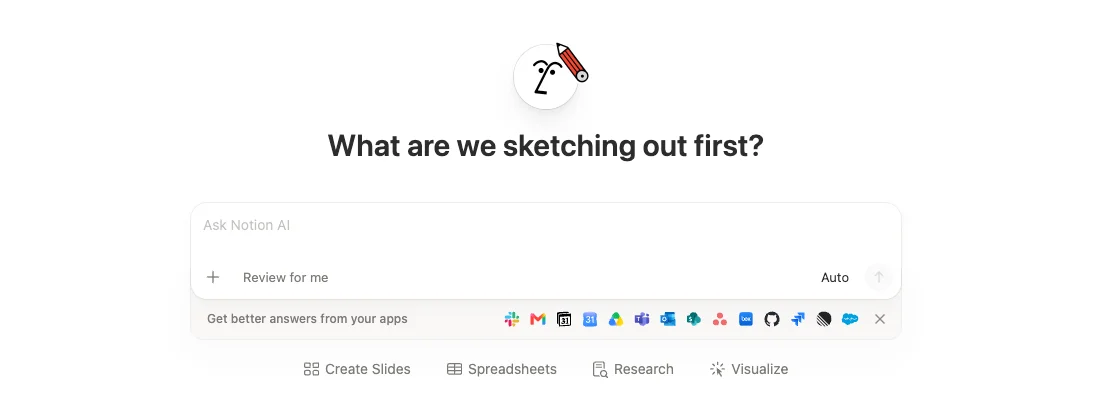
Under the box sits a strip that reads “Get better answers from your apps”, with icons for apps including Slack, Gmail, Google Drive and GitHub. I connected none of them, so everything below comes from pages inside the workspace and, where Notion AI chose to search, the web.
A model picker, even on Free
The model control under the chat box was set to “Auto”, described as “Balances speed, effort, and cost.” Opening it on my free workspace listed four recommended models (Opus 5.5 and GPT-6.1 Sol, both marked Beta, plus Kimi K3 and GPT-6 Luna) and a second menu with Sonnet 5.5, Haiku 5.5, Gemini 3.7 Flash, GPT-5.6 Terra and Grok 4.6. Below them, under an “Open models” heading marked “US provider”, sat two DeepSeek models and three GLM models. Settings put the total at 32 models.
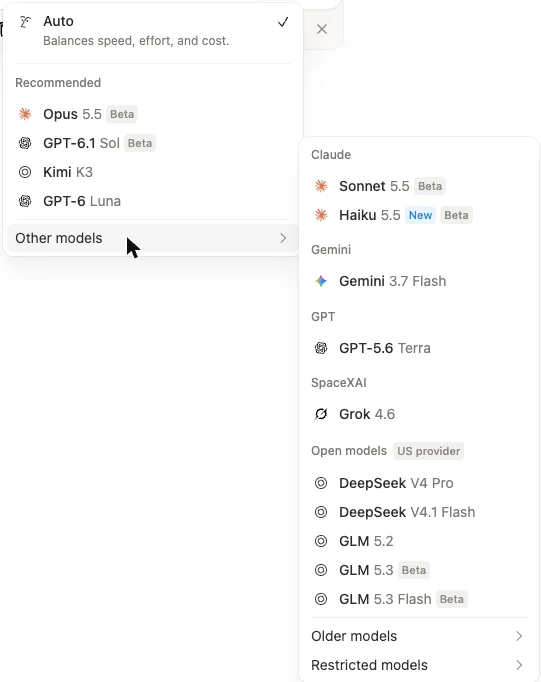
No model in the two menus I opened carried a lock. Notion’s help page on Notion Agent says premium models “spend Notion credits” and that “a workspace admin has to turn each one on”, and its page on Notion credits says credits are a Business and Enterprise add-on. I left the picker on Auto for every test, so I cannot say what happens if you pick a premium model on Free.
My test: four articles, one free workspace
I wanted a test that a reader could repeat and that I could check line by line. So I used the same four articles I gave Gemini Notebook a day earlier: our Canva review, Adobe Express review, Canva pricing guide and Canva vs Adobe Express comparison. I pasted each one into its own private page, from our post source, with images, buttons and FAQ boxes stripped. Headings and tables came through as Notion headings and tables.
The workspace was brand new, set up on the Free plan on the morning of 15 October 2026, with no paid-plan trial and the data-sharing option left off. I left every setting at its default, which includes web search switched on for the workspace. Then I worked through question tests, writing tests, a database, Research mode and a slide deck, and checked the figures in the tests against the four articles.
| Test | What I asked for | Result | Time |
|---|---|---|---|
| Prices | Canva Pro per year, Adobe Express Premium per month, with sources | $144 and $9.99, right, but cited to Canva’s and Adobe’s live pricing pages | 68 s |
| Counts and a false premise | Two menu-test scores, then “which review says Canva’s background remover is free?“ | 7 of 7 and 0 of 7, right; corrected the premise | 20 s |
| Arithmetic and contradictions | Designs per month at 16% each, then every disagreement between the pages | 6 designs, 4% left, right; said there were no real disagreements | under a minute |
| Direct probe | The share of premium templates, and whether the pages agree | Found both figures, worked out 55%, called them “broadly consistent” | 17 s |
| Draft a brief | A one-page brief for a café owner, from the four pages | Written into the page with numbered links; every figure I checked was right | within about 2 min |
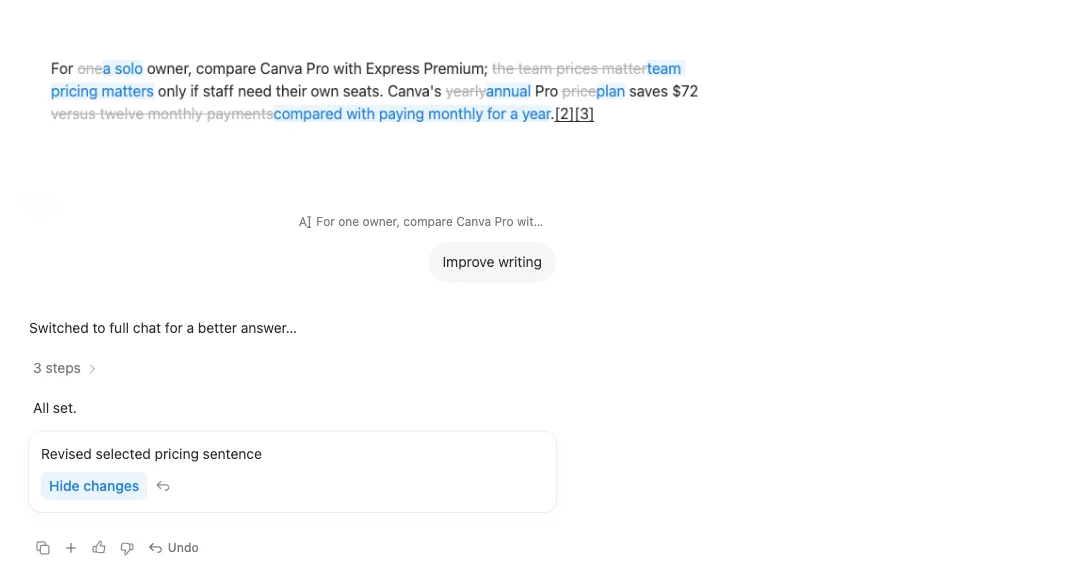
| Improve writing | One sentence, one click | Rewritten with the $72 figure kept; tracked changes shown | about 25 s |
| Build a database | Every plan and price, five named columns | 23 rows as real pages; every row traced to the articles | 3 to 4 min |
| Research mode | A report on Gemini Notebook’s limits and US prices | Every figure matched Google’s pages as I read them a day earlier | 56 s |
| Slide deck | Five slides for a café owner | PPTX and PDF; one wrong line on the last slide | 6 min 3 s |
On top of those nine, I sent 29 short questions and one follow-up to see whether the free trial would run out. More on that in the pricing section.
Asking questions about my pages
The first question surprised me. I asked what Canva Pro costs a year and Adobe Express Premium a month, and to give the source for each figure. The answer was right, $144 and $9.99, but the two citations were Canva’s and Adobe’s favicons, not my pages.
The expandable steps showed why. Its reasoning read: “I found an internal article that points to potential sources. Now, I need to ensure that each figure has an external official source to back it up.” It searched my workspace, found what it called “an internal article”, then searched the web and read canva.com/pricing and adobe.com/express/pricing. That took 68 seconds.
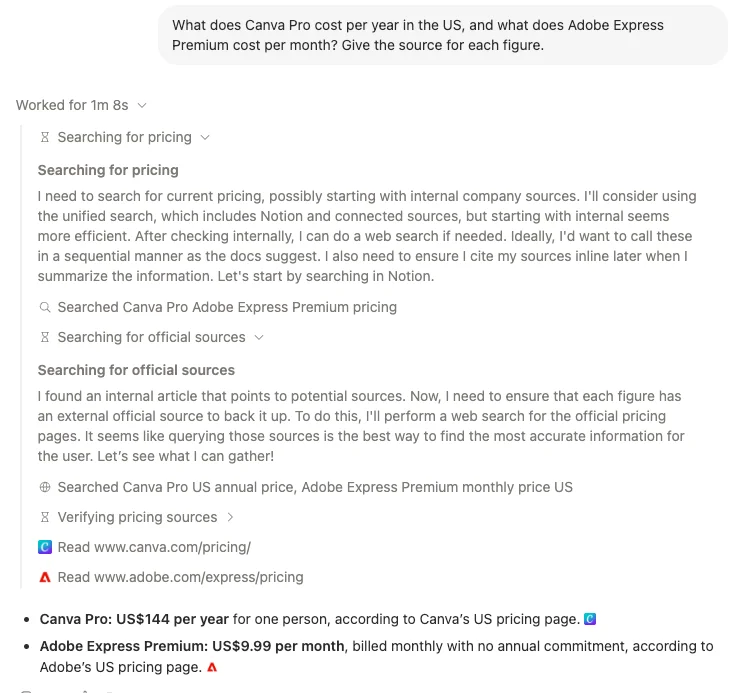
That is a design choice, not an error. I asked for sources, and it treated the vendors as the better source. But it is the opposite of Gemini Notebook, which answers only from what you load into it. If you want answers from your pages and nothing else, say so in the prompt.
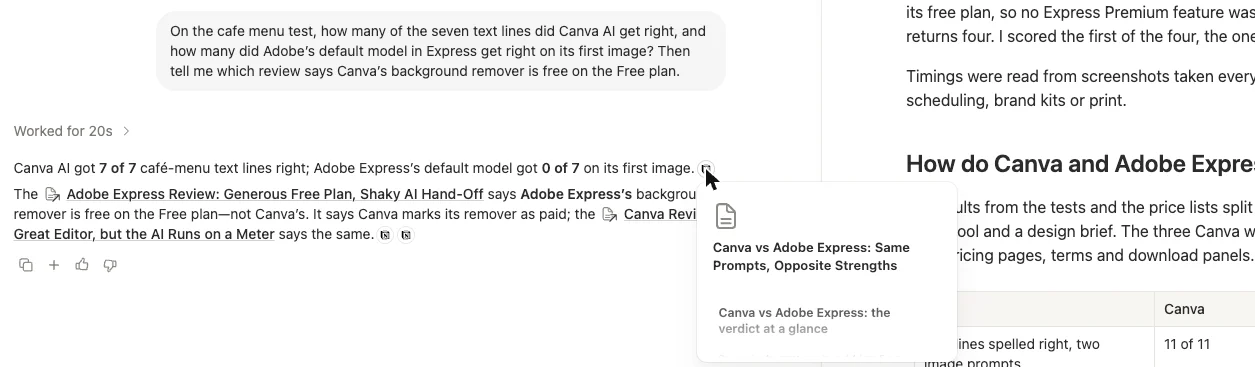
On my second question, it stayed in the workspace. Asked for the café-menu scores and then which review says Canva’s background remover is free, it read three of the pages and answered: “Canva AI got 7 of 7 café-menu text lines right; Adobe Express’s default model got 0 of 7 on its first image.” It then pointed out that the free remover was Adobe’s, not Canva’s, and that both reviews mark Canva’s as paid. Both counts are right, and the premise was false.
The arithmetic test went the same way. Asked how many designs at 16% each fit in a month, it said six, with 4% left, and added that the pricing guide gives the same estimate. That is correct.
Building things: a brief, a database and a deck
This is where Notion AI pulls away from a chat window. On an empty page called “Cafe design tool brief”, I clicked Ask AI and asked for a one-page brief for a café owner choosing between Canva and Adobe Express, using only my four pages. The inline box handed the job to the side chat with the note “Switched to full chat for a better answer…”, ran 17 steps, and wrote the brief into the page.
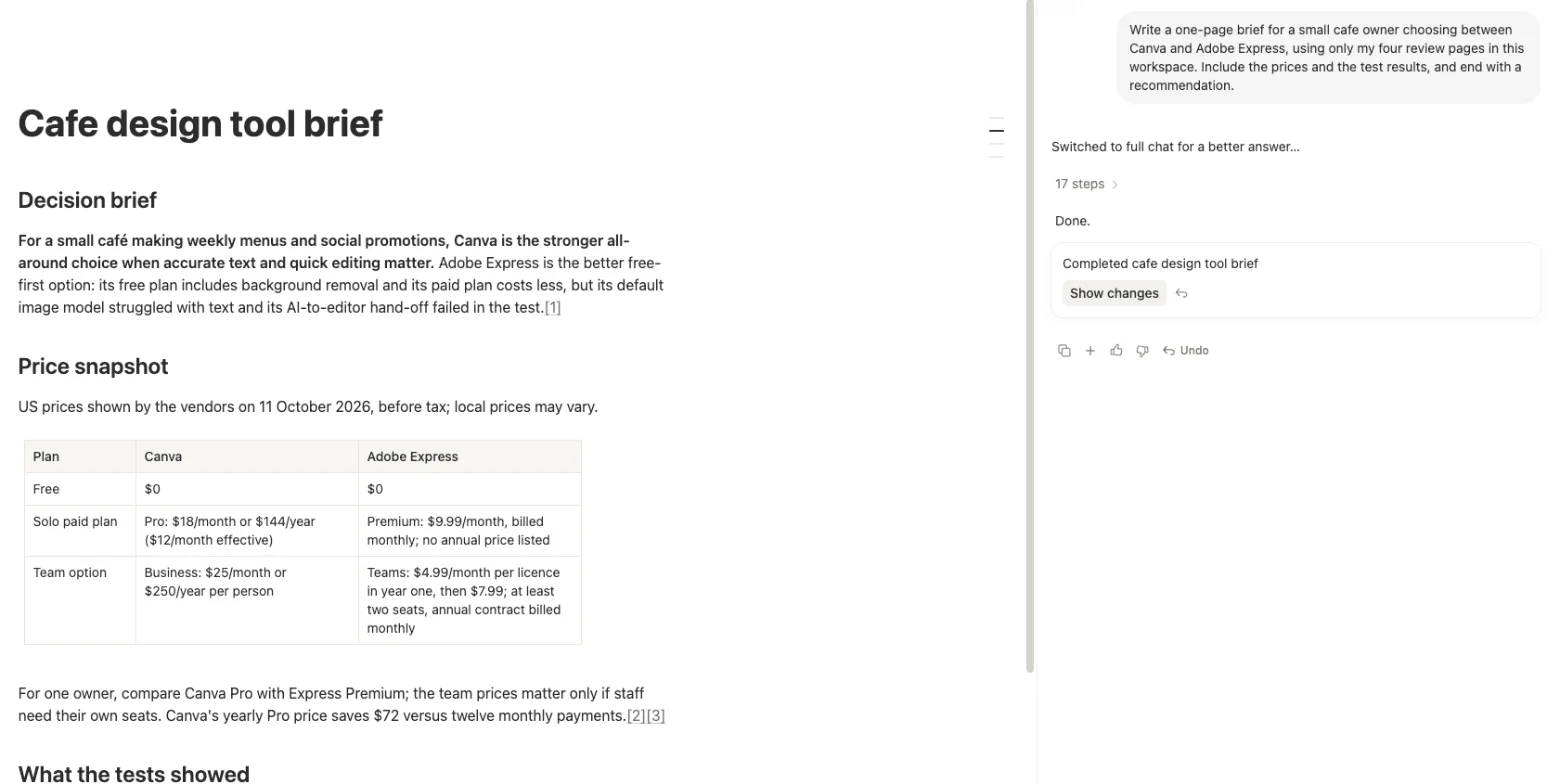
It had four sections: a decision brief, a price table, a table of test results and a recommendation. I checked every figure in both tables, plus the $72 saving it repeated, against the source articles. All of them matched, including details I had half forgotten, such as the Express editor hanging for over 65 seconds. The numbered links each open one of the four pages.
The database was the most impressive result of the day. I asked for a database on a new page listing every plan and price for both tools, with five named columns, and “not stated” wherever a page gave no figure. It loaded all four pages, created the page and the database, then created one row at a time, then reopened three rows to check them. The reply said: “Done — I created a 23-row database”.
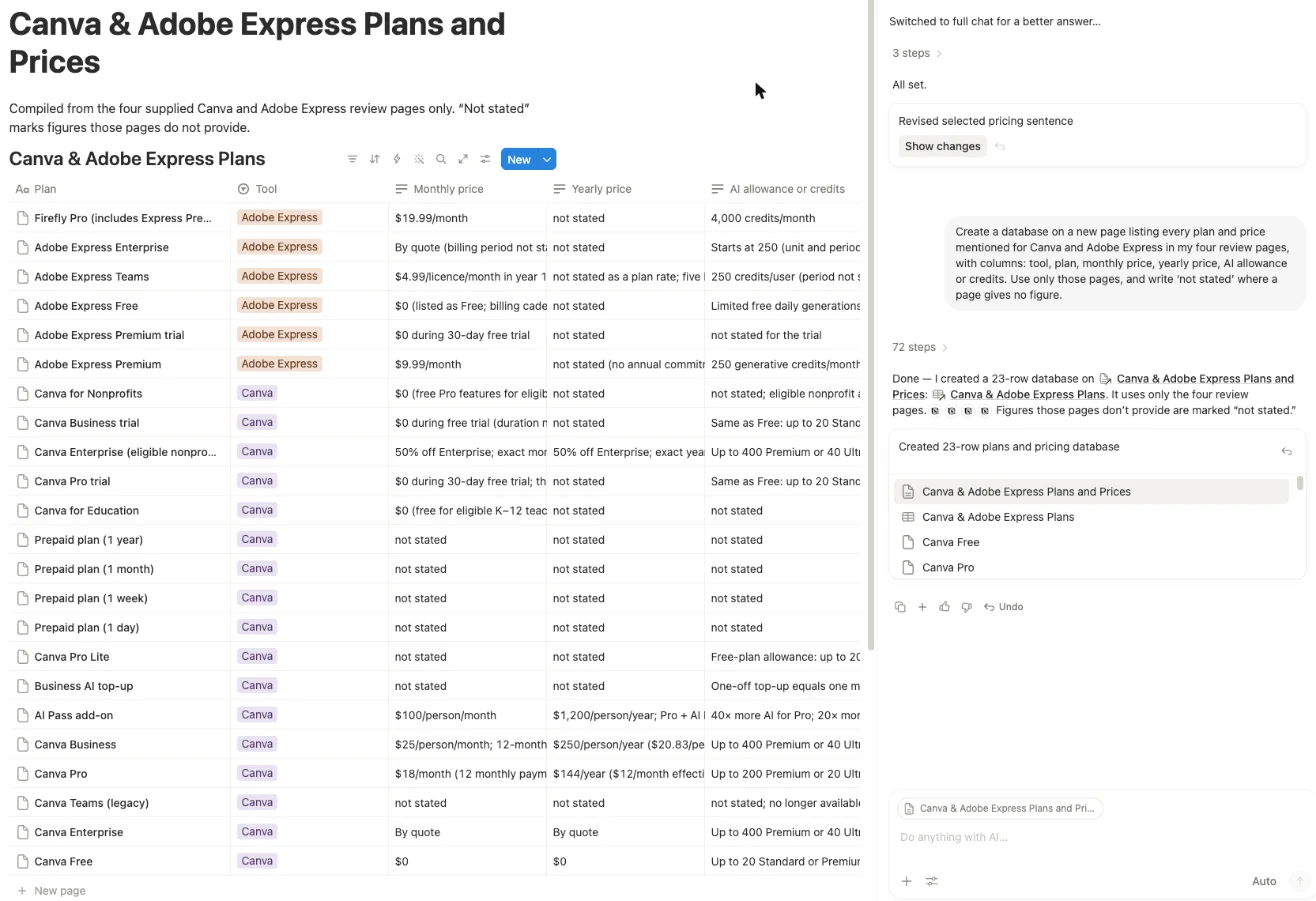
Twenty-three rows is more than double the 10 that Gemini Notebook’s data table gave me for the same brief. It found plans I had mentioned only in passing, such as Canva’s Pro Lite and four prepaid plans, and marked their prices “not stated”, which is exactly what the pricing guide says. I traced every row to a sentence or table in the articles. The one soft spot was a Canva Pro trial row that called the trial 30 days long, generalising from my own trial.
The slide deck took longest. In Create Slides mode, I asked for five slides for a café owner with the US prices and the text-accuracy results. The side panel loaded two skills, “Artifact Design” and “PowerPoint”, and the steps show it writing and repeatedly editing a script called build_deck.mjs, rendering each slide as an image, checking it, and fixing a fit problem. Six minutes and three seconds later, it offered a PPTX and a PDF.
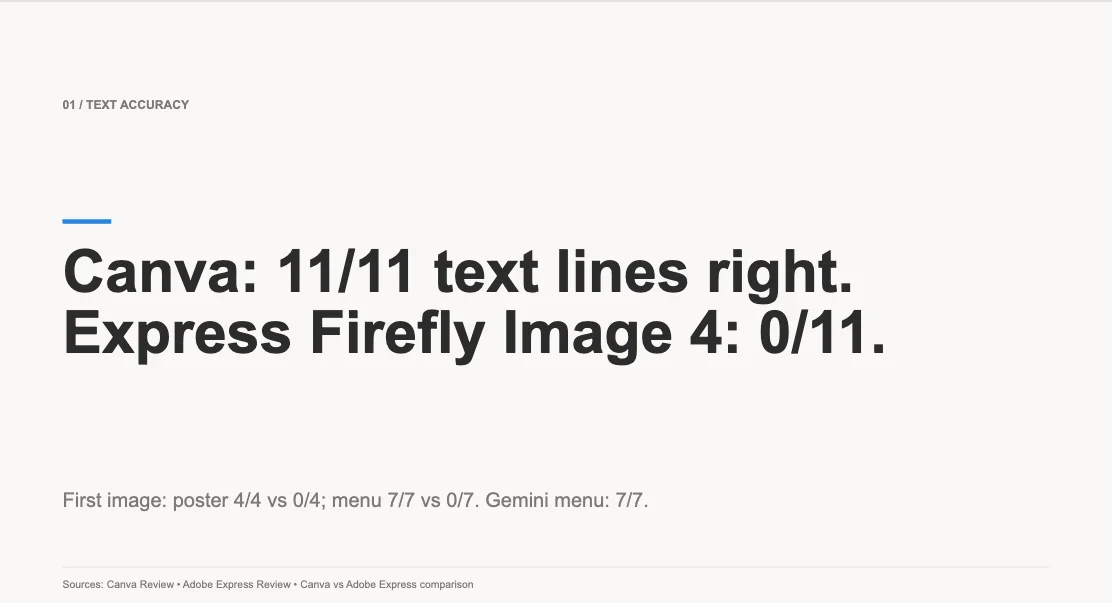
The five slides are plain, grey and white with a blue accent, and the figures on them are right. There are no pictures. The reply explained: “Image generation wasn’t available, so I kept the deck editorial and evidence-led rather than adding filler imagery.” Notion’s AI FAQ page says image generation is a Business and Enterprise feature.
Research mode
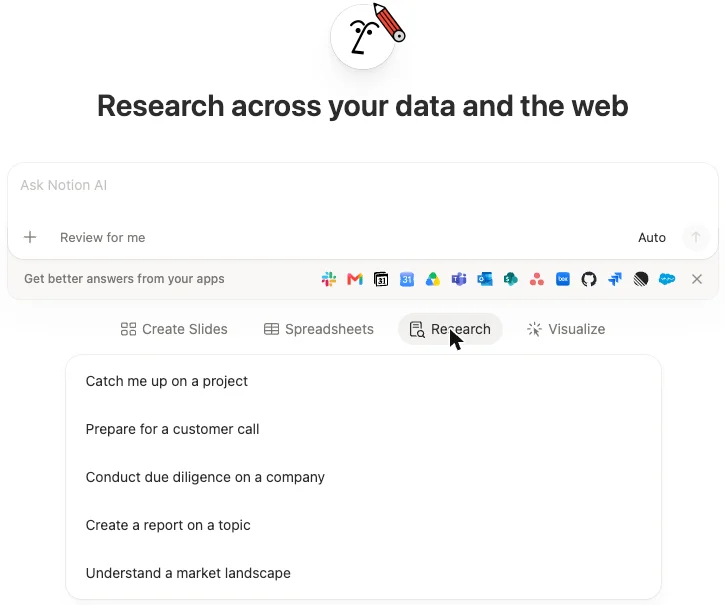
Research mode changes the heading to “Research across your data and the web” and offers starting points such as “Create a report on a topic”. I asked for a report on Gemini Notebook’s usage limits and US prices, citing Google’s own pages for every figure. It searched my workspace, searched the web, read Google’s help page on Gemini Notebook plans and the US Google One plans page, and returned a headed report with a table in 56 seconds.
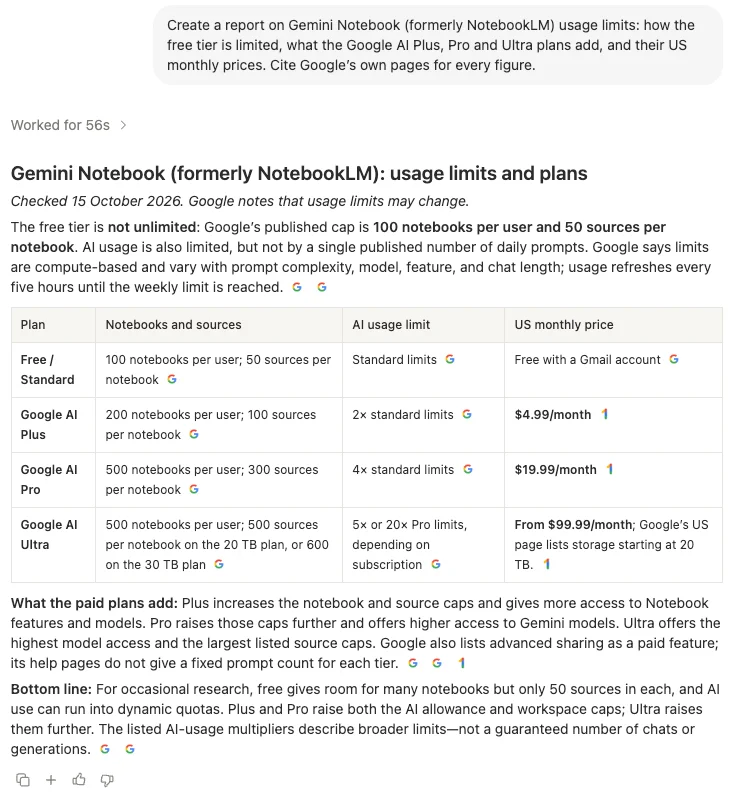
For our Gemini Notebook review the day before, I had read the same help page and Google’s US subscriptions page for Gemini, so I could check the report against my notes. Every number matched: 100, 200 and 500 notebooks; 50, 100, 300, 500 and 600 sources per notebook; two and four times the standard limits for Plus and Pro, and five or 20 times Pro’s limits for Ultra; $4.99, $19.99 and from $99.99 a month. It also read the US version of Google’s plans page, so the prices came out in dollars. Even its line about advanced sharing being a paid feature matched Google’s help page.
How much is Notion AI, and what does the trial cover?
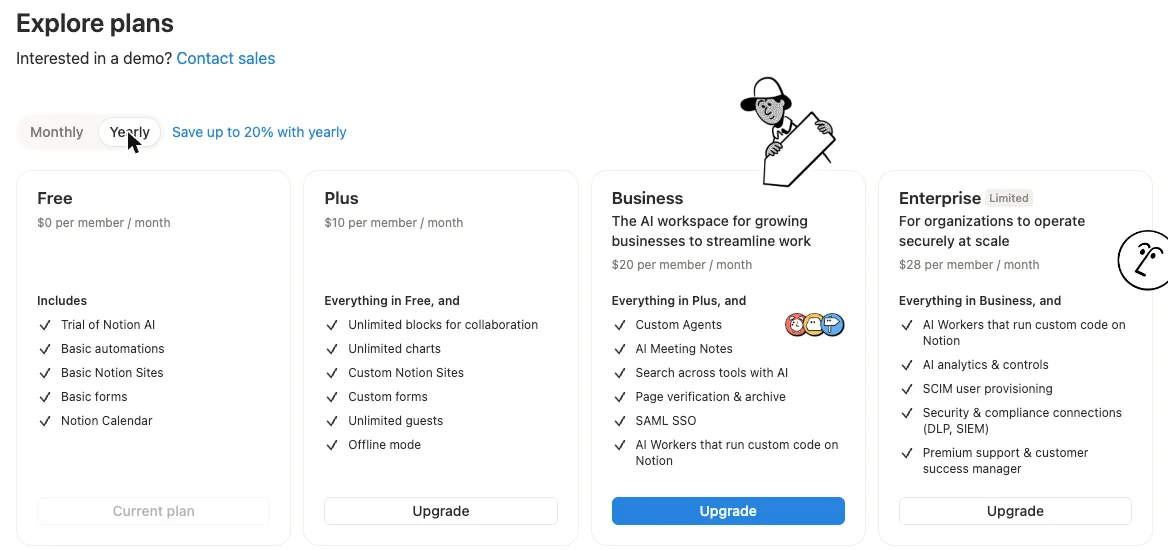
Notion AI comes with the Business plan, at $20 per member a month billed yearly or $24 billed monthly. Free and Plus get a trial only. These are the US prices in Notion’s in-app plan picker on 15 October 2026, and the pricing page shows the same yearly prices.
| Plan | Billed yearly | Billed monthly | Notion AI |
|---|---|---|---|
| Free | $0 | $0 | ”Trial of Notion AI” |
| Plus | $10 per member a month | $12 per member a month | Trial only |
| Business | $20 per member a month | $24 per member a month | Included, with a usage allowance |
| Enterprise | Custom pricing on the pricing page | Custom pricing on the pricing page | Included, plus zero data retention with AI providers |
The pricing page’s Business card is headed “The AI workspace for work that matters” and lists Notion Agent, AI Meeting Notes and Enterprise Search, the last marked Beta. In the in-app picker, Business adds “Custom Agents”, “AI Meeting Notes” and “Search across tools with AI” to Plus.
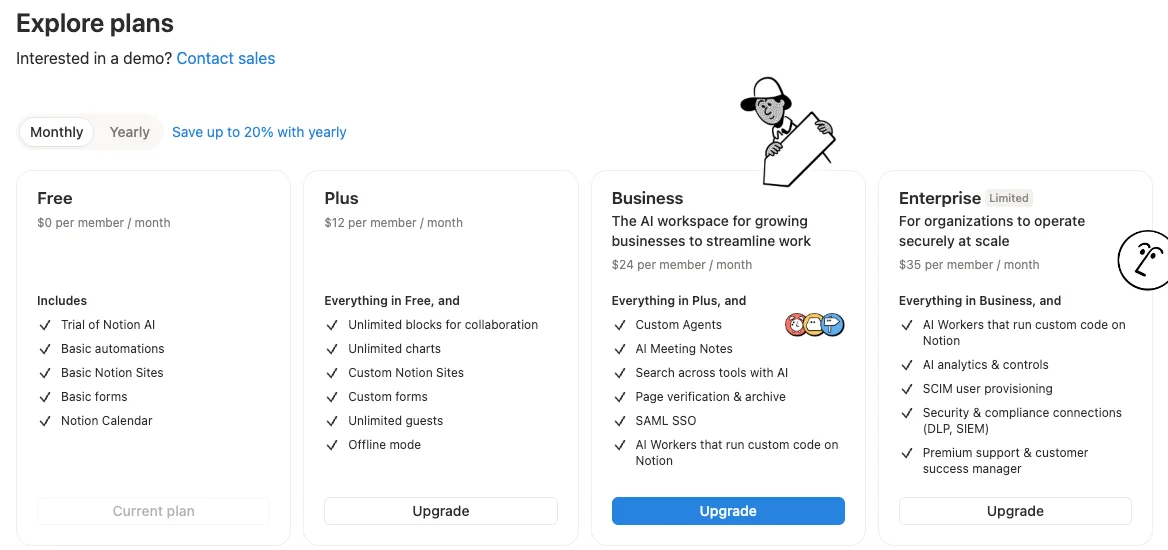
One oddity: the in-app picker on my free workspace showed Enterprise with a “Limited” tag and a price of $35 per member a month billed monthly, or $28 billed yearly. The public pricing page says “Custom pricing” and “Contact Sales”. I would treat the in-app figure as a starting point and expect a quote.
Students and teachers get a break on Plus. The pricing page says “The Plus Plan (with a 1-member limit) is free for students and educators.” Nothing I read says that free Plus includes more AI than the trial.
What the free trial gives you
Notion’s AI FAQ page says “Users on the Free and Plus Plans get a limited number of complimentary AI responses so they can try Notion AI features out.” Its page on complimentary responses explains what counts: “Every time you take an AI action (including creating new content, editing existing content, using AI blocks, adding an autofill property, asking a question, etc.)… that counts as an AI response. Anytime you click Try again, that counts as an additional AI response.”
What it never says is how many. The pages I read give no number, no reset and no difference between Free and Plus. Once you run out, the help page says, “you will see a message that an upgrade to the Business or Enterprise Plan is necessary to continue using AI features.”
| Question about the free trial | Notion’s pages | My free workspace |
|---|---|---|
| How many AI responses? | ”A limited number”, no figure | No limit after 39 requests in about an hour |
| What counts as one? | Any AI action, and each “Try again” | No counter shown, so I could not tell |
| Where can I see what is left? | Not stated | Nowhere I could find; settings search for “usage” found nothing |
| What happens at the end? | A message asking you to upgrade to Business or Enterprise | Not reached |
So I counted. Over about an hour, I sent 39 AI requests on my new free workspace: nine full tests, including the 72-step database build and the six-minute deck, plus 29 short questions and one follow-up. Opening a meeting note also produced one reply I did not ask for, which looked scripted. No limit message appeared, and neither did a warning, a counter or an upgrade prompt. Settings had nothing to show either: searching the settings for “usage” returned “No settings found”.
That makes the trial more generous than “limited” suggests, at least for a new workspace. It also means you cannot plan around it. I stopped at 39, not at a wall, and I do not know whether Notion counts a 72-step build as one response or many.
What Business adds, and what it meters
Paying does not remove the meter; it changes it. Notion’s help page on the usage allowance says usage “is measured in two windows”, a six-hour window and a monthly window, and that the allowance covers the personal Notion Agent, including chat, plus image generation and page translation. It does not say how much usage either window allows.
Some things sit outside the allowance. The same page says AI Meeting Notes “has its own 10-hour daily cap”, and that Custom Agents, Workers and premium models spend Notion credits. Its page on credits lists “$10 per 1,000 credits” monthly and “$13 per 1,000 credits” on annual plans, and adds that “Unused credits don’t carry over”. Its page on AI models and credit spend says Notion “charges tokens at each provider’s published rates, with no markup.” An admin setting, “Allow workspace to use Notion credits after AI limit is reached”, lets a workspace keep going on credits once the allowance runs out.
| What you pay for | Price or limit, per Notion’s pages |
|---|---|
| Business seat | $20 per member a month billed yearly, $24 monthly |
| Notion Agent and chat | Usage allowance: a six-hour window and a monthly window, sizes not published |
| AI Meeting Notes | 10 hours a day per user |
| Image generation (Beta) | 10 per 24 hours and 30 per 30 days, per user |
| Custom Agents, Workers, premium models | Notion credits: $10 per 1,000 monthly, $13 per 1,000 annual |
That is a lot of moving parts for a team trying to budget. I did not test Business, so I cannot tell you how far the allowance goes.
Who should use Notion AI?
Notion AI is for people whose notes, plans and documents already live in Notion. Its best work in my test was turning pages I already had into new pages, tables and files, without copying anything out.
- Small teams running projects in Notion. The database test is the one to copy. Ask it to pull every price, date or owner out of your pages into a table, and check the rows it marks “not stated”.
- Writers and editors with source pages. A brief drafted from your own pages, with numbered links back to them, is a fast first draft. Read each figure against its page before you send it.
- Anyone who presents what they write. The deck took six minutes, but it came out as a PowerPoint file and a PDF built from my pages. I previewed the PDF; I did not open the PowerPoint file.
- Students, carefully. Plus is free for students and educators, but my reading of Notion’s pages is that it still carries only the trial.
Who should skip it? Anyone who wants a research notebook for a pile of PDFs and links. Gemini Notebook does that free, and the citation I clicked there opened the exact passage. And anyone who is not already in Notion, because Business at $20 a member is a lot to pay for the AI alone.
Where Notion AI earns its place
It writes into your workspace, not a chat box
Most AI assistants hand you text to paste somewhere. Notion AI writes the page, creates the database rows and saves the files where they will be used. The brief arrived as a formatted page with headings and tables. The database arrived as 23 real Notion pages with a Tool select property, coloured tags and all. The deck arrived as a PPTX and a PDF, listed under “Artifacts” in the chat.
Changes come with a way back. The brief and the rewrite each ended in a card with “Show changes” and an undo arrow, the database card had an undo arrow, and an “Undo” sat under each of those replies.
The numbers held up
Across the brief, the database, the deck, the research report and the short questions, every price, count and sum I checked against the source was right. That includes figures I had to dig for, such as five Adobe Express Teams licences costing $299.40 in year one and $479.40 a year after, and Canva’s AI Pass coming to $1,344 a year with Pro.
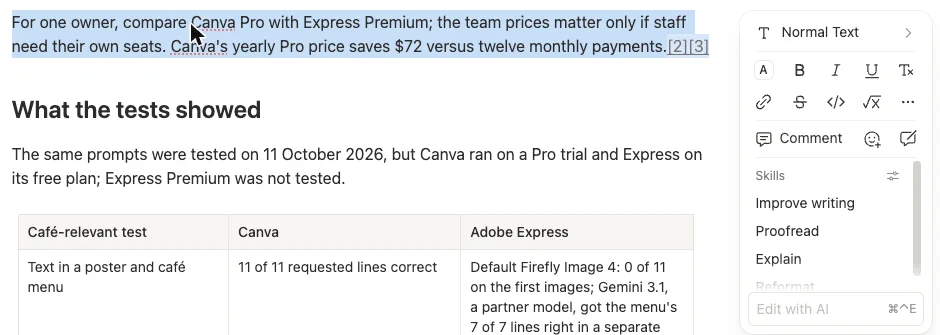
It also kept numbers intact when rewriting. I selected one sentence in the brief and clicked Improve writing. The new version kept the $72 saving and both links, and “Show changes” drew a tracked-changes view in the page, old words struck through in grey and new ones in blue.
You can watch it work
Every answer has an expandable list of steps: what it searched for, which pages it read, which websites it opened, and short notes on what it was thinking. That is how I found out why my first answer cited Canva’s website instead of my page. It is also how I saw it reopen three of the database rows to check them before the reply came back.
For a tool that runs for six minutes on a deck, the visibility matters. You are never staring at a spinner wondering what it is doing.
It owned a mistake when challenged
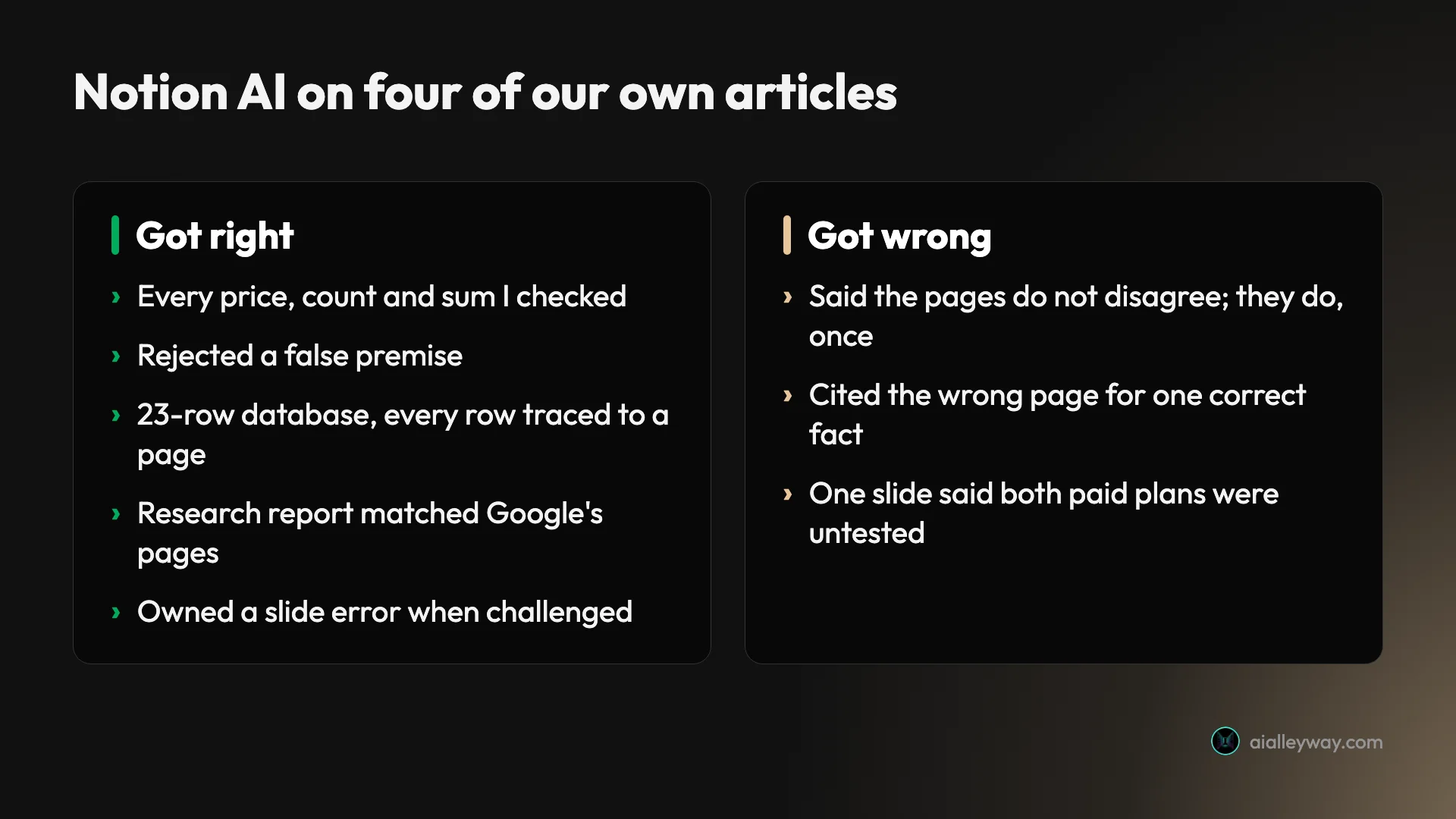
The last slide of the deck said “both paid plans were untested”. That is wrong for Canva, which I tested on a Pro trial, and the deck’s own first slide says “Based on one Canva Pro trial”. I asked whether the line was right for Canva.
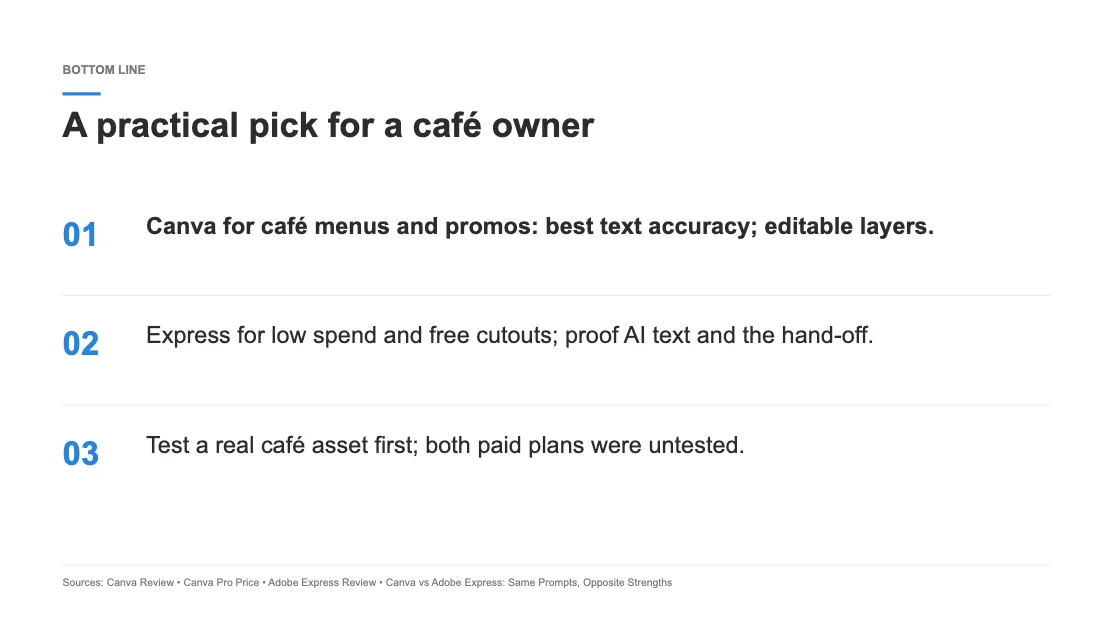
The reply began: “No—the wording is too broad for Canva.” It explained that Canva ran on a Pro trial with the free plan’s AI allowance, that only Express Premium went untested, and offered a corrected line. It did not edit the file itself, but it did not argue either.
The free trial went further than I expected
Thirty-nine requests, including two long builds, without a limit is a lot of room to judge a product. The short questions that showed a time came back in 4 to 15 seconds. If you are deciding whether to pay for Business, the trial is enough to try it on your own pages first.
Where Notion AI falls short
Checking a citation means reading the whole page
Notion AI’s citations are small page icons. Hovering over one shows the page title and the section heading it drew on. Clicking one opens the whole page in a side panel, at the top, with nothing highlighted. I checked the panel’s scroll position and styles after clicking: it had not moved and nothing was marked.
That makes checking slow. In Gemini Notebook, the citation I clicked opened the source with the passage highlighted. In Notion AI, I had to find the figure in a page of up to about 5,000 words myself. For a tool you will trust with numbers, that is the feature I most want added.
It cited the wrong page once
Midway through the session, I asked which tool got the seven-part image scene fully right. It answered that ChatGPT Images got 7 of 7, citing the Canva vs Adobe Express comparison. The fact is right, but the citation is wrong: the comparison never mentions ChatGPT. The 7 of 7 sits in the Canva and Adobe Express reviews.
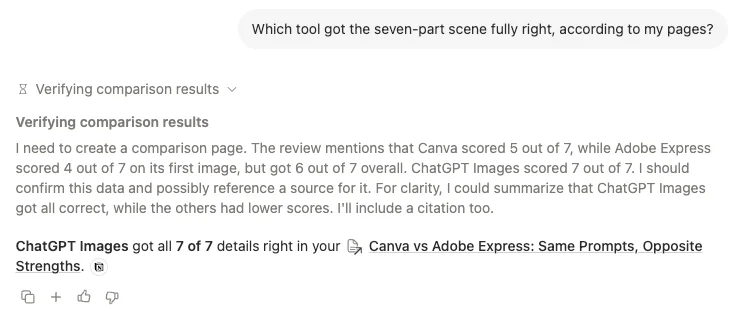
The steps show no new search for that question. It answered from pages it had already read in the chat and cited the wrong one. That is one wrong citation in 39 requests, but it is the kind that page-level citations make hard to catch.
It missed the same contradiction Gemini Notebook missed
Two of my pages count Adobe Express’s premium templates differently: “nearly half” in one, about 12 of roughly 22, which is 55%, in the other. Asked to list every place the pages disagree, Notion AI said: “I found no substantive disagreements in their overlapping claims.” It then flagged a harmless rounding difference instead.
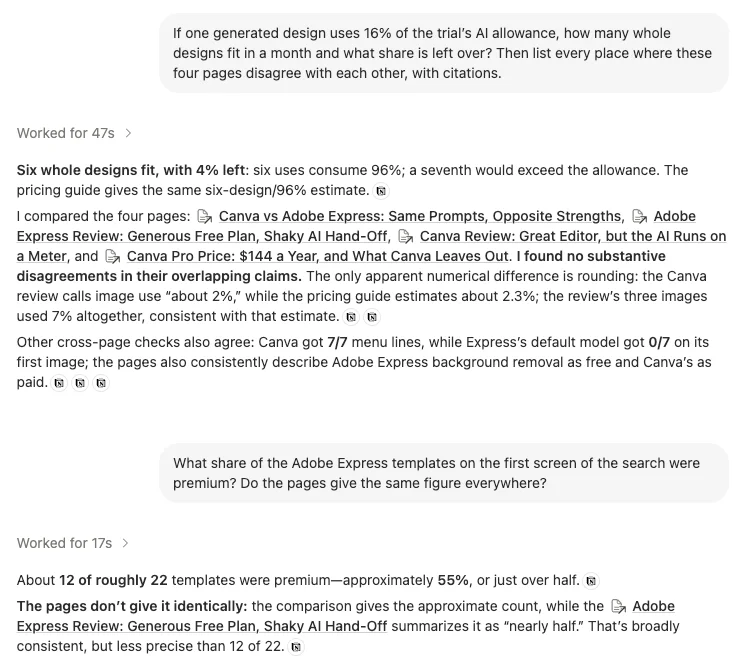
Asked about the templates directly, it found both figures, worked out 55% and wrote that the pages “don’t give it identically”, but called them “broadly consistent”. Gemini Notebook did almost exactly the same. Neither tool is a fact-checker for your own drafts unless you ask pointed questions.
It reaches for the web by default
Web search was on by default in my new workspace, under a setting labelled “Enable web search for workspace”. That is why my first question about my own pages went out to Canva’s and Adobe’s websites.
For research, that is useful. For a question about your own notes, it can mix sources you did not ask for. A workspace owner can switch it off under Settings, Notion AI. Otherwise, ask it to use only your pages. In the runs where I did, the steps it showed read only my pages.
Big jobs are slow
Short questions were quick, but the two biggest builds took minutes. The database took three to four minutes and 72 steps. The deck took six minutes and three seconds. Gemini Notebook made its data table within 20 seconds.
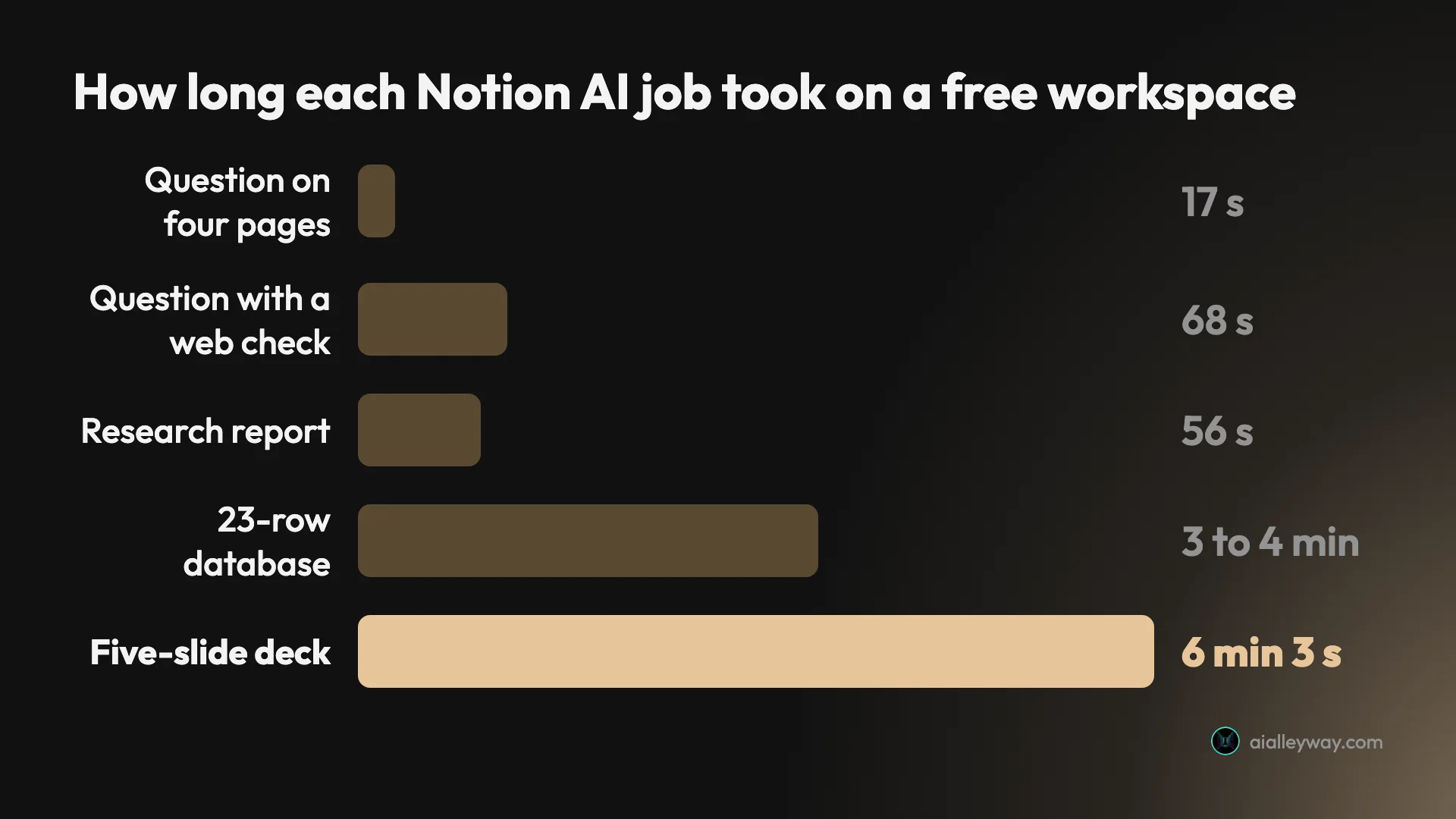
The work was careful, and it is still faster than building a 23-row table by hand. But you will want something else to do while the deck builds.
Full AI starts at $20 a member, and the meter is hidden
The trial is generous, but it is still a trial. Real use means Business, at $20 per member a month billed yearly. Notion prices it per member, so a five-person team pays $1,200 a year.
And the limits stay vague after you pay. The trial has no visible count, Business has a six-hour and a monthly window of unstated size, and premium models and agents run on credits. Gemini Notebook at least shows its meter as a percentage.
Meeting notes are unclear on Free, and images are off
AI Meeting Notes is one of Notion’s headline features, and its status on Free is unclear. The sidebar’s “New AI meeting note” created a meeting page with a “Start transcribing” button and a line asking you to confirm that everyone being transcribed has given consent. The pricing page lists meeting notes as a limited trial on Free and Plus, while the help page on AI Meeting Notes says “You must be on Notion’s Business or Enterprise Plan to use AI Meeting Notes.” I did not record a meeting, so I cannot say which is right in practice.
Image generation was simply unavailable, as the deck’s own reply said.
Alternatives worth considering
If Notion AI is not the right fit, these are the three I would look at first.
- Gemini Notebook, formerly NotebookLM and our best pick for AI notes, if you want answers from a set of sources rather than from a workspace. It is free with a Google account, and the citation I clicked opened the exact passage. It got the same prices and counts right on the same four articles, faster.
- ChatGPT, which our review rates 4.6 as a Category Leader, if you want one general assistant and do not live in Notion. Its Plus plan costs $20 a month, per our review, the same as one Notion Business seat billed yearly.
- Claude, which our review rates 4.4, if your notes are mostly writing. Our review notes that its Projects keep files and standing instructions that every chat inside them inherits, which covers some of what Notion pages do for AI.
Final word
Of the two AI notebook tools I have tested, Notion AI is the better one for turning your own notes into finished work. It drafted a brief, built a database and made a deck from my pages, and the numbers in all three were right. That is real value for anyone who already runs their work in Notion.
It scores 4.3, a Power Tool, and stays our runner-up for AI notes behind Gemini Notebook. It loses points for citations that open a page rather than a passage, one wrong citation, the contradiction it missed, slow builds, and a price that starts at $20 a member with limits Notion does not publish. The score rests on one session on a free workspace; I did not test Business, meeting-note recording or Custom Agents.
Start with the free trial on your own pages. Ask for a database before you ask for a summary, and check what it marks “not stated”. If you find yourself relying on it every day, that is the point to price Business.
Frequently asked questions
Is Notion AI free?
Partly. Notion's help centre says Notion AI is available on the Business and Enterprise plans, and that users on Free and Plus get a limited number of complimentary AI responses to try it out. The pricing page lists a trial of Notion AI on both plans, and marks Notion Agent, meeting notes and Research mode as a limited trial.
Notion does not say how many responses the trial includes. On a new Free workspace on 15 October 2026, I sent 39 AI requests over about an hour, including a database build and a slide deck, and saw no limit message, warning or counter. So the trial is real and, in my test, generous, but you cannot see how much of it is left.
How much does Notion AI cost?
Notion AI is included in the Business plan, which costs $20 per member a month billed yearly or $24 billed monthly in US dollars, according to Notion's in-app plan picker on 15 October 2026; the pricing page shows the same $20 yearly price. Enterprise is sold through sales. Free and Plus get only a trial.
There is no separate AI add-on on the pricing page any more. What you can buy on top of Business or Enterprise is Notion credits, at $10 per 1,000 credits monthly or $13 per 1,000 on annual plans, which pay for Custom Agents, premium AI models and use beyond the plan's usage allowance. Notion does not publish the size of that allowance.
Is Notion AI accurate?
Mostly. With four of our own articles pasted in as pages, every price, count and sum I checked in its answers, its brief, its 23-row database and its slide deck matched the pages, and it rejected a false premise in one of my questions.
It made three clear mistakes. It cited the wrong page for one correct fact, said the four pages did not disagree when they do in one place, and put a line on its last slide saying both paid plans were untested when one of them had been tested. Its citations open the whole page rather than the passage, so checking a claim takes longer than it does in Gemini Notebook.
Is Notion AI better than NotebookLM?
It depends on where your work lives. I gave Notion AI the same four articles and the same core questions I gave Gemini Notebook, the new name for NotebookLM, a day earlier. Both got the prices and counts right and both missed the same contradiction. But the Gemini Notebook citation I clicked opened the exact passage, its answers came back within 30 seconds, and it is free with a Google account.
Notion AI's advantage is output. It wrote a brief straight into a page, built a real database with 23 rows, and made a slide deck as PPTX and PDF files. If your notes already live in Notion, that is worth more than a better citation. If you are starting from a pile of sources, Gemini Notebook is the better first stop.
Does Notion train AI on my data?
Not by default, according to Notion. The FAQ on its pricing page says Notion AI will not use your data to train its models unless you opt in to a request to share your data, and that its contracts with AI subprocessors prohibit them from using customer data to train their models.
The opt-in is a setting called "Share data to improve Notion AI" under Settings, Notion AI, Privacy. A matching option was offered, unticked, when my new workspace was set up, and I left it that way. Notion's pricing page lists 30-day data retention with its AI providers on Free, Plus and Business, and zero retention on Enterprise.
Keep reading
NotebookLM Review: Gemini Notebook Cites Well, Meters Hard
A NotebookLM review, now Gemini Notebook: five test questions, four Studio outputs, and an audio overview estimated at 45% of a five-hour limit.
Best AI note taker: 4 top tools, tested head-to-head
We ran one meeting through Granola, Fathom, Fireflies, and Otter. The best AI note taker depends on whether you take client calls, want it free, or run a team.
ChatGPT review: the free tier is the story, not the $20 one
A ChatGPT review from a year on the free tier plus one month of Plus. Five rungs from $0 to $200, and ads now run on both the Free and $8 Go tiers.
Claude AI review: brilliant at words, strange about limits
A Claude AI review from a paying Max account. My $100 Max 5x plan invoiced at $111.11, three usage meters run at once, and overflow is billed at API rates.