
Canva vs Adobe Express: Same Prompts, Opposite Strengths
Canva vs Adobe Express on the same prompts: Canva's AI spelled 11 of 11 text lines, Adobe's default model 0 on its first image. Express costs less.
Contents
Canva vs Adobe Express: the verdict at a glance
Canva wins for most people, and Adobe Express is the one to open first if you plan to pay nothing: it removed a background for free, a tool Canva marks as paid. I did not use Canva’s free plan. On the same prompts, run on 11 October 2026, Canva’s AI spelled all eleven text lines I asked for and its generated design opened ready to edit. Adobe’s default model in Express got none of those lines right on its first image, but Express costs $9.99 a month for Premium against $18 for Canva Pro, and its AI Assistant got a design brief right where Canva’s dropped a word.
| If you need | Pick | Why, from the test |
|---|---|---|
| AI that spells text, and designs you can edit at once | Canva | 11 of 11 text lines; generated design opened as layers |
| A free background remover, or the lower bill | Adobe Express | Free background removal; Premium $9.99 a month against $18 |
| One tool for a small team’s weekly posts | Canva | The Express editor hung once on an AI design and blanked two text blocks |
How this comparison was made
Both tools got the same three image prompts and the same short design brief on the same day. The wording was identical, apart from a “Create an image:” prefix that I used in Canva’s chat and not in the Express image tool. The full write-ups are our Canva review and our Adobe Express review.
Two things make this less than a perfect match, and you should weigh them. Canva ran on a Canva Pro trial and Adobe Express ran on its free plan, so no Express Premium feature was tested. And Canva returns one image per prompt while Adobe’s Firefly Image 4 returns four. I scored the first of the four, the one Express selects, and I give the best of four where it differs.
Timings were read from screenshots taken every few seconds, so treat them as ranges. I did not test either mobile app, video editing, scheduling, brand kits or print.
How do Canva and Adobe Express compare, axis by axis?
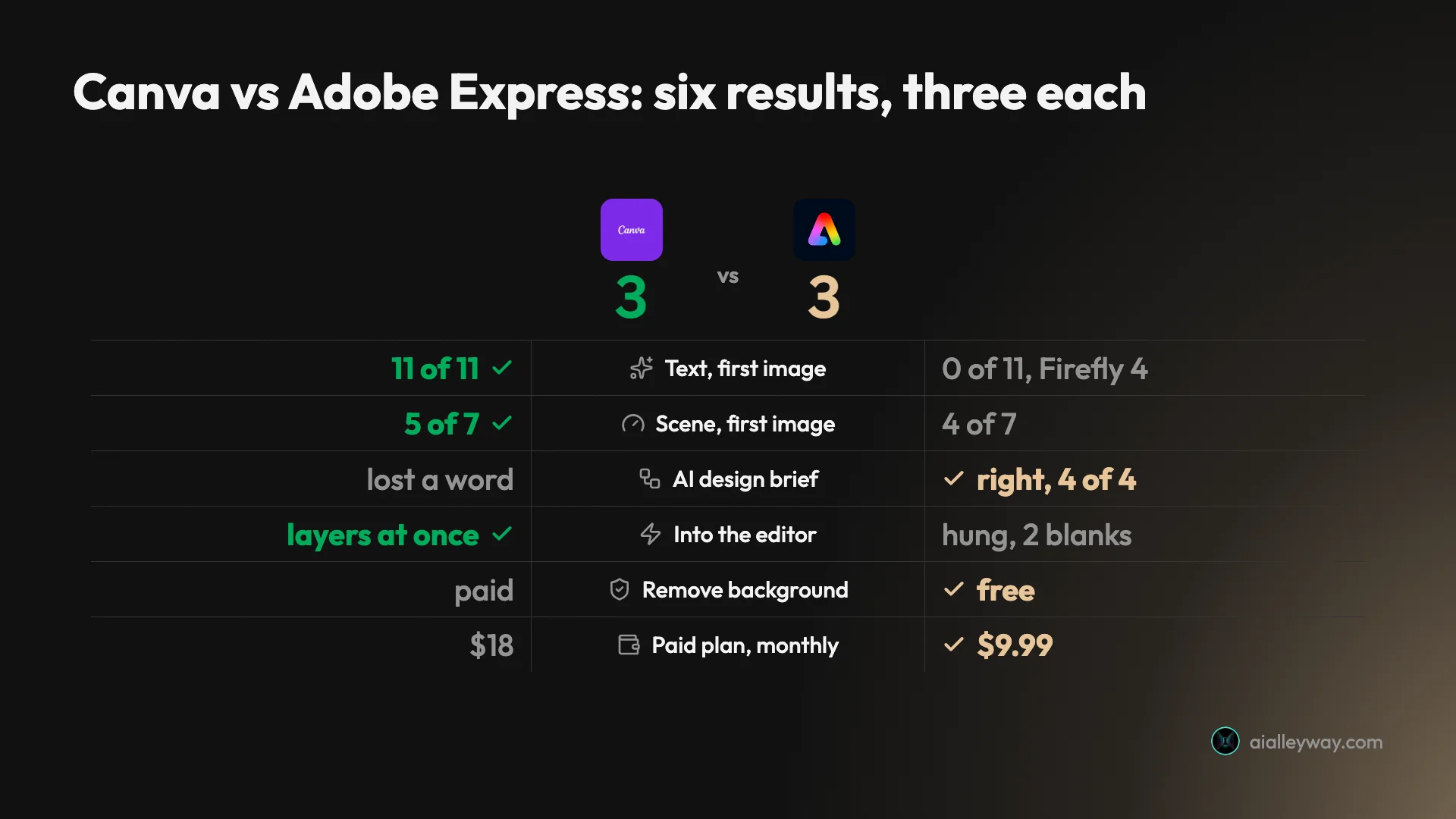
Six results from the tests and the price lists split three each, and our rating breaks the tie, 4.5 to 4.2. The three Express wins are price, a free tool and a design brief. The three Canva wins are about whether the output is right and usable. The table adds more axes read from pricing pages, terms and download panels.
| Axis | Canva | Adobe Express | Winner |
|---|---|---|---|
| Text lines spelled right, two image prompts | 11 of 11 | 0 of 11 with Firefly Image 4, first image | Canva |
| Seven-part scene, first image | 5 of 7 | 4 of 7; best of four was 6 of 7 | Canva |
| Design from a short brief | One design, a word missing from the shop name | Four designs, name, date and offer right in all four | Adobe Express |
| Opening that design to edit | Editable layers at once | Hung for over a minute; saved copy had two blank blocks | Canva |
| Background removal, each on its own image | Paid tool; a few spokes thinned | Free tool; spokes intact | Adobe Express |
| Resize a design to other formats | Ran on a Pro trial; did not re-lay out | Premium; locked on Free, not tested | Not scored |
| Paid plans, listed price | Pro, $18 a month or $144 a year; Business, $250 a year per person | Premium, $9.99 a month; Teams, $4.99 a month per licence in year one, then $7.99 | Adobe Express |
| Free AI allowance | Up to 20 uses a month | Free daily generations, number not published | Not scored |
| Templates on the free plan, as listed on each pricing page | 1.6 million+ | 100,000+ | Canva |
| Export formats listed in the panel I opened | JPG, PNG, PDF, SVG, MP4, GIF, PPTX (a design) | PNG, JPG, two PDF types, PSD (a single image) | Not scored |
| Refunds, per each vendor’s terms | Not refundable in most cases | Full refund within 14 days of the first order | Adobe Express |
| Our rating | 4.5 | 4.2 | Tie-break, not a test result |
The Express text score needs its label read carefully. It is Adobe’s own default model, on the first image. A second model in the same picker did much better on the one prompt I gave it, covered in the quality section below.
Canva: strengths and gaps
Canva is our best pick for design on the picks page, and this comparison did not change that.
Strengths
- It spelled every word in both text images. The gig poster asked for four lines and the café menu for seven. Canva AI got all eleven, prices included, with nothing added.
- AI designs arrive as layers. The generated Instagram post opened with its headline as a real text box. I retyped it and changed the size: two edits, under a minute.
- A broad export list. The download panel offered JPG, PNG, PDF, SVG, MP4, GIF and PPTX. SVG and the size slider carry the paid crown.
- More than a layout tool. Canva Code built a tip calculator that did its sums correctly, and Magic Layers split a flat poster into editable pieces. I found no equivalent of either in the parts of Express I used.
- A larger listed library. Canva’s pricing page lists more than 1.6 million templates on Free and 3.6 million on Pro.
Gaps
- It dropped a word from a name twice. The generated post read “ALLEY” for “Alley Roasters”, and Magic Layers turned “The Midnight Alley” into “Midnight Alley”.
- AI is metered, and the meter moves fast. Six AI requests used 56% of my trial’s monthly allowance. One generated design used 16%.
- Background remover is a paid tool. It carried the crown in the editor. Express does the same job on its free plan.
- It costs more. Pro is $18 a month against $9.99 for Express Premium.
- Resize copies, it does not rethink. A portrait post resized to a Facebook Cover came back as the same layout shrunk into the middle of a wide banner.
Adobe Express: strengths and gaps
Adobe Express is the runner-up to Canva on our picks page, and its free plan is the only one of the two I tested.
Strengths
- Free background removal that kept the spokes. One click cut a bicycle, a cat and a pot of tulips out of a street scene, and left the wheel spokes intact.
- The AI Assistant read the brief. Four Instagram post designs from one short brief, and all four carried the full shop name, the date and the offer, correctly spelled.
- A lower price with no annual commitment. Adobe’s pricing page lists Premium at $9.99 a month, billed monthly.
- Four images per prompt. Firefly Image 4 returns four results each time. On the scene prompt the fourth scored 6 of 7, above Canva’s single image.
- A Photoshop file on the way out. The download panel offered PSD, which Canva’s did not.
- A model picker that names its sources. Adobe’s own model is labelled commercially safe, and partner models sit under a separate heading.
Gaps
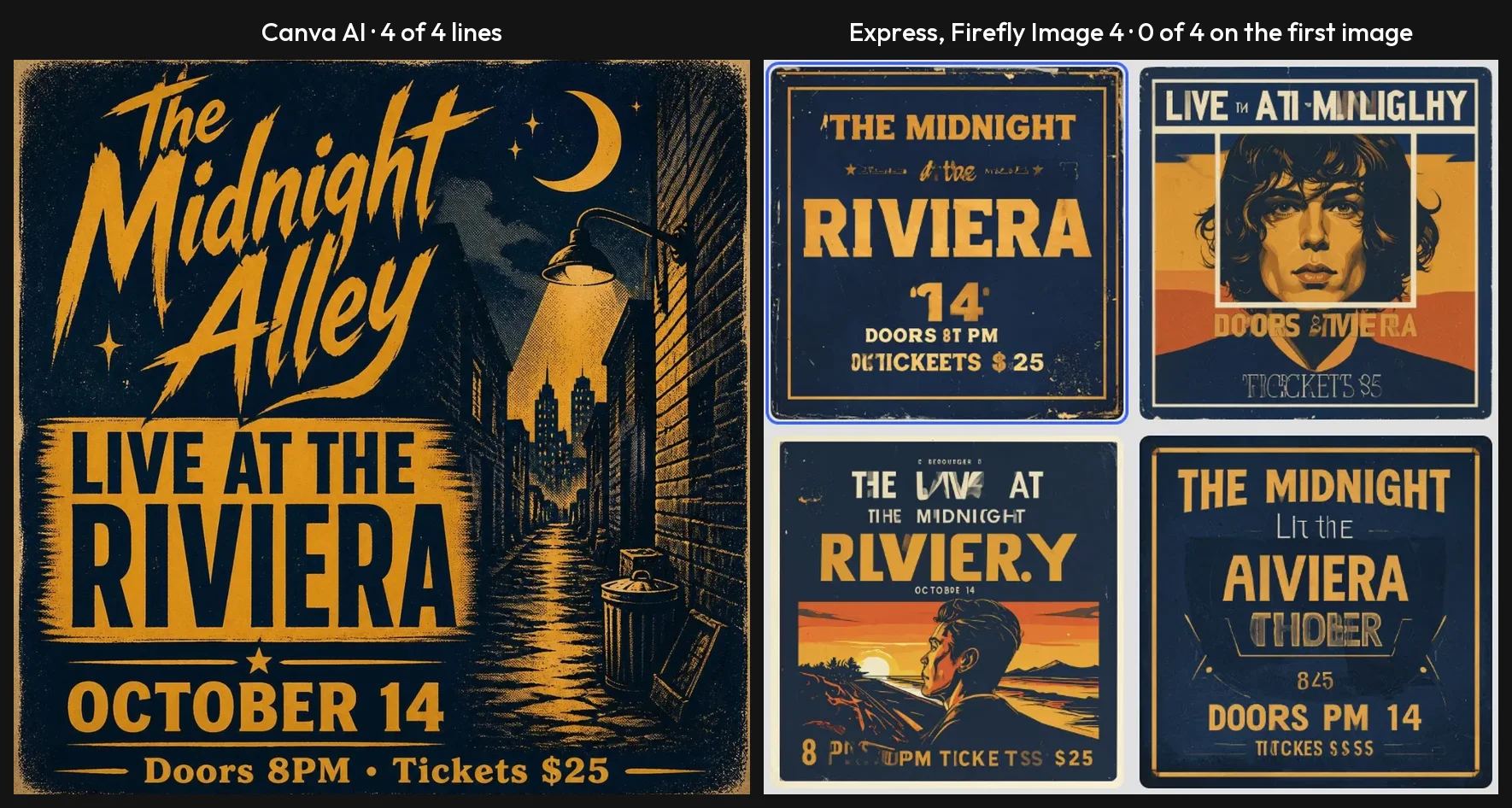
- Adobe’s default model failed both text prompts. Firefly Image 4 scored 0 of 4 on the poster and 0 of 7 on the menu on its first image. None of the four menus had a single complete item line right, and the best of them managed the title only.
- The editor lost text from an AI design. Open in Editor hung for more than a minute. After a reload, the saved copy had blank grey boxes where the shop name and the discount had been.
- The safe model and the working model are different models. Gemini 3.1, a partner model, spelled the menu. Adobe’s help pages do not extend the same commercial-use wording to partner models.
- Free limits are a label, not a number. “Free daily generations” never counted down on my account, and Adobe’s help page gives no figure.
- Resize, Erase and Brand Kits are Premium. I could not test resize at all.
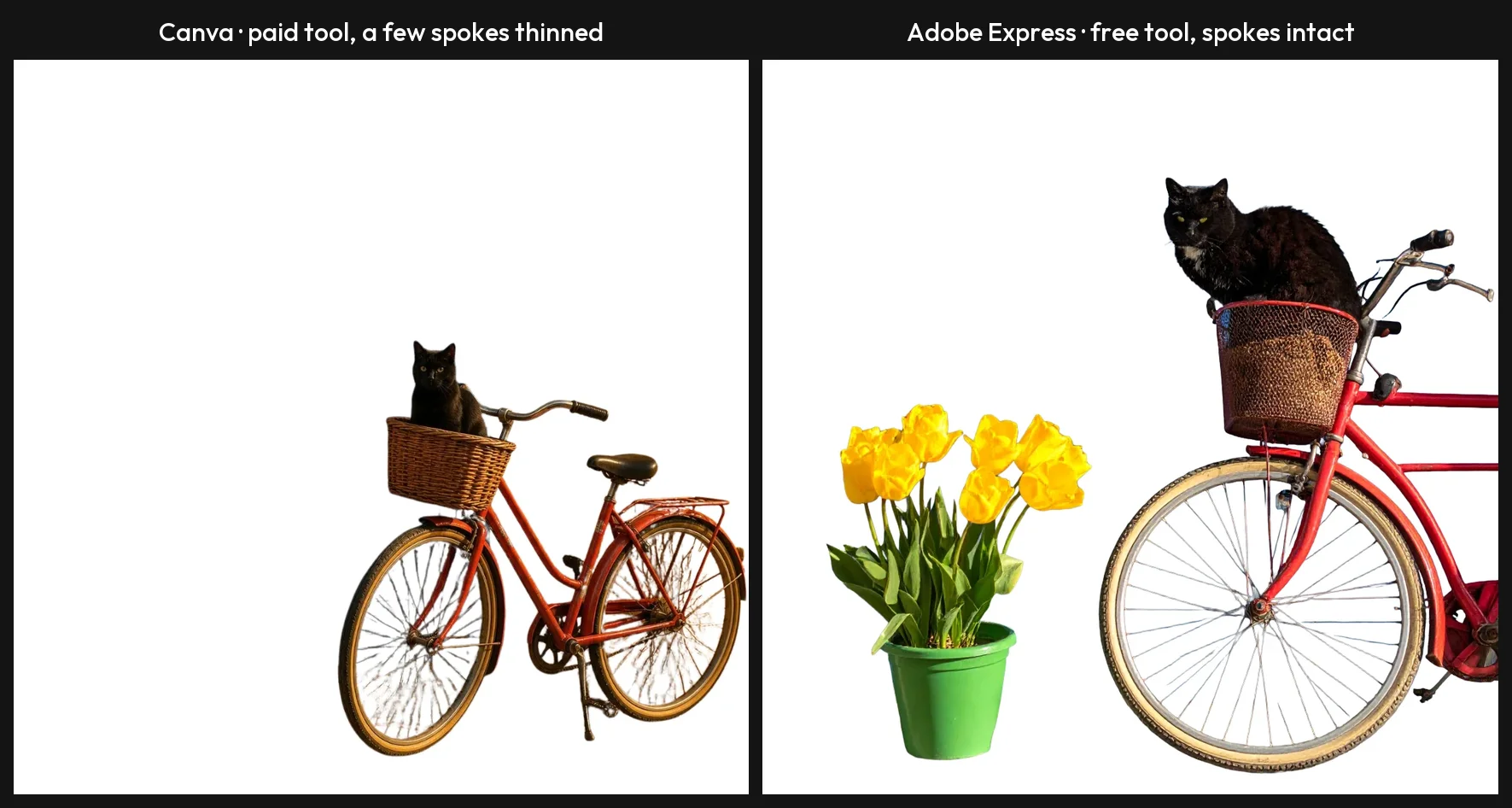
Each tool cut out its own generated bicycle, so this is two tools on two similar images and not one image through both. On these two, the free tool left the spokes intact and the paid one thinned a few.
Is Canva or Adobe Express cheaper?
Adobe Express is cheaper on every paid plan price I could compare, and both free plans are $0. These are the figures on Canva’s US pricing page and Adobe’s pricing page on 11 October 2026.
| Canva | Adobe Express | |
|---|---|---|
| Free plan | $0 | $0 |
| Paid plan, one person, monthly | Pro, $18 | Premium, $9.99 |
| Paid plan, one person, yearly | Pro, $144 | No yearly price on the page |
| Team plan | Business, $25 a month or $250 a year per person | Teams, $4.99 a month per licence in year one, then $7.99; two-seat minimum |
| Step up for more AI | AI Pass add-on, $100 a person a month on top of Pro or Business | Firefly Pro, $19.99 a month |
| Enterprise | By quote | By quote |
For one person
Month to month, the gap is $8.01: $18 for Canva Pro against $9.99 for Express Premium. Over twelve monthly payments that is $216 against $119.88.
Canva narrows it if you commit. Paid yearly, Pro is $144, which leaves Express $24.12 cheaper over the year. Adobe’s page describes Premium as billed monthly with no annual commitment, and I found no yearly price for it there.
So the choice is about flexibility as well as money. Express lets you pay for the two months you need and stop. Canva’s best price needs a year up front. Our Canva pricing guide works through when the yearly plan pays off.
For a team
Here the gap stops being small. Canva Business is priced per person: $250 a year each, so $1,250 for five people.
Adobe Express Teams is $4.99 a month per licence in the first year and $7.99 after, with a two-seat minimum. Five licences come to $299.40 in year one and $479.40 a year after that.
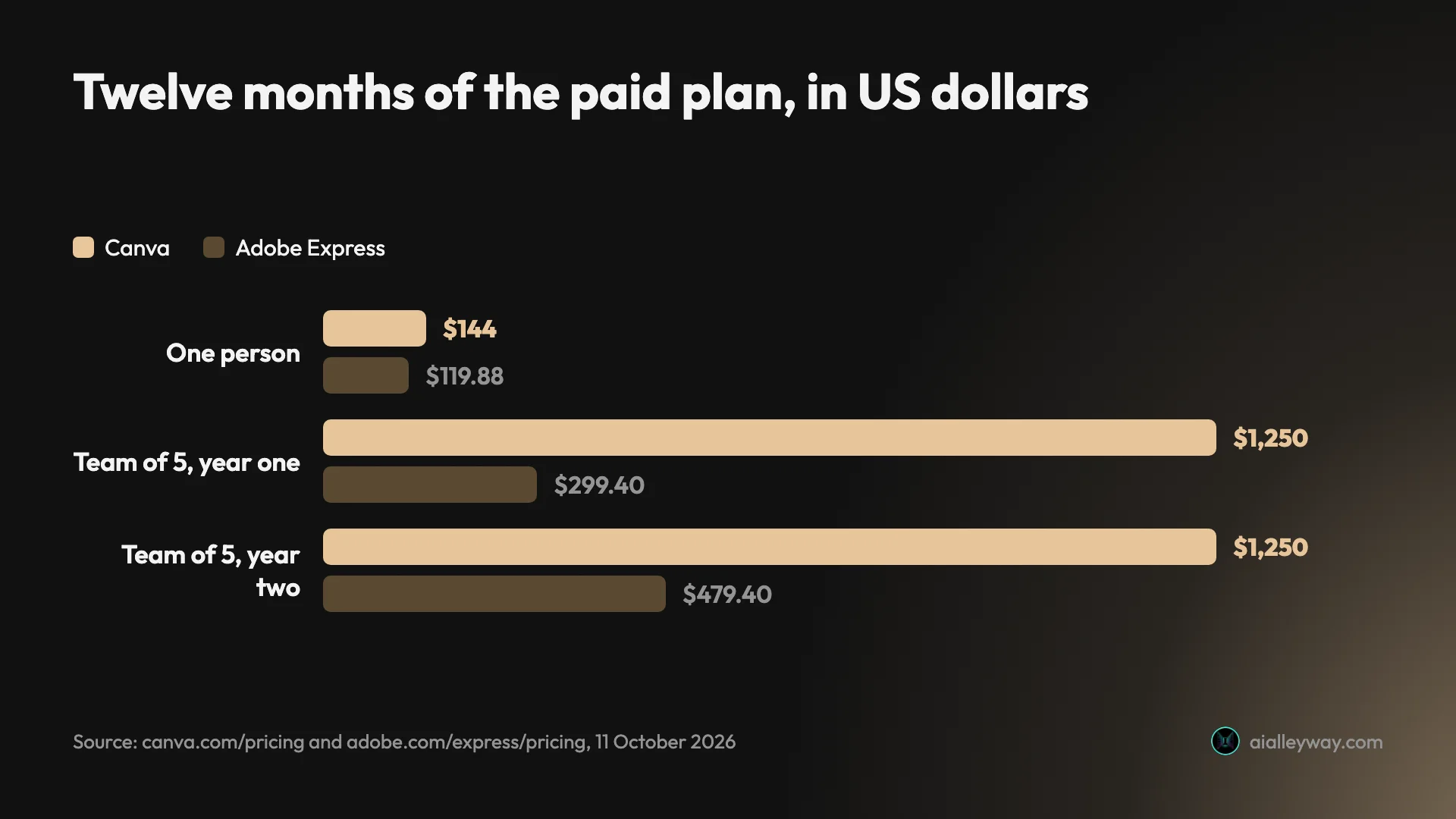
Two cautions sit under that chart. The plans are not equal in what they include, and I tested neither team plan. And Express Teams is an annual subscription billed monthly. Adobe’s subscription terms set a cancellation charge of 50% of the remaining contract on plans sold that way.
Canva has its own team trap. Its help page on Business billing says a seat is billed in the next billing cycle even if the invite has not been accepted.
What the AI costs on top
Both tools meter AI, and they do it differently.
Canva gives each plan one shared monthly allowance. Its help page puts Free at up to 20 uses, Pro at up to 200 Premium uses or 20 of its top Ultra tier, and Business at up to 400 or 40. On my trial, which Canva says carries the free plan’s allowance, one image used about 2% of the month and one generated design used 16%.
Adobe gives Premium 250 generative credits a month. Its help page says a standard generation costs one credit, and the model picker on my account priced the paid partner models far higher: 60 credits for one GPT Image generation, which makes 250 credits four of them. Free accounts get daily generations with no published number. Five went through on mine without a limit.
If you outgrow the allowance, Canva’s answer is AI Pass, an add-on at $100 a person a month on top of Pro or Business. Adobe’s is Firefly Pro at $19.99 a month with 4,000 credits, which its pricing page describes as including Express Premium’s features.
Trials and refunds
Adobe’s pricing page offers a 30-day free trial of Premium. Canva offers a Pro trial too, and its help page says the trial carries the free plan’s AI allowance, not Pro’s.
On refunds the two vendors start from opposite ends. Adobe’s subscription terms promise a full refund if you cancel within 14 days of your first order. Canva’s refund page says subscriptions are not refundable in most cases, though it reviews each request. I did not buy or cancel either plan.
Which one makes better designs?
Canva, on the output I could check, with one clear loss. The scores below are first results with no retries.
Text inside images
This was the widest gap in the test. Canva AI spelled every line on both prompts. Firefly Image 4, the model Express selects by default and labels commercially safe, produced lines like “TICKEETS $25” on the poster and invented item names on the menu.
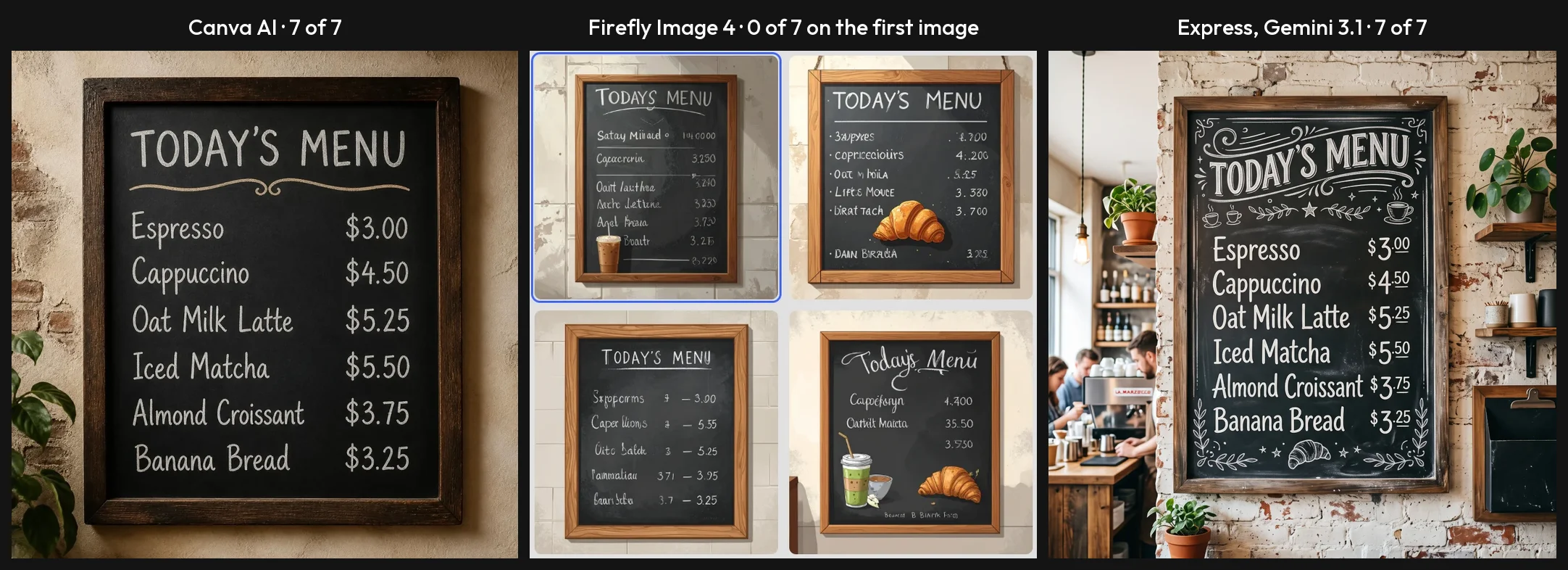
Express has a fix, and it comes with a condition. Switching the picker to Gemini 3.1, a partner model that needed no upgrade on my account, returned a menu with all seven lines right. I ran the partner model on the menu only.
The condition is licensing. Adobe’s help pages say outputs from Firefly features without a beta label can be used in commercial projects. Its page on partner models carries no such wording. Our Adobe Firefly review covers that promise in more detail. So inside Express you choose between the model Adobe stands behind and the model that spelled my menu.
Canva’s position is simpler and no stronger. Its help page says AI-generated images can be used for any lawful purpose, including selling them, and warns that ownership of AI output is legally unclear in many countries.
Following a brief
The seven-part scene asked for a red bicycle against a blue door, a cat in the front basket, three tulips in a green pot, and the number 47 above the door.
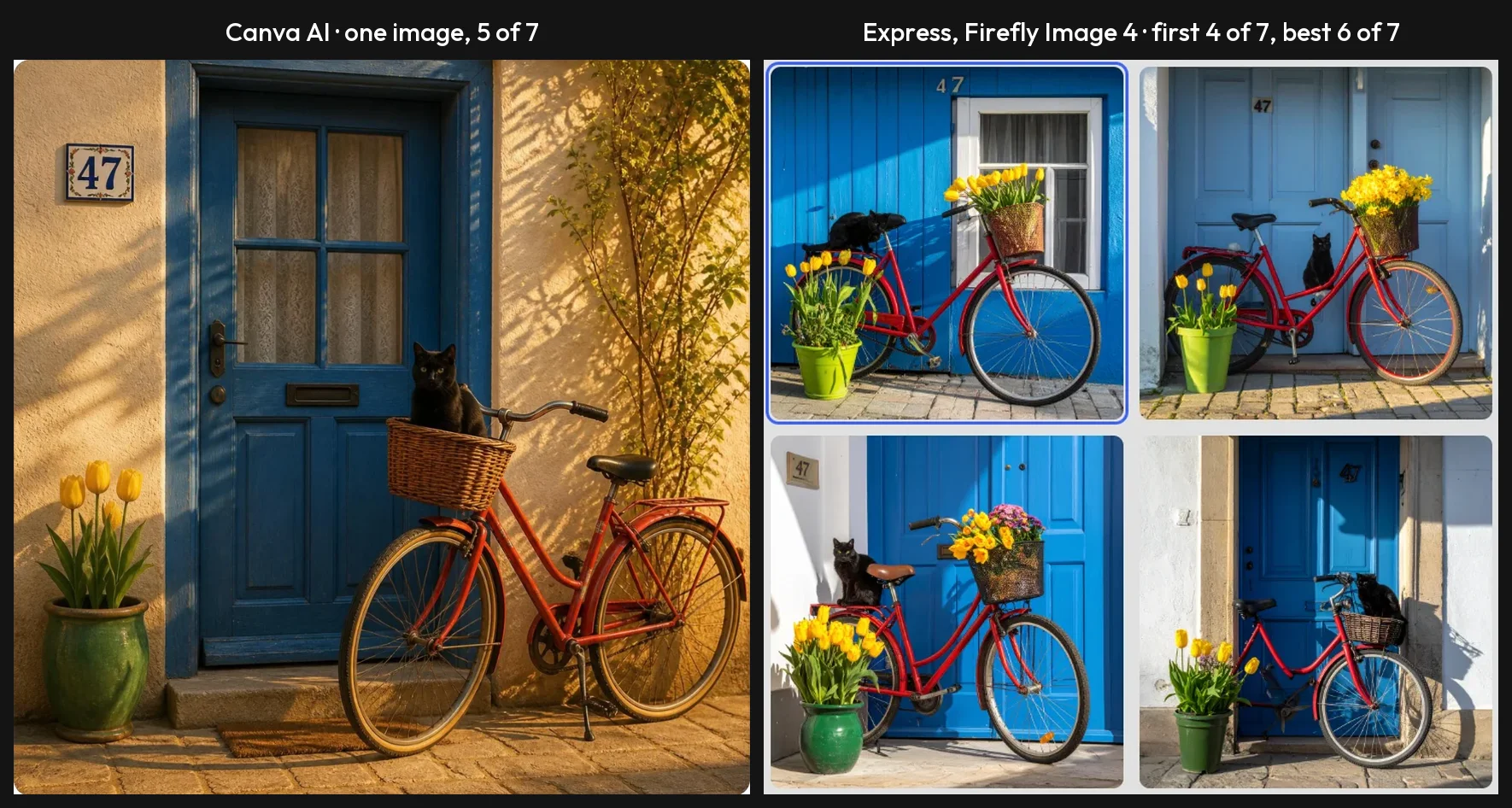
Canva’s one image scored 5 of 7: four tulips, and the number beside the door. Express’s first image scored 4 of 7, with a wall where the door should be and the cat on the rear rack.
The best of the four Express images scored 6 of 7, which beats Canva. That is the case for four results: more chances. The cost is that you have to look at all four and know what to check. None of the images I scored drew three tulips.
A whole design from a short brief
Here Express won the first half and lost the second. I asked both for an Instagram post announcing the grand opening of a coffee shop called Alley Roasters on Saturday 24 October, with 20% off all drinks.
Canva returned one design with the headline reading “ALLEY”. The Express AI Assistant, which is in beta, returned four, and all four had the name, the date and the offer right.
Then I tried to edit them. Canva’s headline was a text box, and I fixed it by hand. In Express, Open in Editor hung, and the copy it saved had lost the shop name and the discount line.
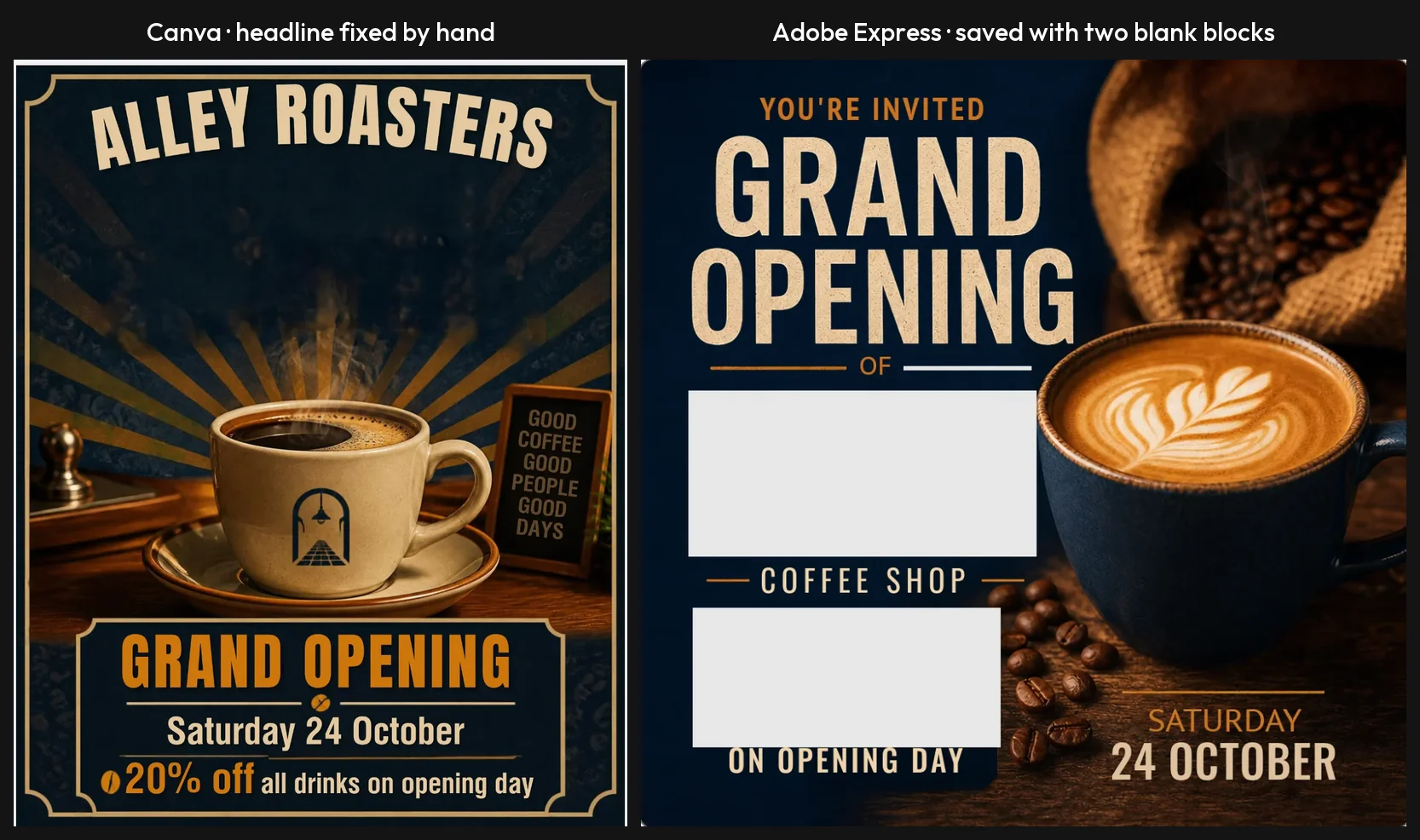
A wrong word you can retype beats a right word that vanishes. I tried the Express hand-off once, on one design, so I cannot say how often it happens.
Templates, without AI
Only Express got a template test. I took a free Instagram template, changed six text boxes by hand, and all six came out as typed, inside the layout, with no resizing. About 12 of roughly 22 templates on the first screen of my search carried the Premium crown.
I did not run the same job from a Canva template, so I have no score to set beside it. On listed size, Canva’s free library is the larger of the two.
Which one is faster and easier to work with?
On the timed runs Express was a little quicker to generate images with its default model, and Canva was quicker to get to a finished, editable design. For most jobs the second matters more.
| Step | Canva | Adobe Express |
|---|---|---|
| One image prompt | About 21 to 26 s, one image | 10 to 22 s on three timed Firefly Image 4 runs, four images; 18 to 28 s for one Gemini 3.1 image |
| Design from a short brief | About 42 s, one design | 80 to 105 s, four designs |
| Opening that design to edit | At once, in a side panel | Over 65 s, then abandoned |
| Background removal | About 10 to 15 s | About 15 to 20 s |
| Resize to two formats | About 10 s | Locked on the free plan |
My timer failed on the first Express image run, so that run is left out of the range above. Its results were on screen within about 70 seconds.
Getting from AI to something you can edit
In Canva the chat and the editor are one place. The generated design opens in a panel beside the conversation, the headline I clicked was a real text box, and a button takes the design to the full editor.
In Express the Assistant’s results are images until you open one. That step is where my session went wrong. Adobe’s own community forum has a bug thread from March 2026 titled “Adobe Express is too slow to work with”, with a reply from Adobe.
The Express editor also tripped me once outside the AI. Pressing Select All too soon after double-clicking a text box selected every object on the page. A one-second pause fixed it.
Knowing what you have left
Canva shows the AI allowance as a percentage on the Billing page. It is a number you can plan around, though I saw nothing that shows what a request will cost before you click.
Express showed me a “Free daily generations” label with no counter. The picker did list a credit price beside each paid partner model, greyed out on my free account, which is clearer than anything I saw in Canva before a request. I did not see how the Premium balance is displayed.
Resizing and exporting
Resizing a design to other formats is marked Premium in Express. In Canva I ran it on a Pro trial and did not check the free plan. Canva’s version ran in about 10 seconds and did not re-lay out the design for a wide banner. Adobe’s panel says its resize “will automatically update the layout of your design”, and I could not test that claim on a free account.
On export, each listed formats the other did not in the panels I opened. Canva offered SVG, MP4, GIF and PPTX. Express offered PSD and a separate print PDF. If your work goes to a designer who lives in Photoshop, that PSD option is a real reason to choose Express.
Who should pick Canva?
- Anyone who needs AI images with readable words. Menus, posters, price lists and event graphics are where Canva’s 11 of 11 matters.
- People who want to fix AI output, not regenerate it. A generated design that opens as text boxes and objects saves a second request and a second share of the allowance.
- Small teams posting every week. One slow editor hand-off is an annoyance once and a cost every week. This rests on a single Express session, so try your own before a team commits.
- Anyone who needs video, slides or a small web tool from the same account. MP4, GIF and PPTX were in the download panel, and Canva Code built a working calculator on my trial. I did not test video editing.
Who should pick Adobe Express?
- People who will stay on a free plan and need background removal. It is free here and a paid tool in Canva. A free Express template also took six edits cleanly; I did not run the same job in Canva.
- Anyone already paying Adobe. Firefly Pro at $19.99 a month is described on Adobe’s pricing page as including Express Premium’s features.
- Buyers who need Adobe’s commercial-use promise. Generate with Firefly Image 4 yourself in the image tool, and keep text out of the image. Add the words as a text layer.
- Teams on a tight budget, or handing work to a Photoshop user. Five Teams licences cost $299.40 in the first year against $1,250 for Canva Business, and PSD is in the download panel. Read the cancellation terms first.
Final word
For the typical buyer, a non-designer who wants a finished post without a designer, pick Canva. It was the one that gave me output I could trust and then change: every word spelled on the two text prompts, and a wrong headline fixed in two edits.
Adobe Express gave away more on the one free feature I could compare, it is the cheaper paid plan, and its Assistant read my brief more carefully than Canva did. What holds it back is the half of the job after the AI finishes. A default model that failed both text prompts and an editor that blanked the shop’s name are the reasons it sits at 4.2 to Canva’s 4.5.
The sensible way to settle it costs nothing. Open both free plans, give each the same real job from your week, and see which one you finish in. Just remember what this comparison did not cover: paid Express, both mobile apps, and video.
Frequently asked questions
Adobe Express vs Canva: which is better?
Canva, for most people. Adobe Express has the edge on price and on the one free feature I could compare, background removal. In tests run on 11 October 2026 with the same prompts, Canva's image model spelled all eleven text lines on a gig poster and a café menu. Firefly Image 4, the default model in Adobe Express, got none of them right on the first image of each prompt. Canva's generated design also opened as editable layers at once, while the Express hand-off to the editor hung and saved a copy with two blank blocks.
Adobe Express won three things. Its AI Assistant got a design brief right in all four designs where Canva's single design dropped a word. It removed an image background on the free plan, a tool Canva marks as paid. And Premium is $9.99 a month against $18 for Canva Pro. Canva ran on a Pro trial and Express on its free plan, so no paid Express feature was tested.
Is Adobe Express cheaper than Canva?
Yes, on the listed prices. Adobe's pricing page showed Adobe Express Premium at $9.99 a month on 11 October 2026, billed monthly with no annual commitment. Canva's US pricing page showed Canva Pro at $18 a month, or $144 if you pay for a year at once. Twelve months of Express Premium comes to $119.88, which is $24.12 less than Canva's yearly price and $96.12 less than twelve monthly Canva payments.
The gap is wider for teams. Canva Business is $250 a year per person. Adobe Express Teams is $4.99 a month per licence in the first year and $7.99 after, with a two-seat minimum, sold as an annual subscription billed monthly. Adobe's subscription terms set a cancellation charge on that kind of contract, so read them before a team signs up.
Which has the better free plan, Canva or Adobe Express?
Adobe Express, on the one free feature I could compare directly. Its Remove background tool carried no Premium crown on my free account and cut a bicycle out of a street scene in one click. Canva's editor marks its background remover with the crown it puts on paid features.
Both free plans list 5GB of storage. Canva's pricing page lists more than 1.6 million templates on Free and up to 20 AI uses a month. Adobe's lists more than 100,000 templates, and its help page says free users get a limited number of daily AI generations, with no number published. Resizing a design to other formats was locked on my free Express account. In Canva I ran resize on a Pro trial and did not check whether the free plan locks it. I tested Express on its free plan and Canva on a Pro trial, so I did not see Canva's free locks first-hand beyond the crowns in the editor.
Which Adobe product is similar to Canva?
Adobe Express. It is Adobe's template-based design tool for people who do not use Photoshop: you start from a template or a blank page, change the words and pictures, and export a social post, flyer, short video or document. That is the same job Canva does.
Adobe Firefly is a different product. It generates images, video and audio, and Express borrows its models for AI features. Adobe's pricing page describes the Firefly Pro plan, at $19.99 a month, as including Express Premium's features.
Does Canva or Adobe Express have better AI?
It depends on the job. For text inside a generated image, Canva: it spelled 11 of 11 requested lines across two prompts, where Adobe's own Firefly Image 4 model in Express scored 0 of 11 on the first image of each. A partner model in the same Express picker, Gemini 3.1, did spell the menu, but Adobe lists it apart from the model it labels commercially safe.
For a whole design from a short brief, Express: its AI Assistant returned four Instagram posts with the shop name, date and offer right in every one, while Canva's single design left a word out of the name. The Assistant is in beta. Canva's design could be corrected by hand in two edits. The Express design lost two text blocks when I opened it in the editor.
Can I use Canva and Adobe Express together?
Yes, and the free plans make it cheap to try. Both have a $0 plan. A workable split from my tests: remove a background in Adobe Express, where the tool is free, and build and finish the layout in Canva, where generated designs opened as editable layers.
I did not test moving a file between them. Adobe Express offered PSD in its download panel and Canva offered SVG, MP4, GIF and PPTX, with PNG, JPG and PDF on both. I opened both panels and did not download a file from either, so I cannot report how a file from one behaves in the other.
Keep reading
Canva Review: Great Editor, but the AI Runs on a Meter
A Canva review from a Pro trial: nine hands-on tests, exact US prices, and six AI requests that used 56% of the trial's allowance. Plus what the trial hides.
Adobe Express Review: Generous Free Plan, Shaky AI Hand-Off
An Adobe Express review from the free plan: free background removal, an AI Assistant that got the brief right in all four designs, and an editor that lost text.
Canva Pro Price: $144 a Year, and What Canva Leaves Out
Canva Pro price in the US: $18 a month or $144 a year. Business is $25 per person. Plus the $100 AI Pass, seat billing and the refund rule, all sourced.
Adobe Firefly Review: Safe to Use, Shaky With Words
An Adobe Firefly review from the free plan: three generations a day, a default model that isn't Adobe's, and a café menu Firefly Image 5 could not spell.