
Canva Pro Price: $144 a Year, and What Canva Leaves Out
Canva Pro price in the US: $18 a month or $144 a year. Business is $25 per person. Plus the $100 AI Pass, seat billing and the refund rule, all sourced.
Contents
How much is Canva Pro?
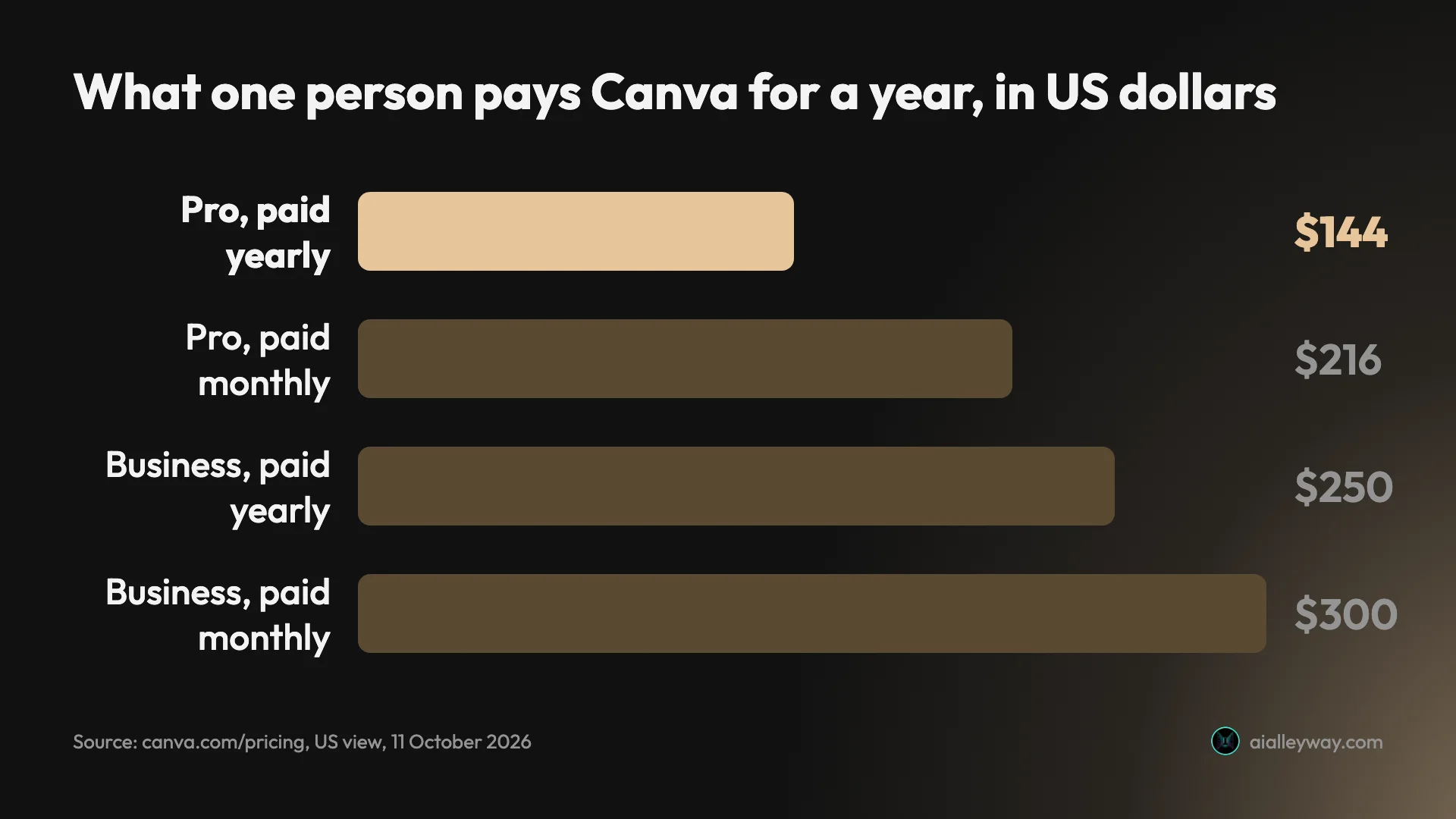
The Canva Pro price in the United States is $18 a month, or $144 a year, for one person. Canva Business is $25 a month or $250 a year per person, and the free plan stays free. Those are the figures on Canva’s pricing page on 11 October 2026, before tax.
Most people should pay yearly for Pro or stay on Free. The yearly plan works out at $12 a month, a third less than paying month by month.
| Plan | Pay monthly | Pay yearly | Yearly, per month | Who it is for |
|---|---|---|---|---|
| Free | $0 | $0 | $0 | Occasional designs |
| Pro | $18 | $144 | $12 | One person |
| Business | $25 per person | $250 per person | $20.83 | Solo sellers and teams |
| Enterprise | By quote | By quote | By quote | Large organisations |
Three costs sit outside that table: an AI add-on at $100 a month, seats on a team plan that bill in ways people miss, and a refund policy that mostly says no. This guide prices all three.
How Canva’s pricing works
Canva sells access per person, per month or per year, and then meters one thing on top: AI.
There are four plans on the pricing page. Free and Pro are for one person. Business is for one person or a team, priced per head. Enterprise is sold by a sales team and has no public price.
Billing is monthly or yearly, and Canva’s help page on billing frequency says every plan renews automatically. That page lists no lifetime plan.
Two things change the number you see. Canva prices by region, and its help page on Business billing says pricing “depends on your location”. The pricing page also notes that prices exclude applicable tax, so your invoice can be higher than the headline.
The AI meter is the part most buyers do not expect. Every plan includes a monthly AI allowance, and heavier AI tools drain it faster than light ones. When it runs low, Canva sells more: an add-on called AI Pass, and one-off top-ups on Business.
So the real question is not only which plan. It is which plan, billed how, for how many people, and with how much AI.
Canva pricing plans, one by one
Each step up the ladder buys three things: more library, more brand controls, and more AI.
| Free | Pro | Business | Enterprise | |
|---|---|---|---|---|
| US price, monthly | $0 | $18 | $25 per person | By quote |
| US price, yearly | $0 | $144 | $250 per person | By quote |
| Templates | 1.6 million+ | 3.6 million+ | As Pro | Not listed |
| Stock photos, video, graphics | 4.7 million+ | 141 million+ | As Pro | Not listed |
| Brand Kits | 1 | 5 | 100 | 1,000 |
| Storage | 5GB | 100GB | 500GB | 1TB |
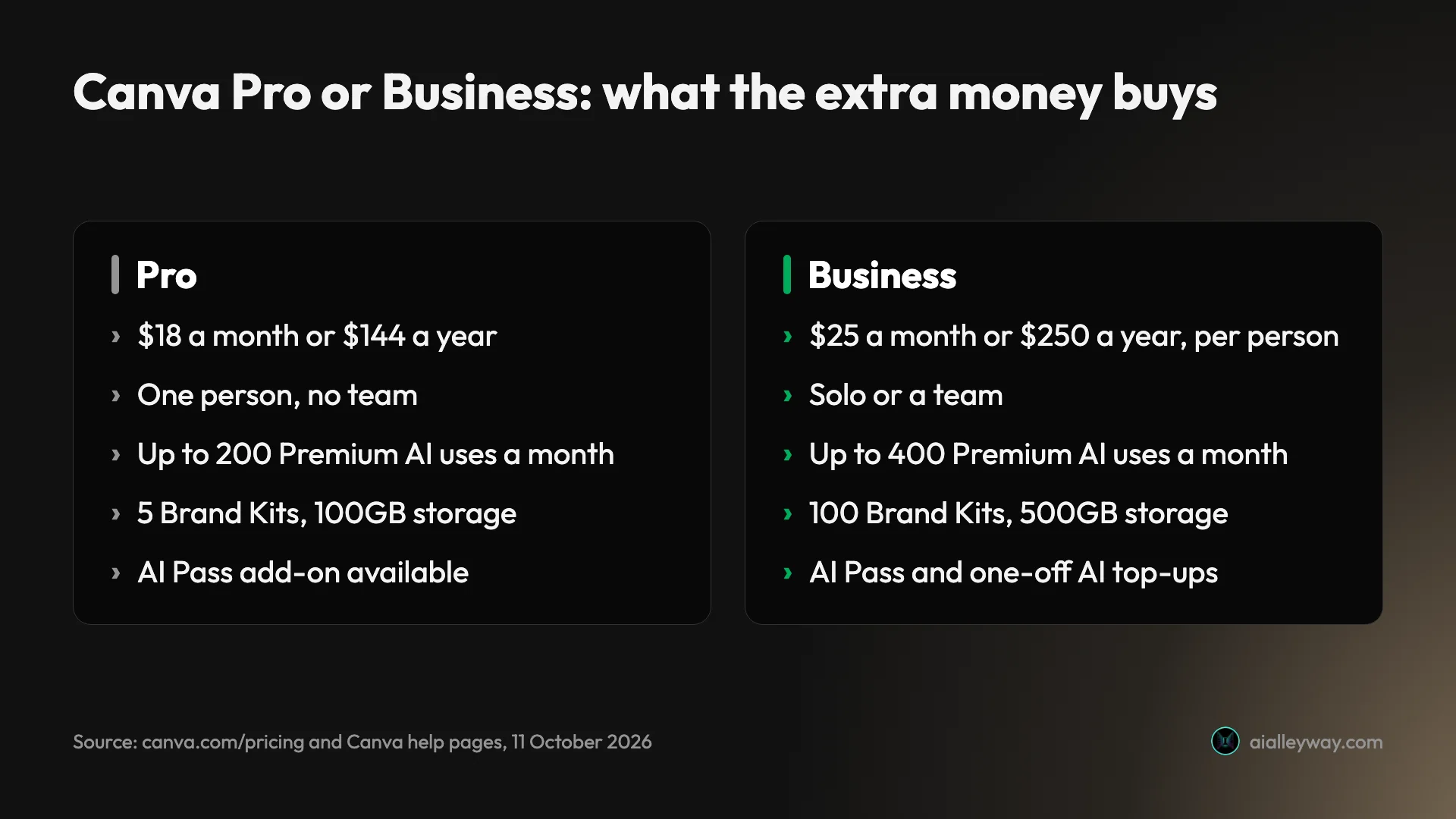
| AI allowance a month | Up to 20 Standard or Premium uses | Up to 200 Premium or 20 Ultra uses | Up to 400 Premium or 40 Ultra uses | Up to 400 Premium or 40 Ultra uses |
| Teams | No | No | Yes | Yes |
Plan features are from Canva’s pricing page and the AI figures from its help page on AI usage, both read on 11 October 2026.
Canva Free
Free costs nothing. It includes the editor, more than 1.6 million templates, 5GB of storage, one Brand Kit and a small AI allowance. Canva’s pricing page also lists access to Affinity, its professional design app, on the free plan.
What it holds back shows up as a small crown in the editor. On my Pro trial the crown sat on the background remover, the Brand tab, SVG export, transparent backgrounds and the export size slider.
Canva Pro
Pro is the plan for one person, at $18 a month or $144 a year. It adds the larger template and stock libraries, five Brand Kits, social scheduling, 100GB of storage and what the pricing page calls “10x more AI than Canva Free”.
It is a single seat. Canva’s help page on upgrading says creating a team requires a Business plan, so Pro cannot hold a team.
Canva Business
Business costs $25 a month or $250 a year per person. Canva’s help page on Business describes it as everything in Pro plus a higher AI allowance, stronger brand management, a 10% discount on print orders, interactive charts through Flourish and ad analytics.
You do not need a team to buy it. Canva describes Business as a plan for “individuals, marketers, and teams”, so a solo seller can take one seat.
One limit to know: Canva’s help page says Business subscriptions bought in the mobile app are for solo users only. To create a team, subscribe on the web.
Canva Enterprise pricing
Enterprise has no listed price. The pricing page shows “Let’s talk” where the number would be, and lists single sign-on, automated user provisioning, 1,000 Brand Kits and 1TB of storage. Its AI allowance matches Business.
If your organisation needs those controls, the price comes from a sales call. I have not been through that process and cannot tell you what Canva quotes. The pricing page shows no Enterprise rate, so a figure you see elsewhere did not come from it.
Canva does publish one Enterprise number. Its nonprofit page offers registered nonprofits that need more than 50 seats 50% off Enterprise.
Canva Free vs Pro: what the $144 buys
The upgrade from Free to Pro is mostly about removing small blocks you hit every week.
| What changes | Free | Pro |
|---|---|---|
| Background remover | Paid feature | Included, used no AI allowance in my test |
| Resize a design to another format | Not checked on Free | Included, used no AI allowance in my test |
| Transparent and SVG export | Paid feature | Included |
| Brand Kits | 1 | 5 |
| Social scheduling | No | Yes |
| Stock library | 4.7 million+ | 141 million+ |
| Storage | 5GB | 100GB |
| AI allowance | Up to 20 uses | Up to 200 Premium uses |
The background remover and the transparent and SVG exports are the ones I saw marked as paid. In my test on a Pro trial, the background remover cut a bicycle out of a busy scene in one click, and resize copied an Instagram post into a Facebook cover. Neither moved the AI meter.
If you never need a transparent logo or a cutout, Free is enough. If you need one of them every week, $12 a month is cheap for the time saved.
There is one more thing the free plan does to old work. Canva’s help page on Teams says that when a Teams subscription lapses, your designs stay saved, but Pro elements in them appear watermarked on the free plan. That page is about Teams. Canva’s cancel page says designs stay on the free plan and does not mention watermarks, so I would expect the same on Pro but have not confirmed it.
What a Canva plan does not cover
A subscription is not the only way Canva takes money. Three things are billed separately.
- Print orders. Print orders are charged on top of a plan. Business includes a 10% discount on print, where Canva Print is offered.
- Web domains. Canva sells domains, with a separate refund process.
- Third-party apps. Canva’s help page on upgrading says apps in its marketplace “usually include limited credits”, and that Canva cannot provide credits or refunds for them. An AI app inside Canva can run out while your Canva allowance is untouched.
I did not order print or buy a domain, so I have no prices for either.
Monthly or yearly: which Canva Pro price is cheaper?
Yearly is cheaper per month, and monthly is cheaper if you leave early. Over a year, the Canva Pro cost is $216 paid monthly or $144 paid yearly, and the break-even is month eight.
| Pay monthly | Pay yearly | Yearly saves | |
|---|---|---|---|
| Pro, 12 months | $216 | $144 | $72 (33%) |
| Business, 12 months, per person | $300 | $250 | $50 (17%) |
Eight monthly payments of $18 come to $144, the same as the full year. So if you will use Pro for eight months or more, yearly wins. If you need it for one campaign or one semester, pay monthly and cancel.
Business tells a different story. The yearly saving is only $50 a person, so the break-even is month ten. A team that might shrink is not giving up much by paying monthly.
The yearly discount comes with a condition. Canva’s refund page says subscriptions are not refundable in most cases, so the yearly price is a twelve-month commitment made on day one.
There is a middle route. Canva’s help page on pausing says a monthly or yearly plan can be paused for three months, though a yearly plan can only be paused when it has less than two months left before renewal. Pausing is not available on subscriptions bought through the iOS App Store.
Canva Business pricing for teams
Team pricing is simple to state and easy to get wrong in practice. The rate is $25 a month or $250 a year for each person.
| Team size | Paid yearly | Paid monthly, over 12 months | Yearly saves |
|---|---|---|---|
| 1 person | $250 | $300 | $50 |
| 3 people | $750 | $900 | $150 |
| 5 people | $1,250 | $1,500 | $250 |
| 10 people | $2,500 | $3,000 | $500 |
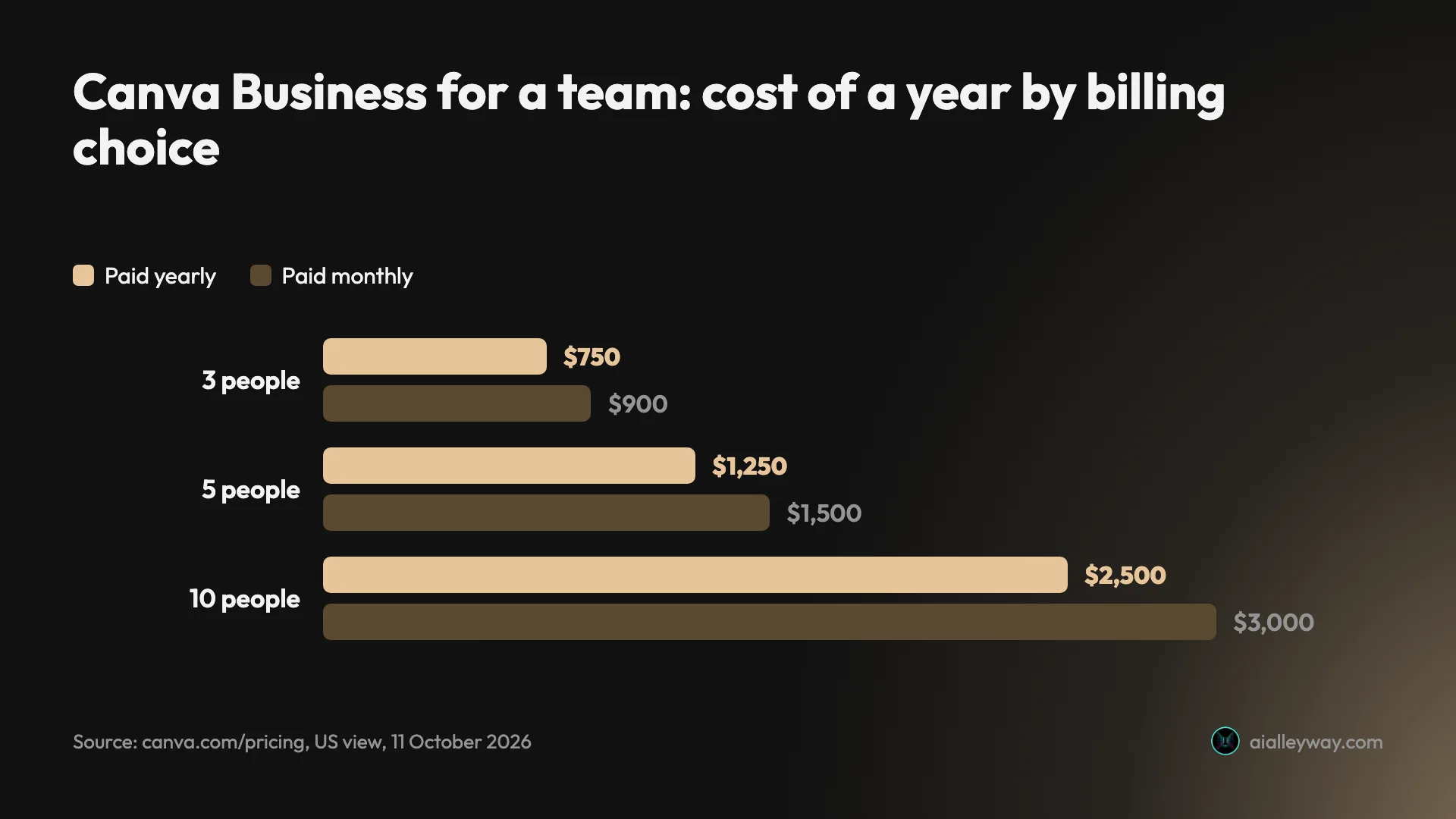
I found no minimum team size and no volume discount on the Canva pages I read. Ten people cost ten times one person.
How seats are billed
The fine print is in Canva’s help page on Business billing. Some accounts are billed by seat and some by team member, and the page tells you how to check: open Settings, then People. If you see “Manage seats”, you are on seat billing.
Seat billing has three rules that cost money if you miss them:
- A seat is billed in the next cycle even if the invite has not been accepted.
- Inviting someone when no seat is empty can add a new paid seat.
- Removing a person does not remove the seat. It stays billable until you delete it.
On a yearly plan, Canva sends a bill every three months for seats added since the last one, priced for the time left on the plan. It also says it sends a reminder three days before each bill. That reminder is the moment to count seats.
What happened to Canva Teams pricing?
Canva Teams is closed to new sign-ups. If you are searching for Canva Teams pricing, the plan you can buy today is Business.
Canva’s help page on Teams says the plan “is no longer available for new sign-ups or upgrades”. The US pricing page lists Free, Pro, Business and Enterprise, and carries a question titled “What happened to Canva Teams?”.
Existing Teams customers are protected, on Canva’s account. The help page says they keep their current pricing, including when they add members, keep their features, and keep getting the new features that go to Pro. They do not get the features exclusive to Business.
The trap is the exit. The same page says that if you cancel a Teams subscription, you cannot resubscribe. So a Teams customer who cancels to “take a break” comes back to Business rates.
| If you are… | What Canva says |
|---|---|
| New to Canva with a team | Buy Business, per person |
| On Teams today | You keep your price and features |
| On Teams and thinking of cancelling | You cannot rejoin Teams afterwards |
| On Teams and want Business features | You can switch to Business |
The AI allowance, AI Pass and top-ups
This is where Canva’s pricing gets a second layer. Every plan has a monthly AI allowance, and Canva sorts its AI tools into tiers that use it at different speeds.
| Plan | Monthly AI allowance, per Canva | Ultra tools |
|---|---|---|
| Free | Up to 20 Standard or Premium uses | No |
| Pro trial or Business trial | Same as Free | No |
| Pro | Up to 200 Premium or 20 Ultra uses | Yes |
| Business | Up to 400 Premium or 40 Ultra uses | Yes |
| Enterprise | Up to 400 Premium or 40 Ultra uses | Yes |
On Pro, Business and Enterprise, Standard tools such as the image upscaler do not count against the allowance, within fair use. Canva also names a group that does not count against the allowance, including Magic Write and AI Voice.
The allowance resets each month on your billing date, even on a yearly plan. On Free it resets on the first of the month.
Read “up to” literally. Canva’s help page says those ranges assume simple tasks on the lightest tool in a tier. My own numbers for generated designs and Canva Code builds, further down, came in well under them.
AI Pass: $100 a month per person
AI Pass is Canva’s answer for people who run out. Its help page on AI Pass gives the price in one line.
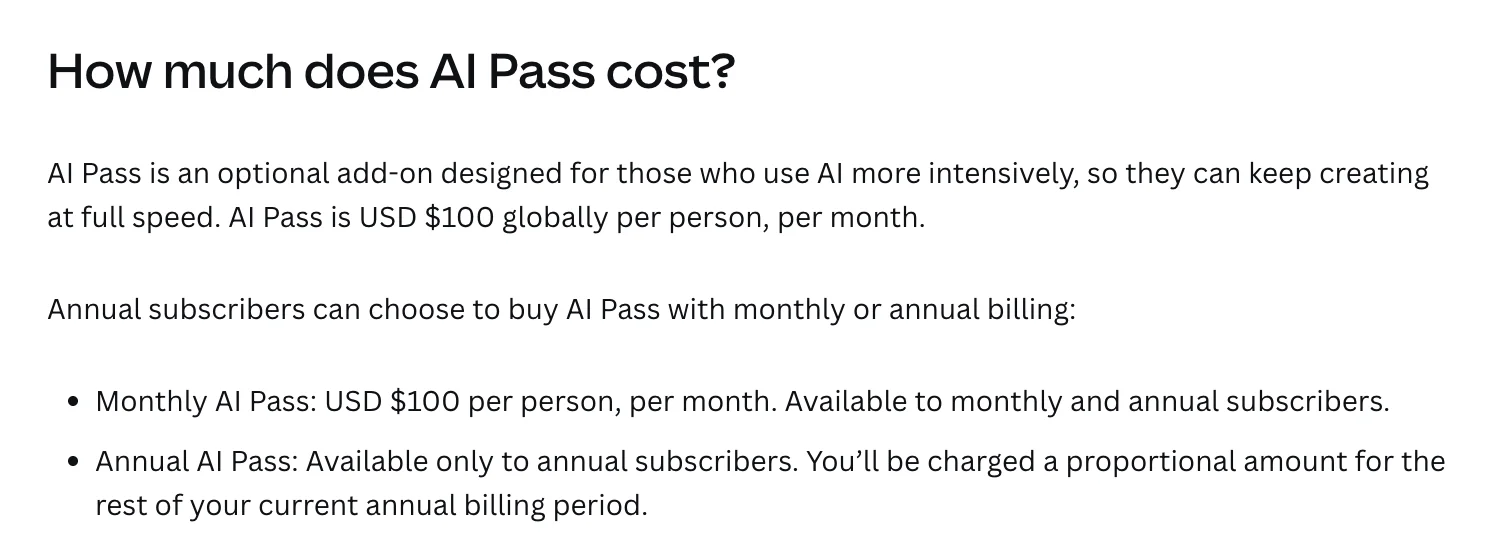
For that, Canva says Pro subscribers get “40x more AI” and Business subscribers “20x more AI”. The page does not say what the multiple is applied to. If it is each plan’s own published allowance, both land in the same place: 40 times Pro’s 200 Premium uses is 8,000, and 20 times Business’s 400 is also 8,000.
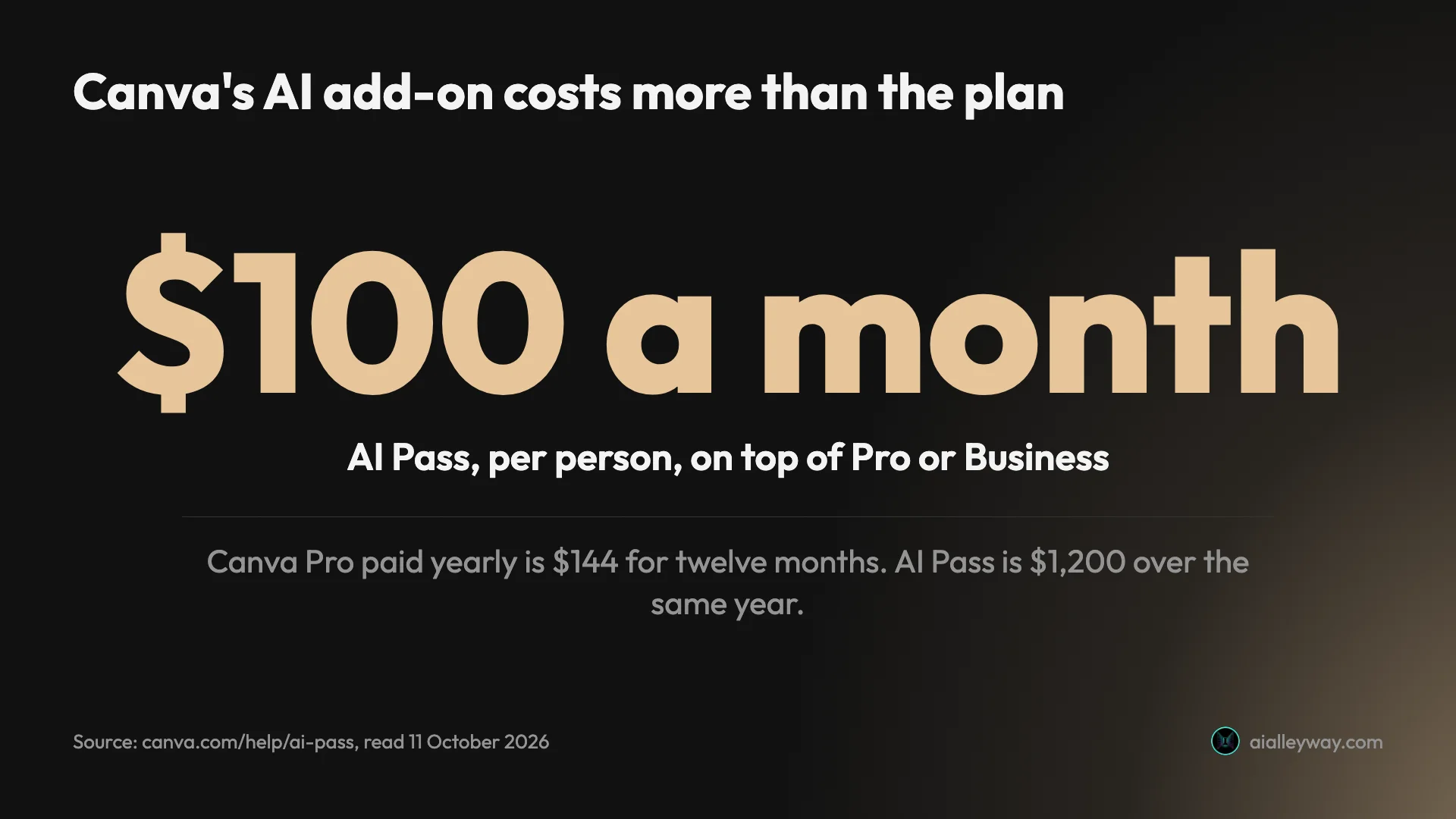
Put beside the plan price, the add-on is the bigger bill. A year of Pro is $144. A year of AI Pass is $1,200. Together they come to $1,344 for one person.
Canva’s page lists who cannot buy it: accounts on Free, Education or Enterprise, anyone on a free trial, anyone on a prepaid plan, and anyone whose subscription runs through the Apple App Store or Google Play. The page also says “You can only purchase AI Pass once.”
AI top-ups on Business
Top-ups are the smaller option, and only Business accounts get them. Canva’s help page on AI top-ups describes a one-off purchase that adds an allowance equal to a month of Business AI.
The terms are tight. A top-up lasts 30 days from purchase, does not roll over, and cannot be cancelled once bought. Only one can be active at a time.
The help page does not give a price for a top-up. Check the figure on your own Billing page before you rely on it.
The cheaper AI upgrade is Business
Before paying $100 for AI Pass, a Pro user should look one plan up. Business carries double Pro’s AI allowance, up to 400 Premium uses against 200, for $7 more a month on monthly billing, or $106 more a year on yearly billing.
That makes Business the cheap way to double your AI, and AI Pass the expensive way to multiply it.
What the AI allowance bought in my test
Canva’s “up to 200 uses” is a ceiling. On my account, a generated design used far more of the meter than one use.
I tested Canva on a Pro trial on 11 October 2026 for our Canva review. Canva’s Billing page shows AI usage as a percentage of the month, and I read it through the test.
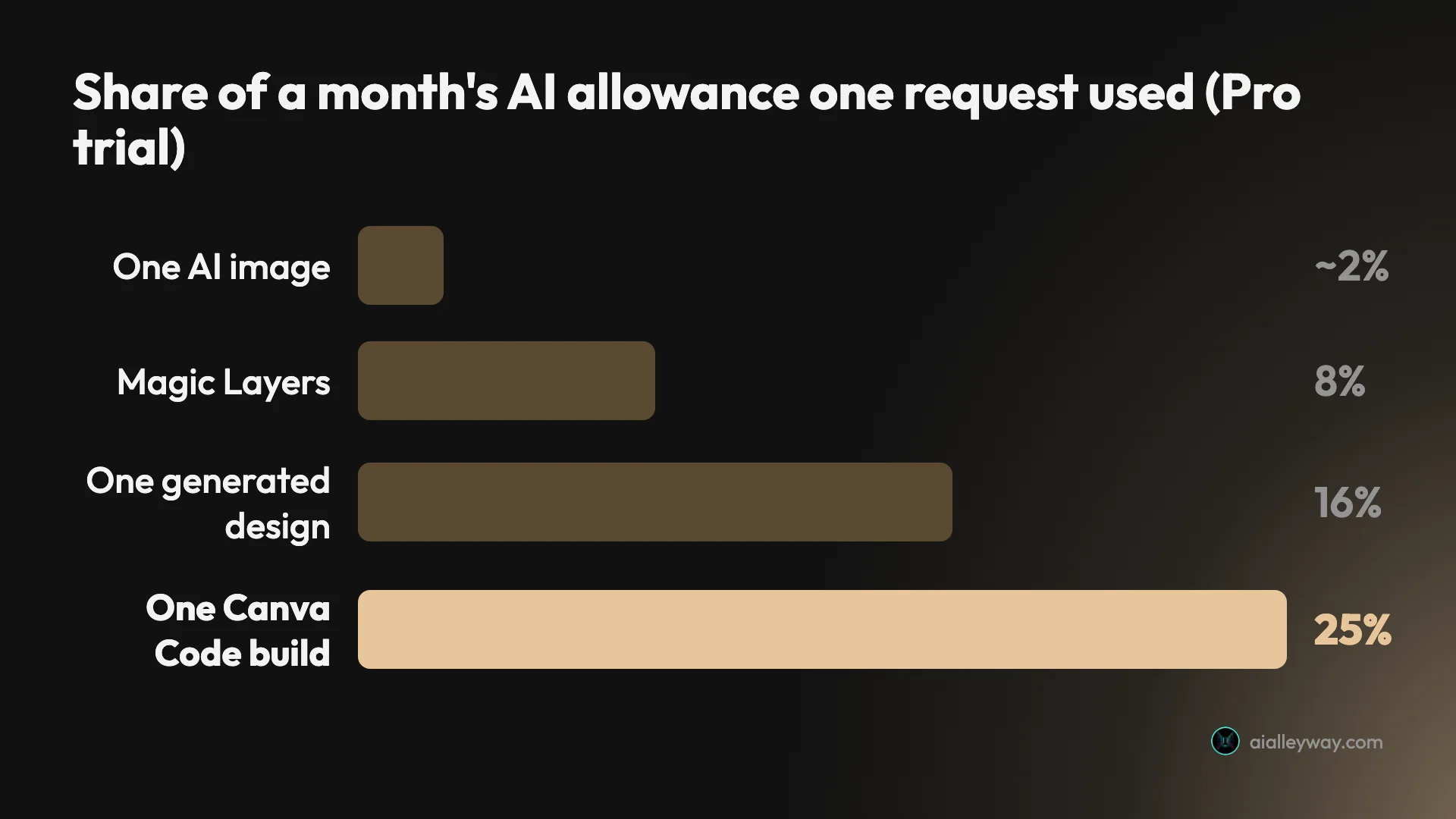
Six requests took the meter to 56%: three images, one generated design, one Canva Code build and one Magic Layers run. Background removal and resize used nothing. Two days later, five background remover and Magic Eraser runs moved the same meter by one point, as our Canva background remover guide reports.
Canva says a trial gets the same size allowance as Free, so the same rates should apply there, though I did not test a Free account. Here is what a full allowance covers at the rates I measured, and what ten times that would cover if paid Pro’s meter scales the way Canva’s “10x” says.
| Request | Share of the trial allowance | Fits in a trial month (Free should match) | Estimate for paid Pro |
|---|---|---|---|
| One AI image | About 2.3% | About 43 | About 430 |
| One Magic Layers run | 8% | 12 | About 125 |
| One generated design | 16% | 6 | About 62 |
| One Canva Code build | 25% | 4 | About 40 |
The last column is an estimate, not a measurement. I did not test paid Pro, and Canva says heavier prompts use more.
Even so, the gap is the useful finding. Canva puts the free allowance at “up to 20” Premium uses. Generated designs are a Premium tool, and six of them would have used 96% of my trial’s allowance.

So budget by what you make. If you mostly generate images, any paid plan should be roomy. If you generate whole designs or build with Canva Code every day, watch the meter in your first paid month before you decide whether Pro is enough. A second build on the same trial also cost 25 points, and one follow-up edit took the 18 points I had left; our Canva Code guide has that test.
Four buyers, priced for a year
Prices mean more against a real case. These four use the US figures above and exclude tax.
| Buyer | Plan | Year one cost |
|---|---|---|
| Solo creator, light AI | Pro, yearly | $144 |
| Solo seller who runs out of AI on Pro | Business, yearly | $250 |
| Five-person marketing team | Business, yearly, 5 seats | $1,250 |
| One heavy AI user on Pro | Pro yearly plus AI Pass | $1,344 |
The solo creator
Someone making social posts and the odd flyer needs Pro at most. Paid yearly that is $144, or $12 a month. If the work is occasional and the free templates are enough, the right price is $0.
The five-person team
Five people on Business cost $1,250 a year, or $125 a month on monthly billing. Before signing, check that everyone on the list needs a seat, because each one is another $250.
If one person leaves mid-year, remember the seat rule: remove the seat as well as the person, or it keeps billing.
The heavy AI user
One person who generates designs all day has three options: Pro at $144, Business at $250 for double the AI, or Pro with AI Pass at $1,344. The jump from the second to the third is $1,094 a year.
Try Business first. If double is still not enough, AI Pass on Business costs the same $100 a month. If Canva’s multiples apply to each plan’s own allowance, it reaches the same total as AI Pass on Pro.
Free ways in: the trial, Education and Nonprofits
Canva runs three routes to paid features that cost nothing, and each has a condition.
The free trial
Canva offers a free trial of Pro and Business. Mine is set to run for 30 days, and the Billing page shows the end date beside the plan. Canva’s help page on upgrading says the trial is available once per Canva account and once per payment method.
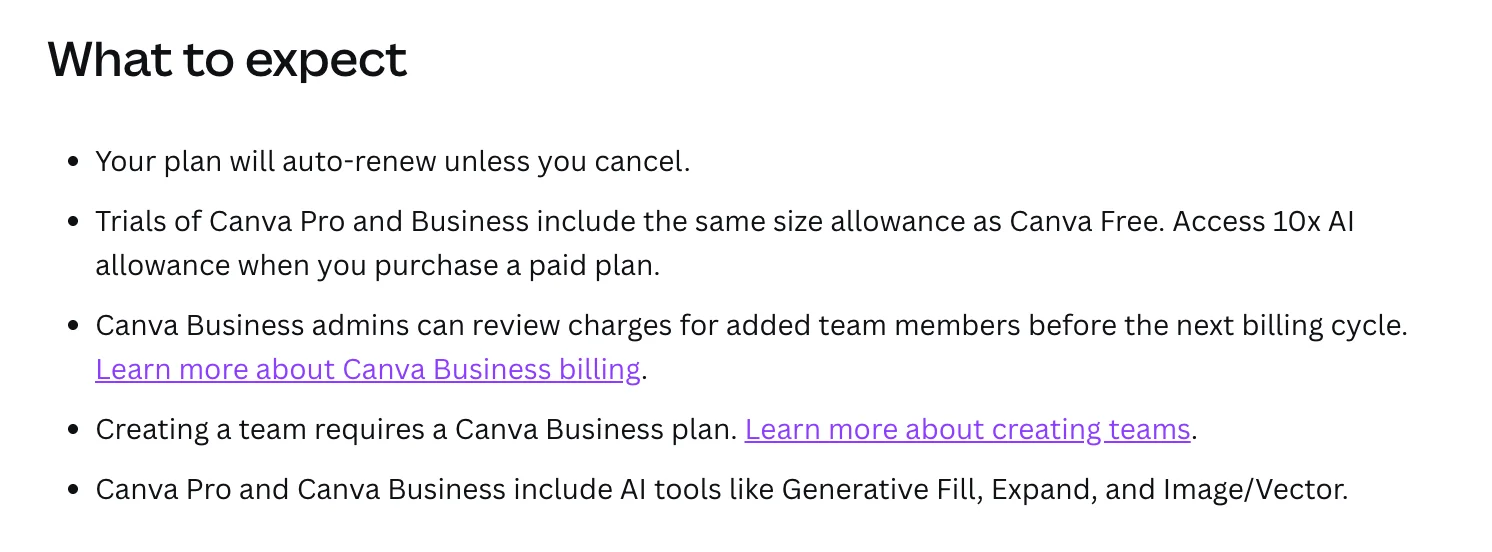
The trial does not include paid AI. Canva says so in two lines.
So a trial is a fair test of the editor, the libraries and tools like background removal. It is not a test of how far Pro’s AI stretches.
Canva says it emails a reminder before the trial ends, and that a trial started without payment details ends by itself with no charge. If you did enter a card, the plan renews automatically.
Canva for Education
Canva’s education page says the product is 100% free for K-12 teachers, their students and qualified school districts. Teachers apply and Canva checks eligibility.
Higher education is different. Canva’s help page on Canva Campus says a university starts its staff on Business and moves to Campus once it reaches a licence threshold based on its full-time student numbers. Campus then includes a free team for students. I found no free plan for an individual university student on those pages, beyond the standard free plan.
Canva for Nonprofits
Canva’s nonprofit page gives registered nonprofits free access to Pro’s features for up to 50 users. Organisations that need more seats are offered 50% off Enterprise.
Nonprofit accounts can also buy AI Pass, according to Canva’s AI Pass page.
What happens when you cancel or downgrade
Leaving Canva Pro is cheap in money and may have one cost in content.
Canva’s help page on cancelling gives the route for a plan bought on the web: Settings, Billing, Cancel plan, pick a reason and confirm. Plans bought through Apple, Google Play or PayPal are cancelled on those platforms.
Cancelling stops the next payment. It does not end access on the spot. Canva says you keep paid features until the end of the period you have paid for, and you can reverse the decision from the Billing page while the plan is still active.
| After you cancel | What Canva says |
|---|---|
| Your designs | Stay in your account on the free plan |
| Paid features | Stay until the end of the paid period |
| Pro elements in old designs (per Canva’s Teams page) | Appear watermarked on the free plan |
| Designs made in a team workspace (per Canva’s Teams page) | Stay with the team, not with the member who leaves |
| Affinity | Stays free |
The team row is the one to plan for. Canva’s help page on Teams says designs created inside a team workspace belong to that workspace, and a member who is removed loses access to them. Download or share anything you need before the change.
I read these steps and did not run them, because the trial on my test account is still live.
What to watch before you pay
Canva’s prices are fair. The surprises come from how they are billed.
Conflicting prices are everywhere
On the day I checked, other write-ups quoted Canva Pro at $12.99, $14.99 or $15 a month, and $119.99, $120 or $180 a year. Canva’s own US page said $18 and $144.
I cannot tell you whether or when any of those figures was Canva’s price. Treat any Canva price that does not come from Canva’s pricing page or your own Billing page as unreliable.
The trial can bill a day early
Canva’s help page on upgrading says charges are processed in the GMT time zone, and its page on cancelling says a charge can therefore appear a day before the trial end date you see. Canva calls that normal.
Cancel at least two days ahead.
Refunds are mostly a no
The refund page opens plainly.
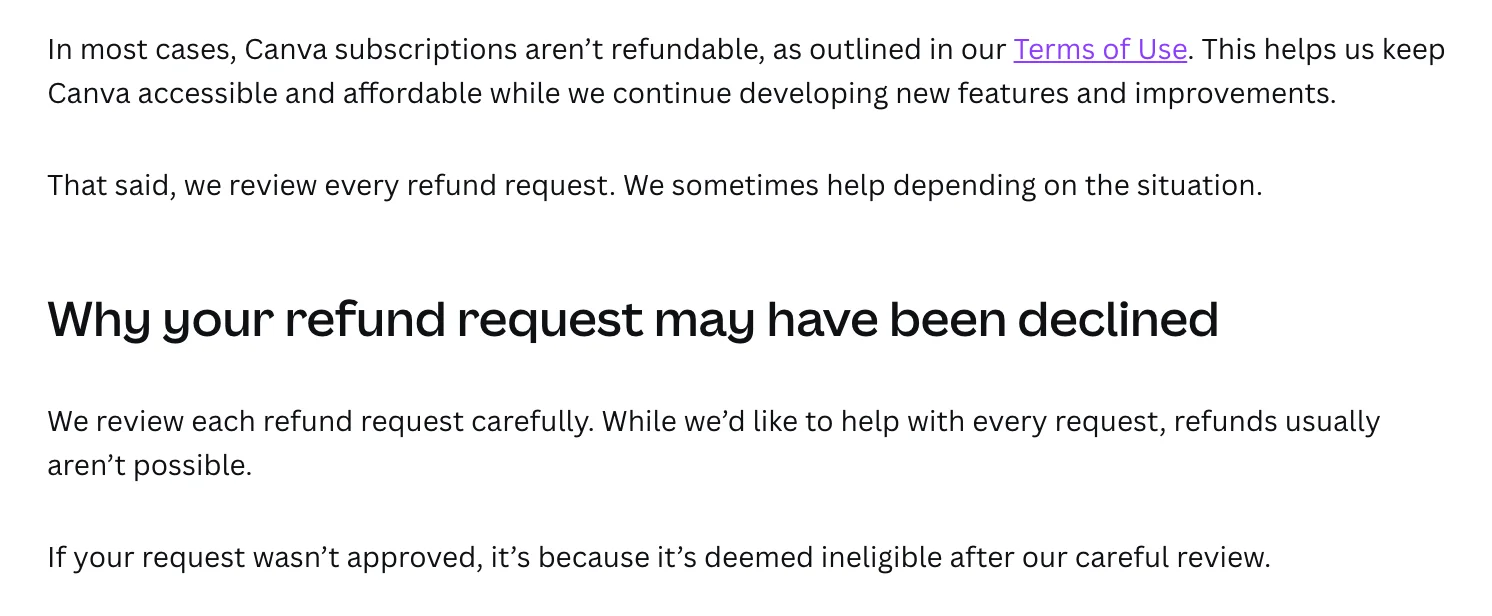
If you forget a yearly renewal, you are asking for an exception, not claiming a right. Approved refunds take 5 to 10 business days on a credit card, by Canva’s own estimate.
An invite can cost money
On seat-billed Business accounts, Canva says a seat is billed in the next cycle “even if an invite hasn’t been accepted yet”. Sending five invites to people who never join can still add five paid seats.
Invite only people who have agreed to join, and clear empty seats before each billing date.
Where you buy changes what you can do
Buying through Apple or Google has knock-on effects, spelled out across Canva’s help pages on refunds, pausing, AI Pass and Business. App Store refunds go through Apple. Pausing is not available on iOS subscriptions. AI Pass cannot be bought on a plan managed by either store, and Business bought on mobile is solo only.
If you might want any of those later, subscribe on the web.
There are plans Canva does not show on its pricing page
Canva’s help page on AI usage mentions a “Pro Lite” plan, and its page on AI Pass lists prepaid plans of one day, one week, one month and one year. Neither appears on the US pricing page I read, and I have no price for them.
They matter for one reason: Canva says prepaid plans cannot add AI Pass, and Pro Lite gets the free plan’s AI allowance. If your account shows one of those names, check what it includes before assuming it is Pro.
Why does Canva Pro seem more expensive now?
Three things shape what people feel they pay, and only one of them is the sticker price.
The first is the number itself. Figures repeated around the web, $12.99 a month or $119.99 a year, are lower than the $18 and $144 on Canva’s US page today. I did not track Canva’s past prices and cannot say whether those figures were ever Canva’s. Anyone comparing them with the current page sees a gap.
The second is the meter. The plan price is not the whole cost. Each plan includes an AI allowance, and many of its headline AI tools draw on it. Someone who leans on generated designs can hit the limit and be shown a $100 add-on, on a plan they thought was all-inclusive.
The third applies to teams. Canva Teams is closed to new sign-ups, and its replacement is priced per person at $25 a month. Existing Teams customers keep their current price, by Canva’s account, but a new team does not get it.
How to pay less for Canva
There is no coupon trick here that I can vouch for. There are five plain ways to lower the bill, all from Canva’s own pages.
- Pay yearly if you will stay eight months. Pro drops from $216 to $144 for the year.
- Pay monthly if you will not. One month of Pro for a single project is $18, against $144 for a year you will not use.
- Pause before you cancel. Canva lets you pause a plan for three months, with no charges while it is paused. A yearly plan can be paused only when renewal is less than two months away.
- Check the free programs. K-12 teachers and registered nonprofits get paid features for $0.
- Trim seats before each bill. On a seat-billed Business account, an empty seat costs the same $25 a month as a used one.
Be careful with sites selling Canva Pro for a few dollars or for life. Canva’s help page on billing frequency lists monthly and yearly billing, and no lifetime plan, so those offers are not a plan listed on Canva’s pages. I have not tested any of them.
How to check your own price
The US figures in this guide may not be the ones in your account. To see yours, open Canva, select your profile icon, then Settings, then Billing. Canva’s help pages say the Billing page shows your plan, its price, your AI usage and your invoices.
On my trial, the same page showed the date the trial ends and that the plan renews automatically. If yours shows the same, that line is the one to read before you decide whether to keep it.
Charges show on a bank statement under one of four names, according to Canva: “Canva”, “Canva*” followed by an invoice ID, “APPLECanva” or “GOOGLECanva”. The last two tell you the subscription runs through an app store, not through Canva directly.
Which Canva plan should you pick?
Start from how often you design and how many of you there are.
- You design a few times a month: stay on Free. Upgrade the first month a crown blocks something you need twice.
- You design every week, alone: Pro, paid yearly, at $144. It is the best value on the page.
- You need Pro for one project: Pro, paid monthly, at $18, and cancel when the project ends.
- You are a team of any size: Business, per person. Pro cannot hold a team.
- You are alone but keep running out of AI: Business before AI Pass. It doubles the allowance for $106 more a year.
- You teach in a school or run a registered nonprofit: apply for the free program first.
Skip Canva Pro if all you want from it is AI images. Its strength is the editor around them, and a dedicated image tool does that one job without the rest.
If the cost adds up
Canva is not expensive, but there are cheaper routes for specific jobs.
- Adobe Express costs $9.99 a month for Premium on Adobe’s pricing page, read on 11 October 2026, and its free plan includes background removal, which Canva charges for. Our Adobe Express review has the test.
- Adobe Firefly is the pick if your reason for paying is AI images that Adobe labels commercially safe, and you do not need templates. See our Adobe Firefly review.
- ChatGPT’s image generator spelled every line in our review test and has a free tier. It gives you a picture and no editor. See our ChatGPT image generator review.
None of the three replaces Canva’s template library. They replace one reason to upgrade.
Final word
Canva’s pricing is easy at the top and fiddly underneath. The Canva Pro price is $18 a month or $144 a year in the US, Business is $25 or $250 per person, and yearly billing is worth it from month eight on Pro.
The fiddly part is everything metered or billed per seat: an AI allowance whose “up to” figures ran well ahead of what I measured for generated designs, a $100 add-on that costs more than the plan, seats that can bill even if an invite is never accepted, and a refund page that mostly says no.
Use the free plan or the trial to test the editor, read the meter in your first paid month, and buy on the web so every option stays open.
Frequently asked questions
How much is Canva Pro per month?
In the United States, Canva Pro costs $18 a month for one person when you pay monthly. Paid yearly it is $144, which works out at $12 a month. Those are the figures on Canva's US pricing page on 11 October 2026, before tax.
Canva prices by region, so the number in your own account can differ, and its Business billing help page says pricing depends on your location. Check the Billing page in your Settings for the exact amount you will be charged. Other figures such as $12.99 or $15 a month appear in other write-ups, and they do not match Canva's page today.
Is Canva Pro cheaper if you pay yearly?
Yes. Twelve monthly payments of $18 come to $216, and the yearly plan is $144, so paying yearly saves $72, or 33%. Canva Business saves less: $250 a year against $300 for twelve payments of $25, a saving of $50 per person.
The trade is flexibility. Canva's refund page says subscriptions are not refundable in most cases, so a yearly plan is a twelve-month commitment. If you are not sure you will use Canva for eight months, monthly billing is the safer choice. Eight months of monthly Pro costs the same $144 as the full year.
How much does Canva Business cost for a team?
Canva Business costs $25 a month per person, or $250 a year per person, on Canva's US pricing page on 11 October 2026. A team of five pays $1,250 a year on yearly billing or $1,500 across twelve monthly payments. A team of ten pays $2,500 or $3,000.
Business is the team plan Canva sells now. Canva Teams is closed to new sign-ups. Canva's help page on Business billing says some accounts are billed by seat, and that a seat is billed in the next billing cycle even if the invite has not been accepted yet. Removing a person does not remove the seat, so check the seat count before each billing date.
Do teachers get Canva Pro for free?
Teachers in primary and secondary schools do not get Canva Pro, but they get something close. Canva Education is free for K-12 teachers, their students and qualified school districts, and Canva describes it as 100% free with no paywalls. You have to pass Canva's eligibility check first.
University and college staff are handled differently. Canva's help page on Canva Campus says institutions start staff on Canva Business and move to Campus once they reach a licence threshold based on student numbers. Registered nonprofits get Canva's Pro features free for up to 50 users under a separate program.
Is there a lifetime Canva Pro plan?
Not on the Canva pages I read. Canva's help page on billing frequency lists monthly and yearly billing and says all plans renew automatically. Its pricing page shows the same two toggles.
A lifetime deal sold on another site is not a plan listed on Canva's pages. The lowest per-month Pro price on Canva's US pricing page is the yearly plan at $144, which is $12 a month. If cost is the problem, the free plan, Canva Education for eligible teachers and the nonprofit program are free routes Canva runs.
Why did Canva charge me more than I expected?
Canva's help page on Business billing lists the usual causes: you switched plans, for example from Pro to Business after inviting team members, you added team members near a billing date, or a free trial renewed automatically into a paid plan.
On accounts billed by seat there are two more. A new seat can be added when you invite someone and no empty seat is free, and seats you no longer use are still billed until you remove them. Tax is another possible gap, because the prices on Canva's pricing page exclude it. Your invoices are on the Billing page in Settings.
Is Canva Pro worth the monthly price?
At $18 a month, Pro pays for itself if you need a cutout or a transparent export most weeks. In my test on a Pro trial, the background remover and resize both ran on the first try and used none of the AI allowance.
It is not worth it for AI images alone. A generated design used 16% of a trial month's AI allowance in my test, so judge it on the editor. If you will keep Pro for eight months or longer, the yearly plan at $144 is the better buy. Our Canva review has the full test.
Can I get a refund on Canva Pro?
Usually not. Canva's help page on refunds opens with the line that, in most cases, Canva subscriptions are not refundable, as set out in its Terms of Use. It adds that Canva reviews every request and sometimes helps depending on the situation.
If a refund is approved, Canva says credit cards take 5 to 10 business days and PayPal 3 to 5. Subscriptions bought through the Apple App Store have to be refunded by Apple. The safer route is to cancel before renewal: you keep paid features until the end of the period you have already paid for.
Keep reading
Canva Review: Great Editor, but the AI Runs on a Meter
A Canva review from a Pro trial: nine hands-on tests, exact US prices, and six AI requests that used 56% of the trial's allowance. Plus what the trial hides.
Adobe Express Review: Generous Free Plan, Shaky AI Hand-Off
An Adobe Express review from the free plan: free background removal, an AI Assistant that got the brief right in all four designs, and an editor that lost text.
Adobe Firefly Review: Safe to Use, Shaky With Words
An Adobe Firefly review from the free plan: three generations a day, a default model that isn't Adobe's, and a café menu Firefly Image 5 could not spell.

Midjourney Pricing: What $10 to $120 a Month Really Buys
Midjourney pricing runs $10 to $120 a month, $8 to $96 billed yearly. What each plan buys in images, Fast hours and video, plus the refund and expiry traps.