
Best AI note taker: 4 top tools, tested head-to-head
We ran one meeting through Granola, Fathom, Fireflies, and Otter. The best AI note taker depends on whether you take client calls, want it free, or run a team.
Contents
AI note takers went from novelty to default in about two years, and the market bloated to match. Search “best AI note taker” and you get listicles ranking ten tools you have never heard of, most of which the writer never actually opened. We took the opposite approach: we picked the four that matter, wrote a full hands-on review of each, and ran the exact same meeting through all of them to see which one we would actually keep.
The best AI note taker, in one line
There is no single best AI note taker, because the four that matter win at different jobs. After writing full hands-on reviews of each and running the same two-speaker meeting through all four, here is where they land:
- Best for client calls (and our overall pick): Granola — bot-free, and it turns the rough notes you jot into a full summary. 4.6 / 5.
- Best free, and best for sales teams: Fathom — a genuinely unlimited free plan, it records video, and it syncs to your CRM. 4.6 / 5.
- Best for teams: Fireflies.ai — AI search, analytics, and CRM sync across every call, with a near-flawless transcript in our test. Overkill for one person. 4.4 / 5.
- Best for live transcription and speaker labels: Otter.ai — strong real-time captions and it auto-joins from your calendar, but the free tier is stingy. 3.8 / 5.
If you just want the short version: take client and external calls? Start with Granola. Want the most generous free plan or you run a sales team? Start with Fathom. Running a whole team that lives in a CRM? Fireflies. Need speaker labels and a full archive of every word? Otter. The rest of this guide shows the testing and the trade-offs behind each of those calls, so you can be sure the one you pick is the right fit before you commit your meetings to it.
How we picked
This is not a list scraped from vendor pages. We wrote a full, hands-on review of each tool, and to make the comparison fair we ran one controlled test through every app: an 80-second, two-speaker product meeting we generated with synthetic voices, loaded with names, numbers, and jargon, so we knew the exact right answer. Otter and Fireflies took it as a file upload, Granola captured it as a Quick Note, and Fathom recorded it bot-free.
The clip was fiction by design, so no real meeting was ever recorded, but it was written like a real one. Two people, Sarah and David, talked through a product decision with the exact details a tool tends to fumble: a “5.2%” churn figure, an activation jump “from 41% to 58%”, a price moving “from $16 to $19”, an instruction to “tag it P1”, and acronyms like SSO and P95. Because we wrote the script, we knew the perfect transcript and the perfect summary in advance, which turns a vague impression into a scoreable result.
Read the full test-meeting script we scored against
These are the exact words in the clip above. The synthetic voices are Sarah (ElevenLabs’ Rachel) and David (Adam), and we scored every tool’s transcript and summary against this ground truth.
Sarah: Morning, David. Before we start, did the Q3 churn numbers come in?
David: They did. We closed at 5.2% monthly churn, down from 6.8% in Q2. The retention experiment on the onboarding flow is doing the work.
Sarah: That’s a big drop. Which cohort moved the most?
David: The self-serve cohort. Activation went from 41% to 58% after we added the interactive checklist. Enterprise barely moved.
Sarah: So the action item is to port that checklist into the enterprise onboarding before the November release. Can you own that?
David: I can. I’ll loop in Priya from design and scope it by Friday. One risk: the enterprise SSO step breaks the checklist’s deep links right now.
Sarah: Note that as a blocker. Let’s also get the API latency under 200 milliseconds before we ship. Marcus flagged P95 spikes on the EU region.
David: Agreed. I’ll file a ticket for the latency and tag it P1. Anything else for the roadmap review?
Sarah: Just the pricing test. We’re moving the Pro tier from $16 to $19 and watching conversion for two weeks. Decision on the 24th.
David: Got it. I’ll have the dashboard ready Monday.
| Tool | Best for | Free plan | Bot? | Video | Paid from | Our rating |
|---|---|---|---|---|---|---|
| Granola | Discreet client calls | Limited history | No (bot-free) | No (deletes audio) | $14/user | 4.6 |
| Fathom | Free use + sales teams | Unlimited | Yes (bot-free in beta) | Yes | $20 | 4.6 |
| Fireflies.ai | Teams: search + analytics + CRM | Unlimited transcription, 400-min storage | Yes (bot-free optional) | Yes | $10/user | 4.4 |
| Otter.ai | Live transcription + speaker labels | 300 min/mo | Yes | No | $16.99 | 3.8 |
That single shared test is what lets us rank them honestly rather than by marketing copy. It is also where the differences showed up: Fathom’s transcript was the cleanest (it kept “Q3”, “$16 to $19”, and “tag it P1” intact), Fireflies matched it on the specifics with a single punctuation slip, Otter dropped the quarter off “Q3”, and Granola garbled a line or two but made up for it by merging our typed notes with the audio.
On the summary, Fathom, Fireflies, and Otter all produced clean action items with the right owners, while Granola’s enhancement turned six rough bullets into the most complete write-up of the four. The free tiers and the privacy models then separated them further.
We weighted the things that actually decide whether you keep a notetaker: summary quality, free-plan generosity, whether a bot joins the call, accuracy on real specifics, privacy, and price. We did not weight raw word-error rate in isolation, because a tool that transcribes everything but summarizes nothing useful is still a chore.
One thing we deliberately did not do is lean on other review sites. Every verdict here traces back to our own use of the tool or to a primary source you can check yourself: the vendor’s pricing page, a public G2 or Trustpilot score, or a court filing. When we could not stand a claim up against one of those, we left it out rather than dress it up as “users report.” The broader market has dozens of options, and we survey the notable ones near the end, but these four are the ones most people should actually choose between, and the rest of this guide is the evidence for why.
One caveat worth stating plainly: our shared clip was clean, two-speaker audio. Real calls have crosstalk, accents, and three people talking at once, so treat our accuracy findings as a best case rather than a guarantee. Every tool here will slip more on a messy line than it did on ours; what the controlled test gives you is a fair head-to-head, not a promise about your worst meeting.
What to look for in an AI note taker
Before the picks, here is what actually separates a great notetaker from a mediocre one. These are the axes we weighted, and the ones worth weighing for your own week.
Bot or bot-free. Most notetakers send a visible bot into your call to record it. That is fine for an internal standup, but on a client or sales call a third party in the participant list can be awkward or against policy. Bot-free tools capture your device audio instead, so nothing joins. If your meetings are external, this is the single most important axis, and it is the one that most “best of” lists skip over.
How real the free plan is. Almost every tool advertises a free tier, but they vary wildly. Some are genuinely unlimited; others cap you at a few hundred minutes a month or hide your older notes behind a paywall. Read the free plan’s limits before you commit, because that is what you will actually live on, not the headline that says “free.” If price is your main filter, our best free AI note taker guide ranks these tools by their free tier alone.
Summary quality, not just transcription. Any tool can produce a transcript. The value is in the summary: does it separate decisions from discussion, pull clean action items, and get the numbers right? In our testing this was the biggest difference between tools that felt useful and tools that handed back a wall of text you still had to read.
Accuracy on the hard parts. Clean, two-person audio is the easy case. Real meetings have crosstalk, accents, and jargon, and that is where transcription slips. Names, figures, and ticket IDs are exactly the details you will quote later, so accuracy on specifics matters more than a headline percentage.
Privacy and compliance. A notetaker records everything everyone says. Check whether it trains its AI on your data by default, whether it deletes the audio after transcribing, and whether it carries SOC 2 or HIPAA if your work needs it. And tell participants you are recording, which is a legal requirement in two-party-consent regions.
Where the notes go. A summary trapped in one app is half as useful. The best tools push notes into the places you work, whether that is a CRM for a sales team or a shared channel for everyone else. If your notes need to reach Salesforce or HubSpot without manual entry, weigh that heavily.
Here is how those six axes map onto our four picks, so you can see at a glance which one leans your way:
| What to weigh | Why it matters | Winner of our four |
|---|---|---|
| Bot or bot-free | A visible bot can be awkward on client calls | Granola (nothing joins) |
| Free-plan reality | It is what you will actually live on | Fathom (truly unlimited) |
| Summary quality | A clean summary beats a raw transcript | Fathom (most structured) |
| Accuracy on specifics | Names and numbers are what you quote later | Fathom & Fireflies (both kept Q3) |
| Privacy and training | A notetaker hears everything | Granola (deletes audio, opt-out) |
| Where notes go | Notes should reach your CRM or channel | Fireflies (two dozen-plus CRMs, plus Slack and Notion) |
1. Granola — best for discreet client calls

Granola is our overall pick because it nails the hardest case: high-quality notes on a call where a recording bot would be awkward. Nothing visibly joins the meeting. It captures your device audio quietly, and its signature move is enhancement, not just transcription: you jot a few rough lines during the call, and when it ends Granola folds in everything it heard and hands back a structured summary.
In our test that was the standout. We typed six terse bullets, and Granola’s enhanced notes came back with specifics we never typed but that were spoken aloud, including the exact owners and deadlines, organized into clean sections. No other tool turned our own thin notes into something we would actually send.
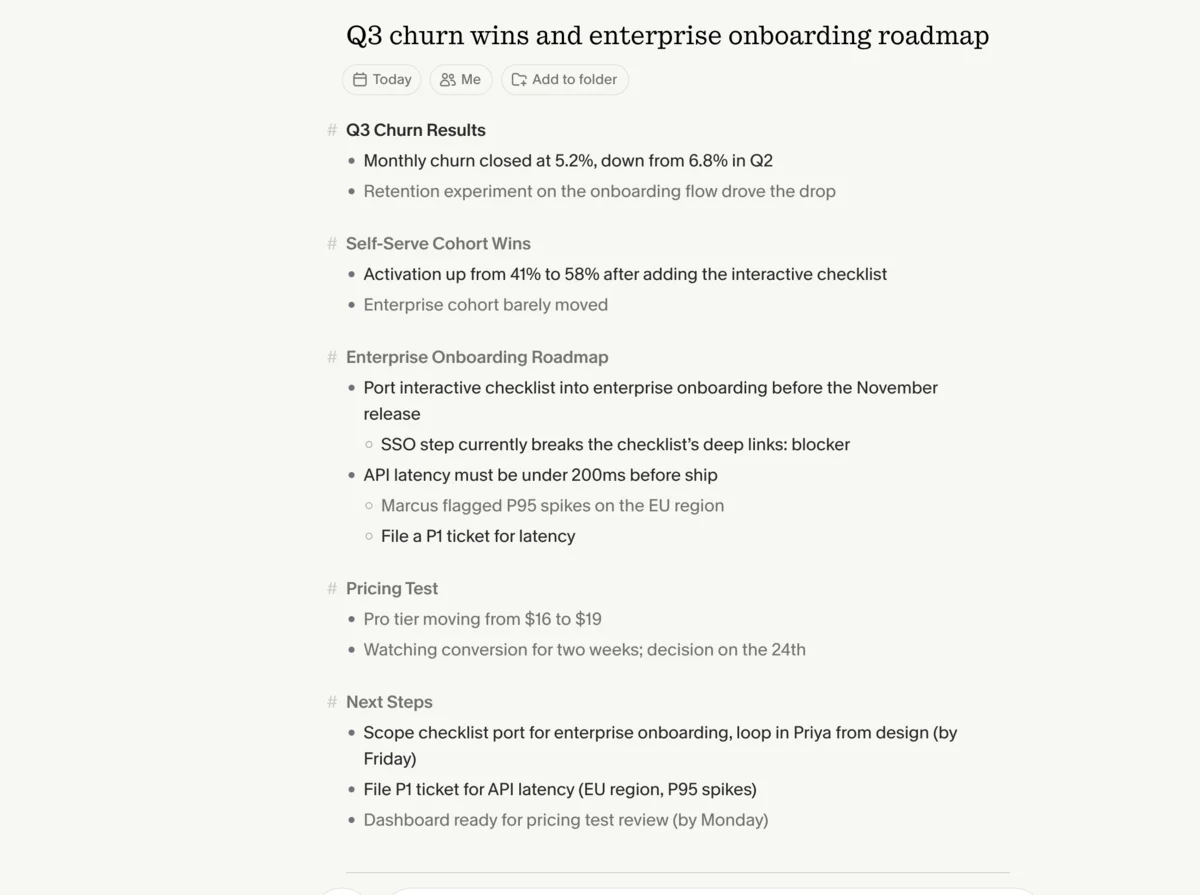
Day to day, Granola feels less like a recorder and more like a smarter notepad. You open a note, type whatever you would normally jot, and it sits quietly in the background until the call ends. The enhancement step is where it earns its keep: it reorganizes your fragments, fills the gaps from what it heard, and formats the result so you can paste it into an email or a Notion doc without cleanup. For anyone who already takes notes by hand, it removes the part you dislike without touching the part you trust.
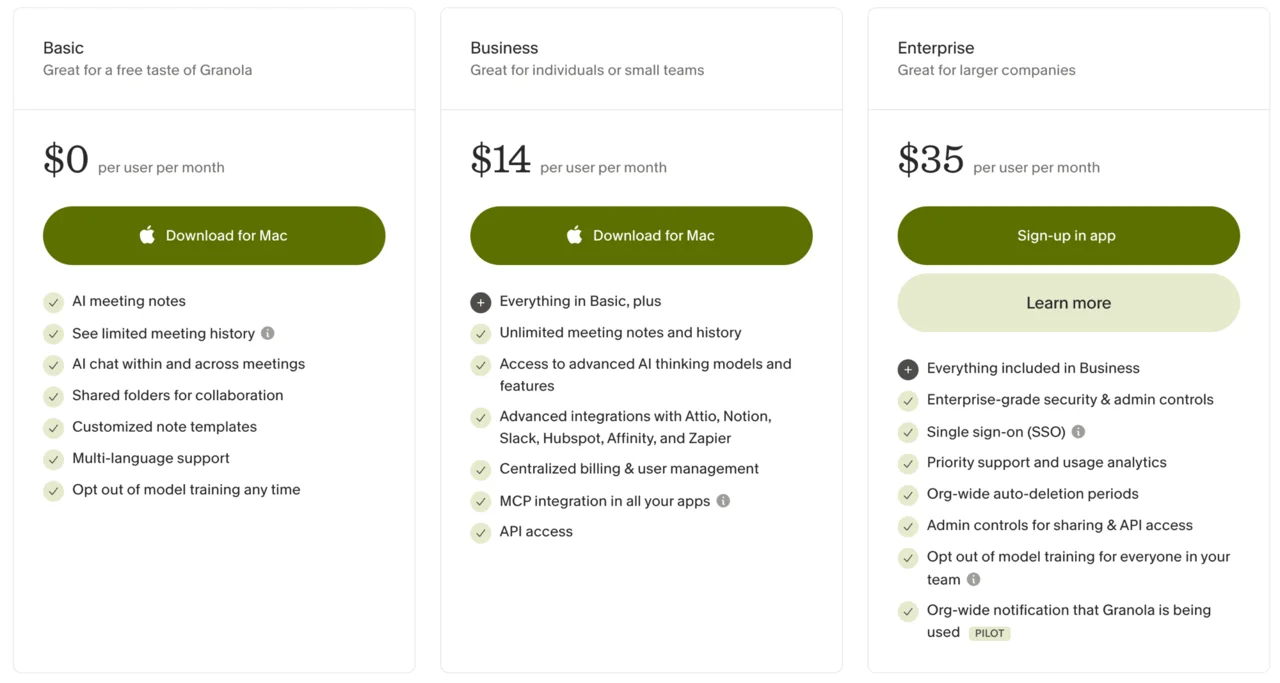
The trade-offs are real but narrow. The free Basic plan only shows limited meeting history, so you need the $14/user Business plan to keep a searchable archive. There is no Android or web app, export is thin, and because Granola deletes the audio after transcribing, there is no recording to re-watch. For a consultant, founder, or salesperson on back-to-back external calls, none of that outweighs the discretion and the note quality. Investors have backed the approach too, with Granola raising at a $1.5 billion valuation in 2026, though the product, not the funding, is the reason to use it.
On price, Granola keeps it simple. The Basic plan is free but only surfaces limited meeting history; Business at $14 a user adds unlimited history, integrations with Notion, Slack, HubSpot, and Zapier, API access, and the more advanced AI models. There is a 30-day Business trial, so you can put the full thing through a real month of meetings before deciding. The honest read for a solo user is that Granola becomes a $14 tool the moment you want your past calls to stay searchable.
Privacy is the other reason it suits client work. Granola only listens when you open a meeting, deletes the audio as soon as the transcript is written, and lets you opt out of model training. In a year when AI notetakers are drawing privacy lawsuits, a tool that stores no audio and joins no call is the easier one to clear with a cautious client or a security team.
Skip Granola if you need to record on a phone in person, you want to re-watch the audio of a call, or your team is split across Android and the web, none of which it supports.
Who it’s for: anyone whose meetings are client-facing or sensitive, who jots notes during calls, and who wants the quietest possible footprint. In practice that is consultants, agencies, recruiters, and founders, anyone whose calendar is mostly external calls where a visible recording bot would read as intrusive or unprofessional. We score it 4.6 out of 5.
Read the full Granola review for the hands-on detail, and the Granola pricing guide for the full cost breakdown. If going bot-free isn’t the trade you want to make, Granola alternatives covers the rest of the field.
2. Fathom — best free, and best for sales teams

Fathom wins two titles at once: the most generous free plan in the category, and the best fit for revenue teams. Its free tier is genuinely unlimited, recording, transcribing, and summarizing as many meetings as you want at $0, where Otter caps you at 300 minutes a month and Granola hides your history. For a lot of people, the free plan is the whole product.
It also produced the cleanest output in our test. Fathom’s Enhanced Summary broke the meeting into a purpose, key takeaways, topics, and next steps, with every number and name correct, and its action items came timestamped to the moment in the recording and assignable to a person. Its transcript was among the most accurate of the four we tested, level with Fireflies and a step ahead of Otter on the planted specifics. It is the highest-rated notetaker on G2, at a near-perfect 5.0 across more than 6,000 reviews as of mid-2026.
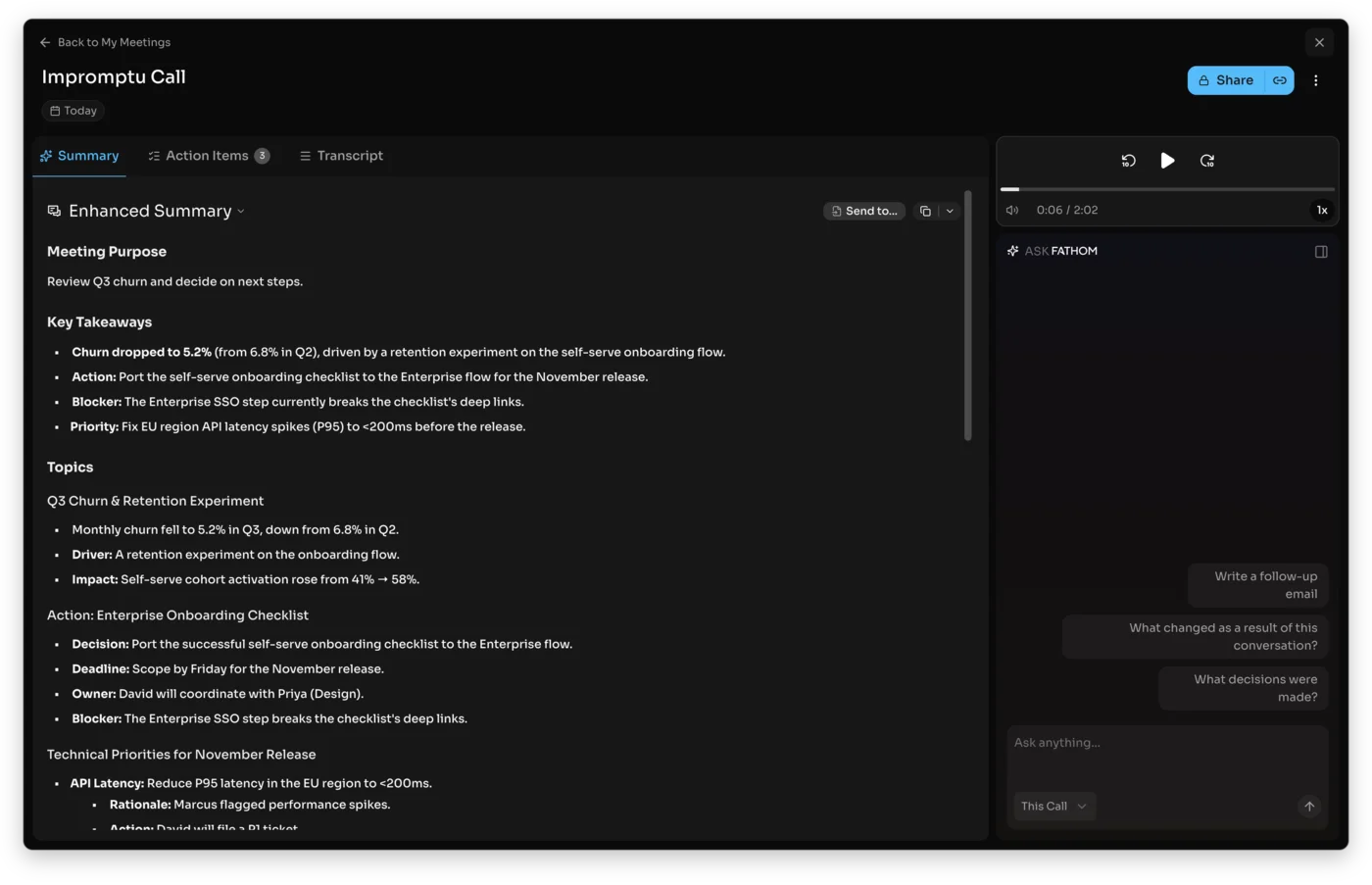
What stood out in daily use is how little Fathom asks of you. It joins, records, and by the time you are back at your desk the summary is waiting, broken into the sections you would have written yourself. Ask Fathom, its built-in assistant, then lets you query the call in plain language, like “what did they say about pricing?”, and jumps you to the exact moment in the recording. For a salesperson reviewing five calls a day, that retrieval is the feature that pays for the upgrade.
For sales teams, the killer feature is native CRM sync: it writes call notes and fields straight into HubSpot or Salesforce, with a Deal View and AI coaching scorecards on the Business plan. The catches: it joins by default as a meeting bot (a bot-free mode is in beta on Mac), the summaries lean formal, there is no mobile recording, and the AI assistant plus CRM sync are paid ($20 Premium, $34/user Business). Founded in 2020 by Richard White, the ex-UserVoice founder, and backed by Y Combinator and Zoom’s own fund, it now runs at hundreds of thousands of companies.
The pricing ladder is worth understanding, because the free plan is good enough to change the math. Free gives you unlimited recordings, transcripts, and summaries, with no monthly minute cap. Premium at $20 a month adds the Ask Fathom AI assistant, unlimited AI summaries in any format, and longer retention. Team at $19 a user and Business at $34 a user layer on CRM sync, shared folders, coaching analytics, and admin controls. For a solo user the free plan is usually enough; the paid tiers earn their keep when a whole team needs notes flowing into a shared system.
Skip Fathom if a visible recording bot is a dealbreaker on every call (its bot-free mode is still Mac-only beta), if you need to record from a phone in the room, or if you would rather a notetaker delete the audio than store a replayable video of the meeting.
Who it’s for: anyone who wants clean notes for free, plus any sales or customer-success team that needs notes in the CRM without manual entry. The unlimited free plan is the rare case where the generous tier is not a trap set to upsell you; plenty of solo users will run Fathom for years and never hit a wall that forces a payment. We score it 4.6 out of 5, tying Granola as a co-leader.
Read the full Fathom review for the hands-on detail, and the Fathom pricing guide for the full cost breakdown. Fathom vs Granola settles our top two head to head, and Fathom vs Fireflies is the one to read before a team rollout.
3. Fireflies.ai — best for teams
Fireflies is the one built for a whole team rather than a single notetaker, and it is the strongest pick once several people are generating calls every week. We ran the same test clip through it, and the transcript came back near-flawless: it held every churn figure, the 41% to 58% activation jump, and the $16-to-$19 pricing change, with one punctuation slip and zero dropped facts. It even kept the “Q3” detail Otter lost on the identical clip.
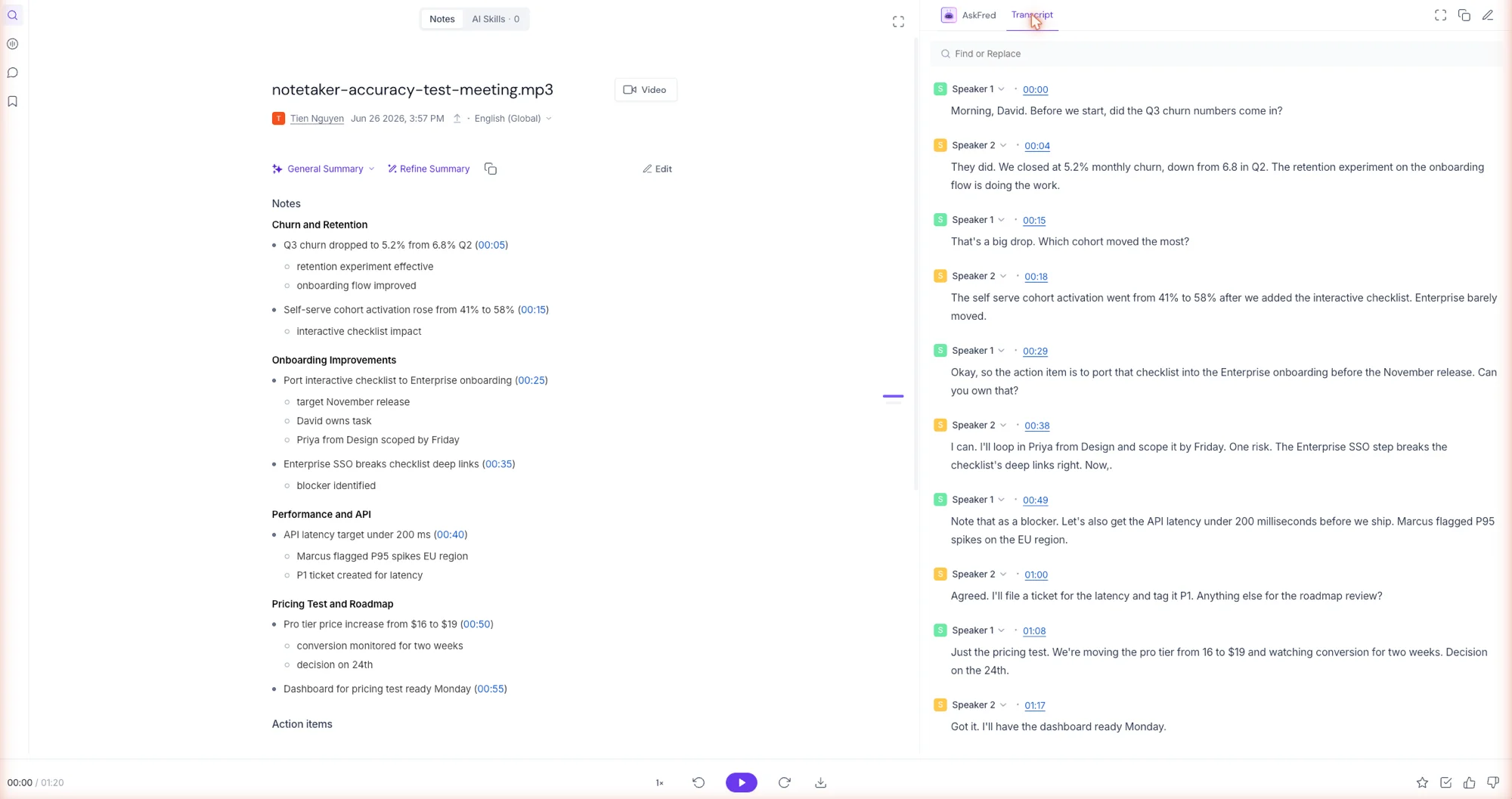
What sets it apart is everything around the transcript. AskFred, its assistant, runs on Claude and answers questions across your entire meeting history, not just one call. Conversation analytics turn months of calls into talk-time, sentiment, and topic trends. And the integration layer is the widest we found, auto-logging notes and action items into more than two dozen CRMs plus Slack and Notion. For a sales or success org, that plumbing is usually the whole reason to buy.
Day to day, capture is hands-off: connect your calendar and the notetaker auto-joins scheduled calls without you starting anything. Its data stance is one of the stronger ones here, too, stating it does not train AI on your meetings and runs a 0-day retention policy with its vendors. It holds a 4.7 out of 5 across 746 G2 reviews, the highest review-site score of the four, in G2’s conversation-intelligence category rather than the personal-notetaker one.
The catch is fit. The team machinery is dead weight for a solo user, it rides a visible bot by default with bot-free capture as the alternate path, and its AI features are metered by a monthly credit allowance. Pricing is per seat: a genuinely useful free tier (unlimited transcription, capped at 400 minutes of stored history), then $10 Pro, $19 Business where the analytics live, and $39 Enterprise.
Skip Fireflies if you are a team of one or two who just want clean notes: the analytics, user groups, and CRM sync are weight you would pay for without using, and Granola or Fathom does the core job with far less around it. Skip it too if a visible bot on external calls is a dealbreaker, since bot-free capture is the alternate path here, not the default.
Who it’s for: teams, not individuals. It is the pick once several people are generating calls every week and someone has to search across them, coach against them, or feed their outcomes into a pipeline: sales orgs, customer success teams, and recruiters who live in a CRM. A solo user gets more from Granola or Fathom, and less to learn. The 4.4 reflects a genuinely excellent team tool, held back only by how much of it a single person will never touch, plus the bot and the credit metering. We score it 4.4 out of 5.
Read the full Fireflies review for the hands-on test, the Fireflies pricing guide for every tier broken down, and Fireflies alternatives if the per-seat math doesn’t work for your team.
4. Otter.ai — best for live transcription and speaker labels

Otter is the most established name here, and it earns its place on two strengths the others de-emphasize: live, accurate transcription with speaker labels, and OtterPilot, which auto-joins your Zoom, Teams, and Meet calls straight from your calendar so the notes happen without you lifting a finger. In our test it separated the two speakers cleanly and its summary and action items were genuinely strong.
So why 3.8 and not higher? The marks against it are ones neither Granola nor Fathom carries. The free tier is stingy: 300 minutes a month, a 30-minute cap per conversation, and three lifetime imports. A 2025 class-action (Brewer v. Otter.ai) challenges how it records people, it trains on your data by default unless you opt out, and its Trustpilot sits at 3.0. It also drops the occasional specific, turning “Q3” into “Q” in our test.
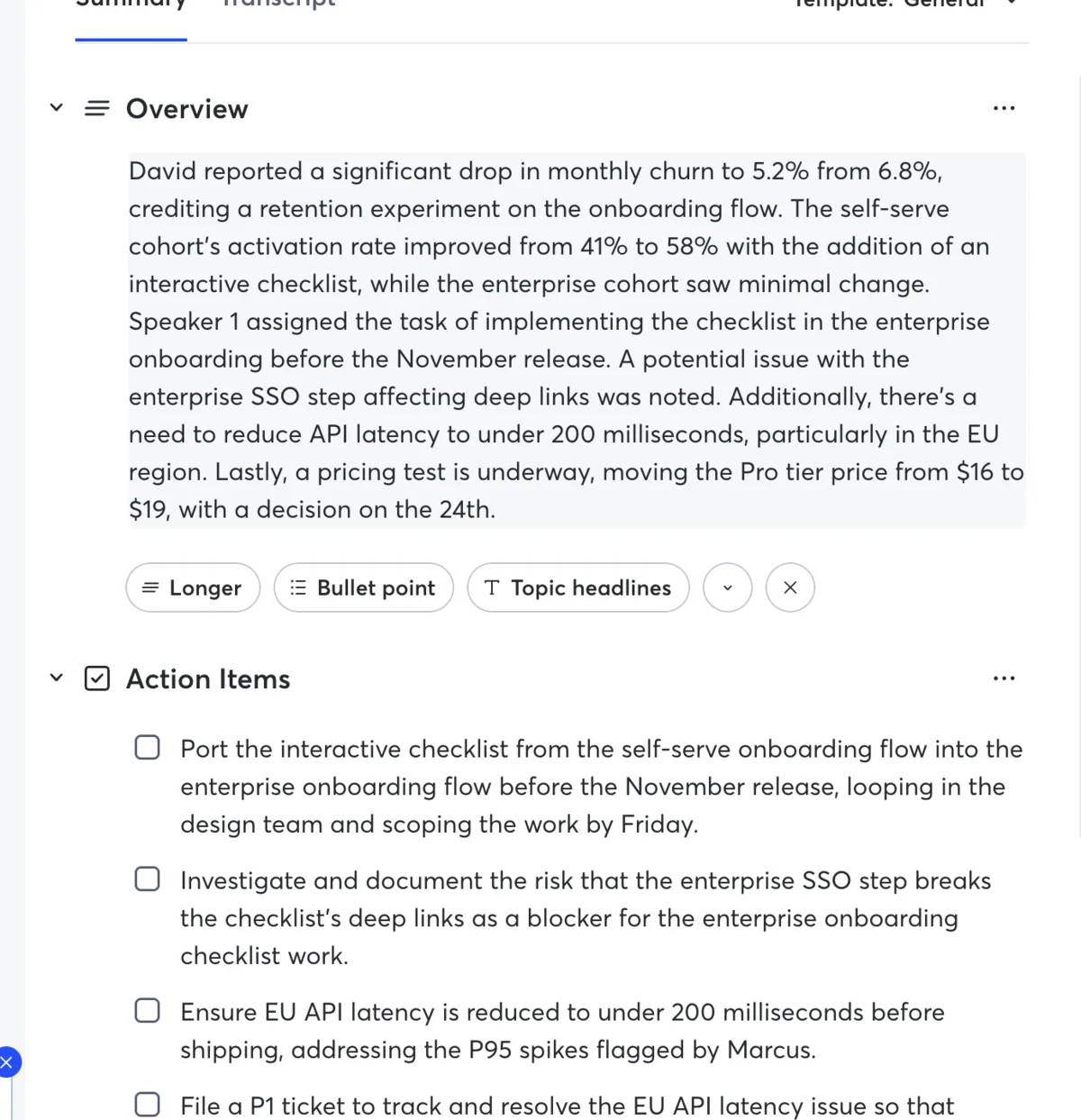
Otter’s real strength shows up live. Open the app during a call and the transcript scrolls in real time, speaker by speaker, which is genuinely useful for accessibility or for anyone who reads faster than they listen. Otter Chat then sits on top of your whole history, so you can ask a question across months of meetings, not just one. Its mobile app is the most capable of the four for recording in the room, a reminder that Otter was built for transcription first and meeting summaries second.
None of that makes Otter a bad tool. Its core AI is good, and for the specific job of a searchable, fully-labeled transcript of every word, with calendar auto-join, it is the pick. Just go in knowing the free plan is a trial, not a home, and turn off data training on your first login.
On price, Otter clears its free-tier limits at $16.99 a month for Pro (1,200 monthly minutes, 90-minute conversations, and more imports) and $30 a user for Business (unlimited minutes, admin controls, and usage analytics). Pro’s allowance is more generous than the free tier’s 300 minutes, but only the $30 Business plan lifts the minute cap entirely, where Fathom’s free plan has no cap at all. That gap is a big part of why Otter sits a tier below the other three despite a genuinely capable AI.
It remains one of the most recognizable names in the category, with a long track record and a mature mobile app, so it is not a risky choice, just a more limited free one.
Skip Otter if the free tier’s 300 monthly minutes and three lifetime imports will not cover your week, if you want video playback rather than a text transcript, or if the 2025 consent litigation and the default opt-in to data training give your security team pause.
Who it’s for: people who need reliable speaker labels, a complete transcript archive, and hands-off calendar auto-join, and who will pay $16.99 a month to clear the free-tier limits. The 3.8 is not a knock on the technology, which is mature and accurate; it reflects the consent lawsuit, the 3.0 Trustpilot, and a free tier built as a trial rather than a home. If none of those bother you, Otter is a stronger pick than its score alone suggests. We score it 3.8 out of 5.
Read the full Otter review for the hands-on detail, and the Otter pricing guide for every tier broken down. If the stingy free tier is the dealbreaker, Otter alternatives covers where to go instead — or read it against the others directly in Otter vs Fathom, Otter vs Granola, and Otter vs Fireflies.
Other notetakers worth knowing
We focused on the four we tested end to end, but the category is crowded, and a few other names come up often enough to place on the map so you know where they fit:
- Jamie is another bot-free option aimed at privacy and in-person use, in the same spirit as Granola, with paid plans in the mid-€20s a month. It is a reasonable Granola alternative if you are in Europe or want a German-built tool with a strong privacy posture.
- tl;dv leans on a generous free tier with unlimited recordings across Zoom, Meet, and Teams, plus solid clip-and-share features for sharing meeting moments. It is worth a look if Fathom’s free plan ever tightens, or if you share meeting highlights with a wider team.
- Avoma and Read.ai sit at the analytics-heavy end: meeting scoring, talk-time ratios, and pipeline insights aimed at sales and customer-success leaders. They are more than most individuals need, but a revenue team weighing Fathom’s Business plan should price them too.
- NotebookLM and Notion AI are not meeting notetakers at all; they are for research and for notes that already live in your workspace. Reach for them when the job is synthesizing documents, not capturing a live call.
- Hardware recorders like Plaud cover the case none of the software tools do well: an in-person conversation with no laptop on the table. They clip to a phone, record locally, and transcribe afterward, which is the right shape for field sales or hallway chats.
| Tool | Best for | Bot? | Paid from |
|---|---|---|---|
| Jamie | Bot-free, EU and privacy | No | ~€25/mo |
| tl;dv | Unlimited free + clip sharing | Yes | Free / paid |
| Avoma, Read.ai | Sales scoring + analytics | Yes | Varies |
| Plaud | In-person, no laptop | Hardware | Device + sub |
We are not adding any of these to our recommended picks, because for the jobs most readers have, the four we tested end to end — Granola, Fathom, Fireflies, and Otter — cover them better. But a pillar should show you the whole field, and that is the field.
How to pick in 30 seconds
The honest decision tree is short:
| Your situation | The pick |
|---|---|
| Client or sensitive calls where a bot would be awkward | Granola |
| Best free plan, video replay, or a sales team | Fathom |
| Speaker labels, calendar auto-join, and a full searchable transcript | Otter |
| A large team searching hundreds of calls and living in a CRM | Fireflies |
| Recording in person, away from a laptop | A phone or hardware recorder, or Otter’s mobile app |
Working mostly in one platform? We have dedicated picks for the best AI notetaker for Zoom, Microsoft Teams, and Google Meet.
Team size tilts the call too. Solo or a handful of people, and Granola or Fathom on a free or single-seat plan is plenty. A growing sales org that needs every rep’s calls flowing into one CRM view leans Fathom Business or Fireflies. A larger company with a security review to clear will find Granola’s no-audio, no-bot model the easiest to get signed off, which is worth as much as any feature when procurement is involved.
If you are still unsure, the lowest-risk move is to start on a free plan. Fathom’s costs nothing and caps nothing, so you can run a real week of meetings through it before you spend a cent, then switch to Granola if your calls turn out to be the kind where a bot does not belong.
A word on paying. The free plans here are good enough that a lot of people never need to upgrade, and that is fine. You start paying when one of three things becomes true: you want your full meeting history searchable forever (Granola Business, Otter Pro), you want an AI assistant you can ask questions of after the call (Fathom Premium, Otter Pro), or your team needs notes flowing into a shared CRM automatically (Fathom Business, Fireflies). If none of those is true for you yet, stay free and revisit when it is.
Final word
The “best AI note taker” question has a satisfying answer once you stop looking for a single winner. For most people the choice is Granola or Fathom, and it comes down to one question: are your meetings the kind where a recording bot would feel intrusive? If yes, Granola’s bot-free, note-enhancing approach is worth the small price. If not, Fathom’s unlimited free plan is the easiest place in the category to start, and it scales into a real sales tool when you need it. The moment a whole team needs every call searchable, measured, and synced to a CRM, Fireflies is the call. And Otter is the specialist for speaker labels and a full archive.
If testing all four changed one thing in how we would shop for a notetaker, it is this: transcription accuracy barely separated them. All four got the gist of our meeting; the real differences were in what each one did next. Whether a bot announced itself on the call, whether the summary was something you would actually send, and where the notes ended up mattered far more than any word-error rate. So do not choose on a quoted accuracy number. Choose on the workflow: the bot question, the free-tier reality, and whether the notes land where your work already lives.
Start with whichever fits your week, and read the Granola, Fathom, Fireflies, and Otter reviews for the detail behind each verdict.
Frequently asked questions
What is the best AI note taker?
For most people it is a tie between Granola and Fathom, both of which we scored 4.6 out of 5, and the right one depends on the job. We ran the same 80-second, two-speaker test meeting through all four tools to compare them fairly.
Granola is the best for discreet client calls because it is bot-free, with nothing joining the call, and it turns the rough notes you jot into a full summary; in our test it surfaced details we never typed. Fathom is the best free option and the best for sales teams, with a genuinely unlimited free plan, video recording, and native CRM sync, and it produced one of the cleanest summaries and most accurate transcripts of the four.
Fireflies, at 4.4, is the best for a whole team, adding AI search, conversation analytics, and CRM sync across every call, though it is overkill for one person. Otter, at 3.8, is the pick if you specifically need speaker labels and a full searchable archive, though its free tier is far more limited.
What is the best free AI note taker?
Fathom. Its free plan records, transcribes, and summarizes unlimited meetings at $0 with no monthly minute cap, which is more generous than any rival we tested. In our hands-on test its free output was also the strongest, breaking the meeting into a clean summary with timestamped, assignable action items, and its transcript kept the exact numbers and names other tools dropped.
Granola, Fireflies, and Otter all have free tiers too, but they come with catches: Granola's free Basic plan hides your older meeting history, Fireflies gives unlimited transcription but stores only 400 minutes for the whole team and meters its AI features with credits, and Otter's free tier caps you at 300 minutes a month with a 30-minute limit per conversation and just three lifetime imports.
None is a place you can live for free the way Fathom's uncapped plan is, which is why Fathom is the one we recommend starting on at no cost.
What is the best AI note taker without a bot joining the call?
Granola is the bot-free pick by design — it captures your device audio so nothing appears in the participant list, which is ideal for client and sales calls. Fathom now offers a bot-free capture mode too (in beta on Mac, on its paid plan), so it is a strong second option if you want bot-free plus video.
Which AI note taker is best for Microsoft Teams or Zoom?
All of them connect to Zoom, Microsoft Teams, and Google Meet. Otter, Fathom, and Fireflies can auto-join calls as a notetaker; Granola is bot-free by design, and Fathom and Fireflies also offer a bot-free capture mode that records without a visible participant. If a visible bot in a Teams or Zoom call is a problem at your company, choose the bot-free route.
Can ChatGPT take notes during a meeting?
Sort of. ChatGPT's record mode can transcribe and summarize an audio recording you make, but it does not join your calls, auto-detect meetings, label speakers, or sync to a calendar the way a dedicated notetaker does. For one-off recordings it works; for a real meeting workflow, a purpose-built tool like the ones here is far better.
What is the best AI note taker for in-person meetings?
For in-person conversations a phone or a dedicated recorder works better than a meeting-bot tool. Otter has a strong mobile app for recording in the room, and standalone hardware recorders capture audio without a laptop. Granola and Fathom are built for calls on a computer, so they are a weaker fit for hallway or field conversations.
Keep reading
Fathom AI alternatives: 5 tested, and the bot-free pick
We tested the top Fathom alternatives. Leaving over the bot? Granola is our bot-free pick (4.6/5). Need in-person recording or a free plan? Here's the fix.
Granola vs Fireflies: quiet notepad or team brain?
Granola vs Fireflies: Granola is the bot-free notepad for client calls, Fireflies the bot-based team brain for search and CRM. Which one fits your meetings?
Granola pricing: the AI notetaker's free-plan catch
Granola pricing, for the AI notetaker, runs free or $14 a user. Its free plan hides your older notes, and that limited history is the catch that makes you pay.
Granola AI review: it took better notes than I did
I fed Granola six rough bullets and a messy call; it returned a clean summary with details I never typed. Why this bot-free notepad earns its hype.