
Fireflies pricing: what the credits and caps really cost
Fireflies pricing runs $0 to $39 a seat, but the free plan's real limit is storage, not minutes, and the AI is metered by credits. Here's the actual math.
Contents
The short answer: what Fireflies actually costs
Most people pay one of two prices. A solo user or small team stays on the free plan or pays $10 a seat a month for Pro; a team that wants analytics and CRM sync pays $19 a seat for Business, and regulated teams pay $39 for Enterprise. The prices are per seat and billed annually, and paying monthly costs roughly 40% more. The product itself earns a strong verdict in our hands-on Fireflies review; this guide is only about the money.
The number that trips people up is not on the price page. Fireflies markets “unlimited transcription,” and that is true on every tier, but the free plan stores only 400 minutes for the whole team, and the AI features are metered by a separate credit allowance. So the real question is not how many minutes you get; it is how much you keep and how much AI reasoning you run.
| Plan | Annual (per seat) | Monthly | Storage | AI credits |
|---|---|---|---|---|
| Free | $0 | $0 | 400 min/team | 20 |
| Pro | $10 | $18 | 8,000 min/seat | 20 |
| Business | $19 | $29 | Unlimited | 30 |
| Enterprise | $39 | annual only | Unlimited | 50 |
How Fireflies pricing works: two meters, not one
Most notetakers meter one thing. Otter caps your transcription minutes; Fathom caps nothing on its free plan. Fireflies is different, and the difference is the whole reason Fireflies AI pricing confuses people: it runs two meters, and neither is the transcription itself.
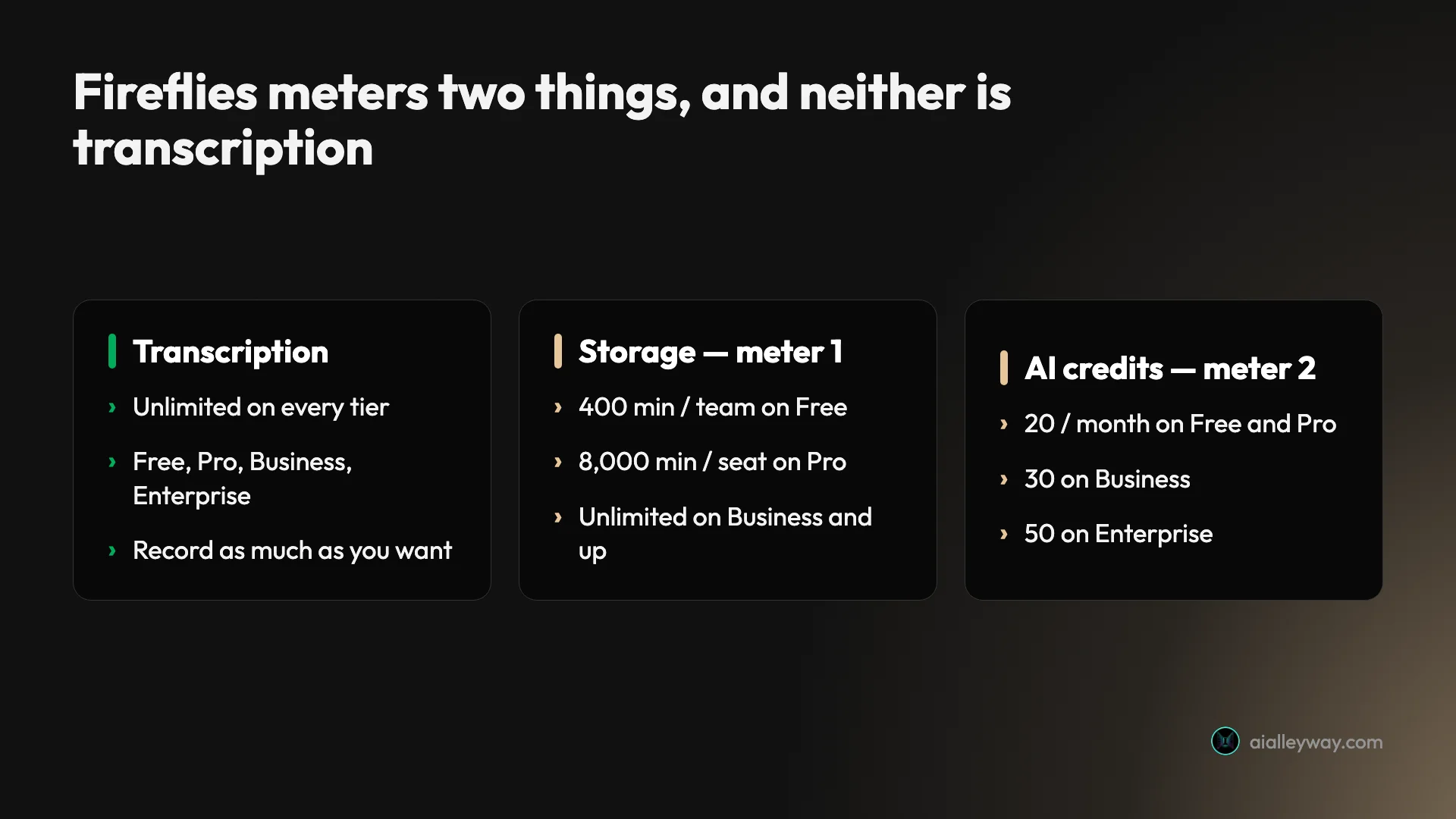
The first meter is storage. Transcription is unlimited on every plan, including Free, so you can record as many meetings as you want. What you cannot do on the cheaper plans is keep them all. Free stores 400 minutes for the entire team, Pro lifts that to 8,000 minutes per seat, and only Business and Enterprise give you unlimited storage. Cross the cap and your oldest meetings age out of reach until you upgrade.
The second meter is AI credits. Every plan includes a monthly allowance, from 20 on Free and Pro up to 50 on Enterprise, and the AI features draw on it. Asking AskFred, the AI assistant, a question about your meeting history spends credits; so do AI Skills and some summaries. Transcription does not, which is why you can transcribe unlimited meetings on a free plan that still rations the intelligence on top of them.
Here is the whole pricing model on one screen. Transcription never changes; the two columns that move are storage and credits.
| What’s metered | Free | Pro | Business | Enterprise |
|---|---|---|---|---|
| Transcription | Unlimited | Unlimited | Unlimited | Unlimited |
| Stored history | 400 min / team | 8,000 min / seat | Unlimited | Unlimited |
| AI credits / month | 20 | 20 | 30 | 50 |
| Video capture | No | Yes | Yes | Yes |
Once you hold those two meters in your head, the plans sort themselves. You are not buying minutes. You are buying how much history you keep, how much AI you run over it, and, on the higher tiers, the team features that turn a pile of transcripts into something a manager can search and measure.
How much does each Fireflies plan cost?
Here is every plan, priced per seat and billed annually, verified on the in-app plan page in June 2026. The “AI credits” column is the monthly allowance; the last column is the line that actually decides the tier.
| Plan | Annual / seat | Monthly | Storage | AI credits | The line that matters |
|---|---|---|---|---|---|
| Free | $0 | $0 | 400 min/team | 20 | Unlimited transcription, AskFred, and API, but no video and no downloads |
| Pro | $10 | $18 | 8,000 min/seat | 20 | Video capture, downloads, action items, AI Skills, unlimited integrations |
| Business | $19 | $29 | Unlimited | 30 | Conversation intelligence and team analytics, the reason teams buy |
| Enterprise | $39 | annual only | Unlimited | 50 | SSO and SCIM, HIPAA, private storage, audit logs, custom retention |
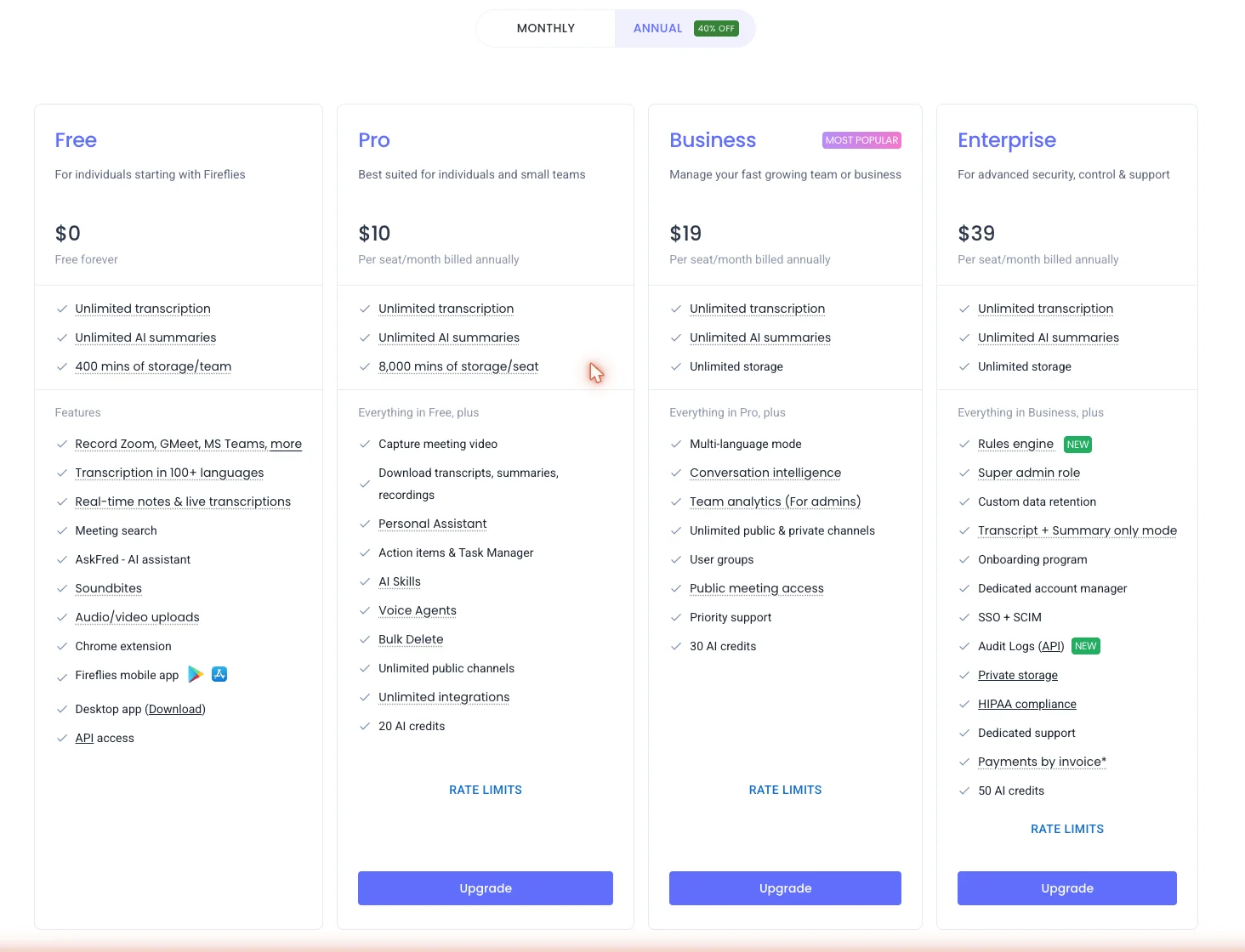
Free is a genuine working tier, not a teaser. At $0 you get unlimited transcription, unlimited AI summaries, the AskFred assistant, audio and video uploads, transcription in 100-plus languages, real-time notes, a Chrome extension, mobile and desktop apps, and API access. What you give up is video capture, the ability to download your transcripts and recordings, and storage past 400 minutes for the team.
Pro at $10 a seat is the individual and small-team plan. It adds the things the free plan holds back: video capture, downloads of transcripts and recordings, an action-item and task manager, AI Skills, voice agents, bulk delete, and unlimited integrations. It also lifts storage to 8,000 minutes a seat, which is roughly 130 hours of kept history.
Business at $19 a seat is the one most teams actually want, because it is the first plan with conversation intelligence and team analytics. That is the talk-time reporting, the topic trends, and the cross-team search a manager pays for, plus unlimited storage, multi-language mode, user groups, and priority support. The jump from Pro is not about capacity; it is about the team brain switching on.
Enterprise at $39 a seat is the security and control tier, and it is annual-only. It adds SSO and SCIM, HIPAA compliance, private storage, audit logs, a rules engine, custom data retention, and a dedicated account manager. If a compliance review stands between you and a notetaker, this is the plan that clears it.
What does a Fireflies AI credit buy?
The AI-credit allowance is the part of Fireflies pricing people understand least, so it is worth being precise. Credits are not transcription, and they are not minutes. They are a monthly budget for the AI reasoning that sits on top of your meetings, and the allowance is small at the bottom of the range: 20 on Free and Pro, 30 on Business, and 50 on Enterprise.
What draws on that budget is the smart stuff. Asking AskFred, the AI assistant, a question about your meeting history spends credits. So do the AI Skills that run a repeatable prompt across a transcript, and the richer AI summaries. Plain transcription and the basic recap do not, which is the source of the confusion: you can transcribe unlimited meetings on a plan that still meters how much you can interrogate them.
In practice, a single AskFred query that runs a multi-step search across dozens of past meetings is not a cheap one-credit lookup; it is the kind of request that takes a real bite out of a 20-credit month. If your team leans on the assistant daily, the credit ceiling, not the transcription, is the limit you will hit first, and it is the reason the jump from Pro’s 20 credits to Business’s 30 is sometimes about the AI rather than the storage. Budget for how much you will ask, not just how much you will record.
What happens when you hit the Fireflies storage cap?
“Unlimited transcription” and “400 minutes of storage” sound contradictory until you separate the two. You can record as many meetings as you like; the cap is on how many you keep. On the free plan, that is 400 minutes for the whole team, which is under seven hours of total stored history. Pro lifts it to 8,000 minutes per seat, roughly 130 hours, and only Business and Enterprise make storage genuinely unlimited.
Once you reach the cap, new recordings stop being retained until you make room or upgrade. Put numbers on it: at three one-hour meetings a week, a team generates 180 minutes of recordings every week and fills the 400-minute free cap in under three weeks, so a free-plan team that records regularly will run into it inside a month. The practical effect is that the free tier is excellent for trialling the product and for light, recent use, but it is not a place to build a permanent, searchable archive, which is the exact thing teams want a notetaker for.
This is the single most common surprise in Fireflies pricing, and it is why the storage column matters more than the price column when you choose a plan. If your reason for buying a notetaker is to keep every call searchable forever, you are really shopping for the unlimited-storage tier, which means Business at $19 a seat, not Pro.
How much does Fireflies cost for a team?
The per-seat sticker is only half the story. Multiply it by your team size and the real number shows up, and that is where Fireflies either looks cheap or looks like overkill.
| Team size | Pro ($10/seat) | Business ($19/seat) | Business, paid monthly ($29/seat) |
|---|---|---|---|
| 1 seat | $10/mo · $120/yr | $19/mo · $228/yr | $29/mo |
| 5 seats | $50/mo · $600/yr | $95/mo · $1,140/yr | $145/mo |
| 10 seats | $100/mo · $1,200/yr | $190/mo · $2,280/yr | $290/mo |
| 25 seats | $250/mo · $3,000/yr | $475/mo · $5,700/yr | $725/mo |
For one person, the honest answer is often $0. The free plan transcribes unlimited meetings, runs AskFred, and even exposes the API, so a solo user who does not need video or downloads can live on it until the 400-minute storage cap forces a decision. Step up to Pro at $10 a month and you get video, downloads, and your own task manager, which is the realistic floor for an individual who wants the full notetaker.
For a five-person sales team that wants unlimited storage, analytics, and CRM sync, Business at $19 a seat runs about $95 a month, or roughly $1,140 a year. That is the number worth sitting with, because the same five seats on Otter’s $30 Business tier cost about $150 a month, and Otter gives you fewer of the team features in the first place. Fireflies’ pricing is built around seat count, and at team scale it undercuts the rivals while bundling the search and analytics a team is buying a notetaker for.
For a heavy AskFred user, the meter that decides the tier is credits, not dollars. The 20-credit allowance on Free and Pro is the constraint that bites first, as the credit math above lays out, so a team leaning on the assistant every day climbs to Business’s 30 credits for the AI headroom rather than for the storage or the seat price. It is the one case where the upgrade is about the intelligence, not the capacity.
How much do you save with Fireflies annual billing?
One number is doing a lot of work in the tables above: the prices shown are the annual rate, and paying month to month costs noticeably more. Pro jumps from $10 to $18 a seat, and Business from $19 to $29, so the annual commitment is close to a 40% discount. Fireflies markets it as “up to 44% off,” which checks out at the Pro tier and lands nearer a third off on Business.
For a team sizing a budget, that monthly-versus-annual gap stacks on top of the per-seat cost, and it is worth planning around rather than discovering on the second invoice. A ten-seat Business team pays $190 a month on the annual plan against $290 month to month, a $1,200-a-year difference for the same product. If you are confident the tool fits, the annual rate is the only discount that matters.
The flip side is that per-seat pricing scales in both directions. Adding people is linear, so a tool that costs $19 a seat is cheap for five people and a real line item for fifty. Fireflies does not have volume pricing published below Enterprise, so model the seat count you will actually have in a year, not the one you start with.
It helps to anchor the saving in a real number.
| Business seats | Annual plan / year | Monthly plan / year | Annual saves |
|---|---|---|---|
| 5 | $1,140 | $1,740 | $600 |
| 10 | $2,280 | $3,480 | $1,200 |
| 20 | $4,560 | $6,960 | $2,400 |
A five-seat Business team pays $1,140 a year on the annual plan; the same five seats at the $29 monthly rate run $1,740, so the annual commitment saves $600 a year on a single five-person team. Scale that to twenty seats and the gap is $2,400 a year for the identical product. The headline seat price is only the start, and the structure around it, annual versus monthly and the seat count you grow into, moves the bill more than the sticker does.
What Fireflies’ pricing page doesn’t tell you
The marketing is mostly honest, but a few things are easy to misread until they cost you.
| The free plan includes | The free plan excludes |
|---|---|
| Unlimited transcription and AI summaries | Video capture |
| AskFred assistant, 100-plus languages | Downloads of transcripts and recordings |
| Audio and video uploads, API access | Storage past 400 minutes for the team |
| Chrome extension, mobile and desktop apps | Conversation intelligence and team analytics |
”Unlimited transcription” is capped by storage
This is the big one. The pricing page leads with unlimited transcription, and it is true, but the free plan keeps only 400 minutes of recordings for the whole team, and Pro keeps 8,000 minutes a seat. You are not limited on how much you record; you are limited on how much you keep, and only Business and above are genuinely unlimited.
The AI is metered separately
Transcription being unlimited does not make the intelligence unlimited. AskFred, AI Skills, and some summaries draw on a monthly credit allowance that starts at just 20 on the free and Pro plans. Lean on the assistant and you will hit that ceiling well before you hit any transcription limit.
The analytics you are probably picturing are Business-only
Conversation intelligence and team analytics, the talk-time and topic reporting that make Fireflies a “meeting intelligence” tool rather than a notetaker, do not appear until the $19 Business plan. If you sign up for Pro expecting the dashboards, they are one tier up.
HIPAA and the real security controls are Enterprise-only
SSO, SCIM, private storage, audit logs, and HIPAA compliance all sit behind the $39 Enterprise plan. The underlying data stance is strong across every tier, with no AI training on your data and a 0-day vendor-retention policy, both stated in Fireflies’ security documentation, but if you need the compliance certifications specifically, budget for the top plan.
Enterprise has no monthly option
Pro and Business can be paid month to month at the higher rate, but Enterprise is annual-only, so the most expensive plan is also the one that asks for the biggest up-front commitment.
There is no published volume discount below Enterprise
Pro and Business cost the same per seat whether you buy two seats or two hundred, so a growing team does not get cheaper as it scales the way some software does; the per-seat price only bends on the custom Enterprise plan, where it actually rises to $39 for the security and compliance layer. If you are sizing a large rollout, that flat per-seat math is worth modelling before you commit, because the bill grows in a straight line with headcount.
Is Fireflies worth paying for?
For the right buyer, yes, and the price is rarely the reason to hesitate. At $19 a seat, Business is cheaper than Otter’s $30 team tier while including the conversation analytics and CRM sync a team is actually buying, and Fireflies holds a 4.7 out of 5 across 746 G2 reviews as of June 2026, so the market broadly agrees the product delivers. We rate the tool itself 4.4 out of 5 in our hands-on review, and on a controlled test it transcribed near-flawlessly, which is the foundation everything else is priced on top of.
The question is fit, not value. The free and Pro plans are easy to justify for an individual, but the Business price only pays off once you have a team generating enough calls that search, analytics, and automatic CRM logging save real time. A solo user paying for Business is buying machinery they will not switch on, which is why the honest answer for one person is usually Free or Pro, not the headline team tier.
So the worth-it test is simple: count the seats and the calls. If several people are recording every week and someone needs to search or measure across all of it, Business at $19 is a bargain for what it replaces. If it is just you and a handful of meetings, the value is in the free plan, and paying more is optional.
| Your situation | The call |
|---|---|
| A team that records weekly and needs search, analytics, or CRM sync | Worth it: Business at $19/seat |
| You want a permanent, searchable archive of every call | Worth it: you need unlimited storage (Business) |
| You lean on AskFred and AI Skills daily | Worth it: mainly for the higher credit allowance |
| A solo user with light, recent meetings | Stay free: paying adds little |
For the full breakdown of what the product does at each tier, our hands-on Fireflies review scores it feature by feature.
How does Fireflies billing work?
A few billing mechanics shape the real cost beyond the per-seat sticker. The discounted prices in every table here are the annual rate, so committing to a year is what earns the roughly 40% saving; the month-to-month option exists on Pro and Business but costs the higher $18 and $29 a seat, and Enterprise has no monthly option at all.
New accounts start on a free trial of the Business plan, which switches on the paid features, including conversation intelligence and the larger AI-credit allowance, for a limited window before the account reverts to the free tier. That is the fastest way to judge whether the team-scale features earn the $19 a seat, and the free plan keeps running at $0 once the trial ends, just without them.
Two things are worth confirming on the billing page before you commit. Because pricing is per seat, your bill scales linearly as you add people, so model the seat count you will have in a year, not the one you start with. And because storage is tier-gated, downgrading from an unlimited-storage plan back to Pro or Free re-applies the lower cap, so check what you would lose access to before stepping down a tier.
Which Fireflies plan should you pay for?
- You are one person who just wants clean notes. Stay on Free. Unlimited transcription, AskFred, and the apps cover most solo use; only move to Pro at $10 when you need video, downloads, or your own task manager, or when the 400-minute storage cap starts deleting meetings you wanted to keep.
- You are a small team that records constantly. Pro at $10 a seat. The 8,000-minute-per-seat storage is the real upgrade here, alongside downloads and unlimited integrations, and it keeps you under the Business price until you actually need the analytics.
- You run a sales or success team that lives in a CRM. Business at $19 a seat. This is the plan that turns on conversation intelligence, team analytics, and unlimited storage, which is the entire reason a team buys Fireflies over a personal notetaker.
- You have a compliance review to clear. Enterprise at $39 a seat. SSO, HIPAA, private storage, and audit logs are non-negotiable for regulated teams, and they live only here.
- Skip paying entirely if your meetings fit inside 400 minutes of stored history a month and you do not need video or downloads. The free plan genuinely covers that case, and there is no reason to upgrade until a limit forces it.
How Fireflies’ price compares to Otter, Fathom, and Granola
Fireflies does not price like its rivals, so a straight sticker comparison misses the point. Here is how the four line up on the numbers that decide a switch, with competitor prices current as of June 2026.
| Tool | Free plan | Paid from | Team tier | Best price for |
|---|---|---|---|---|
| Fireflies | Unlimited transcription, 400-min storage | $10/seat | $19/seat (analytics + CRM) | A whole team |
| Otter | 300 min/mo, 30-min cap | $16.99/mo | $30/seat | A solo transcriber |
| Fathom | Unlimited, no cap | $20/mo | $19–34/seat | Free use |
| Granola | Limited free history | $14/seat | $14/seat | Bot-free client calls |
The reason a sticker comparison misleads is that each tool meters a different thing. Otter prices on transcription minutes, capping the free plan at 300 a month and reserving unlimited transcription for its $30 Business tier, so it is the model most likely to stop you mid-month. Fathom prices on almost nothing, leaving its free plan genuinely uncapped and charging only for the AI assistant and team machinery, which is why it is the cheapest entry point.
Granola prices flat at $14 a seat with no team tier at all, because it is built for the individual rather than the org. Fireflies is the only one of the four that meters storage and AI credits separately, which is what makes its pricing feel complicated even though the seat price is lower.
For a team, that lands in Fireflies’ favor: $19 a seat undercuts Otter’s $30 Business tier substantially while bundling the search and analytics a team is paying for, and a five-seat team saves about $55 a month over Otter.
For a solo user on a budget, Fathom is the one to beat, because its free plan is genuinely uncapped where Fireflies’ is storage-limited, so cost-driven individuals often start there. And if a bot in the room is the dealbreaker, Granola’s $14 plan is the bot-free pick, cheaper than Fireflies Business and far lighter. Our Otter pricing guide and Fathom pricing guide break down those two in the same detail, and the best AI note taker roundup scores all four head to head.
If Fireflies costs too much: cheaper options
If the per-seat math does not work, two notetakers solve the same job for less, depending on which part of Fireflies you were paying for.
- Fathom is the move if the free plan is what matters. Its free tier is genuinely unlimited with no storage cap and no AI credits to ration, and it records replayable video, which makes it the cheapest way to get a capable notetaker for an individual or small team. See our Fathom review.
- Granola is the move if you mostly want clean notes from client calls without a bot or a team platform around them. At $14 a seat it is cheaper than Fireflies Business and far lighter, though it drops the team-wide search and analytics. See our Granola review.
For the full field, our Fireflies alternatives shortlist ranks every swap, and the best AI note taker roundup runs each through the same test meeting.
Final word
Fireflies pricing is simple once you stop reading it as a minutes plan. Transcription is unlimited everywhere; what you actually pay for is how much history you keep and how much AI you run over it. A solo user can live on Free, a small team that records constantly wants Pro at $10, and a sales or success org that needs search, analytics, and CRM sync lands on Business at $19, which is still cheaper per seat than Otter for more team features.
Read the two meters, model the seat count you will have in a year, and commit annually if the fit is clear. If you want the full picture of what those plans actually deliver, our hands-on Fireflies review scores the product itself. Otherwise, start on the free plan, which does real work, and let your own storage cap tell you when it is time to pay.
Frequently asked questions
How much does Fireflies cost?
Fireflies has four tiers, priced per seat and billed annually: Free at $0, Pro at $10 a seat a month, Business at $19 a seat, and Enterprise at $39 a seat. Paying month to month costs more, around $18 for Pro and $29 for Business, so the annual commitment is roughly a 40% discount.
Most individuals stay on Free or Pro, while teams that want conversation analytics and CRM sync land on Business at $19; a five-seat team there pays about $95 a month, or $1,140 a year. Enterprise at $39 adds SSO, HIPAA, and private storage for regulated teams.
The free plan is unusually capable, with unlimited transcription, the AskFred assistant, and API access, but it stores only 400 minutes for the whole team, so heavy users upgrade for the storage and the AI-credit headroom rather than for the transcription itself.
Is Fireflies free?
Yes, and the free plan does real work. It gives unlimited transcription, unlimited AI summaries, the AskFred assistant, audio and video uploads, transcription in 100-plus languages, a Chrome extension, mobile and desktop apps, and even API access, which is more than most rivals put at $0.
The real limits are storage and AI credits: the free tier keeps only 400 minutes of recordings for the whole team, gives 20 AI credits a month, and excludes video capture and downloads. At three one-hour meetings a week, a team fills that 400-minute cap in under three weeks, so the free plan is genuinely enough for trialling the product and for light, recent use, but not for building the permanent, searchable archive of every call that most teams actually want a notetaker for.
What are Fireflies AI credits?
AI credits are how Fireflies meters its AI features, separate from transcription. Each plan includes a monthly allowance: 20 credits on Free and Pro, 30 on Business, and 50 on Enterprise.
Asking the AskFred assistant a question, running an AI Skill, or generating certain summaries draws on that allowance, so heavy AI use can run the meter down before month-end even though transcription itself is unlimited. The distinction matters when you budget: you are not capped on how much you record, but you are capped on how much AI reasoning you run over it.
In practice a single multi-step AskFred query that searches across dozens of past meetings is not a one-credit lookup, so a daily AI user on the 20-credit Free or Pro plan can exhaust the allowance well before the month is out, and will feel the credit ceiling long before any transcription limit.
Is Fireflies cheaper than Otter or Fathom?
For a team, Fireflies is the cheaper of the three. Its Business plan is $19 a seat against Otter's $30 Business tier, so a five-seat team pays about $95 a month, or $1,140 a year, on Fireflies versus $150 a month on Otter, with conversation analytics and CRM sync included on the Fireflies side.
Fathom is the cheapest of all because its free plan is genuinely unlimited with no storage cap, so a cost-driven individual or small team often starts there for nothing. The trade-off is that Fathom is built for the individual and small team, while Fireflies' per-seat price buys the team-wide search and analytics Fathom does not offer. So the honest answer depends on scale: Fathom for free or solo use, Fireflies for a team that needs search and CRM sync at the lowest per-seat price.
Does Fireflies have a free trial of its paid plans?
Fireflies runs a free trial of its Business plan when you sign up, which switches on the paid features, including conversation intelligence, team analytics, and the higher 30-credit AI allowance, for a limited window before the account reverts to Free. That is the fastest way to see whether the search and CRM sync justify the $19-a-seat Business tier before you commit, since those team features are exactly what you cannot judge from the free plan alone.
Beyond the trial, the free plan itself is free forever, so once it ends you keep unlimited transcription, AskFred, and API access at $0, just without the team-scale storage, analytics, and CRM features. For most buyers the question the trial answers is simple: do enough people record enough calls that team-wide search and analytics save real time?
Keep reading
Fireflies AI review: the team brain, not the solo notetaker
I ran a controlled test meeting through Fireflies: a near-flawless transcript, 25+ CRM syncs, and real team analytics. Brilliant for teams, overkill solo.
Fireflies AI alternatives: 5 tested, simpler and free
We tested the top Fireflies alternatives. Fireflies is powerful but heavy — leaving for a simpler tool, a real free plan, or no bot? Here's the one that fits.
Best AI note taker: 4 top tools, tested head-to-head
We ran one meeting through Granola, Fathom, Fireflies, and Otter. The best AI note taker depends on whether you take client calls, want it free, or run a team.
Make.com alternatives: 8 cheaper, more flexible picks
Make's per-operation credit meter is the top reason to leave. The 8 best Make.com alternatives — cheaper or a better fit — and who each one actually suits.