
Make.com alternatives: 8 cheaper, more flexible picks
Make's per-operation credit meter is the top reason to leave. The 8 best Make.com alternatives — cheaper or a better fit — and who each one actually suits.
Contents
The best Make.com alternatives, at a glance
Almost nobody leaves Make because it stopped working. They leave because of the meter. Make charges one credit for every module that runs, so a multi-step scenario or a frequent polling trigger drains credits faster than the plan price suggested, and once a $9 plan turns into a slider you keep dragging up, the search for an alternative begins. The good news is that the alternatives are cheaper, a better fit, or both, and the right one depends on why Make stopped fitting.
We can map this honestly because we are not selling our own automation tool. Most “Make alternatives” lists are published by a tool that conveniently ranks itself first; this one is not. We run n8n in production for the entire AI Alleyway pipeline, we built a real scenario in Make for its review, and we assessed the rest from their live pricing, docs, and aggregate ratings. We say which is which in every section.
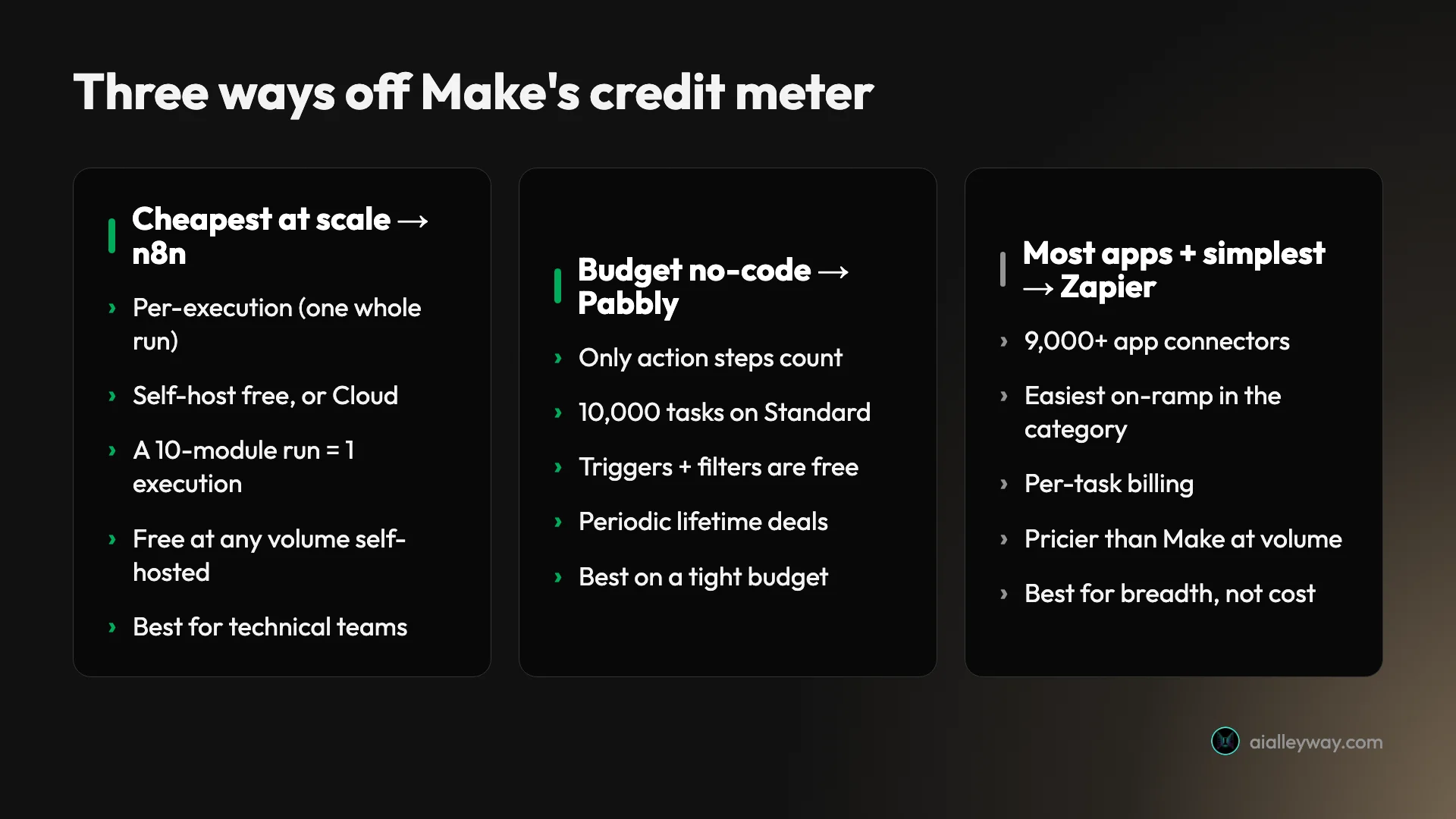
- Best for cost at scale and self-hosting: n8n. Per-execution billing, free to self-host, deepest AI.
- Best on a tight budget: Pabbly Connect. Only action steps count, plus frequent lifetime deals.
- Best for the most apps and the easiest start: Zapier. The widest connector library, simplest on-ramp.
- Best for enterprise and IT: Workato. Governed iPaaS for large orgs that need control.
- Best for Microsoft 365 shops: Power Automate. Native Office integration and desktop RPA.
- Best for developers: Pipedream. Code-first automation on a hosted, serverless platform.
- Best open-source: Activepieces. MIT-licensed, free to self-host, friendly to start.
- Best for AI-native workflows: Gumloop. A canvas built around AI steps, not retrofitted to them.
Why do people leave Make.com (and how we picked)
Start with the why, because it points to the which. Make is a genuinely good tool, the visual middle ground between Zapier and n8n, which we score 4.2 in our Make.com review. People leave it for specific reasons, and there are three big ones.
The first and largest is cost, and it has a precise shape. Make bills per operation, where every module run is one credit, so a 10-module scenario run 1,000 times a month is roughly 10,000 credits, the entire allowance of the $9 Core plan, before you add a second workflow. The bill scales with how much your automations actually do, and that surprises people who priced it off the headline plan.
The polling trap makes it worse. A trigger that checks an app on an interval spends a credit on every check, whether or not there is new data, so a single five-minute polling trigger burns about 8,640 credits a month doing nothing. The August 2025 change that renamed operations to credits also moved AI and code modules to variable rates above one credit, which quietly raised costs for AI-heavy workflows.
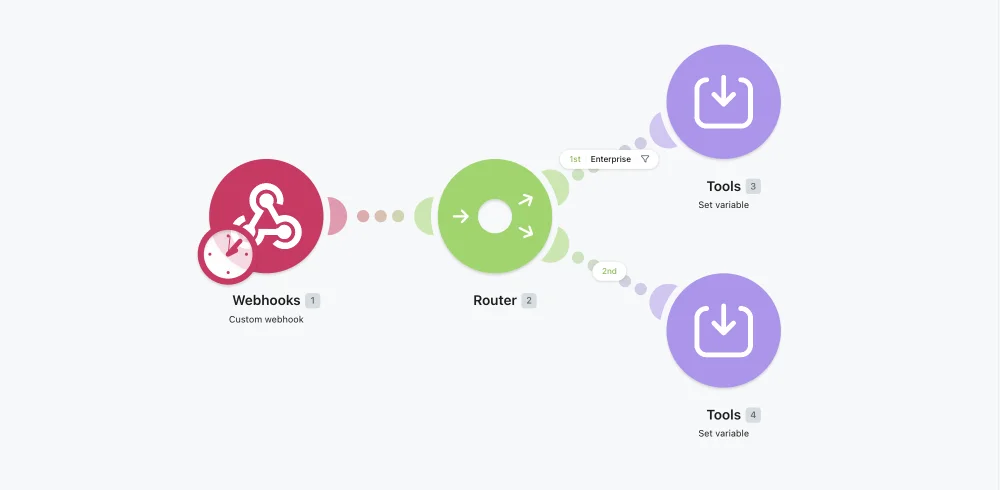
The second reason is fit. Make’s canvas is more powerful than Zapier’s but also more complex, so some leavers want something simpler with more connectors, and others want the opposite, an enterprise-grade or developer-grade tool Make does not pretend to be. The third is model: some teams want self-hosting and data control, or an AI-native builder, neither of which is Make’s design center.
Each reason points somewhere different, which is why a flat ranking would mislead you. Leaving over cost at scale points to n8n. Leaving over a tight budget points to Pabbly. Leaving over breadth or simplicity points to Zapier. Leaving for governance points to Workato, for a Microsoft stack to Power Automate, and for AI-native work to Gumloop.
Two of these we ran ourselves: n8n powers our production pipeline, and we built a real lead-routing scenario in Make through its API. The other six we assessed from their live pricing, documentation, and aggregate reviews, not production use, and we flag that in each section. We weighed one criterion above the rest, the one that pushed you here: what the tool actually costs at the volume you will run, not the price on the plan card.
That math is worth doing concretely, because it is the calculation that sends people looking. Take a 10-module scenario, the shape of a normal Make workflow, and watch the per-operation meter climb against a per-execution model that bills the same flow once per run.
| Monthly runs (10-module scenario) | Make credits | Cheaper alternative |
|---|---|---|
| 100 | ~1,000 | Make’s free tier still fits, or n8n self-hosted (free) |
| 1,000 | ~10,000 | n8n self-hosted (free); Pabbly counts only action steps |
| 10,000 | ~100,000 | n8n €50 Pro (10,000 executions), or self-hosted (free) |
The same scenario is 100,000 credits on Make at 10,000 runs, which slides the bill well past $9; on n8n it is 10,000 executions, free if you self-host. Same automation, very different invoices, which is the whole reason this list exists.
Cost is the headline, but two other criteria shaped the picks. Data control matters for regulated work: a self-hosted tool like n8n or Activepieces keeps automation data and API keys on infrastructure you own, and Workato and Power Automate bring enterprise compliance postures, where a hosted-only tool cannot. And if the real goal is AI agents rather than app-to-app plumbing, that points to a different shortlist than a pure cost cut does. We flag both where they decide the call.
Two more things are worth checking before you commit, because they sink more migrations than price does. The first is connector coverage: list the half-dozen apps your scenarios actually touch and confirm each has a native integration on the tool you are eyeing, because a missing connector means falling back to a raw HTTP call or, worse, no integration at all. The second is the learning curve against your team: n8n and Pipedream reward technical hands, Pabbly and Zapier reward beginners, and a tool nobody on the team can maintain is a false saving no matter how cheap the plan looks.
The 8 best Make.com alternatives compared
Here is the whole field at a glance. Read the “billing unit” column first, because it is the axis that decides your real cost against Make’s per-operation meter, and the “tested?” column second, because it separates what we ran from what we assessed.
| Tool | Best for | Billing unit | Self-host | Free tier | Tested? (Alley rating) |
|---|---|---|---|---|---|
| n8n | Cost at scale, self-host | Per execution (whole run) | Yes (free) | Unlimited (self-host) | ✅ Tested, 4.6/5 |
| Pabbly Connect | Tight budgets | Per task (action steps only) | No | 100 tasks | From docs |
| Zapier | Most apps, easiest start | Per task | No | 100 tasks | ✅ Tested, 4.3/5 |
| Workato | Enterprise & IT | Per workspace (quote) | No | Trial / demo | From docs |
| Power Automate | Microsoft 365 shops | Per user / per bot | No | 30-day trial | From docs |
| Pipedream | Developers | Per credit (compute) | No | Daily credits | From docs |
| Activepieces | Open-source self-hosters | Per active flow | Yes (MIT) | Self-host free | From docs |
| Gumloop | AI-native workflows | Per credit (AI) | No | 5,000 credits | From docs |
1. n8n — best for cost at scale and self-hosting

n8n is the alternative for anyone whose Make bill is the whole problem and who has, or can borrow, a little technical capacity. It bills per execution, where one whole workflow run counts once no matter how many steps it has, which is the exact opposite of Make’s per-module meter. We run our entire content pipeline on it: ten workflows on a self-hosted box, billed as nothing because the Community edition is free.

Pricing: the self-hosted Community edition is free at any volume, so you pay only for a small server. n8n Cloud starts at €20 a month for 2,500 executions, with Pro at €50 for 10,000, if you would rather not host it. Against Make, the gap widens with every module and every run: a 30-module scenario that would spend 30 credits per run on Make is still one execution per run here.
The depth is the other half. Code is a first-class citizen, the HTTP node calls any API, and LangChain-based nodes make it the strongest pick for AI workflows, which we drive in production daily. The cost is the on-ramp: n8n expects comfort with APIs, JSON, and a little JavaScript, and self-hosting adds an operations burden Make never asks of you.
What keeps it in production rather than just impressive is that every workflow exports to JSON, so ours live in version control and a bad change is one revert away. Power users reward it with a 4.7 on G2, the highest G2 score in this roundup, and 4.6 on Capterra.
The Cloud-versus-self-host call is worth thinking through, because it changes the cost story. Self-hosting is free at any volume but puts the server, the upgrades, and the monitoring on you; n8n Cloud removes that burden for €20 to €50 a month. The honest rule is that self-hosting pays off once your execution volume is high or your data must stay on your own infrastructure, and Cloud is the better deal while volume is modest and nobody on the team wants to babysit a box.
Buy n8n if cost at scale or data control matters and you have technical hands. Skip it if you want something that just works with zero setup, where Make’s visual canvas is friendlier. Our full n8n review scores it 4.6, a Category Leader, and n8n vs Make has the head-to-head.
2. Pabbly Connect — best on a tight budget

Pabbly Connect is the pick when price is the only thing that matters and you want to stay no-code without running a server. Based on its pricing and docs, it is built explicitly to undercut the category, and its billing model is the most task-liberal here: only action steps count against your quota, where Make meters every module run.
That is the detail that changes the math. Triggers, filters, routers, formatters, and iterators are all free, so a multi-step automation bills for far fewer tasks than the same flow does credits on Make. Combined with large flat allotments, it makes Pabbly genuinely cheap for busy workflows.
| Plan | Price (annual) | Tasks/mo |
|---|---|---|
| Free | $0 | 100 |
| Standard | $19/mo | 10,000 |
| Unlimited | $79/mo | Unlimited |
Pricing: the free plan includes 100 tasks, Standard is $19 a month for 10,000 tasks, and Unlimited is $79 a month for unlimited tasks, with multi-year prepay dropping those to roughly $14 and $59. Pabbly also runs periodic one-time lifetime deals, around $349 for lifetime access as of June 2026, which no other tool here offers.
The lifetime deals are the part bargain-hunters chase: a one-time fee that replaces the monthly bill entirely, which no subscription-only rival here matches. For a solo operator running steady, simple automations, that can make Pabbly the cheapest tool on this page over any multi-year horizon.
The honest limits: Pabbly’s interface and connector library are less polished and narrower than Make’s, and it is a value tool rather than a power tool, so deep branching and AI orchestration are not its strength. We assessed it from its pricing and docs, not production use.
Choose Pabbly Connect if budget is the deciding factor and your automations are straightforward. Skip it if you need Make’s polished builder or heavy branching logic.
3. Zapier — best for the most apps and the easiest start

Zapier is the counterintuitive alternative: people usually leave Zapier for Make to save money, but some leave Make for Zapier because Make’s canvas is more than they want. If your automations are simple and you value the widest app library and the gentlest setup, Zapier is the easier tool, and we score it 4.3 in our Zapier review.
The trade is cost. Zapier bills per task, where every successful app action counts, and it is pricier than Make at volume, so this swap only makes sense if simplicity and breadth matter more to you than the bill.
| Plan | Price (annual) | Tasks/mo |
|---|---|---|
| Free | $0 | 100 |
| Professional | from $19.99/mo | scales with volume |
| Team | from $69/mo | shared, up to 25 users |
Pricing: Zapier is free for 100 tasks a month, then Professional starts at $19.99 a month on annual billing and climbs with task volume. That entry price is more than double Make’s $9 Core, and the per-task meter climbs steeply: Professional is $49 at 2,000 tasks and $129 at 10,000, which our Zapier pricing guide breaks down in full.
What you gain is reach and ease. Zapier’s 9,000-plus connectors are the widest in the category, against Make’s 3,000-plus, and its linear builder is the simplest on-ramp anywhere, with triggers, filters, Paths, and built-in tools that do not cost a task. When we tested it for our review, that linear flow was genuinely faster to stand up than Make’s canvas for a simple two-step automation, and it is exactly the trade some Make leavers want.
Buy Zapier if you want the most integrations and the easiest experience and your volume is modest. Skip it if cost at scale is your concern, where Make already beat it and n8n beats both. The Make vs Zapier comparison runs the full math.
4. Workato — best for enterprise and IT

Workato is the alternative when automation has graduated from a personal tool to a company-wide platform that IT has to govern. Based on its product and documentation, it is an enterprise iPaaS built for centralized integration: recipes (its term for automations) with role-based access, environments, and the governance a security team signs off on, the layer Make is not designed to provide.
Where Make is a builder one person picks up, Workato is a platform an organization standardizes on, with the controls and support that implies.
| What Workato adds over Make | Why it matters |
|---|---|
| Recipes with role-based access | governed automation IT can approve |
| Environments + promotion | test then ship, like software releases |
| Enterprise connectors (SAP, NetSuite) | systems consumer tools skip |
| Audit trails + SSO | the paper trail compliance demands |
Pricing: Workato is quote-only, with no public price list, which is itself the signal: it is sold to enterprises through sales, priced on a workspace plus the connectors and recipes you run, and it lands well above any tool here. That is the trade for governance, not a hidden bargain, so it makes sense only when the alternative is an unmanaged sprawl of individual automations across teams.
What you gain is control at scale: a single governed place for every integration, with audit trails, environment promotion, and enterprise connectors for systems like SAP and NetSuite that consumer-grade tools skip. For a regulated org, that is the difference between automation IT can approve and automation it has to ban.
The honest caveats: Workato is overkill and overpriced for an individual or small team, and its power assumes dedicated owners. We assessed it from its documentation and positioning, not production use.
Choose Workato if you are an enterprise centralizing integration under IT governance. Skip it if you are a solo builder or small team, where Make, n8n, or Pabbly do the job for a fraction of the cost.
5. Microsoft Power Automate — best for Microsoft 365 shops

If your work already lives in Microsoft 365, Power Automate is the obvious alternative. Based on Microsoft’s documentation and pricing, it combines cloud flows for app-to-app automation with desktop flows for robotic process automation (RPA) that clicks through legacy software no API can reach. Inside Outlook, SharePoint, Teams, and Dynamics, it is the native option, and that integration is the entire reason to pick it over Make.
The billing is a different shape from Make’s, which is the point: it bills per user or per bot, not per operation, so it scales with headcount and automation count rather than how much each workflow does.
| Plan | Price | Bills by |
|---|---|---|
| Premium | $15/user/mo | Per user (cloud + attended desktop) |
| Process | $150/mo | Per bot (unattended RPA) |
| Hosted Process | $215/mo | Per bot (Microsoft-hosted RPA) |
Pricing starts at $15 per user a month for Premium, with per-bot RPA tiers climbing from $150. Standard cloud flows are seeded into every Microsoft 365 Business plan at no extra cost, but connecting to third-party or premium apps needs the $15 Premium plan, and the licensing is notoriously hard to reason about on exactly which connectors are included.
Two things deepen the Microsoft case beyond integration. A Copilot builds flows from a plain-English description, and the tie-in to Copilot Studio puts AI agents where your company data already lives, inside one security boundary. And the admin controls, data-loss-prevention policies, and audit trails are built for an IT department that has to sign off on what automation can touch.
The honest caveats: outside the Microsoft ecosystem Power Automate feels heavy and its licensing is hard to reason about, and we assessed it from docs rather than production. But for a Microsoft shop, the automation, the data, and the AI sit inside one license and one security boundary, which no neutral tool matches.
Choose Power Automate if you are a Microsoft 365 shop that wants native Office automation and RPA. Skip it if you are outside that ecosystem, where Make or Pabbly will be simpler and cheaper.
6. Pipedream — best for developers

Pipedream is the alternative for the developer who finds Make’s canvas constraining but never wanted to run a server. Based on its documentation, it is a hosted, serverless platform where you wire together triggers and steps and drop into real code, Node.js, Python, Go, or Bash, between any of them, with thousands of pre-built integrations to skip the boilerplate.
For someone comfortable in a terminal, that is the appeal Make’s no-code canvas cannot match: actual code, fully managed, with no infrastructure to own.
| Plan | Price | Notes |
|---|---|---|
| Free | $0 | Daily free-credit allowance |
| Basic | $29/mo | Monthly credit base |
| Advanced | $79/mo | Larger credit base |
Pricing is credit-based and tied to compute: one credit covers 30 seconds of compute at the default memory, the free workspace gets a daily allowance, and paid plans start at $29 a month. That meter rewards efficient code and punishes heavy steps, a different discipline from Make’s per-operation count but the same need to watch usage.
The escape hatch is the appeal for a developer: with real code between steps and an HTTP block for anything missing, Pipedream rarely runs out of road the way a pure no-code tool does. The trade is that you maintain that code yourself, and the compute meter rewards keeping it lean.
What to watch for: Pipedream is developer-first, so a non-coder will find it less approachable than Make, and the compute meter means a long-running step costs more than a light one. We assessed it from its docs, not production use.
Choose Pipedream if you want code-first automation on someone else’s servers. Skip it if you do not write code, where Make’s visual builder is the friendlier home.
7. Activepieces — best open-source alternative

Activepieces is the pick if leaving Make is partly about wanting to own your automation rather than rent it on a metered plan. Based on its docs and pricing, it is MIT-licensed, which makes it genuinely open source, and free to self-host with an active contributor community. For anyone who wants Make’s no-code feel without the per-operation meter or the hosted lock-in, it is the closest match.
The builder is designed to be approachable, with a visual flow canvas, a growing library of “pieces,” and native AI agent and MCP support, so it does not assume the API-and-JSON comfort that n8n does.
| Plan | Price | Notes |
|---|---|---|
| Community (self-hosted) | Free | MIT-licensed, self-host |
| Cloud Standard | $5 per active flow / mo | Unlimited runs, free flows to start |
| Ultimate (enterprise) | Custom | RBAC, SSO, audit logs |
Pricing does something different from Make’s meter: the cloud plan bills per active flow at $5 a flow a month with unlimited runs, so a high-volume workflow costs the same as a quiet one. The self-hosted Community edition is free, the same deal as n8n, without the steeper learning curve.
That per-flow model is worth a second look if you run a few busy workflows: $5 a flow with unlimited runs can beat any per-operation meter once a single automation fires thousands of times a month. It is the cleanest answer on this list to “my one busy scenario is the whole Make bill.”
The trade-offs: Activepieces is younger than Make, so its connector library and community, while growing, are smaller, and self-hosting carries the usual operations burden. We assessed it from its docs and license, not production use.
Choose Activepieces if you want open source and a gentle on-ramp. Skip it if you wanted to stop running a server entirely, where Make or Pabbly fit better.
8. Gumloop — best for AI-native workflows

Gumloop is the pick when the work is mostly AI, not app-to-app plumbing. Based on its pricing and positioning, it is a no-code platform built around AI nodes from the ground up, for things like content creation, lead generation, and support agents, with customers it lists as of June 2026 including Gusto, Instacart, and Shopify. Where Make adds AI modules to a classic engine, Gumloop is shaped for “read this, reason over it, write that” as the main event.
That AI-native framing is its edge over Make. If your scenario is fundamentally a chain of model calls with a little glue, Gumloop is built for it, where Make would meter each AI module at a variable, often higher, credit rate.
| Plan | Price | Notes |
|---|---|---|
| Free | $0 | 5,000 credits |
| Starter | from $37/mo | Credit-based AI runs |
| Pro / Enterprise | Custom | Higher credits, team features |
Pricing is credit-based and tuned to AI usage: the free tier includes 5,000 credits, and paid plans start at about $37 a month. Like Make, it is a meter, so the discipline is the same, model your real run frequency, but the credits are spent on AI work rather than on every module in a connector chain.
The honest limit is breadth. Gumloop’s connector library and community are smaller and younger than Make’s, so for plain app-to-app plumbing it is the wrong tool, doing less for more. Its case is narrow and real: workflows where the reasoning is the work, and you would otherwise be gluing an LLM onto a general automation tool anyway. We assessed it from its pricing and docs, not production use.
Choose Gumloop if your automations are mostly AI and you want a no-code canvas built for that. Skip it if your work is classic app-to-app plumbing, where Make or a cheaper general tool will do the same job for less.
How to pick your Make alternative
The whole list collapses to one question: why is Make no longer fitting? Match your reason to the pick.
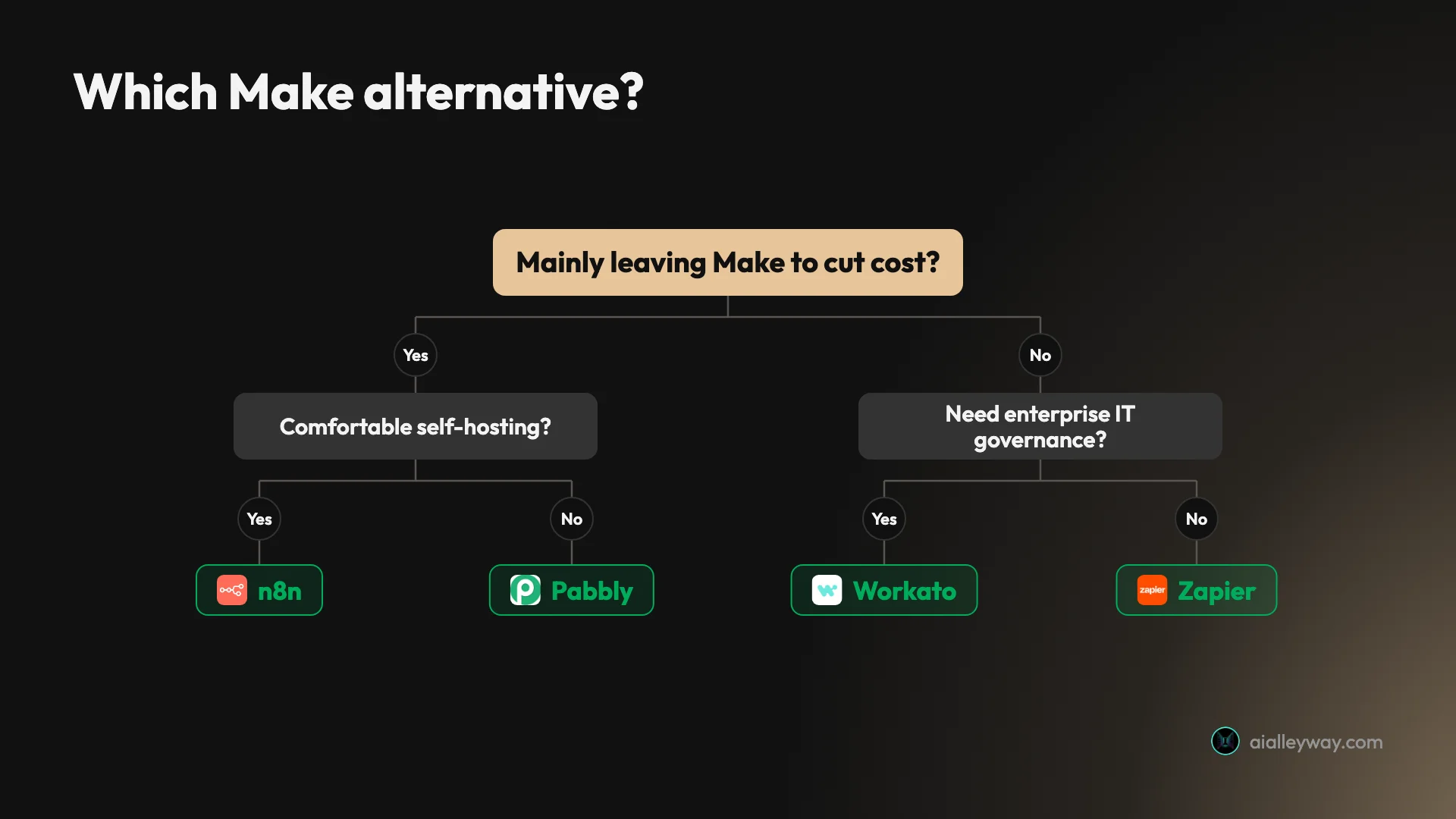
- The credit meter is the problem, and you can self-host → n8n. Per-execution billing and free self-hosting make it the cheapest serious option.
- The meter is the problem, but you want no-code and no server → Pabbly Connect. Only action steps count, plus lifetime deals.
- Make’s canvas is more than you want, and you need more apps → Zapier. The widest library and the simplest builder, if you accept per-task cost.
- Automation has to be governed across the company → Workato. Enterprise iPaaS with the controls IT signs off on.
- Your stack is Microsoft 365, or you need RPA → Power Automate. Native Office automation the others cannot match.
- You write code and want it hosted → Pipedream. Real code, serverless, no infrastructure.
- You want to own it, open source → Activepieces. MIT-licensed and free to self-host, friendlier than n8n.
- Your automations are mostly AI steps → Gumloop. AI-native with a real free tier.
And the honest non-switch: if your scenarios are modest and you keep an eye on the meter, Make is genuinely good, and its $9 Core plan with routers and iterators included is hard to beat for visual no-code. Its per-operation bill only bites once you scale or lean on polling and AI, so the reason to leave should be real, a credit bill that stings or a wall you keep hitting, before the migration work is worth it.
One rule cuts through all of it: model your real run frequency against each tool’s billing unit before you commit, because the unit, not the plan price, decides your bill. A per-execution model (n8n), an action-steps-only model (Pabbly), a per-task model (Zapier), and a per-flow model (Activepieces) produce wildly different totals for the same automation that Make bills per operation.
And there is no one-click importer from Make to any of them, so migrate one scenario first, rebuild it on a free tier, and run both in parallel for a week before you move the rest. That dry run is the cheapest insurance against a missing connector or a pricing surprise.
Which Make alternative should you actually use?
There is no single best Make alternative, only the best one for the reason you are leaving, and for most people that reason is the per-operation credit meter. If you can self-host, n8n is the cheapest serious escape and the most powerful of the lot, billing one execution per whole run no matter how many modules it has. If you want to stay no-code and on a budget, Pabbly Connect counts only action steps and runs lifetime deals.
From there it splits by need: Zapier for the most apps and the simplest start, Workato for enterprise governance, Power Automate for a Microsoft stack, Pipedream for developers, Activepieces for open source, and Gumloop for AI-native work. None of them is selling you a ranking, which most “Make alternatives” lists quietly are.
| Why you’re leaving Make | Best pick |
|---|---|
| Cost at scale, and you can self-host | n8n |
| Budget, want no-code with no server | Pabbly Connect |
| Need more apps or a simpler builder | Zapier |
| Enterprise governance under IT | Workato |
| Microsoft 365 stack, or RPA | Power Automate |
| Code-first, hosted | Pipedream |
| Open source you own | Activepieces |
| Mostly AI steps | Gumloop |
A word on budget, since price is usually the real constraint. If you are spending nothing today, start with the free options in order of power: n8n self-hosted (unlimited and free), then Activepieces self-hosted, then the hosted free tiers, Pabbly’s 100 tasks, Zapier’s 100 tasks, or Gumloop’s 5,000 AI credits.
If you already pay Make and the credit bill has started to climb, the move is almost always n8n if you have someone technical who can carry a server, or Pabbly if you want to stay no-code with nothing to run. Either way, do the dry run before you commit, because a tool that looks cheaper on the plan card can cost more once a missing connector forces a workaround.
Before you switch, estimate one number: your busiest scenario’s module count times how often it runs each month. If that lands in the low thousands of credits, Make is probably still fine and worth keeping. If it lands in the tens or hundreds of thousands, the move pays for itself fast. For the deeper picture, read our n8n vs Make comparison, the Make.com pricing breakdown, or the full best AI automation tools roundup.
Pricing and ratings verified June 2026 from each vendor’s pricing page and our own hands-on reviews of n8n, Make, and Zapier.
Frequently asked questions
What is the best alternative to Make.com?
For most people leaving Make, n8n is the best alternative: it bills per whole-workflow execution instead of per operation, so a 10-module scenario that spends about 10 credits per run on Make is a single execution on n8n, and the self-hosted Community edition is free at any volume. That is the cheapest escape from Make's per-operation meter if you have technical hands.
If you want to stay no-code and on a budget, Pabbly Connect counts only action steps and runs frequent lifetime deals. If you want the widest app library and the simplest on-ramp, Zapier is easier than Make, though pricier at volume.
The honest answer is that the best Make alternative depends on why you are leaving: cost at scale points to n8n, a tight budget to Pabbly, breadth and simplicity to Zapier, and a Microsoft stack to Power Automate.
Why do people leave Make.com?
Almost always the per-operation billing. Make charges one credit for every module that runs, so a multi-step scenario or a frequent polling trigger drains credits faster than the plan price suggests. A single trigger polling every five minutes runs roughly 8,640 times a month, most of a Core plan's 10,000 credits, before doing any real work.
The August 2025 switch from operations to credits also moved AI and code modules to variable, usage-based rates, which raised real costs for AI-heavy and bulk workflows. So the people who leave are usually the ones running high-frequency or AI-heavy automations, where the meter outpaces the convenience.
The fix is a different billing model: per-execution (n8n) or action-steps-only (Pabbly) bills the same automation for far less at volume. At 1,000 monthly runs of a 10-module scenario, that billing flip is the difference between filling a Make Core plan's 10,000 credits and spending 1,000 free executions on a self-hosted n8n.
Is there a free Make.com alternative?
Yes, several. The most powerful free option is n8n: its self-hosted Community edition is free at any volume with unlimited executions, so you pay only for a small server. Activepieces is also free to self-host and is MIT-licensed, genuinely open source.
Among hosted tools, Pabbly Connect's free tier includes 100 tasks where only action steps count, Zapier's free plan covers 100 tasks, and Gumloop gives 5,000 AI credits free. None of these expire.
If you want free with zero setup, start with Pabbly's or Zapier's free tier; if you can run a server and want unlimited free automation, self-host n8n or Activepieces, where the only real cost is a small VPS, often around $5 a month. Make's own free plan (1,000 credits, two scenarios) is the tightest of the bunch, which is part of why people look elsewhere.
Is n8n cheaper than Make?
Usually, yes, and the gap widens as you scale. Both are cheap at the entry level, but they bill differently: Make charges per operation (every module run), while n8n charges per execution (one whole workflow run, no matter how many steps). A 30-module scenario that spends 30 credits per run on Make is a single execution on n8n.
Make's Core plan is $9 a month for 10,000 credits; n8n's self-hosted Community edition is free at any volume, and its Cloud Starter is €20 a month for 2,500 executions. For a busy or step-heavy workflow, n8n's per-execution model wins clearly, and self-hosting makes it free.
The trade is that n8n expects comfort with APIs and a little code, and self-hosting adds an operations burden Make does not. See our n8n vs Make comparison for the full math.
How do I migrate my automations from Make.com?
There is no one-click importer from Make to any of these tools, because each describes its logic in a different model, so migration means rebuilding by hand. The good news is that the concepts transfer directly: a Make scenario's trigger, modules, routers, and filters map cleanly onto an n8n workflow, a Zapier Zap, or a Pabbly task. A Make Router becomes an n8n IF or Switch node, and a Make Iterator becomes n8n's Split In Batches, so the rebuild is mechanical once you know the equivalents.
The practical approach is to migrate one automation first, the one whose Make credit usage pushed you to switch, rebuild it on the free tier of your chosen tool, and run both in parallel for a week to confirm it behaves before you move the rest.
That dry run also surfaces any missing connector or pricing surprise before you commit, which is far cheaper than discovering it after a full migration.
Keep reading
Make.com pricing: what you'll really pay per operation
Make is free for 1,000 credits, then $9/mo Core — but every module run spends a credit, so the operations meter sets your real Make.com pricing.
Make vs Zapier: which is cheaper, and which is easier?
We built in both. The honest Make vs Zapier verdict: who's cheaper at scale, who's easier to start, and which one actually fits how you work.
Make.com review: more power than Zapier, if you watch the meter
Make is the visual middle ground between Zapier and n8n: router logic and 3,000+ apps, at a price that depends entirely on how fast you burn operations.
Best AI automation tools: which one fits how you build
We tested the top three and ranked six AI automation tools by who each is for — and what their very different billing actually costs.