
Make.com pricing: what you'll really pay per operation
Make is free for 1,000 credits, then $9/mo Core — but every module run spends a credit, so the operations meter sets your real Make.com pricing.
Contents
How much does Make.com cost?

Make is free for 1,000 credits a month, and its paid plans start at $9 a month for Core on annual billing. But that $9 is the entry price, not the price you will actually pay. The unit that governs your whole bill is the credit: Make charges one credit for every module that runs in a scenario, so what you pay depends entirely on how much your automations do and how often they fire.
Here is the whole picture in one glance, verified live on make.com/en/pricing in June 2026 (US pricing, annual billing):
| Plan | Price (yearly, per mo) | Credits / mo | Best for |
|---|---|---|---|
| Free | $0 | 1,000 | Trying Make, one light scenario |
| Core | from $9 | from 10,000 | Solo builders, the default paid tier |
| Pro | from $16 | from 10,000 | Higher volume, priority execution |
| Teams | from $29 | from 10,000 | Teams sharing scenarios |
| Enterprise | Custom | Custom | Large orgs, SSO, governance |
Most people start on Free, then move to Core once a real scenario runs often enough to blow past 1,000 credits. The rest of this guide is about the part the plan cards hide: how every paid tier starts at the same 10,000 credits, how the credit slider climbs from there, and how the per-operation model decides whether Make is a bargain or a budget leak.
What is a Make credit (and why it decides your bill)
Make charges per credit, where one credit is one module run inside a scenario. Before the plan tiers make sense, you need that unit. A scenario that adds a Google Sheets row, fetches a Gmail message, and posts to Slack spends three credits every time it runs. A scenario with ten modules spends about ten credits per run.
This is the opposite of how people read a plan card. The $9 and $16 are not the price of the plan so much as the price of a credit bucket, and a scenario that does more work empties that bucket faster. Make renamed operations to “credits” on August 27, 2025, converting them 1:1, so for most non-AI apps one operation is still one credit; the two terms mean the same thing.
| What spends a credit | What to know |
|---|---|
| Each module run in a scenario | Ten modules ≈ ten credits per run |
| Polling triggers, every interval check | Runs whether or not there is new data |
| Filters, even when they stop the flow | A filter spends a credit to say “no” |
| AI and code modules | Bill above one credit, by tokens / file size / seconds |
Two exceptions matter for the budget. AI-native modules bill at variable rates by token count or file size, and Make’s code module runs at two credits per second of execution time, verified on the live pricing page. So an AI-heavy or code-heavy scenario can cost several times what its module count implies, which is why the credit total, not the module count, is the number to model.
To make it concrete, take a lead-routing scenario. A webhook triggers it (one credit), a filter checks the company size (one credit, even if it stops the run), then it creates a CRM contact, posts to a sales Slack channel, and sends a welcome email: five credits in total. Run it 500 times a month and you have spent 2,500 credits, comfortably inside Core’s 10,000. Add an AI module that summarises each lead and the same 500 runs cost more, because that module bills above one credit. The unit is small; the multiplication is what gets you.
Is the Make free plan enough?
The free plan is real, not a trial: $0 a month, 1,000 credits, two active scenarios, and a 15-minute minimum interval between runs. It never expires, and you get the full no-code visual builder, routers and filters, and access to 3,000-plus apps, which makes it a fair way to learn the tool before paying.
What you give up on Free is headroom, not features. The 15-minute minimum interval means you cannot run anything more often than every quarter hour, the two-scenario cap limits you to a pair of live automations, and the data-transfer ceiling is small. Those are sizing limits, not missing capabilities, so a Free scenario behaves like a paid one, just slower and capped.
The real ceiling is the 1,000 credits. Because every module run counts, a single multi-step scenario that runs a few times a day burns through 1,000 credits in days, not weeks. Free comfortably covers one light automation, like a daily digest or an occasional form-to-sheet sync. The moment you automate something that runs often or branches into many modules, you are on Core.
That is the honest read: Free is a proving ground and a genuine home for one small scenario, not a place for real volume. If an automation matters enough to run through the day, budget for Core from the start, and use the free plan to model your real credit usage first.
Make plans, tier by tier
Make has four paid tiers above Free — Core at $9, Pro at $16, Teams at $29 a month on annual billing, plus custom-priced Enterprise — and every one starts at 10,000 credits. The prices below are the annual rates; the yearly toggle saves about 15%, so paying month to month runs roughly 18% more.
Free ($0/mo) gives you 1,000 credits a month, two active scenarios, a 15-minute interval, and the full visual builder with 3,000-plus apps. It is the learn-and-dabble tier.
Core (from $9/mo) is where most individuals land. It lifts the big Free limits: unlimited active scenarios, the interval drops to one minute, the maximum scenario run time goes from 5 to 40 minutes, and you get access to the Make API. The “$9” is the price at 10,000 credits, and it is the number everyone quotes.
Pro (from $16/mo) adds performance and visibility on top of Core: priority scenario execution during peak times, custom variables shared across scenarios, and full-text search of your execution logs. It is the tier for higher volume where queuing time and debugging speed start to matter.
Teams (from $29/mo) adds collaboration: team roles and permissions, plus the ability to create and share scenario templates across the group, so several people build on one organisation instead of scattered accounts.
Enterprise (custom pricing) is the contact-sales tier: SSO, 24/7 priority support, enterprise app integrations, an on-prem agent for local networks, advanced security and audit logs, and credit overage protection so scenarios keep running when you hit the limit. It is built for organisations standardising automation across many teams.
The detail every plan card buries is that all four paid tiers start at the same 10,000 credits. The tiers buy you features and ceilings, not more runs by default. You scale the credit allowance up a slider, and the monthly price climbs with it, with Core topping out at 300,000 credits a month and Pro reaching 8 million after the November 2025 adjustment.
| Tier | Annual (per mo) | Monthly (per mo) | Starting credits | What it adds |
|---|---|---|---|---|
| Free | $0 | $0 | 1,000 | 2 scenarios, 15-min interval, full builder |
| Core | $9 | $10.59 | 10,000 | unlimited scenarios, 1-min interval, Make API |
| Pro | $16 | $18.82 | 10,000 | priority execution, custom variables, log search |
| Teams | $29 | $34.12 | 10,000 | team roles, shared scenario templates |
| Enterprise | Custom | Custom | Custom | SSO, 24/7 support, overage protection |
So two people on the Pro plan can have wildly different bills depending on how many credits their scenarios consume. The right way to read Make’s pricing is to estimate your monthly credits from your real scenarios first, then find the tier and credit level that covers them, rather than picking a tier by name and hoping the included credits are enough.
What you’ll actually pay on Make
Most solo users land on Core at $9 a month for 10,000 credits, light users stay free, and AI-heavy or higher-volume accounts pay more as the credit slider climbs. Plan cards give you a starting price; they do not tell you which credit level your real usage lands on. Here is the math worked through for common shapes of user, because the credit count, not the plan name, decides the bill.
| Your situation | Rough credits/mo | Cheapest fit | What it costs |
|---|---|---|---|
| One light scenario, runs occasionally | under 1,000 | Free | $0 |
| Solo, a couple of multi-step scenarios | ~10,000 | Core | from $9/mo |
| Heavy AI or several busy scenarios | ~50,000 | Core (slider up) | climbs from $9 |
| Higher volume, a small team | 150,000+ | Pro or Teams | slider-dependent |
Take the solo row. Two multi-step scenarios firing through the day add up faster than people expect: a five-module scenario run a few hundred times a month, plus a second smaller one, lands around 10,000 credits, which is exactly Core’s entry allowance at $9. Still cheap, and more included runs than Zapier’s comparable tier gives you (the Make vs Zapier comparison runs that math in full). The catch is any AI module or polling trigger, each of which spends credits faster than a plain action.
Now the heavy row. Once an AI summariser or a frequent polling trigger enters the picture, the same two or three scenarios can push past 50,000 credits, and you slide the Core allowance up, raising the monthly price. This is where modelling matters: across a couple of scenarios, the difference between a 15-minute and a 5-minute polling interval can be many thousands of credits a month, which is the difference between staying near $9 and climbing well above it.
The higher-volume row is where the tier features, not just the credits, start to earn their keep. Pro’s priority execution keeps scenarios from queuing during peak times, and Teams’ shared templates and roles matter once more than one person builds. At this volume you are buying both a bigger credit bucket and the governance to run it, and the slider price is what it is, set by your real credit demand.
The pattern is consistent: Make is excellent value at low and moderate volume, especially against per-task tools, and the bill climbs with credits, driven far more by polling and AI modules than by your scenario count. Knowing where you sit on the credit slider before you commit is the difference between a $9 plan and a much larger one.
Make.com pricing traps to watch
Five things quietly inflate a Make bill: polling triggers, AI and code modules, the August 2025 credits change, failed runs and filters that still bill, and the monthly reset with its overage markup. The plan cards are honest, but these details decide whether your estimate survives contact with reality.
Why do polling triggers drain Make credits?
This is the trap that drains budgets fastest. A trigger that polls an app on an interval runs whether or not there is new data, and each check is a credit. The math is unforgiving: a single five-minute polling trigger spends roughly 8,640 credits a month, most of a Core plan, before any real work happens.
| Polling interval | Credits per month (just checking) | Share of Core’s 10,000 |
|---|---|---|
| Every 5 minutes | ~8,640 | ~86% |
| Every 15 minutes | ~2,880 | ~29% |
| Every 30 minutes | ~1,440 | ~14% |
| Every hour | ~720 | ~7% |
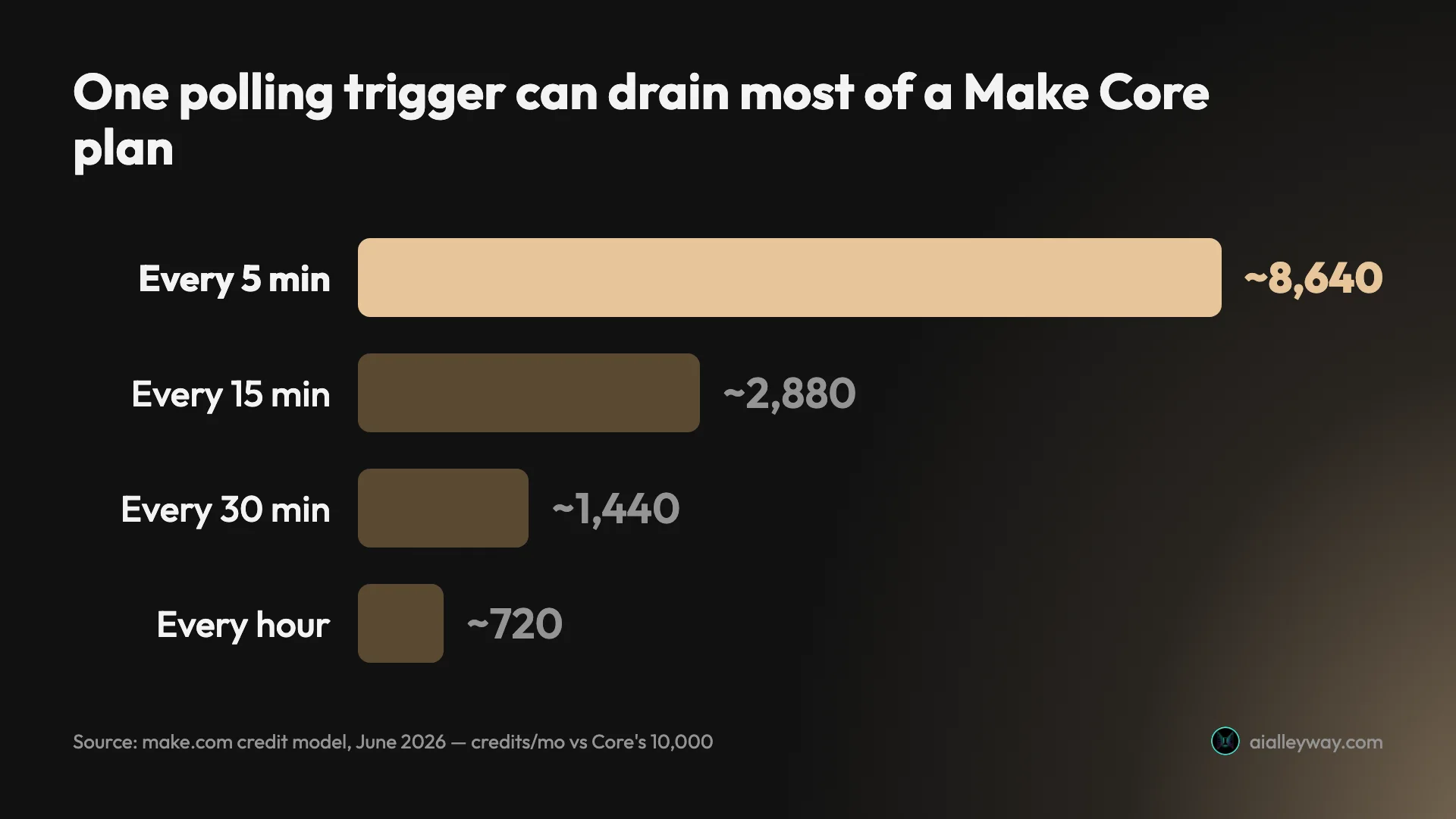
The fix is to use instant webhook triggers instead of polling wherever the app supports them, and to widen your intervals when it does not. Moving one trigger from a 5-minute to a 30-minute poll saves over 7,000 credits a month on its own.
Why do AI and code modules cost more than one credit?
Where an ordinary module costs one credit, Make’s AI modules bill at variable rates by token count or file size, and the code module runs at two credits per second of execution. An AI-heavy scenario can cost several times what its module count suggests, so an automation that looks like ten credits a run can be far more once a model call is in the loop.
Concretely, a code module that runs for five seconds spends ten credits on its own, as much as a whole ten-module scenario, and a built-in AI module summarising a long document costs more again as the token count climbs. The fix is to bring your own model API key, covered below, which drops those AI calls back to the standard one credit while you pay the provider directly for tokens.
What did the August 2025 credits change cost you?
When Make renamed operations to credits, the 1:1 conversion looked cosmetic, but AI-native modules and the code module moved to variable, usage-based pricing. Bulk and AI workflows quietly got pricier, and the change was not prominently surfaced to existing accounts, so the higher cost often showed up on the invoice before anyone noticed. The November 2025 option to bring your own AI API key is the escape: route model calls through the HTTP module on your own key, pay the provider directly for tokens, and the call bills at the standard one credit.
| Trap | Why it bites |
|---|---|
| Polling triggers | every interval check is a credit, all day |
| AI and code modules | bill above one credit, by tokens / seconds |
| Aug 2025 credits change | AI and bulk work moved to variable, pricier rates |
| Failed runs and filters | both spend credits, even when nothing useful happens |
| Monthly reset and overage | no rollover monthly; overage at a 25% markup |
Do failed runs and filters still cost credits?
Two smaller edges compound the meter. If a scenario fails halfway, you still pay for every module that already executed, which makes heavy testing genuinely expensive. And a filter spends a credit even when it stops the flow, where Zapier’s filters are free. Together they mean the meter runs during exactly the moments, debugging and gating, when you least expect to be charged.
In practice, a scenario you re-run dozens of times to fix one mapping can quietly burn a few hundred credits before it works, which is why testing on small batches of data, not your full dataset, pays off.
What happens when you run out of credits?
On monthly billing, your credit allowance resets each cycle and does not roll over, so a quiet month is simply lost. Run out mid-month and overage credits bill at a 25% markup over your plan rate, or scenarios pause until the reset. Annual billing softens this: prepaid annual credits expire after 12 months instead of each month, so they roll over within the year.
On a Core plan, where 10,000 credits cost $9, the markup keeps the per-credit cost low, but a runaway scenario can rack up overage faster than you notice. If you cannot afford a paused automation, size the slider above your busiest month, or use Enterprise’s overage protection, which keeps scenarios running once the limit is hit.
How to pay less for Make
The biggest savings come from replacing polling triggers with webhooks, widening any polling intervals, bringing your own AI API key, filtering early, and paying annually. Once you understand the credit unit, those levers cut the bill, and the pricing page advertises none of them.
| Lever | What it saves |
|---|---|
| Replace polling with webhooks | thousands of credits a month per trigger |
| Widen polling intervals | 5-min → 30-min saves ~7,000 credits/mo |
| Bring your own AI API key | AI modules drop to the standard one credit |
| Filter and route early | fewer module runs per scenario |
| Pay annually | ~15% below monthly, and credits roll over 12 months |
First, kill the polling. Because an interval trigger spends a credit on every check, switching to an instant webhook trigger, or simply widening the interval, is the single biggest saving available. One trigger moved from 5-minute to 30-minute polling claws back over 7,000 credits a month.
Second, own your AI calls. Since the November 2025 change, you can route model calls through the HTTP module on your own provider key, which bills at the standard one credit instead of Make’s premium AI-module rate. You pay the model provider directly for tokens, which is usually cheaper than the built-in modules for any serious AI volume.
Third, build lean and size honestly. Filter and route early so fewer modules run per scenario, then model your real monthly credits on the free plan before you subscribe, and set the slider to that level rather than guessing. And pay annually if you are sure: it is about 15% cheaper than monthly, and prepaid annual credits roll over for 12 months instead of vanishing each cycle.
Cheaper Make alternatives
The two cheaper alternatives worth weighing are n8n (per whole-workflow execution, free if self-hosted) and Pabbly Connect (counts only action steps); Zapier is the better-known rival but usually costs more, not less. Make is already the cheaper no-code choice for most people, but those tools bill differently and can win in specific cases. We cover the full field in our Make alternatives and best AI automation tools roundups; these are the cost-driven comparisons.
| The measure | Make | Zapier | n8n |
|---|---|---|---|
| Billing unit | per operation (credit) | per task | per execution (whole run) |
| Entry price | $9/mo (10,000 credits) | from $19.99/mo | €20/mo, or free self-hosted |
| At scale | climbs with credits | climbs steeply | cheapest, free if self-hosted |
Zapier is the better-known rival, but for pricing it usually loses to Make: it bills per task and gates multi-step automations and branching behind higher tiers, where Make includes routers and filters from Core. Zapier’s polish and its larger app library can justify the premium for simple, low-volume setups, but on cost Make’s per-operation model and 10,000-credit entry plan are hard to beat. Our Make vs Zapier comparison runs the full math.
n8n is the cheaper pick at high volume if you are technical. It bills per whole-workflow execution, so a 30-module scenario that would spend 30 credits per run on Make is a single execution on n8n, and the self-hosted edition is free at any volume. The trade is running a server and writing a little more configuration. See n8n vs Make for the head-to-head, and n8n pricing for its own cost breakdown.
For a rock-bottom budget on simple automations, Pabbly Connect counts only action steps, not triggers or internal steps, and runs one-time lifetime deals, so a steady workflow can cost a single fee. We cover it in the Zapier alternatives roundup. But for most people who want a hosted, no-code tool with real branching logic without managing a server, Make stays the value pick.
Which Make plan should you pick?
The deciding question is your credit volume, not a feature. Map yourself to one of these:
- Just trying it, or one light scenario → Free. 1,000 credits covers a daily digest or an occasional sync, two active scenarios, and it never expires.
- Solo with a few real scenarios → Core. Model your real monthly credits first; expect $9 at 10,000 credits and a higher slider setting if you run AI modules or frequent polls.
- Higher volume or queuing pain → Pro, from $16, for priority execution, custom variables, and log search once scenarios run often enough to wait in line.
- A team building together → Teams, from $29, for roles and shared templates once more than one person maintains scenarios.
- A large org with governance needs → Enterprise, for SSO, 24/7 support, overage protection, and enterprise apps.
- Technical and scaling past tens of thousands of runs → price n8n’s per-execution model, which pulls ahead of any per-operation tier at high volume.
Is Make worth the price?
So is Make worth its price? For most people who have outgrown Zapier’s bill or its straight-line flows, yes: $9 a month for 10,000 credits, with routers and unlimited scenarios from the entry tier, is strong value, and the per-operation model is cheaper than per-task billing for most real workloads. The value only wobbles on heavy high-frequency polling or very long scenarios, where the meter can erase the savings.
Make’s pricing is simple at the surface and metered underneath. Free covers 1,000 credits, Core starts at $9 for 10,000, and the per-operation model keeps the bill low while your scenarios are lean. The trap is the credit slider and the costs you do not see: polling triggers, AI modules, and failed runs all spend credits, so the headline price tells you little about what a busy account pays.
Model your real credit usage on the free plan before you commit, replace polling with webhooks, bring your own AI key, and pay annually if you are sure. Do that and Make is one of the best-value automation tools going. For the full picture, read our Make.com review or the best AI automation tools roundup.
Pricing verified June 2026 from make.com/en/pricing and our own hands-on reviews of Make, Zapier, and n8n.
Frequently asked questions
How much does Make.com cost?
Make has a free plan and four paid tiers, and the price you see depends on how many credits you buy. The Free plan is $0 for 1,000 credits a month. Core starts at $9 a month on annual billing, Pro at $16, and Teams at $29, with Enterprise custom-priced.
Every paid tier starts at 10,000 credits a month and scales up a slider, so the headline $9 is the price at the entry credit level, not a ceiling. The slider caps Core at 300,000 credits and Pro at 8 million a month, so the tier sets both your features and your ceiling. What actually drives your bill is credits, because each module that runs in a scenario spends one, so a busy or multi-step automation climbs faster than the plan name suggests.
One more thing the plan cards hide: on monthly billing your credits reset each cycle and do not roll over, and if you run out mid-month overage bills at a 25% markup or scenarios pause until the reset. Annual billing softens that, since prepaid credits last 12 months.
Is Make.com free?
Yes, there is a real free plan: $0 a month for 1,000 credits, two active scenarios, and a 15-minute minimum interval between runs. It never expires, and you get the full no-code visual builder plus 3,000-plus app connectors.
The limit is the 1,000 credits and the two-scenario cap. Because every module run is a credit, a single multi-step scenario that runs a few times a day burns through 1,000 credits quickly. Free is enough to learn Make and run one light automation; anything regular pushes you to Core.
What is a credit (operation) in Make?
A credit is one module run inside a scenario. Adding a Google Sheets row, fetching a Gmail message, or posting to Slack each counts as one credit every time that module fires. A scenario with ten modules uses about ten credits per run.
Make renamed operations to credits on August 27, 2025, converting them 1:1, so for most non-AI apps one operation is still one credit. The exceptions are AI-native modules and the code module, which bill at variable rates above one credit, by token count, file size, or seconds of execution (the code module runs at two credits per second).
This is stricter than Zapier's per-task model, where triggers and filters are free. On Make a filter spends a credit even when it stops the flow, and a failed run still bills for the modules that already executed, so budget by your real run frequency, not your happy-path step count.
Why do Make credits run out so fast?
Because every module run is a credit, and the costs you do not see add up. A ten-module scenario spends about ten credits each run, and a trigger that polls every five minutes runs roughly 8,640 times a month before doing any real work, which is most of a Core plan's 10,000 credits.
Failed or partial runs still bill for the modules that already executed, and a filter spends a credit even when it stops the flow. Slow your polling intervals, use instant webhook triggers where you can, and watch the usage screen rather than the plan name. Moving one trigger from a five-minute to a thirty-minute poll cuts that 8,640 to about 1,440, clawing back more than 7,000 credits a month.
Is Make cheaper than Zapier?
Usually, yes, especially at scale. Make bills per operation and Zapier bills per task, but Make's entry plans pack far more included runs for the money: Core is $9 a month for 10,000 credits against Zapier's $19.99 for a small task base. The branching logic Zapier gates behind higher tiers is standard on Make from Core.
The exception is heavy polling or very long scenarios, where Make's per-operation meter can erase the savings. For simple, high-volume automations Make wins on price; for the cost math in full, see our Make vs Zapier comparison.
Did Make change its pricing in 2025?
Yes, twice. On August 27, 2025 Make renamed operations to credits and converted them 1:1, but AI-native modules and the code module moved to variable, usage-based pricing above one credit, which raised real costs for AI and bulk workflows.
A November 2025 adjustment capped Core at 300,000 credits a month, extended Pro to 8 million, and added the option to bring your own AI API key, so you can route model calls through the HTTP module on your own key and pay the standard one credit instead of Make's premium AI rate.
What is a cheaper alternative to Make?
If you are technical, n8n is cheaper at scale: it bills per whole-workflow execution rather than per operation, so a 30-module scenario is a single execution per run, and the self-hosted edition is free at any volume. The trade is running a server and writing a little more configuration.
For a rock-bottom budget on simple automations, Pabbly Connect counts only action steps and runs one-time lifetime deals. But for most people who want a hosted, no-code tool with real branching logic, Make's per-operation model is already the cheaper choice versus Zapier.
Keep reading
Make vs Zapier: which is cheaper, and which is easier?
We built in both. The honest Make vs Zapier verdict: who's cheaper at scale, who's easier to start, and which one actually fits how you work.
Make.com review: more power than Zapier, if you watch the meter
Make is the visual middle ground between Zapier and n8n: router logic and 3,000+ apps, at a price that depends entirely on how fast you burn operations.
Make.com alternatives: 8 cheaper, more flexible picks
Make's per-operation credit meter is the top reason to leave. The 8 best Make.com alternatives — cheaper or a better fit — and who each one actually suits.
Zapier alternatives: 8 cheaper, more capable picks
Zapier's per-task pricing is the top reason to leave. The 8 best Zapier alternatives, cheaper or more powerful, and who each one actually fits.