
n8n pricing: what you'll really pay (and when it's free)
n8n is free self-hosted or €20/mo on Cloud — but the per-execution model decides what you actually pay. The real cost, plan by plan, with worked math.
Contents
How much does n8n cost?

n8n is free if you self-host it, and n8n Cloud starts at €20 a month for 2,500 executions on annual billing, or €24 month to month. The one word that decides your whole bill is execution: in n8n, one execution is a single run of your entire workflow, however many steps it has, not a charge per step the way Zapier counts tasks. That distinction is the careful read the pricing page never gives you.
Here is the whole picture in one glance, verified live on n8n.io/pricing in June 2026:
| Plan | Price (annual, per mo) | Executions / mo | Best for |
|---|---|---|---|
| Community (self-hosted) | Free | Unlimited | Technical teams who can run a server |
| Starter | €20 | 2,500 | Solo builders, light automation |
| Pro | €50 | 10,000 | Growing teams, heavier volume |
| Business | €667 | 40,000 | Companies needing SSO, self-host, and Git |
| Enterprise | Custom | Custom | Large orgs, compliance, scale |
Most people land in one of two places: the free self-hosted edition if they have technical hands, or Cloud Starter if they would rather pay €20 and never think about a server. The rest of this guide is about why the number on the plan card is the least interesting part of n8n’s pricing, and how to make sure 2,500 executions is the right size for what you actually run.
What is an n8n execution (and why it decides your bill)
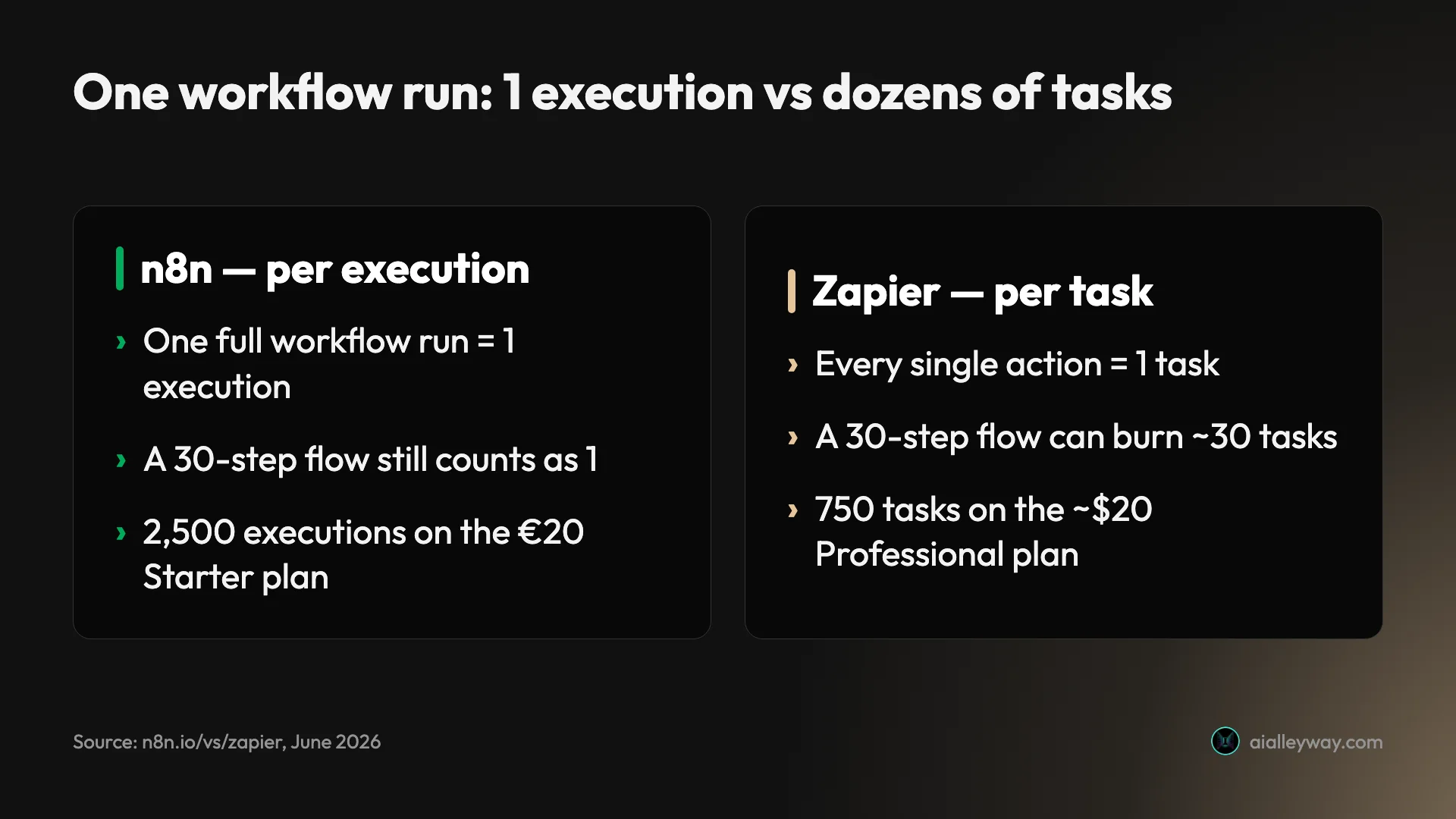
Before any plan makes sense, you need the unit. n8n charges per execution, where one execution is a single run of your entire workflow, no matter how many steps it has. That is the opposite of how Zapier works, and it is the single fact that decides whether n8n is cheap or expensive for you.
Zapier bills per task, where every individual action counts. Send a Slack message, update a row, post to an API: three tasks. n8n counts that same three-step flow as one execution. n8n’s own comparison page states it plainly: a simple two-step workflow and a complex 200-step AI-powered agent both count as a single execution.
| The measure | n8n | Zapier | Make |
|---|---|---|---|
| Billing unit | per execution (one full run) | per task (one action) | per operation (one module step) |
| A 30-step workflow, run once | 1 execution | up to ~30 tasks | up to ~30 operations |
| Entry quota | 2,500 executions (€20) | 750 tasks (~$20) | 10,000 operations (~$9) |
That table is the entire argument for n8n’s pricing, and the entire reason it confuses people. A quota of “2,500” sounds small next to “10,000 operations” until you remember n8n’s 2,500 are whole-workflow runs and the others are per-step. Our social-publisher workflow is 33 nodes; on n8n it costs one execution every time it fires, where a per-task tool would count it dozens of times over.
The model is genuinely a learning curve, not just marketing spin. The “N8N Pricing Confusion” thread on the r/n8n subreddit ranks on the first page of Google for this very search, which tells you buyers find the unit counterintuitive. Once it clicks, the rest of the pricing is simple: pick the tier whose execution quota covers how often your workflows run.
Is the n8n Community edition really free?
The cheapest n8n plan costs nothing, and it is not a stripped trial. The Community edition is the full product, self-hosted on your own server, with unlimited workflows and unlimited executions at zero license cost. You pay only for the machine it runs on.
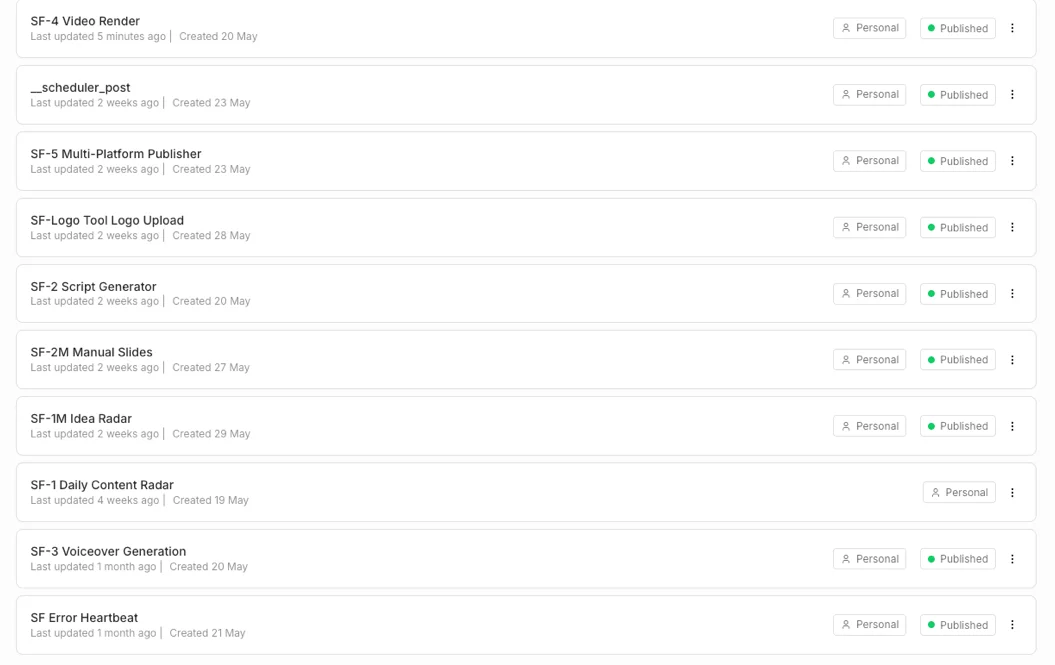
This is the plan we run. The entire AI Alleyway content pipeline, ten workflows turning trend signals into scripts, voiceovers, rendered videos, and scheduled posts, lives on a single small self-hosted box, and the n8n software bill is zero.
There is one honest catch in the license. The Community edition is source-available, not open source: it ships under n8n’s fair-code Sustainable Use License, which lets you self-host freely for your own business and personal use but forbids reselling n8n as a hosted service to others. For 99% of users that restriction never comes up. If you planned to wrap n8n and sell it, read the license first.
The free path is only free if your time is. Self-hosting means you own the server, the database, the upgrades, the backups, and the monitoring. The compute is cheap, but the attention is not, and we cost that out properly in the worked examples below. The short version: if you can follow a Docker tutorial and you do not mind owning the upgrades, free self-hosting is the best value in the category for a technical team. If you cannot, Cloud exists precisely so you do not have to.
n8n Cloud plans, tier by tier
If you would rather n8n ran the servers, Cloud has four tiers. The published prices are in euros and run about 17% cheaper on annual billing than month to month, the usual discount for committing for a year.
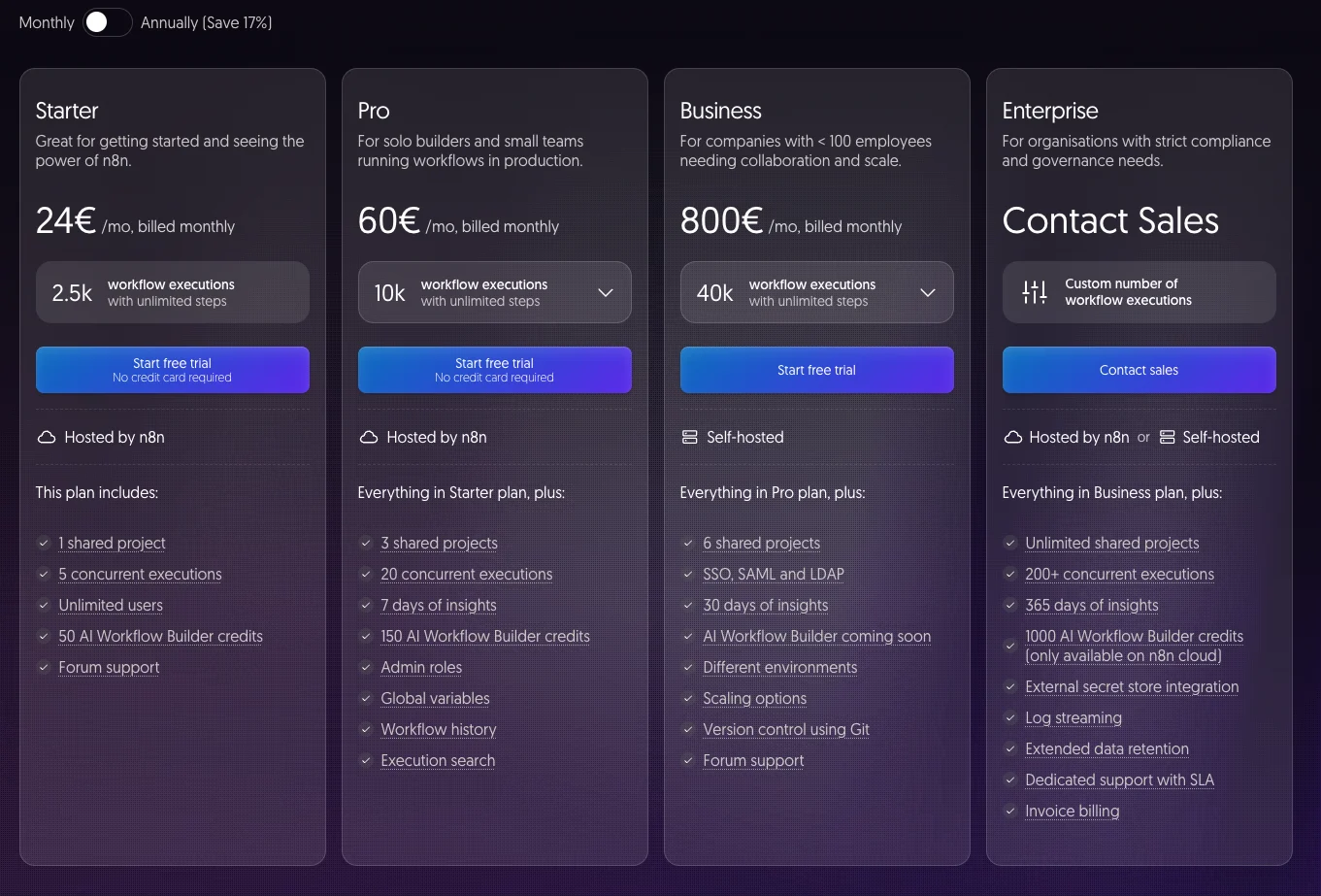
Here is every published limit that matters, pulled from the live pricing page in June 2026:
| Plan | Monthly | Annual (per mo) | Executions / mo | Concurrent | Projects | History / insights | AI credits |
|---|---|---|---|---|---|---|---|
| Starter | €24 | €20 | 2,500 | 5 | 1 | 1 day | 50 |
| Pro | €60 | €50 | 10,000 | 20 | 3 | 5 days | 150 |
| Business | €800 | €667 | 40,000 | higher | 6 | 30-day insights | included |
| Enterprise | Contact sales | Custom | Custom | 200+ | Unlimited | 365-day insights | 1,000 |
Starter (€20/mo annual, €24 monthly) is the entry tier and where most solo builders land. You get 2,500 executions a month, 5 concurrent runs, one project, one day of workflow history, and 50 AI credits for n8n’s built-in AI features. Unlimited steps per workflow, so the only ceiling you can hit is run frequency.
Pro (€50/mo annual, €60 monthly) is the volume step-up: 10,000 executions, 20 concurrent runs, three projects, five days of history, and 150 AI credits. It also adds the team-and-debugging features Starter lacks: admin roles, global variables, and execution search, which matters once more than one person is building and you need to find why a run failed last Tuesday.
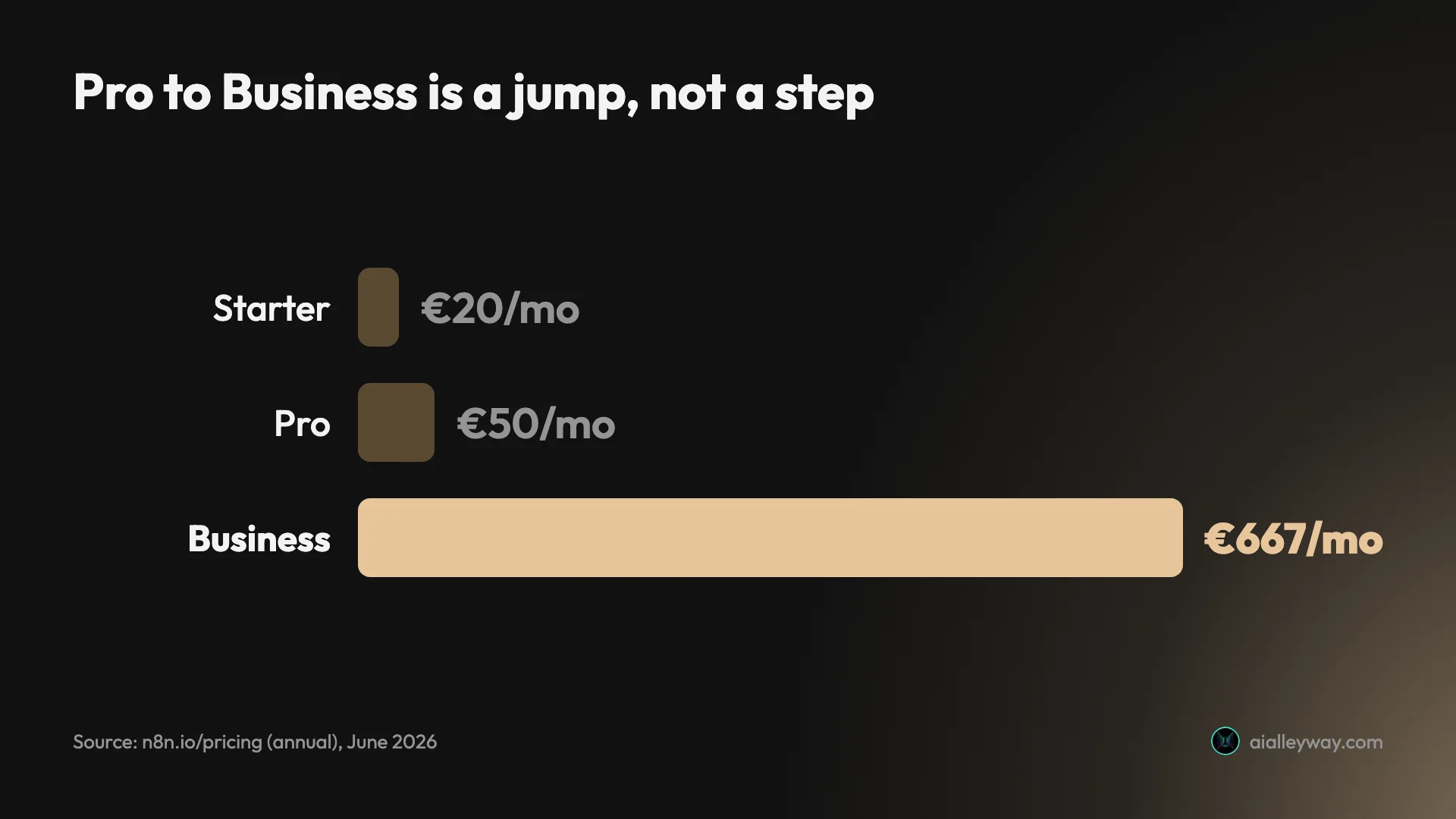
Business (€667/mo annual, €800 monthly) is a deliberate cliff, not a gentle step. The jump from €50 to €667 is steep because Business is the compliance-and-self-host tier, not the natural next rung for a solo builder. It is the first paid plan that lets you self-host with support, and it adds SSO, SAML, and LDAP, role-based access, 40,000 executions, and Git-based version control. Most individuals never need it; teams with a security review do.
Enterprise (custom pricing) is the call-sales tier for large orgs: 200+ concurrent executions, unlimited projects, 365 days of insights, 1,000 AI credits, external secret stores, log streaming, and a dedicated SLA. If you are asking the price, you are probably not the buyer.
One more thing the plan cards bury: n8n does not charge per user. Cloud pricing is on execution volume and features, not seats, so adding a teammate does not multiply the bill the way it does on most SaaS tools. For a team, that alone can make n8n cheaper than a per-seat competitor before you even count the execution math.
What you’ll actually pay: four real scenarios
Plan cards tell you the price; they do not tell you which one you need. Here is the math worked through for four real shapes of user, because the right plan depends entirely on how often your workflows run, not on a feature you will never use.
| Your situation | Monthly runs | Cheapest fit | What it costs |
|---|---|---|---|
| Solo builder, a few automations | ~500 executions | Free self-host, or Starter | €0, or €20/mo |
| Growing team, moderate volume | ~8,000 executions | Pro | €50/mo |
| Heavy ops, high volume | ~35,000 executions | Business, or self-host | €667/mo, or server cost |
| Our content pipeline | thousands of runs | Community self-hosted | ~one 4-vCPU box |
Take the growing-team row. Picture a 30-step workflow that runs 1,000 times a month. On n8n that is 1,000 executions, comfortably inside even the Starter plan’s 2,500. On a per-task tool, 30 steps times 1,000 runs is 30,000 tasks, which sails past every entry tier and lands you on a plan several times more expensive. The more your automation actually does per run, the more lopsided the math gets in n8n’s favor.
Now the self-hosted row, costed honestly. We run the whole AI Alleyway pipeline on one small 4-vCPU cloud box. The compute and database together cost less than a single Cloud Starter seat, and we get unlimited executions instead of 2,500. The trade is real labor: someone patches the host, watches the logs, and owns the upgrade when a new major version ships. Call it a few hours a month. If your time is worth more than the gap between “free server” and “€20 Cloud,” pay for Cloud. If you would do that maintenance anyway, self-hosting wins outright.
The pattern across all four rows is the same. For light, simple use, Starter and a per-task competitor cost about the same, so polish wins. The moment your workflows get long, run often, or both, n8n’s per-execution model pulls ahead fast, and self-hosting removes the bill entirely if you can carry the ops.
Self-hosted n8n: the true cost of “free”
It is easy to stop at the Cloud sticker price and treat self-hosting as simply “free.” It is free of license cost. It is not free of everything else, so here is the math the marketing pages skip.
At small scale, what you actually stand up is modest: a single Docker container plus a Postgres database. That is the whole stack, and it is exactly what runs our pipeline. Standing it up takes about 30 minutes if you can follow a Docker tutorial, and the software only updates when you choose to pull a new image.
The bill in euros is small. Our entire content operation runs on one 4-vCPU cloud box, with Postgres on the same machine, for a compute cost well under what a single Cloud Starter seat would run over a year. The software license is zero. On paper, self-hosting wins before you finish reading the invoice.
| Cost line | Our small setup | At scale |
|---|---|---|
| Software license | €0 | €0 |
| Compute | one 4-vCPU box | multiple worker processes |
| Database | Postgres on the same box | managed Postgres |
| Queue layer | none needed | Redis instance |
| Your time | a few hours / month | an ongoing ops role |
The line the marketing pages skip is the last one. Someone owns the upgrades, the backups, the monitoring, and the occasional 2am debugging. Major-version upgrades can introduce breaking changes, so each one deserves a staging test before you trust it in production. None of that is hard for a technical team, but it is not nothing, and it is the entire reason Cloud exists.
There is also a ceiling on a single box, and you will meet it. On our small machine, two heavy jobs cannot run at once: we serialize the headless-Chromium renders behind a Postgres advisory lock because the hardware cannot handle two at the same time. Scaling past one node means queue mode, separate worker processes, and the Redis instance in the table above, which is real configuration work a hosted plan absorbs for you.
So the honest break-even is simple. Cloud Pro is €600 a year. A self-hosted box doing the same work costs a fraction of that in compute, so the question is never the server, it is your hours. If the few hours a month of maintenance are work you would do anyway, self-hosting is free money. If those hours are worth more to you than the €600 gap, pay for Cloud and spend them elsewhere.
Pricing traps to watch
The plan cards are honest, but a few details decide whether your estimate survives contact with reality. These are the ones that cost us, or that the community keeps flagging.
Sub-workflows, test runs, and retries all count
A “normal” run is one execution, but it is not the only thing that draws down your quota. Per n8n’s own docs, sub-workflows you call, manual test runs while you build, and automatic retries each count as executions too. A flow that retries three times on a flaky API can quietly use four executions for one logical job. Model your real run frequency including retries, not your happy-path count, or 2,500 will shrink faster than you expect.
The Pro-to-Business jump is a cliff, not a step
Going from Pro to Business means going from €50 to €667 a month. There is nothing in between. If you need exactly one Business feature, SSO for a security review, say, you pay the full €667 for it. For many teams the smarter move is to stay on Pro for volume and self-host the Community edition separately for the data-control or SSO-adjacent needs, rather than buying the whole compliance tier for one checkbox.
”Free” self-hosting is not free of labor
The Community edition costs no license money, but it costs attention: the upgrades, backups, and monitoring detailed in the self-hosting section above, plus the major-version upgrade that can break a flow and wants a staging test first. The server is cheap; the time is the real price, and it is the single reason to pay for Cloud instead.
AI credits are metered separately, and they are small
The AI credits that power n8n’s built-in AI features are capped per tier and they are not generous: 50 on Starter and 150 on Pro. Business lists them as “included” with no published number, and a hard cap of 1,000 shows up only at Enterprise.
| Plan | AI credits / mo |
|---|---|
| Starter | 50 |
| Pro | 150 |
| Business | included (no fixed cap published) |
| Enterprise | 1,000 |
If your workflows lean on n8n’s native AI nodes heavily, you will burn through those fast. The workaround we use is to call model APIs directly over the HTTP node with our own Anthropic and other keys, which sidesteps the credit pool entirely and keeps the cost on our own provider bill where we can see it.
Annual billing locks the discount behind a year
The €20, €50, and €667 prices are the annual rates. Pay month to month and you are at €24, €60, and €800, about 20% more (or, the same gap from the other side, roughly 17% cheaper if you commit annually). That is a fair discount for committing, but it means the headline prices everyone quotes assume you are willing to pay for a year up front. Budget for the monthly figure unless you are sure.
Workflow history is short on the lower tiers
When a workflow fails, the execution log is how you find out why, and the lower tiers keep it briefly. Starter retains one day of history; Pro stretches to five; the long retention and 30-to-365-day insights arrive on Business and Enterprise. If you run unattended automations and only check them weekly, a Monday failure can age out of a one-day window before you look. It is not a hidden fee, but it shapes how debuggable your stack is, and it is a real reason a busy team outgrows Starter before it outgrows the execution quota.
The model itself is the trap for newcomers
The biggest pricing surprise with n8n is not a hidden fee, it is the unit. People coming from per-task tools assume a small execution quota means a small allowance, when the opposite is true. The recurring confusion on the r/n8n forum is real evidence of this. Spend ten minutes understanding executions before you pick a tier, and none of the numbers will surprise you.
How to pay less for n8n
Once you understand the unit, a few levers cut the bill, and the pricing page advertises none of them.
| Lever | What it saves |
|---|---|
| Pay annually instead of monthly | ~17% cheaper than monthly |
| Stay on Pro, self-host for SSO | avoids the €50-to-€667 jump |
| Use your own AI keys via the HTTP node | preserves the small AI-credit pool |
| Self-host the Community edition | removes the Cloud bill entirely |
First, commit annually if you are sure. The €20, €50, and €667 prices are annual rates; month to month they are €24, €60, and €800, about 20% higher. If you have validated that n8n is your tool, the yearly commitment is the easiest discount on offer.
Second, do not buy Business for one feature. The €50-to-€667 cliff means a single Business checkbox, SSO for a security review, say, costs the full jump. The cheaper pattern is to stay on Pro for execution volume and self-host the free Community edition separately for the data-control needs, rather than paying the whole compliance tier for one box ticked.
Third, route AI through your own keys, not n8n’s credits. The built-in AI credits are small and metered per tier. We call model providers directly over the HTTP node with our own Anthropic and ElevenLabs keys, which keeps that spend on our provider bills where we can see it and leaves the credit pool untouched. If your workflows are AI-heavy, this one change can decide whether you need a higher tier at all.
And the biggest lever, for anyone technical: self-host the free edition. Every tip above trims a Cloud bill. The Community edition removes it. If you can run a server, the cheapest n8n is the one you host yourself, and the €20 a month goes somewhere it is needed more.
Which n8n plan should you pick?
The deciding question is never features, because the free edition already has them. It is whether you want to own the operations or pay n8n to handle them, and how often your workflows run. Map yourself to one of these:
- Just starting, and technical: run the free self-hosted Community edition. Unlimited executions, full Code and HTTP nodes, your data on your own box. It is the best deal in the category if you can stand up Docker.
- Want zero setup: take Cloud Starter at €20/mo. You get 2,500 whole-workflow executions and never touch a server. Upgrade to Pro only when you actually cross the quota.
- A growing team with real volume: Pro at €50/mo buys 10,000 executions, admin roles, and execution search, the debugging features that matter once more than one person builds.
- A company with a security review: Business at €667/mo is the SSO, RBAC, self-host, and Git tier. Buy it for compliance, not for raw automation power you can get free.
- Skip Cloud entirely if your time is cheap, your team is technical, and you care about data control. Self-host and put the €20 a month somewhere else.
If n8n’s cost adds up: Zapier and Make
If the per-execution model or the self-host operations are not for you, two alternatives trade some of n8n’s value for an easier start. Both are fully hosted, so there is nothing to run and nothing to upgrade.
| The measure | n8n | Zapier | Make |
|---|---|---|---|
| Billing unit | per execution | per task | per operation |
| Entry price | €20/mo, or free self-hosted | ~$20/mo | ~$9/mo |
| Self-host | Yes, free | No | No |
| Best for | technical teams, volume, AI | non-technical, quick links | visual builders, middle ground |
- Zapier is the pick if you want the widest, most polished integration library and zero setup. The trade is the per-task billing that gets expensive at volume, with no self-host option to escape it. Best for non-technical users connecting a few SaaS apps. See our full Zapier review for the cost math at scale.
- Make sits in the middle: a visual, drag-and-connect builder friendlier than n8n but more flexible than Zapier, priced per operation. It is the natural step up if Zapier feels limiting but n8n feels like too much. Our Make.com review breaks down the operations model.
Two is enough. Across all three, the choice comes down to your comfort with code and your run volume, and on both axes n8n is where heavy users end up. For the wider field, our n8n alternatives roundup ranks every option by why you’d leave.
Final word
n8n’s pricing reads scary and is actually simple once you fix on the unit. Free if you self-host and can carry the operations; €20 a month on Cloud if you would rather not; and the whole bill is governed by how often your workflows run, not how many steps they have. That per-execution model is the reason teams outgrow per-task tools and land here, and it is why our entire content pipeline runs for the price of one small server.
If you are technical, start with the free self-hosted edition and see how far it goes before you pay a cent. If you want it to just work, Cloud Starter is the €20 that buys you out of server maintenance. Either way, model your real run frequency first, and the number on the plan card will stop being a mystery. For the full hands-on picture of what you are buying, read our n8n review.
Frequently asked questions
Is n8n free?
Yes, if you self-host. The Community edition is free to run on your own server under n8n's fair-code Sustainable Use License, with unlimited workflows and unlimited executions and no license cost. You only pay for the server it runs on.
The paid plans are n8n Cloud, the hosted version where n8n runs the servers for you: Starter is €20/month for 2,500 executions on annual billing, or €24 month to month. So n8n is free if you are willing to run it yourself, and paid if you want n8n to handle the hosting.
How much does n8n Cloud cost?
n8n Cloud has three published tiers plus Enterprise, priced in euros and cheaper on annual billing. Starter is €20/month annually (€24 monthly) for 2,500 executions. Pro is €50/month annually (€60 monthly) for 10,000 executions. Business is €667/month annually (€800 monthly) for 40,000 executions, and it adds SSO, self-hosting, and Git version control. Enterprise is custom-priced with 200+ concurrent executions and a dedicated SLA.
Most individuals live on Starter or the free self-hosted edition.
What counts as one execution in n8n?
One execution is a single run of your whole workflow, no matter how many steps it has. Per n8n's own comparison, a two-step workflow and a 200-step AI agent both count as one execution, which is the opposite of Zapier's per-task model.
The catch is that sub-workflows you call, manual test runs while you build, and automatic retries each count as executions too, so a flow that retries on failure can use more of your quota than the run count suggests. Model your real run frequency, not your happy-path count.
Is self-hosting n8n actually free?
The software is free; your time is not. Self-hosting costs you the server, the database, the upgrades, the backups, and the monitoring. Our whole content pipeline runs on a single small 4-vCPU cloud box, which is a rounding error next to a stack of hosted seats, so the compute bill is cheap.
The real cost is attention: someone has to patch the host, watch the logs, and own the upgrade when a new major version lands. For a team with technical hands that trade is easy. For a team without them, paying for Cloud is the cheaper option once you count the hours.
Does n8n charge per user or per seat?
No. Unlike most SaaS automation tools, n8n's Cloud plans are priced on execution volume and features, not on the number of people using the workspace.
You can add teammates without the per-seat multiplier that makes other tools expensive for a group. What changes between tiers is the execution quota, concurrency, project count, history retention, and governance features like SSO, not a headcount fee.
Is there a free trial for n8n Cloud?
Yes. n8n Cloud offers a free trial with no credit card required on the Starter and Pro tiers, so you can run real workflows before paying anything. The Business tier offers a 14-day trial that does ask for a card up front. And if you self-host the Community edition there is nothing to trial, because it is free to run indefinitely on your own server.
Which n8n plan is best for developers?
For most developers, the free self-hosted Community edition is the best starting point: unlimited executions, full access to Code and HTTP nodes, and your data on infrastructure you control.
Move to Cloud Starter or Pro only if you would rather not run a server. Step up to Business when you need SSO, role-based access, or Git-based version control for a team. The deciding factor is almost never raw features, which the free edition already has, but whether you want to own the operations or pay n8n to handle them.
Keep reading
n8n vs Make: which is cheaper, and which is easier?
We run n8n in production and built a real scenario in Make. The honest n8n vs Make verdict: who's cheaper at scale, who's easier to start, who wins.
n8n vs Zapier: which is cheaper, and which is easier?
We run n8n in production and tested Zapier hands-on. The honest n8n vs Zapier verdict: who's cheaper at scale, who's easier to start, and which fits you.
n8n review: the tool that runs our whole content pipeline
We run 10 production workflows on self-hosted n8n. Where it beats Zapier on price, where the learning curve bites, and who should actually use it.
Best n8n alternatives: who each one is actually for
We run n8n in production, so we know what you'd trade away. The 9 best n8n alternatives, from managed to open-source, and who each one actually fits.