
n8n vs Zapier: which is cheaper, and which is easier?
We run n8n in production and tested Zapier hands-on. The honest n8n vs Zapier verdict: who's cheaper at scale, who's easier to start, and which fits you.
Contents
n8n vs Zapier: the verdict at a glance
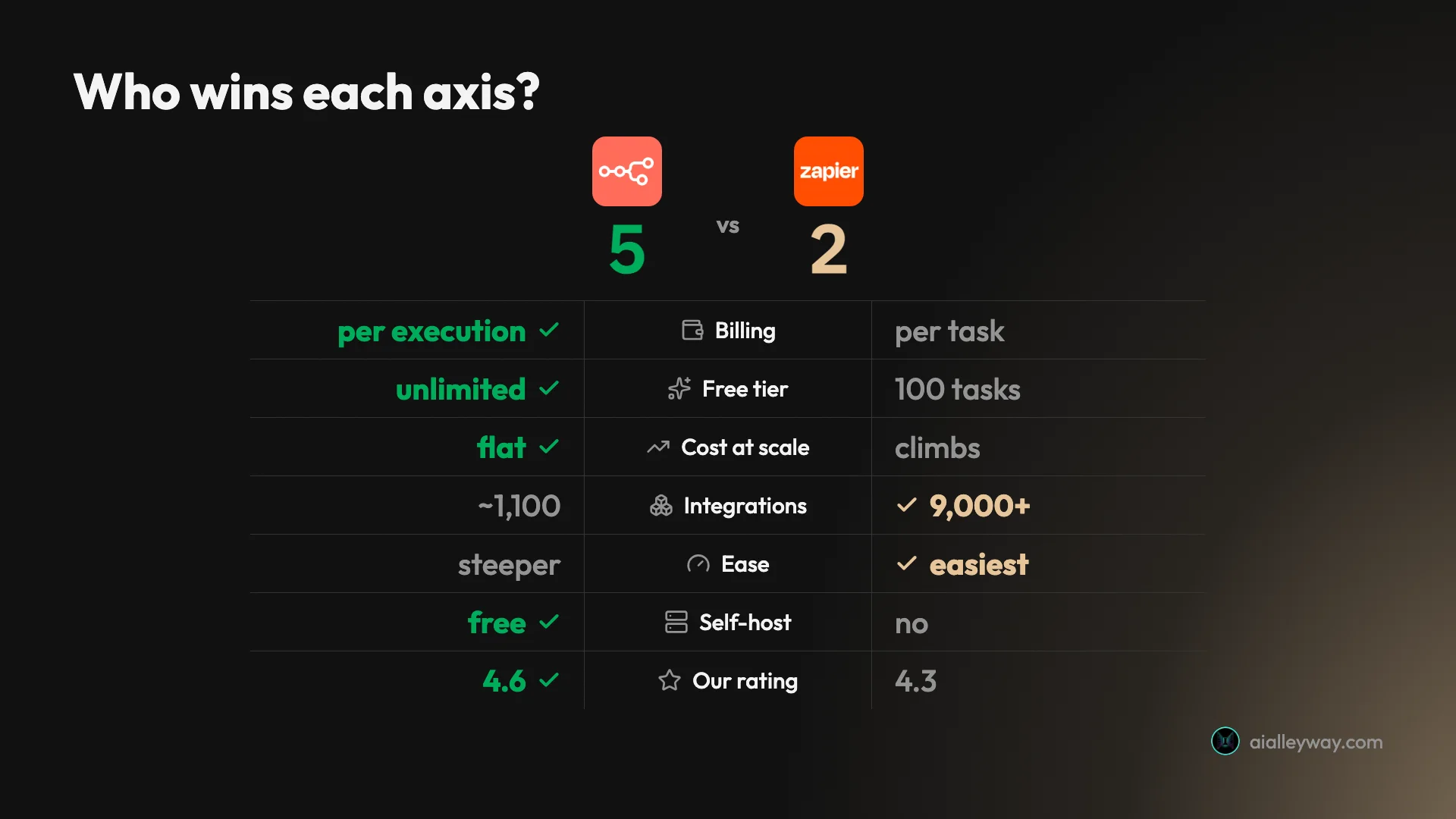
The honest answer is that this is not close on either axis that matters; it is just that the two tools win different axes. Zapier is the easiest automation tool to start with and has by far the widest app library. n8n is dramatically cheaper at volume, self-hosts for free, and goes deeper on code and AI. Your choice comes down to whether you value ease and reach or cost and control.
We can compare these two with more standing than most, because we live in both. n8n runs the entire AI Alleyway content pipeline: ten production workflows, including a 33-node publisher, on a self-hosted box. We did not run Zapier in production, but we built a real multi-step Zap with its Copilot and ran its new MCP layer live across Gmail, Google Calendar, and Slack. The verdict below is grounded in that, plus both tools’ live pricing and thousands of reviews.
| Pick this | Tool |
|---|---|
| Best for non-coders and the widest app coverage | Zapier |
| Best for cost at volume, self-hosting, and AI depth | n8n |
| Best overall value, if you have technical hands | n8n |
If you read only one section below, make it the price deep-dive: the per-task-versus-per-execution gap is the single fact that flips this decision, and it is the one almost every other comparison skips. Everything else, reach, ease, AI, governance, is real but secondary to what these two tools do to your monthly bill as you grow.
n8n vs Zapier compared, axis by axis
Here is the whole comparison in one place. The “how it bills” and “starting cost at volume” rows are the ones that decide most switches.
| Axis | n8n | Zapier | Winner |
|---|---|---|---|
| How it bills | Per execution (one whole run) | Per task (one app action) | n8n |
| Free tier | Yes, self-host, unlimited | Yes, 100 tasks, two-step only | n8n |
| Paid from | €20/mo (2,500 exec) or free self-host | $19.99/mo (750 tasks) | n8n |
| Cost at volume | Stays low; flat per run | Climbs with steps × runs | n8n |
| Self-host | Yes, free | No | n8n |
| Pre-built integrations | ~1,100 (plus HTTP to anything) | 9,000+ | Zapier |
| Ease of starting | Steeper; rewards code | Easiest in the category | Zapier |
| Code as first-class | Yes (JavaScript, Python) | No | n8n |
| AI / agents | LangChain nodes, deep | Copilot, Agents, MCP, broad | Tie |
| Security / governance | You own it (self-host) | SOC 2, SSO, audit logs | Zapier |
| Our Alley Rating | 4.6 | 4.3 | n8n |
Where n8n wins

n8n is the tool we trust with our own production pipeline, and its case rests on three things Zapier structurally cannot match: price at scale, ownership, and depth. The reason to start here is the billing model. n8n charges per execution, so our 28-node render workflow (a separate pipeline from the 33-node publisher) costs exactly one execution per run, the same as a two-node one. That single design choice is why teams outgrow per-task tools and land here.

Self-hosting is real ownership, and free. The Community edition runs on your own server with unlimited executions and zero license cost. We run the whole pipeline on one small 4-vCPU box, and every API key it touches stays on infrastructure we control rather than handed to a third-party vendor. For regulated work or a wall of sensitive credentials, that is not a nice-to-have; it is the requirement that rules hosted tools out.
Code is a first-class citizen. Every workflow we run leans on Code nodes where you write plain JavaScript or Python with the workflow’s data in scope, and the HTTP Request node calls any API that exists even when there is no pre-built integration. That is the difference between bending the tool to your data and bending your data to the tool, and it is a ceiling Zapier’s no-code model never reaches.
The AI nodes are deep. n8n ships LangChain-based nodes for LLM calls, agents, and retrieval, which is why it is increasingly the home for serious AI automation in 2026. Our pipeline drives Anthropic, ElevenLabs, and Buffer from inside n8n every day.
It is reliable, and the workflows live in Git. Pulling our live execution history in June 2026, the last 93 stored runs across the pipeline came back at 100% success, which is the bar that matters for a stack that posts to three platforms unattended. And because every workflow exports to JSON, ours sit in version control next to the rest of our code: we review changes in a pull request and revert a bad one in seconds, something no hosted tool offers.
On the developer aggregates n8n rates near the top, 4.7 on G2, and it carries one of the largest followings in open automation, so when you hit a wall someone has usually posted the fix on the community forum.
The gaps are just as real, and they are the mirror image of Zapier’s strengths. The learning curve is steep; Capterra reviewers name it the top complaint, with ease of use at 4.1 against a 4.6 overall. The integration library is narrower at roughly 1,100 connectors. And if you self-host, you own the upgrades, the backups, and the occasional 2am debugging. n8n rewards technical hands and frustrates everyone else. Our full n8n review scores it 4.6, a Category Leader.
Where Zapier wins

Zapier is the easiest place in the world to get a working automation, and for most non-technical teams that is the entire decision. It connects more than 9,000 apps, far ahead of n8n’s roughly 1,100, so the thing you want to automate is almost certainly supported and building is mostly clicking and connecting.
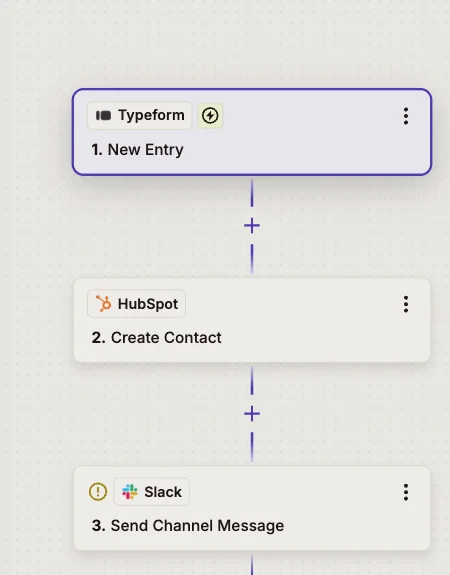
It is the easiest tool to learn. The trigger-then-action format is the simplest in the category, and its Copilot drafts a working Zap from a plain-English sentence on every plan, including the free one. When we built a multi-step Typeform-to-HubSpot-to-Slack Zap, Copilot scaffolded it from a description and we tuned field mappings rather than wiring it from scratch. A first useful automation takes minutes, not an afternoon.
The AI layer is broad, and we ran it live. Beyond Copilot, Zapier ships Agents, Tables, Interfaces, Chatbots, and a Model Context Protocol server. We connected Gmail, Google Calendar, and Slack to that MCP and had an agent pull a live rundown across all three with no Zap pre-built, each request reaching straight into the real apps. The same 9,000-app library that powers static Zaps powers the agent, which is a strong position as automation goes agentic.
It is enterprise-grade on governance. SOC 2 Type II on all plans, SAML SSO on Team and up, audit logging on Enterprise, and centrally managed connections so a team shares an app login without sharing the password. That maturity is an easy approval for IT, where a self-hosted or younger tool faces more scrutiny.
| Trust and governance | Available on |
|---|---|
| SOC 2 Type II compliance | All plans |
| SAML single sign-on | Team and up |
| Advanced admin, app restrictions, audit logging | Enterprise |
It is more than a connector now. Tables give you a built-in database, Interfaces publish simple forms and pages, and Canvas is a visual space to plan, so a small team could take requests through an Interface, store them in a Table, route them with a Zap, and answer common questions with a Chatbot, all inside Zapier and all without code. That ambition is newer and less proven than the core automation, but it changes what Zapier competes on, from wiring two apps together to building a small app outright.
The depth of each integration helps too: popular apps expose dozens of triggers and actions, not just one, so you react to granular events and write back specific fields rather than settle for a generic “new item.” That depth is part of why a sprawling stack feels at home on Zapier in a way it rarely does elsewhere.
The catch is the meter, and it is the whole story at scale. Zapier bills per task, so a long multi-step Zap run thousands of times a month burns tasks fast and a $20 plan can become hundreds. It has no self-host option, so you cannot escape the per-task model the way you can with n8n. Trustpilot sits at 1.4 from 303 reviews, almost entirely about billing and cancellation, the standard tax of a usage-metered market leader. Our Zapier review scores it 4.3, a Power Tool.
How n8n and Zapier differ on price
This is the section that decides most switches, and it is the one almost no comparison does honestly, so here is the real math. The two tools meter in completely different units. n8n charges one execution per whole workflow run, however many steps it has. Zapier charges one task per successful app action, so a multi-step automation burns several tasks every time it runs.
That difference is invisible at a glance and decisive at scale. Take a 10-step automation with six billable app actions, the shape of a normal real-world workflow. On n8n that is one execution per run. On Zapier it is roughly six tasks per run. Now watch what happens as you run it more often.
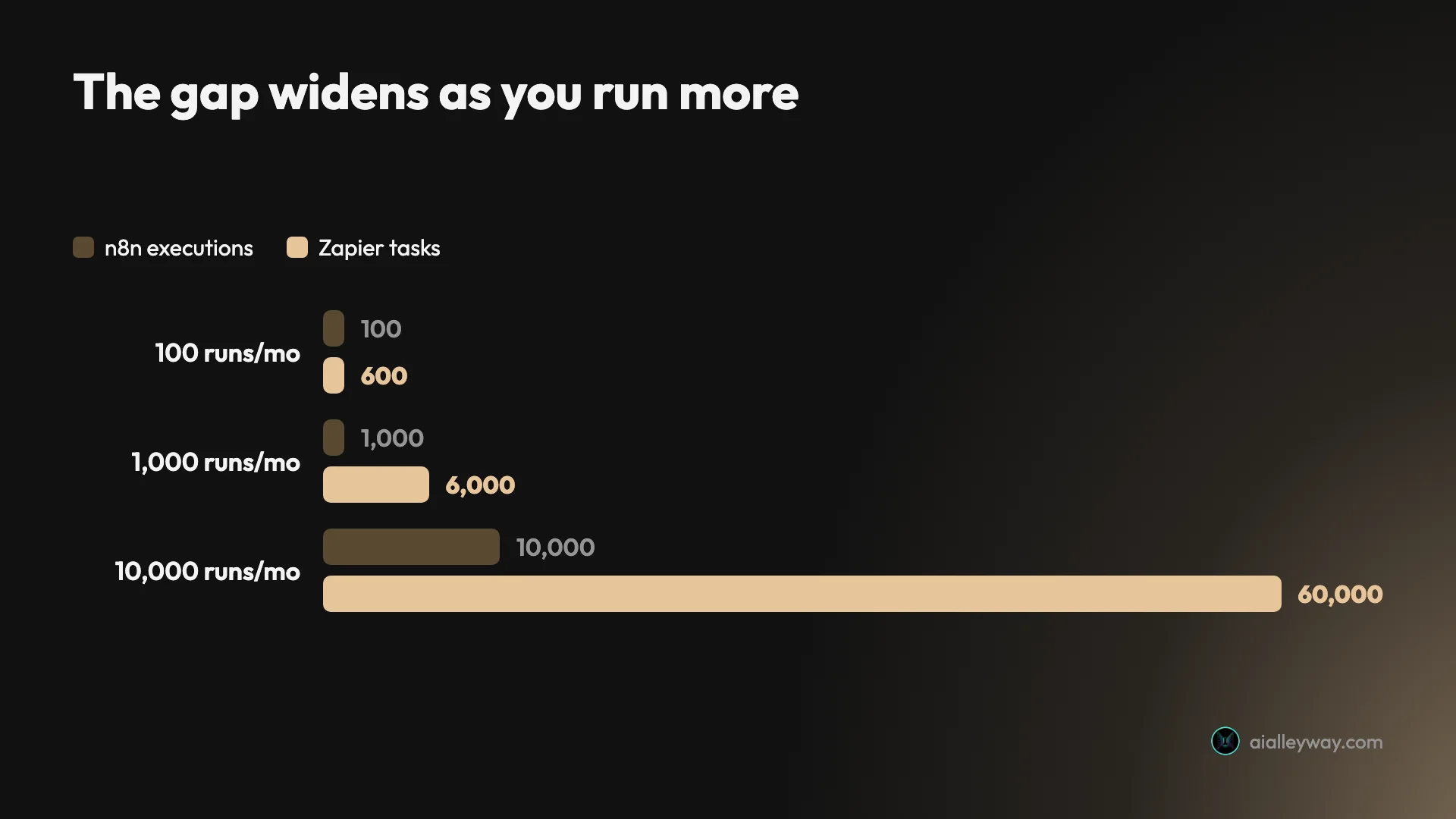
| Monthly runs (10-step flow) | Zapier tasks | n8n executions | Who’s cheaper |
|---|---|---|---|
| 100 | ~600 | 100 | Roughly tied, about $20 each |
| 1,000 | ~6,000 | 1,000 | n8n — 1,000 fits the €20 Starter’s 2,500; 6,000 tasks is far past a $19.99 plan’s 750 |
| 10,000 | ~60,000 | 10,000 | n8n by a wide margin — 10,000 is the €50 Pro tier; 60,000 tasks is a costly high plan |
The entry prices look almost identical: Zapier is free for 100 tasks and $19.99 for 750, while n8n is free self-hosted or €20 for 2,500 executions. At a hundred runs of a simple workflow, the two are a wash and Zapier’s polish is worth the price. The gap only opens as your automation does more work, and then it opens fast.
There is a nuance that softens Zapier’s side, and it is worth being fair about. Triggers, Filters, Paths, and Zapier’s built-in tools like Formatter and Delay are all free; only successful actions in outside apps bill. So a Zap that triggers, filters, formats text, and creates one contact is one task, not four. That gentler-than-it-looks model is real, and a disciplined builder who filters early and leans on free steps can hold the line. But it does not change the shape of the curve: every billable action still costs, every run, forever.
n8n’s side has its own asterisk, in the opposite direction. The €20 and €50 Cloud prices are real, but the Community edition is free at any volume if you self-host, so for a technical team the entire right-hand side of that table can be zero plus the cost of a small server.
A second worked example makes the divergence concrete. Picture two ordinary automations running every month, and watch the totals split:
| Two real automations | Zapier tasks | n8n executions |
|---|---|---|
| Lead Zap (2 actions × 500 runs) | 1,000 | 500 |
| Order sync (3 actions × 1,000 runs) | 3,000 | 1,000 |
| Monthly total | 4,000 (past the 750 base) | 1,500 (inside €20 Starter) |
Two normal automations, and the bills have already split by a wide margin. The 4,000 tasks push you well past Professional’s base and into paying to lift the slider; the 1,500 executions sit comfortably inside the €20 Starter plan, and at zero if you self-host. Neither workflow is exotic, which is the point: it does not take a heavy operation to reach the crossover, just a couple of multi-step automations that run on a schedule.
Two more wrinkles change the real number, one on each side. On Zapier, the June 2026 move to model-based AI pricing means AI steps now bill with a task multiplier by tier: Standard at 1x, Advanced at 3x, and Premium at 5x, with a safeguard that pauses any Zap hitting 75 tasks in one run. If your automations lean on AI, model choice drives the bill directly, though you can connect your own model key to stay at the 1x rate.
On n8n, the wrinkle is the self-host break-even: Cloud Pro is €600 a year, while a self-hosted box doing the same work costs a fraction of that in compute, so the real question is never the server, it is your maintenance hours. If patching and upgrades are work you would do anyway, self-hosting is free money.
One last note on cadence, because both reward annual billing unevenly. Zapier’s annual rate runs about a third cheaper than month to month, a steep enough discount that the headline $19.99 assumes a year’s commitment. n8n’s annual saving is gentler, around 17%. Budget for the monthly figure on either unless you are sure. The honest summary: at low volume the two cost about the same and Zapier is the nicer experience; the moment your workflows get long or run often, n8n is cheaper, and free if you host it yourself. Our full n8n pricing breakdown walks the tiers in detail.
How they differ on power and reliability
Price decides the bill; capability decides whether the tool can do the job at all, and here the two trade wins. Zapier’s advantage is reach. Its integration library dwarfs n8n’s, and depth matters as much as count: popular apps expose dozens of triggers and actions, so you react to granular events and write back specific fields.
| Tool | Pre-built integrations |
|---|---|
| Zapier | 9,000+ |
| Make | ~3,000 |
| n8n | ~1,100 (plus HTTP to anything) |
n8n’s answer to that gap is the HTTP Request node, which calls any API directly, so its practical ceiling is “any service with an endpoint” rather than “any service we pre-built.” For a developer that is liberating; for a non-coder it is a wall. So Zapier wins coverage for the common case, and n8n wins reach for the custom one, which is the whole no-code-versus-low-code split in a sentence.
It is worth being precise about what n8n’s escape hatch buys you. The HTTP Request node calls any REST API directly, and when even that is not enough you can build and install custom nodes, so a niche internal service becomes a first-class block on the canvas rather than a pile of raw calls. Zapier’s answer to a missing app is its Webhooks and API Request steps, which reach any service too, but you are hand-mapping payloads rather than working with a typed node. Both can technically reach anything; the difference is how much of the plumbing you see, and how repeatable it is the second time you need it.
On raw capability, n8n goes further. Code nodes, real branching, custom nodes, and first-class AI building blocks let it handle automation that Zapier’s model cannot express without leaving the platform. Zapier has grown into Tables, Interfaces, and Agents, so it is more than a connector now, but the depth still favors n8n once a workflow gets genuinely complex.
Reliability is where the aggregate reviews speak, and they split in an instructive way. Both tools are dependable in production; the rating gaps are about support and billing, not uptime.
| Aggregate | n8n | Zapier |
|---|---|---|
| G2 | 4.7 | 4.5 |
| Capterra | 4.6 | 4.7 |
| Trustpilot | 3.4 | 1.4 |
Read those carefully. On the developer-facing aggregates the two are neck and neck, with Zapier’s Capterra 4.7 from over 3,000 reviews reflecting the longest track record in the category and n8n’s G2 4.7 reflecting how much developers love the flexibility. The Trustpilot split is not about the products failing; both scores there are dominated by billing and support complaints, which is the usual fate of any usage-metered tool. We have run n8n unattended at 100% success across the executions we keep, and Zapier reviewers describe their Zaps as infrastructure they rarely think about. For the job of running real business processes, both clear the bar.
Beyond the averages, the day-to-day reliability tools matter, and both are mature in different ways. Zapier has run mission-critical automations for well over a decade, and the maturity shows in the small things: clear run histories, automatic retries, and error notifications that keep a broken Zap from failing silently. n8n gives you the same safety net but you assemble it. A dedicated error-trigger workflow catches any failure anywhere in the pipeline and fires an alert, which is how we hear about a problem in seconds rather than discovering a silent gap days later. The platform gives you the hook; you decide how loud the alarm is.
The scaling stories diverge sharply. Zapier scales invisibly, because it is fully hosted, so a workload that grows ten-fold is a billing change, not an engineering project. n8n scales on a single box right up until it does not: two heavy jobs cannot run at once on a small machine, and going past that means queue mode, separate worker processes, and a Redis instance. That is real configuration work Zapier absorbs for you, and it is the other half of the self-host trade, the operations tax the free license never mentions.
The last axis is data sovereignty, and it is the cleanest win for n8n. Self-hosted, every API key and every byte of automation data stays on infrastructure you control; Zapier, by definition, is a third party your data flows through. For a regulated business or anyone handling client data, that distinction can rule a hosted tool out before price or features enter the conversation. The flip side is the license: n8n is source-available under a fair-code license, not OSI open source, so you can self-host your whole company for free but cannot resell it as a service, a line that almost never matters but is worth reading once.
How they differ on ease and workflow
If price is n8n’s home turf, ease is Zapier’s, and the gap is just as wide in the other direction. Getting started on Zapier is genuinely fast: connect an app once, describe what you want, and Copilot drafts the Zap. You can run it against real data and watch each step before turning it on, which is exactly the guardrail that wins over cautious first-timers. We had a working multi-step Zap in minutes without reading a single doc.
n8n’s on-ramp is steeper by design. The visual canvas is approachable for the first hour, and being able to run a single node in isolation and inspect its output is genuinely pleasant. But the first time a downstream node needs reshaped data or a branching error path, you are in expression-and-Code-node territory, and the syntax expects you to be comfortable there. A non-coder can build a basic flow; an ambitious one rewards a developer, and the gap between those two is where most people bounce off n8n.
The day-to-day build experience splits along the same line. Both let you test before you trust, but differently: Zapier runs a Zap against real data and shows what each step would do, while n8n lets you execute a single node and inspect its raw output before wiring the next one. Both lean on large template galleries to skip the blank canvas, so a common job starts from a working example on either tool. The difference is what happens when you outgrow the template: on Zapier you are still clicking, on n8n you are writing an expression.
| Build experience | n8n | Zapier |
|---|---|---|
| First working automation | ~30 min (after Docker, if self-hosting) | Minutes, no setup |
| Draft from a sentence | No | Yes (Copilot, all plans) |
| Test before turning on | Run a single node in isolation | Run the Zap on real data |
| When you outgrow the basics | Code nodes + expressions | Mostly more clicking |
| Version control | JSON in Git | Dashboard only |
That table is the ease-versus-power trade in one frame: Zapier removes friction at the start, n8n removes ceilings later.
Where n8n pays that learning curve back is in how it treats automation as code. Every workflow exports to a JSON file, so ours live in Git next to the rest of our code: we review changes in a pull request and deploy with a script instead of clicking around a dashboard, and a bad change is one revert away. Zapier keeps your logic inside its dashboard with no real version history or rollback. For a solo builder that does not matter; for an engineering team that treats automation as part of the stack, it is the difference between a toy and a tool.
The AI-and-agents axis is the one genuine tie. Both are investing hard where the category is heading. Zapier’s MCP server and Agents make it a friendly, no-setup on-ramp to agentic automation across its huge app library, which we confirmed by running it live: we connected Gmail, Google Calendar, and Slack, and an agent pulled a rundown across all three with no Zap pre-built, each request reaching straight into the real apps.
n8n’s LangChain nodes make it the deeper platform for building custom agents you fully control, though its prebuilt AI Agent node is younger than the hype, so for our critical path we call models over HTTP directly and keep control of the prompt rather than hand it to the agent abstraction. Pick Zapier if you want an agent that can already drive your apps; pick n8n if you want to build the agent’s logic yourself.
Who should pick n8n
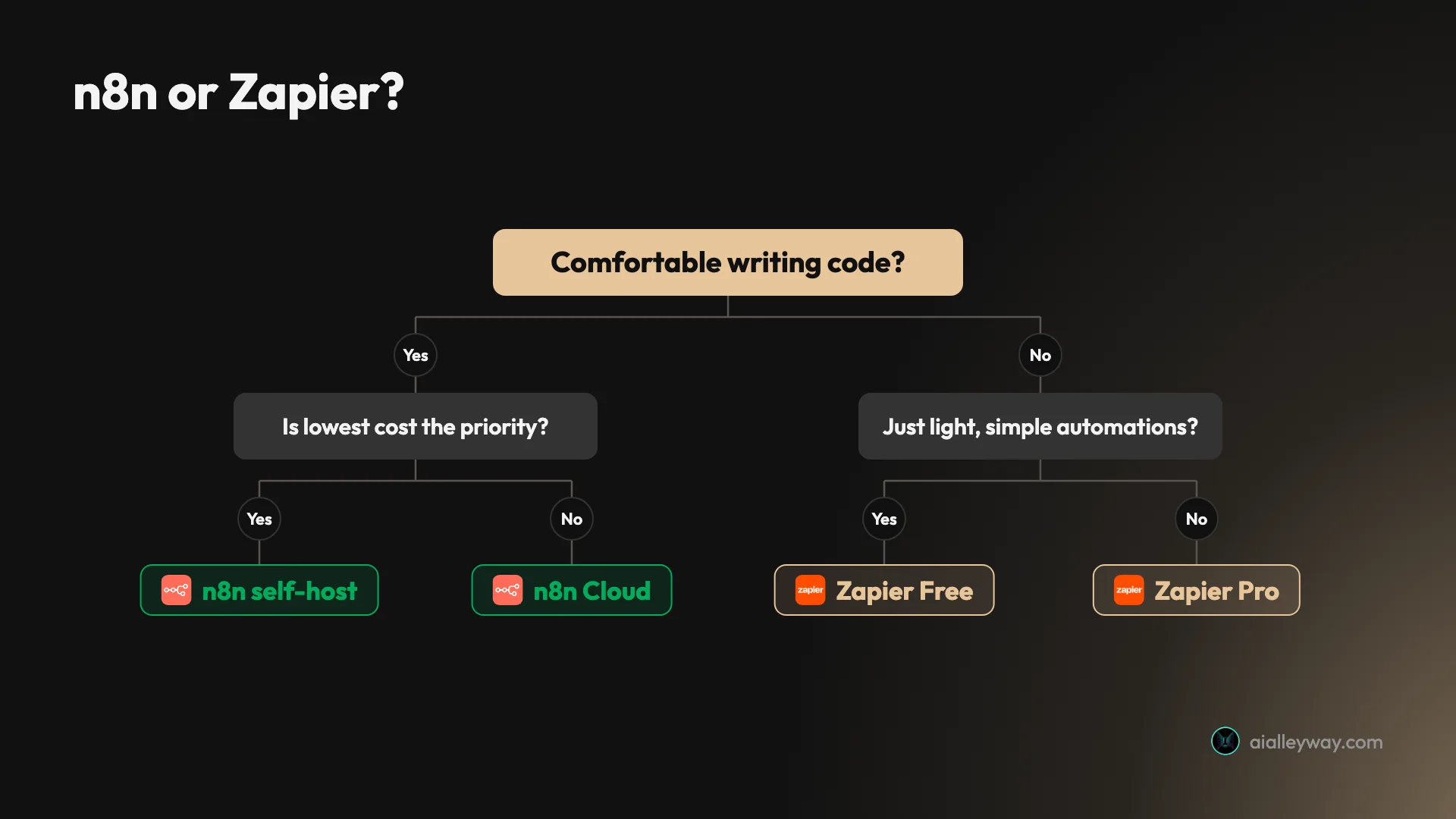
n8n is the right call when cost, control, or depth outweighs convenience. It fits these people:
- Technical teams automating at volume. If you run long workflows or fire them thousands of times a month, the per-execution model and free self-host make n8n the cheapest serious option by a wide margin. Our whole pipeline runs for the price of a small server.
- Developers who want code, not a sandbox. If your automations need real data transformation, custom API calls, or AI orchestration, n8n’s Code and HTTP nodes give you room a no-code tool never will.
- Privacy- and compliance-minded shops. Self-hosting keeps automation data and credentials on infrastructure you own, which matters for regulated work or client data you would rather not route through a third party.
- Engineering teams that treat automation as code. Because workflows export to JSON, n8n fits a Git-based, review-and-deploy way of working that a UI-locked tool cannot match.
- Builders of AI agents. The LangChain-based nodes make n8n the natural home for LLM-driven workflows you want wired into the rest of your stack rather than living in a separate app, and you keep full control of the prompt and the parsing.
The common thread is technical capacity. If “API” and “JSON” do not scare you and cost at scale is real, n8n is the better long-term home, and you can start free.
Who should pick Zapier
Zapier is the right call when ease and reach matter more than the bill. It fits these people:
- Non-technical teams and solo operators. If you want the shortest path from idea to working automation and would rather not think about APIs, Zapier is the easiest tool there is, and Copilot drafts the first one for you.
- Anyone with a wide or unusual stack. With 9,000-plus integrations, Zapier is the safest bet that your specific apps are supported. If a niche tool matters, it is more likely here than anywhere else.
- Low-to-moderate volume users. If your automations run hundreds or low thousands of times a month, the per-task bill stays reasonable and the polish is worth the premium. This is Zapier’s large sweet spot.
- Teams that value time over money. If an hour of your team’s time is worth more than the gap between Zapier’s bill and a cheaper rival’s, the easiest tool is the right tool.
- People adding AI to simple workflows. Copilot, Agents, and the MCP server make Zapier a friendly on-ramp to AI-assisted automation without leaving a familiar tool, which we confirmed by running its MCP live across three apps with no setup.
- Businesses that need governance fast. SOC 2 on every plan, SSO, and audit logging make Zapier an easy approval for IT, where a self-hosted tool would face a longer security review.
The common thread is that you are buying speed and simplicity. Just be honest about your trajectory: a workflow that is cheap on Zapier today can get expensive fast if it succeeds and you scale it.
The final word
For most individual buyers the decision is simple. If you do not code and want the fastest, widest, most polished automation tool, pick Zapier and do not look back until the task meter starts to hurt. If you have technical hands and care about cost at scale, data control, or AI depth, pick n8n, start with the free self-hosted edition, and you will likely never look back at all.
Our own choice tells you where we land for a technical team running real volume: n8n powers everything we ship, for the price of one small server. But that is our situation, not everyone’s, and Zapier earns its 4.3 by being the tool we would still hand a non-technical founder on day one.
The fastest way to decide is to estimate one number before you commit: how many times your busiest workflow will run each month, times its billable steps. If that lands in the hundreds, either tool is fine and Zapier is the nicer one. If it lands in the tens of thousands, n8n will save you real money, and free if you self-host. Decide by the meter and your comfort with code, not by the marketing. For the deeper picture, read our full n8n review and Zapier review, or see how both stack up against Make in our best AI automation tools roundup.
Pricing and ratings verified June 2026 from each vendor’s pricing page and our own hands-on reviews.
Frequently asked questions
Is n8n cheaper than Zapier?
Usually yes, and often by a wide margin, once you get past a handful of simple automations. The reason is the billing unit: n8n charges one execution per whole workflow run no matter how many steps it has, while Zapier charges one task per app action, so a 10-step automation that costs 1 execution on n8n costs around 6 tasks on Zapier every time it runs.
At low volume the two are close, both roughly $20 a month. At 1,000 runs of that workflow you are at 1,000 executions on n8n, inside the €20 Starter plan, versus about 6,000 tasks on Zapier, far past the 750 a $19.99 plan includes.
And if you self-host n8n's free Community edition, the software cost is zero at any volume. The crossover is not exotic either: two ordinary multi-step automations running on a schedule are usually enough to push a Zapier bill past its base while n8n stays on its entry tier.
Is n8n harder to use than Zapier?
Yes. Zapier is the easiest automation tool to start with: its trigger-then-action format is the simplest in the category, Copilot drafts a working automation from a plain-English sentence, and its 9,000-plus app library means setup is mostly clicking and connecting. n8n's visual canvas gets you going, but anything ambitious rewards comfort with APIs, JSON, and a few lines of JavaScript, and Capterra reviewers name the learning curve as its top complaint. In practice the dividing line is data: the moment a step needs reshaped data or a branching error path, n8n asks you to write an expression where Zapier keeps you clicking.
The trade is real: Zapier is faster to start, n8n is cheaper and more powerful once you are over the curve. Start on Zapier if you do not code; move to n8n when cost or control starts to bite.
Can n8n do everything Zapier can?
Almost, with one big asterisk on each side. n8n matches or beats Zapier on logic, code, AI nodes, and cost, and its HTTP Request node can call any API even without a pre-built integration.
But Zapier has roughly 9,000 pre-built app connectors against n8n's roughly 1,100, so for a niche SaaS app Zapier is far likelier to support it out of the box. Going the other way, n8n self-hosts for free and treats code as first-class, which Zapier cannot do at all.
So the honest answer is that they overlap on most everyday jobs, and each keeps one thing the other cannot copy: Zapier its 9,000-app catalog, n8n its free self-hosting and first-class code. n8n can technically reach almost anything through HTTP, but Zapier makes the common cases click-and-connect simple in a way n8n does not.
Should I self-host n8n or use Zapier?
Self-host n8n if you have technical hands, want the lowest possible cost, and care about keeping your automation data and API keys on infrastructure you control. The Community edition is free with unlimited executions; you pay only for a small server, and our entire content pipeline runs that way.
The break-even math is simple: n8n Cloud Pro is €600 a year, while a self-hosted box doing the same work costs a fraction of that in compute, so the real question is whether the few maintenance hours a month are worth more to you than the savings.
Use Zapier if you would rather never think about a server, want the widest app library, and your volume is low enough that the per-task bill stays reasonable. The deciding question is rarely features; it is whether you want to own the operations and save money, or pay for convenience and the biggest integration catalog.
Which is better for AI automation, n8n or Zapier?
It depends on how much control you want. n8n ships LangChain-based nodes for LLM calls, agents, and retrieval, so it is the stronger pick for developers building AI agents wired into a wider workflow they control, and we drive Anthropic from inside n8n in production every day.
Zapier's AI layer is broader and easier: Copilot on every plan, plus Agents, Chatbots, and a Model Context Protocol server we ran live across Gmail, Calendar, and Slack with no setup.
So Zapier is the friendlier on-ramp to agentic automation across many apps, while n8n is the deeper, cheaper platform for building custom AI workflows you keep full control of. Pick by whether you want a ready-made agent that can already drive your apps, or the building blocks to assemble your own.
Keep reading
n8n vs Make: which is cheaper, and which is easier?
We run n8n in production and built a real scenario in Make. The honest n8n vs Make verdict: who's cheaper at scale, who's easier to start, who wins.
n8n pricing: what you'll really pay (and when it's free)
n8n is free self-hosted or €20/mo on Cloud — but the per-execution model decides what you actually pay. The real cost, plan by plan, with worked math.
n8n review: the tool that runs our whole content pipeline
We run 10 production workflows on self-hosted n8n. Where it beats Zapier on price, where the learning curve bites, and who should actually use it.
Best n8n alternatives: who each one is actually for
We run n8n in production, so we know what you'd trade away. The 9 best n8n alternatives, from managed to open-source, and who each one actually fits.