
Best n8n alternatives: who each one is actually for
We run n8n in production, so we know what you'd trade away. The 9 best n8n alternatives, from managed to open-source, and who each one actually fits.
Contents
The best n8n alternatives, at a glance
The best n8n alternative is not a single tool, because people leave n8n for opposite reasons. Some want to stop running a server. Some want to stop writing JavaScript. Some need enterprise governance n8n was never built for. So the right answer depends entirely on why you are looking, and the picks below are sorted by that reason, not by a single leaderboard.
We can map this honestly because we still run n8n in production: the entire AI Alleyway content pipeline is ten n8n workflows on a self-hosted box. That means this is not a list of tools we are talking you into, it is a map of what you would actually trade away, written by people who use the thing you are thinking of leaving. We also ran two of the alternatives ourselves (Make and Zapier) and assessed the rest from their live pricing and docs.
- Best for most people leaving n8n: Make. The visual power of n8n, fully hosted, from $9 a month.
- Best for non-coders: Zapier. The easiest start and the widest app library.
- Best open-source alternative: Activepieces. MIT-licensed, free to self-host, friendlier than n8n.
- Best for developers: Pipedream. Code-first automation without running a server.
- Best for enterprise teams: Workato. Governance and scale, at an enterprise price.
- Best for Microsoft 365 shops: Power Automate. Cloud flows plus desktop RPA, native to Office.
- Best for AI-native workflows: Gumloop. A canvas built around AI steps, not bolted onto one.
- Best for IoT and edge automation: Node-RED. The veteran open-source flow tool, free and self-hosted.
- Best for AI-driven enterprise integration: Tray.ai. Low-code iPaaS with built-in AI agents.
How we picked, and why people leave n8n
Start with the why, because it determines the which. n8n is a source-available workflow automation platform you self-host, wiring together apps, APIs, and LangChain AI agents in a visual node editor, and it is a genuinely great tool (we score it 4.6 in our n8n review). So the reasons people leave are specific, not vague dissatisfaction. There are three.
The first is the learning curve. n8n expects comfort with APIs, JSON, and a little JavaScript, and Capterra reviewers name that curve as its single biggest complaint, with ease of use rated 4.1 against a 4.6 overall. The first time a node hands you a nested object and the next node wants a flat list, a “no-code” task becomes a Code node.
The second is the self-hosting burden. The Community edition is free in license cost, but you own the server, the upgrades, the backups, and the 2am debugging when an automation stops at midnight.
The third is the managed-team gap. Because your workflows live on your own instance, collaboration, version history, and real support are yours to build rather than yours to buy.
Each reason points a different direction, which is why a flat ranking would mislead you. Leaving because it is too technical points to Make or Zapier. Leaving because you want to keep control but lose the friction points to an open-source tool like Activepieces. Leaving because you need governance at scale points to Workato or Power Automate.
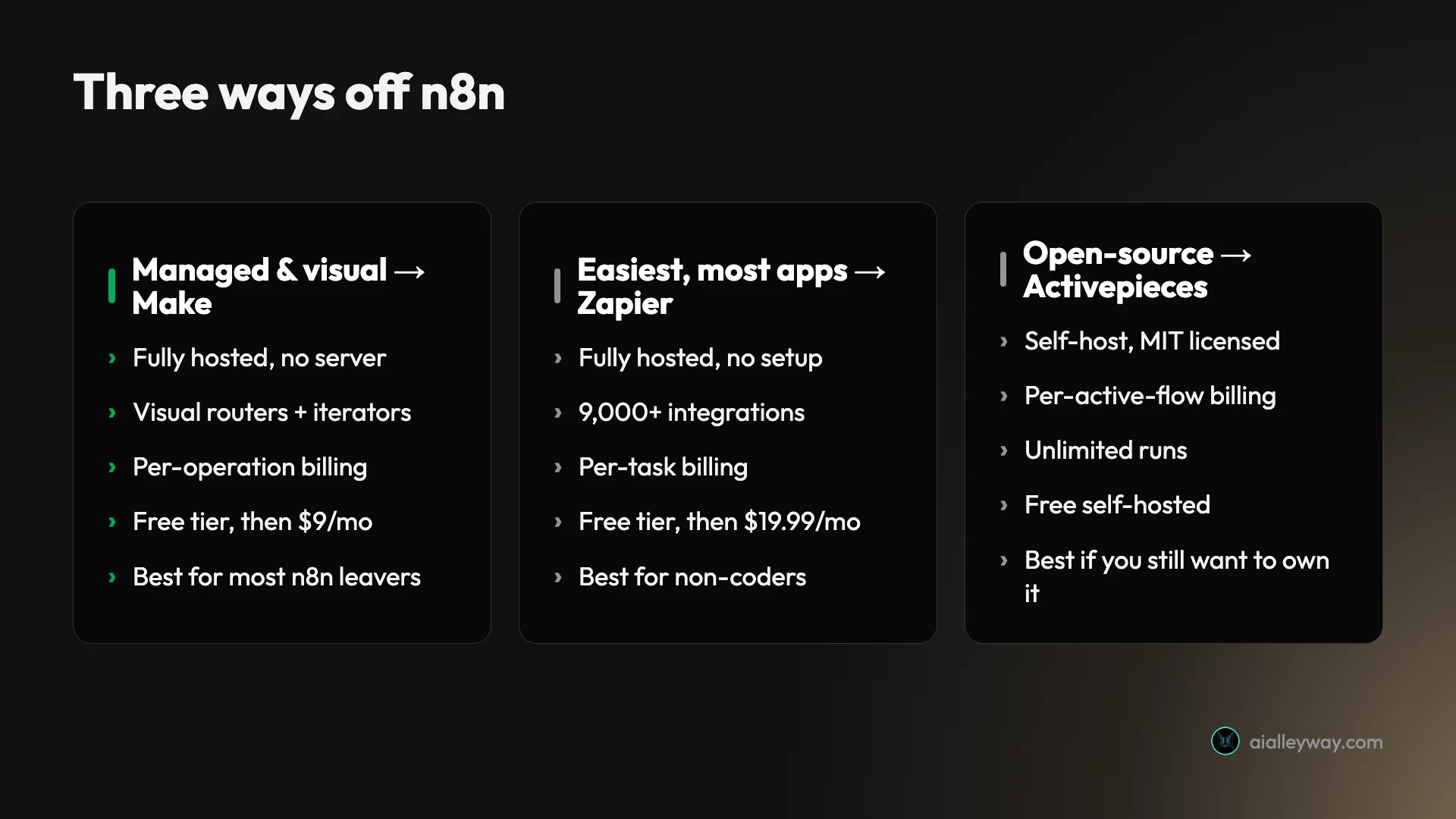
Two of these we ran ourselves. We built a real lead-routing scenario in Make through its API, and we ran Zapier’s MCP layer live across Gmail, Google Calendar, and Slack. The other seven (Activepieces, Pipedream, Workato, Node-RED, Tray.ai, Power Automate, and Gumloop) we assessed from their live pricing, documentation, and aggregate reviews, not production use. We flag which is which in every section, because “we tested this” and “we read about this” are different claims and you deserve to know which one you are getting.
One criterion we weighed above the rest, and it is the one that pushed many of these readers toward n8n in the first place: how the tool bills you. n8n’s per-execution model is cheap precisely because one whole workflow run counts once. Its alternatives meter in different units, and that unit, not the sticker price, decides your real cost once your workflows get long or run often.
The math is worth doing concretely, because it is the calculation most “alternatives” lists skip. Take a 10-step workflow run 1,000 times a month. On n8n that is 1,000 executions, the same whether the workflow has two steps or twenty. On Make it is roughly 10,000 operations, because every module run counts. On Zapier it is up to 6,000 tasks, because every billable action counts. Same automation, three very different invoices, and the gap only widens as the workflow gets longer or runs more often. That single calculation can reorder this list for your situation, which is why we lead with it rather than a feature checklist.
The best n8n alternatives compared
Here is the whole field at a glance. Read the “billing unit” column first, because it is the axis that decides your real cost, and the “tested?” column second, because it separates what we ran from what we assessed on paper.
| Tool | Best for | Billing unit | Self-host | Free tier | Starts at | Tested? |
|---|---|---|---|---|---|---|
| Make | Most n8n leavers | Per operation (module run) | No | 1,000 credits | $9/mo | ✅ 4.2 |
| Zapier | Non-coders, app coverage | Per task (action) | No | 100 tasks | $19.99/mo | ✅ 4.3 |
| Activepieces | Open-source self-hosters | Per active flow | Yes (MIT) | Self-host free | $5/flow/mo | From docs |
| Pipedream | Developers | Per credit (compute time) | No | Daily credits | Paid credit plans | From docs |
| Workato | Enterprise teams | Per recipe (quote) | No | Demo only | Custom (sales) | From docs |
| Node-RED | IoT and edge automation | None (free) | Yes (OSS) | Free, open-source | Free | From docs |
| Tray.ai | Enterprise AI integration | Per task (quote) | No | Demo only | Custom (sales) | From docs |
| Power Automate | Microsoft 365 shops | Per user / per bot | No | 30-day trial | $15/user/mo | From docs |
| Gumloop | AI-native workflows | Per credit | No | 5,000 credits | $37/mo | From docs |
1. Make — best for most people leaving n8n

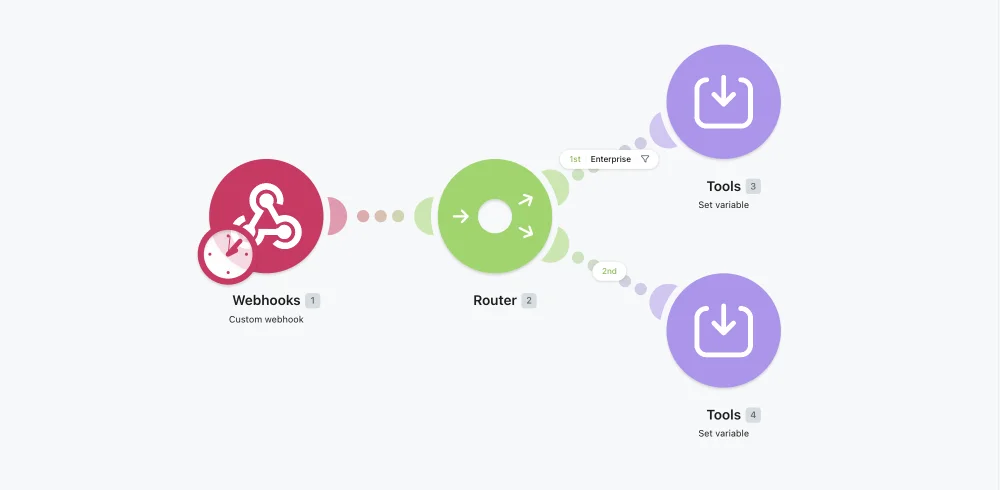
Make is the closest thing to “n8n without the server,” and for most people leaving n8n it is the right landing spot. It keeps the part that made n8n attractive, real visual branching, but it is fully hosted, so there is nothing to self-host and nothing to upgrade. Its router module splits a scenario down conditional paths, iterators loop over lists, and aggregators recombine them, which is the same kind of logic you built in n8n, laid out as draggable modules instead of wired nodes.
When we built a real lead-routing scenario through the Make API, the visual canvas made multi-step branching genuinely legible in a way a list of steps never is. The connector library is deep at more than 3,000 apps, and when a native module is missing the HTTP module calls any REST API, the same escape hatch n8n gives you.
Pricing: Free for 1,000 credits a month and two scenarios, then Core at $9 a month for 10,000 credits on annual billing, with Pro at $16. The catch is the meter: Make bills per operation, where every module run counts, so a multi-step scenario or a frequent polling trigger drains credits faster than the plan price suggests. Budget by your real run frequency, not your step count.
What you give up coming from n8n is twofold: the free self-hosting and the data ownership. Make is a third party your automation data flows through, where self-hosted n8n keeps every key on infrastructure you control. If that ownership was not why you ran n8n, you will not miss it, and power users reward Make for the trade with a 4.8 on Capterra and 4.6 on G2. The Trustpilot 2.7 tracks billing and support complaints, not whether the engine works.
Choose Make if you want n8n’s branching power without running a server, and you can keep half an eye on the meter. Our full Make.com review scores it 4.2, a Power Tool.
2. Zapier — best for non-coders and app coverage

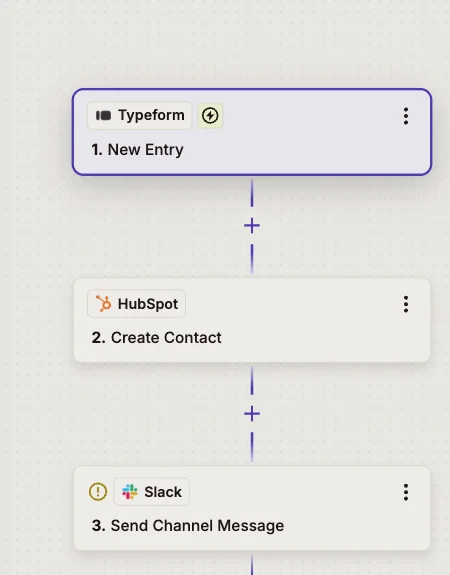
If you are leaving n8n because it was simply too technical, Zapier is the soft landing. It is the easiest mainstream automation tool to start with, and it connects more than 9,000 apps, far more than n8n’s roughly 1,100, so the thing you want to automate is almost certainly supported and setup is mostly clicking and connecting. The trigger-then-action format is the simplest there is, and Copilot drafts a working automation from a plain-English sentence on every plan, including the free one.
When we ran Zapier’s MCP server live across Gmail, Google Calendar, and Slack, an AI assistant drove our connected apps directly with no glue code, because Zapier had already done the connecting. That is the whole pitch in miniature: it removes the wiring that n8n asks you to do by hand.
Pricing: Free for 100 tasks a month and two-step Zaps, then Professional at $19.99 a month for 750 tasks on annual billing. Triggers, filters, and built-in tools are free, which softens the meter, but the shape is still per-task: every successful app action counts, so a long Zap run often gets expensive fast.
The honest trade is that Zapier is less powerful and pricier at scale than what you are leaving. Its branching is gated to higher tiers, where n8n and Make include it, and per-task billing climbs faster than n8n’s per-execution model. It earns the highest aggregate ratings here, 4.5 on G2 and 4.7 on Capterra, with a Trustpilot 1.4 that is almost entirely billing and cancellation complaints, the usual tax of a usage-metered leader.
Choose Zapier if you want the simplest possible tool and the widest app library, and your volume stays modest. Our Zapier review scores it 4.3, a Power Tool.
3. Activepieces — best open-source alternative

If you chose n8n because it self-hosts, Activepieces is the alternative that keeps that and drops the friction. Based on its docs and pricing, it is MIT-licensed, which makes it genuinely open source in a way n8n is not: n8n ships under a source-available fair-code license that bars you from reselling it as a service, while Activepieces carries the permissive MIT license with a 270-plus contributor community behind it. For anyone who left a proprietary tool for n8n on principle, that distinction matters.
The builder is designed to be friendlier than n8n’s, with a visual flow canvas, a growing library of “pieces” (its term for integrations), and native AI agent and MCP support. It targets the same low-code audience without assuming as much comfort with raw JSON and expressions.
| Plan | Price | Notes |
|---|---|---|
| Community (self-hosted) | Free | MIT-licensed, core features, self-host |
| Cloud Standard | $5 per active flow / mo | Unlimited runs, 10 free active flows |
| Ultimate (enterprise) | Custom | RBAC, SSO, audit logs, projects |
Pricing is where Activepieces does something genuinely different. Its cloud plan bills per active flow at $5 a flow per month, with unlimited runs, where n8n meters executions and Make meters operations. If you have a handful of high-volume workflows, paying per flow with unlimited runs can be dramatically cheaper than any per-run model. The self-hosted Community edition is free, the same deal as n8n, and the enterprise Ultimate tier adds the governance features (RBAC, SSO, audit logs) on request.
The honest caveats: Activepieces is younger than n8n, so its connector library and community, while growing fast, are smaller, and self-hosting carries the same operations burden you already know. We have not run it in production, so treat this as an assessment from its docs and license rather than a hands-on verdict.
Choose Activepieces if open source and self-hosting are the whole point and you want a gentler build experience than n8n; it is free to self-host, or $5 per active flow a month on Cloud with unlimited runs. Look elsewhere if you wanted to stop running a server entirely.
4. Pipedream — best for developers

Pipedream is the pick for the developer who liked n8n’s code-first power but never wanted to run the server. Based on its documentation, it is a hosted, serverless platform where you wire together triggers and steps and drop into real code, Node.js, Python, Go, or Bash, between any of them, with thousands of pre-built integrations to skip the boilerplate. It is the part of n8n you loved, the Code node, made the default rather than the escape hatch, and fully managed.
For someone comfortable in a terminal, that combination is the appeal: the flexibility of writing actual code, without owning infrastructure, upgrades, or scaling. It is closer in spirit to n8n than the no-code tools, just hosted.
| Plan | Price | Notes |
|---|---|---|
| Free | $0 | Daily free-credit allowance |
| Basic | $29/mo | Monthly credit base |
| Advanced | $79/mo | Larger credit base, more features |
| Business | Custom | Enterprise controls |
Pricing is credit-based and tied to compute, which is a different model worth understanding: one credit covers 30 seconds of compute at the default 256MB of memory, and doubling the memory doubles the cost. The free workspace gets a daily credit allowance, then Basic is $29 a month and Advanced $79 a month, each adding a larger monthly base of included credits, with a custom Business tier above them.
The honest caveats: Pipedream is developer-first, so a non-coder will find it less approachable than Make or Zapier, and the compute-based meter means a heavy or long-running step costs more than a light one, the same watch-the-meter discipline you need on Make. We assessed it from its docs, not production use.
Choose Pipedream if you want n8n’s code-first flexibility on someone else’s servers. Skip it if you do not write code or you specifically wanted to self-host.
5. Workato — best for enterprise teams

Workato is where you look when the reason for leaving n8n is organizational, not technical. Based on its positioning, it is an enterprise integration platform (iPaaS) built for large teams that need governance, security, and support n8n leaves you to assemble yourself. Where n8n hands a developer a powerful tool and trusts them with it, Workato wraps automation in the controls a CIO signs off on: role-based access, audit trails, environment management, and managed support.
That makes it a different category of product than most tools on this list. It competes less with “n8n the builder” and more with “n8n plus the entire operations team you would need to run it safely at enterprise scale.”
| Aspect | Workato |
|---|---|
| Pricing | Custom / contact sales (no public tiers) |
| Billing unit | Per recipe (workspace + connectors) |
| Best for | Large teams, governance, mission-critical iPaaS |
| Trade | Enterprise pricing, sales-led onboarding |
Pricing is the headline caveat: Workato publishes no public prices. Its pricing page is a “contact sales” flow built around a workspace plus recipe and connector entitlements, which in practice means enterprise budgets, not a self-serve $9 plan. If you are a solo builder or small team, this is almost certainly the wrong tool, and the absence of a sticker price is itself the signal.
The honest assessment: we have not deployed Workato, and its value is hard to judge without a quote, but its reputation is as a capable, expensive, governance-first platform. It belongs on this list because “n8n cannot satisfy our security and compliance review” is a real reason teams leave, and Workato is a common destination when they do.
Choose Workato if you are an enterprise that needs governance and managed support and has the budget for it. Skip it if price transparency or self-serve onboarding matters to you.
6. Microsoft Power Automate — best for Microsoft 365 shops

If your work already lives in Microsoft 365, Power Automate is the obvious alternative. Based on Microsoft’s documentation and pricing, it combines two things most rivals split: cloud flows for app-to-app automation and desktop flows for robotic process automation (RPA) that clicks through legacy software a human would otherwise drive. Inside Outlook, SharePoint, Teams, and Dynamics, it is the native option, and that integration is the entire reason to pick it over a neutral tool like n8n.
The RPA capability is the real differentiator. A desktop flow can open a legacy app that no API touches, key in data, and click through the screens unattended, which is a job n8n is not built for. For an enterprise standardizing on Microsoft, that combination of cloud automation plus RPA plus native Office data is hard to match.
| Plan | Price | Bills by |
|---|---|---|
| Premium | $15/user/mo | Per user (cloud + attended desktop) |
| Process | $150/mo | Per bot (unattended RPA) |
| Hosted Process | $215/mo | Per bot (Microsoft-hosted RPA) |
Pricing bills per user or per bot, not per run, so it scales with headcount and automation count rather than volume, the opposite shape from n8n’s per-execution model. The per-bot RPA tiers climb fast, and the licensing is famously confusing, with what is included in a given Microsoft 365 plan versus what needs Premium being the most common source of community questions.
The honest caveats: outside the Microsoft ecosystem, Power Automate feels heavy and its licensing is hard to reason about, and we assessed it from docs rather than production. But for a Microsoft 365 shop, the automation, the data, and the AI all sit inside one license and one security boundary, which no neutral tool can offer.
Choose Power Automate if you are a Microsoft 365 shop that wants RPA and native Office integration; it starts at $15 per user a month for Premium cloud flows. Skip it if you are outside that ecosystem, where Make or Zapier will be simpler and cheaper to reason about.
7. Gumloop — best for AI-native workflows

Gumloop is the pick when your automations are mostly AI steps rather than app-to-app plumbing. Based on its pricing and positioning, it is a no-code platform built around AI from the ground up, for jobs like content creation, lead generation, and support agents, with enterprise customer logos featured on its own site. Where n8n bolts AI nodes onto a general automation engine, Gumloop’s canvas is shaped around the model reasoning at each step.
If your workflow is fundamentally “read this, reason over it, write that,” Gumloop is built for it in a way a retrofitted tool is not. That focus is its edge and its limit at once.
| Plan | Price | Credits |
|---|---|---|
| Free | $0 | 5,000/mo, 1 seat |
| Pro | $37/mo | 20,000+/mo, unlimited seats |
| Enterprise | Custom | SSO, audit logs |
Pricing is credit-based, the same watch-the-meter caveat as Make: AI steps consume credits by how much work they do, so a heavy reasoning workflow drains a balance faster than a simple one. The free tier (5,000 credits, one seat) is generous enough to evaluate honestly, and Pro at $37 with unlimited seats is reasonable for a small team.
The honest limit is breadth. Gumloop’s connector library and community are smaller and younger than n8n’s, so for classic app-to-app automation it is the wrong tool, doing less for more. We assessed it from its pricing and docs, not production use. Its case is narrow and real: workflows where the reasoning is the work.
Choose Gumloop if your automations are mostly AI and you want a canvas built for that; Pro is $37 a month with unlimited seats, and the free tier gives you 5,000 credits. Skip it if your work is classic plumbing, where n8n or a cheaper general tool does more for less.
8. Node-RED — best for IoT and edge automation

Node-RED is the alternative for the maker and the developer who liked n8n’s wire-the-nodes feel but want something free, local, and closer to the hardware. Based on its project documentation, it is a flow-based programming tool, originally built by IBM and now stewarded by the OpenJS Foundation, that runs on everything from a Raspberry Pi at the edge of a network to a cloud server. You wire together flows in a browser editor, the same mental model as n8n, with a huge community library of nodes.
Where it diverges from n8n is its center of gravity. Node-RED’s strength is event-driven and IoT work, talking to sensors, MQTT brokers, serial devices, and protocols, rather than stitching together hundreds of SaaS apps. For industrial, hardware, and home-automation projects, it is the more natural tool; for “sync my CRM to a spreadsheet,” it is the less natural one.
| Aspect | Node-RED |
|---|---|
| License | Open source, OpenJS Foundation |
| Cost | Free (self-hosted) |
| Best for | IoT, edge, event-driven flows |
| Trade | Few SaaS connectors; you run it |
Pricing is the simplest on this list: Node-RED is free and open source, and you self-host it, so the only cost is the hardware or server it runs on. There is no vendor, no per-run meter, and no plan tiers, which for an n8n self-hoster is a familiar and welcome model. Commercial managed hosting exists from third parties, but the project itself is free.
The honest caveats: Node-RED is lower-level and more developer-oriented than n8n, its prebuilt SaaS integrations are thinner (its library leans hardware and protocol, not business apps), and the editor shows its age next to newer tools. We assessed it from its docs, not production use.
Choose Node-RED if your automation touches hardware, sensors, or the edge, and you want a free, self-hosted, mature flow tool. Skip it if your work is SaaS-to-SaaS plumbing, where n8n or Make has far more connectors.
9. Tray.ai — best for AI-driven enterprise integration

Tray.ai is the enterprise alternative for teams that want low-code integration plus AI agents under one governed roof. Based on its product and pricing pages, it is an iPaaS that has leaned hard into AI: its Merlin Agent Builder ships AI agents that “reason, act, and learn with context and control,” sitting alongside classic integration and automation on one platform. Where Workato is the recipe-and-governance veteran, Tray.ai positions as the more AI-forward, low-code take on the same enterprise problem.
For an organization that has outgrown n8n on governance but wants something more approachable than a developer-recipe tool, Tray.ai’s low-code builder plus built-in agents is the pitch. It is built for departments and partners, not solo builders.
| Plan | Scope | Pricing |
|---|---|---|
| Pro | 3 workspaces | Custom (sales) |
| Team | 20 workspaces | Custom (sales) |
| Enterprise | Unlimited + SSO, HIPAA, regional hosting | Custom (sales) |
Pricing is task-based but quote-only: Tray.ai publishes no public rates, and its plans (Pro, Team, and Enterprise) are sold through sales based on your usage and features, with Insights retention and controls scaling from Pro up to Enterprise. As with Workato, the absence of a sticker price is the signal that this is an enterprise budget, not a self-serve $9 plan.
The honest caveats: quote-only pricing makes it hard to evaluate without a sales conversation, it is overkill for a solo builder or small team, and we assessed it from its docs rather than production use. Its case is the enterprise one: governance, scale, and AI agents the open tools leave you to assemble.
Choose Tray.ai if you are an enterprise that wants low-code integration with built-in AI agents and the governance to match. Skip it if you want transparent pricing or you are a small team, where Make or n8n will be far simpler and cheaper.
How to pick your n8n alternative
The whole list collapses to one question: why are you leaving n8n? Match your reason to the pick.
- It is too technical, but I still need real logic → Make. Visual routers and branching, fully hosted, from $9 a month.
- It is too technical and I want the simplest tool → Zapier. The easiest start and 9,000-plus apps, as long as volume stays modest.
- I want to keep self-hosting and stay open source → Activepieces. MIT-licensed, free to self-host, friendlier than n8n, billed per active flow with unlimited runs.
- I write code but never wanted to run a server → Pipedream. n8n’s code-first power, fully managed and serverless.
- We need enterprise governance and support → Workato. Built for large teams that have to pass a security review, at an enterprise price.
- Our stack is Microsoft 365, or we need RPA → Power Automate. Native Office integration and unattended bots the others do not match.
- My automations are mostly AI steps → Gumloop, built AI-native with a real free tier.
- My work touches hardware, sensors, or the edge → Node-RED. Free, self-hosted, and built for IoT and event-driven flows.
- We want enterprise low-code with built-in AI agents → Tray.ai, if the quote-based enterprise pricing fits.
And the most honest option of all: stay on n8n. If you self-host comfortably, write a little code, and care most about cost at scale, none of these is strictly better; they are just different trades. We still run n8n in production for exactly those reasons. The right time to switch is when one of its three friction points, the learning curve, the ops burden, or the managed-team gap, costs you more than the per-run billing of a hosted tool would.
One thing the roundups never mention is the switching cost, so plan for it. There is no one-click importer that lifts an n8n workflow into Make, Zapier, or any of these tools; n8n exports its workflows as JSON, but every destination expects you to rebuild the logic by hand in its own model.
The practical move is to migrate one real workflow first, the one whose pain pushed you to switch, rebuild it on the free tier of your chosen tool, and run both in parallel for a week before you move the rest. That dry run tells you the true cost of leaving far better than any feature table, and it is cheap insurance against a missing connector or a metering surprise after you have committed.
One rule cuts through all of it: model your real run frequency against each tool’s billing unit before you commit, because the unit decides your bill more than the plan name does.
| Billing unit | Tools |
|---|---|
| Per execution (whole run) | n8n |
| Per operation / module | Make |
| Per task / action | Zapier, Tray.ai |
| Per active flow | Activepieces |
| Per credit (compute) | Pipedream, Gumloop |
| Per user / per bot | Power Automate |
| Free (self-hosted) | Node-RED |
A per-active-flow model (Activepieces), a per-operation model (Make), and a per-user model (Power Automate) produce wildly different bills for the same automation, so match the unit to how your workflows actually run, not to the cheapest headline price.
Should you switch from n8n, or stay?
There is no single best n8n alternative, only the best one for the reason you are leaving. For most people that reason is “I want n8n’s power without running a server,” and the answer is Make, a gentle switch that keeps the branching logic and loses the ops burden. If you want to stay open source, Activepieces is the closest match; if you do not code, Zapier is the easiest; and if your constraint is enterprise governance or Microsoft 365, Workato and Power Automate earn their places.
Before you switch, though, do the honest thing and re-read why you chose n8n in the first place. If self-hosting, low cost at scale, and code-first control are still what you want, the best move may be no move at all, and our full n8n review lays out exactly what it does well. If you have decided, start with the free tier of whichever pick matches your reason, and see how it feels on one real workflow before you migrate the rest. For the wider field beyond n8n’s orbit, our best AI automation tools roundup ranks the whole category.
Pricing and ratings verified June 2026 from each vendor’s pricing page and our own hands-on reviews of n8n, Make, and Zapier.
Frequently asked questions
What is the best alternative to n8n?
For most people leaving n8n, Make is the best alternative: it keeps the visual, branching power that made n8n attractive but is fully hosted, so there is no server to run, and it starts at $9 a month with a free tier.
If you specifically want to keep self-hosting and stay open-source, Activepieces is the closest match, MIT-licensed and free to self-host with a friendlier on-ramp than n8n. If you do not code at all, Zapier is the easiest start with the widest app library.
The honest answer is that the best alternative depends on why you are leaving n8n: too technical points to Make or Zapier, want-to-keep-control points to Activepieces, and enterprise governance points to Workato or Power Automate.
Is there a free open-source alternative to n8n?
Yes. Activepieces is the closest: it is MIT-licensed, genuinely open source (unlike n8n's source-available fair-code license), and free to self-host with a 270-plus contributor community. Its cloud plan even bills per active flow with unlimited runs, a different model from n8n's per-execution metering.
Other open-source options include Node-RED (a long-standing flow-based tool aimed at developers and IoT) and Windmill (script-first workflows for developers). The trade with all of them is the same one you already know from n8n: self-hosting is free in license cost but not in time, since you own the server, the upgrades, and the monitoring. If you want open source without the ops burden, a managed tool like Make is the better fit even though it is not open source.
Why would I switch away from n8n?
The three most common reasons are the learning curve, the self-hosting burden, and the lack of a managed team experience.
n8n expects comfort with APIs, JSON, and a little JavaScript, and Capterra reviewers name the learning curve as its top complaint. Self-hosting is free in license cost but means you own the server, the upgrades, the backups, and the 2am debugging. And because workflows live on your own instance, collaboration, version history, and support are yours to build rather than yours to buy.
If any of those is a dealbreaker, a managed tool like Make or Zapier removes it, at the cost of per-run billing and less control. We still run n8n in production ourselves, so this is not a knock on the tool, just an honest map of who outgrows it in which direction.
Which n8n alternative is cheapest at scale?
The cheapest n8n alternatives at scale are the open-source, self-hosted options, because they have no per-run license cost: Activepieces (MIT) and n8n's own Community edition both run free on your own server, so you pay only for compute.
Among managed tools, the cheapest at scale depends on the billing unit. Make bills per operation (one module run), Zapier per task (one action), and both climb with volume; Pipedream bills by compute time in credits; Power Automate bills per user or per bot rather than per run, so it scales with headcount instead of volume.
The rule that decides it is the same one that pushes people toward n8n in the first place: model your real run frequency against the billing unit before you commit, because the sticker price rarely tells the real story.
Is Make or Zapier a better n8n replacement?
Make is the closer replacement if you want power, Zapier if you want simplicity. Make has routers, iterators, and aggregators for real branching logic, more than 3,000 app connectors, and a visual canvas that handles multi-step scenarios that Zapier charges a premium for, starting at $9 a month.
Zapier is the easier tool and has the widest app library at more than 9,000 integrations, with a plain-English Copilot that drafts automations, but its per-task billing climbs faster and its branching is gated to higher tiers.
If you are leaving n8n because it is too technical but you still need real logic, choose Make; if you are leaving because you want the simplest possible tool and the broadest app coverage, choose Zapier. We tested both, and rate Make 4.2 and Zapier 4.3.
Keep reading
n8n vs Make: which is cheaper, and which is easier?
We run n8n in production and built a real scenario in Make. The honest n8n vs Make verdict: who's cheaper at scale, who's easier to start, who wins.
n8n vs Zapier: which is cheaper, and which is easier?
We run n8n in production and tested Zapier hands-on. The honest n8n vs Zapier verdict: who's cheaper at scale, who's easier to start, and which fits you.
n8n pricing: what you'll really pay (and when it's free)
n8n is free self-hosted or €20/mo on Cloud — but the per-execution model decides what you actually pay. The real cost, plan by plan, with worked math.
n8n review: the tool that runs our whole content pipeline
We run 10 production workflows on self-hosted n8n. Where it beats Zapier on price, where the learning curve bites, and who should actually use it.