
Zapier pricing: what you'll really pay as tasks add up
Zapier is free for 100 tasks, then $19.99/mo — but the per-task bill climbs fast as you scale. The real Zapier pricing, plan by plan, with worked cost math.
Contents
How much does Zapier cost?
Zapier is free for 100 tasks a month, and its paid plans start at $19.99 a month for Professional on annual billing. But that headline number is a floor, not the price you will actually pay. The one word that governs your whole bill is task: Zapier charges per successful app action, so what you pay depends entirely on how much your automations do.
Here is the whole picture in one glance, verified live on zapier.com/pricing in June 2026 (US pricing, annual billing):
| Plan | Price (yearly, per mo) | Tasks / mo | Best for |
|---|---|---|---|
| Free | $0 | 100 | Trying Zapier, one or two light Zaps |
| Professional | from $19.99 | scales with volume | Solo builders and individuals |
| Team | from $69 | shared, up to 25 users | Teams sharing automations |
| Enterprise | Custom | Custom (annual limits) | Large orgs, governance, scale |
Most people land on Free to start, then move to Professional once a real automation runs often enough to blow past 100 tasks. The rest of this guide is about the part the plan cards hide: how fast Professional climbs as your task count grows, and how to keep the bill in check.
What is a Zapier task (and why it decides your bill)
Zapier charges per task, where one task is each successful action it completes in an outside app. Before the plan tiers make sense, you need that unit. Send a Slack message, update a CRM record, create a calendar event: three tasks, every time the Zap runs.
The good news is what does not count. Triggers are free, and so are filters, Paths, and Zapier’s built-in tools like Formatter and Delay. A Zap that fires on a trigger, filters out the rows you do not want, formats some text, and creates one contact is one task, not four. That makes Zapier gentler than a naive step-count suggests, and a disciplined builder who filters early keeps the count down.
| What counts as a task | What’s free |
|---|---|
| Each successful action in an outside app | Triggers (the event that starts a Zap) |
| Every billable step, every time the Zap runs | Filters and Paths |
| AI steps and code (now billed as tasks too) | Built-in tools: Formatter, Delay, Looping |
One 2026 change matters here. Per the banner on Zapier’s own pricing page, AI steps, code, and the SDK now all follow the same task-based pricing model rather than sitting on a separate meter, so an AI-heavy Zap draws down the same task pool. The rates can vary by step type, so an AI or code step may cost more than one task per run; Zapier’s task-usage-rates page lists the specifics, and it is worth a look before you build an AI-heavy Zap.
To make it concrete, take a lead-routing Zap. A form submission triggers it (free), a filter checks the company size (free), then it creates a CRM contact, posts to a sales Slack channel, and sends a welcome email: that is three tasks. Run it 500 times a month and you have used 1,500 tasks, not 2,500, because the trigger and the filter were free. Add two more app actions to the same Zap and the same 500 runs become 2,500 tasks, which is the difference between sitting comfortably on a tier and climbing to the next one.
The reason this unit matters is multiplication. A 10-step Zap with six billable actions, run 1,000 times a month, is roughly 6,000 tasks. That is the number that decides which tier you need, and it climbs with every run.
Is the Zapier Free plan enough?
The free plan is real, not a trial: $0 a month, 100 tasks, and it never expires. You can build genuine Zaps on it with Zapier’s AI, Tables, and Forms, which makes it a fair way to learn the tool before paying.
What you get on Free is broader than it once was: unlimited Zaps, plus Zapier’s Tables (a lightweight database), Forms, and AI features, all sharing the 100-task budget. What you do not get is the heavy lifting. Multi-step Zaps and unlimited premium apps live on Professional, so a Free Zap is best kept to a single trigger and a couple of actions on standard apps.
The ceiling is the 100 tasks. Because every successful action counts, a single multi-step Zap that runs a few times a day burns through 100 tasks in days, not weeks. The Free plan comfortably covers one or two light automations, like a weekly digest or an occasional form-to-sheet sync. The moment you automate something that runs often, you are on Professional.
That is the honest read: Free is a proving ground, not a home for real volume. If your automation matters enough to run daily, budget for a paid tier from the start.
Zapier plans, tier by tier
Zapier has four tiers, and the prices below are the annual rates (the yearly toggle saves 33%, so paying month to month runs about 49% more).
Free ($0/mo) gives you 100 tasks a month, unlimited Zaps, Tables, and Forms, and access to Zapier’s AI. It is the learn-and-dabble tier.
Professional (from $19.99/mo) is where most individuals land. It adds multi-step Zaps, unlimited premium apps, and the full Zap platform. The “$19.99” is the entry price at a low task volume, and it is the number everyone quotes, but it scales with how many tasks you need (more on that climb below).
Team (from $69/mo) adds collaboration: up to 25 users, shared Zap workflows and folders, and shared app connections, so a team builds on one account instead of scattered seats. It holds at $69 from the entry tier through 2,000 tasks because its base task allowance is larger than Professional’s, so the premium buys both the team features and more headroom before the price climbs.
Enterprise (custom pricing) is the contact-sales tier for large orgs: unlimited users, advanced admin and app controls, annual task limits (instead of monthly), observability, advanced deployment options, and a technical account manager with priority support. It is built for organizations standardizing automation across many teams, where governance and a named contact matter more than the sticker price. If you are asking what it costs, you are probably the buyer they want a call with.
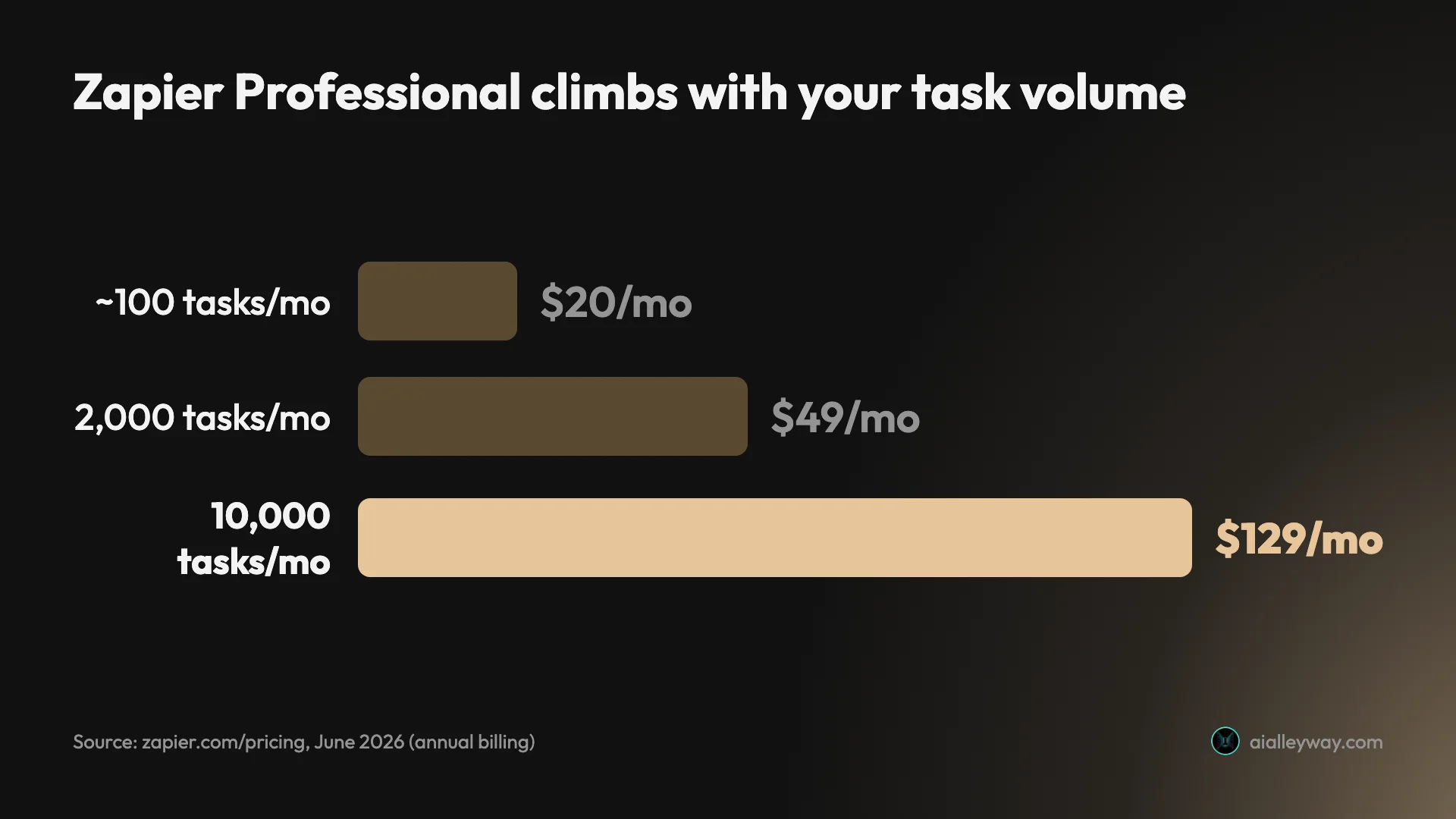
The detail the plan cards bury is that Professional and Team are not fixed prices. Zapier’s pricing page is a slider: you pick how many tasks you need, and the price moves. Here is what that climb actually looks like, pulled live from the slider in June 2026:
| Tasks / mo | Professional | Team |
|---|---|---|
| up to ~750 (entry) | $19.99 | $69 |
| 2,000 | $49 | $69 |
| 10,000 | $129 | $169 |
That table is the whole story of Zapier’s cost. Professional more than sextuples from $19.99 to $129 as you go from a trickle of tasks to 10,000 a month, and that is before you reach the six-figure task tiers. The plan name stays the same; the bill does not.
What you’ll actually pay on Zapier
Plan cards give you a starting price; they do not tell you which tier your real usage lands on. Here is the math worked through for three common shapes of user, because the task count, not the plan name, decides the bill.
| Your situation | Rough tasks/mo | Cheapest fit | What it costs |
|---|---|---|---|
| One light automation, runs occasionally | under 100 | Free | $0 |
| Solo, a few multi-step Zaps daily | ~2,000 | Professional | ~$49/mo |
| Small team, several busy Zaps | ~10,000 | Professional or Team | $129–$169/mo |
| Growing ops, many heavy Zaps | ~50,000+ | Team, or switch tools | $300+/mo (est.) |
Take the solo row. A couple of multi-step Zaps firing through the day add up faster than people expect: three Zaps at six billable actions, running a dozen times a day, is well over 2,000 tasks a month, which puts Professional at roughly $49. Still reasonable, but more than double the headline $19.99. And that count is before any premium app or AI step, each of which is another task on every run, so the real total creeps higher than the napkin math suggests.
Now the small-team row. Once you are at 10,000 tasks, Professional is $129 a month and Team is $169 (the Team premium buys 25 users and shared workflows). At this point a 10-step automation running 1,000 times has eaten most of your budget, and the per-task model is working against you. This is exactly the volume where teams start pricing out alternatives, because per-execution and per-operation tools get cheaper as Zapier gets more expensive.
The growing-ops row is where the model stops being friendly. At 50,000-plus tasks a month, you are paying several hundred dollars for the same automations a per-execution tool would run for a fraction, and the gap only widens. By this point the question is not which Zapier tier to buy but whether to stay on per-task billing at all, which is what the alternatives section below is for.
The pattern is consistent: Zapier is cheap and easy at low volume, and the bill climbs faster than your automation count as you scale. Knowing where you sit on that slider before you commit is the difference between a $20 plan and a $130 one.
Zapier pricing traps to watch
The plan cards are honest, but a few details decide whether your estimate survives contact with reality.
The slider climb is the real cost
The “$19.99” everyone quotes is the floor. The moment your tasks rise, so does the price, to $49 at 2,000 and $129 at 10,000. Price your real task volume on the slider before you sign up, not the entry number, or the first invoice will surprise you.
AI steps now spend tasks
Under the 2026 unified pricing, AI steps and code consume tasks from the same pool as everything else. An AI-heavy Zap is no longer a side cost; it draws down your task budget directly, so a workflow that leans on AI can reach a higher tier faster than its step count implies.
Annual billing locks the discount behind a year
The $19.99, $49, and $69 figures are annual rates. The yearly toggle saves 33%, so paying month to month costs about 49% more. The headline prices everyone repeats assume you are willing to commit for a year.
Premium apps and multi-step Zaps gate on Professional
The Free plan’s limits are not only the 100 tasks; the full multi-step Zaps and unlimited premium apps live on Professional. If your automation needs a premium connector or more than a couple of steps, you are on a paid tier regardless of task count.
Tasks reset monthly and don’t roll over
Your task allowance resets at the start of each billing cycle, and unused tasks do not carry forward, so a quiet month is simply lost. The mistake here is the mirror of overbuying: set the slider too low and a busy month can run you out of tasks before the cycle resets. Size your plan for your busiest month, not your average.
| Trap | Why it bites |
|---|---|
| Slider price climb | $19.99 → $49 (2k tasks) → $129 (10k tasks) |
| AI steps bill as tasks | AI and code draw from the same task pool |
| Annual lock | yearly saves 33%, so monthly runs about 49% more |
| Premium apps gated | multi-step Zaps + premium apps need Professional |
| No rollover | unused tasks reset each month; size for your peak |
How to pay less for Zapier
Once you understand the unit, a few levers cut the bill, and the pricing page advertises none of them.
| Lever | What it saves |
|---|---|
| Filter early in the Zap | fewer billable actions per run |
| Lean on free built-in steps | Formatter, Delay, Paths cost nothing |
| Pay annually | ~33% below monthly |
| Right-size the task slider | avoid overbuying a higher tier |
| Switch to a cheaper model | per-operation or per-execution at scale |
First, filter early. Because triggers, filters, and built-in tools are free, a Zap that screens out unwanted runs before the billable action keeps its task count low. A filter that stops 70% of runs cuts your tasks by 70%. The same logic applies to Paths and Formatter: route each run down the branch that does the least billable work, and lean on free built-in steps instead of an app action wherever the job allows.
Second, price the slider honestly. Estimate your real monthly tasks and set the slider there before subscribing, rather than assuming the $19.99 entry covers you. Walk it up to your expected volume and read the price at each stop, the way we did for the ladder above; the step from one task tier to the next is often exactly where a plan stops being worth it. It is cheaper to know your tier than to be moved up to it by a surprise.
And the biggest lever once you scale: change the billing model entirely. Zapier’s per-task pricing is the cheapest at low volume and the most expensive at high volume. If your bill has crossed into the hundreds, the move is almost always to a tool that bills differently. A Make scenario billed per operation, or an n8n workflow billed per whole run, does the same job for a fraction once your task count is in five figures, and the switch keeps you no-code in Make’s case. The break-even usually lands somewhere between 10,000 and 50,000 tasks a month, depending on how many billable steps your Zaps have.
Cheaper Zapier alternatives
If the per-task climb has stopped making sense, three tools bill in ways that get cheaper exactly where Zapier gets expensive. We cover the full field in our Zapier alternatives roundup, but these are the cost-driven picks.
| The measure | Zapier | Make | n8n |
|---|---|---|---|
| Billing unit | per task | per operation | per execution (whole run) |
| Entry price | from $19.99/mo | $9/mo | €20/mo, or free self-hosted |
| At scale | climbs steeply | cheaper per unit | cheapest, free if self-hosted |
Make is the closest swap for most people: fully hosted and no-code like Zapier, but billed per operation, with a $9 Core plan that includes 10,000 operations against Zapier’s small entry task base. Where Zapier’s bill climbs with every task, Make packs far more units per dollar, so an automation that would put you on Zapier’s $129 tier at 10,000 tasks can sit inside Make’s $9 plan at a similar operation count. Our Make.com review covers the tool in depth, and the Make vs Zapier comparison runs the full cost math.
n8n is the cheapest at volume if you are technical: it bills per whole-workflow execution, so a 30-step Zap that would shred your task budget is a single execution per run, and the self-hosted edition is free at any volume. The trade is that you write a little more configuration and, if you self-host, run a server. See n8n vs Zapier for the head-to-head.
For a rock-bottom budget on simple automations, Pabbly Connect, a no-code automation tool, counts only action steps (triggers and internal steps are free) and has run one-time lifetime deals, so a steady workflow can cost a single fee instead of a monthly climb. We cover it in full in the Zapier alternatives roundup.
Which Zapier plan should you pick?
The deciding question is your task volume, not a feature. Map yourself to one of these:
- Just trying it, or one light automation → Free. 100 tasks covers a weekly digest or an occasional sync, and it never expires.
- Solo with a few real automations → Professional. Price your actual task volume on the slider first; expect $19.99 at a trickle and $49 or more once Zaps run daily.
- A team building together → Team, from $69, for 25 users and shared workflows, once more than one person needs to build and maintain Zaps.
- A large org with governance needs → Enterprise, for admin controls, annual task limits, and a dedicated account manager.
- Scaling past a few thousand tasks a month → seriously price a cheaper model. Per-operation (Make) or per-execution (n8n) billing pulls ahead exactly here.
Is Zapier worth the price?
So is Zapier worth its price? At low volume, yes: nothing else gets you automating across 9,000-plus apps as quickly, and $19.99 is fair for what it does. The value only tips negative as you scale, when the same automations cost two or three times what a differently-billed tool would. Zapier is worth paying for right up until the meter outpaces the convenience.
Zapier’s pricing is simple at the entry and sharp at the top. Free covers 100 tasks, Professional starts at $19.99, and the per-task model keeps the bill low while your automations are light. The trap is the slider: the same Professional plan is $49 at 2,000 tasks and $129 at 10,000, so the headline price tells you almost nothing about what a busy account pays.
Price your real task volume before you commit, filter early to keep the count down, and pay annually if you are sure. And if your automations are getting long or running often, do the honest comparison: at scale, a per-operation tool like Make or a per-execution tool like n8n costs less for the same work. For the full picture, read our Zapier review or the best AI automation tools roundup.
Pricing verified June 2026 from zapier.com/pricing and our own hands-on reviews of Zapier, Make, and n8n.
Frequently asked questions
How much does Zapier cost?
Zapier has a free plan and three paid tiers, priced by how many tasks you run. The Free plan is $0 for 100 tasks a month. Professional starts at $19.99 a month on annual billing and climbs with your task volume. Team starts at $69 a month for up to 25 users, and Enterprise is custom-priced.
The number that decides your real bill is tasks. Professional is $19.99 at a low task volume, but the same plan is $49 a month at 2,000 tasks and $129 at 10,000, so the headline price is a floor, not the price you will actually pay once your automations run often.
Is Zapier free?
Yes, there is a genuinely free plan: $0 a month for 100 tasks. It lets you build real Zaps with Zapier's AI, Tables, and Forms, and it never expires.
The catch is the 100-task ceiling. A single multi-step Zap that runs a few times a day will burn through 100 tasks in days, not weeks, because every successful app action counts as a task. The Free plan is enough to learn Zapier and run one or two light automations; anything regular pushes you onto Professional.
What is a task in Zapier?
A task is each successful action Zapier completes in an outside app. If a Zap sends a Slack message, updates a CRM record, and creates a calendar event, that is three tasks every time it runs.
What does NOT count is the helpful part: triggers are free, and so are filters, Paths, and Zapier's built-in tools like Formatter and Delay. So a Zap that triggers, filters, formats text, and then creates one contact is one task, not four. Multi-action Zaps are where tasks add up, because every billable app action counts on every run.
Why does Zapier get so expensive?
Because the per-task model scales with how much your automations do, and the price climbs steeply as task volume rises. Professional is $19.99 a month at a low volume, $49 at 2,000 tasks, and $129 at 10,000 — so a few busy multi-step Zaps can quietly move you up the ladder.
The other factor is multi-step automation: a 10-step Zap run 1,000 times a month is roughly 6,000 tasks, which is well past the entry tier. Tools that bill per whole workflow run (n8n) or include far more units per dollar (Make, Pabbly) get cheaper than Zapier exactly as your volume grows, which is why people switch.
What is a cheaper alternative to Zapier?
Make is the closest cheaper alternative for most people: it is fully hosted and no-code like Zapier, but bills per operation, and its $9 Core plan includes 10,000 operations against Zapier's $19.99 for a small task base. If you are technical, n8n is cheaper still, billing per whole-workflow execution and self-hosting for free.
For a tight budget with simple automations, Pabbly Connect counts only action steps and runs frequent lifetime deals. The right switch depends on why Zapier's bill hurts: cost at scale points to n8n, no-code value points to Make, and rock-bottom budget points to Pabbly.
Keep reading
Zapier review: easiest to start, priciest to scale
Zapier connects 9,000+ apps with the easiest setup in automation. The catch is per-task pricing that climbs fast — here's who it's actually worth it for.
Zapier alternatives: 8 cheaper, more capable picks
Zapier's per-task pricing is the top reason to leave. The 8 best Zapier alternatives, cheaper or more powerful, and who each one actually fits.
Make.com pricing: what you'll really pay per operation
Make is free for 1,000 credits, then $9/mo Core — but every module run spends a credit, so the operations meter sets your real Make.com pricing.
Best AI automation tools: which one fits how you build
We tested the top three and ranked six AI automation tools by who each is for — and what their very different billing actually costs.