
Fireflies AI review: the team brain, not the solo notetaker
I ran a controlled test meeting through Fireflies: a near-flawless transcript, 25+ CRM syncs, and real team analytics. Brilliant for teams, overkill solo.
Contents
Is Fireflies worth it?
For a team, yes. Fireflies is a meeting-intelligence platform that happens to take notes, and I score it 4.4 out of 5, a Power Tool: I uploaded a controlled test meeting and the transcript came back near-flawless, the summary caught every number, and the integration list is the widest in the category. The catch is fit, not quality, because almost everything that makes it powerful is built for a team and wasted on a solo user.
That is the whole review in one line. Fireflies is not trying to be the quiet notetaker for your one-on-ones. It is trying to be the system that makes a whole organization’s calls searchable, measurable, and connected to the CRM, and it is very good at that job. The market agrees: it holds a 4.7 out of 5 across 746 reviews on G2, in the conversation-intelligence category rather than the personal-notetaker one.
What does Fireflies do?
Fireflies records your meetings, transcribes them, and writes a structured summary you can search, share, and push into the tools your team already uses. A notetaker joins the call as a participant, or you capture it bot-free from the desktop app, and once it ends you get a timestamped transcript, an auto-summary grouped by topic, and a list of action items with owners.
The headline feature is the assistant, AskFred. It runs on Anthropic’s Claude and answers questions across your entire meeting history, not just one call. When I asked it to summarize a meeting and list the numbers, it ran a three-step retrieval, found the right transcript, and built the answer from it. That history-wide search is the thing a single notetaker cannot do.
Around that sit the team features. Conversation analytics turn months of calls into talk-time, sentiment, and topic trends. Soundbites clip key moments to share. Topic trackers flag every time a competitor or a pricing objection comes up across the team. And the integration layer pushes all of it into a CRM, Slack, or Notion automatically, which for a sales org is usually the entire reason to buy.
| Fireflies at a glance | |
|---|---|
| What it is | A team meeting-intelligence platform: record, transcribe, summarize, analyze |
| Best at | Making a whole team’s calls searchable, measurable, and CRM-connected |
| Assistant | AskFred, running on Anthropic’s Claude, across your full meeting history |
| Capture | Visible bot by default; bot-free via the desktop app or Google Meet SDK |
| Languages | 100-plus |
| Free plan | Unlimited transcription, AskFred, uploads, and API (400 min storage/team) |
It also casts a wide net on input. Fireflies records Zoom, Google Meet, Microsoft Teams, and more, transcribes in over 100 languages, and lets you upload an audio or video file directly, which is how I ran my test. The breadth is the point: it wants to be the one place every conversation in the company lands.
In day-to-day use, most of that happens without you. Connect your calendar and the notetaker auto-joins scheduled calls; when I logged in, my upcoming meetings were already listed with a recording toggle next to each one, so capture is a default you opt out of, not a button you remember to press. There is a Chrome extension, a desktop app, and a mobile app for in-person conversations, plus real-time notes that build the transcript live during the call rather than after it.
The newer addition is Voice Agents, Fireflies’ move beyond passive note-taking into agents that can act on a meeting. It sits alongside AI Skills, which run repeatable prompts over a transcript to pull structured data out of every call the same way. Both are signs of where the product is heading: not just a record of what was said, but a layer that does something with it.
The trade-off baked into all of that is metering. The AI features run on a monthly “AI credit” allowance, and storage is capped per plan, so the product that feels unlimited on the surface has two quiet ceilings underneath it. More on both in the pricing.
How much does Fireflies cost?
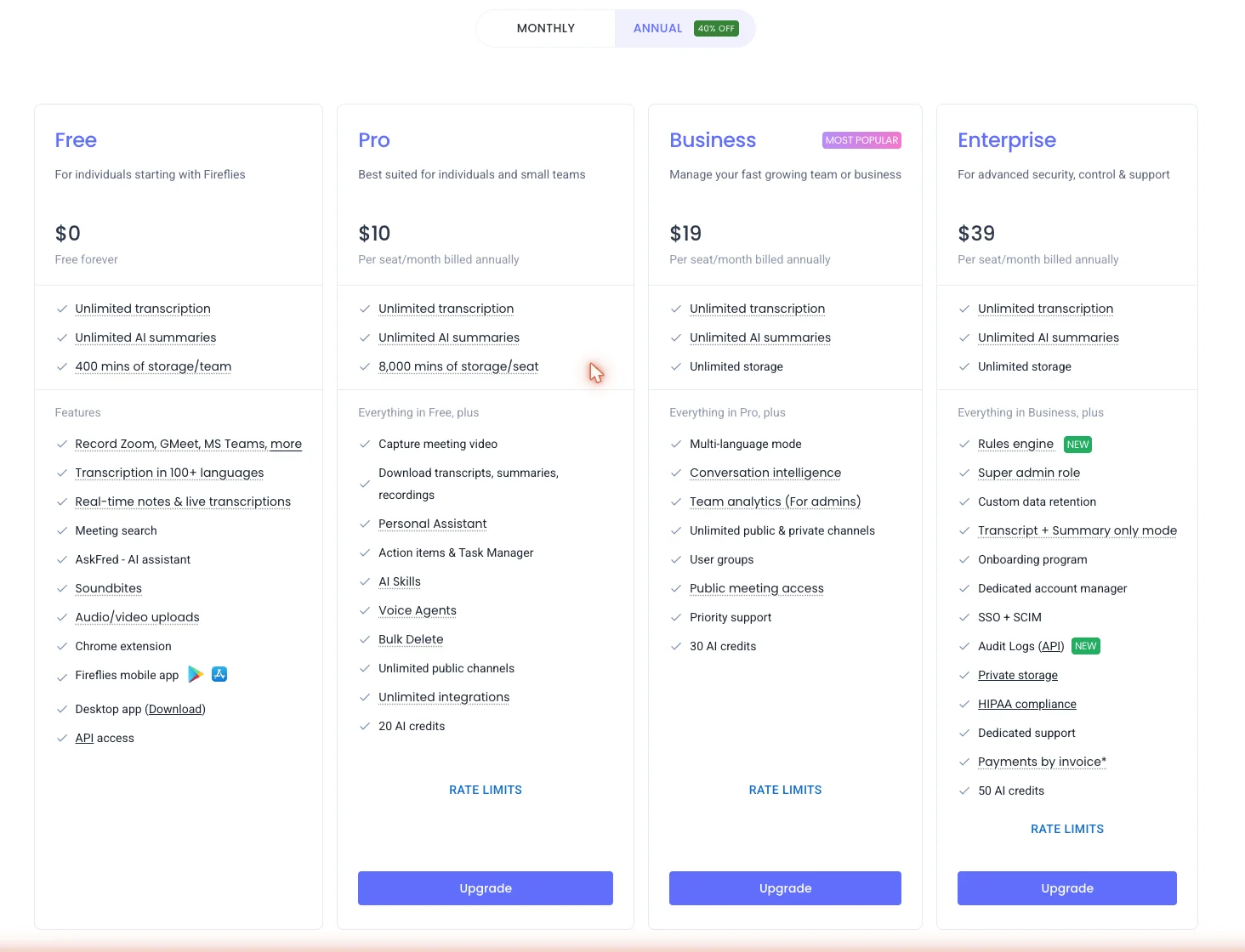
Fireflies has four tiers, priced per seat, and the prices below are billed annually, verified live on the in-app plan page in June 2026. Annual billing runs about 40% under the monthly rate.
| Plan | Annual (per seat) | Monthly | Storage | AI credits | The line that matters |
|---|---|---|---|---|---|
| Free | $0 | $0 | 400 min/team | 20 | Unlimited transcription, AskFred, uploads, and API, but no video and no downloads |
| Pro | $10 | $18 | 8,000 min/seat | 20 | Video capture, downloads, action items, AI Skills, unlimited integrations |
| Business | $19 | $29 | Unlimited | 30 | Conversation intelligence and team analytics, the reason teams buy |
| Enterprise | $39 | annual only | Unlimited | 50 | SSO and SCIM, HIPAA, private storage, audit logs, custom retention |
Read the table once and the plans sort themselves. Free is a genuine working tier, not a teaser: unlimited transcription, the AskFred assistant, 100-plus languages, and even API access all sit at $0. What you give up is video capture, the ability to download your transcripts, and storage beyond 400 minutes for the whole team.
Pro at $10 a seat is the individual and small-team plan. It adds video, downloads, action items, voice agents, and unlimited integrations, and it lifts storage to 8,000 minutes a seat. For one person who wants the full notetaker, this is the floor.
Business at $19 a seat is the one most teams actually want, because it is the first plan with conversation intelligence and team analytics. That is the search, the talk-time reporting, and the cross-team insight a manager is paying for, so the jump from Pro is not about capacity, it is about the team brain switching on. Enterprise at $39 adds the security and control layer: SSO and SCIM, HIPAA compliance, private storage, audit logs, and custom data retention.
One number is doing a lot of work in that table: the prices shown are the annual rate, and paying month to month costs noticeably more. Pro jumps from $10 to $18 a seat, and Business from $19 to $29, so the annual commitment is close to a 40% discount. For a team sizing a budget, that monthly-versus-annual gap stacks on top of the per-seat cost and is worth planning around rather than discovering on the second invoice. For the full tier-by-tier breakdown — the storage caps, the AI-credit math, and which plan fits which team — see our Fireflies pricing guide.
The honest read on value: Fireflies is cheap for a team and slightly awkward for a solo user. Run the math for a real team and the case is stark. A five-seat sales team on Business pays around $95 a month, with conversation analytics and CRM sync included, against roughly $150 a month for Otter’s $30-a-seat Business tier, which gives you fewer of the team features in the first place. That is the per-seat economics Fireflies is built around. One person, though, is paying for machinery they will never switch on, which is the whole reason a solo user should think twice before climbing past the free plan.
Who is Fireflies for?
- Sales and revenue teams who need every call to land in Salesforce or HubSpot with notes, action items, and deal context attached. The CRM sync and the Business-tier analytics are built for exactly this, and the per-seat price undercuts the rivals that bolt analytics on as an add-on.
- Customer success and account managers running a high volume of calls who need to search across all of them, not just their own, and pull every mention of a renewal or a competitor on demand. AskFred and topic trackers are the draw here.
- Recruiters and agencies juggling many external conversations who want each one transcribed, summarized, and filed automatically, with an applicant-tracking-system integration to push the notes downstream.
- Globally distributed teams who need transcription in more than English. The 100-plus-language support is a real edge over notetakers tuned mostly for English.
- Not for: the solo professional who just wants clean notes from a handful of weekly calls. You will pay for team analytics, CRM plumbing, and admin controls you never touch. A bot-free, single-user tool like Granola or the unlimited free plan on Fathom fits that job better and gets out of your way.
The good
Seven reasons it earns the 4.4, in the order a buyer should weigh them.
The transcription held up on a controlled test
I uploaded the same 80-second, two-speaker meeting we run through every notetaker in this cluster: synthetic voices, planted with names, numbers, and jargon so I can score exactly what each tool gets right. Fireflies came back essentially perfect. It kept both speakers separated, held every figure, and the only slip in the whole transcript was turning “right now” into “right. Now,” a punctuation glitch with zero dropped words.
Here is the scorecard, planted fact against what Fireflies transcribed:
| Planted in the test meeting | Fireflies transcript |
|---|---|
| Q3 churn 5.2%, down from 6.8% in Q2 | ”5.2% monthly churn, down from 6.8 in Q2” ✓ |
| Self-serve activation rose from 41% to 58% | “41% to 58% after we added the interactive checklist” ✓ |
| Port the checklist before the November release | captured, attributed to David ✓ |
| Enterprise SSO breaks the checklist’s deep links | captured as a blocker ✓ |
| API latency under 200 ms; Marcus flagged P95 in EU | ”under 200 milliseconds… P95 spikes on the EU region” ✓ |
| Pro tier $16 → $19, decision on the 24th | ”16 to $19… Decision on the 24th” ✓ |
| The phrase “right now” | rendered “right. Now,” — the only slip |
Here is how a stretch of it actually read back, diarized turn by turn:
Speaker 2 (00:04): They did. We closed at 5.2% monthly churn, down from 6.8 in Q2. The retention experiment on the onboarding flow is doing the work.
Speaker 1 (00:15): That’s a big drop. Which cohort moved the most?
Speaker 2 (00:18): The self serve cohort activation went from 41% to 58% after we added the interactive checklist. Enterprise barely moved.
Notably, it kept “Q3” intact, which is the exact detail Otter dropped on the same clip in our testing. For an uploaded file with no participant list, it labelled the speakers generically as Speaker 1 and 2, which you can rename in a click. Off that one short clip it also auto-computed the metadata a real call would carry: a talk-time split between the two speakers, a words-per-minute figure for each, a sentiment read of 93% neutral, and entity filters that bucketed the meeting into questions, metrics, tasks, and pricing. That is analysis layered on top of a transcript most tools would simply hand you flat.
The summary and action items are genuinely usable
The auto-summary is the part I would actually send to a team. It came back grouped by topic, with a clickable timestamp on every point, and it was factually flawless: the churn drop, the activation jump, the SSO blocker, the latency target, and the pricing test were all there, in the right buckets.
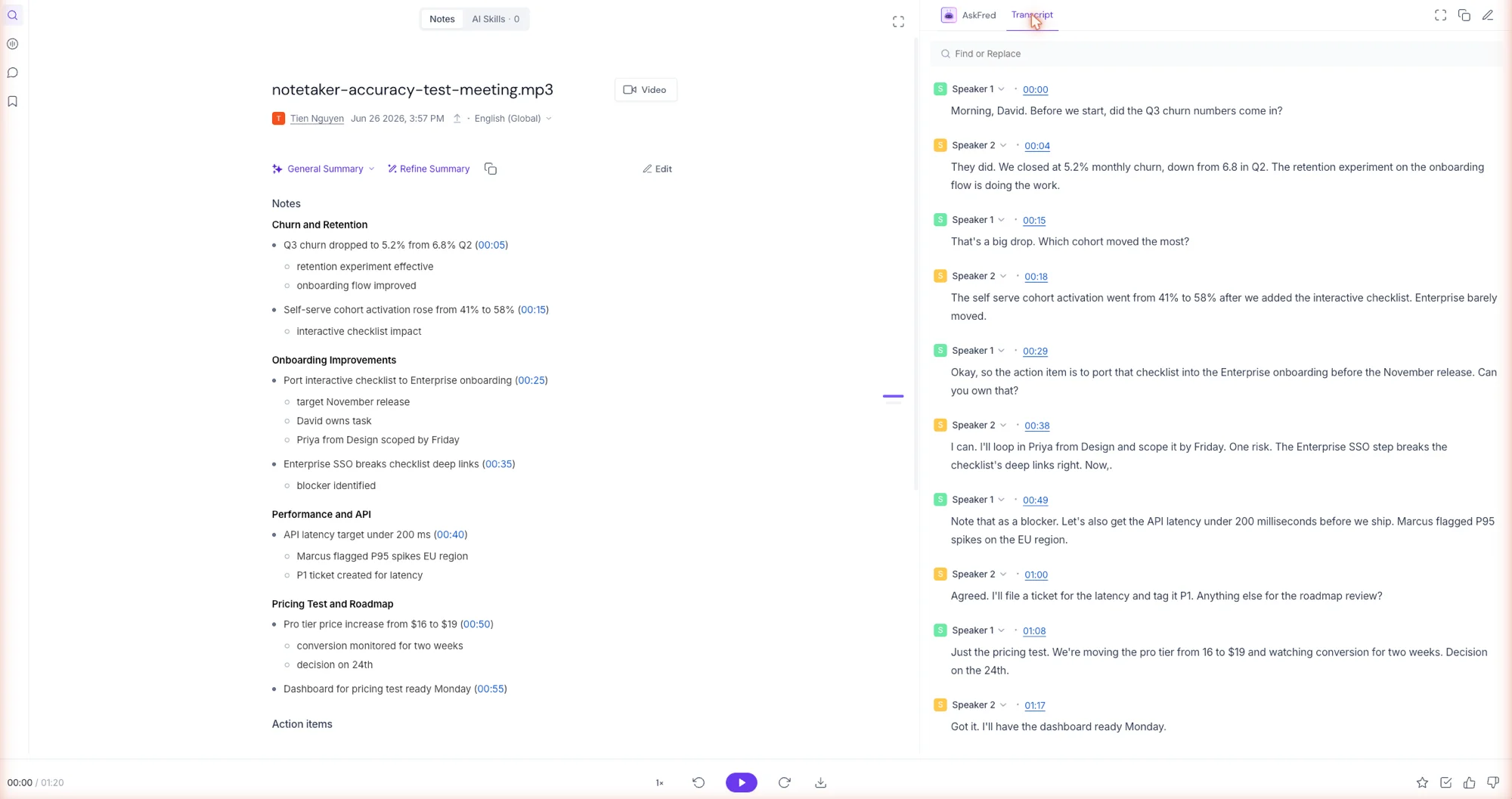
It also extracted four action items and attributed all four to the correct owner, David, including the one about looping in Priya from Design by Friday:
| Action item Fireflies pulled out | Owner | Deadline |
|---|---|---|
| Port the interactive checklist into Enterprise onboarding | David | Before the November release |
| Loop in Priya from Design to scope the implementation | David | Friday |
| File a P1 ticket to get API latency under 200 ms | David | Before shipping |
| Have the pricing-test dashboard ready | David | Monday |
That owner attribution is the thing most summarizers fumble, and Fireflies got it right where its own AskFred chat was slightly more hedged, marking two of the same items as having unnamed owners. The structured summary was the more accurate of the two AI surfaces.
The summary template is also adjustable. A “General Summary” dropdown swaps the format, a “Refine Summary” control lets you push it in a direction, and a “Continue from this meeting” row suggests follow-up actions drawn straight from the content. For a recurring meeting type, you can settle on a template once and have every recap come out in the same shape, which is exactly what makes the output something a team can pass around rather than re-read.
AskFred reasons across your whole meeting history
AskFred is more than a search box. I asked it to summarize the meeting and pull the exact numbers, and it ran a visible three-step process, understanding the query, finding the relevant meeting, then reading the transcript, before answering in about 50 seconds.
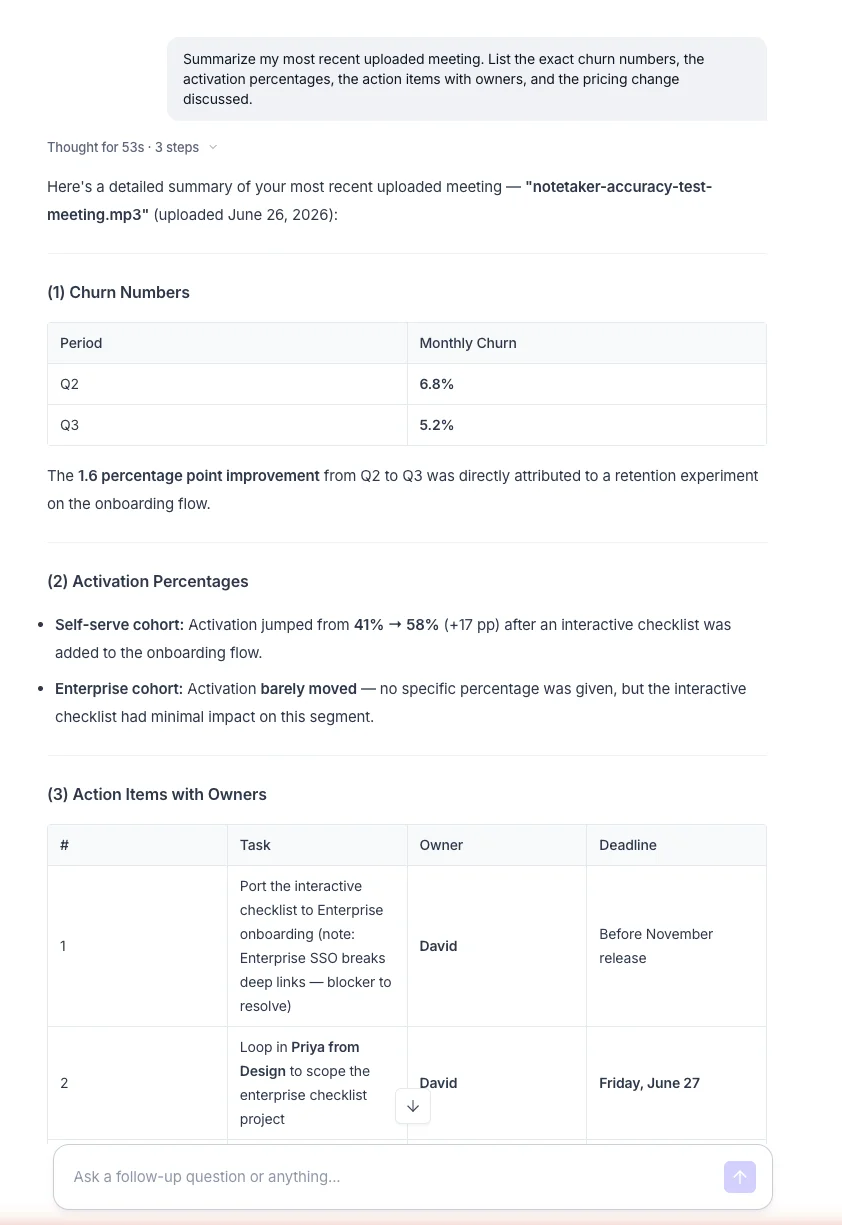
Every number it returned was correct, and it resolved the relative dates the speakers used, turning “Friday” into June 27 and “the 24th” into July 24. It laid the answer out in clean tables, cited the source meeting, and offered three follow-up questions to dig deeper. Running on Claude Sonnet 4.6, the model its picker showed during my testing, it is built to query a whole organization’s history, so a manager can ask what an account said about pricing last quarter and get an answer pulled from across dozens of calls, not one transcript at a time.
The reasoning is the part that surprised me. It did not just keyword-match the transcript; it inferred that “Friday” meant a specific date, calculated the percentage-point change between two churn figures, and grouped loose discussion into a structured action list. That is the difference between a search tool and an assistant, and it is the strongest argument for paying past the free tier, where AI credits run thin.
The integration breadth is the widest in the category
This is where Fireflies pulls clear of every rival. Its marketplace carries more than two dozen CRM connectors alone, plus the team and storage tools you would expect, and each one auto-logs your notes and action items after a call.
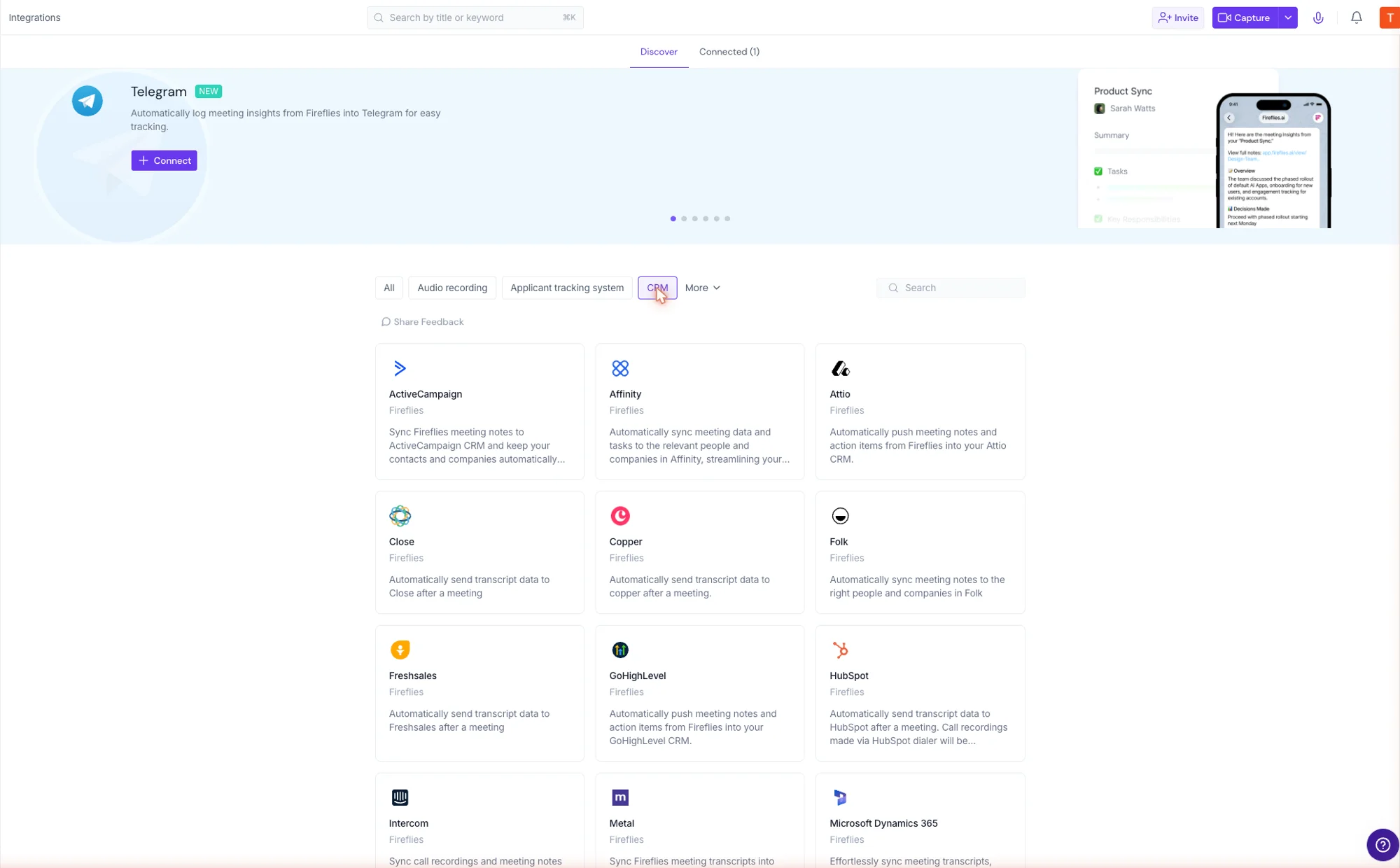
| Category | A sample of what Fireflies connects to |
|---|---|
| CRM | Salesforce, HubSpot, Pipedrive, Zoho, Microsoft Dynamics 365, Close, Copper, Attio, Freshsales, GoHighLevel, Monday.com, Intercom, Zendesk Sell, Affinity |
| Team & docs | Slack, Notion, Google Sheets, Microsoft Excel, Asana |
| Storage & automation | Amazon S3, Airtable, Zapier |
For a team that lives in a specific CRM, this list is the buying decision. Where Otter’s CRM sync is shallow and reserved for higher tiers, Fireflies treats the integration as the product.
The catalog goes wider than CRM, too. There are connectors for applicant-tracking systems, audio-recording tools, project trackers like Asana and Jira, and a Telegram bot, with new ones flagged as they land. The practical effect is that a meeting note stops being a thing you copy and paste and becomes a record that files itself into wherever the work already happens. Unlimited integrations arrive on the $10 Pro plan, which is a low bar for a feature this central.
Conversation analytics most rivals never ship
On the Business plan, Fireflies layers a real analytics dashboard over your calls: talk-to-listen ratio, filler-word counts, the longest monologue, words per minute, silence, sentiment, and topic trends, split into Team, Topics, and Sales views. Even my single 60-second upload registered talk-time and sentiment on the meeting itself:
| From my 60-second test clip | What Fireflies computed |
|---|---|
| Speaker 1 talk-time | 44% (191 words per minute) |
| Speaker 2 talk-time | 56% (162 words per minute) |
| Sentiment | 93% neutral, 4% positive, 4% negative |
This is the reporting a sales or success leader actually wants, and it is the category’s clearest dividing line. A personal notetaker records the call; Fireflies measures it.
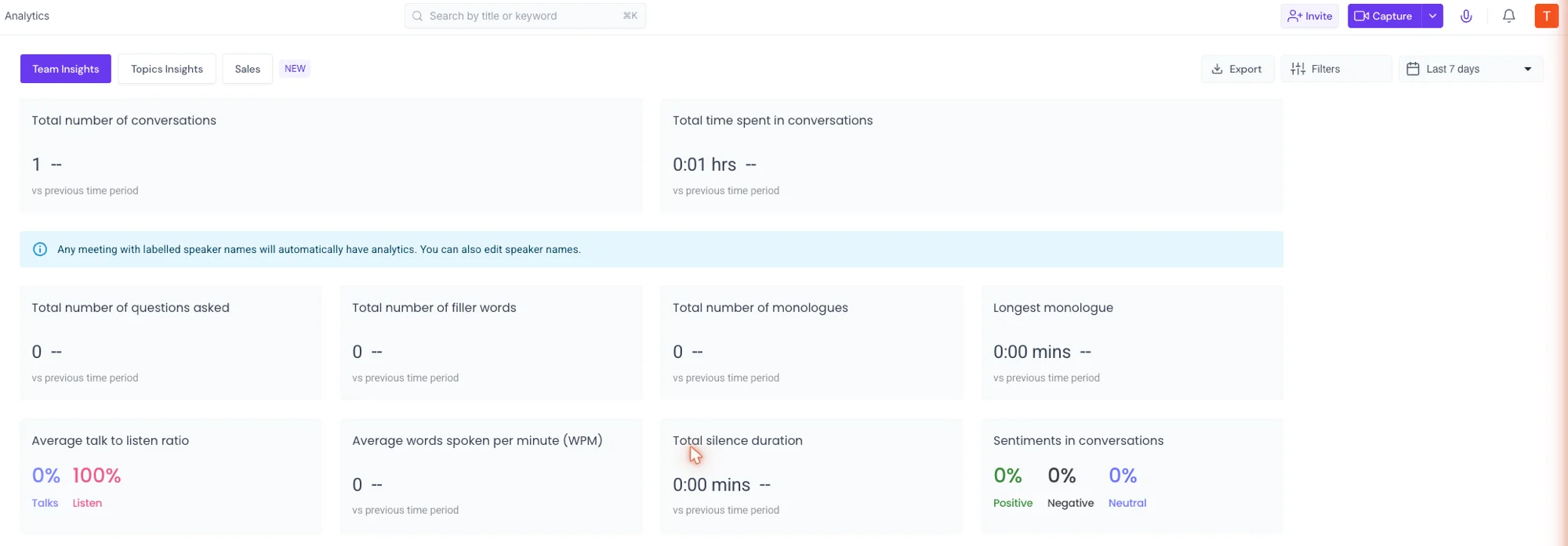
The dashboard is built for a populated team, not a sample of one, so most of my numbers sat at zero with a single upload in the library. A note on the page makes the mechanism explicit: any meeting with labelled speaker names is automatically rolled into the analytics, and you can edit those names. Fed a real team’s calls, the Sales view turns into talk-time-per-rep and coaching signals, and the Topics view into what the whole org is actually talking about, week over week. It is the part of the product a solo user will never see populated, and the part a sales manager would buy it for.
A free tier that does real work
Most notetakers gate the useful parts behind a paywall. Fireflies puts unlimited transcription, the AskFred assistant, audio and video uploads, 100-plus-language support, the mobile and desktop apps, and even API access on the $0 plan. I ran the entire accuracy test above on what a free user can do.
The constraint is storage and credits, not capability, which is an unusually honest free tier. It is enough to judge the product on real output before anyone pays, and for a light user it can be the whole job done for free.
A clear, strong data stance
The privacy posture is better than most of this category, and it is the question buyers ask first. Fireflies states plainly that it does not train AI models on your data by default, and it runs a 0-day retention policy with its vendors and partners so your meetings are never fed into model training.
| Security and compliance | What Fireflies states |
|---|---|
| Training AI on your data | No, not by default; 0-day retention with vendors and partners |
| Certifications | SOC 2 Type II, GDPR |
| HIPAA | Enterprise plan |
| Encryption | 256-bit AES at rest, TLS in transit |
| Data controls | Private storage (Enterprise), delete your data anytime |
It is certified for SOC 2 Type II and GDPR, encrypts data with 256-bit AES at rest, and offers HIPAA compliance and private storage on Enterprise.
That is a sharper line than some rivals draw. Otter, by contrast, has defaulted to opting your data into training, so for a team with a security review to clear, Fireflies’ stance is the easier one to sign off.
The bad
The trade-offs are real, and almost all of them trace back to one thing: Fireflies is a team tool, and it charges and behaves like one.
The default is a visible bot in your meeting
Out of the box, a Fireflies notetaker joins your call as a participant everyone can see. For internal standups that is fine; for a sensitive client call it is the exact friction a bot-free tool like Granola was built to avoid.
Fireflies does offer bot-free capture, through the desktop app recording system audio and through a Google Meet SDK integration, but it is the alternate path, not the default, and the optics of a bot in the room are still the first objection people raise. A client watching “Fireflies Notetaker” join the call is a different conversation than one that never knows software is in the room, and on external calls that perception can matter more than any feature.
It is overkill, and overpriced, for a solo user
Everything that justifies the price assumes a team. A single user does not need conversation analytics across the organization, CRM sync, user groups, or admin controls, yet Pro at $10 a seat is the floor for downloads and action items. Against Granola or Fathom’s genuinely unlimited free plan, one person is paying for machinery they will never switch on.
The AI features are metered by credits
AskFred, AI Skills, and the smart summaries all draw on a monthly “AI credit” allowance, and the allotment is thin at the bottom of the range. A heavy AskFred user on Free or Pro can run the meter down well before month-end, and the only fix is to climb a tier.
| Plan | AI credits / month |
|---|---|
| Free | 20 |
| Pro | 20 |
| Business | 30 |
| Enterprise | 50 |
That metering is easy to miss when you sign up, because the transcription itself is unlimited. The intelligence on top of it is not. A single AskFred query like the one I ran, which kicked off a multi-step retrieval across the library, is the kind of request that eats into a 20-credit allowance fast, and the more you lean on the assistant the more the credit ceiling, not the transcription, becomes the thing you actually hit.
The free tier’s real cap is storage, not minutes
Fireflies markets “unlimited transcription” on the free plan, and that is true, but the plan only stores 400 minutes for the entire team. Cross that and older meetings age out of reach unless you upgrade. It is a reasonable limit, but the framing invites a misread: you are not capped on how much you record, you are capped on how much you keep.
Transcription is strong, not the most accurate
My test came back near-perfect, but the broader picture is a slight step behind the leader. In our own cluster testing, run through the same controlled test meeting, Fireflies produced the small “right now” punctuation slip while Otter came back marginally cleaner on the verbatim transcript, and independent testing broadly agrees, placing Fireflies around 90 to 93 percent on transcription and speaker recognition against roughly 93 to 95 for Otter. It is more than accurate enough for summaries and search; for a transcript you quote word for word, Otter holds a narrow edge.
The interface is busy
Fireflies surfaces a lot at once: a notebook, channels, AskFred, analytics, integrations, voice agents, AI Skills, and team admin all live in the same sidebar. For a power team that breadth is the appeal, but next to Granola’s single clean note or Fathom’s stripped-back recorder, the learning curve is steeper and a first-time user has more to wade through before the value shows up. Even small things add friction: the nav labels and the URLs do not always line up, so a couple of times I clicked “Meetings” and landed somewhere else. None of it is broken, but it is a product that asks you to learn it, where the calmer rivals ask nothing at all.
The best controls are Enterprise-only
The features a regulated or security-conscious team needs most, HIPAA compliance, SSO and SCIM, private storage, audit logs, and custom data retention, all sit behind the $39-a-seat Enterprise plan. The data stance is strong across every tier, but if compliance certification is a hard requirement, budget for the top plan, not the $19 Business one.
Alternatives worth considering
If you decided Fireflies is not the fit, here is where to look next, depending on what pushed you away.
- Otter.ai — if you are one person who wants clean, accurate transcription without a team platform around it. Otter is the simpler solo buy with a slight edge on raw accuracy, though its CRM sync is shallow and its free tier is far stingier. See our Otter review, or the full Otter vs Fireflies comparison for the team-versus-individual split.
- Granola — if a visible bot in the room is the dealbreaker. Granola is bot-free by design, captures device audio in the background, and enhances the notes you type, which suits discreet client calls far better than an auto-joining recorder. See our Granola review, or the full Granola vs Fireflies comparison.
- Fathom — if the free plan is what matters most. Fathom’s free tier is genuinely unlimited, records replayable video, and produced the cleanest summary in our cluster testing, which makes it the natural first stop for a solo user or small team on a budget. See our Fathom review, or the full Fathom vs Fireflies head-to-head.
Here is how the three line up on the axes that decide it:
| The measure | Fireflies | Otter | Granola / Fathom |
|---|---|---|---|
| Best fit | A whole team | One person, transcription-first | Discreet calls (Granola) / free use (Fathom) |
| Team starts at | $19/seat (Business) | $30/seat (Business) | Fathom from $20; Granola from $14 |
| Bot-free capture | Alternate path (desktop / Meet SDK) | No, sends a bot | Yes, native (Granola) |
| Transcription accuracy | ~90-93% | ~93-95%, slight edge | Fathom cleanest in our test |
| Team analytics + CRM | Built in on Business | Shallow | No |
For the whole field ranked side by side, our best AI note taker roundup runs every option through the same test meeting, and our Fireflies alternatives shortlist covers the closest swaps.
Final word
Fireflies earns its 4.4 by being the best in the category at one specific job: turning a whole team’s meetings into something searchable, measurable, and wired into the CRM. In my testing the transcription held up, the summary and action items were clean and correctly attributed, AskFred reasoned across the history the way a team needs, and the integration breadth is genuinely unmatched. The data stance is a real bonus, not an afterthought.
The brake is fit. The bot rides along by default, the AI features are metered, and the team machinery that justifies the price is dead weight for one person. Go in as a team that needs every call to land in a CRM and Fireflies is an easy recommendation. Go in as a solo notetaker and you are buying a platform when you wanted a tool. Start on the free plan, which does real work, and let your own calls tell you which one you are.
Frequently asked questions
Is Fireflies free to use?
Yes, and the free plan does real work. It gives unlimited transcription, unlimited AI summaries, the AskFred assistant, audio and video uploads, transcription in 100-plus languages, and even API access, which is more than most rivals put at $0.
The real limit is not minutes but storage: 400 minutes for the whole team, plus 20 AI credits a month, and no video capture or downloads. That distinction matters, because Fireflies markets unlimited transcription while quietly capping how much you keep, and a single multi-step AskFred query can eat into the 20-credit budget fast.
It is genuinely enough to judge the product on real output, including the accuracy test I ran, but a team that records daily will hit the storage ceiling quickly and need Pro at $10 a seat or Business at $19.
Does Fireflies join my meetings as a bot?
By default, yes. A Fireflies notetaker joins your Zoom, Google Meet, or Microsoft Teams call as a visible participant and records it, which everyone on the call can see.
If that is a problem on client or sensitive calls, Fireflies offers bot-free capture two ways: its desktop app records your computer's system audio with nothing joining the meeting, and a Google Meet SDK integration captures the call with no visible bot. Both are live, generally available features, not beta.
The catch is that the visible bot is still the default path, so bot-free is something you switch on rather than the standard behavior. If a silent footprint is your priority, a tool built bot-free from the start, like Granola, stays calmer than flipping Fireflies into its alternate mode.
How accurate is Fireflies transcription?
Strong, but not the category's most accurate. On a controlled two-speaker test meeting I uploaded, Fireflies kept every name, number, and piece of jargon, including the churn figures (5.2 percent, down from 6.8), the activation jump from 41 to 58 percent, and the 16-to-19-dollar pricing change. The only slip in 80 seconds was turning the phrase right now into right. Now, a punctuation glitch with zero dropped words, and it kept Q3 intact where Otter dropped it on the same clip.
Run that same clip through Otter, though, and the verbatim transcript comes back marginally cleaner, which matches Fireflies' broader reputation as a notch behind Otter on raw transcription accuracy while supporting far more languages. For summaries and search it is more than accurate enough; for a word-for-word transcript, Otter holds the narrow edge.
Does Fireflies train its AI on my meeting data?
No. Fireflies states it does not use customer meeting data to train AI models by default, and it runs a 0-day data-retention policy with its vendors and partners, so your meetings are never used for model training, even by the AI providers behind its features.
It is certified for SOC 2 Type II and GDPR, encrypts data with 256-bit AES at rest and TLS in transit, and offers HIPAA compliance with a business associate agreement on its Enterprise plan. Private storage and custom data retention are also Enterprise options, and you can delete your data at any time.
That stance is sharper than some rivals draw, which is part of why it clears a security review more easily than a notetaker that defaults to training on your conversations.
Is Fireflies better than Otter?
For a team, yes. Fireflies runs AI search and conversation analytics across everyone's calls, pushes notes and action items into a CRM automatically, and supports 100-plus languages, which is what a sales or success org needs once it is generating hundreds of calls a month. On price it is the cheaper team buy: a five-seat team pays about 95 dollars a month on Business against roughly 150 for Otter's 30-a-seat Business tier, while bundling the analytics and CRM sync a team is paying for.
For one person, though, Otter is the simpler, cleaner buy with a slight edge on raw transcription accuracy, and Fireflies' team machinery is wasted on a solo user. Choose Fireflies for team-wide meeting intelligence, Otter for personal transcription. See our full Otter vs Fireflies comparison for the breakdown.
Keep reading
Otter vs Fireflies: solo transcriber or team brain?
We tested Otter and dug into Fireflies. Otter wins for the individual and live transcription; Fireflies for team search, analytics, and CRM. Which fits you?
Fireflies AI alternatives: 5 tested, simpler and free
We tested the top Fireflies alternatives. Fireflies is powerful but heavy — leaving for a simpler tool, a real free plan, or no bot? Here's the one that fits.
Best AI note taker: 4 top tools, tested head-to-head
We ran one meeting through Granola, Fathom, Fireflies, and Otter. The best AI note taker depends on whether you take client calls, want it free, or run a team.
Fireflies pricing: what the credits and caps really cost
Fireflies pricing runs $0 to $39 a seat, but the free plan's real limit is storage, not minutes, and the AI is metered by credits. Here's the actual math.