
Fathom review: the best free AI notetaker, tested
I fed Fathom a fake meeting and it wrote the cleanest summary of any notetaker I tested. With a genuinely unlimited free plan, it's where to start.
Contents
Is Fathom worth it?

For most people, Fathom is the AI notetaker to start with, and the reason is simple: its free plan is genuinely unlimited. This Fathom review is grounded in a hands-on test, and the test made the case for me. I fed Fathom a fake two-speaker meeting and it returned the cleanest, most structured summary of any notetaker I have tried, with every number and name correct. I score it 4.6 out of 5, a Category Leader.
Fathom is also the highest-rated notetaker in the category, sitting at a near-perfect 5.0 on G2 across more than 6,000 reviews. The catches are real but narrow: it is built around a meeting bot that joins your call, a bot-free mode is still in beta, the summaries can read a little formal, and the features that make it sing for sales teams sit behind the paid plans.
Start on the free plan, which is more than most people will ever need. Upgrade only if you want bot-free capture, CRM sync, or team coaching. What it is not is the quietest option for a sensitive client call, or a way to record a conversation on your phone. For everyone else, the math is easy: a notetaker this capable, free for unlimited calls, is the obvious place to begin.
What does Fathom do?
Fathom is an AI meeting assistant for people who live on calls. It joins your Zoom, Microsoft Teams, or Google Meet meeting, records and transcribes it, and then writes you a structured summary with action items, all without you taking a note. The pitch that sets it apart is the price: the core of that, unlimited recording and summarizing, is free.
Where Otter sends a bot and Granola quietly captures your device audio, Fathom started as a bot and is now adding the quiet option too. By default a Fathom Notetaker joins the call as a visible participant. As of mid-2026 it also offers a bot-free capture mode in beta on Mac, which records your system audio instead, the same approach Granola takes. That puts Fathom in the rare position of offering both styles.
The bot-free mode matters beyond etiquette. It lets Fathom capture a conversation on a platform it has no bot for, or one that is not a formal meeting at all, by listening to whatever audio your Mac is playing. It is the same flexibility that makes Granola feel frictionless, now offered inside the tool with the most generous free plan.
Search ties the whole thing together. Every call you record becomes a searchable transcript, so finding the meeting where a client mentioned a budget is a keyword away rather than a scroll through recordings. Clips and playlists turn those moments into things you can send, which is how Fathom stops being a private archive and starts being a shared resource for a team.
To see how good the notes actually are, I ran a controlled test rather than a real call, so I would know the correct answer. I used the bot-free capture to record an 80-second, two-speaker product meeting I generated with synthetic voices, loaded with names, numbers, and jargon. Then I opened the result.
The summary was the most polished I have seen from any notetaker. Fathom calls it an Enhanced Summary, and it broke my short meeting into a Meeting Purpose, Key Takeaways, Topics, and Next Steps, each with the right specifics underneath. It correctly pulled the churn numbers, the 41%-to-58% activation jump, the November deadline, the SSO blocker, and the owners, attributing tasks to David and the design handoff to Priya.
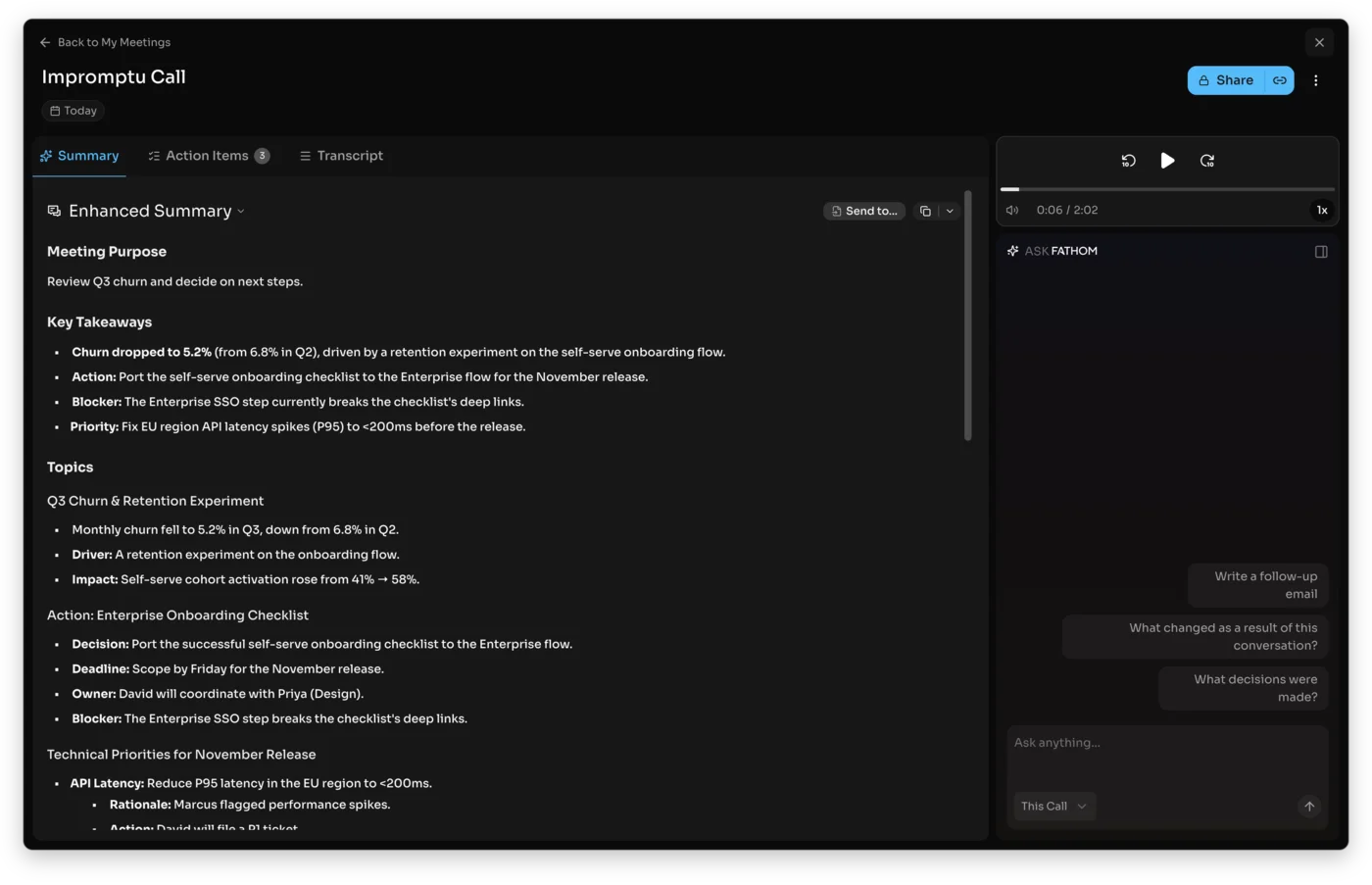
Accuracy on the specifics was perfect in this test. Here is what the clip said against what Fathom captured.
| What the clip said | What Fathom’s summary captured | Verdict |
|---|---|---|
| churn 5.2%, down from 6.8% in Q2 | ”Churn dropped to 5.2% (from 6.8% in Q2)“ | correct |
| activation 41% to 58% | “Self-serve cohort activation rose from 41% → 58%“ | correct |
| loop in Priya from design | ”David will coordinate with Priya (Design)“ | correct |
| Marcus flagged p95 spikes, EU region | ”Marcus flagged performance spikes… EU region… P95” | correct |
| move the Pro tier from $16 to $19 | ”move the Pro tier from $16 to $19” | correct |
| decision on the 24th | ”Review the pricing test decision on the 24th” | correct |
That summary sits on top of an equally clean transcript. Fathom’s was the most accurate of the three notetakers I ran this same clip through: it kept “Q3 churn,” “down from 6.8 in Q2,” “$16 to $19,” and “tag it P1” all intact, where Otter dropped the quarter digits and Granola garbled a line or two.
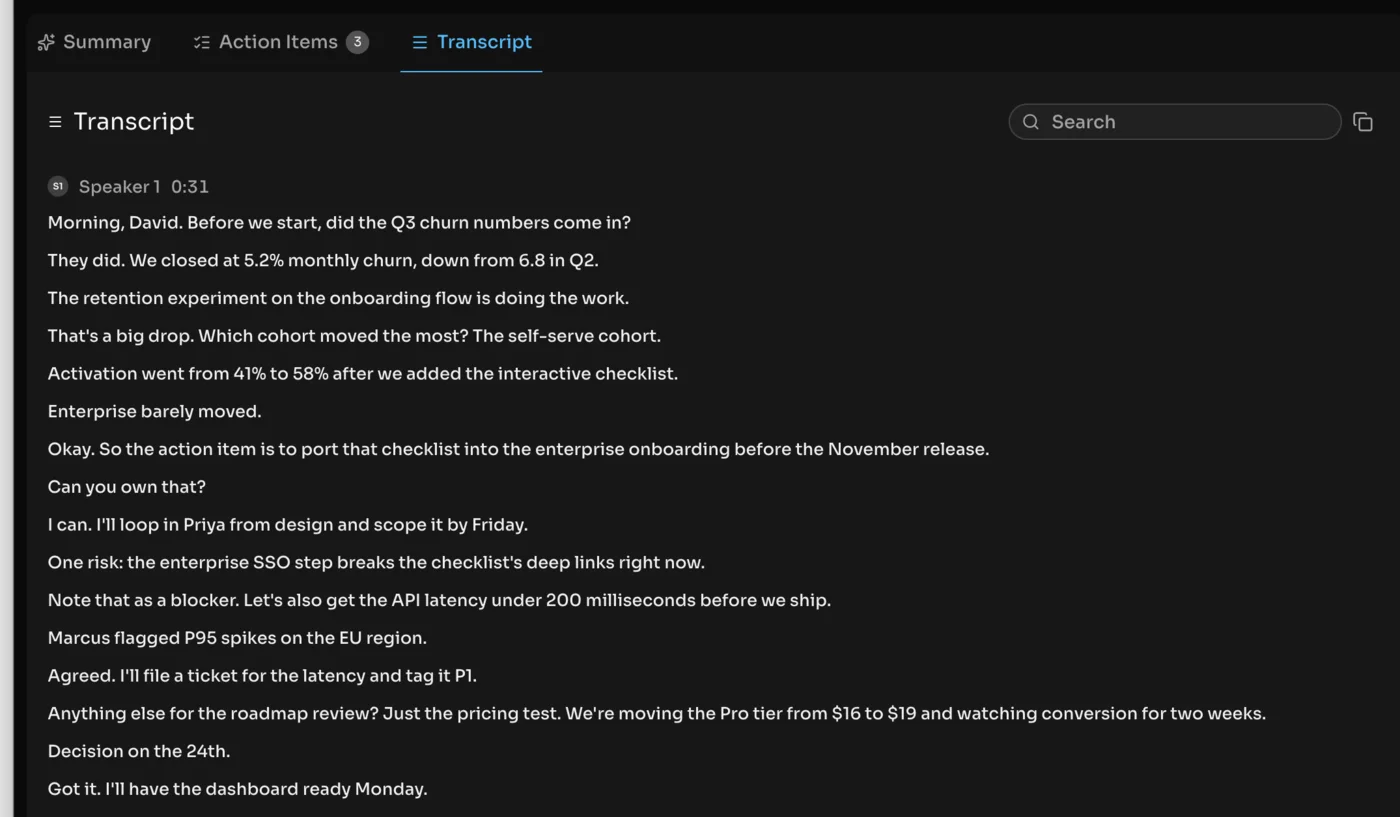
Beyond the summary, Fathom records the full video of the call, builds a timestamped transcript, lets you cut clips and playlists of key moments, and answers questions about the meeting through a chat called Ask Fathom. For sales teams it also pushes notes and fields straight into a CRM, which is the part of the product that most of its design speaks to.
Those summaries are template-driven, which is part of why they come out so structured. Beyond the default Enhanced Summary, the paid plans add a library of formats built around sales methodologies like BANT and Sandler, plus custom templates, so a discovery call and an internal standup can produce differently shaped notes. It also transcribes in more than 35 languages, which takes it well past English-only teams.
Fathom is not a small operation behind all this. It is made by the company of the same name, founded in 2020 by Richard White, who built UserVoice before it, and it came up through Y Combinator with Zoom as an early investor. It is used at hundreds of thousands of companies, raised a $17 million Series A in 2024, and has grown fast on the strength of that free plan, and the product reflects that scale with a feature set most people never fully explore. The everyday version of it, though, is simple: a call happens, and a clean set of notes is waiting for you a few seconds after it ends.
How much does Fathom cost?
Fathom’s pricing is unusual because the free plan is the headline, not a teaser. The prices below are per user and verified live on fathom.ai/pricing on June 14, 2026. Annual billing knocks roughly 20-25% off the paid tiers.
| Plan | Price (monthly) | What you get |
|---|---|---|
| Free | $0 | Unlimited recording, transcription, and basic AI summaries; clips, playlists, and search |
| Premium | $20/user | Everything free, plus Ask Fathom, advanced summary templates, AI action items, and bot-free capture |
| Team | $19/user | Team collaboration, global search across shared calls, custom vocabulary, and SSO (2-user minimum) |
| Business | $34/user | CRM field sync, Deal View, AI coaching scorecards, and custom retention (2-user minimum) |
The free plan is the most generous in the category by a wide margin. Otter caps its free tier at 300 minutes a month with a 30-minute-per-meeting limit, and Granola only shows limited history before it asks you to pay. Fathom lets you record, transcribe, and summarize as many meetings as you want at $0, forever. For a solo professional who just wants clean notes, that is often the entire job done for free.
The paid plans are where the AI assistant and the team machinery live. Premium at $20 adds Ask Fathom, the advanced summary templates built around sales frameworks, and the bot-free capture. Team at $19 a user is about shared search and collaboration. Business at $34 a user is the revenue-team tier: it syncs fields into HubSpot or Salesforce, adds a Deal View that stitches every call on a deal together, and layers on AI scorecards for coaching reps. If you are not in sales, you will likely never touch the top tier.
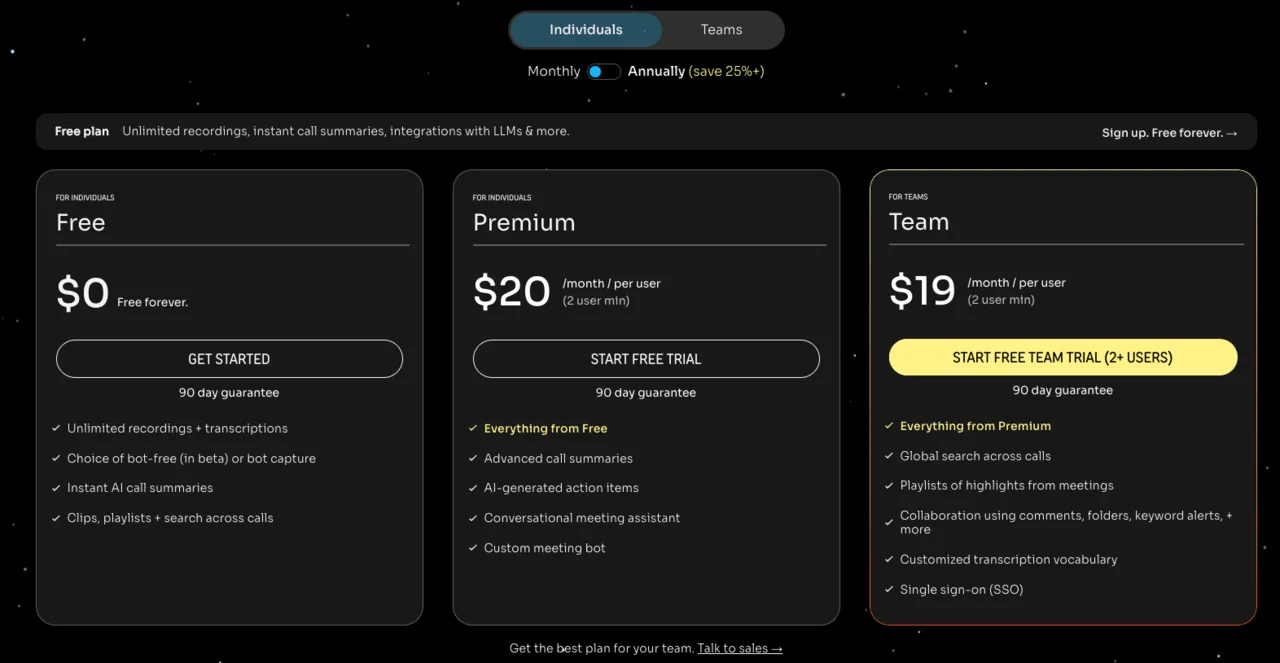
A few details are worth knowing before you pick a tier. The Team and Business plans carry a two-user minimum, so a true solo user lives on Free or Premium. Annual billing trims the paid plans by roughly a fifth, which brings Premium closer to $15 and Business closer to $25 a user. And the bot-free capture, the feature that most directly answers Fathom’s biggest criticism, is a Premium perk rather than something on the free plan.
The honest read is that Fathom is free for what most people need and a sales tool once you climb the plans. That is a healthier split than rivals that put basic note retention behind a paywall, and it is a big reason Fathom tops our best free AI note taker ranking and gets recommended so often as the first notetaker to try. If you only ever want notes, you may never see a bill; if you run a revenue team, the Business tier is doing work no free notetaker can. For the full plan-by-plan breakdown and the annual math, see our Fathom pricing guide.
Who is Fathom for?
- Anyone who wants clean meeting notes for free. This is the headline. If your need is “record my calls and write me a summary,” Fathom does it with no meeting cap and no cost, which no other top-tier notetaker matches.
- Sales and customer success teams. Fathom is built for revenue work: CRM field sync, a Deal View across a deal’s calls, and AI coaching scorecards. If your notes need to land in HubSpot or Salesforce without manual entry, this is the strongest fit in the category.
- People who want to re-watch the call. Because Fathom records video and keeps it, you can play back a moment, clip a key quote, or build a highlight reel. That suits anyone who needs the receipts, where a tool that deletes audio leaves you guessing.
- Teams that want one shared, searchable library. The Team plan’s global search across shared calls turns a quarter of meetings into something the whole team can query, so onboarding a new hire can mean handing them a searchable archive instead of a folder of recordings nobody opens.
- Anyone comparing notetakers on price first. Because the free plan is unlimited, Fathom is the lowest-risk way to find out whether an AI notetaker fits your week at all. You can run it for a month, decide it is worth it, and only then think about which paid tier, if any, you need.
- Not for: anyone who needs to record on a phone in person, or who wants the quietest possible footprint today. Fathom has no native mobile recording, and while a bot-free mode is in beta, its default is still a visible bot in the call. If those are dealbreakers, a bot-free-first tool fits better. It is also more than someone whose entire need is a single weekly one-on-one will ever use: the free tier covers that easily, but you would never touch the paid features that justify climbing the plans, and a simpler notetaker might suit you better.
The good
Fathom earns its score on a free tier nobody else matches and a summary that came out cleaner than the competition. Here are the seven things that should sway you, strongest first.
The free plan is genuinely unlimited
This is the headline feature, and it is rare. Fathom records, transcribes, and summarizes as many meetings as you want for $0, with no monthly minute cap and no per-meeting limit. Set that against Otter’s 300 free minutes a month or Granola’s hidden history, and Fathom’s free tier is the most generous in the category by a clear distance. For most individuals, the free plan is not a trial, it is the whole product. The catch worth naming is that the AI assistant and the advanced templates are paid, so what is free is the recording, transcript, and a solid default summary, which for a lot of people is exactly the job.
The summary is the cleanest I tested
Fathom’s Enhanced Summary was the most structured output of any notetaker I tried. It organized my short meeting into a Meeting Purpose, Key Takeaways, Topics, and Next Steps, each with accurate detail, and as the test table above shows, it got every number and name right. The structure means you can skim a one-hour call in fifteen seconds and trust what you read, which is the entire point of a notetaker.
What impressed me most was the layering: it did not just transcribe and bullet, it inferred the purpose of the meeting, separated decisions from discussion, and surfaced the blocker on its own. Granola’s enhancement is more conversational and Otter’s is flatter; Fathom’s is the one I would forward to an executive without editing.
Action items come timestamped and assignable
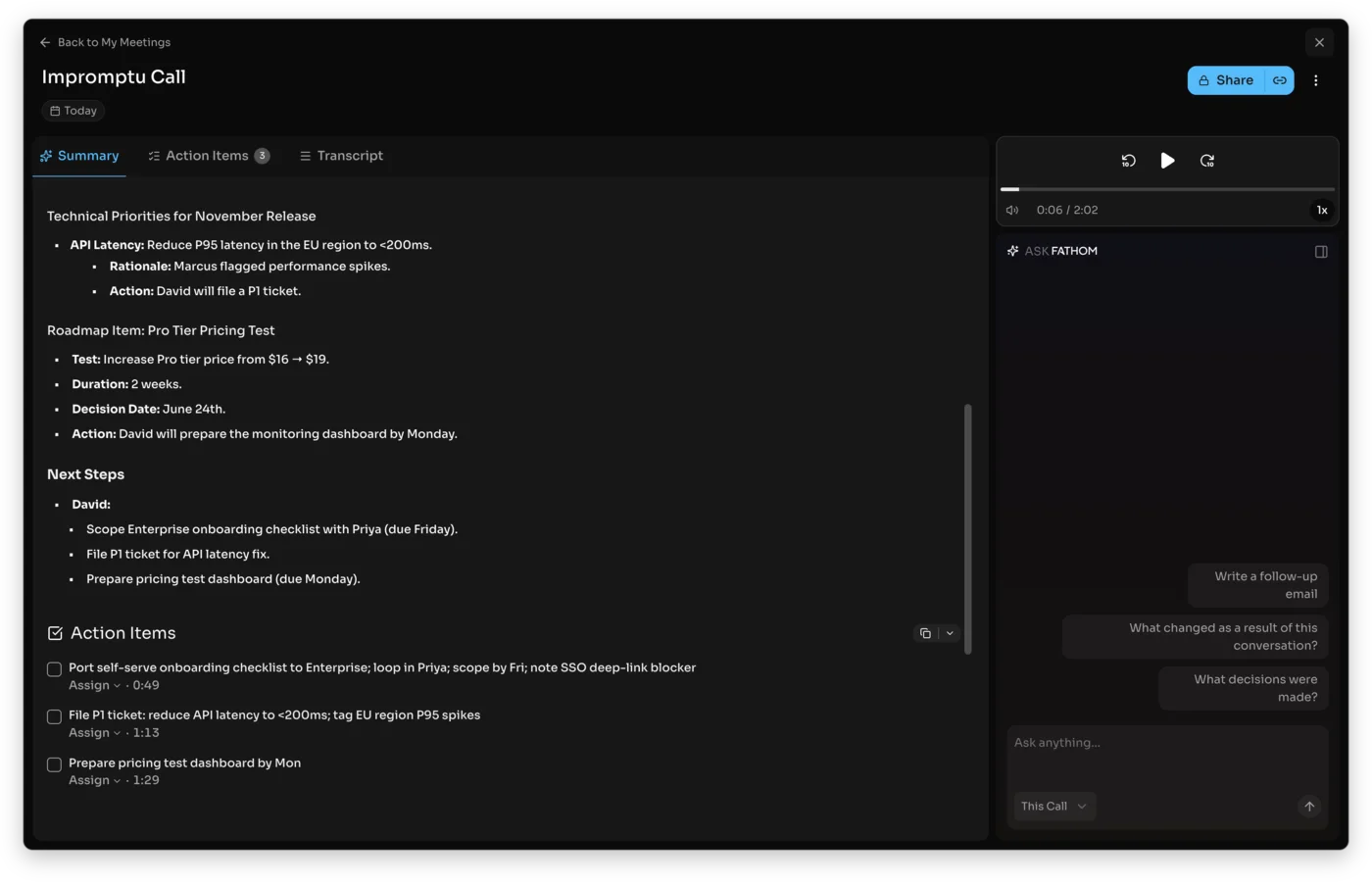
Fathom does not just list tasks, it links them. Each action item it pulled carried a timestamp to the exact moment in the recording, so a click jumps you to where the commitment was made, and each one can be assigned to a person. From my clip it produced a clean, owner-ready list: port the checklist, file the P1 ticket, prepare the pricing dashboard, each tagged to its moment in the call. That assign step is small but telling. It means the notes are not just a record, they are the start of the follow-up, and a manager can turn a call into delegated work without retyping a thing.
Ask Fathom answers with a citation
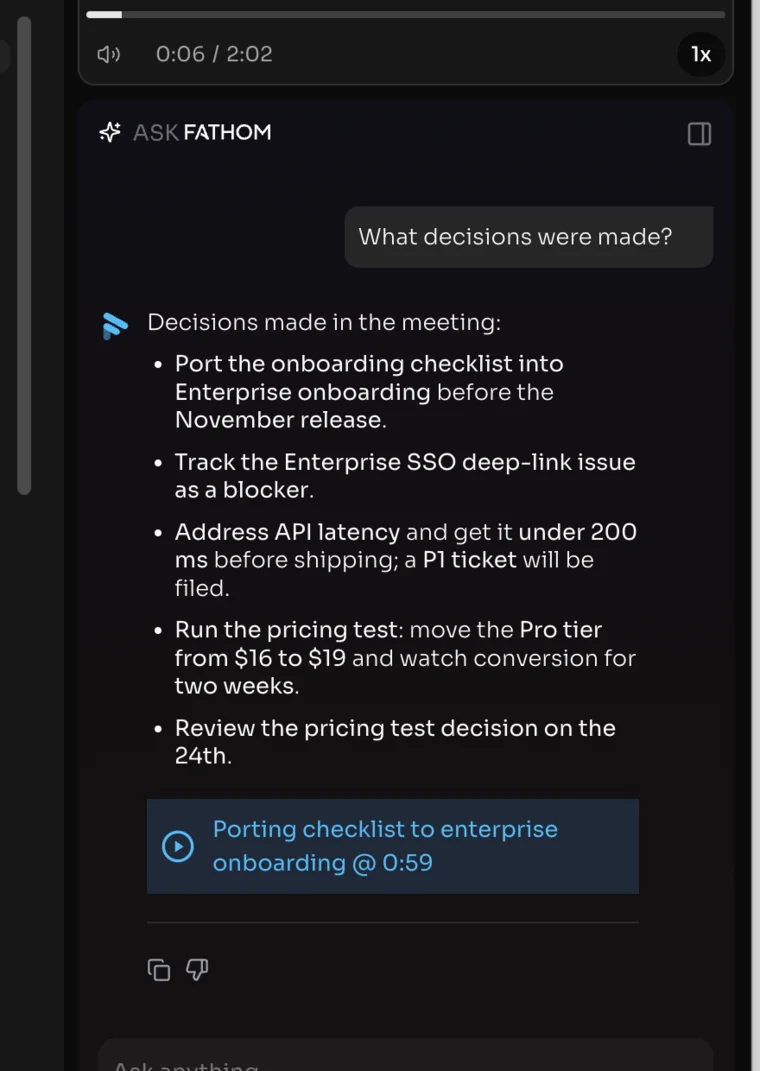
The Ask Fathom chat is more than search. I asked what decisions were made and it returned an accurate, structured list, then attached a clickable citation pinned to the timestamp where the decision happened. That last part matters: it is the difference between an AI that asserts and one that shows its source, and it makes the answer trustworthy enough to act on. It also scoped cleanly to the call I was in, with a selector to widen the question across every meeting when you want it. It is the searchable-memory idea Granola leans on, with the citation discipline that earns the trust.
It records video you can actually play back
Fathom keeps the full video of your call, not just a transcript. You can replay a moment to catch a tone, cut a clip of a key quote, or assemble a playlist of highlights to share. That is a real edge over a notetaker like Granola, which deletes the audio after transcribing and leaves you nothing to re-watch when a summary misses a nuance.
For sales, the clip-and-share flow is genuinely useful: pulling a 30-second snippet of a prospect describing their pain point and dropping it into a deal thread is the kind of thing reps actually do, and Fathom makes it a couple of clicks rather than a screen-recording chore. It is also the honest answer to anyone who does not fully trust an AI summary: when a note looks off, the source is right there to replay, which a transcript-only tool or one that deletes its audio cannot offer.
Native CRM sync is the killer feature for sales
For revenue teams, the standout is that Fathom writes call notes and structured fields straight into HubSpot or Salesforce, no manual entry. The Business plan adds a Deal View that pulls every call on a deal into one timeline and AI scorecards that grade reps against a coaching rubric. The whole product clearly began as a sales tool, and that focus is why it is the category’s strongest pick for revenue work.
The time saving is concrete: a rep who would otherwise spend ten minutes after each call updating CRM fields gets that back, and a manager gets a consistent record instead of whatever each rep remembered to type. For a team carrying a quota, that combination of clean notes and automatic CRM hygiene is the difference between a notetaker and a system of record.
It is the highest-rated notetaker around
Reputation is not a feature, but Fathom’s is hard to ignore. It holds a near-perfect 5.0 on G2 across more than 6,000 reviews, the highest score and the largest review count of any notetaker in the category, plus strong marks on Trustpilot across its 249 reviews. That weight of independent sentiment is a strong signal that the experience holds up beyond a single test.
A 5.0 average across thousands of reviews is not something you fake, and it is notably higher than Otter’s mixed aggregate scores. When a tool this widely used keeps that rating, the most likely explanation is that the everyday experience is genuinely good, not that one demo went well.
The bad
Now the part the launch pages skip. Fathom’s limits are narrower than most, but a couple of them are real dealbreakers for the wrong buyer.
It is built around a meeting bot
Fathom’s default is a visible Notetaker that joins your call as a participant, and that bot presence is the most common complaint about it. On an internal standup nobody cares, but on a client or sales call, a third party appearing in the participant list can be awkward or against policy. A bot-free capture mode is now in beta on Mac, which removes the bot, but it is newer and less proven than the bot-free-first approach Granola was built on.
It is also a Premium feature, so the answer to Fathom’s most-cited weakness costs $20 a month, where the rivals that never used a bot give you that for free. If a recorded participant in the call is a hard no for your work, weigh that carefully.
The summaries can read formal and rigid
The structure that makes Fathom’s summaries so skimmable can also make them feel corporate. The advanced templates are built around sales frameworks, and the default Enhanced Summary leans businesslike rather than conversational. For a casual brainstorm or a one-on-one, the output can feel heavier than the meeting warranted, where a lighter tool would give you a looser, friendlier recap. You can switch templates or build your own to soften it, so this is fixable, but the voice you get out of the box is the businesslike one.
Here are Fathom’s main limits in one view, so you can weigh them against your own needs:
| Limitation | The detail behind it |
|---|---|
| Default meeting bot | Joins the call as a visible participant; bot-free capture is Premium-only and in beta |
| No native mobile recording | No phone app for in-person capture; built for calls on a computer |
| Best features are paid | Ask Fathom, CRM sync, and coaching scorecards need Premium or Business |
| Sales-shaped | Deal View, scorecards, and CRM sync target revenue teams, not solo note-takers |
There is no native mobile recording
Fathom is built for calls on a computer. There is no real way to record an in-person conversation from a phone the way Otter’s mobile app or Granola’s iPhone app handle it. If part of your week is hallway chats, site visits, or coffee meetings you want captured, Fathom simply does not cover that, and you would need a second tool for it.
Accuracy is strong, not flawless
My clean, two-voice test was perfect, and Fathom’s transcript was the most accurate of the three I ran the clip through. But that is the friendly case. On harder material, heavy accents, technical jargon, and people talking over each other, even a strong engine like Fathom’s slips, and the timestamped transcript is there precisely so you can check it.
As with every notetaker here, budget a quick proofread on a messy call before you quote a number from it. The summary layer tends to paper over small transcript slips, which is reassuring most of the time but means an error can hide inside confident-looking notes. On anything high-stakes, the timestamped transcript is there to check against, and it is worth the thirty seconds.
The best features sit behind the paid plans
The free plan is generous on recording, but the AI assistant and the team machinery are not free. Ask Fathom, the advanced templates, and bot-free capture need Premium at $20, and the CRM sync, Deal View, and coaching scorecards that define Fathom for sales need Business at $34 a user. The free tier is real, but the features that make people evangelize Fathom are mostly the paid ones.
It is shaped like a sales tool
Look closely and Fathom is a revenue-team product that happens to take great notes. The Deal View, the scorecards, the CRM sync, even the Salesforce prompt in the desktop app all point at sales. If you are a solo consultant, a student, or a manager who just wants meeting notes, you will pay for a scaffolding of sales features you will never open. None of that hurts the free plan, which stays clean and useful, but it does mean the upgrade path is priced for revenue teams, not for an individual who just wants the AI assistant. A non-sales solo user can feel like they are renting an apartment to use one room.
Alternatives worth considering
If you decided Fathom is not the fit, here is where to look next, depending on what pushed you away. Here is how the three notetakers in this cluster compare at a glance:
| Tool | Best for | The main trade-off |
|---|---|---|
| Fathom (4.6) | The most generous free plan, video playback, and CRM sync | A default meeting bot; sales-shaped |
| Granola (4.6) | Discreet, bot-free client calls and note enhancement | Deletes the audio; limited free history |
| Otter (3.8) | Speaker labels and a full audio archive | A stingy free tier and privacy questions |
| Fireflies (4.4) | Team-wide search, analytics, and CRM sync | Overkill and storage-capped for one person |
- Granola — if you want the quietest footprint and the best note quality for client calls. Granola is bot-free by design and enhances the notes you type, which suits discreet external meetings better than a bot. It is our pick for client calls. See our Granola review, or the Fathom vs Granola head-to-head.
- Otter.ai — if you need speaker labels and a long history of every word. Otter auto-transcribes with diarization Fathom does not emphasize, though its free tier is far stingier. See our Otter review for that trade, or Otter vs Fathom side by side.
- Fireflies — if you are buying for a whole team rather than yourself. Fireflies adds cross-meeting AI search, conversation analytics, and cheaper CRM sync, though its machinery is wasted on a solo user. See our Fireflies review, or the Fathom vs Fireflies head-to-head.
For the wider field beyond these three, our best AI note taker roundup ranks every option side by side, and our Fathom alternatives shortlist covers the closest swaps.
Final word
Fathom earns its 4.6 by getting the fundamentals right and giving them away. The free plan records and summarizes unlimited meetings at no cost, the Enhanced Summary was the cleanest and most accurate of anything I tested, and the timestamped action items and cited Ask Fathom answers make the output trustworthy enough to act on. For most people asking which notetaker to start with, the honest answer is this one.
It is held back from a higher score by a default meeting bot that not every call welcomes, summaries that lean formal, no way to record in person on a phone, and the fact that its best features are paid. None of those is fatal, and the bot-free beta is already chipping at the biggest one. If your priority is a sales-ready notetaker or simply the most generous free plan in the category, Fathom is very hard to beat.
Where it lands for you comes down to one question: do you want the most generous free notetaker and a sales-ready upgrade path, or the quietest, most private capture for client work? If it is the former, Fathom is the answer, and the bot-free beta means even the privacy gap is closing. If it is the latter, Granola is the one we reach for.
Start on the free plan, run a week of your real calls through it, and see whether the notes are good enough to stop taking your own.
Frequently asked questions
Is Fathom really free?
Yes, and the free plan is the most generous in the category. It records, transcribes, and summarizes unlimited meetings at $0, with no cap on the number of calls. The paid plans add the AI assistant (Ask Fathom), advanced summary templates, CRM sync, and team coaching, but the core notetaking is free forever.
Does Fathom use a meeting bot?
By default, yes — Fathom joins your Zoom, Teams, or Google Meet call as a visible participant to record it, which is the most common complaint about it. As of mid-2026 a bot-free capture mode (it records your device audio instead) is in beta on Mac, which removes the bot from the call if discretion matters.
Is Fathom safe and private?
Fathom is SOC 2 Type II certified and GDPR and HIPAA compliant, and its AI providers are contractually barred from training their models on your data. Fathom can use de-identified data to improve its own models, which you can opt out of.
As with any recorder, the practical step is consent: tell participants the call is being recorded, which is also a legal requirement in two-party-consent regions.
Is Fathom better than Otter or Granola?
They aim at different users. Fathom wins on the most generous free plan, video playback, and native CRM sync for sales teams. Granola wins for discreet, bot-free client calls and note enhancement. Otter adds speaker labels and audio playback but its free tier is far stingier. See our Granola and Otter reviews for those sides.
How accurate is Fathom?
Very accurate on clean audio. In my test it transcribed a two-speaker meeting perfectly, the most accurate of the three notetakers I ran the same clip through, and its summary kept every name and number correct.
Like every notetaker, expect it to slip on heavy accents, jargon, and people talking over each other, so proof a messy call against the timestamped transcript before quoting a number.
Does Fathom record video?
Yes. Fathom records the full video of your call, not just audio, so you can play back a moment, create clips, and build playlists of highlights. That is a real advantage over notetakers like Granola that delete the audio after transcribing.
Is Fathom good for sales teams?
It is one of the best fits in the category for sales. It syncs call notes and fields directly into HubSpot or Salesforce, offers a Deal View across a deal's calls, and adds AI coaching scorecards on the Business plan, which is why so much of its design speaks to revenue teams.
Keep reading
Fathom vs Fireflies: solo notetaker or team brain?
Fathom vs Fireflies, both run through one test meeting: Fathom wins the free plan and clean summaries, Fireflies wins team search and CRM. Which fits you.
Fathom pricing: what you'll pay, and who pays nothing
Fathom pricing starts at $0, and most people stay there. Here's what each paid tier costs, the 30-day free-preview catch, and which plan you actually need.
Fathom vs Granola: we ran one meeting through both
We fed the same meeting to Fathom and Granola. Fathom wins on the free plan and video; Granola wins on bot-free notes. Here's which AI notetaker fits you.
Fathom AI alternatives: 5 tested, and the bot-free pick
We tested the top Fathom alternatives. Leaving over the bot? Granola is our bot-free pick (4.6/5). Need in-person recording or a free plan? Here's the fix.