
Fathom vs Granola: we ran one meeting through both
We fed the same meeting to Fathom and Granola. Fathom wins on the free plan and video; Granola wins on bot-free notes. Here's which AI notetaker fits you.
Contents
Fathom is the better all-round pick for most people, and Granola is the one to choose if a recording bot in your call is a dealbreaker. Both are the highest-rated notetakers we have tested, tied at 4.6 out of 5, and they are the pair people most often weigh against each other. They get to the same place, a clean set of meeting notes, by opposite routes: one sends a silent bot to capture everything for you, the other joins nothing and turns the notes you jot into a polished summary. We ran the exact same meeting through both to see precisely where the gap is.
The verdict: Fathom for most, Granola for the bot-averse
Both are genuinely good, so this is a split rather than a knockout, but there is a clear default and a clear exception.
| You want… | Winner |
|---|---|
| The most generous free plan, video, and a team/sales tool | Fathom — 4.6/5 |
| A bot-free tool that enhances the notes you take yourself | Granola — 4.6/5 |
| The cheaper paid plan and the quietest footprint on a call | Granola |
The one-line version: Fathom is the better starting point for most people because its free plan is unlimited and it does more, but if a recording bot in your call is a dealbreaker, Granola wins almost by default. That the two tie at 4.6 is the point: this is not a case of one being clearly better, but of two strong tools built for different ways of working. Read our full Fathom review and Granola review for the detail behind each verdict.
Fathom vs Granola at a glance
| The measure | Fathom | Granola |
|---|---|---|
| Our rating | 4.6 / 5 | 4.6 / 5 |
| Approach | Bot joins and captures everything | Bot-free, enhances your own notes |
| Meeting bot | Yes (bot-free capture in beta) | No (captures device audio) |
| Video replay | Yes | No (deletes audio) |
| CRM sync | Native (HubSpot, Salesforce) | No |
| Searchable archive | Yes, across all meetings | Paid plan only |
| Platforms | Web, plus apps | Mac, Windows, iPhone |
| Free plan | Unlimited record + transcribe | Unlimited notes, 30-day history |
| Paid from | $20/mo Premium | $14/user Business |
| Best for | Free use, teams, sales | Bot-free client calls, solo writers |
Where Fathom is stronger

Fathom is the more complete, more generous tool, and it wins on the things that make a notetaker easy to adopt and to scale. These four advantages are the ones that drive most of the people who end up choosing it over Granola.
The free plan is the most generous in the category. Fathom records, transcribes, and summarizes unlimited meetings at no cost, and you keep those recordings indefinitely. For a lot of people the free plan is the whole product, and it is more generous than Granola’s, which keeps your history only 30 days unless you pay.
It records video, not just notes. Fathom keeps a replayable video of the call with timestamped highlights, so you can jump back to the exact moment something was said. Granola deletes the audio after transcribing, so there is nothing to re-watch.
It is built for teams and sales. Native CRM sync writes notes and fields into HubSpot and Salesforce, and the Business plan adds a Deal View, coaching scorecards, and search across every past meeting. Granola has none of this; it is an individual tool.
It produced the cleanest output in our test. Fathom’s summary and transcript were the most accurate and best-structured of any notetaker we ran, and it is the highest-rated notetaker on G2, at a near-perfect 5.0 across more than 6,000 reviews as of mid-2026. That weight of independent sentiment, combined with what we saw in our own test, is why Fathom is the safer recommendation for someone who just wants reliable notes without having to think about the tool.
The catch is the one Granola is built to avoid: Fathom joins your call as a visible bot by default, and while a bot-free audio-capture mode now exists, it is still in beta on Mac. It also has no native mobile recording, so it is built for calls on a computer rather than capturing a conversation on your phone.
Where Granola is stronger

Granola is the higher-craft, quieter tool, and it wins on the things that make notes pleasant on sensitive calls. Where Fathom optimizes for completeness and reach, Granola optimizes for discretion and the quality of what you keep, and that trade is the whole reason it exists.
Nothing joins the call. Granola captures your device audio locally, so there is no bot in the participant list and no “this meeting is being recorded” beat. On a client or sales call where a visible recorder is awkward, this is the single biggest reason to pick it, and Fathom only matches it with a beta mode.
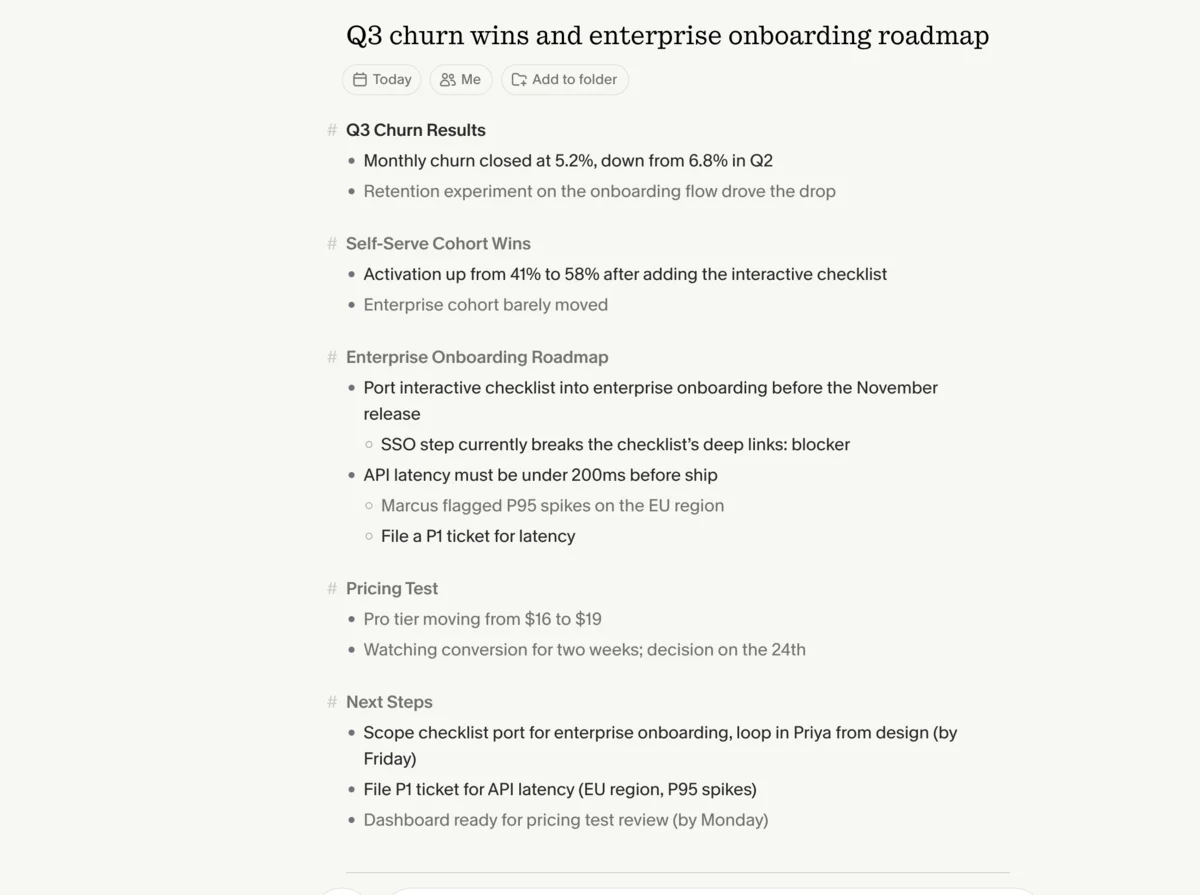
It enhances your own notes. Instead of capturing everything passively, Granola lets you jot a few rough lines and then folds in what it heard to produce a structured summary. In our test it turned six terse bullets into the most complete write-up of the meeting, with owners and deadlines we never typed. It keeps you engaged in the conversation rather than outsourcing your attention to a bot, which is a genuinely different experience from sitting back while a recorder works: you stay present and still walk away with a clean record, which is the appeal for people who think while they write.
It is cheaper and calmer on privacy. Granola’s Business plan is $14 a user, well under Fathom’s $20 Premium and $34 Business tiers, and it deletes the audio after transcribing and lets you opt out of model training. For anyone whose work touches confidential conversations, that delete-the-audio, no-bot posture is easier to clear with a cautious client or a security team than a tool that stores a full video recording of every call by default.
The trade-offs: no video replay, no CRM or team features, only Mac, Windows, and iPhone apps with no Android or web, and a free plan that drops your meeting history after 30 days.
Free plan or cheaper paid: the price split
On price the two are closer than they look, but they pull you toward paying in opposite ways, and Granola is the cheaper option once you do.
Start with the free plans, because both are usable. Fathom’s free tier records, transcribes, and summarizes unlimited meetings and keeps them forever, with its premium AI features available for a 30-day preview before settling into the free form. Granola’s free Basic plan also lets you take unlimited notes, but it only retains your meeting history for 30 days, so you cannot build a lasting archive without upgrading. Fathom’s free plan is the more generous of the two.
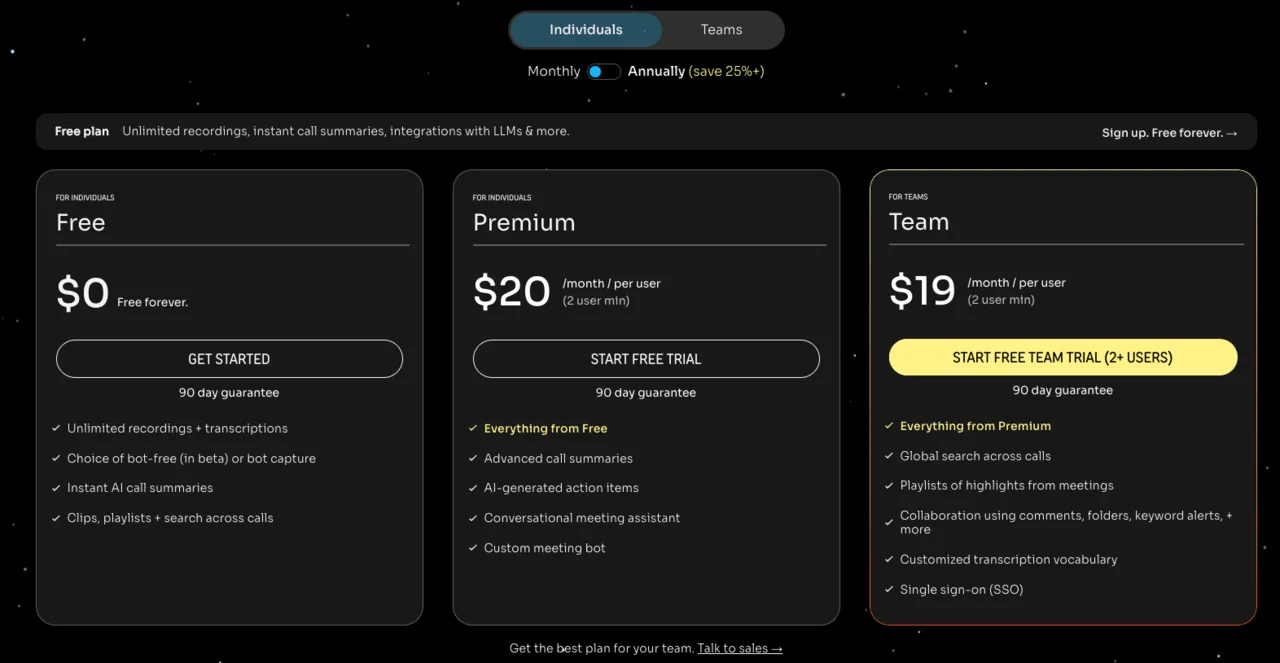
On the paid plans, Granola is the better value for an individual. Its Business plan is $14 a user and includes unlimited history and the better AI models. Fathom charges $20 a month for Premium, which adds the Ask Fathom assistant and unlimited AI summaries, and $19 to $34 a user for its Team and Business plans, where the CRM sync and coaching live. So a solo user pays $14 on Granola or $20 on Fathom, and the difference grows on team plans. The way to read it: Granola is cheaper for a single discreet note-taker, while Fathom’s higher tiers buy the team and sales features Granola simply does not offer.
For a five-person team the gap widens: Granola at $14 a head runs $70 a month, while Fathom’s $34 Business plan runs $170, but only Fathom’s tier includes the CRM sync and coaching that a team is usually paying for in the first place. The cheaper number is only the better deal when you want the same job done.
Which takes more accurate notes? We ran one meeting through both
Most Fathom-versus-Granola comparisons assert that one takes better notes. We tested it: an 80-second, two-speaker synthetic meeting, loaded with names, numbers, and jargon, fed identically to both so we knew the exact right answer in advance.
Read the full test-meeting script we scored against
These are the exact words in the clip above. The synthetic voices are Sarah (ElevenLabs’ Rachel) and David (Adam), and we scored each tool’s transcript and summary against this ground truth.
Sarah: Morning, David. Before we start, did the Q3 churn numbers come in?
David: They did. We closed at 5.2% monthly churn, down from 6.8% in Q2. The retention experiment on the onboarding flow is doing the work.
Sarah: That’s a big drop. Which cohort moved the most?
David: The self-serve cohort. Activation went from 41% to 58% after we added the interactive checklist. Enterprise barely moved.
Sarah: So the action item is to port that checklist into the enterprise onboarding before the November release. Can you own that?
David: I can. I’ll loop in Priya from design and scope it by Friday. One risk: the enterprise SSO step breaks the checklist’s deep links right now.
Sarah: Note that as a blocker. Let’s also get the API latency under 200 milliseconds before we ship. Marcus flagged P95 spikes on the EU region.
David: Agreed. I’ll file a ticket for the latency and tag it P1. Anything else for the roadmap review?
Sarah: Just the pricing test. We’re moving the Pro tier from $16 to $19 and watching conversion for two weeks. Decision on the 24th.
David: Got it. I’ll have the dashboard ready Monday.
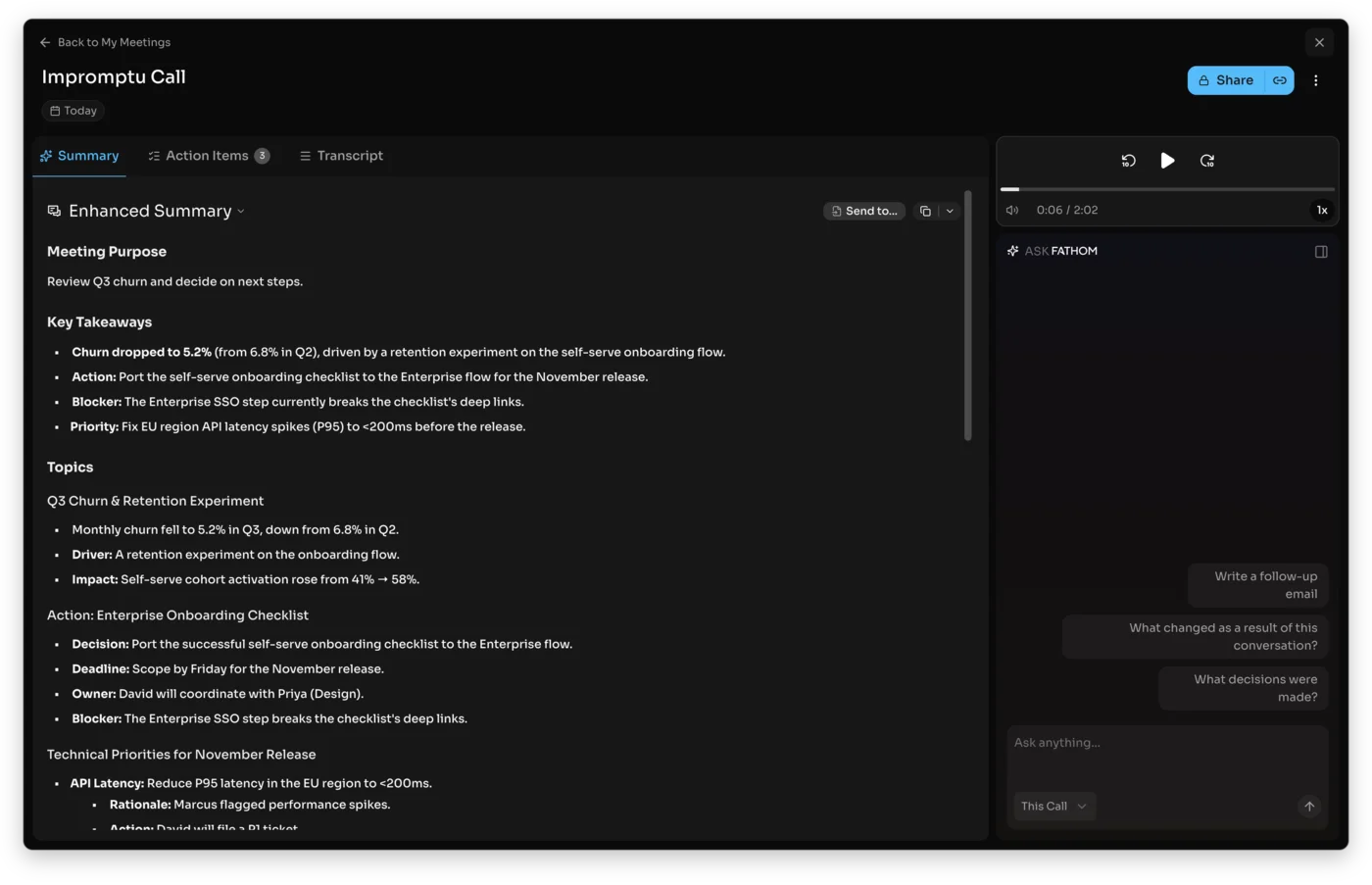
The result favored Fathom on the raw numbers and Granola on the workflow. Fathom’s transcript was the most accurate of anything we tested, keeping “Q3,” “$16 to $19,” and “tag it P1” intact, and its Enhanced Summary broke the meeting into purpose, takeaways, topics, and next steps with every figure correct. It is the more reliable record.
Granola garbled the latency line in its raw transcript, writing “How file a ticket… and tagget P1” where the speaker said “I’ll file a ticket and tag it P1,” so as a verbatim record it was the weaker of the two. But that is not what it is built for. When we fed it six rough bullets and let it enhance them, it merged our notes with what it heard into the most complete and usable write-up of the call, surfacing owners and deadlines we had not typed.
On the summaries specifically, both got the substance right, which is the reassuring part. Fathom’s Enhanced Summary read like a finished document, split into purpose, takeaways, and next steps with timestamped, assignable action items. Granola’s enhanced notes were just as complete but shaped by what we typed, reading more like the notes we would have written ourselves with more time. Either one is something you could forward without editing; the difference is whether it came from the bot or from you.
So “more accurate” splits the way the whole comparison does: Fathom is more accurate as an automatic transcript and summary, while Granola is better at turning the notes you take yourself into something finished. Both got the substance and the action items right; the difference is whether you want the tool to do the work or to amplify yours.
Bot or your own notes: the difference that decides it
If the output quality is close, the working style is not, and it is the axis most people should actually choose on. The two tools sit on opposite sides of one question: should the tool capture the meeting for you, or help you capture it yourself?
| The measure | Fathom (bot) | Granola (bot-free) |
|---|---|---|
| Joins the call | Yes, a visible participant | No, captures device audio |
| Your effort | None, fully hands-off | Jot a few notes to enhance |
| Keeps afterward | Full video + searchable archive | Enhanced notes, audio deleted |
| Best on | Internal meetings | Client and sensitive calls |
Fathom’s model is hands-off. A bot joins the call and records everything, so you can sit back and stay present without taking a single note, and the summary is waiting when you are done. The cost is a visible bot in the participant list, which on an external call can be awkward or against policy, though Fathom’s beta bot-free mode is starting to soften that.
Granola’s model is hands-on and quiet. Nothing joins the call, and it leans on you jotting a few lines during the meeting, which it then enhances. The trade is a little more effort and the most discreet result available, with no recorder for anyone to notice.
There is a second, quieter consequence of the split. Because Fathom records everything by default, it builds a complete, searchable archive you can revisit later, which is its own advantage when you forget a detail or need to re-watch a call. Because Granola leans on your notes and deletes the audio, it keeps less but also exposes less, which is the safer posture for confidential conversations. So the bot question is not only about optics during the call; it shapes what each tool holds onto afterward.
That single difference resolves most of the decision. If you want to be fully hands-off and do not mind a bot, Fathom’s automatic capture is the better fit. If you would rather stay engaged and keep a bot out of the room, Granola’s enhance-your-notes approach is worth the small effort. It is less about which is better and more about which working style is yours.
Who should pick Fathom
Fathom is the better default, and especially right for these people. If you see yourself in more than one of them, it is not a close call:
- Anyone who wants the most generous free plan — unlimited recording, transcription, and summaries that you keep forever.
- Sales and customer-success teams — the native CRM sync, Deal View, and coaching scorecards are built for revenue work Granola does not touch.
- People who want video — to re-watch a call or share a timestamped highlight.
- Anyone who wants fully hands-off capture and does not mind a bot joining the meeting.
Who should pick Granola
Granola is the better fit for a specific, real set of people, and for them the rating tie is beside the point, because it is simply the right shape of tool for the job:
- Anyone whose calls are client-facing or sensitive, where a visible bot is awkward or not allowed, and where the optics of “this call is being recorded” can change the conversation itself.
- People who like to take their own notes and want a tool that enhances them rather than replacing them with a passive transcript.
- Privacy-conscious users who want the audio deleted and a quiet, local footprint.
- Solo users watching the budget, since the $14 Business plan undercuts Fathom’s paid tiers.
Final word
For most people, Fathom is the one we would start with. Its free plan is more generous, it records video, it scales into a real team and sales tool, and it produced the cleanest notes we tested. That is the easier recommendation, and it is why independent reviews and G2’s satisfaction scores tend to land on Fathom too.
What testing both made clear is that the accuracy race is basically a tie at this level. Both capture a meeting competently, and on the same audio neither pulled far ahead. What actually separates them is the working style and the bot, which is a question about how you run your meetings, not about the software. Settle that one thing first and the rest of the comparison answers itself.
But “most people” is not everyone, and Granola is not a runner-up so much as a different philosophy. If you want a notetaker that joins nothing, keeps your call private, and sharpens the notes you take yourself, Granola does that better than Fathom does, and at a lower price. Pick Fathom for hands-off capture and the most generous free plan; pick Granola to stay engaged and keep a bot out of the room.
Weighing both against the rest of the field? Our best AI note taker roundup, the Fathom alternatives and Granola alternatives shortlists, and the Otter vs Granola comparison put them in context.
Frequently asked questions
Is Fathom or Granola better?
They are close enough that we rate both 4.6 out of 5, and the right one depends on how you like to work. Fathom is the better pick for most people: its free plan is genuinely unlimited, it records video you can replay, it syncs to your CRM, and it produced the cleanest summary and most accurate transcript when we ran the same meeting through both.
Granola is the better pick if a recording bot in your call is a problem, because it is bot-free by design and nothing joins the meeting, and if you like to jot your own notes and have AI expand them rather than sit back while a bot captures everything.
The simplest way to choose: Fathom if you want hands-off capture and the most generous free plan, Granola if you want a quiet, bot-free tool that enhances the notes you take yourself.
Is Fathom's free plan better than Granola's?
Yes, for most uses. Fathom's free plan is one of the most generous in the category: it records, transcribes, and summarizes unlimited meetings at no cost, with the premium AI features available for a 30-day preview before the plan settles into its free form.
Granola's free Basic plan lets you take unlimited notes too, but it only keeps your meeting history for 30 days, so you cannot build a lasting searchable archive without paying. The practical difference: on Fathom's free plan you keep recordings and transcripts indefinitely, while on Granola's free plan your older notes age out.
If a free, permanent record of your meetings is what you want, Fathom's free tier is the stronger one, and it is a big part of why Fathom is the easier tool to start with at no cost.
Does Granola use a bot like Fathom?
No, and this is the biggest difference between them. Granola is bot-free by design: it captures your device audio locally, so nothing joins the call and the other participants never see a recorder. Fathom joins your Zoom, Meet, or Teams call as a visible bot by default, though it has recently added a bot-free audio-capture option.
So if avoiding a visible recorder is your priority, Granola is the cleaner choice, with Fathom's bot-free mode as a newer second option. The distinction matters most on client and sales calls, where a third participant labeled as a notetaker can be awkward or against the other side's policy.
For internal meetings, where nobody minds a bot, Fathom's default capture is perfectly fine and saves you from taking any notes at all. If avoiding a bot is your specific reason for choosing, Granola is the safer pick, since Fathom's bot-free capture is still in beta and Mac-only for now.
Which is better for sales teams, Fathom or Granola?
Fathom, clearly. It has native CRM sync that writes call notes and fields straight into HubSpot and Salesforce, a Deal View, AI coaching scorecards on its Business plan, and search across your whole meeting history.
Granola is built around individual note-taking and lacks the deep CRM and team-analytics features a revenue team needs. For a salesperson or a sales manager, Fathom is the tool designed for the job; Granola is the better fit for the solo consultant or founder on discreet client calls.
The split is really individual versus team: Granola optimizes for one person taking better notes, while Fathom optimizes for a whole revenue org getting those notes into the systems and reports it already runs on. If your notes need to reach a CRM without manual entry, that alone settles it for Fathom.
Is Granola or Fathom more accurate?
They are close, and they are accurate in different ways. We fed both the same 80-second synthetic meeting with planted names, numbers, and jargon so we knew the exact right answer. Fathom produced the most accurate, cleanest transcript and the most structured summary of any tool we tested, keeping the figures and names intact.
Granola garbled a line in its raw transcript, but its strength is not verbatim capture: it merges what you typed during the call with what it heard, and that enhanced summary was excellent. So Fathom is the more accurate transcriber, while Granola is the better at turning your own rough notes into a finished write-up.
Neither gap is wide enough to choose on accuracy alone, though: both captured the meeting's substance and the action items correctly, so the decision really comes down to the bot question and the free plan rather than which one transcribes a clean call more faithfully.
Is Granola a good note-taking app?
Yes, Granola is one of the best note-taking apps for meetings, and we rate it 4.6 out of 5. Its strength is a distinctive approach: instead of sending a bot to record everything, it captures your device audio quietly and folds it into the rough notes you jot, producing a polished summary that reads like the notes you would have written yourself with more time. In our testing it turned six terse bullets into the most complete write-up of a meeting, surfacing owners and deadlines we never typed.
It is especially good for client and sales calls, since nothing visibly joins the meeting, and for people who like to stay engaged and take their own notes. The main limits are that it runs only on Mac, Windows, and iPhone with no Android or web app, it keeps no video, and its free plan retains your history for only 30 days.
Keep reading
Fathom vs Fireflies: solo notetaker or team brain?
Fathom vs Fireflies, both run through one test meeting: Fathom wins the free plan and clean summaries, Fireflies wins team search and CRM. Which fits you.
Fathom pricing: what you'll pay, and who pays nothing
Fathom pricing starts at $0, and most people stay there. Here's what each paid tier costs, the 30-day free-preview catch, and which plan you actually need.
Fathom review: the best free AI notetaker, tested
I fed Fathom a fake meeting and it wrote the cleanest summary of any notetaker I tested. With a genuinely unlimited free plan, it's where to start.
Fathom AI alternatives: 5 tested, and the bot-free pick
We tested the top Fathom alternatives. Leaving over the bot? Granola is our bot-free pick (4.6/5). Need in-person recording or a free plan? Here's the fix.