
Otter vs Granola: we ran one meeting through both
We fed the same meeting to Otter and Granola. Otter wins on transcription and search; Granola wins on bot-free notes. Here's which AI notetaker fits you.
Contents
Granola and Otter both turn your meetings into notes, but they go about it so differently that the choice is less “which is better” and more “which approach fits how you work.” One sends a bot into your call and writes down every word; the other joins nothing and turns your rough notes into a finished summary. That single difference in philosophy drives almost everything else, from the price to the privacy to who each one is really for.
We had already reviewed and tested both, so instead of comparing spec sheets, we did the thing none of the other comparisons do: in June 2026 we fed Otter and Granola the exact same meeting and watched what each one did with it. The result is a genuine split rather than a blowout, and which side you land on comes down to one question we will get to quickly.
The verdict: Granola for most, Otter for the archive
There is no clean knockout here, but there is a clear split. Across our testing, Granola is the better tool for most people, and Otter is the better tool for a specific, real set of needs.
| You want… | Winner |
|---|---|
| Bot-free notes on client and sales calls (and the best pick for most) | Granola — 4.6/5 |
| A verbatim transcript with speaker labels and a searchable archive | Otter — 3.8/5 |
| The lower price and the more polished summary | Granola |
The one-line version: if a recording bot visibly joining your call is a problem, Granola wins almost by default. If you live in a searchable archive of speaker-labeled transcripts, Otter is still the one to beat. Read our full Granola review and Otter review for the detail behind each verdict.
Otter vs Granola at a glance
| The measure | Otter.ai | Granola |
|---|---|---|
| Our rating | 3.8 / 5 | 4.6 / 5 |
| Approach | Auto-records, full verbatim transcript | Bot-free, enhances your own notes |
| Meeting bot | Yes (OtterPilot joins the call) | No (captures device audio) |
| Speaker labels | Yes | No (on quick notes) |
| Searchable archive | Yes, strong | Paid plan only |
| Video replay | Business plan | No (deletes audio) |
| Platforms | Web, iOS, Android, extensions | Mac, Windows, iPhone |
| Free plan | 300 min/mo, 30-min cap, 3 imports | Free notes, older history hidden |
| Paid from | $16.99/mo Pro, $30/user Business | $14/user Business |
| Privacy default | Trains on your data (opt-out) | Deletes audio, opt-out training |
Where Otter is stronger

Otter is the more established, more complete transcription tool, and it has four genuine advantages over Granola that nothing in Granola’s design replaces.
It produces a real, speaker-labeled transcript. Otter records the whole call verbatim and splits it cleanly by speaker, so you get a word-for-word record of who said what. Granola’s quick notes carry no speaker labels at all. If the transcript itself is a deliverable, Otter is built for it.
Its searchable archive is the category benchmark. Every meeting Otter has ever captured is searchable, and Otter Chat can answer questions across your whole history rather than a single call. For someone who needs to find what a client said three months ago, that archive is the product.
It auto-joins your calls. OtterPilot connects to your calendar and shows up to your Zoom, Meet, and Teams meetings on its own, so the notes happen with zero effort. Granola needs you to open it and start a note.
It runs everywhere. Otter has web, iOS, and Android apps plus browser extensions, where Granola is limited to Mac, Windows, and iPhone. If your team is on Android or works in a browser, that alone can settle it.
The gaps that drag Otter to 3.8: a stingy free tier, a 2025 consent class-action (Brewer v. Otter.ai), a 3.0 Trustpilot score, training on your data by default, and the bot itself.
Where Granola is stronger

Granola is the newer, higher-rated tool, and it wins on the things that actually make meeting notes pleasant to use rather than just complete.
Nothing joins the call. Granola captures your device audio quietly, so on a client or sales call there is no third participant labeled as a recorder. This is the single biggest reason people pick it over Otter, and Otter cannot match it without abandoning OtterPilot.
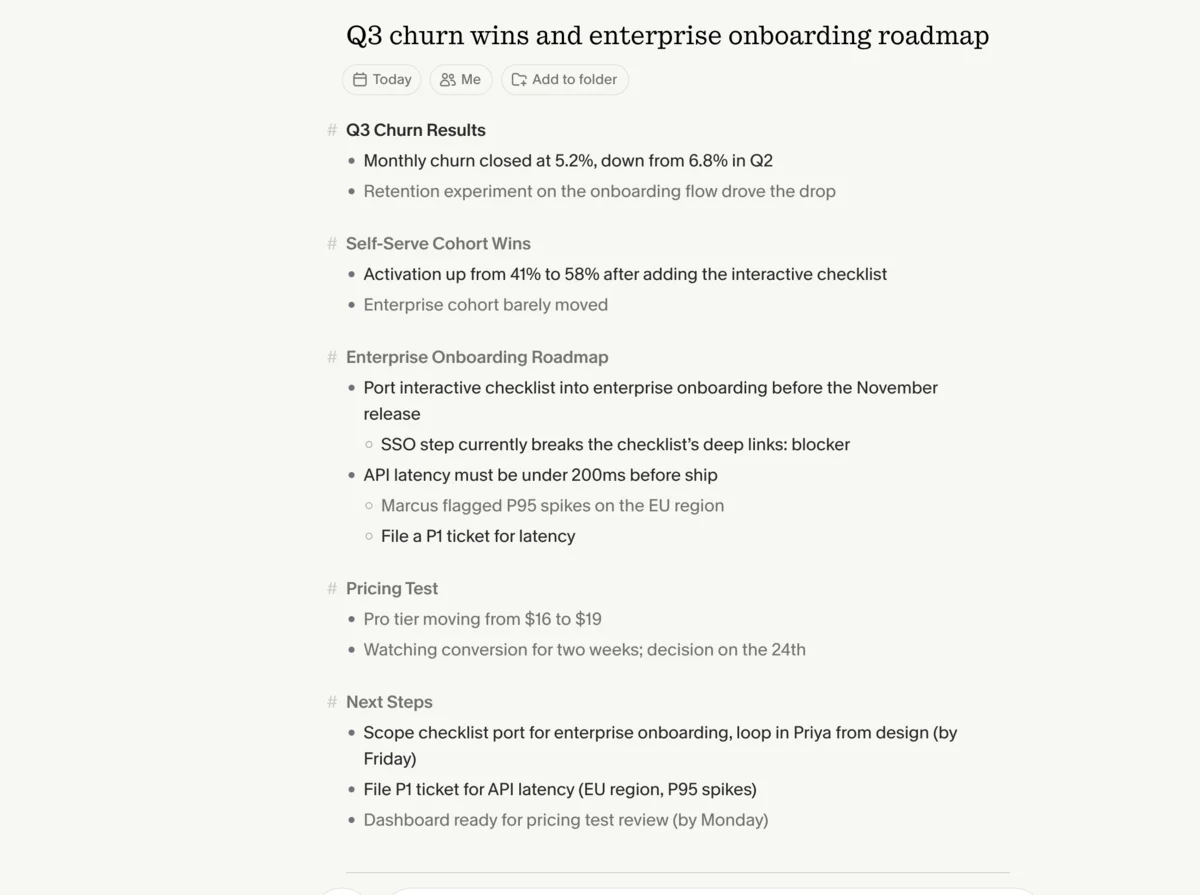
It enhances your notes instead of replacing them. You jot a few rough lines during the meeting, and Granola folds in everything it heard to produce a structured summary. In our test it surfaced owners and deadlines we never typed, and turned six terse bullets into the most complete write-up of the call.
It is calmer on privacy. Granola deletes the audio once the transcript is written and lets you opt out of model training, which is an easier story to clear with a cautious client than Otter’s default opt-in.
It is cheaper and just feels lighter. At $14 a user its Business plan is less than half Otter’s $30 tier, and the interface is quieter and faster to live in day to day.
The gaps that keep Granola from a clean sweep: no Android or web app, no video replay, and a free plan that hides your older history until you pay.
How they differ on price
On price the two tools are closer than their reputations suggest, but Granola comes out ahead for anyone who plans to pay, while Otter is the more flexible free trial.
Start with the free plans, because that is where most people begin. Otter’s free tier gives you 300 minutes a month, caps each conversation at 30 minutes, and allows only three file imports for the lifetime of the account, but it does keep your transcripts searchable within those limits. Granola’s free Basic plan lets you take notes for free, but it hides your older meeting history, so you cannot build the searchable archive that is Otter’s whole strength without upgrading. Neither free plan is a place to live forever; they pull you toward paid in opposite ways.
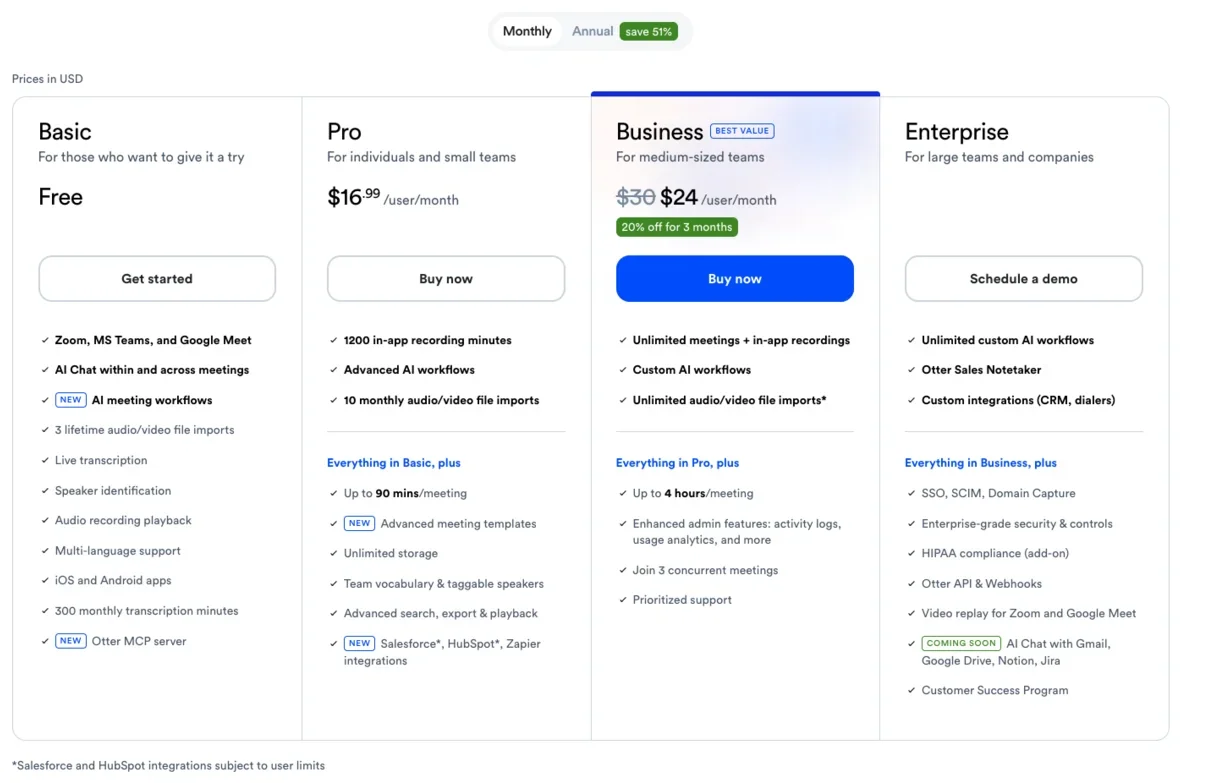
On the paid plans, Granola is the clearer value. Its Business plan is $14 a user and includes unlimited history, integrations, and the better AI models. Otter charges $16.99 a month for Pro, which mostly just lifts the free-tier minute caps, and $30 a user for Business, where the genuinely useful upgrades like video replay and unlimited transcription finally arrive.
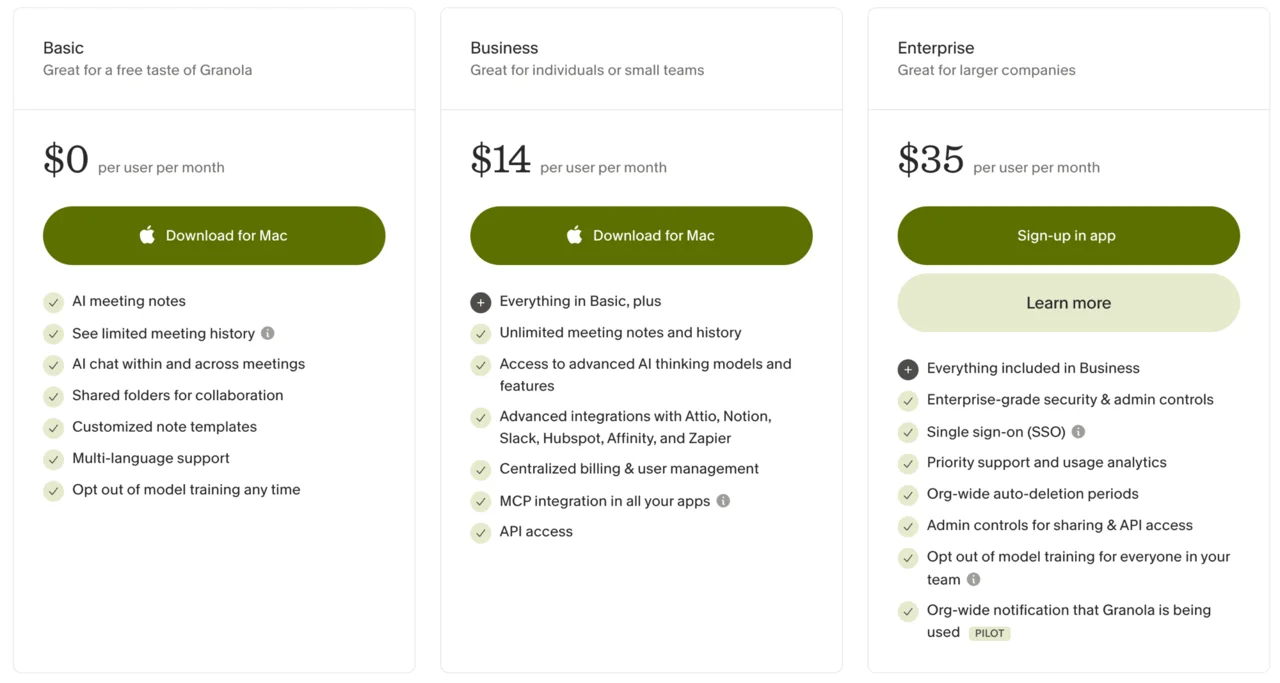
So a single user who wants the full product pays $14 on Granola or $16.99 on Otter, and a team pays $14 versus $30 a head. For a team especially, Granola is less than half the price for the everyday note-taking job, and you only pay Otter’s premium if you specifically need the archive, the video, and the speaker-labeled transcripts that justify it. There is one wrinkle worth naming: if the searchable archive is what you are paying for, Otter’s $30 plan is doing something Granola’s $14 plan cannot, so the cheaper number is only the better deal when you actually want the same job done.
Which one is more accurate? We tested both on the same meeting
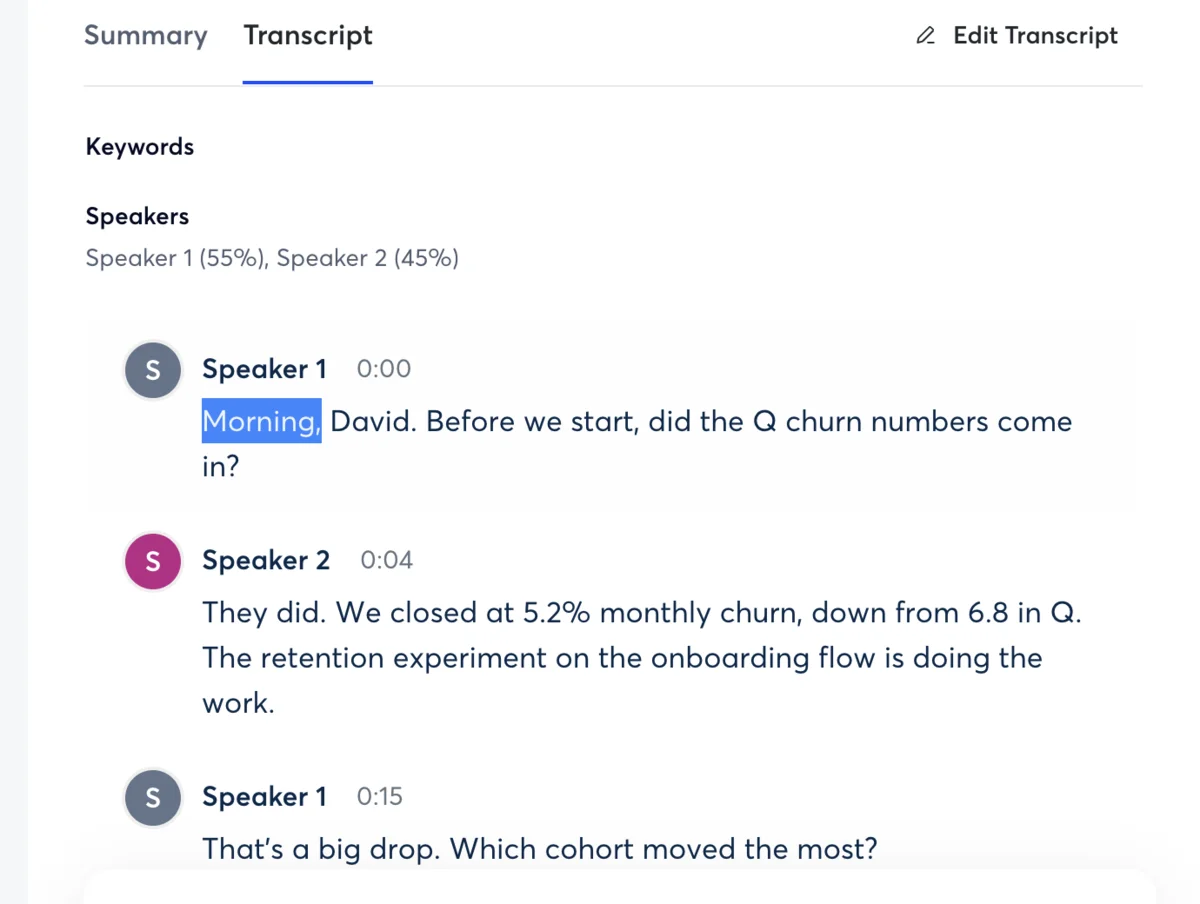
The short answer is that it is close, and it splits: Otter is more accurate as a verbatim, speaker-labeled transcript, while Granola is more accurate as a finished, usable summary. This is the question every Otter-versus-Granola comparison answers with a shrug and a claim. We answered it with a test: an 80-second, two-speaker synthetic meeting, loaded with names, numbers, and jargon, fed identically to both tools so we knew the exact right answer in advance.
Read the full test-meeting script we scored against
These are the exact words in the clip above. The synthetic voices are Sarah (ElevenLabs’ Rachel) and David (Adam), and we scored each tool’s transcript and summary against this ground truth.
Sarah: Morning, David. Before we start, did the Q3 churn numbers come in?
David: They did. We closed at 5.2% monthly churn, down from 6.8% in Q2. The retention experiment on the onboarding flow is doing the work.
Sarah: That’s a big drop. Which cohort moved the most?
David: The self-serve cohort. Activation went from 41% to 58% after we added the interactive checklist. Enterprise barely moved.
Sarah: So the action item is to port that checklist into the enterprise onboarding before the November release. Can you own that?
David: I can. I’ll loop in Priya from design and scope it by Friday. One risk: the enterprise SSO step breaks the checklist’s deep links right now.
Sarah: Note that as a blocker. Let’s also get the API latency under 200 milliseconds before we ship. Marcus flagged P95 spikes on the EU region.
David: Agreed. I’ll file a ticket for the latency and tag it P1. Anything else for the roadmap review?
Sarah: Just the pricing test. We’re moving the Pro tier from $16 to $19 and watching conversion for two weeks. Decision on the 24th.
David: Got it. I’ll have the dashboard ready Monday.
The result was a genuine split, and it maps exactly onto how the two tools think about notes. Otter produced the more faithful verbatim transcript and labeled Sarah and David cleanly, the kind of record you can quote from. Its one slip was dropping the quarter off “Q3,” turning a specific figure into a vaguer one. Its AI summary, though, was solid, pulling the action items and the owners correctly.
Granola went the other way. Its raw transcript garbled a line, and it carried no speaker labels, so as a word-for-word record it was the weaker of the two. But that is not what Granola is for. When we gave it six rough bullets and let it enhance them, the result merged our notes with what it heard into the single most complete and usable write-up of the meeting, with owners and deadlines we had not even typed.
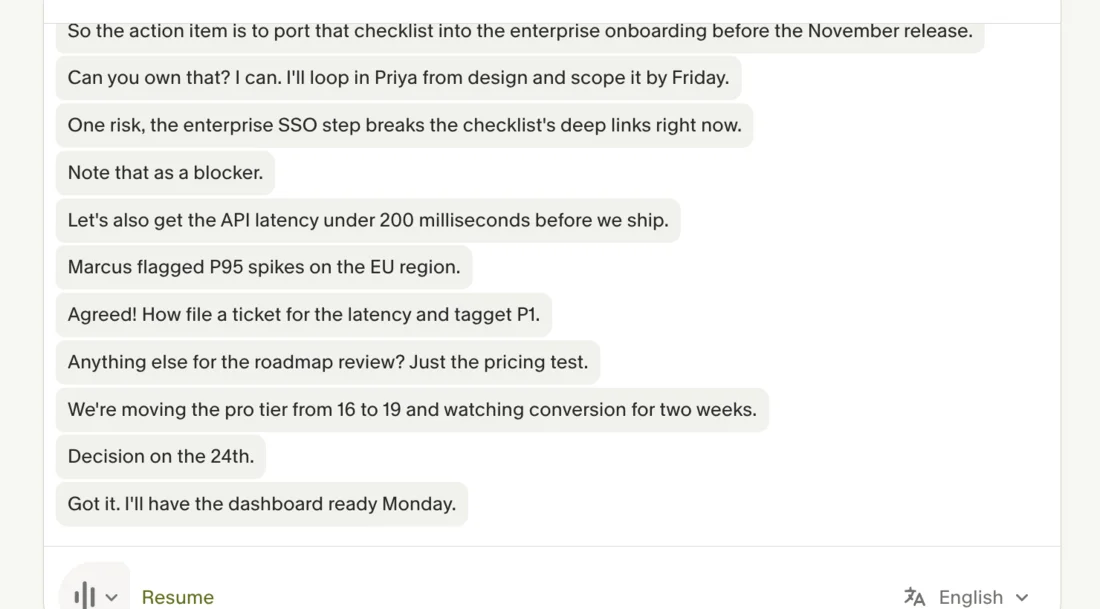
On the summaries specifically, both tools got the substance right, which is the more reassuring finding. Otter’s summary pulled the three action items, the owners, and the P1 latency ticket correctly, presented as a clean recap of what was said. Granola’s enhanced notes did the same but went further, organizing the call into the decision, the blocker, and the next steps, and reading like something you would actually send rather than a tidied transcript. If your bar is “did it capture the meeting,” both clear it; if your bar is “can I forward this without editing,” Granola’s enhancement is the one that gets there.
So “more accurate” splits cleanly: Otter is more accurate as a transcript, Granola is more useful as a set of notes. If you need to prove exactly what was said, Otter’s speaker-labeled record wins. If you need a summary you can act on without editing, Granola’s enhancement wins. The speaker-label gap is a hard stop for a few specific roles, anyone quoting exactly who said what, but for most people neither accuracy difference alone settles the choice.
Bot or no bot: the workflow difference that actually decides it
If the accuracy is a wash, the workflow is not, and it is the axis most people should actually choose on. The two tools sit on opposite sides of one question: should a recorder visibly join your call?
Otter’s model is hands-off automation. OtterPilot joins your meetings from your calendar as a visible participant and captures everything, which is genuinely convenient for internal standups and means the notes happen whether or not you remember to start them. The cost is that a bot labeled as a notetaker shows up in the participant list, which on a client or sales call can be awkward, raise a “are we being recorded?” beat, or simply be against the other side’s policy. In a two-party-consent state, that visible recorder is also doing some of your compliance work, which cuts both ways.
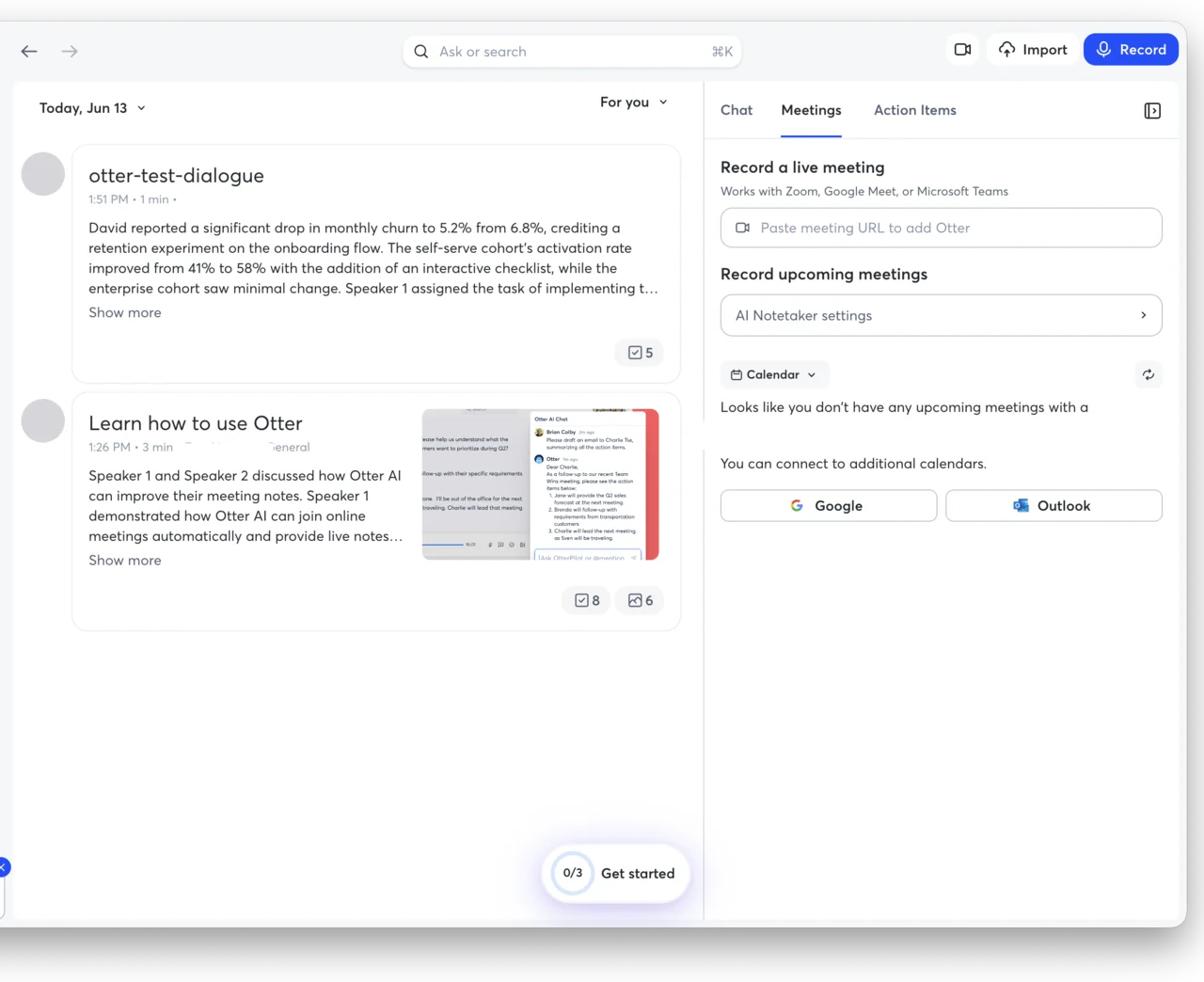
Granola’s model is quiet capture. Nothing joins the call; it records your device audio locally, and the other participants never see a recorder. The trade is that you have to open Granola and start the note yourself, and it leans on you jotting a few lines for its enhancement to work best. It is a more hands-on workflow that produces a more discreet result, and for a lot of people the few seconds of manual effort is a price worth paying to keep a bot out of a client call.
That single difference resolves most of the decision. For internal meetings where nobody minds a bot and hands-off capture is the point, Otter’s auto-join is the better workflow. For external calls where discretion matters, Granola’s bot-free capture is worth the small amount of manual effort. It is less a referendum on the software and more a question of which workflow suits the meetings you actually take.
This is the thing testing both made obvious: it is not really a quality contest. Both tools capture a meeting competently, and on the same audio neither pulled far ahead. What separates them is exactly this design choice about whether a recorder belongs in your call, which is a question about your meetings, not about the software. Decide that one thing first, and the rest of the comparison mostly answers itself.
Who should pick Otter
Otter is the right call for a specific, real set of people, and if your work shows up in this list the 3.8 rating should not scare you off, because the things dragging that score down are not the things you would be buying it for:
- Anyone who needs a verbatim, speaker-labeled record — researchers, journalists, lawyers, or anyone who has to quote exactly who said what, where Granola’s label-free quick notes simply do not compete.
- People who live in a searchable archive — if finding what was said across months of meetings is part of your job, Otter Chat over your whole history is the product.
- Teams on Android or the web, where Granola simply does not run.
- Anyone who wants zero-effort, auto-joining capture for internal meetings and does not mind the bot.
Who should pick Granola
Granola is the better fit for most people, and especially for these. If you recognize yourself in more than one of them, the choice is not close:
- Anyone whose meetings are client-facing or sensitive, where a visible bot is awkward or not allowed.
- People who already take notes by hand and want a tool that enhances them rather than replacing them with a wall of transcript.
- Privacy-conscious teams that want the audio deleted and training off by default.
- Anyone watching the budget, since Granola does the everyday note-taking job for less than half of Otter’s Business price, with no feature an ordinary meeting-taker would miss to get there.
Final word
For most people, Granola is the one we would start with. It is the higher-rated tool, it is cheaper, its notes are more usable out of the box, and its bot-free capture removes the single most awkward thing about running a notetaker on a real call. That is why it sits at 4.6 to Otter’s 3.8.
But “most people” is not everyone, and Otter is not a fallback so much as a specialist. If your work depends on a verbatim, speaker-labeled transcript, a deep searchable archive, hands-off auto-join, or an Android app, Otter still does those things better than Granola does, and that is worth more than a rating gap.
Pick Granola for the meeting notes most of us actually need; pick Otter when the transcript and the archive are the job. And if you are still weighing the wider field, our best AI note taker roundup, plus our Otter alternatives and Granola alternatives guides, put both against the rest of the category, including Fathom, which undercuts the pair of them with a genuinely unlimited free plan.
Frequently asked questions
Is Otter or Granola better?
It depends on the job, and we rate Granola higher overall at 4.6 out of 5 versus Otter's 3.8. Granola is the better pick for most people because it is bot-free, so nothing visibly joins your call, and it turns the rough notes you jot into a polished summary, which is ideal for client and sales meetings. Otter is the better pick if you specifically need a verbatim transcript with speaker labels, a fully searchable archive of every past meeting, an app that auto-joins your calls, and support on Android and the web, none of which Granola offers.
We ran the same controlled meeting through both to compare them directly: Granola produced the more useful final notes, while Otter produced the more literal, speaker-labeled transcript.
If a recording bot in the call is a problem for you, choose Granola; if a complete searchable archive matters more, choose Otter.
Is Granola more accurate than Otter?
Not dramatically, and they are accurate in different ways. We fed both tools the same 80-second synthetic meeting with planted names, numbers, and jargon so we knew the exact right answer.
Otter produced the more literal, verbatim transcript and labeled the two speakers cleanly, though it dropped the quarter off one figure, turning 'Q3' into 'Q'. Granola garbled a line in its raw transcript, but its strength is not verbatim capture: it merges what you typed during the call with what it heard, and that enhanced summary was the most complete and usable write-up of the meeting.
So Otter is more accurate as a word-for-word record with speaker labels, while Granola is more useful as a finished set of notes. Neither is so far ahead on raw accuracy that it should be the only thing you decide on.
Does Granola use a meeting bot like Otter?
No, and this is the biggest practical difference between them. Otter's OtterPilot joins your Zoom, Meet, or Teams call as a visible participant labeled as a notetaker. Granola captures your device audio locally, so nothing appears in the participant list and the other people on the call never see a recorder.
For internal meetings the bot is fine, but on a client or sales call Granola's bot-free approach is the safer, less awkward choice.
It also matters for compliance: in a two-party-consent state the visible bot makes the recording obvious, while Granola's quiet capture puts the responsibility on you to tell people you are recording. And if your company bans third-party bots from joining calls, which many security teams do, Granola is effectively the only one of the two you can use at all, because there is no version of Otter that captures a meeting without OtterPilot in the room.
Is Otter or Granola cheaper?
Granola is cheaper where it counts. Its paid Business plan is $14 a user, less than half of Otter's $30 Business tier, so a team of five pays $70 a month on Granola versus $150 on Otter for the everyday note-taking job. Otter's Pro plan sits in between at $16.99 a month for a single user.
Both have free plans, but with catches: Otter's free tier caps you at 300 minutes a month with a 30-minute limit per conversation, and Granola's free Basic plan hides your older meeting history until you upgrade. For a paid plan, Granola is the better value; for a free trial run, Otter lets you keep and search your history but limits your minutes.
The only time Otter's higher price is justified is when you specifically need the searchable archive, video replay, and speaker-labeled transcripts that its Business plan adds.
Can Granola replace Otter?
For most meeting-notes workflows, yes, and it will likely do them better, since Granola is the higher-rated tool and its enhanced summaries are more usable out of the box. But Granola cannot replace Otter if you rely on a verbatim transcript with speaker labels, a searchable archive of every past meeting, hands-off calendar auto-join, or apps on Android and the web, which are Otter's genuine advantages and which Granola does not offer at all.
The honest test is your own meetings: if they are mostly client-facing calls where you want clean notes and no bot, Granola replaces Otter easily; if your work depends on a complete, labeled, searchable record of everything said, it cannot. Try Granola first if you are in the first camp, and stay on Otter if you are in the second.
Keep reading
Otter vs Fathom: live transcript or polished summary?
We tested both. Fathom wins for most — unlimited free plan, video, cleaner summaries; Otter for live transcription and in-person notes. Which fits you?
Otter vs Fireflies: solo transcriber or team brain?
We tested Otter and dug into Fireflies. Otter wins for the individual and live transcription; Fireflies for team search, analytics, and CRM. Which fits you?
Otter.ai pricing: what you'll actually pay in 2026
Otter.ai pricing runs from free to $30 a user. Here's what each tier really costs, the limits the pricing page soft-pedals, and which plan you actually need.
Otter.ai review: the AI notes are great, the limits aren't
I fed Otter.ai a controlled two-speaker meeting: near-perfect transcript, summary and action items. The catch is the stingy free plan and a privacy lawsuit.