
Otter.ai pricing: what you'll actually pay in 2026
Otter.ai pricing runs from free to $30 a user. Here's what each tier really costs, the limits the pricing page soft-pedals, and which plan you actually need.
Contents
Otter.ai’s pricing looks simple on the marketing page: a free plan, two paid tiers, and an enterprise quote. What the page is quieter about is where the free plan stops being useful, what the paid tiers actually lift, and which one you genuinely need. We have run Otter ourselves, including burning through the free tier’s limits, so this is what each plan really costs and what it really buys.
The short answer
Most individuals who outgrow the free plan pay $16.99 a month for Pro (or $8.33 a month on annual billing), and most teams pay $30 a user for Business (or $19.99 on annual billing). The free Basic plan is real but tightly capped, and Enterprise is a custom quote for large organizations.
| Plan | Monthly | Annual (per mo) | Best for |
|---|---|---|---|
| Basic (Free) | $0 | $0 | Trying Otter, light occasional use |
| Pro | $16.99 | $8.33 | One person who hits the free caps |
| Business | $30/user | $19.99/user | Teams needing unlimited use + admin |
| Enterprise | Custom | Custom | Large orgs needing HIPAA, SSO, API |
If you only take a few short calls a month, the free plan may be enough. If you run regular meetings, Pro is the realistic floor. If you are equipping a team, you are looking at Business. Prices verified on otter.ai/pricing as of June 2026.
How Otter’s pricing actually works
Before the per-plan detail, you need the mental model, because Otter meters three different things at once and the free plan can strand you on any of them.
Monthly transcription minutes. This is the headline allowance: how much audio Otter will turn into text each month, resetting on your billing date. Free gives you 300 minutes, Pro 1,200, and Business unlimited. This is the number the marketing leads with.
A per-conversation cap. Separately, every single recording is capped at a maximum length no matter how many monthly minutes you have left. Free cuts each conversation off at 30 minutes, Pro at 90 minutes, and Business at 4 hours. This is the limit that catches people out, because a normal hour-long meeting overflows the free cap halfway through even on a fresh monthly allowance.
Feature gates and AI Chat queries. On top of minutes, the genuinely useful extras are rationed by tier. Otter AI Chat, the panel that answers questions about a past meeting, is limited to 20 queries a month on Free, 50 on Pro, and 200 on Business. Unlimited file imports and admin controls open up on Business, while video replay and the API are Enterprise-tier features.
The practical upshot: you do not just pick a plan for the minutes. You pick it for whichever of these three ceilings you hit first, and for most people that is the 30-minute conversation cap, not the monthly total.
What each Otter plan costs and includes
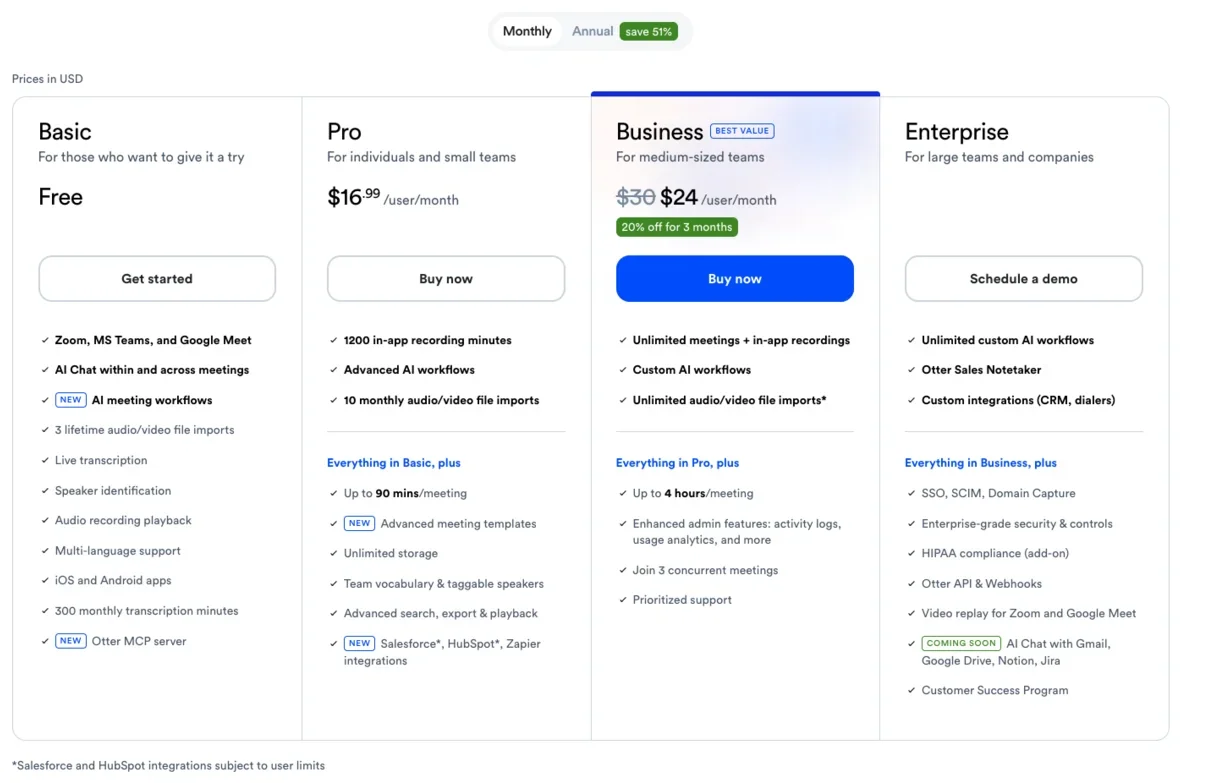
Here are the four tiers in full. The prices are per user and were verified live on otter.ai’s pricing page in June 2026. Annual billing lowers the effective monthly rate on the paid plans.
| Plan | Price (monthly) | Annual (per mo) | Transcription | Per conversation | Imports | AI Chat |
|---|---|---|---|---|---|---|
| Basic (Free) | $0 | $0 | 300 min/mo | 30 min | 3 lifetime | 20/mo |
| Pro | $16.99 | $8.33 | 1,200 min/mo | 90 min | 10/mo | 50/mo |
| Business | $30/user | $19.99/user | Unlimited | 4 hr | Unlimited | 200/mo |
| Enterprise | Custom | Custom | Unlimited | 4 hr | Unlimited | Custom |
Basic (Free): a trial, not a home
The free plan gives you 300 transcription minutes a month, a 30-minute cap on each conversation, and three file imports for the lifetime of the account. It includes the core product, real-time transcription plus an AI summary and action items after each meeting, so it is a genuine way to see whether Otter suits you.
What it is not is a plan you can live on. The 30-minute conversation cap means a single normal meeting overflows it, and the three-import limit is a lifetime total, not a monthly one. The AI Chat that makes your notes searchable is also capped at 20 questions a month. It is enough to test Otter, and that is exactly what it is designed for.
Pro ($16.99/mo): headroom for one person
Pro is the plan a solo user upgrades to, and what it mostly buys is breathing room. You go from 300 monthly minutes to 1,200, the per-conversation cap rises from 30 minutes to 90, file imports jump from three for life to ten a month, and AI Chat from 20 queries to 50. At $16.99 billed monthly or $8.33 a month on an annual plan ($99.99 for the year), it is the realistic floor for anyone who runs more than a couple of short calls a week.
What it does not add is the genuinely premium stuff: unlimited transcription and team controls stay locked behind Business, and video replay behind Enterprise. Pro is about removing the free tier’s friction, not adding new powers.
Business ($30/user/mo): for teams and unlimited use
Business is where the real upgrades arrive. Transcription becomes unlimited, the per-conversation cap rises to four hours, file imports go unlimited, and AI Chat to 200 queries a month. It adds shared workspaces, channels, and the admin and usage controls a team lead needs, though video replay of the recorded meeting stays an Enterprise-only feature. At $30 a user monthly or $19.99 on annual billing, it is roughly double Pro per seat, and it is the tier you need if your bottleneck is the minute cap or you are managing more than yourself. It is overkill for a single light user and the right answer for a team.
Enterprise: custom pricing for large orgs
Enterprise is a quote, not a price, and it is aimed at organizations with compliance and scale needs. It adds the things regulated industries require, HIPAA support, single sign-on, an API, advanced security controls, and workspace-wide analytics, on top of everything in Business. If you are asking what Enterprise costs from a blog post, you almost certainly do not need it yet; it is a sales-assisted plan for companies large enough to have a procurement process.
What Otter really costs by use case
A plan table tells you the price, not the value. What actually decides your bill is how much you record, because Otter’s plans are priced around volume. Here is what the numbers work out to for the people who actually buy Otter, with the effective hourly cost on annual billing so you can compare apples to apples.
| Who you are | Monthly recording | Right plan | Effective cost |
|---|---|---|---|
| Occasional caller | A few short calls under 30 min | Free | $0 |
| Student / interviewer | A few hours, some over 30 min | Pro (student rate) | ~$6.67/mo |
| Regular solo user | 5–20 hours | Pro | $8.33/mo (~$0.42/hr at 20 hrs) |
| Daily meeting-taker | 20+ hours | Business | $19.99/mo |
| Five-person team | Shared, unlimited | Business ×5 | ~$1,200/yr |
The occasional caller. If you take a handful of short calls a month, well under five hours total and none longer than half an hour, the free plan genuinely covers you, and you pay nothing. The moment any single call runs past 30 minutes, though, you are pushed to Pro regardless of your monthly total.
The student or interviewer. A student recording a few hour-long lectures or an interviewer doing 60-to-90-minute sessions blows straight through the free plan’s 30-minute cap, but sits comfortably inside Pro’s 1,200 monthly minutes and 90-minute conversation limit. With the 20% education discount, Pro is about $6.67 a month, which is the best-value path Otter offers.
The daily meeting-taker. Someone in roughly an hour of meetings every working day records around 22 hours, or 1,300 minutes, a month. That edges just past Pro’s 1,200-minute allowance, so a heavy individual user is the one case where a single person might actually need Business for the unlimited transcription, not just the team features.
The team. For any group sharing notes, the math is per seat: Business at $19.99 a user on annual billing means a five-person team pays about $1,200 a year. That buys unlimited transcription and shared workspaces, and there is no cheaper Otter tier that gives a team admin controls.
Otter discounts: student, nonprofit, and annual billing
The list prices are not the only numbers that matter, because there are three legitimate ways to pay Otter less.
The student and education discount is the biggest. Students and teachers who verify with a .edu email get 20% off Pro, which brings it to about $6.67 a month on annual billing ($79.99 for the year) or $13.59 a month on monthly billing. It is individual-only, so it does not extend to Business or team plans, but for a student recording lectures it is the cheapest serious way to run Otter.
The nonprofit discount runs through TechSoup. Qualifying nonprofits can get discounted Otter Business subscriptions through TechSoup’s program rather than paying the $30 list rate, which is worth checking before a charity buys seats at full price.
Annual billing is the discount everyone can take. Paying for a year up front drops Pro by 51%, from $16.99 to $8.33 a month, and Business by 33%, from $30 to $19.99 a user. The Pro saving is close to half; the Business saving is smaller but still real. The catch, covered below, is that Otter bills the whole year at once and does not refund unused months, so the discount is only a saving if you stay the course.
There is also a Business trial for small teams who want to test the paid tier before committing, which is worth using to evaluate it rather than paying for a month you may not keep.
The costs the pricing page soft-pedals
Every pricing page is an advertisement, and Otter’s is no exception. These are the limits and catches that shape what you actually pay, drawn from running the product ourselves and from what users report.
The 30-minute conversation cap, not the monthly total, is the real free-tier wall
The free plan advertises 300 minutes a month, which sounds like ten half-hour meetings. In practice the 30-minute-per-conversation cap is what stops you, because almost no real meeting is under half an hour. You can have plenty of monthly minutes left and still get cut off mid-sentence at the 30-minute mark. It is the single most common reason free users upgrade.
Three imports for the lifetime of the account
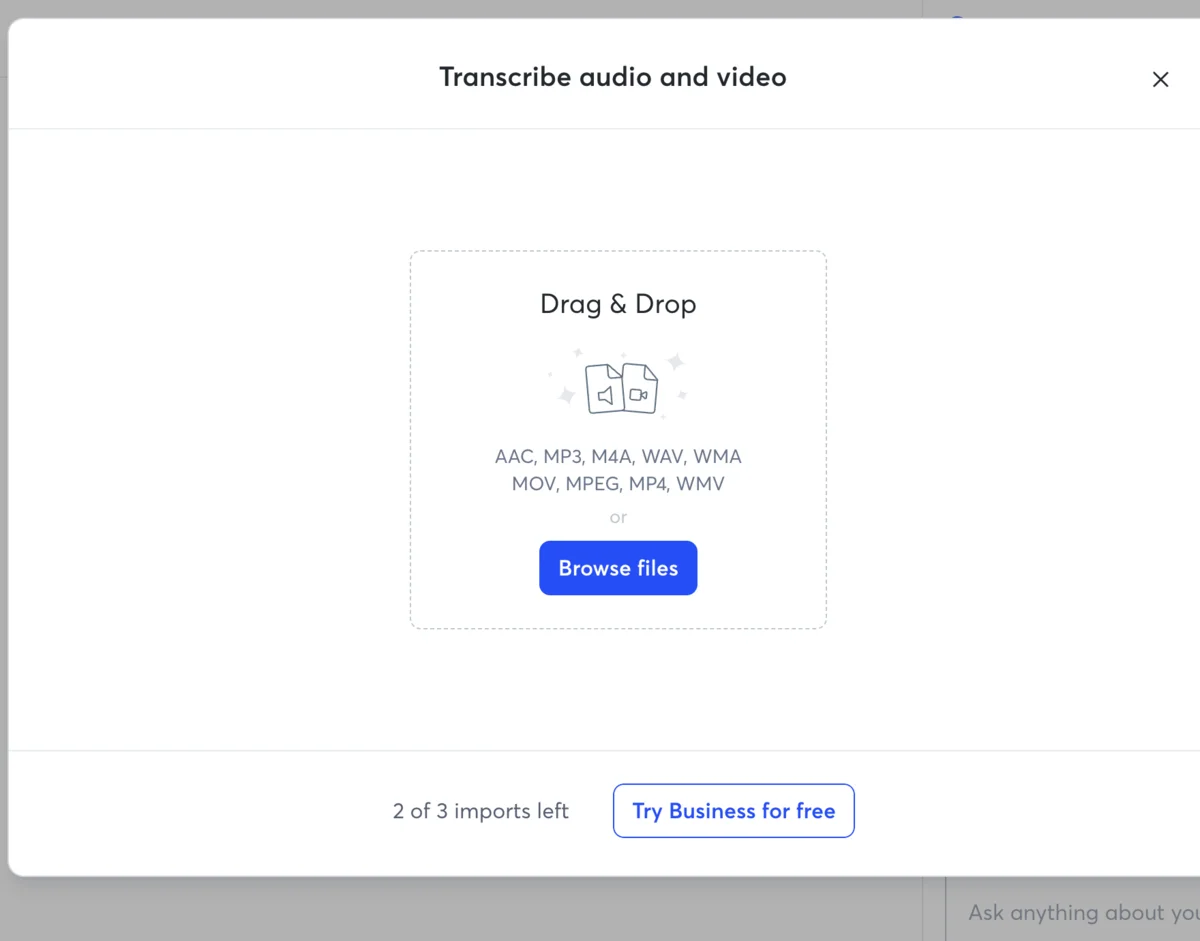
The free plan’s file-import limit is three for the entire life of the account, not three a month. We used one importing a single test file and immediately watched the counter drop to “2 of 3 imports left,” with no way to earn more without paying. If part of your plan is transcribing audio you already have, the free tier effectively does not support it.
AI Chat is rationed exactly where most people sit
Otter AI Chat, the feature that lets you ask a past meeting what was decided, is one of the better parts of the product, and it is metered: 20 queries a month on Free, 50 on Pro, 200 on Business. The free allowance runs out fast for anyone who actually leans on it, so the feature that makes Otter’s archive useful is rationed hardest at the tier most solo users sit on.
Annual billing locks you in for the saving
The annual prices are a real discount, Pro drops 51% and Business 33%, but Otter bills the full year up front and does not refund unused months if you cancel early. The saving is genuine, but only if you are sure you will keep Otter for a full year. If you are testing the waters, the higher monthly rate buys you the option to leave.
A consent lawsuit hangs over the product
Pricing is not the only cost. Otter is the subject of a federal class-action, Brewer v. Otter.ai, reported by NPR in August 2025, which alleges it recorded people without the consent of everyone on the call. It is an unproven complaint, not a verdict, but it is a live legal question about how the product works, and in two-party-consent states the practical step is to tell everyone before Otter starts listening.
Otter has changed its paid allowances before
The plan you sign up for is not necessarily the plan you keep. Otter has revised its Pro tier’s allowances in the past, and the change was unpopular enough to generate a r/podcasting thread titled “Bad otter.ai Pro Plan Changes”. The minutes and caps quoted here are current as of June 2026, but a subscription tool can move the goalposts on an existing plan, so it is worth re-checking your allowance rather than assuming it is fixed for the life of the account.
Minutes do not roll over
Your monthly transcription allowance resets on your billing date and does not carry forward. If you record only 200 of your 1,200 Pro minutes one month, the unused 1,000 are gone, not banked for a busy month later. For anyone with uneven meeting loads, that means you are sizing your plan for your heaviest month, not your average one.
The reviews are mixed despite the good AI
On Trustpilot Otter sits at 3.0 out of 5 across 553 reviews as of June 2026, with recurring complaints about billing friction and customer support. The AI notes themselves are good; the account experience around them is where the frustration shows up, so factor a less-than-smooth billing relationship into the price.
How Otter billing works: renewals, downgrades, and refunds
A few mechanics decide what you actually pay over time, and they are the questions that tend to come up only after you have subscribed.
- Renewals are automatic. Both monthly and annual plans renew on their own unless you cancel, and an annual plan renews as another full year billed up front. Put the renewal date in your calendar if you are on an annual plan, because the charge is large and lands without much of a prompt.
- Cancelling keeps you to the end of the term. You can cancel at any time from account settings, and you keep the paid features until the period you have already paid for ends. On a monthly plan that is the rest of the month; on an annual plan it is the rest of the year.
- Refunds for unused annual months are not standard. Because Otter bills the full year up front, cancelling in month three of an annual plan stops the next renewal but does not refund the nine months you will not use. This is the single biggest reason to start on monthly billing if you are unsure, and switch to annual only once you know Otter is staying.
- Downgrading is allowed, but the headroom snaps back with it. You can drop from Business to Pro or from Pro to Free, with the change taking effect at the next billing cycle. The catch is that the limits revert too: downgrade to Free and you are back to 300 minutes and the 30-minute cap, so size the move to the volume you will actually record afterward.
Is Otter.ai worth the price?
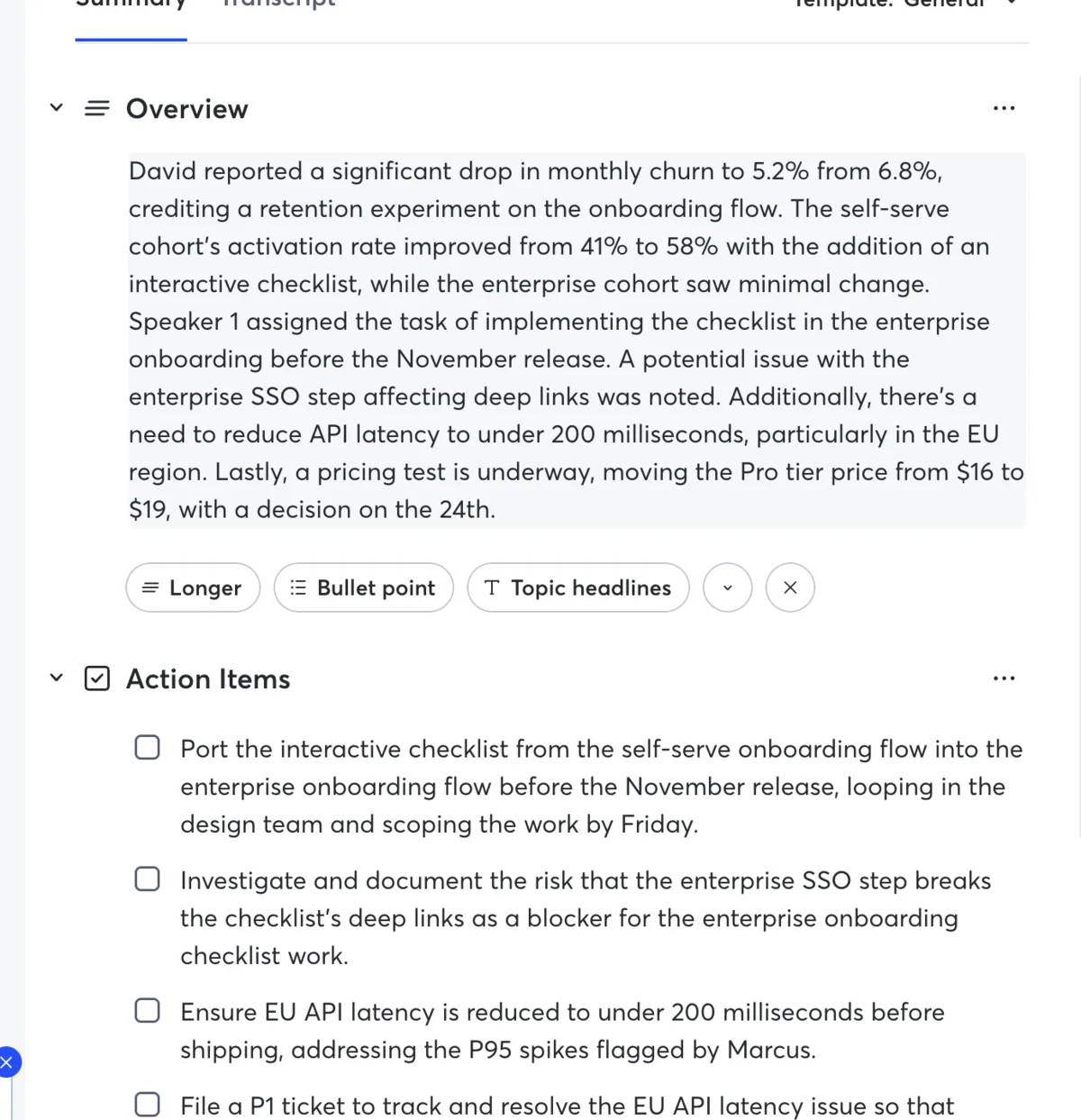
For the right user, yes, and the value is highest exactly where the price is lowest. The free plan is worth its zero cost as a trial, and Pro at $8.33 a month, or $6.67 for students, is genuinely good value for what an individual gets. In our testing the AI summaries and action items were the standout, pulling correctly-scoped tasks with the right owners and deadlines out of a meeting, and the transcription on clean audio was near-perfect. For a solo professional running clear one-on-ones, interviews, or lectures, Pro earns its keep.
Where the value gets harder to defend is Business at $30 a user. The jump from Pro is large, and what you are paying for, unlimited minutes and admin controls, only matters if you actually hit those ceilings. A team that does will find it worth the price; a team that does not is paying double Pro for headroom it never touches.
There are two real marks against the money at any tier. The first is the mixed reputation: a 3.0 Trustpilot average and recurring billing complaints mean the account experience does not always match the quality of the AI. The second is that Otter’s transcription, excellent on clean two-person audio in our test, is reported by users to slip on crowded, crosstalk-heavy calls, so the value depends on the kind of meetings you actually record.
The honest verdict: Otter is worth it at the Pro and student tiers for individuals with clean audio, defensible at Business for teams that use the unlimited features, and a harder sell if your meetings are messy or your budget is tight, where the cheaper alternatives below close most of the gap.
Which Otter plan should you actually pay for
Match the plan to your real usage, not the feature list:
- Stay on Free if you take only occasional calls, each under 30 minutes, and you rarely import files. It costs nothing and covers light use.
- Pay for Pro if you are one person who keeps hitting the 30-minute cap or the monthly minutes, which is most regular users. At $8.33 a month annually it is the obvious individual upgrade.
- Pay for Pro at the student rate if you have a .edu email, since 20% off makes it about $6.67 a month, the best value Otter offers.
- Pay for Business if you need unlimited transcription, the longer per-conversation cap, or to manage a team, or if you are a single heavy user recording more than 20 hours a month.
- Skip Otter’s paid plans if your main objection is the bot or the price itself, because the alternatives below do the core job for less or for free.
How Otter’s price compares to other notetakers
Otter is not expensive in isolation, but it is not the cheapest way to get meeting notes either. Here is how its paid tiers line up against the notetakers we have tested, which is the comparison that actually decides whether Otter’s price is justified for you.
| Tool | Free plan | Paid from | Notable |
|---|---|---|---|
| Otter | 300 min/mo, 30-min cap | $16.99/mo Pro, $30/user Business | Verbatim transcript, speaker labels, searchable archive |
| Granola | Limited history | $14/user Business | Bot-free, half Otter’s team price |
| Fathom | Unlimited | $20/mo Premium | Most generous free plan, records video |
| Fireflies | Unlimited transcription, 400-min storage | ~$10/user | Cheapest per seat, team search |
Competitor prices are current as of June 2026; confirm each on the tool’s own page before buying.
The headline is that Otter sits in the middle on price and at the bottom on free-plan generosity. Its Business plan at $30 a user is the most expensive of the four, and its free tier is the most limited. What Otter charges the premium for is the verbatim, speaker-labeled transcript and the searchable archive, which the cheaper tools either do not match or gate differently. If those are the features you are paying for, the price holds; if you just want clean meeting notes, the alternatives do that for less.
If Otter’s price doesn’t add up: cheaper options
If the math pushes you to Business and you balk at $30 a user, two notetakers we have tested do the everyday job for less:
- Granola charges $14 a user for its Business plan, less than half of Otter’s, and it is bot-free on top of being cheaper. Its trade-off is no Android or web app. See our Granola review and the head-to-head Otter vs Granola comparison.
- Fathom has a genuinely unlimited free plan that records, transcribes, and summarizes meetings at no cost, which undercuts even Otter’s free tier on minutes. It is the value pick if price is your main reason for shopping around.
For the full field, our Otter alternatives guide lines up six options by what each one fixes, and the best AI note taker roundup ranks them overall.
Final word
Otter’s pricing is straightforward once you ignore the marketing framing and look at the ceilings. The free plan is a trial that the 30-minute conversation cap renders impractical for real meetings; Pro at $16.99 (or $8.33 annually) is the realistic individual plan and a genuine bargain at the student rate; and Business at $30 a user is for teams and unlimited use. Pick the plan for the limit you actually hit, start on monthly billing if you are unsure, and switch to annual once you know Otter is staying. If the price never quite justifies itself, the cheaper notetakers above will do the core job for less.
Frequently asked questions
How much does Otter.ai cost per month?
Otter.ai has four tiers. Basic is free. Pro is $16.99 a month billed monthly, or $8.33 a month if you pay for a year up front ($99.99 total, a 51% saving). Business is $30 per user a month, or $19.99 per user on annual billing (a 33% saving). Enterprise is custom-quoted.
The two prices that matter for most people are the Pro plan, which an individual upgrades to mainly to lift the free tier's caps, and the Business plan, which a team needs for unlimited transcription and admin controls.
On annual billing the realistic numbers are roughly $100 a year for one Pro seat or $240 a year per Business seat, and students with a .edu email get Pro for about $6.67 a month. The free Basic plan costs nothing but is capped tightly enough that most regular users outgrow it within a week.
Is Otter.ai free?
Yes, Otter has a free Basic plan, but it is a trial more than a home. It gives you 300 transcription minutes a month, caps each individual conversation at 30 minutes, and allows only three audio or video file imports for the entire lifetime of the account, not three a month.
The 30-minute-per-conversation cap is the one that bites: a single normal hour-long meeting overflows it halfway through. The AI Chat feature that lets you ask questions about a meeting is also rationed to 20 queries a month on the free plan.
It is genuinely enough to test whether Otter's transcription and summaries suit you, which is what it is for, but anyone running more than a couple of short meetings a week hits a wall fast and gets nudged toward Pro.
What is the difference between Otter Pro and Business?
Pro ($16.99/mo) is built for one person and mostly buys you headroom: 1,200 transcription minutes a month instead of 300, a 90-minute per-conversation cap instead of 30, 10 file imports a month instead of three for life, and 50 AI Chat queries instead of 20.
Business ($30/user/mo) is built for teams and adds the things Pro still withholds: unlimited transcription, a 4-hour per-conversation cap, unlimited imports, shared workspaces and admin controls, and 200 AI Chat queries. Video replay of the meeting, re-watching the Zoom or Meet recording, is not a Business feature at all; it sits on the top Enterprise tier. The simple rule: if you are a solo user who just keeps hitting the free tier's caps, Pro is enough; if you need unlimited transcription or to manage a team, you need Business.
In practice the dividing line is whether you are managing only yourself or other people: a single user almost never needs Business unless they record more than 20 hours a month, while any team sharing notes needs its admin controls and shared workspaces from day one.
Does Otter.ai have a student discount?
Yes. Students and teachers who verify with a .edu email address get 20% off the Pro plan, which works out to about $6.67 a month on annual billing ($79.99 for the year) or $13.59 a month on monthly billing. It applies to individual education users on Pro, not to Business or team plans.
For a student recording lectures and interviews, that discounted Pro plan is the sweet spot, since it lifts the 30-minute cap that makes the free tier impractical for a full class.
To get it, you verify your student or teacher status with a .edu email during checkout, and the discount applies for as long as you keep the plan and stay verified. At roughly $80 for a full year it is a fraction of the standard Pro price, which is why it is the plan we would point any student to first.
What happens when you hit Otter's free plan limit?
Two things stop you on the free Basic plan. When you reach 300 transcription minutes in a month, Otter stops transcribing new audio until the next billing cycle resets the allowance. Separately, the 30-minute per-conversation cap cuts off any single recording at the half-hour mark mid-sentence, regardless of how many monthly minutes you have left.
And once you have used your three lifetime file imports, the import option is simply gone with no way to earn more without upgrading. In each case Otter prompts you to move to Pro rather than offering a top-up, which is why the free plan functions as a trial that funnels you toward a paid subscription.
There is no pay-as-you-go option to buy extra minutes or imports on the free plan, so once you hit any one of these three ceilings your only route forward is to upgrade to Pro or wait for the monthly reset.
Can you cancel Otter.ai anytime?
Yes, you can cancel an Otter subscription at any time from your account settings, and you keep access to the paid features until the end of the billing period you already paid for. The catch is with annual plans: Otter bills the full year up front, so cancelling part-way through stops the next renewal but does not refund the remaining months.
If you are not sure Otter is a long-term fit, start on monthly billing despite the higher per-month rate, then switch to annual once you know you will keep it for a full year.
Cancelling does not wipe your past transcripts on the spot, but keeping long-term access to your meeting archive generally needs an active paid plan, so export anything you want to keep before you downgrade. The cancel button itself is simple; it is the up-front annual billing, not the cancellation, that is the thing to watch.
Keep reading
Otter vs Fathom: live transcript or polished summary?
We tested both. Fathom wins for most — unlimited free plan, video, cleaner summaries; Otter for live transcription and in-person notes. Which fits you?
Otter vs Fireflies: solo transcriber or team brain?
We tested Otter and dug into Fireflies. Otter wins for the individual and live transcription; Fireflies for team search, analytics, and CRM. Which fits you?
Otter vs Granola: we ran one meeting through both
We fed the same meeting to Otter and Granola. Otter wins on transcription and search; Granola wins on bot-free notes. Here's which AI notetaker fits you.
Otter.ai review: the AI notes are great, the limits aren't
I fed Otter.ai a controlled two-speaker meeting: near-perfect transcript, summary and action items. The catch is the stingy free plan and a privacy lawsuit.