
Otter vs Fathom: live transcript or polished summary?
We tested both. Fathom wins for most — unlimited free plan, video, cleaner summaries; Otter for live transcription and in-person notes. Which fits you?
Contents
Otter.ai is the better live transcriber; Fathom is the better notetaker for almost everyone else. That is the comparison in one line, and the reason is that these two solve the meeting in opposite orders. Otter shows you the words as they are spoken and lets you work the transcript live; Fathom stays quiet during the call and hands you a polished summary the moment it ends.
We reviewed both and ran the same controlled meeting through each in June 2026, scoring Otter at 3.8 and Fathom at 4.6, so this is a head-to-head from use rather than spec sheets.
The verdict: Fathom for most, Otter for live transcription
For most people, Fathom is the one we would start with. It is the higher-rated tool, its free plan is unlimited where Otter’s stops at 300 minutes a month, it saves a replayable video of every call, and in our test it wrote the cleanest summary and kept the specific numbers Otter dropped. If your goal is polished meeting notes without paying, Fathom gets you there with less friction.
Otter wins one thing decisively: the live transcript. It shows the words appearing in real time with speaker labels, lets several people read and annotate during the call, and has the stronger mobile app for recording in person. If watching and working a transcript live is the point, Otter is the better tool, and we rated it a solid 3.8.
Both join your calls as a visible bot by default, so the recorder in the participant list is not the deciding factor here. The real fork is whether you want a live transcript to work with or a finished summary to read.
Otter vs Fathom at a glance
The short version of every section below, in one table:
| The measure | Otter.ai | Fathom |
|---|---|---|
| Our rating | 3.8 / 5 | 4.6 / 5 |
| Best for | Live transcription, in-person | Free notes, summaries, video |
| Free plan | 300 min/mo, 30-min cap | Unlimited recording + summaries |
| Paid from | $16.99/mo Pro; $30/user Business | $20/mo Premium; $19/user Team |
| Live in-meeting transcript | Yes, with speaker labels | No, summary after the call |
| Saved video | Top (Enterprise) tier only | Yes, every call |
| Summary style | Transcript-first | Structured (decisions, actions, next steps) |
| Accuracy on specifics (our test) | Dropped “Q3” | Kept “Q3”, “$16-19”, “P1” |
| Mobile / in-person recording | Strong | No native mobile recording |
| CRM sync | Shallow | Deep (HubSpot, Salesforce) |
| Bot | Visible bot (OtterPilot) | Visible bot (bot-free beta) |
The pattern is consistent. Otter wins the rows about working a transcript live and in person: the real-time view, speaker labels, mobile capture, and collaboration during the call. Fathom wins the rows about turning a meeting into finished notes cheaply: the unlimited free plan, saved video on every call, the structured summary, the CRM sync, and the specifics it held in our test. Which of those two sets you actually need is the whole decision.
Where Fathom is stronger
Fathom’s advantages are the ones that decide most switches, which is why it is our default recommendation.
The free plan is genuinely unlimited. Fathom records, transcribes, and summarizes as many meetings as you want at no cost, with no monthly minute cap and your full history kept. Otter’s free plan stops at 300 minutes a month. For a lot of people that single difference ends the comparison, because Fathom gives away what Otter charges for.
The summaries are cleaner and structured. In our test Fathom’s Enhanced Summary broke the meeting into a purpose, key takeaways, topics, and next steps, with the numbers and names correct, and its action items came timestamped to the moment and assignable to a person. It is built to hand you a finished document, not a wall of transcript to read.
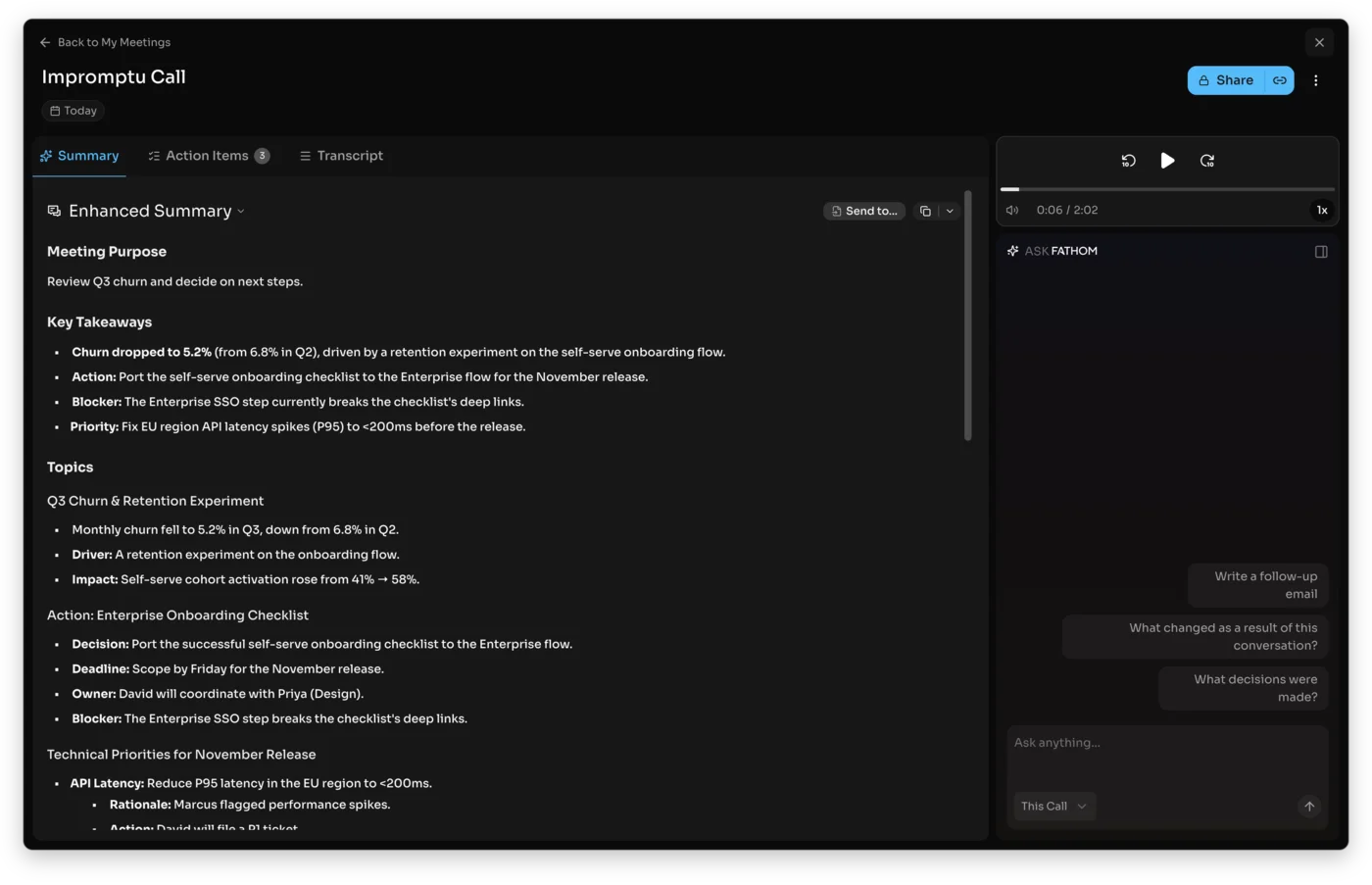
It saves video, and Otter mostly does not. Fathom records and stores the full video of every call, so you can re-watch a demo, a screen-share, or a reaction. On Otter, transcript-synced video replay is reserved for the top Enterprise tier, so for nearly everyone Fathom is the only one of the two that lets you see the meeting again.
It kept the hard specifics in our test. When we ran the same planted meeting through both, Fathom’s transcript held “Q3”, “$16 to $19”, and “tag it P1” intact, the exact details you would later quote, where Otter softened one of them. More on that head-to-head below.
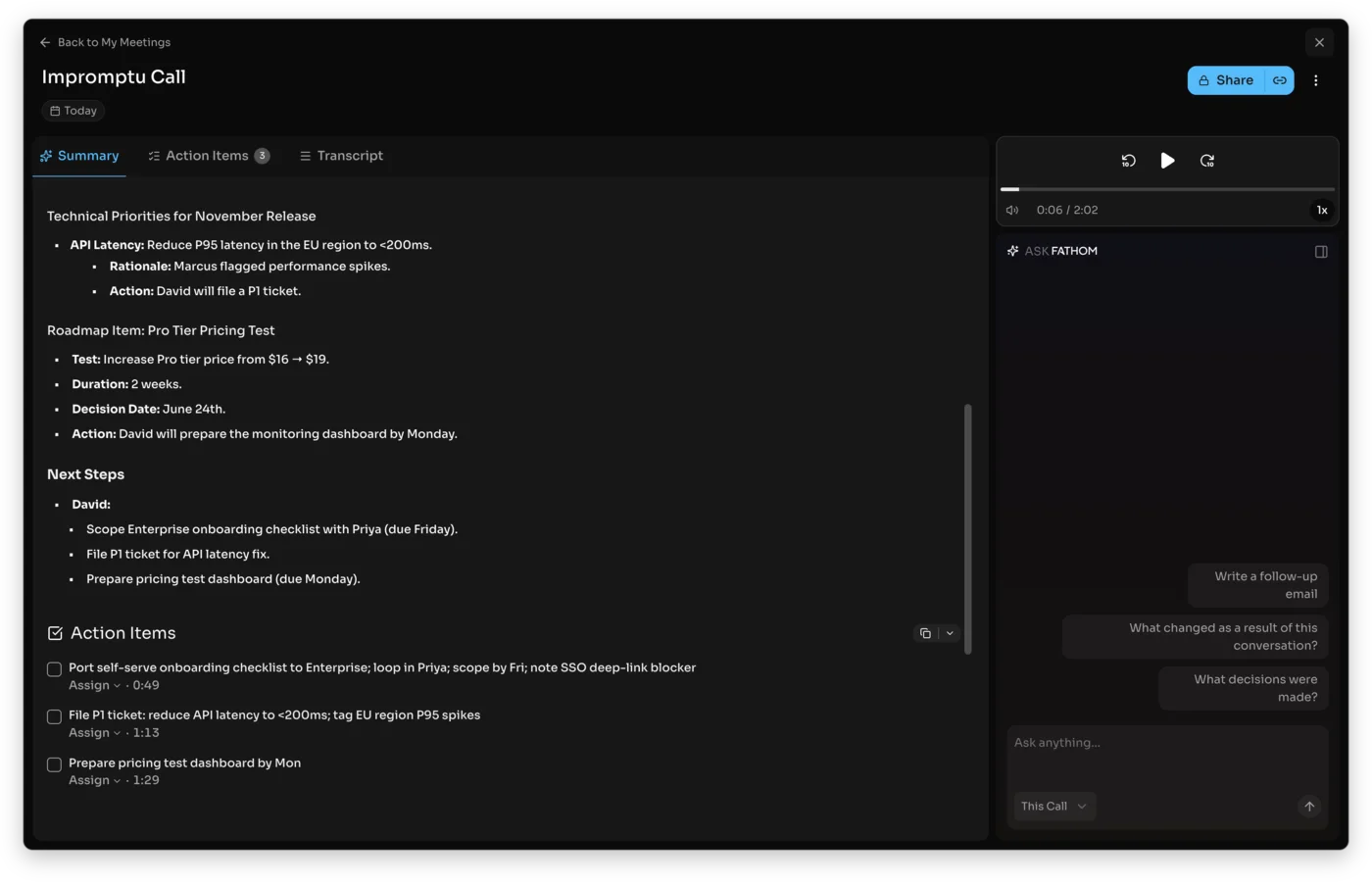
The Ask Fathom assistant. On Premium, Fathom lets you ask a past call a question in plain language and get a structured answer, plus expert summary templates like BANT and Sandler for sales calls. It is the same idea as Otter’s AI Chat but tied to Fathom’s cleaner summary engine, and it turns the archive into something you query rather than scroll. Otter has its own chat, but Fathom’s pairs with the stronger underlying summaries.
CRM sync for sales teams. Fathom’s Team and Business plans push notes and action items straight into HubSpot and Salesforce and add coaching scorecards and a Deal View, which makes it the stronger pick for a revenue team. Otter has integrations, but the CRM sync is shallow by comparison. It is also the highest-rated notetaker on G2, at a near-perfect 5.0 across more than 6,000 reviews, a stronger aggregate than Otter’s, and a large share of that goodwill traces straight back to the unlimited free plan.
One honest caveat on the free tier. Fathom’s advanced AI features are a 30-day preview, after which the core recording, transcription, and basic summaries stay free forever while the smarter assistant needs a paid plan. It is not a bait and switch, since the part most people rely on never expires, but it is worth knowing before you lean on the AI assistant in week one.
Where Otter is stronger
Otter is not a weak tool; it simply wins on a narrower, specific set of jobs built around the live transcript.
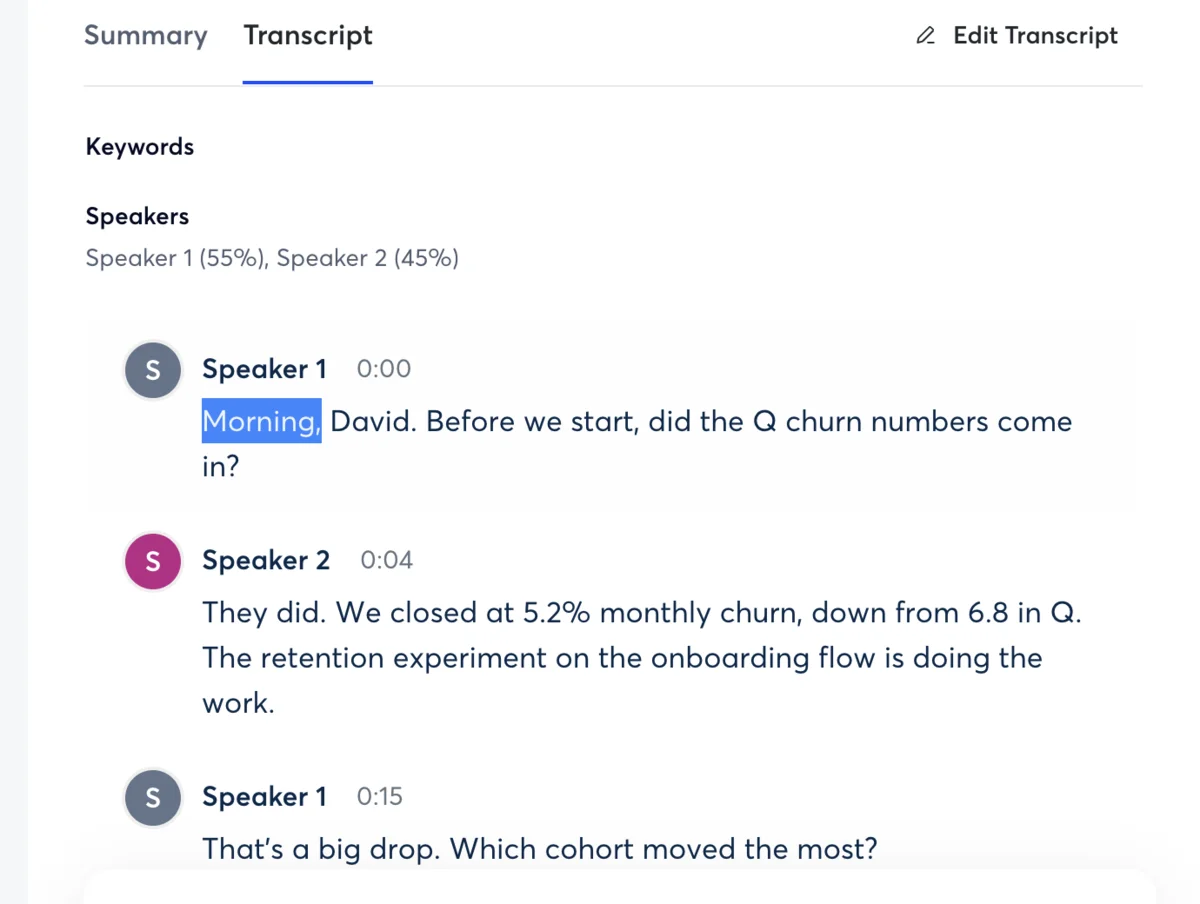
The live, real-time transcript. This is Otter’s signature and the thing Fathom does not do. Otter shows the words appearing on screen as people speak, with speaker labels, so you can follow, search, and act on the conversation while it is still happening rather than waiting for a summary. For anyone who works from the transcript in the moment, that is decisive.
Real-time collaboration. Because the transcript is live, several people can open the same meeting as it runs, highlight lines, and add comments together, so a team takes shared notes off one building transcript. Fathom’s value lands after the call, so for live, in-the-room teamwork Otter is the better fit.
Speaker-labeled, verbatim transcripts. Otter is built around the transcript as the deliverable, with clear speaker separation, which makes it the stronger choice when the verbatim record itself is what you need: a journalist, a researcher, or anyone producing a written record rather than a recap.
In-person recording and a mature mobile app. Otter’s iOS and Android apps record conversations in a room, not just scheduled video calls, so for capturing a lecture, an interview, or a hallway meeting it is the better tool. Fathom has no native mobile recording and is built around the online call.
Hands-off auto-join. OtterPilot connects to your calendar and joins your scheduled meetings automatically, so the transcript starts without you lifting a finger, which suits someone who wants every internal call captured by default. Fathom also joins automatically, but Otter’s calendar-driven model and its team workspaces lean harder into the “capture everything, search it later” archive.
A few practical evens. Some things are close enough not to decide it. Both record across Zoom, Google Meet, and Microsoft Teams, so platform coverage for online calls is a wash. On languages Fathom is the broader of the two, with support across roughly three dozen, where Otter is built mainly around English with lighter coverage elsewhere, so a non-English team should lean Fathom; but for an English-only user that gap never shows up. Worth weighing only if it applies to you.
A searchable archive with AI Chat. Otter keeps a searchable history of your transcripts and lets you query a past meeting with AI Chat, though that feature is metered on the cheaper plans. It also exports cleanly to text, Word, SRT captions, or PDF, so the record does not stay locked inside Otter. For someone whose notetaker is mostly a personal archive of conversations to search and re-export later, Otter is well suited, and that archive-first design is genuinely different from Fathom’s summary-first one.
Free plan and price: the split that decides most switches
Price is where the comparison gets lopsided, and it starts with the free plans, because that is what most people will actually live on.
Otter’s free plan is a trial. You get 300 transcription minutes a month, a 30-minute cap per conversation, and three file imports for the lifetime of the account. The 30-minute-per-conversation cap is the one that bites first: a single normal hour-long meeting overflows it halfway through, so the free plan cannot capture one full meeting end to end, let alone a week of them. Pro at $16.99 a month lifts those caps; Business at $30 a user adds unlimited transcription and admin controls.
The contrast with Fathom is the whole story here, because Fathom’s free plan has no per-conversation cap at all and will sit through a three-hour call without complaint.
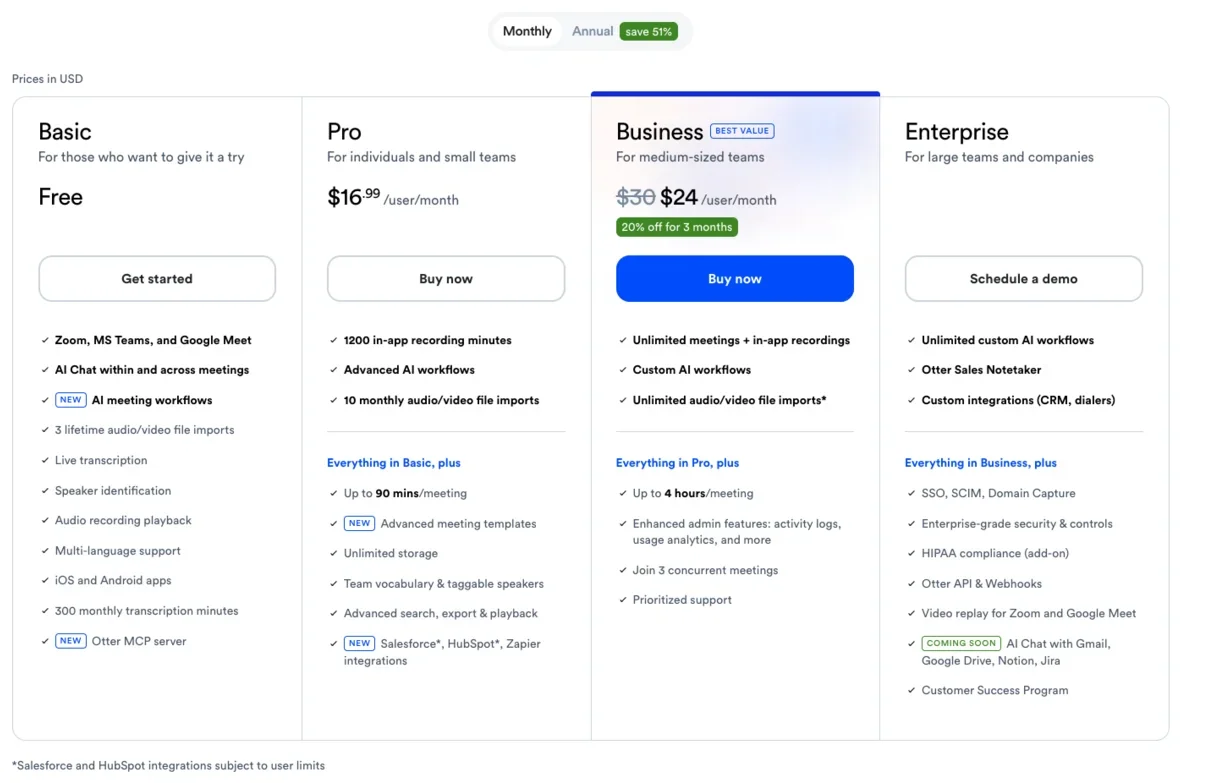
Fathom’s free plan is a home. It records, transcribes, and summarizes unlimited meetings with no minute cap and keeps your full history, which is more than Otter gives on its $30 Business tier. When you do pay, Premium is $20 a month ($16 annually) for the Ask Fathom assistant and unlimited AI summaries, and Team and Business ($19 and $34 a user) add collaboration and CRM sync. A lot of Fathom users never upgrade at all.
Run the math and it stays one-sided. A solo user who needs unlimited transcription pays Otter $30 a month on Business, or about $1,800 a year for a five-person team, to get what Fathom includes on its $0 plan. A team that does want Fathom’s paid collaboration lands at $19 a user on Team, roughly $95 a month for five seats, still well under Otter’s $150. Annual billing narrows nothing in Otter’s favor: Fathom’s Premium drops to $16 a month on the year, and Otter’s Pro to $8.33, but the free-plan gap dwarfs either discount.
So the price verdict is stark for an individual: Fathom does for free what Otter gates to its paid tiers. The only reason to pay Otter over using Fathom free is if you specifically need Otter’s live transcript or in-person recording. For the full breakdown of each tier, see our Otter pricing guide and Fathom pricing guide.
| Plan reality | Otter | Fathom |
|---|---|---|
| Free | 300 min/mo, 30-min cap, 3 lifetime imports | Unlimited record + transcribe + summarize |
| Entry paid | $16.99/mo Pro (lifts caps) | $20/mo Premium (AI assistant) |
| Team / Business | $30/user (unlimited + admin) | $19–$34/user (collaboration + CRM) |
| What free really gives | A trial | A usable home |
Which takes more accurate notes? We ran one meeting through both
Both tools went through the same controlled test: an 80-second, two-speaker meeting generated with synthetic voices and loaded with names, numbers, and jargon, so we knew the exact right answer in advance. Otter took it as a file import and Fathom recorded the audio live through its bot, the standard path each tool uses for this kind of clip, both in June 2026.
Fathom won the specifics. Its transcript kept “Q3”, “$16 to $19”, and “tag it P1” intact, and its summary organized them into clean decisions and action items. Otter’s transcription was solid too, with correct speaker labels and most details right, but it dropped the quarter off “Q3”, turning a specific figure into a vaguer one, the kind of slip that matters when the note is the record you act on.
To be fair to Otter, it got the harder structural things right: it separated the two speakers cleanly, showed a talk-time split, and held the action items and most of the numbers. This was not a case of one tool understanding the meeting and the other missing it; both understood it. The difference was at the level of a single quoted detail, and over a week of real meetings those single details are exactly what you go back to the notes for, which is why even a narrow edge there matters for a notetaker specifically.
The summaries diverged as much as the transcripts. Fathom returned a structured Enhanced Summary that separated the decision from the discussion and listed the action items with owners; Otter gave a solid AI Overview and an action-item list too, but kept more of the raw transcript feel, leaving a little more reading to do. For turning the meeting into something you act on without re-reading it, Fathom’s output needed less work.
It is worth being fair about what that does and does not prove. General benchmarks put the two within a few points of each other on pure word accuracy, and some give Otter a slight edge on raw transcription, so this is not a rout. But for a meeting notetaker the question is whether the names, numbers, and action items survive into your notes, and on that test Fathom held more of them. Combined with its cleaner, more structured summary, that made Fathom the stronger of the two at turning a meeting into something you can act on, which is the whole job.
Live transcript or polished summary: the difference that decides it
Strip away the pricing and the feature lists and one distinction is doing the real work: Otter gives you a live transcript to work with, and Fathom gives you a finished summary to read.
Map it onto how you actually sit in meetings. If you want to watch the words appear, follow along, search mid-call, and have several people annotate the same transcript in real time, you are describing Otter, and Fathom’s quiet “wait for the summary” model would frustrate you. If you would rather pay no attention to the tool during the call and get a clean, structured recap the moment it ends, with decisions and action items already sorted, you are describing Fathom, and Otter’s raw live transcript is more than you want to manage.
Two quick scenarios make it concrete. A user-research lead runs live interviews and wants to watch the transcript build, tag quotes as they are said, and have a colleague follow along in the same document. She wants Otter, where the live transcript and shared annotation are the whole point, and Fathom’s silent wait-for-the-summary model would get in her way.
A founder runs back-to-back sales and partner calls and wants to forget the tool is there, then find a clean recap with the decisions and follow-ups already sorted, synced to the CRM, the moment each call ends. He wants Fathom, and Otter’s raw live transcript would be one more thing to manage. Same two tools, opposite right answer.
There is a quieter consequence to the choice, too, in what you are left holding weeks later. Otter’s archive-first model leaves you a full, searchable transcript of every word, so going back to find exactly what someone said six weeks on is easy. Fathom’s summary-first model leaves you a clean recap and the saved video, which is faster to skim but keeps the verbatim detail in the recording rather than in searchable text. Neither is wrong; they optimize for different moments, the meeting itself versus the record of it.
This is why the accuracy and even the price comparisons are secondary for many people. They are choosing between a tool that surfaces the meeting as it happens and one that digests it afterward. Decide which of those you want, and the winner is mostly chosen, with the free plan and video tipping the rest toward Fathom for everyone who does not specifically need the live view.
| Your situation | The tool | Why |
|---|---|---|
| Work the transcript live, in the call | Otter | Real-time transcript, speaker labels, collaboration |
| Want a clean summary after the call | Fathom | Structured recap, action items, unlimited free |
| Record in person / on mobile | Otter | Native mobile + in-person capture |
| Free plan and saved video matter most | Fathom | Unlimited free + video on every call |
Who should pick Fathom
Fathom suits the person whose meetings end and need to become clean notes with the least effort. If you would rather not babysit a tool during the call and instead open a finished, structured recap afterward, on a free plan that never caps you, Fathom is built for exactly that, and it is why it is our default pick between the two. It is the right call for most people comparing these two, and clearly so when:
- You want the most generous free plan. Unlimited recording, transcription, and summaries at no cost, where Otter caps you at 300 minutes a month.
- You want polished, structured summaries with decisions, action items, and next steps already organized, rather than a raw transcript to read.
- You need to re-watch a call on video, which Fathom saves on every meeting and Otter reserves for its Enterprise tier.
- You run a sales team that needs notes synced into HubSpot or Salesforce and managers coaching off calls.
The honest catch: Fathom has no live in-meeting transcript and no native mobile recording, so if either is central to your work, it is the wrong tool. Read our full Fathom review for the hands-on detail.
Who should pick Otter
Otter suits the person who lives in the transcript itself, during the call as much as after it. If you read along as people speak, act on the words in the moment, take shared notes with a team in real time, or capture conversations in a room rather than only on video calls, Otter does things Fathom simply does not. It is the better choice when the live transcript or in-person capture is the job, specifically when:
- You work from a live transcript during the call, watching the words appear with speaker labels and acting on them in the moment.
- Several people take notes together on the same transcript in real time, not after the fact.
- You record in person, in a room or on the move, where Otter’s mobile app beats Fathom’s online-only capture.
- The verbatim, speaker-labeled transcript is the deliverable, for a journalist, researcher, or anyone producing a written record.
The catches: Otter’s free plan is tight at 300 minutes, video replay is reserved for its top Enterprise tier, and it has faced privacy scrutiny, including a 2025 class-action and a default opt-in to training on your data. Our full Otter.ai review covers the detail.
Final word
Otter versus Fathom comes down to a single question with a clear answer for most people: do you want to work a transcript live, or read a finished summary? Otter is the better live transcriber, with a real-time, speaker-labeled record you can collaborate on and a mobile app that captures in person. Fathom is the better notetaker for almost everyone else, with an unlimited free plan, saved video, cleaner structured summaries, and the specifics it held onto in our test.
If the live transcript is genuinely your workflow, Otter earns its place. For everyone else, start on Fathom’s free plan: it costs nothing, caps nothing, and produced the better notes in our head-to-head. For the wider field, our best AI note taker roundup lines up every option, and our Fathom vs Granola and Otter vs Granola comparisons cover the other matchups in this cluster.
Frequently asked questions
Is Otter or Fathom better?
For most people Fathom is better, and we rated it 4.6 out of 5 to Otter's 3.8. Fathom's free plan records, transcribes, and summarizes unlimited meetings where Otter's free tier stops at 300 minutes a month, it saves a replayable video of every call, and in our hands-on test it produced the cleanest structured summary and kept the specific numbers Otter dropped. It is the better pick for almost anyone who wants polished notes without paying.
Otter wins in one important area: live, in-the-room transcription. It shows the words appearing in real time with speaker labels, lets several people read and annotate the transcript during the call, and has a stronger mobile app for capturing in-person conversations.
So choose Fathom for the better free plan, video, and post-call summaries, and Otter if watching and collaborating on a live transcript, or recording in person, is what you actually need.
Does Fathom have a better free plan than Otter?
Yes, and it is the single biggest difference between them. Fathom's free plan is genuinely unlimited: it records, transcribes, and summarizes as many meetings as you want with no monthly minute cap, and it keeps your full history. Otter's free Basic plan gives you 300 transcription minutes a month, caps each conversation at 30 minutes, and allows only three file imports for the lifetime of the account, so it is more of a trial than a home.
For anyone whose main question is how much a notetaker costs, that gap usually settles it: Fathom does for free what Otter charges $30 a user for on its Business plan, namely unlimited transcription. Otter's free tier is fine for testing the product or for a couple of short meetings a week, but you hit its wall fast, whereas a lot of Fathom users never pay at all.
If a real free plan is your priority, Fathom wins clearly.
Is Otter or Fathom more accurate?
They are close on raw transcription, but in our controlled test Fathom held the specific details that matter more reliably. We ran the same planted two-speaker meeting through both: Fathom's transcript kept 'Q3', '$16 to $19', and 'tag it P1' intact, while Otter dropped the quarter off 'Q3', turning a specific figure into a vaguer one.
General benchmarks put the two within a few points of each other on pure word accuracy, and some give Otter a slight edge there, so this is not a blowout. But for a meeting notetaker the thing that matters is whether the names, numbers, and action items survive into your notes, and on that test Fathom did better. Both get the substance of a meeting right; neither will embarrass you.
If verbatim accuracy on hard specifics is your priority, Fathom edged ahead in our run, though the difference is small enough that it should not be the only thing you weigh.
What is the difference between Otter and Fathom?
The core difference is what each one is built to hand you. Otter is a live transcriber: it shows the words on screen in real time as people speak, with speaker labels, and you read, highlight, and collaborate on that transcript during and after the call. Fathom is a post-call summarizer: you do not watch it work, and when the meeting ends it returns a polished, structured summary with decisions, action items, and next steps already organized.
Around that, Fathom adds an unlimited free plan, saved video of every call, and native CRM sync, while Otter adds a stronger mobile app, in-person recording, and a searchable transcript archive. Both join your calls as a visible bot by default, so the bot is not the dividing line.
Pick Otter if the live, editable transcript is the point; pick Fathom if a clean summary after the call, plus a generous free plan and video, is what you want.
Is Otter.ai worth paying for if Fathom is free?
Only if you specifically need what Otter does that Fathom does not, because Fathom's free plan covers what most people pay Otter for. Otter Pro at $16.99 a month and Business at $30 a user mostly buy you unlimited transcription and the longer caps, which Fathom already gives away for nothing. So paying Otter to escape its free-tier limits, when Fathom has no such limits, is a hard sell.
Where Otter earns its price is the live, real-time transcript with speaker labels, the real-time collaboration during a call, and the mature mobile app for in-person meetings, none of which Fathom matches. If those are central to your work, Otter Pro is worth it.
If you mainly want clean meeting notes and summaries, start on Fathom's free plan instead and you may never need to pay either company.
Which is better for sales teams, Otter or Fathom?
Fathom, in most cases, because it was built with sales workflows in mind. Its Business plan adds native CRM sync into HubSpot and Salesforce, AI coaching scorecards, and a Deal View that pulls insight across a deal, so call notes and next steps land in the CRM without manual entry. Combined with the polished, structured summaries and the saved video for reviewing a call, that makes Fathom the stronger fit for a revenue team that lives in its CRM.
Otter has CRM integrations too, but the sync is shallower and the product is oriented around the individual transcript and the searchable archive rather than pipeline workflows.
If your sales team needs meeting data flowing into a CRM and managers want to coach off calls, Fathom is the better tool. If the team mostly needs accurate, searchable transcripts of internal meetings, Otter is enough, but for sales specifically Fathom pulls ahead.
Keep reading
Otter vs Fireflies: solo transcriber or team brain?
We tested Otter and dug into Fireflies. Otter wins for the individual and live transcription; Fireflies for team search, analytics, and CRM. Which fits you?
Otter.ai pricing: what you'll actually pay in 2026
Otter.ai pricing runs from free to $30 a user. Here's what each tier really costs, the limits the pricing page soft-pedals, and which plan you actually need.
Otter vs Granola: we ran one meeting through both
We fed the same meeting to Otter and Granola. Otter wins on transcription and search; Granola wins on bot-free notes. Here's which AI notetaker fits you.
Otter.ai review: the AI notes are great, the limits aren't
I fed Otter.ai a controlled two-speaker meeting: near-perfect transcript, summary and action items. The catch is the stingy free plan and a privacy lawsuit.