
Otter.ai review: the AI notes are great, the limits aren't
I fed Otter.ai a controlled two-speaker meeting: near-perfect transcript, summary and action items. The catch is the stingy free plan and a privacy lawsuit.
Contents
Is Otter.ai worth it?

For solo note-taking, yes, with a few catches you should know before you trust it with a real meeting. This Otter.ai review is grounded in a hands-on test: I imported a controlled two-speaker conversation into Otter and it came back with a near-perfect transcript, a summary that got every number right, and an action-item list I would have been happy to send to the team. I score it 3.8 out of 5, a Solid Choice.
The AI notes are the best part of the product, and they are genuinely good. What holds Otter back from a higher score is everything around them: a free plan that runs dry fast, a transcription engine that real-world reviewers say stumbles on messy multi-speaker calls, and a 2025 privacy lawsuit over how it records people. Buy it if your meetings are clear one-on-ones, interviews, or webinars. Think twice if you live in crowded, crosstalk-heavy rooms or handle sensitive conversations.
What does Otter.ai do?
Otter.ai, the Mountain View company founded in 2016 by Sam Liang and Yun Fu, is an AI meeting assistant. Its whole job is to sit in on a conversation, write down every word in real time, and then hand you the notes you would otherwise have scrambled to take yourself.
Connect your Google or Microsoft calendar and OtterPilot can auto-join your Zoom, Teams, and Google Meet calls, so the transcript starts without you lifting a finger. It also runs as a Chrome extension and a desktop app, which means it can capture browser calls and in-person audio that never touch a calendar invite. For someone whose week is wall-to-wall meetings, that hands-off coverage is the difference between notes that exist and notes you meant to take.
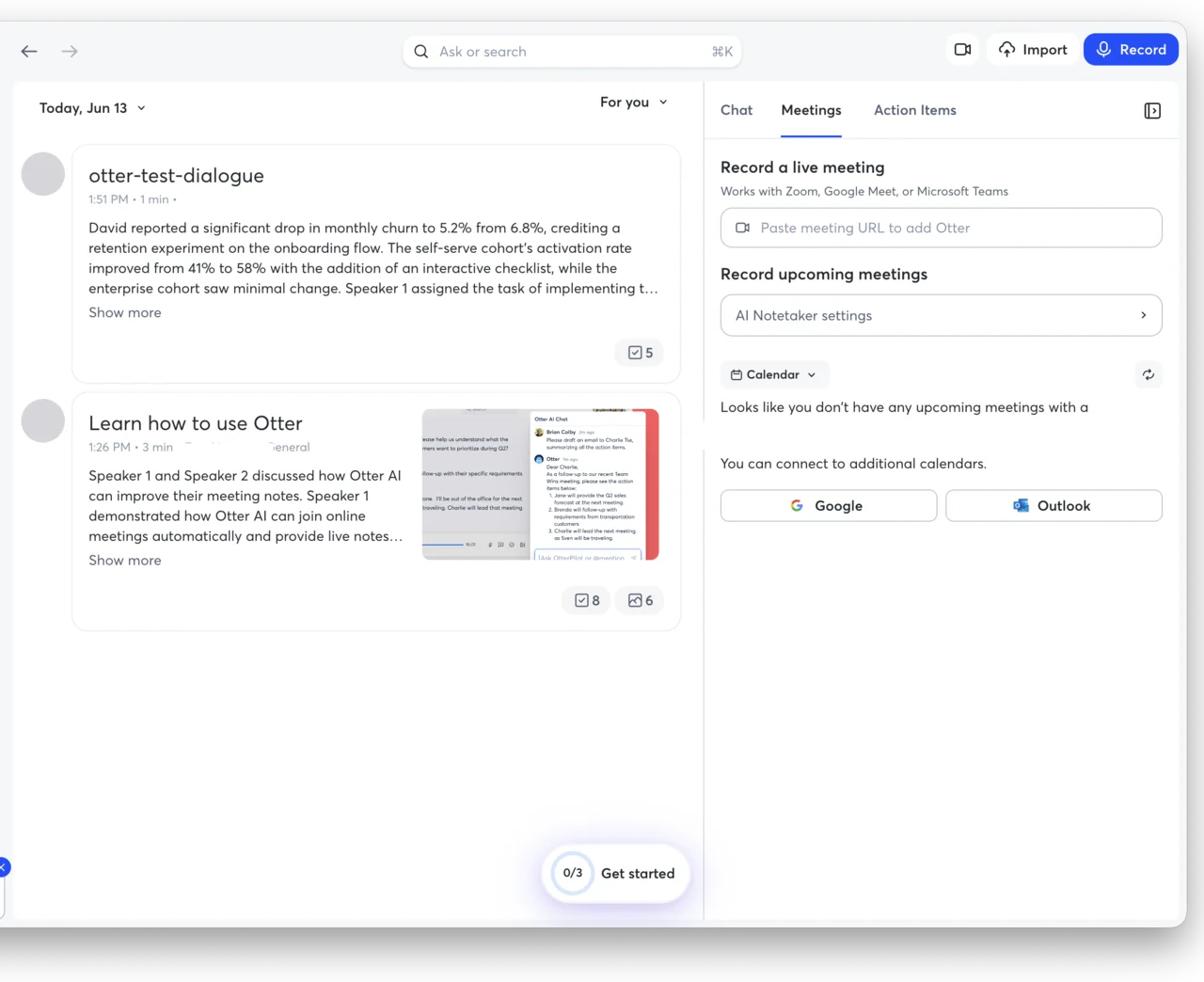
The live transcript is only the raw material. When a meeting ends, Otter writes an Overview summary, pulls out an Action Items checklist, and surfaces the keywords and speakers, all without a prompt. A separate panel called Otter AI Chat then lets you interrogate the conversation after the fact: ask what was decided, whether you were mentioned, or what the open questions were, and it answers from the transcript.
There is also a mobile app for recording conversations in person, and an import path for audio and video files you already have, which is how I ran this test. When the notes are done you can search across every transcript at once and export them as text, Word, SRT captions, or PDF, so the meeting record does not stay locked inside Otter. That export flexibility matters more than it sounds, because it lets Otter feed your existing notes app or CRM instead of becoming one more silo you have to remember to check.
It helps to be clear about what Otter is and is not. It is not a general chatbot. Where ChatGPT will summarize a transcript you paste into it, Otter is built to be in the room: it captures the call live, labels who spoke, and writes the notes without you feeding it anything. For meetings specifically, that focus is the whole point.
To see how good the notes actually are, I ran a controlled test instead of a messy live call, so I would know the exact right answer. I generated an 80-second, two-speaker product meeting with two distinct synthetic voices, loaded it with names, numbers, and jargon, and imported it. Here is the clip I fed it.
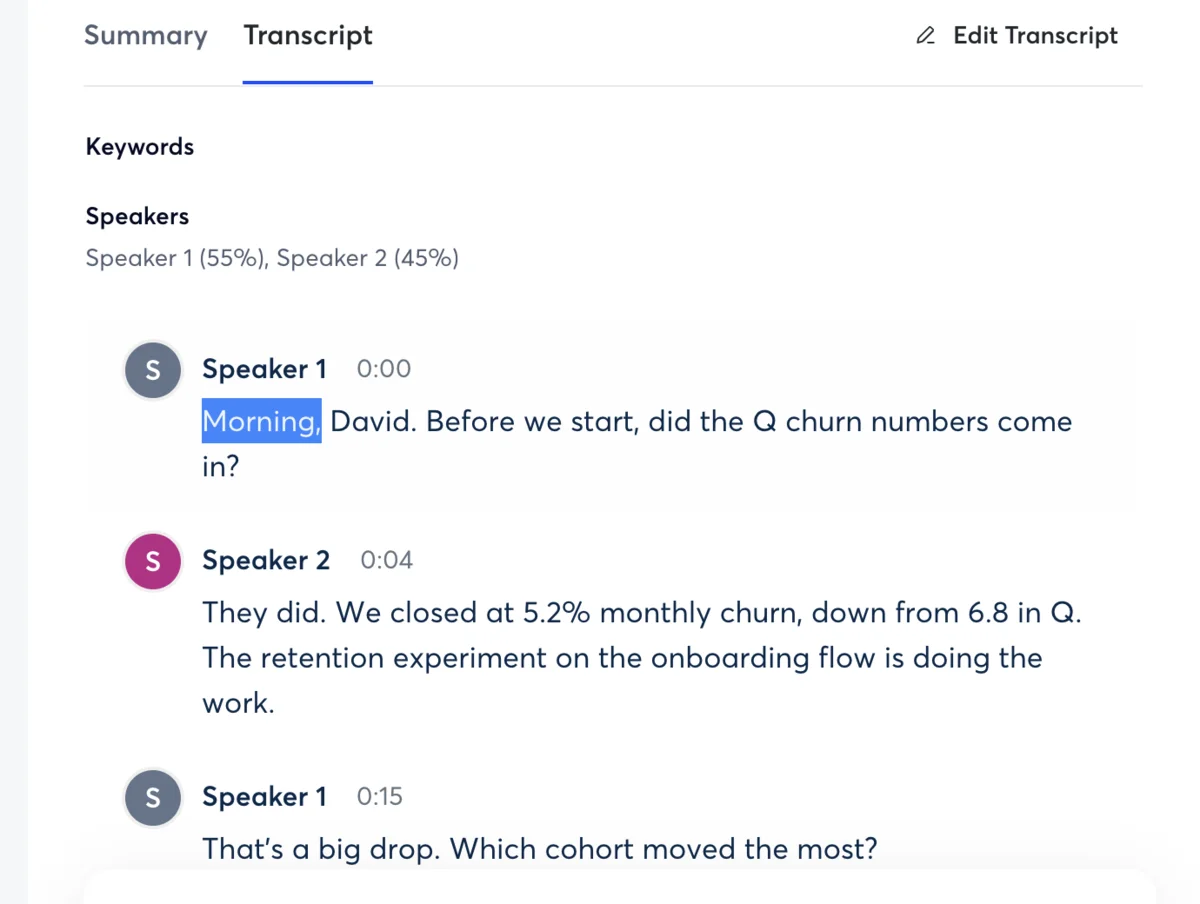
Otter detected two speakers, split them at 55% and 45%, and kept the attribution correct the whole way through. Word accuracy was excellent. Against my known script of roughly 230 words, almost everything landed, including the names Priya and Marcus and technical terms like SSO, deep links, cohort, and activation. The handful of misses were specific and small.
| What the script said | What Otter transcribed | Verdict |
|---|---|---|
| ”Q3 churn numbers" | "Q churn numbers” | dropped the 3 |
| ”down from 6.8 in Q2" | "down from 6.8 in Q” | dropped the 2 |
| ”5.2% monthly churn" | "5.2% monthly churn” | correct |
| ”41% to 58%" | "41% to 58%“ | correct |
| ”loop in Priya" | "loop in Priya” | correct |
| ”Marcus flagged p95" | "Marcus flagged P 95” | spacing only |
| ”tag it P1" | "tag at p1” | one wrong word |
| ”from $16 to $19" | "from 16 to $19” | dropped one $ |
| “decision on the 24th" | "decision on the 24th” | correct |
That is roughly 99% word accuracy, and the only real content errors were dropping the digit off “Q3” and “Q2”. The important caveat: my audio was clean, the two voices were distinct, and nobody talked over anybody. That is the easy case, and it is not the case most complaints come from.
How much does Otter.ai cost?
Otter has four tiers, and the free plan is where most people start and where most people get stuck. The prices below are per user, verified live on otter.ai/pricing on June 13, 2026. Annual billing roughly halves the monthly rate on the paid plans.
| Plan | Price (monthly) | Annual | Transcription | Per meeting | Imports |
|---|---|---|---|---|---|
| Basic (Free) | $0 | $0 | 300 min/mo | 30 min | 3 lifetime |
| Pro | $16.99 | $8.33/mo | 1,200 min/mo | 90 min | 10/mo |
| Business | $30 | $19.99/mo | Unlimited | 4 hr | Unlimited |
| Enterprise | Custom | Custom | Unlimited | 4 hr | Unlimited |
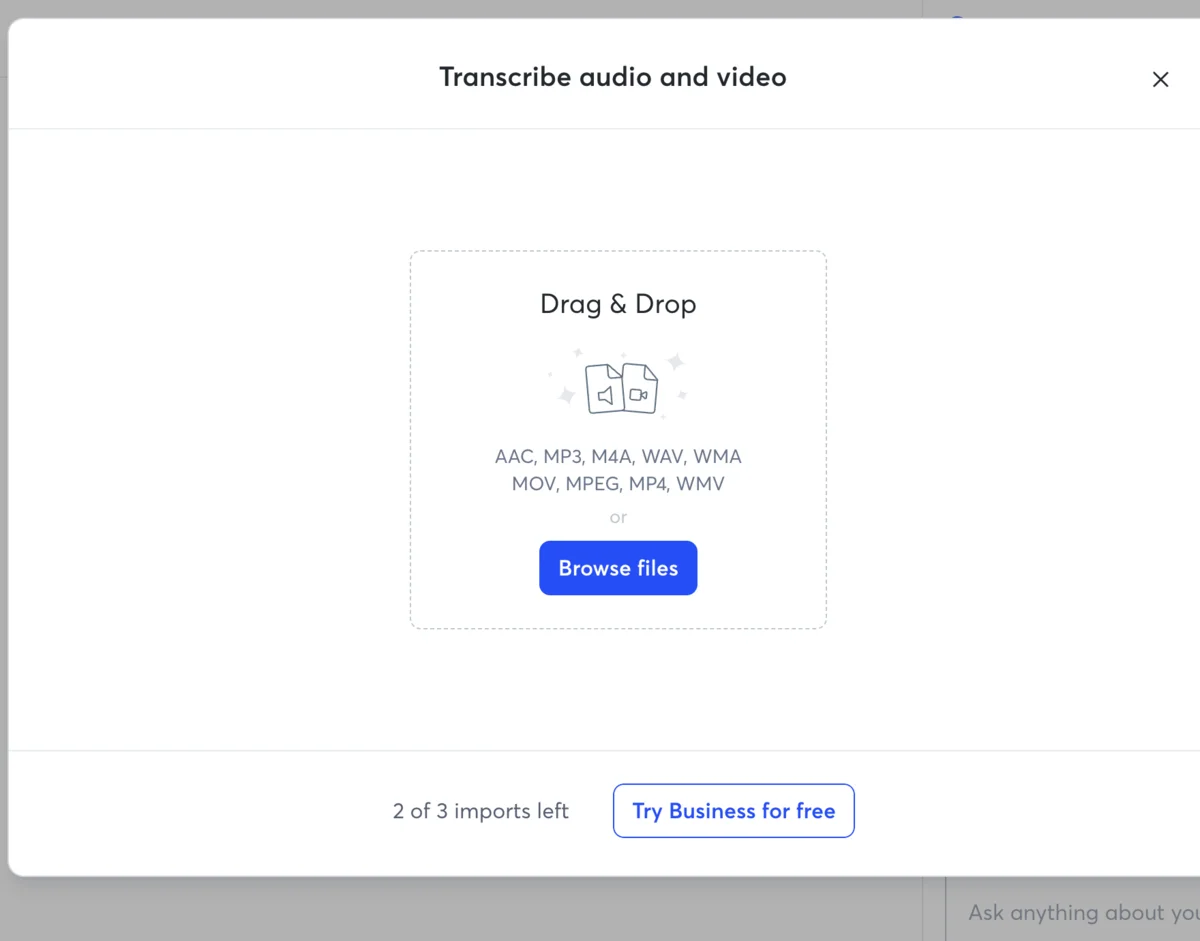
The numbers that bite are on the free tier. You get 300 minutes a month, but no single conversation can run past 30 minutes, so one normal hour-long meeting already overflows it. Imports are capped at three for the lifetime of the account, not three a month. I used one of mine on the test in this review and watched the counter drop to “2 of 3 imports left” with no way to earn more without paying.
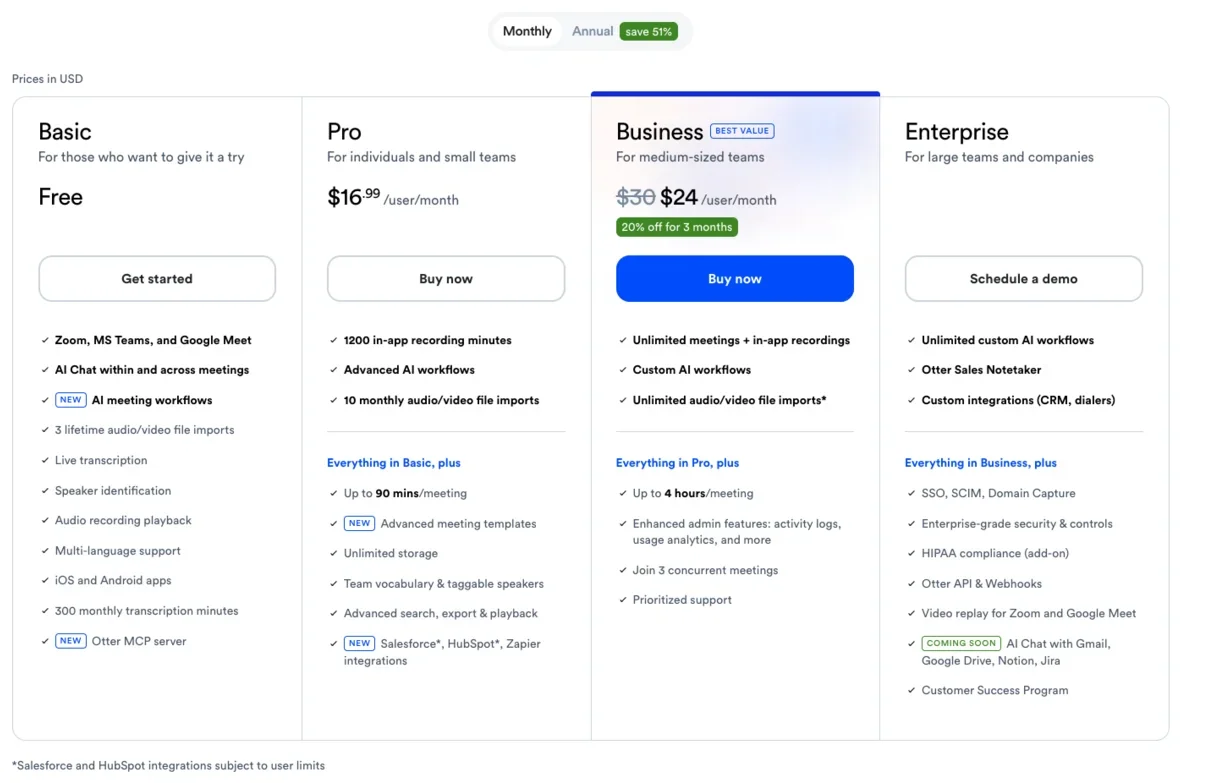
Otter AI Chat is metered too. Basic gets 20 queries a user, Pro gets 50, and Business gets 200, so the feature that makes the notes searchable is rationed at exactly the tier most solo users sit on. The genuinely useful upgrades are gated high: unlimited transcription arrives on Business at $30, and video replay, HIPAA support, SSO, and the API are Enterprise-only. Pro at $16.99 is the realistic plan for an individual who runs more than a couple of short meetings a week, mostly to lift the 30-minute ceiling and the monthly minute cap.
Two smaller things are worth knowing before you pick a tier. Students get Pro at a steep discount, around $6.67 a month on annual billing, if you verify with a school email. And the annual prices are not a rounding error: Pro drops from $16.99 to $8.33 a month and Business from $30 to $19.99, so committing to a year roughly halves the bill. For a daily meeting-taker, Pro’s 1,200 minutes is about 40 hours of talk time a month, which is the concrete reason to climb off the free tier’s 300. For the full tier-by-tier breakdown — the annual math, the student discount, and which plan fits which meeting load — see our Otter pricing guide.
Who is Otter.ai for?
- Solo professionals in clean one-on-ones. Coaches, consultants, recruiters, and salespeople running clear calls with one other person get the most out of Otter. This is the exact condition where its transcription and summaries shine.
- Students and journalists recording lectures or interviews. Single dominant speaker, quiet room, and you want a searchable transcript plus a summary afterward. Otter is built for this.
- Anyone who lives in Zoom, Teams, or Google Meet. OtterPilot’s calendar auto-join means the notes happen whether or not you remember to start them, which is the whole appeal for back-to-back meeting days.
- Teams that want a shared record. Business adds unlimited transcription and admin controls, and channels let a team keep meeting notes in one searchable place.
- Not for: crowded, crosstalk-heavy rooms or privacy-sensitive work. If your meetings are panel discussions with people talking over each other, or you handle confidential conversations where all-party consent and data training are real concerns, Otter is the wrong starting point.
The good
Otter earns most of its score on the quality of what it produces after the meeting. Here are the six things that should sway you, strongest first.
The action-item extraction is the standout
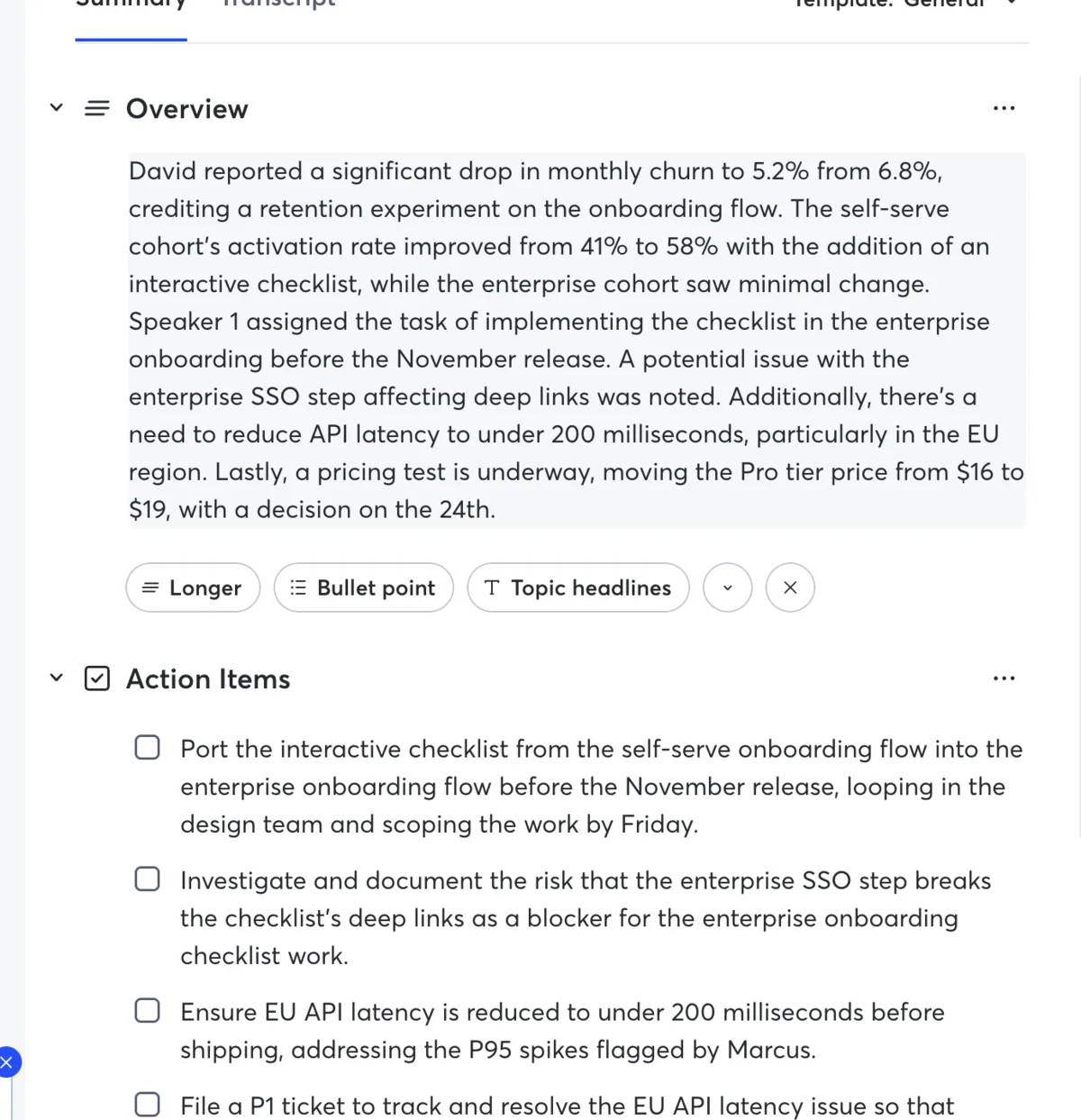
This is the feature that surprised me. From my 80-second clip, Otter pulled five distinct action items, each one specific and correctly scoped, with the owner and deadline attached. One read: “Port the interactive checklist from the self-serve onboarding flow into the enterprise onboarding flow before the November release, looping in the design team and scoping the work by Friday.” It even cleaned up “P 95” into “P95” and attributed the latency task to Marcus. For anyone who forgets who agreed to what, this alone is the reason to run it.
Here are all five action items it pulled, unedited, from that 80-second clip:
| # | Action item Otter extracted on its own |
|---|---|
| 1 | Port the interactive checklist from self-serve into enterprise onboarding before the November release, looping in design and scoping by Friday |
| 2 | Investigate and document the enterprise SSO step breaking the checklist’s deep links, treated as a blocker |
| 3 | Reduce EU API latency to under 200 milliseconds before shipping, addressing the P95 spikes Marcus flagged |
| 4 | File a P1 ticket to track and resolve the EU API latency issue before the next release |
| 5 | Prepare the dashboard to monitor the Pro tier pricing test |
The summary captures the numbers, not just the vibe
A lot of AI summaries give you a vague “the team discussed metrics.” Otter’s Overview reproduced the actual figures: churn down to 5.2% from 6.8%, activation up from 41% to 58%, the 200-millisecond latency target, and the pricing test moving from $16 to $19 with a decision on the 24th.
It even inferred a speaker’s name from context, writing “David reported” because the dialogue opened with “Morning, David”, while the unnamed speaker stayed “Speaker 1”. I did not have to correct a single figure in the Overview, which is rare enough that it changes how much I trust the rest of the notes. That is a summary you can paste into a recap email without fixing it.
Transcription is near-perfect on clean audio
As the test table above shows, Otter transcribed my two-speaker meeting at around 99% word accuracy. Names, percentages, and jargon all came through, and the speaker separation was clean. When the audio is good and the voices are distinct, this is a genuinely reliable engine, and the rest of the product rests on it. It also handled the back-and-forth rhythm without dropping the start of anyone’s turn, which is where weaker transcription tends to swallow the first word or two of a reply.
Otter AI Chat actually answers from the transcript
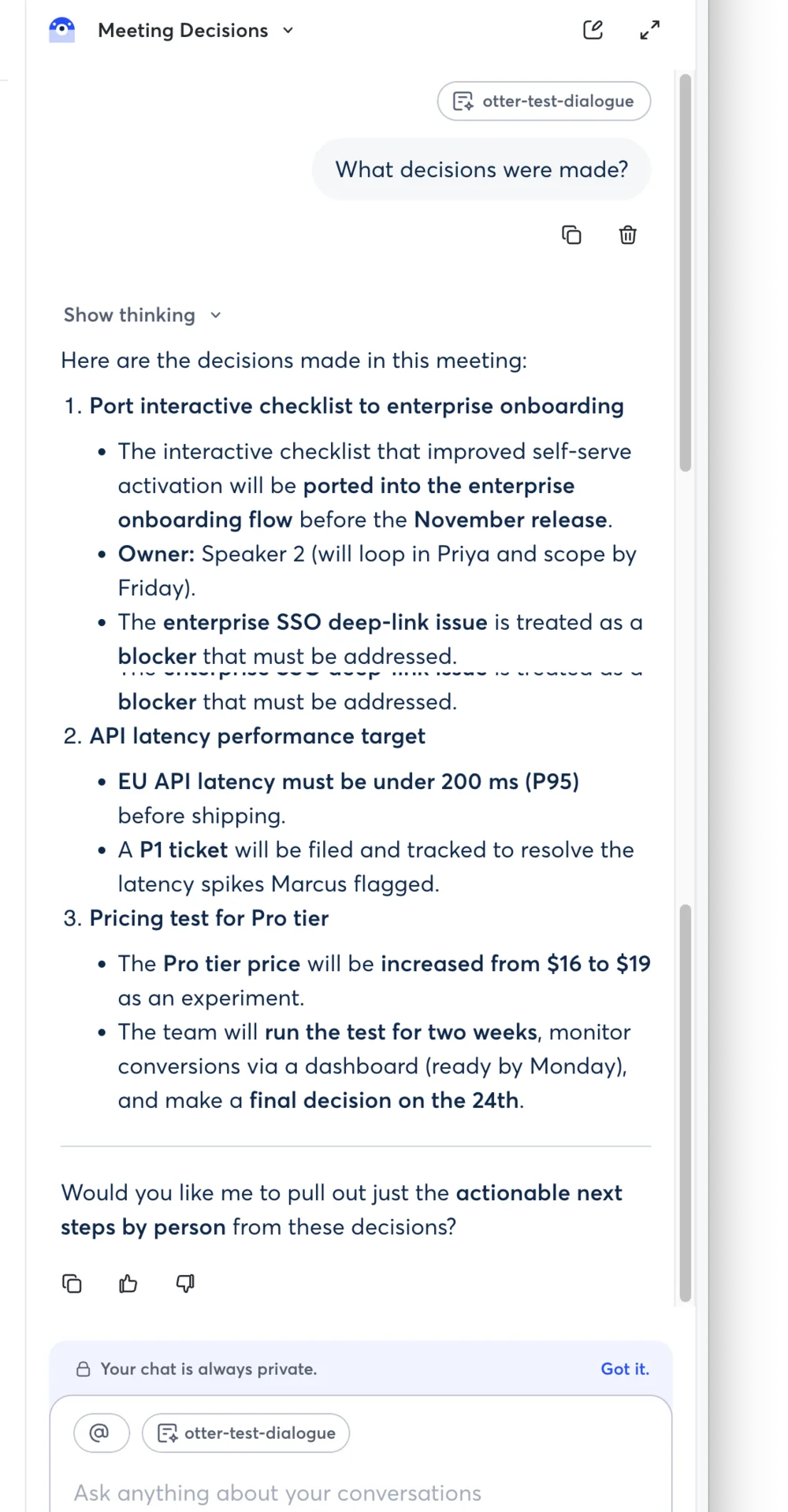
The post-meeting chat is more than a gimmick. I asked “What decisions were made?” and it returned a structured, accurate answer: the checklist port with Speaker 2 as owner, the SSO deep-link issue flagged as a blocker, and the EU latency target with the P95 detail. A “Show thinking” toggle exposes its reasoning, and it auto-titled the thread “Meeting Decisions.” It comes seeded with prompts like “What decisions were made?” and “Was I mentioned in this meeting?”, so you do not have to know what to ask. For digging a fact out of a long meeting you half-remember, it works, and on a busy day it is faster than scrubbing the audio back yourself.
OtterPilot joins your meetings for you
The feature that keeps people subscribed is the calendar auto-join. Connect Google or Microsoft and OtterPilot drops into your scheduled Zoom, Teams, and Meet calls and starts transcribing without a manual step. I tested via import rather than a live call, so I am taking the auto-join at its design rather than my own stopwatch, but the breadth of platform support is wider than most rivals that lock to a single conferencing tool.
Speaker separation and tagging work as advertised
Otter split my two voices correctly and let me assign real names to “Speaker 1” and “Speaker 2” from a Suggested Speakers list tied to my contacts. On clean two-person audio the diarization was flawless. Treat that as the best case rather than the average, but the machinery is there and it is easy to use.
The bad
Now the part the marketing page skips. Most of these are not about the AI quality, which is good, but about the limits, the edge cases, and the trust questions around the product.
The free plan runs dry almost immediately
Otter’s free tier is one of the stingiest in this category. You get 300 minutes a month, but the 30-minute-per-conversation cap means a single normal meeting overflows in the middle, and the three-imports-for-life limit is gone the moment you test a few files. I hit “2 of 3 imports left” after one upload. Compared with rivals that give a more generous free allowance, Basic feels less like a free plan and more like a trailer for Pro.
Real meetings with crosstalk are the recurring complaint
My clean test is the friendly case. The unfriendly one shows up constantly in user reviews. The most-read community thread on the question, on r/ProductManagement, opens with a user calling Otter “absolutely horrible at capturing multi-speaker transcripts,” and a thread on r/PKMS ends with the poster switching to a rival for better value. When voices overlap or sound alike, the speaker labels and accuracy that impressed me on clean audio start to slip.
The pattern in those reviews is consistent: two people talking at once collapses into one run-on line, and similar-sounding voices get merged under a single label, so you spend the time you saved re-splitting the transcript by hand. Test Otter on your own messiest meeting before you rely on it.
A 2025 lawsuit challenges how it records people
Otter is the subject of a federal class-action, Brewer v. Otter.ai, filed in August 2025. As reported by NPR, the suit alleges Otter recorded private conversations without the consent of all participants, with the lead plaintiff claiming his words were captured even though he was not an Otter user. It is an unproven complaint, not a verdict, but it is a live legal question about the core behavior of the product. In two-party-consent states, the practical takeaway is to tell everyone on the call before OtterPilot starts listening.
Here is where Otter sits on the trust questions buyers actually ask:
| Signal | Where Otter stands |
|---|---|
| Consent model | Prompts the meeting host, not every participant (challenged in Brewer v. Otter.ai, 2025) |
| AI training | On by default; opt out in account data controls |
| Aggregate rating | 3.0 / 5 on Trustpilot, 553 reviews (June 2026) |
| Company and location | Otter.ai, Inc., Mountain View, California (US) |
AI training is opt-out, not opt-in
By default, Otter trains its models on your de-identified conversations unless you turn that off in account data controls. Otter says on its privacy and security page that the data is de-identified and not reviewed by humans, which is reassuring as far as it goes. But the default is participation, the responsibility to opt out is yours, and the same class-action argues that de-identification does not guarantee anonymity. If your meetings touch anything confidential, change that setting on day one.
The public rating tells a harsher story than the demo
For all that the AI notes impressed me, Otter’s aggregate reputation is mixed. On Trustpilot it sits at 3.0 out of 5 across 553 reviews as of June 2026, with recurring complaints about a clunky experience and billing friction. A polished transcript engine and a frustrating account experience can live in the same product, and the reviews suggest they do.
It quietly drops specifics, so proof the numbers
The flip side of 99% accuracy is the 1% that matters. In my test Otter turned “Q3” and “Q2” into “Q”, silently losing the quarter, and changed “tag it P1” to “tag at p1.” On a meeting full of figures, dates, and ticket IDs, those small slips are exactly the details you will quote later. The notes are good enough to trust for gist and bad enough to embarrass you on a number, so spend the 30 seconds to proof anything important against the audio.
No video replay unless you go Enterprise
Otter records audio and writes a transcript, but a video replay of the call, re-watching the Zoom or Google Meet recording synced to the transcript, is reserved for the Enterprise tier. On the free, Pro, and even Business plans you get the words and the audio, not a meeting video you can re-watch to catch a screen-share or a reaction. Independent reviews single this out as a gap next to rivals that capture video on cheaper plans, so if seeing the meeting again matters to you, Otter makes you climb to its priciest tier.
Alternatives worth considering
If you decided Otter is not the fit, here is where to look next, depending on what pushed you away.
- Granola — if you want notes without a bot visibly joining the call. Granola captures your device audio and writes the summary in the background, which sidesteps a lot of the “why is a notetaker in my meeting” friction that Otter’s auto-join creates. It is our category pick; see the Otter vs Granola head-to-head.
- Fathom — if the free plan is your sticking point. Fathom is known for one of the most generous free tiers in the category and a strong all-round meeting recorder, which makes it the natural first stop for anyone who hit Otter’s 300-minute wall. We line them up in Otter vs Fathom.
- Fireflies — if you want the same auto-join, full-transcript model with deeper team search and CRM sync. It is the closest like-for-like swap; see Otter vs Fireflies for where each one wins.
For the whole field at a glance — how Otter, Fathom, and Granola stack up head to head on the same test meeting — see our best AI note taker roundup, or our shortlist of Otter alternatives if Otter specifically is the tool you’re replacing.
Final word
Otter earns its 3.8 on the strength of what it does after the meeting. The transcription is sharp on clean audio, the summary keeps the numbers straight, and the action-item extraction is the best I saw in this test, pulling five accurate, owner-tagged tasks out of a short clip. For a solo professional running clear one-on-ones, it turns the chore of note-taking into something that happens on its own.
It is held back by the things around that core: a free plan too thin to live on, a transcription engine that real-world reviewers say struggles where mine succeeded, and genuine privacy questions sharpened by an active lawsuit and opt-out-by-default training. Go in knowing the limits, switch off AI training on your first login, tell people before you record, and test it on your own messiest meeting before you trust it with your real ones.
Start on the free plan to judge the notes for yourself, run one real meeting through it before you commit, and then decide whether the limits and the trade-offs work for the way you actually meet.
Frequently asked questions
Is Otter.ai free to use?
Yes, the Basic plan is free. It gives 300 transcription minutes a month, capped at 30 minutes per conversation, plus three lifetime audio or video imports. It is enough to test the product, not to run on week after week.
Is Otter.ai safe and private to use?
Otter encrypts data and lets you opt out of AI training, but two caveats matter. Training on de-identified data is on by default, so you have to turn it off in account data controls, and a 2025 class-action (Brewer v. Otter.ai) alleges it recorded people without all-party consent. In two-party-consent states, tell everyone before you record.
Is Otter.ai better than ChatGPT?
They do different jobs. Otter is built to join a live meeting, transcribe it, and write the notes; ChatGPT will summarize a transcript you paste in but does not capture the call. For meetings, Otter is the specialist. For open-ended help, ChatGPT is the generalist.
How accurate is Otter.ai transcription?
On clean audio with distinct voices it is excellent. In my test it transcribed a two-speaker meeting at roughly 99% word accuracy and separated the speakers correctly. Accuracy drops on real-world calls with crosstalk, accents, and similar-sounding voices, which is the most common complaint in user reviews.
Is Otter.ai a Chinese company?
No. Otter.ai, Inc. is an American company based in Mountain View, California.
Keep reading
Otter vs Fathom: live transcript or polished summary?
We tested both. Fathom wins for most — unlimited free plan, video, cleaner summaries; Otter for live transcription and in-person notes. Which fits you?
Otter vs Fireflies: solo transcriber or team brain?
We tested Otter and dug into Fireflies. Otter wins for the individual and live transcription; Fireflies for team search, analytics, and CRM. Which fits you?
Otter.ai pricing: what you'll actually pay in 2026
Otter.ai pricing runs from free to $30 a user. Here's what each tier really costs, the limits the pricing page soft-pedals, and which plan you actually need.
Otter vs Granola: we ran one meeting through both
We fed the same meeting to Otter and Granola. Otter wins on transcription and search; Granola wins on bot-free notes. Here's which AI notetaker fits you.