
Fathom vs Fireflies: solo notetaker or team brain?
Fathom vs Fireflies, both run through one test meeting: Fathom wins the free plan and clean summaries, Fireflies wins team search and CRM. Which fits you.
Contents
Is Fathom or Fireflies better?
Neither is simply better — it depends on whether you are buying for yourself or for a team, and that is the whole decision. Both record your meetings, transcribe them, and write you a summary, and both do it well. The difference is who each one is built for.
Fathom is the individual’s notetaker. It has the most generous free plan of the notetakers we tested, it wrote the cleanest summaries of anything we tested, and it is the simpler tool to use alone. We rate it 4.6 out of 5.
Fireflies is the team’s brain. It makes a whole organization’s calls searchable with an AI assistant that reasons across your entire history, ships conversation analytics, and syncs to your CRM for less per seat than Fathom. We rate it 4.4 out of 5.
Here is the one-line split:
- Best for an individual or small team: Fathom — unlimited free notes, the cleanest summaries.
- Best for a whole team’s meeting intelligence: Fireflies — cross-meeting search, analytics, cheap CRM.
- Best free plan: Fathom — unlimited forever, where Fireflies caps storage at 400 minutes.
The rest of this comparison is how we got there: the at-a-glance table, then price, accuracy, and team features in detail, and finally which buyer each one is for.
Fathom vs Fireflies at a glance
We ran both tools through the same controlled test meeting and have full hands-on reviews of each, so the table below is graded from real output, not spec sheets. Both also carry strong third-party marks: Fathom holds a 5.0 across more than 6,000 G2 reviews, and Fireflies a 4.7 across 746, so neither is a fringe pick. The split below is about fit, not quality.
| Axis | Fathom | Fireflies | Winner |
|---|---|---|---|
| Best for | Individuals & small teams | Whole-team meeting intelligence | — |
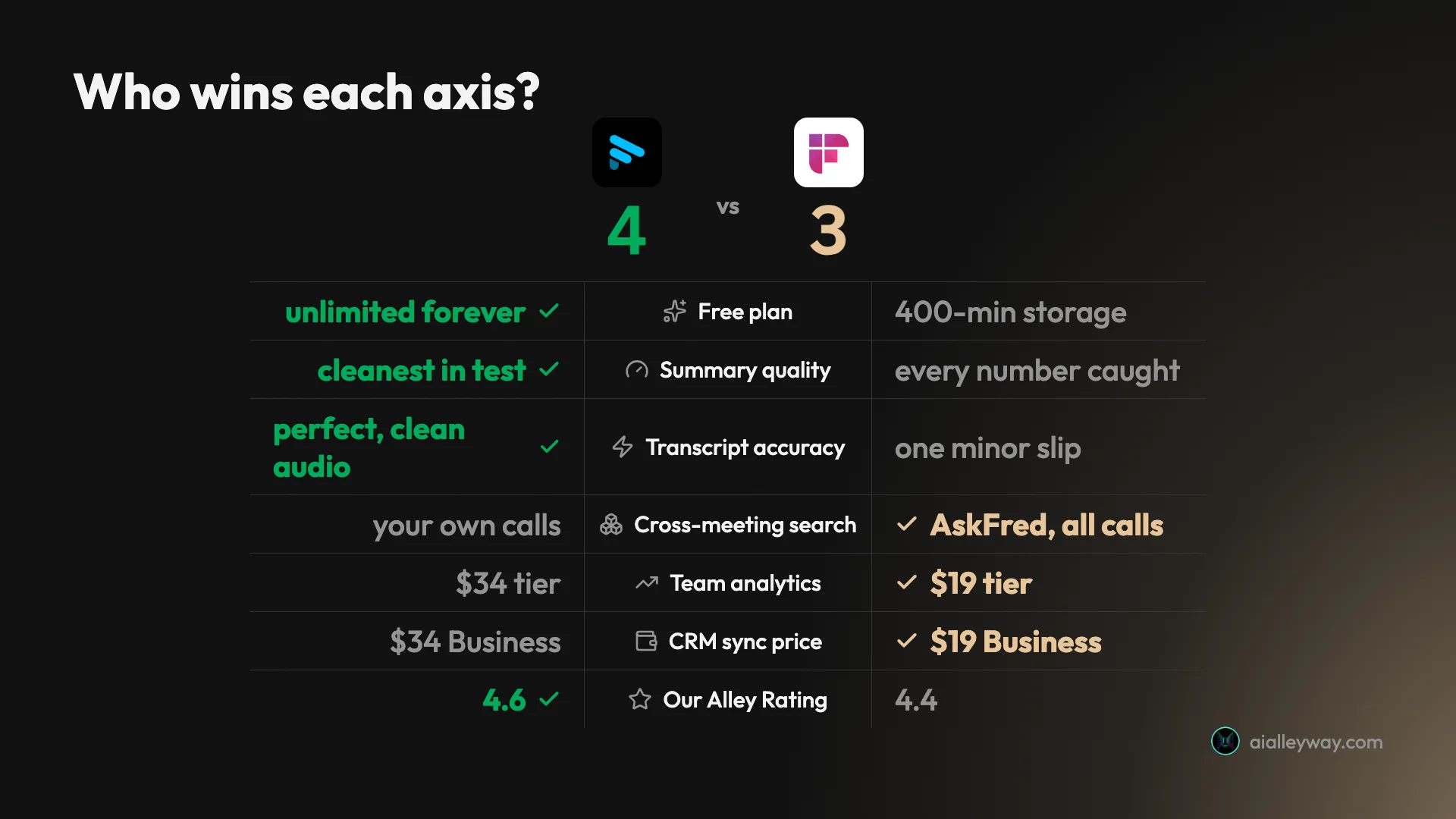
| Free plan | Unlimited meetings & history, forever | Unlimited transcription, 400-min storage | Fathom |
| Summary quality | Cleanest in our test | Caught every number | Fathom |
| Transcript accuracy | Perfect on clean audio | Near-flawless, one slip | Fathom |
| Cross-meeting search | Keyword search of your calls | AskFred reasons across all calls | Fireflies |
| Conversation analytics | Coaching scorecards (Business $34) | Built-in (Business $19) | Fireflies |
| CRM sync | Business, $34/user | Business, $19/user | Fireflies |
| Individual paid plan | Premium, $20/mo | Pro, $10/user/mo | Fireflies |
| Bot on the call | Default bot (bot-free is Premium) | Default bot, or bot-free desktop | Tie |
| Our Alley Rating | 4.6 | 4.4 | Fathom |
The tally lands close, and it splits exactly where you would expect: Fathom takes the notetaking-for-one axes, Fireflies takes the run-a-team axes.
Where Fathom is strong, and where it isn’t
Fathom’s case is built on two things: the most generous free plan of any notetaker we tested, and the cleanest output we have seen from any notetaker.
On the free plan, Fathom records, transcribes, and summarizes unlimited meetings and keeps them forever, with no minute cap and no storage ceiling. A 30-day preview adds the advanced AI assistant, and after that the core notetaking stays free with nothing to cancel. For most solo users the free tier is the whole product.
On quality, we fed Fathom a fake two-speaker product meeting full of names, numbers, and jargon, and its Enhanced Summary broke the call into Meeting Purpose, Key Takeaways, Topics, and Next Steps, each with the right specifics. It pulled the churn figures, the activation jump, the deadline, and the task owners correctly, attributing the work to the right people.
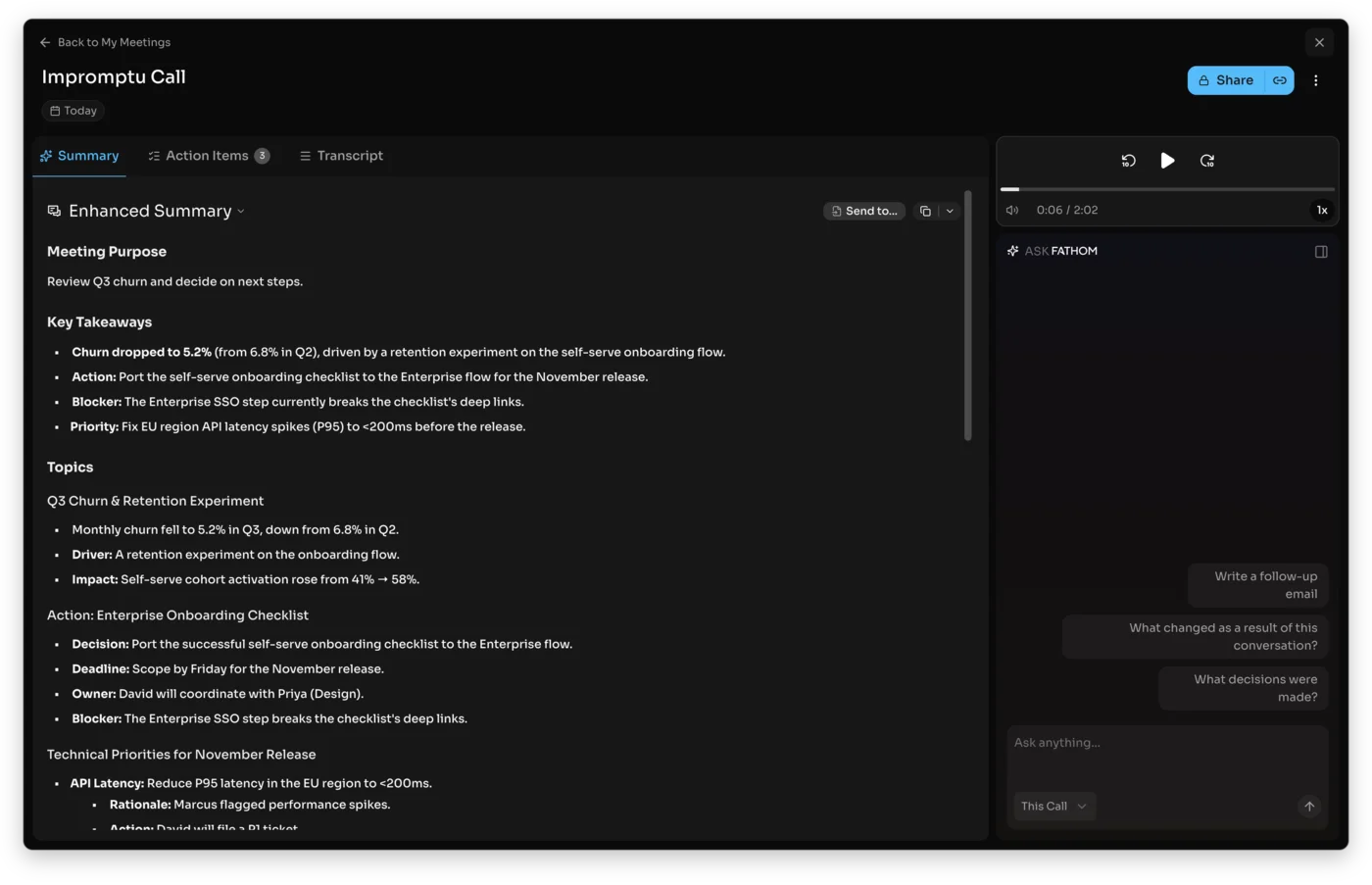
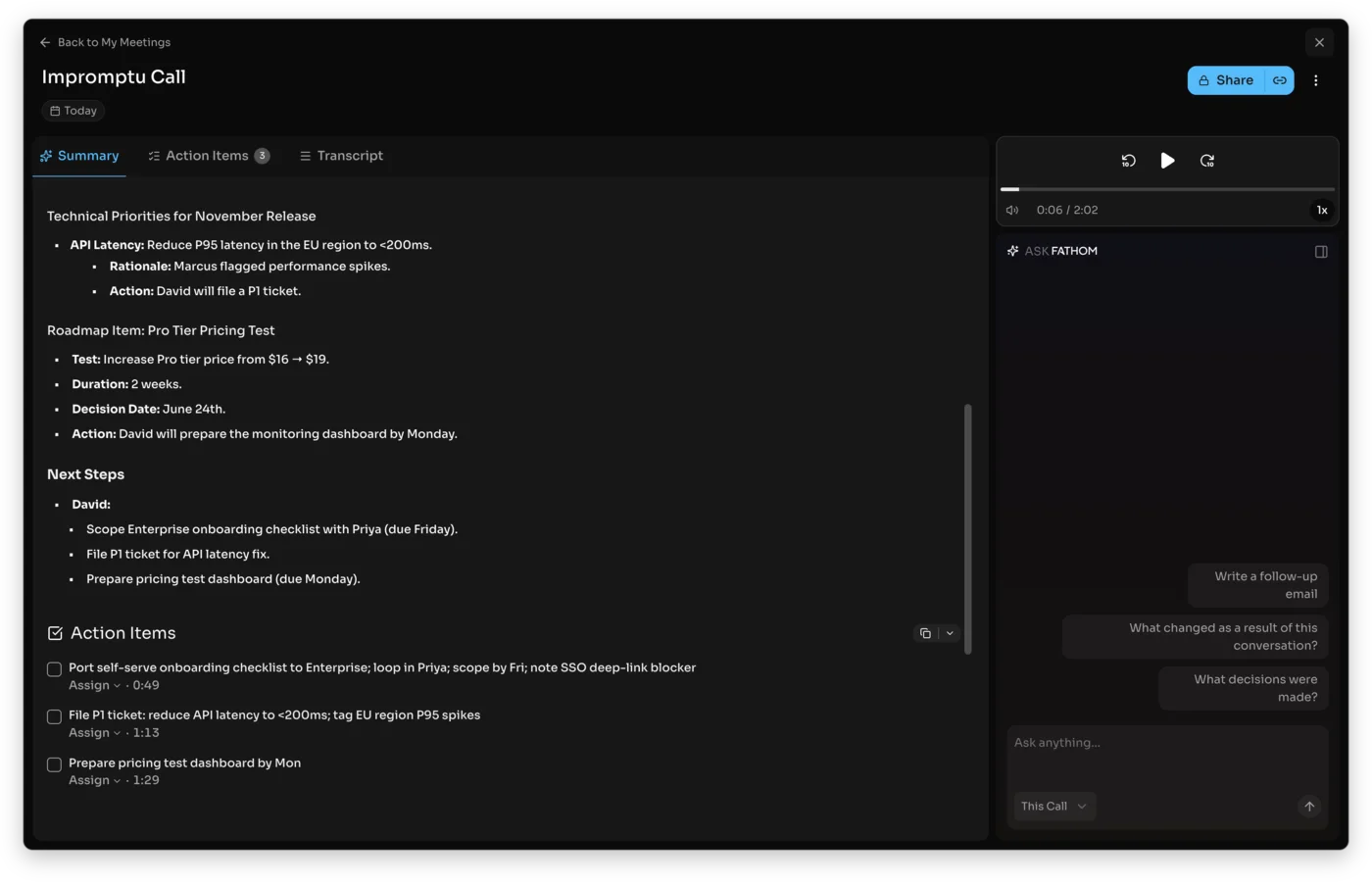
The summary is not the end of it. Fathom turns the call into things you can act on: its action items are each timestamped to the moment they were agreed and assignable to a person, so the November deadline and the SSO blocker from our test came out as tasks with owners rather than buried in prose. On the paid plans, the Ask Fathom assistant answers questions about the meeting with a clickable citation back to the exact second in the recording, which is the difference between trusting a summary and being able to check it.
Where Fathom is weaker is the team layer. Its search covers your own calls rather than reasoning across a whole organization’s history, it ships less in the way of conversation analytics, and its CRM sync sits on the priciest Business tier at $34 a user. It also defaults to a visible meeting bot, with the quieter bot-free capture reserved for paid Premium. None of that matters to a solo user, and all of it matters to a sales org.
Where Fireflies is strong, and where it isn’t
Fireflies is not trying to be the quiet notetaker for your one-on-ones. It is trying to be the system that makes an entire team’s calls searchable, measurable, and wired into the CRM, and it is very good at that job.
Its headline feature is AskFred, an AI assistant that answers questions across your whole meeting history, not just one call. When we asked it to summarize a meeting and list the numbers, it ran a multi-step retrieval, found the right transcript, and built the answer from it. That history-wide reasoning is the thing a single notetaker cannot do.
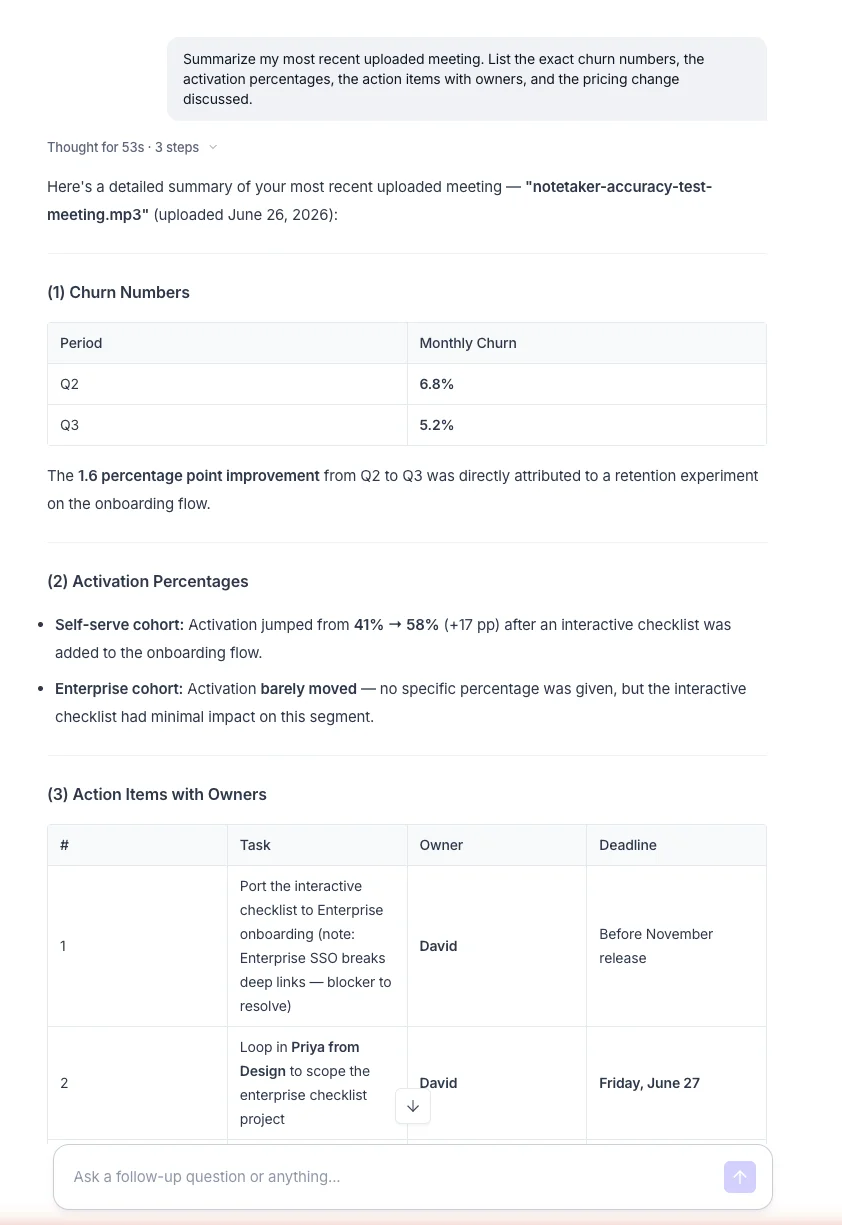
Around that sit the team features: conversation analytics that turn months of calls into talk-time, sentiment, and topic trends; topic trackers that flag every competitor or pricing mention; and an integration layer that pushes all of it into a CRM, Slack, or Notion automatically. It also transcribes in over 100 languages, the widest reach of the tools we tested.
Fireflies also casts the widest net on what it can capture. It records Zoom, Google Meet, and Microsoft Teams, lets you upload an audio or video file directly, which is how we ran our test, and builds the transcript in real time during the call rather than only after it. The breadth is the point: it wants to be the one place every conversation in a company lands, in any of 100-plus languages.
Where Fireflies is weaker is the solo experience and the free plan’s ceiling. Almost everything that makes it powerful is built for a team and wasted on one person, and its free plan stores only 400 minutes for the whole team and meters AI with 20 credits a month. For an individual, that machinery is overkill and the storage cap arrives fast.
Is Fathom or Fireflies cheaper?
For one person, Fathom is the cheaper tool, because its free plan covers what most solo users need at $0. For a team that needs CRM sync, Fireflies is cheaper, at $19 a user against Fathom’s $34. The pricing question has two different answers depending on whether you are one person or a team, so take them separately.
Prices below are current as of June 2026; SaaS pricing shifts often, so confirm on each tool’s own pricing page before you buy.
For an individual, Fathom is usually free and Fireflies usually is not. Fathom’s free plan covers unlimited recording and summaries at $0 with no storage cap, so a solo user often never pays. Fireflies’ free plan is generous on features but its 400-minute storage cap pushes a regular user to Pro at $10 a user a month to lift the ceiling. So a single user who can live on free saves the most with Fathom.
For a team that needs CRM sync and analytics, Fireflies is the cheaper buy, and it is not close. Fireflies puts conversation analytics and CRM sync on Business at $19 a user a month. Fathom gates CRM sync to its own Business tier at $34 a user. A five-seat sales team therefore pays about $95 a month on Fireflies Business against $170 on Fathom Business, with the analytics layer included on the Fireflies side.
| Plan | Fathom | Fireflies |
|---|---|---|
| Free | Unlimited meetings, forever | Unlimited transcription, 400-min storage |
| Individual paid | Premium $20/mo | Pro $10/user/mo |
| Team paid | Team $19/user/mo (2-user min) | Business $19/user/mo |
| CRM + analytics | Business $34/user/mo | Business $19/user/mo |
The middle of the table is where it gets interesting. At the $19 team tier the prices match, but you get different things: Fathom’s $19 Team plan buys shared search and collaboration, while Fireflies’ $19 Business plan buys the analytics and CRM sync Fathom withholds until $34. So for raw team note-sharing they tie, and for team meeting-intelligence Fireflies wins on price.
Annual billing tilts both a little cheaper, and it is worth knowing the real numbers before you commit. Fathom’s annual prices fall to roughly $16 a month for Premium, $15 a user for Team, and $25 a user for Business. Fireflies leans harder on the annual discount: its Pro and Business plans cost about $18 and $29 a seat month to month, dropping to the headline $10 and $19 on a yearly commitment, so paying monthly on Fireflies costs roughly 40 percent more. If you are confident the tool will stick, annual billing is the cheaper road on both, and more so on Fireflies.
Is Fathom or Fireflies more accurate?
Both are excellent, and Fathom holds a narrow edge on a clean, raw transcript. This is where the two tools are closest, and we have the like-for-like test to prove it. We ran the identical 80-second, two-speaker clip through each, generated with synthetic voices and loaded with figures so we knew the correct answer.
To make the grading fair, the clip was scripted with exact specifics we could check against the output: churn at 5.2 percent, down from 6.8; an activation jump from 41 to 58 percent; a pricing change from $16 to $19; a November deadline; an SSO blocker holding up a deal; and two named task owners. A notetaker does not get credit for the gist here. It has to recover those precise numbers and attributions, which is exactly the thing that separates a usable summary from one you have to re-check against the recording.
Fathom transcribed it perfectly and produced the most structured, most accurate summary of any notetaker we tried, with every name and number correct. Its raw transcript was the cleanest of the tools we ran the clip through.
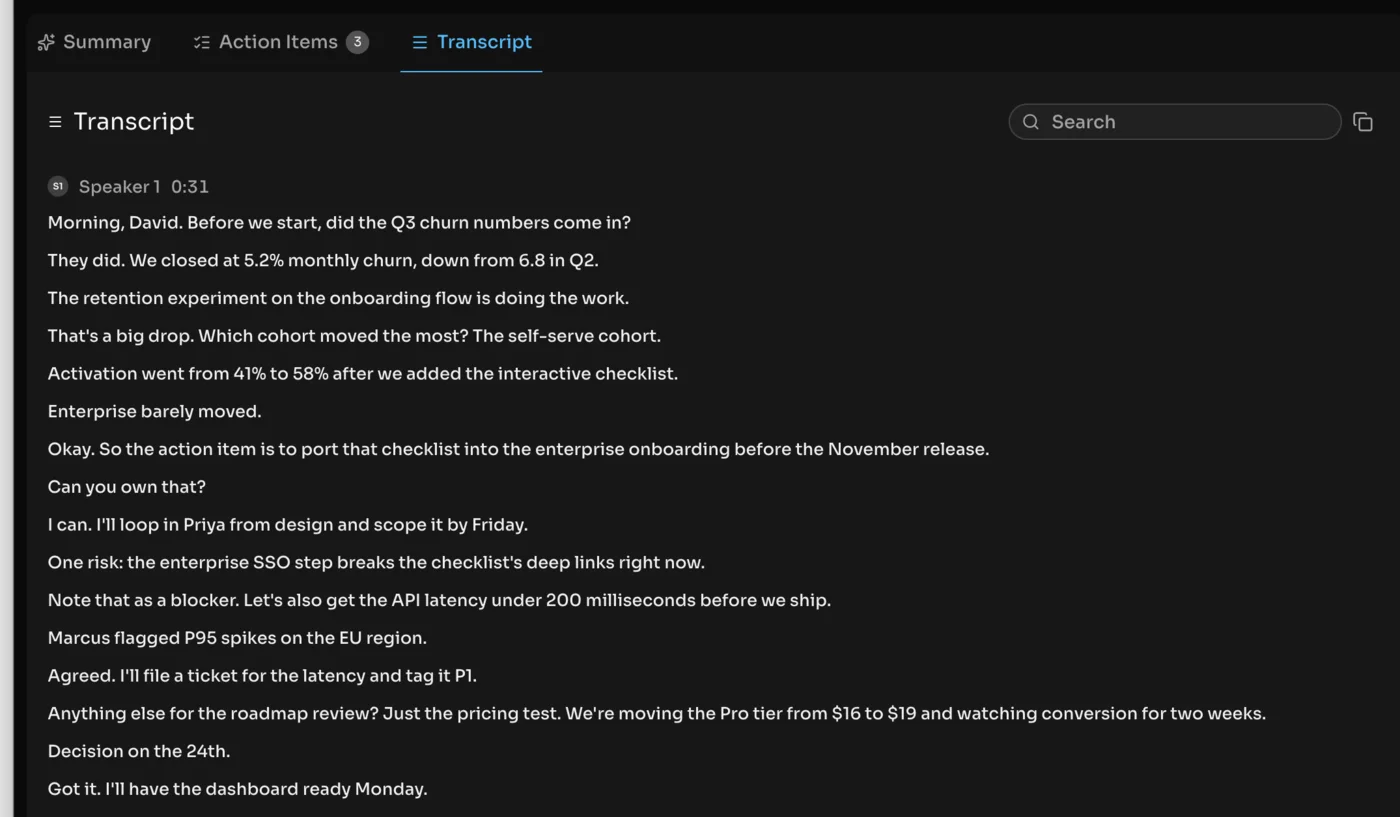
Fireflies came back near-flawless on the same clip. It separated both speakers, kept every churn figure, the activation jump from 41 to 58 percent, and the pricing change, and its only stumble in 80 seconds was turning “right now” into “right. Now,” a punctuation glitch with zero dropped words. On a verbatim transcript it sits a hair behind the cleanest tools, while supporting far more languages.
So the honest read is a near-tie on accuracy, with Fathom holding a narrow edge on a clean raw transcript and the cleaner summary structure. For the job most people care about, turning a call into a correct, searchable summary, both clear the bar comfortably.
Which has the better team features?
Fireflies wins on team features, clearly. If accuracy is where they converge, workflow is where they split hardest, and it comes down to scope: Fathom organizes your calls, Fireflies organizes a team’s.
Day to day, both are low-effort. Connect your calendar and each one auto-joins scheduled meetings, so capture is a default you opt out of rather than a button you remember to press. Both offer a Chrome extension, desktop and mobile apps, and searchable transcripts with clips you can share.
The difference is what happens above a single call. Fireflies turns months of meetings into conversation analytics, talk-time, sentiment, and topic trends across the whole team, and its topic trackers flag every time a competitor or a pricing objection comes up.
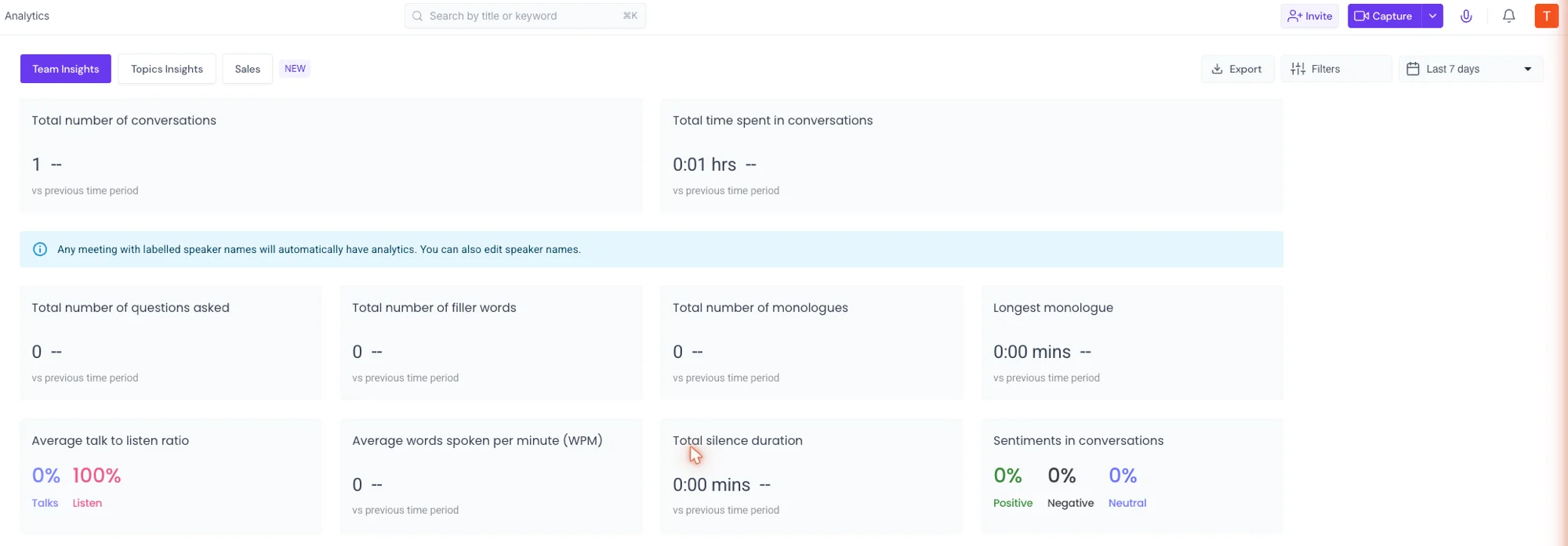
Fathom has team features too, with shared search, playlists, and CRM sync on its paid tiers, but they are aimed at sharing calls rather than measuring them. It does not try to be a conversation-intelligence platform, and for a solo user or a small team that is a feature, not a gap, because the simpler surface is easier to live in.
The integration layer widens the same gap. Fireflies pushes notes and action items into HubSpot, Salesforce, Slack, Notion, and dozens more automatically, the broadest integration set of the notetakers we tested, which for a sales org is usually the whole reason to buy. Fathom’s integrations are narrower and centered on CRM sync at the Business tier, which suits a smaller setup that does not need a meeting feeding ten downstream tools.
Both also meet your calls the same basic way, with a visible bot. Fathom defaults to a meeting bot that joins as a participant, and reserves the quieter bot-free capture for paid Premium; Fireflies likewise sends a notetaker into the call, or you capture bot-free from its desktop app. Neither is invisible by default, so for a sensitive external call where a bot would be awkward, a bot-free tool like Granola is the better shape. And for a regulated team, Fireflies’ $39 Enterprise tier adds SSO, HIPAA, and private storage, where Fathom’s Business tier offers custom data retention.
The split is clean: Fireflies is the better machine for a sales or success org generating hundreds of calls a month, and Fathom is the better tool for the person who just wants their own meetings handled.
Who should pick Fathom?
Fathom is the right call when the notetaker is for you, or for a handful of people, rather than a whole department.
- The solo professional who wants notes for free. Fathom’s unlimited free plan is the most generous of the four we tested, and for most individuals it is the entire product.
- Anyone who values the cleanest summary. In our test Fathom produced the most structured, most accurate summary of any tool, so if you forward notes without editing them, it is the safer bet.
- The small team that shares calls but does not need analytics. Fathom’s $19 Team plan covers shared search and collaboration without paying for conversation intelligence nobody will open.
Read the full Fathom review for the hands-on detail, or the Fathom pricing guide for the plan-by-plan math.
Who should pick Fireflies?
Fireflies is the right call when the notetaker has to serve a team, and especially a sales or success team that lives in a CRM.
- The sales or success org. Cross-meeting search, conversation analytics, and CRM sync on the $19 Business plan are exactly the machine a revenue team buys, at half the per-seat price of Fathom’s CRM tier.
- The team that asks questions across hundreds of calls. AskFred reasons across your whole history, so “what did every prospect say about pricing this quarter” is an answerable question, not a manual scroll.
- The multilingual team. With over 100 languages supported, Fireflies reaches further than most rivals for teams that meet across regions.
See the full Fireflies review for the team-intelligence detail, or the Fireflies pricing guide for the credit-and-storage math.
Final word
If you are choosing for yourself, start with Fathom — its free plan is the most generous we tested and its summaries were the cleanest we tested, so most individuals never need anything else. If you are choosing for a team that has to search, measure, and CRM-sync everyone’s calls, Fireflies does that job for less per seat. For the wider field, see our best AI note taker comparison.
Frequently asked questions
Is Fathom or Fireflies better?
It depends on whether you are buying for yourself or for a team, because the two tools are built for different jobs. We rate Fathom 4.6 out of 5 and Fireflies 4.4, but the ratings matter less than the fit.
Fathom is the better pick for an individual or a small team. Its free plan is genuinely unlimited, its summaries were the cleanest of any notetaker we tested, and it is the simpler tool to live in day to day. If you mostly want great notes from your own calls without paying, Fathom wins.
Fireflies is the better pick for a whole team that needs to search, measure, and CRM-sync everyone's calls. Its AskFred assistant reasons across your entire meeting history, it ships conversation analytics, and its team plan is cheaper than Fathom's once you need CRM sync. For meeting intelligence at the org level, Fireflies wins.
Is Fathom or Fireflies more accurate?
Both are excellent, and on our controlled test meeting the gap was small. We ran the same 80-second, two-speaker clip, loaded with names, numbers, and jargon, through each tool so the comparison was like-for-like rather than anecdotal.
Fathom transcribed the clip perfectly and produced the most accurate, most structured summary of any notetaker we ran it through, keeping every churn figure, the activation jump, the deadline, and the task owners correct. Fireflies came back near-flawless too, catching every number, with a single punctuation slip in 80 seconds and zero dropped words.
So Fathom holds a narrow edge on a clean, raw transcript, while both are more than accurate enough for summaries and search. On a messy call with heavy accents or crosstalk, expect either tool to slip, so proof the transcript before quoting a number.
Which has the better free plan, Fathom or Fireflies?
Fathom, clearly, for most people. Its free plan records, transcribes, and summarizes unlimited meetings and keeps them forever, with no minute cap and no storage cap. For a solo user that free tier is often the entire product, and many never upgrade.
Fireflies has a capable free plan too, with unlimited transcription, the AskFred assistant, and even API access, but it stores only 400 minutes of recordings for the whole team and meters its AI with 20 credits a month. A team that records steadily fills that 400-minute storage cap in under three weeks.
So Fathom's free plan is the one you can live on indefinitely, while Fireflies' free plan is more of a genuine team trial that nudges you toward a paid seat once your storage fills.
Is Fireflies cheaper than Fathom?
For a team that needs CRM sync and analytics, yes. Fireflies puts conversation analytics and CRM sync on its Business plan at $19 a user a month, where Fathom gates CRM sync to its Business plan at $34 a user. So a sales team that wants notes flowing into HubSpot or Salesforce pays roughly half as much per seat on Fireflies.
For an individual the picture flips toward Fathom, because its free plan covers what most solo users need at $0, where they would otherwise pay for a Fireflies Pro seat at $10 to lift the storage and credit caps.
So the cheaper tool depends on scale: Fathom is cheaper for one person who can live on free, and Fireflies is cheaper for a team that needs the paid CRM-and-analytics layer.
Can Fathom search across all your meetings like Fireflies?
Both let you search your past calls, but Fireflies goes further. Fathom makes every call you record a searchable transcript, so finding the meeting where a client mentioned a budget is a keyword search rather than a scroll, and you can clip and share those moments.
Fireflies' AskFred assistant does something a keyword search cannot: it reasons across your entire meeting history. When we asked it to summarize a meeting and list the numbers, it ran a multi-step retrieval, found the right transcript, and built the answer from it.
So for finding a known moment in your own calls, Fathom's search is enough. For asking open questions across hundreds of a team's meetings, Fireflies' AskFred is the tool built for it.
Keep reading
Fathom review: the best free AI notetaker, tested
I fed Fathom a fake meeting and it wrote the cleanest summary of any notetaker I tested. With a genuinely unlimited free plan, it's where to start.
Fireflies AI review: the team brain, not the solo notetaker
I ran a controlled test meeting through Fireflies: a near-flawless transcript, 25+ CRM syncs, and real team analytics. Brilliant for teams, overkill solo.
Best AI note taker: 4 top tools, tested head-to-head
We ran one meeting through Granola, Fathom, Fireflies, and Otter. The best AI note taker depends on whether you take client calls, want it free, or run a team.
Fathom pricing: what you'll pay, and who pays nothing
Fathom pricing starts at $0, and most people stay there. Here's what each paid tier costs, the 30-day free-preview catch, and which plan you actually need.