
Best free AI note taker: which free plan actually lasts
Most free AI notetakers are trials in disguise. We tested the tiers: Fathom's stays unlimited forever, and Granola, Fireflies, and Otter each win a niche.
Contents
What is the best free AI note taker?
If you want one answer: Fathom is the best free AI note taker, because its free plan is the only one that does not quietly run out. It records, transcribes, and summarizes unlimited meetings and keeps them forever, and in our testing it took the cleanest notes of any free plan we tried.
Every other free plan in this roundup is genuinely useful, but each one has a meter that eventually pushes you toward paying. The trick to picking a free notetaker is knowing which meter you will hit first, and whether you will ever hit it at all.
Here is the short version:
- Best free plan overall: Fathom — unlimited meetings, transcripts, and summaries, kept forever.
- Best free for bot-free notes: Granola — joins no call, shows no bot; free for recent history.
- Best free for teams: Fireflies — unlimited transcription plus team-wide search at $0.
The rest of this guide is the long version: what each free tier actually gives you, where the wall is, and which tool fits your specific reason for wanting a free one.
What counts as a truly free AI notetaker?
We started from the four notetakers we have already tested hands-on for this site — Fathom, Granola, Otter, and Fireflies — and added tl;dv, the one free plan named in nearly every roundup that we have not run through our own meetings. For the four we tested, the verdicts below come from real calls run through each tool; the tl;dv section is sourced from the company’s own help documentation and is flagged as not-yet-tested.
The ranking is not by overall product quality. It is by how usable each free tier is for the long run. A tool can be excellent and still have a free plan that is really a 14-day trial in a trench coat, so we weighted the free plan’s ceiling more heavily than the polish of the paid product above it.
For the tools we tested, we did not just read the pricing page. We ran a controlled two-speaker meeting through each one in June 2026 — the same scripted conversation, recorded as clean audio, fed to every tool so the transcripts and summaries were comparable rather than anecdotal. That is how we know which free summaries are actually usable and which free transcripts drop speaker labels or mangle crosstalk, instead of taking the marketing copy at its word.
Every free notetaker meters something. The honest way to compare them is to ignore the marketing word “free” and ask what runs out: minutes, storage, history, or the AI itself. That single question sorts this entire category.
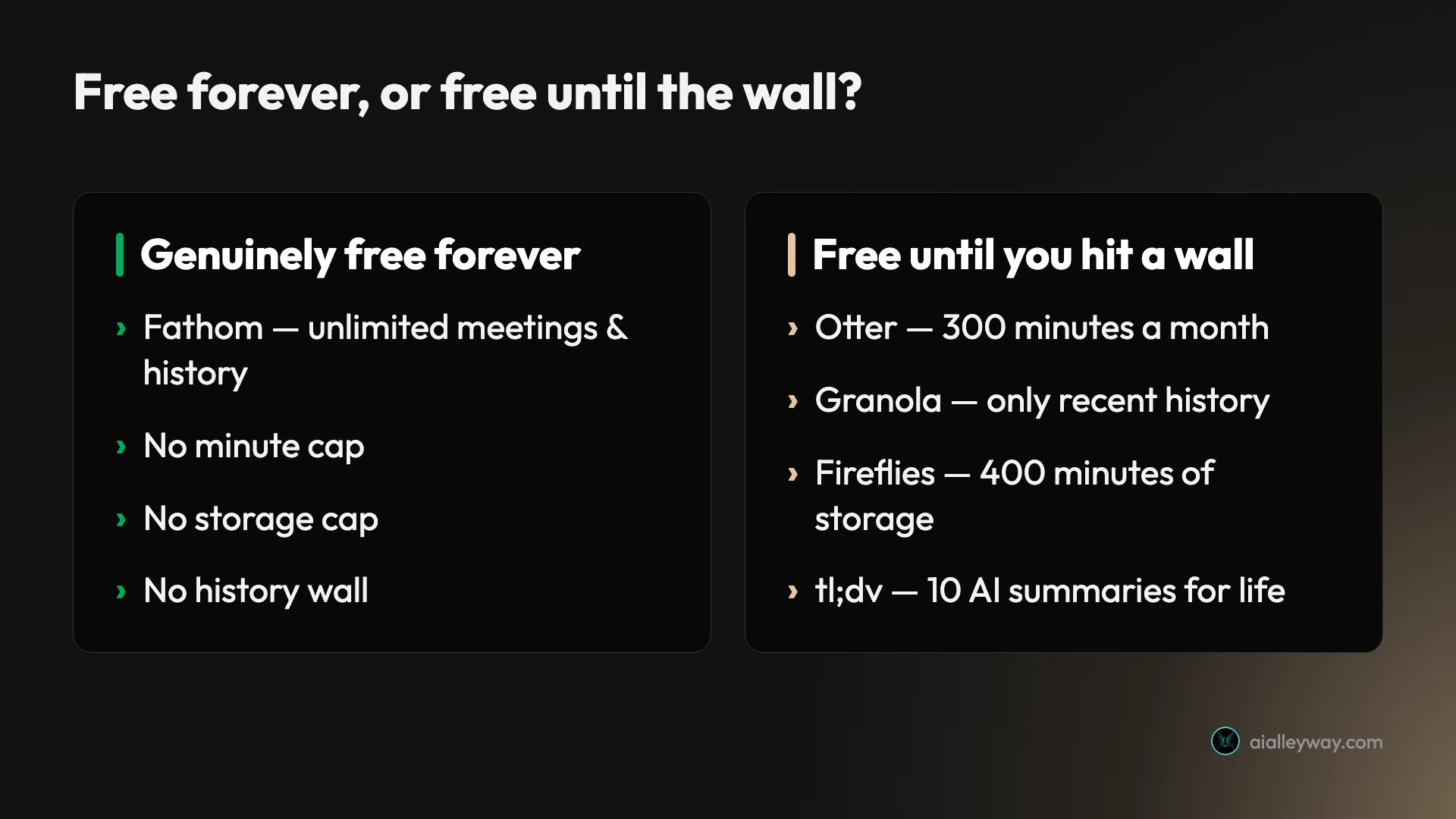
That is the lens for everything below. Fathom is the only plan on the right side of that line; the rest are free until a specific, knowable limit.
The free plans at a glance
| Tool | What’s free | The free-plan catch | Paid from | Alley Rating | Best free for |
|---|---|---|---|---|---|
| Fathom | Unlimited meetings, transcripts & summaries, forever | Advanced AI assistant only in a 30-day preview | $20/mo Premium | 4.6 | Everyone — the default |
| Granola | Unlimited bot-free notes + AI chat | Only recent history; Mac/Windows/iPhone only | $14/user/mo | 4.6 | Bot-free client calls |
| Fireflies | Unlimited transcription + AskFred + API | 400 min storage (whole team), 20 AI credits/mo | $10/user/mo Pro | 4.4 | Team-wide search |
| tl;dv | Unlimited recordings + transcripts | 10 AI summaries for the account’s lifetime | ~$18/user/mo Pro | Not tested | A recording library |
| Otter.ai | 300 transcription min/mo, live transcript | 30-min/meeting cap, 3 lifetime imports | $16.99/mo Pro | 3.8 | Live transcription |
Prices are per user a month, and every price and limit here was checked against each tool’s own pricing page in June 2026. Now the detail, in ranked order.
1. Fathom — best free plan overall

Fathom wins this list because its free plan is the rare one with no asterisk on the part you actually use. It records, transcribes, and summarizes an unlimited number of meetings, and it keeps all of them forever, with no monthly minute allowance and no storage ceiling to manage.
In our hands-on testing Fathom produced the cleanest summary and the most accurate transcript of any notetaker we ran, and that was on the free plan. The summary of a real meeting came back structured into topics and action items that we would have been happy to send without editing.
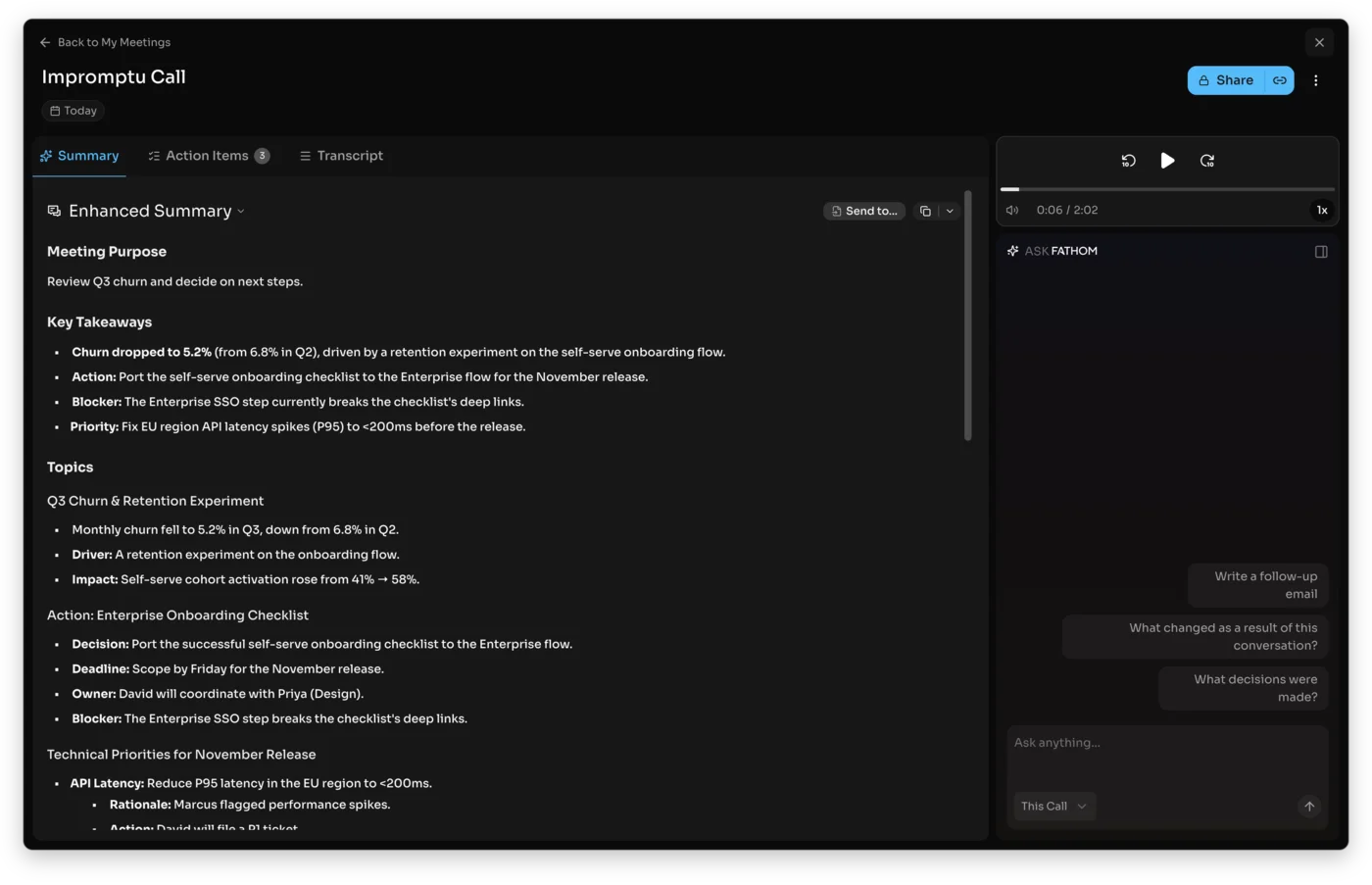
There is one honest caveat, and it is small. When you sign up, you get a 30-day preview of Fathom’s premium AI features — the Ask Fathom conversational assistant, the expert summary templates, and AI-generated action items. After 30 days those advanced extras need a paid plan, but the core recording, transcription, and basic-to-good summary of every call stay free with nothing to cancel.
So nothing forces you off Fathom when the preview ends; you simply drop back to a still-very-usable free tier. For a lot of solo users, that free tier is the entire product, and they never pay at all. You only reach for Premium at $20 a month if you specifically miss the conversational assistant and the BANT- or Sandler-style templates, or for Team at $19 a user if you need shared search across a group.
The only people Fathom’s free plan does not fully serve are large teams who need conversation analytics or CRM sync, and that is what the Business tier is for. For everyone else, this is the free notetaker to start with and probably the one to stay on.
Read the full Fathom review for the hands-on detail, or the Fathom pricing guide for where the paid tiers start to matter.
2. Granola — best free for bot-free notes

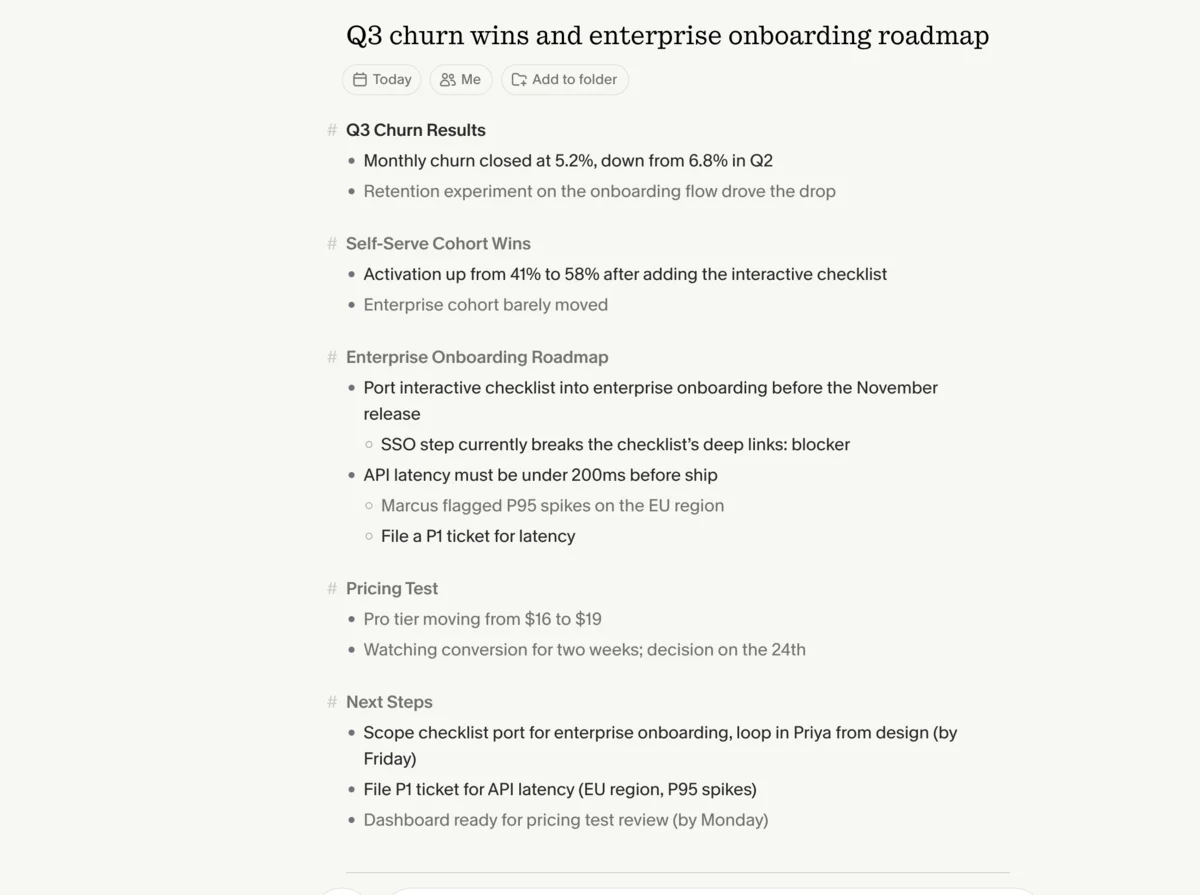
Granola is the free notetaker to pick when you do not want a bot in the meeting. Instead of sending a recorder into your Zoom or Meet, it listens on your own machine and turns the rough notes you type during a call into a full AI summary afterward. Nobody on the other end sees a third-party participant join, which matters for client calls, interviews, and anything sensitive.
The free Basic plan covers that entire experience at $0: unlimited bot-free notes, the AI summary, and the AI chat that lets you ask questions within and across meetings. In testing, the notes it built from a few jotted fragments were genuinely good — it rated a 4.6 for us overall, the same as Fathom.
The catch is history, and it is a specific one. Granola’s free plan does not cap how many meetings you record or how many minutes you use; it caps how far back you can look. You only see a recent window of past notes, and older meetings drop behind the $14-a-user Business plan. Granola does not publish the exact cutoff, describing it only as “limited” history, so treat it as enough for recent calls and not as a permanent archive. Basic works indefinitely if you mostly reference this week’s meetings, but it is not where you keep a searchable record of everything.
Two more limits decide whether Granola fits at all. It runs only on Mac, Windows, and iPhone, with no Android and no web app, so a team split across devices is out. And because it leans on the notes you jot rather than a verbatim bot transcript, it suits working meetings better than ones you need transcribed word for word.
If you want bot-free notes and you mostly act on recent meetings, Granola’s free plan is the best in the category at exactly that job.
The full Granola review covers the bot-free workflow in depth, and the Granola pricing guide explains the history catch in full.
3. Fireflies — best free for teams
Fireflies has the most capable free plan for a group rather than a single person. At $0 it gives unlimited transcription, unlimited AI summaries, the AskFred assistant, transcription in 100-plus languages, a Chrome extension, mobile and desktop apps, and even API access — more than most rivals hand out for nothing.
The reason it is the team pick is search. Fireflies is built so a whole team’s calls land in one searchable place, and you can ask AskFred a question that reaches across dozens of past meetings. That cross-meeting recall is the thing teams actually buy a notetaker for, and it works on the free tier.
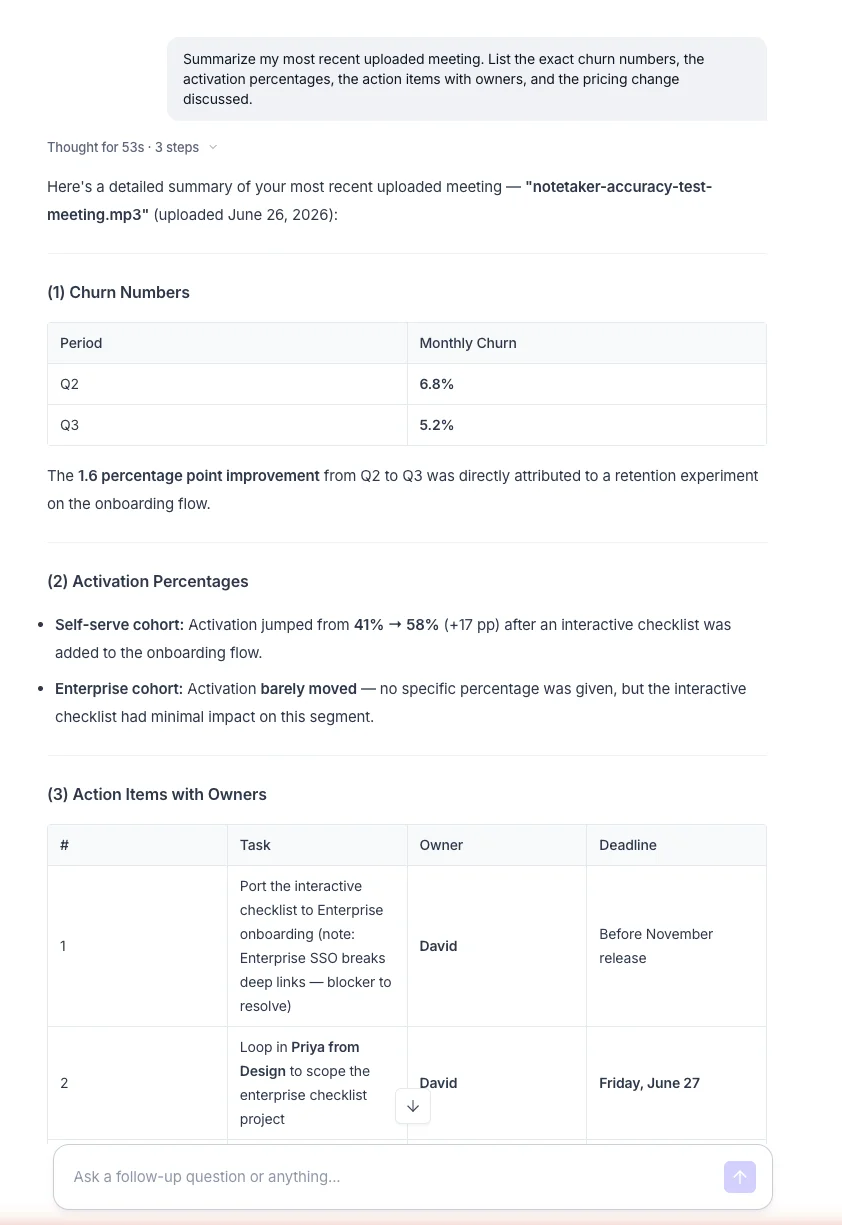
The catch is storage, not minutes. The free plan keeps only 400 minutes of recordings for the entire team, so at three one-hour meetings a week a team fills that cap in under three weeks. There is also an AI meter: 20 AI credits a month, where a single multi-step AskFred query that searches across many meetings can draw down more than one. So transcription is unlimited, but how much you keep and how much AI reasoning you run over it are both rationed.
That makes the Fireflies free plan a real team trial rather than a permanent home. Teams that record steadily upgrade to Pro at $10 a seat or Business at $19 a seat for the storage and the higher credit allowance, and the per-seat price is lower than Otter’s equivalent team tier. For a solo user, the free plan can last longer, but Fathom’s no-storage-cap free tier is usually the better fit for one person.
See the full Fireflies review for the team-search workflow, or the Fireflies pricing guide for the credit-and-storage math.
4. tl;dv — best free for a recording library
One caveat first: we have not run tl;dv through our own meetings the way we tested the four tools above, so this section is a read of its published free plan rather than a hands-on verdict, and the limits below come from the company’s own help documentation.
With that flagged, tl;dv earns its place for a reason the others do not share: its free plan is built around the recording, not the AI. The free tier gives unlimited recordings and transcripts, plus unlimited manually timestamped notes, which makes it a strong free way to build a searchable video library of your calls. The appeal is clear for anyone who rewatches meetings: the recording and transcript of every call, kept without a per-month minute cap.
| tl;dv free plan | What you get |
|---|---|
| Recordings & transcripts | Unlimited |
| Timestamped notes | Unlimited, manual |
| Automatic AI summaries | 10 for the account’s lifetime, then first 10 min per meeting |
| Recording storage | 3 months (archived after 3 days; unarchive to rewatch) |
| Integrations | Metered — 20 integration credits, including HubSpot and Salesforce |
The catch is the AI, and it is a sharp one. The free plan includes only 10 automatic AI summaries for the entire life of the account — not per month. After those first 10 meetings, only the first 10 minutes of each call get an automatic summary, so the AI notes effectively switch off for full meetings while the recording keeps going. Storage is also time-boxed: recordings live for three months and move to archive after three days, where the transcript stays readable but you have to unarchive a call to watch the video again.
So tl;dv’s free plan is excellent if you mainly want the library of recordings and transcripts and you do the thinking yourself, and weak if you want the AI to summarize every meeting the way Fathom or Granola do for free. Pro lifts the AI cap and starts at about $18 a user a month on annual billing. For the AI-notes job most people mean by “free notetaker,” start with Fathom; for a free recording archive, tl;dv is the specialist.
5. Otter.ai — best free for live transcription

Otter is the most recognizable name here, and its free plan still has one real strength: the live transcript. As a meeting runs, Otter streams a running transcript with speaker labels on screen, which is genuinely useful for in-person conversations, accessibility, and following along in real time. It is the free plan to pick if watching the words appear matters more to you than a polished after-the-fact summary.
The reason it ranks last is that its free tier is the most trial-like of the five, and we hit the walls ourselves in testing. Basic gives you 300 transcription minutes a month and caps any single conversation at 30 minutes, so one normal hour-long meeting overflows halfway through. The AI Chat that lets you query a meeting is rationed to 20 questions a month.
The limit that surprised us most was file imports: the free plan allows only three audio or video imports for the entire lifetime of the account, not three a month. Once those three are gone, the import option simply disappears.
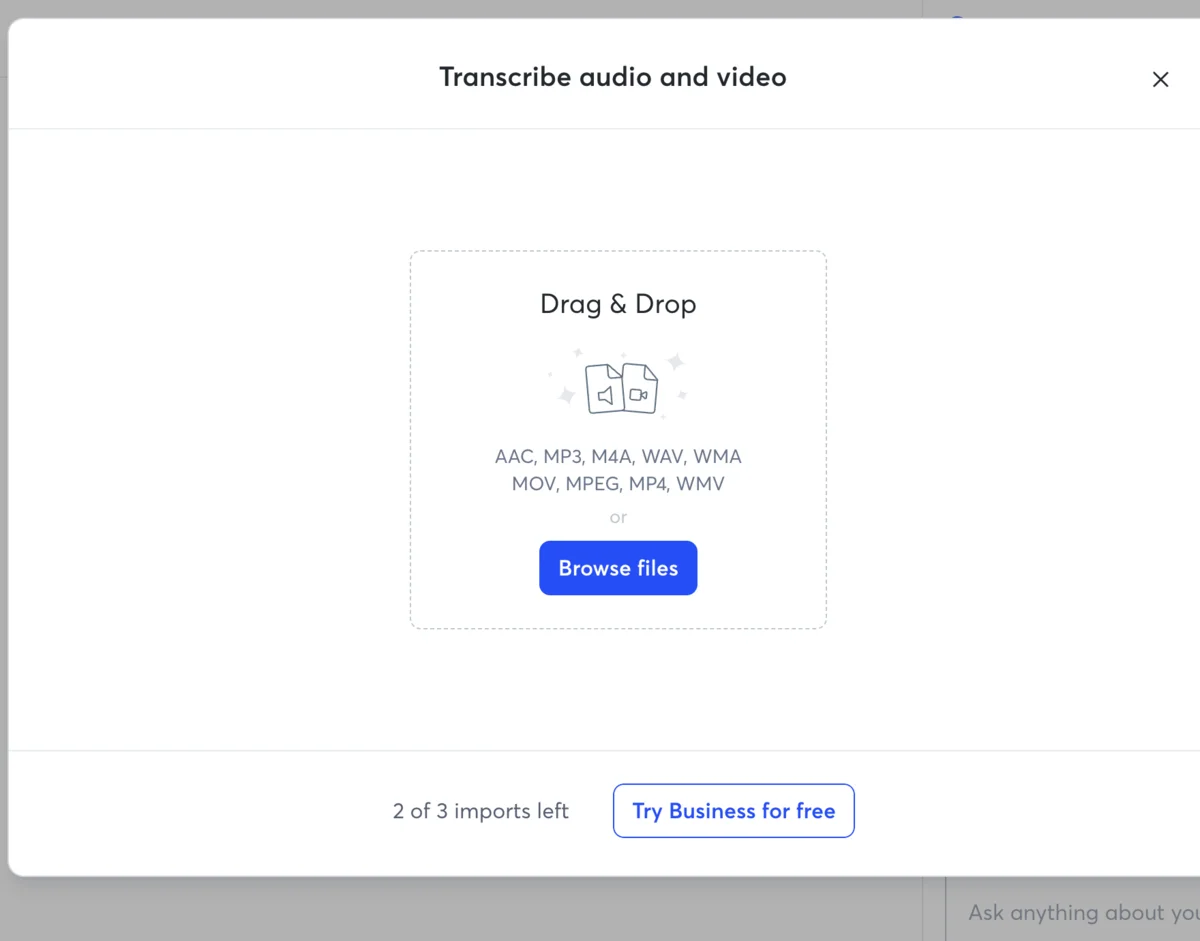
When you hit any of these ceilings, Otter prompts an upgrade rather than a top-up; there is no pay-as-you-go on the free plan, so your only routes are to wait for the monthly reset or move to Pro. Pro at $16.99 a month (about $8.33 on annual billing) lifts the allowances to 1,200 minutes and a 90-minute per-meeting cap, and students with a .edu email get it for roughly $6.67 a month, which is the cheapest sensible way into a usable Otter.
For pure live transcription and speaker labels, Otter’s free plan is fine to trial. For an everyday free notetaker you do not outgrow in a week, the tools above it on this list go much further.
The full Otter review and the Otter pricing guide cover where the caps bite and when Pro is worth it.
Which free AI note taker should you pick?
The free plans split cleanly by what you need, so match your reason to the tool:
- You just want a free notetaker that never runs out → Fathom. Unlimited everything, kept forever. It is the default, and most people stop reading here.
- You do not want a bot visible in the meeting → Granola. Bot-free notes at $0, as long as you mostly reference recent calls and you are on Mac, Windows, or iPhone.
- Your whole team needs to search each other’s calls → Fireflies. The most capable free team plan; plan around the 400-minute shared storage cap.
- You mostly want a free library of recordings to rewatch → tl;dv. Unlimited recordings and transcripts, as long as you do not need the AI to summarize every meeting.
- You want a live transcript with speaker labels → Otter. Best for real-time and in-person, but the tightest free caps, so expect to upgrade if you use it daily.
If two of those describe you, default to Fathom and add a second tool only for the specific job it does better, because Fathom’s free plan is the one least likely to interrupt you with a paywall.
Free notetakers by platform and meeting type
One practical filter narrows the list before price does: where you work and how you meet.
- Android or a web browser: Granola is out — it runs only on Mac, Windows, and iPhone. Otter, Fathom, and Fireflies all have Android and web access, and Otter’s web app is the most complete of the three for working entirely in a browser.
- In-person meetings, no video call: Otter’s live transcript is built for a phone on the table capturing a room, and Granola’s local listening works without a meeting link too. Bot-based tools that join a call link are the wrong shape for a face-to-face conversation.
- Calls where a visible bot would be awkward: Granola is the only free pick here that joins nothing and shows no participant, which is why it leads for external and client-facing calls.
- Heavy rewatching of recorded calls: tl;dv’s unlimited free recordings make it the library, where Fathom keeps the meeting but the others lean on the summary over the video.
Match the platform constraint first, then pick on the free-plan limits above — there is no point ranking a tool that does not run on your phone.
Final word
The best free AI note taker is the one whose meter you will never hit, and for most people that is Fathom — start there, and reach for Granola, Fireflies, tl;dv, or Otter only for the narrower job each one owns. For the full head-to-head behind these picks, see our best AI note taker comparison.
Frequently asked questions
What is the best free AI note taker?
Fathom is the best free AI note taker for most people. Its free plan records, transcribes, and summarizes unlimited meetings and keeps them forever, with no minute cap, no storage cap, and no history wall. In our hands-on testing it also produced the cleanest summary and most accurate transcript of any notetaker we ran, free or paid.
The other free plans win narrower jobs. Granola is the best free option if you want bot-free notes that no one else on the call sees. Fireflies is the best free plan for a team that needs to search across everyone's calls. Otter is the one to pick if you mainly want a live transcript with speaker labels.
But if you just want a free notetaker that does not quietly turn into a paywall after a few meetings, Fathom is the default answer, and most people who start there never pay.
Is there a truly free AI note taker with no limits?
Fathom is the closest thing to a truly unlimited free AI notetaker. Its free tier puts no cap on how many meetings you record, how many minutes you transcribe, or how long your notes are kept, which is rare in this category. You sign up, and the core recording, transcription, and summary stay free indefinitely.
The one nuance is that Fathom gives you a 30-day preview of its advanced AI features, the conversational assistant and the expert summary templates, and those specific extras need a paid plan once the preview ends. The everyday product, full meeting capture with a solid AI summary, does not.
Every other free plan we tested has a real ceiling somewhere: Otter caps minutes, Granola caps history, Fireflies caps storage, and tl;dv caps the AI. Fathom is the one that does not make you watch a meter.
What's the catch with free AI notetaker plans?
Most free notetaker plans are trials wearing a 'free forever' label, and the catch is just hidden in a different place on each one. The trick is knowing which meter each tool runs, because that is what decides when the free plan stops being enough.
Otter caps you at 300 transcription minutes a month and cuts any single meeting off at 30 minutes. Granola lets you record unlimited meetings but only shows a recent window of history, so your older notes disappear behind the paywall. Fireflies gives unlimited transcription but stores only 400 minutes for the whole team and meters its AI by credits. tl;dv records unlimited meetings but gives only 10 AI summaries for the life of the account.
Fathom is the exception that caps none of those, which is why it tops the list. Read each plan's limit before you commit, not after you have a month of notes trapped inside it.
Which free AI notetaker is best for teams?
Fireflies has the most capable free plan for a team. At $0 it gives unlimited transcription, unlimited AI summaries, the AskFred assistant, and even API access, and crucially it lets a whole team's calls be searched in one place, which is the thing teams actually buy a notetaker for.
The limit to plan around is storage: the Fireflies free tier keeps only 400 minutes of recordings for the entire team, and at a few hour-long meetings a week a team fills that in under three weeks. So the free plan is a genuine team trial rather than a permanent home, and active teams upgrade to the $10-a-seat Pro or $19-a-seat Business plan for the storage and the AI-credit headroom.
Fathom is the better free pick if your 'team' is really one or two people, since its free plan never hits a storage wall at all.
Can I use a free AI notetaker without a meeting bot?
Yes. Granola is the best free notetaker that joins no meeting and shows no bot to anyone on the call. Instead of sending a recorder into your Zoom or Meet, it listens locally and turns the rough notes you jot into a full AI summary, so the people you are meeting never see a third-party participant in the attendee list.
Granola's free Basic plan covers unlimited bot-free notes and its AI chat at $0. The catch is history: the free plan only shows a recent window of past meetings, and older notes need the $14 Business plan to stay accessible. It also runs only on Mac, Windows, and iPhone, with no Android or web app.
For sensitive client calls, external interviews, or anywhere a visible bot would be awkward, Granola's bot-free free plan is the one to start with.
Keep reading
Best AI note taker: 4 top tools, tested head-to-head
We ran one meeting through Granola, Fathom, Fireflies, and Otter. The best AI note taker depends on whether you take client calls, want it free, or run a team.
Fathom review: the best free AI notetaker, tested
I fed Fathom a fake meeting and it wrote the cleanest summary of any notetaker I tested. With a genuinely unlimited free plan, it's where to start.
Granola AI review: it took better notes than I did
I fed Granola six rough bullets and a messy call; it returned a clean summary with details I never typed. Why this bot-free notepad earns its hype.
Free AI clip generator: only one export came back clean
Four AI clip generators, one 35-minute file, two of them on genuine free plans. Only CapCut returned a file with no watermark. Here is what the rest hand back.