
Granola pricing: the AI notetaker's free-plan catch
Granola pricing, for the AI notetaker, runs free or $14 a user. Its free plan hides your older notes, and that limited history is the catch that makes you pay.
Contents
The short answer: what Granola actually costs

Granola, the bot-free AI meeting notetaker we rated 4.6 out of 5 in our hands-on review, has one of the simplest pricing tables in the category. There is a free Basic plan at $0, a Business plan at $14 a user a month, and an Enterprise plan at $35 a user. There is no separate individual paid tier, so a solo user who wants the full product pays the same $14 that a team pays per seat.
Most people pay one of two numbers: $0 or $14. And the thing that decides which is not minutes, transcription, or credits, the way it is with every other notetaker. Granola does not meter your meetings at all. The free plan limits one thing only, your access to older history, and that limit is the entire reason anyone upgrades.
| Plan | Price (per user / month) | History | Best for |
|---|---|---|---|
| Basic | $0 | Limited window | Trying it, recent-notes use |
| Business | $14 | Unlimited | Individuals and teams who keep an archive |
| Enterprise | $35 | Unlimited + admin controls | Orgs with a security review |
How Granola pricing works: it meters memory, not meetings
Every other notetaker charges you for usage. Otter caps your transcription minutes, Fireflies caps stored history and meters AI credits, and the paid tiers buy you more of each. Granola is built differently, and that difference is the whole reason its pricing feels unusually simple: it does not meter your meetings at all.
On the free Basic plan you can record and summarize as many meetings as you want. There is no minute cap, no credit allowance, and no per-meeting limit. What the free plan does limit is history: you only see a recent window of your past notes, and older meetings drop out of reach until you pay. The constraint is not how much you record; it is how far back you can look.
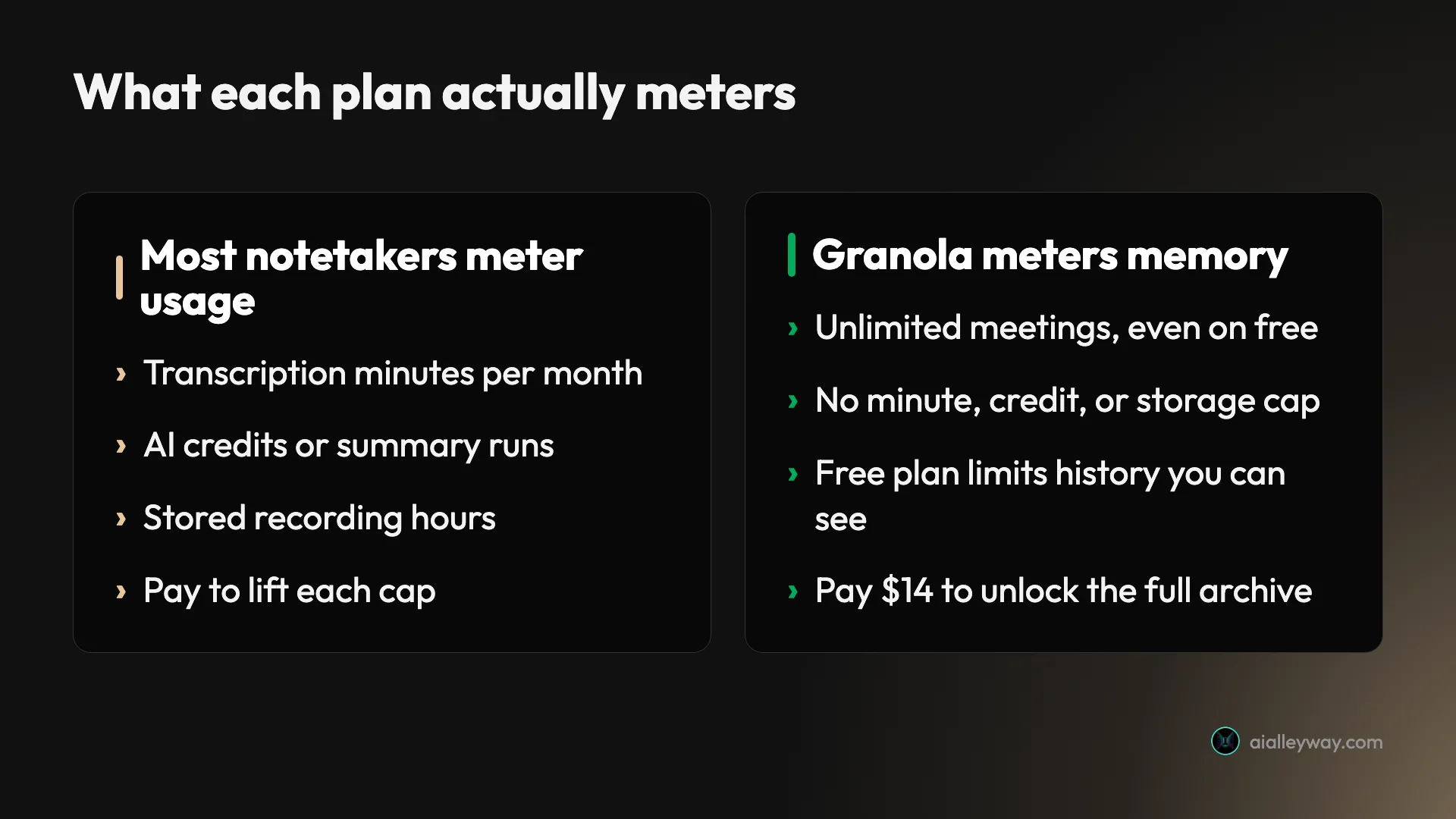
That is why the upgrade question is so clean. You are not buying more capacity or more AI; you are buying the right to keep your whole archive searchable. Business at $14 turns the limited window into unlimited history and adds the integrations and API that let those notes flow into the tools you already use. Enterprise at $35 layers on the security and admin controls a big organization needs.
The only real decision is whether losing access to your older notes would cost you anything. If it would, you pay $14. If it would not, you stay free.
How much does each Granola plan cost?
Here is every plan, priced per user a month, verified on Granola’s pricing page in June 2026. Granola does not display an annual discount, so the monthly per-user figure is the price. One note if you have read other pricing guides: some still list a separate Individual plan around $18 a month, or a specific free-plan cap like “25 notes.” Those describe an older structure. The current page shows the three plans below and describes the free limit simply as limited history.
| Plan | Per user / month | What you get | The line that matters |
|---|---|---|---|
| Basic | $0 | Bot-free notes, AI chat, shared folders, custom templates, multi-language, training opt-out | Unlimited note-taking, but only a limited window of history |
| Business | $14 | Everything in Basic, plus unlimited history, advanced AI models, integrations, centralized billing, MCP, API | The plan that keeps your whole archive and connects your stack |
| Enterprise | $35 | Everything in Business, plus SSO, priority support, org-wide auto-deletion, admin controls, team-wide training opt-out | Security and control for a regulated org |
Basic is a real working tier, not a teaser. At $0 you get Granola’s signature bot-free capture, the AI summary that builds itself from the rough notes you jot during the call, the AI chat that answers questions within and across meetings, shared folders, custom templates, and the option to opt out of model training. The only thing held back is access to your older meeting history.
Business at $14 a user is the plan most committed users land on, because it removes the one limit that matters and adds the connective tissue. Unlimited history means every past call stays searchable; the integrations push notes into Attio, Notion, Slack, HubSpot, Affinity, and Zapier; and the API and MCP support let you wire Granola into your own tools. The advanced AI models also come in here.
Enterprise at $35 a user is the security and control tier. It adds SSO, priority support and analytics, organization-wide auto-deletion policies, admin controls over sharing and the API, a team-wide training opt-out, and usage notifications. If a procurement or security review stands between you and a notetaker, this is the plan that clears it.
How much does Granola cost a team?
The per-user price is simple, but multiply it by your headcount and the real number shows up. Because Granola does not publish volume discounts, the math is perfectly linear, which makes it easy to model.
| Team size | Business ($14/user) | Enterprise ($35/user) |
|---|---|---|
| 1 user | $14/mo · $168/yr | $35/mo · $420/yr |
| 5 users | $70/mo · $840/yr | $175/mo · $2,100/yr |
| 10 users | $140/mo · $1,680/yr | $350/mo · $4,200/yr |
| 25 users | $350/mo · $4,200/yr | $875/mo · $10,500/yr |
For an individual, the decision is $0 versus $14. The free plan covers the whole product except old-history access, so a solo user who mostly works from recent calls can stay free, and one who wants a permanent archive pays $14 a month. There is no cheaper individual tier to split the difference; $14 is the price of unlimited history.
For a small team, Business at $14 a user is cheap for what it is: a five-person team pays $70 a month, or $840 a year, for bot-free notes that stay searchable forever and sync into a shared stack. That undercuts the equivalent team tier on Otter ($30 a user) by more than half.
For a large or regulated org, the jump to Enterprise at $35 is about control, not capacity. The product is the same; what you are paying for is SSO, admin governance, and org-wide retention policy. If you do not need those, a big team can run on Business at $14 indefinitely.
The free plan’s catch: limited history
The single thing to understand about Granola pricing is what “limited history” actually means, because it is the line that decides whether you ever pay.
| On the free Basic plan | |
|---|---|
| Meetings you can record | Unlimited |
| AI summaries and AI chat | Included |
| Bot-free capture | Yes |
| Older meeting history | Limited window only |
| Integrations and API | No (added on Business) |
On Basic, Granola keeps a recent window of your meetings fully accessible, and older notes move out of reach until you upgrade. It does not delete your recording in real time the way it deletes the source audio, and it does not stop you making new notes; it simply gates how far back into your own archive you can see. Granola does not publish the exact size of that window, so treat it as “your recent meetings stay; your older ones get locked.”
That design is gentler than a hard cap in one way and harsher in another. It is gentler because you are never cut off mid-month from recording, the way Otter’s 300-minute free cap can strand you. It is harsher because the value of a notetaker compounds over time: the longer you use Granola, the more your older notes are worth, and the free plan is engineered so that exactly when the archive becomes valuable, you need to pay to keep seeing it.
So the honest read on the free plan is that it is excellent for two cases and wrong for one. It is excellent for trying Granola on real meetings, and excellent for anyone who genuinely only references recent calls. It is wrong for anyone building a long-term, searchable record of every conversation, which is the job most people actually buy a notetaker for, and that person should plan on the $14 Business plan from the start.
What Granola’s pricing page doesn’t tell you
The pricing is honest, but a few things are easy to miss until they shape your decision.
The free plan limits history, not usage
This is the big one, and it inverts what you expect. Most free notetaker plans cap minutes or meetings; Granola’s caps neither. You can record unlimited calls on Basic forever. What you cannot do is see your older notes once you pass the history window, so the upgrade trigger is retention, not volume.
There is no annual discount
Granola does not display annual billing on its pricing page, so unlike most software, paying for a year up front does not lower the per-user rate. The $14 Business and $35 Enterprise figures are monthly per-user prices, full stop. Budget the headline number, because there is no committed-term saving to plan around.
Granola runs only on Mac, Windows, and iPhone
This is a pricing factor even though it is not a price. Granola has no Android app and no web version, so before any plan makes sense, every person who needs to use it must be on a supported device. For a team with Android users, the cheapest workable option is not Granola at any tier; it is a cross-platform rival like Otter or Fathom.
| Platform | Granola | Otter / Fathom |
|---|---|---|
| Mac and Windows | Yes | Yes |
| iPhone | Yes | Yes |
| Android | No | Yes |
| Web browser | No | Yes |
There is no separate individual plan
Because the only paid individual option is the $14 Business plan, a solo user who wants unlimited history pays the same per-seat price a company does. There is no cheaper “personal” tier, so the choice for an individual is genuinely binary: free with limited history, or $14 with all of it.
Enterprise is a control tier, not a power tier
The jump from $14 to $35 buys governance, not a better notetaker. SSO, admin controls, org-wide retention, and a team-wide training opt-out are the difference. If you are a small team without a compliance requirement, there is no product reason to climb to Enterprise, so do not let the existence of a higher tier make you assume Business is the limited one.
Is Granola worth paying for?
For the right user, the $14 is easy to justify, because it is the cheapest paid bot-free notetaker for an individual and it buys the one thing the free plan withholds. In our hands-on review its note-enhancement, merging the rough lines you type with the captured audio, produced the most complete write-up of any tool we tested. The product earns its price; the only question is whether you need the paid tier at all.
The honest answer depends on how you use it. If you take notes during calls and want the quietest possible footprint, with nothing joining the meeting, Granola is worth paying for the moment your archive matters to you. If you only ever look at this week’s meetings, the free plan may be the whole product, and you can stay at $0 indefinitely without missing anything.
So the worth-it test is simply the history question asked from the other side: would you pay $14 a month to never lose access to a past note? For anyone who runs client calls, manages a pipeline, or refers back to decisions made weeks ago, the answer is usually yes, and at $14 it is among the easiest calls in the category. For a light, recent-only user, the answer is no, and Granola is honest enough to let you keep using it for free.
Which Granola plan should you pay for?
- You are trying Granola, or you only reference recent meetings. Stay on Basic at $0. The free plan is the full product minus old-history access, so there is no reason to pay until the limited window starts hiding notes you actually need.
- You want a permanent, searchable archive, or you live in Slack, Notion, or a CRM. Business at $14 a user. Unlimited history plus the integrations and API are the entire reason to upgrade, and for an individual it is the cheapest paid bot-free notetaker going.
- You run a team that needs admin governance. Enterprise at $35 a user, but only if you actually need SSO, org-wide retention, and admin controls. A team without a compliance requirement runs fine on Business.
- Skip Granola entirely if anyone who needs it is on Android or works in a browser, since Granola ships no Android or web app. No plan fixes a platform gap, so a cross-platform notetaker is the cheaper real option there.
Is Granola cheaper than Otter, Fathom, and Fireflies?
Granola does not price like its rivals, so a straight sticker comparison misses the point. Here is how the four AI notetakers line up on the numbers that decide a switch, with competitor prices current as of June 2026.
| Tool | Free plan | Paid from | Top per-user tier | Best price for |
|---|---|---|---|---|
| Granola | Unlimited notes, limited history | $14/user | $35 (Enterprise) | Bot-free capture, cheapest of the bot-free tools |
| Otter | 300 min/mo, 30-min cap | $16.99/mo | $30 (Business) | Cross-platform transcription |
| Fathom | Unlimited, full history | $20/mo | $34 (Business) | Free use |
| Fireflies | Unlimited transcription, 400-min storage | $10/user | $39 (Enterprise) | Teams |
For an individual who wants a full paid plan, Granola’s $14 is the cheapest of the group, undercutting Otter’s $16.99 and Fathom’s $20. For someone who wants to stay free with a permanent archive, Fathom is the better pick, because its free plan keeps full history where Granola’s hides it. For a team at scale, Fireflies’ $10-a-seat entry is the lowest, though it is bot-based where Granola is bot-free.
The deciding factor is rarely the dollar figure. It is the model: Granola is the only one of the four that captures bot-free and builds the summary from your own notes, so you pay $14 for a workflow the others do not offer, not for a cheaper version of theirs. Our Otter pricing guide, Fathom pricing guide, and Fireflies pricing guide break down each of those in the same detail.
If Granola costs too much: cheaper options
If $14 does not fit, or the platform gap rules Granola out, two notetakers solve a similar job depending on what you were paying for.
- Fathom is the move if you want a permanent archive for free. Its free plan records, transcribes, and summarizes unlimited meetings with full history kept forever, which is exactly the limit Granola’s free plan imposes, and it runs cross-platform through the browser. See our Fathom review.
- Otter is the move if you need Android or a web app, or live in-the-room transcription. It works on every platform Granola does not, though its free tier is tighter at 300 minutes a month and its team price is higher. See our Otter review.
For the full field, our Granola alternatives shortlist ranks every swap, and the best AI note taker roundup runs each through the same test meeting.
Final word
Granola pricing is the simplest in the category once you stop looking for a usage meter, because there isn’t one. You record as much as you want for free; you pay $14 a user only when you need your older notes to stay accessible and your stack connected, and $35 only when an organization needs governance on top. There is no annual discount to chase and no per-minute math to model.
So the decision is a single question: is your archive worth $14 a month to keep? Run your real meetings through the free Basic plan for a few weeks, and let the answer come to you. If losing your old notes would cost you nothing, stay free. If it would, the $14 Business plan is among the cheapest yes-es in the category, and our hands-on Granola review covers whether the product itself is the right fit before you commit.
Frequently asked questions
How much does Granola cost?
Granola has three tiers: a free Basic plan at $0, Business at $14 per user a month, and Enterprise at $35 per user a month. There is no separate individual paid plan, so a solo user who wants the full product pays the same $14 Business price as a team does per seat.
Most people pay one of two numbers. The free Basic plan covers unlimited bot-free note-taking with the AI chat, but it only lets you see a limited window of recent meeting history. Business at $14 adds unlimited history plus integrations like Slack, Notion, and HubSpot, an API, and the advanced AI models.
Granola does not publish an annual discount, so the per-user monthly price is what you pay, which makes it one of the simplest pricing tables in the notetaker category.
Is Granola free?
Yes, Granola has a genuinely useful free plan called Basic. It captures your meetings bot-free, writes the AI summary from the rough notes you jot, runs the AI chat within and across meetings, and supports shared folders and custom templates, all at $0.
The one real limit is history. The free plan only shows a limited window of your past meetings, so older notes drop out of reach until you upgrade. It does not cap how much you record; it caps how far back you can look. That makes Basic perfect for trying Granola and for people who mostly reference recent calls, but not for keeping a permanent, searchable archive.
If you need every past meeting to stay accessible, that is the single reason most people move to the $14 Business plan.
What does Granola's free plan actually limit?
Unlike most notetakers, Granola's free plan does not meter minutes, transcription, or AI credits. You can record and summarize as many meetings as you want on Basic at $0. The limit is on history: the free plan only keeps a limited window of your past notes visible, and older meetings become inaccessible until you upgrade.
So the free-plan trade-off is unusual. Rivals like Otter cap you at 300 minutes a month and Fireflies caps stored history at 400 minutes; Granola caps neither your recording nor your minutes, only your access to old notes.
The practical effect is that Basic works indefinitely if you mostly act on recent meetings, but the moment you need to search back through months of calls, the limited history is what pushes you to the $14 Business plan.
Is Granola cheaper than Otter or Fathom?
For an individual who wants the full paid product, Granola is the cheapest of the three at $14 a month, against Otter's $16.99 Pro plan and Fathom's $20 Premium plan (rival prices as of mid-2026). Its bot-free capture and note-enhancement are also a different model from the bot-based rivals, so the comparison is about fit as much as price.
Fathom is cheaper if you can live on a free plan, because its free tier is unlimited with full history kept forever, where Granola's free plan limits history. So a cost-driven user who wants a permanent free archive often picks Fathom, while someone who wants the quietest, bot-free footprint pays Granola's $14.
One caveat that affects the comparison: Granola runs only on Mac, Windows, and iPhone, with no Android or web app, so for a team split across devices, Otter or Fathom may be the only workable choice regardless of price.
Does Granola have a free trial?
Granola's free Basic plan is effectively the trial, and it does not expire. You can use the bot-free capture, the AI summaries, and the AI chat indefinitely at $0, with the only limit being the window of past history you can see.
That is different from a time-boxed paid trial that reverts after 14 or 30 days. With Granola you simply keep using Basic for as long as you like, and you upgrade to the $14 Business plan when you decide the unlimited history and the integrations are worth paying for.
Because the free plan is open-ended, the honest way to evaluate Granola is to run your real meetings through Basic for a few weeks, then ask whether losing access to your older notes would actually cost you anything. If it would, that is your signal to pay.
Keep reading
Granola AI review: it took better notes than I did
I fed Granola six rough bullets and a messy call; it returned a clean summary with details I never typed. Why this bot-free notepad earns its hype.
Granola AI alternatives: 5 better notetakers, tested
The best Granola alternatives for AI meeting notes, tested. Need Android, saved video, or team-wide search? Here's the notetaker that fixes Granola's gaps.
Best AI note taker: 4 top tools, tested head-to-head
We ran one meeting through Granola, Fathom, Fireflies, and Otter. The best AI note taker depends on whether you take client calls, want it free, or run a team.
Granola vs Fireflies: quiet notepad or team brain?
Granola vs Fireflies: Granola is the bot-free notepad for client calls, Fireflies the bot-based team brain for search and CRM. Which one fits your meetings?