
Claude AI review: brilliant at words, strange about limits
A Claude AI review from a paying Max account. My $100 Max 5x plan invoiced at $111.11, three usage meters run at once, and overflow is billed at API rates.
Contents
Is Claude AI worth it?

If your work is words, documents and code, Claude is the assistant I would buy first, and I pay for it myself on the Max plan. What nobody explains before you subscribe is that you are not buying a flat monthly allowance, you are buying metered capacity across three separate meters that Anthropic never puts a number on. The writing quality earns the money; the billing model is the part that surprises people.
What does Claude actually do?
Strip away the branding and Claude is a text engine with an unusually good sense of instruction. You type, it answers, and the answers hold their shape over long documents in a way that most assistants stop doing around the third turn.
That sounds like faint praise until you have watched the alternative. Ask most assistants to avoid a particular word and they will comply for two messages, then quietly reintroduce it once the conversation gets complicated. Claude keeps the constraint in view.
Projects, and why they change the economics
Projects are the feature that turns Claude from a chat window into a workspace. A Project holds a persistent set of files and standing instructions, and every conversation started inside it inherits both.
The obvious benefit is that you stop re-explaining yourself. The non-obvious benefit is financial. Anthropic’s usage documentation states that content in Projects is cached and does not count against your limits when it is reused, which means the 40-page brief you paste into a fresh chat every morning is costing you allowance that the same document in a Project would not.
Pro and above get unlimited Projects. On the free tier this is the main thing you are missing.
Artifacts, for anything you would rather see than read
Artifacts open a live pane beside the conversation. Ask for a chart, an SVG, a working HTML page or a small interactive tool, and it renders as an object you iterate on rather than a code block you copy somewhere else to test.
This is the closest Claude gets to visual output, and it is worth understanding the distinction. Claude will not draw you a picture, but it will build you a functioning thing. For a diagram, a data visualisation or a landing page mockup, that is usually the better outcome anyway.
The model picker, and the dial underneath it
Four models sit in the list on a paid plan: Fable 5 for the hardest problems, Opus 5 for complex tasks, Sonnet 5 as the efficient everyday option, and Haiku 4.5 for quick answers. A “More models” entry sits below them for anything older.
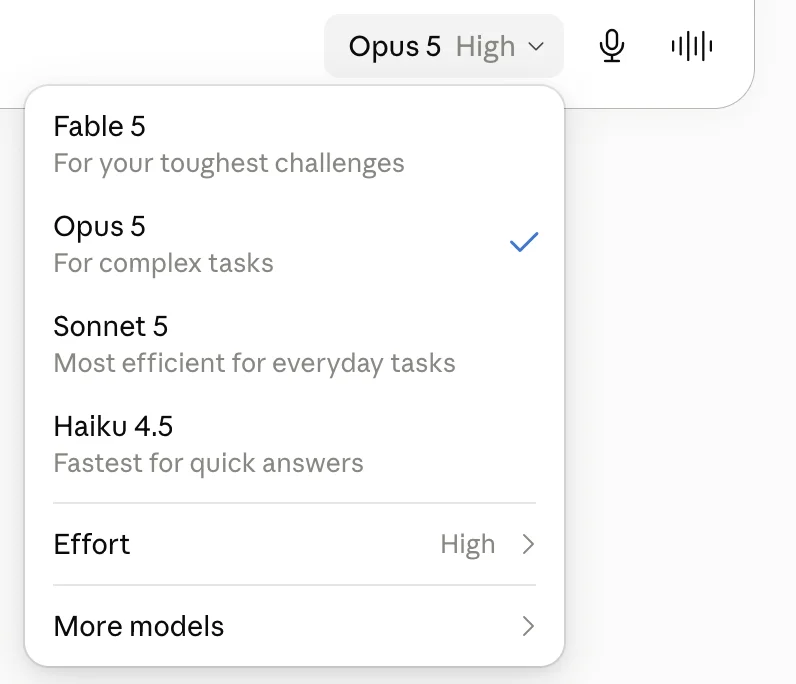
Under the model list is Effort, which runs Low, Medium, High, Extra and Max, and defaults to High. Anthropic’s own tooltip is blunt about the trade: higher effort means a more thorough answer, but it takes longer and uses your limits faster.
Two clicks therefore decide both how hard the model thinks and how fast you burn your plan. I have not seen another consumer assistant expose that lever this plainly, and most people never open the menu far enough to find it.
| Effort level | When I use it |
|---|---|
| Low | Reformatting, extraction, quick lookups |
| Medium | Most drafting and editing work |
| High (default) | Anything where the reasoning matters more than the speed |
| Extra | Hard analysis over a large document set |
| Max | Rare; problems I would otherwise spend an afternoon on |
The honest summary is that High is the wrong default for most of what people actually type into an assistant. Reformatting a list does not need the model’s full deliberation, and paying for it is a habit rather than a decision.
Set it to Medium, work for a week, and see whether you notice. In my experience the answers get shorter before they get worse, and shorter is often the improvement.
Skills, connectors and plugins
Claude has a skills directory, and it is further along than I expected. Skills are packaged instruction sets you install with a slash command, browsable from the Customize screen, filterable and sortable, with install counts on every card.
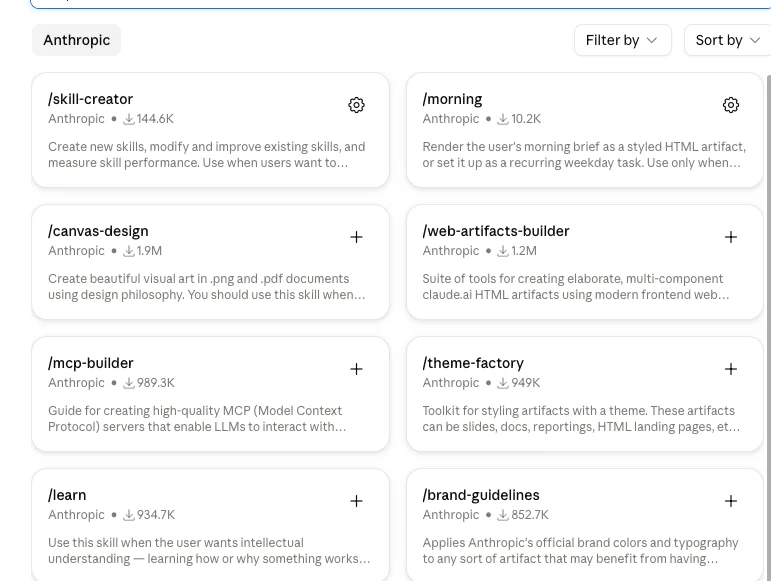
The counts tell you what people actually use. On the Anthropic-authored shelf, /canvas-design shows 1.9M installs and /web-artifacts-builder 1.2M, followed by /mcp-builder at 989.3K, /theme-factory at 949K, /learn at 934.7K and /brand-guidelines at 852.7K. There is a /skill-creator skill whose job is writing new skills, which tells you where this is heading.
Connectors and Plugins sit alongside them on the same Customize screen, with a connector directory Claude can search on your behalf when a conversation looks like it needs one.
Memory, including a raid on the competition
Three memory controls live in Capabilities. Claude can search and reference your past chats, generate memory from your chat history, and import memory from another AI provider.
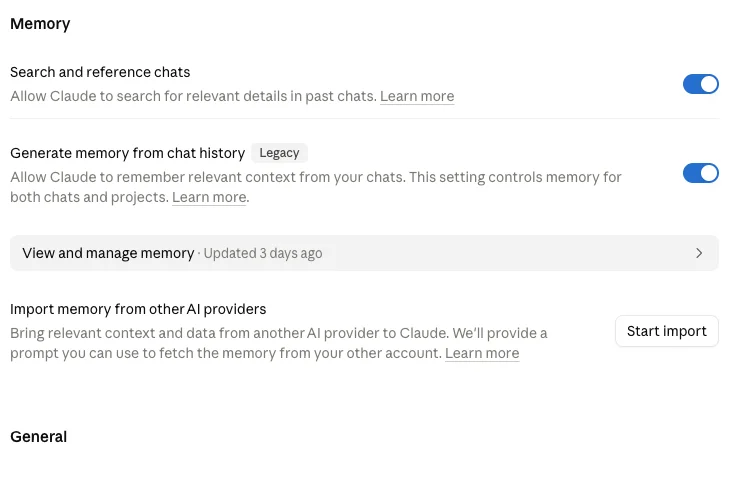
That last one is unusual enough to name. It generates a prompt you run inside a rival assistant’s account to pull your context across, which is a direct attack on the only real moat in this category. Switching assistants normally means abandoning everything the old one learned about you.
The middle control is marked Legacy, which is a small tell about direction of travel. Anthropic appears to be consolidating around retrieval, where Claude looks through your chat history on demand, rather than maintaining a separate distilled memory of you. Both are switched on in my account, and there is a “view and manage memory” panel if you want to audit what it thinks it knows about you.
What “good at words” actually means here
Every assistant claims to write well, so the claim is worthless without a test that can fail. Mine is a style guide with prohibitions in it, because prohibitions are the hard part.
Positive instructions are easy for any model. Tell it to write in short paragraphs and you get short paragraphs. Negative instructions are where they come apart: do not use this word, do not open a section with a summary sentence, do not reach for that punctuation mark. Models comply, then relapse once the material gets difficult and the constraint falls out of attention.
Claude relapses least. That is the whole finding, and it is worth more to me than any benchmark score, because a constraint that survives to the end of a long document is the difference between editing a draft and rewriting one.
The second thing it does well is stay on the brief when the brief is boring. Long, structured, repetitive work is exactly where assistants start improvising, adding headings you did not ask for and helpfully restructuring your outline. Claude mostly does what was asked and flags the disagreement instead of acting on it.
Where it is weaker is brevity. Left unconstrained it writes long and slightly formal, and it takes an explicit instruction to get genuinely punchy copy out of it. That is a fixable problem, but it is a real one, and anyone expecting snappy social captions out of the box will be disappointed.
The safety behaviour you will actually notice
Most reviews treat AI safety as an abstraction. Claude turns it into a setting you can see, and it is worth knowing what it does before it happens to you.
In Capabilities there is a toggle called “Switch models when a message is flagged”. Anthropic’s own description: when safeguards flag a message, Claude automatically switches to a different model to keep the conversation going, and when the toggle is off, the chat pauses instead.
| Setting | What happens when a message is flagged |
|---|---|
| On (the state in my account) | Claude quietly switches to a different model and the conversation carries on |
| Off | The chat pauses and tells you instead |
That is an unusually honest piece of product design. It tells you plainly that some responses come from a different model than the one you picked, and it gives you the choice between a conversation that continues under substitution and one that stops and says so.
If you care about knowing exactly which model wrote which answer, turn it off. If you care about not being interrupted, leave it on. Either way you now know that the model label at the bottom of the composer is a preference rather than a guarantee, which is more than most assistants will admit.
I would rather have the interruption. A review that quotes model behaviour needs to know which model produced it, and silent substitution makes that unknowable after the fact.
Where you can actually use it
Claude runs on the web, on iOS and Android, and as a desktop app, with all four available on the free tier. Desktop extensions and the connector directory hang off that, and Claude in Chrome drives a browser on your behalf.
| Surface or feature | Free | Pro and above |
|---|---|---|
| Web, iOS, Android, desktop apps | Yes | Yes |
| Web search, code execution, file creation | Yes | Yes |
| Desktop extensions, Slack, Google Workspace | Yes | Yes |
| Projects | Not listed on the free tier | Unlimited |
| Model picker (Fable 5 / Opus 5 / Sonnet 5 / Haiku 4.5) | Not listed on the free tier | Yes |
| Claude Code, Cowork, Design, Science, Research | Not listed on the free tier | Yes |
| Microsoft 365 integration | Not listed on the free tier | Yes |
The split is worth reading closely, because it is not the split most products use. Anthropic gives away the surfaces and charges for the depth, so the free tier is a real product rather than a demo with a countdown on it.
Scheduled tasks let a prompt run on a recurring basis rather than waiting for you to open a tab, which is the closest the consumer product gets to automation. Combined with connectors, it turns a chat assistant into something that can check on things while you are not watching.
Cowork, Design, Science and Research are included from Pro upward, as is Claude Code, the terminal agent I reviewed separately. The practical effect of that bundle is that the $20 tier is doing more work than the price suggests, and it is the main reason I would push almost everyone to Pro rather than Max.
The hole in the middle of it
No image generation. No video generation. Claude reads images you upload and reasons about them well, and it will not make one.
For a product competing at the top of the consumer price range against assistants that ship image models as standard, that is the gap that decides purchases. It is the most common reason I see people keep a second subscription open, which means the real cost of standardising on Claude is often Claude plus something else.
How much does Claude cost?
Four consumer tiers on Anthropic’s pricing page, and the gap between the second and third is the widest in the category.
| Plan | Price | What you get |
|---|---|---|
| Free | $0 | Chat on web, iOS, Android and desktop; code generation and data visualisation; web search; memory across conversations; file creation and code execution; desktop extensions |
| Pro | $20/mo billed monthly, or $17/mo billed annually at $200 up front | Everything in Free plus more usage, Claude Code, Cowork, Design and Science, unlimited projects, Research, multiple models, Microsoft 365 integration |
| Max 5x | From $100/mo | Everything in Pro plus 5x the Pro usage, higher output limits, early access to new features, priority access at peak times |
| Max 20x | Higher Max tier | The same feature set with the 20x usage multiplier |
The annual option on Pro is real money rather than a rounding difference. Twelve months at $20 comes to $240; the annual commitment is $200 up front, which Anthropic markets as $17 a month. You save $40 and lose the ability to cancel mid-year.
Two further costs live outside that table, and both caught me out.
The sticker is not the bill
Every figure on the pricing page is pre-tax. My Max 5x invoices for July and August 2026 both came to $111.11 against a $100 plan price, and that difference is local tax rather than anything Anthropic hides.
It is a small thing that matters at the top of the range. Budget the plan price plus whatever your jurisdiction adds, because the checkout number and the pricing-page number are not the same number.
Overflow is billed at API rates
When you exhaust a plan limit, you can buy usage credits to keep working. Anthropic’s documentation on extra usage states that these are billed at standard API rates, which is a materially different pricing world from the subscription you are already inside.
Here is what that means in practice. On Opus 5 the published API rate is $5 per million input tokens and $25 per million output tokens. Fable 5 costs $10 and $50 for the same units. Haiku 4.5 costs $1 and $5.
Here is what $20 of credits buys at each rung of the model ladder.
| Model | Input per million tokens | Output per million tokens | Output tokens for $20 | Roughly, in words |
|---|---|---|---|---|
| Fable 5 | $10 | $50 | 400,000 | ~300,000 |
| Opus 5 | $5 | $25 | 800,000 | ~600,000 |
| Sonnet 5 | $2 | $10 | 2,000,000 | ~1,500,000 |
| Haiku 4.5 | $1 | $5 | 4,000,000 | ~3,000,000 |
The word estimates use Anthropic’s own rule of thumb of about 0.75 words per token, and they only count output, so treat them as a ceiling rather than a budget. Input costs money too, and on a long conversation the input side is usually the bigger half.
Two things fall out of that table. The first is that credits are not obviously terrible value: $20 of Opus 5 output is a large amount of writing by any measure. The second is that the bill arrives per token rather than per month, which is a different relationship with a product than a subscription is. I have collected what these subscriptions actually run across the category in the AI tool cost statistics.
Credits are available on Pro, Max 5x and Max 20x. You can set a monthly cap on credit spend or choose unlimited, auto-reload will top the balance up when it drops below a threshold you pick, and there is a $2,000 daily redemption limit. Credits generally do not expire, with a jurisdiction-specific exception for Japan starting September 2026.
How far the free tier actually gets you
The free tier is more generous than the category norm and it is the right place to start. You get chat across web, iOS, Android and desktop, code generation, data visualisation, web search, memory across conversations, file creation, code execution and desktop extensions.
What you do not get is the two things that make Claude a working tool rather than a chat toy. Anthropic lists “unlimited projects” and the “ability to use more Claude models” as Pro features, and neither appears in the free tier’s own list, so plan on persistence and model selection arriving with the subscription. Claude Code, Cowork, Design, Science and Research all sit behind Pro as well.
The usage ceiling on Free is low enough that a serious session will find it. That is not a criticism, it is the design: Anthropic is showing you the quality and then charging for the quantity.
My advice is to use Free deliberately for a week rather than idly. Run your actual work through it, not test questions, and see whether the writing quality is meaningfully better than whatever you use now. If it is not, none of the rest of this review matters. If it is, you will know within days whether the limits are the problem.
What actually consumes your allowance
Anthropic will not tell you how big the tank is, but it does tell you what burns fuel. The usage and length limits article names seven factors, and knowing them is the difference between a plan that lasts the week and one that does not.
| Factor | Can you control it? | What to do about it |
|---|---|---|
| Message length | Yes | Ask one thing at a time; long preambles cost the same as long answers |
| Current conversation length | Yes | Start a new chat per task; every turn re-sends the whole thread |
| File attachment size | Yes | Attach the pages you need, not the whole document |
| Tool usage | Yes | Research and web search fire several retrievals per question |
| Model choice | Yes | Haiku and Sonnet for routine work, Opus and Fable for hard problems |
| Effort level | Yes | High is the default; Medium is plenty for most tasks |
| Artifact creation | Partly | Every re-render of an artifact is generation like any other |
Message length and current conversation length are the two most people miss. Every turn re-sends the conversation so far, so a thread that has run for forty exchanges costs more per message than a fresh one. Starting a new chat for a new task is not tidiness, it is budgeting.
File attachment size behaves the same way. A 200-page PDF is not a one-off cost if you keep talking about it in the same thread.
Model choice and effort level are the two levers you control most directly, and they are the two that move the needle fastest. Tool usage covers Research and web search, which fire off multiple retrievals per question. Artifact creation rounds out the list, because rendering and re-rendering a document is generation like any other.
The one documented exemption is Projects. Content stored in a Project is cached, and Anthropic states it does not count against your limits when reused. That is the only officially confirmed way to take something off the meter.
A month on Pro versus a month on Max
The arithmetic that matters is not the plan price, it is the plan price plus whatever overflow you buy.
Pro at $20 with no credits is $20. Pro at $20 where you routinely add $30 of credits is $50 a month for a plan that keeps running out, and at that point you are paying half of Max for a fraction of Max’s headroom while doing the work of monitoring a balance.
Max 5x at $100, plus tax, was $111.11 on my invoice. If that replaces a Pro plan plus recurring credit top-ups, it is the cheaper and calmer option. If it sits half-used, it is $91.11 a month of headroom you bought for nothing over Pro’s $20.
The reason to check rather than guess is that the answer is personal and the meter already knows it. Anthropic gives you the usage screen; the failure is not looking at it before upgrading. Our Claude Max plan guide goes further into how the session and weekly limits interact, and what genuinely stretches them.
Which plan should you actually buy?
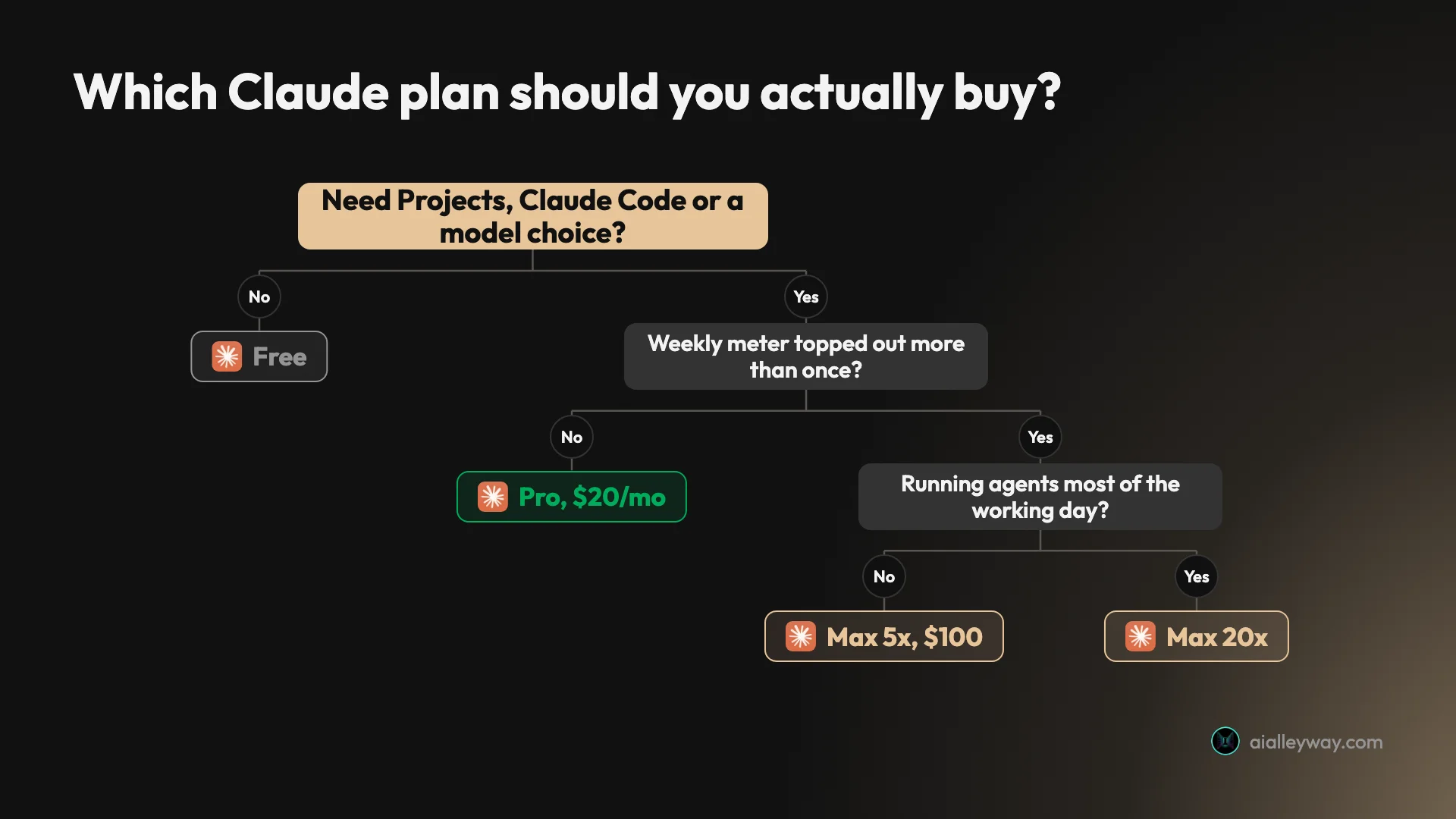
Start on Free for a week and pay attention to whether you hit a wall. If you are asking questions rather than producing work, you may never need to leave.
Move to Pro the moment you want Projects, Claude Code, or a model above the default. At $20 a month it is the best-value tier in the assistant category, mostly because a terminal coding agent rides along with it for no extra charge. I broke down that side of the value in the Claude Code pricing guide.
Only step up to Max 5x after you have watched your Pro weekly meter top out more than once. At $100 against Pro’s $20 you are paying five times the price for five times the usage, which is a fair ratio and not a discount. Buying it early means paying for headroom you are not using. Max 20x is for people running agents most of the working day.
Who is Claude for?
- Writers and editors who publish. This is the strongest case by a distance. If the output has to survive a brief and land in front of readers, Claude’s drafts come back needing structural notes rather than a line-by-line rewrite, and that difference compounds across a week of work. The specific thing it does better than its rivals is hold a negative instruction, which is most of what a style guide is made of.
- Developers who want one subscription. Claude Code is included from Pro upward, so the chat app and the terminal agent come out of the same plan and the same usage pool. If you already pay for Claude, you already have Claude Code, which makes the $20 tier unusually dense, and I put the same money against the rest of the field in Claude Code alternatives. The trade is that both draw from one weekly budget, so a heavy coding week costs you drafting capacity.
- Anyone reasoning over long documents. Contracts, research papers, transcripts, a quarter of support tickets. The long-context behaviour holds up where the job is one huge input rather than fifty small turns, and that is the shape of most analysis work. Put the document in a Project and the same analysis stops costing you allowance on every follow-up question.
- Teams with recurring context. Projects plus the caching behaviour mean the same brief, style guide or codebase description stops costing you allowance every time you re-send it. The saving is real, officially documented, and almost nobody sets it up on day one.
- People switching from another assistant. The memory import is aimed squarely at you. It generates a prompt you run inside your old assistant to carry the relevant context across, which removes the main reason people stay somewhere they have outgrown.
- Not for people who need imagery. No image generation, no video generation. If your work is visual, Claude is a second subscription rather than your only one, and you should price it that way.
- Not for people who need predictable capacity. If a flat, knowable monthly allowance matters more to you than answer quality, the metering here will frustrate you and no amount of writing quality will fix that. This is the single most common reason people cancel.
What is Claude good at?
Claude’s strongest suit is writing that holds a brief: it keeps negative instructions, like a banned-word list, intact to the end of a long document where rivals relapse. Behind that sit Projects caching, an effort dial that trades thinking depth for usage, and one subscription covering both the chat app and Claude Code.
The prose survives a real brief
This is the reason I pay. Give Claude a style guide with negative constraints in it, and it holds them.
I write to a voice spec that bans a specific list of words and caps a punctuation pattern. Claude is the only assistant I use that still respects that spec in the fourth section of a long draft, rather than drifting back to house LLM cadence once the material gets complicated.
The difference shows up as editing time rather than as a wow moment, which is why demos undersell it. A draft comes back needing a structural conversation instead of a rewrite.
One plan covers the chat app and the terminal agent
Claude Code is listed as included from Pro upward on Anthropic’s pricing page. You are not buying a chat assistant and then a separate developer tool, which is the arrangement most of the market still runs.
The catch is that they share a usage pool, and it cuts both ways. My weekly meter is one bar for everything, so a heavy Claude Code week eats the capacity I would otherwise spend drafting. One bill, but also one budget. I went through the terminal side in the Claude Code review.
The effort dial is the best value lever in the product
Of the seven things Anthropic says consume your allowance, four are under your control, and this is the one with the best return per click.
I treat it as the default first move on any new account. The judgement it encodes is unusual: most products hide the compute-versus-cost trade behind a plan tier, and Claude hands it to the user with an honest warning attached.
Projects caching is free headroom nobody sets up
The caching exemption is the only documented way to take work off the meter, and in a product this opaque about limits, a confirmed exemption is worth more than a guess about capacity.
The reason it counts as a strength rather than a footnote is the size of the effect on recurring work. A brief you reuse daily moves from a daily cost to a one-off one. I have never seen a new user configure this in their first week.
The memory import is aimed at somebody else’s moat
Switching costs are the only real defence any assistant has, and Anthropic shipped a feature whose entire purpose is dismantling a rival’s.
That tells you something about how confident they are in the product once you are inside it. For a buyer it removes the honest objection to trying Claude, which is that your old assistant already knows you and this one starts blank.
The skills directory has adoption, not just a launch post
A marketplace is easy to announce and hard to make anyone use. Seven-figure install counts on the top entries are the difference between a shipped feature and a used one.
What makes it a strength rather than a novelty is that a skill is just instructions in a folder, so anything you install you could also have written. The ceiling is your own process, not Anthropic’s catalogue.
The model ladder is a real ladder, not cosmetic tiers
The tenfold spread in what Anthropic charges for these models on the API is the proof that the picker is a genuine capability range rather than marketing.
On a metered plan that range is your steering wheel. The mistake I see people make is leaving it on the top model permanently, which converts a strength into the fastest way to exhaust a week.
Where does Claude fall short?
Claude’s weaknesses are billing transparency and scope, not quality. Anthropic publishes no numeric usage limits for any plan, three meters run at once, and overflow credits are billed at standard API rates rather than a consumer price. It also generates no images and no video.
Anthropic publishes no numeric limits at all
This is the central complaint and it is entirely fair. The help centre article on usage and length limits confirms that allowances differ by plan and lists what consumes them. It gives no message counts, no token budgets and no hours, for any of Free, Pro, Max 5x or Max 20x.
You are being asked to commit up to $100 a month to a quantity that is never stated anywhere. The only source of truth is a percentage bar inside the product you have already paid for.
Every other line item in this review can be checked against a published page. This one cannot, and that is a deliberate choice by Anthropic rather than an oversight.
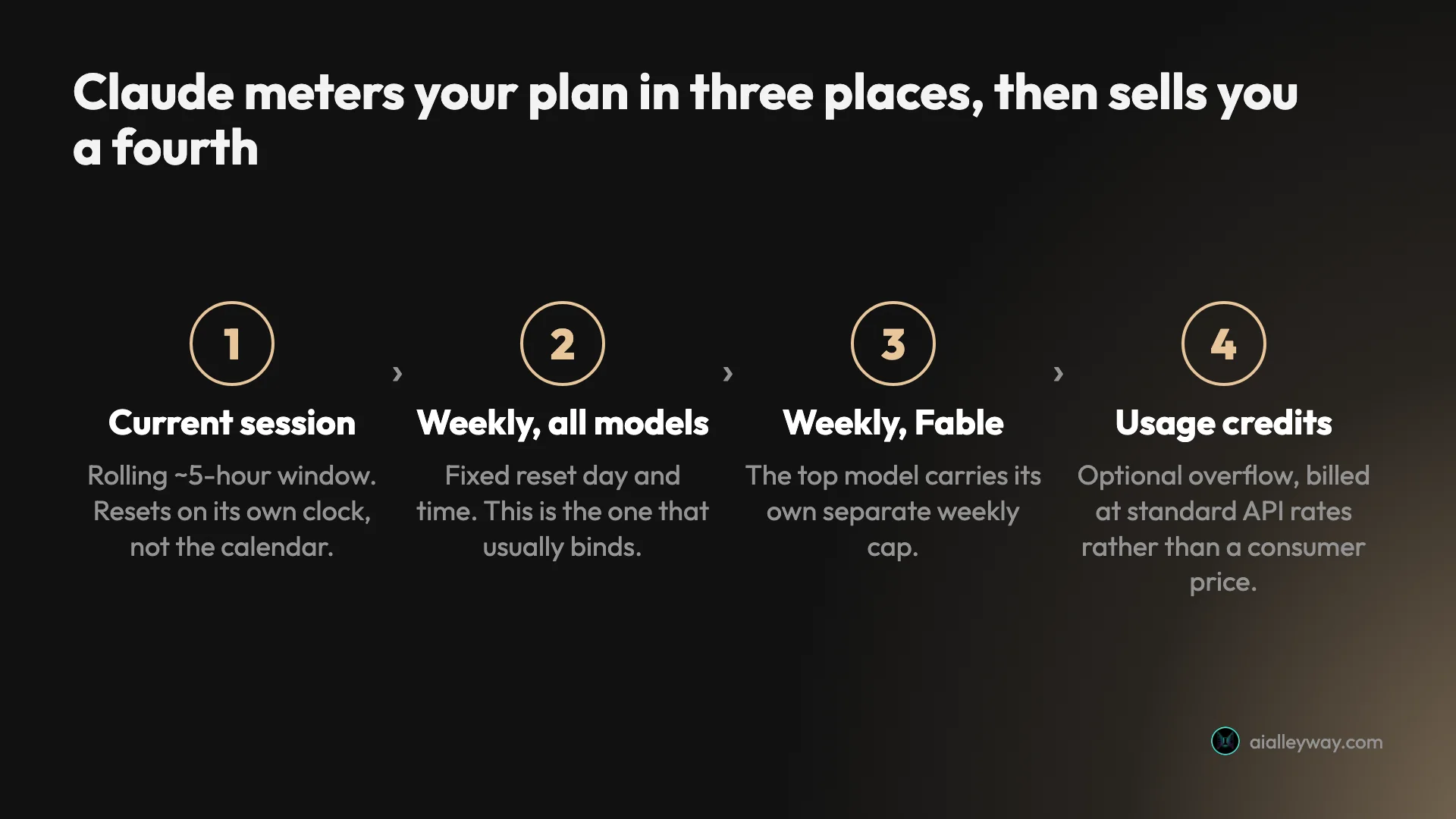
Three meters run at once, and the wrong one bites
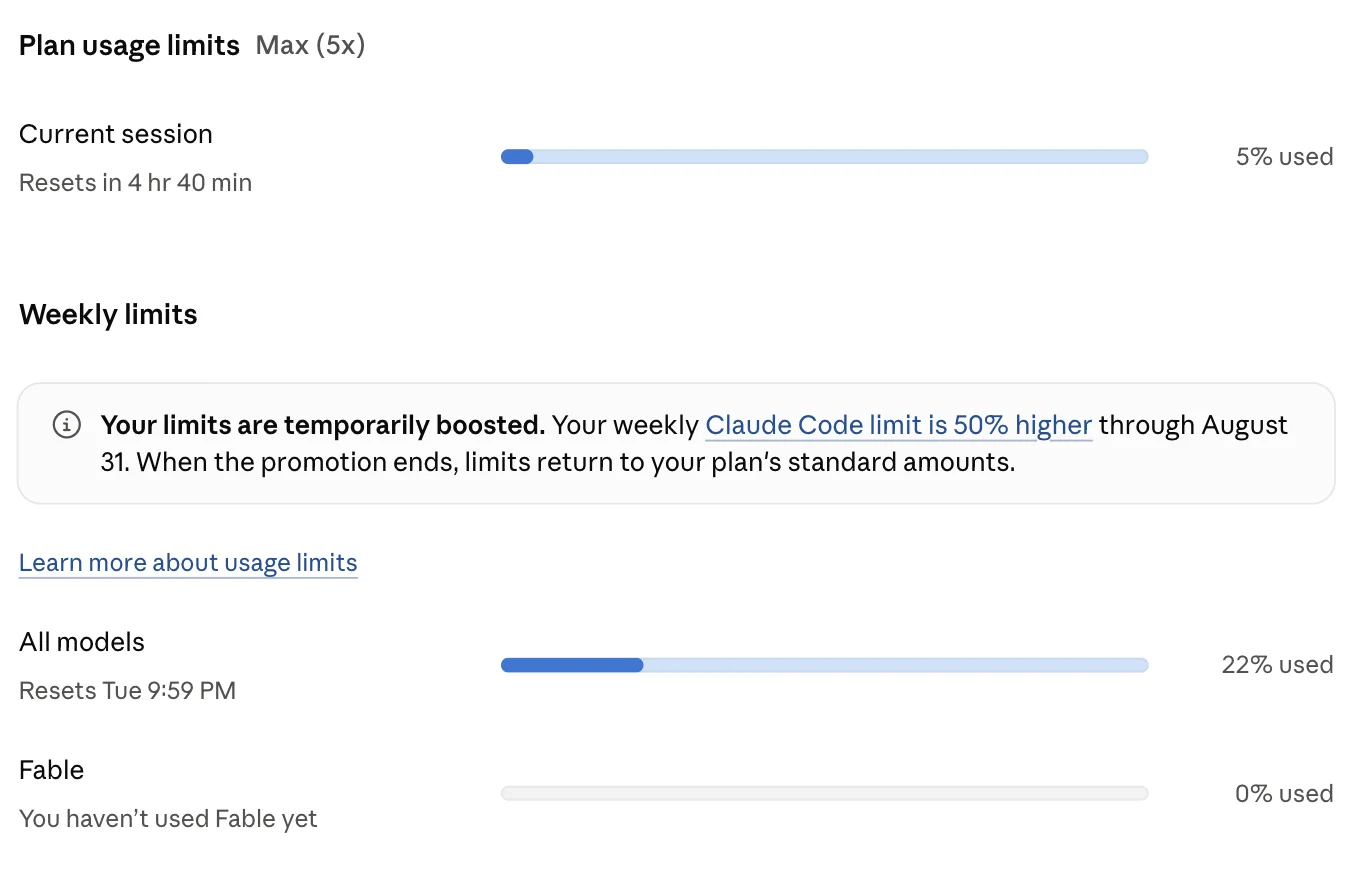
The usage screen shows a current session resetting on a rolling five-hour window, a weekly bar across all models with a fixed reset time, and a separate weekly bar for Fable.
The failure mode is reading the wrong one. While I was writing this review my session meter sat at 5% with 4 hours 40 minutes to reset, and my weekly meter was already at 22%. Nothing about a nearly empty session bar warns you that the week is the binding constraint, and the week is almost always the binding constraint.
The overflow is priced at API rates, not consumer rates
Usage credits keep you working past a plan limit, and Anthropic’s documentation is clear that they are billed at standard API rates.
That is a different pricing world from the subscription. Someone paying $20 a month who runs out and switches to credits is suddenly paying $25 per million output tokens on Opus 5, metered per token, with a $2,000 daily ceiling.
Nothing about this is hidden. Nothing about it is intuitive either, and the jump from a flat monthly fee to per-token billing is not a transition most consumer buyers are braced for.
The mitigation is decent, to be fair. You can set a monthly cap so credits cannot run away from you, the daily redemption ceiling is a second backstop, and auto-reload is opt-in rather than on by default. Someone who never turns credits on simply hits a wall and waits, which is the old behaviour and a perfectly reasonable choice.
What bothers me is the framing. Credits are presented as a convenience feature, and they are also the mechanism by which an undisclosed limit turns into an open-ended bill. Those two things deserve to be described in the same sentence somewhere in the product, and they are not.
Temporary boosts make the baseline unknowable
My account currently carries a banner explaining that limits are temporarily boosted, that the weekly Claude Code limit is 50% higher through August 31, and that limits return to the plan’s standard amounts when the promotion ends. That banner was on my account on 21 August 2026; if you are reading this later, it has lapsed.
Since the standard amounts were never published, this is a percentage increase on an unknown quantity, ending on a date after which you find out the difference by running into it. Threads in r/ClaudeAI over the past month track exactly this tension, including one titled “Anthropic extends 50% limit increase to Aug 31” and another disputing whether the boost is visible at all.
Goodwill gestures are welcome. Goodwill gestures on top of undisclosed baselines make it impossible to tell a generous month from a stingy one.
Here is the disclosure gap in one table.
| Anthropic publishes | Anthropic does not publish |
|---|---|
| That limits differ by plan | Any message count, token budget or hour count for any plan |
| The seven factors that consume your allowance | How much each factor consumes |
| That Max 5x is 5x Pro and Max 20x is 20x Pro | What 1x is |
| That a promotion raised weekly limits by 50% | The number the 50% applies to |
| A live percentage meter inside the product | The denominator behind the percentage |
Every row on the left is genuinely useful, which is what makes the right-hand column so odd. This is a company that documents its API pricing to the token and its cache multipliers to two decimal places. The consumer limits are the one place it goes quiet.
No image generation, and no sign of it
Claude reads images competently and builds charts and diagrams as code in Artifacts. It does not generate pictures, and it does not generate video.
For a product positioned as a general assistant at the top of the consumer price range, that is a real hole. It is the single most common reason I see people keep a second subscription running alongside it, which quietly doubles the true cost of standardising on Claude.
There is a coherent argument for the omission. Anthropic has aimed the product at work that is verbal and analytical, and image models are a different research programme with a different risk surface. Focus is a defensible strategy and the writing quality is what it bought.
It is still a hole, and buyers should price it as one. If your month includes making pictures, the honest comparison is not Claude against ChatGPT, it is Claude plus an image tool against ChatGPT on its own.
The public rating is bad, though the comparison is instructive
Claude sits at 1.5 out of 5 on Trustpilot across 1,848 reviews, 79% of them one-star and 8% five-star. That number gets quoted a lot, and on its own it reads as damning.
It is worth checking the neighbours before drawing a conclusion. On the same platform on the same day, ChatGPT scores 1.6, Gemini 1.5, Perplexity 1.5, Grok 1.4, and the OpenAI and Anthropic corporate domains both score 1.3. Trustpilot also flags on Claude’s page that the company has never invited customers to review, so the sample is self-selected complaint traffic.
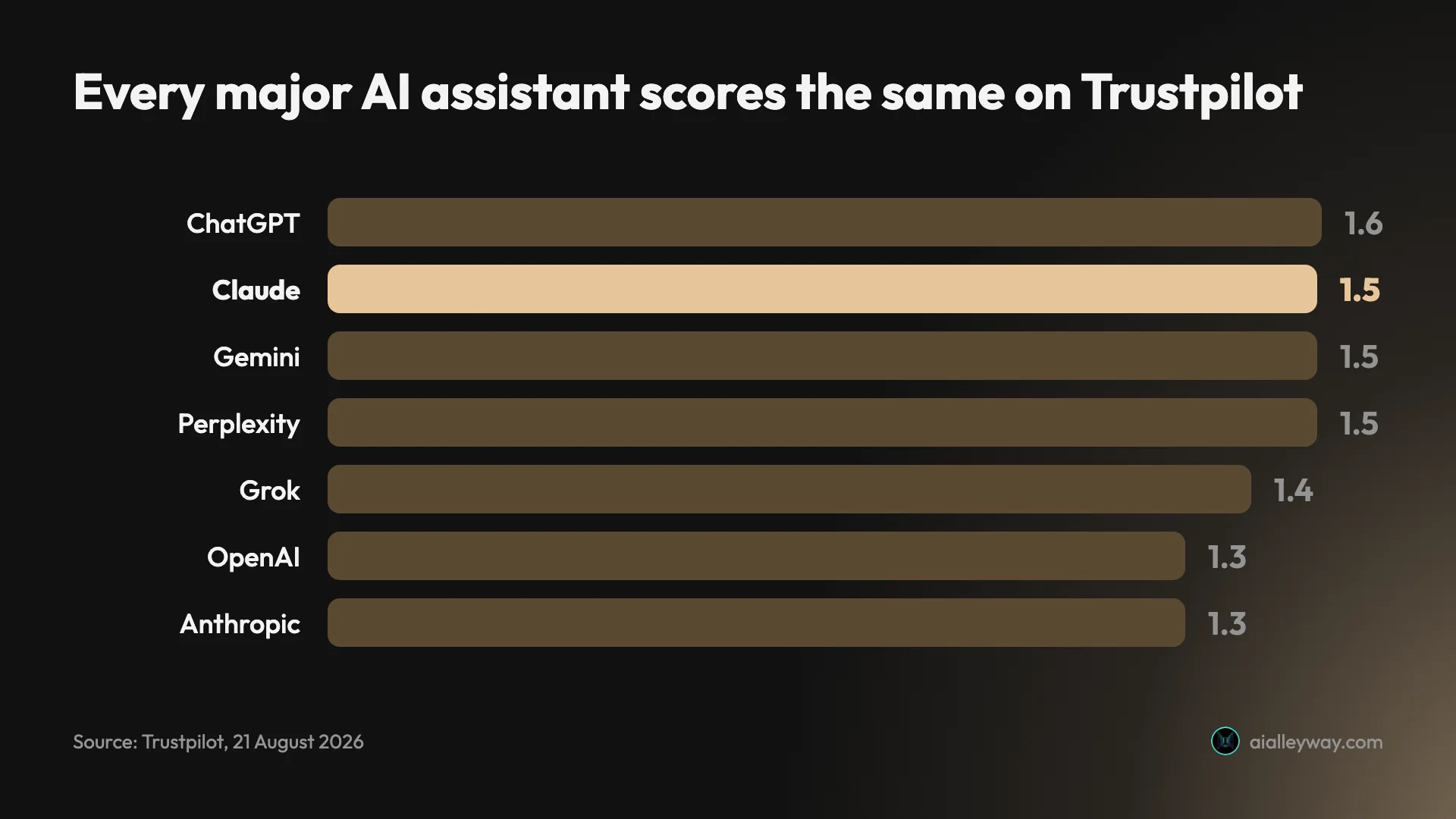
The score does not distinguish Claude from its rivals, so treating it as a verdict on Claude specifically is a mistake. The complaint themes do distinguish it, and on Claude’s page they concentrate on usage limits and sudden lockouts, which is the same thing the metering half of this review keeps arriving at.
The training toggle deserves a deliberate choice
Anthropic’s consumer terms update is clear and worth acting on. The “Help improve our AI models” setting covers Free, Pro and Max accounts, including Claude Code sessions run from them. With it enabled, retention runs to five years. With it declined, retention is 30 days. Deleted conversations are excluded either way.
This is a setting rather than a scandal, and it takes one click on the Privacy screen. The problem is that most people never open that screen, and five years is a long window to inherit without noticing.
Alternatives worth considering
If the metering is the dealbreaker, or you need something Claude does not do, three are worth a look.
| Claude | ChatGPT | Gemini | Perplexity | |
|---|---|---|---|---|
| Best at | Writing, long documents, code | Breadth in one subscription | Google Workspace integration | Sourced answers on current information |
| Generates images | No | Yes | Yes | No |
| Trustpilot score | 1.5 | 1.6 | 1.5 | 1.5 |
| Our pick status | Runner-up, assistants | Category pick, assistants | Runner-up, assistants | Category pick, search |
ChatGPT is the one to take if you want breadth in a single subscription. It generates images, has voice modes, and carries the widest ecosystem of integrations and custom GPTs, which is why it is our current category pick. Our full review covers where its free tier beats this one, and why the $8 tier carries advertising, and ChatGPT vs Claude puts the two $20 plans side by side.
Take it over Claude if you would otherwise end up paying for two tools. The honest trade is that you give up some writing discipline to get a product that covers more ground, and for a lot of people that is the correct swap. Its Trustpilot score, for what the comparison is worth, is 1.6 against Claude’s 1.5.
Gemini makes sense if you already live inside Google Workspace. The draw is integration rather than raw writing quality, and if your documents, mail and calendar are already there, the friction it saves is real and daily.
It is also the cheapest way into a capable assistant if your organisation already pays Google for something else, which is a procurement argument rather than a product one. That argument wins more often than product reviews like this one usually admit.
Perplexity is a different product rather than a cheaper Claude. If most of what you want is sourced answers about current information rather than drafting and reasoning, an answer engine serves that better than a general assistant does.
The distinction to hold onto is that Perplexity is built to tell you what is true right now with citations attached, while Claude is built to work with material you bring it. Buying the wrong one of those two is the most common mis-purchase in this category.
Grok is not in that table because it is a different kind of bet, and I tested it after this review was written. On a factual question about a competitor’s pricing it went to the vendor’s own documentation where Claude went to third-party articles about the vendor, and both reached the right answer. Claude vs Grok has the two runs and the screenshots.
None of the three solves the thing Claude is best at. If your use case is code rather than prose the field looks different, and I ranked it in best AI for coding. For the wider field ranked in one place, our best AI assistant pillar covers all five, and Claude alternatives is the one to read first if you are not sure which Claude product you are replacing. If prose quality is what you are buying, switching away costs you more than the metering annoyance does.
Final word
Claude is our pick in two categories, coding and copywriting, and scores 4.4 in both rather than the 4.6 a Category Leader label implies. The reason is the same in each: nothing I have tested writes or reasons better, and the usage allowance is opaque enough that you cannot predict when it will stop. Leading a category and being beyond criticism are different claims, and this review makes only the first.
Claude is the best writing and reasoning assistant I use, and I will keep paying for it. The rating is 4.4 rather than higher because the product is excellent and the billing model is opaque, and those are not the same thing.
Buy Pro rather than Max unless you have evidence you need Max. Then do four things in your first hour:
- Turn the Effort dial down to Medium for routine work.
- Move recurring context into a Project so it stops costing you allowance.
- Open the Privacy screen and make a deliberate call on model training.
- Bookmark the usage meter in Settings, and read the weekly bar rather than the session one.
Those four adjustments stretch a plan considerably further than it goes out of the box, and none of them takes longer than a minute. If you find yourself buying credits at API rates every month, treat that as the signal to move up a tier rather than to keep topping up a balance.
Everything in this Claude AI review came off an account I pay for: the meters, the model list, the $111.11 invoice.
Frequently asked questions
Is Claude AI worth it?
If your work is writing, editing, reasoning over documents or code, yes. I pay for the Max 5x plan and Claude is the assistant I open first, because the prose comes out closer to publishable than anything else I use and it follows a negative instruction without drifting back three messages later.
The honest caveat is that you are not buying a flat monthly allowance. Three meters run at once: a rolling session window of about five hours, a weekly cap across all models, and a separate weekly cap for Fable. Anthropic does not publish numbers for any of them, so the only way to know where you stand is the usage screen in settings.
At $20 a month on Pro, the risk is small and the writing quality alone justifies it. At $100 and up on Max, work out how you actually use it first. I score Claude 4.4 out of 5.
How much does Claude cost per month?
There are four consumer tiers. Free is $0. Pro is $20 a month billed monthly, or $17 a month if you pay $200 up front for the year. Max starts at $100 a month for the 5x usage tier, with a 20x tier above it.
Two costs sit outside those numbers. The first is tax, which the pricing page excludes: my Max 5x invoice for August 2026 came to $111.11 against a $100 sticker. The second is usage credits, the overflow you can buy when you exhaust a plan limit.
Credits are the part worth reading twice, because Anthropic bills them at standard API rates rather than a consumer overage price. On Opus 5 that is $5 per million input tokens and $25 per million output tokens. You can cap monthly credit spend or set it to unlimited, and there is a $2,000 daily redemption limit.
What are Claude's usage limits?
Anthropic does not publish numeric limits for any consumer plan. The help centre article on usage and length limits says allowances differ by plan and lists what consumes them, but gives no message counts or token budgets for Free, Pro, Max 5x or Max 20x.
What you get instead is a live meter in Settings then Usage, expressed as percentages. Mine shows three bars: a current session that resets on a rolling five-hour window, a weekly bar across all models with a fixed reset time, and a separate weekly bar for Fable.
Seven things drive consumption, per Anthropic's own documentation: message length, file attachment size, current conversation length, tool usage, model choice, effort level, and artifact creation. Content stored in Projects is cached and does not count against your limits when reused, which is the one lever that reliably buys headroom.
Does Claude train on my chats?
Only if the setting is on, and it is a single toggle. In Settings then Privacy there is a control labelled 'Help improve our AI models' that allows your chats and coding sessions to train Anthropic models. It applies to Free, Pro and Max accounts, including Claude Code used from those accounts.
The consequence worth knowing is retention, not training itself. Anthropic's consumer terms state a five-year retention period when the setting is enabled, and a 30-day retention period when you decline. Conversations you delete are excluded from training either way.
So the practical advice is to open Privacy settings on day one and make a deliberate choice rather than inheriting one. If you work with client material or anything under an NDA, turning it off moves you from five years of retention to thirty days, which is a meaningful difference for one click.
Can Claude generate images?
No. Claude has no native image generation and no video generation, and this is the clearest capability gap against ChatGPT and Gemini. It reads images you upload and reasons about them well, but it will not produce a picture for you.
It does produce visual output of a different kind. Artifacts render working HTML, SVG and charts in a live pane beside the conversation, so if what you actually need is a diagram, a data visualisation or a small web page, Claude builds the thing rather than illustrating it.
For anyone whose workflow includes generating imagery, this is the reason to keep a second subscription or use a dedicated image tool. It is also why I would not recommend Claude as somebody's only AI subscription if their work is visual rather than verbal.
Is Claude Pro or Max better value?
Pro at $20 a month is the better buy for almost everyone, and it is unusually dense because Claude Code is included in it. You get Projects, the full model picker, Research and the integrations, and the only thing Max adds is more of the same usage.
Max 5x costs $100 a month, which is five times the Pro price for five times the Pro usage. That is a fair ratio rather than a bargain, so the upgrade only pays off once you are genuinely hitting the Pro weekly cap. Buying it pre-emptively means paying for headroom you never touch.
The honest test is to run Pro for a month and watch the weekly bar in Settings then Usage. If it tops out more than once, move up. If it never passes half, you have your answer and you are already on the right plan.
Keep reading
Claude vs Grok: I ran both on a question Google gets wrong
Claude vs Grok, both run on the same two prompts. Both got the hard question right, but Grok opened 3 vendor pages while Claude cited 9 third-party posts.
Claude Max plan: the 5x is per session, not per month
The Claude Max plan costs $100 or $200 a month. The multiplier everyone quotes describes a five-hour window, and the limit that actually stops you is weekly.
Claude vs ChatGPT vs Gemini: they don't all cost $20
Claude vs ChatGPT vs Gemini, after reviewing all three separately. Two cost $20, one is a storage plan — and the free tiers differ far more than the paid.
Claude alternatives: which Claude are you replacing?
Anthropic sells the chat assistant plus five named products called Claude, and page one answers four different questions. Work out which you mean first.