
NotebookLM Alternatives: 9 Picks, Sorted by Why You're Leaving
The best NotebookLM alternatives by reason for leaving: Notion AI for teams, Copilot Notebooks for Microsoft 365, Open Notebook to self-host. Prices in US$.
Contents
The best NotebookLM alternatives, in one line each
If you’re looking for a NotebookLM alternative, the answers probably aren’t the problem. You have hit a wall: a usage meter, a team that works somewhere else, a need for privacy, or a pile of academic papers. Pick by the wall.
- Best for teams already in Notion: Notion AI. It builds pages and databases from your notes, and Business is $20 a member a month on yearly billing.
- Closest match for Microsoft 365 users: Microsoft Copilot Notebooks. Microsoft says answers come only from the references you add, with audio overviews on work accounts.
- Best if you already pay for ChatGPT: ChatGPT Projects. Projects on every plan, from 5 files on Free to 40 on Pro and Business.
- Best for long documents and writing from them: Claude Projects. Files of up to 30MB each, and a project search for big collections on paid plans.
- Best for mixing your files with the web: Perplexity Projects. Inline citations on every answer, and your own files in the same Project.
- Best for a lifelong reading library: Recall. Saves articles, videos and PDFs, then lets you chat across all of them.
- Best for finding academic papers: Elicit. Searches more than 138 million papers, with sentence-level citations.
- Best for chatting with PDFs you already have: Paperguide. Citations show the page, and hovering previews the cited sentence.
- Best free option you run yourself: Open Notebook. Open source, runs on your machine, and works with local models.
I have tested two tools for this cluster on the same four articles: Gemini Notebook itself and Notion AI. The other eight are here on the strength of their own pages (for Open Notebook, its GitHub repository), read on 17 October 2026. Each section says which is which.
How we chose these NotebookLM alternatives
Start with what you would be replacing. Google renamed NotebookLM to Gemini Notebook on 16 July 2026, and it is still our top pick for AI notes. I rated it 4.5 in our NotebookLM review after a test on a Google account with no AI plan.
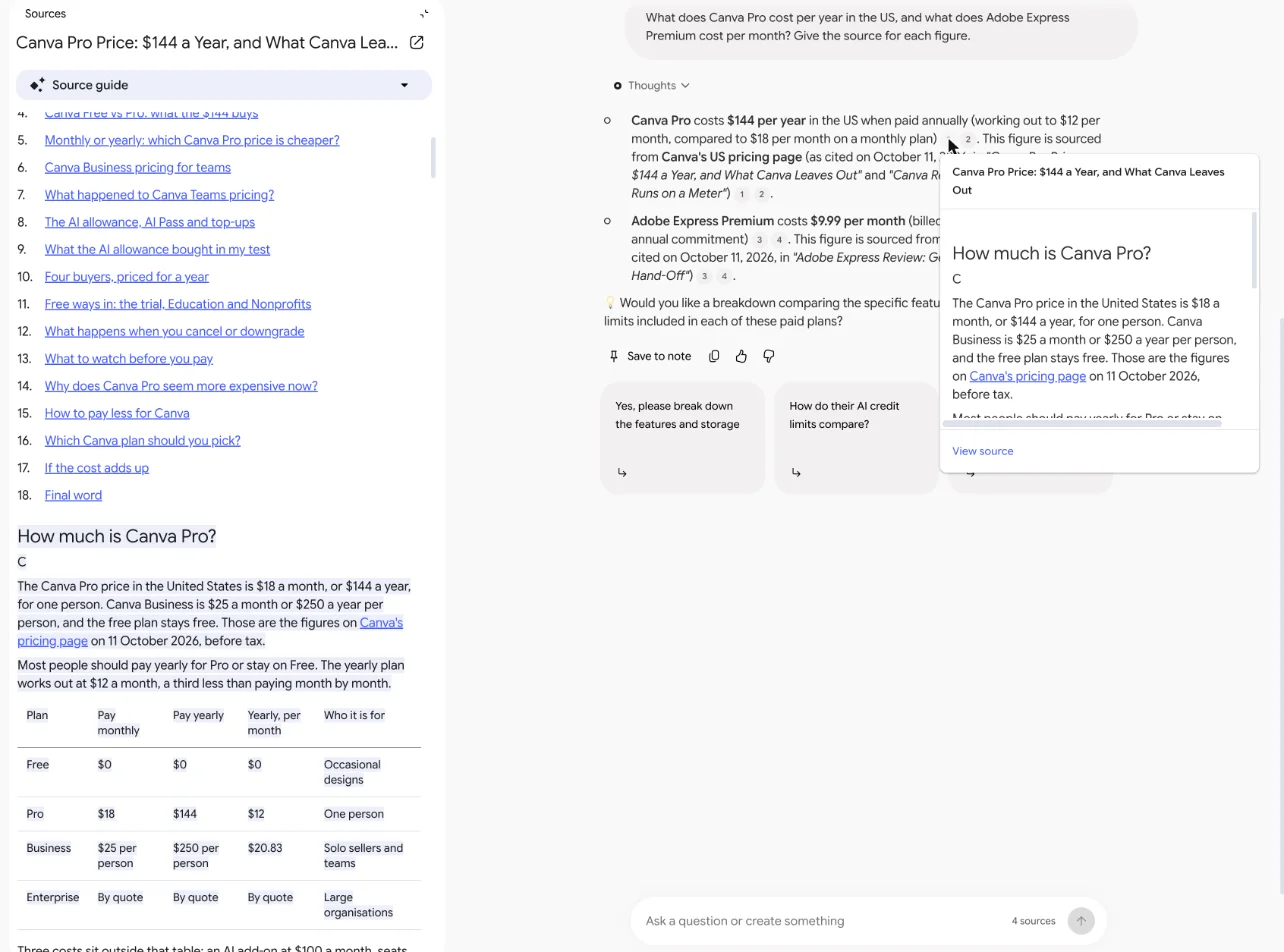
The thing it does best is the citation. I added four of our own articles as sources and asked questions about them. The citation I clicked opened the source with the exact passage highlighted, and it declined a question the sources could not answer instead of guessing.
So why leave? In my test and on Google’s pages, four reasons come up.
The meter. Usage on a personal account runs on a five-hour window plus a weekly cap, shown only as a percentage. One audio overview was estimated at 45% of a window on my free account. Our NotebookLM pricing guide has every plan, from free to Google AI Ultra.
The silo. Each notebook is its own island of up to 50 sources on the free tier. If your work lives in Notion, Word or a reading app, you bring it in and the answers stay in Google.
The privacy question. Google’s help pages say your sources are not used for training unless you give feedback. Some people want their files on their own machine anyway.
The papers. Gemini Notebook answers from what you bring. It can search the web for new sources, but none of Google’s pages I read describe a database of academic papers to search.
What you give up by leaving
Be clear about what goes with it. In my test, Gemini Notebook declined to answer a question about something its sources did not cover and offered web research instead. Its data table wrote “Not in source” for missing figures rather than filling the gaps, and the mind-map branch I checked matched the articles.
Its audio overview is the other loss. The 1-minute-42-second Brief it made from my four articles sounded good on a listen, though the player gives no transcript to check it against. Of the nine tools below, only two describe anything like it: Microsoft’s notebooks for work accounts, and Open Notebook if you set it up yourself.
And it costs nothing to start. The free tier holds 100 notebooks of 50 sources each.
I compared each alternative on five things a Gemini Notebook user would miss: whether answers stay inside your files, whether the tool shows where an answer came from, audio overviews, the free plan, and the price of the first paid plan. Meeting note takers such as Otter and Granola are left out, because they answer from recordings, not documents, and our best AI note taker roundup covers them.
One rule shaped the write-ups. For the eight tools I have not used, I report what each vendor’s pages say and nothing about how good the answers are. Where a vendor’s pages disagree with each other, I say so.
NotebookLM alternatives compared
The second column is the one to read first. Gemini Notebook’s whole appeal is answers that stay inside your sources, and most of the alternatives reach outside them.
| Tool | What it answers from | Shows where answers came from | Audio overviews | Free plan | First paid plan, billed monthly |
|---|---|---|---|---|---|
| Gemini Notebook, for reference | Your sources | Yes, passage highlighted in my test | Yes | Yes, 50 sources per notebook | $4.99 (Google AI Plus) |
| Notion AI | Your pages, plus the web by default in my test | Page and section, no highlight | None seen in my test | AI trial of unpublished size | $24 a member (Business, the first plan with full AI) |
| Microsoft Copilot Notebooks | Only the references you add | Not described on its pages | Work and school accounts only | Copilot Chat, up to 50 references | $9.99 (Microsoft 365 Personal) |
| ChatGPT Projects | Project files first, on Plus and Pro | Not described for project files | None described | Yes, 5 files per project | $8 (Go) |
| Claude Projects | Project knowledge | Not described for project files | None described | Yes, up to 5 projects | $20 (Pro) |
| Perplexity Projects | Your files plus the web | Inline citations on every answer | None described | Yes; Projects access not confirmed | $20 (Pro) |
| Recall | Your saved library, the web, or both | Every answer cited | Read-aloud only | 10 AI summaries a month, no chat | $12 (Plus) |
| Elicit | 138 million papers, your uploads and the web | Sentence-level citations | None described | Basic, limited agent use | $19 (Academic Plus) |
| Paperguide | Your PDFs and its paper search | Page number and sentence | None described | 2,000 credits, 5 PDFs | $19 (Plus) |
| Open Notebook | Your sources, on your machine | Cites the sources and notes used | Yes, one to four speakers | Free software | None; you pay for AI usage |
Read the citations column with care. “Not described” means the vendor’s own help pages, as I read them, do not say how a source is shown on screen; it does not prove there is no citation. Only Gemini Notebook and Notion AI were checked by clicking. Of the rest, Perplexity, Recall, Elicit, Paperguide and Open Notebook all say their answers carry citations, and Elicit and Paperguide describe them down to the sentence.
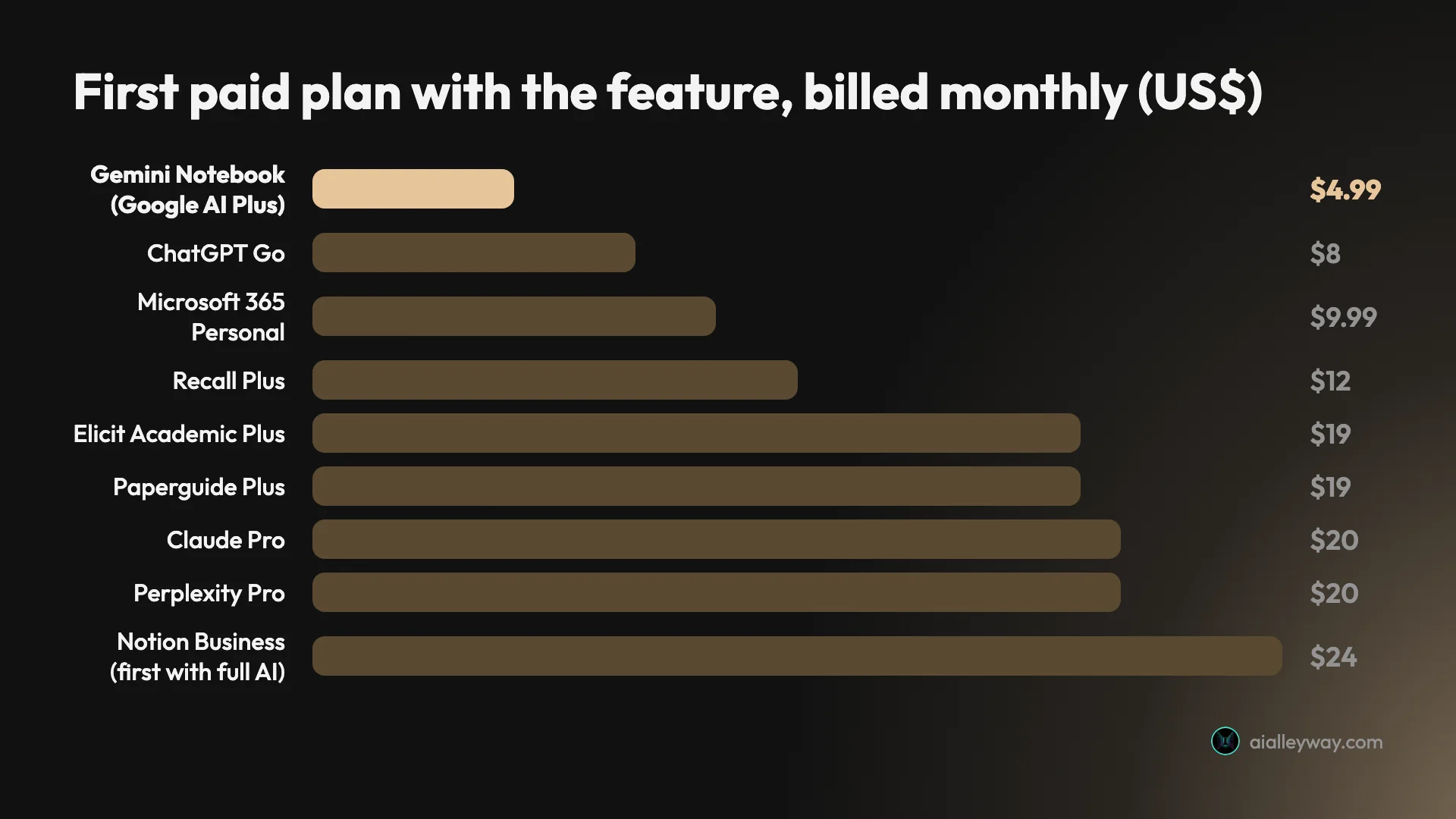
Two cautions on that chart. The cheapest paid plan is not always the one you need: ChatGPT Projects and Claude Projects both work on free plans, and Notion AI is only fully included from Business. And Gemini Notebook is still the cheapest way to pay for more of the same thing.
1. Notion AI — best for teams already in Notion
Notion AI is the only alternative here I have put through the same test as Gemini Notebook. I gave it the same four articles as pages in a new free workspace on 15 October 2026, asked the same core questions, and wrote up the results in our Notion AI review, where it scored 4.3.
It got every price, count and sum I checked right, and it rejected a false premise in one of my questions. Where it pulled ahead of Gemini Notebook was in building things. Asked for a table of plans and prices, it made a real Notion database of 23 rows, each one a page I could open, in three to four minutes.
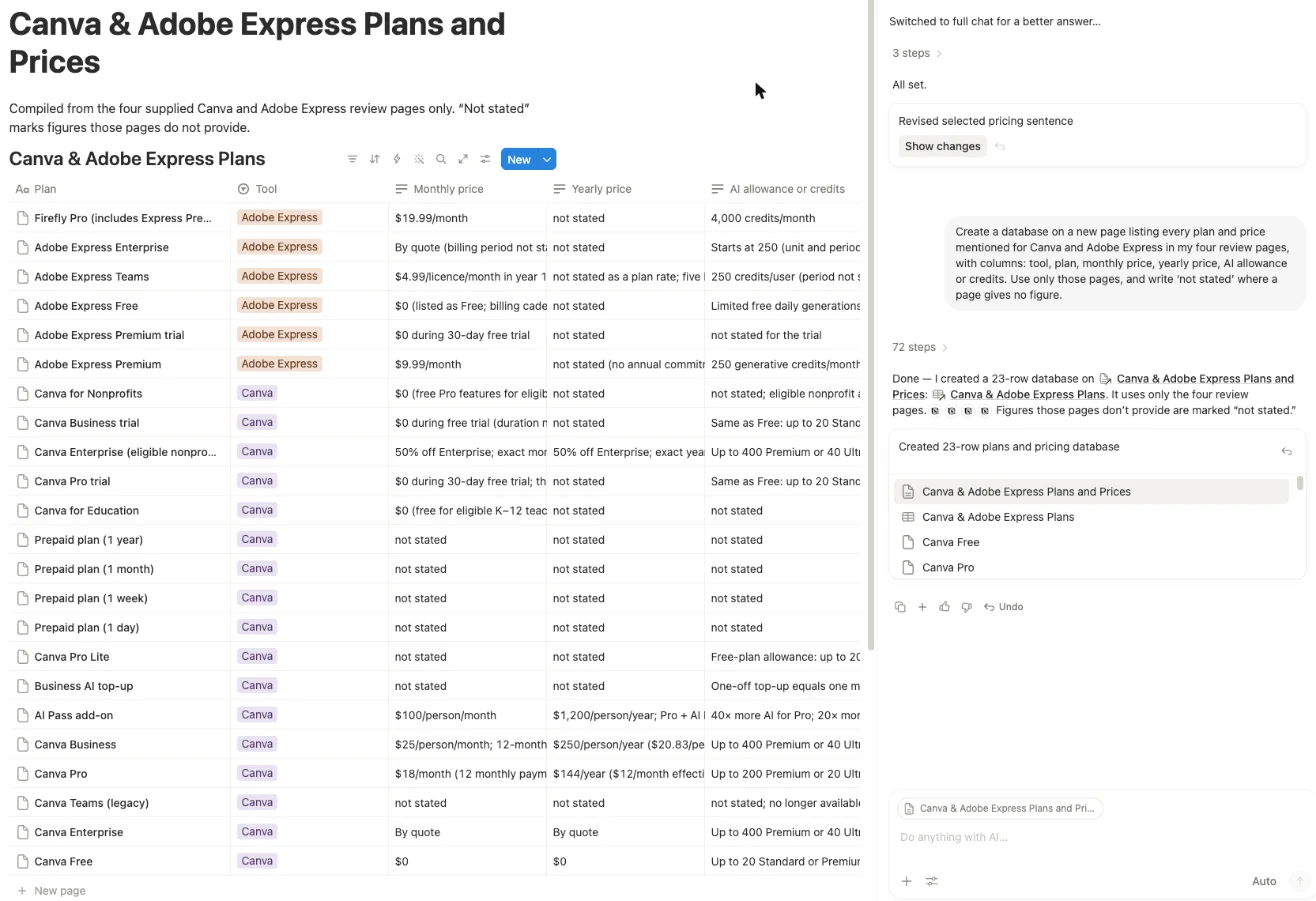
Where it falls short of Gemini Notebook. Two things, both from my test. First, the citations: hovering over one shows the page and section heading, and clicking it opens the whole page at the top with nothing highlighted. I also found one wrong citation in 39 requests.
Second, it does not stay inside your pages. With web search on by default, my first price question came back right, but cited to Canva’s and Adobe’s live pricing pages rather than my articles.
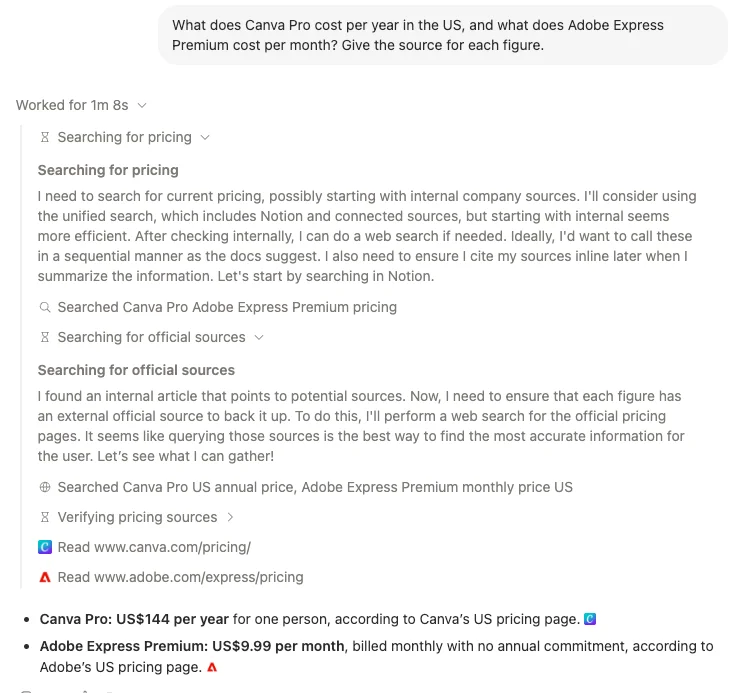
That is handy for checking current prices, and a problem when you need to know what your own pages say.
Price. Notion’s pricing page lists Notion AI as included from Business, at $20 a member a month billed yearly or $24 monthly. Free and Plus get a trial of unpublished size. In my test, 39 requests in about an hour hit no limit, and Settings showed no meter. Our Notion pricing guide covers every plan.
The range. Beyond answers, it wrote a decision brief straight into a Notion page in about two minutes, rewrote a sentence as tracked changes in about 25 seconds, and produced a sourced research report in 56 seconds. A five-slide deck took 6 minutes 3 seconds and arrived as PPTX and PDF files, with one wrong line on a slide.
Gemini Notebook’s notes and tables stay in the notebook unless you export them to Docs or Sheets; Notion’s land in the workspace your team already reads.
On privacy, Notion’s pricing FAQ says your data is not used to train models unless you opt in.
Who it is for. A team whose documents, tasks and meeting notes already live in Notion, and who would rather the AI write into those pages than into a separate notebook. Our NotebookLM vs Notion comparison puts the two side by side.
2. Microsoft Copilot Notebooks — best for Microsoft 365 users

On paper, this is the closest thing to Gemini Notebook from another large company. Microsoft’s support page says a notebook gives “focused answers from Copilot that are based only on the references you’ve added”. I have not used it, so everything here comes from Microsoft’s pages, read on 17 October 2026.
The feature list reads like a copy of Google’s: study guides, reports, flashcards, quizzes, mind maps, infographics and audio overviews. References can be Word, PowerPoint, Excel, PDF, Loop and OneNote files, plain text and Markdown, and on paid plans, web addresses.
| Copilot Chat (free) | Paid Copilot licence | |
|---|---|---|
| References per notebook | Up to 50 | More than 300, the first 300 used (the licensing page says up to 300) |
| Audio overviews | Not available | Up to 20 a day on a work licence |
| Web addresses as references | Not supported | Supported |
| Study guides, flashcards, quizzes | Standard processing | Priority processing |
The catch is the audio. Microsoft says Copilot Notebooks is available to Microsoft 365 Personal, Family and Premium subscribers, but the audio overview “is available only to commercial Microsoft 365 users with work or school (Entra ID) accounts”. A home subscriber gets the notebook without the podcast.
Microsoft’s pages describe the grounding but not how a source is shown on screen, so I cannot tell you whether a citation opens the passage the way Gemini Notebook’s does. Creating a notebook also needs a OneDrive or SharePoint licence on the account.
The boundaries are stated plainly. Microsoft says Copilot “doesn’t access your entire OneDrive, email, Teams chats, or the web” and uses only what you add to the notebook. You cannot create charts, graphs or images inside a notebook, and CSV files, images and Teams chats are listed as coming soon.
Where audio overviews are available, in OneNote you choose the format, voice, style and length before generating, and Microsoft lists eight languages, including English, Spanish, Japanese and Chinese. A work licence also adds Researcher, its deep research tool, up to 25 times a month.
Price. For one person at home, Microsoft 365 Personal is $9.99 a month or $99.99 a year.
For a business, the Microsoft 365 Copilot Business add-on is $21 a user a month billed yearly, or $18 for the first year if you buy by 31 December 2026, or $25.20 billed monthly, on top of a qualifying Microsoft 365 plan. Microsoft also sells Business Standard with Copilot at $23.50 a user a month and Business Premium with Copilot at $32, both billed yearly, which include the base plan.
Who it is for. Anyone whose files already sit in OneDrive or SharePoint, and especially a business on Microsoft 365 that wants audio overviews of its own documents without moving them into Google.
3. ChatGPT Projects — best if you already pay for ChatGPT

If you already pay for ChatGPT, you may already own a reasonable NotebookLM alternative. A Project keeps chats, files and instructions together, and OpenAI’s help page says that “access to projects is included with every qualifying ChatGPT plan”. I have not tested Projects for this post; this comes from OpenAI’s help and pricing pages, read on 17 October 2026.
You can add PDFs, spreadsheets, documents, images or pasted text, and link Google Drive files and folders or Slack channels as sources. For Plus and Pro users, OpenAI says that “ChatGPT prioritizes the project chats and files” when you ask a question inside a project.
| Plan | Price, billed monthly | Files per project |
|---|---|---|
| Free | $0 | 5 |
| Go | $8 | 25 |
| Plus | $20 | 25 |
| Pro | From $100 | 40 |
| Business | $25 a seat, or $20 billed annually | 40 |
The catches. Free users can upload 3 files a day, and everyone else is capped at 80 files every 3 hours. The OpenAI help pages I read do not say that answers cite the project file they came from, which is the feature I would miss most coming from Gemini Notebook, and they describe no audio overview of your documents.
Study mode, ChatGPT’s quiz-and-flashcard tutor, is on Free, Go, Plus and Pro, but OpenAI’s help page says it does “not apply to project conversations”. So the study tools and your uploaded notes live in separate places.
The limits worth knowing. Documents can be up to 512MB each, text files are capped at 2 million tokens, and uploads share 25GB of storage per user. Projects can be shared on every plan, with up to 5 collaborators on Free, 10 on Go and Plus, and 100 on Pro.
Two notes on the plans. OpenAI’s pricing page says Go “may include ads”. And Pro now comes in three tiers at $100, $200 and $500 a month; OpenAI’s help page says new Pro 200 subscriptions since late September carry a lower usage allowance than before, at the same $200.
Who it is for. Someone who already pays $20 for Plus, wants to keep a set of reference files in one place, and is happy to check claims by hand. Our ChatGPT review covers the rest of the subscription.
4. Claude Projects — best for long documents and writing from them

Claude’s Projects take a different approach to limits than ChatGPT’s. There is no file count; instead, each file can be up to 30MB, and the total “must fit within Claude’s context window”. I have not tested Claude Projects for this post; this comes from Anthropic’s help and pricing pages, read on 17 October 2026.
That window is large. Anthropic says the newest models on paid plans support up to a million tokens. When a project grows past what fits, paid plans switch on retrieval, and Claude uses what Anthropic calls a “project knowledge search tool” to pull the relevant parts of your files into each answer.
| Plan | Price | Projects |
|---|---|---|
| Free | $0 | Up to 5 |
| Pro | $20 a month, or $17 a month billed yearly | Yes, with project search for large projects |
| Max | $100 or $200 a month | Yes, with more usage |
| Team (Standard) | $25 a seat, or $20 billed yearly | Shared projects |
The catches. Like OpenAI’s, the Anthropic help pages I read do not say that answers cite your project files, and they describe no audio overview. Sharing a project with other people is a Team and Enterprise feature, so two friends on Pro cannot pool a project.
Anthropic is also changing Projects. Its help page says a new version is in beta, rolling out first in Claude Code, and that some Pro and Max users’ existing projects have already been moved. Expect the screens to change.
The limits worth knowing. Files you attach to a single chat follow different rules from project files: up to 500MB each, up to 20 per chat, and PDFs of up to 1,000 pages. Anthropic lists PDF, Word, CSV, plain text, HTML, ODT, RTF, EPUB, JSON and Excel files among the types it accepts.
Once a project is big enough to switch on that search, Anthropic suggests naming a specific document in your question to help Claude focus. The search works alongside web search and Research, so an answer can draw on web search as well as your files. For a company, Enterprise is $20 a seat a month billed annually, with a 20-seat minimum.
Who it is for. Writers and analysts who want to draft from a long brief, a contract or a stack of reports, and who value the size of the window more than a citation for every sentence. If you need both, keep Gemini Notebook for the checking. Our Claude review covers the plans and usage limits in detail.
5. Perplexity Projects — best for mixing your files with the web

If you used Perplexity Spaces, they have a new name. Perplexity announced on 30 July 2026 that Spaces had become Projects, “an evolution of Spaces”, and that existing Spaces moved over automatically. I have not tested Projects for this post; this comes from Perplexity’s own pages, read on 17 October 2026.
Perplexity’s pitch is the citation. Its pricing page says that “every answer includes inline citations that show exactly where each claim comes from”. A Project adds your own files and instructions to that, and can connect to outside apps such as Google Drive and Notion.
| Plan | Price | Notes |
|---|---|---|
| Free | $0 | Projects access not confirmed |
| Pro | $20 a month, or $200 a year | Deep research, search across files and apps |
| Max | $200 a month, or $2,000 a year | Higher upload allowance for single searches |
The catches. Perplexity’s help pages disagree about how many files a Project holds. The Projects article says 10,000 files and 5GB per Project, “the same for everyone, on every plan”. The plans article, updated on 8 October, lists “up to 50 file uploads per project” under Pro. I would plan around the smaller number until Perplexity settles it.
Its pages also do not confirm whether the Free plan can use Projects at all, and they describe no audio overview. And because it is a search engine first, answers can reach the web as well as your files, which is the opposite of Gemini Notebook’s discipline. The Projects settings let you choose which web links and domains to prioritise.
The details worth knowing. A Project takes instructions of up to 8,000 characters and up to 5 contributors, or 9,999 if the owner belongs to an organisation or is a verified student or educator. Projects created before August 2026 that hold more than 5GB still work, but take no new files.
Files you attach to a single search outside a Project are limited to 40MB each, from a weekly allowance that Perplexity says is not shown in your account settings. Students can get Education Pro for $10 a month after verification.
Who it is for. Researchers who want their own documents and current web sources in one cited answer. Our Perplexity review and Perplexity pricing guide have more.
6. Recall — best for a lifelong reading library
Recall’s own pricing page draws the line neatly: “NotebookLM is built for research projects. Recall is built for lifelong learning.” Instead of a notebook per project, you save everything you read or watch into one library, and Recall summarises it, links related items into a knowledge graph and lets you chat across the lot. I have not used Recall; this comes from its pricing page and docs, read on 17 October 2026.
Its web address has changed too: getrecall.ai now redirects to recall.it.
| Free | Plus | Max | |
|---|---|---|---|
| Price, billed yearly | $0 | $10 a month | $38 a month |
| Price, billed monthly | $0 | $12 | $48 |
| AI summaries | 10 a month | Unlimited, fair use | Unlimited, fair use |
| Chat across your library | No | Yes | Yes |
| Quizzes and spaced repetition | No | Yes | Yes |
| Choose the AI model | Not stated | Automatic | Yes |
The case for it. Recall’s docs say that “every source is cited” in chat, and you can ask about your saved library, the open web, or both. There are browser extensions for Chrome, Firefox, Edge and Safari, plus apps for iOS and Android. Recall says it does not train AI models on your content, and its pricing page claims more than 700,000 users.
The catches. The free plan is a bookmarking tool with 10 summaries a month; chat, quizzes and the automatic knowledge graph are on Plus. Its audio is Listen Mode, a read-aloud of your summaries, not a generated conversation like Gemini Notebook’s audio overviews.
The details worth knowing. Plus can bulk-import up to 1,000 bookmarks or 10,000 Markdown notes, which matters if you are moving a library from somewhere else. On Plus, Recall picks the AI model for each task; its docs list models from OpenAI, Anthropic, Google, xAI and DeepSeek, and choosing one yourself is a Max feature. API and MCP access are on the free plan.
Recall offers a refund within the first 30 days, and a 20% student discount if you email from a student address.
Who it is for. Someone who reads widely and wants to ask questions across years of saved articles, videos and PDFs, not across one project’s sources.
7. Elicit — best for finding academic papers

Gemini Notebook answers from the sources you bring. Elicit goes and finds them: its free plan includes “unlimited search across more than 138 million papers”. I have not used Elicit; this comes from its pricing page, help centre and changelog, read on 17 October 2026.
Elicit has just changed shape. On 30 September 2026 it removed Find Papers, Extract Data and Chat with Papers as separate tools and folded them into its Research Agent. Each session takes up to 20 uploaded files, and its changelog describes “sentence-level citations”. Reports export as PDF or Word.
| Plan | Academic, billed yearly | Industry, billed yearly |
|---|---|---|
| Basic | Free | Free |
| Plus | $11 a month ($132 a year) | Not offered |
| Pro | $39 a month | $49 a month |
| Scale | $89 a month | $169 a month |
The catches. The pricing page opens on the Industry prices, which are higher, so switch to Academic if you qualify. On monthly billing, Academic Plus is $19. The free plan’s Research Agent allowance is “limited”, with no number given; since July, usage comes from one monthly pool shared across everything rather than per-tool counts.
The Elicit pages I read describe no audio feature and do not name the AI models it uses.
The details worth knowing. Pro adds a systematic review workflow that screens up to 5,000 papers, plus API and MCP access. Data-extraction tables take 5 columns at a time on Plus, 20 on Pro and 30 on Scale. If you run out on Pro or Scale, extra usage is billed in $100 increments, with a monthly spend limit you set.
Old sessions from the separate tools are now view-only, and Elicit says they will be removed at a date to be set in 2027. Export anything you need from them. The free plan still imports from Zotero.
Who it is for. Students and researchers doing a literature review, who need the papers found and compared, not just summarised. With only a handful of PDFs in hand, Gemini Notebook or Paperguide is the simpler choice.
8. Paperguide — best for chatting with PDFs you already have

Of the eight tools I have not used, Paperguide is the one whose help centre describes a citation most like Gemini Notebook’s. Each one “shows the paper title and page number”, hovering over one will “preview the cited sentence”, and citations carry a confidence score. I have not used Paperguide; this comes from its pricing page and help centre, read on 17 October 2026.
You can upload a PDF, pick one from its reference manager, or paste a PDF link, a DOI or an arXiv ID. It also has a research agent, a literature review report and a writing tool, all on the free plan in limited form.
| Free | Plus | Pro | |
|---|---|---|---|
| Price, billed yearly | $0 | $12 a month | $29 a month |
| Price, billed monthly | $0 | $19 | $49 |
| AI credits a month | 2,000 | 12,500 | 50,000 |
| PDFs for chat | Up to 5 | Unlimited | Unlimited |
| Systematic reviews | Not listed | Up to 1,000 papers | Up to 5,000 papers |
The catches. Five PDFs on the free plan is a small notebook, and credits are shared across the research agent, reports and the writer. Its help centre still calls the top team tier “Max” while the pricing page calls it “Evidence”, at $89 a seat a month billed yearly. The pages I read describe no audio feature and do not name the AI models.
The details worth knowing. The free plan imports from Zotero and Mendeley and includes an MCP connection. Its data-extraction tables stop at 5 columns and 10 papers, and its plagiarism checker at 4,000 words a month. Paperguide’s help centre estimates that Plus credits cover about 15 to 17 literature reviews a month.
Who it is for. A student or researcher with a folder of papers who wants page-level citations and a reference manager in one place.
9. Open Notebook — best free option you run yourself

Open Notebook describes itself as “an open source, privacy-focused alternative to Google’s Notebook LM”, and besides Copilot Notebooks it is the only tool here that describes an audio overview, and the only one that offers it on any account. Its README lists podcasts with “1-4 speakers with custom profiles”, against “2 speakers only” for NotebookLM in the same comparison. I have not installed it; this comes from its GitHub repository, read on 17 October 2026.
It is MIT-licensed, had about 40,000 stars on GitHub that day, and released version 1.15.0 on 4 October. You run it with Docker, which starts two containers, a database and the app, and you open it in a browser on your own computer.
docker compose up -d# wait about 30 seconds, then open http://localhost:8502The case for it. It works with more than 20 model providers, including Ollama and LM Studio for models on your own machine. With local models, the README says, nothing leaves your computer, and local models cost nothing per call. Answers cite the sources and notes they used.
The catches. You are the IT department. Its README warns that the interface and API “are published on all network interfaces and there is no password by default”, so do not run it on a shared network as installed. The podcast profiles ship with no models assigned, so you set those up yourself. The project’s GitHub page and website offer no hosted version, and the site links to GitHub and Discord for help.
The details worth knowing. It takes PDFs, videos, audio and web pages as sources, searches them by keyword and by meaning, and offers a REST API and an MCP connection for tools such as Claude Desktop and VS Code. Podcasts run from 3 to 20 segments. Multi-user support is listed only as a direction under consideration, so it is a one-person tool for now.
Who it is for. Someone comfortable with Docker who wants Gemini Notebook’s features and wants to choose where their files go.
How to pick a NotebookLM alternative
Start from the wall you hit. Most people have one.
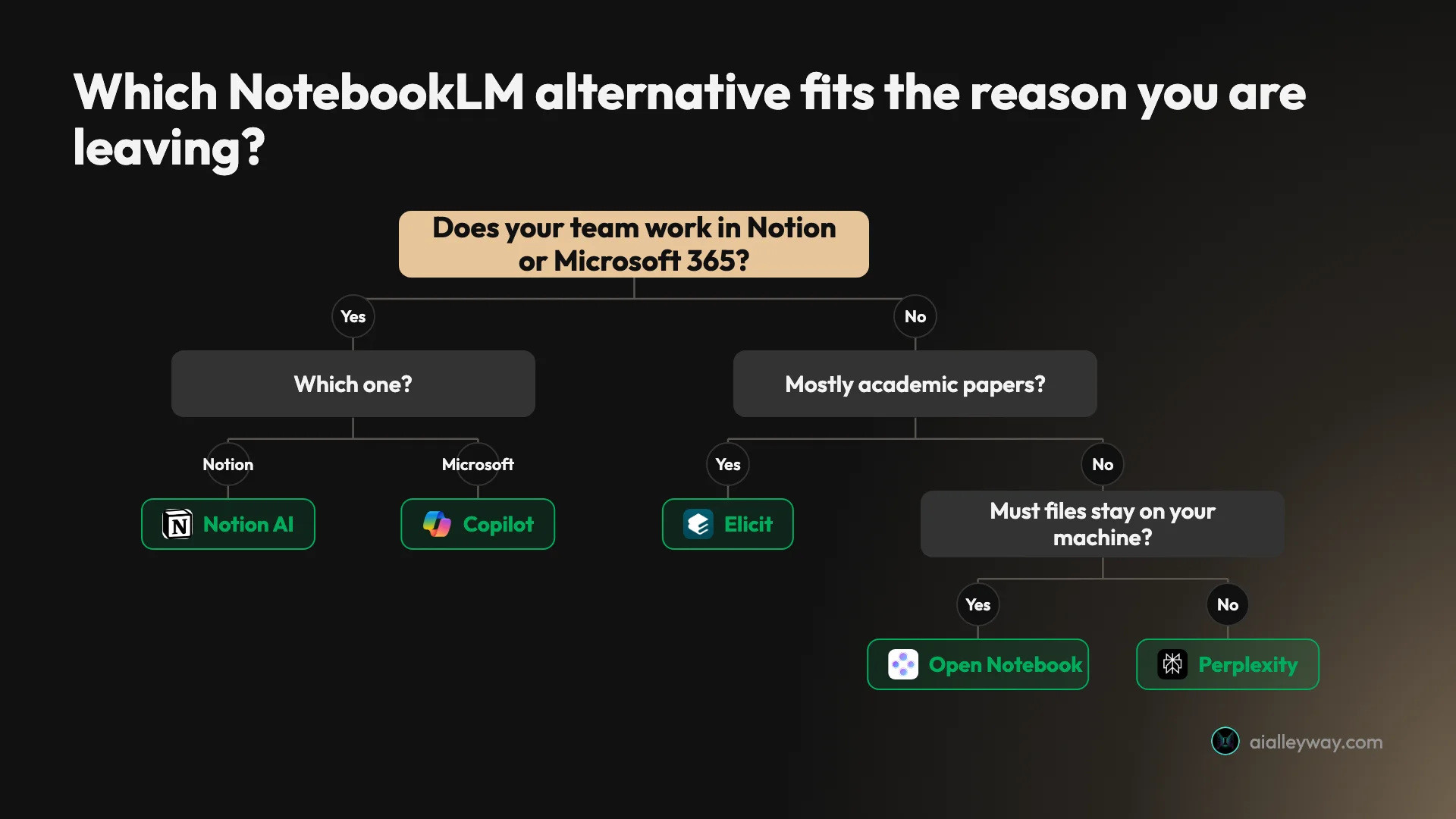
- If your team lives in Notion, pick Notion AI, and check where each answer was cited from.
- If your files live in OneDrive or SharePoint, pick Copilot Notebooks. Check that you have a work or school account if you want audio overviews.
- If you already pay for ChatGPT or Claude, try a Project before you pay for anything else.
- If you want your files and the web in one cited answer, pick Perplexity.
- If you want one library of everything you have ever read, pick Recall, and plan on Plus.
- If you need to find papers, pick Elicit. If you already have them, pick Paperguide.
- If your files cannot leave your machine, pick Open Notebook.
Three checks before you move
Whichever you pick, check these on its own pages first.
- Does it show you the passage? Fewer than half of the alternatives describe showing the exact passage. Gemini Notebook’s citation took me to the highlighted passage; Notion AI’s opened the whole page. Ask one question you know the answer to and click the citation before you trust the rest.
- Can you get your notes out? Gemini Notebook lets you export notes to Google Docs. Check the export on the new tool before you put a year of work into it.
- Who can see your files? Read the training policy for your plan. Recall says it does not train on your content; Open Notebook can keep everything on your own computer.
Taking your notes out of Gemini Notebook
Google’s notes help page describes one way out for your work. Save an answer you like as a note, then choose Export to Docs from the note’s menu. The export is a copy: Google says changes in the new Docs file do not sync back to the note.
Your sources are easier, because they are yours already. Gemini Notebook accepts Word, PDF, Markdown, text, CSV and PowerPoint files, so the same files can go straight into any of the tools above. Copilot Notebooks, ChatGPT, Claude, Elicit, Paperguide and Open Notebook all list PDF; check the others’ file lists before you move a folder.
And if the meter was your only problem, Google AI Plus at $4.99 a month may be the cheaper fix. It keeps the citations you came for.
Final word
For a team already working in Notion, Notion AI is the alternative I have tested and would use, and our Notion AI review shows where it beats Gemini Notebook and where it does not.
Frequently asked questions
What is the best alternative to NotebookLM?
It depends on why you are leaving, because none of the nine does every part of the job. Notion AI is the one I have tested against Gemini Notebook, as NotebookLM is now called, on the same four articles. It got every price and count I checked right and built a 23-row database from the pages, but its citations opened a whole page rather than the passage, and it searched the web by default.
If you want the closest match on paper, Microsoft Copilot Notebooks is the big-company option that also answers only from the files you add and makes audio overviews, though Microsoft's pages limit the audio to work and school accounts. If you want it on your own machine, Open Notebook is free, open source and runs in Docker. For academic papers, Elicit searches a corpus of more than 138 million.
Does Microsoft have anything similar to NotebookLM?
Yes. Microsoft Copilot Notebooks is Microsoft's closest equivalent. Microsoft's support pages say a notebook gives answers based only on the references you have added, and list study guides, flashcards, quizzes, mind maps and audio overviews among its outputs.
There are two catches. The audio overview is available only to commercial Microsoft 365 users with work or school accounts, so a Personal, Family or Premium subscriber gets notebooks without it. And the free Copilot Chat tier takes up to 50 references per notebook, while a paid Copilot licence lets you add more than 300 and uses the first 300. Microsoft 365 Personal is $9.99 a month in the US.
I have not used Copilot Notebooks, so this comes from Microsoft's pages, read on 17 October 2026.
Is there a free alternative to NotebookLM?
Several, each with a limit that matters. Open Notebook is free software under the MIT licence, and you pay only for the AI models you connect, or nothing per call with local models. ChatGPT and Claude both offer Projects on their free plans, capped at 5 files per project on ChatGPT Free and 5 projects on Claude Free.
Recall's free plan saves unlimited articles and notes but gives 10 AI summaries a month and keeps chat on its paid plan. Elicit's free Basic plan includes unlimited paper search, with limited Research Agent use and no number given. Paperguide's free plan has 2,000 AI credits a month and up to 5 PDFs for chat. Gemini Notebook itself is still free with a Google account, with 100 notebooks and 50 sources in each.
Is there an open-source NotebookLM alternative I can run locally?
Yes. Open Notebook is MIT-licensed, describes itself as a privacy-focused alternative to Google's Notebook LM, and had about 40,000 stars on GitHub on 17 October 2026. It runs in Docker as two containers, a database and the app, and opens in a browser on your own computer.
It works with more than 20 model providers, including Ollama and LM Studio for models that run on your machine, and its podcast feature takes one to four speakers. From its own README: it needs Docker, and its interface and API listen on every network interface with no password by default. Keep it off shared networks until you have put it behind a password. I have not installed it; this comes from the project's repository.
Which NotebookLM alternative is best for research papers?
Elicit if you need to find papers, Paperguide if you already have the PDFs. Elicit searches more than 138 million academic papers, takes up to 20 uploaded files per session, and its changelog describes sentence-level citations. Since 30 September 2026 its paper search, data extraction and chat all run inside one Research Agent. Academic Plus is $11 a month billed yearly.
Paperguide is built around chatting with your own PDFs. Its help centre says each citation shows the paper title and page number, and hovering previews the cited sentence. The free plan takes up to 5 PDFs for chat, and Plus is $12 a month billed yearly. I have not used Elicit or Paperguide; both summaries come from their own pages.
Can ChatGPT or Claude do what NotebookLM does?
Partly. Both let you put files in a Project and chat about them, on every plan including free. ChatGPT allows 5 files per project on Free, 25 on Go and Plus, and 40 on Pro and business plans. Claude allows files of up to 30MB each with no count limit, as long as they fit in its context window, and paid plans switch on a search over the project when it grows past that.
What neither documents is the part that makes Gemini Notebook useful for checking: neither company's help pages that I read say that answers cite the uploaded file, and neither describes audio overviews of your documents. If you already pay for one of them, try a Project first. If you need to check every claim against its source, keep Gemini Notebook.
Keep reading
NotebookLM Review: Gemini Notebook Cites Well, Meters Hard
A NotebookLM review, now Gemini Notebook: five test questions, four Studio outputs, and an audio overview estimated at 45% of a five-hour limit.
Notion AI Review: It Builds Real Pages, but Full AI Costs $20
A hands-on Notion AI review on a free workspace: 39 requests, a 23-row database, a six-minute slide deck, one wrong citation, and what Business costs.
NotebookLM vs Notion: I Gave Both the Same Four Articles
NotebookLM vs Notion AI on the same four articles and questions: Gemini Notebook's citation opened the passage and it is free; Notion builds pages, from $20.
NotebookLM Pricing: Free, $4.99 or $19.99, and What You Get
NotebookLM pricing in the US: free, or $4.99, $19.99 or from $99.99 a month via Google AI plans. What each tier's limits buy, plus work and student routes.