
NotebookLM Pricing: Free, $4.99 or $19.99, and What You Get
NotebookLM pricing in the US: free, or $4.99, $19.99 or from $99.99 a month via Google AI plans. What each tier's limits buy, plus work and student routes.
Contents
NotebookLM pricing at a glance

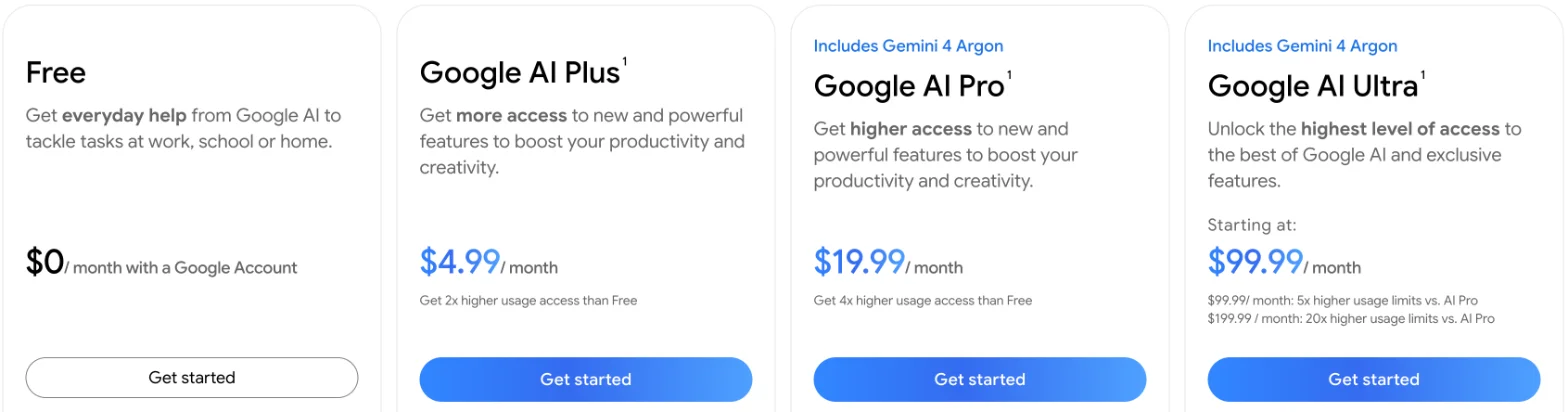
How much does NotebookLM cost? Nothing to start. Google renamed it Gemini Notebook in July 2026, and it is free with a Google account. To get more of it, you buy a Google AI plan: on Google’s US plans page on 15 October 2026, Google AI Plus was $4.99 a month, Google AI Pro $19.99 and Google AI Ultra $99.99 or $199.99. There is no NotebookLM-only subscription.
| What you buy | Monthly cost, US | Room in Gemini Notebook | How much more use than free |
|---|---|---|---|
| Nothing (a Google account) | $0 | 100 notebooks, 50 sources each | Baseline |
| Google AI Plus | $4.99 | 200 notebooks, 100 sources each | 2x |
| Google AI Pro | $19.99 | 500 notebooks, 300 sources each | 4x |
| Google AI Ultra, smaller tier | $99.99 | 500 notebooks, 500 or 600 sources each | 5x Pro’s |
| Google AI Ultra, larger tier | $199.99 | 500 notebooks, 500 or 600 sources each | 20x Pro’s |
I tested the free tier only, on 14 October 2026. I did not test any paid plan, a Workspace or Gemini Enterprise account, the student offer or the mobile app; every paid-plan figure here is Google’s, or my arithmetic on Google’s multipliers and my free-tier measurements.
Most people should start free. In my hands-on test on a Google account with no AI plan, five questions about four articles barely moved the meter. Audio and video overviews are what run it down.
You pay for a Google AI plan, not for NotebookLM
Google does not price Gemini Notebook on its own. Its plans help page opens: “You can upgrade Gemini Notebook to get additional capabilities, including higher limits and more features through Google AI Plans, Google Cloud, or a qualifying Google Workspace plan.” So there are three ways to pay: a personal Google AI plan, a work or school Workspace edition, or Gemini Enterprise through Google Cloud.
What you are paying for is mostly room. My free account was offered every Studio format, from audio overviews to slide decks. Paid tiers raise the notebook and source caps, add advanced sharing, and give you more usage before you hit a wall.
On personal accounts, usage is no longer counted in chats or overviews. Google’s usage-limits help page calls its limits “compute-based”: a long chat, a heavy feature or a complex prompt all cost more. You get a fresh allowance every five hours, capped by a weekly limit.
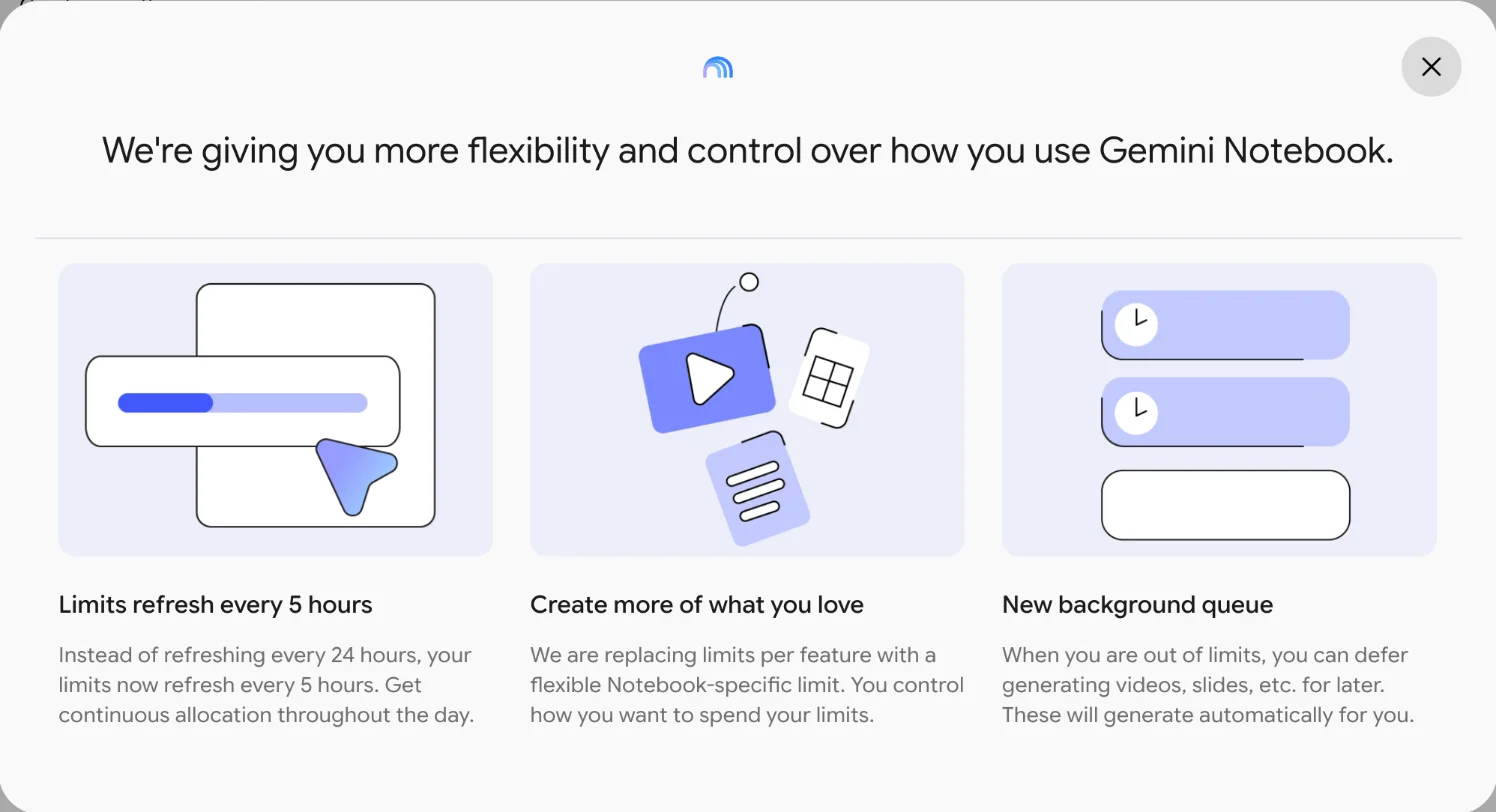
Google told users about this inside the app. On 14 October 2026 my account showed a pop-up promising “more flexibility and control”, which said limits now refresh every five hours instead of every 24, with one flexible Gemini Notebook limit in place of a limit for each feature. So a per-day count no longer describes a personal account.
Free, Plus, Pro and Ultra in detail
Here is what each personal tier gets, from Google’s plans help page and its US plans page, both read on 15 October 2026.
| Free | Plus | Pro | Ultra | |
|---|---|---|---|---|
| Price a month | $0 | $4.99 | $19.99 | $99.99 or $199.99 |
| Notebooks | 100 | 200 | 500 | 500 |
| Sources per notebook | 50 | 100 | 300 | 500 or 600 |
| Advanced sharing | No | Yes | Yes | Yes |
| Earlier access to features | Standard | Early | Priority | Priority |
| Visible watermark removal | No | No | Yes, with exceptions | Yes, with exceptions |
| Cloud storage across Google | 15 GB | 400 GB | 5 TB | From 20 TB |
Free
The free tier, which Google’s help page calls Standard, is a full product. The US plans page lists it at “$0/ month with a Google Account” and describes Gemini Notebook in it as a “Research and writing assistant”. You get 100 notebooks and 50 sources in each, and the plans help page lists “Access to Gemini models”. On my free account, all nine Studio formats were offered.
Custom chat and analytics are free too. Google’s help page says “Advanced sharing available to paid users. Custom chat and analytics are available to everyone.”
Google AI Plus, $4.99
Plus is the cheapest upgrade. The plans page sums it up as “Get 2x higher usage access than Free”, and lists Gemini Notebook as “Research and writing assistant with more Audio Overviews, notebooks, and more.” The help page doubles the notebook cap to 200 and the source cap to 100.
Plus also brings 400 GB of Google storage and the other Google AI benefits on the plans page. Google says it is available in more than 160 countries and territories.
Google AI Pro, $19.99
Pro is the plan behind the “Gemini Notebook in Pro” column of Google’s plans help page, so it is the nearest thing to a NotebookLM Pro, and it is where Gemini Notebook gets roomy: 500 notebooks, 300 sources per notebook, four times the standard limits, “Higher access to Gemini models” and “Priority” access to new features. The plans page lists Gemini Notebook in Pro as “Research and writing assistant with 5x more Audio Overviews, notebooks, and more.”
Note the two figures. The same page says Pro gets “4x higher usage access than Free”, and the usage-limits help page says “Four times higher than standard limits”. I would plan on four times, the figure Google gives for limits, and treat “5x more Audio Overviews” as marketing for the card.
Pro’s wider bundle is large: 5 TB of storage, YouTube Premium Lite, Google Home Premium Standard and 1,000 Google Flow credits. On Pro and Ultra, Google’s plans help page also marks watermark removal as available, with an exception for a few countries.
Google AI Ultra, $99.99 or $199.99
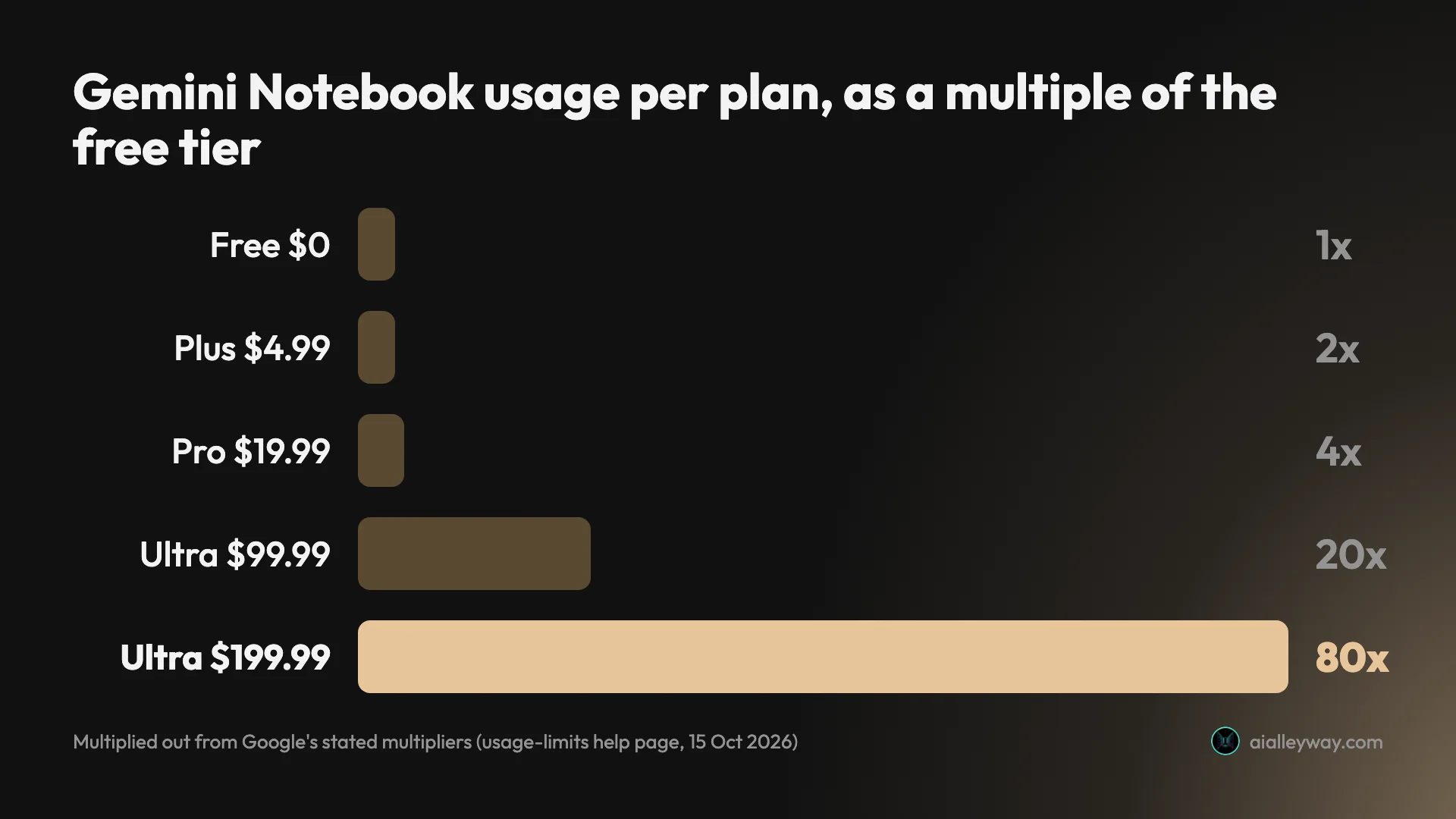
Ultra comes in two sizes. The plans page reads “$99.99/ month: 5x higher usage limits vs. AI Pro” and “$199.99 / month: 20x higher usage limits vs. AI Pro”. Google’s plans help page has two Ultra columns, a 20 TB plan and a 30 TB plan, with 500 and 600 sources per notebook. The plans page says Ultra storage starts at 20 TB, so I take the $99.99 plan to be the 20 TB one.
For Gemini Notebook alone, Ultra is hard to justify. Its notebook cap is the same 500 as Pro. What it adds is much more usage, 500 or 600 sources per notebook against Pro’s 300, and “Highest access to Gemini models”.
Multiplied out, Ultra at $99.99 is five times Pro’s four, or 20 times the standard limits. The $199.99 plan is 20 times Pro’s four, or 80 times the standard limits. That is my arithmetic on Google’s multipliers, not a figure Google publishes.
How much one free five-hour window buys
Is NotebookLM free? Yes, but Google gives no count for the free tier, so the only way to size it is to spend it. I did that on 14 October 2026, on a Google account with no AI plan, for our Gemini Notebook review. The account’s own Usage dialog offered “Upgrade to AI Plus: Get double the usage than your current plan”, which puts it below AI Plus, on the free tier.
Five questions about four of our articles moved the five-hour meter to just 4.7%. Then the Studio dialogs showed what each output would cost before I clicked. Eight of the nine showed an “AI Usage” bar shaded for “Already used” and “Estimated use”; the percentages below are the widths the page itself set for those shadings.
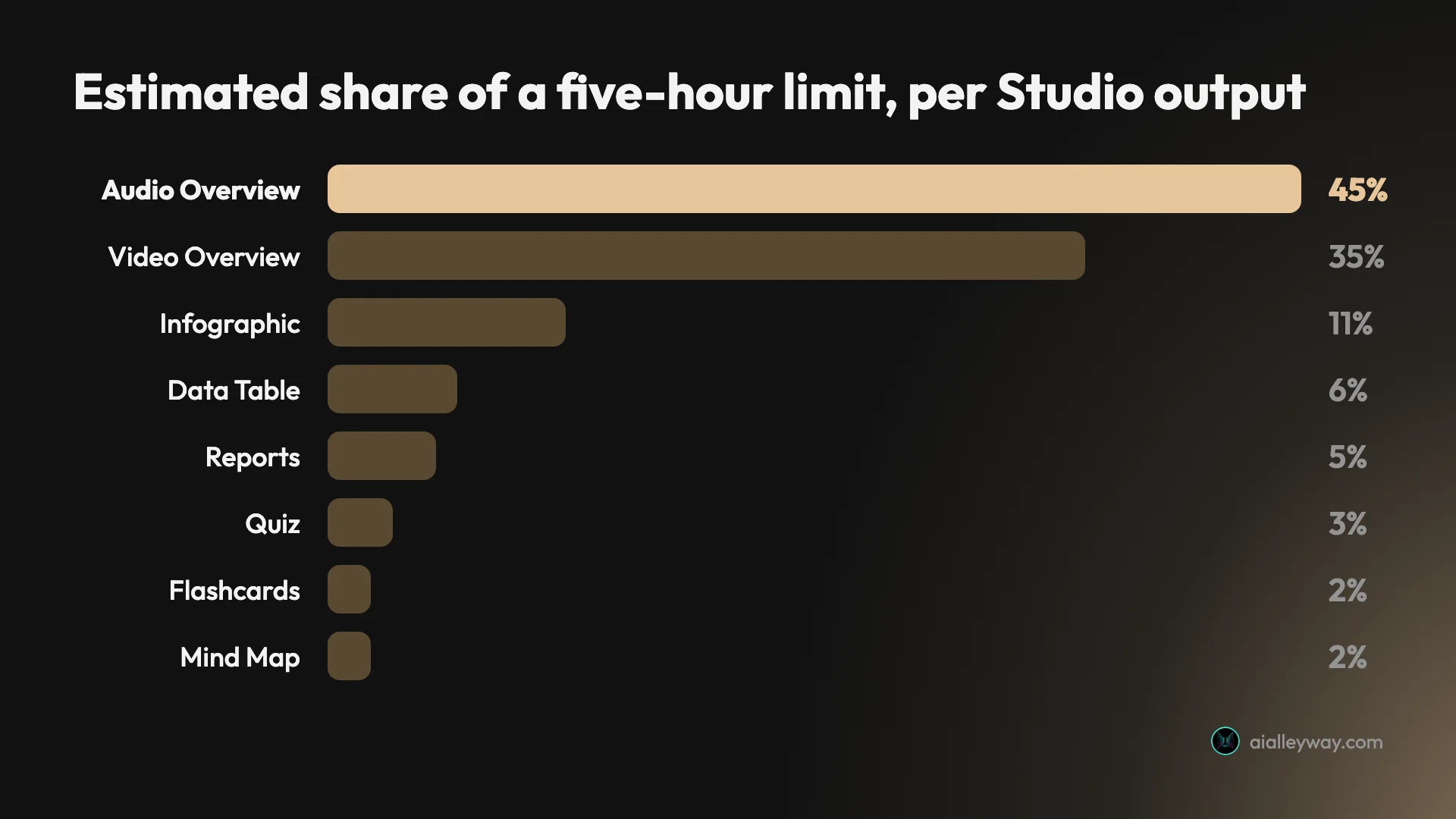
| Output | Expected cost on the free tier, as a share of one 5-hour allowance |
|---|---|
| Audio Overview | 45% |
| Video Overview | 35% |
| Infographic | 11% |
| Data Table | 6% |
| Reports | 5% |
| Quiz | 3% |
| Flashcards | 2% |
| Mind Map | 2% |
By the end of the session I had asked five questions and made four Studio outputs: an audio overview, a mind map, an infographic and a data table. The Usage screen in Settings then showed 32% gone from the current window and 2% from the week. Its reset times were five hours and seven days after my first request.
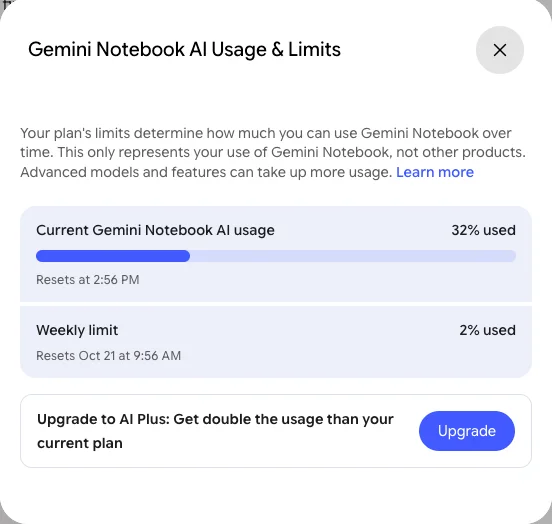
One oddity: the meter rose to about 60% while those outputs were generating, then read about 30% once the audio overview had finished. Nothing on screen explained the drop, so treat the estimates as an upper bound rather than a final charge.
How to check your NotebookLM limits
Because the limits are a moving percentage, it is worth knowing where Gemini Notebook shows them. Google’s pages describe four places. I saw two of them on my free account.
| Where | What it shows | Source |
|---|---|---|
| Settings, then Usage | Five-hour window and weekly limit, as percentages with reset times | My free account; Google’s usage page |
| In chat | A warning near the limit, and the time it resets | Google’s usage page |
| Each Studio dialog | Estimated cost of that output on a bar | My free account; Google’s usage page |
| Next to your profile image | A badge if you are on an upgraded plan | Google’s plans help page and work or school help page |
The Usage dialog. Google’s usage-limits page says to open Gemini Notebook and, “At the top right, select Settings Usage.” On my free account, that dialog was headed “Gemini Notebook AI Usage & Limits” and said “This only represents your use of Gemini Notebook, not other products.” It showed two limits, the current five-hour window and the weekly limit, each as a percentage with a reset time.
The chat box. Google’s page says chat messages warn you as you get close, and quotes two examples: “You’re almost at your AI usage limit. Limit resets at 3:00 PM.” and “Limit reached. All features are available after 3:00 PM.” I did not reach either in my test.
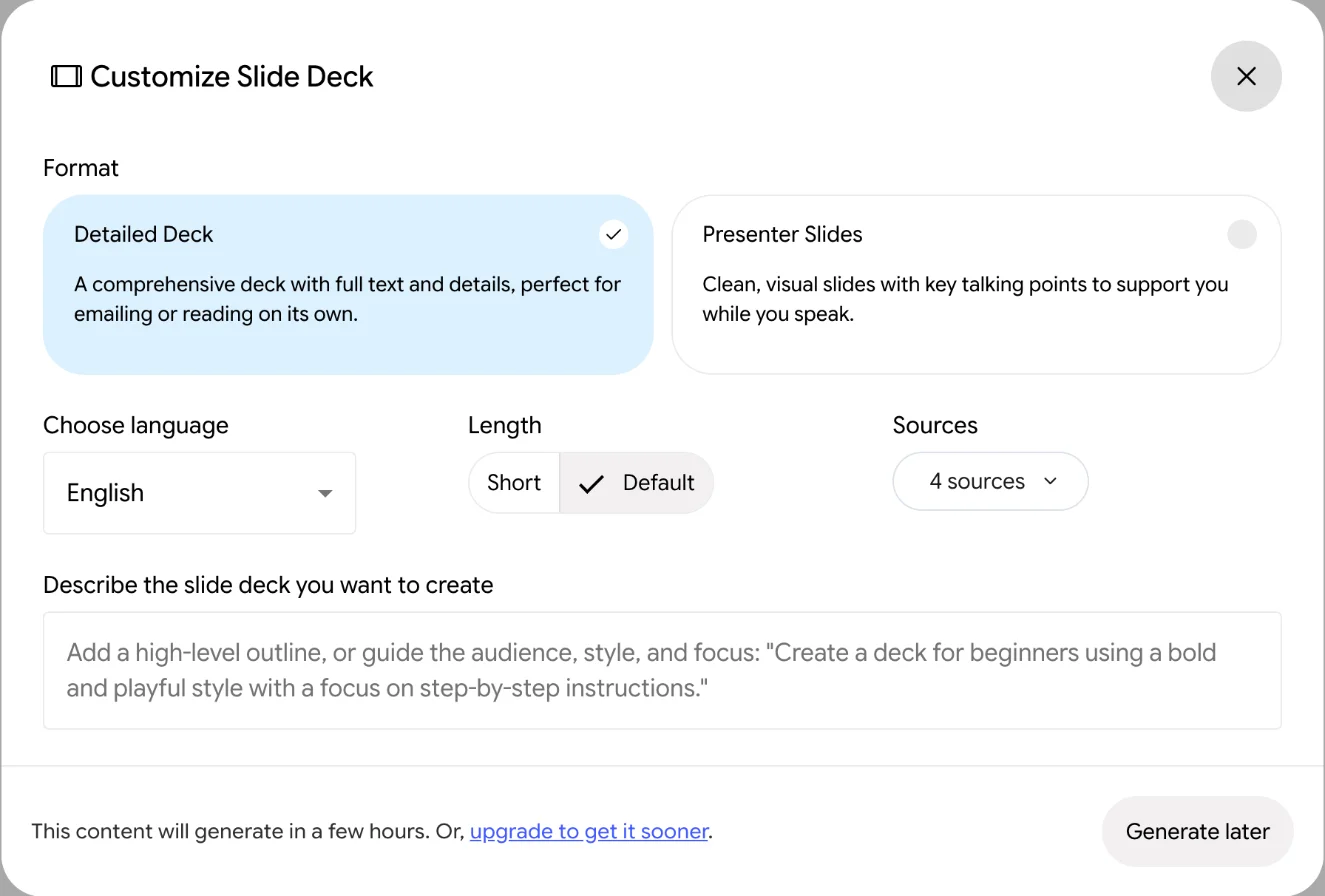
The Studio dialogs. Before you generate anything, the dialog for that output shows its expected cost. Only the slide deck, which I opened late in the session, skipped the bar. Google’s page describes the same bar: “The more the bar is filled in, the higher the expected cost.” Checking it before you generate is the easiest way to stop one audio overview from using half your window.
The badge. To confirm an upgrade went through, Google’s plans help page says to “check to see if you have a distinct badge next to your user profile image”. The work and school help page names the badges: “Pro, Plus, Expanded, or Ultra”.
If you do want to upgrade from inside the app, Google’s usage page says to select Upgrade “In chat or studio generation”. The Settings menu on my account also had a highlighted “Upgrade Gemini Notebook” item.
Work and school accounts get a different table
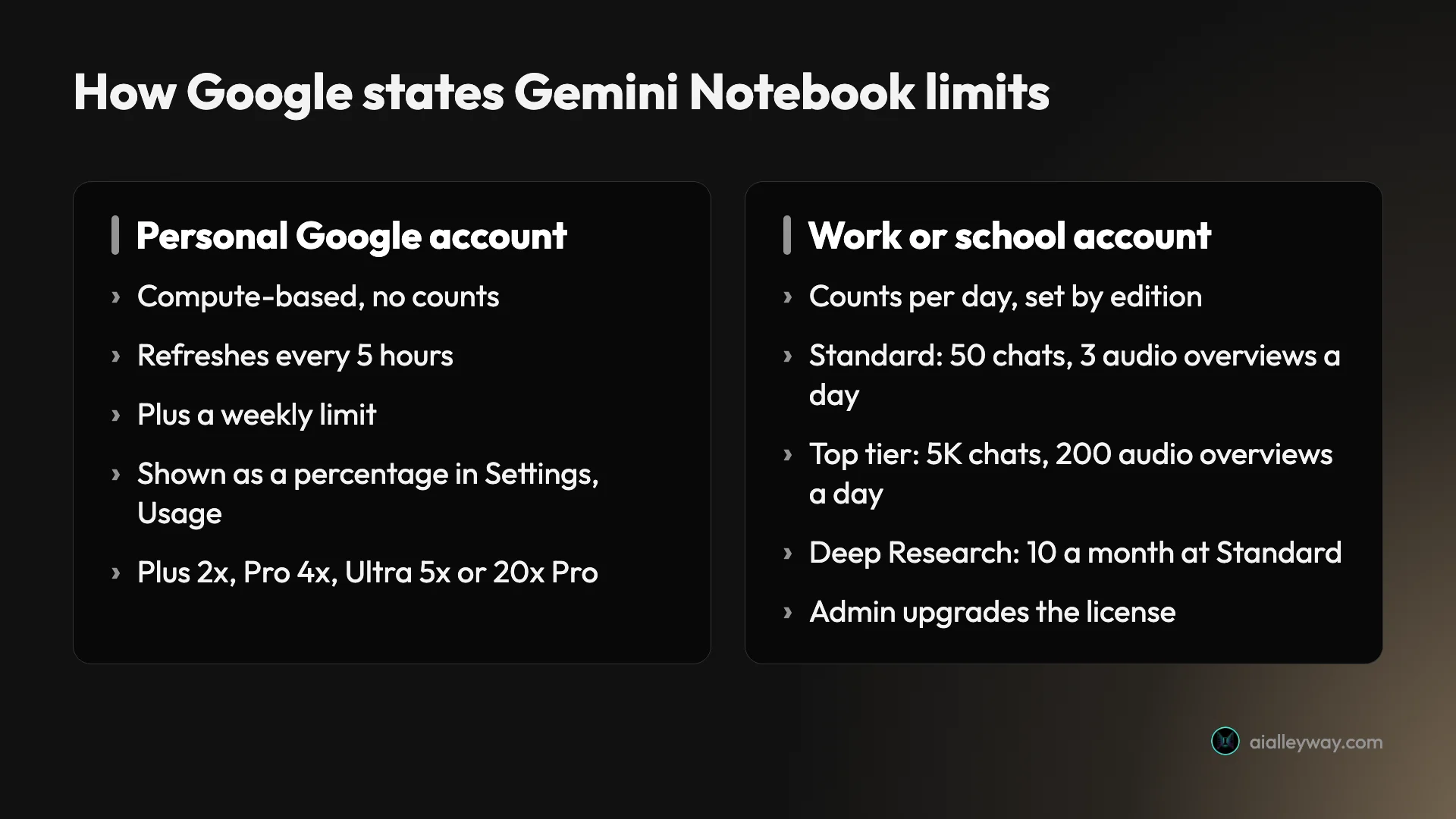
If you sign in with a work or school account, the rules change. Google’s help page for work and school accounts says “Gemini Notebook is now a core service (like Gmail, Google Calendar, and Docs)” for Workspace and Workspace for Education users, and that higher limits need “a Google Workspace plan that includes higher limits.”
Unlike the personal pages, this one still publishes daily counts. They are set by the Workspace edition your organization pays for, not by a Google AI plan.
| Per user, “Subject to Change” | Standard | More | Higher level | Expanded level | Highest level |
|---|---|---|---|---|---|
| Notebooks | 100 | 200 | 500 | 500 | 500 |
| Sources per notebook | 50 | 100 | 300 | 400 | 600 |
| Chats | 50 a day | 200 a day | 500 a day | 1,000 a day | 5,000 a day |
| Audio Overviews | 3 a day | 6 a day | 20 a day | 40 a day | 200 a day |
| Reports, flashcards, quizzes, mind maps | 10 a day each | 20 a day | 100 a day | 200 a day | 1,000 a day |
| Deep Research | 10 a month | 3 a day | 20 a day | 30 a day | 200 a day |
Which column you land in depends on the edition. The page puts Business Starter, Enterprise Essentials, the Frontline editions, Nonprofits, and Education Fundamentals and Standard at standard access. Education Plus and the Teaching and Learning add-on get more. Business Standard and Plus, Enterprise Standard and Plus, and Google AI Pro for Education get the higher level. Two add-ons, AI Expanded Access and AI Ultra Access, sit at the top two levels.
The work page also makes a stronger privacy promise: “Your uploaded files, chats and model outputs won’t be reviewed by human reviewers or used to improve generative AI models.” On a personal account, Google’s plans help page says your data “is not used to train Gemini Notebook unless you provide feedback”, and that feedback may be reviewed in full context.
Paying for a team: Gemini Enterprise
Businesses can also buy Gemini Enterprise, which Google’s plans page lists under its Business tab. The Business edition starts at “$21 USD per seat per month” with a trial, up to 300 seats, and includes “Gemini Notebook for enterprise”. The Standard and Plus editions start at “$30 USD per seat per month” through sales, with “Higher usage limits for Gemini” and “enterprise compliance features in Gemini Notebook for enterprise”.
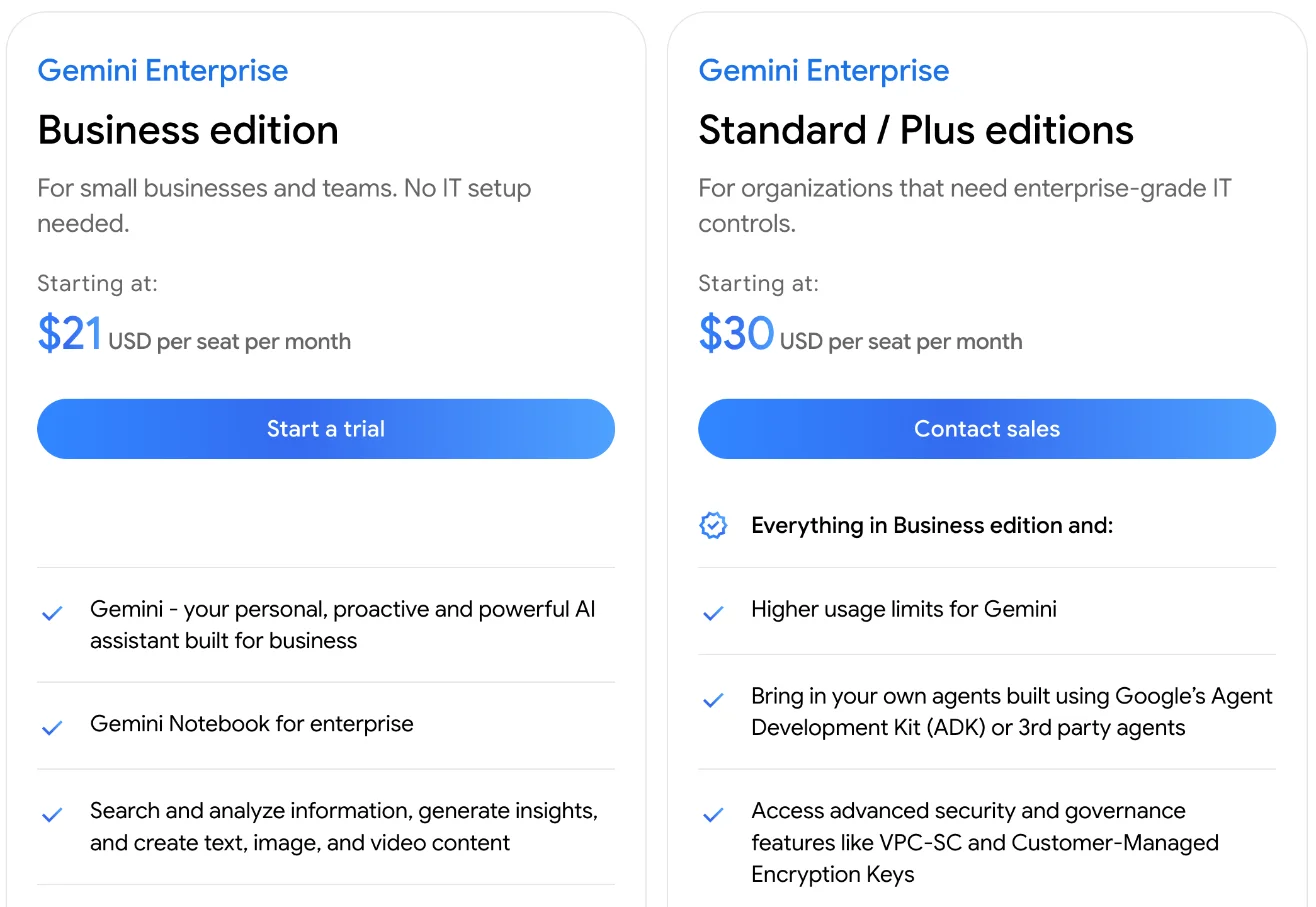
On the plans help page, the Google Cloud route promises “5X or more notebook artifacts, including Audio Overviews, Video Overviews, Reports, and more”, and says uploaded files “will remain within your GCP project.” I did not test any business plan.
Free for a year: the student offer
US college students may not need to pay at all. Google’s student page offers a “Free student plan for 1 year”, which its FAQ describes as “The free Google AI Pro student offer”, open to “eligible U.S. college students ages 18+”.
Read the fine print before you claim it. The page says “Valid form of payment required at sign-up” and “Unless cancelled earlier, Google AI Pro will automatically charge $19.99/month after the trial ends.” It also says eligibility “must be verified each year to maintain access”, and the offer can be redeemed “until December 31, 2026”. The student page itself lists Gemini app benefits rather than Gemini Notebook by name, but the plan is Google AI Pro, and Google’s plans page includes Gemini Notebook in Pro.
What each plan buys in practice
Google’s multipliers are abstract, so here is how they map onto the costs I measured. The arithmetic below divides my free-tier estimates by Google’s multipliers; it assumes the multiplier applies evenly, which Google does not promise.
A student turning lecture notes into audio. On the free tier, an audio overview was estimated at 45% of a five-hour window, so two in a sitting would use 90% of it. On Pro, at four times the usage, the same overview would be about 11% of a window. If audio is your main use, Pro, or the free student offer, is the plan to look at.
A researcher who mostly asks questions. Five questions used 4.7% of a free window in my test, roughly 1% each. At that rate, a long session of questions fits in one free window. The cap you are more likely to hit is 50 sources per notebook, and Plus doubles that to 100 for $4.99.
A team sharing notebooks. Advanced sharing is paid, and Google’s help page says “Sharing a notebook does not change the source limit for any collaborator.” If the team already has Google Workspace, check its edition before anyone buys a personal plan. Business Standard already sits at the higher level, with 500 chats a day.
Catches in Google’s pricing
Daily counts no longer apply to personal accounts
Of the Google pages I read, only the work and school page still gives daily counts, such as three audio overviews a day at the standard level, and they apply to Workspace editions. The personal-account page describes compute-based limits that refresh every five hours, with no counts. Check which account you are signed in with before you trust a number.
The meter is a percentage, and the paid tiers are multiples of it
There is no number of questions or overviews you can budget against. Google’s usage page warns that “we may at times have to cap the number of prompts and conversations you can have”, and that limits “may change.” Paying for Pro buys four times an amount Google does not publish.
Some outputs wait when you run low
Google’s usage page describes a “Generate later” queue for when you run out, which “may take a couple hours”. I met it with about 60% of a window used: the Slide Deck dialog had a single button, Generate later, and no Generate now.
The plans page shows monthly prices only
Google’s US plans page lists every AI plan by the month. It gives no yearly price, and its footer adds “No refunds for partial billing periods, except as required by applicable law.” It also says the plans are “only available for ages 18+”.
Ultra’s two tiers have different source caps
The $99.99 and $199.99 Ultra plans share a name but not a source cap. Google’s help page lists a 20 TB and a 30 TB Ultra plan with 500 and 600 sources; by the storage figures, I take those to be the $99.99 and $199.99 plans. If source count is why you are upgrading, Pro’s 300 may already be enough.
Matching a plan to how you use it
- Trying it out, or asking questions of a few documents: stay on Free. Chat barely moved the meter in my test.
- Running into the 50-source cap: Google AI Plus at $4.99 doubles the notebook, source and usage limits.
- Making audio or video overviews most days: Google AI Pro at $19.99, for four times the usage and 300 sources per notebook.
- A US college student: claim the free year of Google AI Pro, and set a reminder to cancel before it renews at $19.99 if you do not want it.
- At work: ask your Workspace admin what your edition includes before paying for anything yourself.
- Skip Ultra unless you also want its other Google AI benefits. For Gemini Notebook alone, it adds usage and sources but no more notebooks than Pro.
Other options
If your notes already live in Notion, Notion AI is our runner-up for AI notes. It builds pages, databases and decks from your workspace, but full AI needs Notion’s Business plan at $20 per member a month billed yearly, per our review. For a general assistant rather than a source notebook, our Google Gemini review covers what the same Google AI plans buy in the Gemini app.
Final word
Gemini Notebook is free, and for chatting with your sources the free tier goes a long way. Pay only when the meter, not the feature list, stops you: Plus at $4.99 if you need more sources, Pro at $19.99 if you make audio and video overviews often. Check the student offer and your Workspace edition first, because either may already cover it.
Frequently asked questions
What does the free version of NotebookLM leave out?
Mostly space and allowance, plus two paid extras. Google's US plans page lists Gemini Notebook, as NotebookLM is now called, at $0 a month with an ordinary Google account. Without paying you get 100 notebooks instead of 200 or 500, 50 sources per notebook instead of up to 600, less usage, no advanced sharing, which Google's plans help page reserves for paid users, and no visible-watermark removal, which it lists only for Pro and Ultra.
Money only comes in when you outgrow that. The cheapest step up is Google AI Plus at $4.99 a month, and the one Google's plans page describes with "5x more Audio Overviews" is Google AI Pro at $19.99. In my free-account test, chatting with four sources cost very little of the allowance, while a single audio overview was estimated at almost half of a window.
Is there a paid version of NotebookLM?
Yes, but not as a separate subscription. You pay for one of Google's AI plans and Gemini Notebook comes with it. On Google's US plans page on 15 October 2026, Google AI Plus cost $4.99 a month, Google AI Pro $19.99 and Google AI Ultra $99.99 or $199.99.
Google's usage-limits page puts Plus at two times the standard limits, Pro at four times and Ultra at five or 20 times Pro. Paid plans also raise the notebook and source caps and add advanced sharing. Work and school accounts get higher limits through their Google Workspace edition instead, and businesses can buy Gemini Enterprise, from $21 per seat a month.
Is there a NotebookLM Plus?
Google sells Gemini Notebook, the name it announced for NotebookLM on 16 July 2026, through its Google AI plans, and its plans help page names the paid columns after them: Gemini Notebook in Plus, in Pro and in Ultra. So the Plus you can buy is Google AI Plus.
The in-Plus column is Google AI Plus at $4.99 a month, which Google's pages describe as two times the standard limits, 200 notebooks and 100 sources per notebook. Google AI Pro, at $19.99, is the column with four times the standard limits and 300 sources per notebook.
What are NotebookLM's limits?
For personal Google accounts, Google's help pages give caps and multipliers rather than counts. The free tier allows 100 notebooks and 50 sources per notebook, and AI use is compute-based, refreshing every 5 hours up to a weekly limit. Plus doubles the usage and Pro quadruples it, with 200 and 500 notebooks and 100 and 300 sources per notebook.
Work and school accounts follow a different table. Google's help page for them still lists daily counts by Workspace edition: at the standard level, 50 chats, 3 audio overviews and 10 reports a day, rising to 5,000 chats and 200 audio overviews a day at the highest level. Google's personal-account pages no longer give daily numbers, so check which kind of account a daily figure refers to.
Is Google AI Pro worth it for NotebookLM?
Only if you hit the free limit often. In my test on a free account, one audio overview was estimated at 45% of a five-hour window, so two of them in a sitting would use most of a window. Pro's four-times allowance, by Google's multiplier, would make the same overview a much smaller share, and it raises the source cap from 50 to 300 per notebook.
If you mostly chat with your sources, the free tier went a long way in my test: five questions used under 5% of the window. Students should check Google's free student offer first, which gives eligible US college students aged 18 and over Google AI Pro free for a year, with a payment method required and $19.99 a month charged after it ends unless cancelled.
Keep reading
NotebookLM Review: Gemini Notebook Cites Well, Meters Hard
A NotebookLM review, now Gemini Notebook: five test questions, four Studio outputs, and an audio overview estimated at 45% of a five-hour limit.
Notion AI Review: It Builds Real Pages, but Full AI Costs $20
A hands-on Notion AI review on a free workspace: 39 requests, a 23-row database, a six-minute slide deck, one wrong citation, and what Business costs.
Google Gemini review: the best free tier, sold as storage
A Google Gemini review from the free tier: four models including 3.1 Pro handed over for nothing, then paid tiers that are really 400GB, 5TB and 20TB of Drive.
Best AI note taker: 4 top tools, tested head-to-head
We ran one meeting through Granola, Fathom, Fireflies, and Otter. The best AI note taker depends on whether you take client calls, want it free, or run a team.