
Notion Pricing: $0 to $24 a Seat, and Where Notion AI Starts
Notion pricing in the US: Free, Plus at $10 or $12, Business at $20 or $24 per member a month. Where Notion AI starts, what credits cost and how seats bill.

Contents
What Notion costs you
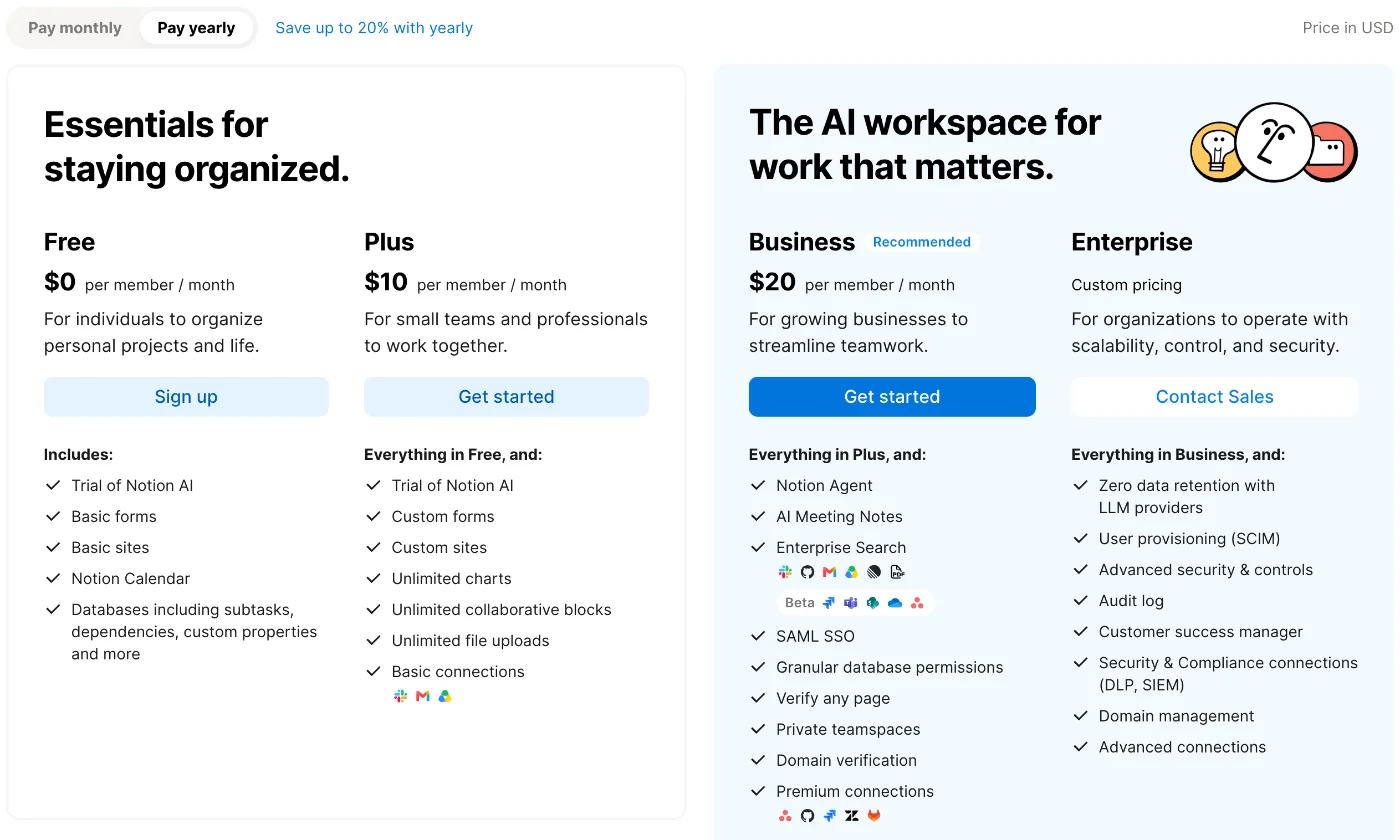
Notion is free for one person and costs $10 to $24 per member a month for teams. On notion.com/pricing on 16 October 2026, Plus was $10 billed yearly or $12 billed monthly, and Business, the first plan with Notion AI included, was $20 or $24. Enterprise is sold by quote.
| Notion plan | Per seat, yearly billing | Per seat, monthly billing | AI on this plan |
|---|---|---|---|
| Free | $0 | $0 | Trial only |
| Plus | $10 | $12 | Trial only |
| Business | $20 | $24 | Full, within a usage allowance |
| Enterprise | Custom pricing | Custom pricing | Full, within a usage allowance |
I read notion.com/pricing in both billing views, and Notion’s help pages on credits and AI limits, on 15 and 16 October 2026, and tested Notion AI on a new Free workspace on 15 October 2026. I did not pay for Plus or Business, buy credits, ask for a refund or request an Enterprise quote; those parts come from Notion’s own pages.
Most solo users can stay on Free. Small teams usually start on Plus. Pay for Business mainly if the team will use Notion AI, because that is the line where AI stops being a trial.
How Notion charges
Three rules decide what you pay, and the pricing page’s FAQ spells them out.
You pay per member, not per workspace. The FAQ says “If you upgrade your workspace to one of the paid plans, you will be charged a fee per member.” Everyone you add as a member takes a paid seat, at the workspace’s plan price.
Guests are free. “Guests are free of charge – but they can only access individual pages they are invited to.” Free allows 10 guests; every paid plan has no guest limit. For a client or a freelancer who needs a few pages, a guest invite costs nothing.
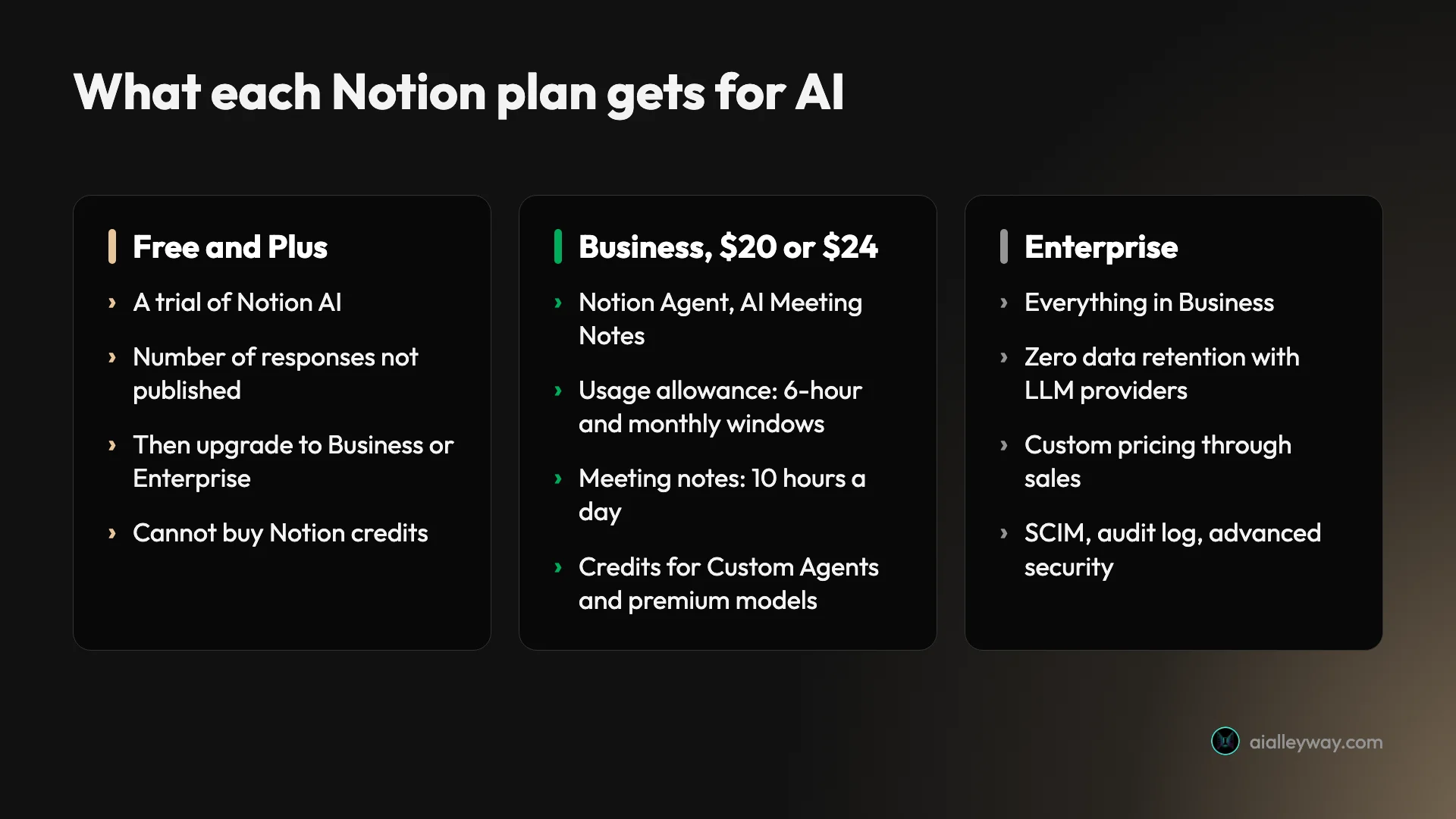
AI is bundled, not bought separately. The pricing page lists no separate Notion AI add-on. Free and Plus get a trial; Business and Enterprise include Notion AI with a usage allowance. On top of Business or Enterprise, you can buy Notion credits for the AI features the allowance does not cover.
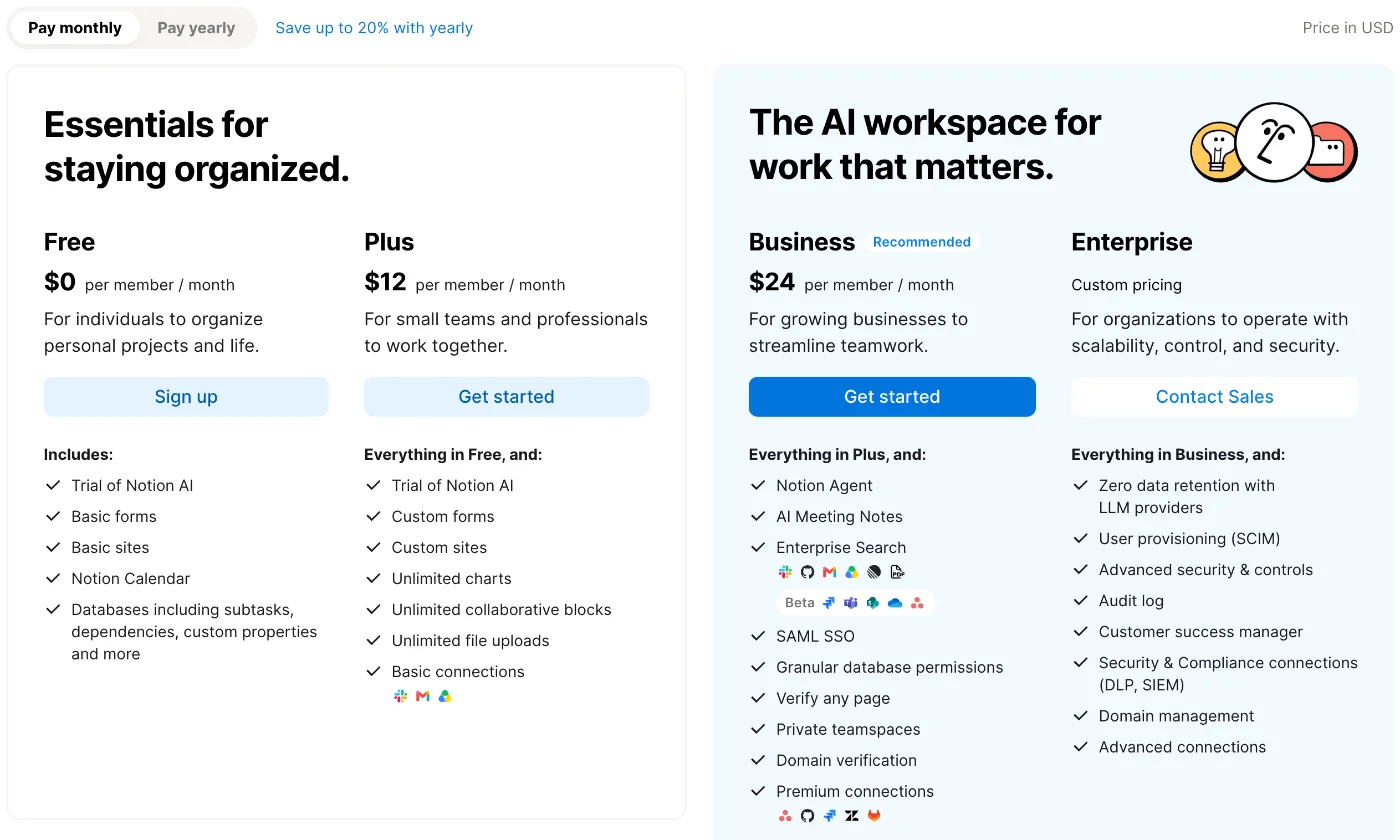
In my browser the page showed “Price in USD”, with a toggle between “Pay monthly” and “Pay yearly” and the note “Save up to 20% with yearly”. Check which view you are reading before you compare prices.
Notion plans in detail
Notion free plan: $0, unlimited for one person
Free is aimed “For individuals to organize personal projects and life.” A solo user gets unlimited pages and blocks, Notion Calendar, basic forms and sites, and databases with subtasks, dependencies and custom properties.
The limits start when you share. Notion’s pricing FAQ says that in a Free workspace with multiple members “you’ll be able to add a limited number of blocks before you have to upgrade”, and that once you hit the limit you can still read and edit what is there but “won’t be able to add new content blocks.” Free also caps file uploads at 5 MB, page history at 7 days, guests at 10 and charts at one.
Plus: $10 or $12 per member
Plus is “For small teams and professionals to work together.” It adds unlimited collaborative blocks, unlimited file uploads, unlimited charts, custom forms and sites, and basic connections. Page history goes to 30 days, guests become unlimited, and you get five notion.site domains instead of one, according to the pricing table.
Plus still has only the AI trial, the same as Free. The cheapest way to pay for Notion AI is to move the whole workspace to Business.
Notion Business plan: $20 or $24 per member, with Notion AI
Business is the plan Notion marks “Recommended”, under the heading it shares with Enterprise, “The AI workspace for work that matters.” It adds Notion Agent, AI Meeting Notes and Enterprise Search, with some connectors in Beta, plus SAML SSO, granular database permissions, private teamspaces, page verification and 90 days of page history.
Business is also where Notion credits become available; Notion’s help page calls them an add-on for Business and Enterprise. Credits pay for Custom Agents, Workers, premium AI models, and AI use beyond the plan’s allowance; the next section covers how much.
Notion Enterprise pricing: by quote
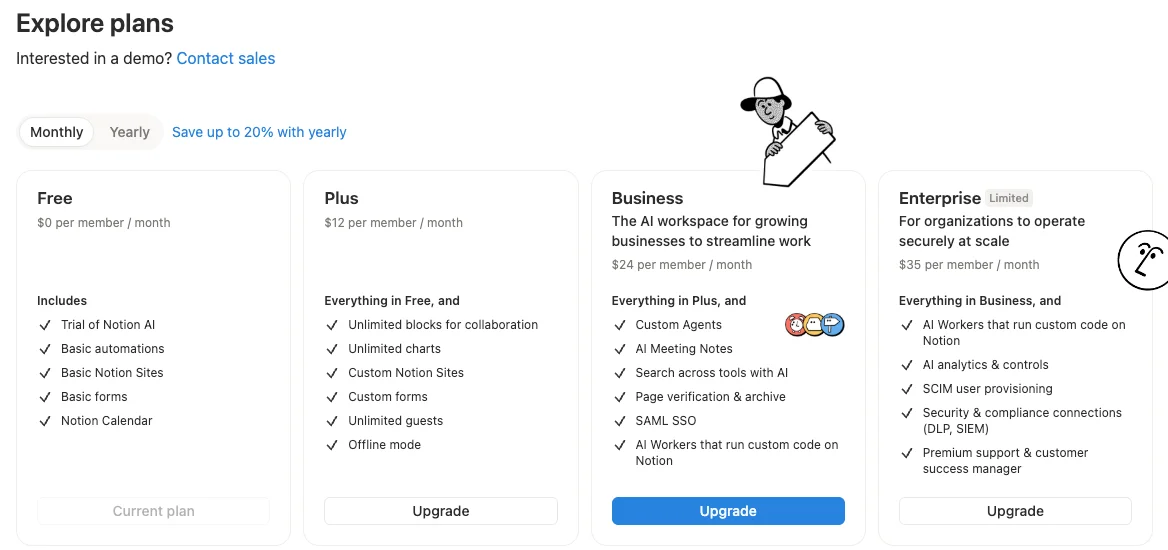
Enterprise is “For organizations to operate with scalability, control, and security”, priced through sales. It adds “Zero data retention with LLM providers”, SCIM user provisioning, an audit log, advanced security controls, domain management and a customer success manager.
A useful benchmark is $28 a seat. That is the yearly Enterprise price Notion’s own plan picker showed inside a free workspace on 15 October 2026; the monthly view showed $35, with a “Limited” tag. The public page gives no number, so a sales quote is the only firm price.
The features that change between plans
AI gets the attention, but most of what separates Notion’s plans is ordinary workspace plumbing. The comparison table on the pricing page lists it row by row, and a few rows decide most upgrades.
| Feature | Free | Plus | Business | Enterprise |
|---|---|---|---|---|
| Page history | 7 days | 30 days | 90 days | Unlimited |
| File uploads | Up to 5 MB | Unlimited | Unlimited | Unlimited |
| Guests | 10 | Unlimited | Unlimited | Unlimited |
| Automations | Basic, buttons only | Custom, database automations | Same as Plus | Same as Plus |
| Forms | Basic | Custom | Custom, with conditional logic | Custom, with conditional logic |
| notion.site domains | 1 | 5 | 5 | 5 |
| Search engine indexing for sites | Basic | Advanced | Advanced | Advanced |
Automations are the row most teams notice first. On Free they are “Basic, buttons only”; Plus adds custom database automations, which is what most people mean when they say a Notion workflow runs itself. Business and Enterprise do not add more here: the table reads “Same as plus”.
Page history matters more than it looks. Seven days on Free means a page someone emptied last week may be past saving. Plus keeps 30 days and Business 90, and only Enterprise keeps everything.
Sites and forms grow in steps. Free publishes basic sites on one notion.site domain with basic search indexing. Plus moves to custom forms, five domains and advanced indexing. Business adds conditional logic to forms. A custom domain is “Pay per domain” on every paid plan, so it is an extra cost on top of any paid plan, not a perk of one.
Support steps up once you pay. The pricing table ticks priority support on Plus, Business and Enterprise, and lists premium support and a customer success manager on Enterprise only. Every plan, Free included, gets the public API, webhooks and a full export as HTML, Markdown and CSV; exporting the whole workspace as PDF starts at Business.
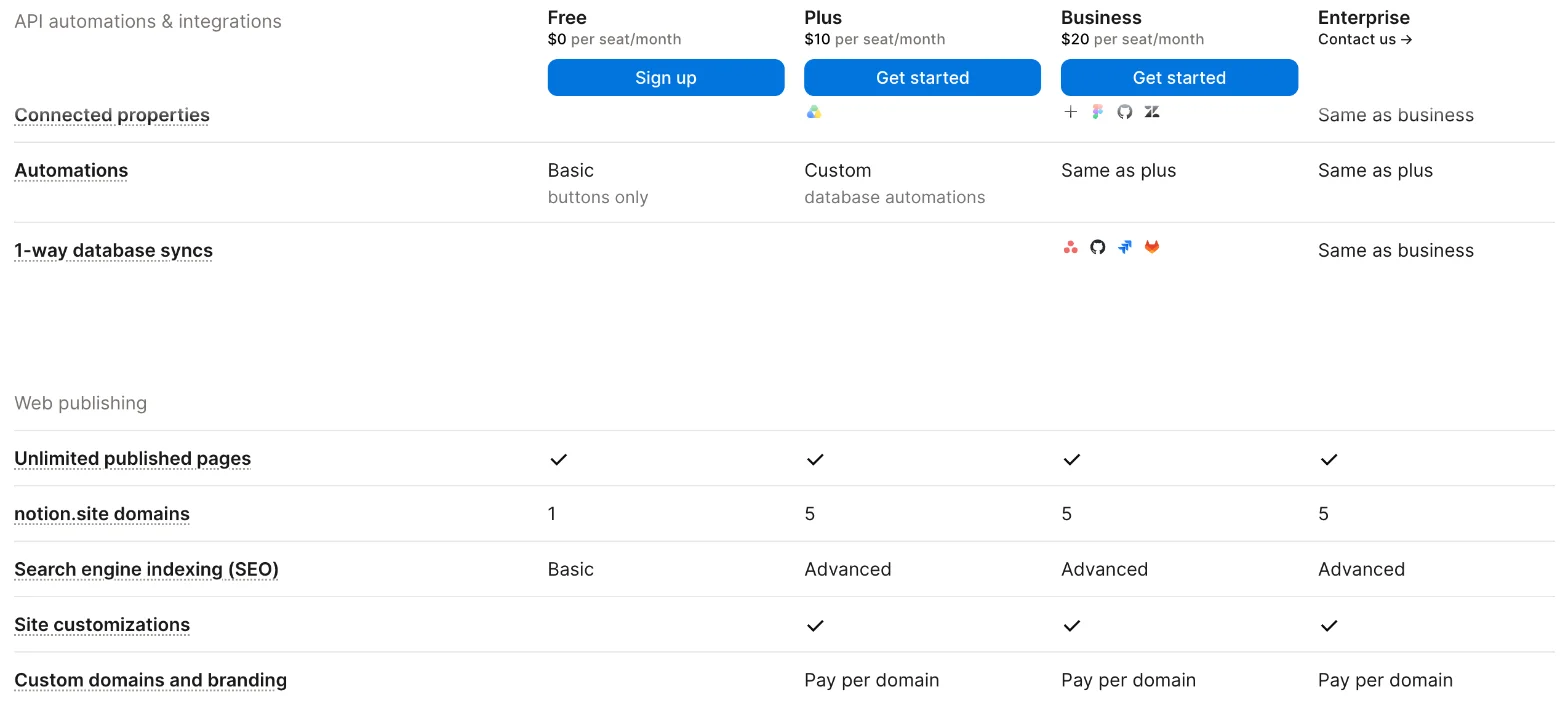
Read together, the table says Plus is the upgrade for collaboration and Business is the upgrade for AI, security and admin control. If neither AI nor single sign-on is on your list, Plus covers most of what a small team needs.
Notion’s student plan: Plus, free
Students and teachers get Plus for nothing. The pricing FAQ says “The Plus Plan (with a 1-member limit) is free for students and educators”, and that signing up with a school email gives access at once; it adds that “Thousands of school email domains are eligible, not just .edu!”
The one-member limit is the catch. It suits a personal course workspace, not a shared class or club workspace, which would need a paid plan for every member. On AI, the plan is still Plus, and the pricing page’s Plus card lists only a “Trial of Notion AI”.
Notion AI pricing: trial, allowance and credits
Notion AI is included in the seat price on Business and Enterprise and is a trial on Free and Plus. What you actually spend depends on the trial’s size, the Business allowance, and whether you buy credits.
Is Notion AI free? Only as a trial
Notion’s help page on complimentary responses says “Everyone can try Notion AI for free”, and that every AI action counts, including asking a question or adding an autofill property: “Anytime you click Try again, that counts as an additional AI response.” When the responses run out, you see a message that an upgrade to Business or Enterprise is needed.
How many responses that is, and whether they ever come back, is left unsaid, and the page treats Free and Plus alike. When I tested Notion AI for our Notion AI review, on a new Free workspace on 15 October 2026, 39 AI requests over about an hour produced no limit message. They included a 23-row database build and a five-slide deck. That is plenty for a fair trial on your own pages; just don’t expect a counter telling you where you stand.
The Business usage allowance
Business still has a ceiling. Notion’s usage allowance page says Business and Enterprise “include a usage allowance for certain Notion AI features”, measured in “A six-hour window” and “A monthly window”. Notion lists three features that draw on it, among others: chatting with or tasking your personal Notion Agent, generating images, and translating pages.
Neither window has a published size. If you use up the six-hour allowance, the page says access “resets automatically within six hours”; if you use up the monthly one, it comes back “at the start of your next billing cycle.” You can watch both in Settings, Notion AI, Usage, and Notion Agent warns you in chat as you get close.
Image generation also has its own beta cap on top of the allowance: 10 generations or edits per 24 hours and 30 per 30 days per user, according to Notion’s AI FAQ page. Several features are not counted against the Business allowance at all. Custom Agents, Workers and premium models are paid for in credits. Meeting notes are limited differently: the page gives AI Meeting Notes “its own 10-hour daily cap”.
Notion credits
Credits are the only part of Notion AI with a public unit price. Notion’s page on credits calls them “an add-on for Business and Enterprise plans”, shared across the workspace.
| Monthly credits | Annual credits | |
|---|---|---|
| Price | $10 per 1,000 | $13 per 1,000 |
| Who can buy in the product | Workspaces on monthly billing | Annual Business or Enterprise plans |
| Billing | Monthly, alongside the subscription | Paid upfront in one payment |
| Unused credits | Reset each month, no carry-over | Expire at renewal, no carry-over |
The pricing page puts Custom Agents at “Free to try, then $10 per 1,000 monthly Notion credits.” Notion’s credits page does not say how many credits any action uses, so you cannot turn a budget into a number of agent runs before you start.
By default, a member who uses up the allowance has to wait. An admin can switch on “Allow workspace to use Notion credits after AI limit is reached”, so the team keeps working on credits instead, and can track each member’s spend in a credits dashboard.
Premium models
The model picker in Notion AI is long: my test workspace’s settings counted 32 models, from several providers. Two rules from Notion’s Notion Agent help page decide whether a model costs extra: premium ones are billed in credits, and each premium model stays off until an admin switches it on. The usage allowance page adds that premium models spend credits “even when you use them inside Notion Agent.”
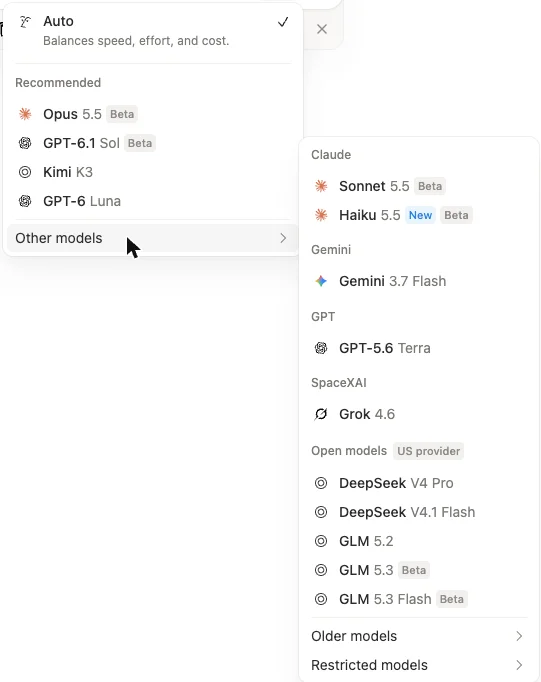
Models that are not premium are covered by the seat and its usage allowance. The premium ones are where a Business bill can grow.
Monthly or yearly billing?
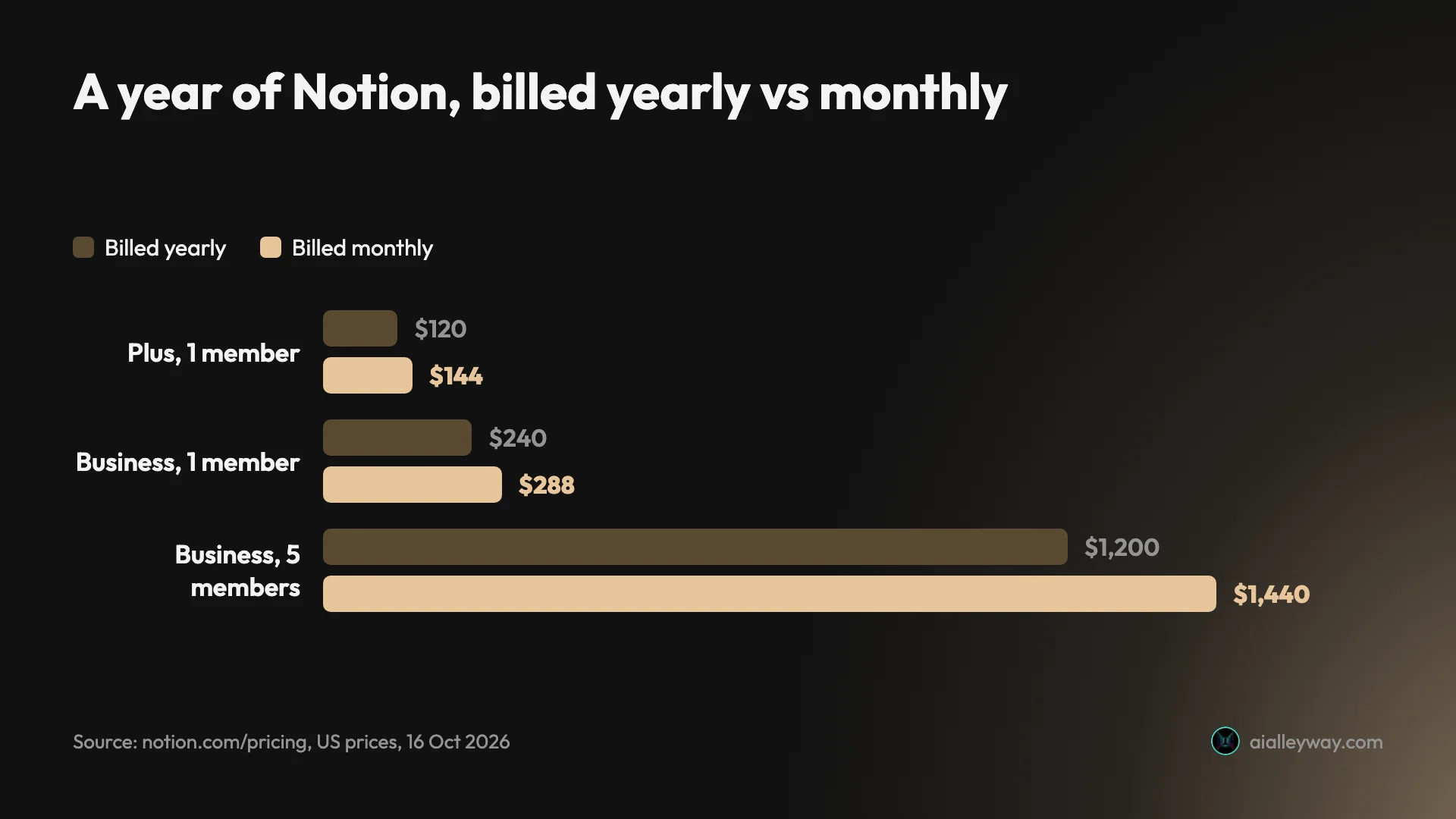
Yearly billing is cheaper on both paid self-serve plans. Notion’s toggle says “Save up to 20% with yearly”. On the US prices on the page, the saving is $2 a month on Plus and $4 a month on Business, per member.
| A year of Notion | Billed yearly | Billed monthly | You save on yearly |
|---|---|---|---|
| Plus, 1 member | $120 | $144 | $24 |
| Business, 1 member | $240 | $288 | $48 |
| Business, 5 members | $1,200 | $1,440 | $240 |
| Business, 10 members | $2,400 | $2,880 | $480 |
Yearly billing has two other effects. If you buy credits in the product, only workspaces on annual plans can buy annual credits. And the refund window is longer: 30 days against three on monthly billing, per the pricing FAQ.
How seats, changes and refunds work
The pricing FAQ is unusually specific about billing, and it is worth reading before you invite a team.
| Event | What Notion’s pricing FAQ says happens |
|---|---|
| Add a member | Fills an open paid seat, or adds one, billed pro rata |
| Remove a member | No credit; the seat stays open until the period ends |
| Upgrade | Charged now, less the share of the billing cycle left |
| Downgrade or cancel | Takes effect at the end of the cycle |
| Refund | Full, within 3 days (monthly) or 30 days (annual) of signing up |
Adding members. A new member takes an empty paid seat if you have one. If not, “your count of paid seats will increase by 1”, and the change is billed pro rata for the rest of the cycle. The FAQ adds that your account “may be charged on a monthly basis if you make changes in membership”, even on yearly billing.
Removing members. You do not get money back. “If you removed members, you will not receive credit but instead will still have use of that seat for a different user for the remainder of the billing period.” At the start of each billing period, paid seats are reset to match the members in the workspace.
Changing plans. An upgrade is “charged immediately”, with the amount reduced based on the share of the billing cycle left. A downgrade happens “at the end of your billing cycle.”
Cancelling. “Your Notion subscription, annual or monthly, will automatically renew until you cancel it.” To cancel, go to Settings, then Billing, then Change plan, on a desktop computer. You keep paid features until the cycle ends.
Refunds. Notion refunds “the full amount (not pro-rated) if you downgrade your subscription within three days of signing up for monthly billing, or within 30 days of signing up for annual billing.” If members were added by mistake, it refunds the prorated charges if you write in “within three days of the invoice date”.
Four teams, four Notion bills
A solo writer or student. Free gives one person unlimited pages and blocks, which covers most personal use. A student with a school email can get Plus free, with a one-member limit, for larger uploads and longer page history. Notion’s pages list no AI beyond the trial for either.
A five-person team without AI. Plus at $10 per member billed yearly comes to $600 a year. That removes the block limit and the 10-guest cap, and keeps 30 days of page history.
A five-person team that wants Notion AI. Business at $20 per member billed yearly is $1,200 a year, double Plus. Every member pays it, whether or not they use AI. If only two people want AI, compare that $600 difference with a separate AI tool for those two before you upgrade the workspace.
A team that runs agents. Custom Agents need credits on top of Business. At $10 per 1,000 credits monthly, a $100 monthly budget buys 10,000 credits; Notion does not publish what that buys in agent runs, so start small and watch the credits dashboard.
Before you upgrade a Notion workspace
The AI trial has no published size
Notion’s AI FAQ page promises “a limited number of complimentary AI responses” and stops there. My test went 39 requests without a limit, but that is one new workspace on one day, not a rule. Judge Notion AI on the work you would really use it for before the trial ends.
Plus does not include AI
If you are upgrading for Notion AI, Plus will not help. The pricing page gives Plus the same “Trial of Notion AI” line as Free, and the comparison table marks Notion Agent as “Limited Trial” on both.
Business limits are real but unpublished
The usage allowance has two windows and no stated size. Notion’s page also warns that it may change “the size of the allowances, how they’re calculated, and how they work alongside Notion credits.” Heavy users may meet the six-hour limit, so decide in advance whether credits can take over.
Removing a member does not refund the seat
Seats bill pro rata when you add people, but removing someone mid-cycle gives no credit. Time large removals for the end of a billing period, and keep contractors as guests where you can.
Free stops growing for teams
Two or more members on Free hit a block limit. Notion does not give the number on the pricing page; it says only that you can keep reading and editing but cannot add new blocks. Plan the move to Plus before a shared workspace fills up.
The right Notion plan for you
- One person, personal notes and projects: Free.
- A student or teacher with a school email: the free Plus for students and educators.
- A small team that shares pages and files: Plus, billed yearly at $10 per member.
- A team that will use Notion AI every day: Business, billed yearly at $20 per member, and set a credit policy for premium models.
- Large or regulated organizations: Enterprise, for SCIM, audit logs and zero data retention with AI providers. Ask sales, and compare the quote with the $28 or $35 the in-app picker showed.
- Skip Business if only a couple of people want AI. You pay it for every member, so a separate tool for the few can cost less.
If Notion AI costs more than you need
If you mainly want an AI that answers questions from your own documents, Gemini Notebook, formerly NotebookLM, is free with a Google account; its paid tiers come with Google AI plans from $4.99 a month. Our Notion AI review covers what Notion AI does on real pages, from a 23-row database to a slide deck, tested on the Free trial.
Final word
Notion’s pricing is simple until AI enters it. Free covers one person, and Plus at $10 per member billed yearly covers most small teams. Full Notion AI starts at Business, $20 per member billed yearly, for every member, with an allowance whose size Notion does not publish and credits for anything beyond it. Try the AI trial on your own pages first, then decide whether the whole team needs it.
Frequently asked questions
How much does Notion cost per month?
Notion has a free plan and three paid ones, priced per member. On notion.com/pricing on 16 October 2026, Plus cost $10 per member a month billed yearly or $12 billed monthly, and Business cost $20 billed yearly or $24 billed monthly. Enterprise is sold through sales and listed as custom pricing.
Those figures are for every member of the workspace, not per workspace. Five Business seats come to $1,200 a year when billed yearly and $1,440 when billed month by month. Guests are free, but Notion's pricing page says they can only open the individual pages they are invited to.
Does Notion Plus include Notion AI?
Only as a trial. On the Plus card of Notion's pricing page, AI appears as a single line, "Trial of Notion AI", the same line the Free card carries; further down, the comparison table labels Notion Agent, meeting notes and Research mode "Limited Trial" for both. Full Notion AI comes with Business at $20 or $24 per member a month, and with Enterprise.
Notion does not say how big the trial is. Notion's AI FAQ page says only that Free and Plus users get a limited number of complimentary AI responses, and its page on those responses says that once they are used up you see a message that an upgrade to Business or Enterprise is needed. In our Notion AI test on a new Free workspace, 39 AI requests over about an hour produced no such message.
Can students get Notion for free?
Yes, on the Plus plan. Notion's pricing page says "The Plus Plan (with a 1-member limit) is free for students and educators", and that signing up with a school email address gives access straight away. It adds that thousands of school email domains qualify, not only .edu addresses.
The free student Plus has a one-member limit, so it suits personal notes rather than a shared class workspace. Notion's pricing FAQ describes it as giving more guests, more version history and larger file uploads than Free. Notion's pages do not list any extra AI for the student plan.
How do I cancel my Notion subscription?
On a desktop computer, open Settings in the left-hand sidebar, then Billing, then Change plan. Notion's pricing FAQ says a subscription renews automatically until you cancel, and that after you cancel you keep the paid features until the end of the billing cycle. Downgrades also take effect at the end of the cycle.
Refunds are narrow. The same FAQ says Notion refunds the full amount if you downgrade within three days of signing up for monthly billing, or within 30 days of signing up for annual billing. Removing a member mid-cycle does not give you credit; the seat stays open for someone else until the period ends.
Is Notion's paid version worth it?
For one person, often not. The Free plan gives a solo user unlimited pages and blocks, so the main reasons to pay for Plus are larger file uploads, longer page history, more guests and more site and form options. For a team of two or more, Free's block limit and 10-guest cap make Plus the realistic starting point.
Business is worth it if you will use Notion AI every day, because that is the cheapest plan where AI is included rather than a trial. At $20 per member a month billed yearly, it costs twice as much as Plus, and every member pays it. If only one or two people want AI, price that against a separate AI tool before upgrading the whole workspace.
Keep reading
Notion AI Review: It Builds Real Pages, but Full AI Costs $20
A hands-on Notion AI review on a free workspace: 39 requests, a 23-row database, a six-minute slide deck, one wrong citation, and what Business costs.
NotebookLM Pricing: Free, $4.99 or $19.99, and What You Get
NotebookLM pricing in the US: free, or $4.99, $19.99 or from $99.99 a month via Google AI plans. What each tier's limits buy, plus work and student routes.
NotebookLM Review: Gemini Notebook Cites Well, Meters Hard
A NotebookLM review, now Gemini Notebook: five test questions, four Studio outputs, and an audio overview estimated at 45% of a five-hour limit.
Best AI note taker: 4 top tools, tested head-to-head
We ran one meeting through Granola, Fathom, Fireflies, and Otter. The best AI note taker depends on whether you take client calls, want it free, or run a team.