
QuillBot AI detector: 6 of 7 right, and the miss that matters
QuillBot AI detector tested on seven texts: it cleared every human one and caught formal AI, then scored a casual Claude story 100% human.
Contents
Is QuillBot’s AI detector accurate?
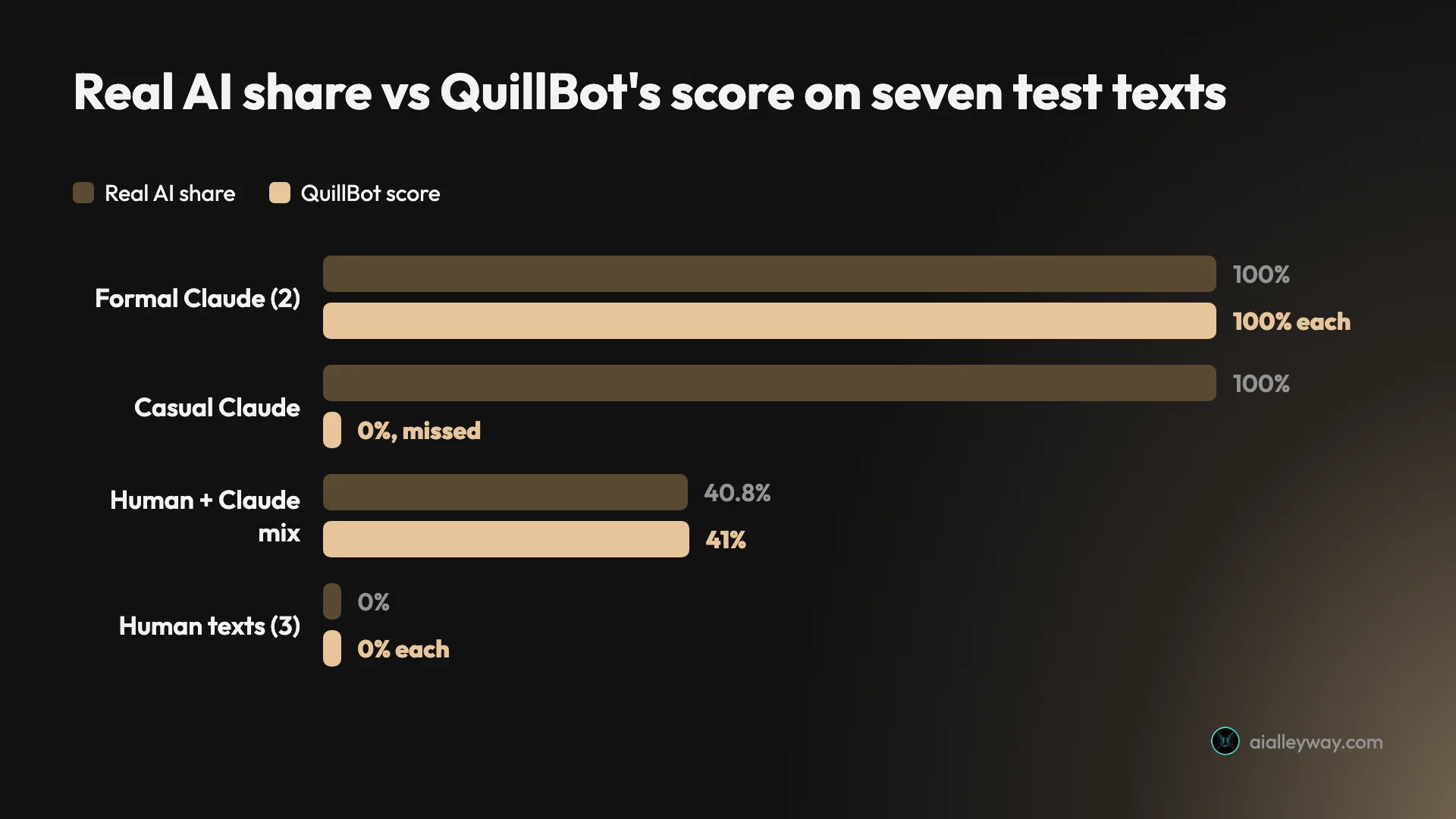
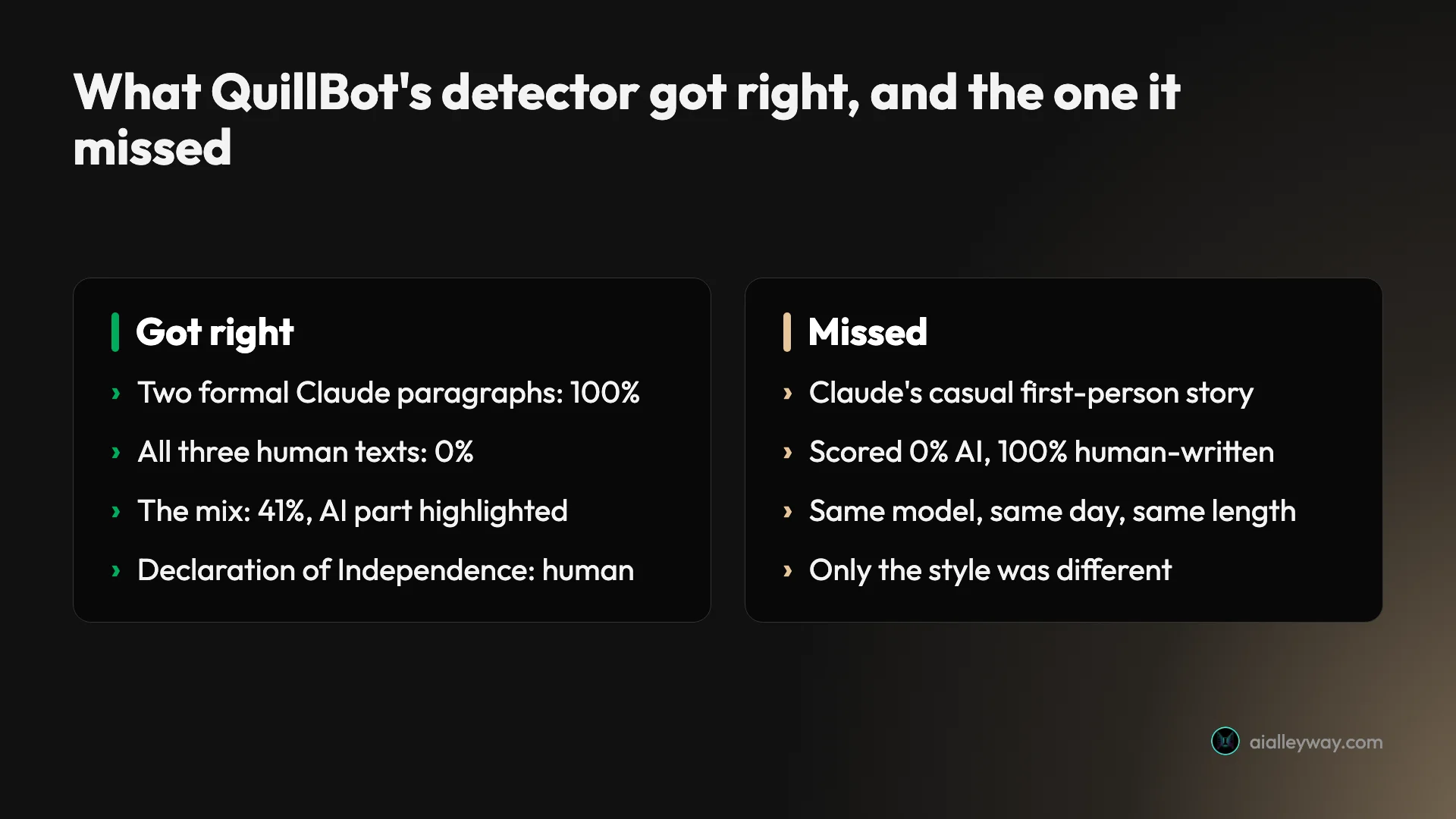
Mostly, and in the direction that protects writers. I ran QuillBot’s free AI detector on seven texts on 23 October 2026, and it got six right. It scored every human text at 0% AI, including the Declaration of Independence, a classic trap for detectors. It caught two formal paragraphs written by Claude at 100%. On a text that was 40.8% Claude by word count, it said 41% and highlighted the right part.
The miss is the one to remember. A casual first-person blog post, also written by Claude, came back 0% AI and 100% human-written. Same model, same day, same length as the paragraphs it caught. Only the style changed.
So QuillBot is a careful detector: slow to accuse a person, and easy to fool with AI text that sounds chatty. That is a better trade for students than the reverse, but it means a clean score proves little.
| Question | Short answer (tested 23 October 2026) |
|---|---|
| Price | Free; Premium from $8.33 a month billed yearly (US default price) |
| Scans on a free account | 7 a day |
| Minimum length | 40 words in the app (a help article says 80) |
| What you get | A percentage, a three-way split, highlighted passages with reasons |
| AI text caught | 2 of 3 Claude paragraphs (100%, 100%, 0%) |
| Human text flagged | 0 of 3 (all 0% AI) |
| Mixed text | 41% AI, against a true 40.8% |
How does QuillBot’s AI detector work?
You paste text, and a model trained on human and AI writing estimates which passages look machine-made. The interesting part is what QuillBot shows you afterwards.
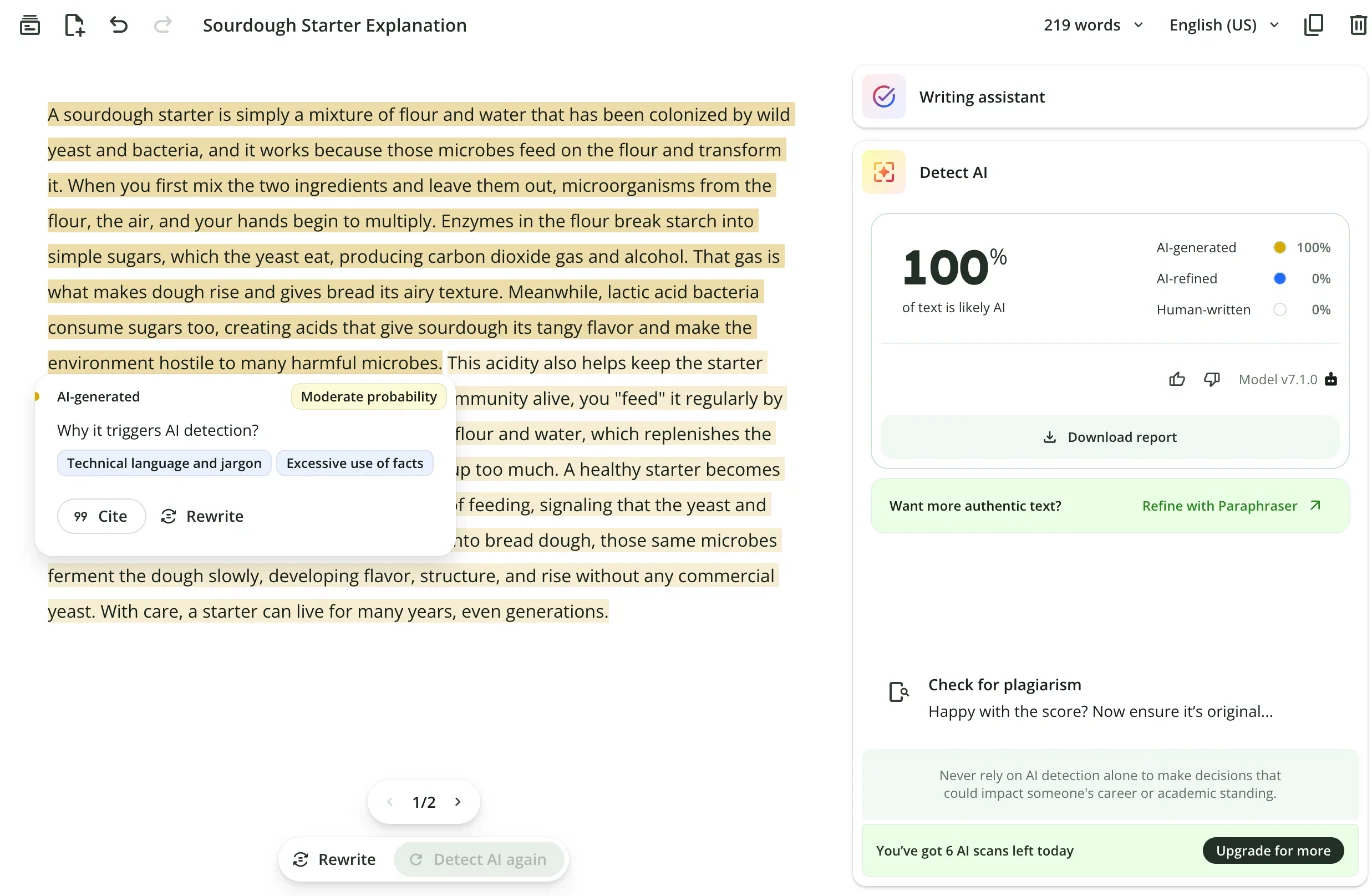
When I opened quillbot.com/ai-content-detector while signed in, it sent me to a blank QuillBot document with a Detect AI panel on the right. Pasting text creates a document in your account, and the panel scores it. The panel labelled its engine “Model v7.1.0.”
The result comes in three parts that add up to 100%:
- AI-generated: text the detector thinks a model wrote from scratch.
- AI-refined: text it thinks a person wrote and then ran through an AI tool, such as a paraphraser.
- Human-written: the rest.
Above the split sits one headline figure, “of text is likely AI.” In every scan I ran, AI-refined stayed at 0%, because none of my texts had been paraphrased.
The more useful part is in the document itself. Flagged passages turn yellow, and clicking one opens a small card with a confidence level (“Moderate probability” or “High probability”) and a line headed “Why it triggers AI detection?” with tags such as “Neutral tone,” “Excessive use of facts” or “Overly polished / too perfect writing.” On one passage it also listed “AI phrases found” and named the phrase.
That is more than Grammarly’s free page gives you, which is a single percentage. QuillBot shows you where and roughly why, on the free plan.
Built to lean toward “human”
One line on QuillBot’s detector page explains a lot of what follows. In the version archived on 3 October 2026, the FAQ says: “When the result is unclear, our model tends to classify texts as human written, which reduces false positives.” That line has been on the page since mid-2025.
It is a deliberate trade. A detector tuned this way will wrongly accuse fewer people, and it will let more AI text through. Keep it in mind when you read my results, because it predicts both the clean human scores and the one AI text it missed.
The page is also candid about what makes scores less reliable. It says “Longer texts (300+ words) produce more reliable scores than short inputs,” that heavily paraphrased or lightly AI-edited content “is harder to detect for any AI checker,” and that “formulaic human writing (academic definitions, legal copy, structured templates) can score higher than expected.” It also says plainly: “Results are probability estimates, not verdicts.”
The categories have shifted over time. Older versions of the page listed four: AI-generated, AI-generated and AI-refined, human-written and AI-refined, and human-written. The October 2026 page describes three, and three is what my panel showed.
How to use QuillBot’s AI detector for free
The whole flow takes a minute. This is what I did on a free account in Chrome.
- Sign in to QuillBot and open the AI Detector from the left rail, or go to quillbot.com/ai-content-detector.
- Paste your text into the document, or use Upload. The panel asks for at least 40 words.
- Check the word counter at the top of the document; my seven texts ran from 200 to 360 words.
- Press Detect AI at the bottom of the page. My results came back within the eight seconds I waited.
- Read the headline percentage and the three-way split, then click any highlighted passage for its reasons.
- To check a different text, replace the document’s text and press Detect AI again. Each run uses one scan.
The panel also offered a Download report button, which QuillBot’s help center says gives you “a detailed AI detection report,” and a history behind a clock icon. I did not use either.
Seven scans a day
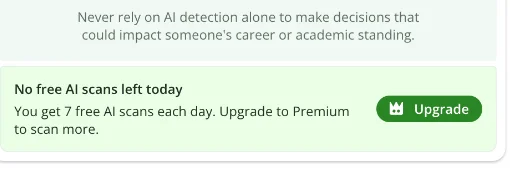
Before my first scan, the panel said “You’ve got 7 AI scans left today.” It counted down after each run. After the seventh, it changed to “No free AI scans left today. You get 7 free AI scans each day. Upgrade to Premium to scan more.”
Seven is generous next to Grammarly’s free detector page, which gave me two scans on a free account the same morning before telling me I had hit my daily free limit. QuillBot’s help article “Is Quillbot’s AI Detector free or premium?” simply says the detector “is a free tool available to all users,” and does not mention the cap.
Free vs Premium, and where QuillBot contradicts itself
QuillBot’s own detector page, archived 3 October 2026, sets out the plans like this:
| Free | Premium | |
|---|---|---|
| Words per scan | Up to 1,200 | No limit |
| Scans per day | “Up to 6” on the page; 7 on my account | Unlimited |
| Explainer cards | “1 free explainer card” | Unlimited |
| Report download | Premium, per the page | Included |
| Price | $0 | $19.95 a month, or $99.95 a year ($8.33 a month), US default price |
Three of those rows don’t match what I saw or what QuillBot’s help center says. My free account got seven scans, not six. I got explainer cards on three different scans, not one. And the help article on reports says “Yes, you can download a detailed AI detection report” without mentioning Premium. The minimum length is muddled too: the page says “A minimum of 80 words is required to scan,” while the app let me scan from 40 and the help center gives both numbers in one article.
Languages are the vaguest part. The page has said the detector works “in all languages” (2025), then “20+ languages” without a list, and in October 2026 “20+ languages … English, Spanish, French, Portuguese, and many others.” There is no full list. I only tested English.
One side effect: the scans happen inside a QuillBot document, and that document stays in your account afterwards. Mine was auto-titled “Sourdough Starter Explanation” after the first text I pasted.
My test: seven texts, one detector
I built a test set where I knew the right answer for every text. I used the same set on Grammarly’s free detector, so the two can be compared text for text.
Three AI texts. I asked Claude, through Anthropic’s API, for three paragraphs of about 200 words each: a plain explainer on how sourdough starter works, a high-school history paragraph on why the printing press mattered, and a casual first-person blog post about missing the last train home on a rainy night. I pasted each one unedited.
Three human texts, all written before chatbots: the opening of the Declaration of Independence (1776), the first three paragraphs of Jerome K. Jerome’s Three Men in a Boat (1889), and the first three paragraphs of Wikipedia’s “Printing press” article as it stood on 29 May 2019, without link markup or footnotes.
One mix: the two opening Wikipedia paragraphs followed by the last 147 words of Claude’s essay. By word count it is 213 human words and 147 Claude words, so 40.8% AI.
| Text | Who wrote it | Words | % likely AI | AI-generated / AI-refined / Human-written |
|---|---|---|---|---|
| Sourdough explainer | Claude | 219 | 100% | 100 / 0 / 0 |
| Printing-press essay | Claude | 216 | 100% | 100 / 0 / 0 |
| Missed-train blog post | Claude | 207 | 0% | 0 / 0 / 100 |
| Declaration of Independence | Human, 1776 | 228 | 0% | 0 / 0 / 100 |
| Three Men in a Boat | Human, 1889 | 200 | 0% | 0 / 0 / 100 |
| Wikipedia, “Printing press” | Human, 2019 | 294 | 0% | 0 / 0 / 100 |
| Wikipedia + Claude mix | 40.8% Claude | 360 | 41% | 41 / 0 / 59 |
The formal AI paragraphs: caught
Both formal Claude paragraphs scored 100% AI-generated. The essay is the kind of text detectors are built for: topic sentence, a march through causes and effects, an “In short” summary. QuillBot rated its main passage “High probability” and gave “Neutral tone” and “Excessive use of facts” as the reasons.
The sourdough explainer also hit 100%, though its highlighted passage was rated only “Moderate probability,” with “Technical language and jargon” among the reasons. The headline number and the per-passage confidence don’t always move together, so read both.
The casual AI story: missed
This is the result I would put in front of any teacher using a detector. Claude’s blog post about a missed train, with a vending-machine coffee that “tasted like warm pennies” and a stranger sharing peanuts, scored 0% AI and 100% human-written. Nothing was highlighted.
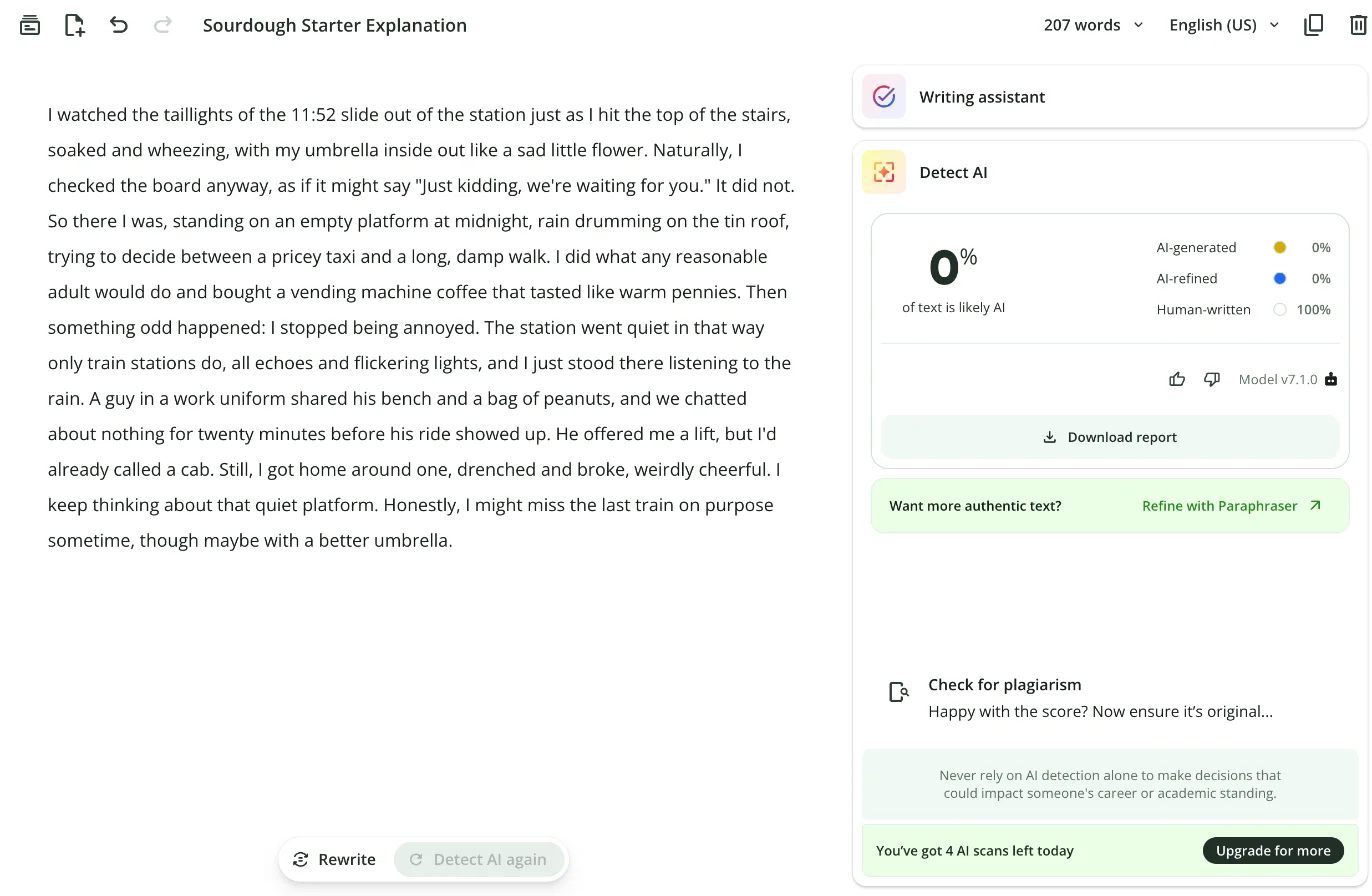
I did not ask Claude to sound human or to dodge detectors. I asked for “first person and casual,” the way a student might ask for a personal essay. That was enough. The detector seems to key on the habits of formal AI prose, and a chatty register with concrete details doesn’t have them.
The human texts: all cleared
All three human texts scored 0% AI. That includes the Declaration of Independence, which has a reputation as a detector trap: in a 2024 test reported by Decrypt, one popular detector called the Declaration’s opening 97.93% AI-generated. In that Decrypt test, QuillBot also called the Declaration 100% human-written, so it has handled this trap the same way in two tests two years apart.
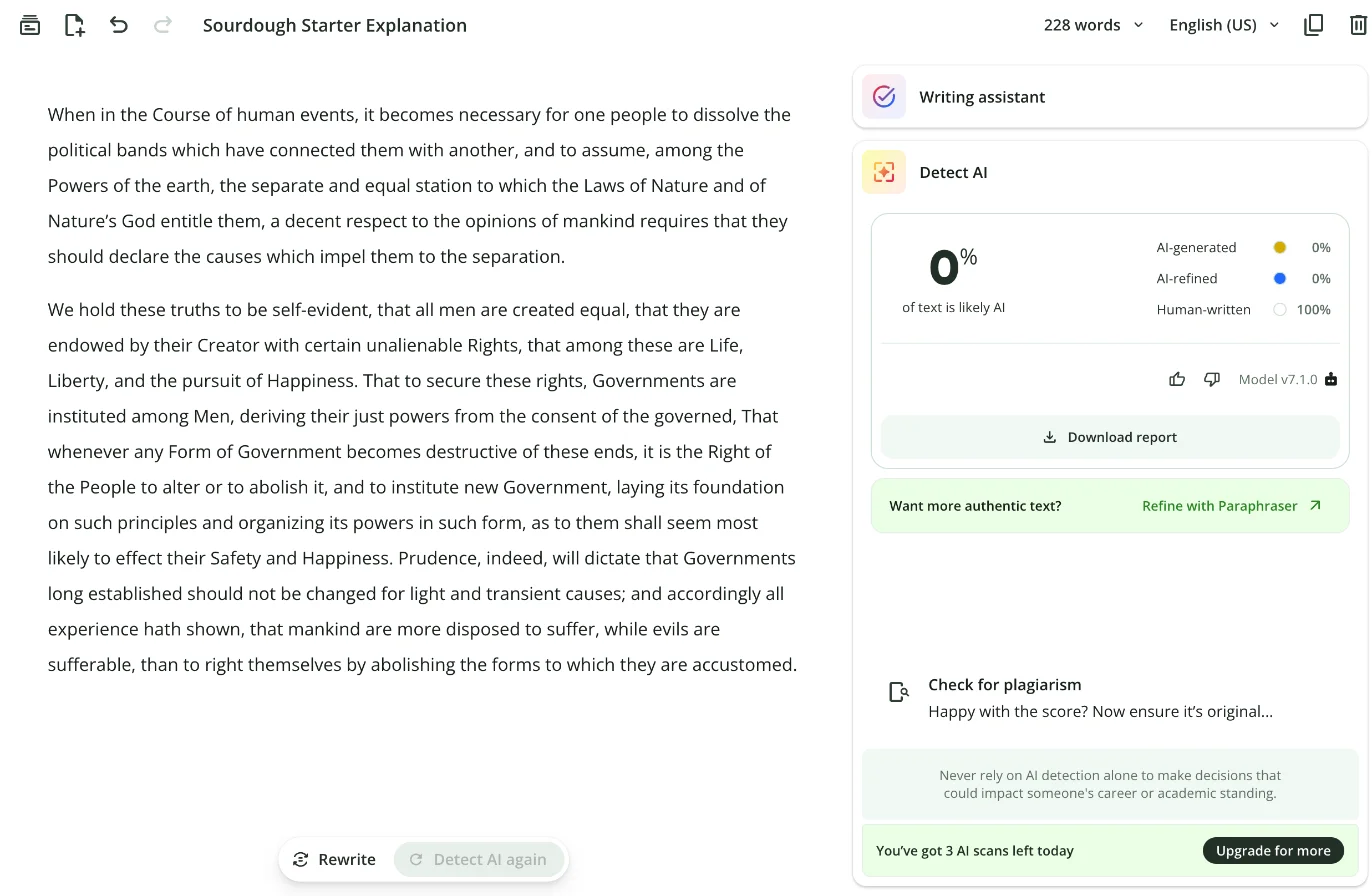
The Wikipedia text is the one I expected to trip. Encyclopedia prose is neutral, tidy and full of facts, which are two of the reasons QuillBot gave for flagging Claude. It still came back clean.
The mix: the most impressive result
The mixed text scored 41% AI, 59% human. The true split by word count was 40.8% AI. QuillBot also highlighted the right passage: the Claude part, from “This surge in available books” to the end, and none of the Wikipedia paragraphs.
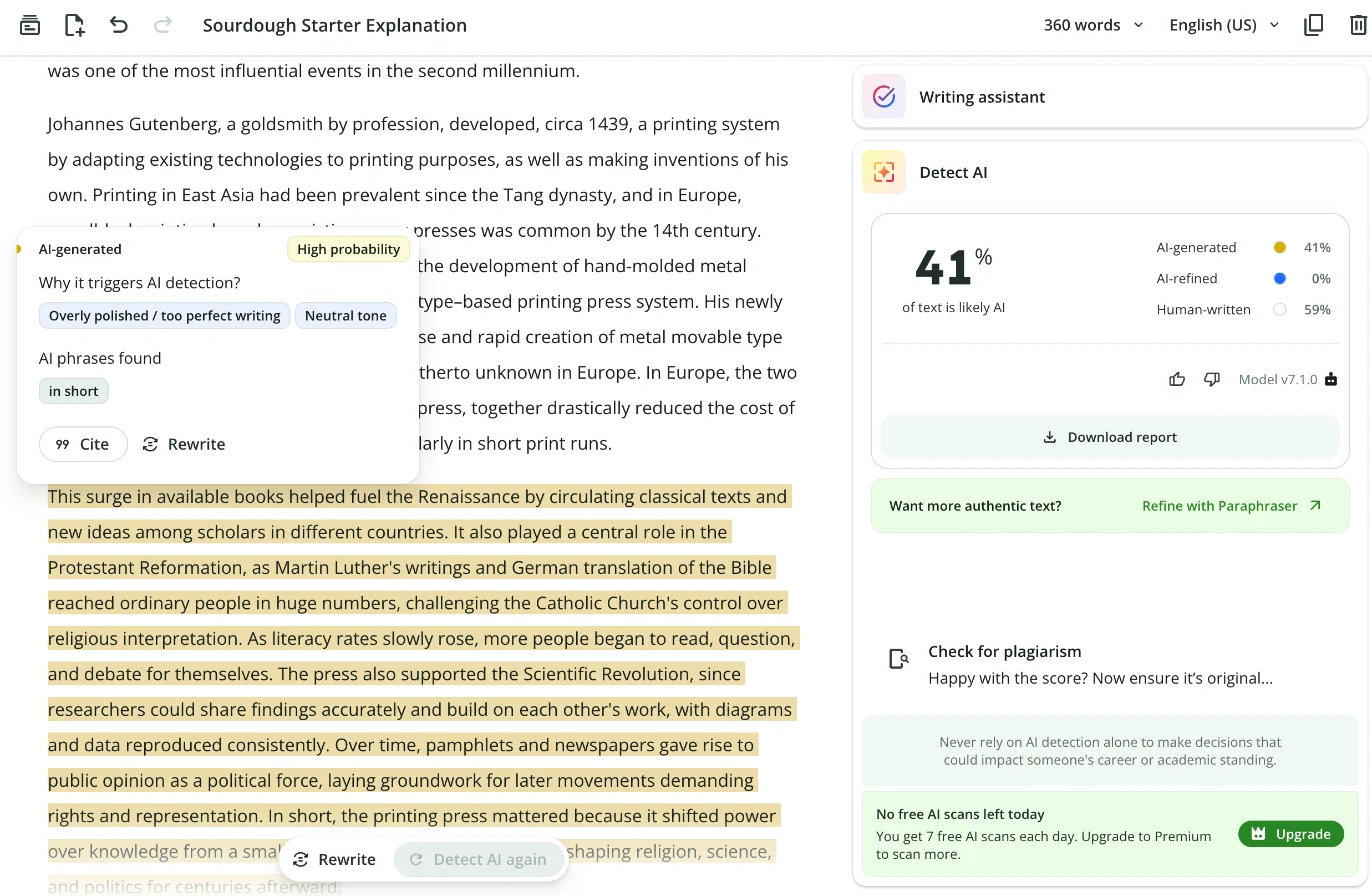
The card on that passage read “High probability,” with “Overly polished / too perfect writing” and “Neutral tone,” and under “AI phrases found” it named one phrase: “in short.” Claude’s essay ends “In short, the printing press mattered because…”, so the detector pointed at a real tell.
What seven texts can and can’t tell you
Seven texts are a spot check. They show how QuillBot’s free detector behaved on these samples on one day in October 2026, on model v7.1.0. They are not an error rate, and anyone reporting a precise accuracy figure from a handful of pastes is overselling it.
What they do show is the shape of the tool: cautious with human writing, precise on formal AI text and on mixed documents, and blind to AI text written in a casual voice.
What QuillBot’s “99% detection rate” means
QuillBot’s page says you can “Detect AI text reliably with a 99% detection rate, according to independent evaluations from RAID.” That sentence is true in a narrow way and misleading in a broad one.
RAID is a public benchmark for AI text detectors, built by University of Pennsylvania researchers and others and published at ACL 2024. Vendors run their detector on RAID’s hidden test set and get a public score. QuillBot’s entry is dated 30 January 2025. Archived copies of QuillBot’s page show the RAID line first appeared between July and August 2026, eighteen months later.
The 99% is real: RAID scores QuillBot at 99.72% with no adversarial attacks. But that figure is the share of AI texts caught when the threshold is set so that 5% of human texts are flagged, and RAID sets that threshold separately for each genre of writing. The product you use has one threshold for everything. At RAID’s stricter 1% setting, QuillBot’s figure is 99.24%.
On the RAID leaderboard on 23 October 2026, QuillBot was 15th in the default view of 60 entries, and 14th with adversarial attacks included. That is a strong result, just not the top of the table. Grammarly, its main rival, was 6th and 17th on the same two views.
The models RAID doesn’t test
QuillBot’s FAQ says RAID covers “ChatGPT, GPT-4, GPT-5, Claude, Gemini, Mistral, Llama, and more.” It doesn’t. RAID’s AI text comes from GPT-2, GPT-3, GPT-4, ChatGPT, Mistral, Cohere, Llama, MPT and their chat versions. There is no Claude, no Gemini and no GPT-5 in it, and no student essays either.
So QuillBot’s benchmark number tells you nothing about the chatbots most students use in 2026. That gap is why I tested with Claude, and Claude found the hole.
Where RAID found it weakest
QuillBot’s RAID submission is public, so you can see where the 99% thins out. At the strict 1% setting, its catch rate drops to 94.07% against RAID’s paraphrasing attack and 91.40% against a trick that hides invisible zero-width spaces in the text. By genre, Reddit posts and reviews were its weakest areas, and the single worst cell was reviews with zero-width spaces, at 58.62%.
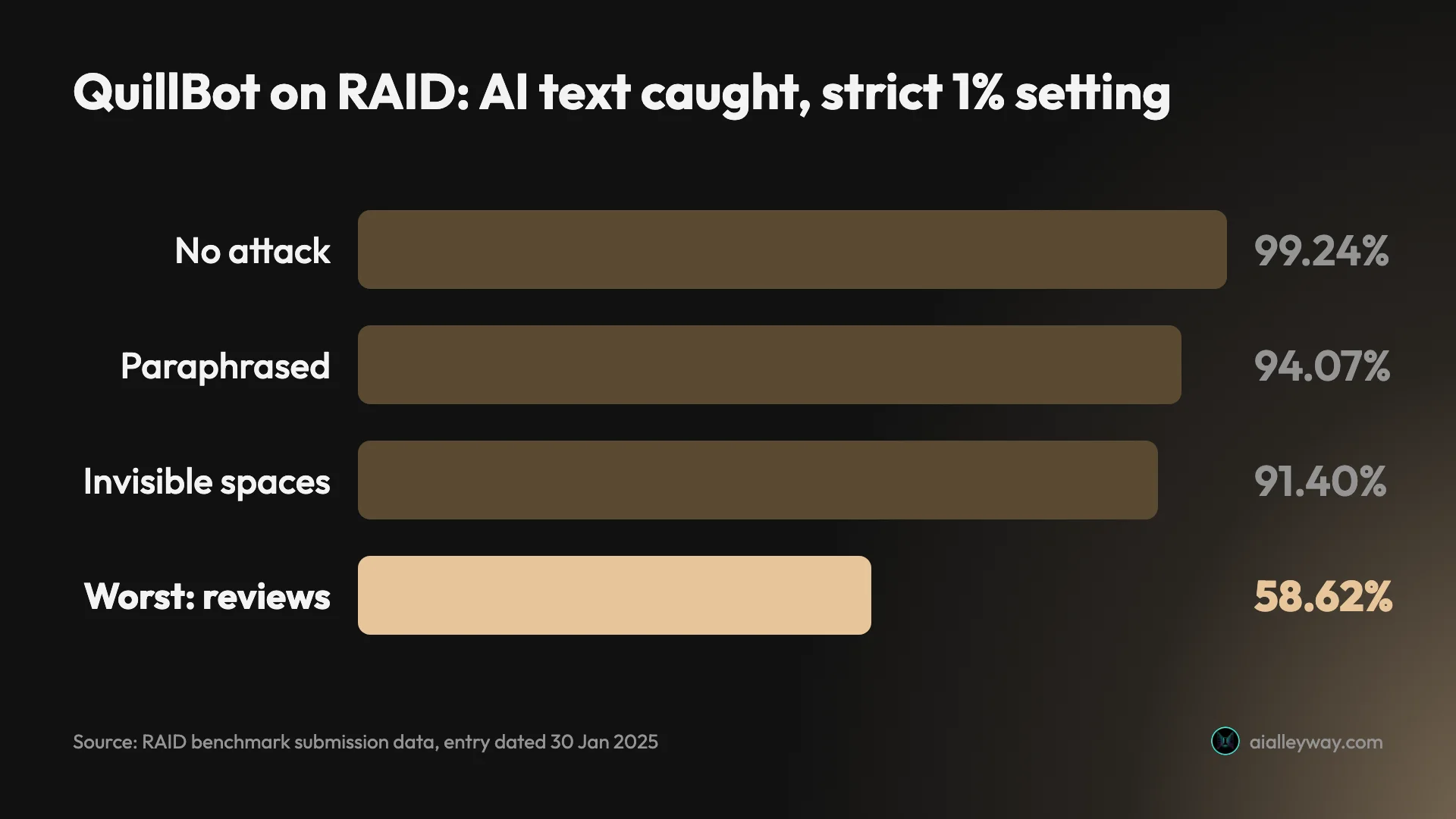
Informal genres like Reddit posts and reviews being the weak spot matches what happened in my test: the AI text it missed was a casual first-person story.
Does QuillBot detect ChatGPT, Claude and Gemini?
It detects their formal writing well. Casual writing is another story, and that holds whichever chatbot you use.
My test used Claude only, because that is what I could generate cleanly through an API on the day. Two of its three paragraphs scored 100%. The third, written in a relaxed personal voice, scored 0%. That is not a Claude quirk so much as a register problem: QuillBot’s reasons for flagging text were “Neutral tone,” “Excessive use of facts” and “Overly polished / too perfect writing,” and a chatty story with a vending-machine coffee in it has none of those.
Other users have seen it catch Claude too. In an October 2026 r/teenagers thread about inconsistent detectors, one poster says a text that was “very obviously claude generated” scored 90% AI on QuillBot, while a 2022 study they wrote themselves scored 3.4%.
QuillBot’s page says the detector covers “GPT-6, Gemini, Claude, Llama, and more.” I would read that as “trained to try,” not as a measured result. Neither QuillBot nor RAID publishes a number for Claude or Gemini text, and I tested only Claude.
I did not run ChatGPT or Gemini text through it, so for those two, treat the answer above as QuillBot’s claim plus the register pattern my Claude texts showed, not as a measurement. Our Claude review and ChatGPT review cover the two chatbots themselves.
QuillBot vs Grammarly’s free AI detector
I ran the same seven texts through Grammarly’s free detector page on the same morning, and Grammarly stopped me after two. On those two, the tools agreed on the verdict and disagreed on the number.
| QuillBot (free) | Grammarly (free page) | |
|---|---|---|
| Scans a day on my free account | 7 | 2 |
| Words per scan | 1,200 (page) | 1,400 (counter) |
| Output | Percentage, three-way split, highlighted passages with reasons | One percentage |
| Claude sourdough explainer | 100% AI | 75% AI |
| Claude printing-press essay | 100% AI | 100% AI |
| RAID default view, 23 Oct 2026 | 15th | 6th |
On RAID’s default view Grammarly ranks higher, 6th to QuillBot’s 15th, though QuillBot edges ahead once adversarial attacks are counted, 14th to Grammarly’s 17th. On the free plan, QuillBot is the more usable tool: more scans, and it shows you which sentences it is worried about. Our Grammarly review covers the rest of Grammarly’s product.
How to get a more useful score from QuillBot
A detector score is only as good as what you feed it. These habits made my results easier to read.
Scan at least 300 words. QuillBot’s own page says “Longer texts (300+ words) produce more reliable scores than short inputs.” The minimum of 40 is a floor, not a recommendation, and the human texts people complain about on Reddit are mostly short ones: a cover letter, two paragraphs.
Scan the whole piece, not the worrying paragraph. A full section gives the model more context and shows you whether the flag is one passage or the whole document. With seven free scans a day, a 3,000-word essay fits in three scans of 1,000 words.
Read the highlights, not just the headline. On my mixed text the 41% was useful, but the highlighted passage was more useful: it showed exactly which part was AI. On the sourdough paragraph the headline said 100% while the highlight card said only “Moderate probability.”
Don’t rewrite good sentences to chase a number. If your own writing scores high, the fix is evidence of how you wrote it, not worse sentences. One r/6thForm poster said the only way to lower their score was to make their sentences “completely inarticulate.” That is a bad trade.
Keep a record of your process. Version history in Google Docs or Word, an outline, early drafts. If you want something stronger, Grammarly’s free Authorship feature records what you typed, pasted or generated as you write.
Scribbr’s AI detector is QuillBot’s, with more free scans
Here is a tip the vendor pages don’t spell out. Scribbr’s free AI detector runs on QuillBot’s engine. Scribbr’s detector page loads its tool from a QuillBot script named ai-detector-partner, and its FAQ describes the same four categories in the same words QuillBot once used.
That is no accident. Course Hero bought QuillBot in 2021 and Scribbr in 2022, and renamed itself Learneo in 2023. Learneo’s site lists both brands today, and QuillBot’s footer reads “Quillbot, a Learneo, Inc. business.”
The useful part for readers: Scribbr’s page, archived 2 October 2026, offers “an unlimited number of AI checks for free, with a limit of up to 1,200 words per submission,” “without having to create an account.” If you run out of QuillBot’s seven daily scans, Scribbr is the same detector with no daily cap, according to its own page. I did not test Scribbr myself, but if the engine is shared, the same text should get the same verdict on both sites, so it makes a handy way to stretch the free allowance.
One caution. Scribbr publishes its own test of free AI detectors, and it rates QuillBot’s and Scribbr’s detectors joint second at 78% accuracy. They tie because they are the same engine, and the article does not say the two companies share an owner. QuillBot’s blog, in turn, recommends Scribbr in its list of free detectors without mentioning the link either.
Does Turnitin catch text paraphrased with QuillBot?
It is built to catch AI text that was paraphrased to hide it. Human text that you paraphrase is a different matter.
Turnitin’s AI detection FAQ, updated 22 October 2026, says its detector includes “detection of likely AI-generated content that may have been modified using a word spinner/AI paraphrasing or bypassing tool to evade detection.” It says the paraphrase detection works on English submissions only, and that Turnitin can’t name the tools it was trained against. When it launched that feature in July 2024, Turnitin’s chief product officer said that “applying AI paraphrasing to AI-generated content is likely a sign that the writer is trying to hide their use of AI.”
So the route “write with ChatGPT, then run it through QuillBot” is exactly what Turnitin targets. QuillBot’s help center says the same thing in its own way: the Paraphraser is meant for clarity, tone and style, not for getting past AI detectors.
Paraphrasing your own writing is a greyer area. QuillBot’s AI-refined label exists for that case, and in 2025 QuillBot’s page said it separated AI-generated from AI-refined text partly to avoid “biases against non-native English students who use writing tools ethically.” The October 2026 version of the page no longer carries that line. Whether your school treats AI-refined as acceptable is a rule for your school, not for the detector.
What to watch before you trust a QuillBot score
The panel itself carries the most important line: “Never rely on AI detection alone to make decisions that could impact someone’s career or academic standing.” These are the specific traps behind it.
| Your score | What it tells you | What it doesn’t |
|---|---|---|
| 0% AI | Nothing looked like formal AI prose | That a person wrote it; my casual Claude story scored 0% |
| Mixed, e.g. 41% | Which passages look machine-made | Who wrote them, or whether AI use was allowed |
| 100% AI | The text reads like formal AI output | Proof; short formal human writing can score high too |
A 0% score doesn’t mean a person wrote it
My casual Claude story is the proof. If you are a teacher, a clean QuillBot result on a personal essay tells you very little, because personal essays are exactly the register it missed. If you are a student who used AI, a clean score doesn’t change what your school’s rules say, and your teacher may use a different detector.
The paraphraser isn’t a way around it
QuillBot’s help article on the subject is blunt: “Quillbot’s Paraphraser is built to enhance clarity, tone, and style—not to bypass AI detection systems.” The detector even has its own AI-refined category for text that a person wrote and then reworked with AI. I did not test paraphrased text here, so I can’t tell you how often that category fires.
Human writing can still be flagged
None of my human texts were, but other people’s have been. In May 2026 a user on r/resumes wrote that QuillBot rated their own cover letter 100% AI. A student on r/6thForm said two paragraphs they wrote scored 97.5% AI. Both were short, formal pieces, the kind QuillBot’s own page says can “score higher than expected.”
QuillBot doesn’t claim perfection either. Its help article “Why was my original (human-written) content still flagged as AI?” says “AI detectors sometimes produce false positives,” and “no tool is perfect.” It asks users to send flagged human text to its research team.
Short texts are shaky, and the minimum is unclear
The panel asked for at least 40 words. A help article gives the same 40-word error message, then advises “make sure your text has at least 80 words.” Either way, a 40-word sample gives any detector very little to go on. Mine were 200 to 360 words.
Non-native English writers carry more risk
Plain, careful English with common words and regular sentences is what detectors tend to read as AI. In a 2023 Stanford study published in Patterns (Liang et al.), seven detectors flagged 61.3% of 91 human-written TOEFL essays as AI on average. QuillBot’s detector was not one of the seven, and in 2025 its page said the AI-refined category was there to avoid “biases against non-native English students.” I did not test non-native writing, so I can’t tell you whether that works.
Scores can change without warning
The panel showed “Model v7.1.0” on the day I tested, and QuillBot’s page says the detector is “continuously trained on large datasets.” There is no public changelog. A score you got last month may not match the score the same text gets today, and the RAID result QuillBot advertises comes from an entry dated January 2025, many model updates ago.
A 0% rule turns the tool into a weapon
Some teachers set a hard number. In a February 2026 r/peyups thread, a University of the Philippines student wrote that a professor required “0% AI content” on QuillBot, and that everything they wrote scored 50% or 100%. QuillBot’s own page says “Never make an academic or employment decision on a detector score alone.” A pass mark on a detector is exactly that kind of decision.
Even detector makers have backed away from certainty. OpenAI withdrew its own AI text classifier in July 2023 “due to its low rate of accuracy,” after reporting that it caught 26% of AI-written text and wrongly flagged human text 9% of the time. Detectors have improved since, but none can show you who typed the words.
The tool that detects also sells the fix
Under the score, the panel says “Want more authentic text? Refine with Paraphraser.” QuillBot also sells an AI humanizer. That doesn’t make the detector’s numbers wrong, but it is worth knowing that the same company profits whichever way your score comes out.
Is QuillBot Premium worth it for the detector?
For most people, no. The free plan already gives you the part that matters, and the paid extras are about volume.
Premium removes the 1,200-word cap and the daily limit, adds unlimited explainer cards, and, according to QuillBot’s detector page, the report download. It also comes with everything else in QuillBot Premium: all the paraphrasing modes, the plagiarism checker and the full humanizer. The default US prices are $19.95 a month, $79.95 for six months or $99.95 a year, though QuillBot tests prices and varies them by region, as I found in my QuillBot review. Twelve months at $19.95 comes to $239.40, so if you pay at all, the annual plan is the one to look at.
Who would pay just for the detector? Someone checking more than seven documents a day, or documents over 1,200 words that they don’t want to split, such as a tutor reviewing a class’s essays or an editor checking freelance copy. For everyone else, seven free scans a day covers it, and Scribbr’s free version of the same engine, covered above, removes the daily cap without an account.
Who should use QuillBot’s AI detector?
It is the more useful of the two big free detectors for checking your own writing, because seven scans and highlighted passages let you actually work with the result.
- Students checking their own drafts: a good fit. Seven scans a day is enough to check a full essay in pieces, and the highlights show which passage is the problem.
- Students worried about being falsely accused: QuillBot cleared all three human texts in my test, but your school’s detector is the one that counts. Keep drafts and version history.
- Teachers: use it as one signal, and don’t read a 0% as proof of human authorship. My casual Claude story got exactly that.
- Editors checking freelance copy: the highlight-and-reason view is handy for a quick look, but seven scans a day won’t cover a content pipeline.
- Non-native English writers: QuillBot’s AI-refined label exists partly for you. It is meant to separate text you wrote and polished with a tool from text a model wrote, and in 2025 QuillBot pitched it as a guard against bias toward non-native students. Run your draft before you use any rewriting tool, so you have a clean baseline.
- Skip it if you need to prove that a text is human. No detector can, and QuillBot’s own panel says not to rely on it alone.
Other ways to check for AI writing
If QuillBot’s answer isn’t enough, these are where I would look next.
Grammarly’s free AI detector is the obvious second opinion. Its free page gives one percentage and no highlights, and it gave me two scans on a free account before its daily limit. On the two texts I got through, it agreed with QuillBot that both were AI, scoring the Claude essay 100% and the sourdough explainer 75%. Our Grammarly review covers the rest of the product.
GPTZero is a dedicated detector that Superhuman, the company behind Grammarly, agreed to buy in June 2026. Its pitch is classroom reporting for teachers. See GPTZero.
Grammarly Authorship answers a different question. Instead of guessing from the finished text, it records how a document was written: typed, pasted or AI-assisted. It is free, works in Google Docs, Microsoft Word and Canvas, and is the stronger evidence if you are ever accused. Grammarly’s Authorship page explains it.
Final word
QuillBot’s free AI detector is the better free checker I have tested: seven scans a day, highlighted passages with reasons, a three-way split, and a clean record on human writing in my test, including the Declaration of Independence. On a text that was 40.8% AI it got the split right to within a point.
The surprises were mostly good ones. It never once flagged a human text, it explained its flags in plain tags instead of a bare number, and on the mixed document it drew the line between the human part and the AI part almost exactly where I had put it. Its page is honest about its own bias toward calling text human, and my results bear that out in both directions. What QuillBot’s marketing gets wrong is the benchmark: the 99% comes from a January 2025 entry, measured on older models, at a setting that allows a 5% false-alarm rate.
Its blind spot is AI text that sounds casual. A chatty Claude story sailed through as 100% human, so treat a low score as “nothing obvious found,” not as proof. Use it to check your own drafts, never as the only evidence against someone else’s.
Frequently asked questions
Is QuillBot's AI detector accurate?
In my test it got six of seven texts right. On 23 October 2026 it scored two formal paragraphs written by Claude at 100% AI and scored three human texts at 0% AI: the opening of the Declaration of Independence, the opening paragraphs of Three Men in a Boat from 1889, and a 2019 Wikipedia article. On a text that was part human and part Claude, it said 41% AI against a real AI share of 40.8% by word count, and it highlighted the Claude passage.
The miss was a casual first-person blog post that Claude wrote about missing a train. QuillBot called it 0% AI and 100% human-written. Its own page says that when a result is unclear, the model tends to classify text as human, which reduces false positives. So in practice it is careful with human writing and easy to fool with AI writing that sounds chatty. Treat a low score as nothing obvious found, not as proof.
Is QuillBot's AI detector free?
Yes, with a daily cap. QuillBot's help center says the AI Detector is a free tool available to all users. On my signed-in free account the panel said “You've got 7 AI scans left today” before I started, counted down after each scan, and after the seventh said “No free AI scans left today. You get 7 free AI scans each day. Upgrade to Premium to scan more.”
QuillBot's detector page lists the free plan as up to 1,200 words per scan and six scans a day, so the page and my account disagreed by one scan. Premium removes the word and scan limits. It defaults to $19.95 a month, $79.95 every six months or $99.95 a year on QuillBot's US page, though QuillBot tests prices and varies them by region. Scribbr's free detector runs on the same QuillBot engine and, according to its own page, has no daily cap.
What do AI-generated, AI-refined and Human-written mean in QuillBot?
They are the three parts of QuillBot's score, and they add up to 100%. AI-generated is text the detector thinks a model wrote from scratch. AI-refined is text it thinks a person wrote and then reworked with an AI tool, such as a paraphraser or a grammar tool. Human-written is the rest. Above the split sits one headline figure, the share of text that is likely AI.
In my seven scans the AI-refined share was 0% every time, because none of my texts had been paraphrased, so every result split only between AI-generated and Human-written. Older versions of QuillBot's page described four categories, splitting AI-refined into AI-generated text that was refined and human text that was refined; the October 2026 page describes three. Inside the document, flagged passages are highlighted, and clicking one shows a confidence level and tags explaining why it was flagged.
How many words does QuillBot's AI detector need?
At least 40 to run, according to the panel on my account, which said “Add at least 40 words to detect AI content.” QuillBot's help article on short texts gives the same 40-word error message but then tips you to use at least 80 words, and QuillBot's detector page says a minimum of 80 words is required. So the vendor's own pages disagree on the floor.
For a score you can lean on, aim higher. QuillBot's page says longer texts of 300 or more words produce more reliable scores than short inputs, and the free plan caps a single scan at 1,200 words. All my samples ran from 200 to 360 words. The human texts that people on Reddit say were wrongly flagged were mostly short, such as a cover letter or two paragraphs, so I would not trust a score on a single short paragraph.
Does QuillBot's AI detector flag the Declaration of Independence?
Not in my test. On 23 October 2026 QuillBot scored the opening of the Declaration of Independence, 228 words, at 0% AI and 100% human-written, with nothing highlighted. The Declaration is a well-known trap for AI detectors because of its formal, list-like style; in a 2024 test reported by Decrypt, one popular detector called its opening 97.93% AI-generated, while QuillBot called it human-written.
QuillBot also scored the opening of Three Men in a Boat, from 1889, and the first three paragraphs of a 2019 Wikipedia article at 0% AI. The Wikipedia text was the one I expected to trip it, because encyclopedia prose is neutral and full of facts, two of the reasons QuillBot gave for flagging Claude's paragraphs. It still came back clean. Clearing human text is consistent with QuillBot's stated lean toward calling unclear text human.
Will paraphrasing with QuillBot get past its AI detector?
QuillBot says not to count on it. Its help center says the Paraphraser is built to improve clarity, tone and style, not to bypass AI detection systems, and that paraphrased or even human-written content can still be flagged as AI generated. The detector also has a separate AI-refined category for text a person wrote and then reworked with AI. I did not run paraphrased text through it in this test.
Turnitin is built to catch the trick too. Its FAQ, updated in October 2026, says its detection includes likely AI-generated content that was modified with an AI paraphrasing or bypassing tool to evade detection, for English submissions. On the RAID benchmark, QuillBot's detector caught 94.07% of AI text under a paraphrasing attack at the strict 1% false-positive setting. Writing with a chatbot and then paraphrasing is the pattern these tools are designed to find.
Keep reading
QuillBot review: a quick paraphraser that edits your meaning too
A QuillBot review from the free plan: 18 of 23 planted errors caught, a paraphraser that swapped facts, and whether Premium at $99.95 a year is worth it.
Grammarly review: a near-perfect checker with a pushy AI
A Grammarly review from 23 planted errors: the free plan caught all 23, but one AI rewrite added a claim I never made. Prices, privacy and verdict.
Claude AI review: brilliant at words, strange about limits
A Claude AI review from a paying Max account. My $100 Max 5x plan invoiced at $111.11, three usage meters run at once, and overflow is billed at API rates.
ChatGPT review: the free tier is the story, not the $20 one
A ChatGPT review from a year on the free tier plus one month of Plus. Five rungs from $0 to $200, and ads now run on both the Free and $8 Go tiers.