
QuillBot review: a quick paraphraser that edits your meaning too
A QuillBot review from the free plan: 18 of 23 planted errors caught, a paraphraser that swapped facts, and whether Premium at $99.95 a year is worth it.
Contents
Is QuillBot worth it?

Yes, if you mostly need to reword text and will read what comes back: QuillBot’s free paraphraser rewrote a clean paragraph in seconds, but both free modes changed small details along the way. As a grammar checker it is weaker, catching 18 of the 23 errors I planted where Grammarly’s free plan caught all 23. Stay on the free plan for short rewrites, and pay only if you rephrase long texts every week.
What can QuillBot do for your writing?
QuillBot started as a paraphraser and still leads with it: paste a paragraph, choose a mode and get the same ideas in different words, with every change coloured in. Around that core sits a whole toolkit. The left rail on my account listed a grammar checker, AI detector, plagiarism checker, AI humanizer, AI chat, image generator, translator, summarizer, citation generator and QuillBot Flow, a document space.
The company behind it is Learneo, formerly Course Hero. QuillBot’s about page says it became part of Learneo in 2021 and that it was started in 2017 to help English-language learners write. Learneo also owns Scribbr and brings LanguageTool into the same group, according to the same page. Its premium page claims “Trusted by over 35 million writers worldwide”.
What changed at QuillBot this year
If you last looked at QuillBot a year or two ago, check these before you rely on an older review.
- The refund guarantee went away. A help article that once described a 3-day money-back guarantee now says refunds are issued only where the law requires them, covered under pricing below.
- The free paraphrasing cap shrank. QuillBot’s premium page offered free users 125 words in August 2026 and 100 words by October.
- The product spread out. QuillBot’s footer now lists image, presentation, website and PDF tools next to the writing ones.
- Prices became a moving target. QuillBot’s help center now says Premium’s cost depends on your region and can change at checkout.
Older reviews that promise a refund window or 125 free words describe a product that has since changed.
How I tested QuillBot
On 22 October 2026 I used a free QuillBot account and the same three practice paragraphs I wrote for our Grammarly review, each with an answer key written first:
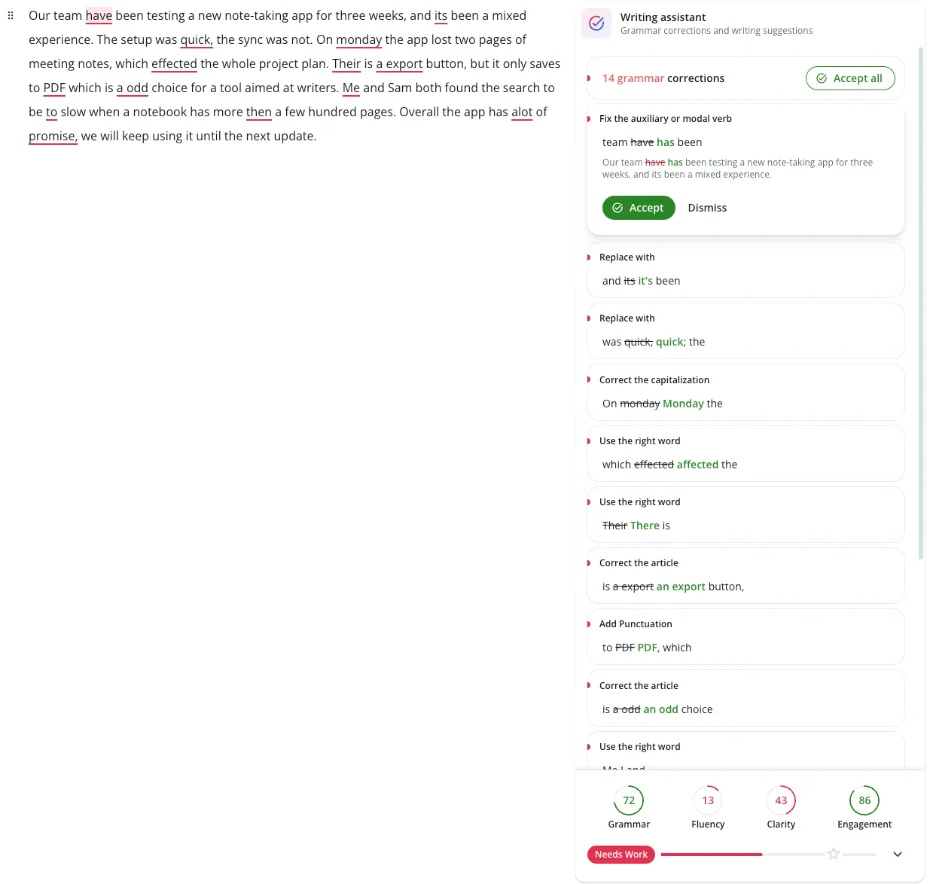
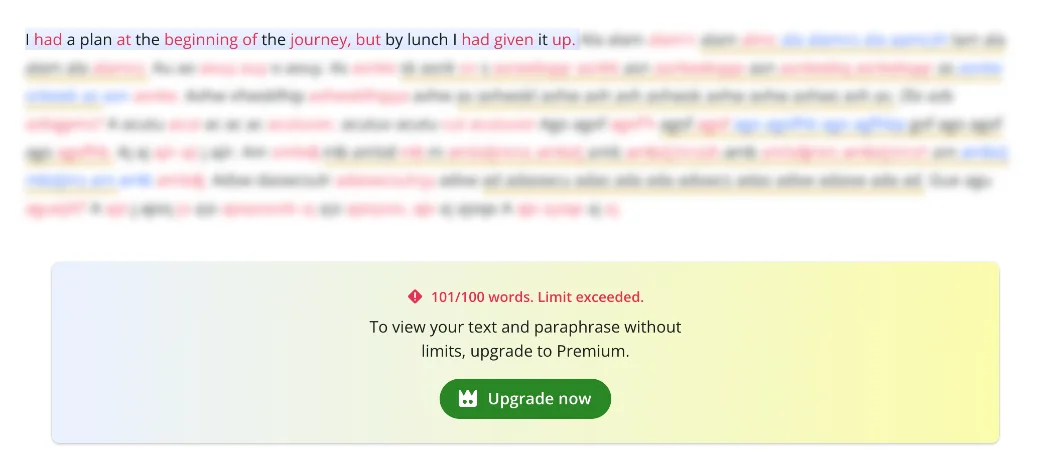
- Paragraph one, 101 words with 14 planted problems such as “its been”, “effected”, “Their is”, “a odd”, “Me and Sam” and “alot”.
- Paragraph two, a clean 77-word control with fragments, a semicolon and “whom”.
- Paragraph three, 74 words with nine subtler mistakes: a dangling modifier, “principle” for “principal”, “who’s” for “whose”, “between you and I”, “could of”, “less” for “fewer”, “irregardless”, “effects” for “affects” and “each of the designers have”.
Using the same text in both tools makes the grammar results directly comparable. I then ran the clean paragraph through the free paraphraser modes and the first paragraph through the summarizer. I did not test Premium, the AI detector’s scores, the humanizer or the plagiarism checker.
The grammar checker
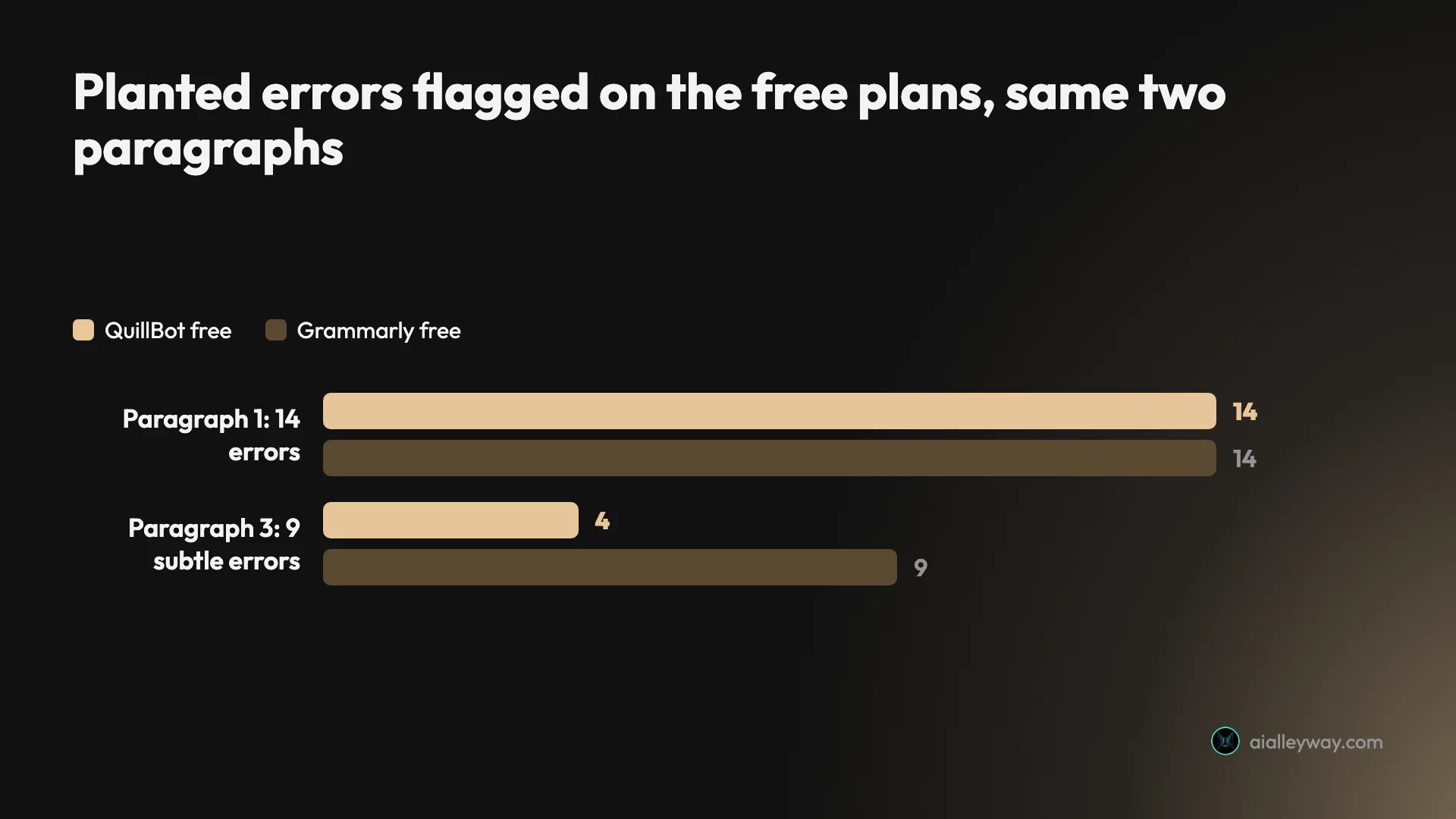
The simple paragraph went well. QuillBot opened it in a document, gave it a title on its own (“Note-Taking App Review”) and listed “14 grammar corrections”, one for every planted problem, with scores of 72 for grammar, 13 for fluency and 43 for clarity.
The subtle paragraph is where it fell behind. QuillBot found 4 of the 9 mistakes: “between you and I”, “could of”, “less” for “fewer” and “each of the designers have”. It missed the dangling modifier, “principle”, “who’s”, “irregardless” and “effects”, and still rated the paragraph’s grammar 87 out of 100. I waited and re-read the panel; the count stayed at 4.
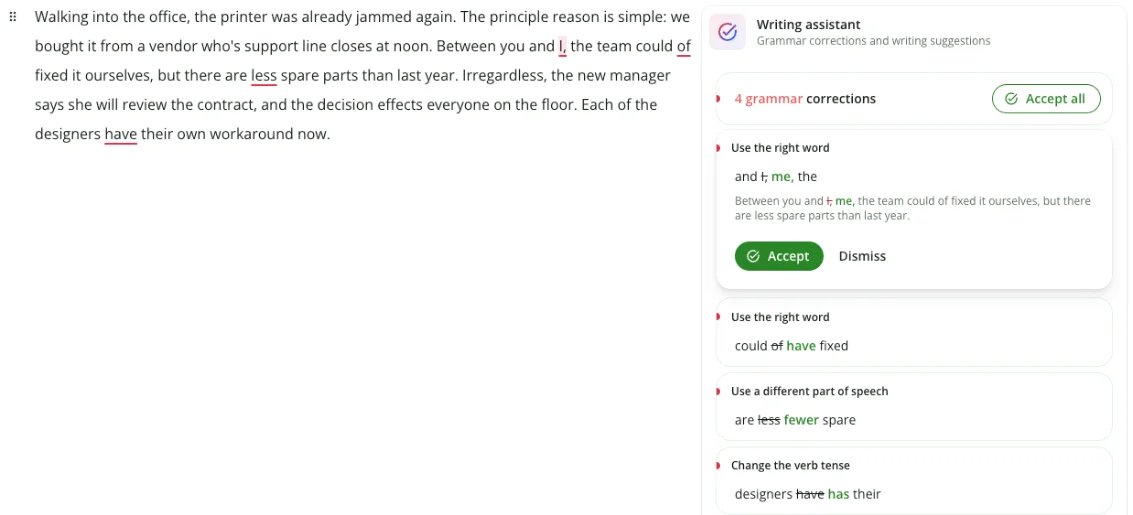
One label was also wrong: it called the “each of the designers have” fix “Change the verb tense” when the problem is agreement, not tense. The fix itself was right.
The checker also picks the variety of English for you. It set my first paragraph to English (US) and the clean control paragraph, which mentions a café, to English (UK), which I suspect was the accent in “café”, and QuillBot’s premium page says it corrects grammar in six languages.
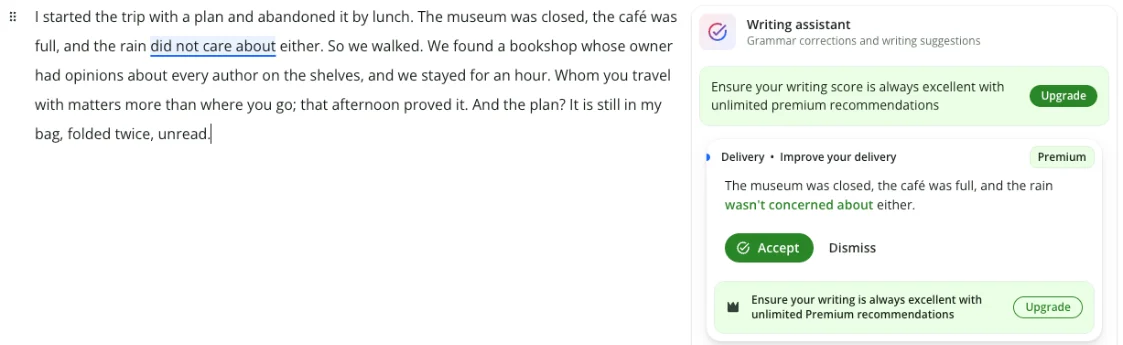
The clean paragraph raised no grammar corrections, which is the result you want. It did show one suggestion with a Premium badge, rewriting “the rain did not care about either” as “the rain wasn’t concerned about either”, which reads worse to me than the original.
The QuillBot paraphraser
This is QuillBot’s real product, and the interface is good. Ten modes run along the top: Standard, Fluency, Humanize, Formal, Academic, Simple, Creative, Expand, Shorten and Custom. A Synonyms slider sets how much vocabulary changes, and the output colours changed words so you can see what moved. Free accounts get Standard and Fluency.
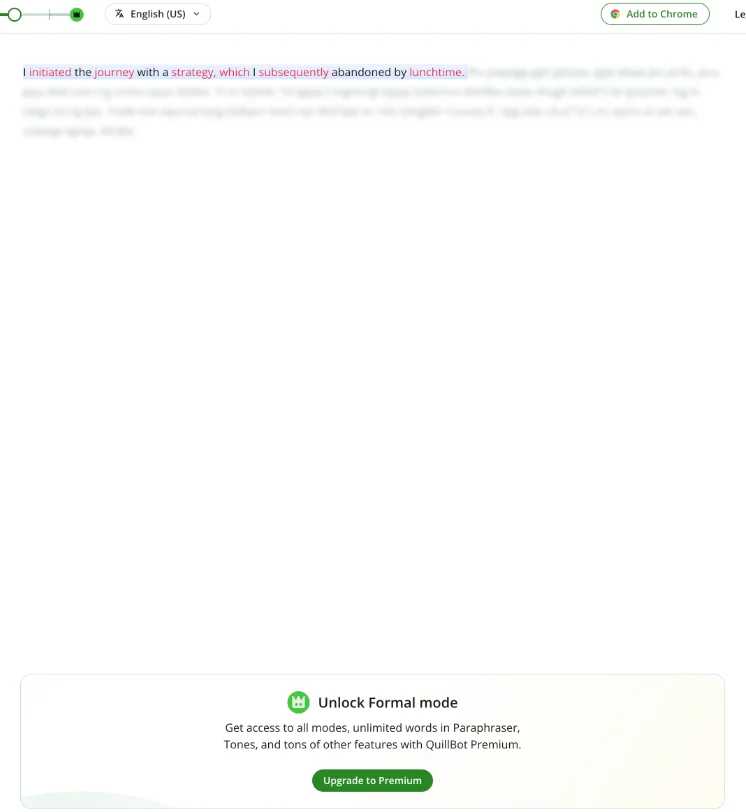
The other modes are locked. Clicking Formal produced one readable sentence, “I initiated the journey with a strategy, which I subsequently abandoned by lunchtime”, with the rest blurred under an “Unlock Formal mode” panel. History, Compare Modes and Tone are Premium too. QuillBot’s premium page says the paraphraser works in 23 languages and lets Premium users create unlimited Custom modes.
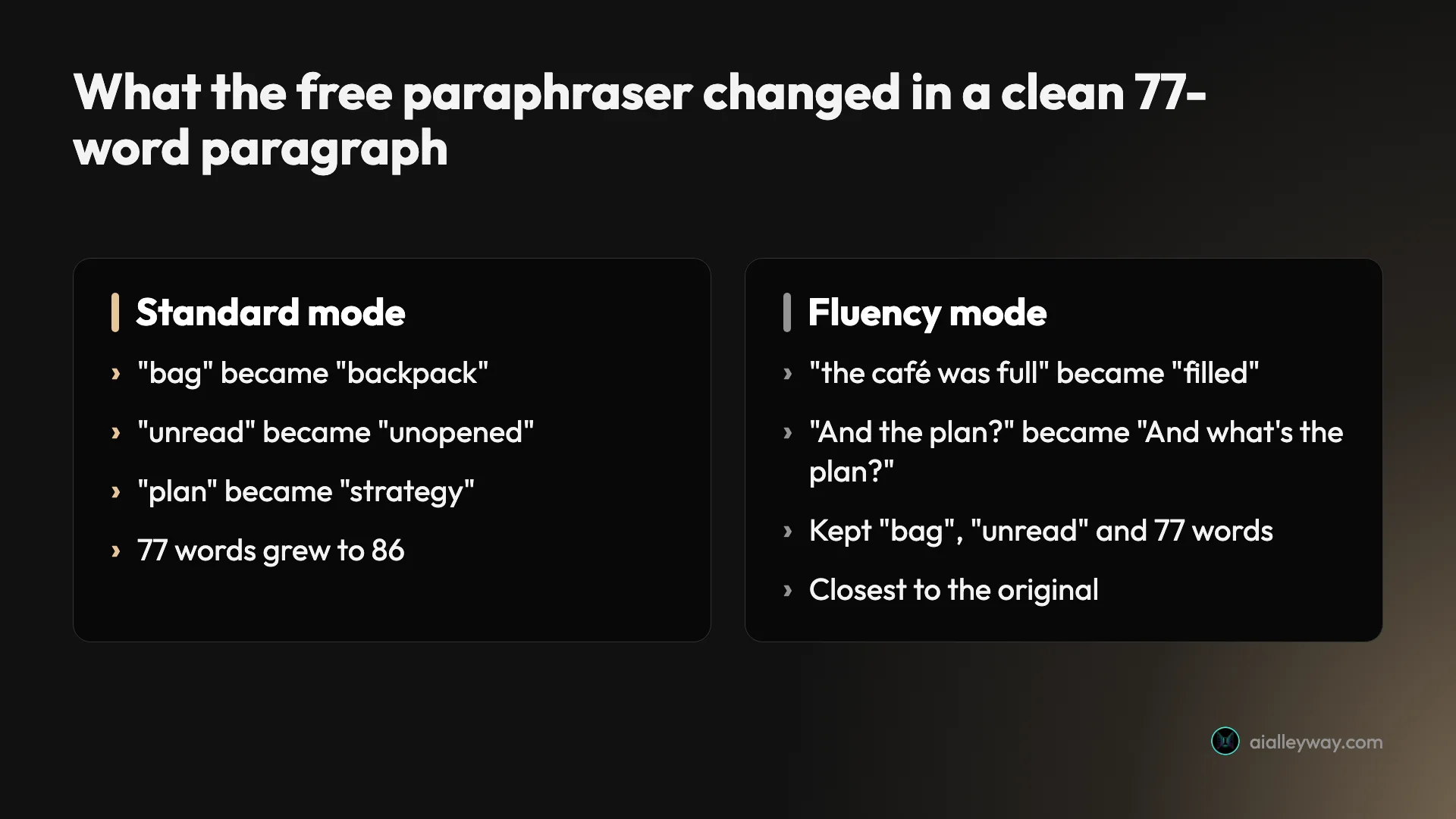
Standard rewrote my 77-word paragraph into 86 words. The structure was fine, but the details drifted: “my bag” became “my backpack”, “unread” became “unopened”, “the plan” became “the strategy”, and the bookshop owner’s “opinions” became “personal judgments”. None of that is grammar. It is the paraphraser deciding what I meant.

Fluency stayed much closer. It kept “bag”, “unread” and the word count, and smoothed a few phrases. It still slipped twice: “the café was full” became “the café was filled”, and my closing callback “And the plan?” became “And what’s the plan?”, which asks a different question.

How to paraphrase without losing facts
The drift is fixable if you work with it rather than accept the output whole.
- Start in Fluency. It changed two small details and kept the length; Standard changed four.
- Keep the Synonyms slider low. It controls how many words get swapped, so fewer swaps should mean fewer accidental changes of meaning; I left it at its default in my test.
- Read the coloured words first. Every changed word is highlighted, so check those against your original before anything else.
- Still cite your source. Rewording someone else’s idea does not make it yours, and a paraphrased passage can still be flagged as AI-written. In an April 2026 Reddit post, a student wrote that “Even if I paraphrase legitimate text turnitin says its 100% machine generated.”
Treat the output as a draft of your own sentence, not a finished one.
The summarizer
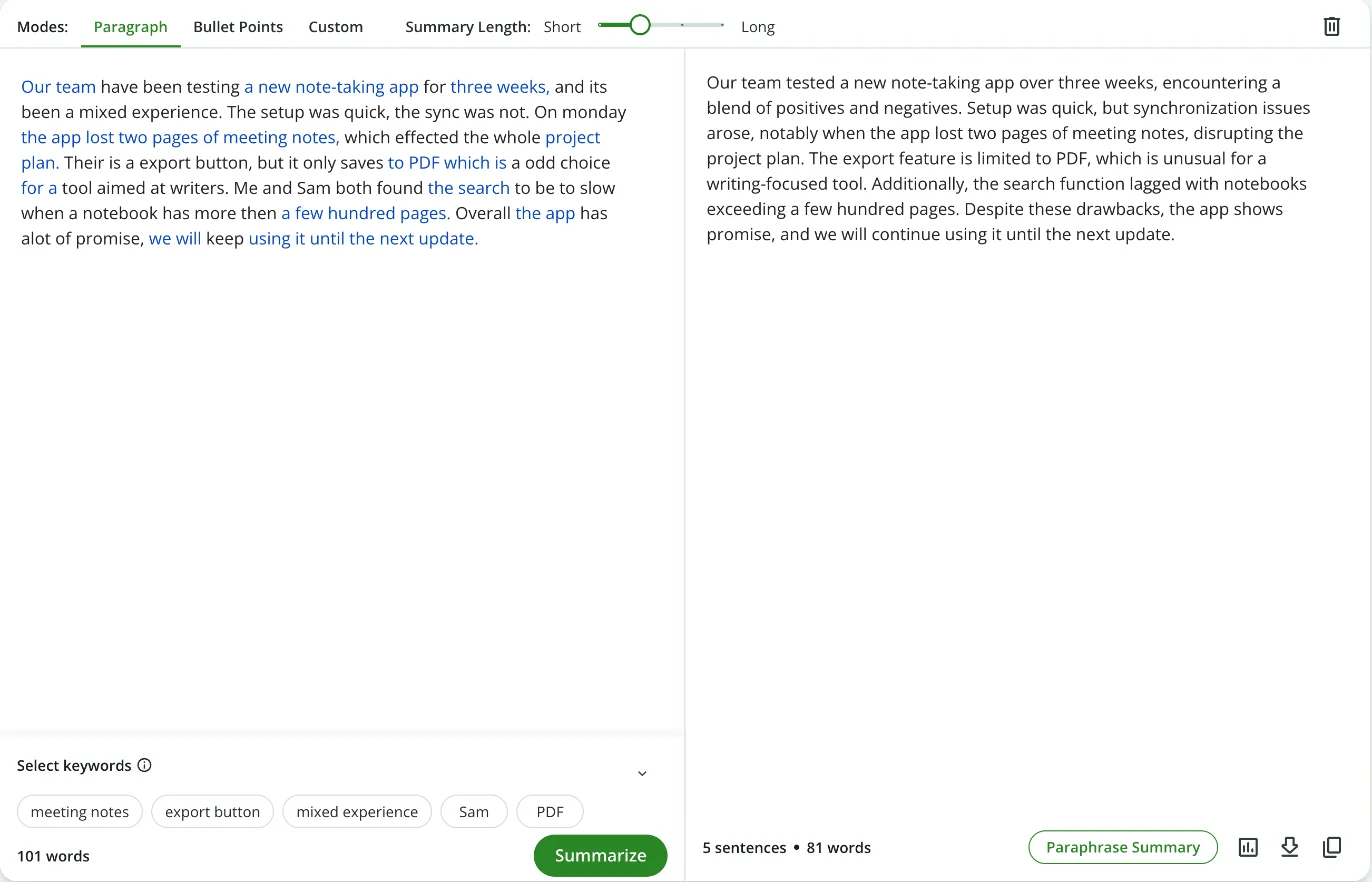
The summarizer offers Paragraph, Bullet Points and Custom modes, a Short-to-Long length slider and keyword chips you can pick to steer the summary. Left at its defaults, it turned the 101-word first paragraph into five sentences and 81 words. It fixed every error and kept the main points, which is useful. It also joined two separate complaints, writing that “synchronization issues arose, notably when the app lost two pages of meeting notes”. My paragraph said the sync was slow and, separately, that notes were lost. A summary should not invent the link.
The extras
The list keeps growing. Beyond the core tools, QuillBot’s footer links an AI image generator, presentation maker, resume builder, website builder, PDF tools, a background remover and text to speech. QuillBot Flow, its document space, stores 10 MB of files on the free plan and 100 MB on Premium. QuillBot also runs on Chrome, Edge and Safari, on Windows and macOS, in Word and on iPhone and Android, according to QuillBot’s own app list. I tested only the web tools.
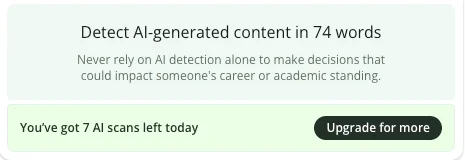
Two of the extras deserve a warning label. The AI detector sits in the document’s side panel, and when I opened it the panel said “Never rely on AI detection alone to make decisions that could impact someone’s career or academic standing.” Good advice, from a company that also sells an AI humanizer to rewrite text so it reads as human; the free humanizer handles up to 100 words. I did not run either; they were outside this test.
How much is QuillBot Premium?
QuillBot pricing comes down to one individual plan, Premium, plus a Team Plan quoted by sales and a student discount page I did not check. The catch is that there is no single price.
| Plan | Price (USD, US default) | What you get |
|---|---|---|
| Free | $0 | Paraphrasing up to about 100 words in Standard and Fluency, basic grammar, 1,200-word summaries, a daily cap on AI-detector scans, humanizing up to 100 words with limited uses |
| Premium, monthly | $19.95 a month | All paraphrasing modes and unlimited words, advanced grammar suggestions, plagiarism checks of 25,000 words a month, 6,000-word summaries, full humanizer and AI detector |
| Premium, 6 months | $79.95 | Same as monthly |
| Premium, annual | $99.95 a year ($8.33 a month) | Same as monthly |
| Team Plan | On request | Premium for several people, with a discount from 5 members; QuillBot says it does not train on Team text |
Those figures are the default prices in the code of QuillBot’s premium page as served to a US visitor on 10 August 2026, archived by the Wayback Machine; QuillBot’s site blocked our tools from reading it live. In October the same page displayed $8.33 a month, the $99.95 annual price in US dollars, to a visitor in Canada. The US App Store listing matches closely, at $19.99 a month, $79.99 for six months and $99.99 a year inside the iPhone app.
Your price may still differ. QuillBot’s help center says the cost depends on your region and can adjust at checkout. The archived US page actually showed its visitor $12.50 a month billed annually, one of several prices QuillBot was testing, and from my browser outside the US the page showed $4.17 a month. Read the checkout total, not the headline.
Two billing details soften the lack of refunds. QuillBot’s premium page says you can pause Premium from your account page when you will not need it for a while, with no billing during the pause, and that one subscription works on up to 10 devices. Payment is by card or PayPal.
Refunds have also changed. QuillBot once offered a 3-day money-back guarantee, and plenty of reviews still mention it. Its refund article now says you can cancel at any time and keep Premium to the end of the period, but “refunds are issued only if required by law”. The live article even repeats that sentence followed by what looks like an internal note about where its link should point.
When Premium pays for itself
Only for heavy rewording. The free plan’s 100-word cap means a single long paragraph, as my 101-word test showed, gets blocked outright. If you rephrase essays, reports or articles every week, Premium’s unlimited words and eight extra modes are the whole point. If you reword a sentence or two at a time, or want a grammar checker, the free plan or a different tool will do.
If you do pay, the billing period matters more than the plan. Twelve months at $19.95 comes to $239.40, against $99.95 billed annually, so the monthly plan costs $139.45 more for the same year. With no refunds, pick monthly only if you need Premium for a single deadline, and set a reminder to cancel.
Who is QuillBot for?
- Students and writers who reword sources or their own drafts. The paraphraser is fast, shows every change and offers a mode for most registers, from Academic to Simple, once you pay.
- English-language learners. QuillBot was built for them, and Fluency mode cleaned up phrasing without changing much.
- People who summarize reading for notes. The summarizer kept the points and fixed the errors in my test.
- Writers on a budget. At QuillBot’s default US price, a year of Premium costs $99.95, and the free plan covers short jobs.
- Not for anyone who needs a dependable proofreader. It missed 5 of 9 subtle errors that Grammarly’s free plan caught on the same text.
Where QuillBot earns its place
The paraphraser is quick and transparent
Paste, pick a mode, read. The output arrives in seconds and colours every changed word, so the drift I describe below is easy to spot if you look. Grammarly’s free rewrites, by contrast, arrive as samples inside its editor.
Fluency mode is a safe default
Of the two free modes, Fluency stayed closest to my paragraph: same length, same voice, two small details changed against Standard’s four. If you want smoother sentences rather than new ones, start there.
Free covers short jobs
Without paying, I got two paraphrasing modes, a grammar check, a 1,200-word summarizer and a limited AI detector. QuillBot’s free-versus-Premium help article adds translation up to 5,000 characters and 20 AI chat queries a day on the free plan. For rewording a sentence or checking a short email, that is enough.
The summarizer kept the points
Five sentences, every complaint present and every error fixed. For condensing a reading or a long message, it does the job, with one caveat below.
It left a clean paragraph alone
My control paragraph, with fragments, a semicolon and “whom”, raised zero grammar corrections. The checker left good writing alone.
Users rate it highly
Ratings are strong across the stores. The Chrome extension holds 4.7 from 6.1K ratings, the US App Store 4.7 from 3.1K, and Google Play 4.5 from 22.6K reviews. QuillBot’s own pages show a Trustpilot score of “Excellent” from 14,548 reviews, the same count on its Trustpilot page, where it scores 4.8; that profile is marked as a paid Trustpilot subscription. On the same site our Grammarly review found a 3.1.
| Where | Rating | Volume |
|---|---|---|
| Trustpilot | 4.8 | 14,548 reviews |
| Chrome Web Store | 4.7 | 6.1K ratings, 6,000,000 users |
| US App Store | 4.7 | 3.1K ratings |
| Google Play | 4.5 | 22.6K reviews |
It runs almost everywhere
QuillBot lists extensions for Chrome, Edge and Safari, apps for Windows, macOS, iPhone and Android, and a Word add-in.
Where QuillBot falls short
The paraphraser changes facts, not just words
A backpack is not a bag, and an unopened plan is not an unread one. In Standard mode, the free paraphraser changed four details of a 77-word paragraph and added nine words. If you paraphrase a source for an essay or a report, those small swaps can turn an accurate statement into a wrong one.
The grammar checker misses subtle errors
Four of nine is a weak score on mistakes that a careful reader would notice: “principle” for “principal”, “who’s” for “whose”, “irregardless”, “effects” for “affects” and a dangling modifier all went through. Grammarly’s free plan caught all nine on the same paragraph.
The summarizer can invent links
Joining “the setup was quick, the sync was not” and “the app lost two pages of meeting notes” into “synchronization issues arose, notably when the app lost two pages” is a small step, but it states a cause the writer never claimed. Check summaries against the original before you quote them.
There is no fixed price
QuillBot shows different prices by region and runs price tests: the same US page carried annual prices from $99.95 to $149.95 in its code, and the visitor it was archived for saw $12.50 a month billed annually. That makes it hard to know whether you are getting the standard deal.
| Annual Premium, as shown | Per month | Where |
|---|---|---|
| $99.95 a year | $8.33 | Default price in the code of QuillBot’s US-served page, August 2026; displayed to a visitor in Canada in October |
| $149.95 a year | $12.50 | What that US page displayed to its visitor, during a price test |
| Regional price | $4.17 | My browser, outside the US, October 2026 |
The middle row is the one to worry about: the same plan, on the same US page, priced 50% above its own default.
Refunds are no longer guaranteed
The 3-day money-back guarantee is gone, replaced by “only if required by law”. On Reddit, an April 2026 r/QuillBot post describes choosing monthly and being charged for a year. With no guarantee, a mis-click at checkout is expensive.
It trains on your text by default
QuillBot’s trust center says your inputs and usage data are used “for both (1) training to improve the services generally and (2) personalizing the service to you.” The opt-out sits in the browser extension’s settings, for account holders on version 4.37.0 or later. Only Team Plan text is excluded by default.
The same page says QuillBot does not let third-party providers train on your data and that “we do not and will not sell your data.” Leaving is harder than joining, though: an August 2026 r/QuillBot post complains that deleting an account means filling in a privacy-request web form rather than pressing a button.
The free limits are tight and shifting
The free paraphrasing cap was 125 words on QuillBot’s premium page in August 2026 and 100 words by October, while a help article updated in June still says 125. The AI detection panel in my document said “You’ve got 7 AI scans left today”, before I had run a scan in my test, while QuillBot’s help center lists 10 scans a day for free accounts. Limits that move like this are hard to plan around.
The upsell is constant, too. Every QuillBot screen I opened had a green “Upgrade to Premium” button in its top bar, the clean paragraph’s only suggestion was a Premium one, and locked modes, the word limit and the scan counter each carried their own upgrade button. In an August 2026 r/QuillBot post, a user complains about a Premium pop-up that could only be snoozed for a few minutes, not turned off.
Alternatives worth considering
If QuillBot is not the right fit, these are the places to look.
Grammarly is the better pick if you mainly need mistakes caught. On the same three paragraphs its free plan flagged all 23 planted errors and nothing on clean text, though its AI rewrites had problems of their own: one added a clause I never wrote. It also costs more, at $12 a month billed annually against QuillBot’s default $8.33 in the US. Our Grammarly review has the full test.
ChatGPT suits rewording when you want to control how much changes. You can tell it to keep every fact and change only the tone, then check whether it did, which is harder to do with a slider. Our ChatGPT review covers its plans, and our best AI assistant roundup compares it with Claude and others.
Final word
QuillBot is a fast, clear paraphraser wrapped in a toolkit that keeps growing, and a mediocre grammar checker. The two halves pull in different directions: the paraphraser is built to change words, and in my test it changed some of my facts with them, while the checker left too many real errors where they were. Its free plan is useful for short rewrites if you read every line of the output. As our writing runner-up, it earns its place for rewording, not for proofreading. Pay for Premium only if long rewrites are a weekly job, check the price at checkout, and switch off training in the extension if your text is private.
Frequently asked questions
Is QuillBot free?
Yes, with tight limits. A free account paraphrases about 100 words at a time in two modes, Standard and Fluency, checks basic grammar, summarizes up to 1,200 words and runs a limited number of AI-detector scans a day. QuillBot's own pages disagree slightly on the paraphrasing cap: the premium page said 100 words in October 2026, while a help article updated in June 2026 says 125.
In my test the limit was hard. A 101-word paragraph produced a blurred result and the message 101/100 words, Limit exceeded. The other eight paraphrasing modes, the plagiarism checker and unlimited humanizing are Premium features.
How much is QuillBot Premium?
The default prices in the code of QuillBot's premium page, as served to a US visitor in August 2026, were $19.95 a month, $79.95 every six months or $99.95 a year, which works out to $8.33 a month. The US App Store lists $19.99 a month, $79.99 for six months and $99.99 a year inside the iPhone app.
The price you see may differ. QuillBot's help center says the cost depends on your region and can adjust at checkout, and the archived US visitor was actually shown $12.50 a month billed annually, $149.95 a year, as part of a price test. In my browser, outside the US, the page showed $4.17 a month billed annually. Check the checkout total before you pay.
Does QuillBot give refunds?
Not as a rule any more. QuillBot used to offer a 3-day money-back guarantee, and many older reviews still mention it. Its current help article says you can cancel at any time by turning off auto-renewal and keep Premium until the end of the period, but refunds are issued only if required by law.
Customers in the EEA and the UK have a 14-day right to withdraw. Subscriptions bought through the Apple App Store or Google Play are refunded through Apple or Google, not QuillBot.
Is QuillBot better than Grammarly?
For grammar, no. I ran the same three test paragraphs through both free plans. Both caught all 14 errors in the simple paragraph, but on the subtler paragraph Grammarly flagged 9 of 9 and QuillBot 4 of 9. Neither raised a grammar flag on a clean control paragraph.
For rewording, QuillBot is the more direct tool: paste a paragraph, pick a mode and get a full rewrite with the changes coloured in. Grammarly's free rewrites arrive as samples inside its editor. If you mostly need a proofreader, use Grammarly. If you mostly need to rephrase, QuillBot is built for it, but read the result for changed facts.
Does QuillBot use my writing to train its AI?
Yes, by default. QuillBot's trust center says your inputs and usage data are used for training to improve the services and for personalising the service to you. It also says QuillBot does not let third-party providers train their models on your data and does not sell your data.
Account holders using the browser extension, version 4.37.0 or later, can opt out of training in the extension's Data and Privacy settings, according to the same page. QuillBot says it does not train on text from Team Plan users.
Who owns QuillBot?
Learneo, the company previously called Course Hero. QuillBot's about page says it became part of Learneo in 2021, and its footer reads Quillbot, a Learneo, Inc. business. Learneo also owns Scribbr and brings LanguageTool into the same group.
QuillBot was started in 2017 by Anil Jason, Rohan Gupta and David Silin as a tool to help English-language learners write. It now covers far more than paraphrasing, from a citation generator and translator to image and website tools.
Keep reading
Grammarly review: a near-perfect checker with a pushy AI
A Grammarly review from 23 planted errors: the free plan caught all 23, but one AI rewrite added a claim I never made. Prices, privacy and verdict.
ChatGPT review: the free tier is the story, not the $20 one
A ChatGPT review from a year on the free tier plus one month of Plus. Five rungs from $0 to $200, and ads now run on both the Free and $8 Go tiers.
Claude AI review: brilliant at words, strange about limits
A Claude AI review from a paying Max account. My $100 Max 5x plan invoiced at $111.11, three usage meters run at once, and overflow is billed at API rates.
Best AI assistant: the free tiers decide it, not the $20 ones
The best AI assistant depends on whether you pay. Five tested on real accounts: at $20 they are close, on the free tier the gap runs opposite to the ranks.