
Nano Banana vs Midjourney: Free Precision or Paid Style?
Nano Banana vs Midjourney: Google's model is free, fast and spelled every word right in our test; Midjourney sells style from $10 a month. Which to use.
Contents
Nano Banana vs Midjourney: the verdict at a glance
Nano Banana wins for most people: it is free, it spelled every text string I asked for exactly, and it edits a picture by conversation in about half a minute. Midjourney wins two jobs: making images that look a particular way, and cheap volume on a flat fee, from $10 a month. I tested Nano Banana hands-on; Midjourney’s side of this comparison comes from its plans, documentation and our Midjourney review, because I have not run its model.
| If you need | Pick | Why |
|---|---|---|
| Free images, text and edits | Nano Banana | Free in the Gemini app; 15 of 15 text strings in my test |
| A particular look and style tools | Midjourney | Built around aesthetics, with moodboards and style profiles |
| Best value at volume on a flat fee | Midjourney | About 800 images for $10, unlimited Relax images from $30 |
Which versions this compares
Most comparisons you will find are out of date. The pages that rank for Midjourney vs Nano Banana test Midjourney’s V7 or a V8 alpha, and at least one still uses Google’s older Gemini 2.5 Flash Image, which Google is retiring on 2 October 2026. None compares Midjourney’s current V8.2 with Nano Banana 2 and Pro at today’s prices.
This one compares what you get today: Midjourney V8.2, its default model since 24 July 2026, against Nano Banana 2, the default image model in the Gemini app, with notes on the pricier Nano Banana Pro. If you searched Midjourney vs Gemini, this is the same fight: Nano Banana is the image model inside Gemini.
On a free Gemini account you cannot choose Pro by name; Google’s help page lists redoing an image with Nano Banana Pro as a feature of the AI Plus plan and above, and on the API it costs from $0.134 an image.
How do Nano Banana and Midjourney compare, axis by axis?
On the seven headline axes in the scorecard it comes out 4 to 2 for Nano Banana, with editing a draw on paper. The full table below comes out 4 to 2, with editing a tie, commercial terms depending on your business and images per prompt not compared. Read the rows Midjourney wins, though, because for some buyers they are the only rows that matter.
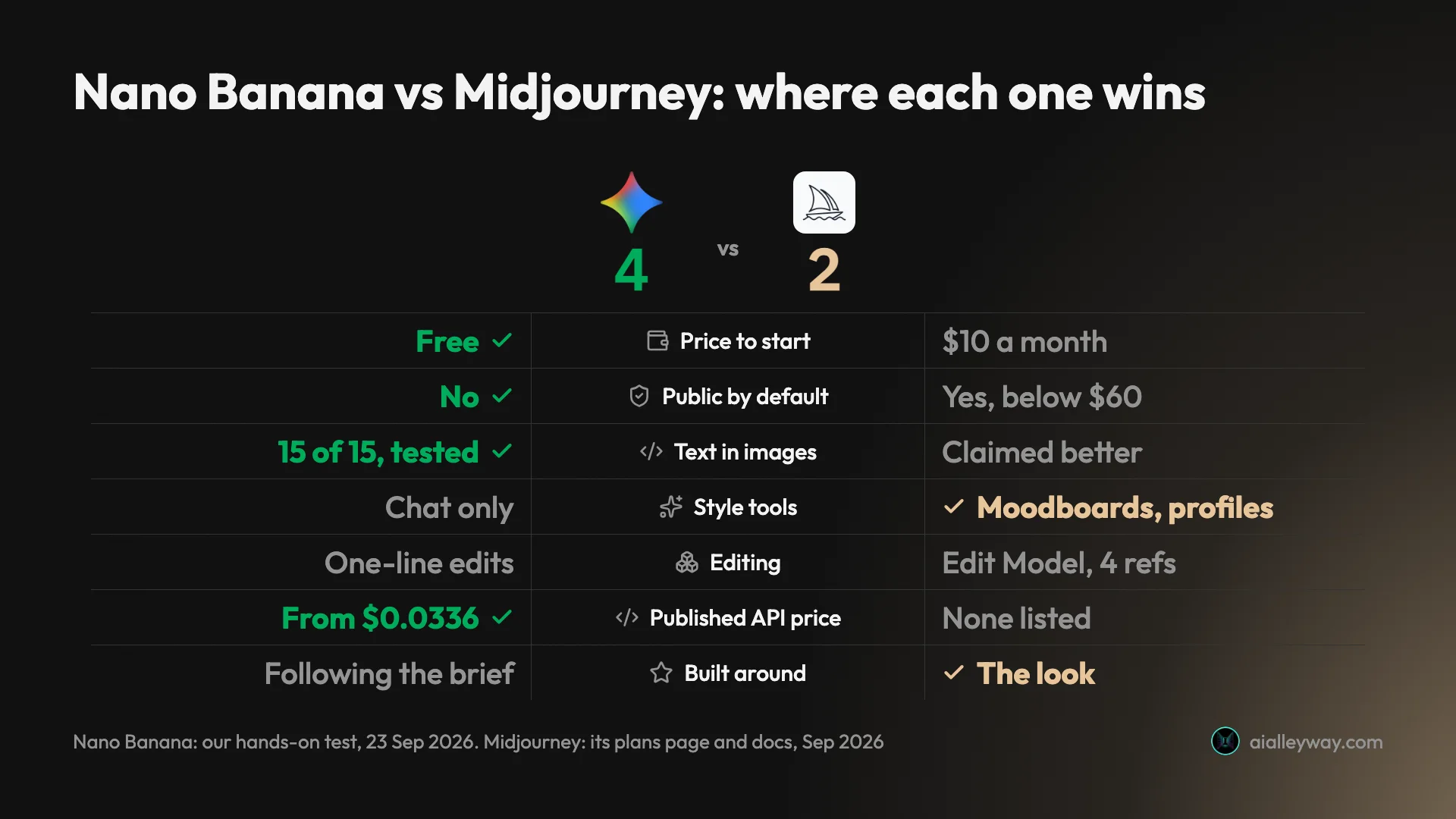
| Axis | Nano Banana (Gemini) | Midjourney | Winner |
|---|---|---|---|
| How we assessed it | Hands-on, 12 prompts | Plans page and docs | — |
| Free tier | Yes; 12 requests, no refusal in my test | None | Nano Banana |
| Cheapest paid plan | Optional Google AI plans | $10 a month, about 800 images | Midjourney for flat-fee volume |
| Public by default | No; stays in your Gemini chats | Yes; Stealth mode from $60 | Nano Banana |
| Text in images | 15 of 15 strings, tested | Better text claimed in V8.1 notes | Nano Banana |
| Style and aesthetic tools | None beyond the prompt | Moodboards, style profiles, personalisation | Midjourney |
| Editing | One-line conversational edits | Edit Model, up to 4 reference images | Tie |
| Images per image prompt | Not recorded in my test | A grid of four | Not compared |
| API with published prices | $0.0336 to $0.24 per image | None on the plans page | Nano Banana |
| Commercial terms | Google claims no ownership | You own it; Pro or Mega above $1M revenue | Depends |
What Nano Banana does better, and where it slips
Nano Banana is the tool that says yes to the most people. It is free, not public by default and quick, and in my test it did what the prompt said more often than not.
Strengths
- Free in the Gemini app, with no refusal across twelve requests on my free account.
- Spelled all 15 requested text strings and added no slogans to the menu or the coffee bag.
- Most images ready in about 30 seconds, none in the default mode over 40.
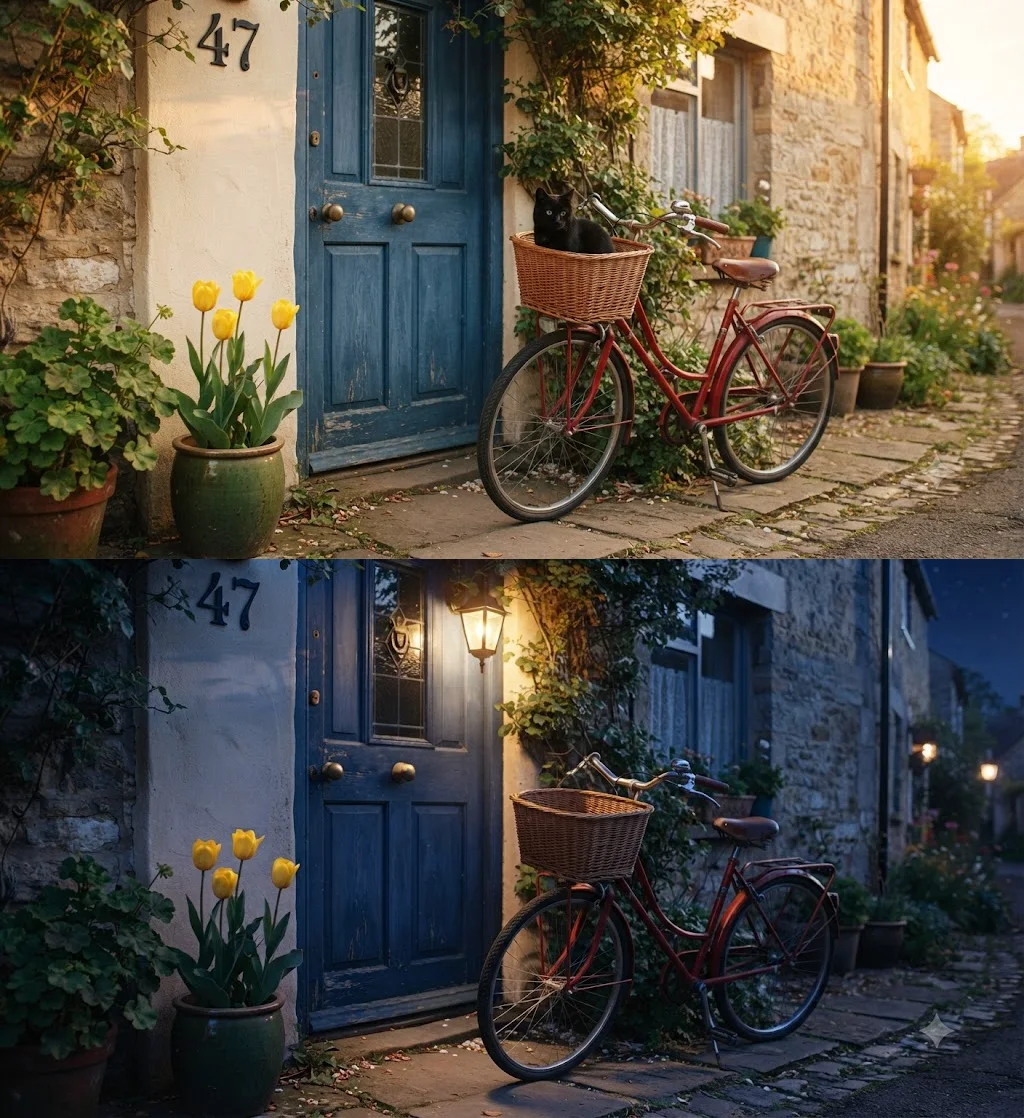
- The best edit in my test: a sunset street turned into a real night, with a lit lantern and nothing else changed.
- Published per-image API prices, from $0.0336.
Gaps
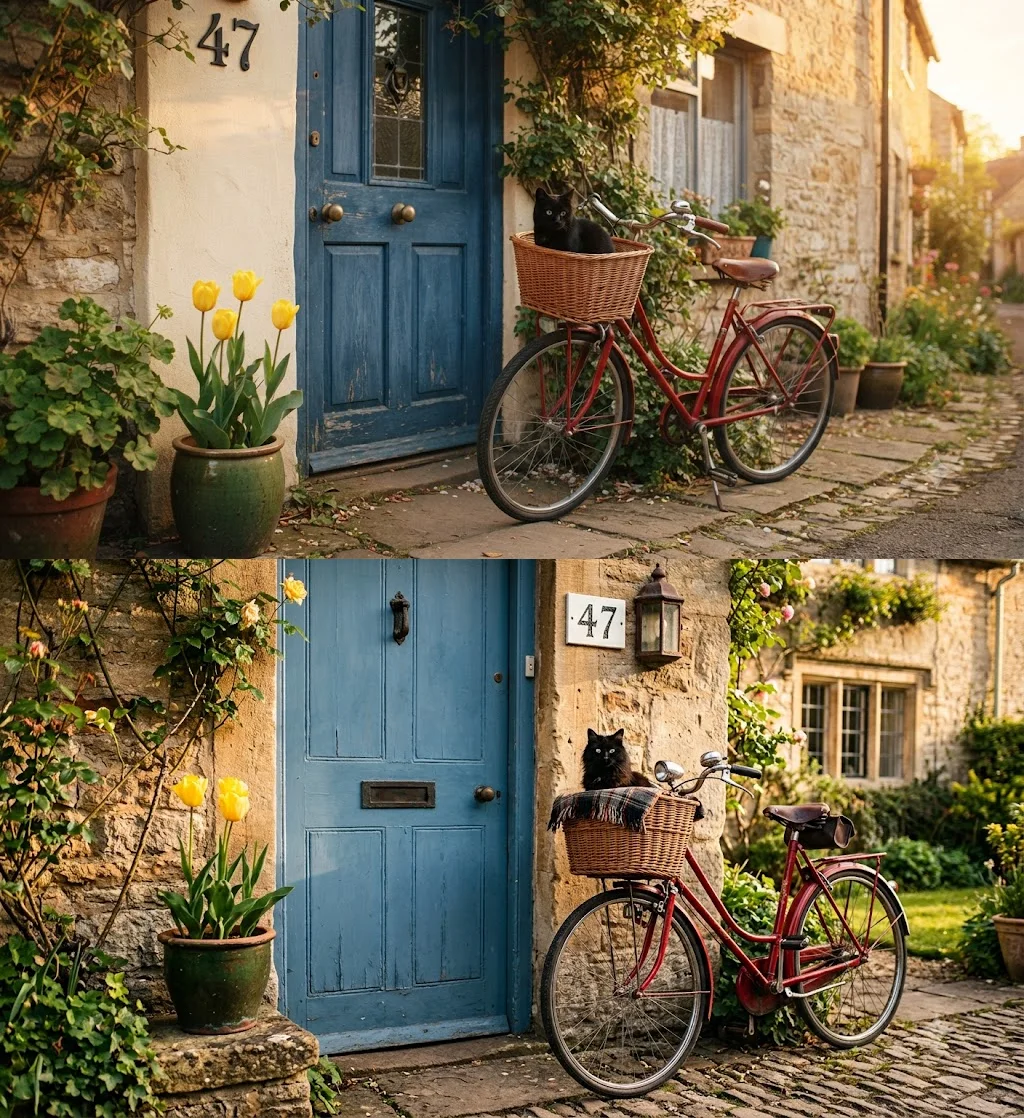
- Reads a crowded brief loosely: four tulips instead of three, and the house number in the wrong place.
- No style tools beyond the words in your prompt.
- A visible sparkle watermark on free images, which most users can switch off.
- A small full-size download, 1408×768.
The pattern behind those lists is a tool tuned for doing what it is told, quickly, for free. Its weaknesses are precision on crowded briefs and polish on output size, not look: the pictures themselves were among the most attractive in my test. It also signed a woodblock-style print with the name of the real artist Hiroshige, a reminder to read any text it adds. The full results are in our Nano Banana review.
Midjourney: strengths and gaps
Midjourney is the tool for people who care most about how a picture looks. I have not tested its model, so everything below comes from Midjourney’s own plans page, which I read signed in, its help centre and its update notes.
Strengths
- Built around aesthetics, with moodboards, style profiles and personalisation; its docs describe V8.2 as focused on aesthetics, image quality and personalisation.
- Every image prompt returns a grid of four images to choose from.
- An Edit Model that works from up to four reference images and can repaint or extend a picture.
- Flat plans: about 800 images for $10, and unlimited Relax-mode images from $30.
- You keep ownership of your images even after you cancel.
Gaps
- No free tier, and refunds only if you have used less than 20 minutes of GPU time.
- Every image is public on its Explore page unless you pay $60 a month for Stealth mode.
- Companies with more than $1 million in revenue must buy Pro or Mega.
- No API price list on its plans page.
- A Trustpilot rating of 1.6 out of 5 when our review checked it in September 2026.
The pattern here is the opposite of Nano Banana’s. Midjourney’s strengths are all about the picture, how it looks and how much control you have over its style, while its weaknesses are all about access: paying before you start, paying more for privacy, and paying more again as a larger business. The Disney and Universal copyright case against it, reported by Variety as still in discovery in July 2026, is one more reason to avoid prompting for recognisable characters in commercial work.
Is Nano Banana or Midjourney cheaper?
For a person making pictures, Nano Banana is cheaper, because it is free. For someone who makes hundreds of images a month and would otherwise pay per picture, Midjourney’s flat plans can cost less. Which is true depends entirely on how you would pay.
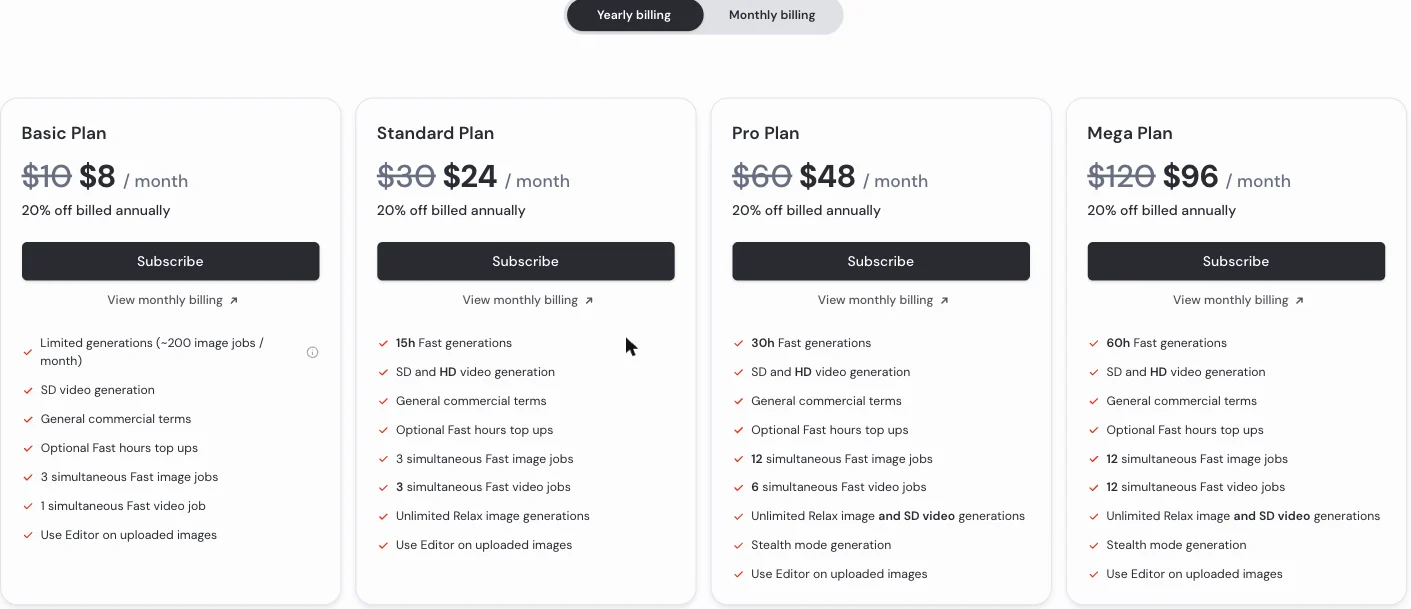
In the apps. Nano Banana is free in the Gemini app. Google meters Gemini by compute rather than by image count, topping up the allowance every five hours until a weekly ceiling, and it publishes no daily image number. My free account ran twelve requests in about twenty minutes without a refusal. Paid Google AI plans raise the limits, and the AI Plus plan and above add the option to redo an image with Nano Banana Pro. Midjourney has no free tier at all. Its plans run from $10 to $120 a month, or $8 to $96 billed yearly.
What Midjourney’s money buys. Midjourney sells GPU time rather than images. Basic’s 3.3 Fast hours come to about 200 jobs of four images, or about 800 images, which is the figure Midjourney’s plans page gives. Standard at $30 adds unlimited images in the slower Relax mode, Pro at $60 adds Stealth mode, and extra Fast time costs $4 an hour on any plan. Our Midjourney pricing guide breaks down what each job costs.
On the API. Google publishes a price for every Nano Banana model on its API pricing page, last updated on 24 September 2026: $0.0336 for a 1K image on Nano Banana 2 Lite, $0.045 to $0.151 on Nano Banana 2 depending on size, and $0.134 to $0.24 on Nano Banana Pro, with batch jobs at roughly half. Midjourney’s plans page lists no API.
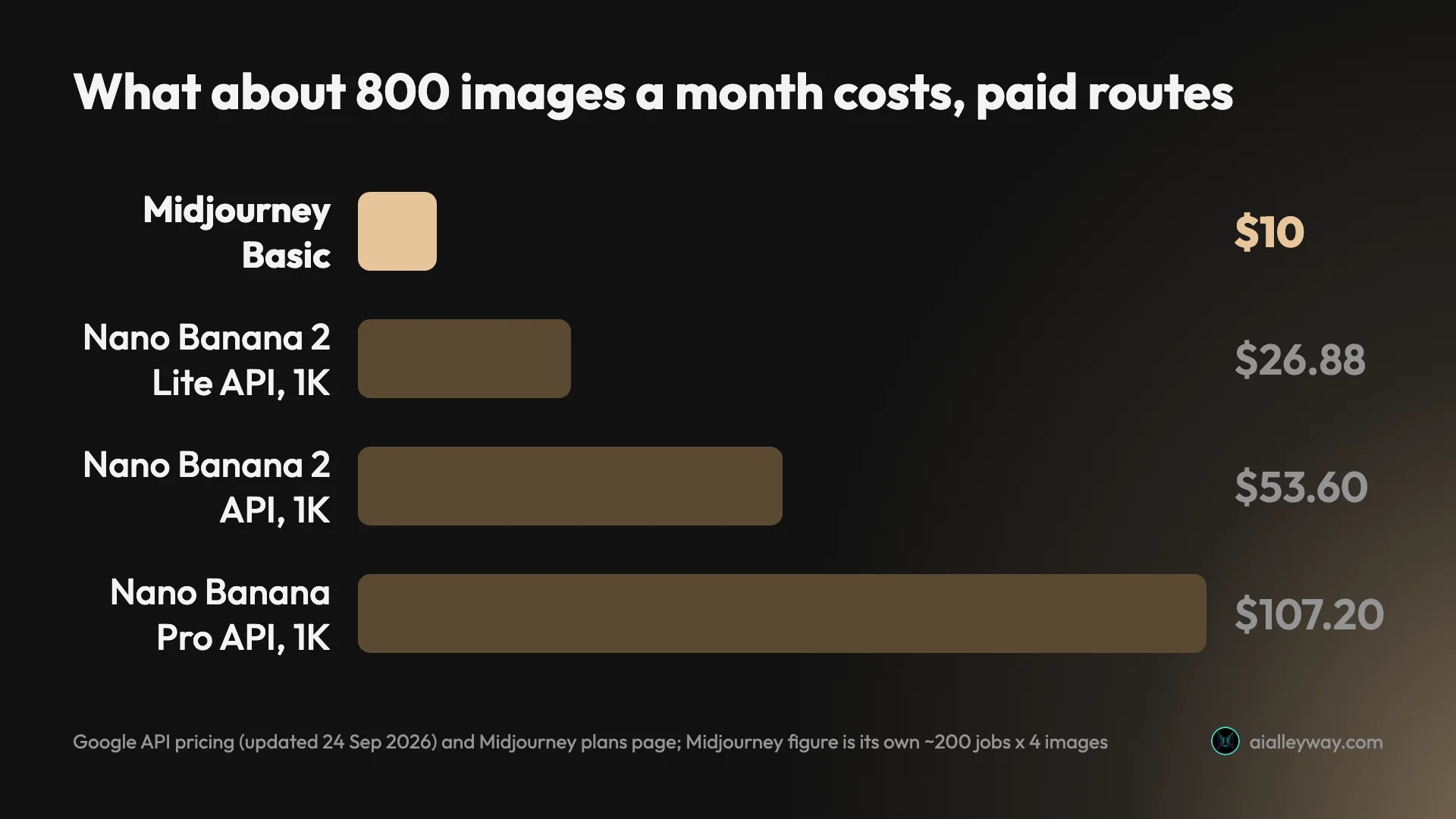
That chart is the surprise in this comparison. At about 800 images a month, Midjourney’s $10 plan costs less than any Nano Banana API route: 800 images at 1K would cost $26.88 on Nano Banana 2 Lite and $53.60 on Nano Banana 2. The free Gemini app still beats both, if its unpublished limits cover your volume.
Privacy is part of the price. On Midjourney, images made below the $60 Pro plan appear on the public Explore page with their prompts and settings visible, and even with Stealth mode on, images made in its public Discord channels stay visible. Gemini has no public gallery; the images I made stayed in my chat history. Both label their output: every Nano Banana image carries Google’s invisible SynthID watermark, and the full-size file I downloaded also carried C2PA content credentials.
Two worked examples. A small business making about 100 social images a month is likely covered by the free Gemini app, which ran twelve requests in twenty minutes for me without a refusal, though Google publishes no limit to plan against. On Midjourney the same business pays $10 a month and its images are public, or $60 if they must stay private.
A studio making about 3,000 images a month reaches a different answer. On Midjourney, Standard at $30 includes 15 Fast hours, about 3,600 images, plus unlimited Relax images. The same 3,000 images at 1K would cost about $100.80 on Nano Banana 2 Lite’s API and $201 on Nano Banana 2. At that volume, Midjourney’s flat fee is the cheaper route, unless the free app’s limits stretch that far.
The hidden costs. Midjourney’s real entry price for private work is $60, because Stealth mode starts on Pro. For a company earning more than $1 million a year, Pro is the minimum regardless of volume. And Midjourney’s checkout defaults to yearly billing, with refunds ending after 20 minutes of use. Nano Banana’s hidden cost is uncertainty: without a published limit, you cannot plan a deadline around the free tier.
Which makes better images, Nano Banana or Midjourney?
This is the axis I can only half answer, and it is worth being plain about why. I tested Nano Banana on twelve prompts. I have not run Midjourney’s model, so what follows for Midjourney is its makers’ description and other people’s judgement, not my measurement.
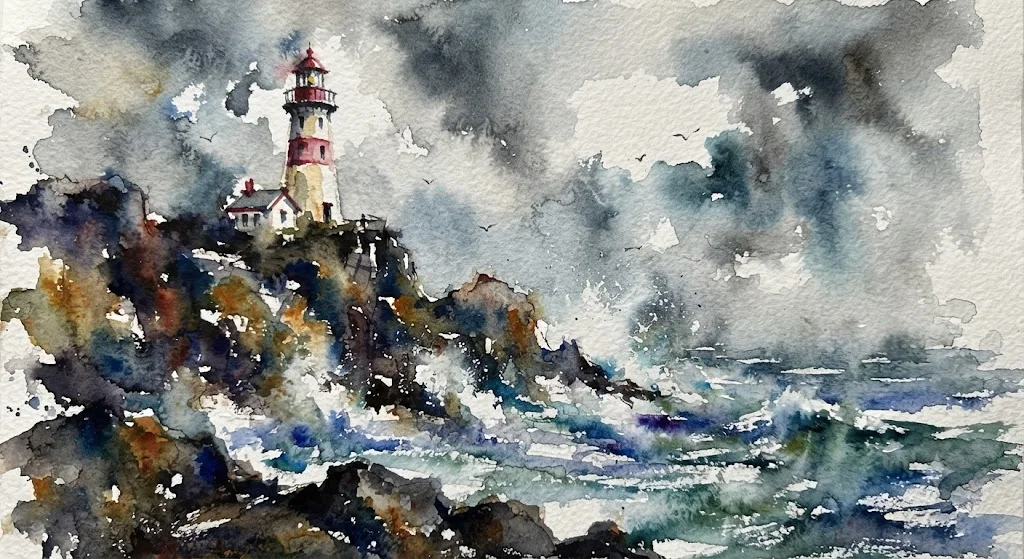
What Nano Banana did. On text it was exact: all 15 strings across a gig poster, a café menu with six prices, a coffee-bag label and a house number, with no invented slogans on the menu or the bag. On photorealism it made no errors: a weathered fisherman, an earbud case on wet slate, and two floured hands with the right number of fingers. Its watercolour lighthouse was the best image in my whole test. Its weak spot was a crowded brief: it drew four tulips where I asked for three and moved the house number, and its slower 3.1 Pro mode fixed the count but not the position.
What Midjourney says about itself. Its documentation describes V8.2 as an update focused on aesthetics, image quality and personalisation. Its notes on V8.1, the previous default, claimed better adherence to detailed prompts and better text rendering than before, with an HD mode at four times the resolution of V7. Those are Midjourney’s claims, not results I have checked.
What others say. Google’s AI Overview for this comparison frames Midjourney as an aesthetic, artistic tool and Nano Banana as a precision tool for editing, text and control. That matches both tools’ own positioning. The same Overview also repeats older claims, such as Midjourney being capped at around 1,024 pixels, which Midjourney’s V8.1 notes contradict, since its HD mode renders at twice the size of V7, so treat single numbers in older comparisons with care.
Getting the best from each. The prompts that worked best on Nano Banana in my test named specifics: counts, positions, the lens and the light. Switching to 3.1 Pro mode helped with exact numbers, and ending a prompt with “no other text, no signature” is cheap insurance against the text it adds. Midjourney’s own tools point the other way: its moodboards, style profiles and up to four reference images are designed to steer a look rather than list requirements, and its Explore page shows the prompts and settings behind other members’ images.
Consistency across a set. I did not test character or style consistency across a set of images. On paper, Midjourney offers more for it: style profiles, moodboards and an Edit Model that can work from up to four reference images. Nano Banana’s approach is conversational, editing the last image in the chat rather than working from a library of references, which kept my night edit faithful to the original scene.
Where that leaves quality. If your image has words in it, exact counts or a layout a client specified, the evidence favours Nano Banana, or ChatGPT, which was more literal still in our Nano Banana vs ChatGPT test. If the image is judged on mood, texture and style, Midjourney is the tool built for that job, and its public Explore page lets you judge the style before you pay. For photographic work, our guide to the best AI image generator for realistic photos goes deeper.
Which is faster and easier to use?
Speed and workflow are where the two differ most in daily use, because they are built for different ways of working.
Speed. Nano Banana returned most images in about 30 seconds in my test, and none in the default mode took over 40. Midjourney’s V8.1 notes claimed about 4 seconds for a standard-definition image and 12 for HD, and its 24 September update says it is testing faster models. I have not timed it. Its Relax mode, the one that makes Standard plans unlimited, queues jobs for spare capacity, with average waits of 0 to 10 minutes according to its plans page.
Choice per request. Midjourney returns a grid of four images for every image prompt, so each prompt gives you options to choose from. I did not record how many images Gemini offered per request, so I cannot compare that directly.
Editing. Both edit, in different styles. Nano Banana edits by conversation: I asked it to make the scene night, light a lamp and remove the cat, and it did all three in one reply without touching anything else. Midjourney’s Edit Model, according to its documentation, can repaint a selected area or extend the frame, and can work from up to four reference images. Its 24 September update says edits now change only the pixels you select.
Controls. Nano Banana has none beyond the words in your prompt and Gemini’s chat modes. Midjourney has a web app with sections for creating, editing and organising, plus moodboards, style profiles and a style creator, and it is testing live previews of a prompt across different styles. If you like controls, Midjourney has them; if you want to describe the picture and move on, Nano Banana is simpler.
Modes and quality settings. Both tools let you trade speed for quality, in different ways. In Gemini you pick a chat mode: 3.5 Flash-Lite by default, then 3.6 Flash, 3.1 Pro and Extended thinking. Switching to 3.1 Pro fixed Nano Banana’s tulip count, at about 80 seconds instead of under 20 on that prompt. Midjourney has Fast, Relax and Turbo speeds and SD or HD output; its documentation says an SD image job uses about 0.8 minutes of Fast time and an HD job about 1.3, and that Turbo uses twice the Fast time and is not currently supported in V8.1.
Video. Midjourney also makes short video clips from its images: five-second clips in standard definition on every plan and HD from Standard up, which can be extended in four-second steps to 21 seconds. Nano Banana itself makes still images, so for a Gemini user this row is simply not a like-for-like comparison. Our Midjourney pricing guide covers what video costs in Fast time.
Where you use it. Nano Banana lives inside Gemini, on the web, on phones and in Google’s new Windows app. Midjourney runs on its own website and in Discord.
Who should pick Nano Banana over Midjourney?
- Anyone with a zero budget. It is free in the Gemini app, and Midjourney is not. Twelve requests in one sitting never hit a limit on my free account.
- People making images with words in them. It spelled every string in my test and added nothing to the menu or the bag, which is what posters, menus and social graphics need.
- People who edit in plain words. Its one-line night edit was the best edit in my test, changing only what I asked for.
- Developers. Google publishes a price for every model, from $0.0336 an image, with batch jobs at roughly half, so a budget is a multiplication away.
Who should pick Midjourney?
- Artists and illustrators. Its tools and its model are built around how an image looks, and the Explore page is a free way to judge whether its style suits you.
- Heavy users on a flat budget. About 800 images for $10, and unlimited Relax images from $30, which beats paying per image on any Nano Banana API route at volume.
- People who want options per prompt. Every image prompt returns four images to choose from, so one prompt gives you a small set of directions.
- Anyone working from reference images and a house style. Moodboards, style profiles and an Edit Model that takes up to four references. Budget $60 a month if the work is for clients, for Stealth mode.
Final word
For most people, Nano Banana is the better choice: it is free, not public by default, quick, and it did what I asked on text and edits. Midjourney is the better choice for one kind of person, someone whose images are judged on look and who is happy to pay, and at volume its flat plans can even cost less than paying Google per image. Try Nano Banana first; if its pictures are accurate but not beautiful enough, that is when Midjourney earns its $10. Before paying, browse Midjourney’s public Explore page to see whether its style is the one you want, and remember that private work starts at $60. Our Nano Banana review has the full test.
If neither fits, our Midjourney alternatives and best AI image generator guides rank the rest.
Frequently asked questions
Is Nano Banana better than Midjourney?
For most people, yes, and for one kind of person, no. Nano Banana, Google's image model in the Gemini app, is free, and in my test it spelled all 15 text strings I asked for, made a convincing night edit and finished most images in about 30 seconds. Midjourney has no free tier, and its images are public unless you pay $60 a month.
Midjourney's case is the look. Its whole product is built around aesthetics, with moodboards, style profiles and a model its makers describe as focused on image quality and personalisation. I have not tested Midjourney's output, so I cannot score the two on style head to head. If the brief matters most, or the budget is zero, use Nano Banana; if the look is the job and you can pay, Midjourney is built for it.
Is Nano Banana cheaper than Midjourney?
In the Gemini app it is cheaper, because it is free: my free account ran twelve image requests without a refusal, and Midjourney's cheapest plan is $10 a month. Google does not publish a free image count, though, so heavy users may hit a limit I never reached.
On Google's API the comparison flips. Midjourney's $10 Basic plan buys about 800 images a month. The same 800 images at 1K would cost about $26.88 on Nano Banana 2 Lite, $53.60 on Nano Banana 2 and $107.20 on Nano Banana Pro at Google's standard rates. So for a person, Nano Banana is cheaper; for someone paying per image at volume, Midjourney's flat plan can be the better deal.
Which is better for realistic images, Nano Banana or Midjourney?
I can only speak first-hand for Nano Banana. On three photoreal prompts, a fisherman's portrait, a product shot on wet slate and two hands kneading dough, it made no anatomy or physics errors, and its hands had the right number of fingers.
Midjourney is widely recommended for realism: Google's AI Overview on realistic photo generators credits it with skin texture, atmospheric lighting and portraits. I have not tested it. Our guide to the best AI image generator for realistic photos compares the tools that I did test side by side, with prompting tips for photographic results.
Does Midjourney have an API like Nano Banana?
Midjourney's plans page lists subscriptions measured in GPU time and no API price list, while Google publishes a per-image price for every Nano Banana model on its API. That makes Nano Banana the straightforward choice if you are building images into your own product: from $0.0336 for a 1K image on Nano Banana 2 Lite to $0.24 for a 4K image on Nano Banana Pro, with batch jobs at roughly half price.
If you use Midjourney through a website or service that claims to offer API access, check who runs it and under what terms, because Midjourney does not list such a product on its own plans page.
Which AI is better than Nano Banana?
For following a crowded brief exactly, ChatGPT was better in my test. Run on the same twelve prompts, ChatGPT placed all seven elements of a busy scene where Nano Banana managed five, and it downloads at a larger size. Nano Banana was faster, added no slogans and made the better edit, so neither beat the other on everything.
Midjourney is the usual recommendation for a particular look rather than accuracy, but I have not tested it. Our Nano Banana vs ChatGPT comparison has the side-by-side results, and our best AI image generator guide ranks eight options for different jobs.
What is better than Midjourney?
It depends on why you want to leave. If the price is the problem, Nano Banana in the Gemini app is free, and in my test it spelled every text string and made a convincing edit. If you need images to follow a brief exactly, ChatGPT was the most literal tool I tested. If privacy is the issue, both keep images out of any public gallery, while Midjourney shows them on its Explore page below the $60 plan.
For a look similar to Midjourney's, the options with style controls and a free daily allowance, such as Leonardo, are the closest, though I have not tested them. Our Midjourney alternatives roundup compares six options with their prices and privacy rules.
Can I use Nano Banana and Midjourney images commercially?
Generally yes, with different conditions. Google's terms say it won't claim ownership of images you generate with Gemini, though the Gemini API terms add that Google may generate the same or similar content for others. Free Gemini images also carry a small visible sparkle, which most users can switch off, and every image carries Google's invisible SynthID watermark.
Midjourney says you own your images, even after you cancel, but companies with more than $1 million a year in revenue must be on the $60 Pro or $120 Mega plan. Midjourney images are also public on its Explore page below the Pro plan, which matters for client work more than the licence does.
Keep reading
Nano Banana Review and Pricing: Fast, Free, Nearly Exact
Nano Banana pricing, tested: 12 prompts on Gemini's free tier, no limit hit. 15 of 15 text strings right, most images in 30 seconds, and one tulip too many.
Midjourney Review: Is It Worth $10 a Month?
A Midjourney review from its own plans page and docs: no free tier, $10 for about 800 images, and every picture public unless you pay $60 a month.
Midjourney Pricing: What $10 to $120 a Month Really Buys
Midjourney pricing runs $10 to $120 a month, $8 to $96 billed yearly. What each plan buys in images, Fast hours and video, plus the refund and expiry traps.
Best AI Image Generator: 8 Picks, Two Tested Head to Head
The best AI image generator is ChatGPT for exact briefs and Nano Banana for free, fast images, both tested. Plus Midjourney, Ideogram, FLUX and three more.