
Best AI Design Tools: 8 Picks, 5 Tested, Sorted by the Job
The best AI design tools by job: Canva for layouts, ChatGPT for images with exact text, Lovable for working apps. Five tested, three read, each one labelled.
Contents
Which AI design tool is best? It depends on the job
There is no single best AI design tool, because “design” now covers four different jobs: laying out a graphic, generating a picture, drawing an interface and building something that runs. Here is the pick for each.
- Best overall: Canva. The AI output lands in a full editor, and its image model spelled 11 of 11 text strings in my test.
- Best free plan: Adobe Express. Free background removal and four on-brief designs from one request.
- Best for images with exact text: ChatGPT Images. Seven of seven parts of a crowded scene, on the free plan.
- Best for images labelled commercially safe: Adobe Firefly. Adobe marks its own models; check which model is selected.
- Best for a working app: Lovable. Six of six requirements from one prompt in 109 seconds.
- Best for interface prototypes in a design team: Figma Make. Read, not used.
- Best for product sellers: Kittl. Read, not used.
- Best known for its style: Midjourney. Read, not used, and no free plan.
We have used five of these eight: four in my own test sessions, and Lovable in Ryan Parker’s for his review. The other three are here on the strength of their own pricing and help pages, and each section says which kind of evidence it rests on.
How we chose these AI design tools
A feature list will not tell you which of these to use. I ranked by a narrower question: after the AI has finished, can you still change the result?
That one test sorts the field. A generated picture is flat, so a wrong word means generating again. A generated design that opens as text boxes and objects means retyping one line. A generated app either runs or it does not.
Five criteria sit under that question.
- Where the output lands. A flat image, an editable layout, a prototype or a running page.
- Accuracy on a fixed brief. I gave the image tools the same three prompts and counted what came back right.
- What the free plan gives. As measured on our accounts where we tested it, and as published where we did not.
- How the AI is metered. Credits, tokens, a percentage meter or a daily count.
- What the licence says. Only where I read the vendor’s own page.
Six of the eight come from three categories on our picks page. Canva and Adobe Express are our design picks. ChatGPT Images, Adobe Firefly and Midjourney are image picks, and Lovable is our top app builder. Kittl and Figma Make are not on the picks page; they are here for jobs those six are not aimed at.
Two things this list leaves out. Dedicated interface generators and AI website builders that I have not opened are not ranked; our Claude alternatives post lists that field. And editors that are not AI-first, such as Affinity and Photopea, are in our Canva alternatives roundup.
Five used, three read: the evidence behind each pick
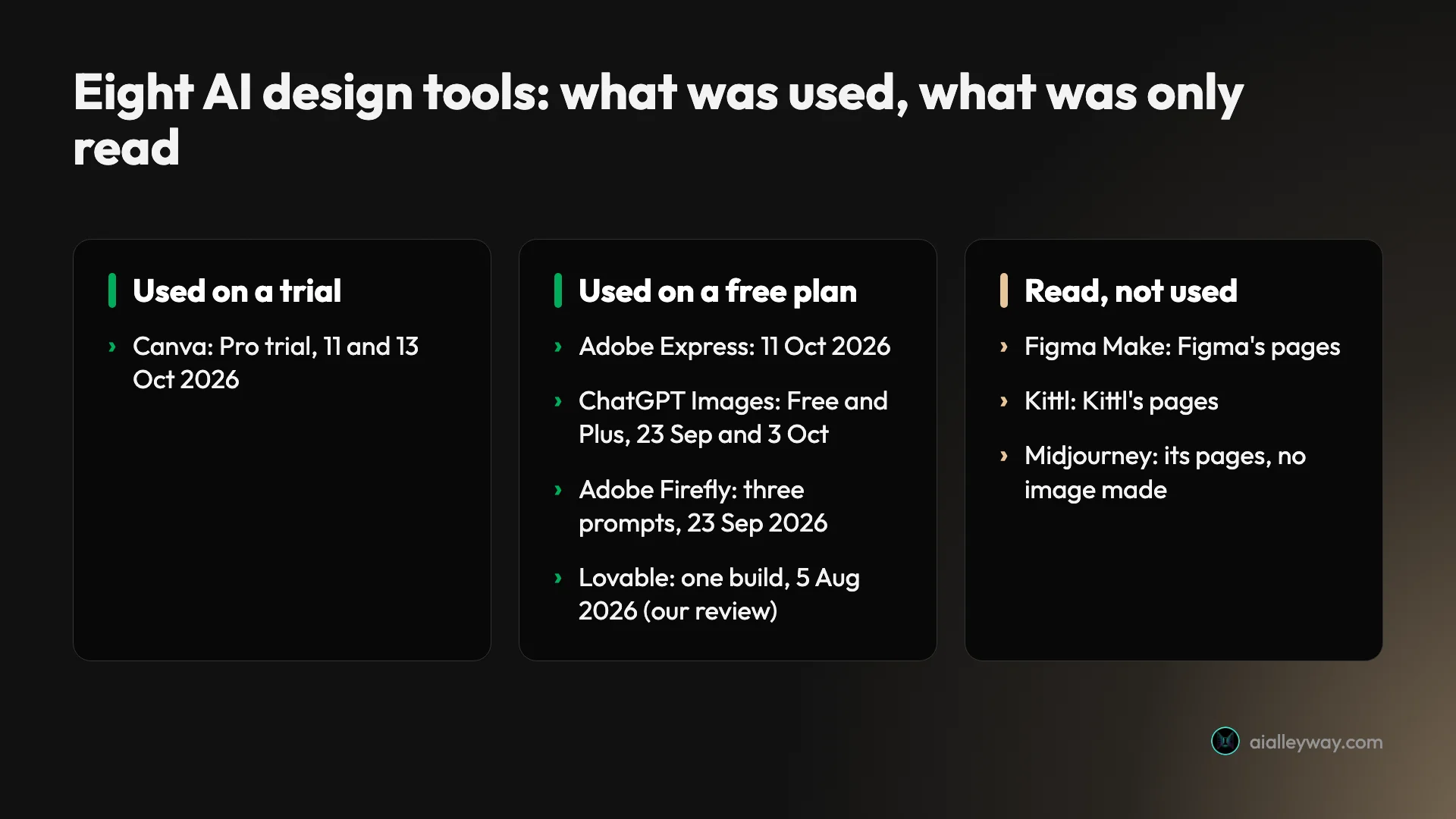
Five tools have a hands-on session behind them. They were run on different dates and on different plans, so treat each result as that plan on that day. Ryan Parker ran the Lovable build for his review; the other four sessions are mine.
| Tool | Evidence | Plan and date |
|---|---|---|
| Canva | Used | Pro trial, 11 and 13 October 2026 |
| Adobe Express | Used | Free plan, 11 October 2026 |
| ChatGPT Images | Used | Free and Plus, 23 September and 3 October 2026 |
| Adobe Firefly | Used | Free plan, three prompts, 23 September 2026 |
| Lovable | Used | Free tier, one build, 5 August 2026 |
| Figma Make | Read | Figma’s pages, 14 October 2026 |
| Kittl | Read | Kittl’s pages, 12 and 14 October 2026 |
| Midjourney | Read | Midjourney’s pages, 7 and 14 October 2026 |
Only ChatGPT was tested on a paid plan, Plus. Canva ran on a trial, which Canva says carries the free plan’s AI allowance, and I never used Canva’s own free plan.
The same three prompts, five models
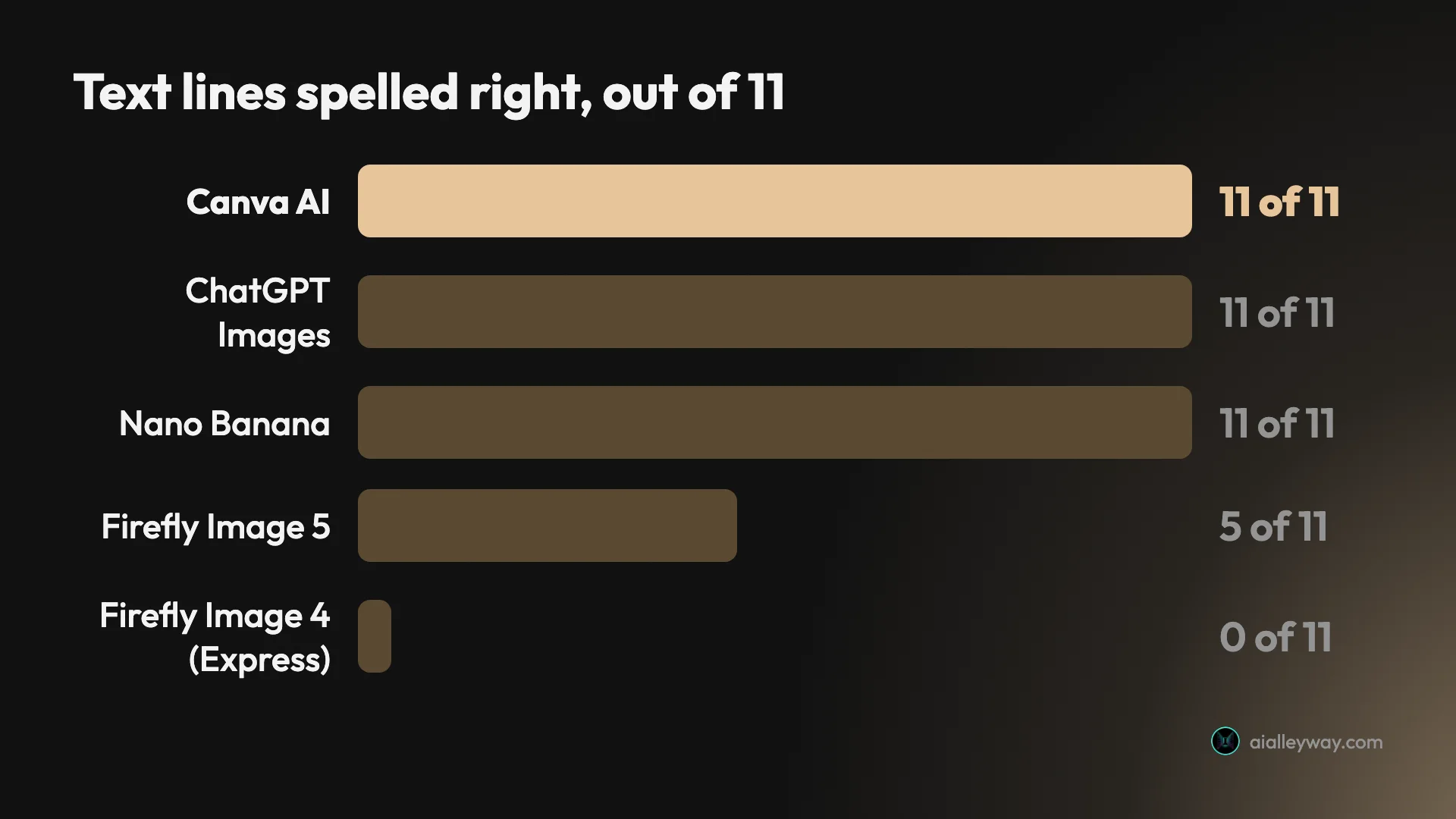
Three prompts went through the five image models in the table below: a street scene with seven specified parts, a gig poster with four lines of text and a café menu with seven.
| Prompt | Canva AI | ChatGPT Images | Nano Banana | Firefly Image 5 | Express, Firefly Image 4 |
|---|---|---|---|---|---|
| Seven-part scene | 5 of 7 | 7 of 7 | 5 of 7 | 6 of 7 | 4 of 7 |
| Gig poster, four lines | 4 of 4 | 4 of 4 | 4 of 4 | 4 of 4 | 0 of 4 |
| Café menu, seven lines | 7 of 7 | 7 of 7 | 7 of 7 | 1 of 7 | 0 of 7 |
The Express column is Adobe’s default model on the free plan, scored on the first of the four images it returns. Nano Banana is Google’s image model in Gemini, covered in our Nano Banana review; it has no section here because our best AI image generator roundup already ranks it.
Eight AI design tools side by side
Prices are US list prices in dollars, read on the dates given in each section. Tax is extra where the vendor says so.
| Tool | Best for | What you get back | Paid plans from | Free plan | AI metering |
|---|---|---|---|---|---|
| Canva | Everyday graphics | Editable design | $18 a month | Yes, per Canva | Monthly allowance, shown as a percentage |
| Adobe Express | Staying free | Editable design | $9.99 a month | Yes, used | Free daily generations; credits on Premium |
| ChatGPT Images | Exact text and placement | Flat image | $8 a month | Yes, used | A locked window after a limit OpenAI does not publish |
| Adobe Firefly | Labelled models | Flat image | $19.99 a month for Pro | Yes, used | Three a day in my test; credits on paid |
| Lovable | Working apps | Hosted app | $25 a month | Yes, used | Credits |
| Figma Make | Interface prototypes | Prototype or web app, per Figma | $16 a month per Full seat | Starter plan, per Figma | AI credits per seat |
| Kittl | Product sellers | Designs and product mockups, per Kittl | $12 a month, billed annually | Personal use only | Tokens |
| Midjourney | Its style, by reputation | Four images per job, per Midjourney | $10 a month | None on its website | Fast GPU hours |
Firefly also lists a Standard plan below Pro; I have only read Adobe’s dollar price for Pro, so that is the one shown.
1. Canva — best overall, because the AI lands in an editor
The reason Canva leads is not its image model. It is what happens after the image model has finished.
I used it on a Pro trial on 11 and 13 October 2026 and rated it 4.5 in our Canva review. I asked Canva AI for an Instagram post for a coffee shop. It came back in about 42 seconds with the headline reading only “ALLEY”, one word short of the shop’s name.
With a flat picture that means generating again. Here the headline was a normal text box. I retyped it and changed the size: two edits, under a minute, and no AI allowance spent.
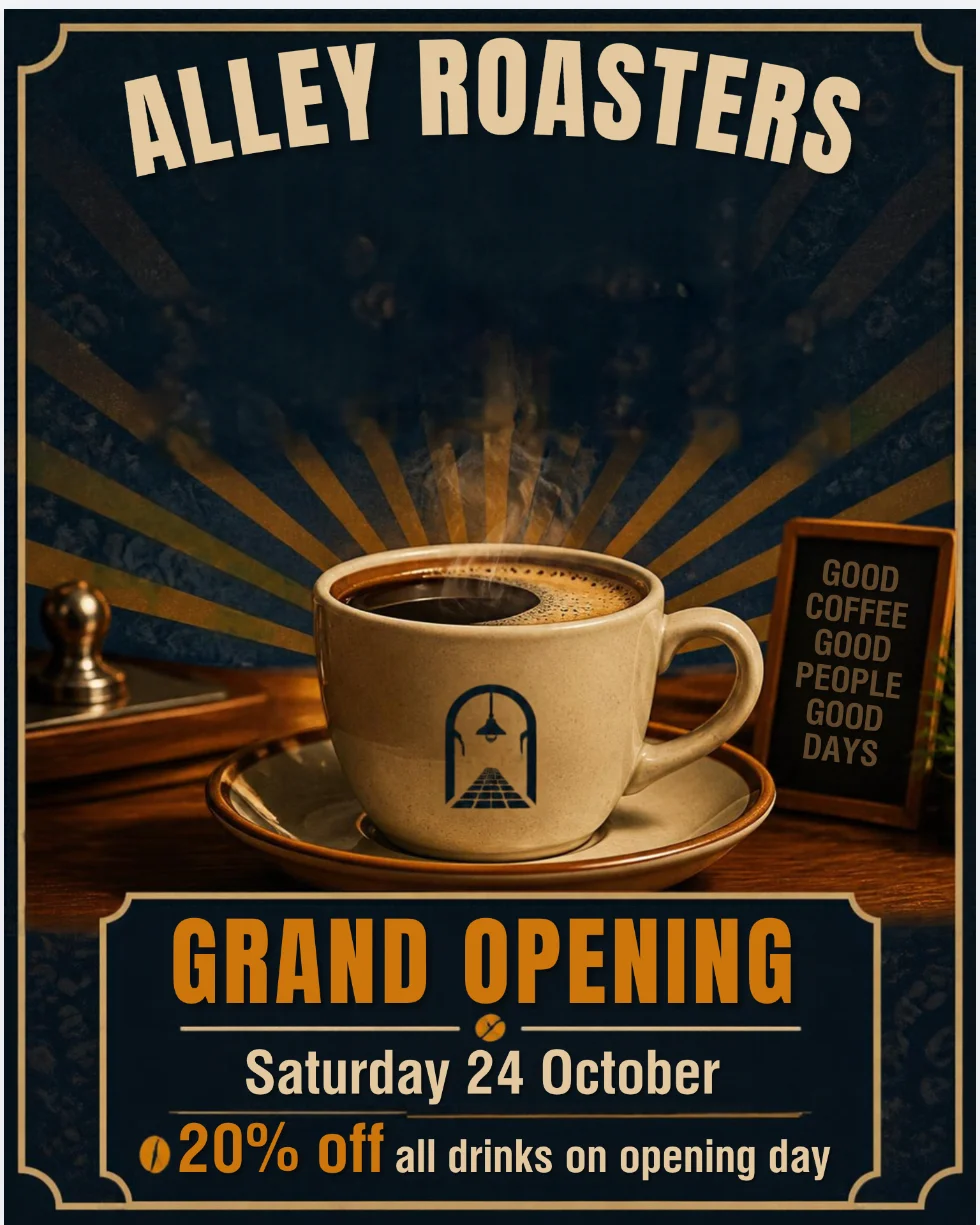
What else it did. The image model spelled all eleven text strings across the gig poster and the café menu. The background remover cut a bicycle out of a street scene in one click; our Canva background remover guide tests it on three harder photos. Canva Code built a tip calculator that did its sums correctly; our Canva Code guide has the second build.
The catch is the meter. Canva shows AI usage as a percentage of the month. Mine read 56% after six requests: three images, one generated design, one Canva Code build and one Magic Layers run. One generated design took 16 points and one Canva Code build took 25.
That was a trial, and Canva’s help page says a trial carries the free plan’s allowance, so a paid Pro plan gets more. I have not measured a paid account.
Pricing. Canva Pro is $18 a month or $144 a year for one person on Canva’s US pricing page, read on 11 October 2026. The free plan includes up to 20 AI uses a month, per Canva’s help page. Our Canva pricing guide has every plan, and our Canva cancellation guide covers ending a trial.
Who it is for. Non-designers who make social posts, flyers, menus and slides every week, and who would sooner fix a draft than start from nothing.
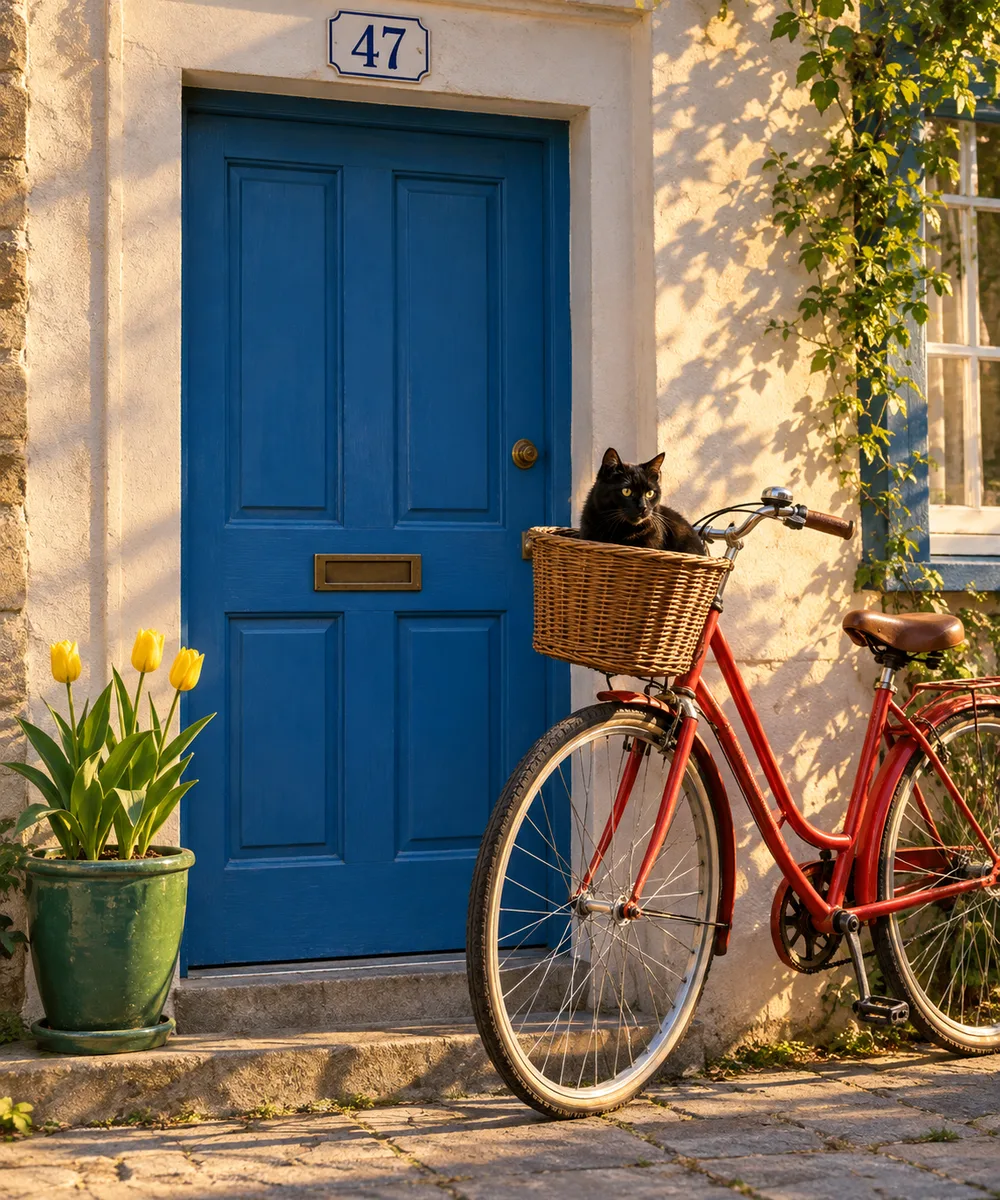
Who should skip it. Anyone who needs the scene exactly as described. Canva scored 5 of 7 on the seven-part scene, with an extra tulip and a house number in the wrong place. I also could not try Canva AI 2.0, its top tier, because the trial blocks it.
2. Adobe Express — best AI design tool that costs nothing
Adobe Express gave away the tool Canva charges for. On its free plan, Remove background carried no Premium crown and cut a bicycle out of a street scene with the wheel spokes intact.
I used it on the free plan on 11 October 2026, with the same prompts and the same design brief as Canva, and rated it 4.2 in our Adobe Express review.
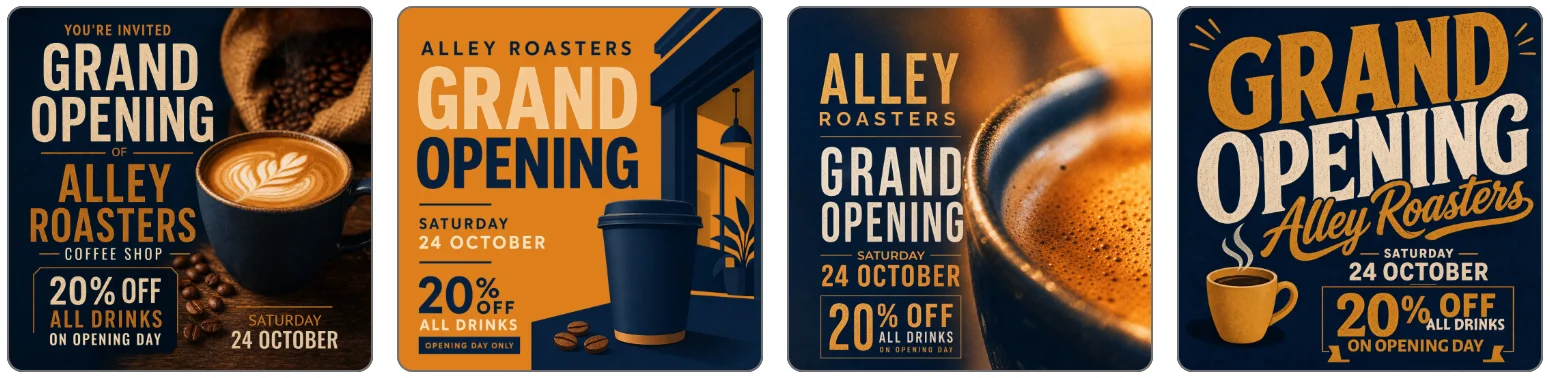
The design brief is where it surprised me. The AI Assistant returned four Instagram posts in 80 to 105 seconds. All four carried the full shop name, the date and the offer, correctly spelled, in the colours I asked for. Canva returned one design and dropped a word.
Where it fell down. Two places, and both matter.
The first is the hand-off. When I clicked Open in Editor on one of those designs, the screen sat on “Saving your changes” for more than a minute. After a reload, the saved copy had blank grey boxes where the shop name and the discount had been. I tried that once, on one design, so I cannot say how often it happens.
The second is text inside images. The image tool opens on Firefly Image 4, and on the first image of each prompt it got none of the poster’s four lines or the menu’s seven right. Switching the picker to Gemini 3.1, a partner model, produced a menu with all seven lines correct. I ran the partner model on the menu only.
Pricing. Premium is $9.99 a month with 250 generative credits on Adobe’s pricing page, read on 11 October 2026. The free plan lists free daily generations with no number. My account showed no counter, and five generations in a row went through.
Who it is for. Anyone staying on a free plan who needs cutouts and a quick first draft, and anyone already paying Adobe.
Who should skip it. People who resize one design into many formats. Resize opened a panel headed “Premium feature” on my account, so I could not test it. Our Canva vs Adobe Express comparison has the full scorecard.
3. ChatGPT Images — pick it when every word must be right
Ask for three tulips and three of the five models in the table drew four. ChatGPT drew three.
I tested ChatGPT’s image generator on 23 September 2026, starting on a free account and moving to Plus, and rated it 4.5 in our ChatGPT image generator review. On the seven-part scene it scored seven of seven on the free plan, first try, with one caveat of reading: the bike leans on the wall beside the door, not on the door. No other model in the table above scored seven.
Text was as good. Across four designs I asked for 15 separate strings, and in that test all 15 came back exact. Later prompt tests turned up a dropped letter on a magazine masthead and a misspelt product name, so proofread anything you plan to print.
The limits. It is an image generator, not a design tool. You get one flat image per request, about 1.5 megapixels in my downloads, and a wrong word means asking again.
It also adds things. My café menu came back with two slogans and a small sign I never requested.
The free plan is small. My free account made three images, one of them an edit, then locked for 24 hours from the first picture. OpenAI publishes no number for the free limit, so three is what one account got.
Pricing. ChatGPT Go is $8 a month and Plus is $20 a month in the US, prices we checked on 22 August 2026 for our ChatGPT review. On Plus, my account made 155 images in one session on 3 October before it locked. OpenAI’s pricing page gives no image count for Plus; the in-app card said 120 a day, and my account passed that.
Who it is for. Anyone who needs one picture with the right words in the right places: a poster, a label, a product mock-up.
Who should skip it. Anyone who needs a layout they can keep editing. Take the image into Canva or Adobe Express for that. Our image roundup ranks it against the other image models.
4. Adobe Firefly — best when legal asks where the model learned
Firefly tells you, in the model picker, which models Adobe stands behind. Its own models sit under a heading that reads “Commercially safe”, apart from the partner models. Adobe Express uses the same label.
Adobe says those models are trained on licensed Adobe Stock content and public-domain content where copyright has expired. That is Adobe’s claim. I have not tested it and could not.
My session with Firefly was on the free plan on 23 September 2026, and our Adobe Firefly review rates it 4.0. The free plan allowed three generations a day, so I spent them on the three prompts in the table above, on Firefly Image 5.
What it got right. Six of the scene’s seven parts were right; the miss was a fourth tulip. It put the bike against the door itself, where ChatGPT and Nano Banana had put it against the wall beside the door. All four poster lines were spelled correctly.
What it got wrong. The café menu. Firefly Image 5 wrote the title, then invented the six items, each priced “30.”.
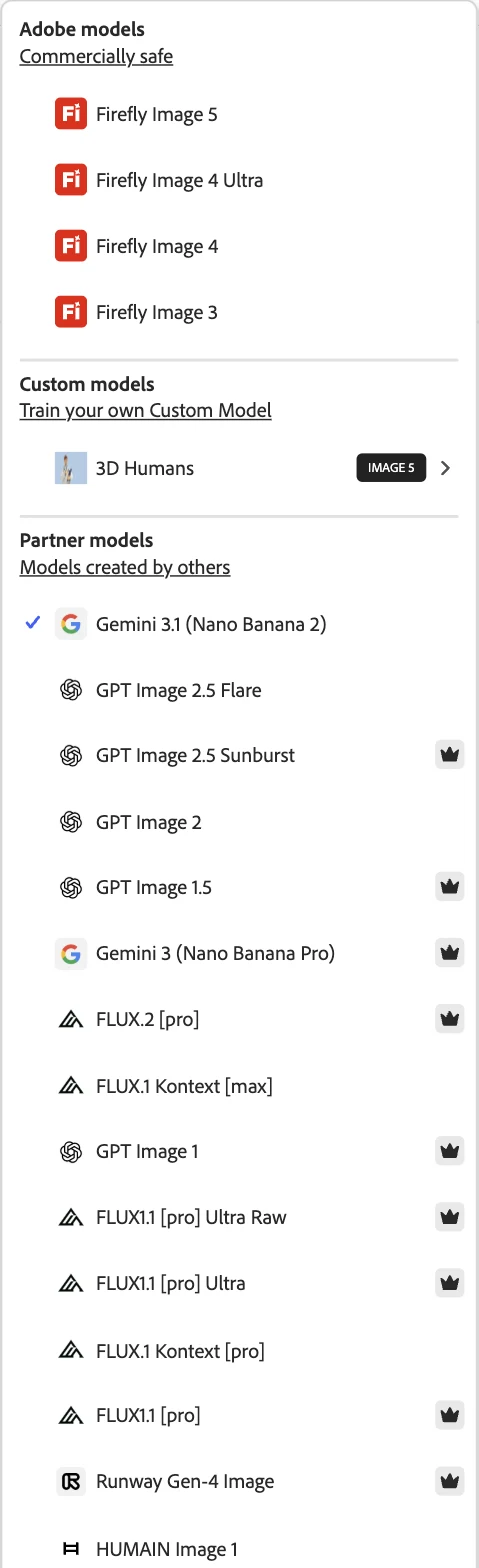
The catch. The label covers Adobe’s group, not the whole app. When I opened Generate image on a free account, the model already selected was Google’s, which sits in the partner list. Nothing on the main screen said so. If the label is why you are here, check the picker every time.
The version matters as well. Firefly Image 5 spelled the poster. Firefly Image 4, the default inside Adobe Express, got none of its lines right on the first image.
Pricing. Adobe’s pricing page, read on 11 October 2026, lists Firefly Pro at $19.99 a month with 4,000 credits and says it includes Express Premium’s features. No paid Firefly plan was part of my test.
Who it is for. Teams whose legal or brand rules ask where a model’s training data came from, and people who already work in Adobe’s apps.
Who should skip it. Anyone making menus, price lists or anything with many lines of small text.
5. Lovable — best for turning an idea into a working app
Some design work does not end as a picture. It ends as something a person clicks.
Lovable builds that from a prompt. Ryan Parker tested it on the free tier on 5 August 2026 for our Lovable review, where it is rated 4.6, and it holds the top slot in our best AI app builder roundup.
He gave it one prompt with six numbered requirements for a subscription tracker. Two were written to be fumbled: a yearly price that had to be shown as a monthly figure, and a cancelled item that had to leave the total without leaving the page. It met all six on the first attempt, in 109 seconds, with no follow-up prompts.
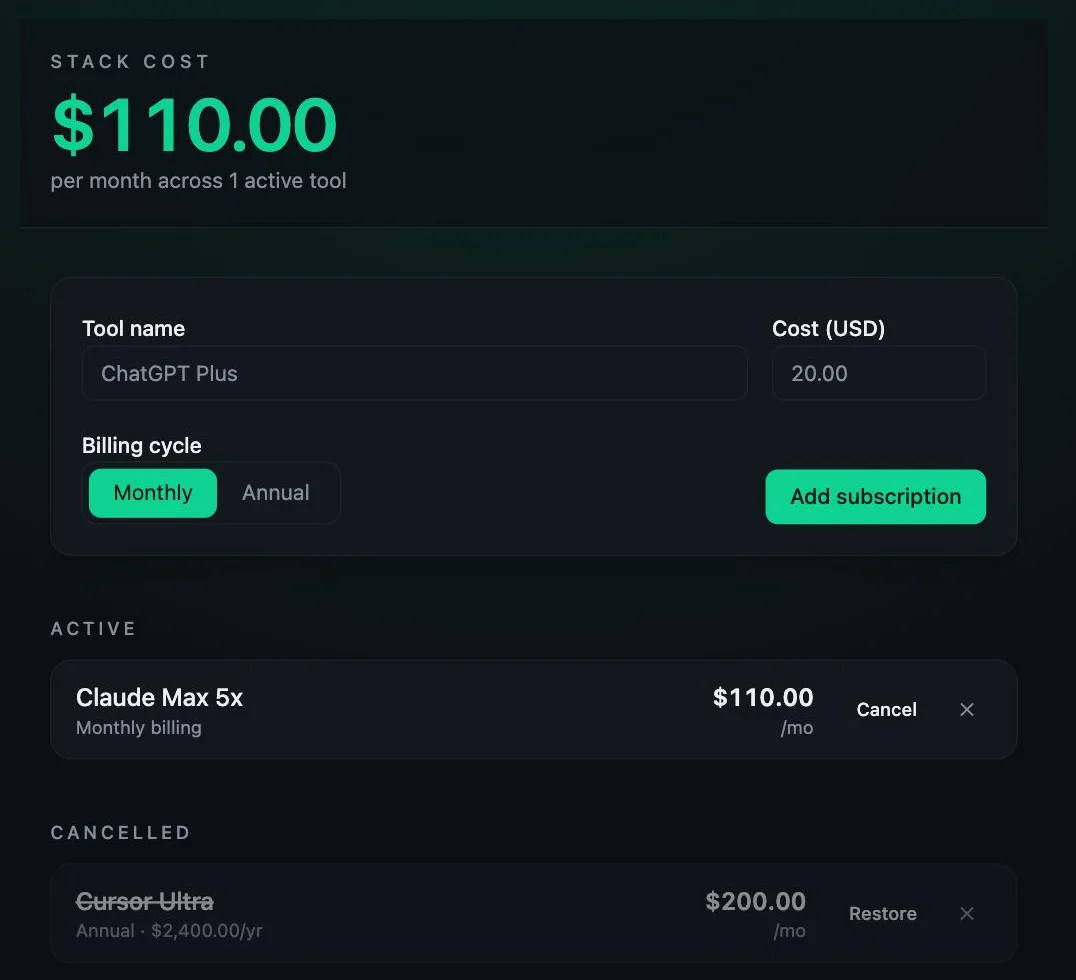
The build cost 1.20 credits. It also did two things he had not asked for: cancelled rows gained a Restore button, and the yearly price stayed visible beneath the monthly figure.
How narrow that test was. One single-page app, one prompt, the free tier. No accounts, no database, no publishing. It was tested as an app builder, so its visual design was not scored the way I scored the image tools.
How it compares with Canva Code. Both turned one prompt into a small interactive page in our tests, on different briefs. Canva Code is the easier reach if you already work in Canva. Lovable is a dedicated app builder that hosts what it makes and bills in credits. Neither test went past one page.
Pricing. Lovable’s pricing page, read on 14 October 2026, lists Free at $0, Pro at $25 a month with 100 monthly credits and Business at $50 a month. Its pricing FAQ puts the free plan at five build credits a day, up to thirty a month. Our Lovable pricing guide works through what a credit buys.
Who it is for. Founders and designers who need a clickable, working version of an idea this afternoon.
Who should skip it. Anyone who wants static graphics, or who needs to control every pixel before anything is built.
6. Figma Make — best for prototypes from your own Figma files
If your team’s designs already live in Figma, this is the AI tool that starts from them.
I have not used Figma Make. This section is drawn from Figma’s product page, pricing page and Figma Make FAQs, all read on 14 October 2026, and it says nothing about how good the output is.
Figma’s own description is short. “Start with design context, prompt, then edit on the canvas,” its product page says, and its pricing page describes the result as a functional prototype or web app. The same product page lists building in a local codebase as “Coming soon”.
| Detail | What Figma’s pages say |
|---|---|
| Who can use it | “Figma Make is available for Full seats on paid plans.” |
| Everyone else | “You can try Figma Make on other seats and plans.” |
| Free Starter plan | 150 AI credits a day, up to 500 a month |
| Professional, Full seat | $16 a month, plus 3,000 AI credits a month |
| Publishing on Starter | Only to the public web if also published to the Figma Community |
| Published prototypes | Anyone can view them; access cannot be restricted |
The case for it. Context. A general image model knows nothing about your components. Figma’s pitch is that Make starts from the designs and libraries a team already has, and that the result stays editable on the canvas. That is my reading of its pages, not a test result.
The catches. Make runs on AI credits, and Figma’s help centre says credit use for Make varies, so there is no fixed price per prototype. I could not tell from the pricing page whether the $16 shown is the monthly or the annual billing rate.
Team libraries are a paid feature too, per Figma’s FAQ, so a free Starter account cannot feed its own design system into Make.
Who it is for. Product teams already paying for Figma seats, who want a prototype built from their own design files.
Who should skip it. Anyone making social graphics or print. Figma has a separate template tool, Buzz, which our Canva alternatives roundup covers.
7. Kittl — best for print-on-demand sellers and product brands
Kittl’s plan cards talk about listings, product shots and mockups. That tells you who it is built for: people whose designs end up on something they sell.
I have not used it. This section comes from Kittl’s pricing page, read on 12 and 14 October 2026, and its licence and help pages, read on 12 October.
Kittl meters its AI in tokens, and the plans are mostly a token ladder.
| Plan | AI tokens | Kittl’s own estimate |
|---|---|---|
| Free | 100, one time | “Up to 20 images or 1 videos” |
| Pro | 2,000 a month | “Up to 400 images or 20 videos” |
| Expert | 12,000 a month | “Up to 2,400 images or 100 videos” |
| Max | 30,000 a month | “Up to 6,000 images or 250 videos” |
The case for it. The Pro card is written for product work. It lists “Unlimited bulk mockup creation”, “High resolution exports for print & digital” and a “Premium AI upscaler and background remover”. Expert is pitched as “New designs, listings, and product shots, every week”.
Pro also carries a commercial licence, which Kittl’s pages cap at 500,000 copies of a design.
The catches. The free plan is a look around, not a place to work. Its 100 tokens are a one-time grant, not a monthly one. On the Free card the commercial licence line is greyed out, and when I read the page on 12 October it said free designs are “for personal use only”.
Pricing, with a caveat. On 12 October the page listed Pro at $12 a month billed annually, or $15 monthly. On 14 October it showed me a non-US currency, so I have not rechecked the dollar figures, and I have no dollar price for Expert or Max.
Who it is for. Sellers who need mockups and print-size files every week, and who will pay for the licence.
Who should skip it. Anyone who wants a generous free plan, or who mainly makes social posts. Our Canva alternatives roundup has Kittl’s export and licence details.
8. Midjourney — known for its look, with no free plan on the web
Midjourney is here on reputation and on its own documentation, and I want that to be plain. I have not generated an image with it.
Our Midjourney review rates it 4.1 and says the same: the score rests on its pricing clarity and its reputation for style, not on our own test. Our standard prompts, run on a paid plan, could move it either way.
What I can report is what Midjourney publishes. Each image job returns four images, per its plans page. Our review describes two of its steering tools: Personalization, which learns from the images you rate, and Moodboards, which steer results with reference images.
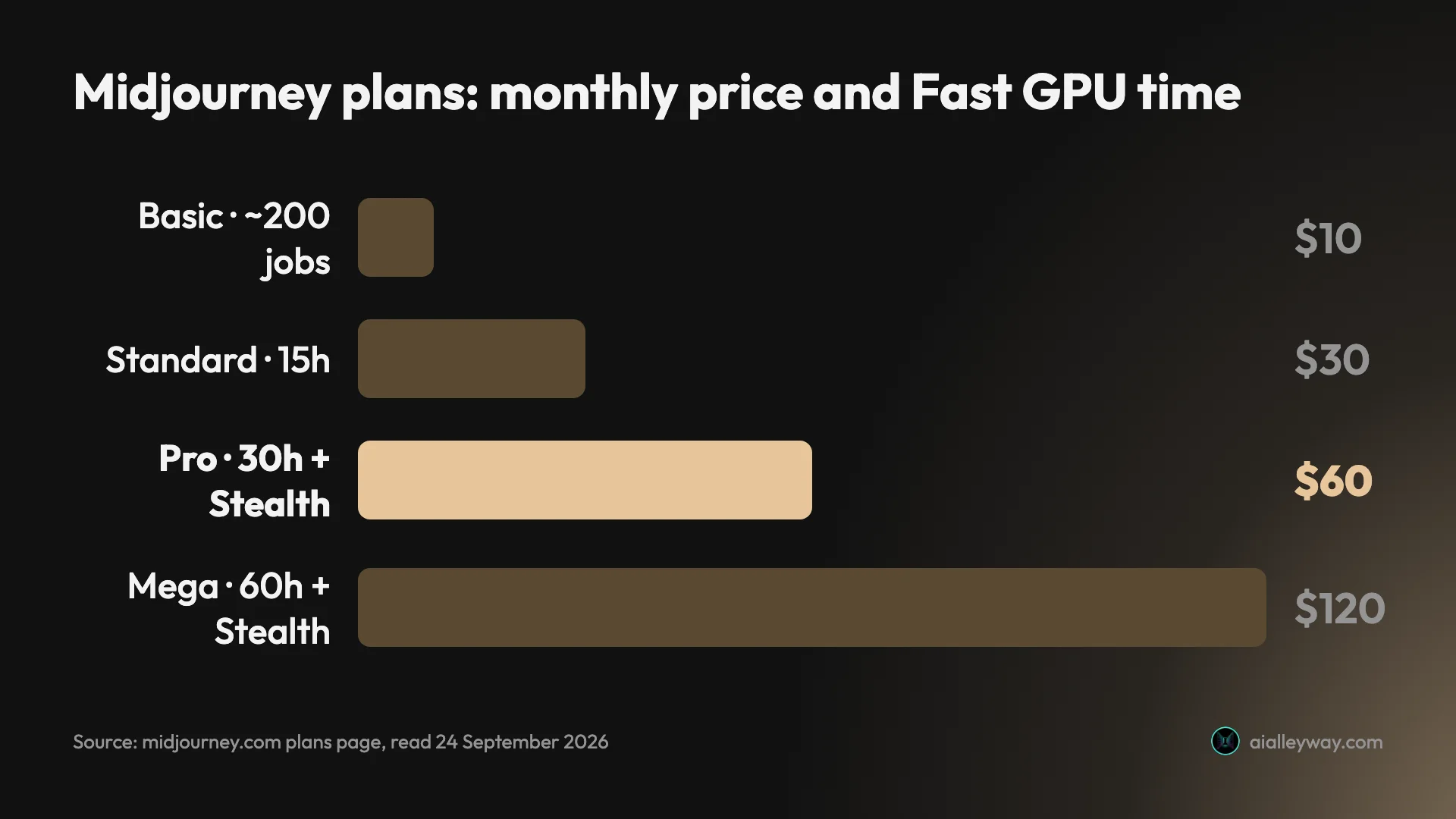
Pricing. Midjourney’s plan comparison page, read on 14 October 2026, lists four plans: Basic at $10 a month, Standard at $30, Pro at $60 and Mega at $120. Paying yearly takes 20% off.
There is no free plan. That page lists four paid tiers and nothing else. When I signed in on 7 October with an account that had no plan, for our Midjourney free guide, the prompt box read “Subscribe to start creating” and nothing was generated.
Two rules to read before paying. Stealth Mode, which keeps images private, “is only available on the Pro and Mega Plans”, per the same plan page. Below Pro, Midjourney’s FAQ says what you make can be found on its Explore page.
The second is for businesses. The plan page says: “You must purchase the Pro or Mega plan if you are a company making more than $1,000,000 USD in gross revenue per year.”
Who it is for. Illustrators and art directors who want the look it is known for, will pay from the first image, and do not need the result to be editable.
Who should skip it. Anyone who wants to try before paying, or who needs client work kept private for less than $48 a month on yearly billing, or $60 month to month. Our Midjourney pricing guide has the arithmetic.
How to pick an AI design tool
Start with what the finished thing is, not with which tool is most talked about.
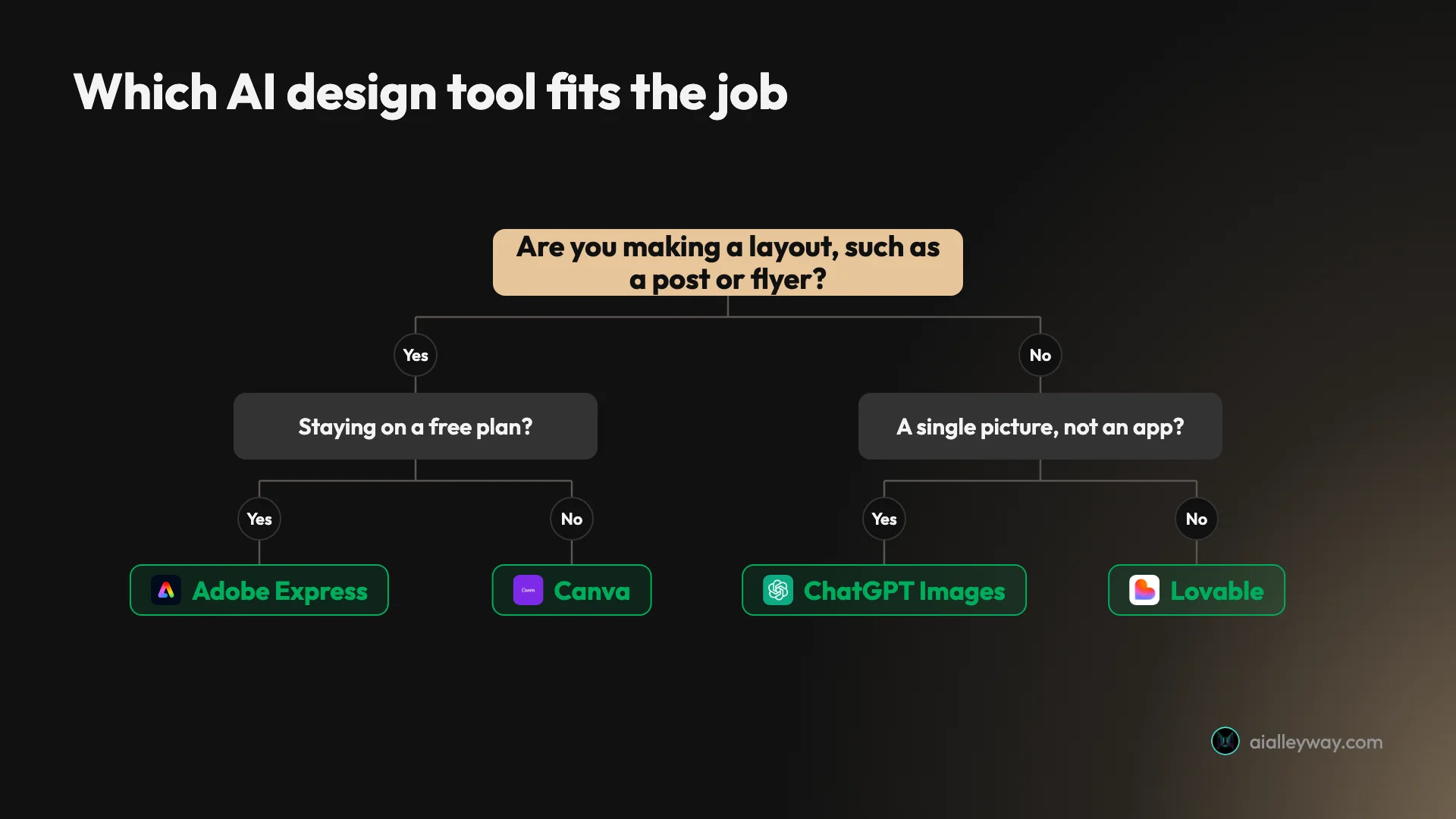
- A social post, flyer or menu you will keep editing: Canva. The generated design opens as layers.
- The same, on a free plan: Adobe Express. Check the design after it opens in the editor.
- One picture with exact words in it: ChatGPT Images, then proofread.
- A picture your legal team will ask about: Adobe Firefly, with an Adobe model selected in the picker.
- A prototype built from your team’s Figma files: Figma Make, on a paid Full seat.
- A design that ends up on a product you sell: Kittl, on a paid plan.
- Illustration, if you trust its reputation for style: Midjourney, from $10 a month.
- Something people can click and use: Lovable.
Three checks before you pay for any of them
Run your own hardest brief on the free plan first. Mine was a menu with seven lines of small text. It split the five models in the table cleanly: three got all seven lines, one got one, and one got none on its first image.
Find the meter before the meter finds you. Every tool here meters AI somehow. Canva showed a percentage and Lovable showed credits. OpenAI’s pricing page gives no number for ChatGPT. On Canva’s trial, one small app and one colour change used 43% of a month’s allowance.
Read the licence for your plan, not the vendor’s headline. Kittl’s free plan is personal use only. Adobe’s label covers Adobe’s models and not the partner models beside them. Midjourney ties its top plans to company revenue.
Final word
For most people the best AI design tool is still the one with an editor attached, and that is Canva; our Canva review has the full test.
Frequently asked questions
What is the best AI design tool?
For most people, Canva. It is the tool here where the AI output landed most cleanly inside a full editor in my tests: on a Pro trial on 11 October 2026, a generated Instagram post opened as layers with a real text box, and Canva's image model spelled all eleven text strings on a gig poster and a café menu.
It is not the best at everything. ChatGPT placed all seven parts of a crowded scene where Canva managed five, Adobe Express removes a background on its free plan where Canva marks that tool as paid, and Lovable is a dedicated app builder that hosts what it makes, where Canva Code sits inside a design editor. So the honest answer is Canva first, then a second tool for the job Canva does least well for you.
Is there a free AI design tool?
Yes, several, and each free plan stops somewhere different. Adobe Express is the one I would start with: on its free plan on 11 October 2026 it removed an image background and its AI Assistant made four on-brief Instagram posts, with resize and the Erase tool held back for Premium.
ChatGPT's free plan made three images in my test and then locked for 24 hours from the first picture. Adobe Firefly's free plan gave three generations a day. Lovable's pricing FAQ lists five build credits a day, up to thirty a month. Midjourney has no free plan on its website. Canva has a free plan with up to 20 AI uses, per its help page, but I tested Canva on a Pro trial and did not see the free plan's locks myself.
Which AI tool is best for graphic design?
Canva for everyday graphics such as social posts, flyers and menus, and Adobe Express if you want to stay on a free plan. Both are template editors with AI built in. Canva's generated design opened as editable layers; the Express one lost two text blocks when I opened it in the editor.
Kittl is aimed at merch, logos and labels, though I have only read its pages and have not used it. Its paid plans list vector export in SVG and PDF and a commercial licence, and its free plan is for personal use only. For a single picture with words in it, ChatGPT's image generator was the only one of five models to get all three test prompts fully right, but it returns a flat image and not a layout.
Can AI design tools replace a graphic designer?
Not on what I saw. Four of the five tools we tested made an error a person had to catch. Canva's generated Instagram post dropped a word from the shop's name. Adobe's default model in Express misspelled every line of a gig poster on its first image. ChatGPT added slogans nobody asked for. Firefly Image 5 invented six of a menu's seven lines.
What the tools did well was the first draft. A generated design that opens as editable layers took two edits to fix in Canva, and a six-requirement app took Lovable 109 seconds in our review. That shifts a designer's time from building to checking and correcting. It does not remove the checking.
Can I use AI-generated designs commercially?
It depends on the tool and the plan, so read the terms for the plan you are on. Canva's help page says images made with its AI features can be used for any lawful purpose, including selling them, and warns that ownership of AI output is legally unclear in many countries. Adobe labels its own Firefly models commercially safe, and that label does not cover the partner models in the same picker.
Plan matters too. Kittl's free plan is for personal use only, with a commercial licence starting on its paid plans. Midjourney's plan page says a company making more than $1,000,000 a year in gross revenue must buy the Pro or Mega plan. None of this is legal advice, and I have not tested any of these terms in a dispute.
What is the best AI tool for UI design?
It depends on whether you want a prototype or a running app. Figma Make is the one to look at if your team already works in Figma: Figma describes it as a way to prompt, then edit on the canvas, and its help centre says it is available for Full seats on paid plans and can be tried on other seats and plans. I have read its pages and have not used it.
Lovable is the one we have used. On its free tier on 5 August 2026 it built a six-requirement subscription tracker from one prompt in 109 seconds, with every requirement met. That was a test of app building, not of visual design, and it covered one single-page app with no backend.
Keep reading
Canva Review: Great Editor, but the AI Runs on a Meter
A Canva review from a Pro trial: nine hands-on tests, exact US prices, and six AI requests that used 56% of the trial's allowance. Plus what the trial hides.
Canva Alternatives: 9 Picks, and the Catch in Each Free Plan
The best Canva alternatives by reason for leaving: Adobe Express for price, VistaCreate for teams, Affinity for pro work. Plus what each free plan holds back.
Best AI Image Generator: 9 Picks, Two Tested Head to Head
The best AI image generator is ChatGPT for exact briefs and Nano Banana for free, fast images, both tested. Plus Midjourney, Ideogram, Firefly and four more.
Best AI app builder: 5 tools, one brief, every app used
The best AI app builder, measured. I gave five builders one brief and used every app. All five passed — what separated them was the cost of the second build.