
Canva Alternatives: 9 Picks, and the Catch in Each Free Plan
The best Canva alternatives by reason for leaving: Adobe Express for price, VistaCreate for teams, Affinity for pro work. Plus what each free plan holds back.
Contents
The best Canva alternatives, in one line each
There is no single best Canva alternative, because people leave Canva for different reasons. Pick by the reason, not by a ranking:
- Best overall, and a cheaper paid swap: Adobe Express. Premium is $9.99 a month against $18 for Canva Pro, and it removed an image background for free in my test.
- Best for a small team on a budget: VistaCreate. One paid plan at $10 a month, billed annually, covers up to 10 seats.
- Best for professional work, free: Affinity. A full desktop design app at no cost, owned by Canva.
- Best for merch, logos and labels: Kittl. Built for product brands, with a commercial licence on paid plans.
- Best for charts, reports and infographics: Visme. A content tool for business documents more than social posts.
- Best for design teams: Figma. One seat covers eight Figma products, with brand templates in Figma Buzz.
- Best free AI design tool for personal use: Microsoft Designer. Free, and licensed for non-commercial use only.
- Best free editor with no sign-up: Photopea. A Photoshop-style editor that opens in a browser tab.
- Best for AI images labelled commercially safe: Adobe Firefly. Adobe labels its own models as commercially safe.
I have used two of these: Adobe Express and Adobe Firefly. The other seven are here on the strength of their own pricing, help and licence pages, which I read on 12 October 2026. I say which is which in every section.
How we chose these Canva alternatives
Start with why anyone leaves. Canva is our top design pick and I rated it 4.5 in our Canva review, so this is not a list for people who are happy. It is for people who hit one of four walls.
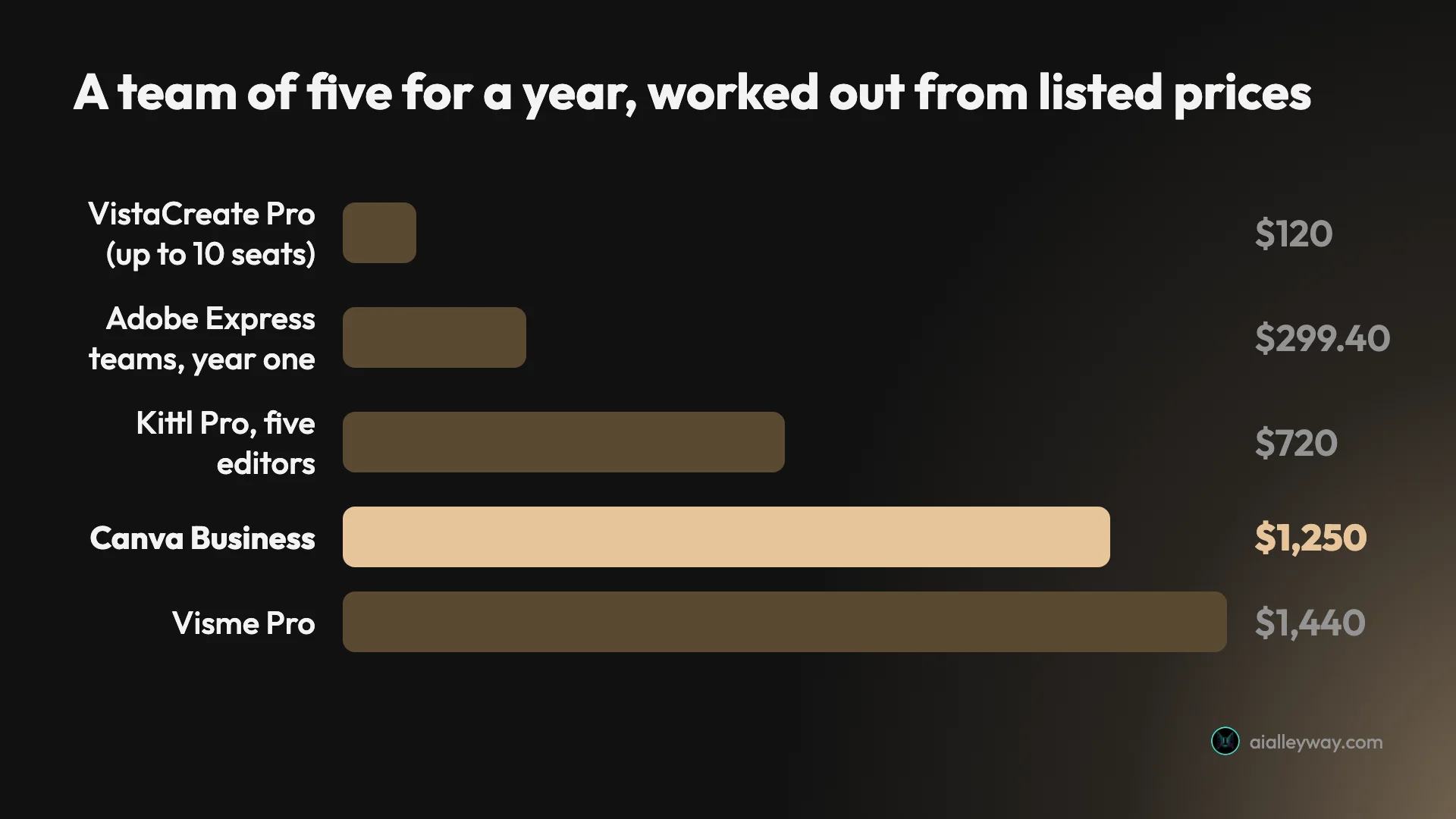
The price. Canva Pro is $18 a month or $144 a year for one person, and Canva Business is $250 a year per person, on Canva’s US pricing page on 11 October 2026. Our Canva pricing guide has every plan. A team of five on Business pays $1,250 a year.
The AI meter. On my Pro trial, six AI requests used 56% of the month’s allowance. Canva’s help page says a trial carries the free plan’s allowance, so paid Pro gets more, but the meter is real and one generated design took 16% of mine.

The locked tools. The background remover, transparent export and SVG export all carried a paid marker in Canva’s editor during my test.
The ceiling. Canva is a template tool. If you need precise vector work, long print documents or serious photo editing, you are asking it for a different job.
Each pick below answers at least one of those. I left out tools that are really for something else, such as video editors and done-for-you design services. I also left out presentation tools such as Gamma, which belong in a different roundup.
One rule shaped the write-ups. For the seven tools I have not used, I report what the vendor’s pages say and nothing about how good the output is. Where a vendor’s own pages disagree with each other, I say so.
Canva alternatives compared
The column that matters most is the third one. Every free Canva alternative here has a catch, and it is rarely the one you expect.
| Tool | Best for | The catch on the free plan | Main paid plan, as listed | Background removal |
|---|---|---|---|---|
| Canva, for reference | Everyday design | Background remover and transparent export marked as paid | $18 a month, or $144 a year | Paid |
| Adobe Express | The closest swap | Resize and Brand Kits are Premium | $9.99 a month | Free, in my test |
| VistaCreate | Small teams | One seat; no resize, no HD download | $10 a month billed annually, up to 10 seats | Pro only |
| Affinity | Professional work | Needs a Canva account; Windows and macOS only | Free | AI version needs Canva premium |
| Kittl | Merch and logos | Personal use only; exports up to 800px | $12 a month billed annually | Free, per its help centre |
| Visme | Charts and reports | No download formats; Visme logo | $12.25 a month billed yearly | 1 AI credit; free plan has 10 a month |
| Figma | Design teams | 3 files across Design and Sites; no AI image tools | $16 a month per full seat | 1 to 5 AI credits |
| Microsoft Designer | Free AI designs | Personal, non-commercial use only | Free; Microsoft 365 Personal, $9.99 a month | Offered; cost not stated |
| Photopea | No sign-up editing | Ads; AI credits are Premium only | One-time payment; US price not confirmed | Offered; whether it needs Premium AI credits is not stated |
| Adobe Firefly | AI images | Three generations a day in my test | Firefly Pro, $19.99 a month; a cheaper Standard plan exists | Not checked |
Canva’s and Adobe’s prices were read on 11 October 2026, Firefly’s free limit and plan list on 23 September 2026, and the other seven tools’ figures on 12 October 2026. All prices shown are US-dollar list prices. I confirmed that tax is excluded only on Canva’s page. “Used” below means I ran real tasks in the tool. “Read” means I read the vendor’s pages and did not use it.
| Tool | Used or read | Commercial use on the free plan |
|---|---|---|
| Adobe Express | Used, free plan | Not checked |
| VistaCreate | Read | Not stated for Starter; the licence draws no plan distinction |
| Affinity | Read | No licence wording found |
| Kittl | Read | Not allowed |
| Visme | Read | Not allowed, and not on the paid Starter plan either |
| Figma | Read | No licence wording found |
| Microsoft Designer | Read | Not allowed |
| Photopea | Read | Allowed |
| Adobe Firefly | Used, free plan | Adobe’s own models are labelled commercially safe |
Three patterns are worth pulling out of those tables before you read on.
“Free” often means “free for personal use”. Kittl, Visme and Microsoft Designer all say so in their licence terms. If the design is for a business, the free plan is a trial, and with Visme so is the cheapest paid plan.
Refunds vary more than prices do. Adobe gives 14 days. VistaCreate gives 14 days too, if you have not downloaded a design. Kittl says refunds are generally not provided, Figma says payments are non-refundable, and Visme rules them out for early termination. Canva says its subscriptions are not refundable in most cases. If you are unsure, pay monthly first where a monthly price exists.
AI is metered almost everywhere. Tokens at Kittl, credits at Visme, Figma, Photopea and Adobe, an allowance at Canva. The free amounts are small: 100 one-time tokens at Kittl, 10 credits a month at Visme.
The team bill is where the gap gets wide. Canva and Kittl charge per person. VistaCreate charges one price for up to 10 seats.
1. Adobe Express — best overall Canva alternative
If you want Canva with a smaller bill, this is the one to open first. Adobe Express is the same kind of tool: templates, a drag-and-drop editor, stock media, brand kits and AI built in. It is our runner-up to Canva for design, and I rated it 4.2 in our Adobe Express review.
I used it on its free plan on 11 October 2026, with the same prompts and the same design brief I gave Canva.
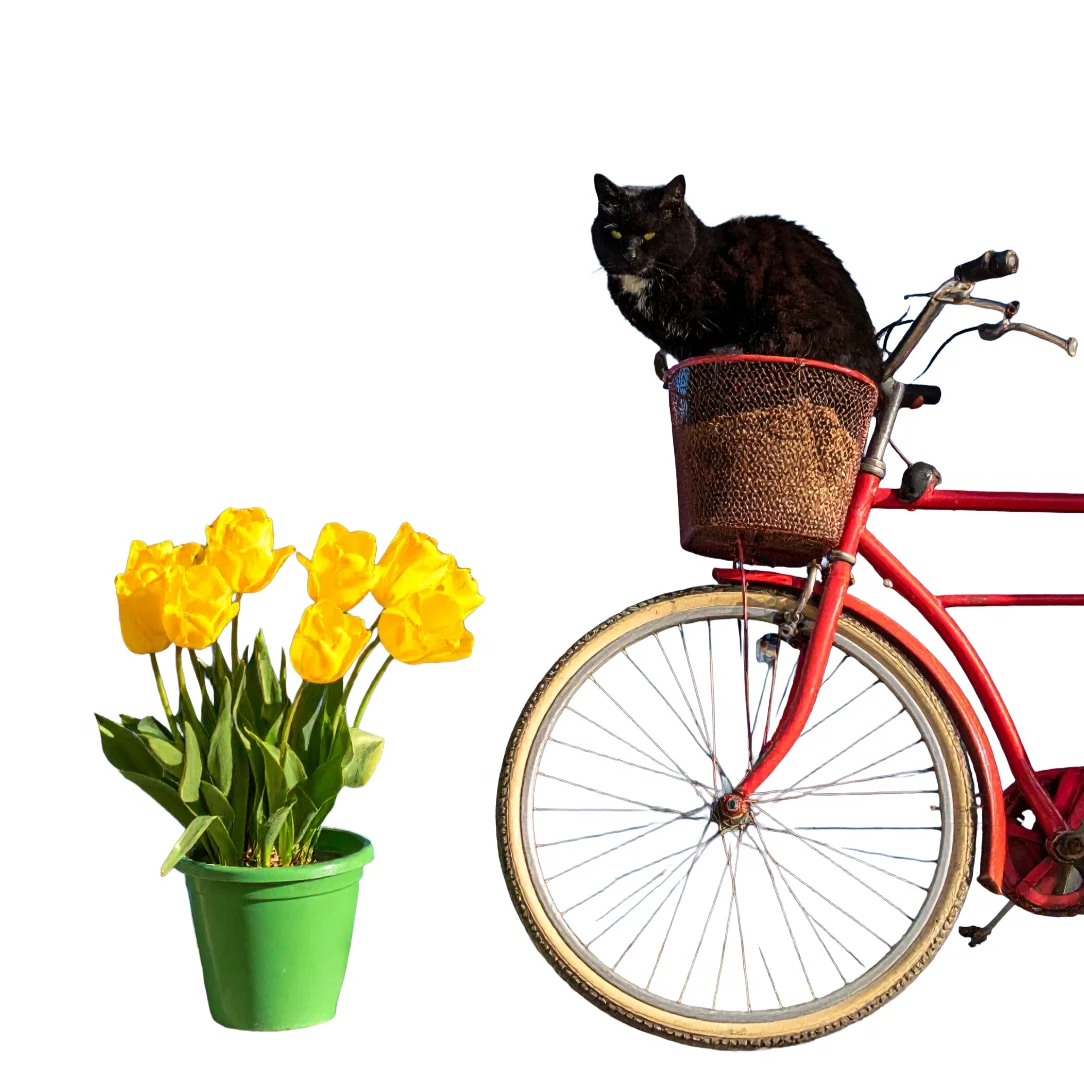
What it did well. The free Remove background tool cut a bicycle out of a street scene in one click. Canva marks that tool as paid. The AI Assistant also read my design brief correctly in all four designs it returned, where Canva’s single generated design dropped a word from the headline.
Where it lost. Text inside AI images. Canva’s AI spelled all eleven text lines I asked for across a gig poster and a café menu. Firefly Image 4, the default image model in Express, got none of them right on the first image of each prompt. A partner model in the same picker did spell the menu, so the fix is one menu away, but you have to know to look.
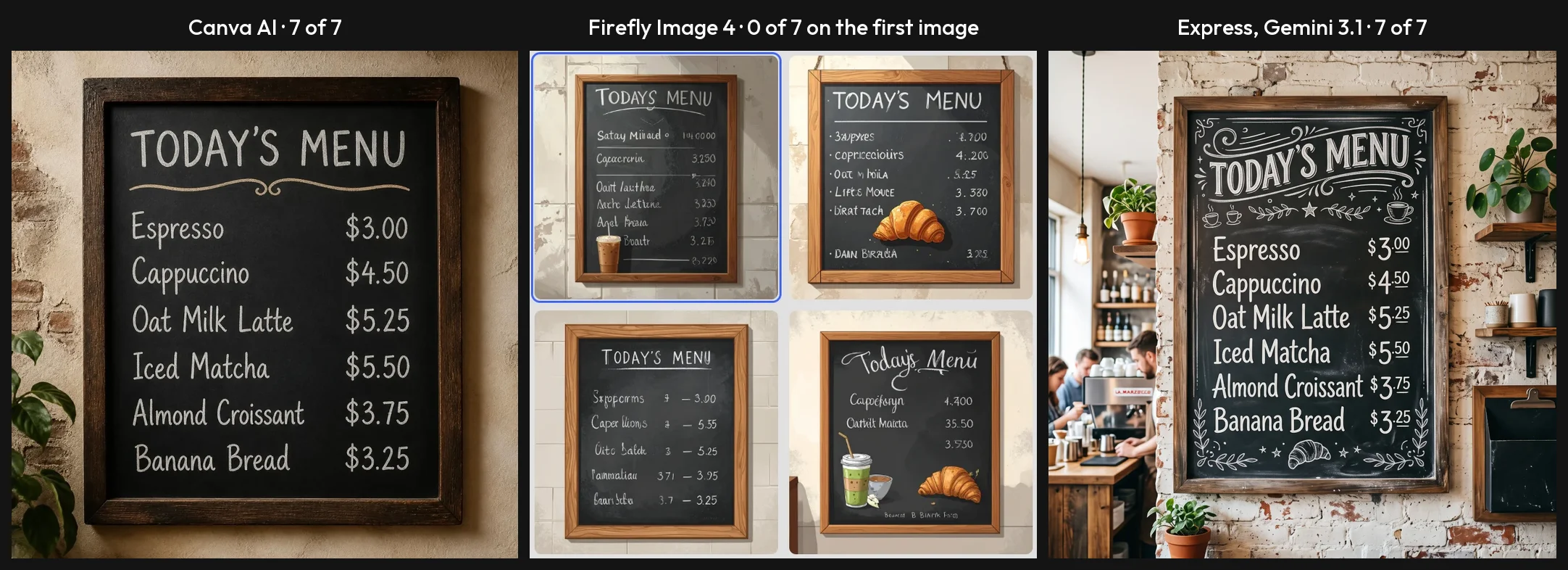
The hand-off to the editor also failed once. When I opened one of the assistant’s designs in the editor, it hung for over 65 seconds and saved a copy with two blank text blocks. I tried that once, so treat it as a warning and not a rate.
What the free plan holds back. Resize, Erase and Brand Kits are Premium. The resize panel was locked on my account, so I could not test it. Adobe’s pricing page lists 100,000+ templates on the free plan, a long way short of the 1.6 million Canva lists on its own.
Price. Premium is $9.99 a month on Adobe’s pricing page, which is $8.01 less than Canva Pro’s monthly price. Adobe’s subscription terms give a 14-day refund, where Canva says subscriptions are not refundable in most cases. I did not test any Premium feature.
For teams, Adobe’s per-licence price works out at $299.40 for five people in the first year and $479.40 a year after that. Canva Business is $1,250 for the same five.
Who it is for. Solo creators and small teams who like how Canva works and want to pay less. Our Canva vs Adobe Express comparison has every result side by side.
2. VistaCreate — best for a small team on a budget
VistaCreate’s pricing page makes one offer that Canva does not: a paid plan that is not priced per head. I have not used VistaCreate, so everything here comes from its own pages.
It describes itself as “an online graphic design tool that allows anyone to quickly create content for social media, blogs, marketing, advertising, and much more without professional design skills”. That is the same audience Canva aims at. Its terms say it is operated by Crello Limited and is part of the Cimpress group.
| Plan feature | Starter | Pro |
|---|---|---|
| Price, as listed | $0 | $10 a month, billed annually |
| Seats | 1 | Up to 10 |
| Templates | 100K | 200K+ |
| Brand Kits | 1 | Unlimited |
| Storage | 10GB | Unlimited |
| Background remover, resize, HD download | No | Yes |
The case for it. At $10 a month on annual billing, a team of five pays $120 a year by my arithmetic. The page shows the monthly figure and a “Save 23%” label, not a yearly total. Canva Business for the same five people is $1,250, more than ten times as much.
The free Starter plan lists more storage than Canva’s free plan: 10GB against 5GB. It also lists 100,000 templates, one Brand Kit and social scheduling for one person.
The catches. VistaCreate’s own background remover page says the feature “is not a free background removal option”, though the same page’s title says “for free”. Resize and HD download are Pro as well. I could not confirm the price on monthly billing, because the page loads on the annual setting and the only other figure I found is in a company blog post from 2022.
Its apps page adds one more: “any design created in the app can’t be accessed on desktop”. If you design on a phone and finish on a laptop, check that first.
Refunds. Better than Canva’s. The cancellation policy gives 14 days for a full refund, provided you have not downloaded any designs.
Who it is for. A team of three to ten that makes social posts and flyers and finds per-person pricing hard to justify.
3. Affinity — best free tool for professional work
Here is the odd one out. A professional design app, the kind you move to when Canva is too simple, now belongs to Canva, and Canva gives it away.
Canva’s announcement of 30 October 2025 reads: “Affinity is now completely free, forever.” It goes on: “There’s no catch, no stripped-back version, and no gotchas.” The app it describes combines photo editing, vector design and page layout in one program. I have not used the new version, so I am reporting what Canva and Affinity publish.
| Detail | What the vendor’s pages say |
|---|---|
| Price | Free |
| Account | A verified Canva account; a free one is enough |
| Platforms | Windows and macOS; an iPad version is listed as coming soon |
| Offline | Works offline after you activate it online |
| AI tools | Need a Canva premium account |
| Older versions | Affinity V2 licences stay valid and get no more updates |
The case for it. This is a different kind of tool to Canva. Canva describes it as a professional design app that combines photo editing, vector design and page layout, and it installs on your own computer.
The catches. There are two, despite the announcement. Canva’s help page says that to access Affinity for free “you must log in with your verified Canva account”. So leaving Canva for Affinity still means keeping a Canva login.
The AI is the second. Canva says its AI tools inside Affinity, including Generative Fill and Remove Background, are for “everyone with a Canva premium account”. The manual tools are free. The one-click AI versions are not.
It is also desktop only. There is no browser version on the pages I read, so a Chromebook is out.
One point in its favour for the wary: Affinity’s pages say your content in the app is not used to train AI features.
Who it is for. Anyone who has outgrown templates: print designers, illustrators, and people making logos they need as true vector files.
Who should skip it. Anyone who came to Canva because they are not a designer. Canva’s announcement calls it the full, professional-grade Affinity experience. If you only make social posts, or you work on an iPad or a Chromebook, it is the wrong swap for now.
4. Kittl — best for merch, logos and labels

Kittl is aimed at people who sell things with designs on them. Its pricing page’s own description calls it “an AI design platform for creating logos, merchandise, packaging, labels, and marketing assets in the browser”. I have not used it, and this section is drawn from its pricing, licence and help pages.
Its own comparison page puts the difference plainly, and this is the vendor speaking: “Canva is great for everyday content like social posts, slides, and quick graphics. Kittl is built for product brands that need launch-ready assets.”
| Plan feature | Free | Pro |
|---|---|---|
| Price, as listed | $0 | $12 a month billed annually, or $15 monthly |
| Projects | 5 | Unlimited |
| Export | PNG and JPG up to 800px at 72dpi | Up to 10,800px at 300dpi, plus PDF and SVG |
| AI tokens | 100, one time | 2,000 a month |
| Commercial use | No | Yes, up to 500,000 copies |
The case for it. Kittl Pro matches Canva Pro on price to the dollar: $144 a year. For that, Kittl’s pages list vector export in SVG and PDF, and a commercial licence that covers up to 500,000 copies of a design. If you print on shirts, mugs or labels, that licence is the product.
Its help centre also says the AI background remover “doesn’t cost tokens, and it’s available on every plan, including Free”. A marketing page on the same site ties it to the 100 free tokens, so the two pages disagree.
The catches. The free plan is a trial in all but name. Kittl’s pricing page says free designs are “for personal use only”, and its licence terms call any commercial use of free-plan content a violation. Free exports stop at 800 pixels, too small for print. Free AI images are “shared publicly with the Kittl community”.
Refunds are thin as well. The cancellation page says “Refunds are generally not provided.”
Who it is for. Print-on-demand sellers and small product brands.
Who should skip it. Teams watching the bill: Kittl charges per editor, so five Pro seats are $720 a year. Also anyone who needs room on a free plan, which stops at 5 projects and 500MB of storage.
5. Visme — best for charts, reports and infographics

Visme is the pick when the thing you are making has numbers in it. It describes itself as a platform “used to create presentations, infographics, documents, reports, charts, social media graphics, videos and forms”. I have not used Visme, and what follows is from its own pages and terms.
The vendor’s own line on Canva, from its comparison page, is that “Canva helps individuals create everyday designs quickly, while Visme enables teams to control, distribute and track branded content at scale”. That is a sales claim, but it tells you who the product is built for.
| Plan feature | Basic | Starter | Pro |
|---|---|---|---|
| Price billed yearly | $0 | $12.25 a month ($147 a year) | $24.75 a month ($297 a year) |
| Price billed monthly | $0 | $29 | $59 |
| Downloads | None listed | JPG, PNG, PDF | Adds MP4, GIF, PPTX, HTML5 |
| AI credits a month | 10 | 200 | 500 |
| Commercial use | No | No | Yes |
The case for it. Reports, proposals and data-heavy documents are what Visme’s own pitch leads with. It lists a desktop app for Mac and Windows with offline creation, and background removal is on every plan at one AI credit a use.
The catches. Read this one twice. Visme’s terms say: “Commercial use is not included in the Basic or Starter Plans.” So the paid Starter plan, at $147 a year, is still for personal use. Commercial use starts at Pro, $297 a year.
The free Basic plan has no download formats on the pricing table and carries the Visme logo. You can build a project and share a link. The pricing table lists no download format for it.
Visme is among the firmest on refunds. Its terms say it “will not under any circumstances issue a refund for early contract termination”. And for teams it is not cheap: its page prices a Pro team of five at $1,440 a year, more than Canva Business.
Who it is for. Marketers, analysts and consultants who make reports and client documents, and who will pay for Pro.
Who should skip it. Solo creators on a budget. The two cheapest plans do not cover commercial use, the free one gives you no file to download, and the monthly prices of $29 and $59 are well above Canva Pro’s $18.
6. Figma — best for design teams
Figma answers a different complaint: Canva is fine for one person and loose for a team that cares about consistency. I have not used Figma, and this section relies on its pricing page and help centre.
Figma sells several products on one seat. Two of them overlap with Canva. Figma describes Buzz as a place to publish brand templates so a team can make social media assets, display ads and one-pagers from them. Figma Slides is a presentation tool.
| Plan feature | Starter | Professional |
|---|---|---|
| Price, as listed | Free | $16 a month per full seat |
| Cheaper seats | None | Collab seat, $3 a month |
| AI credits | 150 a day, up to 500 a month | 3,000 a month per full seat |
| AI image tools | No | Listed; plan ticks not confirmed |
The case for it. Seat types. A designer on a full seat builds the brand templates, and everyone else fills them in from a collab seat at $3 a month, which includes Buzz and Slides. Viewers are free. For a team with one designer and several marketers, that can cost less than giving everyone Canva Business.
Buzz is also free for now. Figma labels it a beta, and its pricing FAQ says all seats and plans can use it for free while it is in beta. Figma’s help centre says there is currently no limit on Buzz files on the Starter plan.
The catches. The free Starter plan allows three files across Figma Design and Figma Sites, and its help page says the Starter plan has no AI image tools. Figma’s help centre prices background removal at 1 to 5 AI credits an image. Since Starter has no AI image tools, I read that as a paid-seat feature. The pricing table did not confirm it.
A full Figma seat covers eight products, from Figma Design and Dev Mode to FigJam, Slides and Buzz, with templates as one part of it, so I would expect more to learn than in a template editor. That is my reading of its pages, not a test result.
Payments are non-refundable, per its pricing FAQ. I could not tell from the pricing page whether the $16 shown is the monthly or the annual billing rate.
Who it is for. Teams with at least one designer who want everyone else to stay on brand.
7. Microsoft Designer — best free AI design tool for personal use

Microsoft Designer is free, and that sentence needs its second half. I have not used it. Designer’s own pages would not load for me, so this section is based on Microsoft’s support and plan pages.
The support FAQ answers the price question directly: “Yes, Designer is free to use. A subscription may be required for those who want to create more frequently.” It calls Designer “a graphic design tool that helps you create, design, and edit effortlessly, when and where you need it”.
| Detail | What Microsoft’s pages say |
|---|---|
| Price | Free with a Microsoft account |
| More usage | Microsoft 365 Personal, $9.99 a month or $99.99 a year |
| Licence | Personal, non-commercial use |
| Platforms | Web, iOS and Android |
| Brand kits | Removed with the old editor |
| AI credit numbers | Not published on the pages I could open |
The case for it. Microsoft’s credits page lists image generation at “Standard usage” on Microsoft 365 Personal and Family plans, without a number. So if you already pay for Microsoft 365, some AI usage is covered. For birthday cards, invitations and personal social posts, a free tool with AI built in is a fair deal.
The catches. The licence is the big one. The FAQ says: “Designer is licensed for personal, non-commercial use with your Microsoft account.” A shop owner making a sale poster is outside that sentence. Kittl and Visme bar commercial use on their free plans too, but here the licence is the main limit Microsoft’s pages state.
It is also a smaller product than it was. Microsoft’s welcome page says the legacy visual editor was retired from 20 October 2025 and that users no longer have access to brand kits. Two of its pages disagree on the account you need: the FAQ says a Microsoft account, and the welcome page mentions a Microsoft 365 Personal or Family account.
Who it is for. People making things for themselves, their family or their club.
Who should skip it. Any business, because of the licence. Also anyone who wants a desktop app: the pages I read list the web, iOS and Android only.
8. Photopea — best free editor with no sign-up

Photopea skips a step. There is no account to create: the editor opens in a browser and offers a new project without a login. I have not edited anything in it myself.
It is not a Canva clone. Photopea calls itself a “Free Online Photo Editor”, and its main file format is PSD, the Photoshop format. Its pages say it also opens PNG, JPG, SVG, PDF, AI and Figma files, among others.
| Plan feature | Free | Premium |
|---|---|---|
| Price | $0, with ads | One-time payment for 30, 90 or 365 days |
| Features | All features | All features, no ads |
| Cloud storage | 0.5GB | 5GB |
| AI credits | None | 3,000 a month |
| Account | Not needed | Needed |
The case for it. The licence is the plainest I read. Photopea’s terms say: “The Photopea editor can be used by anyone for any purpose, for free.” They add that all your work belongs to you and that you can sell it.
Privacy is the other draw. Its pages say: “There are no uploads. Photopea runs on your device, using your CPU and your GPU. All files open instantly, and never leave your device.”
And Premium is not a subscription. The Account window says “No subscription, just one-time payments”, after which you drop back to the free version with ads.
The catches. I cannot give you a US price. Photopea shows Premium prices only inside the editor’s Account window, and I could not confirm a US dollar price there, so I am not printing one.
AI is the second catch. The same window says AI credits are available only to Premium users, while the homepage promises premium features “without spending a dime”. Photopea’s homepage offers one-click background removal. Whether it needs those credits is not stated.
It is also a different kind of tool. Photopea calls itself a photo editor and names PSD as its main format. That is my reading of its pages, not a test result.
Who it is for. Anyone who needs to open a PSD or fix a photo once, without creating another account. Our free AI photo editor guide covers tested options for that job.
9. Adobe Firefly — best for AI images labelled commercially safe

Firefly replaces one part of Canva, the AI image generator, and it is here for one reason: Adobe tells you where the model learned. I used it on its free plan on 23 September 2026 and rated it 4.0 in our Adobe Firefly review.
Adobe says its Firefly models are “trained on licensed content from Adobe Stock and public domain content where copyright has expired”. In the model picker, Adobe’s own models sit under a “Commercially safe” label. The partner models from other companies sit in a separate group without it.
What I saw. I ran three prompts on Firefly Image 5, the same ones I later gave Canva and Adobe Express.
- Gig poster: all four text lines correct.
- Seven-part street scene: six of seven elements right. It drew four tulips where I asked for three.
- Café menu: one of seven lines correct. The title was right and the six items were invented words.

Canva’s image model spelled every line of both the poster and the menu in my later test. So on text inside images, Canva was the better tool. Firefly is not the pick for quality. It is the pick for the licence.
The catches. The free plan gave me three generations for the day. After the third, the counter read “0 generations left today”. Three images is one small test, not a working session.
The default surprised me too. When I opened the image tool, the model already selected was a partner model, Gemini 3.1, and not one of Adobe’s. If the commercially safe label is why you came, change the model before you generate.
Price. Firefly Pro is $19.99 a month with 4,000 credits on Adobe’s pricing page, read on 11 October 2026, and that page describes it as including Express Premium’s features. I did not test a paid plan.
Who it is for. Agencies and brands whose legal team asks where an AI image came from. Our Midjourney alternatives roundup covers more image generators.
How to pick a Canva alternative
Work from the reason you are leaving. Most people have one.
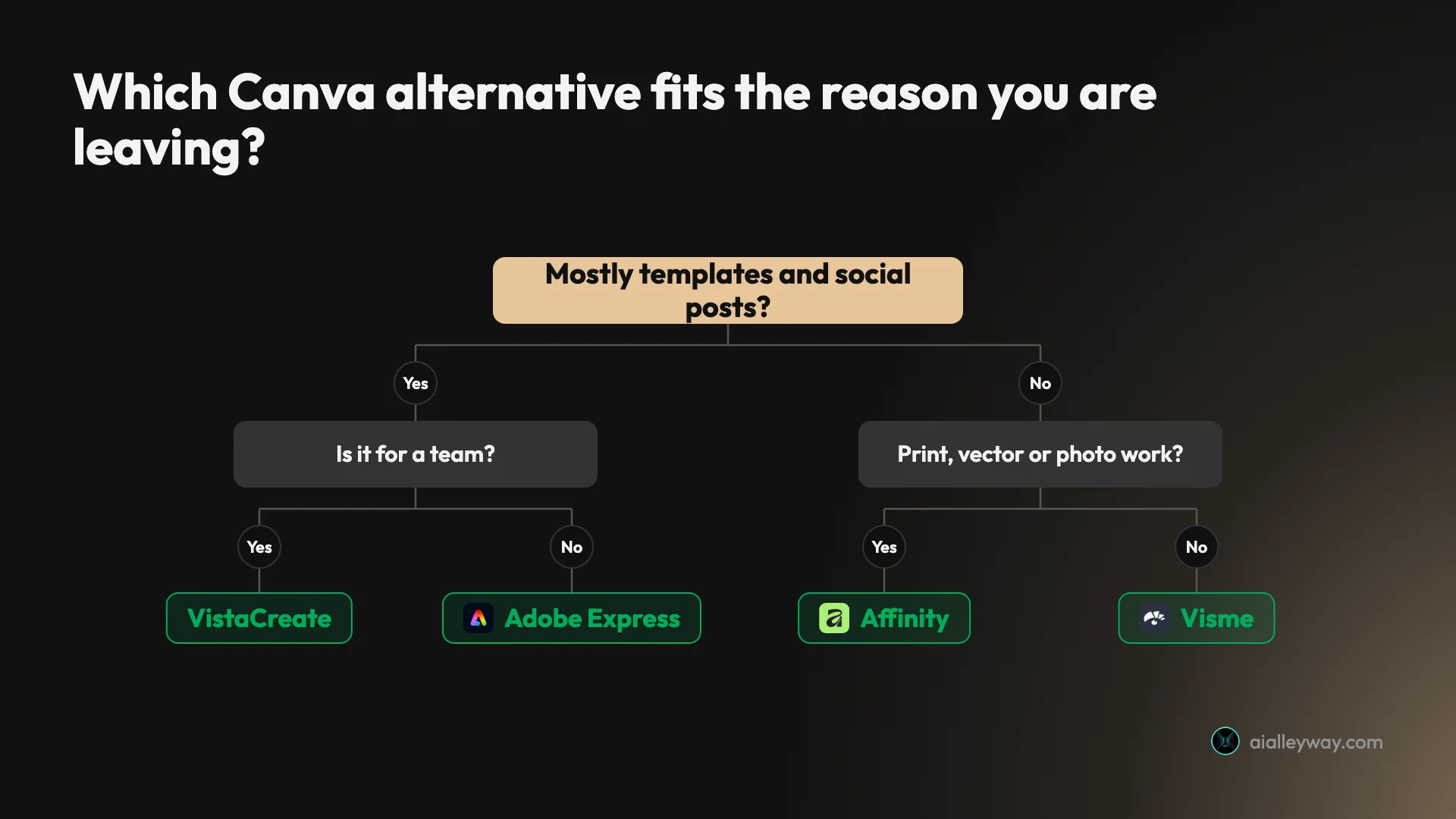
- If Canva Pro costs too much for one person, pick Adobe Express. Premium is $9.99 a month, and the free plan removed an image background in my test.
- If Canva Business costs too much for a team, pick VistaCreate. Its one paid plan covers up to 10 seats for $10 a month on annual billing.
- If you have outgrown templates, pick Affinity. It is free, and it needs a Canva account.
- If you sell products with your designs on them, pick Kittl, and pay for Pro. The free plan is for personal use only.
- If you make reports and charts, pick Visme, and budget for Pro, where commercial use starts.
- If you have a designer and a team who need to stay on brand, pick Figma and use collab seats.
- If it is for personal use and you want AI for free, pick Microsoft Designer.
- If you need one quick edit and no new account, open Photopea.
- If you only want AI images that Adobe labels commercially safe, pick Adobe Firefly, and select an Adobe model.
Four checks before you move
Whichever tool you pick, check these on its own pages first. They are the four places the tools above differ most.
- The licence on your plan. Can you use the design for a business? Three of the nine say no on their free plan.
- The export size. Kittl’s free plan stops at 800 pixels. That is fine for a screen and useless for print.
- The refund terms. Know them before you pay for a year.
- Where your files live. Photopea’s pages say files never leave your device, and Affinity is a desktop app. Most of the browser tools here list account storage on their plans, such as 10GB on VistaCreate Starter and 500MB on Kittl Free and Visme Basic, and VistaCreate’s apps page says designs made in its app cannot be opened on desktop.
And if none of those reasons is yours, stay. Canva is still our top design pick.
Final word
For most people leaving Canva, Adobe Express is the swap that costs less and changes least, and our Adobe Express review shows what its free plan can and cannot do.
Frequently asked questions
Is there a free alternative to Canva?
Yes, and each one holds something back. Adobe Express is the one I have used: on its free plan it removed an image background in one click, a tool Canva marks as paid. VistaCreate's free Starter plan lists 100,000 templates and 10GB of storage for one person, but its background remover and resize tool are on the paid plan.
Read the licence before you rely on a free plan for work. Kittl's free plan is for personal use only and exports at up to 800 pixels. Visme's free plan has no download formats. Microsoft Designer is free and licensed for personal, non-commercial use. Photopea is the clearest exception: its terms say the editor can be used by anyone for any purpose, for free, and it shows ads.
What is the closest alternative to Canva?
Adobe Express and VistaCreate. Both are template-first editors in a browser, aimed at people who are not designers, with brand kits, stock media and social scheduling. Adobe Express is the one I tested, and it is our runner-up to Canva for design.
VistaCreate is the closer match on paper for a small team. Its plans page lists one paid plan at $10 a month, billed annually, for up to 10 seats, where Canva Business is priced per person. I have not used VistaCreate, so that is a reading of its pricing page on 12 October 2026 and not a test result.
Is Adobe Express better than Canva?
Not for most people, in my tests. On the same prompts, Canva's AI spelled all eleven text lines I asked for, and its generated design opened as editable layers. Firefly Image 4, the default image model in Adobe Express, got none of those lines right on the first image of each prompt, and the Express editor blanked two text blocks in a design its assistant had made.
Adobe Express won on price and on one free tool. Premium is $9.99 a month against $18 for Canva Pro, and it removed a background on the free plan. Canva ran on a Pro trial and Express on its free plan, so no paid Express feature was tested. Our Canva vs Adobe Express comparison has the full results.
Why don't professional designers use Canva?
Some do. The usual complaint, as I read it, is about control: Canva is built around templates, while trained designers tend to want precise vector tools, page layout and photo editing in files they fully own.
The tools aimed at that work are different products. Figma's Professional plan lists a full seat at $16 a month. Affinity combines photo editing, vector design and page layout in one desktop app, and Canva, which owns it, made it free on 30 October 2025. That last fact is the odd one: a professional alternative to Canva now needs a Canva account to open.
Is Affinity really free?
Yes, with two conditions. Canva's announcement of 30 October 2025 says Affinity is now completely free, forever, with no stripped-back version. Canva's help page says that to access it for free you must log in with your verified Canva account, and a free Canva account is enough.
The second condition is the AI. Canva says the AI tools inside Affinity, including Generative Fill and Remove Background, are for people with a Canva premium account. Affinity runs on Windows and macOS, with an iPad version listed as coming soon. I have not used the new Affinity, so this comes from Canva's and Affinity's own pages, read on 12 October 2026.
Which Canva alternative is cheapest for a team?
Of the five paid team prices I could work out, VistaCreate. Its Pro plan is $10 a month, billed annually, for up to 10 seats. That works out at $120 a year for a team of five. Canva Business is $250 a year per person, so $1,250 for the same five people.
Adobe Express sits between them. Its teams plan works out at $299.40 for five people in the first year from the per-licence price on Adobe's pricing page, then $479.40 a year. Kittl charges per editor, so five Pro seats are $720 a year, and Visme lists a Pro team of five at $1,440 a year. These are list prices read on 11 and 12 October 2026.
Keep reading
Canva Review: Great Editor, but the AI Runs on a Meter
A Canva review from a Pro trial: nine hands-on tests, exact US prices, and six AI requests that used 56% of the trial's allowance. Plus what the trial hides.
Canva vs Adobe Express: Same Prompts, Opposite Strengths
Canva vs Adobe Express on the same prompts: Canva's AI spelled 11 of 11 text lines, Adobe's default model 0 on its first image. Express costs less.
Adobe Express Review: Generous Free Plan, Shaky AI Hand-Off
An Adobe Express review from the free plan: free background removal, an AI Assistant that got the brief right in all four designs, and an editor that lost text.
Canva Pro Price: $144 a Year, and What Canva Leaves Out
Canva Pro price in the US: $18 a month or $144 a year. Business is $25 per person. Plus the $100 AI Pass, seat billing and the refund rule, all sourced.