
Cancel Canva Subscription: The Steps, and the Refund Rule
Cancel a Canva subscription on the web, iPhone or Android, stop a free trial before it bills, and what Canva's refund page says. Steps from Canva's help pages.
Contents
How do you cancel a Canva subscription?
To cancel a Canva subscription bought on canva.com, open Settings, go to Billing, select Cancel plan and follow the prompts to Cancel subscription. If you bought the plan inside the iPhone or Android app, you can’t cancel it inside the Canva app: you cancel in Apple’s or Google Play’s subscription settings.
Cancelling stops the next payment. It does not end your access that day, and it does not usually bring money back. Canva’s help page on cancelling says you keep paid features until the end of the current billing period, and its refund page says subscriptions aren’t refundable in most cases.
| Where you bought Canva | Where you cancel | What Canva’s page says |
|---|---|---|
| Directly from Canva, on desktop or web | Canva: Settings, Billing, Cancel plan | Nine listed steps, one of them optional |
| iPhone or iPad app | Apple: Settings, your name, Subscriptions | Refunds come from Apple too |
| Android app | Google Play: Payments & subscriptions | Check you are in the right Google account |
| PayPal | Canva’s page names PayPal and lists no steps for it | Not tested here |
I opened the Billing page on a Canva Pro trial on 12 October 2026 and found the Cancel plan button where Canva says it is. I did not press it, because that trial is still in use. Every step after that button is taken from Canva’s own help pages, read on 11 and 12 October 2026.
Who bills you decides how you cancel
Three facts explain most of the trouble people have leaving Canva.
The seller decides the exit. Canva’s page says: “How you cancel depends on where you originally subscribed.” It tells you to check your billing email or bank statement to see whether the charge came from Canva, Google, Apple or PayPal. A plan bought in a phone app is billed by that app store, and Canva’s page says of those plans: “You can’t cancel these subscriptions directly in the Canva app.”
PayPal is the gap. Canva’s page names it as a place a charge can come from and lists no PayPal steps. I did not test a PayPal plan, so my suggestion, not Canva’s, is to check the Canva Billing page first and then PayPal’s own list of automatic payments.
Cancelling stops renewal, not access. In Canva’s words: “Cancelling stops future payments. You’ll keep access to paid features until the end of your current billing period.” On a yearly plan that can be months of paid features after you cancel.
Pausing, cancelling and deleting are three different actions. Pausing holds payments for three months and then resumes. Cancelling ends the plan and keeps the account. Deleting the account removes your designs, and Canva tells paying customers to cancel first.
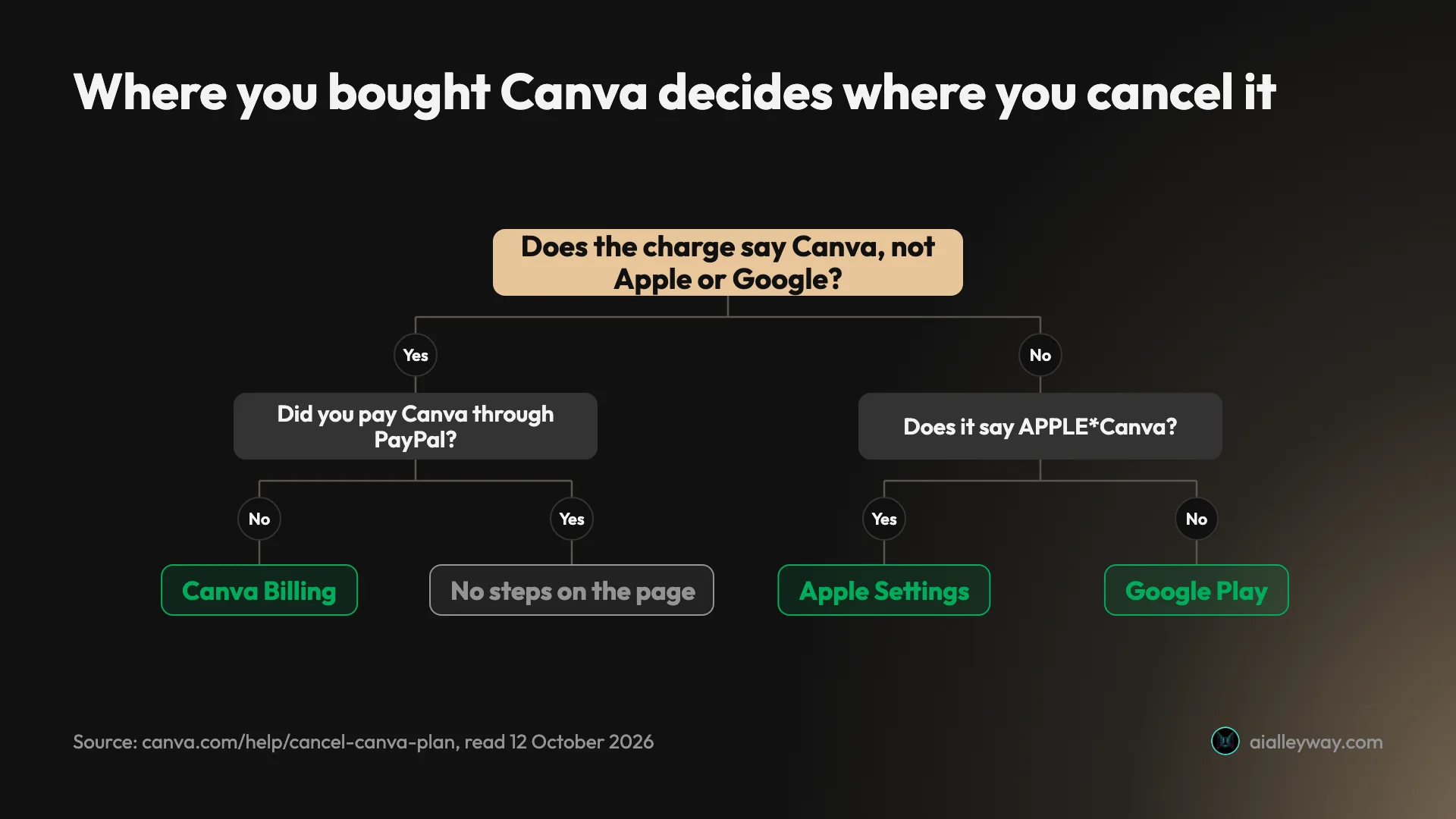
The statement names in that chart come from Canva’s help page on upgrading, which lists the labels a Canva charge can carry: Canva, Canva with an invoice ID, APPLECanva and GOOGLECanva.
Cancel Canva on desktop or web
This is the route for anyone who paid Canva directly, and the only one I could look at first-hand.
On my trial account I opened the Billing page of Settings directly. Billing sits in the left menu under “Payments and plans”. The page showed a Plan card with the plan name, a “Trial” badge, the date the trial ends and the price after it, marked “Auto-renews”. The Cancel plan button sits at the right of that card, with a three-dot button beside it that I did not open.
That is as far as I went. From there, Canva’s help page lists these steps for desktop:
- Make sure you are logged in to the right Canva account or team.
- On the homepage, select your account profile to open the menu.
- Select Settings.
- Go to Billing. Canva notes that this is called “Contract period” in Japan.
- On your plan, select Cancel plan.
- Select Continue cancellation.
- Choose why you want to cancel, then select Continue cancellation again.
- Optionally, tell Canva why you are cancelling.
- Select Cancel subscription.
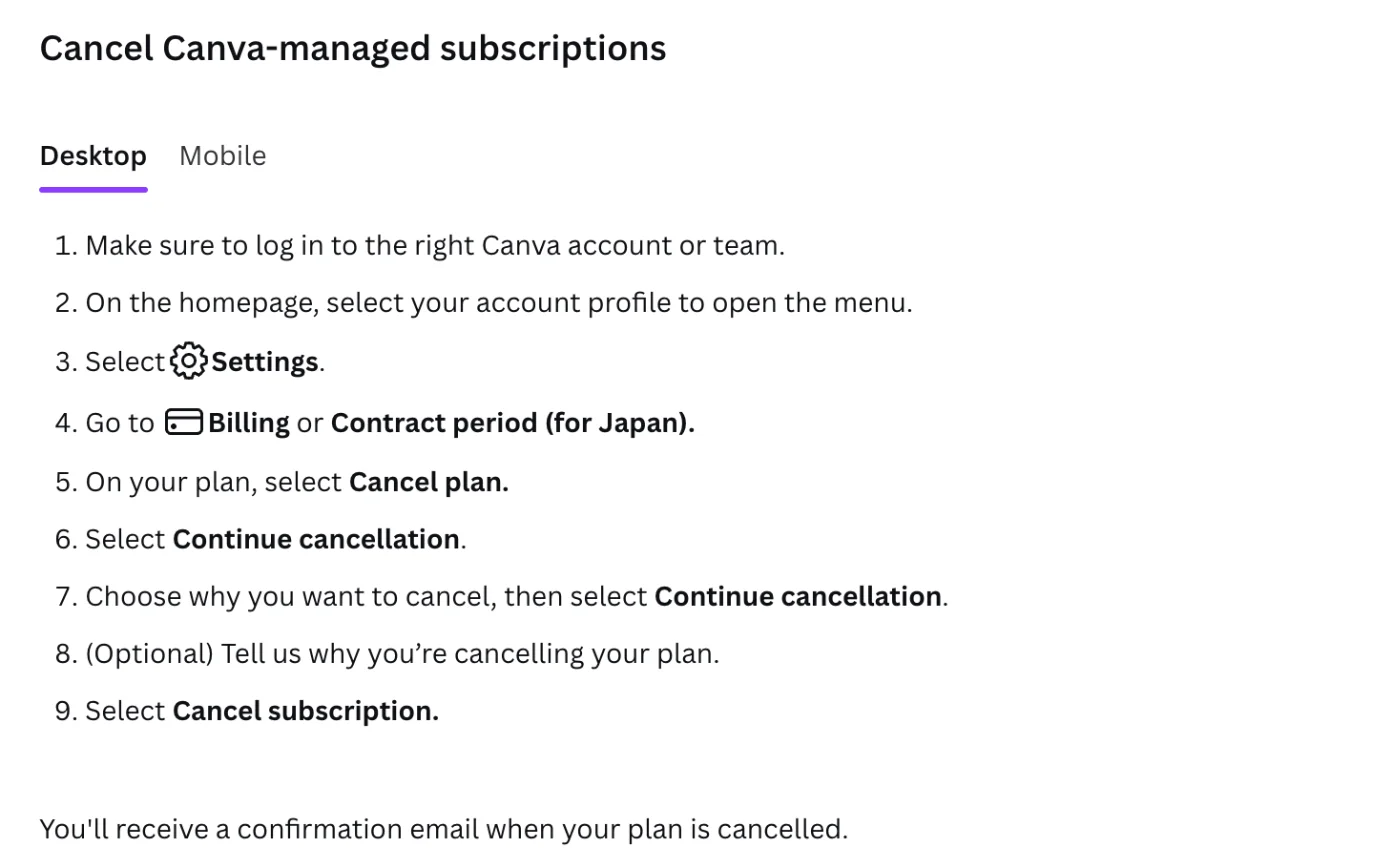
Two details in that list matter. The button labelled Continue cancellation appears twice, so, going by Canva’s list, the plan is not cancelled until the last step. And the steps end with: “You’ll receive a confirmation email when your plan is cancelled.” That email is your proof. Canva’s own troubleshooting says that if you can’t find one, “the cancellation may not have gone through”.
Cancel on mobile, for plans bought from Canva
The same help page has a Mobile tab for plans that Canva bills directly. The route is the same with two extra taps: tap the menu on the homepage, tap your account profile and select Settings, tap the menu again, then go to Billing and follow the same Cancel plan steps.
This tab is for Canva-managed plans only. If the plan was bought through the App Store or Google Play, use the store instead.
The Billing page is also where the dates live
Before you cancel, read the date on the Plan card. On my account it read “Trial ends on November 10, 2026”. Canva’s help page on automatic renewal says the Billing page is where to check the date a paid plan renews.
The same page on my account carries an AI usage panel with a Get more button. That button is not part of cancelling. Canva’s help page on ending a trial says the route Billing, Get more, “Start subscription today” starts the paid plan at once and charges your card.

Cancel Canva on iPhone or iPad
If Apple bills you, Apple cancels you. Canva’s steps for a plan bought through the App Store are:
- On your iPhone or iPad, go to Settings.
- Tap your name.
- Tap Subscriptions.
- Tap Canva.
- Tap Cancel Subscription, then confirm.
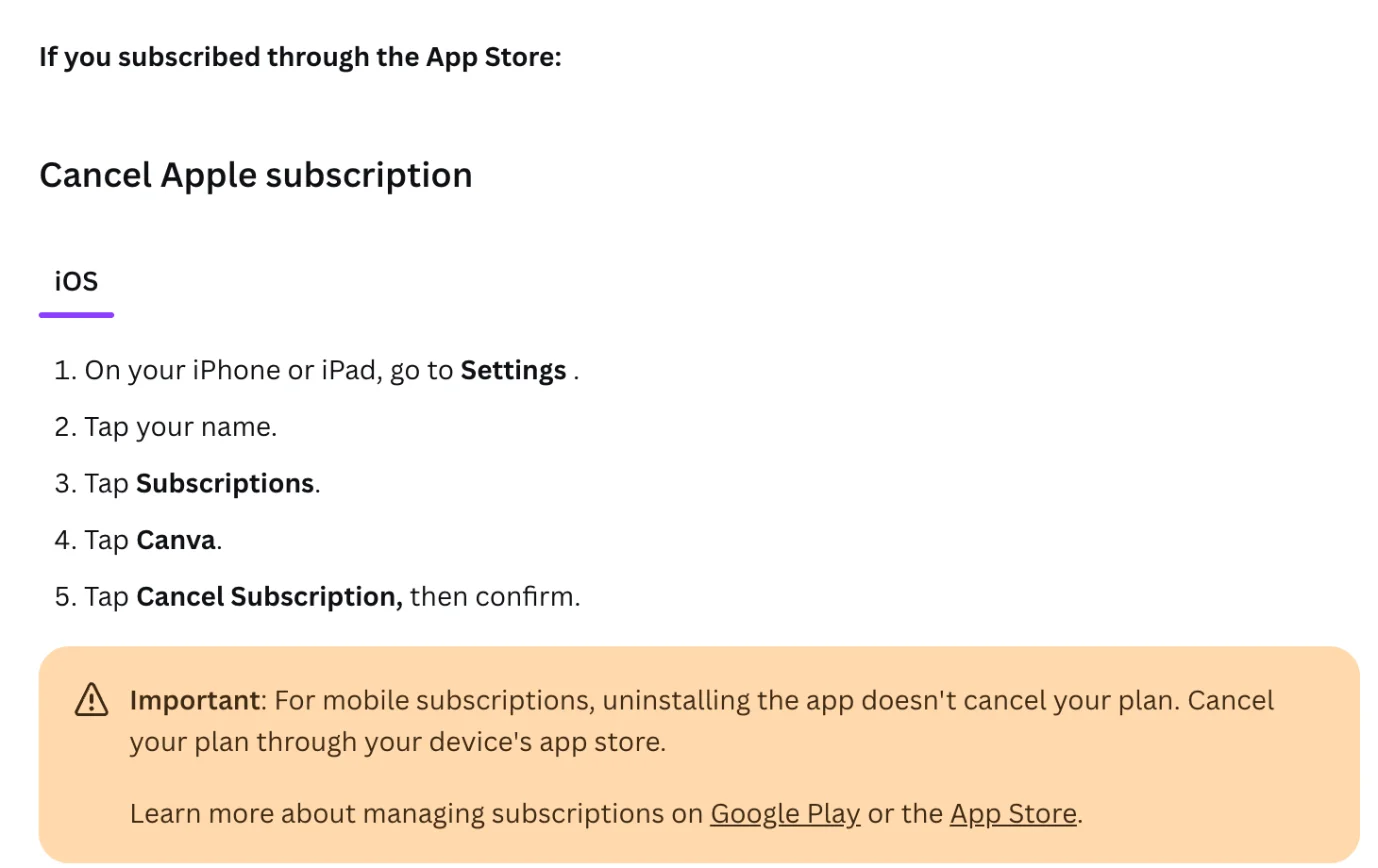
I did not test this on a phone. The steps are Canva’s, and the warning under them is the part people miss: “For mobile subscriptions, uninstalling the app doesn’t cancel your plan.”
Apple plans have two more limits on Canva’s pages. Pausing is not offered: “You can only cancel a Canva plan from the App Store.” And refunds are out of Canva’s hands, because Apple handles “all billing and refunds for App Store subscriptions”.
Cancel Canva on Android
Cancelling through Google Play works the same way as Apple, with one extra trap. Canva’s steps:
- On your Android device, open the Google Play Store.
- Tap your profile icon, then tap Payments & subscriptions.
- Tap Subscriptions.
- Find your Canva plan and tap Cancel subscription.
- Follow the prompts to confirm.
The trap is the Google account. Canva’s page says that if you can’t find the Canva subscription in Google Play, “You may be signed in to a different Google account.” Switch accounts in Google Play and look again before you assume the plan is gone. I did not test this on an Android device.
Cancel a Canva free trial before it bills
A trial is a subscription with a delayed first charge. Canva’s help page on upgrading states it plainly: “Your plan will auto-renew unless you cancel.”
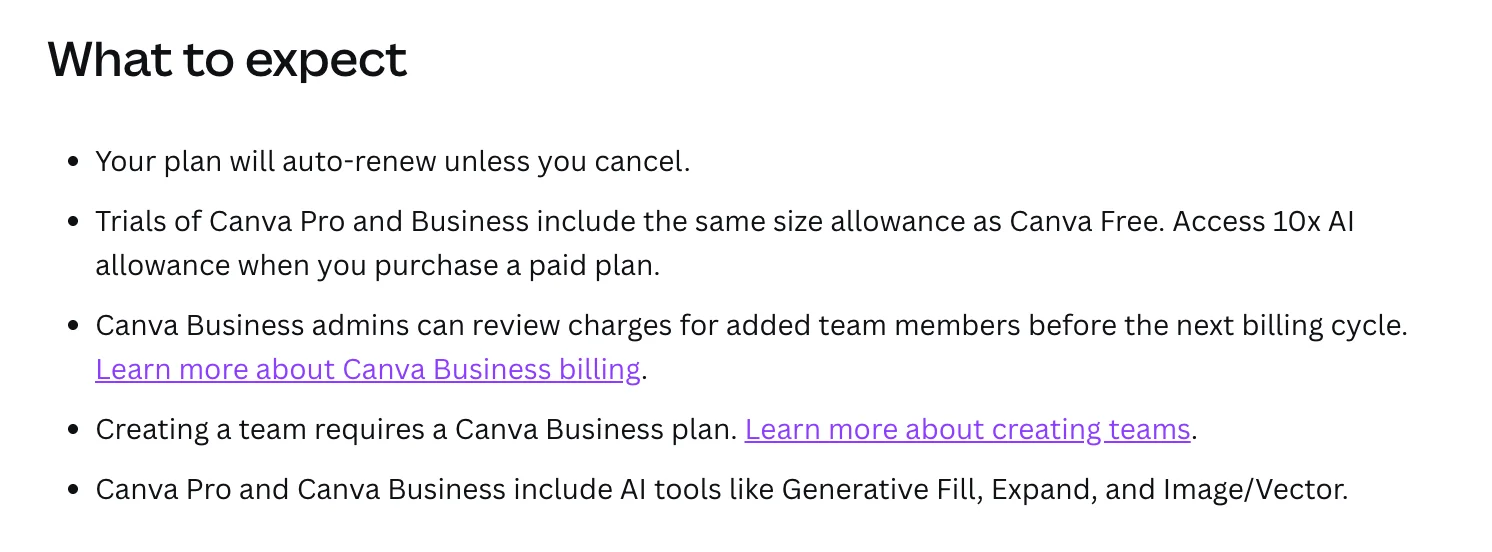
Canva’s page lists no separate steps for a trial, so these are the Cancel plan steps above. The Cancel plan button was on my Billing page during the trial, on the same card as the “Trial” badge. What changes is the timing:
- Know the date. My trial started on 11 October 2026 and the Billing page shows it ending on 10 November 2026.
- Leave a margin. Canva says its billing system runs on UTC and that “a charge can appear a day earlier than expected”. Canva calls that normal. I would cancel at least two days early, which for my trial means by 8 November.
- Expect a reminder, and do not depend on it. The upgrade page says Canva emails a reminder before the trial ends.
- A trial with no card on file ends by itself. The same page says a trial started without payment details ends automatically with no charge.
One thing I can’t tell you from use: whether cancelling a trial ends the trial features at once or leaves them until the end date. Canva’s line about keeping access “until the end of your current billing period” does not mention trials, and I have not cancelled mine.
The trial is also a one-time offer. Canva’s page says it is available “once per Canva account and once per payment method”.
Cancel Canva Teams or Business
On Canva Teams, the person who can cancel is not every member, and it is the one plan here that can’t be bought again.
Canva’s renewal page says: “For Canva for Teams, only owners and administrators can cancel a plan.” You also need to be inside the right team. Canva’s fix when you can’t cancel is to select your profile icon, look under Teams, and switch to the team that holds the subscription.
Canva lists what happens to a team after cancelling:
- Team members lose access to paid features at the end of the billing period.
- All designs, Brand Kit content and shared folders are retained on Canva Free.
- The team workspace moves to the free plan.
- The team admin remains the account owner.
Then the warning that matters for older accounts: “Cancelling Canva Teams is permanent. If you cancel, you won’t be able to resubscribe to Teams.” Canva Teams is closed to new sign-ups, and Canva suggests switching to Canva Business if you think you will want a team plan again. Our Canva pricing guide has the seat prices for Business.
Pause instead of cancelling
If you plan to come back within a season, pausing is the lighter move. Canva’s help page on pausing says a monthly or annual plan can be paused for three months instead of being cancelled.
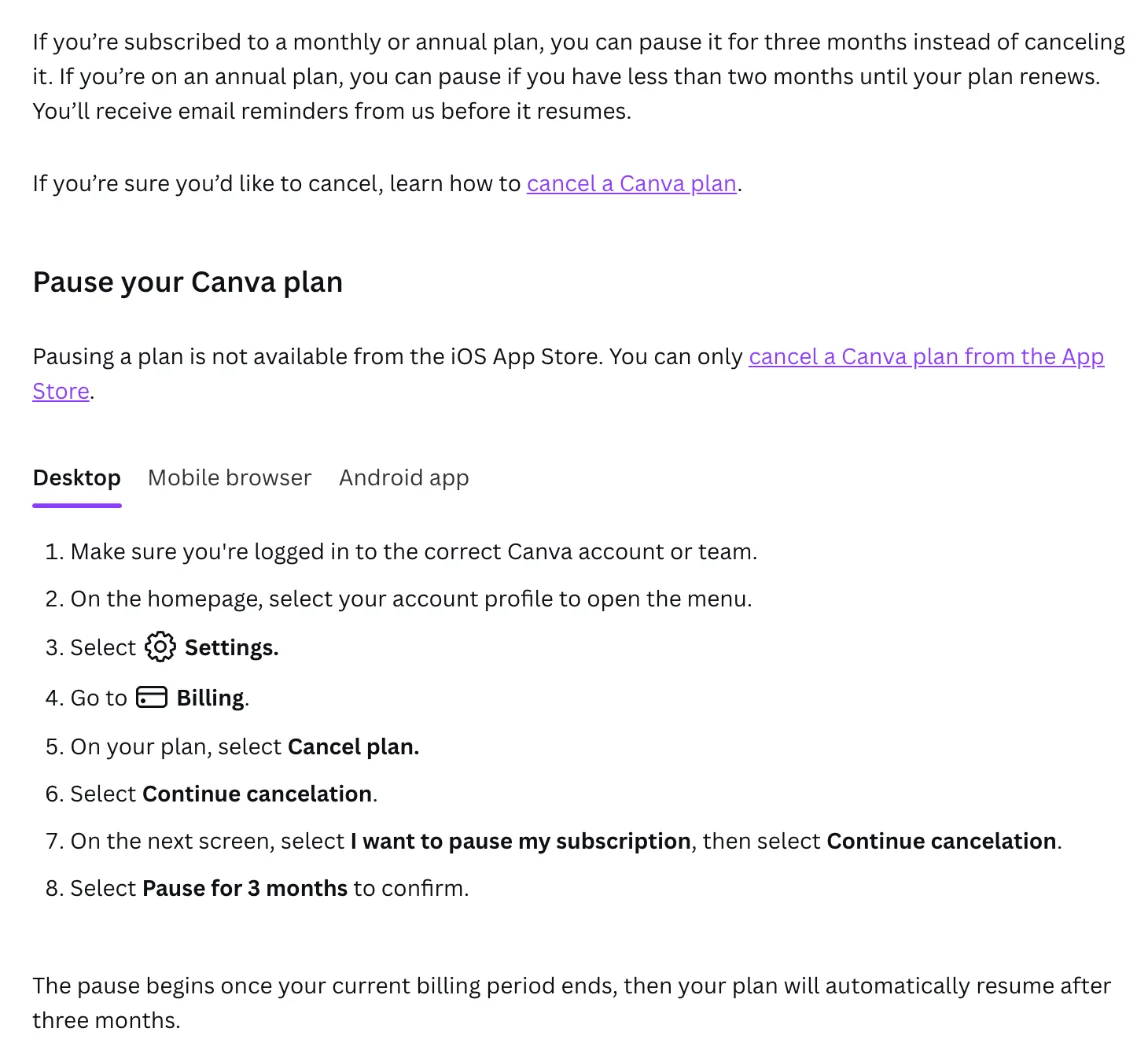
The pause is reached through the cancel flow. Canva’s steps go Billing, Cancel plan, Continue cancelation, then “I want to pause my subscription”, Continue cancelation again, then Pause for 3 months to confirm. So the button that says Cancel plan is also the way in to a pause.
The limits, all from that page:
- Yearly plans can pause only near renewal. “If you’re on an annual plan, you can pause if you have less than two months until your plan renews.”
- The pause starts later. It “begins once your current billing period ends”, then the plan resumes automatically after three months.
- Paid features pause too. “Access to premium features will be paused too, but you can resume your plan at any time.”
- Not through Apple. Pausing is not available from the iOS App Store.
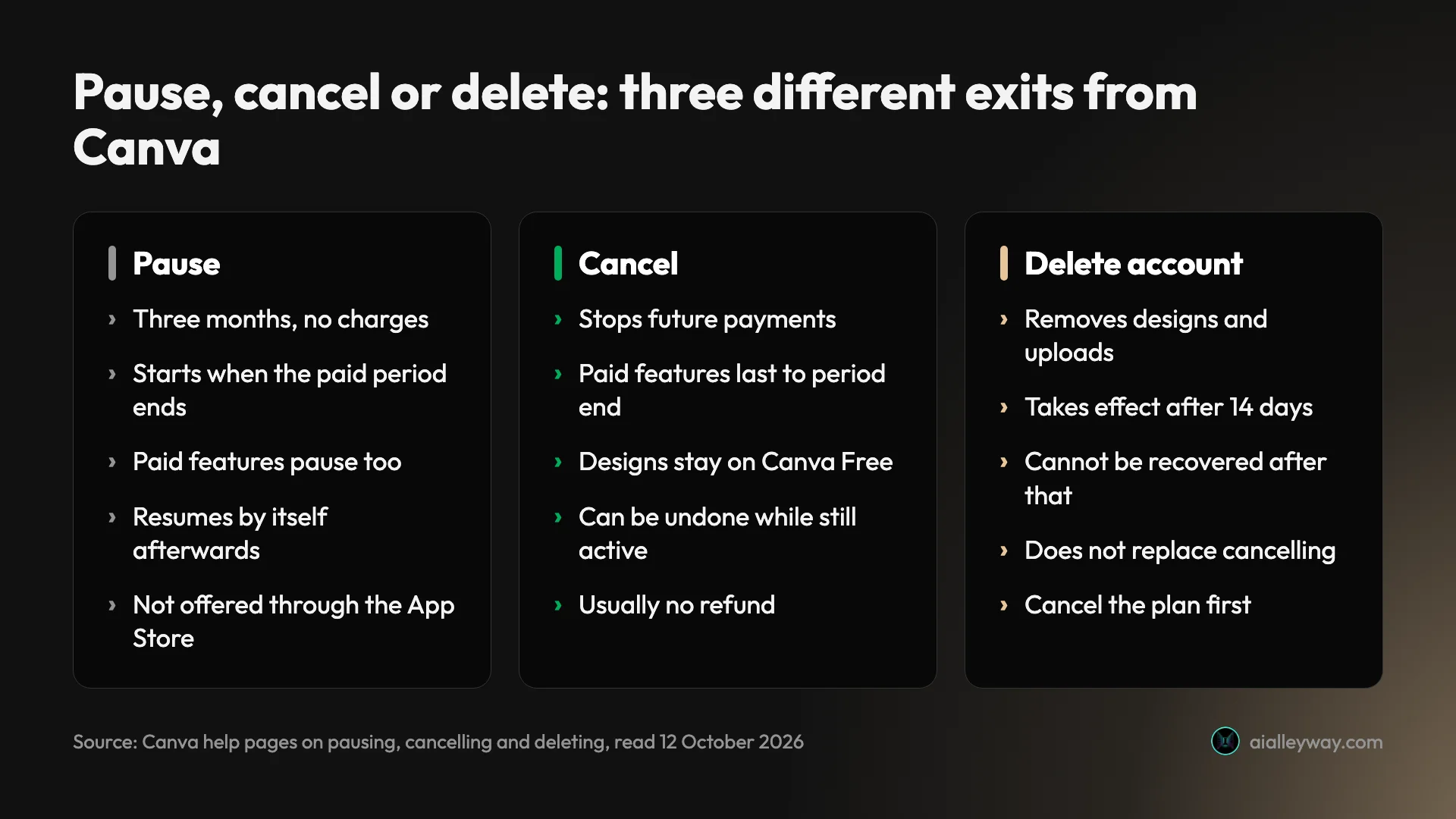
I read these steps and did not run them.
What happens to your designs after you cancel
Your work stays. The paid extras around it do not.
| After you cancel | What Canva’s pages say |
|---|---|
| Your designs | ”All designs remain accessible on Canva Free.” |
| Your account | ”Your Canva account stays active.” |
| Paid features | Kept until the end of the current billing period |
| Pro elements in old designs | ”will appear watermarked on the Free plan” (Canva’s Teams page) |
| Affinity | ”remains accessible for free with your Canva account” |
| Changing your mind | Billing page, then “Stay on” your plan, while the plan is still active |
The undo is worth knowing about. Canva’s page says that if you have cancelled and want to reverse it, you go to the Billing page and select the option to stay on your plan. It adds that this is available only if you have requested cancellation and the subscription is still active. After the period ends, I would expect coming back to mean subscribing again, and for Canva Teams that is not possible.
Storage is the other change to plan for. Canva’s US pricing page listed 5GB on Free and 100GB on Pro when I read it on 11 October 2026. I found nothing on Canva’s cancel page about what happens to an account holding more than the free amount, so if you are well over 5GB, download what you can’t afford to lose before the period ends. That is my caution, not a Canva instruction.
Can you get a refund from Canva?
Mostly no, and Canva says so at the top of its refund page.
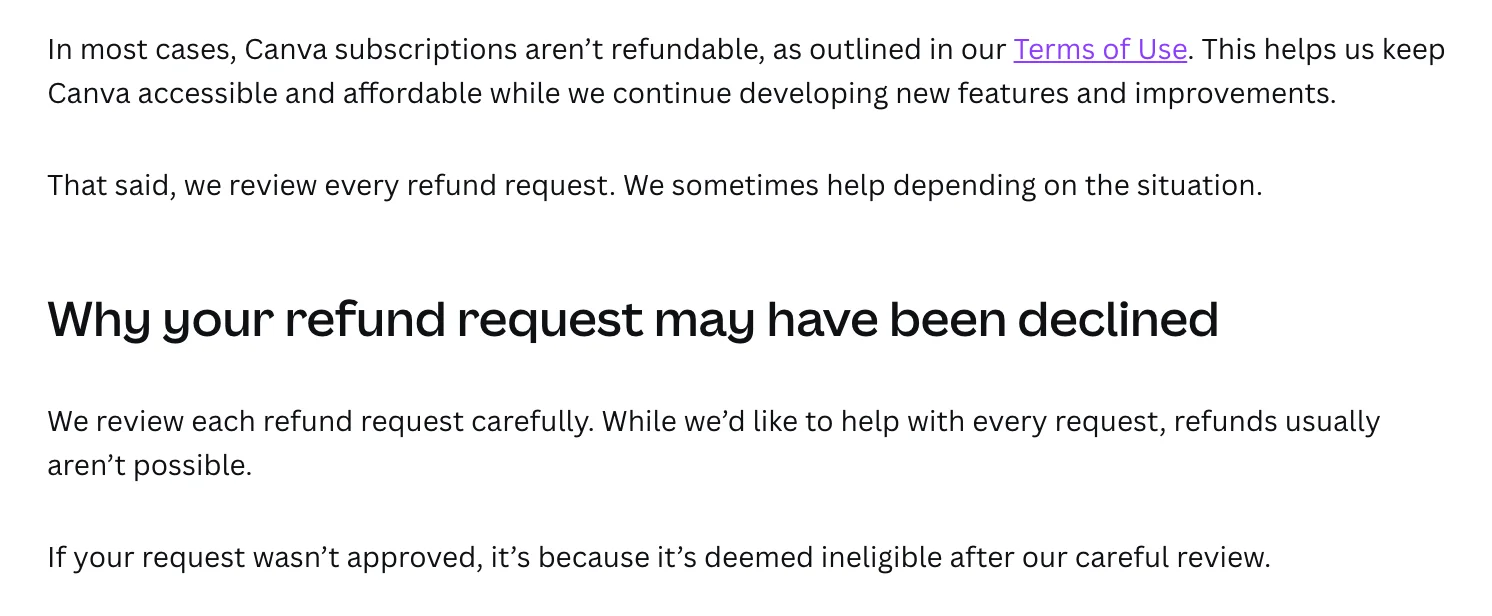
The wording is: “In most cases, Canva subscriptions aren’t refundable, as outlined in our Terms of Use.” The page then leaves a door open: “we review every refund request. We sometimes help depending on the situation.” I found no list of the situations that qualify on that page, so I can’t tell you what gets approved.
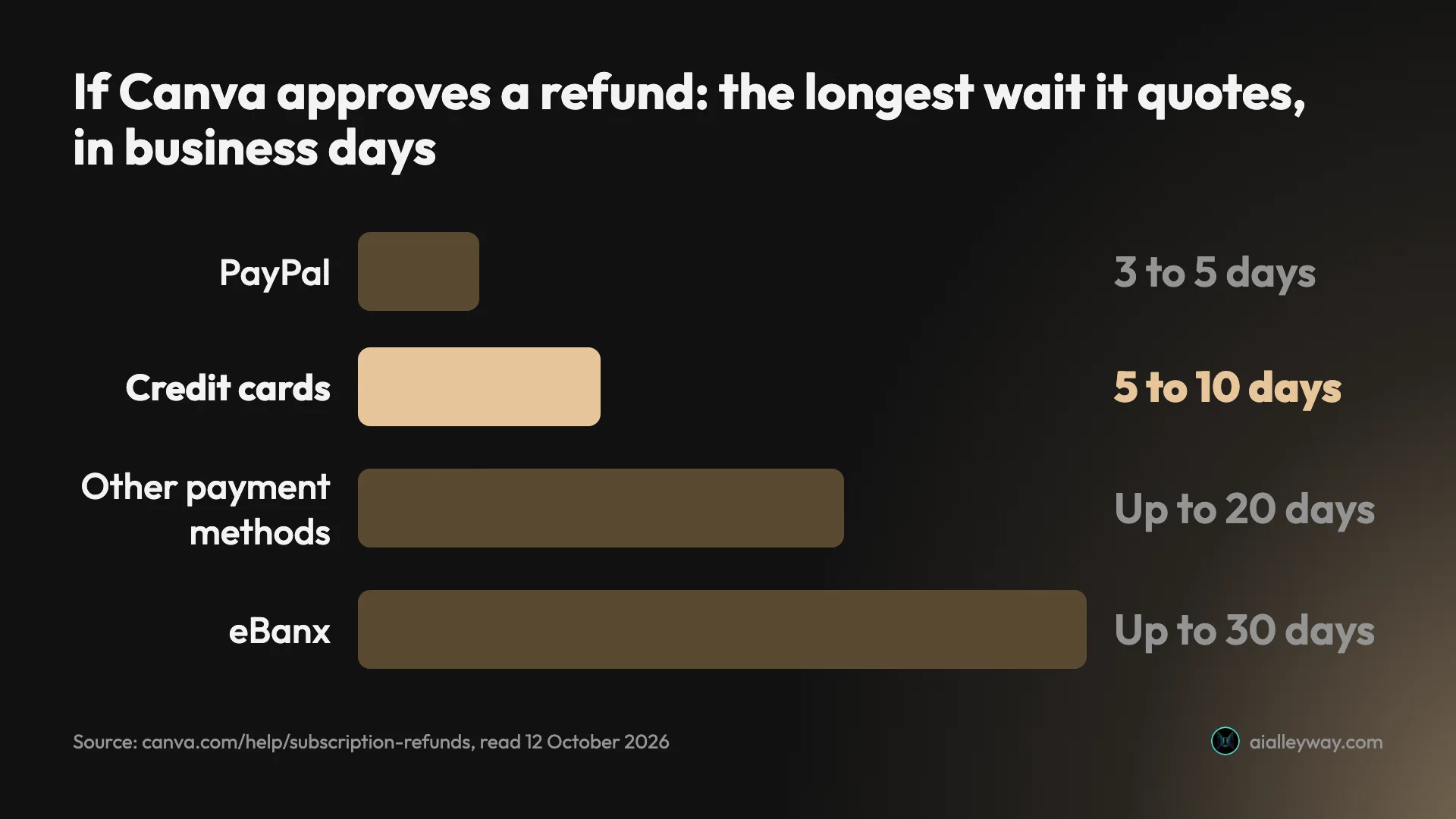
If a refund is approved, the wait depends on how you paid:
| Payment method | Canva’s stated processing time |
|---|---|
| Credit cards | 5 to 10 business days |
| PayPal | 3 to 5 business days |
| Other payment methods | Up to 20 business days |
| eBanx | Up to 30 business days |
Plans bought through Apple are a separate case. Canva says you request that refund directly from Apple and that Canva is “not able to process those for you”.
The practical reading: treat a Canva payment as final and put your effort into cancelling before the next one.
Three cancellations, with dates and dollars
The rules are easier to judge with numbers on them. Prices are Canva’s US prices from 11 October 2026: Pro is $18 a month or $144 a year.
Monthly Pro, cancelled mid-month
You pay $18 on the 5th and cancel on the 12th. By Canva’s rule you keep paid features until the period ends, so you still get the full month you paid for. The next $18 is never taken. Waiting until the last day gains you nothing and risks the early charge, so cancel when you decide.
Yearly Pro, cancelled four months in
You paid $144 in June and cancel in October. Canva’s refund page says to expect no money back in most cases. What you keep is the plan until the following June, eight more months of paid features. Cancelling in October costs you nothing extra and removes the risk of a second $144 next June.
Pausing does not help here. A yearly plan can pause only with less than two months until renewal.
A trial, cancelled before the first charge
My trial ends on 10 November 2026. If I cancel by 8 November, the first payment should never be taken. At US prices that is $18 on monthly Pro. If I forget, the plan renews by itself, and the refund page applies.
A monthly subscriber who pauses in place of cancelling skips three payments, which is $54 at $18 a month. Then the plan resumes.
Six mistakes that keep the charges coming
Each of these comes from a line on Canva’s own pages.
| Mistake | What to do in its place |
|---|---|
| Uninstalling the app | Cancel in the App Store or Google Play |
| Cancelling the wrong account or team | Find the address on the billing emails, then switch |
| Letting the card expire | Cancel the plan itself |
| Cancelling on the last day | Cancel at least two days early |
| Deleting the account | Cancel first, delete only if you want the designs gone |
| Not checking for the email | Look for the confirmation, and cancel again if it is missing |
Uninstalling the app cancels nothing
Canva’s cancel page: “For mobile subscriptions, uninstalling the app doesn’t cancel your plan.” The subscription lives in the app store account, not on the phone.
You may be cancelling the wrong account
Two of Canva’s three listed causes for “I can’t cancel” are about identity: the wrong Canva account, or the wrong team. Its list of causes for “I canceled my plan, but I’m still being charged” starts with: “You have more than one Canva account, and only canceled one.” Search your inbox for Canva billing emails to find which address is paying.
An expired card is not a cancellation
Canva’s page warns: “Some banks may keep recurring subscriptions active, even if the physical card is canceled or expired.” It says banks use automatic card-update services so recurring payments can continue. Letting a card lapse is a gamble. Cancelling is the fix.
Canva bills on the UTC clock, not yours
Canva’s billing runs on UTC. Its cancel page says a charge “can appear a day earlier than expected” depending on your time zone, and its renewal page says all transactions follow GMT. A reader in Los Angeles is seven or eight hours behind that clock.
Deleting your account is not cancelling
Canva’s help page on deleting an account tells Pro, Teams and Business customers to “cancel your plan first to avoid continuous charges”. Deletion also removes your designs, folders, templates and uploads, and Canva says a deleted account can’t be recovered. The request takes 14 days to complete, and logging in during that time cancels it.
No confirmation email? It may not have gone through
Canva says you receive a confirmation email when the plan is cancelled. If you can’t find it, Canva’s advice is to try cancelling again. If charges continue after that, Canva asks for your invoice ID number or a screenshot of the charge when you contact support.
Cancel, pause or stay: how to decide
- You are done with paid Canva. Cancel now. You keep the paid period, your designs stay on the free plan, and you can undo it from Billing while the plan is active.
- You have a quiet quarter coming. Pause, if you pay monthly or your yearly renewal is under two months away, and you did not subscribe through Apple.
- You are on a trial and unsure. Cancel at least two days before the end date. The trial is offered once per account and payment method, so decide on what you have seen.
- You are on Canva Teams. Think twice. Canva says cancelling Teams is permanent and you can’t resubscribe.
- Skip cancelling if the real problem is one surprise charge. Look the charge up first: Canva’s help pages link a tool for identifying a payment, and a second Canva account is on its list of causes.
Do not delete the account as a way of cancelling. Unlike cancelling Pro, it can’t be undone once it completes: Canva says a deleted account can’t be recovered.
If you are leaving Canva: where to look
Cancelling is half a decision. The other half is what you design with next.
- Stay on Canva Free. Your designs remain there, and for occasional work it may be enough. Our Canva review covers what I tested on the Pro trial.
- Adobe Express is our runner-up design pick and its free plan removed a background in my test, a tool Canva marks as paid. See Canva vs Adobe Express for the side by side.
- Something else entirely. Our Canva alternatives guide sorts nine options by the reason you are leaving, including a team price comparison.
If price is the only issue, check the Canva pricing guide first. Yearly Pro works out at $12 a month against $18 paid monthly.
Final word
Cancelling Canva is a short job once you know who bills you: Canva’s Billing page for plans bought from Canva, Apple or Google Play for plans bought in an app. The Cancel plan button was on the Billing page of my trial account, and Canva’s page lists four more steps after it.
The parts worth your attention are around the button. Cancel at least two days before the renewal date, keep the confirmation email, do not expect a refund, and do not confuse cancelling with deleting the account. If you only need a break, the same button leads to a three-month pause.
Frequently asked questions
Will Canva refund me if I cancel my subscription?
Usually not. Canva's help page on refunds says that in most cases Canva subscriptions aren't refundable, as outlined in its Terms of Use. The same page says Canva reviews every refund request and sometimes helps depending on the situation, so asking costs nothing.
Cancelling and refunding are separate things. Cancelling stops future payments, and Canva says you keep paid features until the end of the period you already paid for. If a refund is approved, Canva quotes 5 to 10 business days for credit cards and 3 to 5 for PayPal. A plan bought through Apple has to be refunded by Apple.
Can you cancel a Canva subscription at any time?
Yes. Canva's refund page says you can cancel your subscription at any time to stop future charges, and that you still have access to premium features until your current billing period ends.
The catch is where you cancel. A plan bought on canva.com is cancelled in Settings, under Billing. A plan bought in the iPhone or Android app is cancelled in Apple's or Google Play's subscription settings, and Canva says you can't cancel those directly in the Canva app.
How do I stop automatic payments in Canva?
Cancel or pause the plan before the paid period ends. Canva's help page on automatic renewal says plans renew automatically when the billing period ends, and that to prevent renewal you cancel or pause before your last paid period ends. The renewal date is on the Billing page in Settings.
Cancelling a card or letting it expire is not a reliable way to stop payments. Canva's cancel page says some banks may keep recurring subscriptions active even if the physical card is cancelled or expired, using automatic card-update services.
Why is Canva not letting me cancel my subscription?
Canva's help page lists three causes. You are not signed in to the Canva account that holds the subscription, you are not in the team that holds it, or you subscribed through Google Play or the App Store, which can't be cancelled inside the Canva app.
Check the email under the Your account tab first. Then select your profile icon and look under Teams to switch to the team with the plan. If the charge on your statement names Apple or Google, cancel in that store's subscription settings. If none of that works, Canva asks you to contact support with your account email.
Do I lose my designs if I cancel Canva Pro?
No. Canva's cancel page says all designs remain accessible on Canva Free and that your Canva account stays active. Paid features stop at the end of the billing period.
Some things do change. Canva's help page on Teams says Pro elements in your designs will appear watermarked on the Free plan, and the free plan has less storage than Pro on Canva's pricing page. Deleting your account is different: Canva says designs, folders and uploads are permanently deleted, so do not delete the account when you only mean to stop paying.
Can you cancel Canva before the free trial ends?
Yes, and that is how you avoid the first charge. Canva's help page on upgrading says the plan will auto-renew unless you cancel, and that Canva emails a reminder before the trial ends. The trial end date is on the Billing page in Settings.
Do not leave it to the last day. Canva says its billing system runs on UTC, so a charge can appear a day earlier than expected depending on your time zone. I would cancel at least two days before the date shown. I have not cancelled my own trial, so I can't say from use whether trial access ends at once.
Does deleting my Canva account cancel my subscription?
Do not rely on it. Canva's help page on deleting an account says that if you are on Canva Pro, Canva Teams or Canva Business, you should cancel your plan first to avoid continuous charges.
Deletion also costs far more than cancelling. Canva says designs, folders, templates, uploads, and teams and apps you created are permanently deleted, and the account can't be recovered once deleted. The deletion takes effect 14 days after the request, and logging in during that window cancels the request.
Keep reading
Canva Pro Price: $144 a Year, and What Canva Leaves Out
Canva Pro price in the US: $18 a month or $144 a year. Business is $25 per person. Plus the $100 AI Pass, seat billing and the refund rule, all sourced.
Canva Review: Great Editor, but the AI Runs on a Meter
A Canva review from a Pro trial: nine hands-on tests, exact US prices, and six AI requests that used 56% of the trial's allowance. Plus what the trial hides.
Canva Alternatives: 9 Picks, and the Catch in Each Free Plan
The best Canva alternatives by reason for leaving: Adobe Express for price, VistaCreate for teams, Affinity for pro work. Plus what each free plan holds back.
Canva vs Adobe Express: Same Prompts, Opposite Strengths
Canva vs Adobe Express on the same prompts: Canva's AI spelled 11 of 11 text lines, Adobe's default model 0 on its first image. Express costs less.