
Best AI writing tools: one to draft, one to check
The best AI writing tools, tested on one email brief and 23 planted errors. Claude drafted best, Grammarly checked best, and Gemini changed a promise.
Contents
The best AI writing tools, by job
The best AI writing tool depends on which half of writing you want help with. For drafting, Claude wrote the best email of the three assistants I gave the same brief. For checking, Grammarly caught all 23 errors I planted in two practice paragraphs on its free plan. Most people will be best served by one of each, and both have free plans.
That split is the argument of this roundup. A tool that writes from a blank page and a tool that checks what you wrote are different products, and the ones that try to do both tend to do one of them less carefully.
- Best for checking and editing: Grammarly, which caught 23 of 23 planted errors for free.
- Best for drafting: Claude, which kept every fact and was the only one to add a detail worth keeping.
- Best free all-rounder: ChatGPT, which drafted accurately and caught 22 of 23 errors on its free plan.
- Best paraphraser for students: QuillBot, if you read every rewrite against your original.
- Best if you write in Google Docs: Gemini, though Docs access starts on the paid Pro plan.
- Best for editing a manuscript: ProWritingAid, with style reports and a lifetime licence.
- Best for writing inside your notes: Notion AI, which shows its edits as tracked changes.
- Best for marketing teams: Jasper, built around brand voice. Not tested.
- Best for drafting fiction: Sudowrite, built around a story bible. Not tested.
The one problem every category shared was meaning drift. Gemini changed a promise in my brief. QuillBot’s paraphraser changed four details in a 77-word paragraph. One of Grammarly’s AI rewrites added a claim I never made. None of that shows up on a feature list, which is why I tested before ranking.
Two tests: one email brief, 23 planted errors
I started from the tools people actually use to write, not from a list of every app with “AI” and “write” in its name. That meant the three big chat assistants, the two grammar checkers most people already have installed, the editor novelists recommend, the writing assistant built into a notes app, and the two best-known tools built for one kind of writer: marketers and novelists.
Then I gave the tools I could use the same jobs, so the results compare directly. Everything below was done on free plans unless I say otherwise, and nothing here is sponsored. None of these tools pays us for a click.
What I looked for
Five things decided the order, and they are the five that would change how much editing you do after the tool is finished.
- Does it keep your facts? A draft that changes a date or a promise is worse than no draft, because it reads as finished. This is the criterion that cost Gemini and QuillBot the most.
- Does it catch real mistakes without flagging correct writing? Measured with 23 planted errors and a clean control paragraph.
- Does it sound like a person? Judged on the email, by whether a reader would believe the shop owner wrote it.
- Does it show what it changed? Tracked changes and coloured edits make a bad suggestion easy to reject. A clean block of new text hides it.
- What does it cost to use properly? Not the headline price, but the plan you need for the job, such as the Gemini plan that actually reaches Google Docs.
Feature counts did not count. Every tool here lists dozens of features, and most writers use three of them.
Test 1: the same email brief, three assistants
On 25 October 2026 I gave ChatGPT, Claude and Gemini one identical brief: write an email to the customers of a small bike-repair shop announcing that it is moving. The brief listed four facts and five rules.
The facts were the old and new addresses, the opening date of Monday, November 9, a closure from November 2 to November 7, and a promise that any repair dropped off before October 31 would be ready on time. The rules were a length of 130 to 170 words, no exclamation marks, four banned words (“exciting”, “thrilled”, “journey” and “delighted”), no bullets or headings, and a one-sentence sign-off from Dana, the owner.
Rules like these are easy to check and easy to break. A banned word either appears or it does not. A fact is either kept or changed. That makes the test fair to score, even if one email is a small sample of what a writing tool can do.
| Check | ChatGPT (free) | Claude (paid) | Gemini (free) |
|---|---|---|---|
| Words, without the subject line | 155 | 139 | 140 |
| Exclamation marks or banned words | None | None | None |
| Bullets or headings | None | None | None |
| All four facts kept as written | Yes | Yes | No: changed the repair promise |
| Sign-off in Dana’s own voice | No, signed off in the shop’s voice | Yes | Yes |
| Tone | Accurate, generic | Specific, plain | Formal, corporate |
All three passed every mechanical rule, which is the first useful finding: on a short brief, modern assistants follow word counts and banned-word lists. They differed on the two things that matter more, accuracy and voice.
Gemini changed the one fact a customer would hold the shop to. The brief said repairs dropped off before October 31 would be ready on time. Gemini wrote that any repair dropped off “on or before October 31 will be ready on time for pickup before our temporary closure”. That is a new promise: every bike left before Halloween back by November 1.
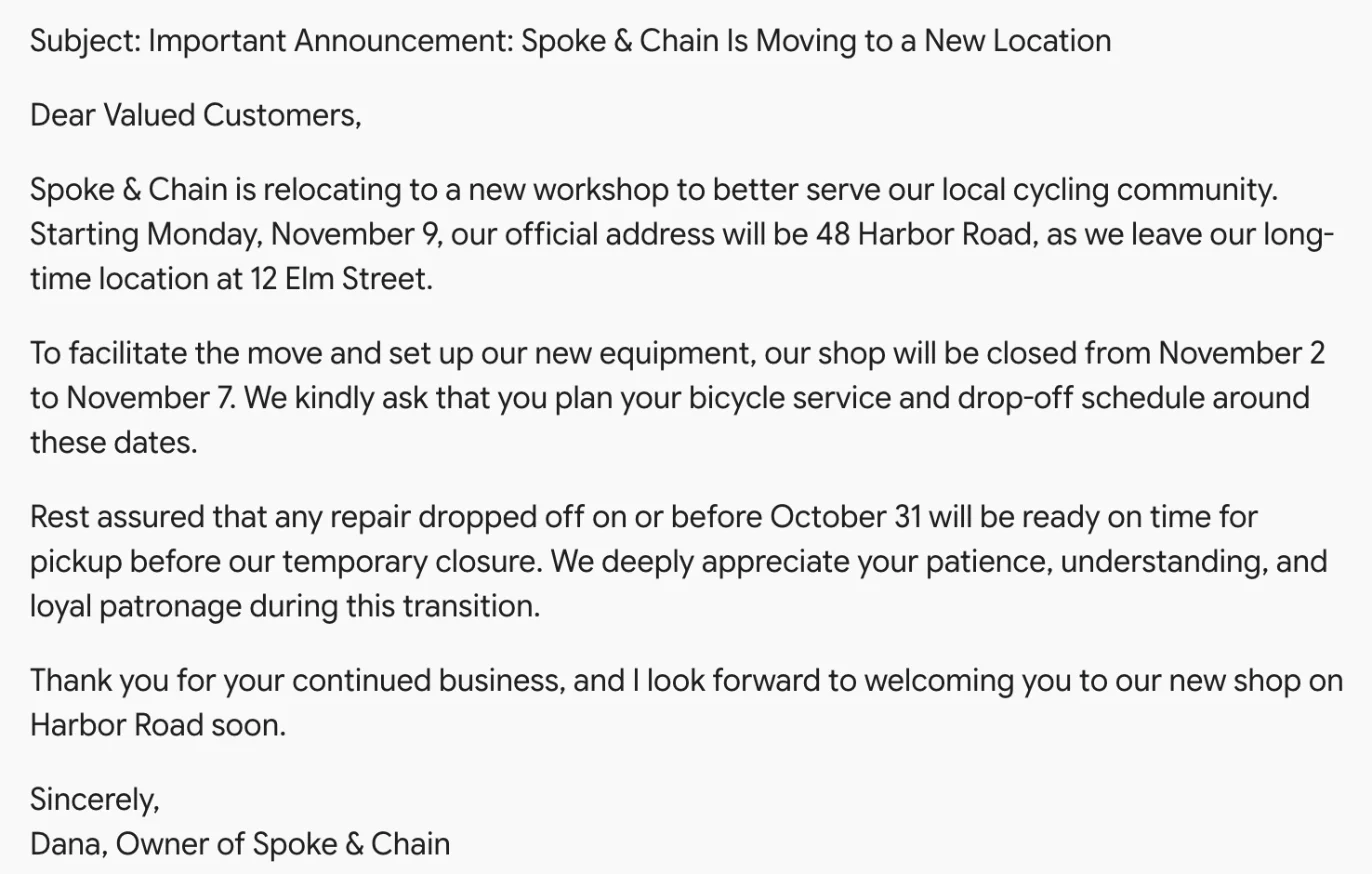
All three also added a subject line I had not asked for. I did not count that against them: a subject line is not a heading, and an email needs one. One fairness note: Claude ran on my paid Max plan with its default model, Opus 5.5, while ChatGPT and Gemini ran on free accounts. Each tool got one run, and chat output changes from run to run.
Limits of a one-email test
A 150-word email is a fair test of the things that go wrong most often in everyday writing: a changed fact, an ignored rule, a voice that sounds like a form letter. It is not a test of long documents, research or creative range, and I would not rank these assistants on one email alone.
That is why the drafting ranking also leans on our longer tests. The Claude vs ChatGPT vs Gemini comparison gave all three a style guide and read the last third of a long draft, and the order came out the same as here: Claude, then ChatGPT, then Gemini. The email adds one thing that test did not show, which is how easily a fact can change in a short piece that otherwise reads well.
Test 2: 23 planted errors and a clean paragraph
For editing, I reused the test from our Grammarly review and Grammarly alternatives roundup. Three practice paragraphs: one with 14 planted errors, one with 9 subtler ones such as a dangling modifier and “irregardless”, and a clean 77-word control paragraph that should get no flags at all.
The clean paragraph matters as much as the errors. A checker that flags correct writing teaches you to ignore it, which is worse than missing a mistake.
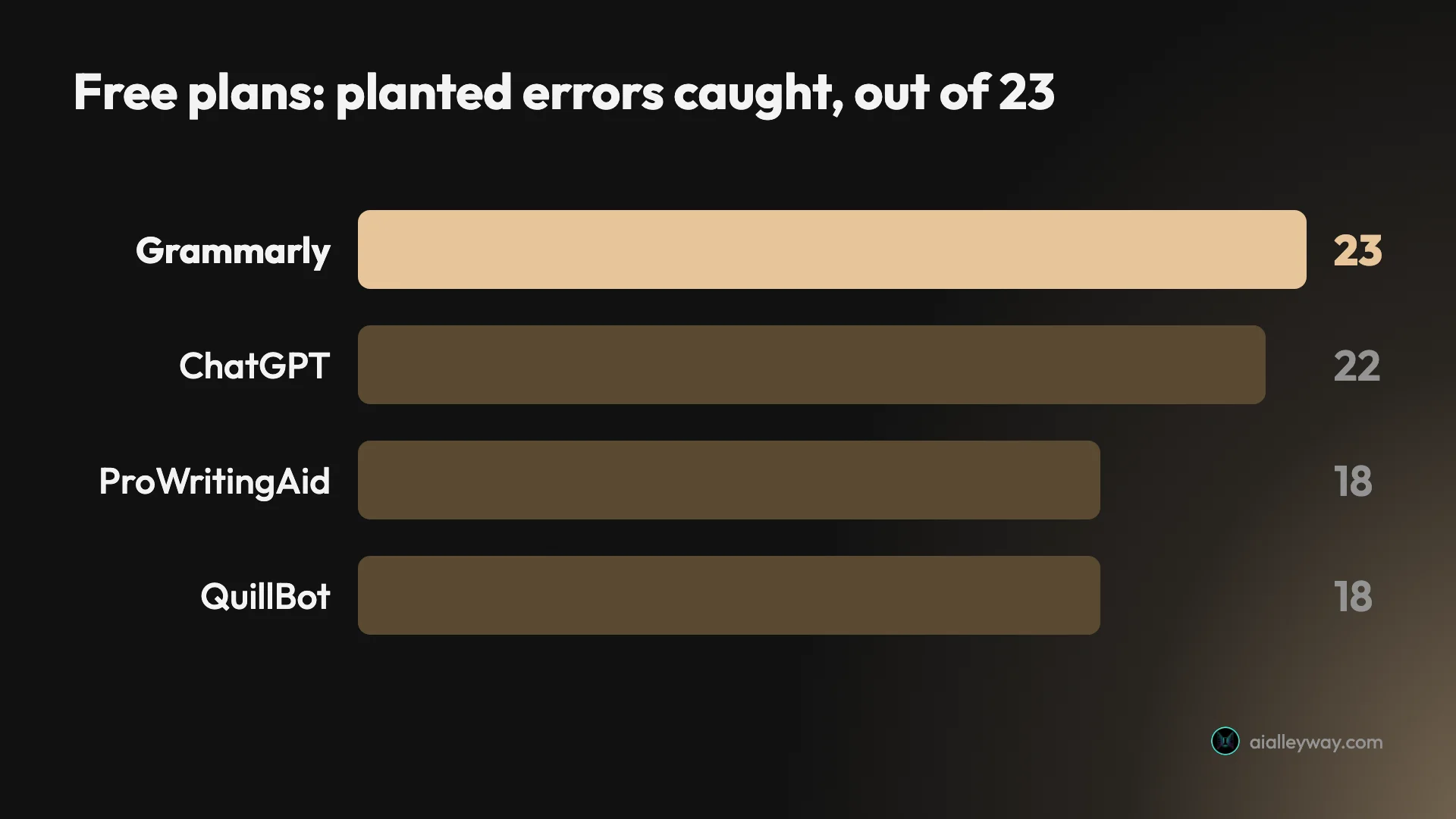
| Tool (free plan) | Simple paragraph, of 14 | Subtle paragraph, of 9 | Total, of 23 | Flags on the clean paragraph |
|---|---|---|---|---|
| Grammarly | 14 | 9 | 23 | 0 |
| ChatGPT | 13 | 9 | 22 | 0 |
| ProWritingAid | 11 | 7 | 18 | 2 |
| QuillBot | 14 | 4 | 18 | 0 |
Grammarly and QuillBot ran on 22 October and the others on 24 October. The full seven-tool results, including LanguageTool, Ginger and Hemingway, are in our alternatives roundup.
Jasper and Sudowrite, read from their own pages
Jasper and Sudowrite have no free plan, and testing either would have meant opening a new account to start a trial, so I worked from their own pages instead. Their sections are written from their own pricing pages, product pages and documentation, and they are labelled that way. Notion AI comes from our hands-on Notion AI review on a free workspace in October, not from these two tests.
Why Copy.ai, Wordtune and the SEO writers are not ranked
Copy.ai was a go-to tool for short marketing copy, and it is still often recommended for it. It has since moved on. Its homepage now sells “GTM AI” for sales and marketing teams, its pricing page lists no free plan, and the entry Chat plan costs $29 a month for five seats, with workflow plans from $1,000 a month. Every listed plan includes unlimited words in its chat tool, and the workflows are metered in credits instead. That is a platform for a go-to-market team, not a writing tool for one person, so it is not ranked here.
Wordtune rewrites sentences in the same way as QuillBot, with a free plan of 10 rewrites a day and three summaries a month. I did not test it, and QuillBot already covers that job here with test results behind it, so it would have been a pick on reputation alone.
The SEO writing tools are missing for a similar reason: writing is no longer what they sell first. Writesonic’s homepage now calls it “The AI Search Growth Engine”, and its Starter plan, at $99 a month or $79 billed annually, includes 15 AI articles a month. Surfer’s homepage calls it an “AI Visibility Platform”, with its content editor listed as one feature. Both lead with tracking how a brand appears in search and AI answers, with writing as a feature inside a marketing platform, so they belong in a marketing roundup rather than this one.
Price, free plan and rating for all nine
The quickest way to read this table is by the second column. Every tool on it is good at one job, and the price only matters once you know which job is yours.
| Tool | Best for | Free plan | Paid from (US) | Tested here | Our rating |
|---|---|---|---|---|---|
| Grammarly | Checking as you type | Yes, 100 AI prompts a month | $12 a month billed annually | Yes, editing | 4.3 |
| Claude | Drafting from a brief | Yes | $17 a month billed annually | Yes, drafting (paid) | 4.4 |
| ChatGPT | Free all-rounder | Yes, with ads | $8 a month (Go) | Yes, both tests | 4.6 |
| QuillBot | Paraphrasing | Yes, 100 words at a time | $99.95 a year | Yes, editing | 3.8 |
| Gemini | Google Docs and Gmail | Yes | $4.99 a month; Docs from $19.99 | Yes, drafting | 4.3 |
| ProWritingAid | Editing a manuscript | Yes, 500 words at a time | $120 a year, or $399 lifetime | Yes, editing | Not rated |
| Notion AI | Writing inside your notes | Trial only | $20 per member a month billed yearly | Separate review | 4.3 |
| Jasper | Marketing teams | No, 7-day trial | $59 per seat a month billed yearly | No | Not rated |
| Sudowrite | Drafting fiction | No, free trial | $10 a month billed yearly | No | Not rated |
Ratings come from our full reviews of each tool. ProWritingAid, Jasper and Sudowrite have no full review on this site yet, so they carry no rating rather than a guessed one.
Annual cost, cheapest plan to dearest
Monthly prices hide how far apart these tools are over a year. This is the cheapest paid plan for each, in US dollars, at the best rate each company offers, from lowest to highest.
| Tool | Cheapest paid plan | One year |
|---|---|---|
| Gemini | AI Plus, monthly | $59.88 (Docs needs AI Pro, $239.88) |
| ChatGPT | Go, monthly only | $96 |
| QuillBot | Premium, billed yearly | $99.95 |
| ProWritingAid | Premium, billed yearly | $120, or $399 once for lifetime |
| Sudowrite | Hobby & Student, billed yearly | $120 |
| Grammarly | Pro, billed yearly | $144 |
| Claude | Pro, billed yearly | $200 |
| Notion AI | Business, billed yearly | $240 per member |
| Jasper | Pro, billed yearly | $708 per seat |
The pair I recommend, Claude Pro and Grammarly Pro, costs $344 a year billed annually. Most people do not need either paid plan: Grammarly’s free plan did all the checking in my tests and ChatGPT’s free plan drafted an accurate email (Claude was tested on a paid plan), and the paid tiers mainly buy more usage and extras such as plagiarism checks. The top tiers of the chat assistants, ChatGPT Pro and Claude Max, are sold monthly only, so they have no yearly discount at all.
What each one does with your words
Two things decide whether a writing tool is safe to use on work that matters: how it shows its changes, and what it does with your text afterwards.
On the first, the editors win. Grammarly’s editor and Notion AI both show AI edits as tracked changes, with deleted words struck through. That is how I caught Grammarly’s invented clause in seconds. The chat assistants hand back a clean block of new text, so any change of meaning is hidden until you compare the two versions line by line. QuillBot colours its changes, which helps, but you still have to read every coloured word.
On the second, the defaults differ. Our Grammarly review found that Grammarly uses your writing to train its AI by default, with an opt-out in settings. Notion says it does not train on your data unless you opt in. Claude, ChatGPT and Gemini all offer a private or temporary chat mode that keeps a conversation out of your history; I used those modes for the drafting test.
1. Grammarly — best for checking and editing

Grammarly is the tool I would install first, and the free plan is the one to install. It is the only tool in either test that scored perfectly: all 23 planted errors flagged, nothing flagged on the clean paragraph.
What it does better than everything else here is work where you already write. The browser extension and apps underline mistakes as you type in Gmail, Google Docs, Slack and most text boxes, so checking is not a separate step you have to remember. Every chat assistant on this list needs you to paste your text in and copy it back out.
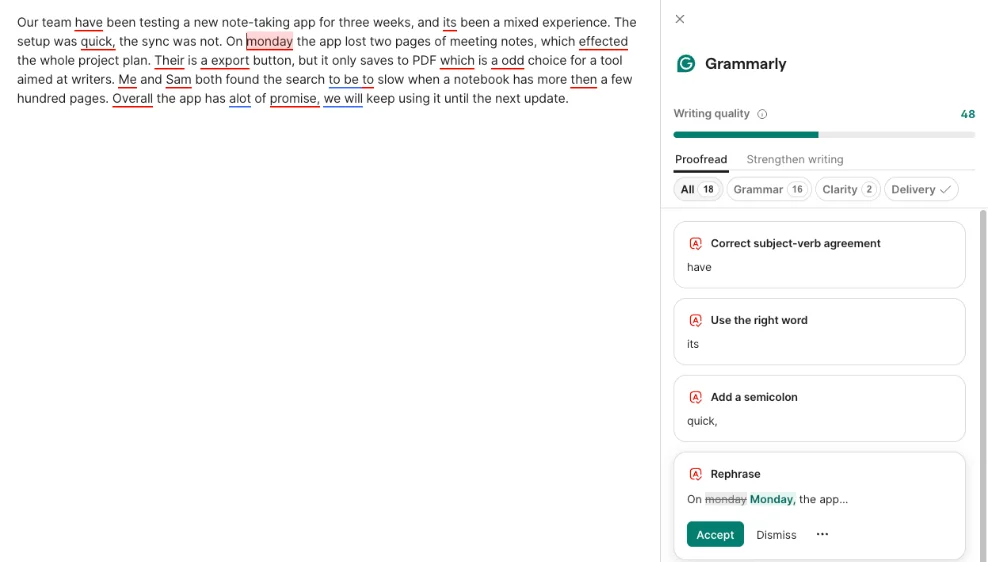
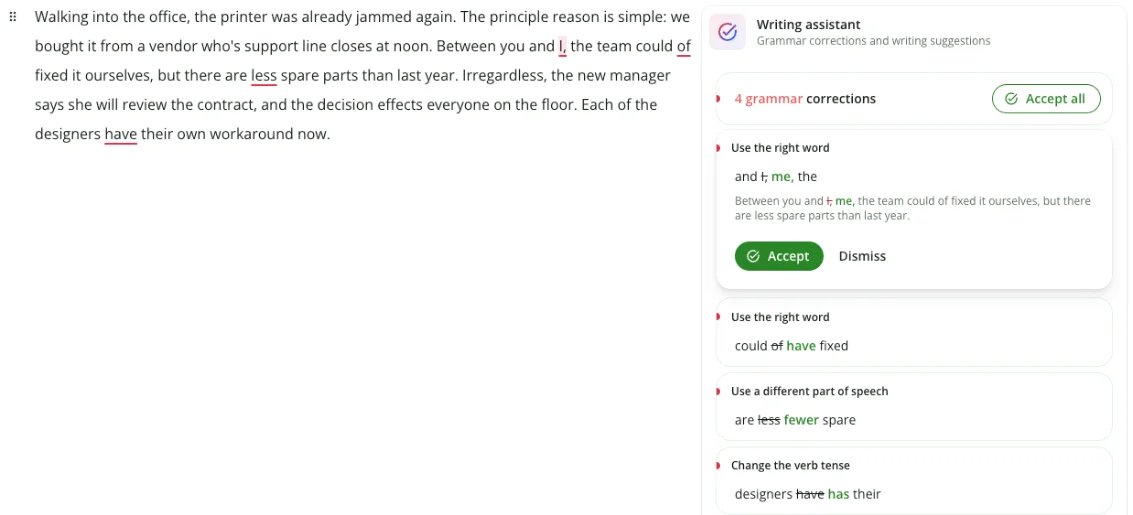
The subtle paragraph is where it pulled away from the field. “Principle” for “principal”, “who’s” for “whose”, “less” for “fewer”, “effects” for “affects” and a dangling modifier all got flagged. QuillBot missed five of those nine on the same paragraph, and ProWritingAid missed two.
The free plan also includes more AI than most people expect: 100 AI prompts a month, a tone detector, AI Grader, Reader Reactions, a paraphraser and a humanizer, most of which opened on my free account. Reader Reactions was the useful one. Set to a product team, it listed the questions that reader would ask, and every one matched the text.
The free paraphrasing page is the weak spot. When I gave it the clean 77-word control paragraph for our Grammarly vs QuillBot comparison, it reworded every sentence, turning a plan into a schedule and then an itinerary, and it did not mark any of the changes on the page. QuillBot at least colours what it changed.
Its AI rewrites need watching
The AI layer is less careful than the checker. One “Clarify key impact” rewrite added a closing clause I never wrote, and Grammarly’s AI Chat, asked to keep every fact, dropped one and then said “All facts are preserved”. The tracked-changes view is what made both easy to spot.
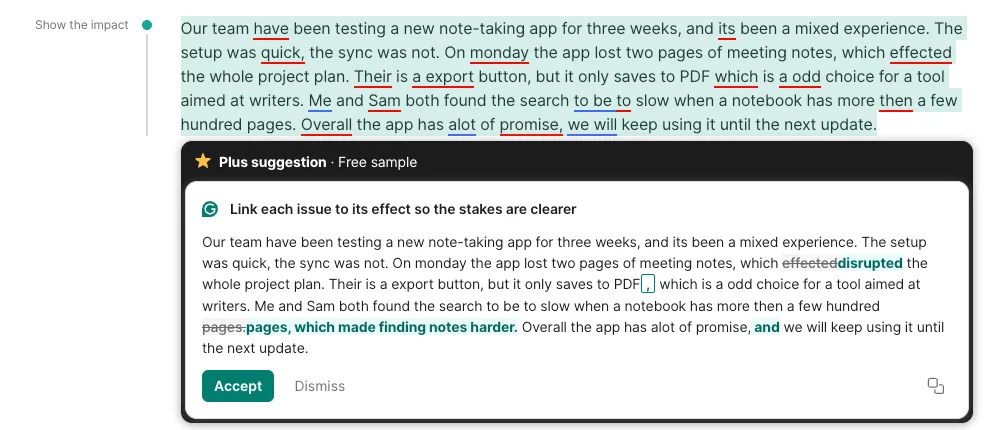
It is also not a drafting tool. Grammarly can generate text from a prompt, but it is built around text you have already written, and the 100 monthly prompts on the free plan run out quickly if you lean on it to write.
Pricing: Free, or Pro at $12 a month billed annually ($144 a year) or $30 month to month. Students can get half off Pro for the first year through Grammarly’s student offer. Pro adds plagiarism and AI-text detection, on-demand sentence rewrites, tone adjustment and 2,000 AI prompts a month. Our Grammarly pricing guide breaks down what a year really costs, including the student discount.
One trap is worth knowing. Grammarly’s parent company renamed itself Superhuman in October 2025, though the product keeps the Grammarly name, and its Superhuman Pro suite lists Grammarly among its apps. On Superhuman’s $15 monthly plan, Grammarly Pro is a separate $15 add-on; only the annual plan includes it. Check which Superhuman plan you are on before you pay for Grammarly twice.
Good for: anyone who writes email, documents or messages and wants mistakes caught before they send. Not for: writing from a blank page. Our full Grammarly review rates it 4.3.
2. Claude — best for drafting from a brief

Claude is the assistant I open when the words themselves matter, and the email test showed why in 139 words. It was the only one of the three that read like a person had written it.
The opening line set the tone: “After many good years at 12 Elm Street, Spoke & Chain is moving to a new home at 48 Harbor Road.” It explained the closure with a concrete picture, “To pack up our tools, parts and workbenches”, where ChatGPT wrote that the team would be “busy setting up our new workshop”. And it added a practical line no one asked for but any shop owner would want: bring your bike in soon, so it is not left waiting during the closure.
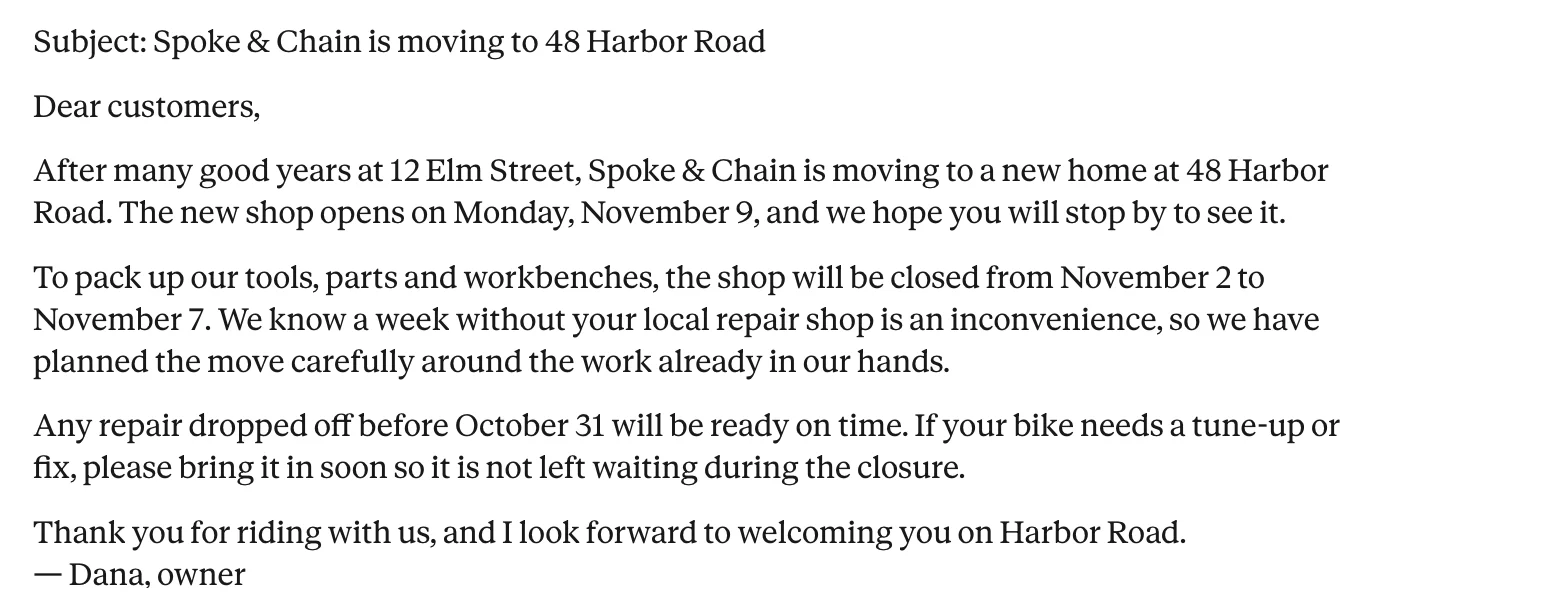
It kept every fact exactly as written, including the repair promise Gemini changed, and its sign-off was one sentence in Dana’s own voice, as the brief asked. The one slip was small: it called a six-day closure “a week”.
Why Claude writes better
The email is a short version of a longer finding. In our Claude AI review and ChatGPT vs Claude tests, the separating test was a style guide with prohibitions in it: banned words, banned openers, a cap on a punctuation mark. Every model obeys positive instructions. Claude is the one that keeps obeying the negative ones in the last third of a long document, where ChatGPT drifts back to headers and bullets.
That matters more for real work than a single email. A rule that survives to the end of a 2,000-word draft is the difference between editing a draft and rewriting it.
Usage limits and no proofreading
It is a writer, not a checker. I would still run its output through Grammarly, because a fluent sentence can still carry a wrong fact you gave it. It also does less than ChatGPT outside writing: no image generation, and a smaller set of extras.
The bigger catch is limits. Claude meters use across several limits at once, and our ChatGPT vs Claude comparison found ChatGPT’s free plan the more generous of the two. My test ran on a paid plan, so a free account may not produce the same email.
The free plan is still a real product. Anthropic’s pricing page lists chat on the web, desktop and mobile, web search, file creation, memory and Artifacts on Free. What it does not include is Projects, the saved workspaces where a style guide and reference files persist between chats, which start on Pro.
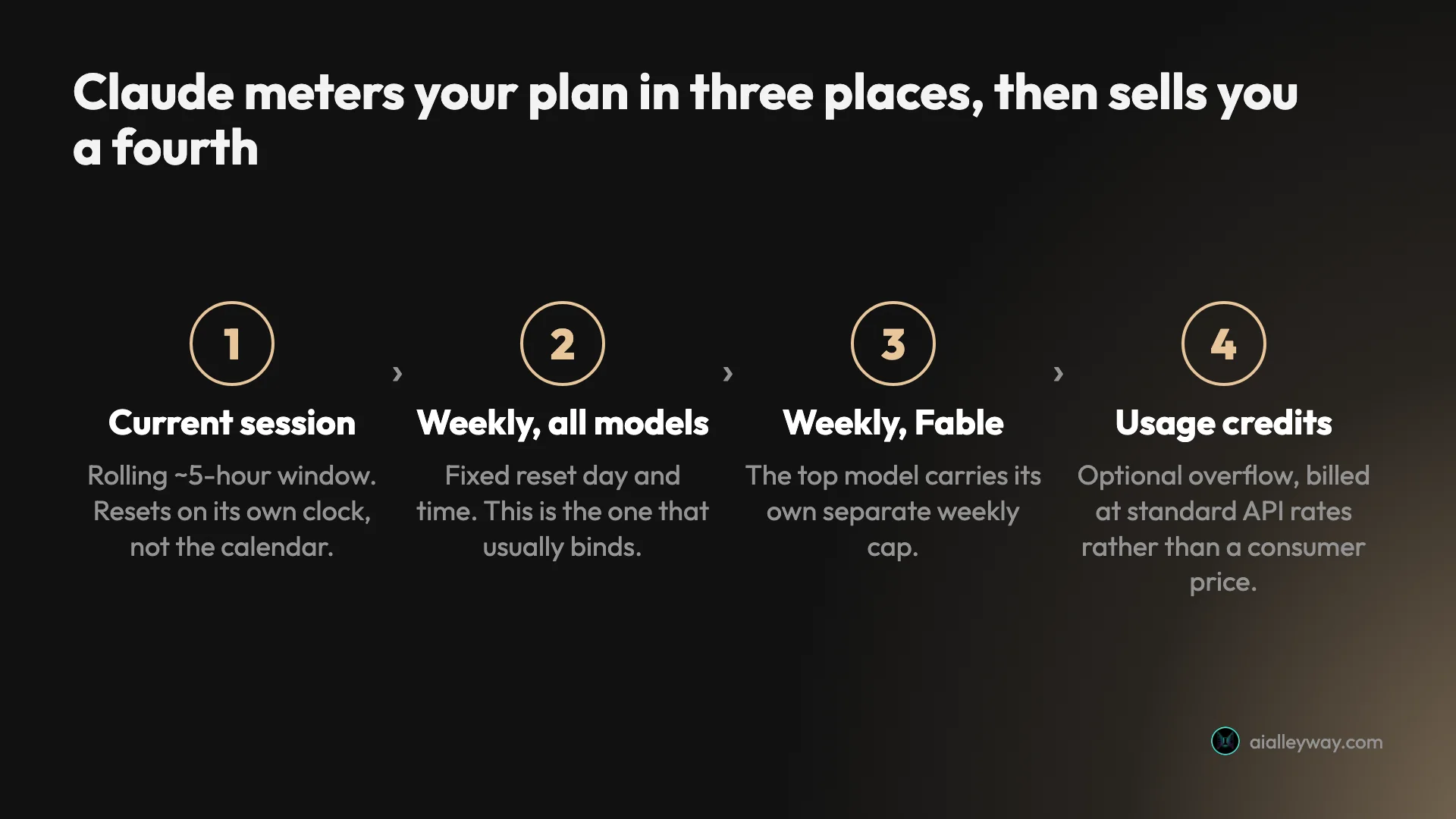
Pricing: Free, then Pro at $20 a month or $17 a month billed annually ($200 up front), and Max from $100 a month, according to Anthropic’s pricing page. Max comes in two sizes, 5x at $100 and 20x at $200, and both are billed monthly only. Pro adds more usage and Projects, which is where a saved style guide lives.
Good for: drafting emails, articles, reports and anything where tone matters, and following a house style. Not for: proofreading, or anyone who wants one subscription that also makes images. Our full Claude AI review rates it 4.4.
3. ChatGPT — best free all-rounder

ChatGPT is the only tool on this list that did both jobs well on a free account. It drafted an accurate email from the brief, and when I asked it to proofread, it caught 22 of the 23 planted errors. If you will only use one AI tool for writing and you do not want to pay, use this one.
The email was correct and safe. All four facts were there, in the right order, with no mechanical rule broken. It was also the most generic of the three: “We’re writing to let you know”, “there’s no need to worry”, and a closing hope to keep your bike “safe, reliable, and ready for the road”. Nothing in it was wrong. Nothing in it sounded like Dana.
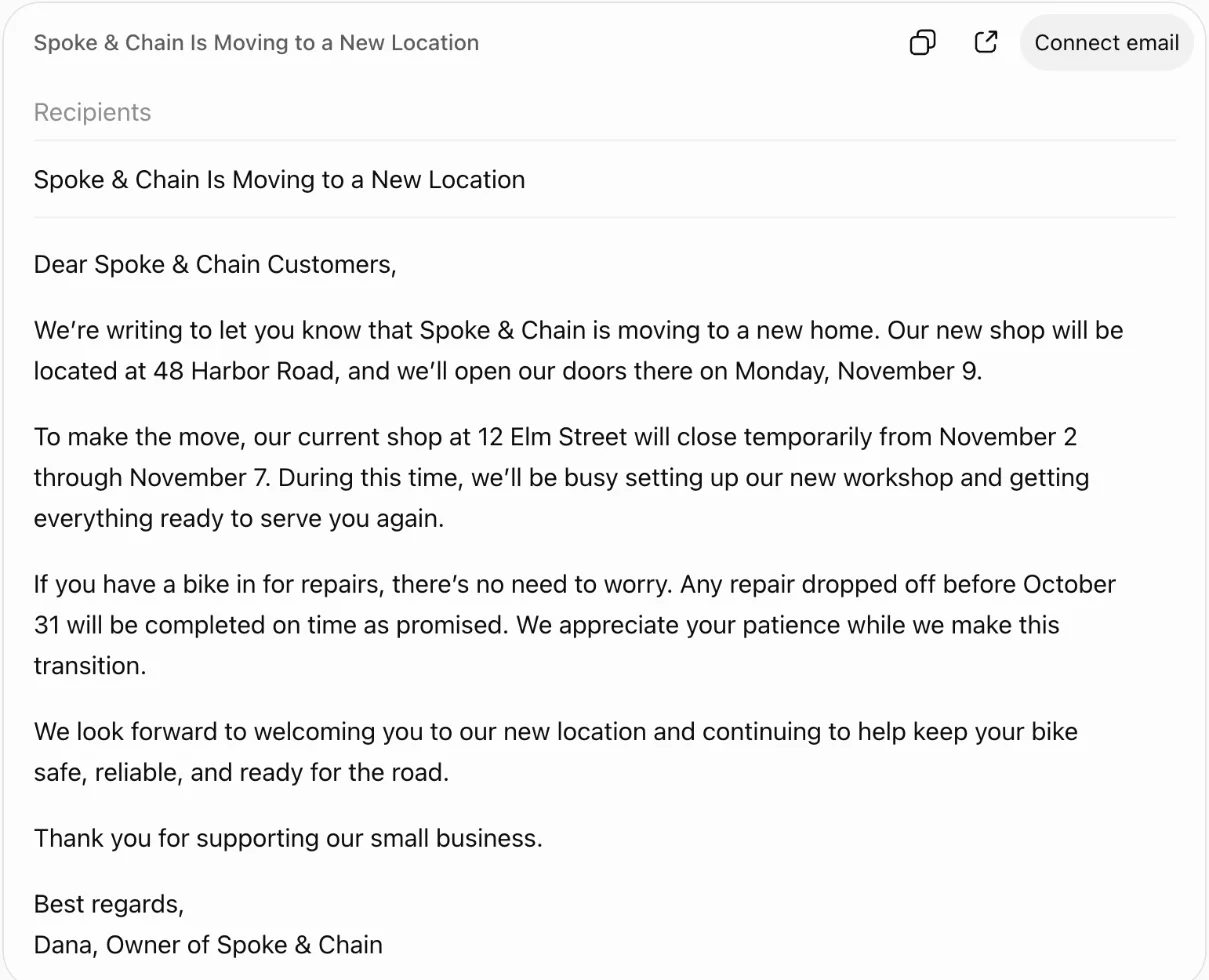
It also signed off in the shop’s voice rather than Dana’s. The last sentence was “Thank you for supporting our small business”, followed by a signature, where the brief asked for a one-sentence sign-off from Dana. That is a small miss, but it is the kind a careful editor would send back.
What ChatGPT does well is the next step. Under the draft it offered two follow-ups, “Make the opening more welcoming” and “Clarify the temporary closure dates”, and its reply came as an email card with a subject field and a button to connect an email account. For people who write a lot of email, that is a shorter path from draft to sent than any other assistant here.
A better proofreader than most proofreaders
The editing result is the surprise. Asked to list every error and give a corrected version, ChatGPT’s free plan found 13 of 14 in the simple paragraph, listing 12 problems because one entry covered two planted errors, and all 9 in the subtle one, including the dangling modifier that QuillBot and LanguageTool missed. On the clean paragraph it said “No errors found” and explained why its short fragments were deliberate.
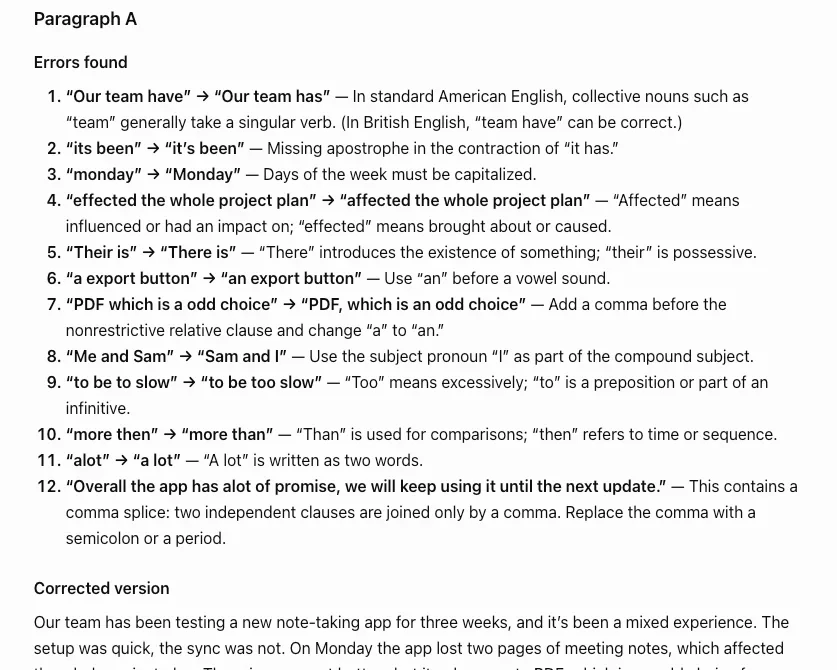
The limits are about workflow, not accuracy. It does not underline anything as you type. Its corrected version is a rewrite, so you have to compare it with your original to see what changed. And a chat model can give a different answer on a second run.
Ads, no model picker and a house style
The free plan has ads, and so does the $8 Go plan. In exchange, OpenAI’s pricing page describes free text chats as unlimited, subject to abuse guardrails, which is more room than Claude’s free plan gives a heavy writer. Free users get no model picker either: you get whatever OpenAI routes you to. For drafting, it reaches for a house style of headers and bullets on longer pieces unless you tell it not to, and in our longer tests it drifted back to that style even when told.
Pricing: Free with ads, Go at $8 a month with ads, Plus at $20, and Pro at $100, $200 or $500 a month, according to OpenAI’s help article on its Pro tiers. Pro is billed monthly only, and only the $500 tier adds OpenAI’s Ultrafast mode. Plus removes the ads and raises the limits; for writing alone, Free or Go is enough for most people. Our ChatGPT review rates it 4.6 and walks through every tier.
Good for: people who want one free tool for drafts, rewrites and a final proofread. Not for: writing that has to sound like you without a lot of editing. If you are torn between the big three, our Claude vs ChatGPT vs Gemini comparison sets them side by side, and our best AI assistant roundup ranks them on more than writing.
4. QuillBot — best paraphraser for students

QuillBot is the quickest way to reword a paragraph, and the most likely tool on this list to reword your facts along with it. Paste text in, pick a mode, and you get a full rewrite with the changed words coloured in. That speed is the whole appeal, and it is also the risk.
In Standard mode, its free paraphraser changed four details of a 77-word paragraph and added nine words. A bag became a backpack. An unread plan became an unopened one. Those swaps look harmless until the paragraph is a source summary in an essay, where “unopened” and “unread” are different claims.
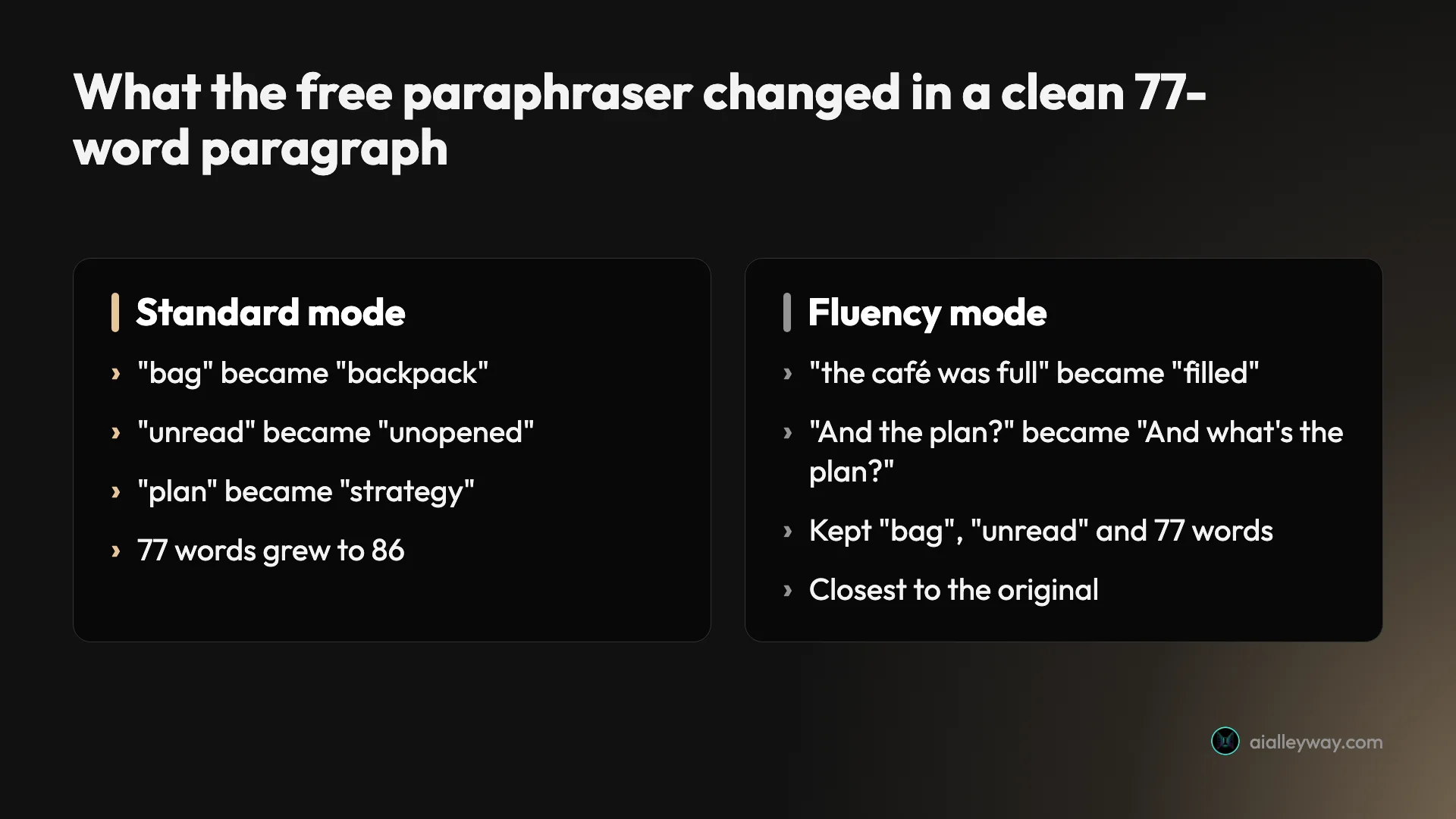
The interface is good, which is part of the danger. Ten modes run along the top, from Standard and Fluency to Formal, Academic, Creative and Shorten, with a Synonyms slider that sets how much vocabulary changes. The free plan opens two of them, Standard and Fluency. Fluency changed two small details on the same paragraph and kept the length, so it is the safer place to start.
Three habits make it usable. Keep the Synonyms slider low, so fewer words get swapped. Read the coloured words first, because every changed word is highlighted. And still cite the source you paraphrased: rewording someone else’s idea does not make it yours.
Its summarizer did something similar. Given two separate complaints, a slow sync and lost meeting notes, it joined them into one cause the writer never claimed. That is the same kind of drift as Gemini’s changed promise, in a tool sold for exactly this job.
Grammar checking: 14 of 14, then 4 of 9
QuillBot also checks grammar, and on the simple paragraph it was perfect: 14 of 14. On the subtle paragraph it caught 4 of 9, letting “principle”, “who’s”, “irregardless”, “effects” and the dangling modifier through. It raised no grammar flags on the clean paragraph, which is to its credit.
The toolkit around it keeps growing: a summarizer, a citation generator and an AI detector with seven free scans a day. Our QuillBot AI detector test found it right on six of seven texts, but it scored a casual AI-written story as 100% human.
Pricing: Free paraphrases up to 100 words at a time in two modes. Premium’s default US price in the page code is $19.95 a month, $79.95 for six months or $99.95 a year; QuillBot tests different prices on different visitors, so check yours. The free plan also summarises up to 1,200 words at a time. Our Grammarly vs QuillBot comparison runs the two side by side.
Good for: students and writers who reword short passages and will read every line of the output. Not for: proofreading, or rewording anything where a changed detail would be a problem. Our QuillBot review rates it 3.8.
5. Google Gemini — best if you write in Google Docs

Gemini’s case is not that it writes best. It is that it lives where a lot of people already write. Google owns Gmail and Docs, so on a paid plan Gemini works inside them directly, without the copy-and-paste every other assistant here needs.
That integration is partly a paid feature, which is easy to miss. Google’s US plan page lists Gemini in Gmail and Vids on AI Plus, adds Docs from AI Pro up, and lists none of them on the free plan. Our Google Gemini review found the same tiering. On the free plan, Gemini is a chat app like the others.
The email that changed a promise
The drafting test is where I would hesitate. Gemini’s free draft followed every mechanical rule and kept three of the four facts, but it rewrote the fourth into a promise the shop never made, that repairs would be ready “for pickup before our temporary closure”. It also widened “before October 31” to “on or before October 31”.
The tone was the most corporate of the three. “Dear Valued Customers”, “to better serve our local cycling community”, “Rest assured” and “loyal patronage” all appeared in a 140-word email for a small bike shop. None of that is wrong, but all of it would need cutting.
One draft is a small sample, and a different run might keep the promise intact. But the changed fact is exactly the kind of error that is easy to miss when you skim an email that otherwise reads fine. If you draft in Gemini, check every number and date against your notes.
Where Gemini is strong
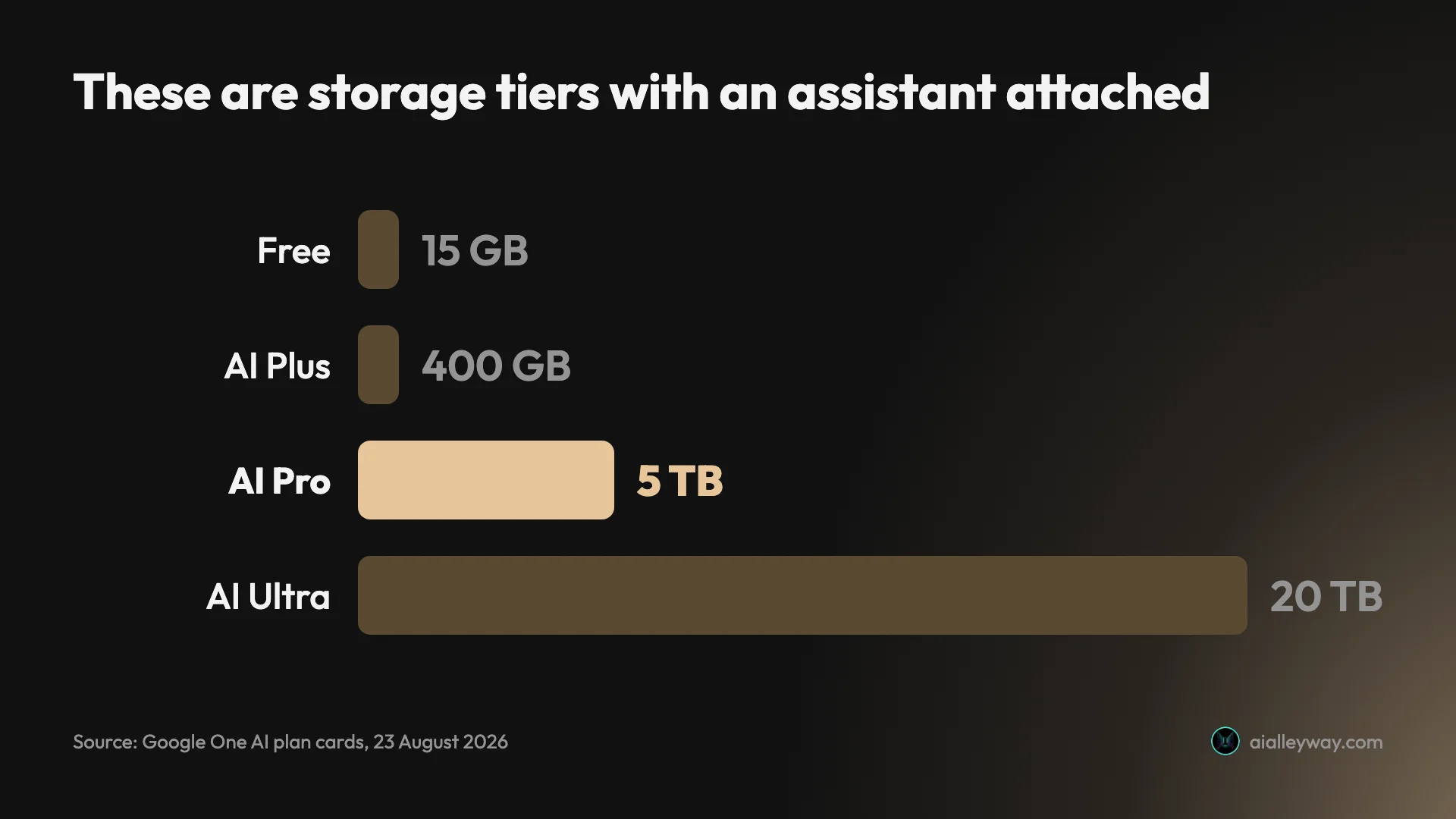
The free plan is generous, and it comes with 15 GB of Google storage, though Google’s plan page lists no Gmail or Docs access on it. When I reviewed it, the free model picker included Google’s Pro model and an extended thinking mode with no padlock, which ChatGPT’s free plan did not offer. On the day of this test the free chat defaulted to an “Auto” setting that picks the model for you.
Pricing: Free, then Google AI Plus at $4.99 a month, AI Pro at $19.99 and AI Ultra at $99.99 or $199.99, on Google’s US subscriptions page. Each plan bundles Google storage, from 400 GB on Plus to 20 TB on Ultra. Pro is the first plan that lists Gemini in Docs, and the $199.99 Ultra tier promises 20 times AI Pro’s usage limits.
Good for: people whose writing lives in Gmail and Google Docs and who will pay for the plan that reaches them. Not for: drafting anything with facts you cannot afford to have changed, unless you check it line by line. Our full Gemini review rates it 4.3.
6. ProWritingAid — best for editing a manuscript

ProWritingAid is the editor novelists recommend, and it is honest about who it is for: its homepage now calls it “The Complete Toolkit for Storytellers”. If Grammarly is a proofreader, ProWritingAid is closer to a writing coach with a stack of reports on pacing, repetition, sentence length and style.
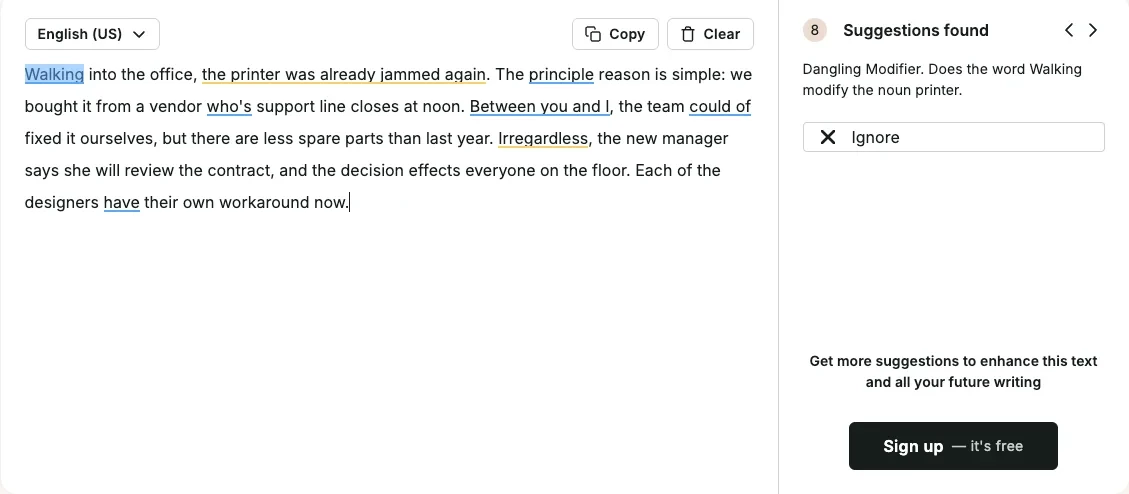
As a plain grammar checker it was middling. Its free web checker caught 18 of 23: 11 of 14 in the simple paragraph and 7 of 9 in the subtle one, including the dangling modifier, with the clearest explanation of any tool: “Does the word Walking modify the noun printer.”
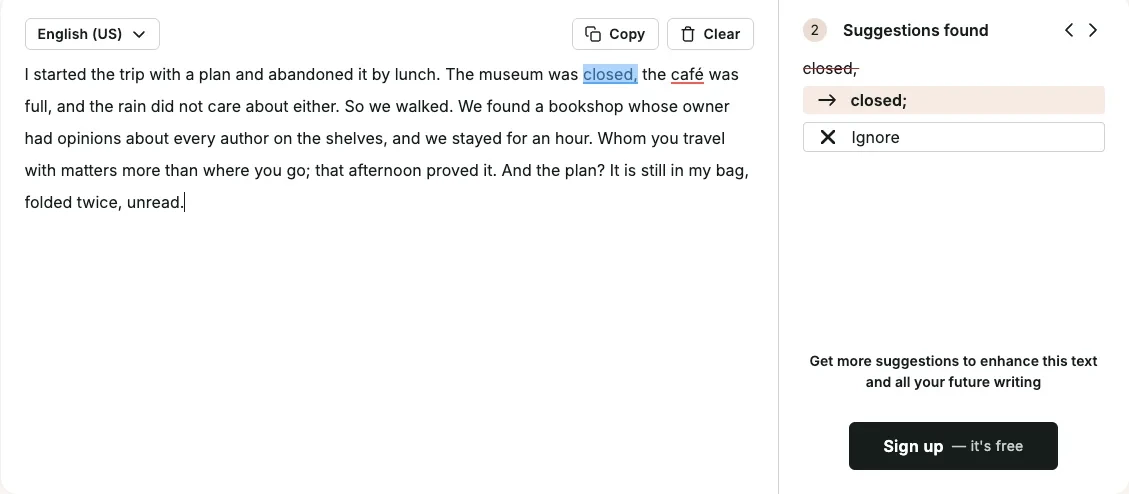
It was also the only checker in the editing test to raise grammar or spelling flags on correct writing. On the clean paragraph it suggested a semicolon that would have broken a correct list of three, and it marked “café” as a spelling error. Two false alarms in 77 words is the kind of noise that trains you to click past suggestions.
What you pay for
The reports are the product, and they sit behind the paid plans. The free plan inside an account checks 500 words at a time and runs each line-editing report up to twice a day, according to its pricing page. Premium lifts those limits and includes a daily Chapter Critique. Premium Pro raises that to 30 critiques and adds workshops. Deeper manuscript analysis of plot and characters is sold separately as Story Credits, discounted by up to 40% on Premium and up to 65% on Premium Pro.
It is the only tool here you can buy outright. That suits writers who would rather pay once for a tool they will use for years than renew a subscription every January.
Pricing: Premium is $30 a month or $120 a year, and Premium Pro $36 a month or $144 a year. Lifetime licences cost $399 for Premium or $699 for Premium Pro. It checks English only.
Where it runs: browser extensions for Chrome, Edge and Firefox, Google Docs, Microsoft Word on the desktop, Scrivener and its own desktop editor, according to its integrations page. Scrivener support is the detail that matters to novelists, because that is where many of them write.
Good for: novelists and long-form writers who want style reports and would rather pay once. Not for: everyday proofreading, where Grammarly is more accurate and quieter. Our Grammarly alternatives roundup covers it in more depth.
7. Notion AI — best for writing inside your notes

Notion AI makes sense if your drafts already start as Notion pages. It writes, edits and summarises inside the page, using your other pages as context, so the brief, the research and the draft sit in one place instead of three browser tabs.
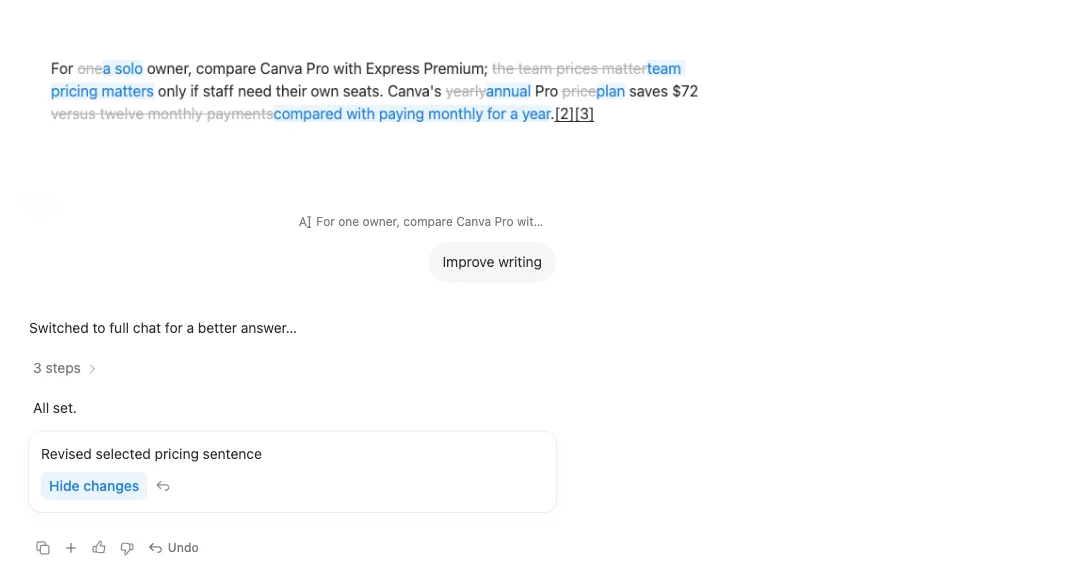
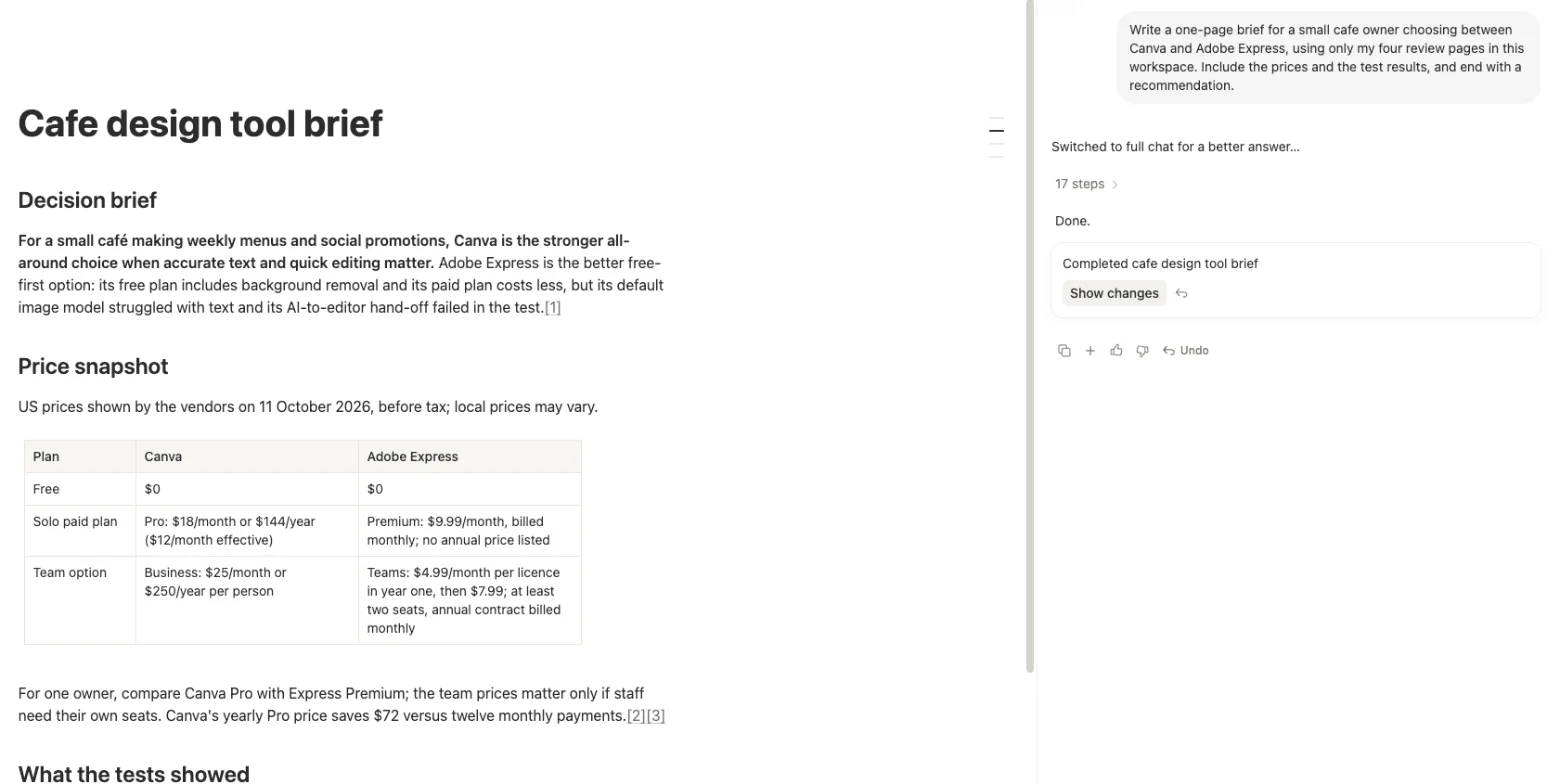
In our hands-on review on a free workspace, we sent it 39 requests. It built a 23-row database, made a slide deck in about six minutes, and drafted a cited decision brief straight into a page, with a price table and numbered source links. Its Improve writing command showed every edit as tracked changes, old words struck through and new ones in blue, which is the safest way an AI tool can hand you a rewrite.
It is not flawless. In the same review it attached one answer to the wrong source, a reminder that a citation can look right and point at the wrong thing. And it is a workspace first and a writing tool second: if you do not already use Notion, adopting it for the AI alone is a lot of tool to learn.
Pricing: Notion’s help centre says full Notion AI comes with the Business and Enterprise plans, and Free and Plus users get a limited number of AI responses to try it. Business costs $20 per member a month billed yearly or $24 monthly, in US dollars, as of our October review. Custom agents and premium models draw on Notion credits, sold at $10 per 1,000 a month on monthly plans. Notion says it does not train its models on your data unless you opt in.
Good for: teams and writers who already plan, research and draft in Notion. Not for: a writer who just wants a better first draft or a proofreader. Our Notion AI review rates it 4.3.
8. Jasper — best for marketing teams

Jasper is the only tool here built for a team rather than a writer. Its pricing page says it was “built by Marketers for Marketers”, and everything on its plan cards is about keeping many people’s writing consistent: brand voices, knowledge assets, target audiences and a library of marketing agents.
I did not test Jasper. It has no free plan, and its trial means starting a new account, so everything in this section comes from Jasper’s own pricing and product pages, checked on 25 October 2026.
What Jasper does
The core feature is Brand Voice. Jasper describes it as letting the AI “analyze your content’s tone of voice, then set tone and formatting rules so Jasper’s writing always sounds like you”. That is the same idea as the style guide I give Claude, built into the product and shared across a team, so a new hire’s blog post and the CEO’s newsletter follow the same rules.
Around that sit the things a marketing department needs and a solo writer does not. Jasper lists “100+ Purpose-Built Marketing Agents” for jobs such as campaign briefs and product copy, a shared workspace it calls Canvas, and more than 30 languages. Business adds agents for AI search optimisation, translation and deep research, a no-code builder for custom agents, a tool Jasper calls Grid, API access and admin controls.
| Jasper plan | Monthly | Billed yearly | What it adds |
|---|---|---|---|
| Pro | $69 per seat | $59 per seat a month | 1 seat, 2 Brand Voices, 5 knowledge assets, 3 audiences |
| Business | Custom | Custom | Unlimited brand setup, custom agents, API, admin controls |
Is Jasper worth $69 a seat?
Price is the obvious one. At $69 a seat a month, Jasper costs more than three times a $20 Claude Pro or ChatGPT Plus plan, and those assistants write well enough for most marketing copy when you give them a written brand guide. What Jasper adds is the shared setup, which is worth paying for when several writers need to sound like one brand, and hard to justify when there is only you.
The underlying writing comes from the same kind of large language models as the assistants above, so the same rule applies: read the output against your facts. A brand voice controls how something sounds, not whether it is true.
Pricing: Pro costs $69 per seat a month, or $59 billed yearly, with a 7-day free trial of Pro. Business is custom pricing. There is no free plan.
Good for: marketing teams with several writers, a defined brand voice and enough volume to justify a per-seat price. Not for: a solo writer, who will get most of the value from Claude or ChatGPT for less than a third of the price.
9. Sudowrite — best for drafting fiction

Sudowrite is the one tool on this list built only for fiction. Where the chat assistants write anything and the checkers fix anything, Sudowrite is shaped around a novel: characters, settings, an outline and chapters, all kept in one place so the AI writes the next scene with the rest of the book in mind.
I did not test Sudowrite. Its trial means opening a new account, so this section is based on Sudowrite’s pricing page, homepage and help documentation, checked on 25 October 2026.
What Sudowrite does
The centre of it is the Story Bible, which Sudowrite’s help centre says “gathers the core elements of your story in one place”. Its homepage describes going “from idea, to outline, to beating out chapters”, and the writing tools work from that context: Write, Rewrite, Describe and Expand, with a promise to keep continuity across a series.
It also runs its own models. Sudowrite says it uses “Muse & Ballad, Sudowrite’s AI models just for fiction”, alongside more than 30 models from other companies. The two higher plans add developmental edits, line edits and beta reads, which puts some of ProWritingAid’s job inside the same tool.
| Sudowrite plan | Monthly | Billed yearly, per month | Credits a month |
|---|---|---|---|
| Hobby & Student | $19 | $10 | 225,000 |
| Professional | $29 | $22 | 1,000,000 |
| Max | $59 | $44 | 2,000,000, unused credits roll over for 12 months |
The catch with Sudowrite’s credits
The credit system is the hard part to judge from outside. Sudowrite meters use in credits, and its pricing page does not say how many words a credit buys, which depends on the feature and model you use. The free trial needs no card, but the number of trial credits is not stated on the pricing page or in the help centre. Its help article on trials describes a seven-day window to cancel and get a refund, and its homepage puts the cheapest plan at $10 a month, billed yearly, after the trial.
The bigger question is whether you need a fiction tool at all. Claude handles prose and long context well, and a Claude Project with your outline and character notes does part of what a Story Bible does. Sudowrite’s case is that it is built around a manuscript from the start, so you are not rebuilding that context in a chat window every session.
Pricing: Hobby & Student is $19 a month or $10 billed yearly, Professional $29 or $22, and Max $59 or $44, with a free trial that needs no credit card.
Good for: novelists and screenwriters who want an AI drafting partner that tracks the whole story. Not for: non-fiction, business writing or proofreading, where every other tool here is a better fit.
How to pick an AI writing tool
Start with the job, not the tool. Most people need two things, something to get words onto a blank page and something to catch the mistakes in those words, and the best choice for each is different.
| Writing job | First choice | Free option |
|---|---|---|
| First draft of an email, post or report | Claude | ChatGPT Free |
| Proofreading as you type | Grammarly | Grammarly Free |
| Final proofread of a finished piece | Grammarly, then ChatGPT | ChatGPT Free |
| Rewording a paragraph | QuillBot | QuillBot Free, 100 words at a time |
| Writing inside Gmail and Docs | Gemini on AI Pro | None: Docs needs a paid plan |
| Editing a manuscript | ProWritingAid | ProWritingAid Free, 500 words at a time |
| Drafting fiction | Sudowrite | Claude Free |
| Brand copy for a team | Jasper | A written brand guide in Claude or ChatGPT |
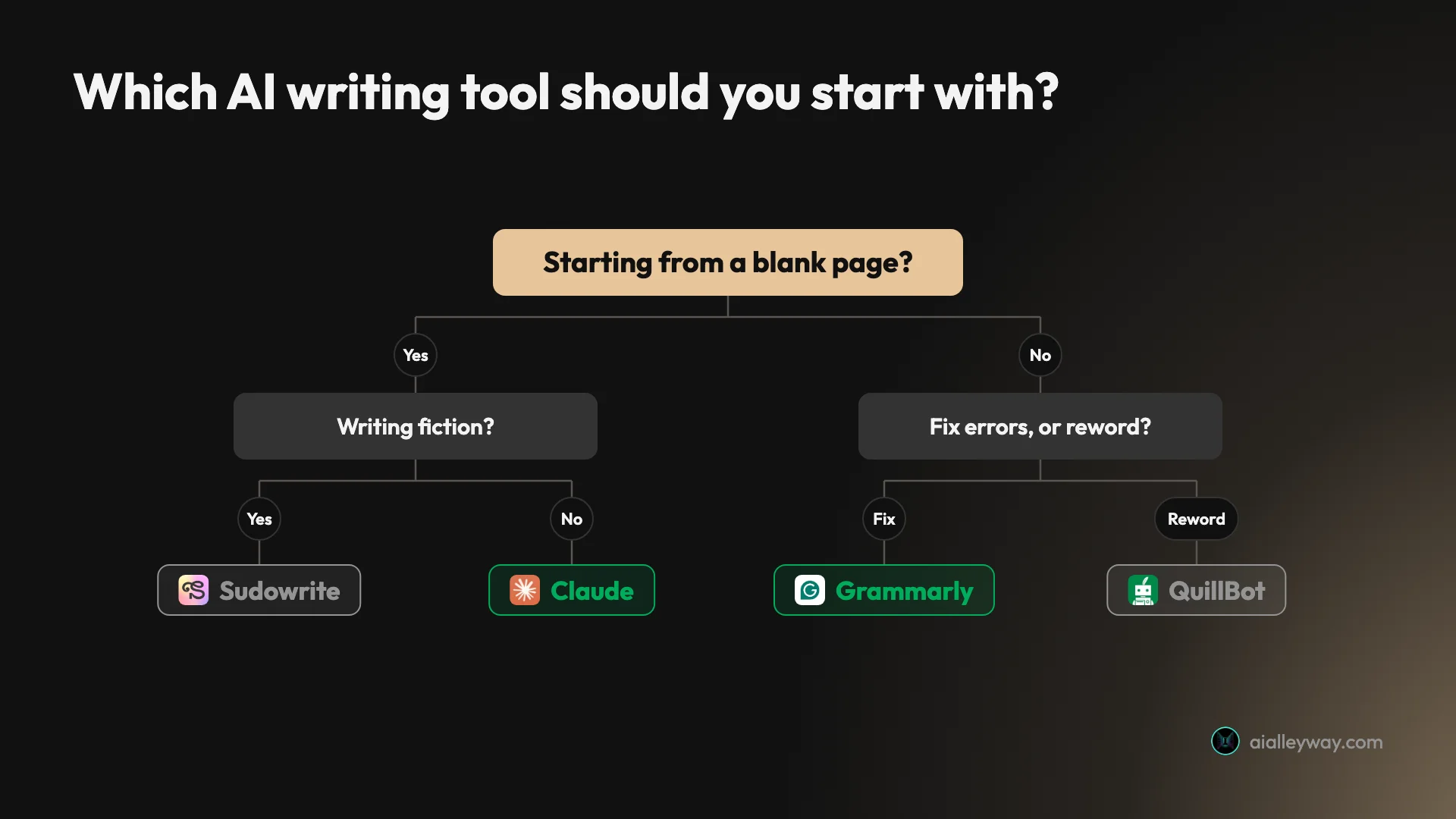
- If you want one free tool for everything, use ChatGPT. It drafted accurately and proofread better than most dedicated checkers in my tests.
- If you want the best first drafts, use Claude, and put every fact and rule in the brief. It kept every fact and was the only one that still sounded like a person.
- If you want mistakes caught as you type, install Grammarly Free. Nothing else I tested matched 23 of 23 with no false alarms.
- If you mostly reword other people’s text, QuillBot is the fastest, but compare every rewrite with the original before you use it.
- If your work lives in Gmail and Google Docs, Gemini is the natural fit, on a paid plan that reaches Docs. Check its numbers and dates.
- If you are editing a novel, ProWritingAid’s reports and lifetime licence suit you better than a subscription proofreader.
- If your notes, research and drafts are already in Notion, Notion AI saves the copying, and its tracked changes are the safest way to accept a rewrite.
- If you run marketing for a brand, look at Jasper, and compare its price with a team plan on Claude or ChatGPT first.
- If you are drafting fiction, Sudowrite is built for it. Start on the trial and see whether its story tools earn their price.
Whatever you pick, add one rule to your process: read the AI’s output against your own notes before it goes anywhere. In my tests, three tools from three different companies changed what I meant at least once, and the fluent ones were the hardest to catch.
What you get for $0
Every tool here except Jasper, Sudowrite and Notion AI, which offers a limited trial, has a free plan, and the free plans are where most people should start. The differences are in the limits, which the pricing pages put in small print.
| Tool | Free plan limit that matters for writing |
|---|---|
| Grammarly | Grammar, spelling and punctuation checks, tone detection, 100 AI prompts a month |
| ChatGPT | Text chats with ads and no model picker |
| Claude | Chat, files, memory and Artifacts; tighter usage limits and no Projects |
| Gemini | Chat only; no Gmail or Docs access |
| QuillBot | Paraphrasing about 100 words at a time in 2 modes; 7 AI-detector scans a day |
| ProWritingAid | 500 words at a time; each line-editing report twice a day; 10 rephrases a day |
| Notion AI | A limited trial on Free and Plus |
| Wordtune | 10 rewrites a day, 3 summaries a month |
For most writers, two free plans cover the whole job: ChatGPT or Claude for drafts and Grammarly for checking. Pay when you hit a limit you feel every week, not because a feature list looks longer.
A simple setup that costs nothing
If you want a starting point, this is the free stack I would hand a new writer. Draft in Claude or ChatGPT with the facts written into the prompt. Rework a clumsy paragraph by asking the same assistant to keep every fact and change only the tone. Proofread in Grammarly Free as you go, and paste the final version into ChatGPT for a second read. Then check every name, number and date yourself.
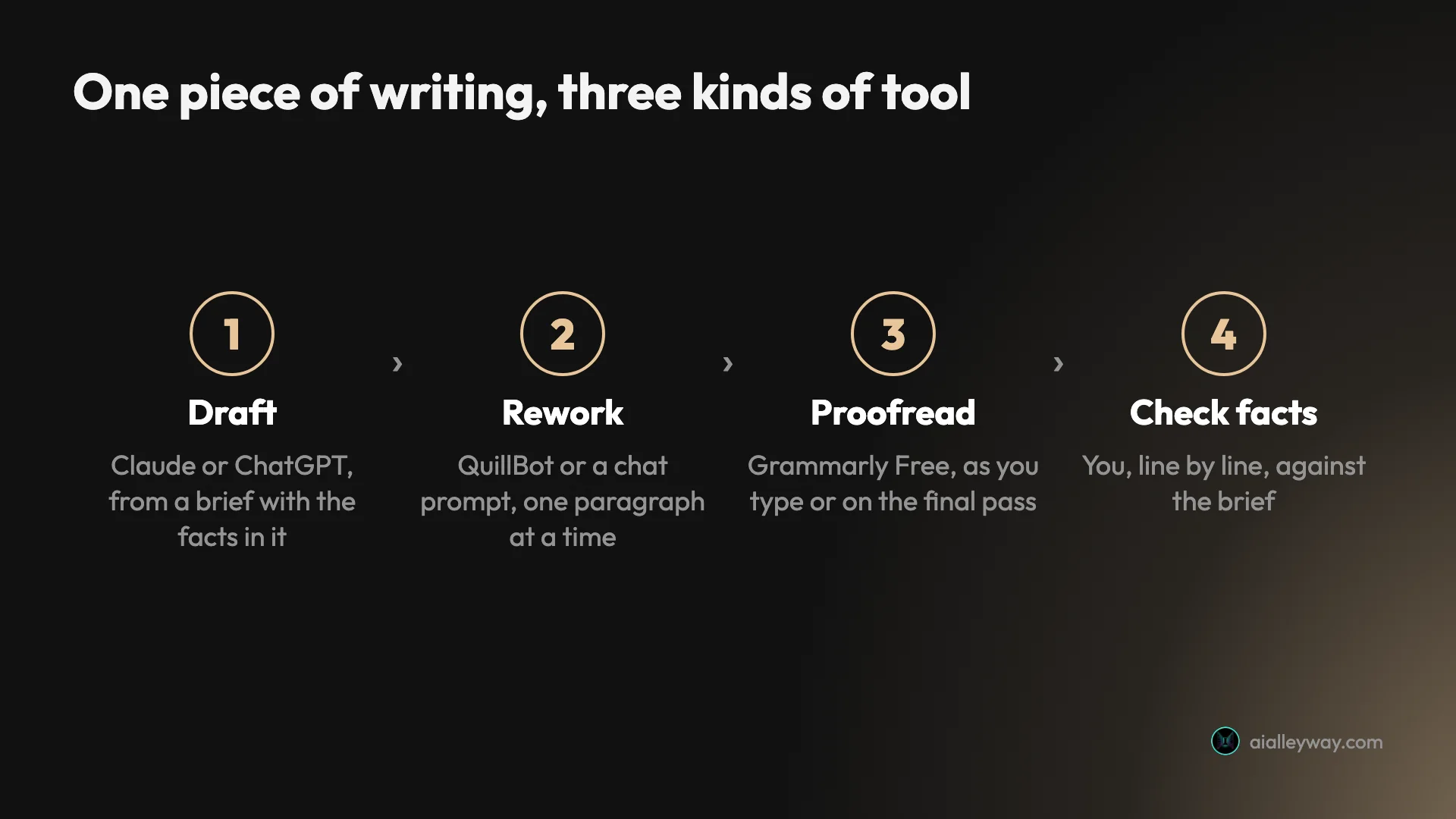
That setup gives each problem I found a place to be caught. Gemini’s changed promise would surface at the fact check. If you rework in QuillBot rather than a chat prompt, its swapped details show up as coloured words to compare with your original. And Grammarly’s invented clause shows up as a tracked change before you accept it.
The best AI writing tool for each kind of writer
The same nine tools rank differently depending on what you write all day. Here is how I would match them, based on what each one did in the tests and what it costs.
| Writer | Draft with | Check with |
|---|---|---|
| Student | Your own notes | Grammarly Free |
| Office worker | Gemini or the assistant your company pays for | Grammarly |
| Blogger | Claude | Grammarly |
| Marketing team | Jasper | Grammarly |
| Novelist | Sudowrite or Claude | ProWritingAid |
| Second-language writer | ChatGPT | Grammarly Free |
Students. Grammarly Free for proofreading, because it underlines mistakes in Google Docs as you write and caught every planted error. Be careful with paraphrasers: QuillBot’s free paraphraser changed four details in one paragraph, and a changed detail in a cited source is a factual error with your name on it. If your school checks for AI writing, read the detector section below before you lean on any of these tools.
Office workers and email-heavy jobs. Grammarly in the browser, plus whichever assistant your company already pays for. If that is Google Workspace with Gemini, use it for first drafts inside Gmail and Docs, and check every date and number it writes, because that is exactly what it changed in my test.
Bloggers and content writers. Claude for drafts, with a style guide saved in a Project (a Pro feature) so it follows your rules on every piece, then Grammarly for the final pass. ChatGPT is the free substitute. Neither replaces your own research: an assistant will write a fluent paragraph around a wrong fact you gave it, or one it guessed.
Marketing teams. Jasper if you need brand voices, shared knowledge and admin controls across several writers. A smaller team can get most of the way with a shared Claude or ChatGPT team plan and a written brand guide, for less money.
Novelists. Sudowrite for drafting and brainstorming scenes, ProWritingAid for editing the manuscript. Claude is a strong general-purpose alternative for both, and it is the one I would try first if you also write non-fiction.
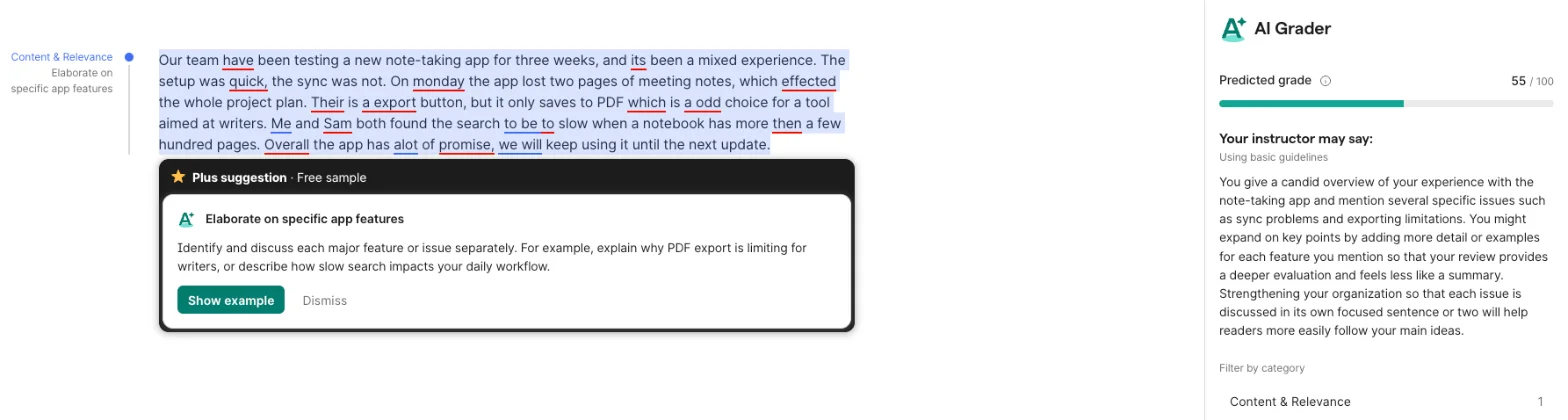
People writing in a second language. Grammarly Free catches the slips that non-native speakers make most often, such as “a export” for “an export”, and it does it as you type. ChatGPT is useful for asking why something is wrong, because it explains each fix in plain words. In my test it gave a reason for every one of the 12 errors it listed in the first paragraph.
How to write a brief an AI can follow
The email test doubles as a lesson in briefing. Every rule I could count was followed by all three assistants: the word count, the banned words, the punctuation and the format. The one failure came on a fact written as a plain sentence, which Gemini then reworded.
This is the brief I used, word for word, if you want to run the same test on a tool you are considering:
Write an email to the customers of a small bike-repair shop called Spoke & Chain, announcing that the shop is moving. Facts to include: the shop is moving from 12 Elm Street to 48 Harbor Road; the new shop opens on Monday, November 9; the shop is closed from November 2 to November 7 for the move; any repair dropped off before October 31 will be ready on time. Rules: the email must be between 130 and 170 words; use no exclamation marks; do not use the words "exciting", "thrilled", "journey" or "delighted"; use no bullet points and no headings; end with a one-sentence sign-off from Dana, the owner. Give me only the email.Four habits made the difference in my briefs, and they work in any of the chat tools here.
- Put every fact in the brief, word for word. Names, dates, prices and addresses. An assistant that has to guess a detail will guess a plausible one.
- Say what must not change. “Keep these four facts exactly as written” is a rule a model can check itself against. “Include these facts” is an invitation to paraphrase them.
- Write rules as limits you can count. “Between 130 and 170 words” and “no exclamation marks” were followed every time. “Keep it short and friendly” gives you whatever the model thinks short and friendly means.
- Ask for the output only. With “Give me only the email” in the brief, all three returned just the email, with no introduction or list of suggestions to delete, though ChatGPT still offered follow-up buttons under it.
The same habits help with rewrites. When I asked Grammarly’s AI Chat to rewrite a paragraph and keep every fact, it still dropped one. A rule in the prompt raises the odds; it does not replace reading the result.
AI detectors and school work
If your writing will be checked for AI, know two things before you use any tool on this list. Detectors make mistakes in both directions, and some of the companies selling them also sell a way around them.
Our QuillBot AI detector test ran seven texts through QuillBot’s free detector. It cleared every human-written text and caught formal AI writing, but it scored a casual story written by Claude as 100% human. Grammarly’s detector page claims 99% accuracy and, further down, says “No AI detector is 100% accurate”. On my free Grammarly account, the locked AI Detector panel sat directly above a card promoting its AI Rewriter to “swap out phrases that may appear to be AI-generated”.
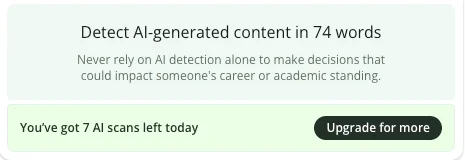
Even the detectors warn you about themselves. QuillBot’s panel tells you never to rely on AI detection alone, right above the count of scans you have left today.
The practical rule is simpler than the technology. Follow your school’s or client’s policy on AI use, keep your notes and drafts so you can show how you wrote something, and use these tools to check and improve your own writing rather than to produce work you hand in as yours.
Will Google penalise AI-written content?
Not for being AI-written. Google’s Search Central blog says “Appropriate use of AI or automation is not against our guidelines”, and that its systems reward high-quality content “however it is produced”. What breaks Google’s rules is volume without value: its spam policies give, as an example of scaled content abuse, using generative AI tools to “generate many pages without adding value for users”.
That makes the advice the same as for any writing. Use these tools to write better pages, not more of them. A post with your own test results, screenshots and judgement is the kind of page Google says it rewards, and it is also the kind none of these tools can write for you.
What AI writing tools still cannot do
None of these tools knows your facts unless you give them. Every error I found came from a tool filling a gap or smoothing a sentence, and the result always read well. Fluency is not accuracy, and the better a tool writes, the easier its mistakes are to miss.
They also cannot tell you whether your argument is right. Grammarly’s AI Grader gave my error-filled paragraph a predicted grade of 55 out of 100 with comments on content and structure, and said nothing about the 14 mistakes in it. A tool that grades your ideas and a tool that checks your grammar are doing different jobs, and neither replaces a human reader who knows the subject.
Final word
The best AI writing tools in 2026 are a pair, not a single app: Claude to draft and Grammarly to check, with ChatGPT as the free tool that does both well enough to start, and our Grammarly review is the place to begin if you only install one.
Frequently asked questions
What is the best AI writing tool?
There is no single best one, because writing is two jobs. For drafting from a brief, Claude was the best of the three assistants I gave the same email to: it kept every fact, followed every rule and was the only one to add a concrete detail of its own. For checking what you wrote, Grammarly's free plan caught all 23 errors I planted in two practice paragraphs and raised nothing on a clean one.
If you want one tool and no bill, ChatGPT's free plan is the closest thing to both. It wrote an accurate email from the same brief and caught 22 of the 23 planted errors when asked to proofread. It is weaker than Claude at sounding like a person and weaker than Grammarly at catching mistakes as you type, but it does each job well enough to start with.
What is the best free AI writing tool?
ChatGPT's free plan for drafting and a final proofread, and Grammarly's free plan for checking as you type. In my tests ChatGPT Free wrote an accurate 155-word email from a brief and caught 22 of 23 planted errors, and Grammarly Free caught all 23 and underlined them in place.
Gemini's free plan is also generous, but in my drafting test it changed a promise in the brief, so read its drafts closely. QuillBot's free plan is useful for rewording up to 100 words at a time. Of the nine tools here, only Jasper and Sudowrite have no free plan at all; both offer a trial instead, and Notion AI gives free users a limited trial of its AI.
Is Claude or ChatGPT better for writing?
Claude, for prose that has to sound like a person. Given the same email brief, both kept every fact and both followed the rules on length, banned words and punctuation, but Claude's version read like a shop owner wrote it, with a line about packing up tools and workbenches, while ChatGPT's read like a template. Our longer tests with a style guide found the same: Claude keeps following prohibitions deep into a long draft where ChatGPT drifts back to headers and bullets.
ChatGPT is the better product overall. It does images, voice and much more, its free plan is more generous, and it is a stronger proofreader than most dedicated checkers. One caveat on my email test: Claude ran on a paid plan and ChatGPT on the free one.
Can AI writing tools replace a grammar checker?
Nearly, for a final pass. When I asked ChatGPT's free plan to proofread two practice paragraphs, it caught 22 of the 23 planted errors, including a dangling modifier that several dedicated checkers missed, and it correctly said a clean paragraph had no errors.
What a chat assistant cannot do is check as you type. You paste text in and read a list back, and its corrected version is a rewrite you have to compare with your original. A grammar checker such as Grammarly underlines mistakes in place in your email or document. Use both: the checker while you write, a chat model as a second read.
Which AI writing tool is best for fiction?
For drafting fiction, Sudowrite is the tool built for it, with a Story Bible that keeps track of characters, setting and plot as you write. I did not test it for this roundup, so treat that recommendation as based on its own documentation and pricing page rather than hands-on use.
For editing a manuscript, ProWritingAid is the one novelists use. It calls itself a toolkit for storytellers, sells reports on pacing and repetition, and has a lifetime licence. Its free checker caught 18 of my 23 planted errors but raised two false alarms on a clean paragraph, so it is better at style reports than at basic proofreading.
Does Google penalise content written with AI tools?
Not for using AI. Google's Search Central guidance says appropriate use of AI or automation is not against its guidelines, and that its ranking systems aim to reward original, high-quality content however it is produced, judged on expertise, experience, authoritativeness and trustworthiness.
What Google does penalise is scale without value. Its spam policies name using generative AI tools to generate many pages without adding value for users as scaled content abuse. In practice, an AI writing tool is safe to use for drafting and editing a page that carries your own knowledge, tests and judgement. Using one to publish hundreds of thin pages is the pattern Google says it acts against.
Do AI writing tools change what you meant?
Sometimes, and it was the most consistent problem across my tests. Gemini rewrote a promise in an email brief, turning repairs that would be ready on time into repairs ready before the shop closed for six days. QuillBot's paraphraser changed four details in a 77-word paragraph, and one of Grammarly's AI rewrites added a claim I never made.
The tools that showed their edits as tracked changes, like Grammarly's editor and Notion AI, made those changes easy to catch. The ones that hand back a clean block of new text hide them. Whatever you use, read the output against your original before you send it.
Keep reading
Grammarly review: a near-perfect checker with a pushy AI
A Grammarly review from 23 planted errors: the free plan caught all 23, but one AI rewrite added a claim I never made. Prices, privacy and verdict.
QuillBot review: a quick paraphraser that edits your meaning too
A QuillBot review from the free plan: 18 of 23 planted errors caught, a paraphraser that swapped facts, and whether Premium at $99.95 a year is worth it.
Grammarly alternatives: 6 tested, none beat its free plan
The best Grammarly alternatives, tested on 23 planted errors: ChatGPT caught 22, Ginger 20, ProWritingAid 18. None beat Grammarly Free. Here is when to switch.
Grammarly vs QuillBot: one caught 23 of 23 errors, one costs less
Grammarly vs QuillBot, tested with the same paragraphs on both free plans: who caught more errors, who rewrote without changing facts, and who costs less.
Grammarly pricing: $144 a year, or $360 if you pay monthly
Grammarly pricing in October 2026: Free, Pro at $12 or $30 a month, the student half-price deal, the Superhuman $15 trap and what a year really costs.
Grammarly AI detector: I tested it, and the #1 claim is stale
Grammarly's free AI detector, tested on human and AI text: what it caught, what it missed, the two-scan daily cap, and why its RAID #1 claim is out of date.