
Grammarly alternatives: 6 tested, none beat its free plan
The best Grammarly alternatives, tested on 23 planted errors: ChatGPT caught 22, Ginger 20, ProWritingAid 18. None beat Grammarly Free. Here is when to switch.
Contents
What is the best Grammarly alternative?
ChatGPT is the best free Grammarly alternative for proofreading a finished draft, and ProWritingAid is the best one for long-form writers who want style reports on top of grammar. But the honest headline is that none of the six I tested caught as many mistakes as Grammarly’s own free plan. I gave every tool the same three practice paragraphs, with 23 errors planted in them and a clean control paragraph: the six alternatives on 24 October 2026, and Grammarly on 22 October.
- Best free proofreader: ChatGPT, which caught 22 of 23 and explained every fix.
- Best for long-form and fiction writers: ProWritingAid, 18 of 23, with style reports and a lifetime licence.
- Best for rewording: QuillBot, 18 of 23, with a paraphraser that colours every change.
- Best for other languages: LanguageTool, 15 of 23 in English, but 30-plus languages and open source.
- Best quick check without an account: Ginger, 20 of 23, in 450-character bites.
- Best for readability, not grammar: Hemingway Editor, which caught none of the planted errors, by design.
If you came here because Grammarly costs too much, read the free-plan results before you switch. Grammarly Free flagged all 23 planted errors in our Grammarly review, and it is still the free checker to beat. The case for an alternative is a specific need: fiction reports, another language, a lifetime licence, rewording, or a second opinion.
How I tested six Grammarly alternatives
Most lists of Grammarly alternatives describe features. I wanted to know which tools catch the mistakes Grammarly catches, so I gave every one the same test.
What a Grammarly alternative has to replace
Grammarly is really four things, and most people use only one or two of them. Knowing which ones you rely on narrows this list fast.
- Live underlines. The browser extension and apps mark mistakes in Gmail, Google Docs, Slack and most text boxes as you type. This is the hardest part to replace for free. QuillBot’s extension is free, ProWritingAid’s free plan lists grammar, spelling and punctuation checks and the company makes extensions for Chrome, Edge and Firefox, LanguageTool’s extension is now paid, and ChatGPT and Hemingway’s free editor do not underline as you type at all.
- The proofreader itself. How many real mistakes it catches, and how rarely it flags correct writing. That is what my test measures.
- Rewrites and tone. Grammarly’s AI rewrites, tone suggestions and paraphraser. QuillBot and ChatGPT are the strongest substitutes here, with the same warning: read every rewrite for changed facts.
- The extras. An AI detector, a plagiarism checker and citation help. Grammarly locks its detector and plagiarism check inside the editor on the free plan; QuillBot’s free plan includes a limited detector.
If you only need the second item, a finished-draft proofread, the field is wide open. If you need the first, your real choice is between Grammarly Free, ProWritingAid and QuillBot.
The test is three practice paragraphs written for our Grammarly review, each with an answer key:
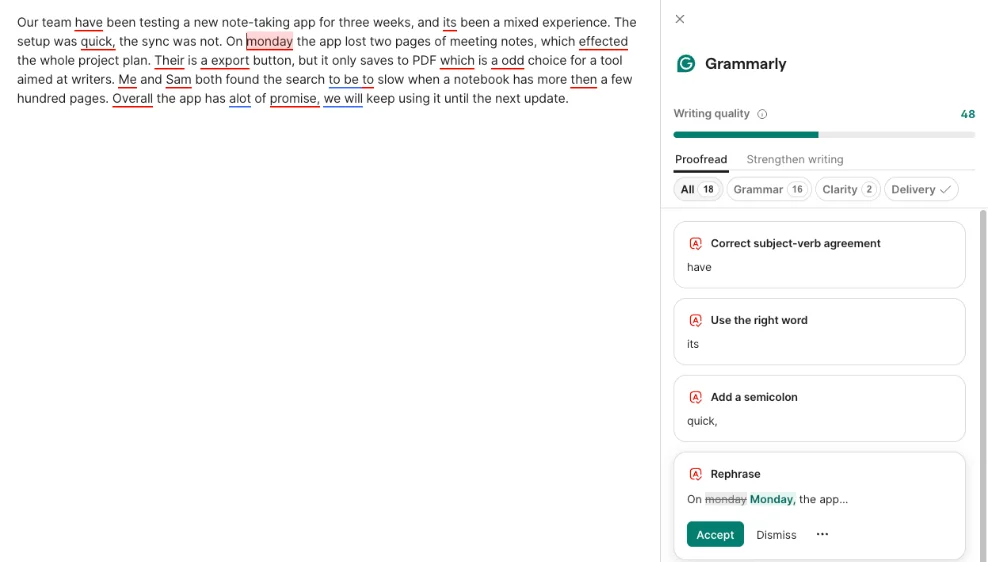
- A simple paragraph with 14 problems: “its been”, “effected”, “Their is”, “a export”, “a odd”, “to slow”, “more then”, “alot”, a missing capital on Monday, “Me and Sam”, two comma splices, a missing comma before “which”, and “Our team have”. Two of the 14 are judgement calls: “team have” is fine in British English, and a short comma splice is accepted by many style guides.
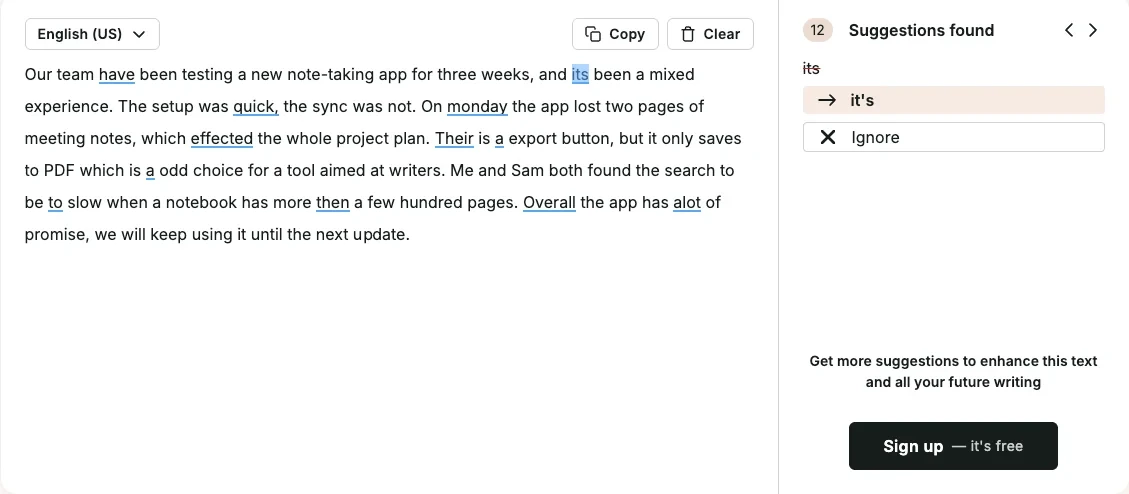
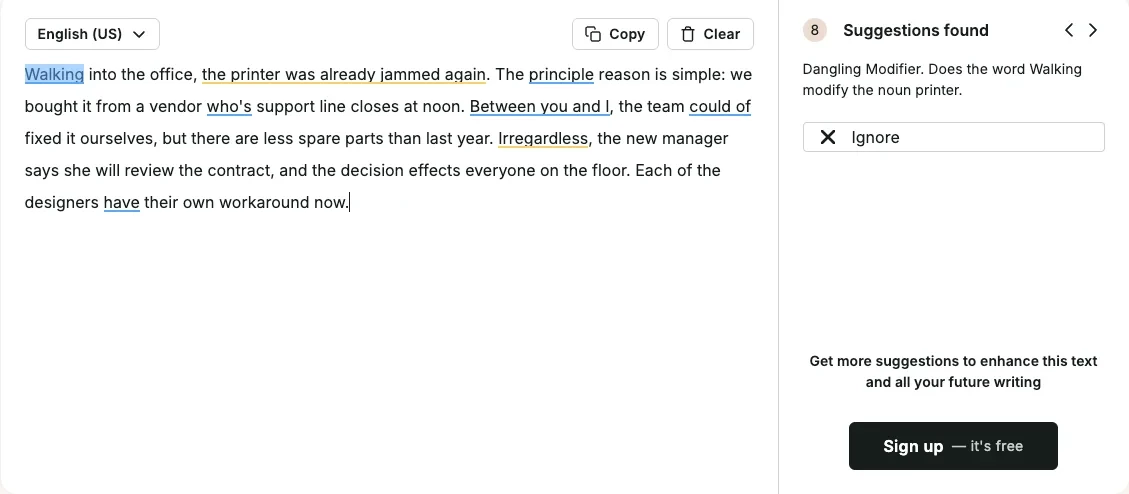
- A paragraph with 9 subtle errors: a dangling modifier, principle for principal, who’s for whose, “between you and I”, “could of”, less for fewer, “irregardless”, effects for affects, and “each of the designers have”.
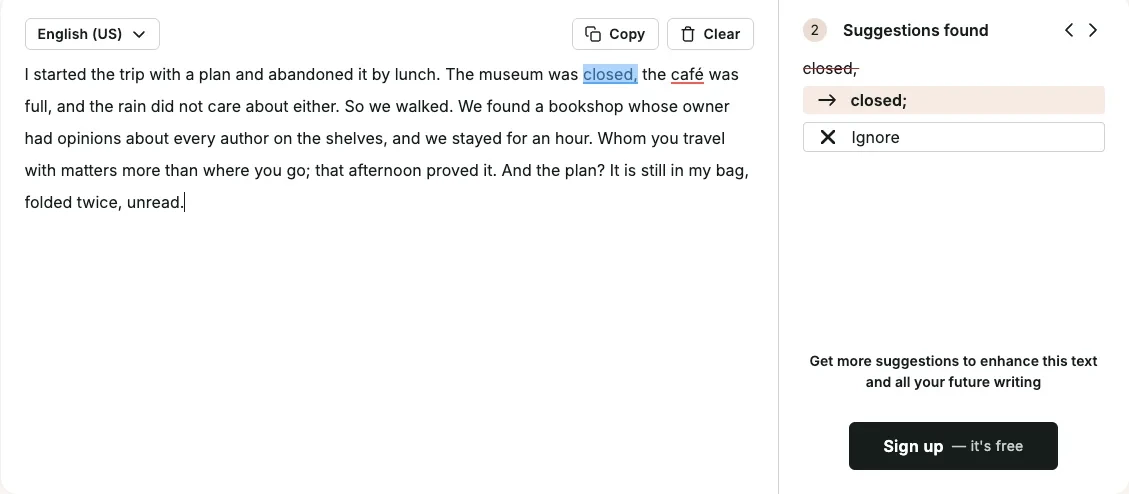
- A clean 77-word control paragraph: no errors, but deliberate fragments, a semicolon, “whom” and a rhetorical question, to see which tools cry wolf.
I counted an error as caught if the tool flagged it or fixed it, even if the fix differed from mine. A false alarm is any suggestion on the clean paragraph that would make it wrong.
| Tool | Account in my test | How I ran it |
|---|---|---|
| ChatGPT | Free, signed in, temporary chat | One message with all three paragraphs |
| ProWritingAid | No account | Free web grammar checker |
| QuillBot | Free account | Grammar checker, from our QuillBot review (22 Oct) |
| LanguageTool | No account | Free public checking service |
| Ginger | No account | Free web checker |
| Hemingway Editor | No account | Free web editor |
| Grammarly, for reference | Free account | Grammarly Docs, from our Grammarly review (22 Oct) |
Three caveats. First, this is one set of paragraphs, not a benchmark; 23 errors is enough to separate a good checker from a weak one, but a two-point gap is not a verdict. Second, I tested free versions only, so ProWritingAid’s and LanguageTool’s paid checks are described from their own pages. Third, LanguageTool’s website would not accept input from my browser automation, so I ran its free public checking service instead, which LanguageTool offers to anyone without an account.
Two that did not make the list
Two tools that often appear on these lists are missing on purpose. Microsoft retired its Editor browser extension on 31 October 2025, according to its support notice, and moved its writing checks into Edge’s built-in proofing. And I did not test Wordtune, whose rewriting overlaps with QuillBot’s, so it is not ranked. WhiteSmoke and Sapling, which appear on some other lists, are not tested here either.
For completeness, here is what their own pages say. Wordtune’s free plan allows “10 Rewrites & AI suggestions” a day and unlimited spelling and grammar checks, and its paid plans cost $6.99 or $9.99 a month billed annually, according to its plans page. It writes only in English. Its Chrome extension had a 3.3 rating when I checked, though its homepage claims 4.7.
Microsoft’s checks now live in Edge’s proofing and in Word. Microsoft’s support page says a free Microsoft account gets basic spelling and grammar checking in Word for the web, and a Microsoft 365 subscription adds clarity, conciseness and formality suggestions. If you already pay for Microsoft 365, try Word’s Editor before paying for anything on this list.
Six alternatives compared
| Tool | Planted errors caught (of 23) | False alarms on the clean paragraph | Free limit I hit or found | Cheapest paid plan | Lifetime option |
|---|---|---|---|---|---|
| Grammarly, for reference | 23 | 0 | None in this test | Pro, $144 a year | No |
| ChatGPT | 22 | 0 | None in this test | Go, $8 a month | No |
| Ginger | 20 | 0 | 450 characters per check | $45 a year during a 50% promotion | No |
| ProWritingAid | 18 | 2 | Full report 2 runs a day, 500 words | Premium, $120 a year | $399 |
| QuillBot | 18 | 0 | Paraphraser 100 words | Premium, $99.95 a year | No |
| LanguageTool | 15 | 0 | Browser extension now paid | Premium, $69.90 a year | No |
| Hemingway Editor | 0 | 0 (one passive-voice note) | Grammar is a paid feature | Plus, $100 a year | Desktop app $19.99, no AI |
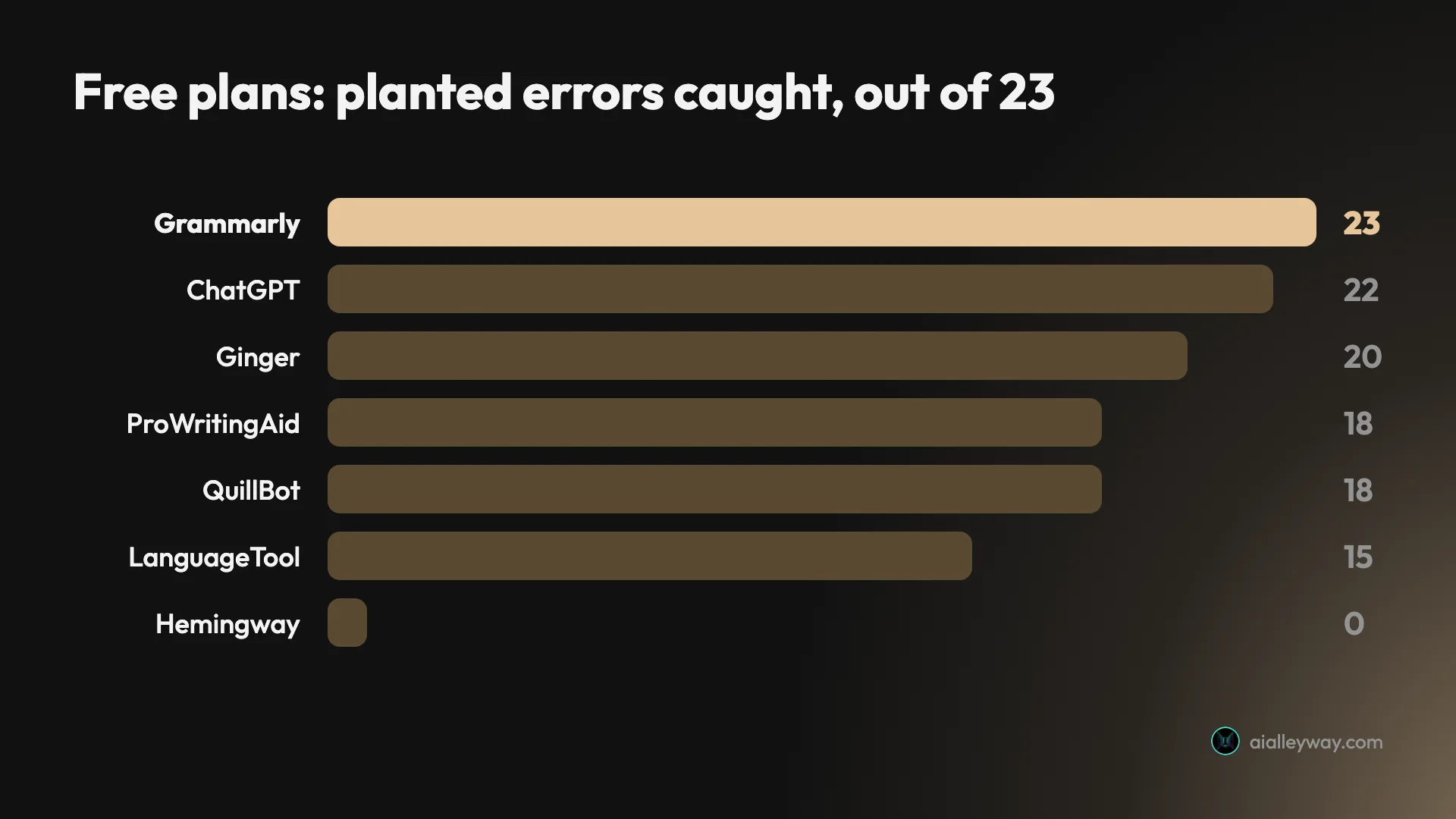
Every grammar checker caught the obvious slips, like “alot” and “more then”. The gaps opened on the subtle paragraph. Only Grammarly and ChatGPT caught all nine, and the dangling modifier (“Walking into the office, the printer was already jammed”) beat Ginger, LanguageTool and QuillBot.
The two hardest items both needed the whole sentence, not a word or two. The dangling modifier and the missing comma before a “which” clause were each missed by three of the five grammar checkers, while “could of” was caught by all five. Those structural slips are also the ones a tired human editor misses, which is exactly why you want a checker that reads sentences rather than matching words.
The clean paragraph matters as much as the score. A checker that flags correct writing trains you to click “ignore” without reading, and then it misses the real error next time. Five of the six left my control paragraph’s grammar alone; ProWritingAid’s free checker did not. Hemingway marked “was closed” as passive voice, a style note rather than a correction.
Where each one runs
Live checking depends on where the tool can reach. This is what each vendor lists, not what I tested; I did not install any of the extensions.
| Tool | Browser extension | Other places the vendor lists |
|---|---|---|
| Grammarly, for reference | Yes | Desktop apps, Word on Windows, Google Docs, a mobile keyboard |
| ChatGPT | None I could find for proofreading | Web, desktop and mobile apps |
| ProWritingAid | Chrome, Edge, Firefox | Google Docs, Word on Mac and Windows, Scrivener, a desktop editor |
| QuillBot | Chrome, Edge, Safari | Word add-in; Windows, macOS, iPhone and Android apps |
| LanguageTool | Premium only (free with a self-hosted server) | Website; Windows, macOS and iOS apps with a free account; a Word add-in for Windows, Mac and Word online |
| Ginger | Chrome, Edge, Safari | Word on Windows, Google Docs; Mac, Windows, iOS and Android apps |
| Hemingway Editor | None I could find | Web editor, Word add-in, desktop app ($19.99) |
Read the table from the app you write in most. If your writing happens in Gmail and Google Docs, the tools with a free browser extension are the only real swaps. If it happens in Word on a Mac, note that Grammarly’s own Mac add-in is gone, while ProWritingAid lists Word on the Mac and LanguageTool’s homepage lists a Word add-in that works on the Mac. And if you write in a dedicated app like Scrivener, ProWritingAid is the one that lists it.
What happens to your text
If you want your text to stay on your own machine, two options here offer that: Hemingway’s paid desktop app, which Hemingway says needs no internet connection, and a self-hosted LanguageTool server. Beyond that, the training defaults differ more than the marketing suggests.
LanguageTool’s privacy policy says inputs are not used to train its models, with no opt-out needed. Hemingway’s privacy policy says neither it nor its AI providers train models on your content. Grammarly and QuillBot both train on individual users’ text by default, with an opt-out, as our Grammarly vs QuillBot comparison found. ChatGPT’s temporary chats are not saved to your history, which is why I used one; its full data controls are worth reading in your own settings before you paste anything confidential. ProWritingAid’s pricing page promises “100% data security & privacy” without detail on that page.
If you handle client work or anything under a confidentiality agreement, that list should decide the shortlist before accuracy does.
1. ChatGPT — best free Grammarly alternative for proofreading

ChatGPT came closest to Grammarly’s score, and it is not even a grammar checker. I opened a temporary chat on a free account, so nothing was saved to history, and pasted all three paragraphs with one instruction: list every error in each, give a corrected version, and leave correct text alone.
It caught 22 of 23. On the simple paragraph it listed 12 problems that covered 13 of the 14 on my key, and left only the short comma splice (“The setup was quick, the sync was not.”) as it was, which is one of the two judgement calls. On the subtle paragraph it caught all nine, including the dangling modifier, which it rewrote as “Walking into the office, I found that the printer was already jammed again.” On the clean paragraph it said “No errors found” and explained why “So we walked.” and “And the plan?” were deliberate.
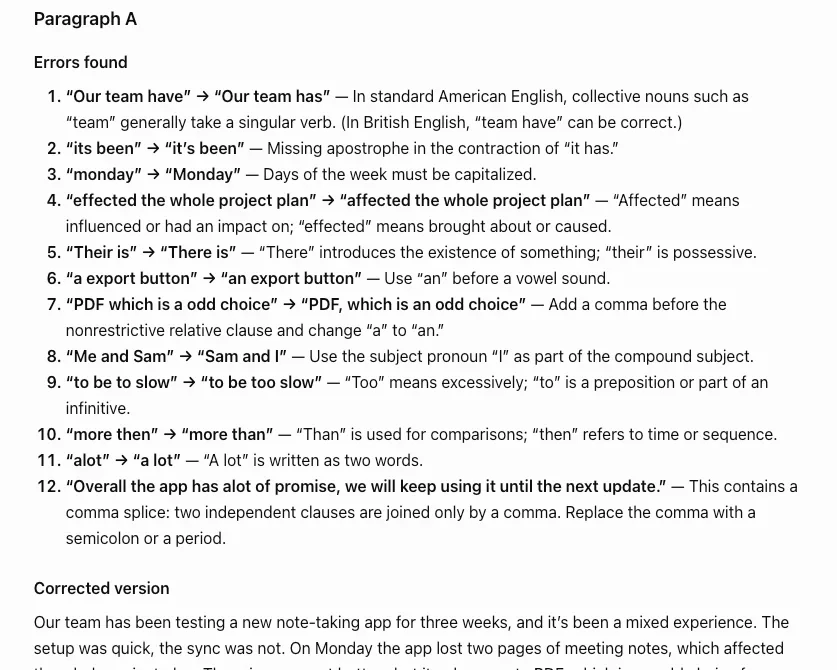
It also hedged where a good editor would. It noted that “Our team have” is acceptable in British English and that “irregardless” appears in dictionaries, while still recommending the standard forms.
The catch is the workflow. ChatGPT does not sit in your email or document underlining words as you type. You paste text in, read a list, and copy a corrected version back, then check that it changed only what you wanted. A chat model’s answer can also vary from one run to the next, so my 22 is one run, not a guarantee. For a cover letter, an essay or a report you are about to send, that trade is fine. For every message you type all day, it is not.
The prompt matters more than people expect. Asking ChatGPT to “fix the grammar” invites it to rewrite your style along with your mistakes. What worked was three parts: list every error, then give a corrected version, and “do not change anything that is already correct”. The list lets you check its reasoning, and the last line is what kept my clean paragraph untouched. If you want British spelling or a house style, say so in the same message.
Pricing: the free plan was enough for this test. Go costs $8 a month, Plus $20 a month and Pro starts at $100, according to OpenAI’s pricing documentation. I could not find a published number of free messages.
Good for: a final proofread of something important, and explanations of why a sentence is wrong. Not for: live checking as you write. Our ChatGPT review covers the rest of what it does, and ChatGPT vs Claude compares it with its closest rival.
2. ProWritingAid — best for long-form and fiction writers

ProWritingAid is the alternative most people mean when they ask for “Grammarly, but for writers”. It has the deepest set of reports of anything here, and its homepage title now calls it “The Complete Toolkit for Storytellers”.
Its free web grammar checker caught 18 of 23. On the simple paragraph it found 11 of 14, plus a comma after “Overall” that was a fair extra. It missed the comma before “which”, “Me and Sam”, and the comma splice at the end. On the subtle paragraph it was better than most, catching 7 of 9 including the dangling modifier, with a clear note: “Does the word Walking modify the noun printer.” It missed less for fewer and effects for affects.
It was also the only tool to raise false alarms. On the clean paragraph it suggested changing “The museum was closed, the café was full, and the rain…” to a semicolon after “closed”, which would break a correct list of three, and it underlined “café” as a spelling error. Two wrong flags in 77 words is the kind of noise that teaches you to ignore a checker.
The free plan inside an account is tight for long work. ProWritingAid’s pricing page limits the free Grammar Report to “2 runs/day (up to 500 words)” and allows 10 rephrases a day. The paid plans are where its reports live, from style and repetition to chapter critiques, with deeper manuscript analysis of plot, characters and pacing sold separately as Story Credits.
The gap between its two paid plans is aimed at novelists. Premium lifts the free plan’s daily report limits and includes one Chapter Critique a day; Premium Pro raises that to 30, increases the Story Credits discount from up to 40% to up to 65%, and adds live and on-demand workshops, according to the same page. If you are not writing a book, Premium is the plan to compare with Grammarly Pro.
Pricing: Premium costs $30 a month or $120 a year, and Premium Pro $36 a month or $144 a year. It is the only tool here with a lifetime licence for the full product: $399 for Premium or $699 for Premium Pro, with a three-day money-back window. It checks English only.
Where it runs: browser extensions for Chrome, Edge and Firefox, Google Docs, Microsoft Word on desktop, Scrivener and a desktop editor, per its integrations page. Its Chrome extension had a 4.6 rating from about 7,000 ratings and 200,000 users when I checked.
Good for: novelists and long-form writers who want reports, and anyone who would rather pay once. Not for: someone who wants the most accurate everyday proofreader. Our Grammarly pricing guide puts its lifetime licence against Grammarly Pro’s renewals.
3. QuillBot — best Grammarly alternative for rewording

QuillBot is a paraphraser first and a grammar checker second, and the scores show it. In our QuillBot review, its free grammar checker caught all 14 errors in the simple paragraph but only 4 of the 9 subtle ones, for 18 of 23. It raised no grammar flags on the clean paragraph.
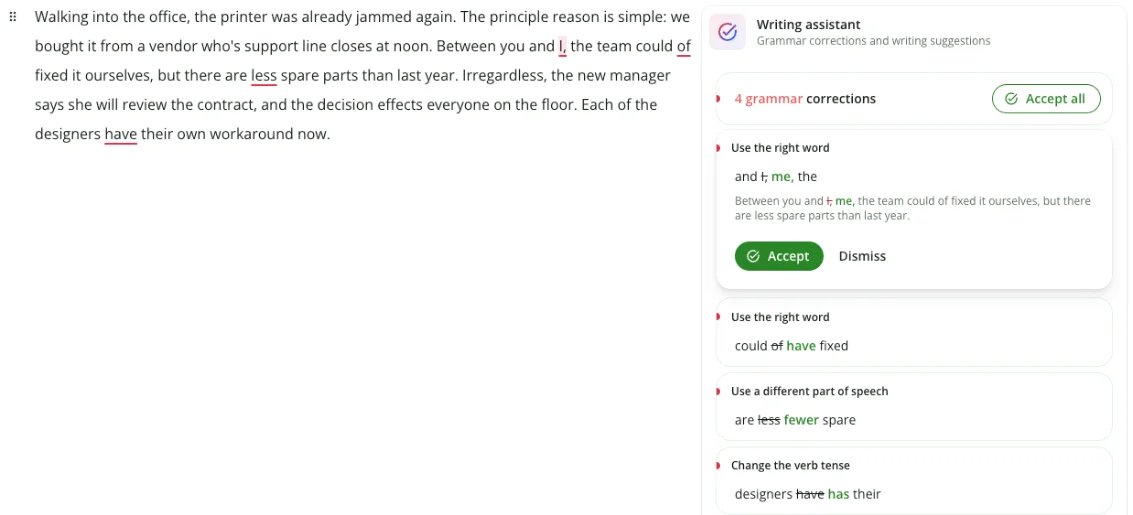
Where it wins is rewording. Paste a paragraph, pick a mode and you get a full rewrite with every changed word coloured in, which makes it quick to see what moved. The free plan rewrites 100 words at a time in two modes; Premium opens up the rest. Read every rewrite against your original, though: in our test, the free Standard mode turned an unread plan into an unopened one and a bag into a backpack, small changes of fact that a reader would never spot.
Its free plan also includes an AI detector with seven scans a day, against two on Grammarly’s free detector page, as our QuillBot AI detector test found.
QuillBot also covers more ground than a grammar checker: a summarizer, a citation generator, a translator and a free browser extension. In our review the summarizer kept the main points of a paragraph but linked two of them in a way the text never did, which is the same caution as the paraphraser.
Pricing: QuillBot Premium defaults to $19.95 a month, $79.95 every six months or $99.95 a year on its US page, though QuillBot tests prices and varies them by region. That is $44.05 a year less than Grammarly Pro.
One more reason it is on this list: LanguageTool, its sister brand under the same owner, Learneo, now points free users to QuillBot’s browser extension.
If you are looking for QuillBot alternatives instead, the same test points the other way: for grammar, Grammarly Free (23) and Ginger (20) beat QuillBot’s 18, and for rewording, ChatGPT lets you say exactly what to keep.
Good for: students and writers who rephrase more than they proofread. Not for: catching subtle grammar. The full head-to-head is in Grammarly vs QuillBot.
4. LanguageTool — best Grammarly alternative for other languages

LanguageTool is the pick if English is not the only language you write in. It checks “more than 30 languages and dialects”, according to its homepage, where Grammarly checks six and ProWritingAid says it is available only in English.
In English it scored lowest of the real grammar checkers here. Its free checker caught 15 of 23: 9 of 14 on the simple paragraph and 6 of 9 on the subtle one, with no false alarms. The pattern of misses is telling: it caught the word-level slips and missed the ones that need sentence structure.
| Paragraph | LanguageTool caught | LanguageTool missed |
|---|---|---|
| Simple (14) | its, monday, Their, a export, a odd, Me and Sam, to slow, more then, alot | team have, effected, comma before which, both comma splices |
| Subtle (9) | principle, who’s, between you and I, could of, irregardless, effects | dangling modifier, less for fewer, each … have |
| Clean (77 words) | No flags | Nothing to miss |
Asking for its stricter “picky” level made no difference on these paragraphs. Its free checking service returned exactly the same matches, so the misses are not a setting.
The bigger change is in how you can use it for free. LanguageTool has made its browser extension Premium-only. Its announcement says the grammar checker and paraphraser “will stop working for free users on the extension”, while the website stays free, and it recommends QuillBot’s free extension instead. The extension’s Chrome rating stood at 3.3 from about 12,600 ratings when I checked, with 2 million users.
Two things still set it apart. The core is open source under the LGPL, and LanguageTool says developers can run their own server, with the extension still working for free against it. And its privacy policy says Learneo “does not use inputs from any LanguageTool user” to train its models, by default and with no opt-out needed.
A free LanguageTool account still gets something beyond the website. LanguageTool says its editor is available as an app for Windows, macOS and iOS if you register for a free account, and Premium adds what it calls more than 20,000 additional checks in English, German, French, Spanish, Dutch, Polish and Portuguese. I tested only the free checks, so whether those extra rules would have caught the dangling modifier is not something I can say.
Pricing: Premium lists at $24.90 a month, $49.90 a quarter or $69.90 a year for a US visitor, with a 14-day money-back guarantee. The pricing page also showed a limited-time offer, so you may see less.
Good for: multilingual writers, privacy-minded teams and developers who want to self-host. Not for: the most accurate English proofreading, or a free extension.
5. Ginger — best quick check without an account

Ginger was the surprise. Its free web checker, with no account, caught 20 of 23, more than any other dedicated checker except Grammarly, and it said “No mistakes detected!” on the clean paragraph.
There is a catch you hit straight away. The free box stops at 450 characters. My simple paragraph is 509 characters, so Ginger corrected the first 450, greyed out the rest, and showed “Sign up for free to correct longer texts”. I checked the last sentence separately to finish the test.
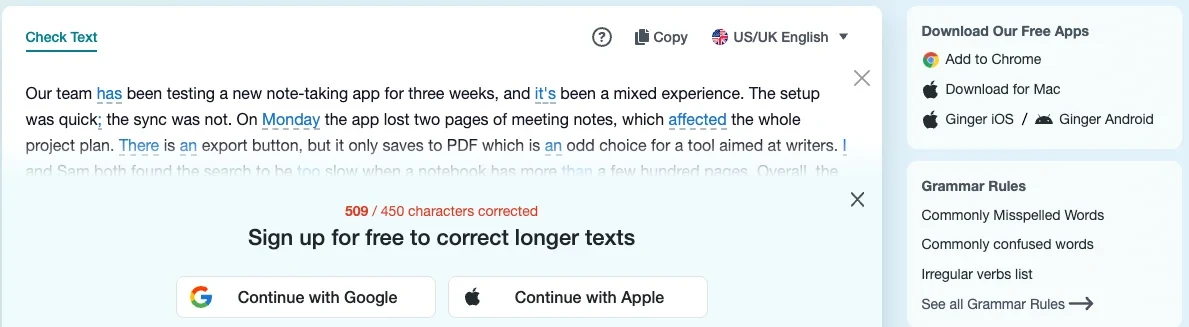
Across the two passes it caught 13 of 14 on the simple paragraph, missing only the comma before “which”. On the subtle paragraph it caught 7 of 9, missing the dangling modifier and “irregardless”. It fixes text in place rather than listing problems, so “Me and Sam” became “I and Sam”: right pronoun, wrong order.

Two things gave me pause. Ginger’s Chrome extension had not been updated since October 2025 when I checked, and it had a 4.0 rating from about 1,600 ratings. And a promotional pop-up for the extension opened over the page while I was testing.
Its iPhone app rates better than its extension: 4.6 from about 3,500 ratings on the US App Store. Ginger also bundles a rephrase button and translation, which is handy if English is your second language, since it corrects in English and can translate your text when you need to check its meaning.
Pricing: Ginger’s store showed a “50% off all plans” promotion, the same as in a US capture from mid-October: $6.50 a month instead of $13, or one payment of $45 a year. There is no free trial and no lifetime plan. Ginger markets its checker for English writing, and it translates into more than 40 languages.
Good for: checking an email or a paragraph quickly without signing up. Not for: anything longer than a short paragraph on the free plan.
6. Hemingway Editor — best for readability, not grammar

Hemingway belongs on this list for the opposite reason to the others: it shows what a grammar checker is not. Given the simple paragraph with 14 planted errors, the free web editor rated it Grade 6, “Good”, and reported “0 writing issues. Nice work.” Its only highlight was “Overall”, as a word with a simpler alternative.
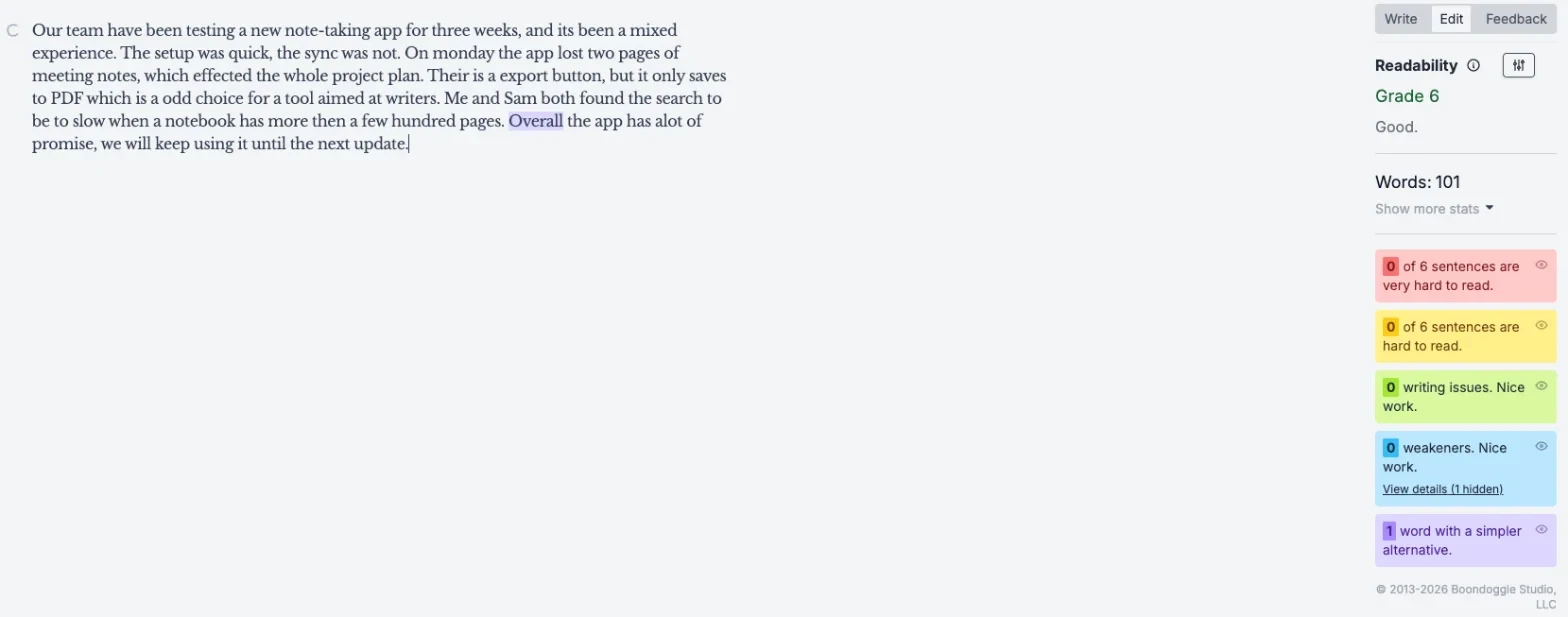
The subtle paragraph went the same way: 0 writing issues, one sentence marked hard to read, and “was already jammed” marked as passive voice. That is 0 of 23, and it is not a fault. Hemingway’s own billing help describes the free version as a tool that “scores the readability of your writing” and flags wordy sentences, passive voice and simpler words. Grammar checking belongs to the paid Hemingway Editor Plus.
That makes it a good second step, not a first one. After a grammar checker has fixed the mistakes, Hemingway shows which sentences are hard to read and where a plainer word would do, which no other tool here does as clearly.
The colour coding is the whole product, and it is quick to learn: yellow and red for sentences that are hard and very hard to read, blue for adverbs and passive voice, purple for a simpler word. Paste in a draft that a grammar checker has already cleaned, cut until the red sentences are gone, and the result is usually shorter and easier to read. That is a different job from proofreading, and doing both is the point.
Pricing: Hemingway Editor Plus costs $10 a month or $100 a year for 5,000 AI sentences a month, or $150 a year for 10,000, with a free two-week trial, per its Plus page. Its billing help says grammar fixes on Plus are unlimited. The desktop app, Hemingway Editor 3, is a one-time $19.99 and “does not include new AI features”. Its privacy policy says it and its AI providers do not train models on your text.
Good for: making clean writing clearer and shorter. Not for: catching grammar mistakes on the free plan.
How to pick a Grammarly alternative
Start with the question that splits these tools most: do you need checks as you type, or a check when you finish?
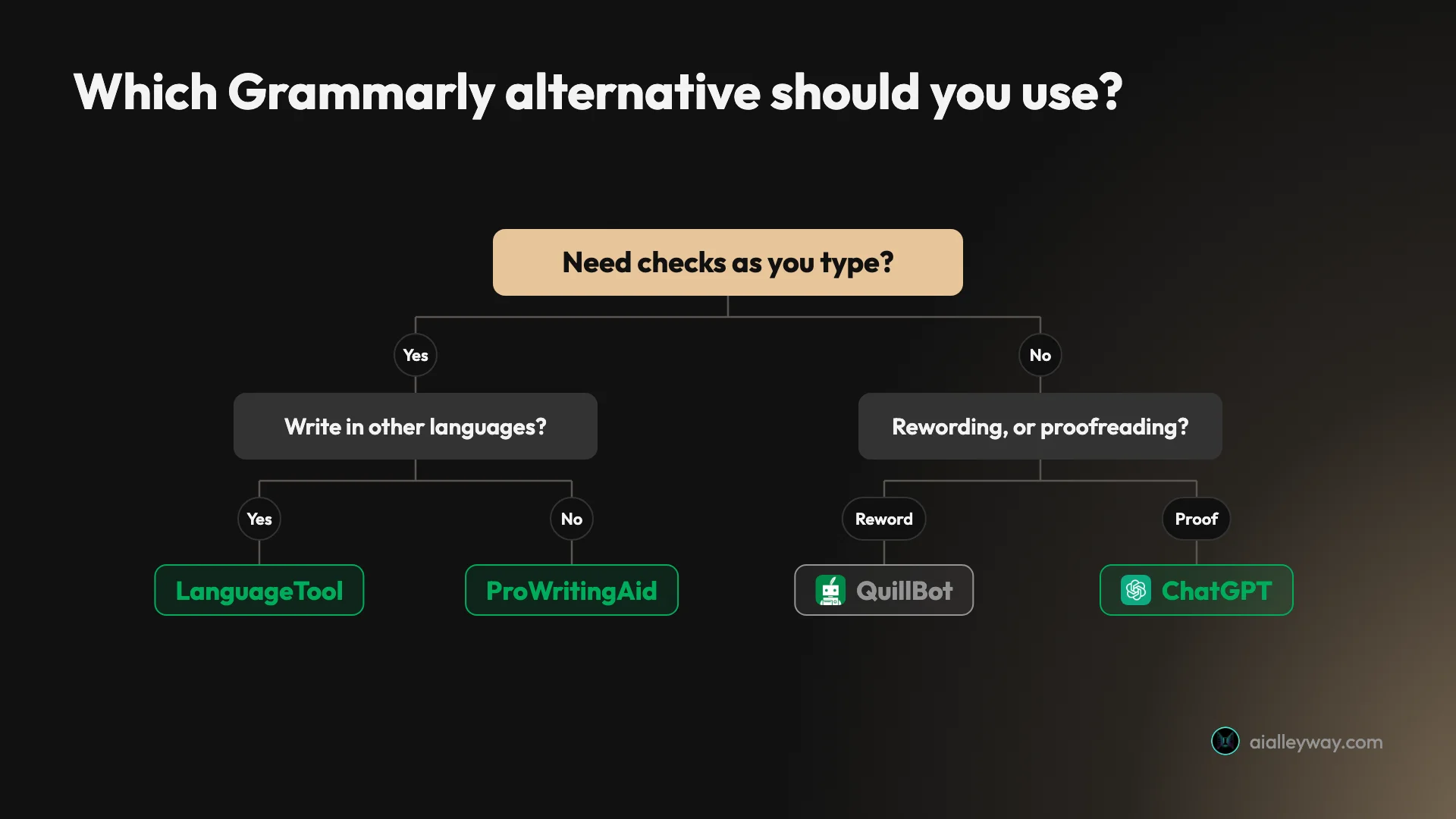
- If you want the most accurate free checker that underlines as you type, stay on Grammarly Free. Nothing I tested beat it.
- If you want a free second opinion on a finished draft, use ChatGPT, and compare its corrected version with yours.
- If you write fiction or long reports and want style feedback, pick ProWritingAid, and look at the $399 lifetime licence if you plan to use it for years.
- If you mostly rephrase, pick QuillBot, and read each rewrite for changed facts.
- If you write in a language other than English, pick LanguageTool, and budget for Premium if you want it in your browser.
- If you need a quick check without signing up, use Ginger, a paragraph at a time.
- If your grammar is fine but your sentences run long, use Hemingway’s free editor.
You do not have to choose one. The pairing that suits most people is a live checker for everyday typing, either Grammarly Free or QuillBot’s extension, plus ChatGPT as a second pass on anything that matters. Writers who care about style can add Hemingway’s free editor at the end. Avoid running two browser extensions at once; two sets of underlines in one text box is more confusing than helpful.
Final word
Switch from Grammarly for a reason, not for a free checker: in my test none of the six caught as many errors as Grammarly Free, so read our Grammarly review before you go. If you do switch, start with ChatGPT for proofreading, as our ChatGPT review explains, or pick ProWritingAid or LanguageTool for the one job each does better.
Frequently asked questions
What is the best free alternative to Grammarly?
For proofreading a finished draft, ChatGPT's free plan. Given the same three practice paragraphs, it caught 22 of the 23 planted errors and left a clean control paragraph alone. It does not underline as you type, though, so you paste text in and read a list back.
For checking as you write, nothing free matched Grammarly's own free plan, which caught all 23. Ginger caught 20 but checks only 450 characters at a time without an account, ProWritingAid's free web checker caught 18 and raised two false alarms, and LanguageTool's free checker caught 15. If you want a free checker that underlines as you type, Grammarly Free is still the one to beat.
Is ProWritingAid better than Grammarly?
Not for catching mistakes. On the same paragraphs, ProWritingAid's free web checker caught 18 of 23 planted errors, where Grammarly's free plan caught all 23. ProWritingAid also flagged two things in a clean paragraph that were not errors: a comma in a list and the word café.
ProWritingAid is built for a different job. It now calls itself a toolkit for storytellers, with style reports, chapter critiques and a lifetime licence at $399 for Premium. Grammarly Pro has no lifetime option and costs $144 a year. If you write long fiction and want reports on pacing and repetition, ProWritingAid is worth a trial; for everyday proofreading, Grammarly is more accurate.
Is LanguageTool still free?
Partly. LanguageTool's checker is still free on its website, but its browser extension is now for Premium users only. LanguageTool's announcement says the grammar checker and paraphraser stopped working for free users on the extension, and it points free users to QuillBot's extension instead. QuillBot and LanguageTool are owned by the same company, Learneo.
Premium lists at $24.90 a month or $69.90 a year for a US visitor. Developers can still run their own LanguageTool server, which is open source, and the extension keeps working for free against a self-hosted server.
Can ChatGPT replace Grammarly?
For a final proofread, nearly. In my test ChatGPT's free plan caught 22 of 23 planted errors, including a dangling modifier that three of the dedicated checkers missed, and it explained each fix. It also said a clean paragraph had no errors.
It cannot replace the way Grammarly works. There are no underlines in your email or document as you type; you paste text into a chat and copy the result back. Answers can vary from one run to the next, and its corrected version is a rewrite of your text rather than marks on it, so you have to compare its version with yours. I would use it as a second pass, not as the only one.
Is there a Grammarly alternative without a subscription?
Yes. ProWritingAid sells lifetime licences, $399 for Premium and $699 for Premium Pro, according to its pricing page. Hemingway Editor 3, the desktop app, is a one-time $19.99, but it checks readability rather than grammar and has none of Hemingway's newer AI features.
The free plans are another route. ChatGPT, Ginger, ProWritingAid, QuillBot and LanguageTool all check grammar for free with limits, and Grammarly Free caught more planted errors than any of them in my test.
What is the best QuillBot alternative?
For grammar, Grammarly. On the same practice paragraphs, Grammarly's free plan caught 23 of 23 planted errors and Ginger's free checker 20, against 18 for QuillBot's free grammar checker, which missed five of the nine subtle errors.
For rewording, ChatGPT is the most flexible substitute, because you can tell it exactly what to keep and what to change; QuillBot's own paraphraser changed small facts in our test, so read any rewrite against your original. Wordtune is QuillBot's closest direct rival for sentence rewrites, but I did not test it. LanguageTool, QuillBot's sister brand, also offers a paraphraser.
Why does Hemingway not catch grammar mistakes?
Because the free Hemingway Editor is a readability checker. It colours long sentences, passive voice, adverbs and words with simpler alternatives, and gives a reading grade. In my test it gave a paragraph with 14 planted errors a Grade 6, called it Good and reported 0 writing issues.
Grammar checking is part of Hemingway Editor Plus, which costs $10 a month or $100 a year and comes with a free two-week trial. Hemingway's billing help says grammar fixes on Plus are unlimited. Use the free editor to make clean writing clearer, after a grammar checker has done its job.
Keep reading
Grammarly review: a near-perfect checker with a pushy AI
A Grammarly review from 23 planted errors: the free plan caught all 23, but one AI rewrite added a claim I never made. Prices, privacy and verdict.
QuillBot review: a quick paraphraser that edits your meaning too
A QuillBot review from the free plan: 18 of 23 planted errors caught, a paraphraser that swapped facts, and whether Premium at $99.95 a year is worth it.
Grammarly vs QuillBot: one caught 23 of 23 errors, one costs less
Grammarly vs QuillBot, tested with the same paragraphs on both free plans: who caught more errors, who rewrote without changing facts, and who costs less.
Grammarly pricing: $144 a year, or $360 if you pay monthly
Grammarly pricing in October 2026: Free, Pro at $12 or $30 a month, the student half-price deal, the Superhuman $15 trap and what a year really costs.