
Grammarly vs QuillBot: one caught 23 of 23 errors, one costs less
Grammarly vs QuillBot, tested with the same paragraphs on both free plans: who caught more errors, who rewrote without changing facts, and who costs less.
Contents
Grammarly vs QuillBot: the short answer
Grammarly is the better proofreader and QuillBot is the better rewriter, and QuillBot costs less. I ran the same three practice paragraphs through both free plans. Grammarly flagged all 23 planted errors; QuillBot flagged 18 and missed five of the subtle ones. QuillBot’s paraphraser is the better tool for rewording a paragraph, but both tools changed small facts when they rewrote my text.
| If you want | Pick | Why, from my tests |
|---|---|---|
| Mistakes caught before you hit send | Grammarly | 23 of 23 planted errors on the free plan, against QuillBot’s 18 |
| A paragraph reworded, with every change shown | QuillBot | Ten modes, a synonyms slider and coloured changes |
| A free AI-detector check | QuillBot | 7 free scans a day with highlights, against Grammarly’s 2 |
| The lower bill | QuillBot | $99.95 a year at its US default price, against $144 |
If you can only install one, install Grammarly. Catching your mistakes is the job most people need done every day, and its free plan did that job without missing anything.
How I compared them
Most Grammarly vs QuillBot pages compare the feature lists. I gave both tools the same work instead, so the differences below come from results.
On 22 October 2026 I wrote three practice paragraphs, each with an answer key written before I pasted it anywhere. The first has 14 planted mistakes such as “its been”, “effected” and “Me and Sam”. The second is a clean 77-word control with fragments, a semicolon and “whom”, there to catch false alarms. The third has nine subtler mistakes: a dangling modifier, “principle” for “principal”, “who’s” for “whose”, “between you and I”, “could of”, “less” for “fewer”, “irregardless”, “effects” for “affects” and “each of the designers have”.
I ran all three through Grammarly’s free plan, in its Docs editor, and through QuillBot’s free grammar checker. I put the clean paragraph through QuillBot’s free paraphraser in both free modes, and through Grammarly’s free paraphraser on 24 October. On 23 and 24 October I ran the same AI-written and human-written texts through both companies’ free AI detectors. Both accounts were free; I did not test either paid plan. The full results are in our Grammarly review and QuillBot review.
This comparison covers the free plans on a computer. I did not test Grammarly Pro or QuillBot Premium, the browser extensions, the desktop or mobile apps, the plagiarism checkers or either humanizer. Three paragraphs and a handful of detector scans are a sample, not a benchmark, and both products change their limits often.
Grammarly vs QuillBot at a glance
Here is how the two compare on what my tests measured, plus what decides a subscription.
| Grammarly | QuillBot | |
|---|---|---|
| Simple errors (14 planted) | 14 of 14 | 14 of 14 |
| Subtle errors (9 planted) | 9 of 9 | 4 of 9 |
| False alarms on clean text | None | None (one Premium style suggestion) |
| Free paraphrasing | A paraphrasing page (125 words) and a Paraphraser agent; changes not marked on the page | 2 of 10 modes, about 100 words at a time, changes coloured |
| Free AI detector | 2 scans a day on the web page; locked in the editor | 7 scans a day on my account, with highlights |
| Paid entry price | Pro $30 a month or $144 a year | Premium $19.95 a month or $99.95 a year (US default) |
| Refunds | Only where the law requires | Only where the law requires |
| Trains on your text | Yes by default; opt-out in settings | Yes by default; opt-out in the extension |
| Languages | Grammar in six (English, Spanish, French, German, Portuguese, Italian), per Grammarly’s education page | Grammar in six, paraphrasing in 23, per QuillBot’s premium page |
| Where it runs | Extension, desktop, Word on Windows, Google Docs, mobile keyboard | Extension, desktop, Word, iPhone and Android |
| Owner | Superhuman (formerly Grammarly) | Learneo (formerly Course Hero) |
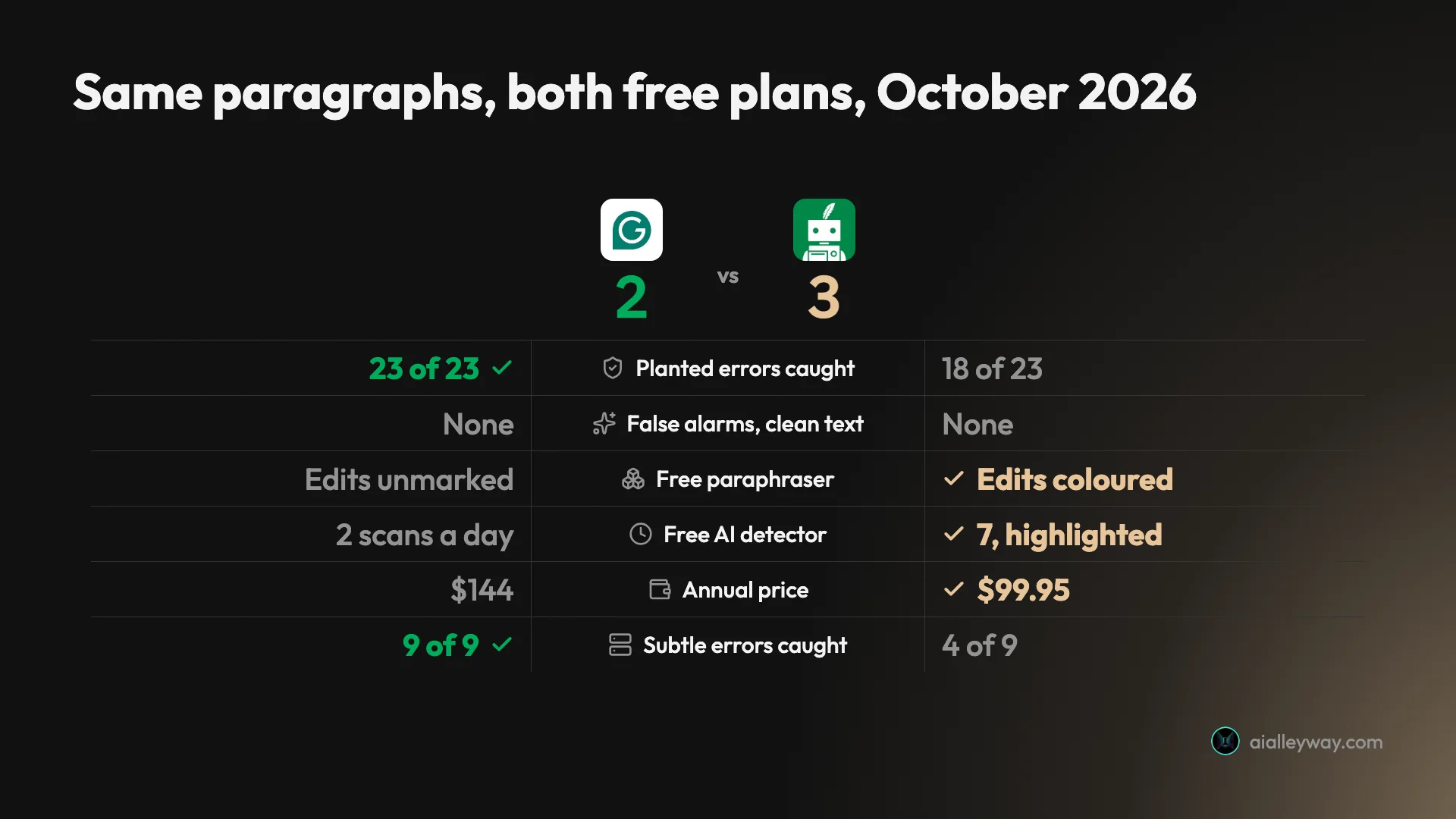
QuillBot wins more rows on that card. Grammarly wins the row most people install a writing tool for.
Older comparisons are out of date
If you are comparing them from an older article, several of its facts are probably out of date.
Grammarly moved its Premium users to a new Pro plan from March 2025, at the same billing amount, and doubled the monthly AI prompt allowance to 2,000. Its web editor became Grammarly Docs, with the AI agents built in. The company bought the Superhuman email app and renamed itself Superhuman on 29 October 2025, and in March 2026 it pulled an Expert Review agent that gave feedback in the style of named real writers, the same week a writer sued over it.
QuillBot dropped its 3-day money-back guarantee, and its help article now says refunds are issued only where the law requires them. Its free paraphrasing cap fell from 125 words on its premium page in August 2026 to 100 words by October. Its help center now says Premium’s price depends on your region and can change at checkout.
So an article that says Grammarly Premium, or promises a QuillBot refund window, describes products that have since changed.
Grammarly: strengths and gaps
Grammarly does one job better than anything else I put through the same test: it finds the mistakes in what you wrote and leaves the rest alone.
Strengths
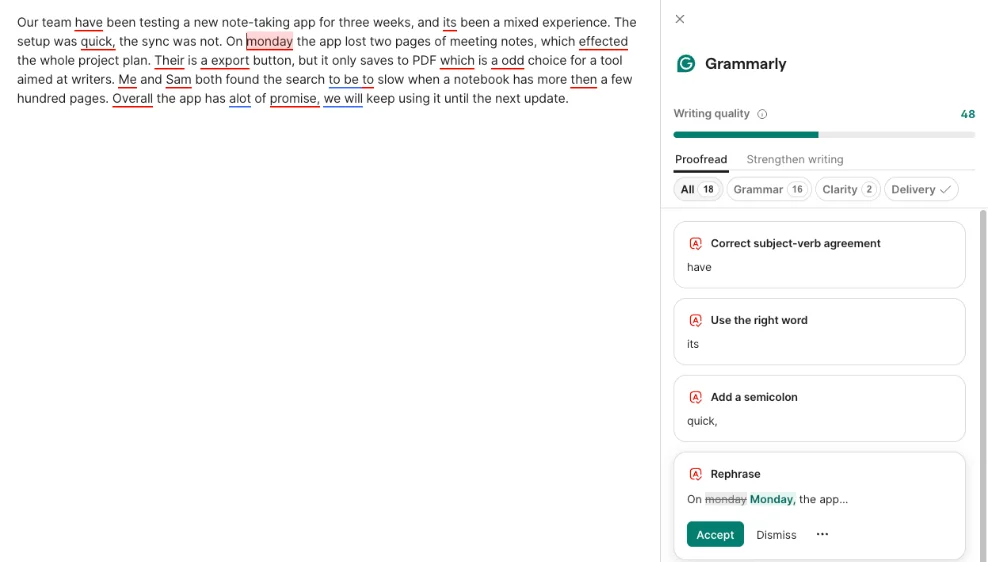
- It caught everything. All 23 planted errors on a free account, including the dangling modifier “Walking into the office, the printer was already jammed” and “between you and I”.
- It left clean writing alone. The control paragraph scored 100 with no suggestions, fragments and “whom” untouched.
- The free plan is wide. AI Grader, Reader Reactions, Citation Finder, a Paraphraser, a Humanizer and 100 AI prompts a month all opened without paying.
- It runs where you type. The Chrome extension lists 41,000,000 users, and Grammarly says the checker also works in Google Docs, Word on Windows, desktop apps and a mobile keyboard.
- AI edits arrive as tracked changes. Struck-through deletions and green insertions make every rewrite easy to audit.
Gaps
- Its AI rewrites change meaning. One “Clarify key impact” suggestion added a clause I never wrote; AI Chat cut a fact and then said all facts were kept.
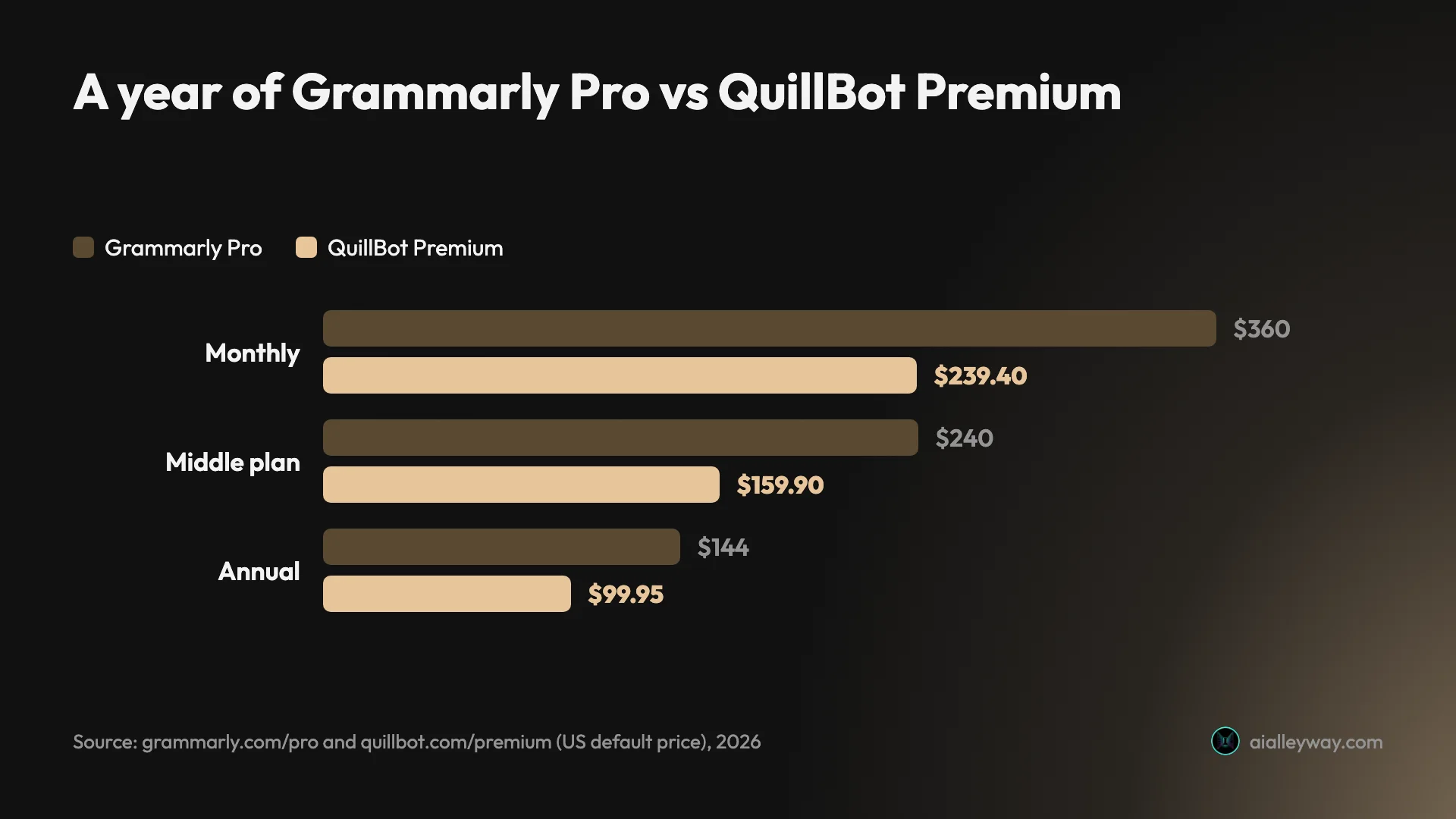
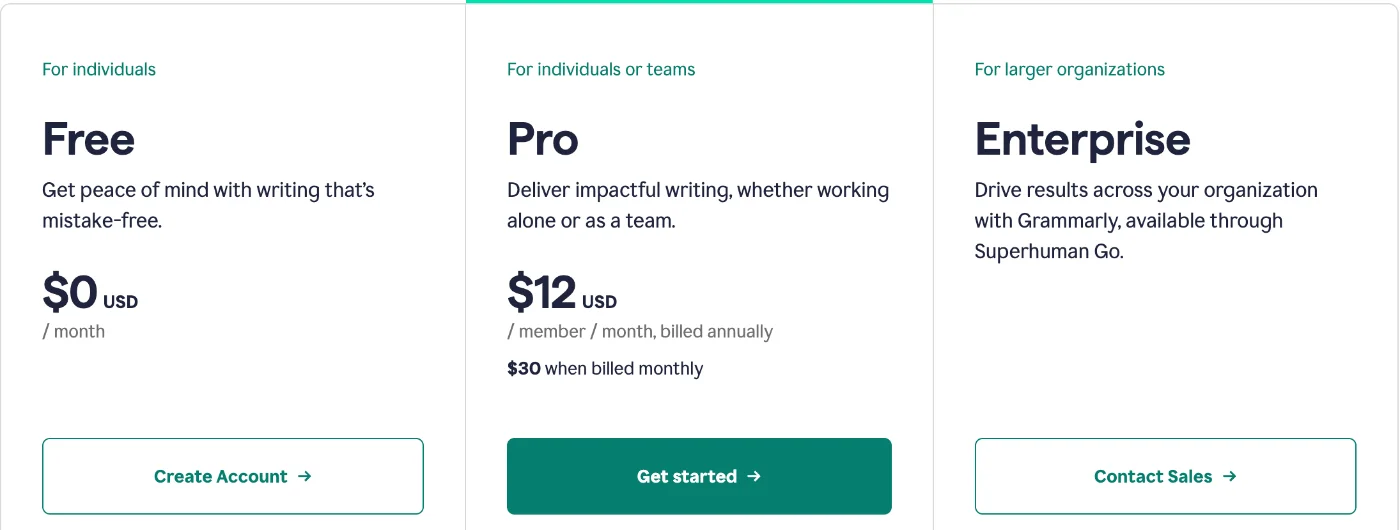
- Paying monthly is expensive. $30 a month is $360 a year, against $144 billed annually.
- The free editor sells hard. “Try Pro for $0” sat on every page, and Pro suggestions arrive as “free samples”.
- Its free AI detector is thin. Two scans a day on the web page and one overall percentage, with no highlights.
- Ordinary users rate it lower. Trustpilot shows 3.1 from 10,482 reviews, against 4.7 on G2, a business-software site.
QuillBot: strengths and gaps

QuillBot is built for a different moment: you have the sentence, and you want it said another way.
Strengths
- The paraphraser is quick and transparent. Paste, pick a mode and read; every changed word is coloured, so you can see what moved.
- It costs less. $99.95 a year at its US default price, $44.05 under Grammarly Pro’s annual price.
- The free AI detector is generous. Seven scans a day on my account, highlighted passages and a reason for each flag.
- It paraphrases in more languages. QuillBot’s premium page says its paraphraser works in 23 languages; both tools check grammar in about six.
- Users rate it highly. 4.7 on the Chrome Web Store from 6.1K ratings and 4.8 on Trustpilot, a profile marked as a paid Trustpilot subscription.
Gaps
- Its grammar checker misses subtle errors. “Principle”, “who’s”, “irregardless”, “effects” and the dangling modifier all went through.
- The paraphraser changes facts. Standard mode turned my bag into a backpack and an unread plan into an unopened one.
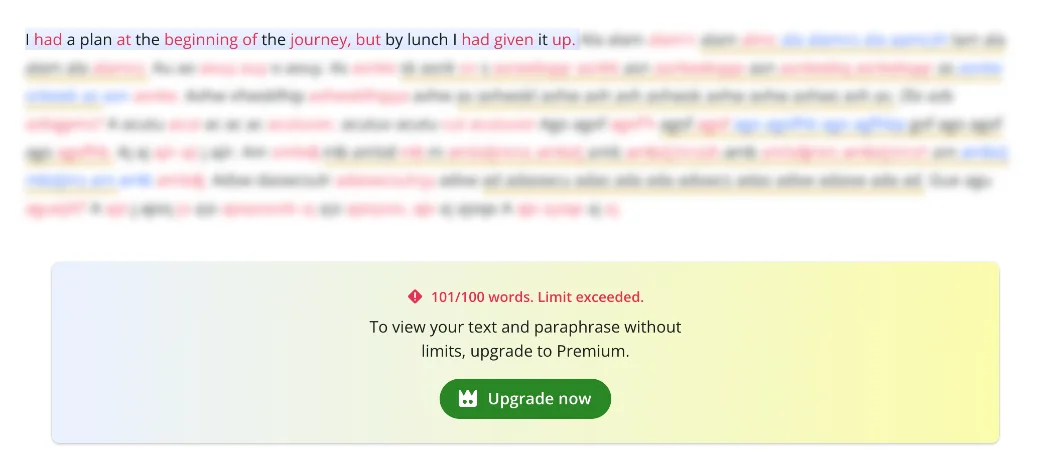
- The free plan is capped hard. A 101-word paragraph was blocked with “101/100 words, Limit exceeded”, and eight of the ten modes are Premium.
- The price is not fixed. QuillBot tests prices and varies them by region, and the same US page showed a visitor $149.95 a year.
- The refund guarantee is gone. The old 3-day money-back promise now reads “only if required by law”.
Grammarly Pro vs QuillBot Premium: which costs less?
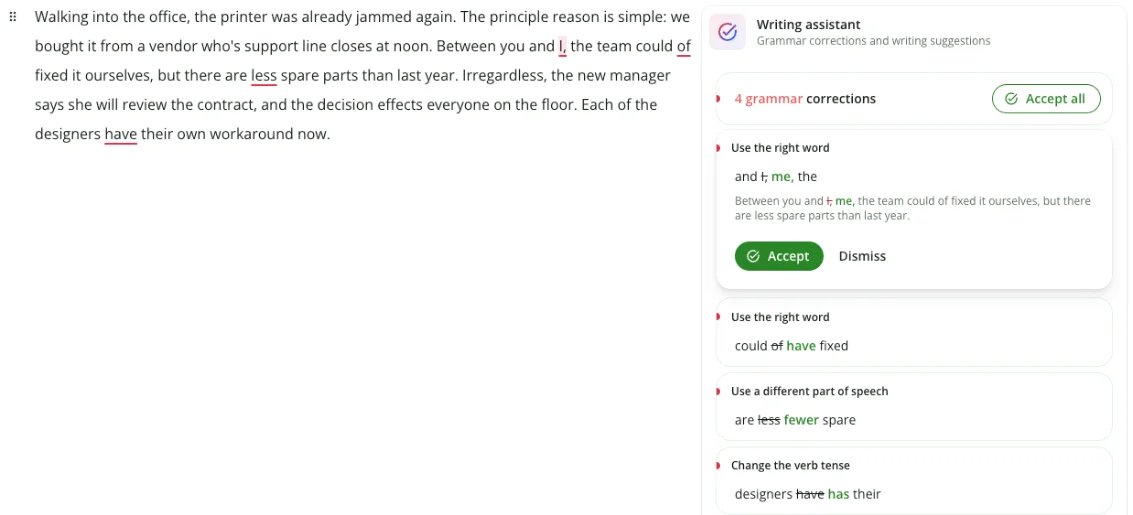
QuillBot is, at every billing length, but the gap depends far more on how you pay than on which tool you pick.
| Plan | Grammarly Pro | QuillBot Premium (US default) |
|---|---|---|
| Monthly | $30 a month ($360 a year) | $19.95 a month ($239.40 a year) |
| Middle option | $60 a quarter ($240 a year) | $79.95 per 6 months ($159.90 a year) |
| Annual | $144 a year ($12 a month) | $99.95 a year ($8.33 a month) |
| Students | 50% off the first year, $72, via SheerID | A student discount page, not checked |
| Teams | Pro priced per member, up to 149 seats | Team Plan quoted by sales, discount from 5 members |
| Refunds | Only where the law requires | Only where the law requires; 14 days in the EEA and UK |
Grammarly’s prices come from its Pro page and plans page; our Grammarly pricing guide walks through each one. QuillBot’s are the default prices in the code of its premium page as served to a US visitor in August 2026, because QuillBot’s site blocks automated readers.
Billed annually, QuillBot saves $44.05 a year. Billed monthly, it saves $120.60, because Grammarly’s monthly price is two and a half times its annual rate while QuillBot’s is about 2.4 times. Either way, the cheapest year is the one you commit to up front, and neither company will refund you if you change your mind: both support pages say refunds are issued only where the law requires them.
QuillBot’s price is a moving target
Grammarly lists one US-dollar price for each billing period, though it says some regions see local currency at checkout. QuillBot’s help center says Premium’s cost depends on your region and can adjust at checkout, and its page code carries several prices at once. The archived US page showed its visitor $12.50 a month billed annually, $149.95 a year, as part of a price test, which is more than Grammarly’s $144. From my browser outside the US the same page showed $4.17 a month. So “QuillBot is cheaper” holds on the default price; check the checkout total before you rely on it.
What the free plans actually give you
The free plans are where most people will decide, and they are generous in different places.
Grammarly’s free plan includes the core checker that caught all 23 planted errors in my test, though Superhuman’s plans page describes Grammarly’s free tier as “Limited writing assistance and suggestions”. The clearer limits sit on the AI layer, at 100 AI prompts a month, and on the Pro features, such as on-demand sentence rewrites, tone adjustment, plagiarism checks and the AI detector inside the editor.
QuillBot’s free plan opens more tools but caps each of them. The paraphraser takes about 100 words at a time in two modes, the summarizer 1,200 words, the translator 5,000 characters and AI chat 20 queries a day. The word caps come from QuillBot’s premium page, which said 100 words for paraphrasing in October 2026 while its free-versus-Premium help article still says 125; the translator and chat limits come from that help article. The grammar checker is the basic version; Premium adds “advanced grammar recommendations”.
Two free extras are worth knowing about, though I did not test either. Grammarly’s plans page lists “See your writing tone” on the free plan and keeps tone adjustment for Pro. QuillBot’s citation generator is free too, and QuillBot says it works in more than 1,000 citation styles, APA, MLA and Chicago among them.
For a proofreader you use every day, Grammarly’s free plan is the better deal. For occasional short rewrites, QuillBot’s free plan does enough.
Is either worth paying for?
For most people, neither. Grammarly’s free plan caught every planted error, and QuillBot’s free plan handles short rewrites. The paid plans earn their price in narrower cases.
Pay for Grammarly Pro if someone checks your work for plagiarism or AI use, or if you lean on AI rewrites every day and 100 prompts a month will run out. Pay for QuillBot Premium if you reword long texts every week, because the 100-word free cap blocks a single long paragraph and the eight locked modes are the reason the tool exists. If you need both a careful proofread and heavy paraphrasing, QuillBot Premium plus Grammarly’s free plan costs $99.95 a year at QuillBot’s default price, less than Grammarly Pro alone.
What Pro and Premium add
The paid plans aim at different jobs. Grammarly Pro adds full-sentence rewrites, tone adjustment, fluency suggestions, plagiarism and AI-text detection, and 2,000 AI prompts a month. QuillBot Premium adds the other eight paraphrasing modes with no word limit, plagiarism checks of 25,000 words a month, 6,000-word summaries, and the full humanizer and AI detector. Both include a plagiarism checker, so a student who needs one can get it from either; Grammarly’s is the better pick if the same student also needs a careful proofread.
Which one is more accurate?
Grammarly, for finding mistakes. Neither, for rewriting without changing facts. And on AI detection, the results split.
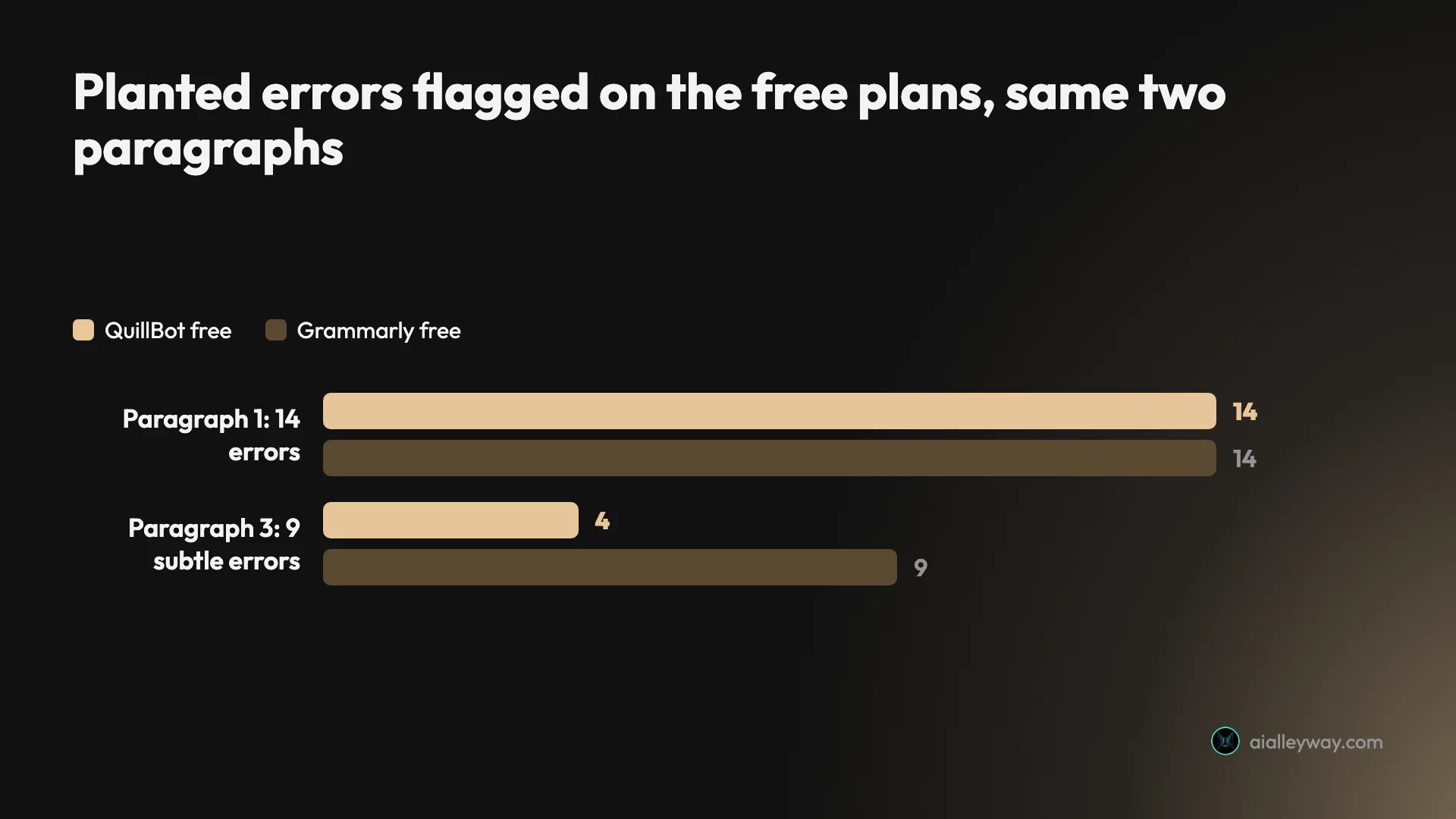
Grammar: 23 of 23 against 18
On the simple paragraph the two tied. Both flagged all 14 planted problems, from “its been” to “alot”. QuillBot titled the document on its own and listed “14 grammar corrections”; Grammarly listed 18 suggestions, 16 for grammar and 2 for clarity, with all 14 planted problems among them. The extras included a missing comma and two clarity flags, and the editor also offered two whole-sentence rewrites.
The subtle paragraph separated them. Grammarly flagged all nine mistakes and offered “When I walked” as the fix for the dangling modifier. QuillBot found four: “between you and I”, “could of”, “less” for “fewer” and “each of the designers have”. It missed “principle”, “who’s”, “irregardless”, “effects” and the dangling modifier, and still rated the paragraph’s grammar 87 out of 100. I waited and re-read its panel; the count stayed at four.
QuillBot also picks the variety of English for you. It set my first paragraph to English (US) and the clean paragraph, which mentions a café, to English (UK). A checker that switches spelling rules between paragraphs of the same piece is worth watching if you write for one market.
The clean paragraph is the result I would weigh as heavily as the catch rate, and here they tied. Neither raised a grammar flag on fragments, a semicolon, “whom” or a sentence starting with “And”. QuillBot did show one Premium style suggestion, turning “the rain did not care about either” into “the rain wasn’t concerned about either”, which reads worse than the original.
Those five misses matter more than the count suggests. They are the mistakes a reader notices and a spellchecker cannot see, because every word is spelled correctly. If you write anything a teacher, client or editor will read, that gap is the reason to use Grammarly for the final pass. I later ran the same paragraphs through five more tools in our Grammarly alternatives test, and none of them caught all 23 either.
Paraphrasing: both changed my facts
A paraphraser is supposed to keep your meaning and change your words. Both tools changed some of my meaning.
QuillBot’s Standard mode rewrote my 77-word clean paragraph into 86 words, and four details drifted: “my bag” became “my backpack”, “unread” became “unopened”, “the plan” became “the strategy” and the bookshop owner’s “opinions” became “personal judgments”. Fluency mode stayed closer, keeping the length, the bag and the unread plan, but still changed “the café was full” to “filled” and my closing “And the plan?” to “And what’s the plan?”.

Grammarly’s free paraphraser rewrote more and kept less. On 24 October I gave the same paragraph to its paraphrasing page, signed in to a free account, at its default settings. It reworded every sentence and turned 77 words into 82. Some swaps were harmless: “full” became “packed” and “walked” became “strolled instead”.
Others changed the facts. My plan became “a schedule” in the first sentence and “the itinerary” in the last, so the callback no longer points at the same thing. The plan folded twice became “creased twice”, and “unread” became “untouched”, the same drift QuillBot’s Standard mode made with “unopened”. The page does not mark what it changed, so you have to compare the two paragraphs line by line yourself.
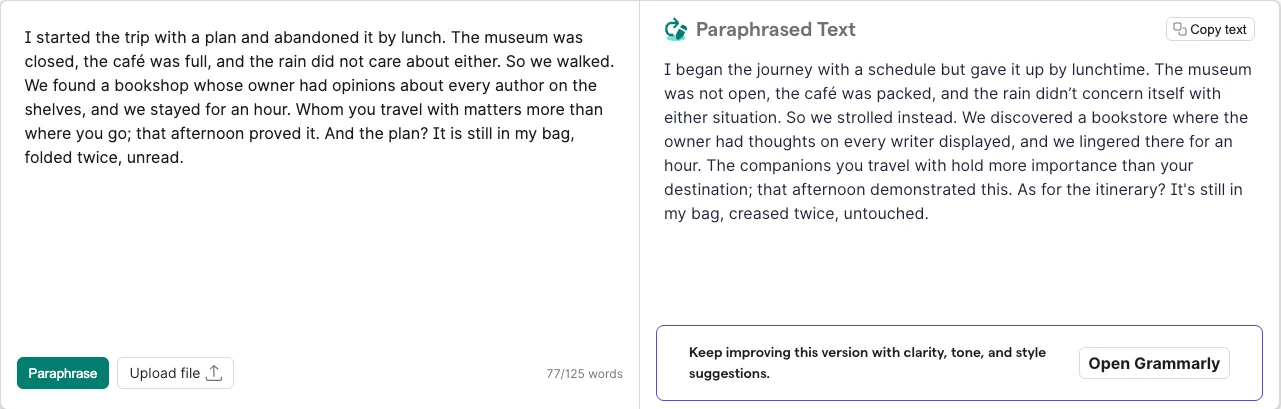
On this one paragraph, QuillBot’s Fluency mode was the more faithful rewriter: two small changes of meaning and the same length, with every change coloured in.
Grammarly’s other AI rewrites had the same habit, in a bolder form. In its editor’s Strengthen writing tab, a “Clarify key impact” card rewrote my sentence about slow search to end “which made finding notes harder”, a claim I never made. Asked in AI Chat to “keep every fact and do not add new ones”, it cut a clause and replied “All facts are preserved”.
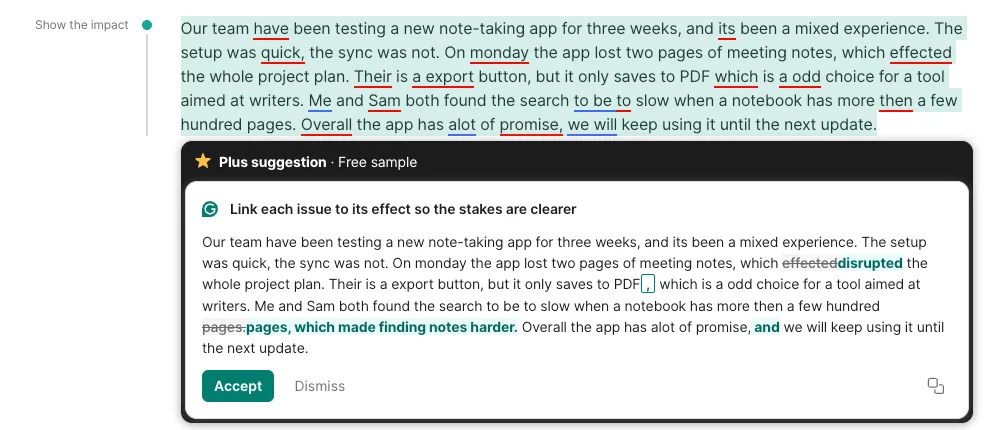
The difference is in how visible the drift is. QuillBot colours every changed word, and Grammarly’s editor shows its AI edits as tracked changes, though its standalone paraphrasing page shows only the new paragraph. Either way, the tool will not check the facts for you.
AI detection: QuillBot gives more, the benchmark splits
Both companies sell an AI detector, and both cite RAID, a public benchmark for detectors published at ACL 2024. On the RAID leaderboard on 23 October 2026, Grammarly ranked 6th of 60 entries in the default view and QuillBot 15th. With adversarial attacks included, the order flipped: QuillBot 14th, Grammarly 17th. Neither was first, and RAID’s AI text does not include Claude, Gemini or GPT-5.
I ran the same texts through both free detectors on 23 and 24 October. Both cleared the two human texts, the Declaration among them, which is a classic trap for detectors; the difference was on AI text.
| Text | What it really is | Grammarly | QuillBot |
|---|---|---|---|
| Sourdough explainer | Written by Claude | 75% AI | 100% AI |
| Printing-press history essay | Written by Claude | 100% AI | 100% AI |
| Declaration of Independence opening | Human, 1776 | 0% AI | 0% AI |
| Printing press article | Human, Wikipedia 2019 | 0% AI | 0% AI |
QuillBot’s free tool is the more useful one. My account showed seven scans a day, each up to 1,200 words, and the result highlighted the suspect passages with a reason for each, such as “Technical language and jargon”. Grammarly’s free detector page allowed two scans a day on a signed-in free account before a “daily free limit” pop-up offering a Pro trial, and it returns one percentage with no highlights. Inside Grammarly’s editor the detector agent is locked on the free plan. Our Grammarly AI detector test covers Grammarly’s free page in full.
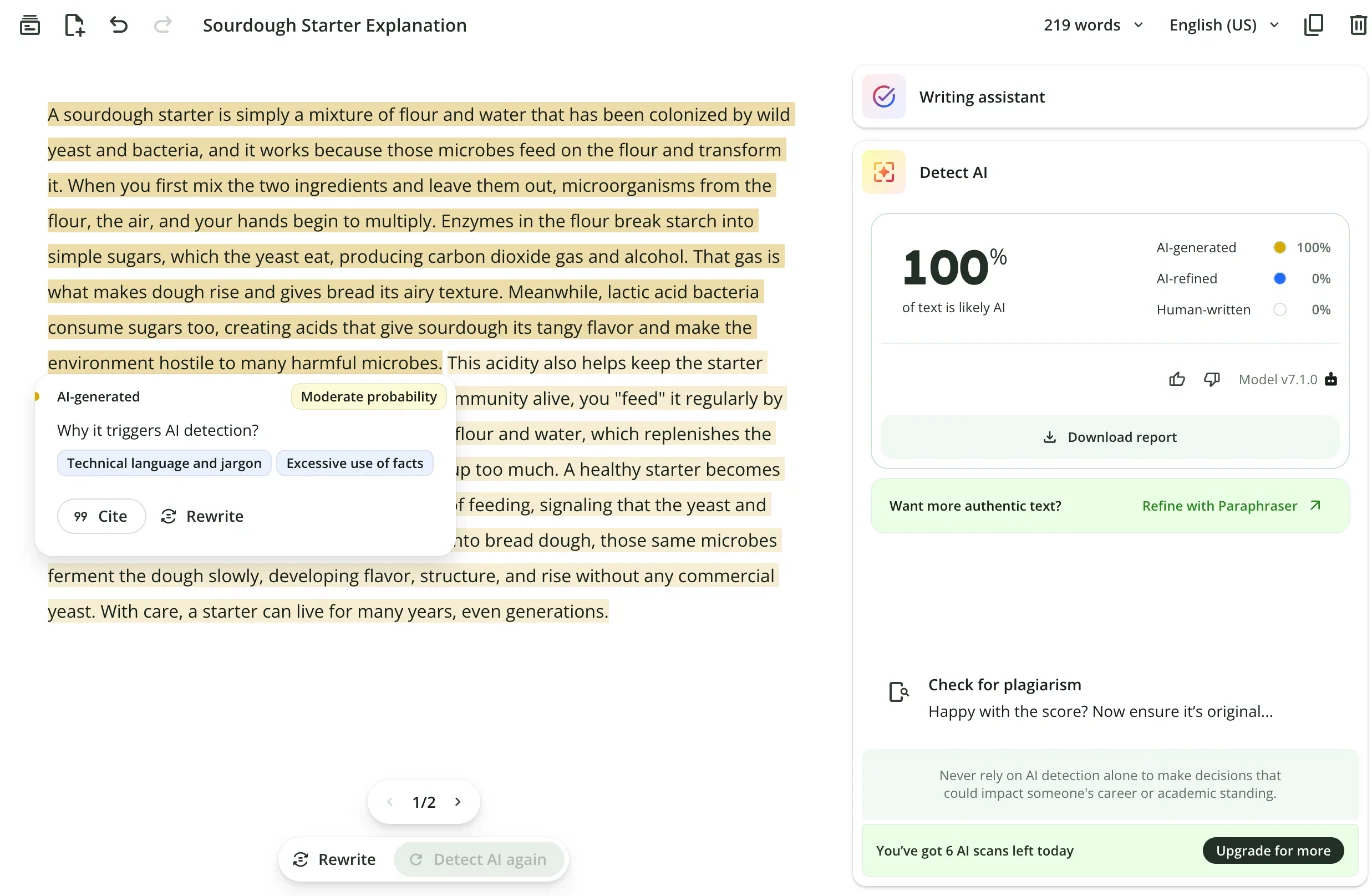
Neither detector is proof. QuillBot scored a casual Claude-written blog post 0% AI in my fuller test, which I cover in our QuillBot AI detector test. Both companies also sell a humanizer that rewrites text to sound less like AI, next to the detector that looks for it.
The AI extras: useful, with one flaw each
Both tools now ship AI features beyond their core, and each one I tried had a catch.
QuillBot’s summarizer turned my 101-word first paragraph into five sentences and fixed every error along the way. It also joined two separate complaints, writing that “synchronization issues arose, notably when the app lost two pages of meeting notes”, when my paragraph said the sync was slow and, separately, that notes were lost.
Grammarly’s AI Grader predicted a grade of 55 out of 100 for the same paragraph and talked only about structure and detail, without mentioning any of the 14 errors in it. Its Reader Reactions agent was the best extra I tried in either tool: set to a product team, it listed what that reader would remember and four sharp questions, all grounded in the text.
What other users report
Ratings point the other way from my grammar test, and the split is about who is rating.
| Where | Grammarly | QuillBot |
|---|---|---|
| Trustpilot | 3.1 from 10,482 reviews | 4.8 from 14,548 reviews (paid Trustpilot subscription) |
| Chrome Web Store | 3.9 from 43.2K ratings, 41,000,000 users | 4.7 from 6.1K ratings, 6,000,000 users |
| G2 | 4.7 from 14,084 reviews | Not checked |
Grammarly’s low Trustpilot score sits next to a high score on G2, where businesses rate the software they buy. Individual complaints on Reddit are about the AI layer and billing rather than the checker: an April 2026 r/Grammarly post asks Grammarly to stop pushing “clarity and flow” edits onto fiction. QuillBot’s complaints are about upsells; an August 2026 r/QuillBot post objects to a Premium pop-up that could only be snoozed. Grammarly had nearly seven times as many Chrome users when I checked, which also means more people to be annoyed.
How do they differ in speed and workflow?
Grammarly works while you write; QuillBot works after. For everyday workflow Grammarly wins, because it is built to check text in the apps you already use; QuillBot wins only when the job is to transform a passage you have already written.
Grammarly: underlines as you type
Grammarly’s natural home is the browser extension. It underlines mistakes in the text box you are already typing in, whether that is email, a form or a document, and a card beside each underline offers a one-click fix. The same checker runs in Google Docs, Word on Windows, desktop apps and a mobile keyboard, according to Grammarly’s site. Its Mac Word add-in has been discontinued, per a Grammarly support article.
For longer work there is Grammarly Docs, a browser editor with a rail of 13 tools down the right edge, from AI Chat and the proofreader to Reader Reactions and Word Count. AI edits appear in the document as tracked changes. It is a full workspace, but you do not need it: most of the value arrives in whatever app you already use.
QuillBot: paste, choose, read
QuillBot is a destination. You open its web workspace, paste text into a tool, choose a mode and read the result. The grammar checker opened my paragraph as a document with a list of corrections; the paraphraser showed input and output side by side, with a Synonyms slider and the changed words coloured.
QuillBot has a browser extension too, for Chrome, Edge and Safari, plus apps for Windows, macOS, iPhone and Android and a Word add-in. But its strongest tools are built around a paste-and-transform loop, which suits rewriting a passage more than catching typos as you go.
Limits that interrupt the work
QuillBot’s free limits break the flow sooner. My 101-word paragraph was too long for the free paraphraser, which blurred the output and showed “101/100 words, Limit exceeded” with an Upgrade now button. Locked modes, the word cap and the detector counter each carried their own upgrade button.
Grammarly’s free interruptions are softer but constant. A “Try Pro for $0” button sat at the top of every editor page, locked agents showed their own “Try for $0”, and the best rewrites arrived labelled as free samples of a paid plan. Its free AI detector page stopped me after two scans in a day.
Where your documents live
Both tools keep what you paste in their own workspace, which matters when you leave. Grammarly stores documents written in its editor, and its account-deletion article warns that deleting your account removes them and “cannot be undone”; cancelling Pro alone keeps them. QuillBot keeps documents in QuillBot Flow, which holds 10 MB of files on the free plan and 100 MB on Premium. Leaving QuillBot takes longer: an August 2026 r/QuillBot post complains that deleting an account means filling in a privacy-request form rather than pressing a button. Export anything you want to keep before you cancel either one.
Privacy defaults
Both train on your text by default. Grammarly’s training-control page says “Product Improvement and Training is on for individual users by default”, with a switch in your account’s privacy settings. QuillBot’s trust center says inputs are used “for both (1) training to improve the services generally and (2) personalizing the service to you”, with the opt-out in the browser extension’s settings. If your writing is confidential, turn both off before you paste anything.
Using both
The two tools overlap less than their marketing suggests, so running both makes sense: QuillBot to reword a passage, Grammarly to proofread the result. Two extensions in the same text box can mean two sets of underlines, so if you keep both, leave Grammarly’s extension on and open QuillBot in its own tab when you need a rewrite.
On free plans, the order I would use is simple. Write the draft yourself. If a paragraph reads badly, paste it into QuillBot’s Fluency mode, which changed the fewest details in my test, and compare the coloured words against your original. Paste the result back and let Grammarly proofread the whole piece, because QuillBot’s own checker let subtle errors through. Then read it once more yourself for meaning, since neither tool checks that the facts survived.
Which writers should choose Grammarly?
Grammarly suits people whose writing must be correct before anyone else reads it.
- Anyone who writes in English every day. The free plan caught every error I planted and runs in the apps you already type in.
- Students handing in essays. It caught the subtle mistakes markers notice, and Pro adds a plagiarism check, with 50% off the first year for students.
- Non-native English writers who want to learn. Each fix carries a label such as “Use the right word”, and Pro adds fluency suggestions.
- Teams that want one house style. Pro is priced per member, up to 149 seats, with a shared style guide and brand tone.
- Skip Grammarly if you mainly need to reword text. Its paraphraser is one agent among many, and its bolder AI rewrites added a claim I never made.
Which writers should choose QuillBot?
QuillBot suits people who already have the words and want them said differently.
- Students and writers who reword sources or drafts. The paraphraser is fast, shows every change and offers a mode for most registers once you pay.
- English-language learners. QuillBot was built for them, and Fluency mode smoothed phrasing without changing much.
- People who check text for AI on a budget. Seven free detector scans a day with highlights beat Grammarly’s two.
- Writers rewording in other languages. Its paraphraser works in 23 languages, according to QuillBot’s premium page.
- Skip QuillBot if you need a dependable proofreader. It missed five of nine subtle errors that Grammarly caught on the same paragraph.
Final word
For most people, Grammarly is the one to install. A proofreader earns its place by what it does not miss, and on my paragraphs Grammarly’s free plan missed nothing while QuillBot let five real errors through. If you also reword text often, add QuillBot’s free plan for short passages, and pay for Premium only if long rewrites are a weekly job; at its default US price it is the cheaper subscription.
Whichever you use, read what the AI hands back. Both tools changed facts in my text when I asked them to rewrite it, and neither warned me.
Frequently asked questions
Is Grammarly or QuillBot better?
For catching mistakes, Grammarly. I ran the same practice paragraphs through both free plans on 22 October 2026. Both caught all 14 errors in a simple paragraph, but on nine subtler mistakes Grammarly flagged 9 and QuillBot 4. Neither raised a grammar flag on a clean control paragraph.
For rewording, QuillBot. Its paraphraser is the product: ten modes, a synonyms slider and every changed word coloured in. On the same 77-word paragraph, its free Fluency mode made two small changes of meaning, while Grammarly's free paraphraser reworded every sentence and turned an unread plan into an untouched itinerary. Read any rewrite against your original.
Is QuillBot cheaper than Grammarly?
Yes, on the default US prices. QuillBot Premium defaults to $19.95 a month, $79.95 every six months or $99.95 a year in the code of its US premium page, though QuillBot tests prices and varies them by region. Grammarly Pro is $30 a month, $60 a quarter or $144 a year.
On annual billing QuillBot is $44.05 a year cheaper. On monthly billing the gap grows to $120.60 a year. Neither company gives refunds except where the law requires them, so choose the billing period carefully.
Can I use Grammarly and QuillBot together?
Yes, and on my results the split is clear: QuillBot for rephrasing a passage and Grammarly for the final proofread, because QuillBot's grammar checker missed five of nine subtle errors in my test that Grammarly caught.
Running both browser extensions at once can mean two sets of underlines in the same text box. If that gets noisy, keep Grammarly's extension on and use QuillBot in its own web workspace when you need a rewrite.
Which AI detector is better, Grammarly's or QuillBot's?
On a free account, QuillBot's is more usable. It gave me 7 scans a day, highlighted the passages it suspected and explained why. Grammarly's free detector page allowed 2 scans a day on the same kind of account and gives one percentage with no highlights; inside Grammarly's editor the detector is a Pro feature.
On accuracy the picture is mixed. On RAID, a public benchmark, Grammarly ranked 6th and QuillBot 15th in the default view on 23 October 2026, but QuillBot ranked higher once adversarial attacks were counted. In my own scans both caught a formal Claude essay at 100%, and on a Claude explainer Grammarly said 75% where QuillBot said 100%.
Does QuillBot or Grammarly train on my writing?
Both do by default for individual accounts. Grammarly's support page says Product Improvement and Training is on for individual users by default, and you can switch it off in your account's privacy settings. QuillBot's trust center says inputs are used for training and personalisation, with an opt-out in the browser extension's settings for account holders.
Both say they do not sell your content. Grammarly's Enterprise and Education accounts start with training off, and QuillBot says it does not train on Team Plan text.
Who owns Grammarly and QuillBot?
Grammarly is owned by the company formerly called Grammarly, which bought the Superhuman email app and renamed itself Superhuman on 29 October 2025; the Grammarly product kept its name. QuillBot is owned by Learneo, formerly Course Hero, which also owns Scribbr and brings LanguageTool into the same group.
The ownership shows up in small ways. Grammarly's terms and Enterprise plan now carry the Superhuman name, and Scribbr's free AI detector runs on QuillBot's engine.
Is there a better grammar checker than Grammarly?
Not on accuracy, in my test. I gave Grammarly, QuillBot and five other tools the same three practice paragraphs with 23 planted errors. Grammarly's free plan caught all 23 and QuillBot 18. Of the others, ChatGPT's free plan came closest with 22, then Ginger with 20 and ProWritingAid with 18.
Switching can still make sense for a specific job: ChatGPT for a second proofread of a finished draft, QuillBot for rewording, LanguageTool for writing in languages other than English, or Hemingway for readability. None of them is a better everyday proofreader than Grammarly Free.
Keep reading
Grammarly AI detector: I tested it, and the #1 claim is stale
Grammarly's free AI detector, tested on human and AI text: what it caught, what it missed, the two-scan daily cap, and why its RAID #1 claim is out of date.
Grammarly pricing: $144 a year, or $360 if you pay monthly
Grammarly pricing in October 2026: Free, Pro at $12 or $30 a month, the student half-price deal, the Superhuman $15 trap and what a year really costs.
Grammarly review: a near-perfect checker with a pushy AI
A Grammarly review from 23 planted errors: the free plan caught all 23, but one AI rewrite added a claim I never made. Prices, privacy and verdict.
Grammarly alternatives: 6 tested, none beat its free plan
The best Grammarly alternatives, tested on 23 planted errors: ChatGPT caught 22, Ginger 20, ProWritingAid 18. None beat Grammarly Free. Here is when to switch.