
Grammarly AI detector: I tested it, and the #1 claim is stale
Grammarly's free AI detector, tested on human and AI text: what it caught, what it missed, the two-scan daily cap, and why its RAID #1 claim is out of date.
Contents
Can you trust Grammarly’s AI detector? The short verdict
On AI text, it did its job in my test. Grammarly’s free AI detector page scored a paragraph Claude wrote about sourdough at 75% AI, a Claude history essay at 100% and a chatty Claude blog post at 100%. It also cleared all three human texts I gave it, scoring each 0% AI, and put a half-human, half-Claude mix at 42%, close to its real 41% AI share.
Two things the marketing leaves out. My free account got two scans before a pop-up told me I had hit my daily free limit. And the “ranks #1 on RAID” line on the page was out of date when I checked on 23 October 2026: Grammarly sat sixth on RAID’s default leaderboard view.
Use it as a quick second opinion on your own drafts. Do not use it, or any detector, as proof that someone else cheated. Grammarly’s own page says the same thing.
| Question | Short answer (tested October 2026) |
|---|---|
| Price | Free on the web page; the in-editor agent needs Pro ($12/month billed annually) |
| Scans on a free account | 2 a day in my test, then a “daily free limit” pop-up |
| Length per scan | 1,400-word counter; 25,000-character box |
| What you get | One percentage, no sentence highlights |
| AI text caught | Claude explainer 75%, Claude essay 100%, Claude blog post 100% |
| Human text flagged | None: 0% AI on all three human texts |
| RAID rank, default view | 6th on 23 Oct 2026 (the page says #1) |
Under the hood: sections, patterns and one percentage
It reads the finished text and guesses. That is the whole method, and it explains both the good scores and the bad ones.
Grammarly’s page says the tool “segments the text and analyzes each section for language patterns that are often linked to AI-generated writing,” then turns those section results into one percentage. The pop-up behind the small info icon next to the score puts it more plainly: the detector compares your text “against a large body of AI-generated content to spot patterns and characteristics typical of text generated with AI.”
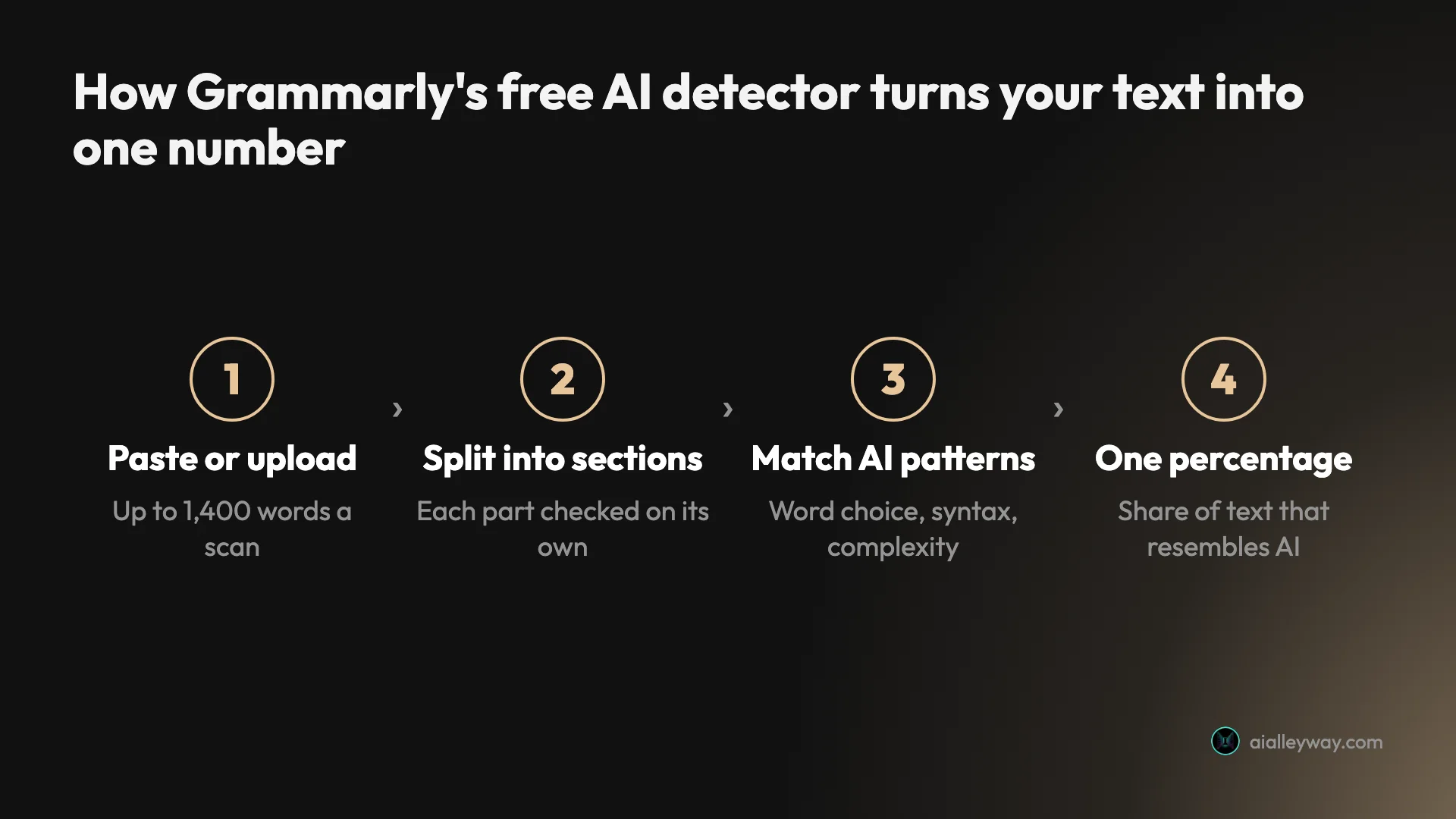
So it is a pattern matcher. AI models tend to write in predictable ways: even sentence lengths, safe word choices, tidy topic sentences, a summary line at the end. Text that has those habits scores high. Text that doesn’t scores low, whoever wrote it.
That last part is the catch. A careful human writer who likes tidy topic sentences can look like a model. A model told to sound casual can look like a person. Grammarly’s page admits both failure modes: detectors “do not track authorship, which means even human-written text can be flagged as AI-generated. Meanwhile, lightly edited AI-generated text may evade detection.”
There is one more detail worth knowing. The page says Grammarly’s model was trained on texts “created before 2021.” The support guide for the same feature, updated 20 October 2026, says the model “is trained on hundreds of thousands of human and AI-generated texts,” while the page says “tens of thousands.” Either way, the vendor is telling you what it trained on, not what it was tested against, and newer models write differently from the ones around in 2021.
How to use the free Grammarly AI detector
The page tool takes under a minute. Here is the flow I used in my tests, signed in to a free Grammarly account in Chrome.
- Open grammarly.com/ai-detector and scroll to the box that says “Type, paste, or upload your text.”
- Paste your text, or press Upload file. The upload button accepts .doc, .docx, .odt, .rtf, .txt, .html and .pdf.
- Watch the counter under the box. Mine read “219/1,400 words” for a 219-word paragraph, so 1,400 words is the cap for one scan.
- Press Scan for AI. My results were on screen within six seconds.
- Read the gauge on the right: one figure for “Resembles AI text” and one for “No AI text patterns found,” which add up to 100%.
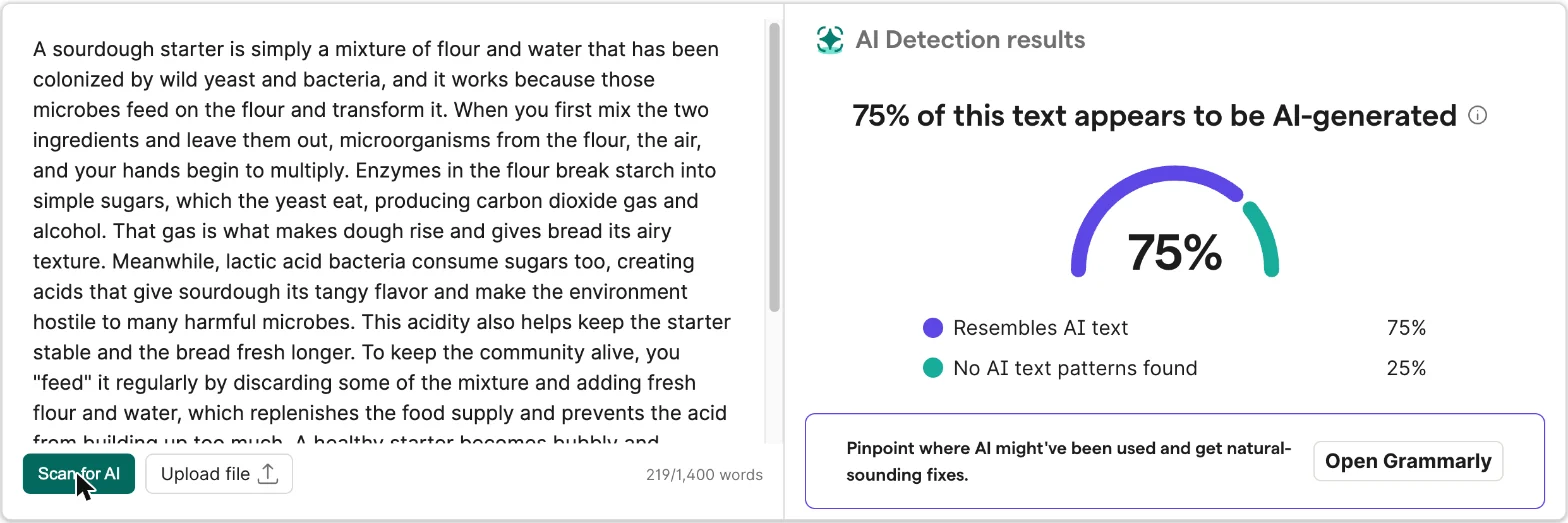
Under the score sits a card that says “Pinpoint where AI might’ve been used and get natural-sounding fixes,” with an Open Grammarly button. That is the upsell to the editor, where the detailed version of the detector lives. More on that below.
The daily limit Grammarly doesn’t publish
My third scan never ran. Instead, a pop-up headed “Unlock the full power of Grammarly” said: “You’ve reached your daily free limit. Start your free trial today to get full access to Grammarly.” It offered two buttons, Try Grammarly Pro for free and Stay on Free plan. I closed it.
Grammarly does not print this limit anywhere I could find: not on the detector page and not in the support guide. On my account it was two scans at a time, so I spread the rest of my test over four days. If you need to check a long essay in pieces, or compare drafts, two scans goes fast.
It is a rolling 24 hours, not a daily reset
The pop-up says “daily”, but the limit behaved like a rolling window. My first two scans ran at about 10:10 in the morning, my time, on 23 October. The next morning at 09:13, already a new calendar day in both my time zone and the US, the very first scan hit the same pop-up. I waited, and at 10:33, just over 24 hours after the first pair, two scans went through with no complaint.
So if you scan two drafts at 9pm, you are waiting until 9pm tomorrow, not until midnight. Plan your two checks for the moment you actually need them, such as the night before a deadline, rather than spending them on an early draft.
The text box itself holds more than the counter suggests. Its code sets a 25,000-character maximum, about 4,000 words of plain English, but the counter stops at 1,400 words. Plan on 1,400.
What happened when I tested it on 7 texts
I wanted texts where I knew the answer, so I built them instead of guessing.
Three AI texts. On 23 October 2026 I asked Claude, through Anthropic’s API, for three paragraphs of about 200 words: a plain explainer on how a sourdough starter works, a high-school history paragraph on why the printing press mattered, and a casual first-person blog post about missing the last train home. I pasted the output unedited.
Three human texts, all written before chatbots existed: the opening of the Declaration of Independence (1776), the first three paragraphs of Jerome K. Jerome’s Three Men in a Boat (1889), and the first three paragraphs of Wikipedia’s “Printing press” article as it stood on 29 May 2019, with link markup and footnotes removed.
One mix: the first two human Wikipedia paragraphs followed by the second half of Claude’s printing-press essay, about 60% human by word count.
The Declaration is there on purpose. It is the classic false-positive test: in a 2024 test reported by Decrypt, one popular detector called it 97.93% AI-generated. The Wikipedia text is there because encyclopedia prose is tidy and neutral, which is exactly the style detectors associate with AI.
| Text | Who wrote it | Words | Grammarly score |
|---|---|---|---|
| Sourdough explainer | Claude (Sonnet) | 219 | 75% AI |
| Printing-press essay | Claude (Sonnet) | 216 | 100% AI |
| Missed-train blog post | Claude (Sonnet) | 207 | 100% AI |
| Declaration of Independence | Human, 1776 | 228 | 0% AI |
| Three Men in a Boat | Human, 1889 | 200 | 0% AI |
| Wikipedia, “Printing press” | Human, 2019 | 294 | 0% AI |
| Wikipedia + Claude mix | About 60% human | 360 | 42% AI |
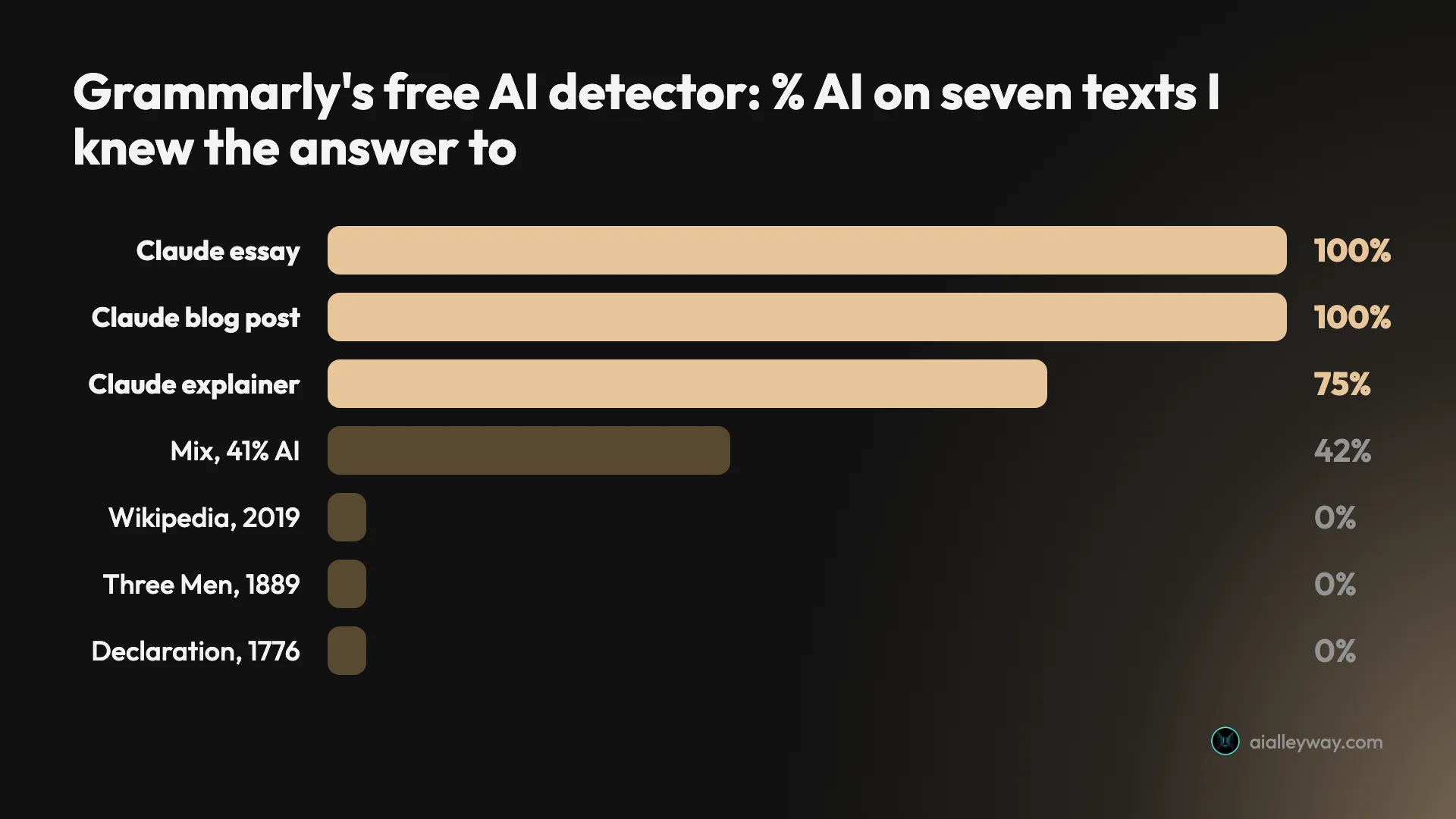
Three Claude paragraphs: 75%, 100% and 100%
The essay was the easy catch: 100%, no doubt at all. It reads like a model answer, with a topic sentence, a list of consequences and an “In short” wrap-up, and Grammarly treated it that way.
The sourdough explainer scored lower, at 75%. Same model, same length, same day. The difference is a reminder that the percentage is not a measure of how much of the text a machine wrote. All of it was machine-written. The score is the share of sections that looked machine-like to Grammarly’s model.
The casual blog post was the test I expected Grammarly to fail. It is a first-person story about missing the last train, with a vending-machine coffee that “tasted like warm pennies” and a stranger sharing peanuts, the kind of chatty, specific writing detectors tend to read as human. QuillBot’s free detector scored it 0% AI. Grammarly scored it 100%.
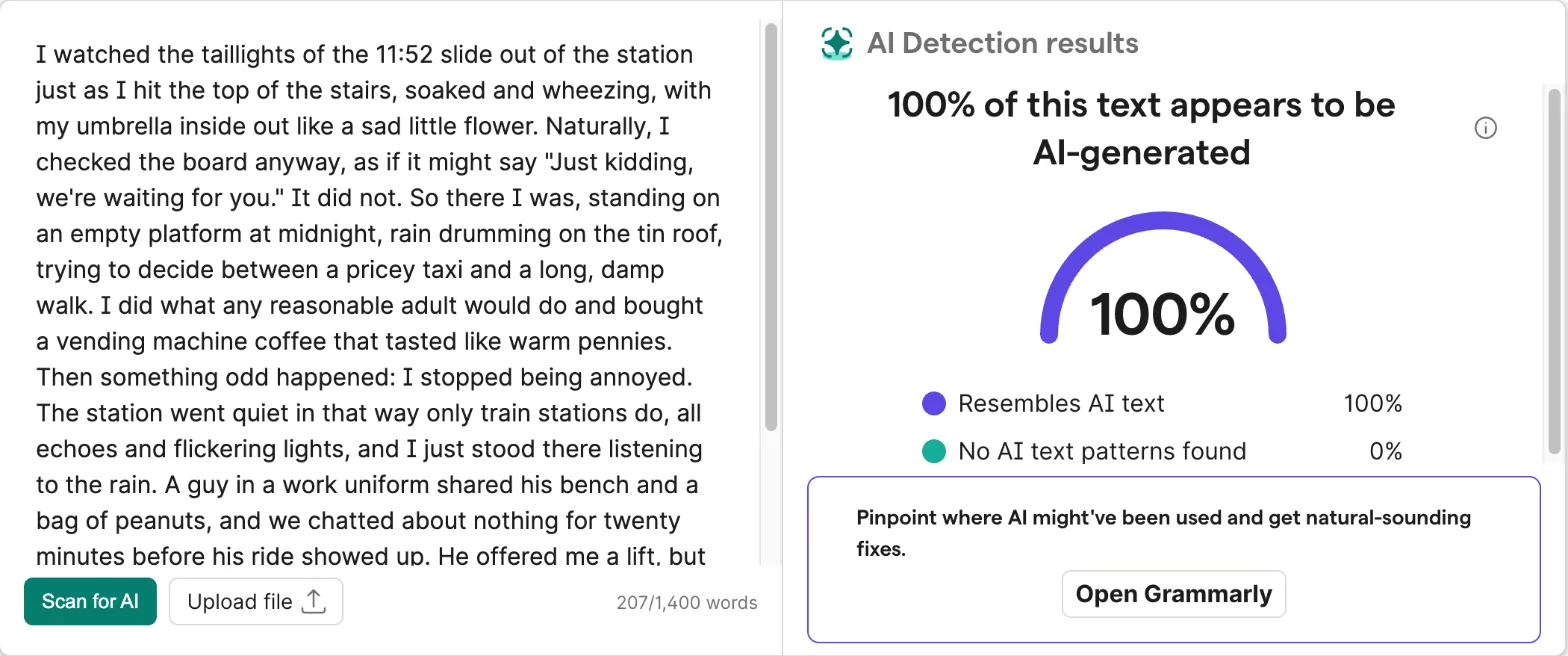
That is the most impressive result in my test, with one caution: a single catch on a single paragraph is not a rate. It does suggest that a casual tone alone will not fool Grammarly’s model the way it fooled QuillBot’s.
1776, 1889 and 2019: zero false alarms
All three human texts scored 0% AI, with “No AI text patterns found” at 100%. That includes the Declaration of Independence, the text another detector once called 97.93% AI, and a Wikipedia article whose flat, encyclopedic style is close to what a chatbot produces.
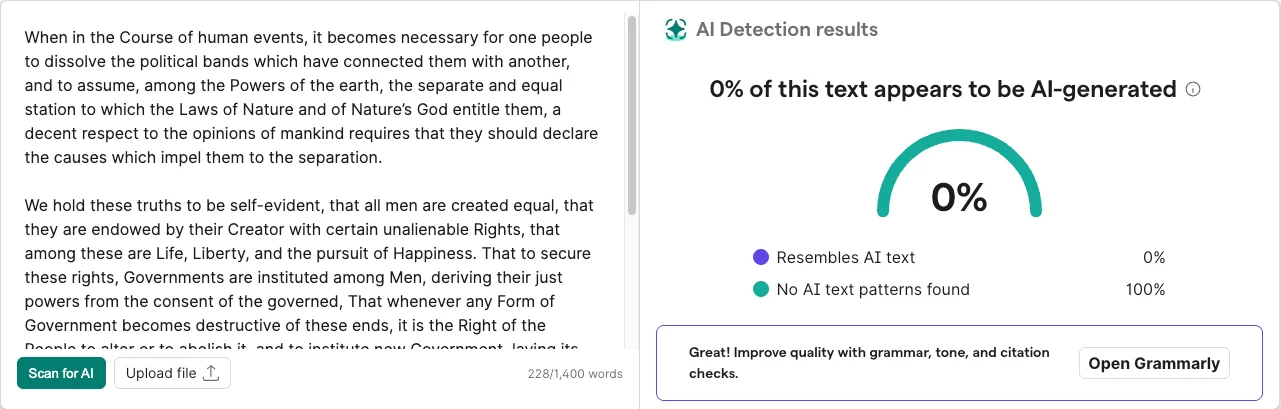
The page also changes its sales pitch with the score. After a 0% result, the card under the gauge read “Great! Improve quality with grammar, tone, and citation checks.” After a result with AI in it, it read “Pinpoint where AI might’ve been used and get natural-sounding fixes.” Both lead to the same Open Grammarly button.
The Jerome K. Jerome passage was the one I expected to be easy, and it was. A narrator reading a liver-pill circular and talking himself into a liver complaint is about as far from chatbot prose as English gets.
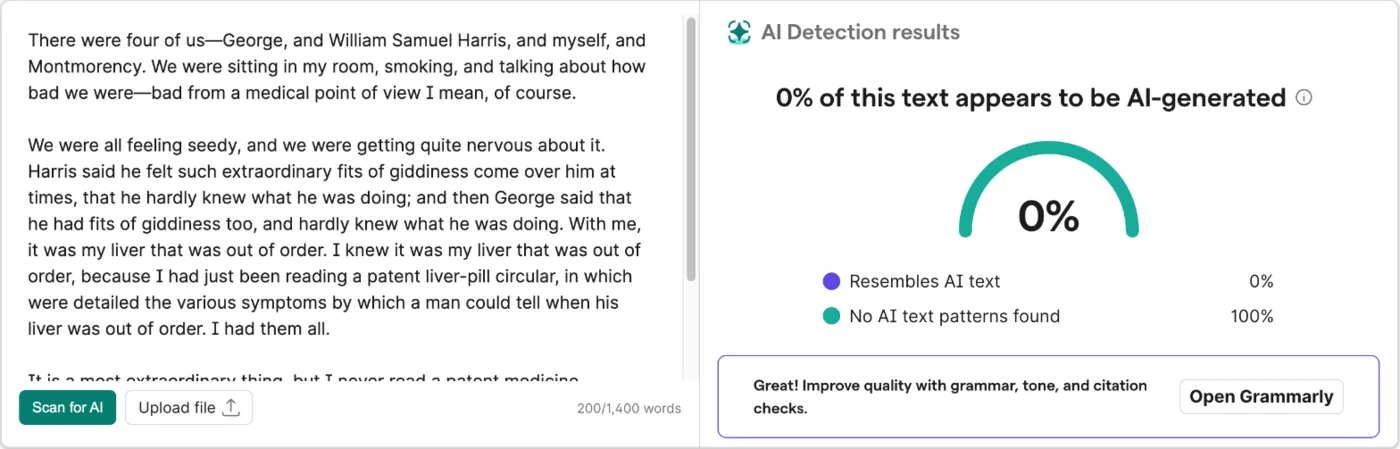
Three clean results are a good sign, not a guarantee: none of my human texts was a student essay, and three texts is a small sample.
Half Wikipedia, half Claude: 42%
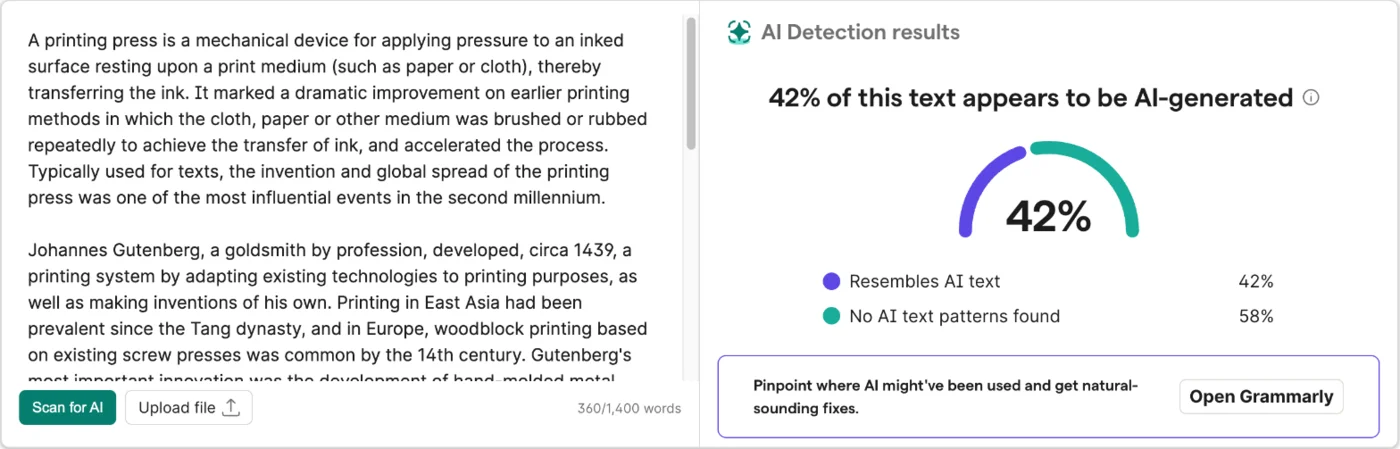
The mix is the most useful result in the test. I joined the first two paragraphs of the Wikipedia article to the second half of the Claude essay: 213 human words and 147 AI words, so 40.8% of the text was machine-written. Grammarly scored it 42% AI.
That is within about a point of the truth, and QuillBot’s detector gave the same text 41% in our QuillBot AI detector test. What the free Grammarly page cannot do is show which part it thinks is AI. You get one number, with no highlighting, and a card telling you to open Grammarly to “Pinpoint where AI might’ve been used”.
A spot check, not a benchmark
Seven texts are a spot check, not a benchmark. They tell you how the free page behaved on these samples in October 2026. They do not give you an error rate, and I would distrust anyone who reports one from a dozen pastes.
They do show the shape of the tool. On my seven texts Grammarly made no mistakes in either direction: it flagged all three AI paragraphs at 75% or more, cleared all three human texts at 0%, and put the mix within about a point of its real AI share.
Is Grammarly really #1 on RAID?
It was. On 23 October 2026, it wasn’t. The claim on the page is a snapshot from February that never got updated.
RAID is a public benchmark for AI text detectors built by researchers at the University of Pennsylvania and others, published at ACL 2024. Its paper opens with a line that could be aimed at this exact page: many detectors “claim to detect machine-generated text with extremely high accuracy (99% or more). However, very few of these detectors are evaluated on shared benchmark datasets.” Vendors run their detector on RAID’s hidden test set, submit the predictions and get a public score.
Grammarly’s entry is dated 9 February 2026, the same day it published a blog post headed “Grammarly’s AI Detector Agent Ranks #1 in Quality.” Among entries dated on or before that day, its score was the highest in the default view. Fair claim, at the time.
Then newer entries arrived. When I loaded the RAID leaderboard on 23 October 2026, its default view (all domains, no adversarial attacks, scored at a 5% false-positive rate) listed 60 entries, and Grammarly’s row was sixth. Winston AI was first, followed by FLAIRD, Zhuque AI Detection Assistant, GPTTrace (Ettin-1B) and FCM. Every entry above Grammarly is dated April 2026 or later.
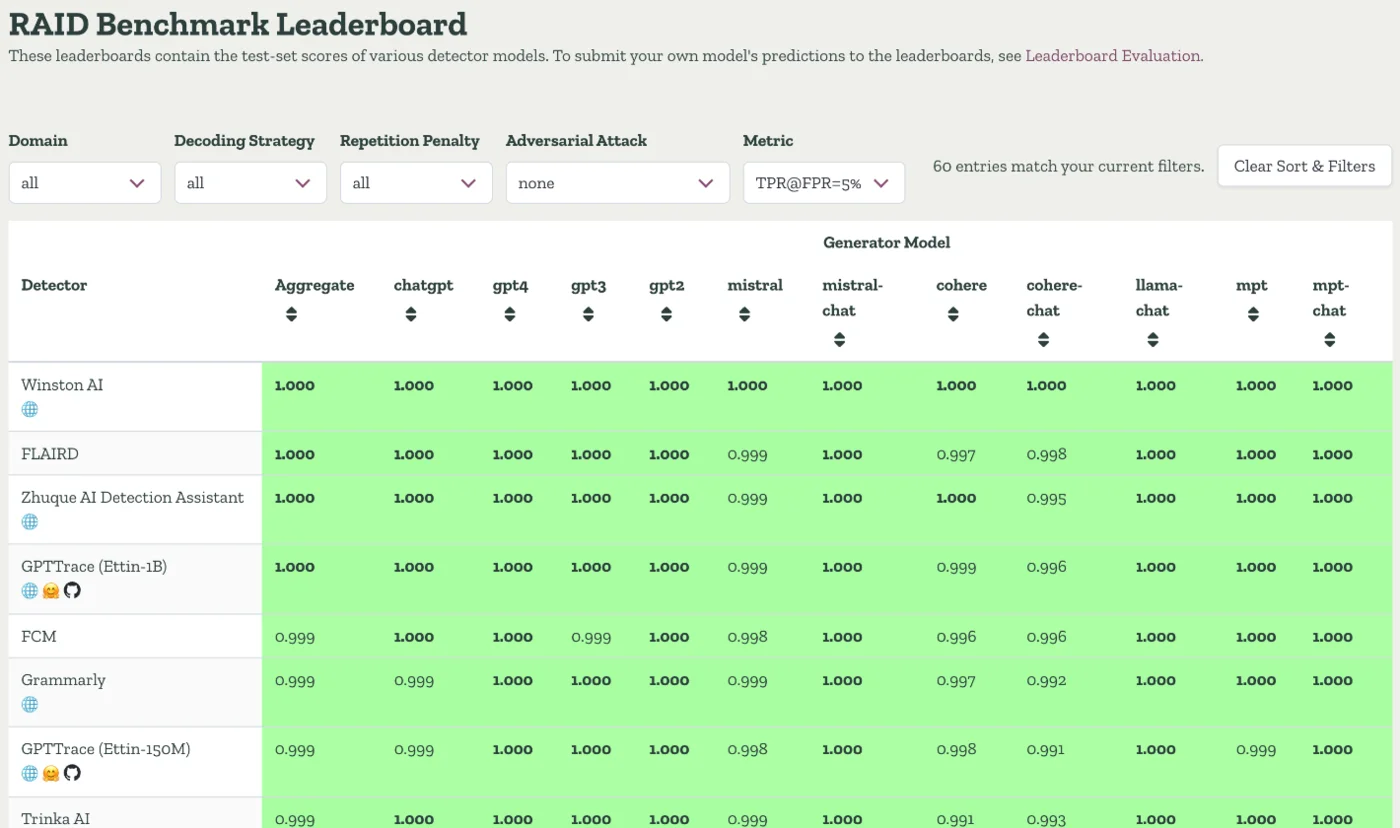
The margins at the top are tiny: Grammarly’s aggregate is 99.91% against Winston AI’s 100.0%. So this is not a story about Grammarly being bad on RAID. It is a story about a page that still says “#1” eight months later.
Switch the leaderboard’s attack filter to include RAID’s adversarial attacks, the tricks people use to dodge detectors, and Grammarly drops further. On 23 October 2026 that view put Grammarly 17th of 60 entries, with 99.47% of AI text caught. QuillBot, 15th in the default view, moved above it to 14th.
What the “99%” actually measures
The page says Grammarly “achieves 99% detection accuracy.” The matching RAID figure is not accuracy in the everyday sense. It is the share of AI-written texts the detector catches when its threshold is set so that 5% of human texts get flagged. Grammarly’s entry scores 99.91% on that measure without attacks.
Read the setting again: 5% of human texts flagged. That is the benchmark’s default, and it is a lot of false alarms if one of them is your essay. RAID also reports a stricter 1% setting, where Grammarly’s caught rate is 99.69%. Neither number tells you how often the free page flags a human writer, which is the question students actually ask.
Blind spots in the benchmark
RAID’s AI texts come from eleven model variants: ChatGPT, GPT-4, GPT-3, GPT-2, Mistral, Cohere, Llama, MPT and their chat versions. There is no Claude, no Gemini, and nothing from the latest GPT generation. Its eight domains are abstracts, books, news, poetry, recipes, Reddit posts, reviews and Wikipedia. There are no student essays.
Grammarly’s page says it identifies text from “ChatGPT, Gemini, and Claude.” RAID can’t confirm that, which is one reason I tested with Claude myself.
Free page vs the Pro AI Detector agent
Grammarly runs two detectors under one name, and they behave differently.
The free web page is the one above: paste, scan, one number. The AI Detector agent lives inside Grammarly’s own editor (app.grammarly.com), in Superhuman Go, in the browser extension inside Google Docs, and in the desktop apps inside Microsoft Word, according to Grammarly’s support guide. The guide opens by calling AI detection “a paid feature.”
On my free account the agent was locked. The panel listed what it would do and offered a trial, and directly under it a card headed “Before you turn it in” promoted the AI Rewriter, which “swap[s] out phrases that may appear to be AI-generated.”
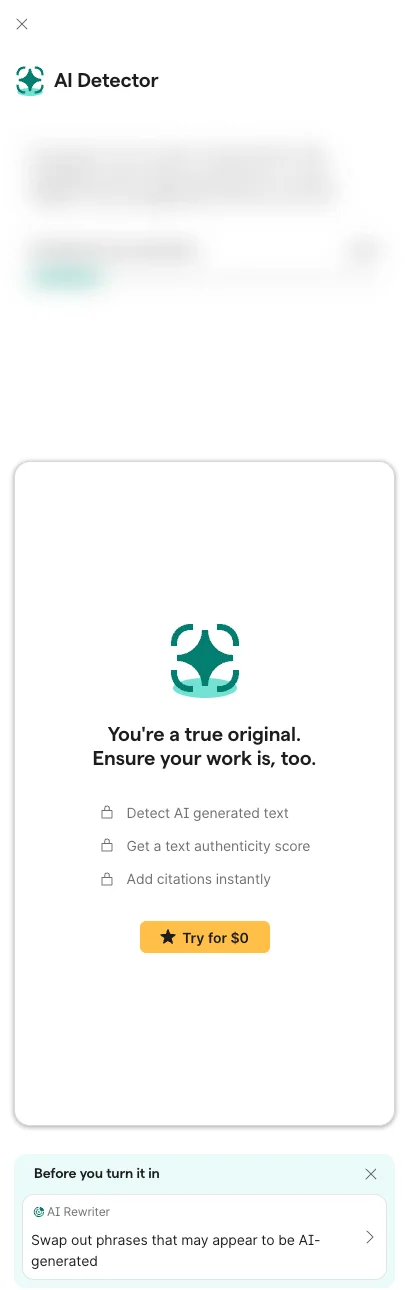
From the support guide, the agent adds three things over the page:
- It marks separate sections of your text with bars in a side panel, showing the likelihood of each part being flagged, so you see where rather than only how much.
- It offers a Generate citation button for APA, MLA or Chicago, for the case where the flagged part is a quote or a source you forgot to cite.
- It tracks citations you mark as added, with a count that updates as you go.
Pro costs $12 a month billed annually or $30 month to month, the same prices I found for the Grammarly review. I did not pay for it, so everything about the agent here comes from Grammarly’s guide.
Grammarly contradicts itself
Read the landing page and the support guide side by side and three claims don’t match.
| Topic | Detector page says | Support guide (updated 20 Oct 2026) says |
|---|---|---|
| Explanations | “Provides clear explanations for why a phrase may be flagged” | “it doesn’t explain why the text may be flagged” |
| Training data | “tens of thousands of texts” | “hundreds of thousands of human and AI-generated texts” |
| Price | “Free AI Detector” | “AI detection is a paid feature” |
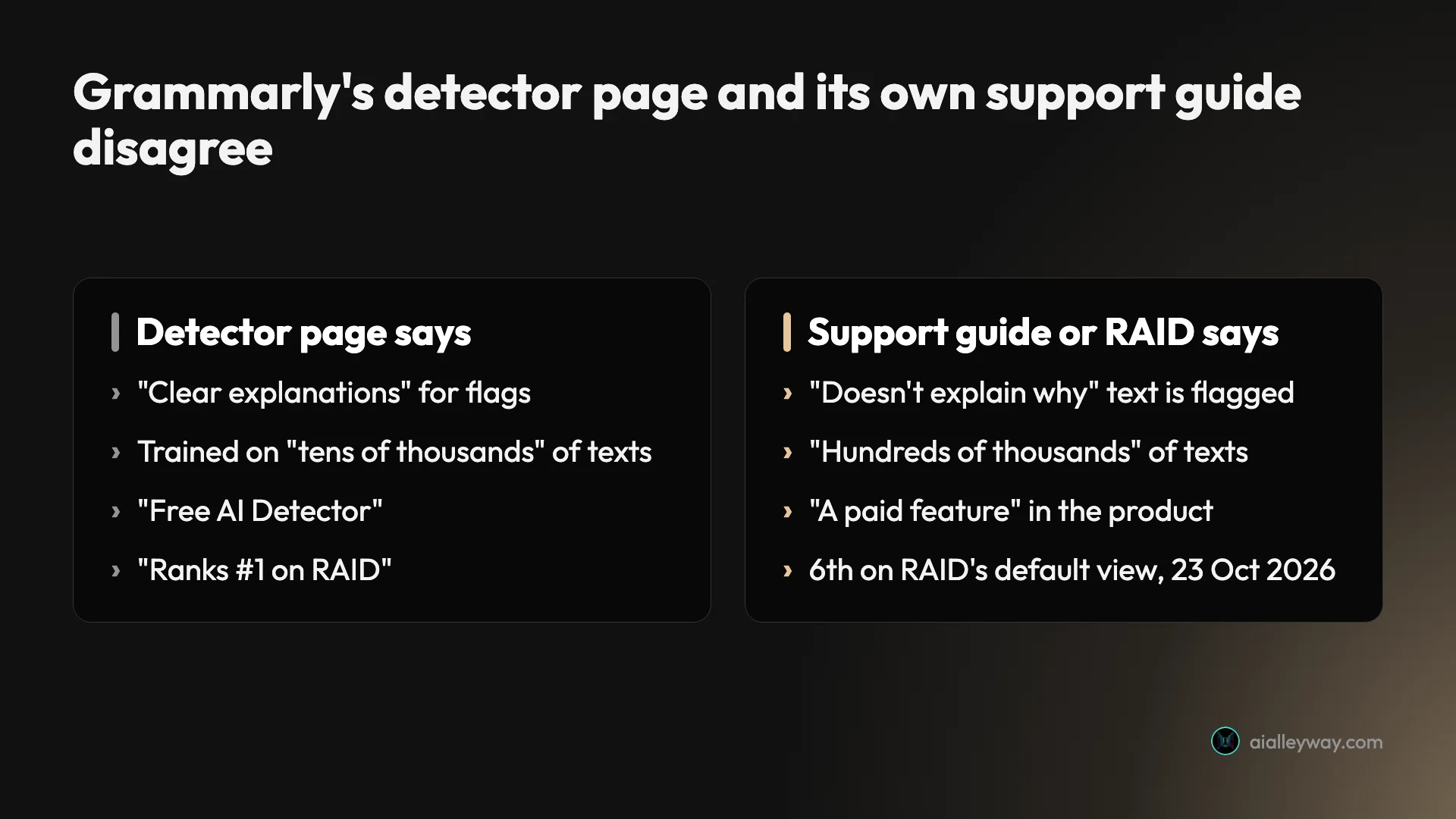
The price line has an innocent reading: the page is free and the in-product agent is paid. The other two are just inconsistent. For a tool whose output can decide whether a student gets a zero, I would like the vendor’s own pages to agree on what it does.
Does using Grammarly make your writing look like AI?
Fixing typos doesn’t. Letting Grammarly rewrite your sentences does. Both Grammarly and Turnitin say so in writing.
Turnitin’s AI detection FAQ, updated 22 October 2026, answers the question directly. In its tests on human documents, “in most cases, changes made by Grammarly (free & premium) and/or other grammar-checking tools were not flagged as AI-written.” The same answer then carves out Grammarly’s generative features: “draft generation, paraphrasing, summarizing, and other features. Content produced using these features will likely be flagged.”
Grammarly’s guide draws the same line for its own detector. The red and blue underlines “should typically not impact the percentage score.” But rewrites from its Grammarly, Paraphraser and Humanizer agents “come from our LLM,” and the guide’s advice is blunt: “If you are concerned about being flagged for inappropriate AI use, we suggest that you refrain from using our agents to rewrite your content.”
That sits awkwardly next to the “Before you turn it in” card that pushes the AI Rewriter. One part of Grammarly sells a rewrite to make text look less AI-generated; another part warns that its rewrites will look AI-generated.
The practical rule for students: accept spelling and grammar suggestions freely, and treat any button that rewrites a whole sentence or paragraph as AI use. Grammarly’s free Authorship feature, covered below, records which is which.
Reading your score: three situations
A percentage only means something next to what you know about the text. Here is how I would read it in the three cases people actually face.
| Your situation | What the score tells you | What to do |
|---|---|---|
| You wrote it, it scored high | Your style resembles AI patterns, nothing more | Keep drafts and version history; turn on Authorship |
| You used AI, it scored low | This detector missed it today | Nothing changes; another detector may catch it |
| You’re grading someone else | One signal that needs context | Ask for drafts and a conversation before any penalty |
You wrote it yourself and it scored high
Don’t panic and don’t start rewriting perfectly good sentences to chase a lower number. Grammarly’s own guide says the score “should be viewed as an average estimate rather than a definitive percentage assessment,” and its page says no detector can “conclusively or definitively determine whether AI was used.”
What helps is evidence of process. Keep your outline, notes and earlier drafts. If you write in Google Docs or Word, the version history shows the text growing over hours, which a pasted AI answer can’t fake. Turn on Authorship before you start the next assignment.
You used AI and it scored low
A low score is not permission. In my test the sourdough paragraph was 100% Claude and scored 75%, so a quarter of it read as human to Grammarly. On Reddit, a user wrote in June 2026 that text copied straight from Gemini scored 0%. If your school bans AI writing, a passing score on one detector doesn’t change what you did, and your teacher may run a different one.
You’re a teacher looking at a student’s score
Treat it as a reason to talk, not a verdict. Grammarly’s support page on AI detection calls detectors “a single data point rather than the sole source of evidence.” Ask for drafts or version history, and ask the student to talk through the argument.
The stakes are real. In an August 2026 r/Grammarly thread, an English learner wrote that a teacher used Grammarly’s detector, got 35% AI, and gave the essay 0/9, though the student says they wrote all of it.
Six caveats before you act on a Grammarly percentage
The detector page is honest in its small print. These are the points where the small print matters most.
Second-language writers face higher false-flag rates
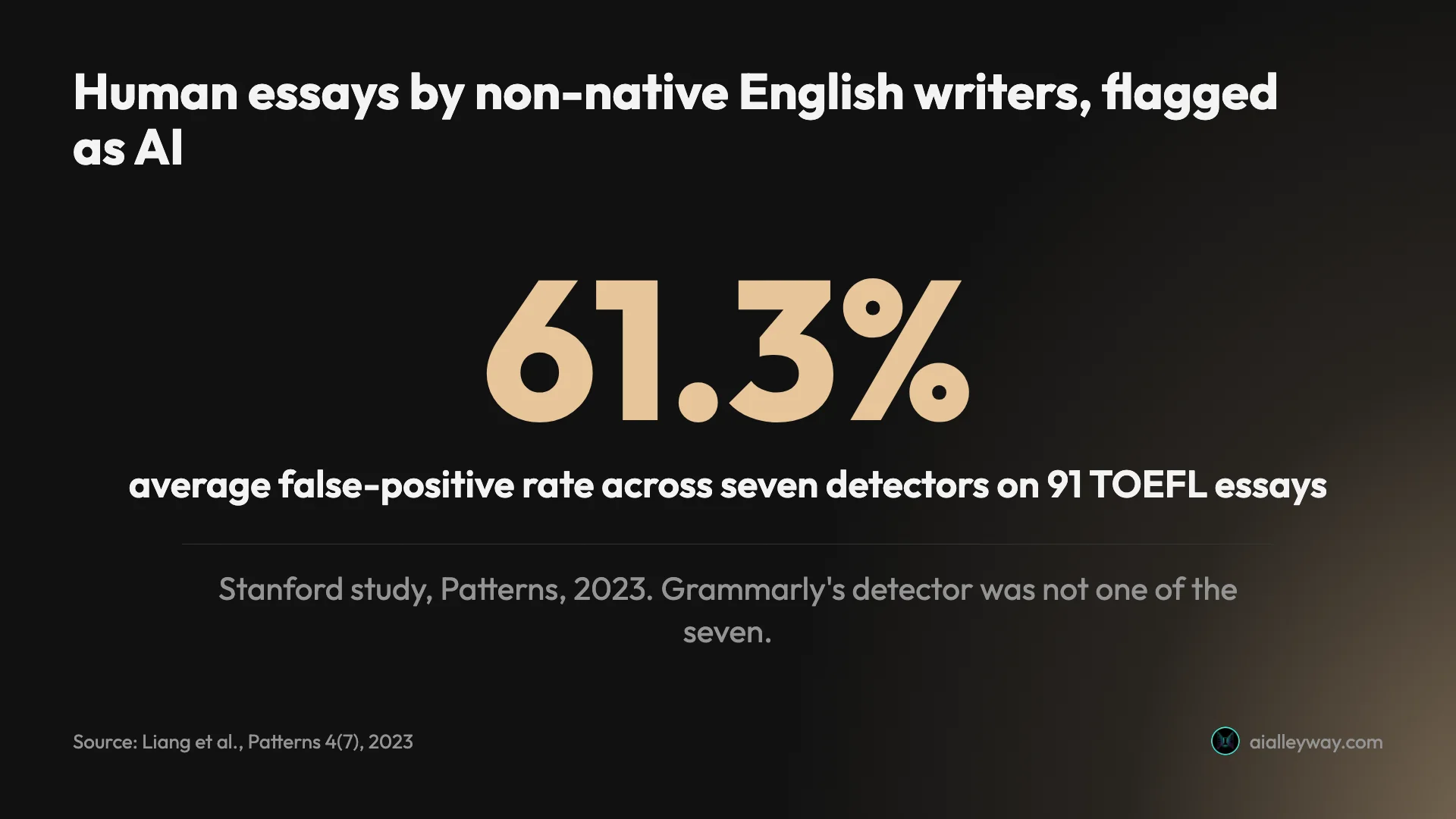
Plain, careful English with common words and regular sentence shapes is exactly what detectors read as AI. A 2023 Stanford study in the journal Patterns (Liang et al.) ran seven detectors on 91 TOEFL essays written by people, and the detectors flagged 61.3% of them as AI on average. Grammarly’s detector wasn’t one of the seven, but the 35% case above is the same pattern.
Short texts are shakier
Grammarly’s support guide says “shorter passages are slightly harder to measure for an accurate score than longer passages.” A single paragraph gives the model fewer sections to average over, so one tidy sentence weighs more. All of my samples were 200 to 360 words, which is about the floor I would trust.
The same tool can disagree with itself
In my test it didn’t seem to. I re-scanned the Claude essay on 26 October, three days after the first scan, and it scored 100% AI again.
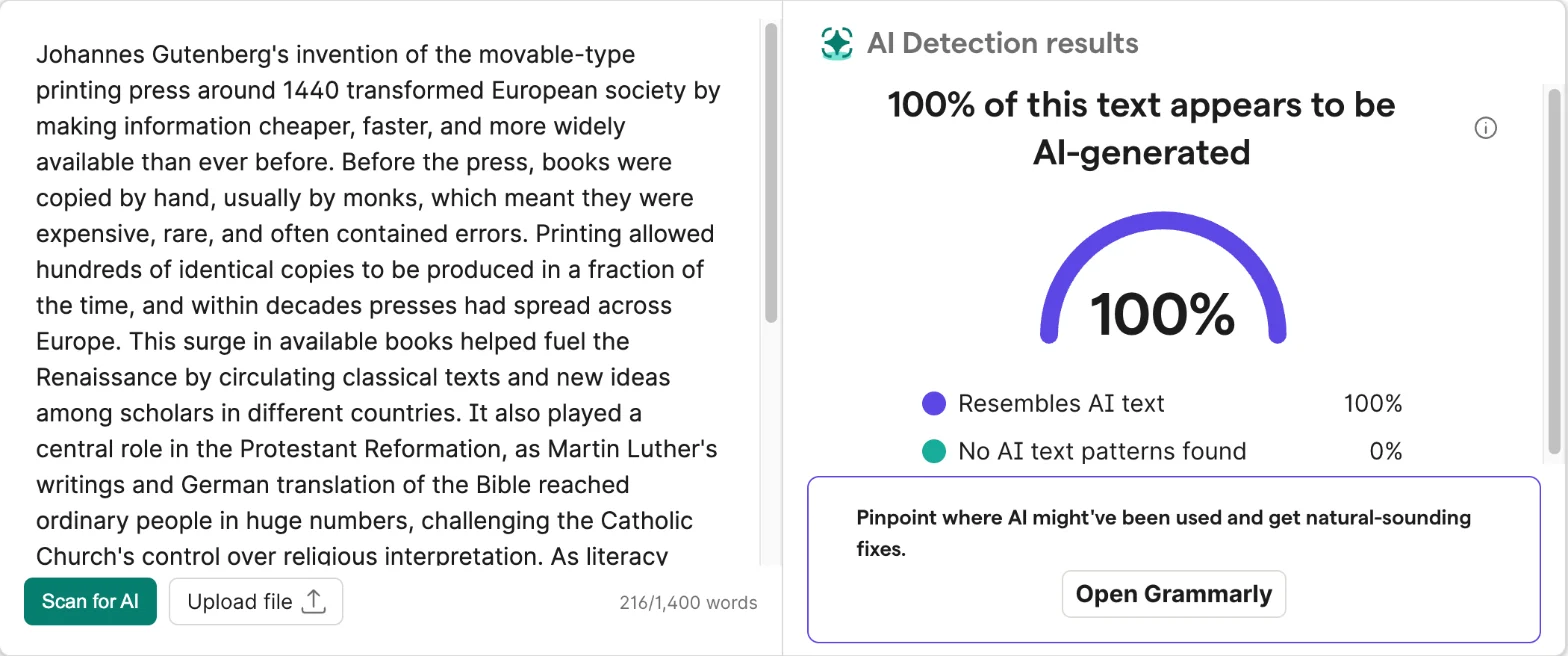
One repeat is not proof of stability, though, and the gauge already read 100% from the scan before it, so I can’t fully rule out a stale display; the word counter did update. On Reddit, a September 2026 post titled “Grammarly, fix your AI Detector, please and thank you” says hand-written fiction that had scanned as human started triggering AI patterns from one day to the next, after what the poster took to be a model update. The page itself says the detector “updates continuously,” so a score from last month is not a score from today.
Grammarly’s own rewrites count against you
Covered above, but it bears repeating as a trap: use the Paraphraser or Humanizer agents on your essay and Grammarly’s guide says its own detector will likely flag the result. So will Turnitin, by its own FAQ.
Even detector makers have given up on certainty
OpenAI launched its own AI text classifier in January 2023 and shut it down on 20 July 2023 “due to its low rate of accuracy.” By OpenAI’s own numbers, it caught 26% of AI-written text and wrongly flagged human text 9% of the time. Vanderbilt University disabled Turnitin’s AI detector the same year, noting that even a 1% false-positive rate would have meant around 750 of the 75,000 papers it submitted in 2022 being wrongly labelled. Detectors have improved since, but the uncertainty hasn’t gone away.
Grammarly’s own article fails its own test
In January 2026 a Reddit user ran Grammarly’s article “How to Avoid AI Detection in Writing” through Grammarly’s detector and posted the result: 63% AI written. Whether that article had AI help or not, it shows how easily clean, structured prose trips the needle.
Grammarly or QuillBot: same seven texts, side by side
I ran the same seven texts through QuillBot’s free detector on 23 October, on a signed-in free account, for our QuillBot AI detector test. Putting the two side by side is the closest thing to a second opinion you can get for free.
| Text | Grammarly (free page) | QuillBot (free) |
|---|---|---|
| Sourdough explainer (Claude) | 75% AI | 100% AI |
| Printing-press essay (Claude) | 100% AI | 100% AI |
| Missed-train blog post (Claude) | 100% AI | 0% AI |
| Declaration of Independence | 0% AI | 0% AI |
| Three Men in a Boat | 0% AI | 0% AI |
| Wikipedia, “Printing press” | 0% AI | 0% AI |
| Wikipedia + Claude mix (40.8% AI) | 42% AI | 41% AI |
On the human texts the two agreed completely, and on the mix they landed within a point of each other and of the true share. QuillBot was the more confident of the two on the formal AI texts, scoring the sourdough explainer at 100% where Grammarly gave 75%. And QuillBot’s one miss was the casual blog post, which it scored 0% AI. Grammarly scored the same post 100%, so on accuracy across these seven texts, Grammarly came out ahead.
The bigger difference is what you get for free. QuillBot gives seven scans a day to Grammarly’s two, and it highlights the passages it thinks are AI: on the mix it marked the Claude half and left the Wikipedia paragraphs alone. Grammarly’s free page gives one number for the whole text. If you only have room for one free detector, QuillBot’s is the more useful page, even though Grammarly was the more accurate on my seven texts; if you can use both, run both and treat agreement as the signal.
Disagreement is worth reading too. The casual blog post split the two completely, 100% against 0%, on text a machine wrote from start to finish. If your own draft scores high on one and low on the other, that tells you the score is unstable, not that you cheated. If a student’s essay does the same, it is a reason to talk to them, not to mark it down.
Our Grammarly vs QuillBot comparison covers the rest of the two products, and our best AI writing tools roundup ranks both against the wider field.
Students, teachers and writers: is it worth your two scans?
It is a good free spot check with a tight daily cap. Whether that is enough depends on who you are.
- Students checking their own work before submitting: use it, two scans at a time, but don’t rewrite good sentences to chase a number. If your school uses Turnitin, Turnitin’s score is the one that counts, and the two can differ.
- Students worried about false accusations: Authorship protects you better than any detector score, because it records how you wrote rather than guessing from the result.
- Teachers: fine as one signal among several. Never as the only one, and never against a non-native writer without a conversation first.
- Editors and content teams checking freelancer copy: two free scans a day won’t cover a content pipeline. You would need Pro or a detector built for volume.
- Skip it if you want sentence-level highlights for free, or you need more than two checks a day without paying. The free page gives one number and then stops.
Alternatives worth a look: Authorship, QuillBot and GPTZero
If the free page’s limits don’t fit, these are the three I would look at first.
Grammarly Authorship is the better tool for proving you wrote something. It is free on Grammarly Free and Pro, runs in Microsoft Word, Google Docs and Canvas submissions, and records what you typed, what you pasted and what came from AI, with a replay of the document being written. Grammarly’s Authorship page says the report is only shared when you choose to share it. It answers a different question from a detector: not “does this look like AI?” but “how was this written?”
QuillBot’s AI detector is the obvious second opinion from a rival writing tool, and the section above shows how it did on the same seven texts. It gives seven free scans a day and highlights the passages it flags. In RAID’s default view it sits 15th, below Grammarly but close. Our QuillBot AI detector test has the full results.
GPTZero is the detector that Grammarly’s parent company agreed to buy in June 2026, and it remains a separate product with its own scores. It ranks 26th in RAID’s default view. See GPTZero.
Final word
Grammarly’s free AI detector is a fair, fast spot check that caught all three Claude paragraphs I gave it, cleared all three human texts at 0%, and scored a mixed text close to its real AI share. It is not the #1 detector on RAID anymore, whatever the page says, its “99%” is a benchmark setting rather than a promise about your essay, and a free account runs dry after two scans a day.
Use it on your own drafts as one signal. If you need proof of authorship, turn on Authorship. If you’re judging someone else’s work, look at their drafts, not a gauge.
Frequently asked questions
Is Grammarly's AI detector free?
Yes, the page version is. Grammarly's AI detector page lets you paste text or upload a file and returns one percentage, with no payment. On my free Grammarly account in October 2026 it allowed two scans in a day; the third raised a pop-up saying I had reached my daily free limit.
The AI Detector agent inside Grammarly's own editor is different. Grammarly's support guide calls AI detection a paid feature in the product, and on my free account that panel was locked behind a Pro trial button. Pro costs $12 a month billed annually or $30 month to month.
Is Grammarly's AI detector accurate?
It caught the AI text I gave it, but no detector score is proof. In my test it scored three Claude-written paragraphs at 75%, 100% and 100% AI, including a casual blog post that QuillBot's free detector missed. All three human texts I gave it, including the Declaration of Independence, scored 0% AI.
Grammarly claims 99% accuracy and a first place on the RAID benchmark. The 99% matches RAID's caught rate at a 5% false-positive setting, not plain accuracy, and on 23 October 2026 Grammarly sat sixth on RAID's default leaderboard view, not first. Grammarly's own page says no AI detector is 100% accurate.
How many scans does the free Grammarly AI detector allow?
Grammarly does not publish a number. On my signed-in free account on 23 October 2026, the first two scans worked and the third opened a pop-up: You've reached your daily free limit. Start your free trial today to get full access to Grammarly. Despite the word daily, the limit worked as a rolling 24 hours: a scan the next morning, before 24 hours had passed, was blocked, and two scans went through once they had.
The page also showed a word counter capped at 1,400 words per scan, and the text box accepts up to 25,000 characters in its code. Uploads take doc, docx, odt, rtf, txt, html and pdf files.
Can Grammarly's AI detector flag human writing as AI?
Yes, and Grammarly says so itself. Its page says detectors do not track authorship, which means even human-written text can be flagged as AI-generated. In my test it did not: three human texts, from 1776, 1889 and 2019, all scored 0% AI. Three texts is a small sample, though, and none was a student essay.
On Reddit, an English learner wrote in August 2026 that a teacher ran their essay through Grammarly's detector, got 35% AI and gave the essay zero marks, though they wrote it themselves. A 2023 Stanford study found seven other detectors flagged 61.3% of essays by non-native English writers as AI on average.
Will using Grammarly get my essay flagged by Turnitin?
Spelling and grammar fixes usually will not, according to Turnitin's own FAQ, updated October 2026. It says changes made by Grammarly free and premium were, in most cases, not flagged as AI-written in its tests on human documents.
The same answer excludes Grammarly's generative features, such as drafting, paraphrasing and summarizing, and says content made with them will likely be flagged. Grammarly's support guide says the same about its own detector: rewrites from its agents come from its language model and are likely to be flagged.
What does the Pro AI Detector agent add over the free page?
Location in the text. The free page gives one overall percentage. Grammarly's support guide says the agent in its editor marks separate sections of your text with bars, shows the likelihood of each being flagged, and offers a Generate citation button.
The guide also says it does not explain why text may be flagged, and that the score should be read as an average estimate rather than a definitive percentage. I could not test the agent: on my free account it was locked.
Is Grammarly's AI detector the same as GPTZero?
No. Superhuman, the company that owns Grammarly, announced on 23 June 2026 that it had agreed to acquire GPTZero, and GPTZero now appears in Grammarly's site footer. But Grammarly's support guide, updated 20 October 2026, still describes its detector as a proprietary in-house model and names GPTZero as a different tool whose scores may differ.
On the RAID leaderboard the two are still separate entries with different scores. I found no statement that Grammarly's free page now runs on GPTZero's technology.
Keep reading
Grammarly review: a near-perfect checker with a pushy AI
A Grammarly review from 23 planted errors: the free plan caught all 23, but one AI rewrite added a claim I never made. Prices, privacy and verdict.
QuillBot AI detector: 6 of 7 right, and the miss that matters
QuillBot AI detector tested on seven texts: it cleared every human one and caught formal AI, then scored a casual Claude story 100% human.
Grammarly vs QuillBot: one caught 23 of 23 errors, one costs less
Grammarly vs QuillBot, tested with the same paragraphs on both free plans: who caught more errors, who rewrote without changing facts, and who costs less.
Best AI writing tools: one to draft, one to check
The best AI writing tools, tested on one email brief and 23 planted errors. Claude drafted best, Grammarly checked best, and Gemini changed a promise.