
Best AI for Research: 8 Tools, Matched to Each Step of the Job
The best AI for research, by step: Gemini Notebook to question your sources, Perplexity and Consensus to find them, deep research to write up. US prices.
Contents
The best AI for research, one pick per step
Research is several jobs, and AI tools are good at different ones. One finds sources, another reads them, a third writes the report. The best AI for research is the one matched to the step you are stuck on.
- Best for questioning sources you already have: Gemini Notebook, formerly NotebookLM. Answers from the files you load, free.
- Best for cited answers from the open web: Perplexity. A source on every claim, even on the free tier.
- Best for what published studies say: Consensus. A yes-or-no evidence meter over the top 20 papers.
- Best for literature reviews and data extraction: Elicit. More than 138 million papers and one Research Agent.
- Best long report to try free: Gemini Deep Research. Listed on Google’s free tier, with export to Docs.
- Best for reports you can steer and export: ChatGPT deep research. An editable plan and Word or PDF export.
- Best for research across your inbox and Docs: Claude Research. Searches the web and connected Google apps.
- Best for research a team keeps: Notion AI. Its Research mode searches your workspace and the web and returns a cited report.
I have used four of these hands-on: Gemini Notebook, Notion AI, and the free tiers of Perplexity and ChatGPT. On ChatGPT Free I have used deep research enough to hit its limit, but never timed or rated a report. Consensus, Elicit, Claude Research and the Gemini and Perplexity deep research modes I have not run; those sections draw on the vendors’ own pages, read on 17 and 18 October 2026.
How we chose the best AI research tools
Every tool in this list will give you an answer. The test is whether you can check it. So the first criterion was the source trail: where an answer comes from, and how quickly you can see the sentence behind it.
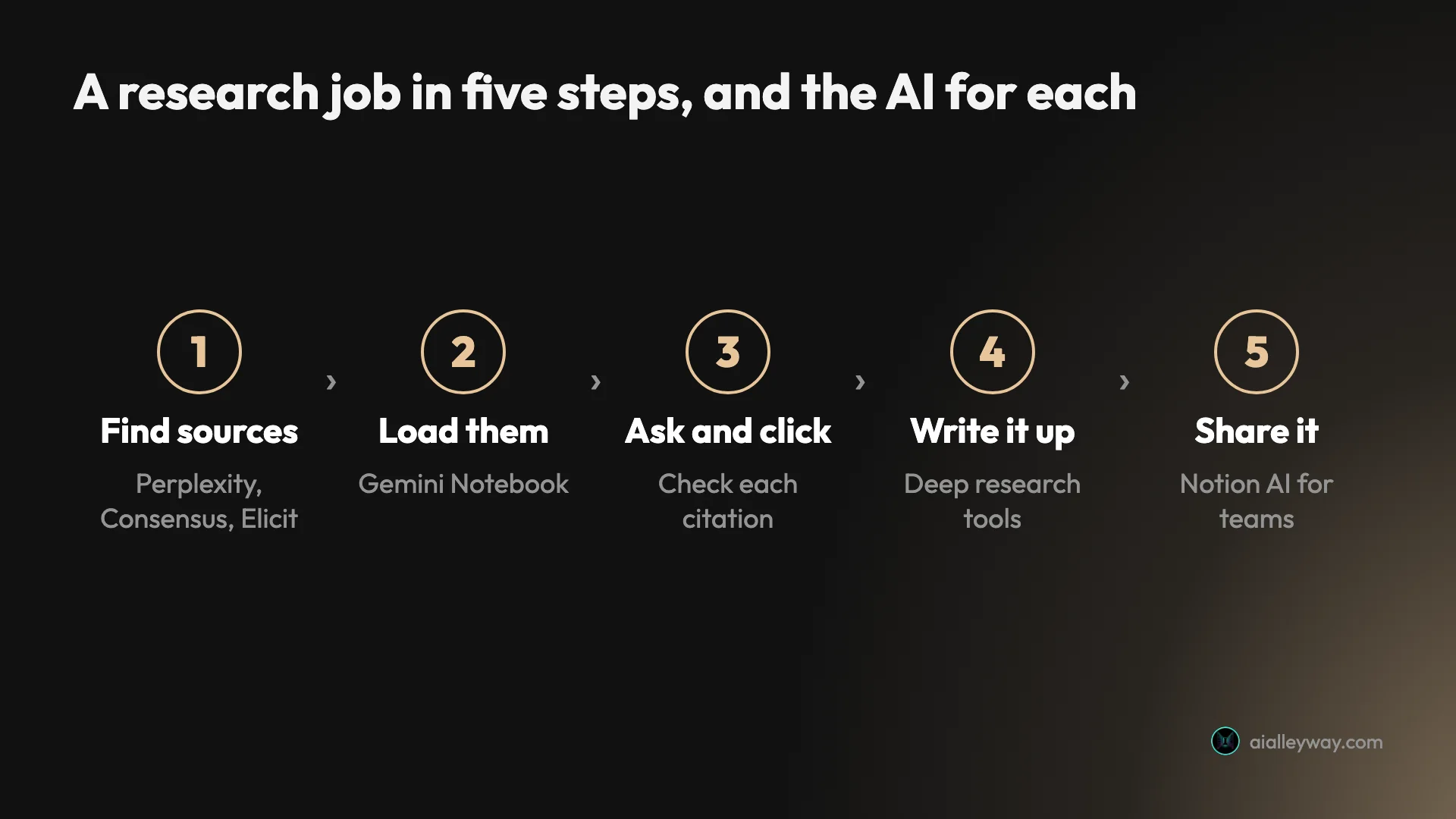
The second was fit to a step. A web search engine, a paper database and a notebook of your own files fail in different ways, so each pick has one job it does best rather than a vague “best overall”.
The third was the free tier, and the fourth was price, in US dollars.
Our evidence: five tests and a stack of help pages
Our hands-on evidence comes from five tests, all mine:
- Gemini Notebook, 14 October 2026, on a Google account with no AI plan, using four of our own articles as sources.
- Notion AI, 15 October 2026, in a new free workspace with the same four articles, including one Research mode report.
- Perplexity, 25 August 2026, one question about the EU AI Act on its free tier, alongside two other AI search engines.
- Perplexity and ChatGPT, 5 September 2026, the same question about Suno on both free tiers.
- Claude, August 2026, an ordinary chat on a paid Max account asking about a competitor’s pricing.
I also draw on a year of using ChatGPT’s free tier, written up in our ChatGPT review.
Using our own articles as sources had one advantage: we knew every figure in them, so a wrong answer was easy to spot. A single question is an anecdote with screenshots, not a benchmark, and I say so where it matters.
Research tools side by side: sources, citations and price
The “Our evidence” column is the honest one: what we saw ourselves versus what a vendor says.
| Tool | Best step | Searches | How it shows sources | Our evidence | Free plan | Paid plan for this, monthly |
|---|---|---|---|---|---|---|
| Gemini Notebook | Question your sources | Only what you add | Clicked citation opened the passage | Hands-on | Yes, 50 sources a notebook | $4.99 (Google AI Plus, more usage) |
| Perplexity | Find web sources | The web | Inline citation on every claim | Hands-on, free tier | Yes, limited | $20 (Pro) |
| Consensus | What studies say | Scholarly papers | Every sentence linked to a paper | Vendor pages | 10 Pro messages, 3 Deep reviews | $20 (Pro) |
| Elicit | Find and extract papers | Papers, your files, the web | Sentence-level citations | Vendor pages | Basic, paper search | $19 (Academic Plus) |
| Gemini Deep Research | Free long report | The web, plus Gmail and Drive if added | Not described on the current help page | Vendor pages | Listed on Free | $19.99 (Google AI Pro, higher limits) |
| ChatGPT deep research | Long report, editable plan | The web, your files, chosen sites | Citations or source links on every report | Free-tier use, no report rated | Limited | $8 (Go, Limited) or $20 (Plus, Expanded) |
| Claude Research | Report across your apps | The web and connected apps | Not described on the current help page | Vendor pages | No | $20 (Pro) |
| Notion AI | Keep it with the team | Your workspace and the web | Page and section, no highlight | Hands-on | Trial of unpublished size | $24 a member (Business; Plus has a trial only) |
Two rows need a note. Google and Anthropic described citations in their launch posts, but the current help pages I read for Gemini Deep Research and Claude Research do not say how sources are shown, so the table says exactly that.
And none of the four assistants publishes a monthly count of deep research reports for its consumer plans. ChatGPT’s plans say “Limited”, “Expanded” and “Maximum”, Google and Perplexity say only that paid plans get more, and Claude’s Research shares ordinary usage limits. Consensus is the exception, with 3, 15 or 200 Deep reviews a month by plan.
1. Gemini Notebook — best for questioning sources you already have

If you already have the papers, articles or transcripts, start here. Gemini Notebook, which Google renamed from NotebookLM in July 2026, answers from the sources you load, and in my test it would not go beyond them. That design is a big part of why it is our best pick for AI notes, rated 4.5 in our NotebookLM review.
What I saw. I loaded four of our own articles and asked five questions. Clicking a citation took me to the quoted lines, already highlighted. When I asked something none of the articles cover, the population of Lisbon, it said the sources did not cover it and suggested searching the web.
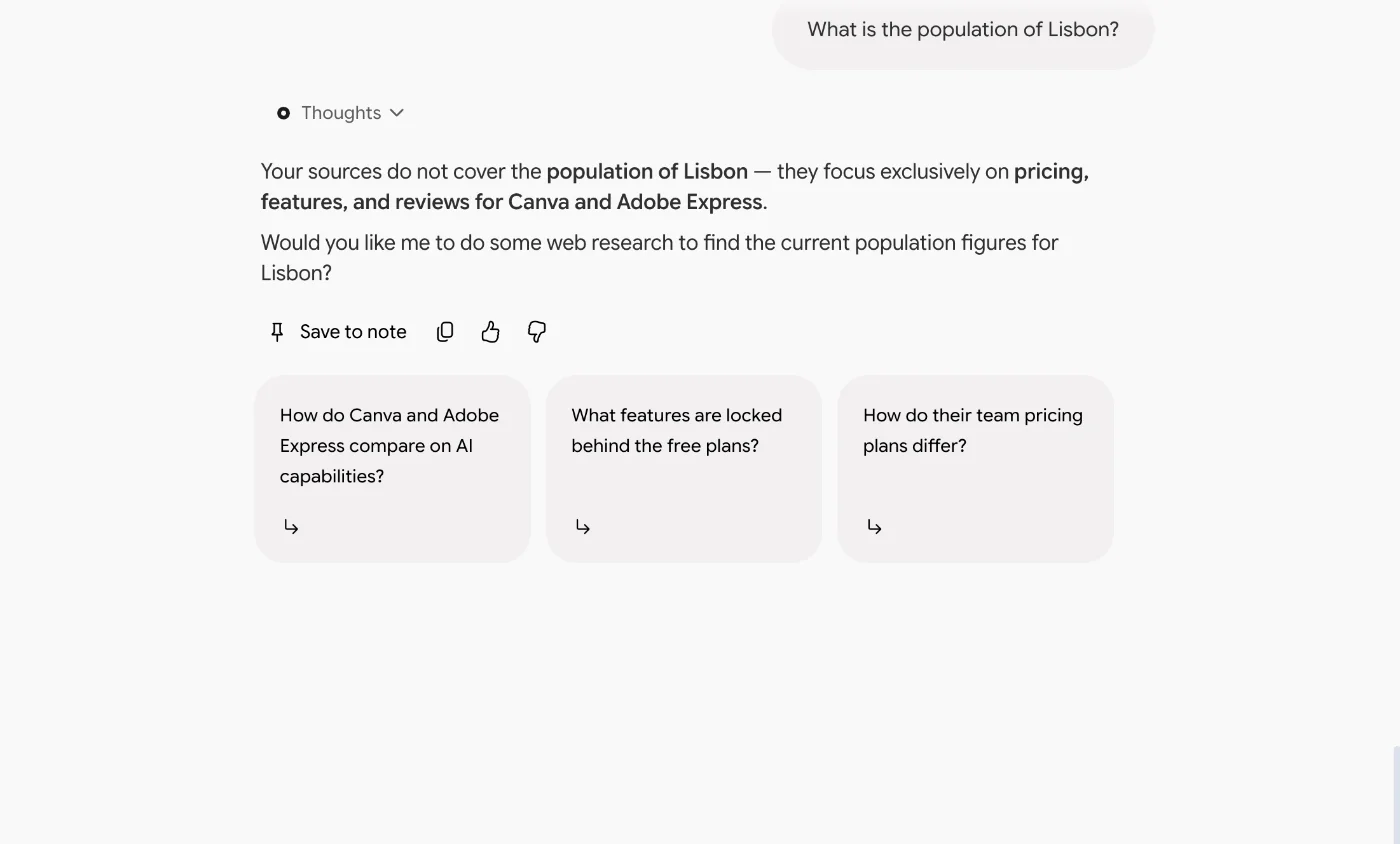
It also caught a false premise I slipped into a question, and its data table wrote “Not in source” for missing figures rather than inventing them.
Where it slipped. Asked to list every disagreement between the four articles, it said there were none. There was one: “nearly half” in one article against “About 12 of roughly 22” in another. A direct question about the templates surfaced both figures. Open-ended “find the contradictions” questions are where to be careful.
Price and limits. Free with a Google account, with 100 notebooks of 50 sources each. Google AI Plus is $4.99 a month and doubles the limits. Usage is shown only as a percentage of a five-hour window and a weekly cap, so you learn your ceiling by reaching it. Every plan and limit is in our NotebookLM pricing guide.
Who it is for. Students, analysts and writers working from a known set of sources who need every answer traceable. It takes PDFs, Word files, web pages and public YouTube videos as sources, so a folder of papers goes straight in. To learn the workflow, see how to use NotebookLM; if it does not fit, our NotebookLM alternatives roundup has nine other options.
2. Perplexity — best for cited answers from the open web

When you do not have the sources yet, Perplexity is the tool I reach for to find them with the trail attached. Every claim in an answer carries a clickable source chip, and that is true on the free tier, which is where I use it.
What I saw. On 25 August 2026 I asked three AI search engines what changed in the EU AI Act in 2026. Perplexity gave the most complete answer, with a table of moved deadlines, and it cited European Commission sites, with ten sources in total. Our best AI search engine roundup has the full comparison.
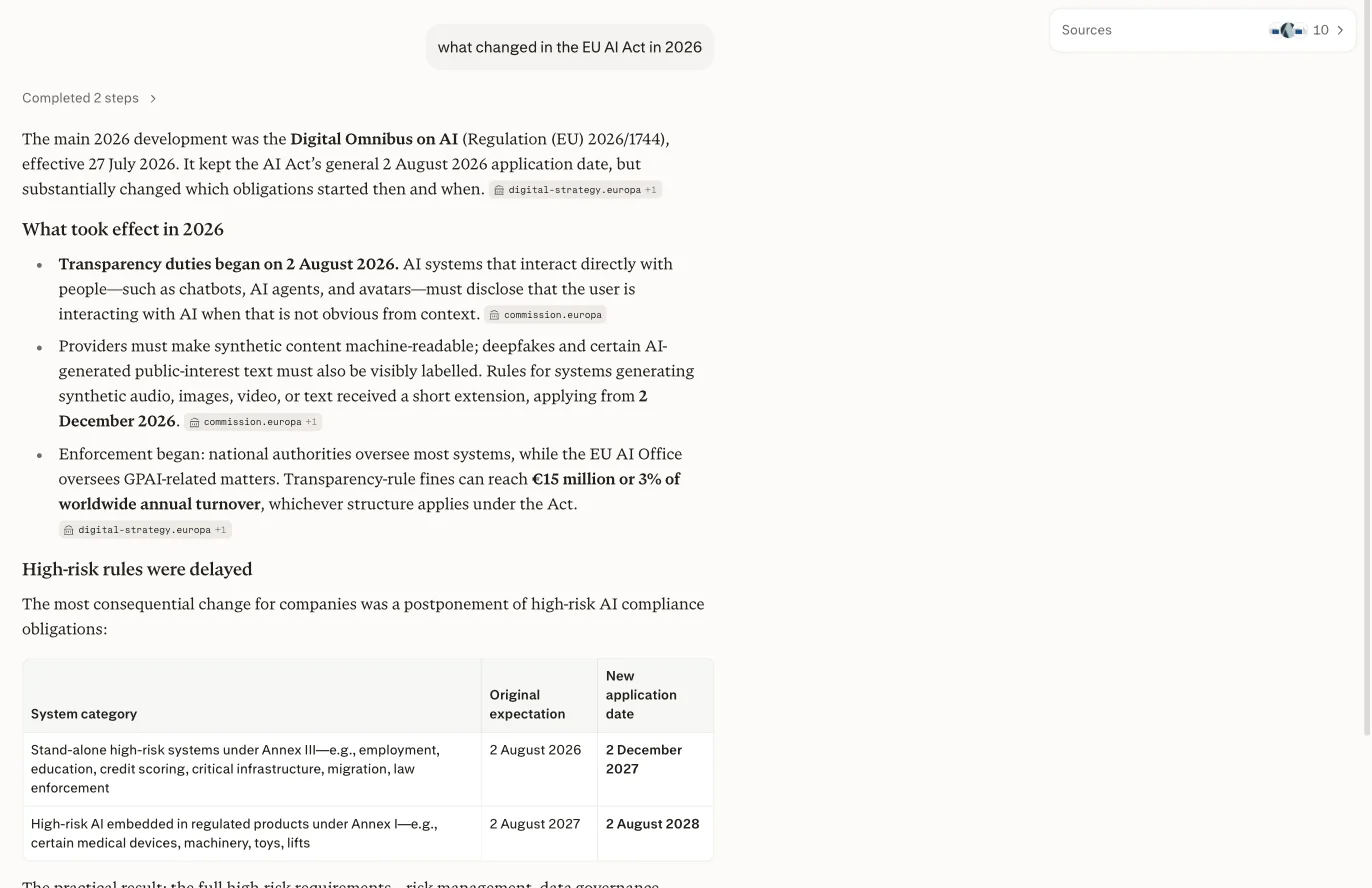
On 5 September it also answered a question about Suno’s free downloads correctly, where ChatGPT did not. But most of the citations behind that right answer pointed to music-industry news sites rather than Suno itself. A correct answer can still rest on secondhand sources.
Deep Research. Since 11 June 2026, Perplexity’s Deep Research runs inside its Computer agent. Perplexity says every factual claim in a report carries an inline citation, and its help pages put a run at a few minutes. Free users get limited access, Pro more and Max more again, with no numbers published. I have not run it.
Price. Pro is $20 a month or $200 a year; Max is $200 a month.
Who it is for. Anyone starting from a question rather than a reading list.
3. Consensus — best for what published studies say

Consensus is built for one kind of question: what does the research say? Its documentation says it searches over 400 million scholarly articles, including 350 million peer-reviewed papers, and writes an answer “where every sentence links back to the paper it came from.”
| Consensus | |
|---|---|
| Price | Pro $20 a month, or $144 a year; Deep $65 a month, or $540 a year |
| Free plan | Unlimited paper searches, 10 Pro messages and 3 Deep reviews a month; Pro gets 15 Deep reviews, Deep gets 200 |
| Sources | Scholarly papers; retracted papers are flagged and not used |
| Exports | Citations in APA, MLA, Chicago, Harvard and more, or a PDF |
The Consensus Meter. Ask a yes-or-no question and, per its help centre, it analyses the top 20 papers for your search and sorts their conclusions into Yes, No, Possibly or Mixed. That is a quick read on whether a claim is settled, before you open a single PDF.
Deep reviews. For bigger questions, a Deep review runs up to 20 searches in parallel and reads 50 to 100 papers before answering, taking a few minutes. Its docs say a small tick next to a citation means it read the full paper; without one, it read only the abstract. That distinction is worth checking on any claim you plan to repeat.
A caution from Consensus itself. Its responsible-AI page says “Sometimes a model can misinterpret a paper and summarize it incorrectly.” Its own pages also disagree on the size of its database, from 220 million peer-reviewed papers on one page to 400 million scholarly articles on another.
Who it is for. Students, clinicians and writers checking whether the evidence backs a claim. I have not used Consensus; this comes from its own pages, read on 18 October 2026.
4. Elicit — best for literature reviews and data extraction

Where Consensus gives you the verdict, Elicit is built for the legwork behind a literature review: finding the papers, then pulling the same details out of each one into a table. Its free plan searches more than 138 million papers.
| Elicit | |
|---|---|
| Price | Academic Plus $11 a month billed yearly, $19 monthly; Academic Pro $39 billed yearly |
| Free plan | Basic: paper search, with limited Research Agent use |
| Sources | Papers, up to 20 uploaded files per session, and the web |
| Exports | Reports as PDF or Word |
One agent now. Since 30 September 2026, searching, extracting data and chatting with papers all happen inside one Research Agent rather than three tools. If you used Elicit before that, your old sessions are read-only, and Elicit plans to delete them on a date in 2027 it has not yet set; save what you need.
Citations and extraction. Elicit’s changelog says answers cite down to the sentence. An extraction table handles 5 columns at a time on Plus and 20 on Pro, and Pro adds a systematic review workflow that can screen up to 5,000 papers.
The limit to know. The free plan’s Research Agent allowance is described as “limited”, with no number, and usage comes from one monthly pool.
Who it is for. Graduate students and researchers running a literature review or a systematic review. Everything in this section is from Elicit’s own pricing page, help centre and changelog as of 17 October 2026; I have not run it.
5. Gemini Deep Research — best long report to try free

Deep research is the mode where an assistant plans a search, reads dozens of pages and writes a report with sources, instead of answering in a paragraph. Gemini’s version is listed on Google’s free tier and exports straight to Docs; ChatGPT and Perplexity also give free users limited access to theirs.
| Gemini Deep Research | |
|---|---|
| Price | Free tier; Google AI Plus $4.99, Pro $19.99 a month |
| Free plan | Listed on Free; may be unavailable at busy times |
| Sources | Google Search by default, plus your Gmail, Drive, uploads or notebooks if you add them |
| Exports | Export to Docs; turn the report into an Audio Overview |
How it works. Gemini drafts a research plan, which you can edit before it starts. Google’s help page says a report “usually takes about 5-10 minutes” and longer for complex ones. Google AI Pro and Ultra subscribers can run it on the Pro model and get higher limits; Ultra reports may include charts and diagrams.
Free, with an asterisk. Google says you must be 18 or over to use it. Its limits page ticks Deep Research for users without a plan, but adds that it “may be unavailable during periods of high demand”. There are daily limits on every plan, and Google does not publish the numbers. Our Google Gemini review, written in August, listed Deep Research behind a paid plan, so check what your own account shows.
What I have not checked. I have not run Gemini Deep Research, and its current help page does not describe how sources appear in the report.
Who it is for. Anyone who wants a long, sourced first draft without paying, and is happy to verify it in Docs.
6. ChatGPT deep research — best for reports you can steer and export

If ChatGPT is already your assistant, its deep research mode lists the most steering controls of the three big assistants, going by their help pages. OpenAI’s help page says it proposes a research plan you can modify, lets you restrict it to sites you name, and exports the finished report as Markdown, Word or PDF.
| ChatGPT deep research | |
|---|---|
| Price | Plus $20 a month for “Expanded”; Pro from $100 for “Maximum” |
| Free plan | “Limited” on Free and on Go, which is $8 a month |
| Sources | The web, specific sites, your uploaded files and connected apps |
| Exports | Markdown, Word or PDF, with a sources-used section |
What the free tier is like. In a year on ChatGPT Free, deep research was the most tightly metered thing I used: it ran out almost as soon as I leaned on it, and I never timed or rated a report. OpenAI’s plan pages give words, not numbers, and its help page points to a usage counter in the app.
What one test showed. On 5 September 2026, I asked ChatGPT’s free tier how many songs Suno’s free plan lets you download. It cited Suno’s own pages, dated the change correctly, and still answered zero. The right answer for an account like mine was seven.
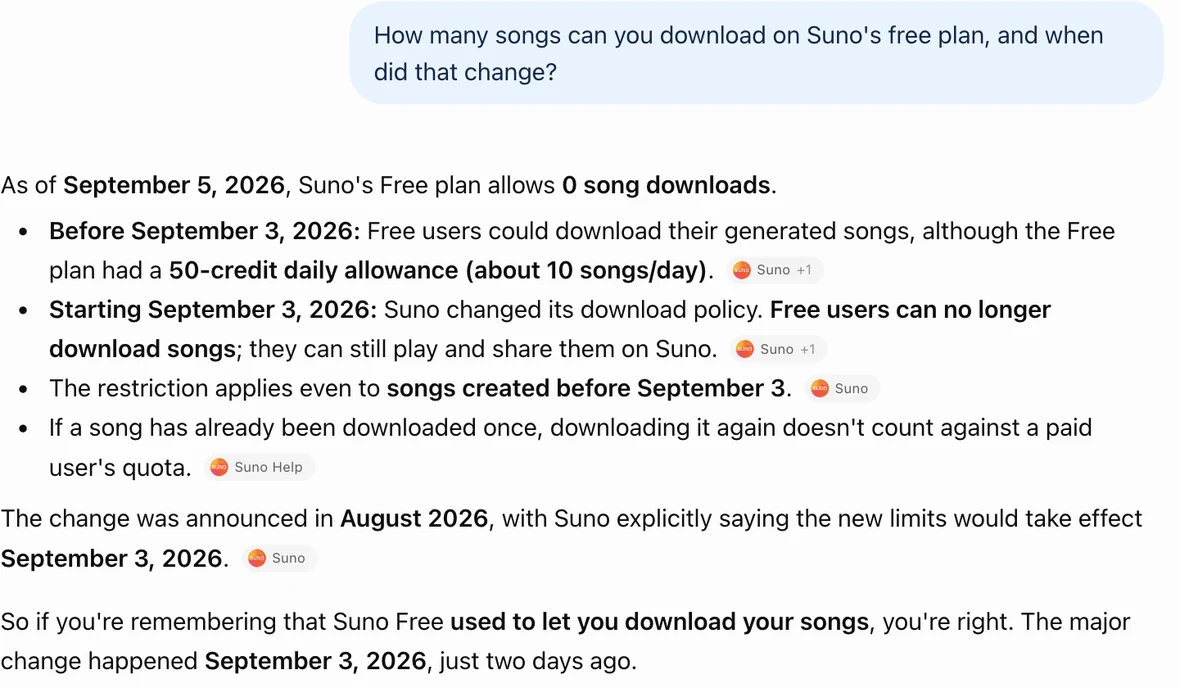
That was ordinary search, not deep research, but it is the failure to watch for in any report: real sources, misread.
Who it is for. ChatGPT Plus subscribers who want reports they can steer and export. Our Perplexity vs ChatGPT comparison has the full Suno test.
7. Claude Research — best for research across your inbox and Docs

Claude’s Research mode runs several searches that build on each other, and Anthropic’s help page says it can search your connected tools as well as the web. With Google Workspace connected, that means Gmail, Google Calendar and Google Docs. For research that lives half in email threads, that is the distinctive part.
| Claude Research | |
|---|---|
| Price | Pro $20 a month, or $17 a month billed yearly; Max from $100 |
| Free plan | No; Research needs a paid plan |
| Sources | The web and connected apps; web search must be on |
| Limits | Shares your normal usage limits and can use them faster |
How it is metered. There is no separate research quota. Anthropic says Research is subject to the same limits as other conversations but can use them up faster, because it retrieves many sources. On the mobile app, it searches only the web, not your connectors.
One caution from our own testing. In our Claude vs Grok test in August, an ordinary chat on a paid Max account rather than Research mode, I asked about a competitor’s pricing. Claude got it right, but mostly through third-party articles, with the vendor’s own page among its nine results rather than leading, so the chain was harder to check. Anthropic’s own help page tells users to review Claude’s cited sources.
What I have not checked. I have not run Claude Research, and its current help page does not describe how sources are shown.
Who it is for. Paid Claude users whose research material sits in Gmail and Google Docs.
8. Notion AI — best for research a team keeps

Notion AI is the pick when the report has to live somewhere a team already works. Its Research mode searches your workspace and the web and returns a cited report, and the rest of Notion AI writes pages and databases straight into the workspace. It was rated 4.3 in our Notion AI review.
What I saw. I gave Research mode a single task: write up what Gemini Notebook allows and costs in the US, and back every number with a Google page. It checked my workspace, read Google’s help and plans pages, and came back in 56 seconds with a headed report and a table. Every figure matched Google’s pages as I had read them a day earlier.
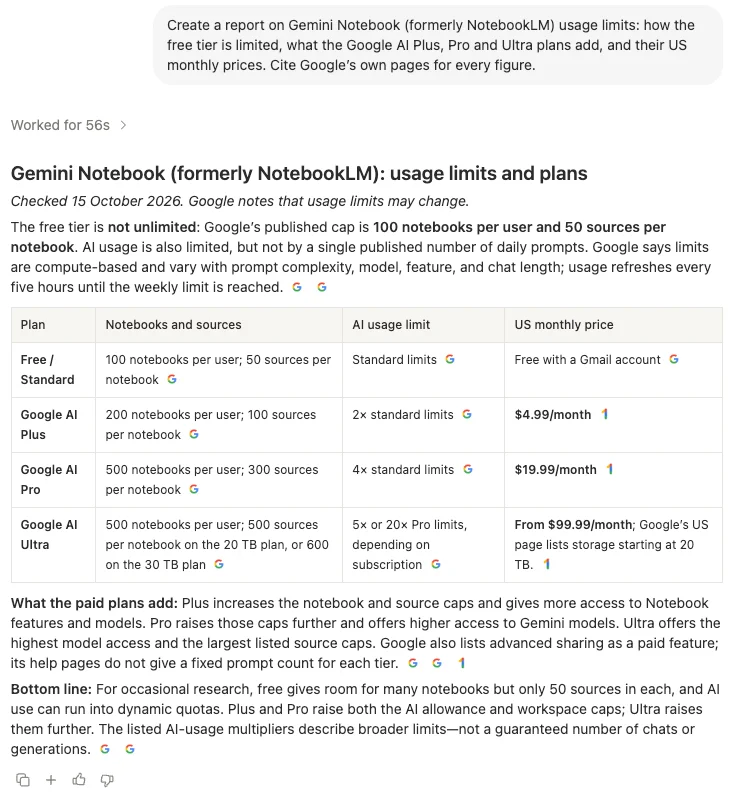
Where it falls short. Its citations open the whole cited page at the top, with nothing highlighted, so checking a figure means finding it yourself. In 39 requests I found one answer cited to a page that did not contain the fact. Web search was also on by default, so a question about my own pages first went to vendor websites.
Price. Notion AI is fully included from Business: $20 a member a month on yearly billing, $24 on monthly. Free and Plus get a trial whose size Notion does not publish; my 39 requests on Free hit no limit. Our Notion pricing guide has every plan.
Who it is for. Teams whose research ends up as shared pages, briefs and databases. Our NotebookLM vs Notion comparison puts it against Gemini Notebook on the same sources, and if Notion itself is the problem, see our Notion alternatives.
Deep research or a notebook?
The two most useful kinds of tool here work in opposite directions. A notebook such as Gemini Notebook closes the world down to the sources you chose, and in my test it refused rather than guessed when the sources ran out. A deep research mode opens the world up: it decides what to read, reads it, and writes.
They combine well. Google’s help page says Gemini Deep Research can take NotebookLM notebooks as sources, and Gemini Notebook can import the pages a web search finds. Let deep research gather, then question what it gathered inside a notebook, citation by citation.
How to pick an AI for research
Start with where the answer lives.
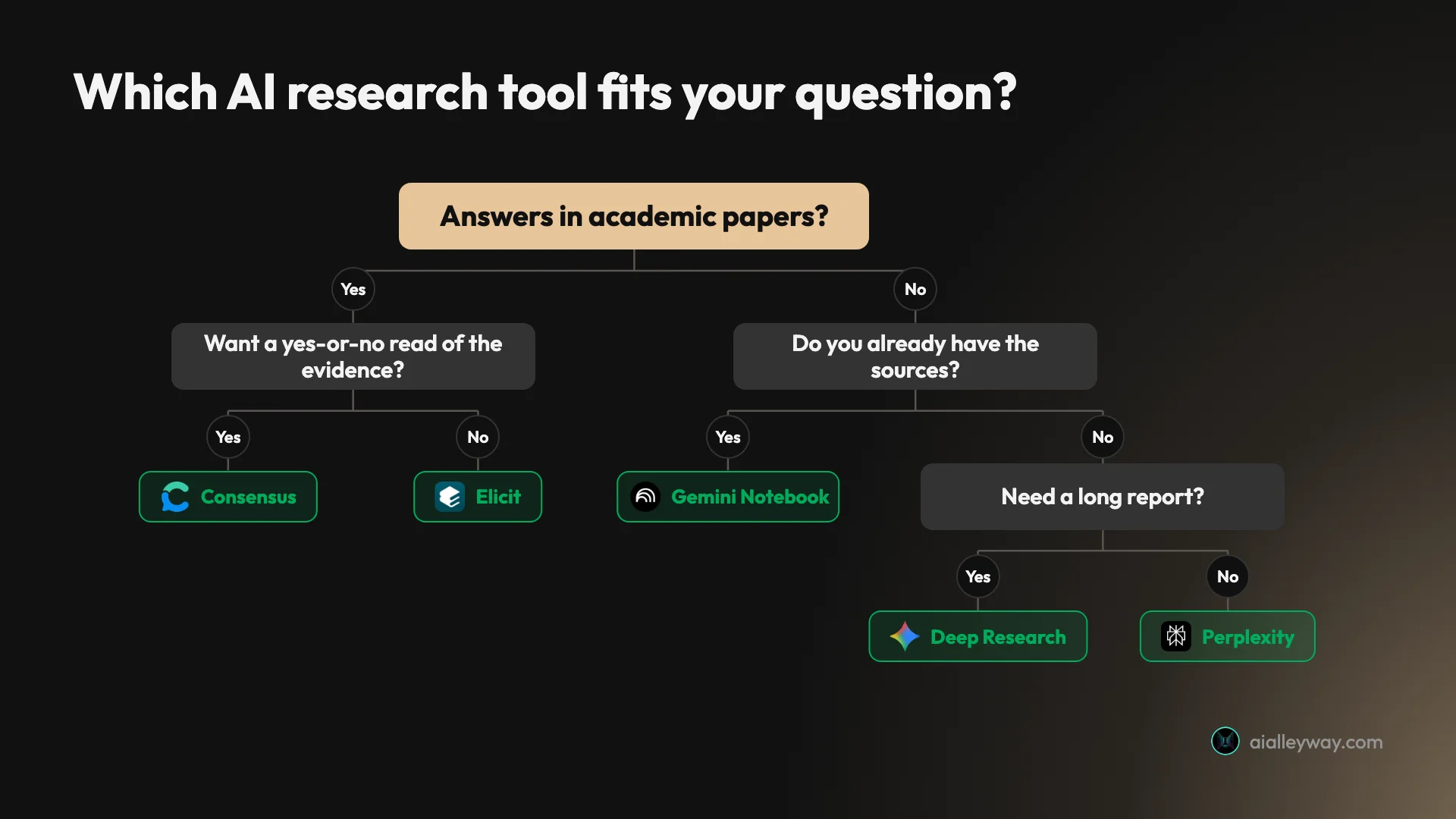
- If you already have the sources, load them into Gemini Notebook and click every citation you plan to use.
- If you need sources from the web, start with Perplexity.
- If the answer is in published studies, ask Consensus for the overall picture and use Elicit to pull details from each paper.
- If you want a long report without paying, try Gemini Deep Research.
- If you already pay for ChatGPT or Claude, use its research mode before paying for another tool.
- If the report belongs to a team, write it in Notion AI.
A free research stack
You can do serious work without paying. Find papers in Consensus Free or Elicit Basic, search the web with Perplexity’s free tier, and load what you keep into Gemini Notebook. For a long draft, Gemini Deep Research is listed on Google’s free tier. Expect usage ceilings everywhere, mostly unpublished.
The one rule for every tool
Four of these vendors say plainly that their tools can get things wrong. OpenAI’s deep research launch post says it “can sometimes hallucinate facts”. Google’s Gemini help page says “Gemini Apps can make mistakes” and to double-check responses. Anthropic’s help centre says Claude “can occasionally produce responses that are incorrect or misleading”. Consensus’s limitations page says a model can misread a paper.
So before anything goes into your own writing, open the source and find the sentence. In my tests, the tools that made that easy were the ones I trusted more.
Final word
For research built on sources you can name, Gemini Notebook is the best AI for the job: in these tests, it was the one that took me straight to the highlighted passage. Our NotebookLM review shows the full test.
Frequently asked questions
What is the best AI for research?
For research built on sources you already have, Gemini Notebook, the Google tool that was called NotebookLM until July 2026. It is designed to answer from the files and links you give it, it declined to go beyond them in my test, and when I clicked a citation it jumped to the exact lines in my source, already highlighted. It is free with a Google account.
No single tool covers the whole job, though. To find sources on the open web, Perplexity attaches a citation to every claim. For academic papers, Consensus and Elicit search scholarly literature rather than the general web. For a long written report, the deep research modes in Gemini, ChatGPT and Claude do the reading for you, and you still check what they cite.
Which AI is best for academic research and papers?
Consensus and Elicit, which search scholarly literature rather than the general web. Consensus's documentation says it searches over 400 million scholarly articles and links every sentence of an answer to the paper behind it. Its Consensus Meter sorts the top 20 papers for a yes-or-no question into Yes, No, Possibly or Mixed.
Elicit searches more than 138 million papers and, since 30 September 2026, runs search, data extraction and chat inside one Research Agent. Both have free plans. I have not used either; this comes from their own pages, read on 17 and 18 October 2026. Once you have the PDFs, Gemini Notebook is the place to question them.
Is there a free AI for research?
Yes, and a capable free stack exists. Gemini Notebook is free with a Google account and holds 50 sources per notebook. Google's plan table lists Deep Research in the Gemini app for users without a paid plan, though Google warns it may be unavailable to them at busy times. Perplexity's free tier cites every answer.
For papers, Consensus Free includes 10 Pro messages and 3 Deep reviews a month, and Elicit's Basic plan includes paper search. The catch is the limits: none of Google, Perplexity or OpenAI publishes how many free deep research reports you get in their consumer apps.
Is ChatGPT the best AI for research?
Not on its own, but it is a good one if you keep one habit: click the sources. OpenAI says every deep research report carries citations or source links, and you can edit its research plan or limit it to sites you choose. Plus at $20 a month gets what OpenAI calls expanded deep research; Free gets a limited allowance.
In a test on 5 September 2026, ChatGPT's free tier cited Suno's own pages and still told me the free plan allowed zero downloads, when the right answer for an account like mine was seven. Perplexity got it right. One question proves little, but it shows why a citation is a place to start checking, not proof.
Which deep research tool is best?
It depends on what you already pay for, because ChatGPT, Gemini and Claude all include one. Gemini's Deep Research is listed on Google's free tier, though Google says it may be unavailable at busy times; it usually takes 5 to 10 minutes by Google's estimate, and exports to Google Docs.
ChatGPT's deep research lets you edit the plan and download the report as Markdown, Word or PDF. Claude's Research is on paid plans only and can also search your connected Gmail, Calendar and Google Docs.
I have not timed or compared their reports myself; this comes from each vendor's help pages, read on 18 October 2026. None of the three publishes a monthly number of reports per plan.
Can you trust the citations in AI research tools?
Trust them enough to click them, no further. OpenAI, Google, Anthropic and Consensus all warn in their own help pages or launch posts that their tools can get things wrong.
In our tests, Gemini Notebook's citation led to the exact passage. Notion AI's opened the whole page, and one of my 39 Notion requests got an answer that pointed to a page that never mentioned ChatGPT. Perplexity's answer about Suno was right, yet most of its citations pointed to music-industry outlets rather than Suno. A citation proves a source exists, not that it says what the answer claims.
Keep reading
NotebookLM Review: Gemini Notebook Cites Well, Meters Hard
A NotebookLM review, now Gemini Notebook: five test questions, four Studio outputs, and an audio overview estimated at 45% of a five-hour limit.
NotebookLM Alternatives: 9 Picks, Sorted by Why You're Leaving
The best NotebookLM alternatives by reason for leaving: Notion AI for teams, Copilot Notebooks for Microsoft 365, Open Notebook to self-host. Prices in US$.
NotebookLM vs Notion: I Gave Both the Same Four Articles
NotebookLM vs Notion AI on the same four articles and questions: Gemini Notebook's citation opened the passage and it is free; Notion builds pages, from $20.
Best AI search engine: one question, three engines
The best AI search engines, tested with one identical question. All three agreed on the facts. One cited EUR-Lex, another a consultancy blog and YouTube.