
Gemini Deep Research tested: fast, thorough, and trusts the vendor
I ran two Gemini Deep Research reports on the free plan and scored them against our own tests. Strong on the docs, weak where the real products differ.
Contents
Gemini Deep Research in short
Gemini Deep Research is the mode in Google’s Gemini app that turns a question into a research plan, reads dozens of web pages, and writes a long, cited report. It is on the free plan. In my test each report took between eight and nine minutes, and two reports used up the free account’s allowance for that window.
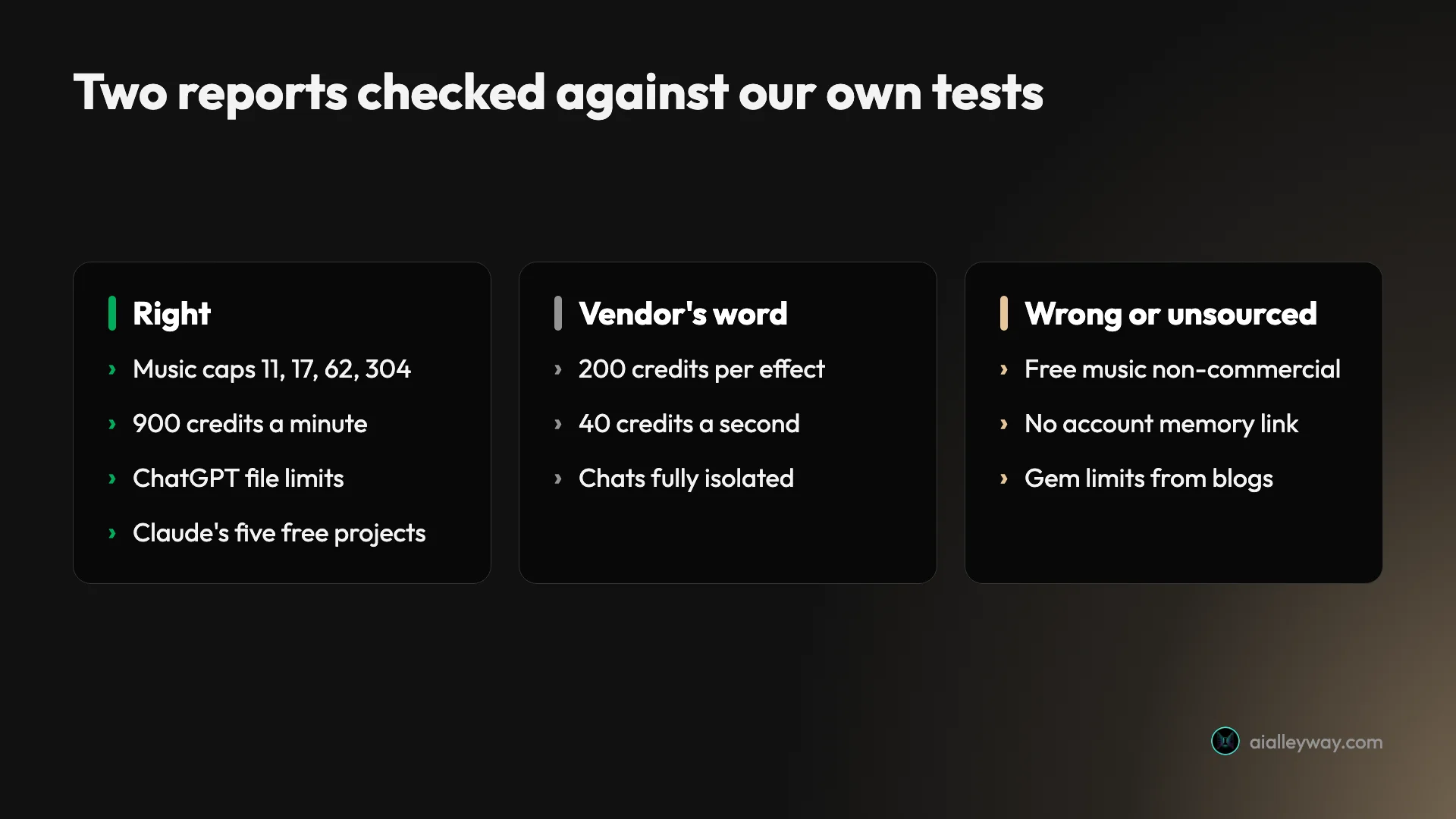
I checked both reports against facts we had already established by testing the products ourselves. It found numbers buried deep in vendor terms that most people would never dig out. It also repeated vendor claims that our own measurements contradict, because a vendor page was the best source it had.
| Gemini Deep Research, at a glance | |
|---|---|
| Who gets it | Every plan, including Free |
| Limits | Compute-based; refresh every five hours up to a weekly limit |
| Time per report | 8 to 9 minutes in my two runs |
| Sources it can use | Google Search, plus Gmail, Drive and Chat if you tick them |
| What it gets right | Published numbers, even obscure ones |
| What it gets wrong | Anything where the product differs from its documentation |
How Gemini Deep Research works
Deep Research is not a smarter chat reply, it is a job you hand off. You ask a question, Gemini writes a numbered plan, and once the plan runs it searches, reads and takes notes before writing anything. Google’s Deep Research page describes the stages as planning, searching, reasoning and reporting, and says it can browse up to hundreds of pages.
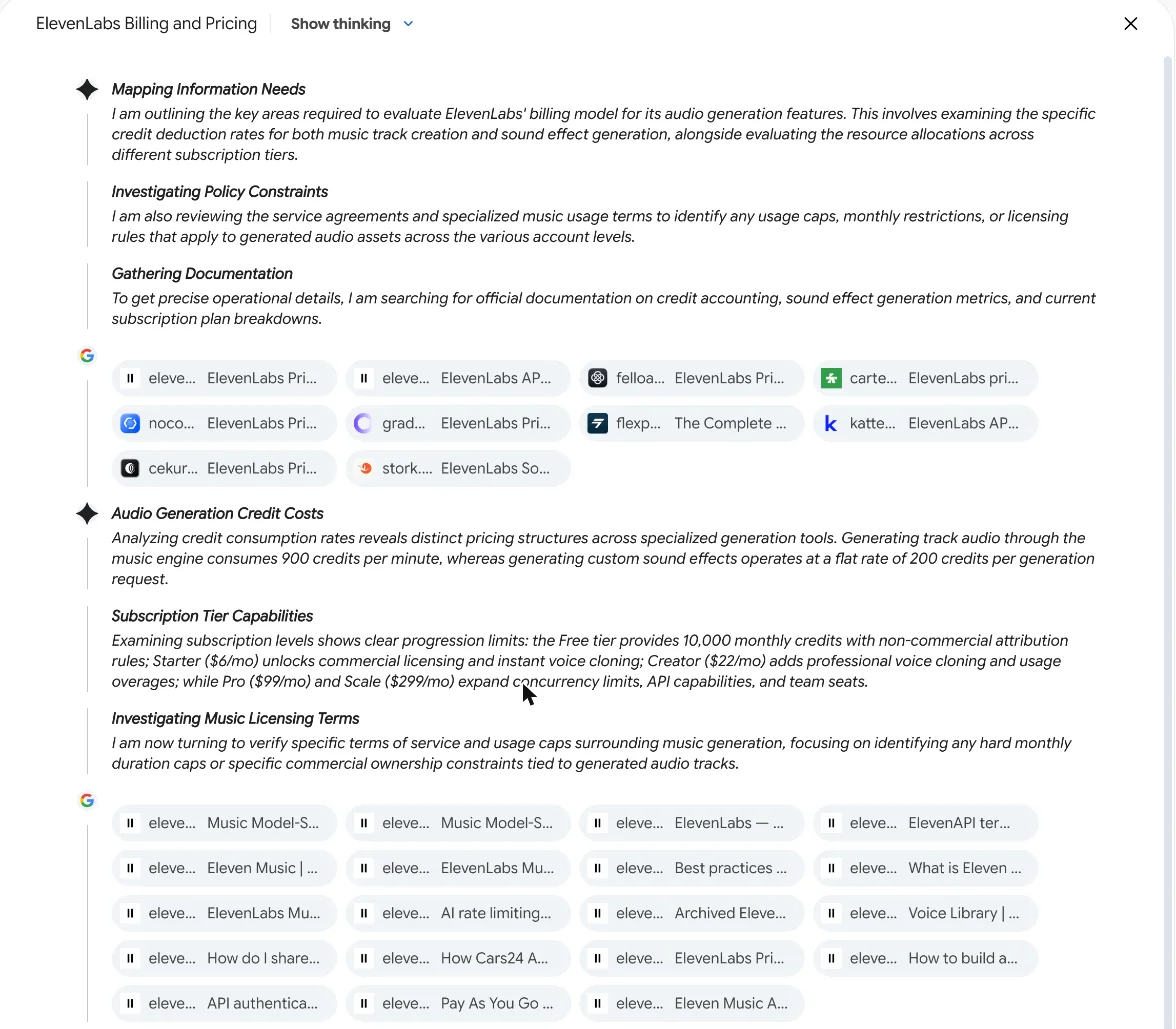
While it works, a side panel shows its thinking in short headed notes, with the sites it is reading listed as small chips underneath. That panel is the most useful part of the product for checking the result, because it shows which page each claim came from before the report smooths everything into confident prose.
Under the plan card there is also a quieter link, Try again without Deep Research, which sends the same question to a normal chat reply instead. That is the right choice more often than the button placement suggests. A normal reply answers in seconds and costs a fraction of the allowance, so use it for anything one good search would settle, and save Deep Research for questions that need several documents read and compared.
Google’s Deep Research page says it now runs on Gemini 3, as read on 2 November 2026, though Google’s plans page already lists a newer Gemini 4 model, so that page may be behind. On my runs the composer showed only “Gemini Auto”, not a model name.
You do not need to stay. After I started each run, Gemini said a report can take up to an hour and that I could leave the chat. Google’s page goes further: you can switch to another app or turn your computer off, and it notifies you when the report is ready.
Running a Deep Research report, from question to finished report
The whole flow takes four clicks. The step worth slowing down on is the plan, because it decides what the report covers and it does not wait for you for long.
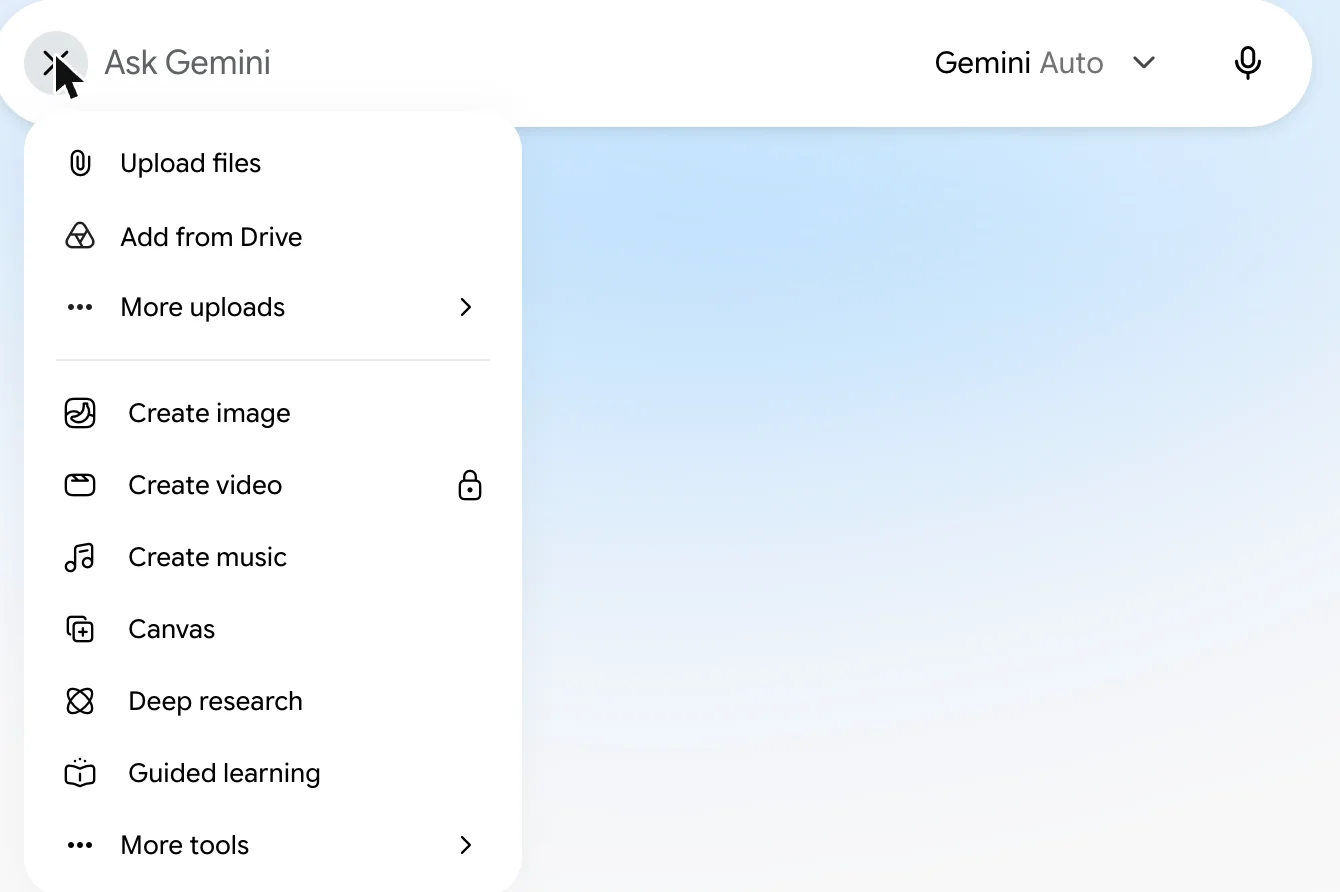
1. Pick Deep research from the tools menu
Open the Gemini app, click the plus button in the message box, and choose Deep research. On my free account it sat between Canvas and Guided learning with no lock, while Create video, three lines above, carried one.
2. Choose your sources
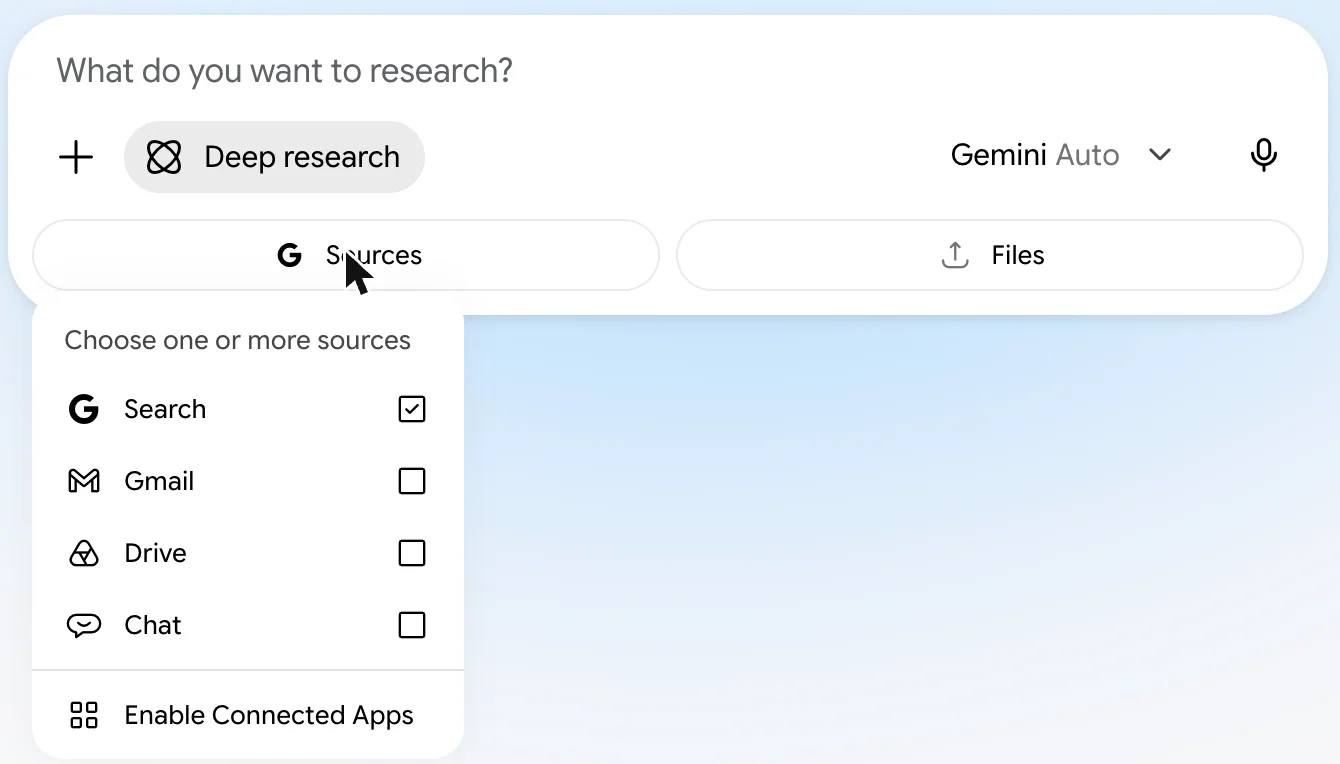
With Deep research selected, the box asks “What do you want to research?” and shows two buttons, Sources and Files. Sources lets you choose Google Search, Gmail, Drive and Chat, with Search ticked by default. Files lets you add your own documents for it to read alongside the web, which I did not use. Every run in this guide used Search alone, because the point was to test the open web, not my inbox.
3. Read the plan before it runs
Within seconds Gemini answers with a plan card: a title, numbered research steps, then Analyze Results, Create Report and an estimate of “Ready in a few mins”. You can choose Edit plan or Start research. My first plan had six steps, including one to search ElevenLabs’ music terms for monthly caps, which is exactly where the answer turned out to be.
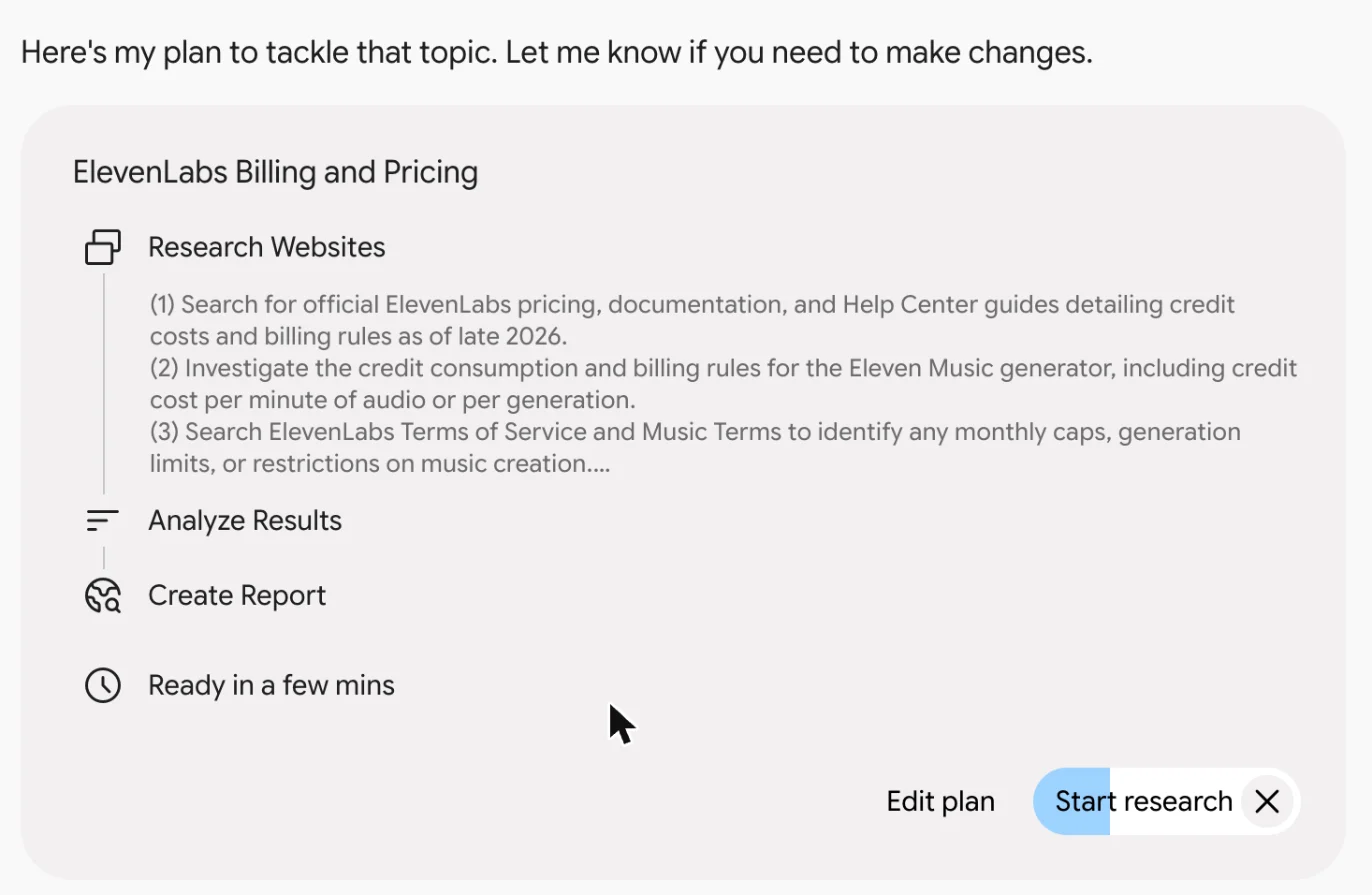
Read it quickly. On my second run the research started on its own before I clicked anything. The Start research button carries a filling animation that appears to be a countdown, so if the plan needs changing, open Edit plan straight away.
4. Read the report, then check it
When it finishes, the report opens in a panel beside the chat, with a Contents menu, a Share and Export menu and a Create menu across the top. The rest of this guide is about the last word in this step’s heading.
Two test runs, scored against our own data
A research tool is only worth testing on questions you already know the answer to. So I picked two where we had done the work ourselves in the past week, and ran them on a free account with Search as the only source.
The first asked how ElevenLabs bills for music and sound effects, and what caps its music terms impose. We had measured that on 1 November by generating music and sound effects on a real account, in our Eleven Music test and our ElevenLabs sound effects test. The second asked Gemini to compare Claude Projects, ChatGPT Projects and Gemini Gems, which I had just tested and checked against all three vendors’ help pages.
I used a free account on purpose, because that is where most people will try Deep Research first, and I left Gmail, Drive and Chat switched off so nothing personal could leak into a report. Both questions asked for specific numbers rather than opinions, so each claim could be marked right or wrong instead of argued about.
| Run 1: ElevenLabs billing | Run 2: Projects vs Gems | |
|---|---|---|
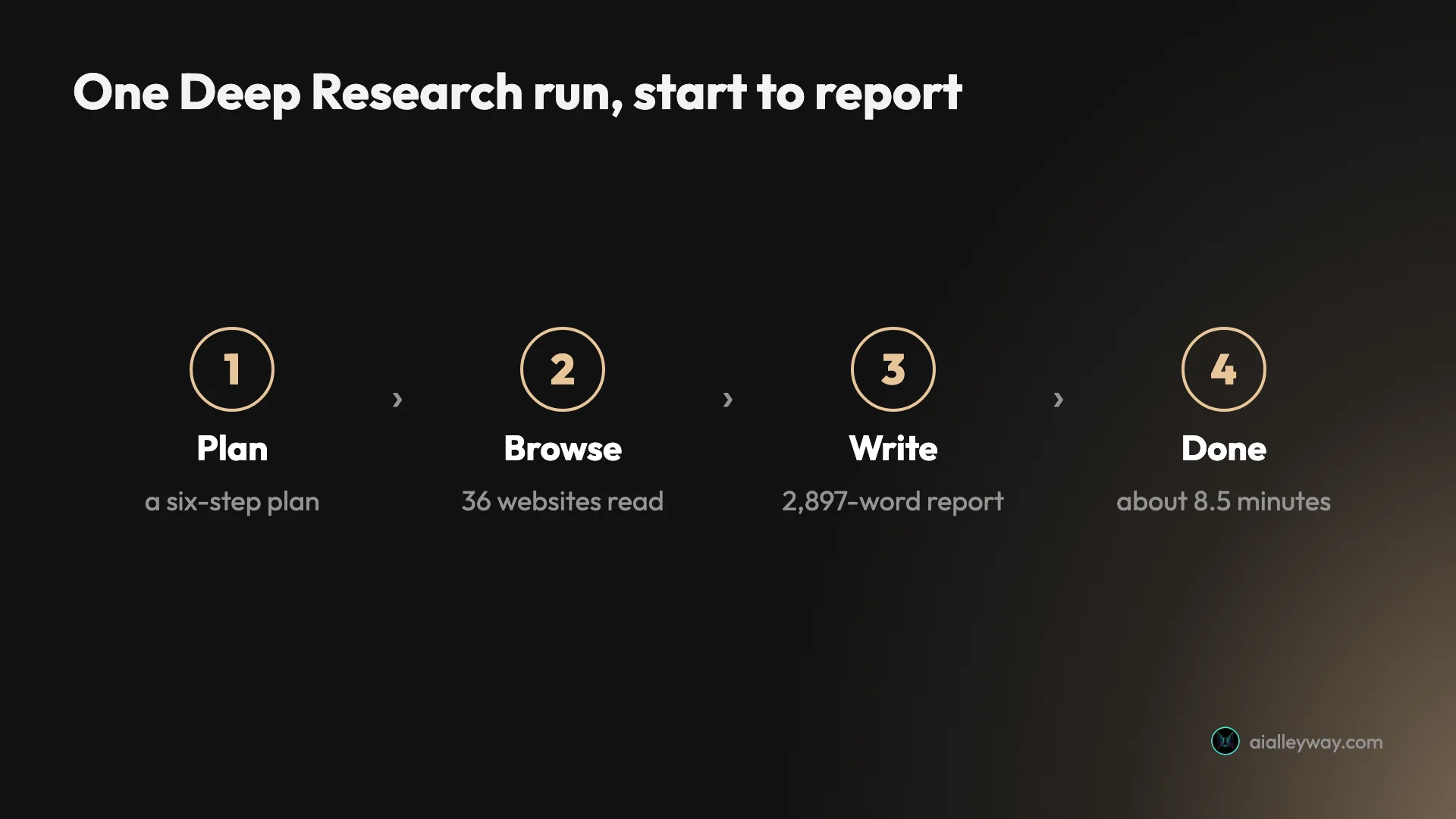
| Time to finished report | About 8.5 minutes | 8 to 9 minutes |
| Websites | 36 (22 used, 14 browsed and dropped) | 46 (34 used, 12 dropped) |
| Report length | 2,897 words, four tables | Longer, four tables |
| First-party sources used | 16 of 22 from elevenlabs.io | 9 of 34 from the three vendors |
| Hard numbers right | Music caps, credit rate, download caps | Claude and ChatGPT limits |
| Clear misses | Free plan rights; sound-effects cost | Whether Claude chats see each other |
Run one: ElevenLabs pricing, right where it was hardest
The first report opened with a grand title, “Valuation Metrics, Licensing Frameworks, and Credit Consumption Models of ElevenLabs Music and Audio Generation”, and a tone to match. Under the prose, the numbers that took us an afternoon to pin down were right.
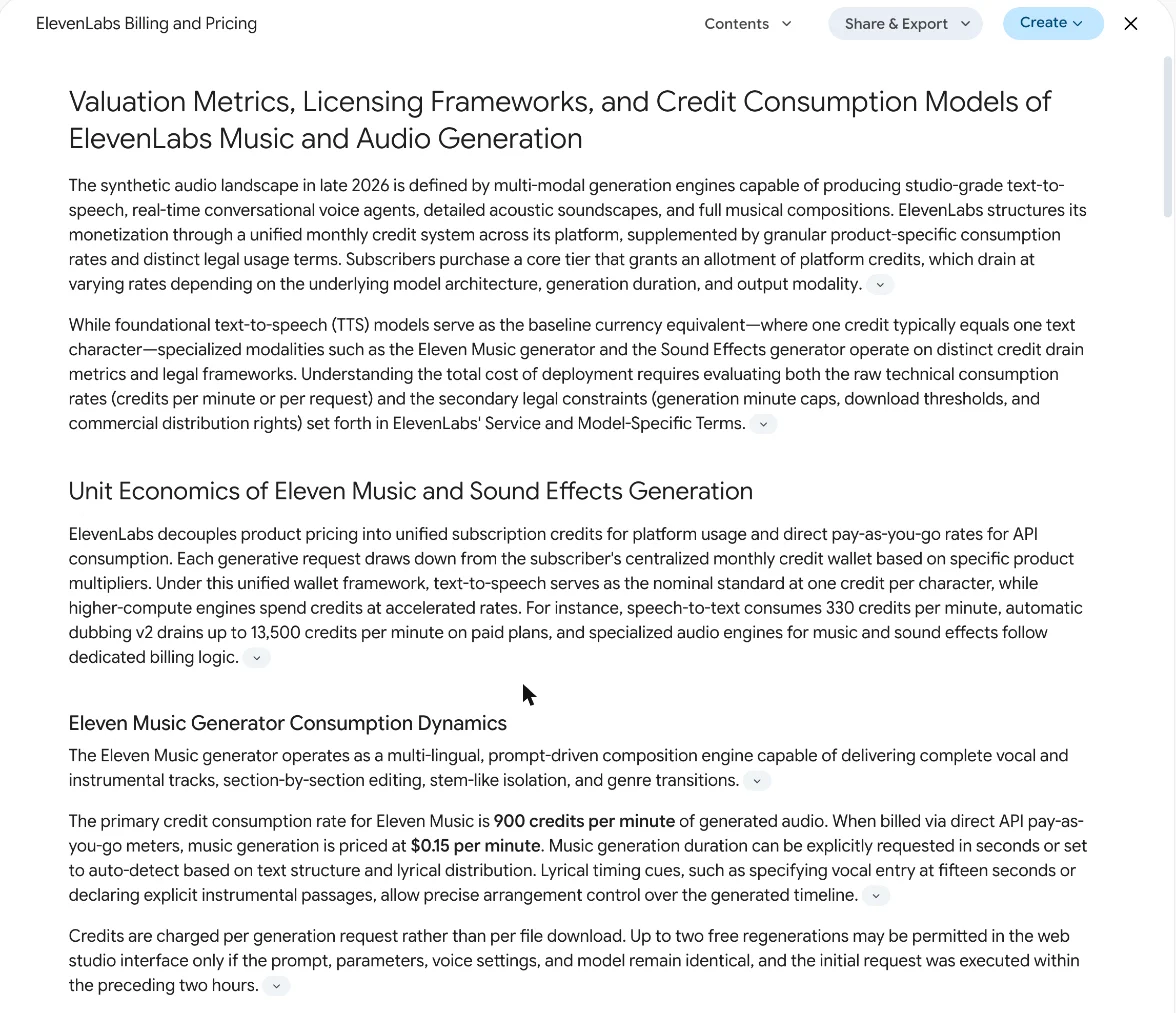
It gave Eleven Music’s rate as 900 credits a minute, which is what we were charged. More impressively, it found the monthly generation caps in ElevenLabs’ music terms, 11 minutes on Free, 17 on Starter, 62 on Creator and 304 on Pro, along with the download caps and which plans allow streaming release. It then did the same arithmetic we did: Creator’s 121,000 credits would buy about 134 minutes of music, so the 62-minute cap binds first.
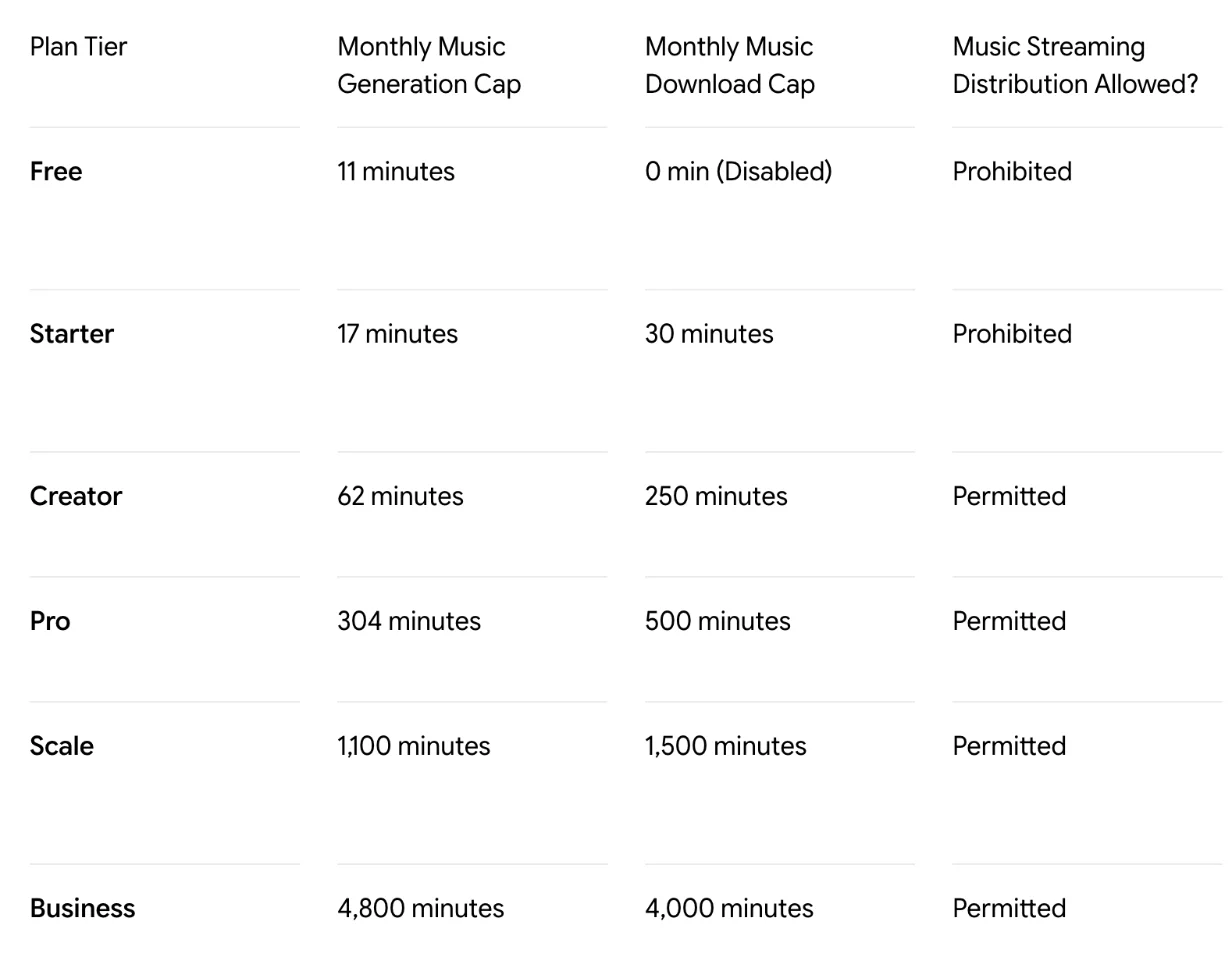
Sound effects were another story, and the reason matters more than the error. The report said a sound effect costs 200 credits per generation when the length is automatic, and 40 credits a second when you set it. Both numbers are ElevenLabs’ own: the pricing page says 200 per generation, and the developer docs say “40 credits per second when duration is specified”. In the web app, our three-second request cost 40 credits for four clips and an automatic-length one cost 67 or 68.

So Deep Research reported the vendor faithfully; it is the vendor’s pages that do not match what its web app charged. It even built a recommendation on it, telling readers to set durations to dodge the 200-credit charge.
The error compounds in the report’s own worked example. It costs out a small project on a $6 Starter plan, including 40 sound effects at 200 credits each, and concludes that sound effects alone eat 8,000 of the month’s 30,000 credits. At the 67 or 68 credits we were actually charged per automatic request, which returns four clips, those 40 requests would cost about 2,700. A reader budgeting from the report would plan for three times the real cost and might upgrade a plan they did not need.
One plain error remained: it listed the free plan’s music as non-commercial only, where ElevenLabs’ music terms allow commercial use on Free with carve-outs for film, TV, radio and what the terms call Studio Games.
The report also mixes evidence with guesswork without saying which is which. A section headed “Second- and Third-Order Strategic Insights” explains the music caps as “a deliberate dual-guardrail system designed for platform yield management”, meant to protect GPU capacity. That may well be true, but no source in the report says so; it is the model’s own theory, written in the same confident voice as the numbers it took straight from the terms. Read any “why” in a Deep Research report as an opinion unless it comes with a citation.
Run two: Claude, ChatGPT and Gems, and a blind spot
The second report was even longer, with four comparison tables, and again strong wherever a vendor help page covered the point. It had Claude’s five free projects, the 30 MB file limit, retrieval at up to 10 times capacity on paid plans only, and sharing for Team and Enterprise. It had ChatGPT’s per-project file limits of 5, 25 and 40, its collaborator limits and its project-only memory rule.
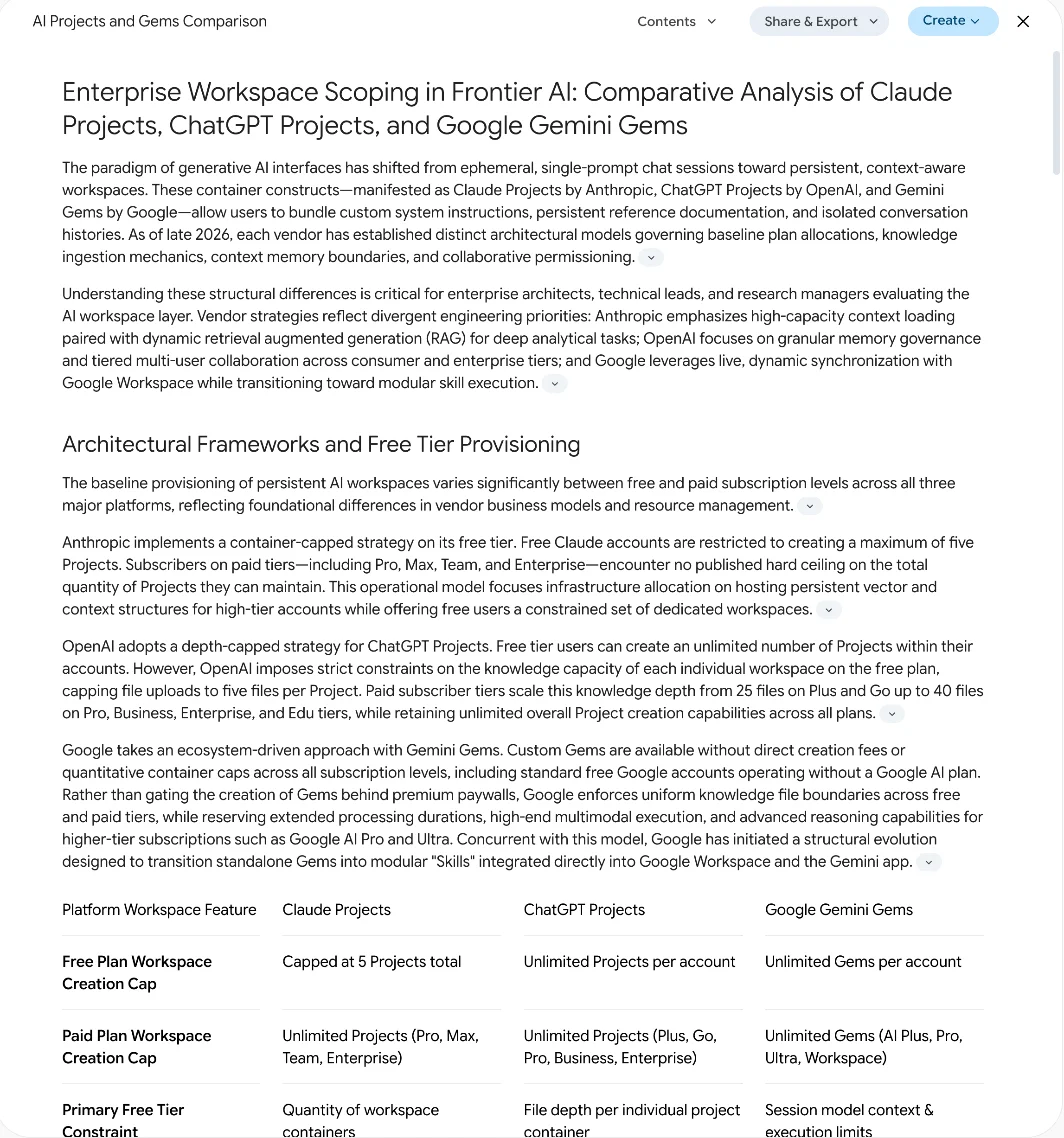
Then it stated that conversations in a Claude project “remain strictly isolated from one another”, and that one chat cannot see another unless you copy text into the project files. That is close to Anthropic’s documented rule, and it is not what the product did in my Claude Projects test, where a new chat found an earlier one by searching past chats and answered from it. Its table also said Claude has no memory crossing between projects and the rest of your chats, when the project I tested had a “Use account memory” switch, on by default, that shares memory with chats outside the project.

The Gems column showed the other weakness. Google’s own Gems help page gives no file limits, so the report took “10 files per Gem” and “100 MB” from third-party blogs, and only nine of its 34 sources came from the three vendors, two of them Google community threads. The report does not mark which figures rest on which kind of source; you have to work that out from the source list.
It also undersold the biggest Gems news. Google’s Gems help page carries a notice that, starting in November 2026, Gems will go away on personal Google accounts and move to skills. The report did find the transition, and cited a Google Workspace page about it, but described it as a migration over “2026–2027” and still recommended Gems for live Google Drive work. Someone reading it this month would build on a feature that is being retired under them.
Is Gemini Deep Research free?
Yes, and guides that say you need Gemini Advanced or a $19.99 plan are out of date. Google’s plans page lists Deep Research on the free plan, and it worked on my free account.
What matters is how the limit works. Google’s usage limits page now describes compute-based limits that refresh every five hours up to a weekly limit. It rates Deep Research as high usage, and warns that without a paid plan it may be unavailable during periods of high demand.
In practice, my two reports, started six minutes apart and running at the same time, used up the free allowance. Straight after the second one finished, Gemini showed “You’ve reached your current usage limit” and said Deep Research would be available again about three hours later. I do not know what else that account had used earlier in the day, so treat two as what I observed, not as a quota.
| Plan (US) | Price | Deep Research |
|---|---|---|
| Free | $0 | Listed; standard limits; may pause at peak demand |
| Google AI Plus | $4.99 a month | Limits 2x the standard |
| Google AI Pro | $19.99 a month | Limits 4x the standard |
| Google AI Ultra | From $99.99 a month | 5x or 20x the Pro limits |
The multipliers are from Google’s usage limits page; the prices are from its US plans page, both read on 2 November 2026. Our Google Gemini review explains why those paid plans are really storage plans with Gemini attached.
What you can do with a finished report
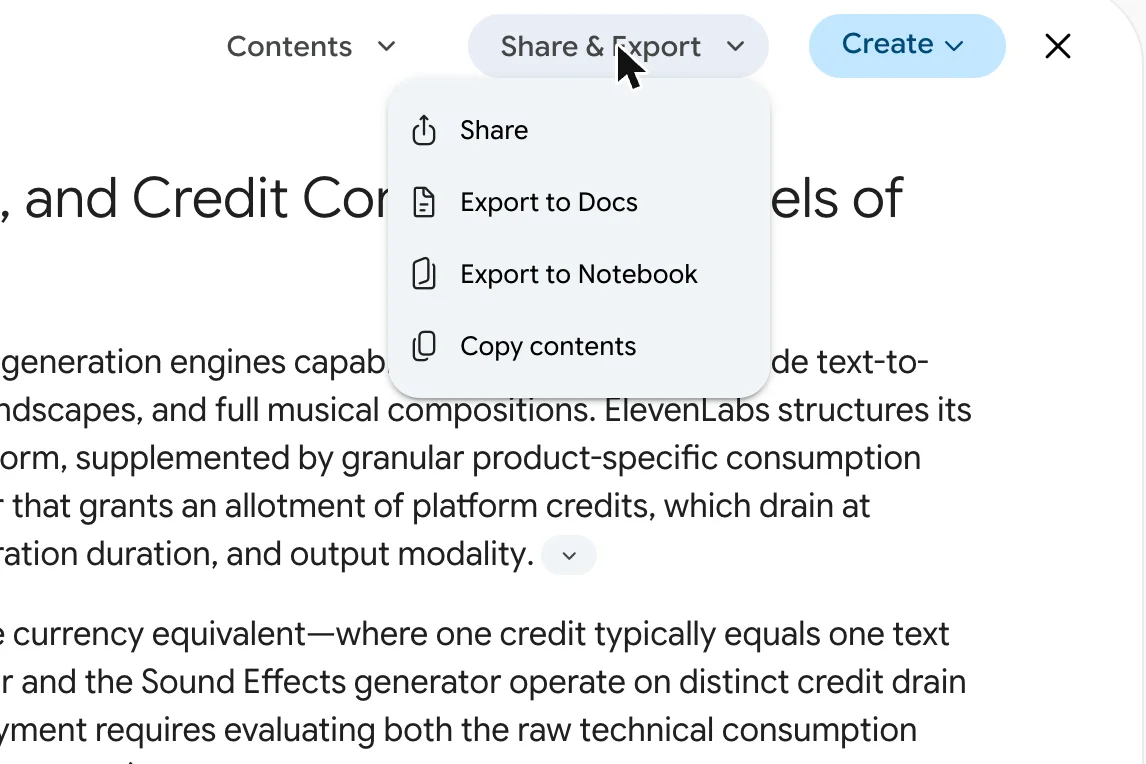
The report panel has two menus beyond the table of contents. Share and Export offers Share, Export to Docs, Export to Notebook and Copy contents. Export to Notebook is the interesting one, because it turns the report into a source you can question further, which our NotebookLM review covers.
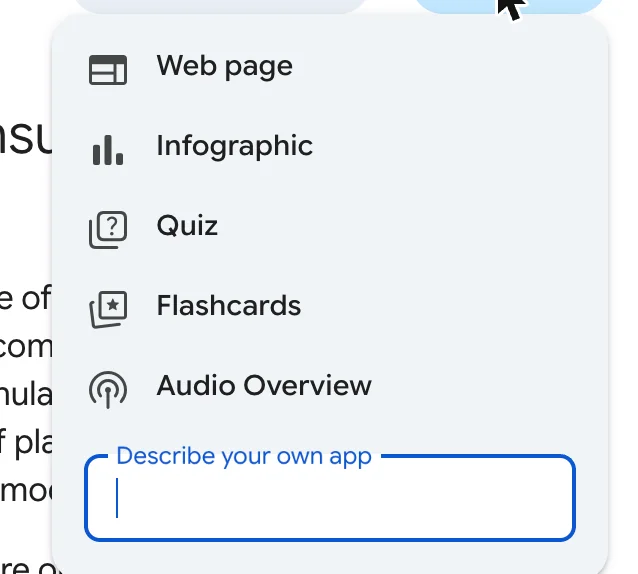
Create, labelled “Create something based on this”, turns the report into a web page, an infographic, a quiz, flashcards or an Audio Overview, or into an app you describe yourself. I opened both menus but did not run any of the options, so I cannot vouch for the results.
When Deep Research is missing or stops working
The search data for this topic shows people looking for why Deep Research has vanished, and my test turned up the most likely reason. Once the allowance ran out, a message under the chat said I had reached my current usage limit and gave the time it would reset. Nothing is broken; you wait or upgrade.
Slow runs are the other complaint, and we have seen one. In our Perplexity vs Gemini comparison on 20 October, a free Deep Research run read 44 websites and was still creating its report 66 minutes later, and a second run stalled while writing. My two runs on 2 November finished in under ten minutes each, so speed varies from day to day; if a run sits on the same stage for half an hour, start it again rather than wait, knowing a restart uses more of your allowance and our second try on 20 October stalled too.
Google’s limits page lists two other causes. Free accounts may find Deep Research unavailable during periods of high demand, and the limits themselves “may change without notice, including due to capacity constraints.” Google’s Deep Research page also says it is available to Google Workspace users, so on a work or school account an administrator’s settings may decide whether you see it. If the option is missing entirely on a personal account, check that you are signed in, because the feature needs a Google account.
Deep Research Max and the API
The search results now mention Deep Research Max, which is a separate thing from the app. Google announced Deep Research and Deep Research Max on 21 April 2026 as agents for developers. The standard one is tuned for speed and cost, while Max spends extra compute to search and refine for longer.
Both are in public preview on paid tiers of the Gemini API, under the model names deep-research-preview-04-2026 and deep-research-max-preview-04-2026, through what the developer documentation calls the Interactions API. None of that is a setting in the Gemini app, and I did not test it.
A worked example: asking for a report you can check
The prompt that worked best was specific about three things: the date, the exact facts wanted, and where they live. My first prompt asked for “the credit cost per minute or per generation, what each paid plan allows, and any monthly caps on music generation in ElevenLabs’ music terms”. Naming the music terms is what sent the plan to the right document.
A pattern to copy:
As of [month year], what does [product] charge for [feature]?I want: [the exact numbers], [what each plan allows], and [the limits in its terms].Use the vendor's own pages first. For every number, say which page it came from,and flag any place where two of the vendor's pages disagree.Label anything that is your own inference rather than a sourced fact.The last line is the one I would add after this test. Gemini found both ElevenLabs pages with different sound-effects prices and quietly reconciled them, assigning one to automatic lengths and the other to set durations. Asking it to flag disagreements gives you a chance to catch that before the report hides it.
Where Deep Research catches people out
The plan does not wait for you
My second run started before I clicked Start research. If you want to edit the plan, do it as soon as the card appears.
Vendor pages are treated as fact
Every wrong number in the ElevenLabs report came from ElevenLabs. Deep Research cannot know what a product actually charges or does, only what its makers wrote.
Third-party blogs fill the gaps
Where Google’s help page was silent on Gem limits, the report used blogs and did not say so in the text. Check the source list for any number you will rely on.
Two runs can empty the free allowance
My two reports exhausted the free limit for about three hours. Run your most important question first.
Running two at once is allowed
Two runs at once both finished in under ten minutes. That saves waiting time, but both still counted, and together they used up the free allowance.
The tone is the same whether it knows or guesses
The sourced caps, the vendor’s mistaken prices and the model’s own theory about GPU load all arrive in the same polished register, under headings like “Valuation Metrics” and “Strategic Insights”. Polish is not evidence. The source list at the end of the report shows every site it used and every site it dropped; check it for anything you plan to repeat.
Other research assistants, and when to use them
Every major assistant now has a version of this, and the choice mostly follows which subscription you already have. Our ChatGPT review found deep research listed as limited on ChatGPT’s free plan, and our Perplexity review found the same for Perplexity’s research mode. Claude includes Research from its $20 Pro plan, per our Claude Max plan guide. For a head-to-head on everyday search, our Perplexity vs Gemini comparison is the place to start.
- Use Gemini Deep Research for a free, thorough first pass on a question with public documentation, especially pricing, policies or product limits.
- Tick Gmail or Drive only if the answer lives in your own files; the open web is the default for a reason.
- Use NotebookLM after it when you want to question the report and its sources further.
- Skip it for anything where you need to know what a product does rather than what its vendor says. For that, test the product.
Final word
Gemini Deep Research is a very good free research assistant for one specific job: digging published facts out of documentation nobody wants to read. In under ten minutes it found ElevenLabs’ monthly music caps, which sit in an exhibit to its music terms, and laid out ChatGPT’s project limits by plan correctly.
What it cannot do is notice when a vendor’s page is wrong, and twice in two runs that was where the important answer was. Use it to find the documents and draft the summary, then check the numbers that matter against the product itself, and run your most important question first, because the free allowance went after two.
Frequently asked questions
Is Gemini Deep Research free?
Yes. Google's plans page lists Deep Research on the free plan, and on my free account it sat in the tools menu without a lock, unlike video generation, which was locked.
The catch is the allowance. Google no longer publishes a fixed number of reports per day. Its limits page puts Deep Research among the features that use the most of your allowance, says limits refresh every five hours up to a weekly limit, and warns that free users may lose access during periods of high demand.
In my test, two reports started six minutes apart used up the free account's Deep Research allowance. Gemini said it would be available again about three hours later. Paid plans raise the limit: Google AI Plus is $4.99 a month, Pro $19.99 and Ultra from $99.99 in the US.
How long does Gemini Deep Research take?
Both of my runs took between eight and nine minutes from pressing Start research to a finished report. The first browsed 36 websites and wrote 2,897 words; the second used 34 sources and wrote a longer comparison.
Gemini itself sets expectations much higher. After I started each run it said a report can take up to an hour, and during the writing stage it said that could take up to 30 minutes. Neither came close in my test, but both questions were narrow, and in an earlier comparison of ours a free run was still unfinished after 66 minutes.
You do not have to watch it. Gemini tells you that you can leave the chat while it works, and Google's Deep Research page says you can switch to another app or turn off your computer and it will notify you when the report is ready.
How accurate is Gemini Deep Research?
Accurate on what vendors publish, less so on what products actually do. I checked two reports against facts we had already established by testing the products ourselves.
It got the hard-to-find numbers right: ElevenLabs' monthly music caps of 11, 17, 62 and 304 minutes, and ChatGPT's per-project file limits by plan. It also repeated ElevenLabs' published sound-effects pricing, 200 credits per generation and 40 credits a second, when the web app charged us about a third of that.
It also stated that chats in a Claude project cannot see each other, which is close to Anthropic's documented rule, when in my own test a new chat found an earlier one by searching. Treat the report as a sourced first draft and check any number you will act on.
What can you do with a Gemini Deep Research report?
Two menus sit above every finished report. Share and Export offers Share, Export to Docs, Export to Notebook and Copy contents, so you can move the report into Google Docs or into a notebook as a source.
The Create menu, labelled create something based on this, turns the report into a web page, an infographic, a quiz, flashcards or an Audio Overview, and has a box to describe your own app. I looked at both menus but did not run any of the exports or create options, so I cannot tell you how well they work.
The report itself also has a Contents menu for jumping between sections, and ends with a list of the sources it used and the ones it browsed but dropped.
What is Gemini Deep Research Max?
Deep Research Max is a version of the research agent for developers, announced by Google on 21 April 2026 alongside a faster standard Deep Research agent. Google describes Max as using extended test-time compute to reason, search and refine the report for more thoroughness.
Both are offered in public preview through paid tiers of the Gemini API, through what the developer documentation calls the Interactions API, with model names deep-research-preview-04-2026 and deep-research-max-preview-04-2026. They are not a setting in the Gemini app.
If you use Deep Research by picking it from the tools menu in the Gemini app, as in this guide, you are not choosing between the two; I did not test the API.
Keep reading
Google Gemini review: the best free tier, sold as storage
A Google Gemini review from the free tier: four models including 3.1 Pro handed over for nothing, then paid tiers that are really 400GB, 5TB and 20TB of Drive.
Perplexity vs Gemini: one cites better, one gives more away
Perplexity vs Gemini, tested on both free tiers with the same questions: who found October's news, who got the prices right, and which free plan does more.
ChatGPT vs Gemini: the free tier decides this one
ChatGPT vs Gemini, both tested on free accounts. One hands a non-paying user its advanced reasoning model; the other will not let you pick a model at all.
NotebookLM Review: Gemini Notebook Cites Well, Meters Hard
A NotebookLM review, now Gemini Notebook: five test questions, four Studio outputs, and an audio overview estimated at 45% of a five-hour limit.
Claude Projects tested: what it finds, and what it can't read
I built a Claude project with three files and ran six chats. It found one line in a 1.46 MB file, but could not count across it. Setup, limits and plans.
Eleven Music tested: ElevenLabs sang every word I wrote
I made three 30-second tracks with Eleven Music, sang my own lyrics on two models and re-did one chorus. What it cost in credits, and the licence fine print.
ElevenLabs sound effects: four clips for 40 credits, not 200
Seven prompts through ElevenLabs sound effects: a door, a rain loop, a 90 BPM drum loop, a spoken line. What each cost, and where the pricing page is wrong.