
Claude Projects tested: what it finds, and what it can't read
I built a Claude project with three files and ran six chats. It found one line in a 1.46 MB file, but could not count across it. Setup, limits and plans.
Contents
The short answer on Claude Projects
A Claude project is a folder for context. You give it files and a set of standing instructions once, and every chat you start inside it can draw on both, so you stop pasting the same style guide and background into each new conversation. Typical uses are a brand voice, a client’s guidelines, a policy library, a product catalogue for support replies, or the notes behind a long piece of research. Projects are on every plan, including Free, which allows up to five, according to Anthropic’s help centre.
I built one around a fictional coffee roaster, gave it a style guide, a menu and a 1.46 MB shift log, and ran six chats against it. The headline from that test: a project is very good at finding a specific fact anywhere in its files, and it will not pretend to have read a whole large file when it hasn’t.
| Claude Projects, at a glance | |
|---|---|
| What it holds | Files, project instructions, its own memory |
| Who gets it | Every plan; Free is capped at five projects |
| File size | Up to 30 MB per file |
| Large files | Retrieval on paid plans, up to 10 times the capacity |
| Sharing | Team and Enterprise only |
| In my test | Found one planted line in a 1.46 MB file; would not count across it |

Two different products are now called Claude Projects
The name now covers two products, and the difference decides which guide you should be reading. The Projects most people mean live in the Claude chat app: a workspace with files, instructions and memory, where each chat is separate. That is the one I tested and the one this guide is about.
The second is newer. Anthropic’s Claude Code documentation describes a Projects beta in which a project is one ongoing conversation. You describe the work, and Claude starts a thread for each task, usually as a cloud session that keeps running after you close your laptop. It is a public beta on Pro, Max and Ultra, rolling out gradually, with a waitlist for accounts that do not see it yet, and it is not offered on Team or Enterprise.
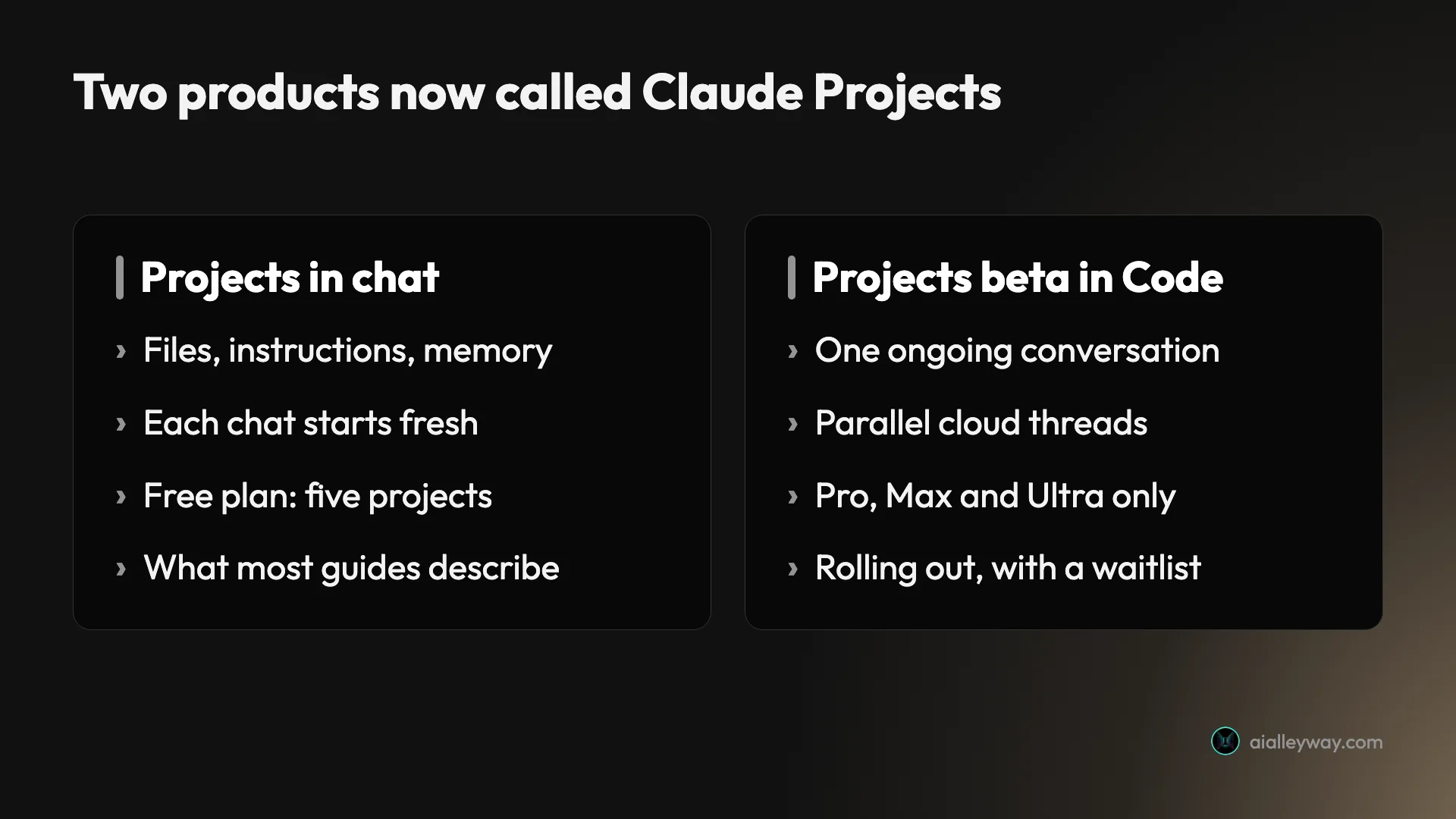
The help centre adds a wrinkle: some existing chat projects are being moved to the new version with their instructions, files, chat history and scheduled tasks intact, and people who used a project in the last 30 days get an email before the move. Other existing projects in chat and in Cowork stay on the current version for now. If your project suddenly looks like a single conversation with threads, that is what happened.
How Claude Projects work
The mental model is simple once you separate three layers. Project knowledge is the files you add. Project instructions are a block of text that applies to every chat in the project, alongside your profile instructions and any style you have selected. Chats are the individual conversations, and each one starts without the others’ history.
What Claude does not see is just as useful to know. Anthropic’s guide to creating and managing projects says the project’s name and description are for you, not for Claude, and my test agreed. I asked a fresh chat, without searching, what the project was called and what goal I had written in its description. It said it could see neither, only that the chat was attached to a project, and offered to look them up with a tool.
That same answer showed something the documentation does not spell out. The small menu file was already in the chat’s context when it started. The style guide was not, and Claude had to fetch it with a tool. Some project files arrive with the chat and some are read on demand, and nothing in the interface told me which, so instructions belong in the instructions box, not in a file you hope it reads.
How to set up a Claude project, step by step
The setup takes about two minutes. The part worth slowing down for is the instructions, because they shape every answer the project gives.
1. Create the project
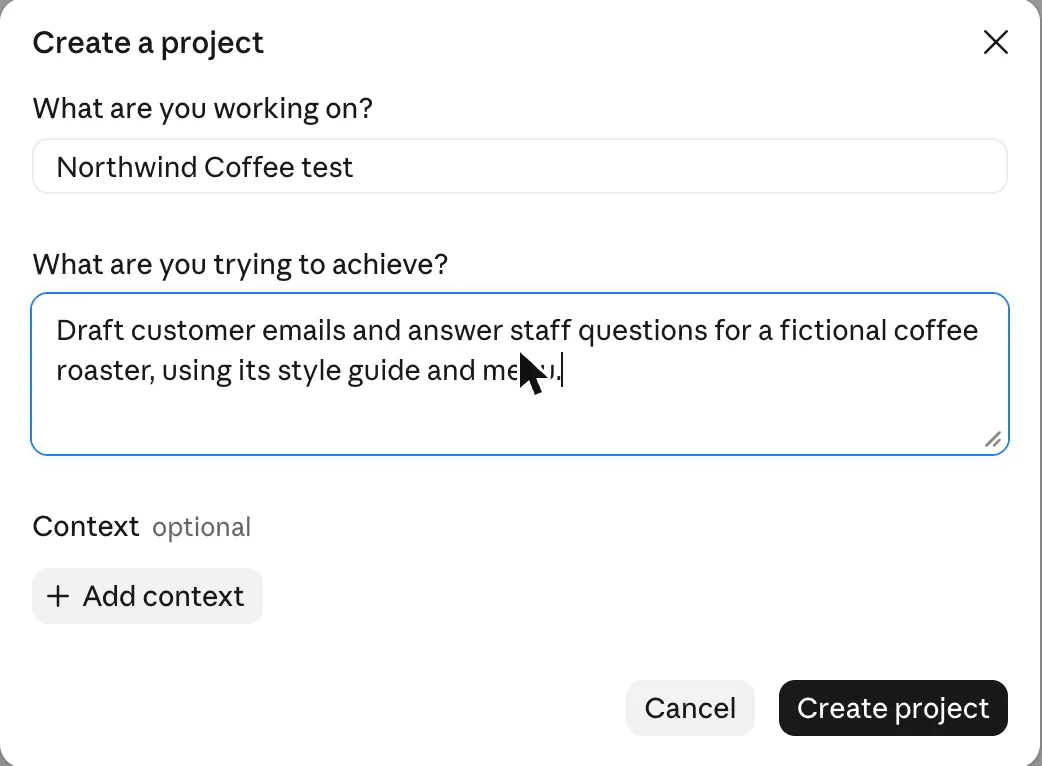
Open Projects in the left sidebar and choose New project. The dialog asks two questions, “What are you working on?” for the name and “What are you trying to achieve?” for the description, with an optional Add context button. Remember that Claude does not read either field, so write them for your future self.
2. Write the project instructions
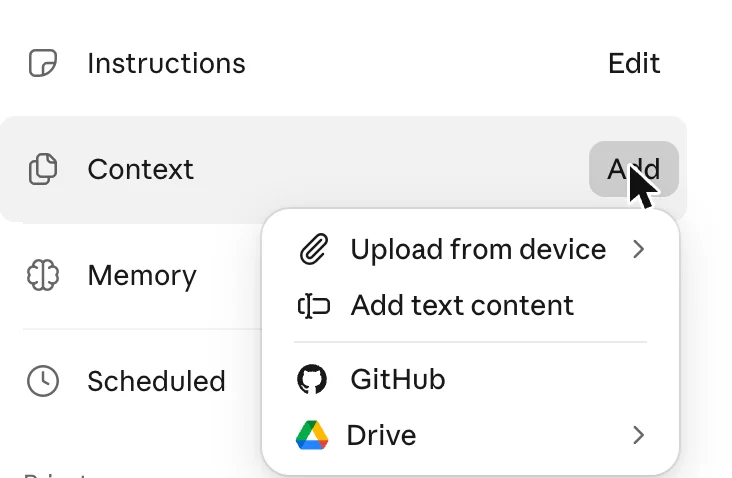
On the project page, the side panel lists Instructions, Context, Memory and Scheduled. Choosing Add next to Instructions opens a box that, in its own words, works “alongside your profile instructions and the selected style”. Mine told Claude to follow the style guide in the project files exactly, keep answers under 120 words, and name the file whenever it quoted a price.
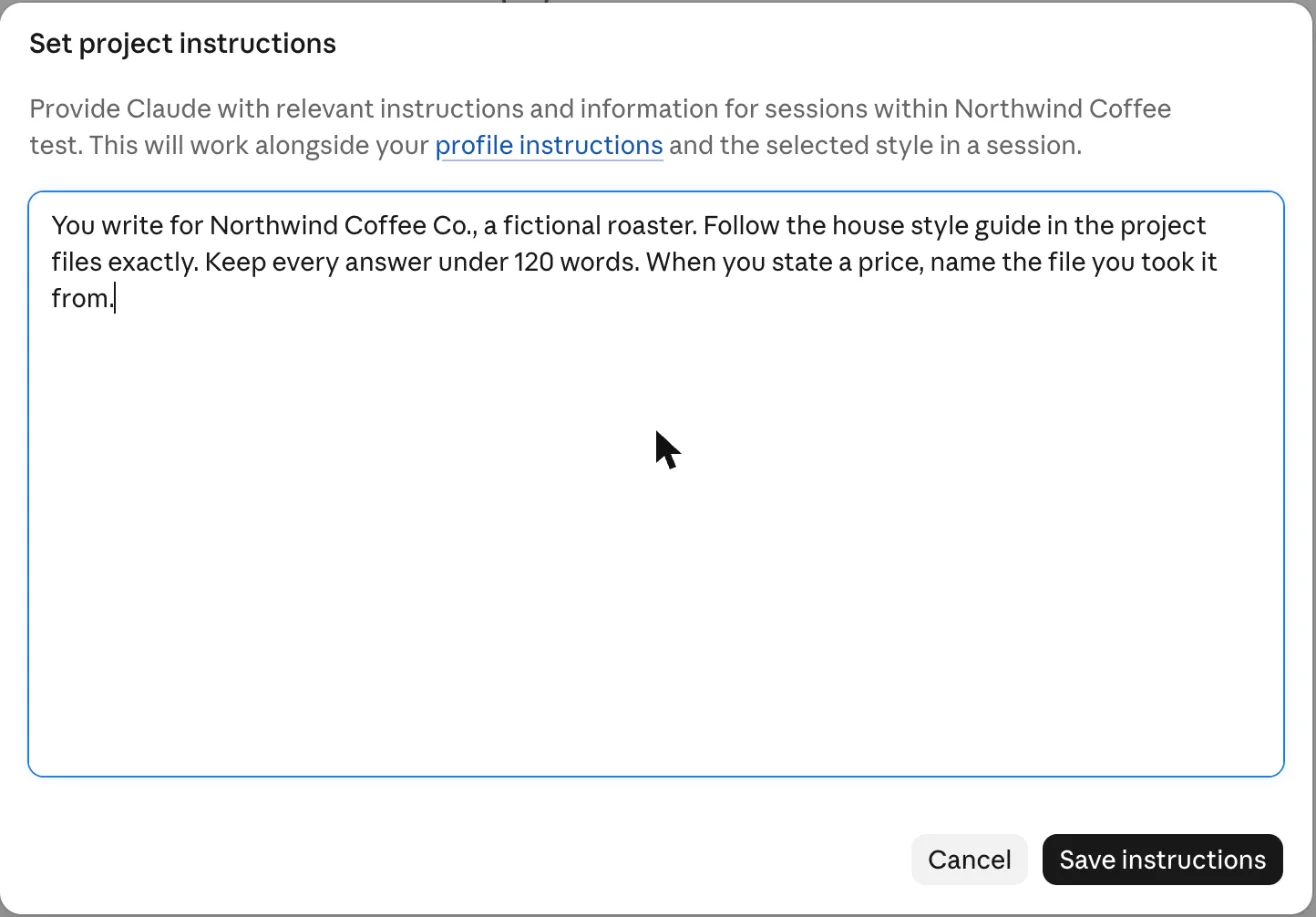
One caveat from my own run: profile instructions apply too, so if yours already set a tone, a project cannot fully isolate its own style. Check your profile before you blame the project for a voice you did not ask for.
3. Add context
Add next to Context offers four sources: upload from your device, paste text content, connect GitHub, or pull from Google Drive. I uploaded the style guide and the menu from my computer, then later added the large shift log.
4. Start a chat inside the project
The composer on the project page reads “New session in” followed by the project name. Anything you start there inherits the files and instructions. You can also move an existing chat into a project from that chat’s menu, which the help centre covers along with starring, archiving and deleting.
Six chats against a fictional coffee roaster
I wanted results a reader could check, so I made up a business. Northwind Coffee Co. is a fictional roaster with a house blend called Lantern, roast days on Tuesdays and Fridays, and a strict sign-off line. Its menu is a five-row CSV, and its shift log is 9,000 synthetic entries with one planted sentence at about 62% depth: a note that the spare roastery key sits in a blue enamel teapot.
I ran everything on a paid Max account in the web app, with Opus 5.5 at medium effort, on 2 November 2026.
| Chat | What I asked | What happened |
|---|---|---|
| 1 | Draft a customer email: blend, roast days, cortado price | Blend and days right; menu read failed, price left blank |
| 1, follow-up | List the menu rows | All five rows, $3.50 total, file named |
| 2 | New chat: what price did we work out? | Searched past chats, answered $3.50 |
| 3 | Find the spare-key note in the log | Found, quoted exactly, placed at Day 224 |
| 4 | Count the late milk deliveries | Declined: only the first 262 KB was readable |
| 5 | Chat 1’s prompt again, fresh | Complete and correct, both files used |
| 6 | What is this project called? | Could not see the name or description |
The style rules held throughout. Every draft kept the drink names lowercase, wrote prices with two decimals, avoided the three banned words and closed with “Brewed with care, the Northwind team”. Answers stayed under 120 words, and when a price appeared, the file it came from was named.
Claude does not always read the file you think it read
The failure was in the first chat, and it is the one worth knowing about. I asked for a customer email that needed the cortado price. Claude ran a tool to read the menu, the tool came back with “File not found in this conversation”, and Claude wrote the email anyway with the price left as a placeholder.
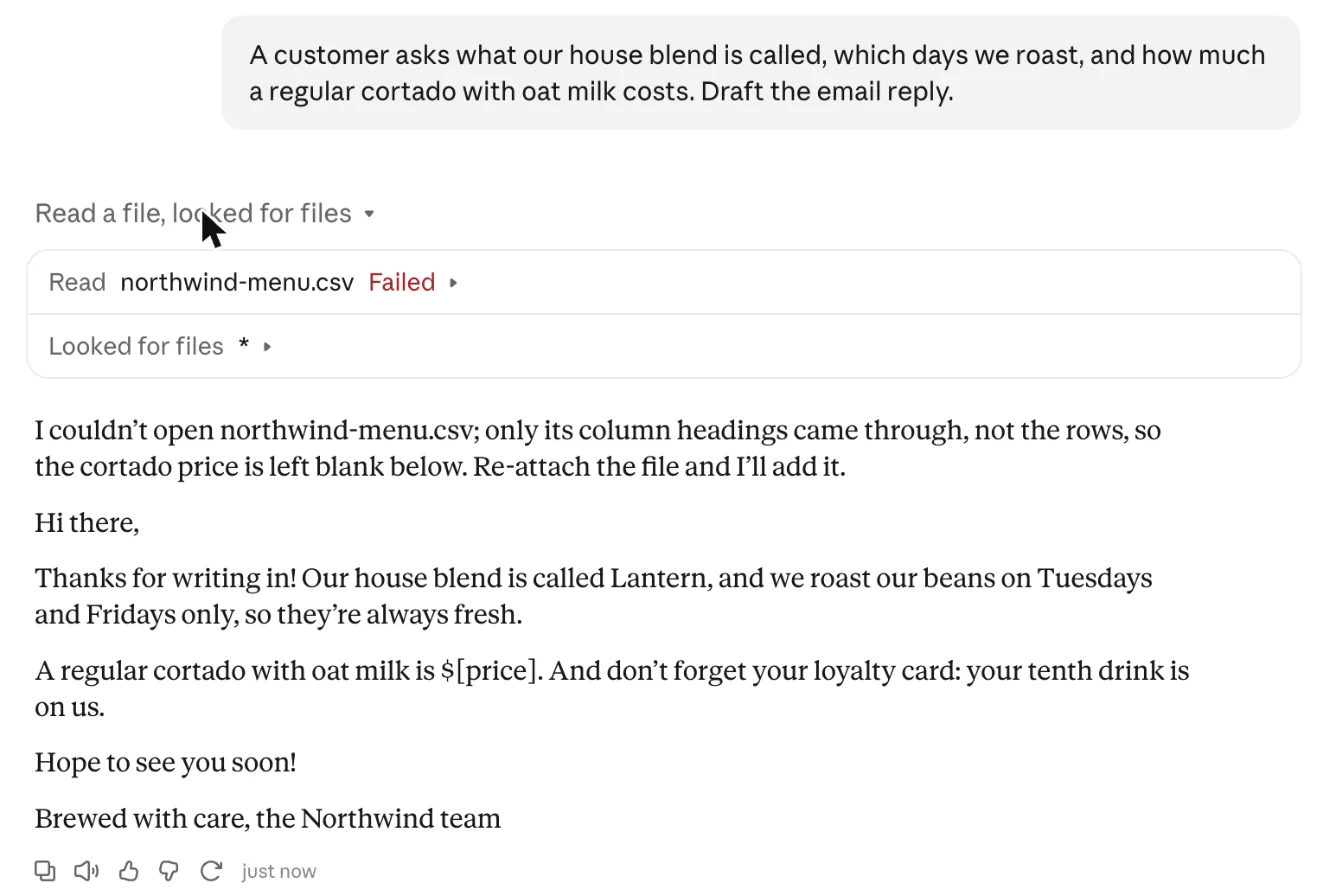
To its credit, it said so at the top rather than inventing a number. When I replied that the menu was in the project files, the next read worked, it listed all five rows exactly and gave $3.10 plus $0.40, or $3.50. I then ran the same first prompt in a fresh chat, and it read both files and got everything right first time.
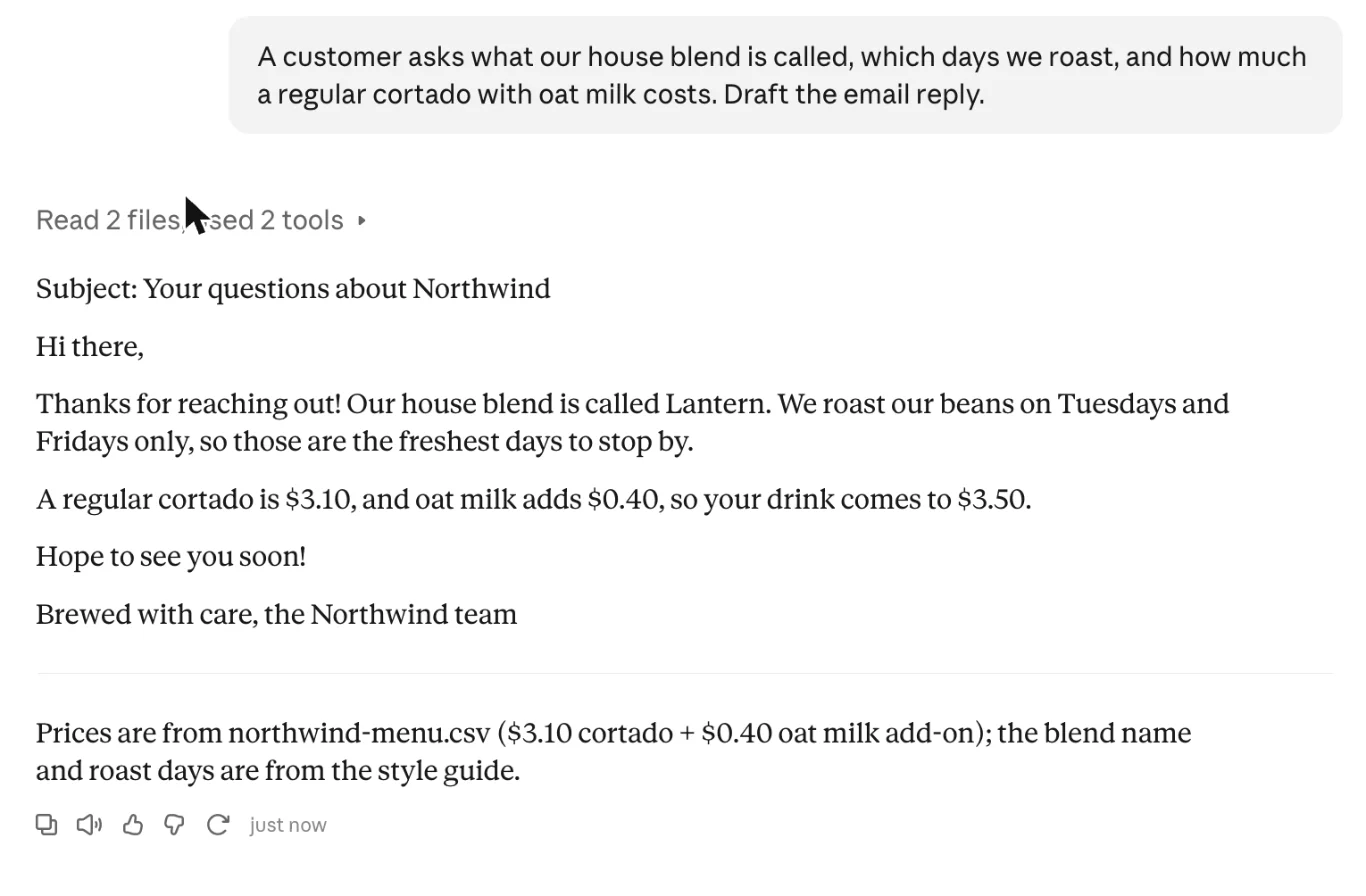
One failure in two identical attempts is not a rate, but it is enough to change a habit. If an answer depends on a number in a project file, ask Claude to name the file, as my instructions did. A missing source is easier to spot than a wrong figure.
Project capacity: the meter and the limits
Each project shows a capacity meter, and it moves faster than the file sizes suggest. My two small files, under a kilobyte together, already read as 1%, which looks like a floor. Adding the 1.46 MB shift log took it to 23%.
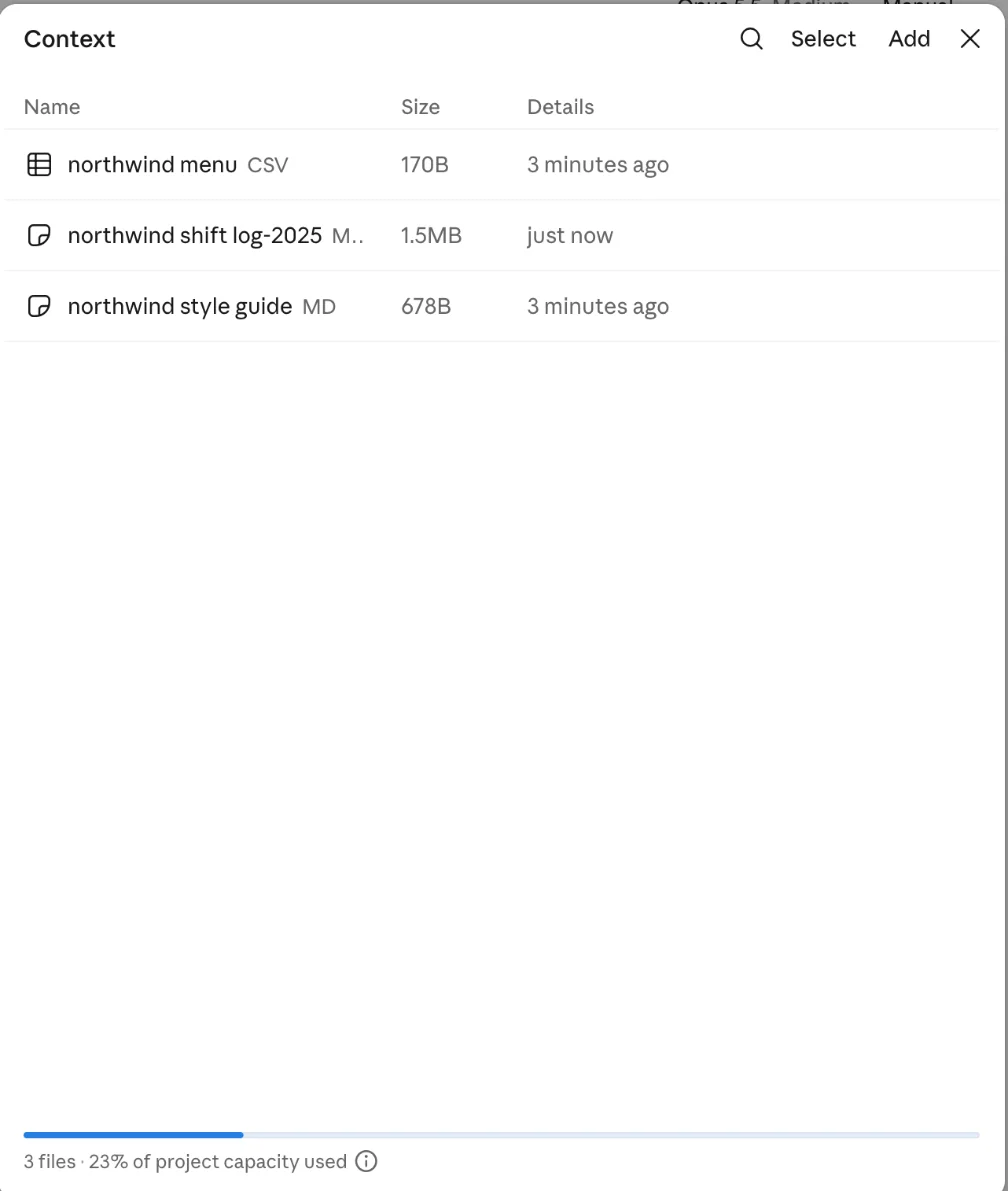
If that ratio holds for similar plain text, the project would fill at roughly 6 MB. That is my arithmetic from one reading, not a published figure, and denser or sparser text will change it. Anthropic’s upload article gives the hard limits: up to 30 MB per project file, no fixed number of files, and total content that has to fit within Claude’s context window.
On paid plans that last limit is softer. The help centre says that when project knowledge nears the context limit, Claude turns on retrieval, which it says expands capacity by up to 10 times while keeping response quality. Retrieval is not available on Free. My log sat at 23%, below where retrieval would be needed, but it was still too big for Claude to read in one pass, which is what the next two chats showed.
Finding a line works; counting across a file does not
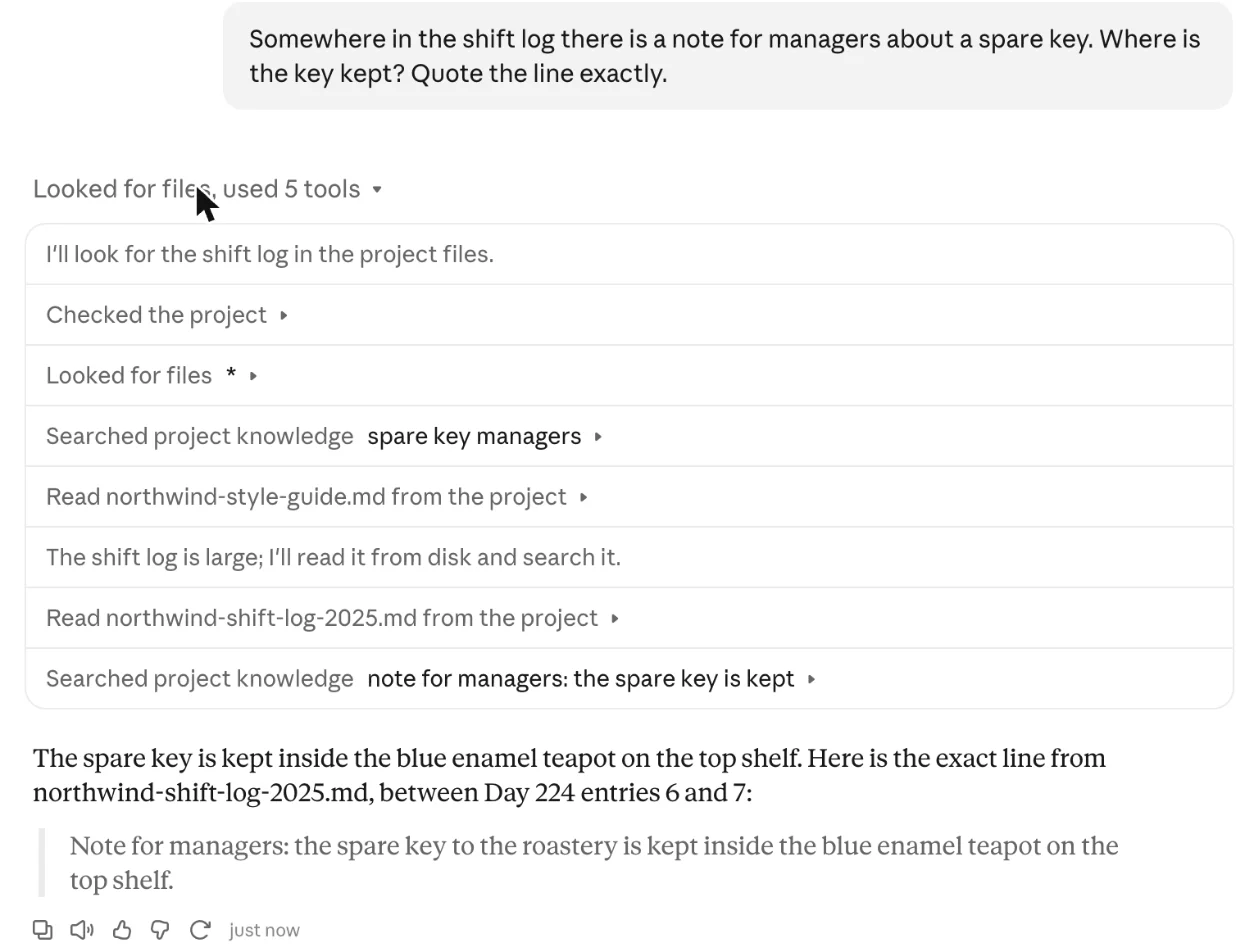
Search and reading are two different jobs, and a project is far better at the first. I asked a fresh chat to find the note about the spare key and quote it exactly. It searched the project knowledge, read the log, searched again with a narrower phrase, and came back with the sentence word for word, placed between Day 224 entries 6 and 7. That is exactly where I planted it.
Then I asked for a count: how many entries say the milk delivery arrived late. The true answer, from a script over the file, is 3,046. Claude would not give a number. It explained that the file is, by its count, about 1.46 MB, that the project tool had returned only the first 262 KB, roughly the first 65 days, and that it had no copy it could run a script on. It offered to count exactly if I attached the file to the chat directly.
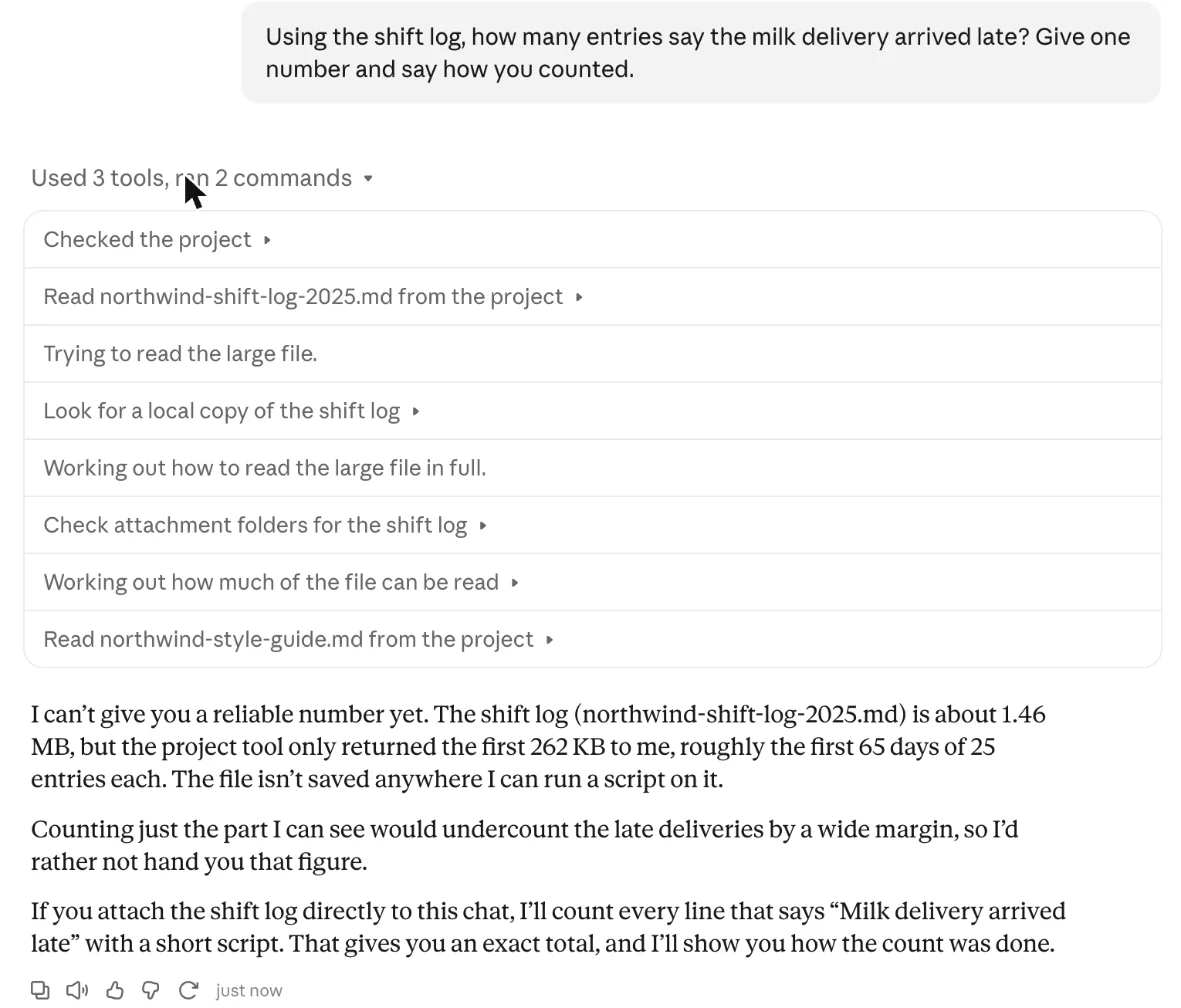
That refusal is the most useful thing I learned, and the honest one. A project is a good home for reference material you will search: style guides, policies, past reports, a product catalogue. It is the wrong home for a dataset you need totals from. For that, attach the file to a chat, where Claude can run code over all of it.
Do chats in a project remember each other?
Officially, no. The help centre says chats in a project do not share context unless the information is in the project’s files. In practice my second chat found the first one anyway. I asked what price we had worked out “in another chat in this project”, and Claude ran a tool called search past chats, found the earlier conversation by its title and answered $3.50, adding that the first draft had left the price blank.
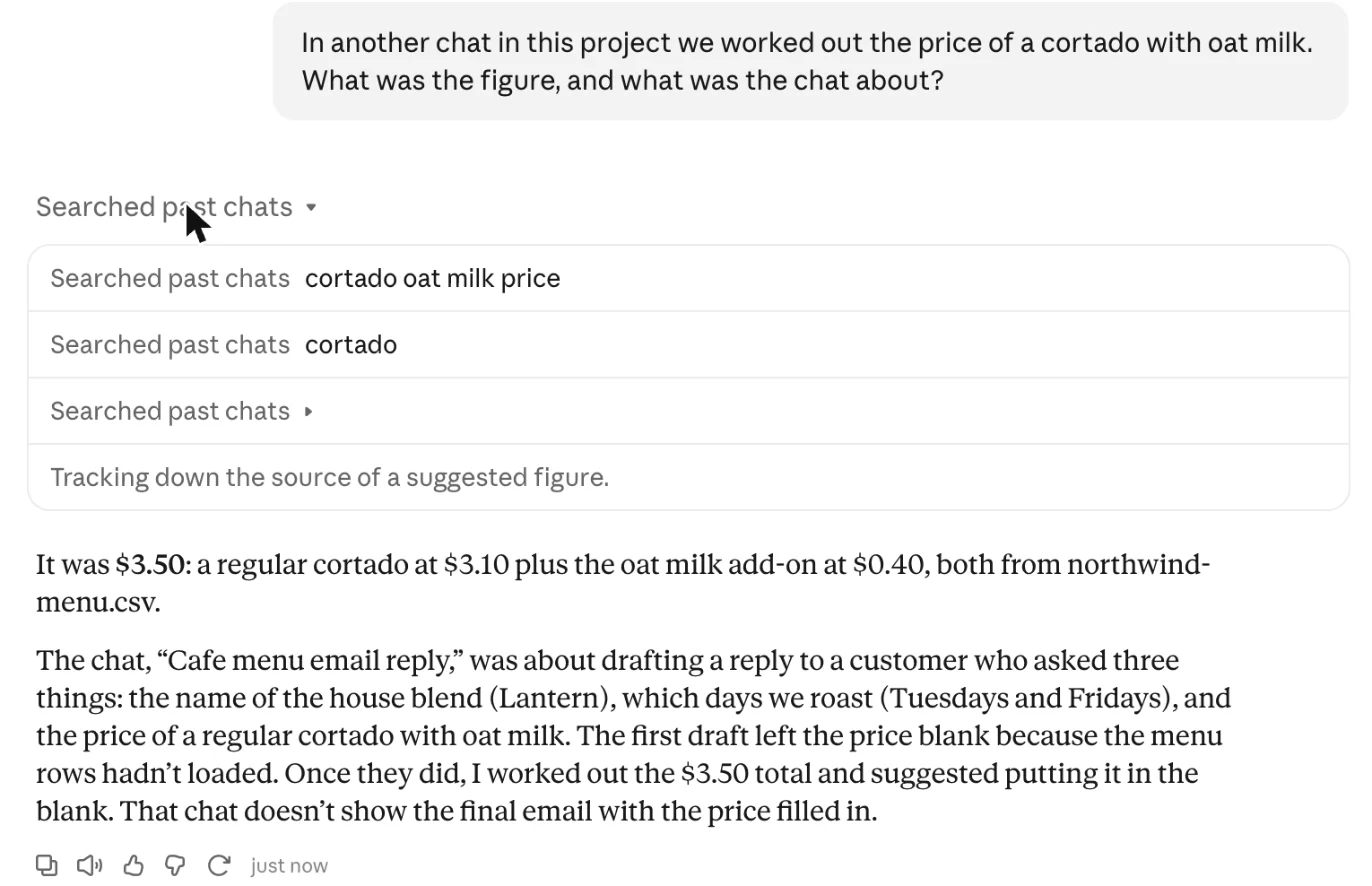
So the separation is about what each chat starts with, not about what it can look up. If you need one chat walled off from another, keep them in different projects. Past-chat search is a setting on the account, and I did not check which switch controls it on mine.
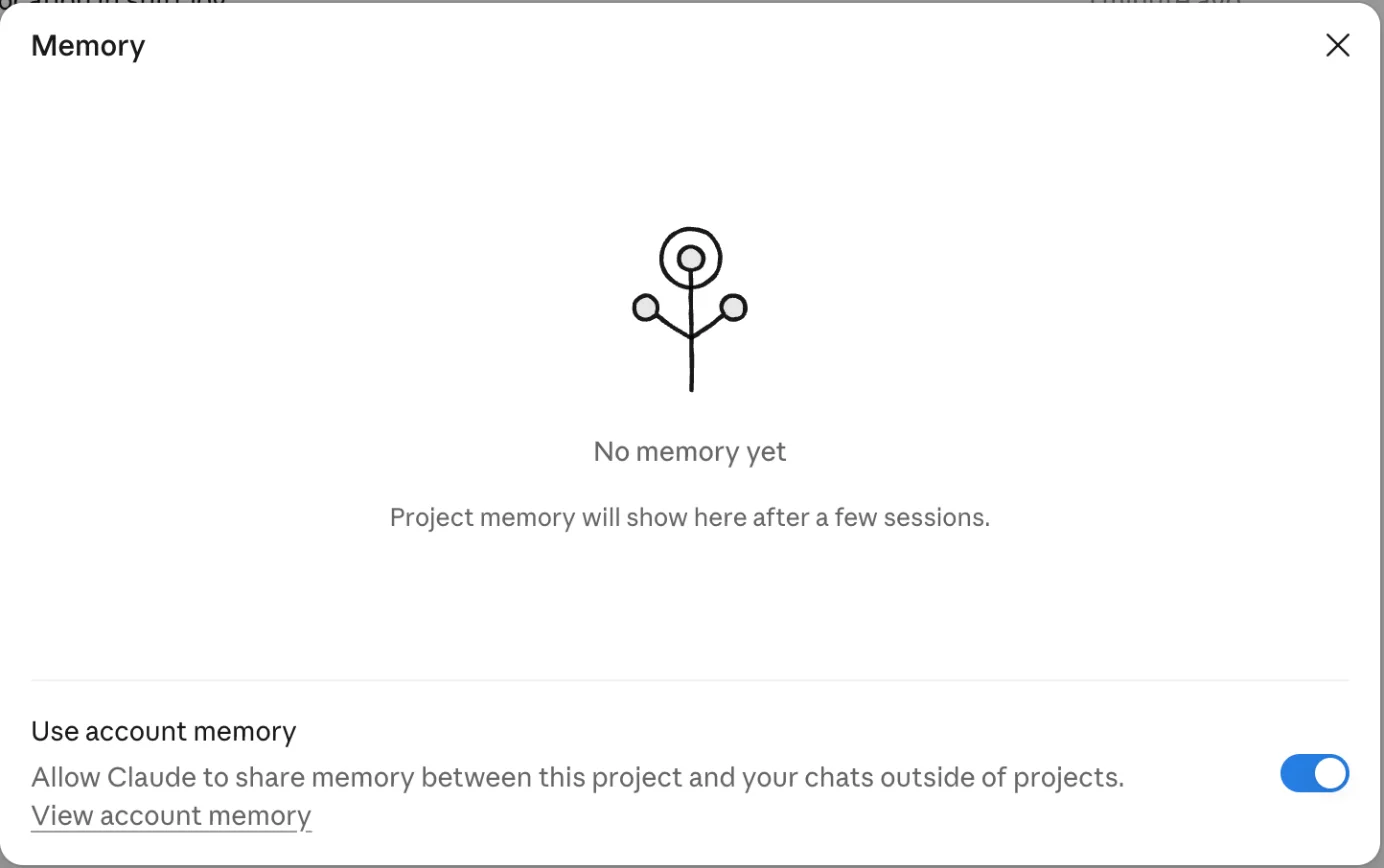
Projects also keep their own memory, separate from the files. After six chats mine still read “No memory yet”, with a note that project memory appears “after a few sessions”. Underneath sits a switch called Use account memory, on by default here, which lets the project share memory with your chats outside projects. Turn it off for client work you do not want bleeding into everything else.
Are Claude Projects free?
Yes, and older guides that say otherwise are out of date. Anthropic’s help centre now says Projects are available on all plans, including free accounts, which can create up to five. What the paid plans add is room, rather than the feature itself.
| Plan | Projects | What changes |
|---|---|---|
| Free, $0 | Up to five | No retrieval for large project knowledge |
| Pro, $20 a month ($17 billed annually) | Not capped at five | Retrieval when knowledge nears the context limit |
| Max $100, Ultra $200 a month | Not capped at five | Same features, more usage before limits |
| Team and Enterprise | Not capped at five | Sharing with can view and can edit permissions |
Prices are from Anthropic’s plan pages as recorded in our Claude review, which covers what the usage meters actually allow, and our Claude Max plan guide explains what each tier’s multiplier buys. One cost detail from the review matters here: content stored in a project is cached and counts less against your limits when it is reused. That makes a project the cheapest way to give Claude the same long context over and over.
The Claude Code Projects beta has its own rules. Its documentation says it is on Pro, Max and Ultra only, that a project uses plan limits faster than a single session, and that a new project runs every thread on Opus at high effort, the setting that draws on your plan fastest. There is also a hard cap of 500 new threads a day across your projects.
A worked example: one project for a recurring job
The best use of a project is a job you do every week with the same background. Take a freelance writer with three retainer clients. One project per client keeps each client’s brand guide, glossary and past approved pieces apart, and the instructions carry the rules that never change.
This is the instruction block I would start from, adapted from the one that held up in my test:
You write for [client], a [one-line description].Follow the brand guide in the project files exactly.When you state a price, a date or a statistic, name the file it came from.If a file you need does not open, say so at the top of your answer and leave a placeholder.Keep first drafts under [N] words unless I ask for more.The fourth line is there because of my first chat. Claude did flag the missing file without being told to, but writing it into the instructions turns a good habit into a rule. Then add files that are mostly searched, not totalled: the brand guide, a list of approved phrases, the last ten pieces the client signed off.
Two things stay out of the project. Anything that needs a count or a sum across rows goes into a chat as an attachment, where code can read all of it. Anything confidential to one client never goes into a project with account memory switched on.
Five things that trip people up
The description is not an instruction
Claude does not see the project’s name or description. My sixth chat confirmed it. Anything you want followed goes in the instructions box.
A file in the project is not always a file in the chat
Some files are in context when a chat starts and others are fetched by a tool, and a fetch can fail. Mine failed once in two identical attempts. Asking Claude to name its source makes a miss visible.
Big files are searched, not read
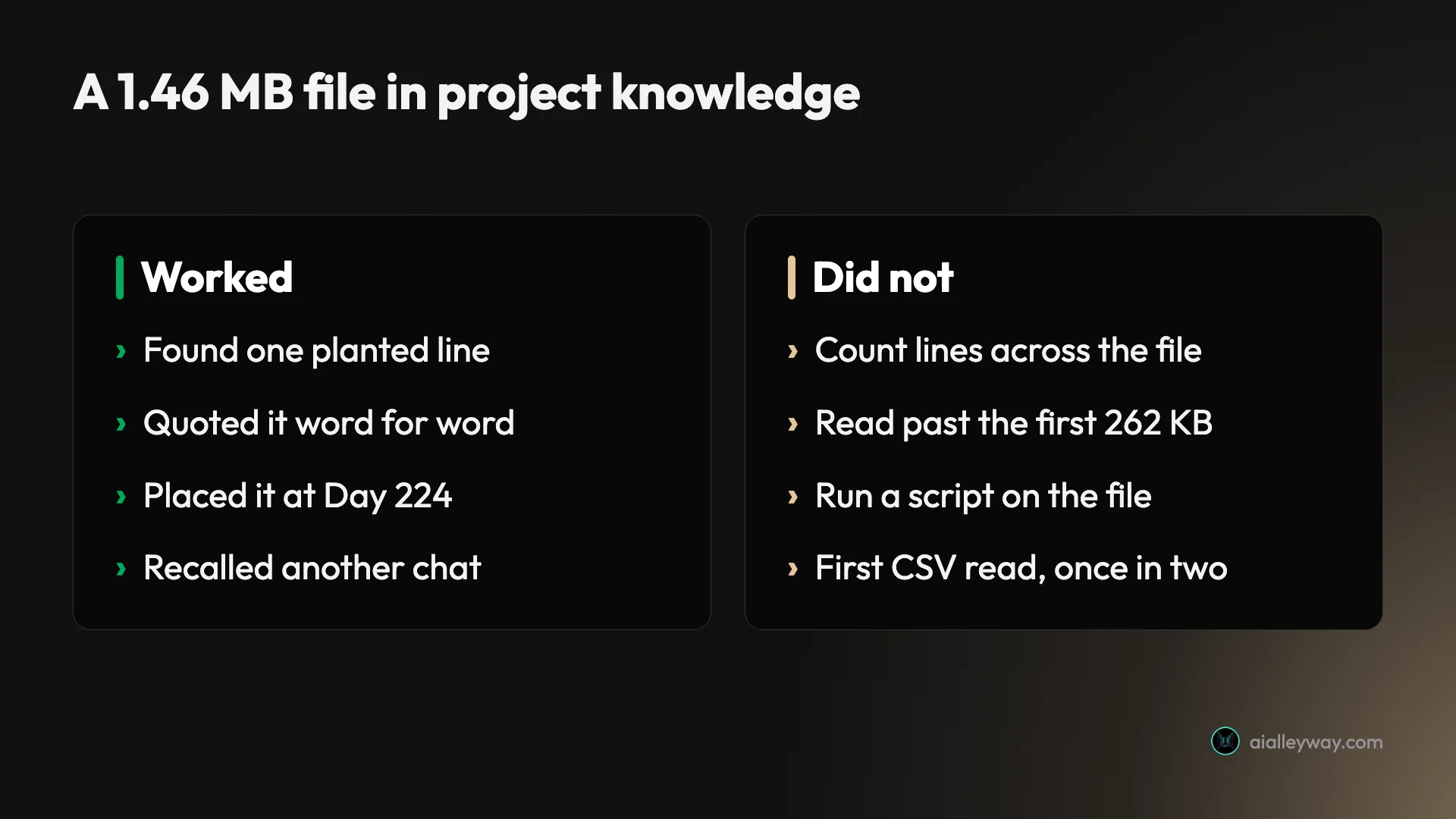
My 1.46 MB log was searchable well past the first 262 KB, enough to find a line 62% of the way in, but the read tool returned only those first 262 KB. Claude found a single line and declined to count across the file. Plan around that.
Separate chats can still find each other
Chats do not share context, but past-chat search found my earlier chat in seconds. Use separate projects, not separate chats, to keep work apart.
Your profile instructions come along
The instructions dialog says project instructions work alongside your profile instructions. If your profile sets a tone, every project inherits it.
Claude Projects or something else?
Projects compete with similar features in the other assistants, and the choice mostly follows which assistant you already pay for. The closest match is ChatGPT’s own Projects; Google’s Gems are lighter and are being retired on personal accounts. This is how the three compare on their vendors’ own help pages, read on 2 November 2026; the Claude column combines Anthropic’s help centre with my test.
| Claude Projects | ChatGPT Projects | Gemini Gems | |
|---|---|---|---|
| Free plan | Up to five projects | Unlimited projects | Not stated |
| Files | 30 MB each, no fixed count | 5 per project on Free, 25 on Plus, 40 on Pro | Knowledge files, limits not stated |
| Instructions | Alongside your profile instructions | Override your global custom instructions | Set per Gem |
| Memory | Own memory, optional account memory | Default or project-only memory | Not stated |
| Sharing | Team and Enterprise | Every plan, from 5 collaborators on Free | Shareable |
ChatGPT’s figures come from OpenAI’s Projects help article, which also says projects cost nothing extra on every qualifying plan. Google’s Gems help page carries a notice that Gems on personal accounts are moving to skills from November 2026, so building a new workflow on a Gem today means rebuilding it soon. If your work is mostly writing against reference material, our ChatGPT vs Claude comparison covers which assistant handles that better.
If what you really want is answers grounded in a pile of documents, with citations back to the page, a research notebook may suit you better. Our NotebookLM review tested exactly that and found it cites well but meters hard. For code, the Projects beta is one option among several, covered in our guide to using Claude Code.
- Use Claude Projects if you repeat the same context across many chats, such as a brand voice, a policy library or a client’s guidelines.
- Use a plain chat with an attachment if you need totals, counts or analysis across a whole file.
- Use separate projects for clients or topics that must never mix, and switch off account memory in them.
- Skip Projects if every conversation you have is a one-off. A project only pays off when you reuse its context.
Final word
Claude Projects are worth setting up the moment you catch yourself pasting the same background into a third chat. In my test a project held a style guide well enough that every draft followed it, found one sentence buried 62% of the way into a 1.46 MB file, and remembered a price from another chat when asked.
Its limits were just as clear: one file read failed on a first attempt, and a count across a large file was out of reach. Claude said so plainly instead of guessing, which is the behaviour you want from a tool you will trust with reference material. Start with the free plan’s five projects, put your rules in the instructions, and keep the spreadsheets for a regular chat.
Frequently asked questions
What are Claude Projects?
A Claude project is a workspace that holds files, standing instructions and its own memory, and every chat you start inside it can use them. You set it up once, with your style guide, your reference documents and the way you want answers written, and then you stop pasting the same context into every new chat.
Each chat in a project still starts fresh. What carries over is the project's files and instructions, not the conversation. In my test a new chat could still find an earlier one by searching past chats, but only because I asked it to.
There is now a second product with the same name: a Projects beta inside Claude Code that runs coding tasks as parallel cloud threads. Most people searching for Claude Projects mean the first one.
Are Claude Projects free?
Yes, with limits. Anthropic's help centre says Projects are available on all plans, including free accounts, and that a free account can create up to five projects. Some older guides still say Projects are paid-only; the help centre's current wording is the one to go by.
The paid plans add two things that matter once a project grows. The first is retrieval: when the files in a project approach the model's context limit, paid plans switch to a search mode that Anthropic says expands capacity by up to 10 times. The second is the number of projects, which is not capped at five.
Sharing a project with colleagues, with view or edit permissions, is a Team and Enterprise feature. Pro is $20 a month, or $17 a month billed annually.
How many files can a Claude project hold?
Anthropic's upload article says project files can be up to 30 MB each, with no fixed limit on the number of files, as long as the total content fits within Claude's context window. On paid plans, retrieval kicks in as you approach that limit.
The project shows its own meter. Two small files, under a kilobyte together, read as 1% of project capacity in my test. Adding a 1.46 MB plain-text log took it to 23%. If that ratio holds for similar text, a project would fill at roughly 6 MB, but that is my arithmetic from one reading, not a published figure.
Supported types include PDF, DOCX, CSV, TXT, HTML, JSON and XLSX. XLSX needs code execution and file creation switched on in your settings.
Do chats in a Claude project share memory?
Not directly. Anthropic's help centre says chats in a project do not share context with each other unless the information is in the project's files. Each project also has its own memory, which builds up over several sessions; mine was still empty after six chats.
In practice the line is blurrier. When I opened a new chat and asked about a price worked out in an earlier one, Claude used a tool called search past chats, found the earlier chat by its title and answered correctly, including the detail that the first draft had left the price blank.
A separate switch in the project's memory panel, on by default on my account, lets the project share memory with chats outside projects. Turn it off if you want a project kept separate.
What is the Claude Projects beta in Claude Code?
It is a different product that reuses the name. In Claude Code, a project is one ongoing conversation in which Claude splits work into threads, each usually a cloud session, and runs them in parallel. Threads keep going after you close your laptop.
Anthropic's documentation describes it as a public beta on Pro, Max and Ultra, rolling out gradually, with a waitlist for accounts that do not have it yet. Team and Enterprise are not included yet. A project draws on the same plan limits as your other Claude Code sessions and uses them faster, and new projects run every thread on Opus at high effort by default.
I did not test it. Everything in this guide that I measured is the chat version.
Keep reading
Claude AI review: brilliant at words, strange about limits
A Claude AI review from a paying Max account. My $100 Max plan invoiced at $111.11, three usage meters run at once, and overflow is billed at API rates.
Claude Max plan: 5x now covers your week, and 20x is gone
Claude Max is $100 a month for 5x Pro usage every five hours and every week. The $200 tier is now Ultra: no five-hour cap, 10x Pro weekly. Which one to buy.
ChatGPT vs Claude: one writes, one does everything else
ChatGPT vs Claude, from a paid Claude account and a year on ChatGPT free. Both $20, but the free tiers differ far more — and only one generates images.
How to use Claude Code: setup, then the part that matters
How to use Claude Code, from the install command to the habits that decide whether it works. Every best practice descends from one constraint most guides skip.
NotebookLM Review: Gemini Notebook Cites Well, Meters Hard
A NotebookLM review, now Gemini Notebook: five test questions, four Studio outputs, and an audio overview estimated at 45% of a five-hour limit.