
Eleven Music tested: ElevenLabs sang every word I wrote
I made three 30-second tracks with Eleven Music, sang my own lyrics on two models and re-did one chorus. What it cost in credits, and the licence fine print.
Contents
Is Eleven Music worth trying? The short answer
Eleven Music is ElevenLabs’ song generator, and inside the ElevenLabs app it costs exactly what the pricing page says: 900 credits per minute of music. I made three 30-second tracks on 1 November 2026, sang my own lyrics on two models, and redid one chorus. Both vocal tracks sang all 28 words I wrote, both landed on the tempo I asked for, and the chorus redo cost 225 credits because only that section was regenerated.
| What I made | Model | Credits | What came back |
|---|---|---|---|
| Lo-fi instrumental, 85 BPM, two versions | v2.5 | 900 | Two 30 s tracks; the one I measured runs at about 85 BPM, no vocals |
| Indie pop song with my lyrics, 110 BPM | v2.5 | 450 | All 28 words sung, about 110 BPM |
| The same song | v2 | 450 | All 28 words sung, about 110 BPM |
| Regenerate the chorus only, stripped back | v2.5 | 225 | New chorus, verse untouched |
Total: 2,025 credits. One thing to know before you search for it: “Eleven Music” now names two products, and the cheaper one depends on what you are making.
Two products called Eleven Music
The first is the Music tool inside ElevenLabs, at elevenlabs.io/app/music. It sits in the same sidebar as text to speech and sound effects, spends the same credits, and is built for people making content: a bed for a video, a jingle, a song with your own words. This is the one I tested.
The second is ElevenMusic, a separate platform at elevenmusic.io with an iPhone app listed as “ElevenMusic by ElevenLabs”. It mixes streaming with creation: charts, artist pages, remixes, and a creator plan that releases songs to Spotify and Apple Music. Its pricing page counts songs, not credits.
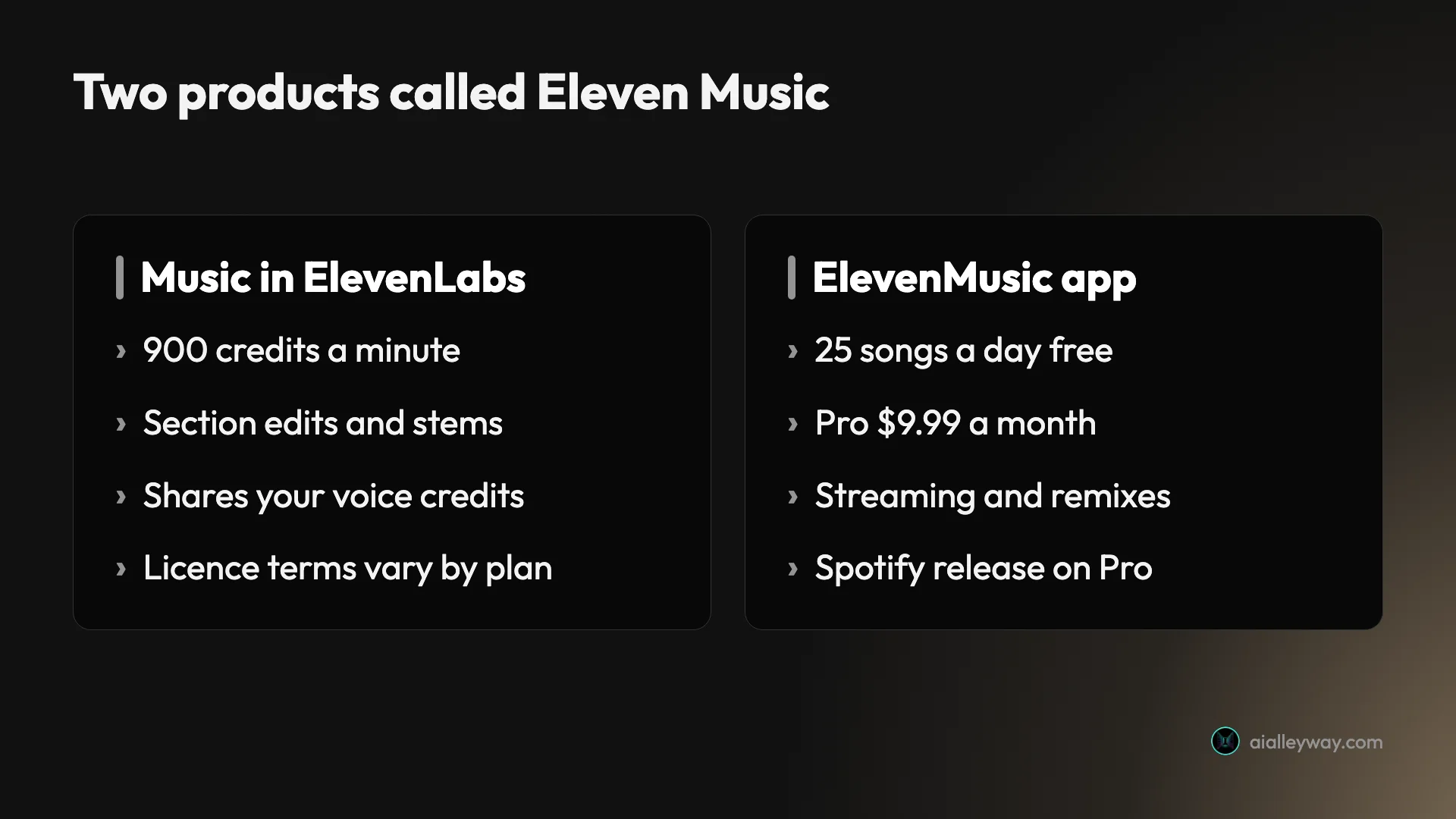
If you already pay ElevenLabs for voices, the app tool costs nothing extra to try. If you want to put songs on streaming services, ElevenMusic’s Pro plan at $9.99 a month is the product aimed at you. Everything measured below is the ElevenLabs app.
The ElevenMusic plans are also built around different limits. Its free tier allows 5 downloads and 5 stem splits a day and one custom style or vocal, and Pro raises that to unlimited downloads, 500 stem splits a month and five custom styles and vocals, with royalties from streams on released songs. Its pricing page does not mention ElevenLabs credits at all, and none of it is something I tried.
How Eleven Music works in ElevenLabs
You describe a song, and the model writes and performs it. A prompt box sits at the top of the Music page, and under it are the controls that decide what you pay and what you get:
- Model. Music v2.5 is the default, labelled “Our most advanced model, with improved quality and prompt adherence”. Music v2 is “Improved quality and better adherence to your prompt”. Music v1 is marked “Will be deprecated soon”.
- Variants. One to four versions per request, two by default. Each version is billed in full.
- Duration. Auto, 30 seconds, 1, 2, 4 or 6 minutes, or a custom length.
- Lyrics. Auto writes words for you, Custom takes yours, Instrumental leaves them out.
- Enhancer. On by default, “Automatically improves short or unclear prompts”.
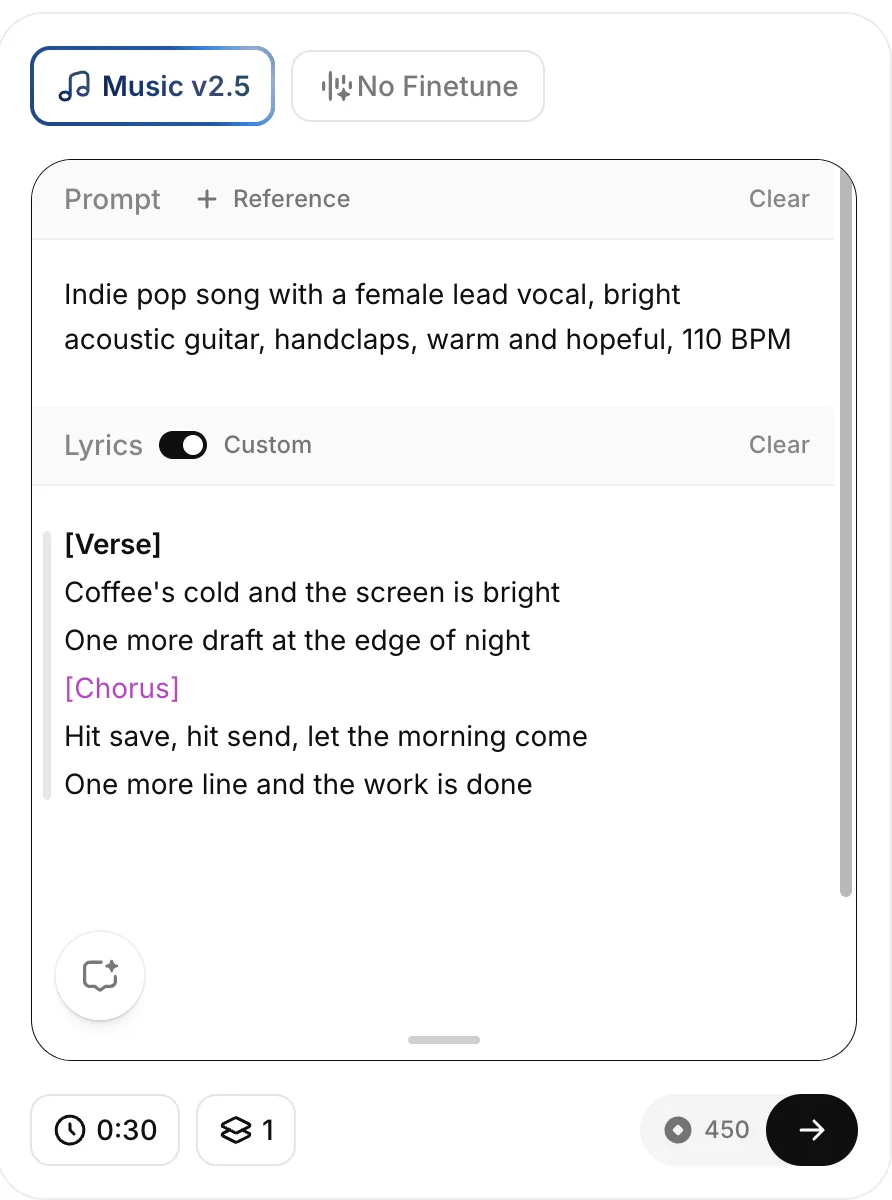
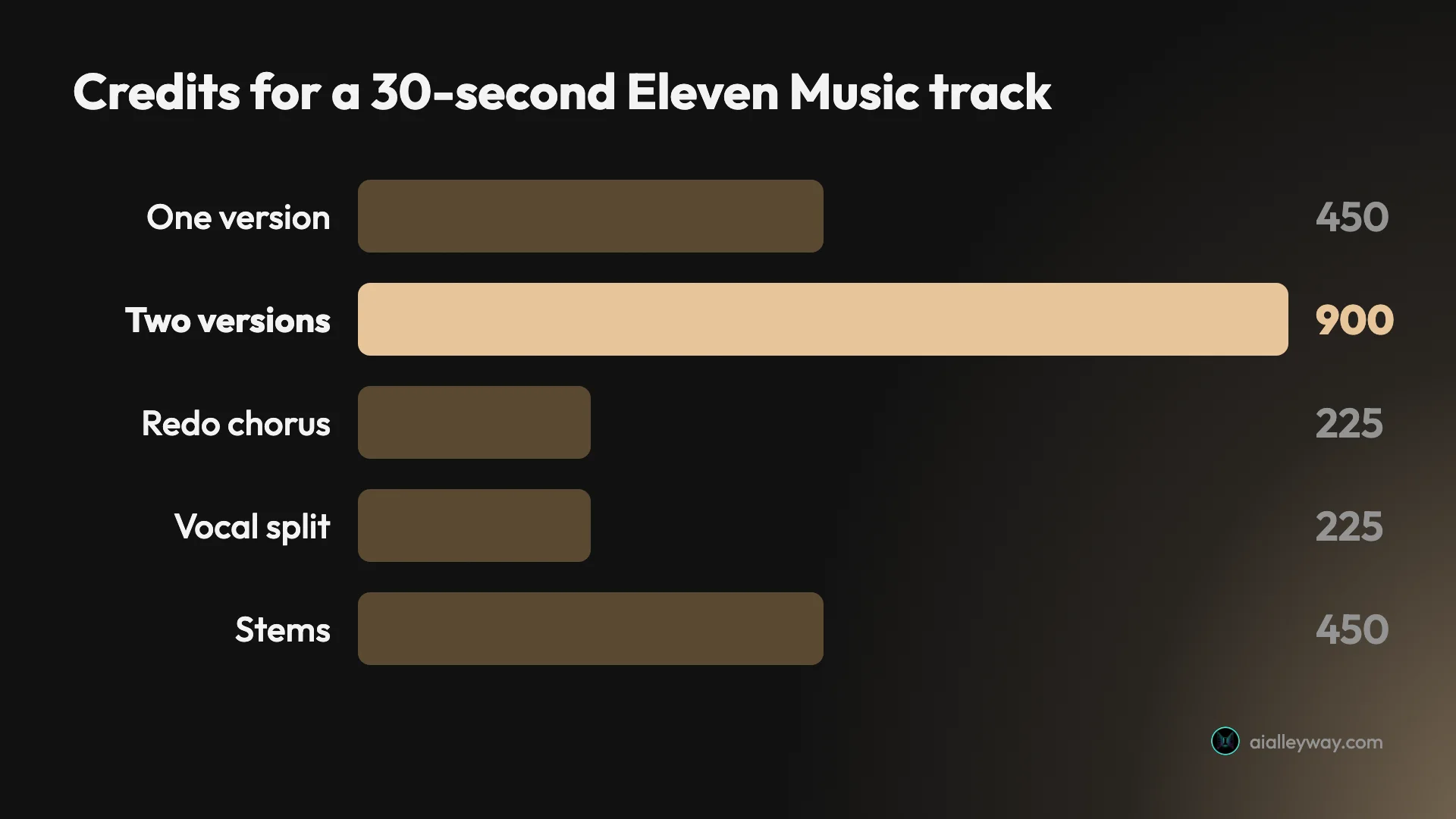
The composer prints the price before you commit. At the defaults it reads “900 credits/min x 2”; with 30 seconds and one version it read 450.
After you generate, each track lands in the Generations tab with an automatic title and genre tags. My lo-fi tracks came back as “Late Afternoon Notes” and “Late Night Study Loop”; both vocal takes were titled “Let the Morning Come”, after a line in the chorus. Each track has an Edit Song button that opens the song editor, which is where Eleven Music differs most from a plain generator.
Making a song in Eleven Music, step by step
The path below is the one I used. It takes about a minute per track once you know the controls.
1. Open Music and set the length first
Pick Music in the ElevenLabs sidebar. Before you type anything, set Duration and Variants, because together they set the price. Thirty seconds with one variant costs 450 credits; leave the defaults on Auto length and two variants and you are paying for two tracks of a length you did not choose.
2. Name the genre, the voice and the tempo
Give it a genre, an instrument or two, a mood, and a tempo as a number. “85 BPM” and “110 BPM” in my prompts came back as about 85 and about 110 in the finished tracks. If you want vocals, say whose: “a female lead vocal” in my prompt became a “female lead vocal” tag on both sections of the song plan.
3. Choose Custom lyrics if the words matter
Switch Lyrics to Custom and type your words, with section labels in square brackets such as [Verse] and [Chorus]. The labels become the song’s structure. Leave it on Auto and the model writes lyrics for you; choose Instrumental for a bed under a voiceover.
4. Generate, then open Edit Song
Press the arrow. My 30-second tracks appeared inside the 10 to 18 seconds I waited. Open Edit Song to see the plan the model made: each section with its own style tags and lyrics, laid out on a timeline.
5. Fix one section instead of rerolling the song
Click a section on the timeline, type what should change, and generate. Only that section is rebuilt and billed. Then download the version you want from the Download button.
Eleven Music pricing in credits and minutes
Unlike ElevenLabs’ sound effects, where the pricing page’s figure only fits one length, Eleven Music billed exactly at its published rate. The pricing page lists “Eleven Music 900 credits per minute”, and every charge I measured matched it:
| Action | Length | Credits charged |
|---|---|---|
| Generate, two versions | 30 s each | 900 |
| Generate, one version | 30 s | 450 |
| Regenerate one section | 15 s chorus | 225 |
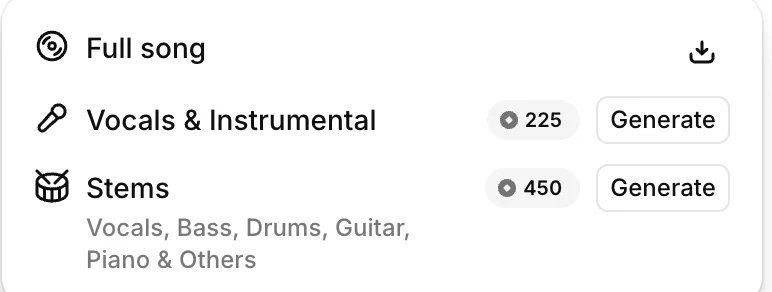
| Split vocals and instrumental | 30 s song | 225 (listed, not used) |
| Split into stems | 30 s song | 450 (listed, not used) |
| Download the full song | 30 s | Free |
Credits are only half the limit. ElevenLabs’ music terms set a monthly generation cap for each plan, and on every paid tier the cap sits below what the credits would buy at 900 a minute:
| Plan | Price | Credits a month | Credits buy | Music terms cap |
|---|---|---|---|---|
| Free | $0 | 10,000 | about 11 minutes | 11 minutes |
| Starter | $6 a month | 30,000 | about 33 minutes | 17 minutes |
| Creator | $22 a month | 121,000 | about 134 minutes | 62 minutes |
| Pro | $99 a month | 600,000 | about 667 minutes | 304 minutes |
The cap is the number to plan around. On Starter, for example, 17 minutes of music uses about 15,300 credits and leaves the rest of the 30,000 for voices and sound effects.
The variants setting is where the money goes. The default of two versions doubles every request, so a free account that never changes it gets about five and a half minutes of distinct music a month rather than eleven. Set it to one until you know what you want.
The paid splits are the other line item. The Download menu in the song editor offers “Vocals & Instrumental” at 225 credits and “Stems” at 450, separating vocals, bass, drums, guitar, piano and others. Both are priced at half or the full generation rate for a 30-second song. I did not run either.
Three tracks, measured
I downloaded the tracks as MP3 and measured them, rather than describing how they sound. Every file was 30.04 seconds long, 44.1 kHz stereo at 192 kbps. For the words, I ran each through ElevenLabs’ speech-to-text, Scribe, as an independent check of what was sung.
A lo-fi instrumental at 85 BPM
The prompt was “Upbeat lo-fi hip hop instrumental for a study video, 85 BPM, mellow electric piano, vinyl crackle, soft drums”, with Lyrics set to Instrumental and two versions. The version I measured has its beat pattern repeating at about 85 BPM, between 84.5 and 85.7 at the resolution I measured, and Scribe found no words in it, only “[outro jingle]”.
It averages -17.7 dB and peaks at -1.3 dB, a normal level for a finished track, so it can go under a voiceover without boosting.
My lyrics on Music v2.5
For the vocal test I wrote two lines of verse and two of chorus, 28 words, and asked for “Indie pop song with a female lead vocal, bright acoustic guitar, handclaps, warm and hopeful, 110 BPM”. On v2.5, Scribe read back every word in order: “Coffee’s cold and the screen is bright. One more draft at the edge of night. Hit save, hit send, let the morning come. One more line and the work is done.”
The vocal comes in at 8.74 seconds, after an intro, and the last word ends at 26.88. The tempo measures between 109.1 and 111.1 BPM, which brackets the 110 I asked for. It is the loudest of the three files, peaking right at 0 dB.
The same song on Music v2
Same prompt, same lyrics, older model, same 450 credits. One caveat on the two vocal files: both downloaded with the same title, and I matched them to v2.5 and v2 by the time stamps in their filenames, which follow the order I generated them in. Scribe again found all 28 words, plus “[outro jingle]” at the end. The tempo measured the same 109 to 111 BPM.
The arrangement differs. On v2 the vocal starts at 5.48 seconds, more than three seconds earlier, and the track sits about 3 dB quieter on average, at -18.6 dB. Both models kept to the words and the tempo; what changes is how they build the song around them.
Editing one section of a song
This is the feature that makes Eleven Music more than a slot machine. Open Edit Song and the track appears as a plan: Global styles at the top, then each section, Verse and Chorus in my case, with its own style tags and lyrics, and a timeline underneath. My verse ran from 0 to about 15 seconds and the chorus from about 15 to 30.
I selected the chorus and typed “Strip the chorus back to just acoustic guitar and the vocal, no drums or handclaps”. The editor rewrote the chorus tags to include “stripped acoustic guitar and vocal” and “sparse chorus arrangement”, added “drums” and “handclaps” as negative tags, and regenerated only the chorus. The verse tags and lyrics did not change.
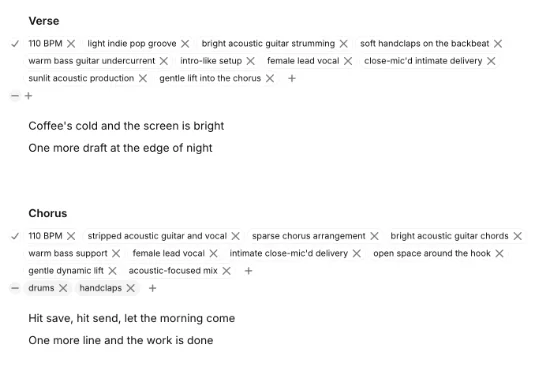
It cost 225 credits, the 900-a-minute rate applied to the 15-second chorus alone. Both versions stay in the History panel on the right, so you can switch back to the original if the new chorus is worse. I did not download the edited version, so there is no clip of it here; the screenshot and the bill are the evidence.
How the song editor plans a track
The editor shows you something most song generators keep hidden: the plan the model wrote before it made the audio. At the top are Global styles, which apply to the whole track. Below them, each section carries its own list of style tags, and those tags are specific. My verse was planned as “light indie pop groove”, “bright acoustic guitar strumming”, “soft handclaps on the backbeat”, “close-mic’d intimate delivery” and “gentle lift into the chorus”. The chorus was “driving indie pop chorus”, “fuller drum pattern” and “anthemic singalong hook”.
Read that way, the tags are a decent production brief. They show what the model took from a one-line prompt, so if a section misses, you can see which instruction it misread before you change anything.
Every tag has a cross to remove it and every list has a plus to add one. There is also a second row, marked with a minus, for things the section should not contain. When I asked for a stripped-back chorus, “drums” and “handclaps” moved into that negative row. You can edit those lists by hand rather than describing the change in a sentence; I used the sentence route, so I cannot say how the two compare.
The lyrics sit under each section and can be edited in place. That is the cheapest fix in the whole tool: a wrong word in the chorus means regenerating 15 seconds, not the song.
A worked example: music for a weekly video
Say you publish one YouTube video a week and want an original 30-second intro and a 2-minute background bed under the talking parts. At 900 credits a minute with one variant, that is 450 credits for the intro and 1,800 for the bed, 2,250 a video and 9,000 for a four-video month.
That is 10 minutes of music a month. On credits it fits inside the free plan’s 10,000, with 1,000 left over, and inside Free’s 11-minute cap. But the free plan’s terms require attribution and do not permit downloads, which rules it out for a channel in practice. Starter, at $6 a month, has a 17-minute generation cap and 30 minutes of downloads, so it covers this month with 7 minutes of generation to spare and drops the attribution requirement.
Now add realistic iteration. Generate two versions of each track and redo one 30-second section of each bed, and a video costs 900 for the intro, 3,600 for the bed and 450 for the fix: 4,950 credits, or 19,800 for the month. That is 22 minutes of generation, past Starter’s 17-minute cap even though its credits would cover it, so this month needs Creator at $22, with a 62-minute cap. The variants setting and section edits decide which plan you need far more than the length of your videos does.
Licence, downloads and the fine print
This is where Eleven Music asks you to read carefully, because ElevenLabs’ own pages disagree. The pricing page lists “Music commercial use” as something Starter adds. The music terms set out a more detailed table by plan:
| Plan | Commercial use | Downloads a month | Streaming release | Attribution |
|---|---|---|---|---|
| Free | Yes, except film, TV, radio and studio games | Not permitted | Prohibited | Required |
| Starter | Same exclusions | 30 minutes | Prohibited | Not required |
| Creator | Same exclusions | 250 minutes | Permitted | Not required |
| Pro | Same exclusions | 500 minutes; lossless or 192 kbps | Permitted | Not required |
| Enterprise Music | No exclusions | Custom | Custom | Not required |
Every plan up to Pro is also marked for individual use only; Scale and Business open music to small companies, under 10 and under 50 employees.
The terms also say that, between you and ElevenLabs, you keep the rights in what you make. The exclusions are the part that bites: a track for a film, a TV advert, a radio spot or a studio game needs an Enterprise Music agreement on any plan.
My account did not behave quite as the table predicts. It is on the free plan with pay as you go switched on, and it downloaded full songs as 192 kbps MP3s, the quality the terms reserve for Pro. I cannot tell which rule applies to a pay-as-you-go account, so if downloads matter to your plan choice, check yours before you budget around it.
Five traps in Eleven Music
| Trap | What I saw | What to do |
|---|---|---|
| Two variants by default | Every request billed twice | Set Variants to 1 |
| Rerolling whole songs | A full 30 s costs 450 | Edit one section for 225 |
| Licence exclusions | Film, TV, radio, games excluded | Check the music terms first |
| Pricing page vs terms | Commercial use described differently | Trust the terms table |
| Two products, one name | ElevenMusic is a separate app | Pick by what you are making |
The default doubles your bill
Two variants is the default, and each is a full generation. That is useful when you are exploring a style and wasteful once you know it. Drop to one variant after the first request.
Rerolling is the expensive way to fix a song
If one section is wrong, the song editor rebuilds just that section at the same per-minute rate. My 15-second chorus cost 225 credits, half of what generating the whole 30-second song again would have cost.
Film, TV, radio and games are excluded
Every self-serve plan excludes film, TV, radio and studio games in the music terms. YouTube videos, podcasts and ads online are inside the licence; a cue for a broadcast is not.
The pricing page and the terms do not match
The plan card says commercial use starts at Starter. The terms permit it on Free, with attribution and without downloads. When they differ, the terms are the contract.
ElevenMusic is a different product
Searching “Eleven Music” mixes the ElevenLabs tool with the ElevenMusic platform, whose pricing counts songs and offers 25 a day free. I did not test it, so its quality and output are not covered here.
Where Eleven Music fits, and where it doesn’t
- Video makers and podcasters already on ElevenLabs. Music comes out of the same credits as your voiceovers, and a 30-second bed at one version costs 450 of them.
- Anyone who needs their own words sung. Custom lyrics came back intact on both models I tried.
- Editors who would rather fix than reroll. Section edits at the per-minute rate make iteration cheaper than starting over.
- Musicians who want parts. Stems at 450 credits a song give you vocals, bass, drums, guitar, piano and the rest to mix yourself; I priced this but did not run it.
- Skip this if your music is for film, TV, radio or a studio game. The self-serve licence excludes all four.
Suno, Udio and other song generators
If the licence or the credit maths does not fit, the clearest comparisons are Suno and Udio, both of which we have reviewed. Our best AI music generator roundup sets Eleven Music against the rest of the field, licence by licence, and we have also tested Google’s Flow Music on its own.
The question to ask of any of them is the one this test kept returning to: what can you do with the file once you have it? Download limits, attribution, streaming release and excluded media differ from tool to tool far more than the music does, and they decide whether a track is usable for your project.
Final word
Eleven Music does the unglamorous things well. It billed exactly what it promised, sang every word I wrote on two models, hit the tempo I asked for, and let me rebuild one chorus for 225 credits instead of paying for a new song. The friction is in the paperwork: a default that doubles each request, a licence with four excluded media, and a pricing page and terms that describe commercial use differently. Set one variant, write your own lyrics, fix sections instead of rerolling, and read the terms before the track goes anywhere that pays.
Frequently asked questions
How much does Eleven Music cost?
Inside the ElevenLabs app it costs 900 credits per minute of music, and that is exactly what I was charged. A 30-second track cost 450 credits per version, so the default setting of two versions cost 900. Regenerating one 15-second section of a finished song cost 225, which is the same rate applied only to the part that changed.
Credits come from the same monthly balance as ElevenLabs' voices and sound effects. The credits are not the only limit: ElevenLabs' music terms cap generation at 11 minutes a month on Free, 17 on Starter ($6), 62 on Creator ($22) and 304 on Pro ($99), below what the paid plans' credits would buy. Splitting a song into vocals and instrumental was listed at 225 credits and full stems at 450, on top of the generation. The separate ElevenMusic app prices by songs instead: 25 a day free, or 1,000 a month on Pro at $9.99.
Is Eleven Music free?
Partly, in two different ways. Inside ElevenLabs, music is on the free plan's feature list and draws on its 10,000 monthly credits, which is about 11 minutes of audio at 900 credits a minute. ElevenLabs' music terms add limits for free accounts, though: an 11-minute monthly generation cap, attribution required, and no downloads. Like every plan up to Pro, it is for individual use only.
The separate ElevenMusic app at elevenmusic.io has its own free tier, listed as 25 songs a day, 5 downloads a day and 5 stem splits a day, with commercial use allowed if you credit it as Made with ElevenMusic. My own test ran inside the ElevenLabs app, on a free-plan account with pay as you go switched on, and that account could download full songs as MP3. I did not test the ElevenMusic app, so its output and download behaviour are not covered by my results.
Can you use Eleven Music commercially?
Yes, with carve-outs that apply on almost every plan. ElevenLabs' music terms permit online and offline commercial use on every tier, but exclude film, TV, radio and studio games on everything below Enterprise Music. Free accounts must also credit Eleven Music, and paid plans do not have to. Streaming distribution is prohibited on Free and Starter and permitted from Creator up.
The pricing page tells a slightly different story, listing Music commercial use as something Starter adds, so read the terms rather than the plan card. In the terms, you keep your rights in what you make. If your track is going into a film, a TV spot or a game you sell through a studio, you need an Enterprise Music agreement, not a self-serve plan, so ask before you generate rather than after.
Does Eleven Music sing your own lyrics?
It did for me, word for word. I wrote two lines of verse and two lines of chorus, 28 words in all, and generated the same song on Music v2.5 and Music v2. I then ran both tracks through ElevenLabs' own speech-to-text, Scribe, and it read back all 28 words in order from each.
The two models arranged them differently. On v2.5 the vocal came in at 8.74 seconds after an intro, and on v2 at 5.48 seconds. Both finished singing before the 27-second mark of a 30-second track, leaving three seconds or more after the last word. Section tags in square brackets, such as Verse and Chorus, set the structure, and the song editor shows each section with its own style tags and lyrics, which you can change and regenerate one at a time without paying for the whole song again.
What is the difference between Eleven Music and ElevenMusic?
They are two products from the same company. Eleven Music is the music generator inside the ElevenLabs app, at elevenlabs.io/app/music, billed in the same credits as voices and sound effects at 900 credits a minute. It has a song editor that regenerates single sections, and splits a track into stems for a credit fee.
ElevenMusic, at elevenmusic.io, is a separate streaming and creation platform with an iPhone app listed as ElevenMusic by ElevenLabs. It prices by song rather than by minute: 25 songs a day free, or Pro at $9.99 a month for 1,000 songs, unlimited downloads and release to Spotify and Apple Music. If you make content and already use ElevenLabs, the app tool fits. If you want to release songs, the ElevenMusic platform is aimed at you. I only tested the ElevenLabs app.
Keep reading
Best AI music generator: the three we ran, and what the rest are for
We gave Suno and Udio the same brief on the same day. Suno wins on output. On the licence the field splits three ways, and one tool grants nothing at any price.
Suno review: the free tier is good, and it's shrinking
One prompt on Suno's free plan returned four tracks. Two were playable, two were paywalled previews. What that tells you about paying, tested 3 September 2026.
Udio review: more knobs than Suno, far less rope
Udio, the AI music generator, gives song length and clip timing free, paywalls BPM and its negative prompt, and caps free at 10 credits a day. Tested Sep 2026.
ElevenLabs review: the best AI voice, billed by the credit
I ran my own scripts through ElevenLabs: the voices are a clear class above everything else, but the credit pricing punishes heavy use. Here's the verdict.
ElevenLabs pricing: what the credits really cost
ElevenLabs starts free and most creators pay $22/month — but credits burn faster than the headline minutes. Here's what every plan actually costs.