
ElevenLabs sound effects: four clips for 40 credits, not 200
Seven prompts through ElevenLabs sound effects: a door, a rain loop, a 90 BPM drum loop, a spoken line. What each cost, and where the pricing page is wrong.
Contents
ElevenLabs sound effects: the short answer

ElevenLabs sound effects turn a sentence into four short audio clips, up to 30 seconds each, and in the web app short effects cost far less than the pricing page claims. The page lists 200 credits per generation. I ran seven prompts on 1 November 2026 and paid 40 credits for four 3-second clips, 67 for an Auto-length request, and 481 for all 28 clips. The free plan’s 10,000 monthly credits cover a lot of that, but only for personal use.
| What I asked for | Settings | Credits | What came back |
|---|---|---|---|
| A wooden door creaks, then slams | v3, Auto length | 67 | Four 6.0 s clips; #1 slams at 4.69 s |
| The same door | v3, 3 seconds | 40 | Four 3.0 s clips |
| The same door | v2, 3 seconds | 40 | Four 3.0 s clips; #1 a busier creak |
| Steady rain on a window | v3, loop on, 10 seconds | 133 | Four 10 s loops; #1 loops with no click, very quiet |
| Boom bap drum loop at 90 BPM | v3, loop on, 8 seconds | 108 (estimate) | Four 8 s loops; #1 at 90 BPM |
| A man says “Hello, welcome back” | v3, Auto length | 68 (estimate) | Four 3.0 s clips; #1 says the words |
| Two-note notification chime | v3, 2 seconds | 28 (estimate) | Four 2.0 s clips; #1 has two notes |
The last three ran back to back and cost 201 credits together, against estimates that add up to 204, so the per-request figures for those three are the composer’s own estimates.
How ElevenLabs sound effects work
You describe a sound in plain words, and the model generates it from scratch. There is no library lookup behind a prompt: the door I asked for did not exist until I asked for it. Every request returns four variations, numbered #1 to #4, at the same length, so you pick the take you like rather than re-rolling one at a time.
Six controls sit under the prompt box in the web app, at elevenlabs.io/app/sound-effects:
- Model. SFX v3 is the default, described in the menu as “Improved quality and better adherence to your prompt”. SFX v2 is “Proven model with consistent results”.
- Loop. Off by default. On, ElevenLabs says it makes a clip built to repeat with no audible start or end point.
- Duration. Auto by default, which lets the model pick. Switch Auto off and a slider runs from 0.5 to 30 seconds in 0.1-second steps.
- Prompt influence. 30% by default, on a Low-to-High slider. Low lets the model improvise, high follows your words more literally.
- Prompt enhancer. On by default, labelled “Automatically improves short or unclear prompts”.
- Suggestions. Chips above the box change with your prompt. For my door they offered “Specify door material”, “Add sound details” and “Describe the environment”.
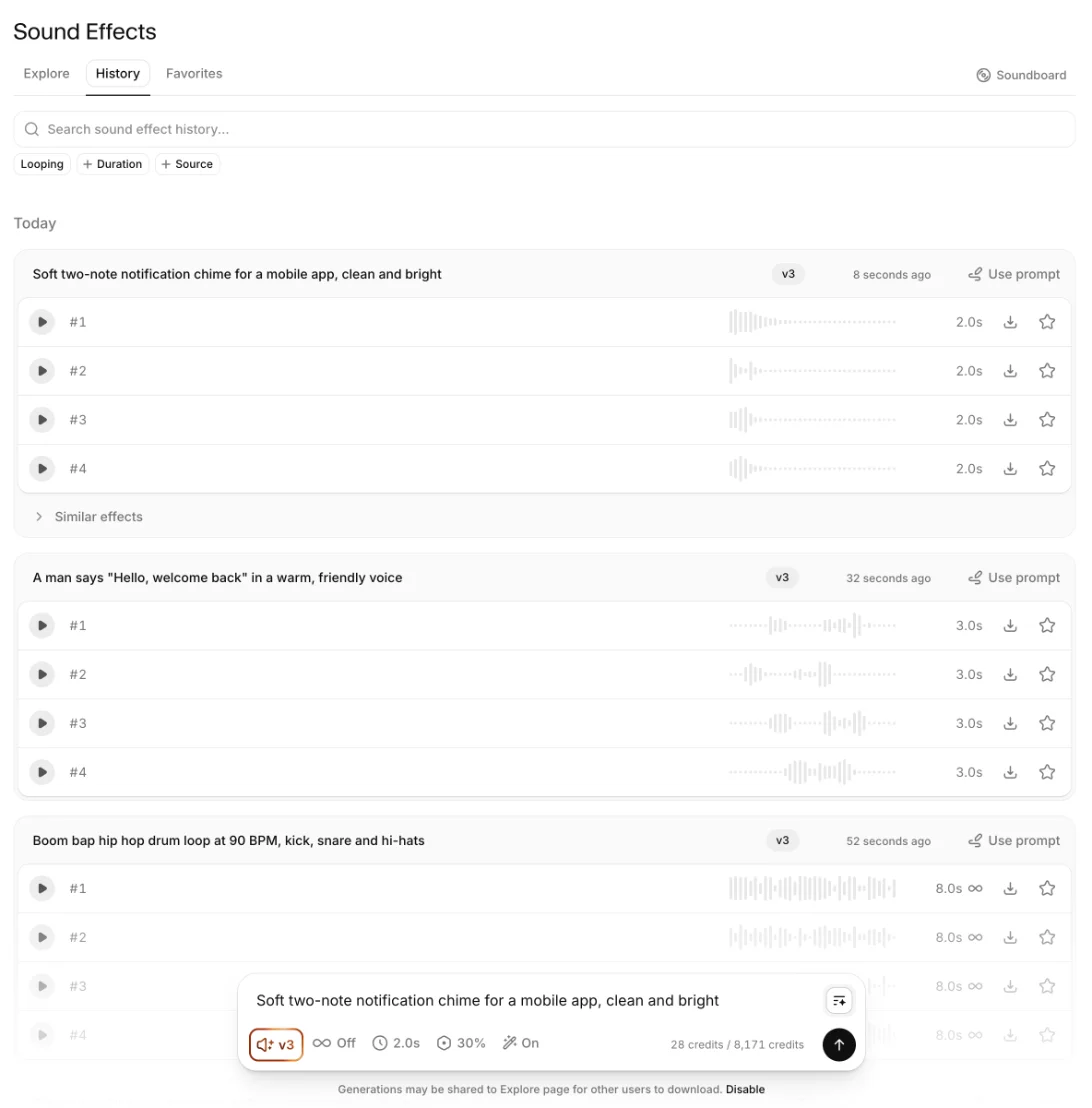
Everything is billed in the same credits as the rest of ElevenLabs: text to speech, the voice changer, dubbing and music all draw on one monthly balance. The composer prints the cost of the next request in its bottom corner before you press generate, which turns out to be the most honest price list ElevenLabs publishes.
How to make a sound effect in ElevenLabs
The whole job takes under a minute once you know where things are. Here is the path I used for every test on this page.
1. Open Sound Effects
Sign in, then pick Sound Effects in the left sidebar, or go straight to elevenlabs.io/app/sound-effects. The page opens on Explore, a public library of other people’s generations sorted into categories such as Animals, Booms and Devices. The prompt box sits at the bottom of the page.
2. Describe the sound, in order
Type what happens, in the order it happens. “Creaks open slowly, then slams shut” gave me a creak followed by a slam in every clip I measured, on both models and at both lengths. Name the material and the space if they matter; the suggestion chips above the box will nudge you towards both.
3. Set the length before you set anything else
Switch Duration off Auto and drag the slider to the length you need. It is the single setting that moves the price, and it decides how much story the model has room for. My 3-second door squeezed the creak to make room for the slam; the 6-second Auto version let it breathe.

4. Turn on Loop for anything that repeats
Ambience, engine hums, music beds and drum patterns should be generated as loops, not trimmed into loops afterwards. Both of mine closed without a click.
5. Generate, compare four takes, download one
Press the arrow and four variations appear. Play them in the panel, then use the download arrow on the one you want and pick MP3 or WAV. Everything you make also lands in the History tab, so you can come back for a different take later without paying again.
What ElevenLabs sound effects really cost
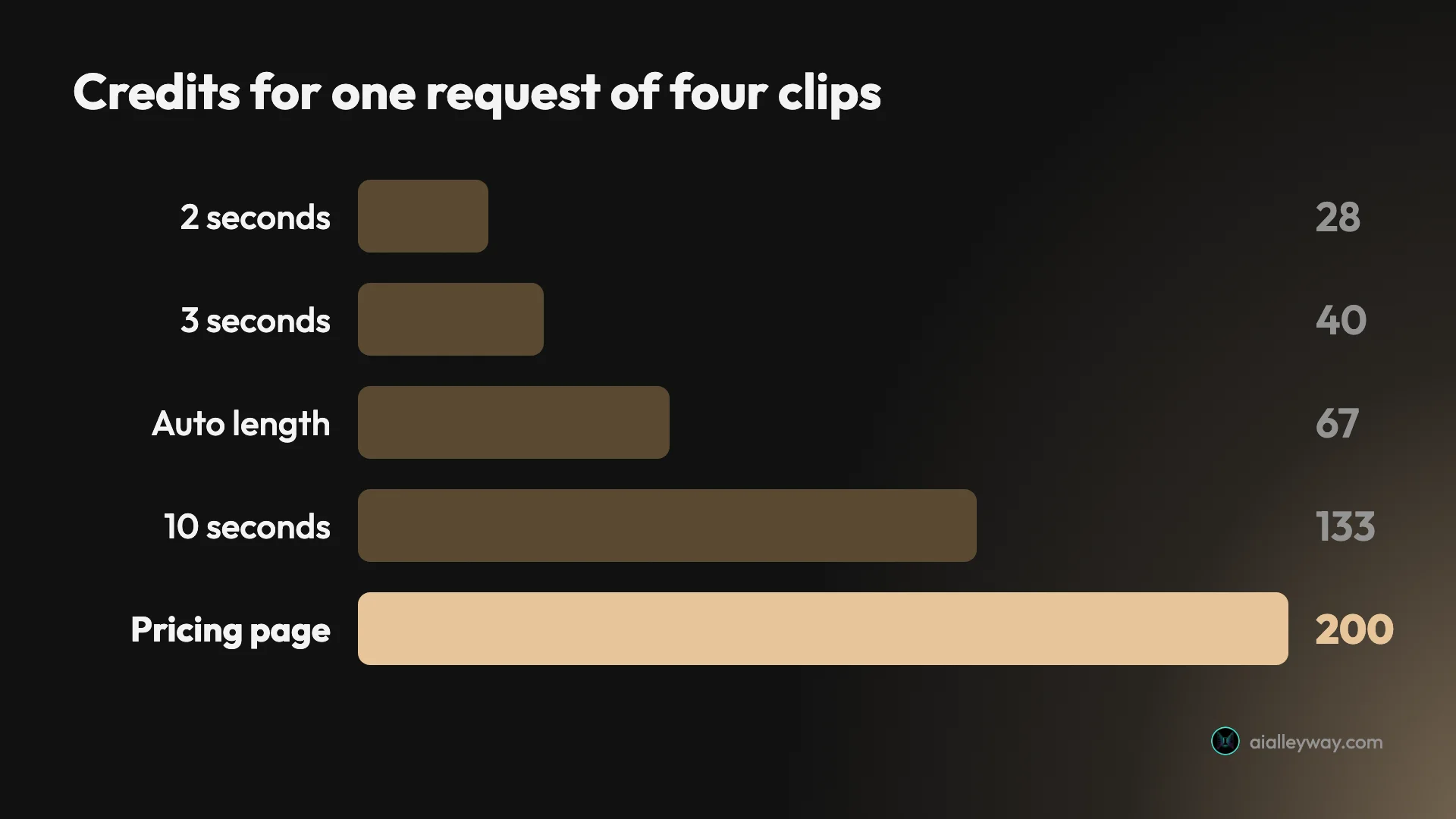
The pricing page and the product disagree, and the product is the one that takes your credits. ElevenLabs’ pricing page answers “How many credits does each product use?” with “Sound Effects 200 credits per generation”. The sound effects page works out its monthly allowances on the same basis: 50 generations on the free plan’s 10,000 credits, 150 on Starter’s 30,000.
That is not what I was charged. Before each request I read the composer’s estimate, and after it I read the balance:
| Duration set | Estimate shown (four clips) |
|---|---|
| 1.4 seconds | 20 credits |
| 2 seconds | 28 credits |
| 3 seconds | 40 credits |
| 5.4 seconds | 72 credits |
| 8 seconds | 108 credits |
| 10 seconds | 132 credits |
| 30 seconds | 400 credits |
| Auto | 68 credits |
The actual charges matched those estimates to within a few credits. The balance read 8,652 before my first request and 8,171 after the seventh, a total of 481. That works out to roughly 13 credits per second of audio, for all four variations at once. At that rate a request only passes the pricing page’s 200 credits once you set it longer than about 15 seconds.
Auto length is the setting to watch. The model chose 6 seconds for my door and 3 seconds for the spoken line, and both Auto requests cost 67 to 68 credits whatever length came back. A fixed 3-second request for the same door cost 40. If you know the length you need, set it.
The API is a separate price list. ElevenLabs’ sound effects docs give “40 credits per second when duration is specified” for developer calls. I did not test the API, so I cannot say how that compares on a real bill. Everything on this page is the web app.
For the plan-by-plan picture, the full ElevenLabs pricing guide covers what each tier’s credits buy across every tool.
Seven prompts, measured
I wrote seven prompts to cover the range people use this for: Foley, ambience, a music loop, a voice, and an interface sound. I downloaded variation #1 of each and measured it with ffmpeg rather than describing how it sounds. I also ran each clip through ElevenLabs’ own speech-to-text, Scribe, as an independent label of what is in it.
A door that creaks, then slams
The prompt was “A heavy wooden door creaks open slowly, then slams shut”, and I ran it three ways. On v3 with Auto length, the model chose 6 seconds: a long creak, and the slam peaks at 4.69 seconds, so the order in the prompt survives. Scribe labelled it “[door squeaking]”.
Fixed at 3 seconds on v3, the slam moved to 2.03 seconds, with a quieter creak ahead of it. The model compresses the story to fit the length, rather than cutting the end off.
On v2 at 3 seconds, the same prompt came back busier. The creak is a ratchet with a fresh onset every 50 milliseconds from 0.38 to 1.31 seconds, and the slam lands at 1.69 seconds. Scribe called it “[door creaking]”. Same credits, same words, a noticeably different take on the sound.
A rain loop that closes cleanly
“Steady rain falling on a window, soft and continuous, no thunder”, with Loop on and 10 seconds set, cost 133 credits. The point of a loop is the seam, so I measured it. From the clip’s last sample back to its first, the waveform jumps by 7 sample values. The typical step between neighbouring samples in the clip is 9. There is nothing there to click.
The catch is level. I asked for soft rain and got very soft rain: the clip averages -49 dB and never rises above -31.6 dB, where the other clips peak between -5.7 and -1 dB. At an average of -49 dB, it sits far below normal listening level as downloaded. Plan to raise it by about 30 dB in your editor.
A drum loop at 90 BPM
“Boom bap hip hop drum loop at 90 BPM, kick, snare and hi-hats”, looped at 8 seconds, was the test of whether the model respects numbers. It does. The strongest hits fall every 1.33 seconds, at 0.02, 1.35, 2.70, 4.04, 5.36 and 6.69 seconds, and 1.33 seconds is exactly two beats at 90 BPM. Eight seconds holds 12 beats, a clean three bars of four.
The loop seam held here too. The clip opens on a hit and ends in the tail of the last one, and the jump across the join is 139 sample values against a 99th-percentile step of 3,424 inside the clip. It restarts on the downbeat, as a loop should. Scribe, asked what it heard, said “[on-hold music]”, which is either a description or a review.
A spoken line
The docs say v3 handles vocal sounds better, so I asked for one: A man says “Hello, welcome back” in a warm, friendly voice. Auto picked 3 seconds. Scribe transcribed the result as “Hello, welcome back”, the exact words, in English.
That makes v3 usable for crowd walla, a shouted line in a game, or a voice inside a soundscape. It is not a replacement for text to speech, where you choose the voice and control the read; here you get four takes and pick one.
A notification chime
“Soft two-note notification chime for a mobile app, clean and bright” at 2 seconds cost 28 credits, the cheapest request of the day. The clip has two onsets, at 0.04 and 0.22 seconds, so the two notes I asked for are there, followed by a decay. Scribe labelled it “[jingle]”.
Every file matched the length the composer listed, to the millisecond: 2.000, 3.000, 6.000, 8.000 and 10.000 seconds by ffprobe.
Writing prompts that come back right
Seven prompts is a small sample, but a few patterns held across all of them, and they are the difference between paying for one request and paying for five.
| Prompt wording | What came back |
|---|---|
| “at 90 BPM” | A pattern repeating every 1.33 s, two beats at 90 BPM |
| “two-note” | Two onsets, at 0.04 and 0.22 s |
| “creaks open slowly, then slams shut” | Creak first, slam second, in all three versions |
| “soft and continuous” | The quietest clip, peaking at -31.6 dB |
| “no thunder” | Scribe labelled it “[rain]” and nothing else |
| says “Hello, welcome back” | Scribe read back “Hello, welcome back” |
Numbers in the prompt are honoured. I asked for 90 BPM and got a pattern that repeats every 1.33 seconds, which is 90 BPM to two decimal places. I asked for two notes and got two onsets. If a quantity matters, write it as a number rather than an adjective.
Sequence words are honoured too. Every door clip put the creak before the slam, because the prompt said “then”. If you want a sound with a shape, such as a whoosh that ends in an impact or a crowd that swells then cheers, write the stages in order and give them enough duration to fit.
Quality words are read literally, sometimes too literally. “Soft and continuous” produced the quietest clip of the day by a long way. Words about loudness and distance change the level of the file, not just its character, so leave them out unless that is what you want, and fix the level in your editor instead.
Negative instructions seem to work. I added “no thunder” to the rain prompt, and Scribe heard only rain. One clip is not proof, but it cost nothing to include.
Quoted speech is spoken. Putting the line in quotation marks gave me exactly those words back. For a crowd or a background voice that is useful; for a narrator it is the wrong tool, and text to speech is the better route.
SFX v3 or SFX v2?
Use v3 unless you have a reason not to. It is the default, it costs the same as v2 at the one length I priced on both, 40 credits for 3 seconds, and it is the only one of the two that ElevenLabs says handles vocal and musical sounds well. My spoken line and drum loop, both on v3, came back with the right words and the right tempo.
The reason to keep v2 in reach is variety. On the identical door prompt the two models made different sounds, a ratcheting creak on v2 and a quiet build to one slam on v3. When none of v3’s four takes is right, switching the model gives you four genuinely different candidates for the same 40 credits.
One availability note: ElevenLabs’ docs describe SFX v3 as in limited access and possibly not available in every region. It was the default on my account.
Free plan, paid plans and file formats
The free plan’s 10,000 monthly credits buy a lot of sound effects at the rates I paid: 250 requests of four 3-second clips, if you spent the whole allowance on nothing else. The limit that matters is the licence. ElevenLabs’ sound effects page says “free users may only use the services for non-commercial purposes”, and that “As long as you have a paid account, you can use our sound effects royalty-free in commercial projects.”
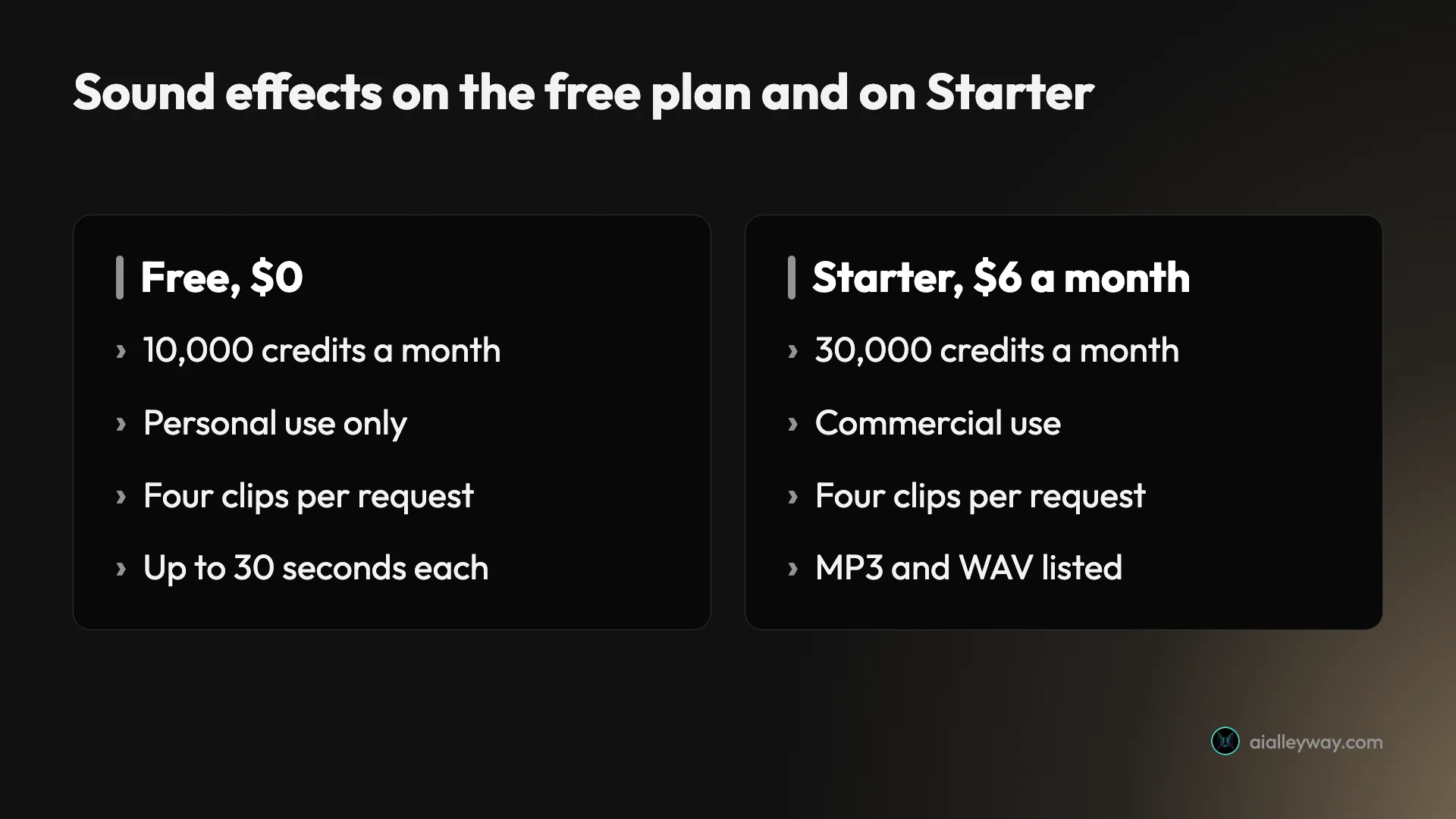
The plan prices on the sound effects page, read on 1 November 2026, are Starter $6 a month, Creator $22, and Pro $99, with 30,000, 121,000 and 600,000 credits. The page also lists a 30-second maximum on every tier.
Formats are less tidy than the page suggests. The page lists “MP3 44.1 kHz” for free and “MP3 + WAV 48 kHz” for paid tiers. My account, on the free plan with pay as you go switched on, offered both MP3 and WAV in the download menu. And the MP3 labelled 44.1 kHz in that menu downloaded as a 48 kHz, 192 kbps stereo file, every time. That is a better file than the label promises, but it means you cannot read the format off the menu.
Five things to know before you generate
| Trap | What I saw | What to do |
|---|---|---|
| Pricing page cost | 200 credits listed; 40 paid for four 3 s clips, 400 quoted at 30 s | Read the composer’s estimate |
| Explore sharing | On by default | Click Disable first for private work |
| Auto length | 67 to 68 credits for 3 to 6 s | Set a fixed duration |
| Quiet output | Rain loop peaked at -31.6 dB | Check and raise levels |
| Free licence | Personal use only | Starter, $6 a month, for commercial work |
The pricing page’s figure only fits one length
The 200-credits-per-generation figure on the pricing page is five times what four 3-second clips cost me, and half of what a 30-second request is quoted at. Short effects cost far less than it suggests, and anything over about 15 seconds costs more. Trust the estimate in the composer’s corner, which matched my charges to within a few credits.
Your sounds may be shared publicly by default
The footer under the composer reads “Generations may be shared to Explore page for other users to download”, with a Disable link. It was on for my account, and I left it on for these test prompts. For anything tied to an unreleased product, a client or a game in development, click Disable before you start.
Auto length costs more than a short fixed length
Both Auto requests cost 67 to 68 credits, even though one returned 6 seconds and the other only 3. A fixed 3-second request cost 40. For short effects, setting the duration yourself is cheaper and gives you control over where the action lands.
“Soft” can mean nearly silent
My soft rain loop peaked at -31.6 dB, about 30 dB below the other clips. It is clean, but you will not hear it until you raise it. Check levels before you drop a clip into a mix, and put loudness words in the prompt only if you mean them.
Free means personal use only
The free plan’s credits are generous, and its licence is not. ElevenLabs’ sound effects page marks the free column “Personal use only” and the paid tiers “Commercial”. A monetised video counts as commercial, so budget for Starter at $6 a month if the sound is going anywhere that earns.
Who ElevenLabs sound effects suit
- Video editors who need one specific sound now. Four takes in seconds, at 28 to 40 credits for short clips, beat searching a library for the exact door.
- Game and app makers. Loops that close cleanly and a model that keeps to a tempo are the useful parts. Do it on a paid plan for the commercial licence, and switch off Explore sharing.
- Podcasters and YouTubers already on ElevenLabs. The credits come from the balance you use for voiceovers, so a few stings and transitions cost little extra.
- Anyone on the free plan making something personal. 10,000 credits covers well over a hundred short requests.
- Skip this if you need precise sound design you can edit layer by layer. You get four finished clips per request, not stems, and each change means generating again.
Sound effects elsewhere in ElevenLabs
The Sound Effects page is not the only door in. ElevenLabs’ Studio guide says audio projects can add sound effects as separate clips on the timeline, generated from a text prompt or picked from an SFX library, then layered and trimmed alongside narration. There is also the SB1 soundboard, where each pad can hold an uploaded sound, a preset or a newly generated effect. I tested neither, so I cannot say whether they bill the same way as the composer.
Other ways to make AI sound effects
If the licence or the credits do not fit, Adobe Firefly has its own sound effect generator. Adobe’s feature page says you can type a description, upload reference audio, or act the sound out into your microphone, and that free accounts get a daily allowance. Adobe also states that content from Firefly models is safe for commercial use. I have not tested its sound effects, so treat that as Adobe’s claim.
Final word
For short sounds, ElevenLabs sound effects are cheaper than ElevenLabs says. Four 3-second clips for 40 credits, a 90 BPM loop that holds its tempo, a rain loop with no seam and a spoken line with every word intact is a strong showing for a prompt box.
The traps are all around the edges: a pricing page whose 200-credit figure is five times the price of a 3-second request and half that of a 30-second one, a sharing setting that is on by default, a soft prompt that comes back nearly silent, and a free licence that ends where commercial work begins. Set the duration, check the level, switch off sharing, and pay for Starter the moment a sound goes into something that earns.
Frequently asked questions
How many credits do ElevenLabs sound effects cost?
In the web app, it depends on length, and short effects cost far less than the pricing page says. Its FAQ lists sound effects at 200 credits per generation, but every request I made returned four clips, and none of mine cost more than 133 credits, and the cheapest was about 28. Four 3-second clips cost 40, an Auto-length request cost 67, and four 10-second looping clips cost 133.
The composer shows the price before you press generate, and it scales with the length you set: 28 credits at 2 seconds, 108 at 8, and 400 at the 30-second maximum, which is about 13 credits a second for all four clips together, so requests longer than about 15 seconds cost more than the page's 200. Seven requests, 28 clips in all, came to 481 credits on my account. The API is priced differently: ElevenLabs' developer docs list 40 credits per second when you set a duration, and I did not test the API.
Are ElevenLabs sound effects free?
You can make them on the free plan, which gives 10,000 credits a month, and at the rates I paid that covers well over a hundred requests of four short clips each. Free accounts are limited to personal use, though. ElevenLabs' sound effects page says free users may only use the service for non-commercial purposes, and that you need a paid account to use the effects royalty-free in commercial projects.
The cheapest paid plan is Starter at $6 a month with 30,000 credits and a commercial licence. If the sound is going into a YouTube video you monetise, a client project or a game you sell, that is the plan to budget for. For a personal project, the free credits go a long way, and my account, on the free plan with pay as you go switched on, also offered WAV as well as MP3 downloads.
Can ElevenLabs make looping sound effects?
Yes. There is a Loop switch in the composer, and both loops I measured closed cleanly. A 10-second rain clip jumped by 7 sample values from its last sample to its first, smaller than the typical step between neighbouring samples, so it repeats without a click. A 90 BPM drum loop started on a hit and ended in the decay of the last one, which is how a loop that restarts on the downbeat should look; the jump across its join was 139 sample values, far below the 3,424 that the sharpest one percent of steps inside the clip reach.
The drum loop also kept its tempo: the pattern repeated every 1.33 seconds, two beats at 90 BPM, so the 8-second clip holds 12 beats. One caution from the rain test: the loop came out very quiet, peaking at -31.6 dB, so expect to raise its level in your editor.
What is the difference between SFX v2 and SFX v3?
SFX v3 is the newer model and the default in the web app, which describes it as having improved quality and better adherence to your prompt. SFX v2 is labelled the proven model with consistent results. Both cost the same in my test: four 3-second clips were 40 credits on either.
On the same door prompt they made different sounds. The v2 clip was a busy, ratcheting creak with a fresh onset every 50 milliseconds, then the slam at 1.69 seconds. The v3 clip stayed quiet and put a single slam at 2.03 seconds. Both kept the creak before the slam, as the prompt asked. v3 also handled a spoken line: speech-to-text read it back as exactly the words I asked for. ElevenLabs' docs say v3 is in limited access and may not be available in every region.
Can I use ElevenLabs sound effects commercially?
On a paid plan, yes. ElevenLabs' sound effects page says that as long as you have a paid account you can use the effects royalty-free in commercial projects, and the plan table marks the free tier as personal use only. The same page asks that you do not sell or license the tools themselves. The cheapest paid plan that includes it is Starter, at $6 a month for 30,000 credits.
One more thing to check before you generate anything sensitive: the web app's footer says generations may be shared to the Explore page for other users to download, with a Disable link beside it. It was on by default on my account. If your sound is part of an unreleased project, a client job or a game you have not announced, switch that off first.
Keep reading
ElevenLabs review: the best AI voice, billed by the credit
I ran my own scripts through ElevenLabs: the voices are a clear class above everything else, but the credit pricing punishes heavy use. Here's the verdict.
ElevenLabs pricing: what the credits really cost
ElevenLabs starts free and most creators pay $22/month — but credits burn faster than the headline minutes. Here's what every plan actually costs.
Eleven Music tested: ElevenLabs sang every word I wrote
I made three 30-second tracks with Eleven Music, sang my own lyrics on two models and re-did one chorus. What it cost in credits, and the licence fine print.
ElevenLabs voice changer: I gave one reading three voices
I ran a 16-second human reading through ElevenLabs' voice changer as three voices. What it kept, what it cost (266 credits), and what noise removal did.
Best ElevenLabs alternatives: which one replaces it?
The best ElevenLabs alternative depends on why you're leaving. I lined up Murf, Descript, Cartesia and 4 more against the one job each actually wins.
Best AI voice generator: what an hour of audio really costs
ElevenLabs wins on voice and costs $10.91 an hour. We normalised six AI voice generators plus open-source to one unit: the cost of an hour you can publish.