
ElevenLabs voice changer: I gave one reading three voices
I ran a 16-second human reading through ElevenLabs' voice changer as three voices. What it kept, what it cost (266 credits), and what noise removal did.
Contents
The short answer: it swaps the voice and keeps the performance
The ElevenLabs voice changer takes a recording and re-voices it as someone else, keeping your words, pauses and pacing. It costs 1,000 credits per minute, so the free plan’s 10,000 credits cover about 10 minutes, with no commercial use. Each conversion can run up to 5 minutes.
I tested it with a 16-second human reading and three library voices. All three came back at 16 seconds, with every word intact and every pause where the reader put it. Each conversion cost 266 credits and took under ten seconds.
| Question | What I found (free plan, 29 October 2026) |
|---|---|
| Cost | 266 credits for 16 seconds, or 1,000 a minute |
| Free allowance | About 10 minutes a month, no commercial use |
| Longest conversion | 5 minutes |
| Upload limit | Audio or video files up to 50MB each |
| Timing kept? | Yes: 15.95 s in, 16.01 s out, pauses within 0.09 s |
| Words kept? | Yes, every word in all three voices |
| Speed | Under 10 seconds per 16-second clip |
| Cheapest paid plan | Starter, $6 a month for 30 minutes |
How the ElevenLabs voice changer works
The voice changer is speech-to-speech. Text-to-speech starts from words you type; this starts from a performance you record. You supply the delivery, and ElevenLabs supplies the voice.
ElevenLabs’ voice changer docs say it can transform “any source audio (recorded or uploaded) into a different, fully cloned voice without losing the performance nuances of the original”. They list three jobs: changing a voice while keeping emotional delivery, keeping a character voice consistent across languages and sessions, and fixing or replacing words in an existing recording.
In the web app it lives under Voice Changer in the left sidebar. You upload a file or press Record audio, pick a target voice and a model, adjust a few sliders, and click Generate speech. Output arrives as an MP3 at 44.1 kHz and 128 kbps by default.
The model on my account was Eleven Multilingual v2. The docs say the multilingual models cover 29 languages, and they recommend the multilingual model over the English-only one “even for English content”. The hard limit is length: the docs say the “Maximum segment length” is 5 minutes, so you split anything longer into chunks.
| Limit | Value | Source |
|---|---|---|
| Longest conversion | 5 minutes | Docs and plan table |
| Upload size | 50MB per audio or video file | Upload box |
| Languages | 29 on the multilingual model | Docs and plan table |
| Library voices | More than 10,000 | Plan table |
| Cost | 1,000 credits a minute | Docs and pricing page |
Is it real time?
Not in the web app. Some guides call the ElevenLabs voice changer real time, but what I used converts a finished file: you upload or record, click Generate speech, and wait for the result. My 16-second clip took under ten seconds each time, which is fast but is still a round trip, not a live voice.
The API reference lists a separate “Voice changer stream” endpoint next to the standard one, and the standard endpoint has an input option for raw 16 kHz audio that it says lowers latency. Both still take audio you have already captured. I did not test streaming, so if you need a live voice for calls or games, check that endpoint before you build on it.
My test: one public-domain reading, three voices
A voice changer test needs a real human performance, with breaths, pauses and a reader’s choices. I didn’t want to use anyone’s voice without permission, so I used a public-domain recording.
The source is a LibriVox reading of Edgar Allan Poe’s poem “Alone”, read by Phil Chenevert and released under a CC0 public-domain dedication on the Internet Archive. I cut the first 15.95 seconds of the poem itself, without the LibriVox introduction. It is a calm, measured read with clear pauses at the line breaks.
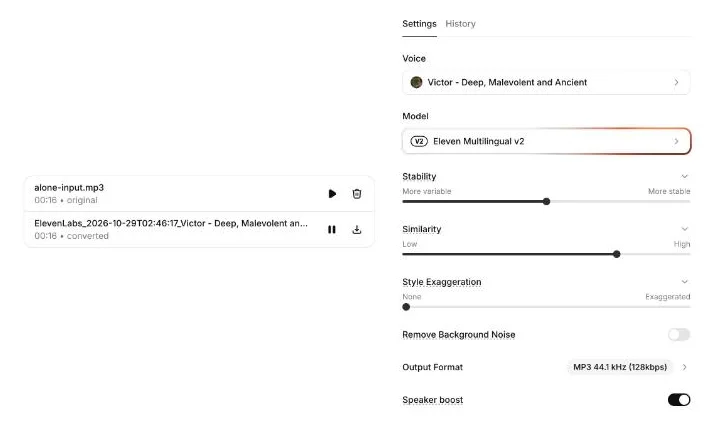
On 29 October 2026 I opened the voice changer on an ElevenLabs account on the free plan (the plan page labels the account Pay as you go), with 9,996 credits showing. I picked three voices from the library that sound nothing alike: Marcus, an American audiobook narrator; Amelia, a British voice described as enthusiastic and expressive; and Victor, a deep character voice described as “Deep, Malevolent and Ancient”. Then I converted the same clip into each one.
I chose them to pull in different directions: one close to the reader, one that changes gender and accent, and one that pushes toward a character performance. If the timing survived all three, it would survive most jobs. I left every slider at the value the voice brought with it, because that is what most people will do on a first try.
To check the results without relying on my ears alone, I measured them. I compared the length of each file and where its pauses fell, and I ran each output back through ElevenLabs’ speech-to-text model to compare the words with the original.
What came back from each voice
Each conversion finished within the ten seconds I waited. The editor shows one converted result at a time, so each new conversion replaced the last one on screen. All five runs stayed in the History tab, where I downloaded them.
Marcus, the audiobook narrator
The closest to the original’s register: an American male narrator reading a calm poem. Its pauses landed within 0.04 seconds of the reader’s, and the transcript matched the original word for word.
Amelia, the British voice
A different gender and accent from the reader. The reader’s pauses and line breaks came through, as did every word. This is the job the docs pitch: keeping the performance while changing who appears to be speaking.
Victor, the deep character voice
The voice least like the reader’s, going by its library description, and the loudest. Its average level was 9.6 dB above the original’s, the biggest jump of the three. The transcript still matched, punctuation aside.
What all three kept, and what they changed
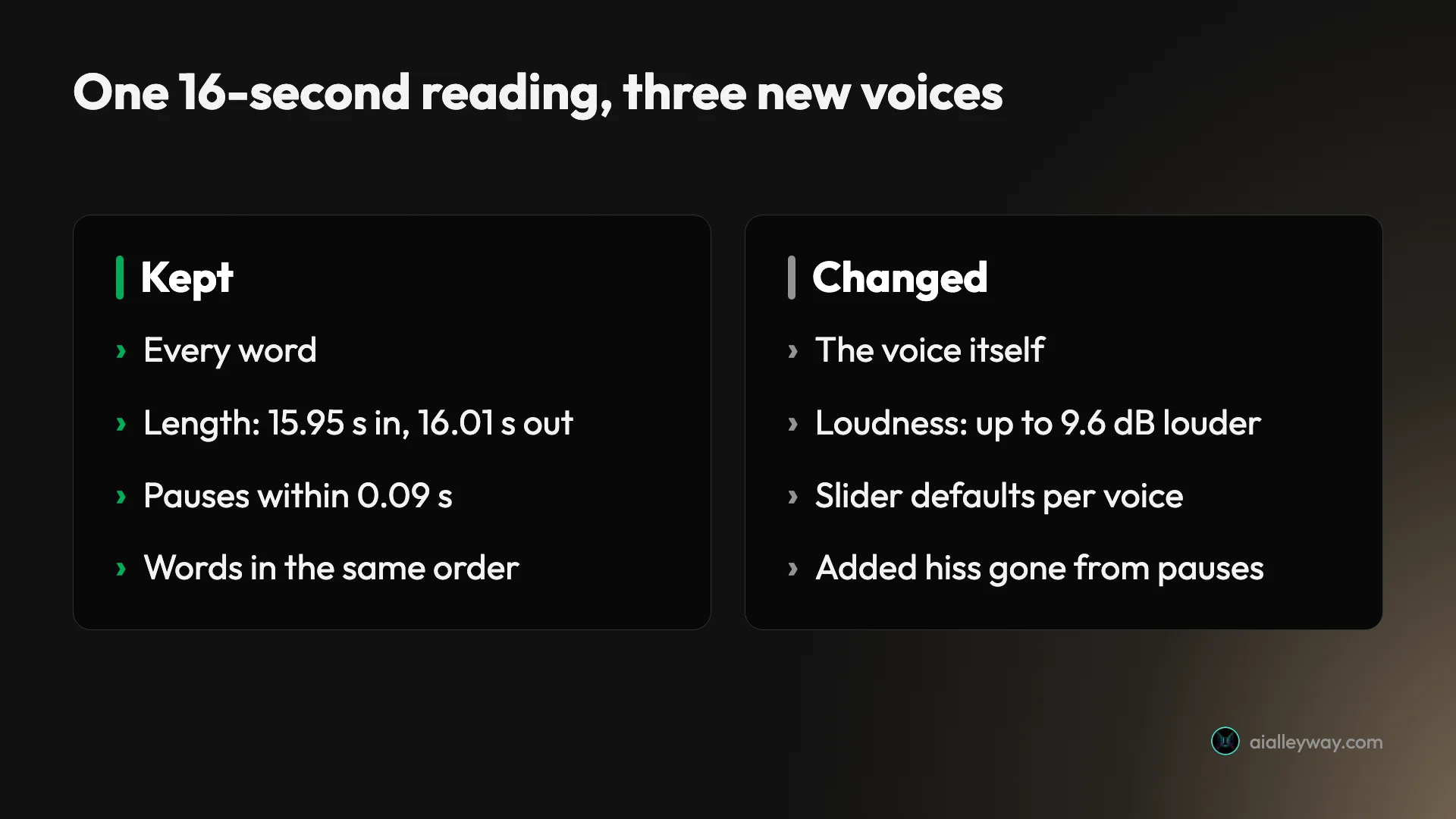
The timing is the headline. The input ran 15.95 seconds and every output ran 16.01. The reader paused at 4.26, 6.81 and 11.47 seconds. Every output paused at the same places, starting within 0.09 seconds of the original.
| Version | Length | Average level | Peak level | Words kept |
|---|---|---|---|---|
| Original reading | 15.95 s | -27.3 dB | -9.1 dB | (source) |
| Marcus | 16.01 s | -21.9 dB | -4.4 dB | All |
| Amelia | 16.01 s | -26.3 dB | -5.1 dB | All |
| Victor | 16.01 s | -17.7 dB | -1.9 dB | All |
Loudness is the one thing to watch. The outputs came back louder than the input, and they differ from each other by up to 8.6 dB on average. If you are dropping a converted line into a finished edit, plan to match levels afterwards.
What I can’t measure is how natural each voice sounds to you. That is why the clips are here, so you can listen to all three against the original and judge for yourself.
The settings, and what changed when I switched voices
The settings panel has six controls: Stability, Similarity and Style Exaggeration sliders, plus switches for Remove Background Noise and Speaker boost, and an output format. I expected them to stay put between voices. They didn’t.
Choosing a voice from the library changed the sliders to that voice’s own defaults. The run log in my account’s history shows the settings each conversion used:
| Voice | Stability | Similarity | Style | Speaker boost |
|---|---|---|---|---|
| Marcus | 0.3 | 0.7 | 0 | On |
| Amelia | 0.5 | 0.48 | 0 | Off |
| Victor | 0.5 | 0.75 | 0 | On |
Speaker boost switched itself off for Amelia, and her Similarity dropped to 0.48. Nothing on screen announced the change. If you are testing voices against each other, check the panel after every switch, or the comparison isn’t like for like.
A Reset values link appeared in the panel after I picked a library voice. The output format menu showed MP3 at 44.1 kHz and 128 kbps. The plan table says WAV and PCM at 44.1 kHz need the Pro plan or above.
Does Remove Background Noise help?
Most real recordings carry some room noise, so I tested the one switch meant for it. I mixed a steady pink-noise hiss into the same reading, loud enough to hear clearly in the pauses. Then I converted it to Victor twice, once with Remove Background Noise off and once with it on.
I measured the average level in the longest pause, from 6.95 to 7.75 seconds:
| Version | Level in the pause |
|---|---|
| Clean original | -64.6 dB |
| Original with hiss | -39.9 dB |
| Victor, from the clean original | -67.2 dB |
| Victor, from the hissy input, removal off | -87.3 dB |
| Victor, from the hissy input, removal on | -66.8 dB |
The hiss was gone from the pause in both conversions. With the switch off, the pause was even quieter than with it on. On this clip, the voice changer dropped the steady hiss by itself, and the switch made no measurable improvement.
Two cautions. I measured the pauses, not the noise under the words. And a steady hiss is the easiest noise there is; traffic, music or a second voice could behave very differently. ElevenLabs’ docs say to use the setting “to minimize environmental sounds in the output”, and it costs nothing extra, so I would still turn it on for a real-world recording.
Voice changer, text-to-speech or dubbing?
ElevenLabs sells three tools that all put a new voice on your words, and they cost different amounts. Picking the wrong one is the fastest way to burn credits.
| You have | You want | Use | Cost per minute of audio |
|---|---|---|---|
| A script, no recording | A voice to read it | Text-to-speech | Metered by characters, not minutes |
| A recording in your language | The same performance, a different voice | Voice changer | 1,000 credits |
| A recording | The same content in another language | Dubbing | 2,000 to 10,000 credits |
| A noisy recording | The same voice, without the noise | Voice isolator | 1,000 credits |
The dubbing range comes from the same pricing page: 2,000 credits a minute for automatic dubbing with a watermark, rising to 10,000 for Dubbing Studio without one. Our ElevenLabs review covers text-to-speech and dubbing in more depth.
The voice changer’s niche is performance. If a line needs a particular pause, a laugh or a slow build, it is easier to perform it once than to coax it out of text-to-speech with punctuation and tags. If you have no recording and no wish to make one, text-to-speech is the cheaper route.
The Remove Background Noise switch ties two of these tools together. The API reference says the setting cleans “the background noise from your audio input using our audio isolation model”, the same model behind Voice Isolator. In the web app, that cleaning is folded into the voice changer at no extra charge.
What it costs: 1,000 credits a minute
The voice changer’s pricing is simple. It is metered by the length of the audio, not by voice or settings.
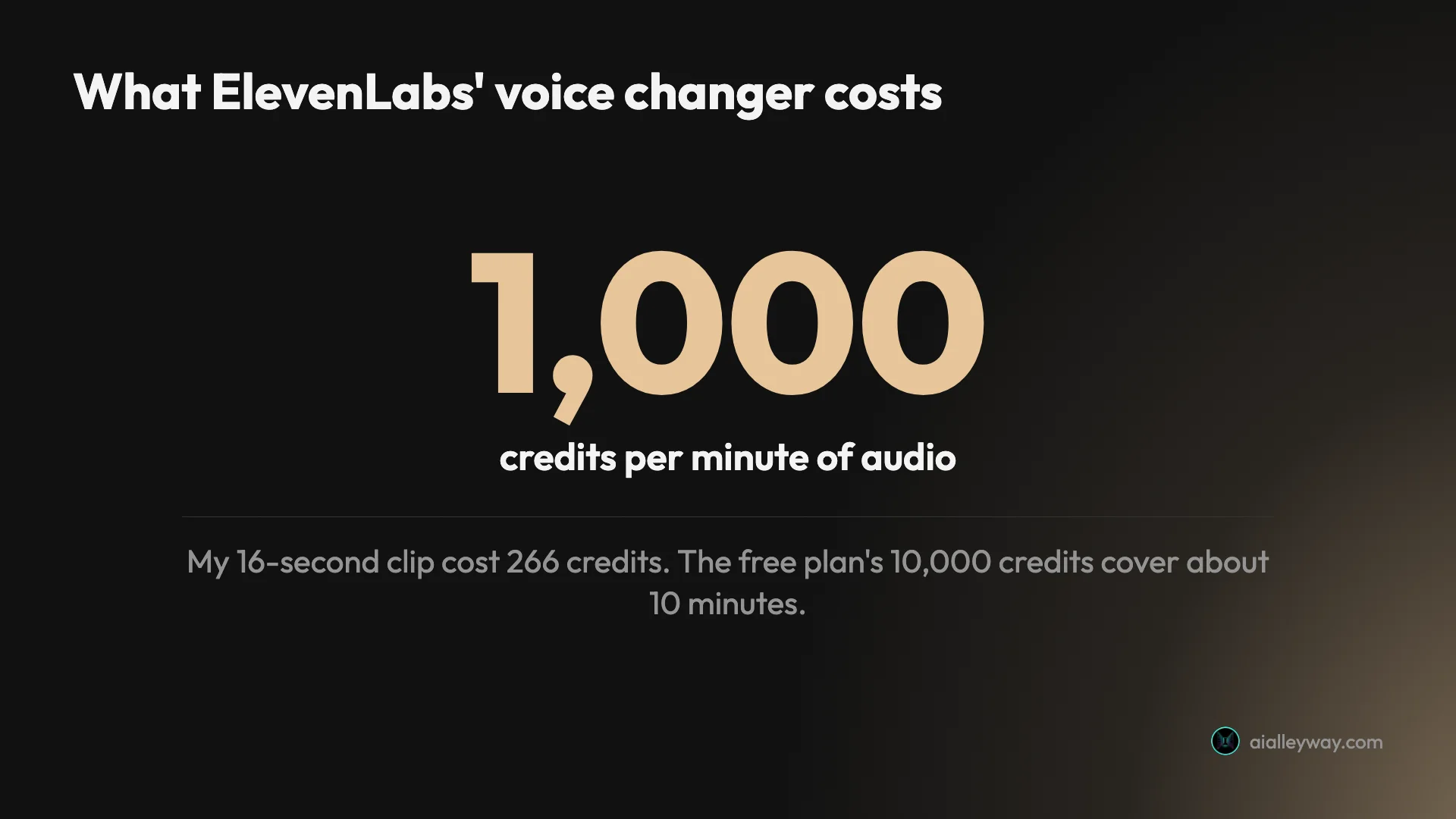
ElevenLabs’ pricing page lists “Voice Changer and Voice Isolator 1,000 credits per minute”, and the docs give the same rate. My runs matched. Each 16-second conversion appeared in my history at 265 or 266 credits, which is 1,000 a minute almost exactly. The account counter rose by 1,067 credits over the five runs. That is about four runs’ worth (4 × 266 = 1,064), which suggests one of the five was not charged.
The in-app plan comparison turns that into minutes:
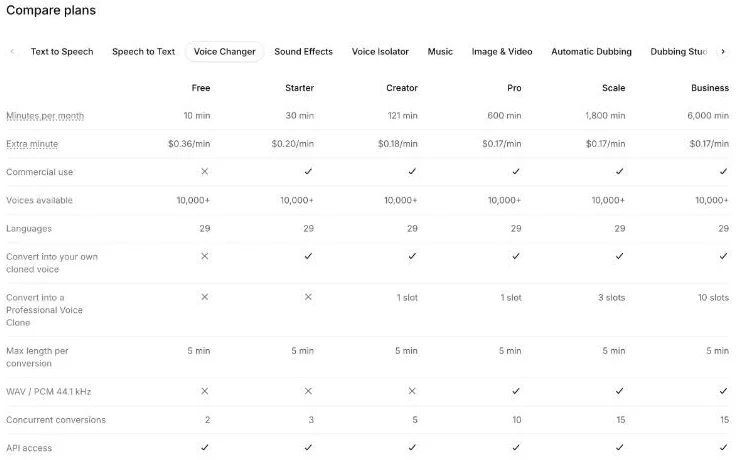
| Plan | Price a month | Voice changer minutes | Extra minute | Commercial use | Your own cloned voice |
|---|---|---|---|---|---|
| Free | $0 | 10 | $0.36 | No | No |
| Starter | $6 | 30 | $0.20 | Yes | Yes |
| Creator | $22 | 121 | $0.18 | Yes | Yes, plus 1 Professional Voice Clone slot |
| Pro | $99 | 600 | $0.17 | Yes | Yes, plus 1 Professional Voice Clone slot |
| Scale | $299 | 1,800 | $0.17 | Yes | Yes, plus 3 slots |
| Business | $990 | 6,000 | $0.17 | Yes | Yes, plus 10 slots |
Prices are ElevenLabs’ monthly US prices on 29 October 2026. On that day the pricing page also ran first-month offers: Starter for $1 (shown “Until Nov 1”) and Creator at 50% off. The credits are shared with everything else ElevenLabs does, so minutes spent here come out of the same balance as text-to-speech and dubbing. Our ElevenLabs pricing guide covers how that shared balance works.
Worked examples: what a real job costs
At 1,000 credits a minute the arithmetic is easy, but it adds up faster than text-to-speech for long recordings.
| Job | Audio length | Credits | Plan that covers it in a month |
|---|---|---|---|
| A 30-second ad read, three voice options | 1.5 minutes | 1,500 | Free (no commercial use) or Starter |
| A 3-minute YouTube voiceover | 3 minutes | 3,000 | Free for testing, Starter to publish |
| Ten 3-minute videos a month | 30 minutes | 30,000 | Starter, exactly |
| A 30-minute podcast episode, re-voiced | 30 minutes, in 6 parts | 30,000 | Starter, exactly |
| A weekly 30-minute podcast, four episodes a month | 120 minutes | 120,000 | Creator (121 minutes), but not a five-episode month |
The podcast row shows the 5-minute cap in practice. A 30-minute file has to go through as six conversions of 5 minutes or less, which means six uploads and six downloads to stitch back together. The plan table lists two concurrent conversions on Free, three on Starter and five on Creator.
Retakes cost the same as first takes. Every time I switched voices and clicked Regenerate speech, the history logged another 265 or 266 credits for the same 16 seconds. Testing three voices on a 3-minute script costs 9,000 credits, close to the whole free month.
Using the voice changer through the API
Everything in the web app is also an API call, and every plan includes API access, according to the plan table. The API reference lists the endpoint as POST to /v1/voice-changer/ followed by a voice ID, with the audio file and a model ID sent as form data. The model it shows is eleven_multilingual_sts_v2, the API name for the Eleven Multilingual v2 model I used in the web app.
The useful options are the ones the web app hides or simplifies. remove_background_noise defaults to false. output_format picks the file type and bitrate, with WAV and PCM limited to Pro and above. seed asks for repeatable results, though the reference says “Determinism is not guaranteed”. And enable_logging=false switches on zero retention, which the reference limits to enterprise customers.
I ran my conversions in the web app, then used the API only to pull the five finished files from my account’s history. Each history entry records the voice, the model, the settings and the credit count before and after the run, which is how I know what each conversion cost and which slider values it used. If you are testing voices at any volume, that log is worth more than the editor screen.
For batch work, the 5-minute cap still applies per request, and the plan table caps concurrent conversions at two on Free, three on Starter and five on Creator. A long recording becomes a queue of 5-minute jobs, a few at a time.
How to get a clean result
The voice changer copies your delivery closely, so the work happens before you upload.
- Record the performance you want. Pauses, pace and emphasis come through almost exactly, so read it the way it should sound.
- Keep each file under 5 minutes. Split longer recordings at natural pauses, not mid-sentence.
- Pick the voice, then check the sliders. Library voices bring their own Stability, Similarity and Speaker boost settings with them.
- Test on a short excerpt first. A 15-second test costs about 250 credits; a wrong 5-minute conversion costs 5,000.
- Turn on Remove Background Noise for real-world recordings. It made no difference on my steady hiss, but it costs nothing.
- Match levels afterwards. My outputs ranged from 1 dB to 9.6 dB louder than the input on average.
Traps to know about
None of these is hidden, but each one can cost credits or a usable result.
| Trap | What I saw or read | What to do |
|---|---|---|
| No commercial use on Free | Plan table marks it as not included | Use Starter or above for anything you publish for money |
| 5-minute cap | “Maximum segment length : 5 minutes” in the docs | Split long recordings at pauses |
| Settings change per voice | Speaker boost went off for Amelia | Check the panel after every voice switch |
| Retakes cost full price | 265 or 266 credits every run | Test on short excerpts |
| Uneven loudness | Outputs up to 9.6 dB louder | Normalise before you edit |
| Your own clone needs a paid plan | Plan table marks it as not included on Free | Starter for an instant clone |
Free is for testing, not publishing
The free plan’s 10 minutes a month is a generous trial, and my account on the free plan converted everything without an upgrade prompt, using about a tenth of the monthly credits. The account had Pay as you go switched on, but my runs never needed it. The plan table still marks commercial use as not included on Free. If the converted audio goes into a monetised video, an ad or a client job, you need a paid plan. Unused free minutes don’t carry over either: the pricing page says unused credits roll over for up to two months on paid plans, and that “Rollover does not apply to the Free plan.”
Your own voice needs Starter
Converting into a voice you have cloned yourself is marked as not available on Free. On the free plan you choose from the library, which the table puts at more than 10,000 voices. A Professional Voice Clone as the target needs Creator.
The editor keeps only the latest result on screen
Each conversion replaced the previous one in the editor, so the only place all five lived was the History tab. If you are comparing voices, download each one before you switch, or plan to dig through History.
Use voices you have the right to use
I used a public-domain reading as my input for a reason. Uploading someone else’s voice and re-voicing it raises consent and rights questions that ElevenLabs’ settings can’t answer for you. Use your own recordings, or ones you have permission to change.
Who the voice changer suits
- Video creators who want their own delivery in a different voice. Record the script the way you want it read, then convert. The timing came through exactly in my test.
- Game and animation teams voicing several characters. One performer can record every line, and each character gets a consistent voice. The docs pitch this use directly.
- Podcasters fixing a line after the fact. Re-record the line in your own delivery and convert it into your cloned voice, which needs Starter or above.
- Skip it if you start from a script, not a recording. Text-to-speech is the better tool when there is no performance to keep, and our ElevenLabs review covers that side.
Other options
- ElevenLabs alternatives. Other voice tools, if ElevenLabs’ credit pricing doesn’t fit your volume.
- Best AI voice generator. Our wider ranking of text-to-speech tools, for jobs that start from a script.
- Best AI voice cloning. Where to get a clone of your own voice to convert into.
Final word
The ElevenLabs voice changer does the one thing it promises very well: my three conversions kept every word and every pause and changed only the voice. At 1,000 credits a minute it is easy to budget, and the free plan’s 10 minutes is enough to find out whether it suits your recordings.
Budget for levelling the audio, splitting anything over 5 minutes, and a paid plan before you publish.
Frequently asked questions
How much does the ElevenLabs voice changer cost?
It costs 1,000 credits per minute of audio, the rate ElevenLabs gives in its docs and on its pricing page. My 16-second test clip cost 265 or 266 credits per conversion, which is that rate almost exactly.
In minutes, the plans work out as follows in the in-app comparison table: Free 10 minutes a month, Starter 30, Creator 121, Pro 600, Scale 1,800 and Business 6,000. Starter is $6 a month, Creator $22 and Pro $99. Extra minutes run from $0.36 on Free to $0.17 on Pro and above.
Is the ElevenLabs voice changer free?
You can use it on the free plan. Its 10,000 monthly credits cover about 10 minutes of voice changing, and every conversion can be up to 5 minutes long. My account on the free plan, with Pay as you go switched on, converted five 16-second clips without any upgrade prompt, well inside the free credits.
The catch is the licence. The comparison table marks commercial use as not included on Free, and converting into your own cloned voice is also missing from Free. For anything you publish for money, Starter at $6 a month is the entry point.
Does the ElevenLabs voice changer keep my timing and emotion?
It kept my timing almost exactly. A 15.95-second reading came back as 16.01 seconds in all three voices, and every pause started within 0.09 seconds of where it started in the original. A speech-to-text pass found the same words, in the same order, in every output.
ElevenLabs says the voice changer preserves emotional delivery, including whispers, laughs and accents. My test clip was a calm poem reading, so it shows that pacing survives but does not stress-test big emotional swings. Record the performance you want, because that is what you get back.
Does Remove Background Noise matter in the voice changer?
Not on my test clip. I added a steady hiss to the reading and converted it twice, with the toggle off and on. In a pause where the hiss was loud in the input, the output was near silent both times, and quieter with the toggle off than on.
That suggests the voice changer drops a steady background hiss on its own. I only tested one kind of noise, though. ElevenLabs recommends the setting to minimise environmental sounds, and it costs nothing extra to switch on, so I would leave it on for real-world recordings.
Can I use my own voice with the ElevenLabs voice changer?
Yes, on a paid plan. The plan table marks converting into your own cloned voice as available from Starter up, and converting into a Professional Voice Clone from Creator, which includes one slot. On the free plan you can only convert into voices from ElevenLabs' library of more than 10,000.
You can also record straight into the tool. The upload box has a Record audio button next to the file upload, which takes audio or video files up to 50MB each.
Keep reading
ElevenLabs review: the best AI voice, billed by the credit
I ran my own scripts through ElevenLabs: the voices are a clear class above everything else, but the credit pricing punishes heavy use. Here's the verdict.
ElevenLabs pricing: what the credits really cost
ElevenLabs starts free and most creators pay $22/month — but credits burn faster than the headline minutes. Here's what every plan actually costs.
ElevenLabs sound effects: four clips for 40 credits, not 200
Seven prompts through ElevenLabs sound effects: a door, a rain loop, a 90 BPM drum loop, a spoken line. What each cost, and where the pricing page is wrong.
Best AI voice generator: what an hour of audio really costs
ElevenLabs wins on voice and costs $10.91 an hour. We normalised six AI voice generators plus open-source to one unit: the cost of an hour you can publish.
Best AI voice cloning: which tool sounds most like you?
The best AI voice cloning tools, prices re-checked November 2026: who clones closest, who answers fastest in real time, and what cloning actually costs.
Best ElevenLabs alternatives: which one replaces it?
The best ElevenLabs alternative depends on why you're leaving. I lined up Murf, Descript, Cartesia and 4 more against the one job each actually wins.