
Google AI Mode review: free, current and loose with its sources
A hands-on Google AI Mode review: news two days old, correct arithmetic, a Canvas that forgot the question, and citations that lean on blogs over sources.
Contents
Is Google AI Mode worth it?

Yes, for the questions you already type into Google: it is free and one click away, and in five tests it kept context, got its prices and sums right and reported news from two days earlier. The catch is provenance, because its source chips lean on write-ups rather than the page that holds the fact, and one sentence stretched its source. Use it as a quick first answer, and click through before you act on anything that costs money.
What is Google AI Mode?
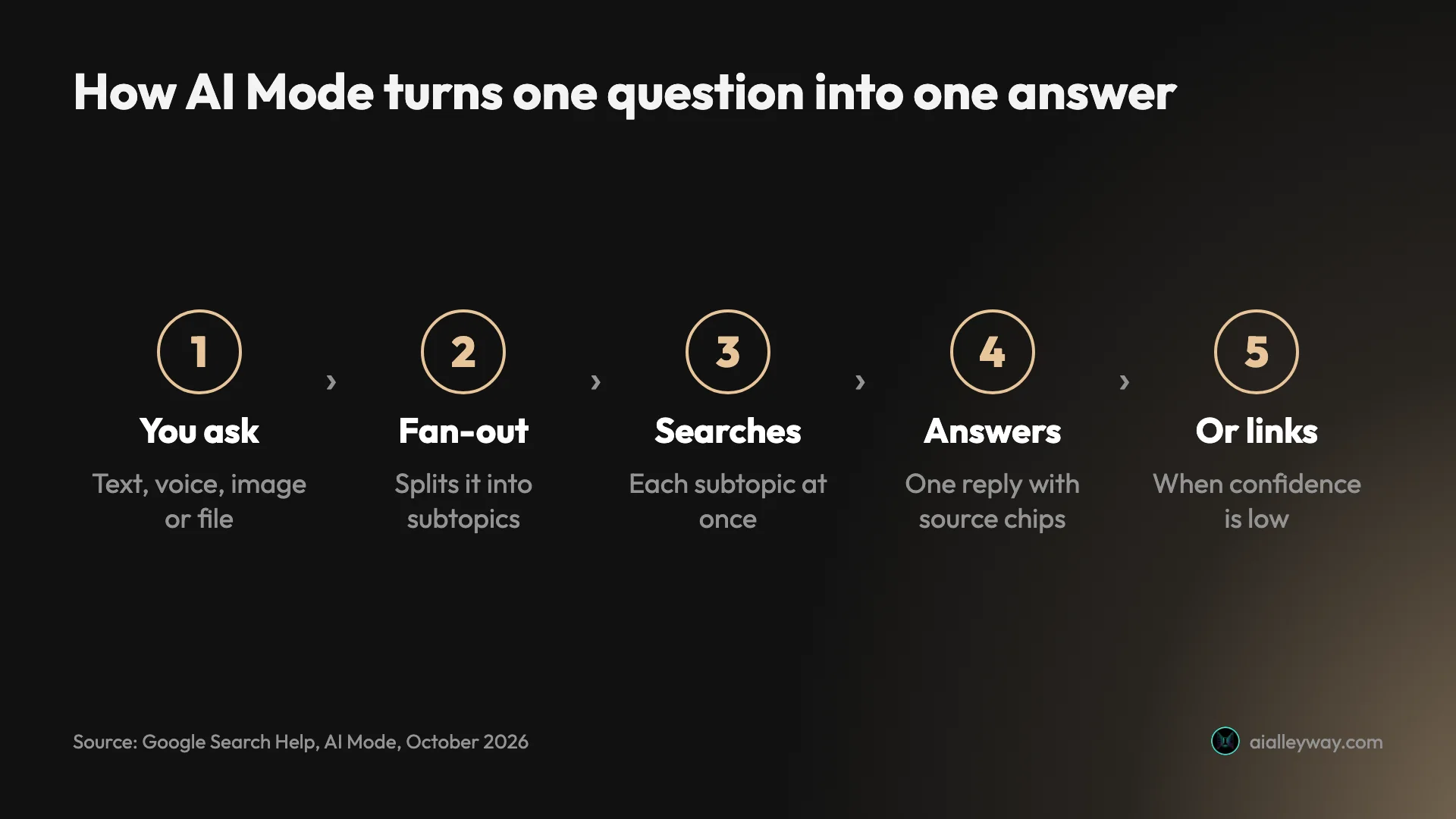
Google AI Mode is a free tab inside Google Search that answers a question in writing instead of handing you ten links. It splits your question into subtopics, searches each at once and writes one answer with source chips, a method Google calls query fan-out. You reach it beside All and Images, at google.com/ai, or from the Google app.
Google’s help page calls it “Google’s most powerful AI search experience”. The chips sit beside the sentences and name the source each one came from, and when AI Mode is not confident in an answer, the help page says it shows a set of web links instead. It is not the Gemini app: that is Google’s chat assistant, while AI Mode is Search with Gemini models inside it.
It is also no longer an experiment. AI Mode began as an opt-in Labs test on 5 March 2025, opened to everyone in the US in May 2025, reached more than 180 further countries in English that August, and now covers more than 200 countries and territories. At I/O in May 2026 Google said it had passed one billion monthly users.
How it differs from AI Overviews
If you have used Google in the last two years you have seen AI Overviews: the short AI summary sitting above an ordinary page of results. AI Mode is the longer form of the same idea. It replaces the results with a conversation, takes follow-ups, accepts files and images, and adds tools such as Canvas.
Google has been joining the two. At I/O in May 2026 it described bringing AI Overviews and AI Mode “into one” AI search experience, so a follow-up asked under an overview now continues in AI Mode. The practical difference remains: an overview is a summary on top of links, while AI Mode is an answer in place of them, with the links one tab away under All.
How I tested it
I ran five tests on 19 October 2026, on a free personal Google account in Chrome. Each was chosen to check one thing a search tool has to get right, and two of them had answers I could check against our own published research.
On the first load, AI Mode opened a prompt titled “Supercharge Search with Personal Intelligence”, asking to connect Gmail, Calendar, Drive and Photos. I chose Use without content apps, and everything below ran without them.
| Test | What I asked | What it got right | What went wrong |
|---|---|---|---|
| 1. Multi-part question | Heat pumps below -15°C, and what to check in an old house | Clear structure, four checks, three questions back to me | One sentence stretched its GOV.UK source |
| 2. Follow-up | My house details, and what a survey costs | Kept the context; a three-row cost table | Assumed I was in the UK and priced it in pounds |
| 3. Checkable facts | Perplexity Pro and Max prices | Every price and credit count correct | Six named third-party sources, none from Perplexity |
| 4. Canvas | Turn the pricing answer into a team decision sheet | Correct cost maths once corrected | Started a new conversation and built a MacBook sheet |
| 5. Freshness | What Google announced for AI Mode last month | Sources dated two days earlier | None in the two items I checked against Google |
A multi-part question, and a follow-up
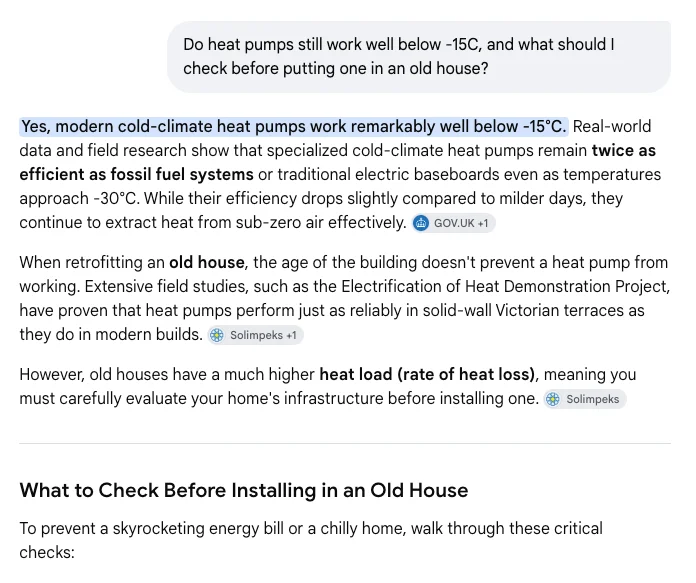
The first test asked whether heat pumps still work below -15°C and what to check before fitting one in an old house. AI Mode opened with a one-line answer, then four numbered checks (radiators and pipework, insulation, ductwork, sizing), two fallback setups, and three questions back to me about fuel, radiators and the age of the house.
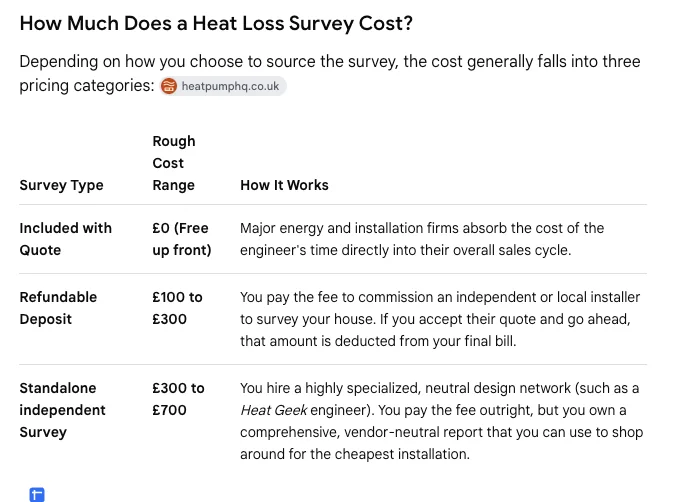
I answered those questions in a follow-up: gas boiler, radiators, built in 1925, single glazing, and what would a survey cost? It kept the thread, ranked radiator sizing as my first priority, and built a three-row table of survey types with a price range for each.
The tools menu, and Canvas
The plus button in the Ask anything bar is where the extra tools live. On my free account it listed four: Add images, Add files, Create images and Canvas. There was no model choice. Google’s help page says subscribers pick Gemini 4 Argon from that menu.
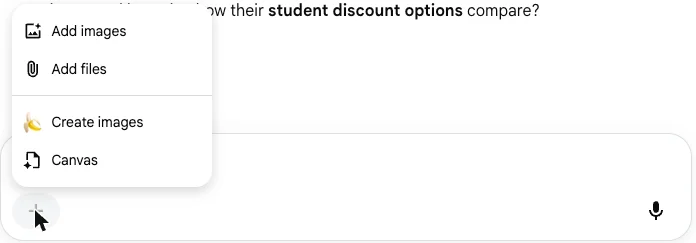
Canvas opens a document beside the conversation, with undo, redo and share buttons, for things you want to keep: a plan, a sheet, a draft. Google made it available to everyone in the US in March 2026. I tested it with a team decision sheet, and the result belongs in the shortfalls section below.
What else it can do that I did not test
Google’s help pages list more than I could fairly test in a day. Search Live adds voice and camera conversations in the Google app. Deep Search, launched for subscribers in July 2025, issues hundreds of searches for a long cited report. AI Mode can also generate PDF, Word, Excel and PowerPoint files, call businesses on your behalf in the US, and check out with some US retailers.
I did not test image or file upload, Search Live, Deep Search, booking, calls or any paid model. The agentic features act in the real world, so all of these are reported here from Google’s pages, not from use.
Is AI Mode free, and what do the paid plans cost?
AI Mode itself is free with a Google account. You pay only if you want more of the top model, more image generation or more agentic use, and those come bundled in Google’s AI plans, which also carry Gemini app access and Google One storage.
| Plan | US price | What it adds in Search |
|---|---|---|
| Free | $0 | AI Mode on the default model (Gemini 3.5 Flash), Canvas, file and image upload |
| Google AI Plus | $4.99 a month | More access to Nano Banana image generation in Search |
| Google AI Pro | $19.99 a month | Higher access to Gemini 4 Argon, Nano Banana and agentic capabilities |
| Google AI Ultra | $99.99 a month | Highest access; five times Pro’s usage limits |
| Google AI Ultra, top tier | $199.99 a month | Highest access; twenty times Pro’s usage limits |
Prices are from Google’s US subscriptions page in October 2026. The Ultra pair is new: at I/O in May 2026 Google cut its top tier from $250 to $200 a month and added the $100 plan below it.
Two things on that page need care. Gemini 4 Argon has daily limits in AI Mode, and Google publishes no number for them. And the page is partly out of date: its title still advertises Gemini 3.1 Pro, and a footnote still refers to Deep Search, which no 2026 plan card lists. Our Google Gemini review works through what the same plans buy outside Search.
The free price has a second side. Google has been testing ads inside AI Mode answers in the US since May 2025, labelled Sponsored, with new formats announced in May 2026. You are not paying for AI Mode with money, and that is the business model.
Who should use AI Mode for everyday search?
AI Mode suits anyone who already starts at Google and wants a written answer instead of a list to read. The match is strongest for these people:
- Everyday searchers asking how, why or which questions, where a structured answer saves five tabs and nothing rides on a single figure.
- People planning something in steps, such as a home project, a trip or a purchase, who will ask follow-ups and want the context kept.
- Anyone tracking recent news about a topic, since its sources in my test were two days old.
- Students and writers making a first pass, who want the shape of a topic and a list of sources to read next.
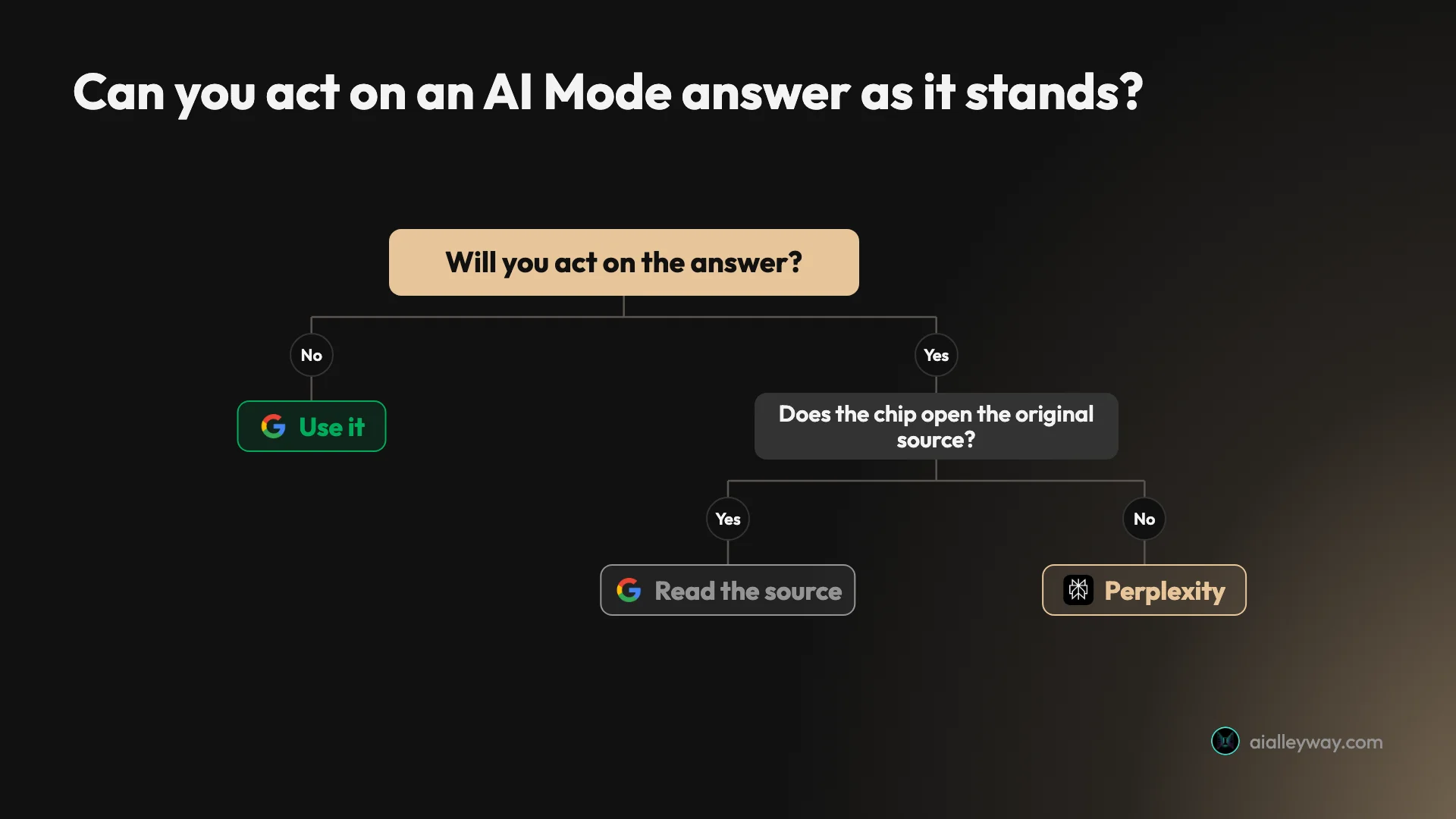
- Not for anyone who needs to cite the original. Researchers, journalists and anyone acting on a price, a dose or a legal date should treat the chips as leads and go to the primary source.

Where AI Mode beats a list of links
AI Mode’s strengths are the ones that come from being Google: convenience, freshness, and a free version that is the real product.
It is already where you search
There is nothing to install and no account to open. AI Mode is a tab in the box where you already type questions, which means the cost of trying it on any question is one click, and the ordinary results remain one click back under All.
That sounds minor until you compare it with every other answer engine, each of which asks you to change a habit first. Google’s figure of more than one billion monthly users, given at I/O in May 2026, is mostly a measure of that position.
Its news was two days old
My fifth test asked what Google had announced for AI Mode in the last month. On 19 October it led with link-visibility changes from 15 October and cited reports dated 16 and 17 October, alongside Google’s own blog. It also named Gemini 4 Argon, which Google announced on 13 October.
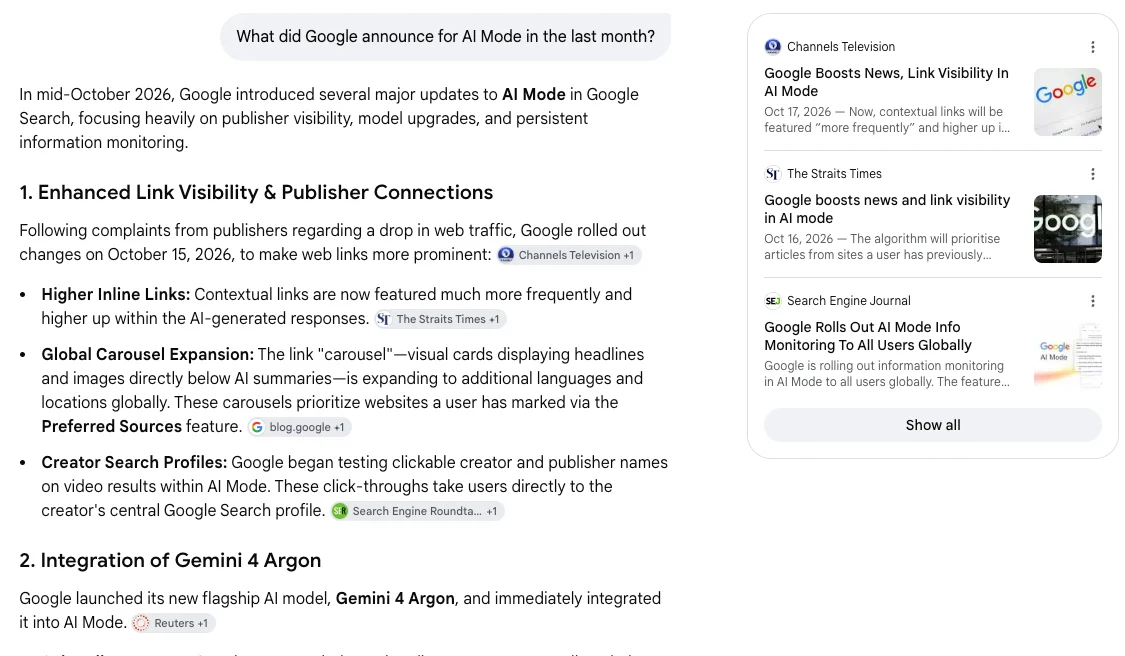
The link changes and Gemini 4 Argon both match Google’s own announcements. Two days is as fresh as a search answer realistically gets, and it is the clearest advantage of an answer engine sitting on the world’s largest index.
Follow-ups keep the thread
In my heat pump test, the follow-up named only my house: gas boiler, radiators, 1925, single glazing. AI Mode carried the earlier question forward and answered “for your 1925 property” without being told what the subject was.
It also asks questions back. Both heat pump answers ended with two or three questions about the house, which is what a good adviser does and what a list of links cannot.
Its arithmetic held up
Every price, credit count and sum in the pricing test was right. It gave Perplexity Pro at $20 a month or $17 billed annually, Max at $200 or $167, and Max’s 10,000 monthly credits plus a 35,000 one-time bonus, all matching our Perplexity pricing guide.
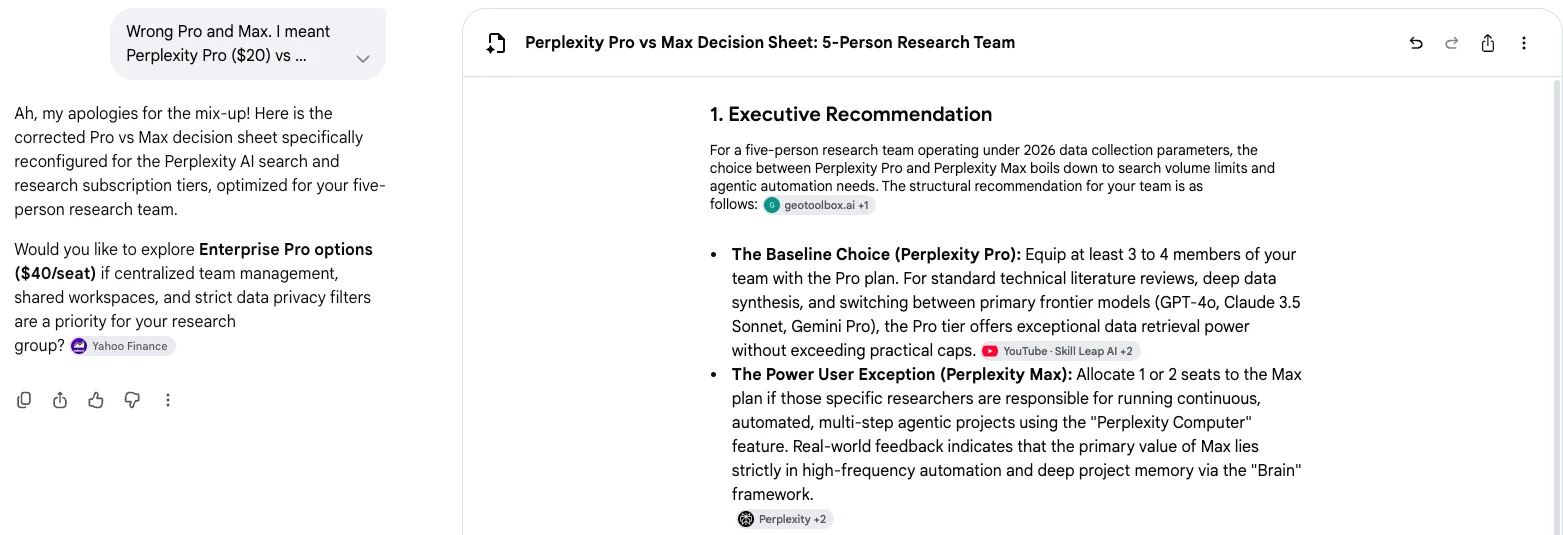
The corrected Canvas sheet did a five-person cost model: $100 a month for five Pro seats, $1,000 for five Max seats, and $280 for four Pro and one Max. Each sum was correct.
Nothing in the free menu is locked
On a free account I had Canvas, file and image upload and image creation, and since May 2026 every user gets the same default model. Google’s paid plans add more of the top model, not the ability to use AI Mode at all.
Compare that with our Perplexity review, where the free tier’s model picker lists ten models and locks every one. AI Mode’s free tier hides nothing from the menu; it simply has no model choice.
Where AI Mode’s answers go wrong
AI Mode’s weaknesses all sit in the step between finding a source and writing a sentence about it.
It cites the write-up, not the source
Asked what Perplexity Pro and Max cost, AI Mode got the prices right, and its named chips were Mem0, FreeAcademy.ai, SentiSight.ai, Finout, geotoolbox.ai and Mashable. Perplexity’s own pricing page, the one that decides the price, was not among them.
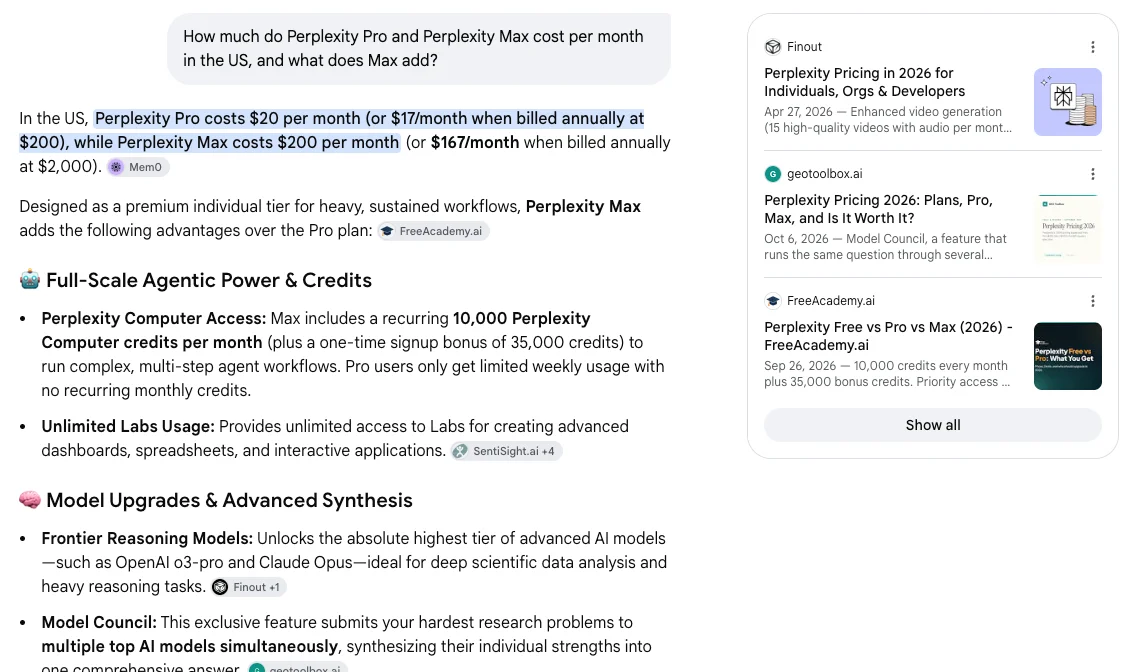
The heat pump answers leaned the same way, on a heat pump seller, a heating supplier, YouTube videos and a Facebook group post. Our best AI search engine test found the same pattern on an EU law question: the European Commission was in the panel, but the chips on the load-bearing sentences pointed at secondary write-ups. Two tests, two subjects, one habit. The exception was the corrected Canvas sheet, which did cite Perplexity’s own pages.
One sentence stretched its source
The heat pump answer said cold-climate heat pumps “remain twice as efficient as fossil fuel systems” even as temperatures approach -30°C, with a GOV.UK chip. The GOV.UK page says heat pumps are “more than twice as efficient as fossil fuel heating in cold temperatures”, and separately that they “outperform oil and gas” approaching -30°C.
Those are two claims, and AI Mode merged them into one stronger one. The direction is right and the source is real, which is exactly why this kind of slip survives: the chip looks like proof unless you open it.
It guessed my country
The follow-up never asked where I lived. It answered in pounds, assumed solid brick walls, and named a British installer network, probably because several of the first answer’s sources were British. I had given a temperature in Celsius and nothing else about location.
For a cost question that is a real error, since survey prices, grants and installers all depend on the country. A good adviser asks; AI Mode inferred and did not say it had.
Canvas forgot the question
With the Perplexity pricing answer on screen, I chose Canvas and asked it to “turn this into a one-page Pro vs Max decision sheet for a five-person research team”. The request loaded as a new search, the earlier answer was gone, and Canvas built a decision sheet comparing Apple’s M5 Pro and M5 Max MacBook chips.
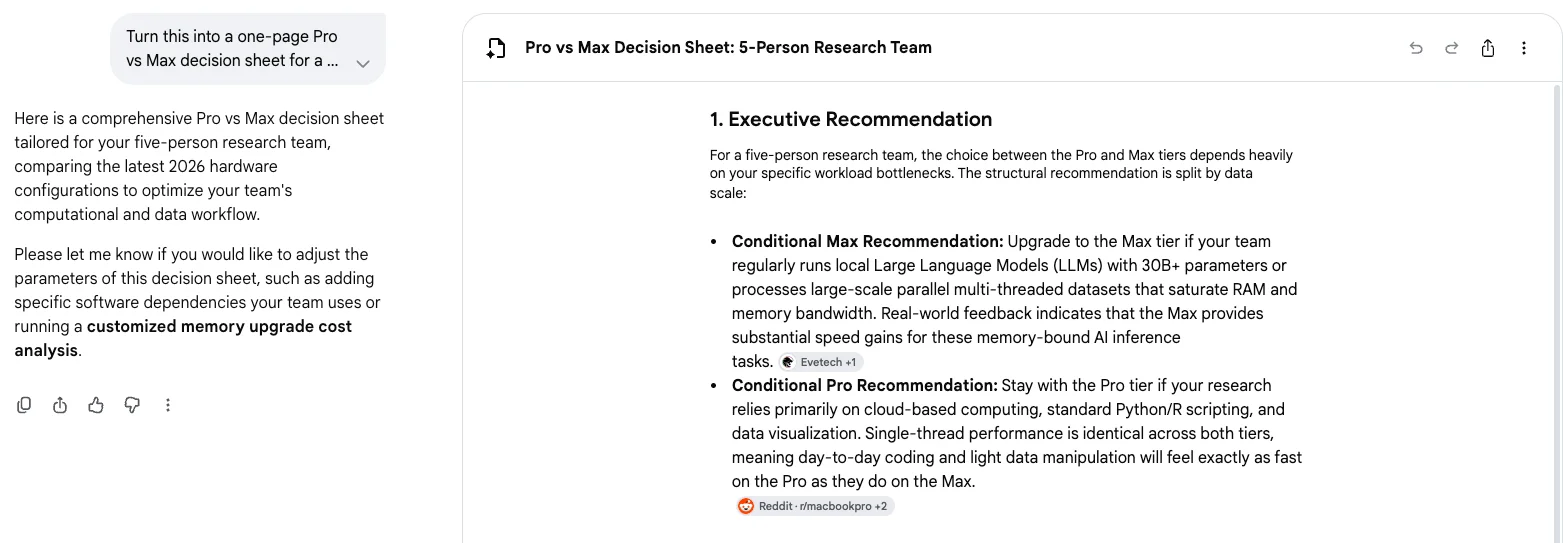
It was a well-built sheet about the wrong thing. When I corrected it, Canvas apologised and rebuilt it for Perplexity, with correct cost maths but a Pro model list of GPT-4o and Claude 3.5 Sonnet, models Perplexity’s own picker no longer shows.
You cannot switch it off
Google’s AI Mode help page describes no off switch, and its AI Overviews page says those features “cannot be turned off”, pointing to the Web filter for plain links instead. Chrome lets you hide the AI Mode button in the address bar, and that is the extent of the control.
For most people that is fine, because AI Mode is a tab you can ignore. For anyone who wants Google without AI answers, the honest route is the Web filter or another search engine. Our guide to using Google AI Mode shows how to make the Web filter Chrome’s default search.
Personal context asks for a wide door
The Personal Intelligence prompt on first load is optional, and free since May 2026. But the help page’s consent wording is broad: “all Search services will be permitted to access Workspace and Google Photos”. Google says it does not train directly on your inbox or photo library, and that training is limited to things like your AI Mode prompts.
I declined, and lost nothing I tested. If you accept, know that the permission covers Search as a whole, not one conversation.
History is the other half. AI Mode keeps past conversations in a history panel on the left, and Google’s help page notes that deleting one there is not the end of it: the same search can also sit in your Search history, which you have to clear separately. Deleted items, it adds, may stay in My Activity for up to a day.
Alternatives worth considering
If you have decided AI Mode’s sourcing is not good enough for the work you do, these are where to look.
- Perplexity, if you want the citations to be the product. Its answers are built around sources you are meant to check, and in our one-question EU AI Act test it cited the European Commission’s own pages where AI Mode leaned on explainers. Our Perplexity review covers what the free tier withholds. A later Perplexity vs Google test ran the two side by side on five everyday searches.
- Brave Search, if you want a free answer from an independent index. It was the surprise of our best AI search engine test. See Brave Search.
- ChatGPT, if most of your questions end in writing something rather than finding something. Search is one feature inside a general assistant there; our ChatGPT review covers the rest.
Final word
Google AI Mode is the most convenient free answer most people already have, and in my tests it was current and careful with prices and sums. It is not yet careful with sources: it reaches for whichever write-up is handy, and once it stated a source more strongly than the original did.
That makes it a 4.0, a Power Tool for everyday questions and a starting point for anything serious. Ask it first, then click the chip before you spend money on its answer.
Frequently asked questions
What is Google AI Mode?
Google AI Mode is the conversational mode inside Google Search. Instead of a list of links, you ask a full question in plain language and get one written answer, with small source chips beside the sentences and a sources panel on the right. You can ask follow-ups in the same thread and it keeps the context.
Under the hood it uses what Google calls query fan-out: it splits your question into subtopics and searches each of them at the same time, then combines what it finds. Google's help page says it falls back to a plain set of web links when it is not confident in an AI answer. You reach it from the AI Mode tab beside All and Images, from google.com/ai, or from the Google app.
Is Google AI Mode free?
Yes. AI Mode costs nothing with a Google account, and on my free account the tools menu offered file uploads, image uploads, image creation and Canvas. Since May 2026 the default model for everyone is Gemini 3.5 Flash.
The paid Google AI plans add more of it rather than a different product. Google AI Pro is $19.99 a month and lists higher access to Gemini 4 Argon, Nano Banana and agentic capabilities in Search. Google AI Ultra is $99.99 or $199.99 a month for the highest access. Google AI Plus, at $4.99, adds only more image generation in Search. For most people the free version is the whole product.
How is AI Mode different from AI Overviews?
AI Overviews is the short AI summary that appears at the top of an ordinary results page. AI Mode is a separate tab built for longer questions and follow-ups, with more reasoning, a sources panel, file and image input, and tools such as Canvas.
Google has been joining the two. At I/O in May 2026 it described bringing AI Overviews and AI Mode into one AI search experience, so a follow-up from an AI Overview now carries on in AI Mode. They still behave differently: the overview is a summary above links, while AI Mode is a conversation that replaces the link list until you click back to All.
Can you turn off Google AI Mode?
Not in Search itself. Google's AI Mode help page describes no off switch, and its AI Overviews help page says those AI features cannot be turned off, pointing people to the Web filter instead, which shows plain links.
What you can do is avoid it. AI Mode is a tab, so the ordinary results stay one click away under All. In Chrome, Google lets you hide the AI Mode button in the address bar by unticking Always show AI Mode. And you can decline Personal Intelligence, the prompt that asks to connect Gmail, Calendar, Drive and Photos; I picked Use without content apps and AI Mode worked normally.
Is Google AI Mode accurate?
Mostly, in my tests. Every price, credit count and sum in its Perplexity pricing answer was right, though a later Canvas sheet repeated stale model names. Where it slipped was in how it used its sources: one sentence turned a government page's more than twice as efficient in cold temperatures into twice as efficient approaching minus 30, and a pricing answer's named chips were six third-party sites rather than the company whose prices they were.
Google's own help page says AI responses may include mistakes and advises checking important information in more than one place. Treat AI Mode as a first draft of an answer. When money or health rides on it, click the chip and read the original.
Which AI model does Google AI Mode use?
A custom version of Gemini, which has changed several times. AI Mode launched in Labs in March 2025 on a custom Gemini 2.0, moved to Gemini 2.5 for its US rollout in May 2025, and picked up Gemini 3 Pro for subscribers in November 2025.
Since May 2026 the default for everyone is Gemini 3.5 Flash. On 13 October 2026 Google added Gemini 4 Argon for Google AI Pro and Ultra subscribers, selectable from the menu in the Ask anything bar, with daily limits Google does not put numbers on. On my free account there was no model choice at all.
Keep reading
How to use Google AI Mode, and when an AI Overview is enough
How to use Google AI Mode on desktop, phone and Chrome, tested on a free account: every way in, what the + menu does, and where the sources thin out.
Google Gemini review: the best free tier, sold as storage
A Google Gemini review from the free tier: four models including 3.1 Pro handed over for nothing, then paid tiers that are really 400GB, 5TB and 20TB of Drive.
Google Whisk AI Is Gone: Do It in Flow Instead, Tested
Google Whisk shut down on 30 April 2026 and now redirects to Flow. I rebuilt a Whisk subject, scene and style remix in Flow, free, and tested ImageFX prompts.

Google Flow Free: What 50 Daily Credits Buy, Tested
Google Flow free, tested on a free account: 50 credits a day bought four AI video clips, images cost nothing, and Veo 3.1 Quality was out of reach.