
Perplexity vs Google: same right answers, different sources
Perplexity vs Google, tested side by side on five everyday searches: both got every answer right, so the difference is whose sources you can check.
Contents
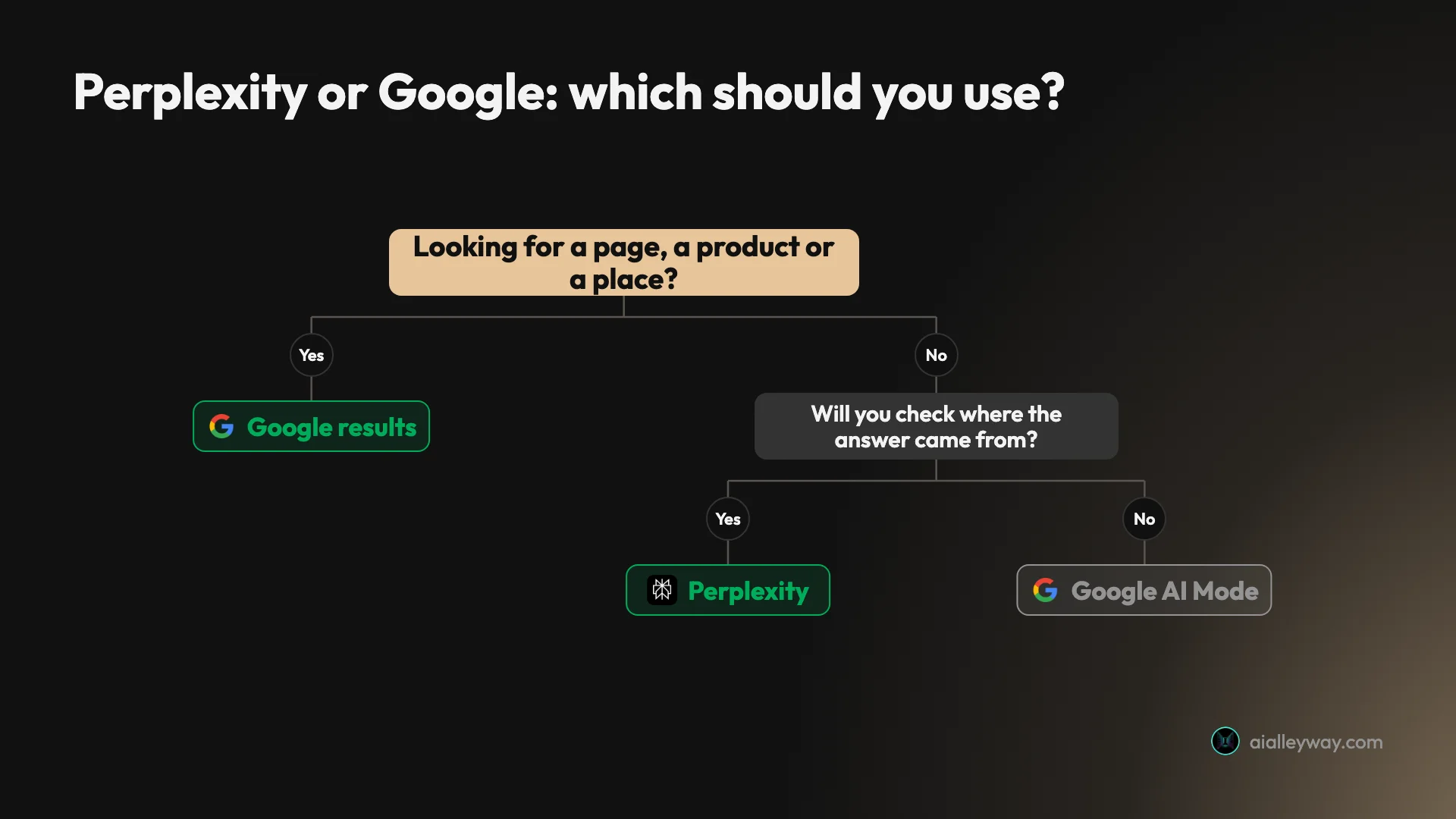
Perplexity or Google?
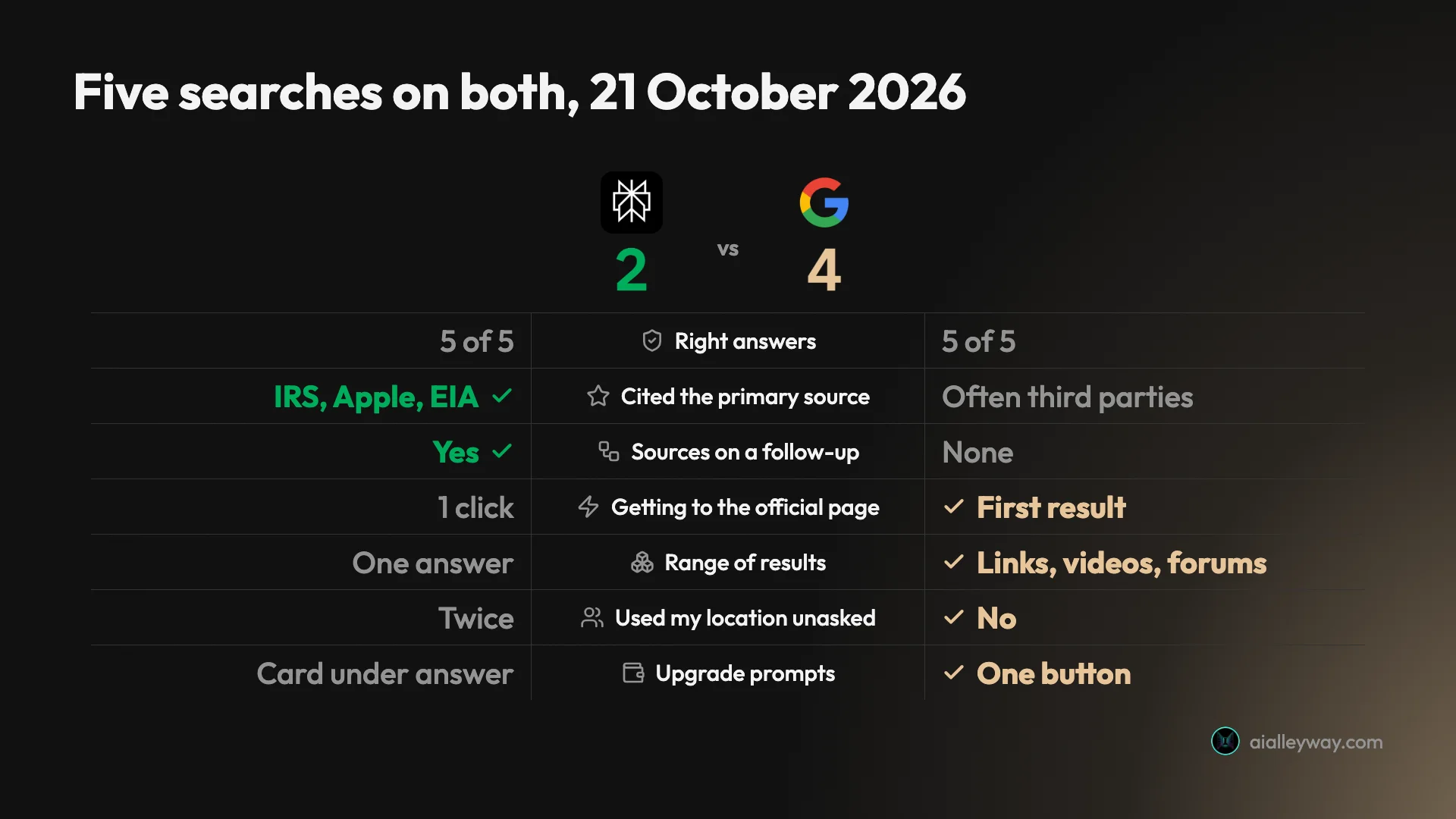
Google is still the better way to find things, and Perplexity is the better way to get an answer you can check. I put the same five everyday searches to both on 21 October 2026, and both got every one right. The difference was in what sat behind the answers: Perplexity’s citations kept pointing at the IRS, Apple and the US government’s energy statistics, while Google’s AI answers often leaned on third parties for the same facts.
| If you want | Pick | Why, from my tests |
|---|---|---|
| The official page, file or product listing | Google results | The IRS PDF was the first result |
| An answer whose sources you will open | Perplexity | Cited IRS, Apple and EIA directly |
| An AI chat without leaving Google | Google AI Mode | One tab from any search; showed its sums |
| Videos, forums and today’s news around the answer | Google results | Perplexity returns one answer and a source list |
| No upgrade pitch inside an answer | Perplexity put one under its hardest answer |
One more difference surprised me: Perplexity used my location twice without being asked, while Google, which I had set to US results, asked before going local.
The test: five searches, same morning
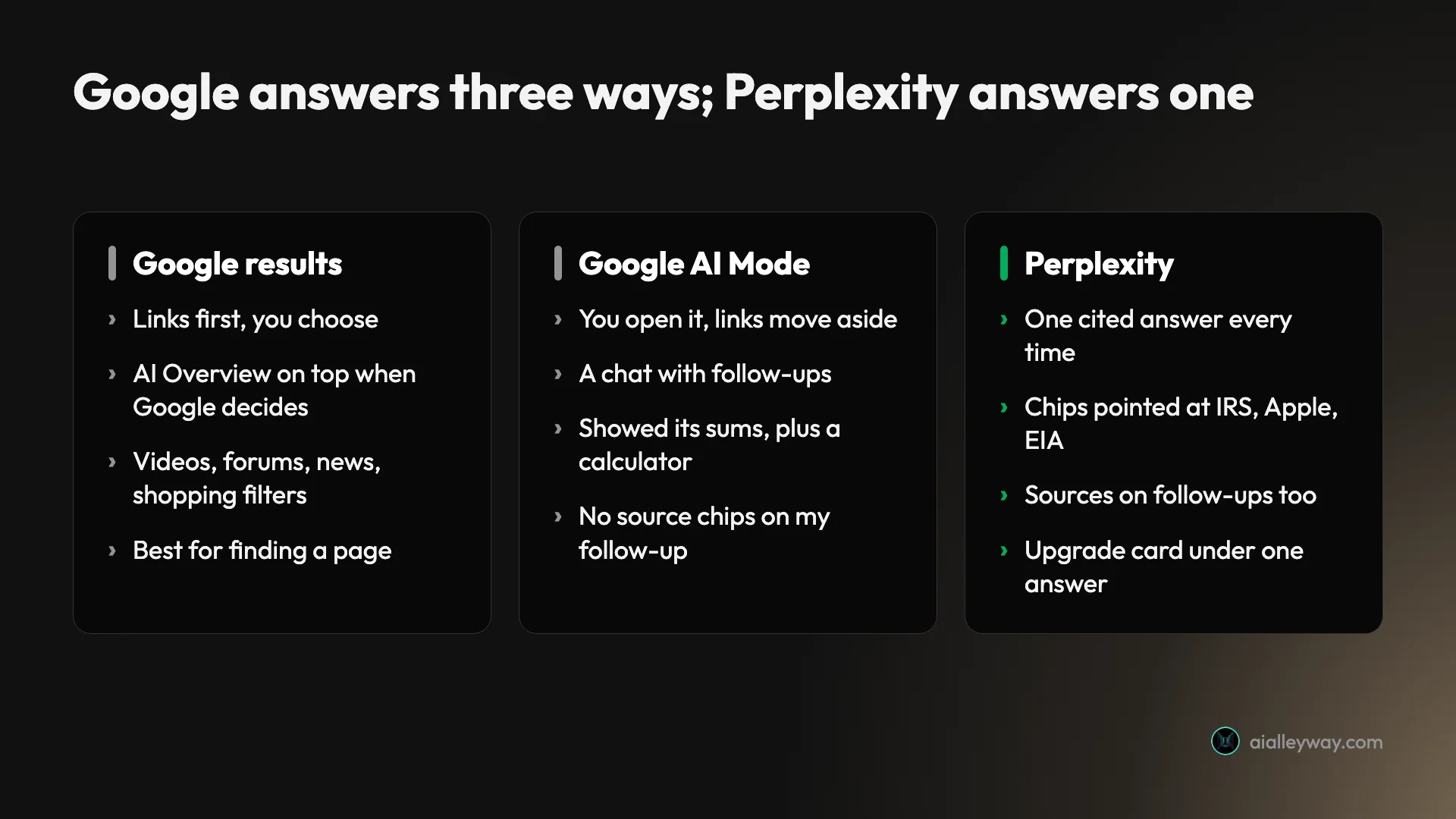
Most comparisons of the two describe a chat window against a page of blue links. That stopped being the right picture when Google put AI on its results page. A Google search now answers in three ways: the links, an AI Overview that Google places above them when it chooses, and AI Mode, a chat you open from a tab.
So I tested Perplexity against all three. Both ran on free, signed-in accounts in Chrome on the morning of 21 October 2026. Perplexity used its default Search mode, with a notice saying a “free preview of advanced search” was switched on. Google’s addresses carried English and US settings, because my test machine is outside the US.
The five searches are the kind people type every day. One looks for a specific document, one recalls a date, one fixes a phone, one shops on a budget, and one asks for a cost worked out with a follow-up. I checked every answer against the primary source afterwards.
| Test | The search | Perplexity | |
|---|---|---|---|
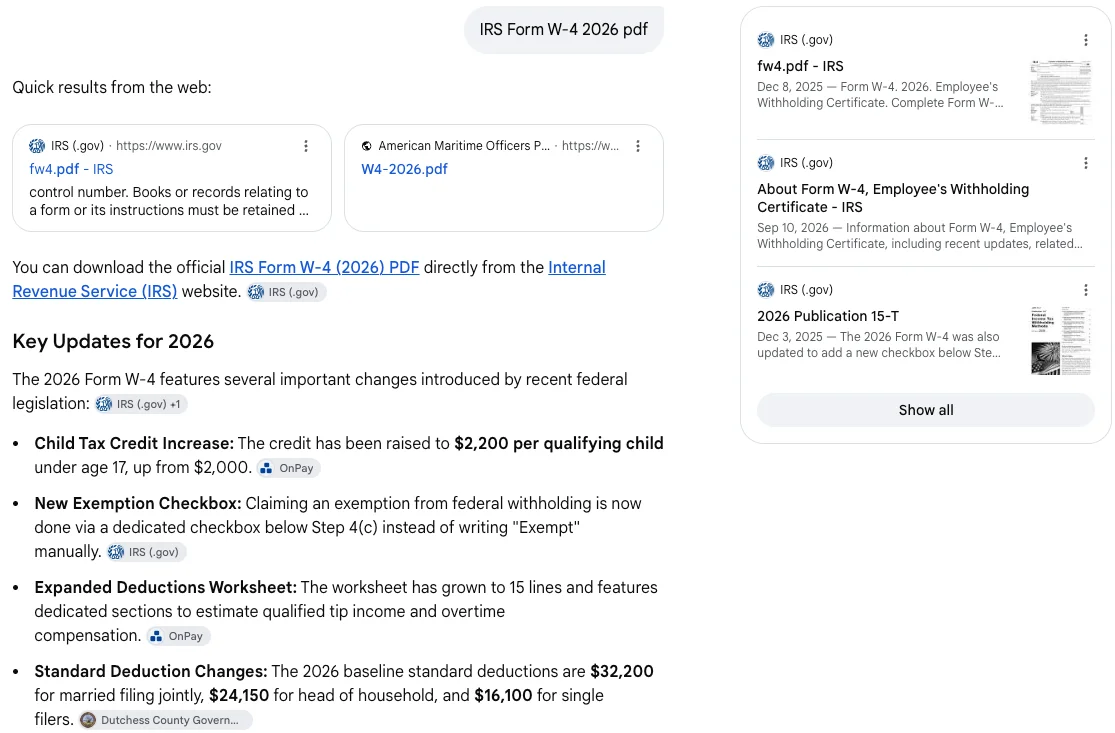
| 1. Find a file | IRS Form W-4 2026 pdf | Three IRS links, file size and date | IRS PDF as the first result; AI Mode added tax figures |
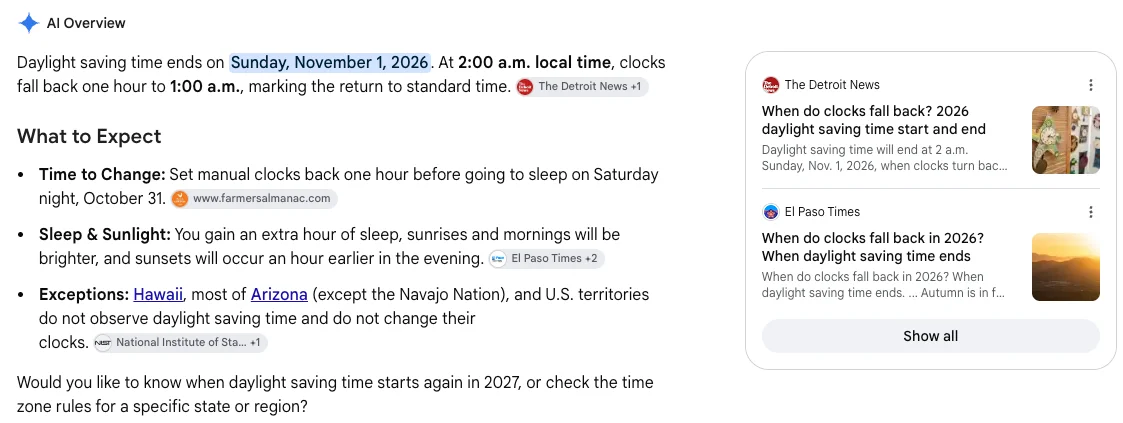
| 2. Recall a date | When daylight saving time ends in 2026 | Right; cited ABC News | Right; cited The Detroit News and NIST |
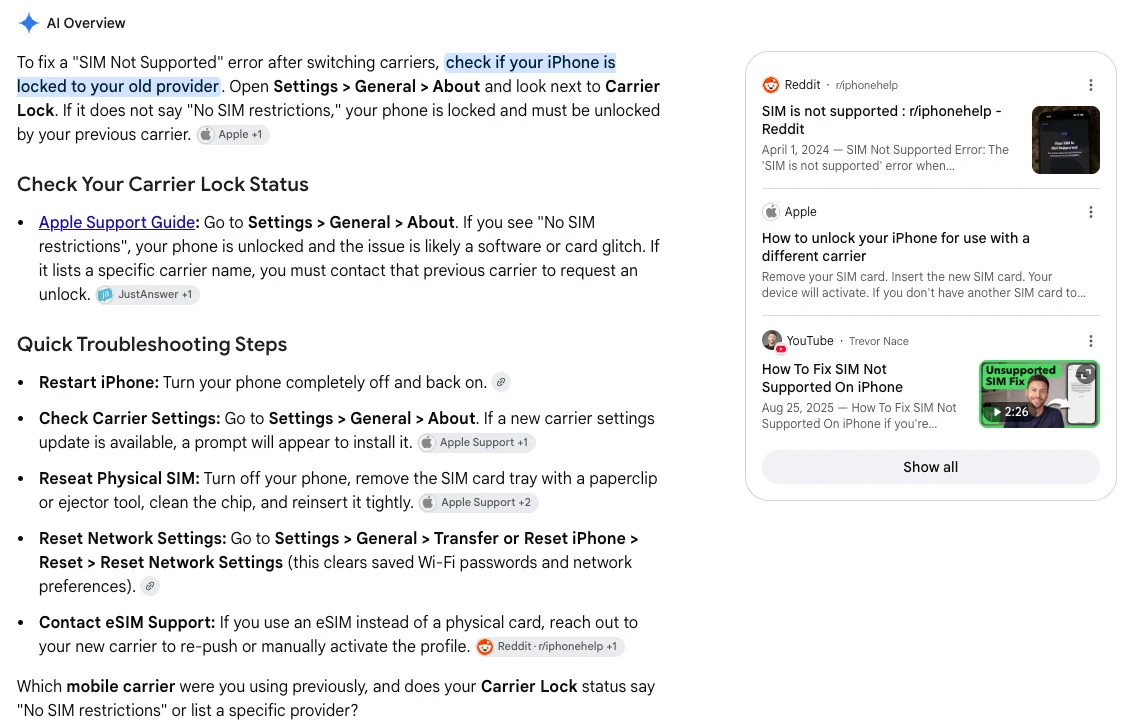
| 3. Fix a problem | iPhone says SIM not supported after switching carriers | Right steps; chips mostly Apple | Right steps; Apple, JustAnswer and Reddit |
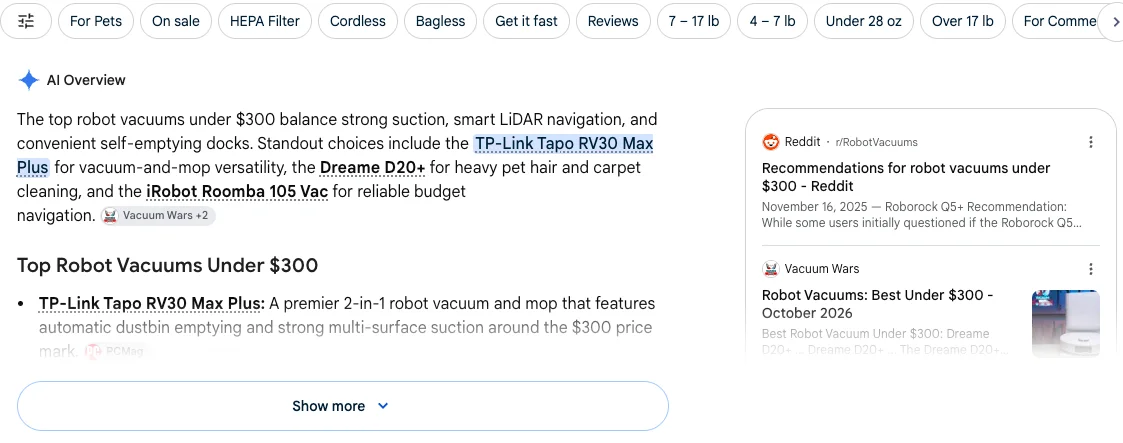
| 4. Shop | Best robot vacuum under $300 | Tapo RV30 Max Plus first, in a table | Tapo RV30 Max Plus first, plus forums |
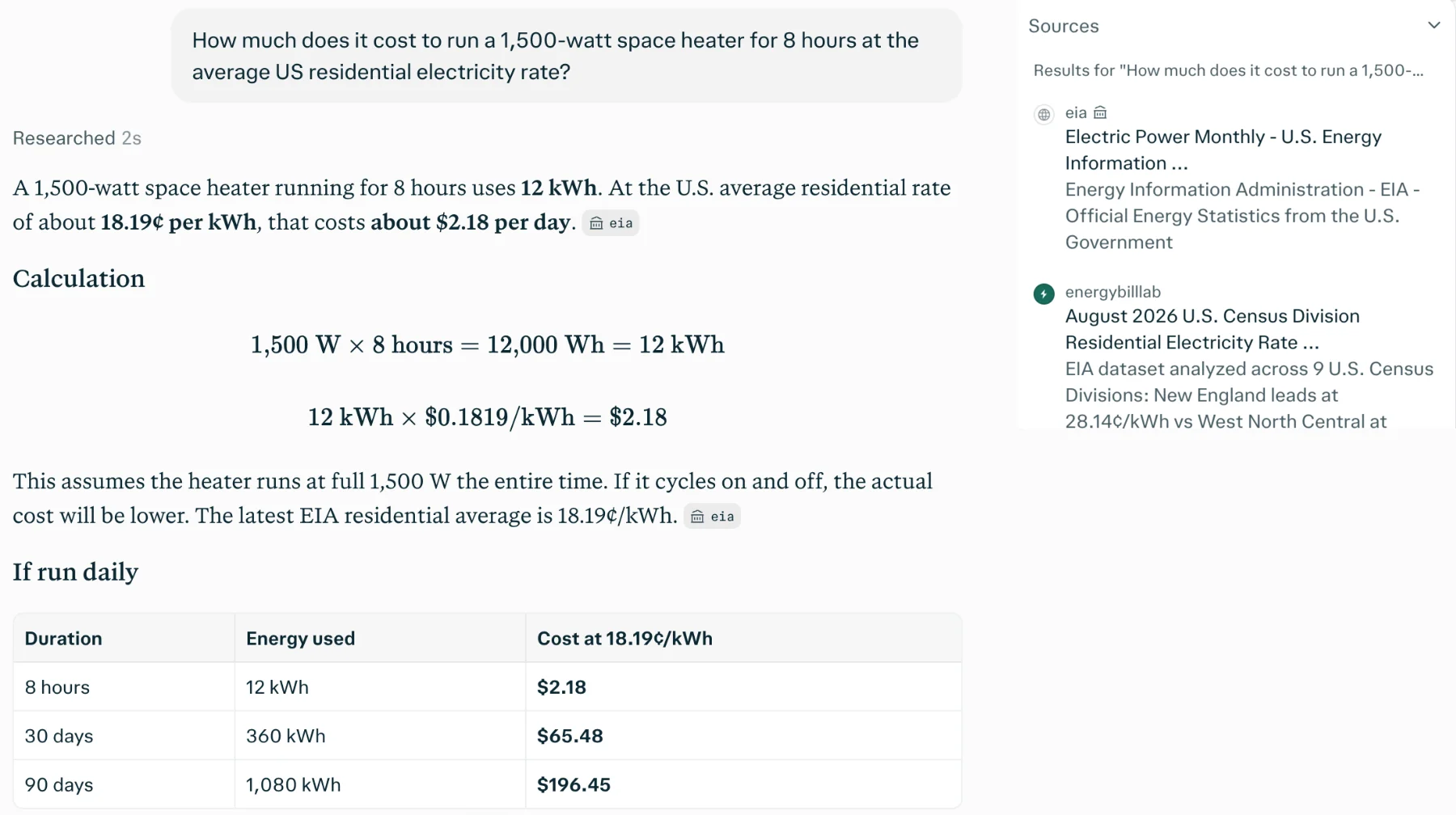
| 5. Work it out | Cost of a 1,500 W heater for 8 hours, then 4 | $2.18 a night at EIA’s 18.19¢ | $2.20 to $2.35 at two rates |
Perplexity vs Google at a glance
Here is how they compared on what decided my tests, plus what decides which one you keep open.
| Perplexity | ||
|---|---|---|
| What you get | One written answer with numbered sources | Links, an AI Overview, or an AI Mode chat |
| Right answers in my tests | 5 of 5 | 5 of 5 |
| Primary sources on the deciding facts | IRS, Apple, EIA | Mixed with a payroll firm, a county site, JustAnswer, Reddit |
| Finding a specific file | A link in the answer | The first result |
| Follow-ups | Kept context, with sources | AI Mode kept context, no source chips |
| Extras around the answer | Suggested follow-ups | Videos, forums, news, shopping filters |
| Used my location unasked | Twice | No (set to US results; AI Mode asked first) |
| Free plan | Yes, with a “free preview of advanced search” | Yes, AI Mode and AI Overviews included |
| Paid entry price | Pro $20 a month, $17 billed annually | Google AI Pro $19.99 a month |
| Ads | None seen in my five answers | Tested in AI Mode answers in the US since May 2025 |
Perplexity as a search engine: strengths and gaps

Perplexity turns every search into a short report, and on these five it was the more careful reporter.
What it does well
- It cites the organisation that owns the fact. Tax form: IRS. Phone fault: two Apple support pages at the top of its source panel. Electricity price: the EIA’s Electric Power Monthly.
- It gives the useful detail. For the W-4 it listed the current PDF, the archived 2026 copy and the accessible version, plus the file size and the date the IRS posted it. All three checked out.
- It keeps sources on follow-ups. When I halved the heater’s hours, the new answer still carried chips and reused the same rate.
- It is quick. Four of the five answers were labelled “Researched 2s”, and the follow-up “Researched 3s”.
Where it stops
- It guessed my location and used it. Twice it added a sentence about where it thought I was, once naming my city in a shopping answer. Neither search asked for that.
- It upsells under an answer. The heater answer ended with a “This question looks difficult” card and an Upgrade to Pro button.
- It returns one answer, not a results page. There are no video, forum or news panels beside it, just the sources it chose.
- Its label was loose. It called 18.19¢ the “latest EIA residential average”; that is the 2026 year-to-date figure, and July’s monthly figure was 18.31¢.
Google Search and AI Mode: strengths and gaps

Google is three tools on one page, and the oldest of them, the links, is still the best at its job.
What it does well
- The right page comes first. For the W-4, the first result was the PDF on irs.gov, one click away.
- It surrounds the answer. The robot vacuum search came with filters such as On sale, HEPA Filter and Get it fast, plus a Reddit thread and a reviewer’s October 2026 list. The daylight saving search added stories from the last day.
- AI Mode works things out. It showed each step of the heater sum, offered a calculator, and gave a range across two published rates rather than pretending there is one.
- It asked before going local. AI Mode offered to find my state’s electricity rate if I told it where I was, with a Try without personalization link underneath.
Where it stops
- Its AI answers lean on third parties. The 2026 standard deduction came from a county website, the carrier lock check from JustAnswer, and an eSIM step from Reddit.
- AI Mode adds what you did not ask for. My W-4 search returned four “Key Updates for 2026”; the deductions match the IRS, but two of the points were cited to a payroll company.
- Follow-ups lose their sources. AI Mode’s answer to my follow-up had no source chips at all, the same thing our how to use Google AI Mode guide found.
- The labels can blur. It called 18.34¢ “the EIA average rate”, while the chips on that line pointed to the St. Louis Fed’s FRED database.
Is Perplexity or Google cheaper?
Both are free for searching, so the price question is really about what each charges for more, and what the free version costs you in other ways.
| Plan | Perplexity | |
|---|---|---|
| Free | Search with citations | Search, AI Overviews and AI Mode |
| Cheapest paid | Pro (no cheaper paid plan) | Google AI Plus, $4.99 a month |
| Main paid tier | Pro, $17 a month billed annually; $20 month to month | Google AI Pro, $19.99 a month |
| Top tier | Max, $167 a month billed annually; $200 month to month | Google AI Ultra, $99.99 or $199.99 a month |
Perplexity’s prices are from its pricing pages, checked on 20 October 2026, which showed only the billed-annually figures; the month-to-month rates are from our August capture in the Perplexity pricing guide. Google’s are from its US subscriptions page in October 2026, as listed in our Google AI Mode review.
The paid plans buy different things. Perplexity Pro adds a choice of AI models, Deep research, expanded access to Computer, its agent mode, and 4,000 one-time bonus credits. Google AI Pro adds higher access to Gemini 4 Argon in AI Mode, along with 5 TB of storage and Gemini in Gmail and Docs, so in Search it is mostly a model upgrade.
A year at the entry level comes out close. By our arithmetic, Perplexity Pro is $204 prepaid or $240 month to month, and Google AI Pro is $239.88; Google’s US page shows no annual price. At the top, Google AI Ultra’s lower tier is $1,199.88 a year against $2,004 for a prepaid year of Perplexity Max.
What free costs you instead
Free is not the same deal on both sides. Google has been testing ads inside AI Mode answers in the US since May 2025, labelled Sponsored. From my test machine I saw no ads on any of the Google pages I captured, but that tells you about my location, not about Google’s US pages.
Perplexity showed no ads or sponsored items in my five answers. Its pressure came as an upgrade card instead, under the one answer it judged hard. Google’s AI Mode pages carried an Upgrade button in the top corner, and nothing inside the answers.

The other cost is data. Perplexity’s AI data retention setting, which lets it use your searches to improve its models, was switched on for our free account when we checked it for our Perplexity vs Gemini test. Google keeps AI Mode threads in your Search history, and deleting one properly takes two steps, as our AI Mode guide explains.
Is Perplexity more accurate than Google?
Neither was more accurate: both got all five searches right, and that was the surprise. The differences were in where each answer came from and how much extra it volunteered.
Finding a file: Google’s first result, Perplexity’s three links
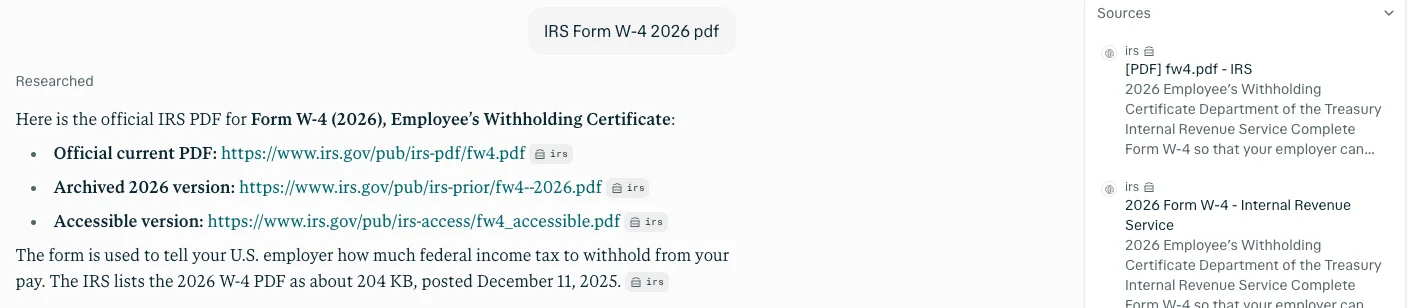
I searched “IRS Form W-4 2026 pdf”. Perplexity replied with three irs.gov links: the current PDF, an archived 2026 copy and an accessible version. It added that the IRS lists the file at about 204 KB, posted on 11 December 2025, and the file’s own server headers confirm both.
Google’s first result was the PDF itself, with the AI Overview below it pointing to the same file. For a known document, a list of links is still the fastest route: no reading, one click.
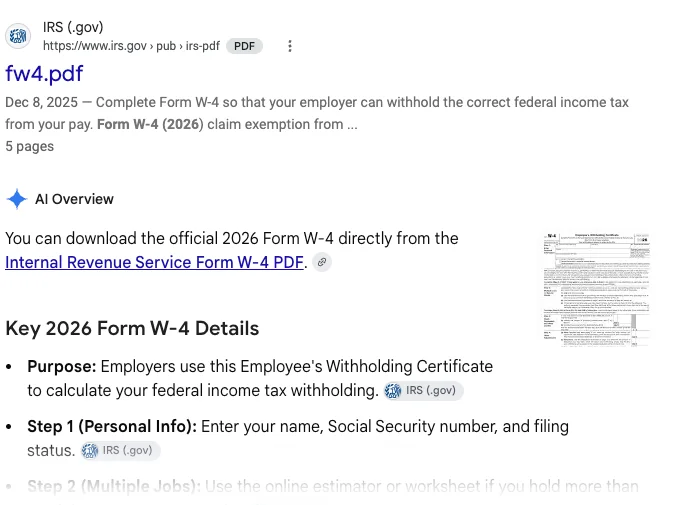
AI Mode did more than asked. Below the link it listed four “Key Updates for 2026”, including a $2,200 child tax credit and standard deductions of $32,200, $24,150 and $16,100. The IRS’s own announcement matches those deductions, but AI Mode cited a county website for them, and a payroll company for two other points.
Recalling a date: both right, Perplexity looked over my shoulder
Daylight saving time in the US ends on Sunday, 1 November 2026, at 2 a.m., and both said so. Google’s overview added that most of Arizona and Hawaii do not change, citing NIST, the US standards body. Perplexity added Europe’s date, 25 October, which is also right.

Then Perplexity added a sentence about the country it had placed me in, which I had not mentioned, and offered a follow-up about it. Google, set to US results, gave the US answer and asked whether I wanted a specific state.
Fixing a phone: same steps, different sources
Asked why an iPhone says “SIM not supported” after a carrier switch, both reached the same diagnosis: the phone is probably locked to the old carrier, so check Carrier Lock under Settings, General, About. Both then gave the same fallback steps.
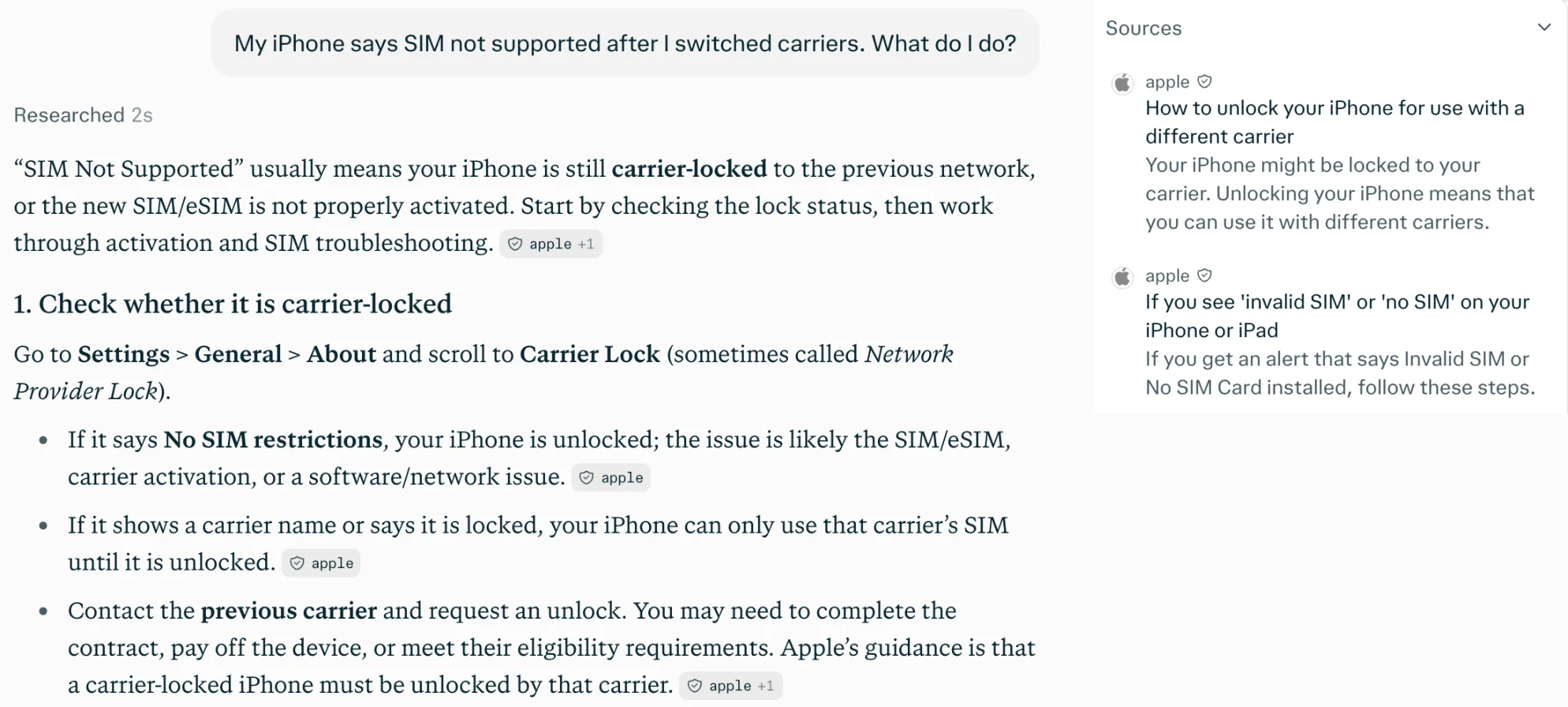
Perplexity’s chips were almost all Apple’s support pages. Google’s overview opened with Apple, then cited JustAnswer for the lock check, Reddit for the eSIM step, and two steps with no named source. Its side panel showed a Reddit thread from 2024, an Apple page and a YouTube video.
Shopping: the same pick, and a city I never typed
For “best robot vacuum under $300” both named the TP-Link Tapo RV30 Max Plus first, and both credited the same tech-review site for it. Perplexity put three picks in a table with a trade-off column, noting the Roborock Q7 M5+ lists at about $360 and only fits on sale.
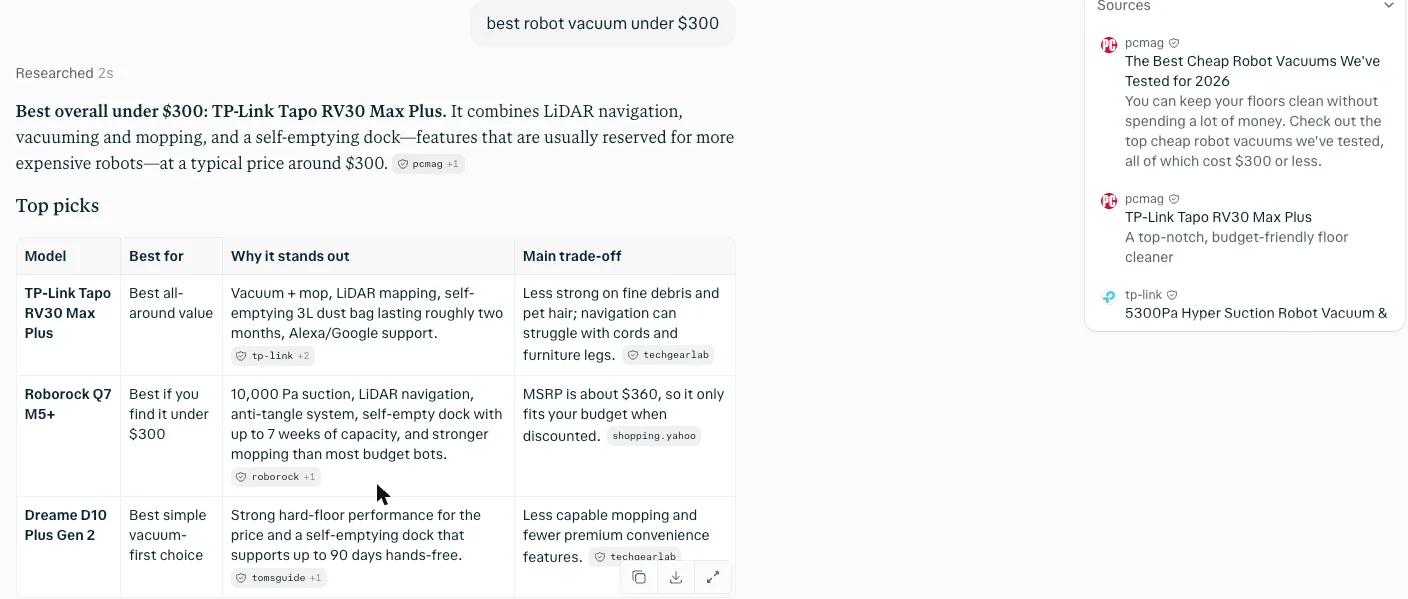
It finished by recommending a model for a home in my city, by name. I had typed no location, and I cropped that line out. Google’s overview named the Tapo, a Dreame and an iRobot, cited a vacuum reviewer, and sat under filters for pet hair, sales and delivery speed.
Working out a cost: both right, different rates
The last search asked what a 1,500-watt space heater costs to run for eight hours at the average US home electricity rate. The physics is fixed at 12 kWh; the rate is the judgement call. Perplexity used 18.19¢ from the EIA and answered $2.18 a night, $65.48 for 30 days.
AI Mode gave a range, $2.20 to $2.35, from two rates: 18.34¢, which it called the EIA average, and 19.6¢ from the Bureau of Labor Statistics city average. It added $66.02 to $70.56 a month and state examples from Louisiana to Hawaii.
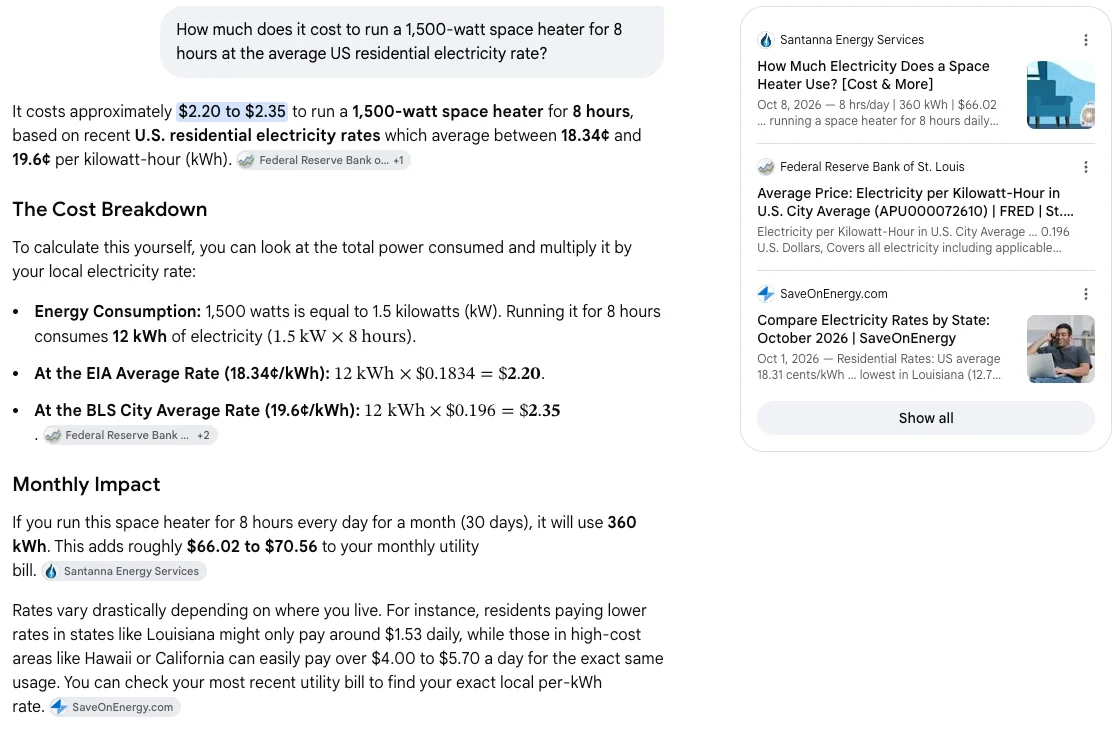
I recomputed every figure and all were right. On EIA’s Electric Power Monthly, 18.19¢ is the 2026 year-to-date residential average and 18.34¢ is June’s figure. Both are fair choices, but only Perplexity linked the EIA itself.
Whose sources can you check?
Across five searches the pattern was consistent. When an organisation owns the fact, Perplexity cited that organisation. Google’s AI answers usually got the same fact right but reached for whoever had written about it.
That matters because you cannot tell a correct answer from a confident one without opening the source. Our Google AI Mode review found the same habit on other questions, and our best AI search engine test found it on an EU law question.
Which is faster, and which fits your day?
Speed did not separate them; the workflow is where they part. Most of Perplexity’s answers were labelled two or three seconds of research, and I did not time Google’s, so what decides your day is what happens after the first answer.
Follow-ups: Perplexity vs Google AI Mode
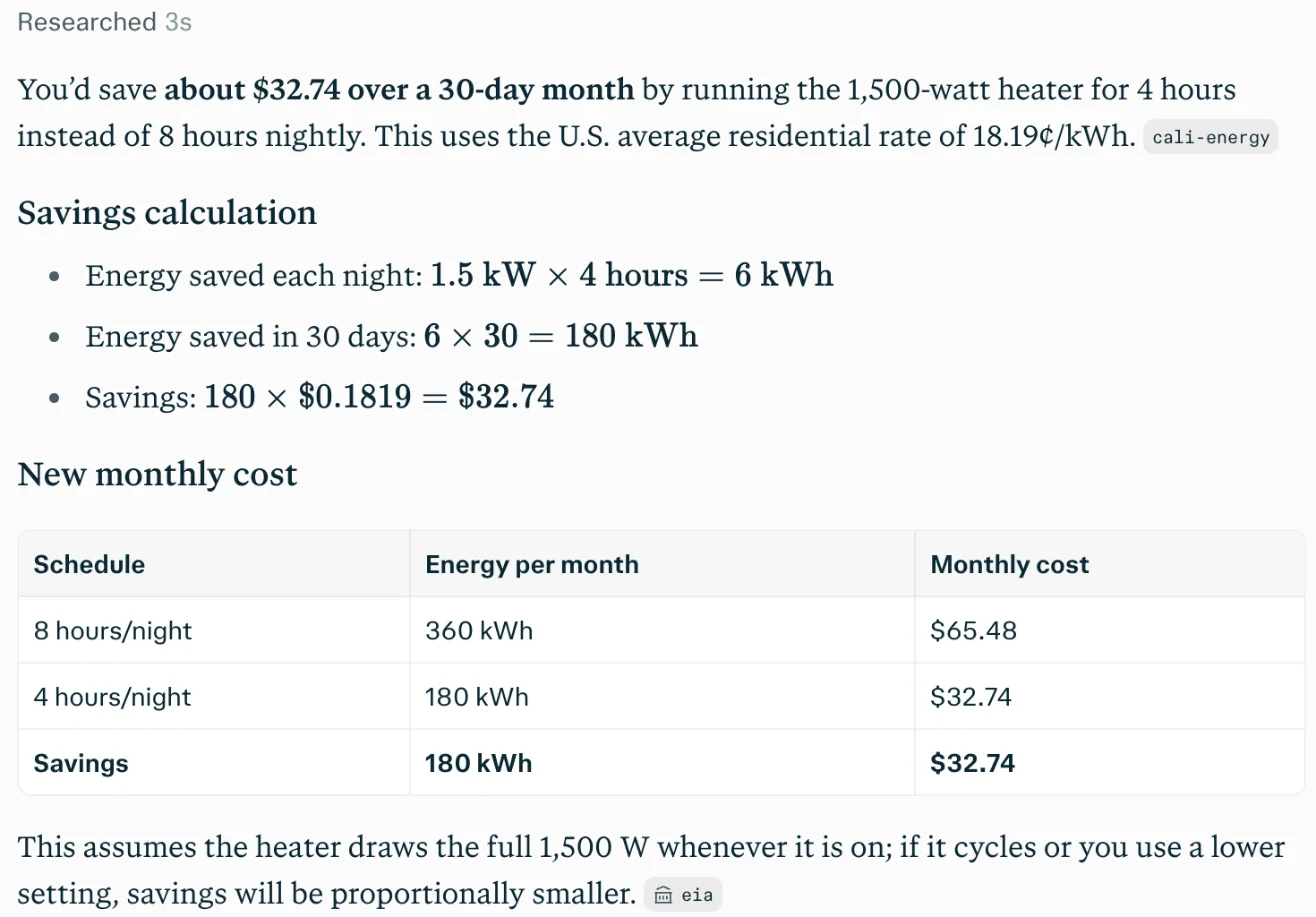
I followed the heater question with “If I cut it to 4 hours a night, how much do I save over a 30-day month?” Both kept the context. Perplexity answered $32.74 a month, reusing its 18.19¢ rate, with a table and source chips.
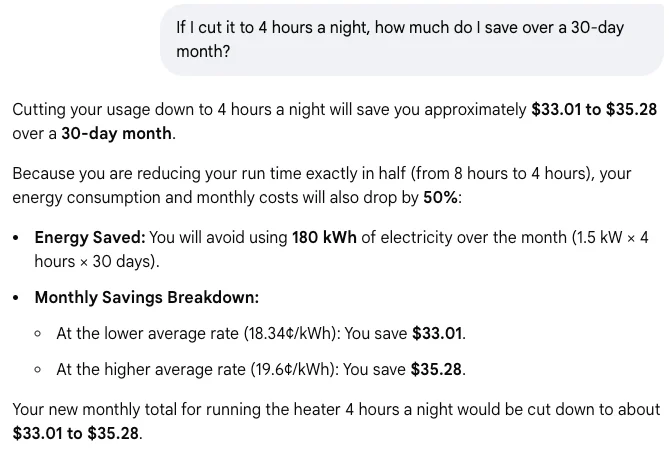
AI Mode answered $33.01 to $35.28, reusing both of its rates, which is also right. But its follow-up carried no source chips at all, only a calculator, a Show Code button and a note that AI responses may include mistakes.
Location: Perplexity guesses, Google asks
This was the clearest behavioural difference. Perplexity decided where I was and wrote it into two answers. Google’s AI Mode gave a national figure and offered to look up my state’s rate if I told it where I was.
If you share screenshots of your searches, or simply prefer not to have your city appear in an answer, add the country to your question on Perplexity. Google’s results follow your settings and location as usual, which is why I set US results in its address.
Where each one lives
Google is already the default search in most browsers, and AI Mode is a tab away from any search. Perplexity is a separate site or app, unless you install its Comet browser, which our Comet browser review covers. In practice that means Google is where you start, and Perplexity is where you go on purpose.
How to use both without switching all day
You do not have to choose one tab. My working setup after these tests is Google as the default search, with Perplexity one keystroke away.
In Chrome, add Perplexity as a site search: open the search engine settings, add a new site search with a short keyword such as p, and use https://www.perplexity.ai/search?q=%s as the URL. I checked that address: it opens a new Perplexity search with whatever follows the q=. Typing the keyword and a space in the address bar then sends that question to Perplexity, while everything else still goes to Google.
| Chrome site search field | What to enter |
|---|---|
| Name | Perplexity |
| Shortcut | p |
| URL with %s in place of query | https://www.perplexity.ai/search?q=%s |
Then split the work by intent. Documents, sites, shops and places go to Google, where the first result was the file I wanted. Questions you will act on go to Perplexity, and you open its first source before spending money on the answer.
Two small habits remove the friction I hit. Put the country in Perplexity questions, so it does not supply one for you; with “in the US” added, my daylight saving question came back with no line about where I was. And when you want Google without AI at all, the Web filter does it, as our AI Mode guide explains.
Where Gemini and ChatGPT fit
If the “Google” you mean is the Gemini app rather than Search, our Perplexity vs Gemini test is the better guide: Perplexity found the month’s news there and Gemini’s free Deep Research never finished. For the other big rival, our Perplexity vs ChatGPT comparison found Perplexity right on a fresh policy question that ChatGPT got wrong.
What five searches cannot tell you
This was five searches on free plans, on one morning, from a computer outside the US. I did not test local results such as restaurants, because my location would have skewed them, nor breaking news, image search, voice, the mobile apps, the paid plans or the ads Google shows US users. Five searches are a sample, not a benchmark, and both products change monthly.
Who should use Perplexity instead of Google?
Pick Perplexity when the answer is the point and you want to see where it came from.
- The checker. You open the sources before you act. Perplexity’s chips pointed at the IRS, Apple and EIA, so the click lands on the authority.
- The researcher with follow-ups. You ask a question, then three more. Perplexity kept citing on the follow-up, where AI Mode stopped.
- The table reader. You like options laid out with trade-offs. The vacuum answer came as a comparison table; Google’s came as a paragraph and a list.
- The Pro buyer who only wants research. Perplexity Pro spends the money on model choice and research tools rather than storage.
Skip it if you mostly look up sites and products, or if you dislike an assistant inferring where you are.
Who should stick with Google?
Pick Google when you are finding rather than asking, or when you want the answer with the rest of the web around it.
- The page finder. Forms, manuals, login pages, the official site. The first result was the file.
- The shopper. Filters for sales, delivery and features, plus forums and reviewer lists beside the AI summary.
- The everyday asker. An AI Overview appeared on all four searches I ran on the results page, answering each without a second site to visit.
- The Google AI Pro subscriber. If you pay Google for storage already, the plan’s extra Argon access in AI Mode costs you nothing more.
Skip Google’s AI answers, not Google, when you need the original source; open the link instead of trusting the chip.
Final word
Keep Google as your search engine and add Perplexity for the questions that matter. In my five searches neither got anything wrong, which says a lot about how far both have come. Google was faster to the page you want and richer around the answer. Perplexity was better at showing you whose fact it was, and that is the half of search an AI answer most needs.
If you only try one change, make it this: the next time an AI answer will cost you money or time, ask Perplexity too and open its first source.
Frequently asked questions
Is Perplexity better than Google?
For answers you plan to check, yes, in my tests. On five everyday searches both got every answer right, but Perplexity's citations pointed at the IRS, Apple and the US Energy Information Administration, while Google's AI answers mixed in a payroll company, a county website, JustAnswer and Reddit for some of the same facts.
For finding things, Google is still better: its first result was the official IRS file. Perplexity also used my location twice without being asked, and ended one answer with an upgrade card.
Can Perplexity replace Google search?
For questions, it can. For finding pages, products and places, I would not swap. In my tests Perplexity answered all five searches correctly, with sources, and it gave a direct link when I asked for a form.
But Google's results page does jobs Perplexity does not try to do: a first result that is the official file, video and forum results beside the answer, news stories from the last day, and shopping filters such as On sale and Get it fast. Most people will get more from using both than from replacing one.
Is Perplexity more accurate than Google AI Mode?
Not on my five tests: both were right every time, and every sum I recomputed was correct on both. The difference was sourcing. Perplexity used the Energy Information Administration's 2026 average for electricity prices; AI Mode labelled its figure EIA, but the chips on that line pointed to the St. Louis Fed's FRED database.
AI Mode also added unrequested tax figures to a form search, correct but cited to a county website rather than the IRS, and its follow-up answer carried no source chips at all. Accuracy was a tie; checkability was not.
What is the difference between Perplexity and Google AI Mode?
Perplexity is a separate answer engine: every search returns a written answer with numbered sources, and the free plan covers that. Google AI Mode is a tab inside Google Search that swaps the list of links for a conversation, also free, and it sits beside the normal results and the AI Overviews Google adds to them.
In practice, Perplexity always answers, while Google lets you choose between links, a short overview and a full chat. Both take follow-ups and keep the context. Paid plans differ: Perplexity Pro adds model choice and research tools, and Google AI Pro adds more of Gemini 4 Argon in Search.
Does Perplexity use your location?
It did for me, without being asked. On a daylight saving question it added a line about the country it had placed me in, and on a shopping question it tailored its final pick to my city. Neither question mentioned where I was.
Google AI Mode took the opposite approach in my test: it gave a national answer, then offered to find my local electricity rate if I told it my state or city, with a Try without personalization link below. If you want location-free answers from Perplexity, say which country you mean in the question.
Is Perplexity free?
Yes. The free plan answers searches with citations, and all five of my tests ran on it. Perplexity's paid Pro plan is $17 a month billed annually on its current pricing pages, and was $20 month to month when we captured it in August; Max is $167 a month billed annually.
The free plan does push. One of my five answers ended with a This question looks difficult card and an Upgrade to Pro button. Google AI Mode is free too, and Google AI Pro at $19.99 a month adds more access to its top model in Search.
Keep reading
Perplexity vs Gemini: one cites better, one gives more away
Perplexity vs Gemini, tested on both free tiers with the same questions: who found October's news, who got the prices right, and which free plan does more.
Perplexity pricing: $20 a month, or $17, on the same site
Perplexity pricing is $0, $20 or $200 a month. Its own plan pages show two different headline numbers, and the Enterprise tab quietly switches billing basis.
Perplexity AI review: the free tier is a showroom
A Perplexity AI review from the free tier: ten models in the picker and every one padlocked, $17 a month to unlock them, and six publishers now suing.
Perplexity vs ChatGPT: we asked both the same question
Same question, same day, both free tiers. One got the facts right and cited them; the other was confidently wrong. Plus the price nobody compares properly.