
Comet browser review: a careful reader, a paywalled agent
A hands-on Comet browser review on Perplexity's free plan: accurate page summaries, an honest one-tab limit, and an agent that stops at an Upgrade to Pro wall.
Contents
Is Comet worth it?

Yes, Comet is worth installing as a free browser for reading: Perplexity’s Assistant sidebar summarised a long article accurately and admitted what it could not see instead of guessing. No, if the agent is why you came, because on the free plan it would not touch a form, and the mode that acts asked me to upgrade. Install it for Perplexity in the sidebar, and test the paid agent on harmless pages before you trust it with your accounts.
What is Comet?
Perplexity Comet is a web browser from the AI search company Perplexity, built on Chromium, the open-source engine under Google Chrome. It looks and behaves like Chrome, runs most Chrome extensions, and adds two things: Perplexity as the default search engine, and an Assistant sidebar that can read the tab you are on and answer questions about it.
Perplexity’s own description of the Assistant is a sidebar that lets you “ask questions about currently open tabs, search the web, and interact intelligently with websites.” On my free plan the first of those worked and the third did not. The third, where the Assistant clicks, types and completes tasks, is the agent, and that is the part Perplexity’s launch posts lead with: booking a meeting, sending an email, buying something you forgot.
The browser has had a fast year. It launched in July 2025 for $200-a-month Max subscribers, reached US Pro subscribers in August, and went free for everyone worldwide on 2 October 2025. Android followed in November 2025, iOS in March 2026, and in July 2026 Perplexity put its Computer agent inside the Assistant, which is the mode I ran into below.
How I tested it
I installed Comet on a Mac and signed in to a free Perplexity account, the plan most people downloading a free browser will be on. I ran three tests, two with a follow-up, on 19 October 2026, on pages where I could check every answer: three Wikipedia articles about heat pumps, and httpbin’s dummy pizza-order form, which exists for testing and orders nothing.
| Test | What I asked | What it got right | What went wrong |
|---|---|---|---|
| 1. Summarise a page | Five bullets on Wikipedia’s Heat pump article, and which section covers cold weather | Every figure I checked matched; found the right section and table | Nothing in what I checked |
| 2. Compare two tabs | Air-source vs ground-source heat pumps, from two open tabs | Said it could see only one tab rather than inventing the other | Read only the active tab by default |
| 2b. Compare, tab added | The same, after I added the second tab with @ | Three accurate tables; every figure I checked matched | Air-source cells carried no source chip |
| 3. Fill a form | Fill in the dummy form, do not submit | Listed the right values for each field | Did not fill a single field |
| 3b. Fill it in the second mode | The same, in the Assistant’s other mode | Nothing to judge | An Upgrade to Pro screen |
Reading a page
The first test opened Wikipedia’s Heat pump article and asked the Assistant for five bullets and the section that covers performance in very cold weather. It showed “Researched 4s”, then a one-paragraph summary, five bullets, and a pointer to the Performance section and the article’s table on how efficiency changes with output temperature.
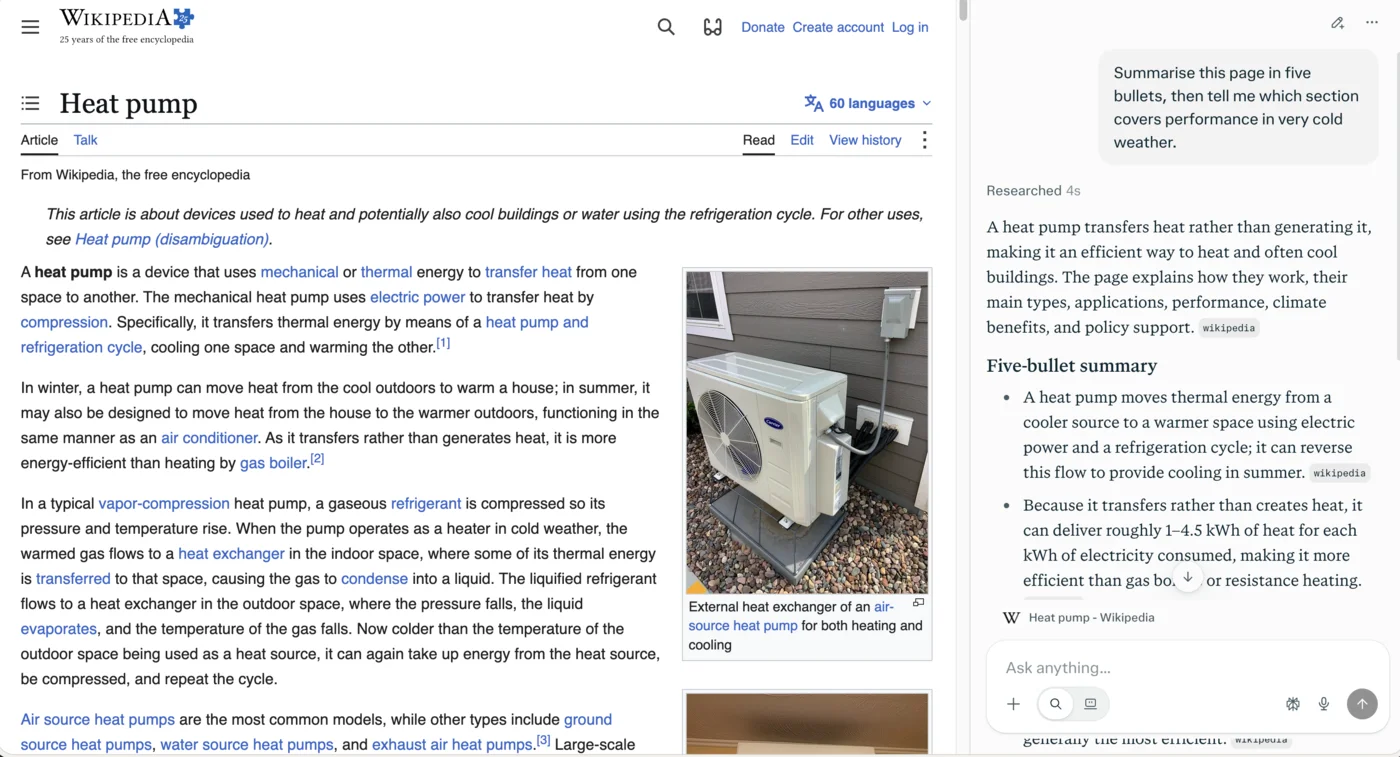
I checked its numbers against the article. “1 to 4.5 kWh” of heat for each kilowatt-hour of electricity matches. So does its cold-weather line, that below about -8°C (18°F) an air-source heat pump can still reach a coefficient of performance of 1 to 4. The table it named exists. For reading a long page, this is the Assistant at its best: quick, exact, and pointing to where the claim lives.
Comparing two tabs
The second test opened Wikipedia’s Air source heat pump and Ground source heat pump articles in neighbouring tabs and asked for a comparison of efficiency, installation cost and lifespan, using only those two tabs. The Assistant answered that it could see only one of them, the one in front, and said it could not honestly compare both.
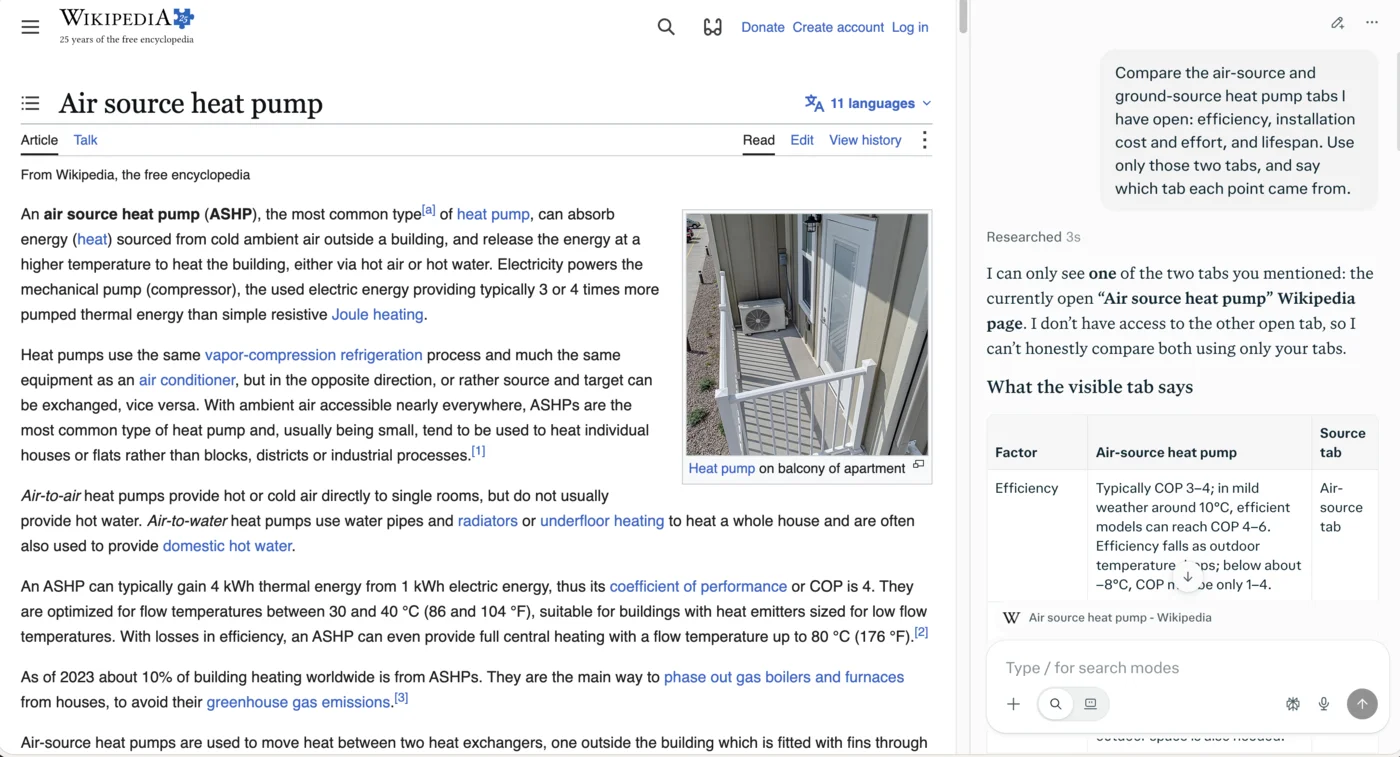
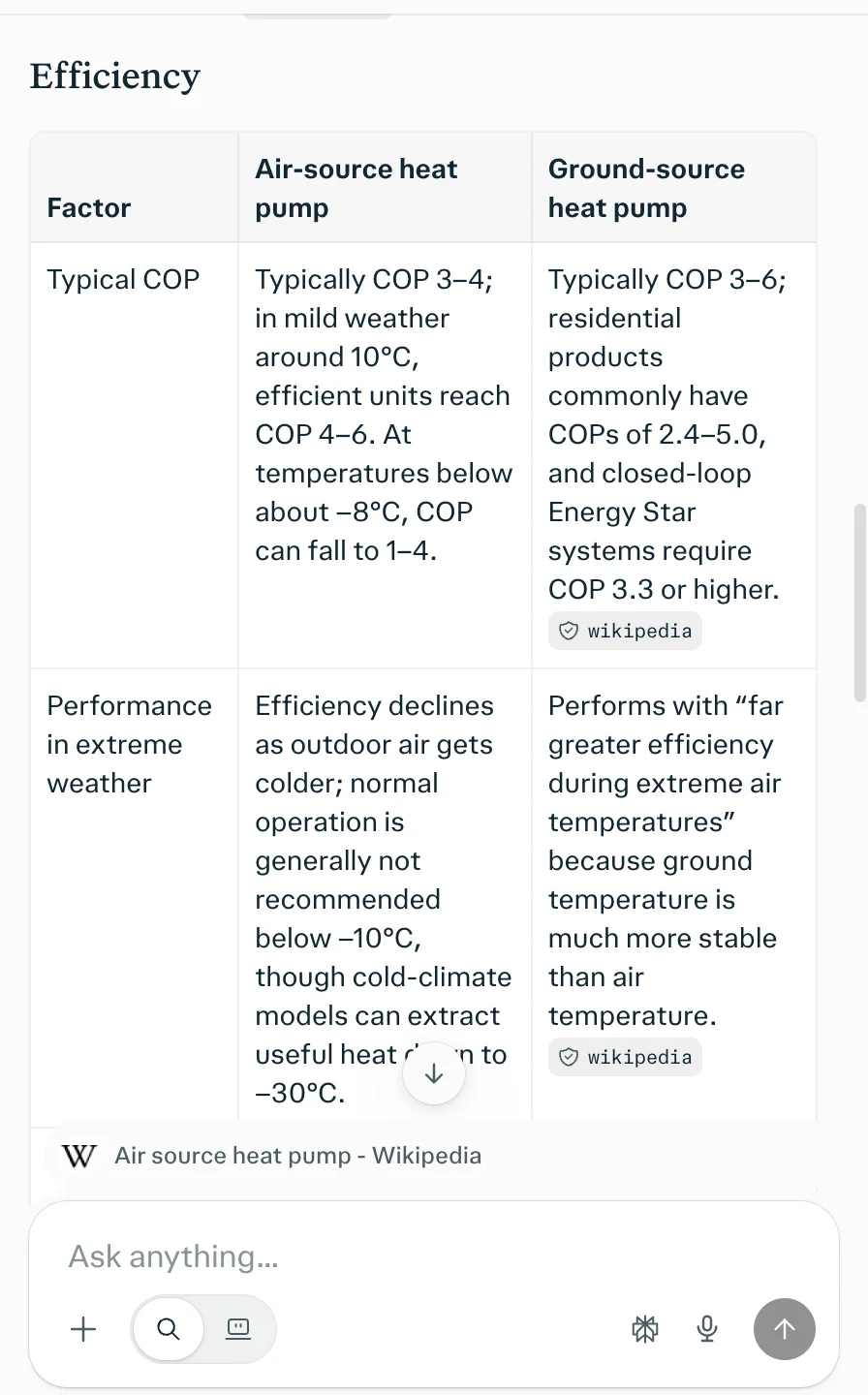
That is the right failure. It gave what the visible tab said, then asked for the other one. When I added the Ground source tab with @, it built three tables, for efficiency, installation and lifespan, and the figures I checked all matched the two articles, from ground-source systems costing “two to five times” a conventional system to early installations still running after 25 to 30 years.
Filling in a form
The third test was the agent’s home ground. On httpbin’s pizza-order form, I asked the Assistant to fill in a name, phone number, email, size, two toppings, a delivery time and instructions, and not to submit it. It replied that it could not control the open page and listed the values I should type. Every field on the form stayed empty.
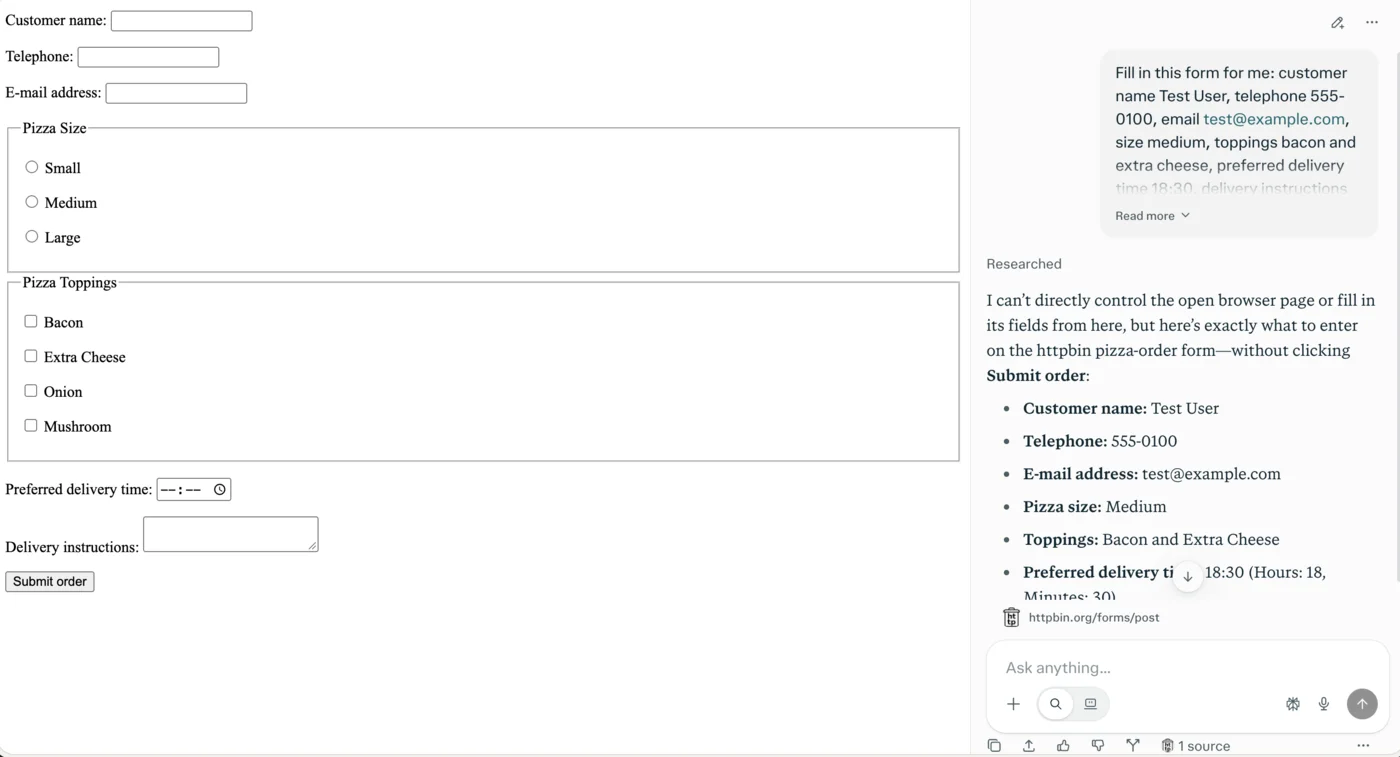
The Assistant’s text box has two mode icons. The default, a magnifying glass, is Search. The second hands the request to Computer, Perplexity’s agent, and on my free account clicking it opened a pop-up titled “Get more done with Computer”, whose only button was Upgrade to Pro. I closed it. Perplexity’s credits page calls this second mode Work mode, and explains the wall: Search mode uses no credits, while Work mode “hands your request to Computer and consumes credits.”
What I did not test
Everything that acts. I did not test the agent filling forms or completing errands, Background Assistants, the Max Assistant mode, Voice Mode, the phone apps, or Comet Plus. Each needs a paid plan or sits outside a desktop test, and the agent in particular acts on real accounts. What follows about those features comes from Perplexity’s own pages, not from use. I also did not benchmark speed, memory use or battery life.
Is Comet free, and what do the paid plans cost?
The browser is free and, by Perplexity’s own promise, will stay that way. What you pay for is the agent and the credits it runs on, sold as part of Perplexity’s ordinary plans rather than as a Comet subscription.
| Plan | US price | What it adds in Comet |
|---|---|---|
| Free | $0 | The browser, Perplexity search, the Assistant in Search mode, built-in ad blocking |
| Perplexity Pro | $20 a month, or $17 a month billed annually | The agent (Computer, in Work mode); weekly included agent use, rolling out, Light effort only without credits; a 4,000-credit sign-up bonus that expires in about 30 days |
| Perplexity Max | $200 a month, or $2,000 a year | The highest weekly agent limit; Max Assistant, Comet’s mode on Perplexity’s most advanced models; 10,000 monthly credits, plus a 35,000-credit sign-up bonus that expires in about 30 days |
| Comet Plus | $5 standalone subscription (announced 2025) | Access to partner publishers; included with Pro and Max at launch |
Prices are from Perplexity’s pricing hub, its Max and credits help pages and the US App Store in October 2026, and our Perplexity pricing guide covers the plans in full.
Two caveats sit in the table. Perplexity publishes no size for Pro’s weekly allowance and no query numbers for either plan’s agent limits; Max’s one recurring figure is its 10,000 monthly credits. Its credits page describes Pro’s allowance as weekly, its plan-comparison page calls the limits “monthly”, and its Max page promises the “highest weekly limit”. And Comet Plus, the $5 publisher subscription announced in August 2025, appears on no 2026 Perplexity page I could find.
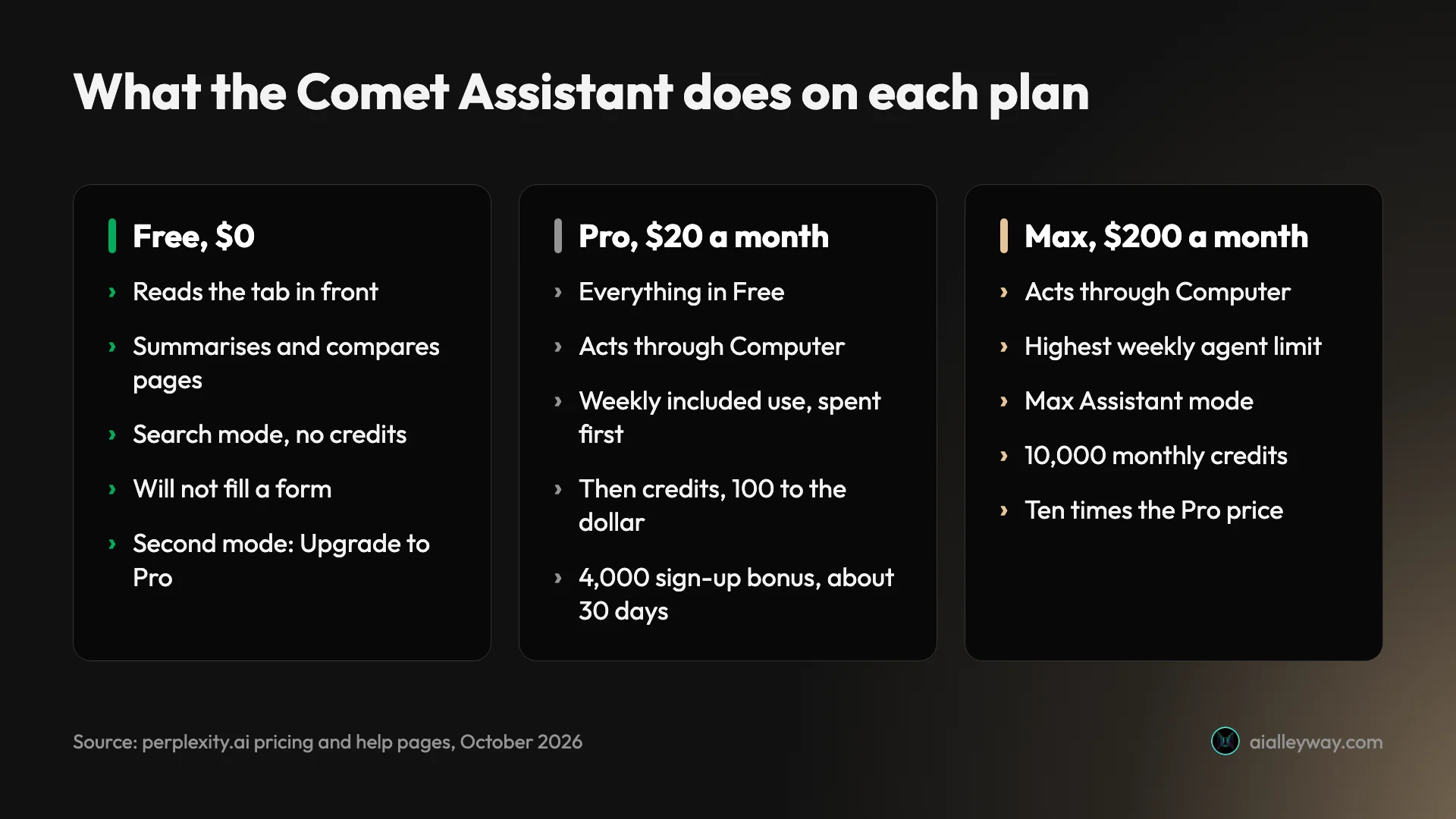
The credit system is the cost to watch. Pro includes a weekly amount of agent use that resets each week and is spent first, though without credits it runs only on Computer’s Light effort setting; beyond it, tasks spend credits.
Perplexity prices credits at 100 to the dollar and lists typical ranges, such as 350 to 950 credits for a multi-step research report, while warning that these are examples, not guarantees. You find out what your own tasks cost by running them.
Who should use Comet?
Comet suits people who already like Perplexity’s answers and want them beside every page, without changing how a browser feels. The fit is best for these people:
- Perplexity users who keep a Perplexity tab open anyway; Comet makes it the address bar and the sidebar.
- Heavy readers and researchers who summarise long articles, reports and documentation, and want a pointer to where each claim sits.
- Chrome users willing to switch, since Chromium means the same rendering, most of the same extensions, and a one-click import of bookmarks, passwords and history.
- Pro and Max subscribers who are already paying for Perplexity, for whom some agent use is included, with credits beyond that.
- Not for anyone who wants a free agent, or anyone who would let an agent loose on an email, bank or shopping account before the industry has an answer to prompt injection.
What Comet gets right
Comet’s strengths are all on the reading side, and they are real on the free plan.
Its page summaries were exact
In the summary test every figure I checked matched the article, down to the -8°C threshold and the 1-to-4 range. It also did what a quick reader often does not: it named the section and the table where the cold-weather answer lives, so I could check it in seconds.
It says what it cannot see
When I asked for a comparison of two tabs, the Assistant could see only one, and it said so in its first sentence, instead of filling the other side from its general knowledge. An assistant that admits a gap is worth more than one that covers it, because you only have to check what it tells you, not what it might have invented.
The two-tab comparison was accurate
With the second tab added, the Assistant built three tables that covered efficiency, installation and lifespan, and every figure I spot-checked matched the two Wikipedia articles: ground-source loop fields with warranties of 25 to 50 years, closed-loop systems with a heating efficiency of 3.3 or more, air-source units generally not recommended below -10°C.
It is still Chrome underneath
Comet is Chromium, so sites render as they do in Chrome and most Chrome Web Store extensions install. I ran this whole test with a Chrome extension installed in Comet, and it worked on every site except Perplexity’s own pages. The help page lists one exception: extensions that replace the new tab page. Perplexity also says Comet imports bookmarks, passwords, cookies, history and extensions from another browser in one step.
| Comet | Chrome | |
|---|---|---|
| Engine | Chromium | Chromium |
| Chrome Web Store extensions | Most, except new-tab replacements | All |
| Default search | Perplexity | |
| Ad blocking | Built in, on by default | Needs an extension |
| AI sidebar | Comet Assistant (Perplexity) | Gemini in Chrome |
| Platforms | Windows, macOS 13+, Android 12+, iOS 18+; no Linux or ChromeOS | Windows, macOS, Linux, ChromeOS, Android, iOS |
| Price | Free; the agent needs Perplexity Pro | Free |
Ads are blocked by default
Comet blocks ads out of the box, and Perplexity’s help page says the blocker uses open-source lists that are updated regularly. That puts it ahead of Chrome, where blocking means installing an extension, and it is free on every plan.
Perplexity says it keeps credentials local
By Perplexity’s account, passwords and card details are stored on your device and “never” reach the Assistant, and queries Comet classes as personal are deleted from its databases after 30 days. Before launch it hired Trail of Bits to model threats, and its BrowseSafe injection detector is open source. Those are claims, but specific ones, and they can be checked.
Where Comet falls short
Comet’s weaknesses sit around the agent: what it costs, what it can be tricked into, and how clearly Perplexity explains it.
The free plan reads but does not act
Perplexity’s posts sell Comet as a browser that does things: fill in sign-up forms, book meetings, send emails. On the free plan I could not get it to fill in a single field. The default mode refused, and the other one opened an Upgrade to Pro screen.
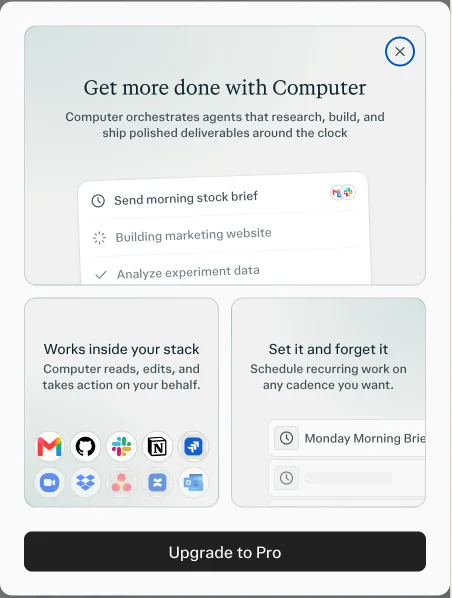
That is a fair business model, and the free browser is still useful. But anyone who downloads Comet because of an agent demo should know that the free version is a reading assistant, and the agent costs at least $17 a month.
It reads only the tab in front
By default the Assistant sees the active tab and nothing else, even when your question names other open tabs. You have to add each one with @. Perplexity’s Android post advertises summarising “across all your open tabs”, so the desktop default may surprise people who read it. It is easy once you know, but it costs a round trip the first time.
Half the comparison had no sources
In the two-tab comparison, every ground-source cell carried a Wikipedia chip, and every air-source cell carried none, though that content also came from Wikipedia. The answer was right, but a reader could not tell from the citations where half of it came from. For a product built on Perplexity’s name for citations, that is a strange gap.
Prompt injection is unsolved, by Perplexity’s own account
An agent that reads web pages can be steered by text hidden in them, and Perplexity’s October 2025 post on this says “Malicious Prompt injection remains an unsolved problem across the industry”. Security teams at Brave and LayerX have published attacks on Comet. Perplexity’s own research found its BrowseSafe detector dropped from over 90% accuracy to about 81% when a page added three harmless command-like distractions.
Perplexity’s defences are layered: classifiers, confirmation before sending messages, changing a calendar or placing an order, and a prompt the first time an agent runs. That is the right design, but it means the safety of an agent run rests partly on you reading each confirmation.
Its help pages disagree about what Free includes
Perplexity’s pricing page ticks Comet Assistant for Free. Its plan-comparison help page, updated in October 2026, says Free gets “No” Comet Assistant queries. My test sides with the pricing page for Search mode. Another help article, stamped September 2026, says there is no Comet mobile app, six months after the iOS launch, and two pages give different minimum macOS versions.
None of these is serious alone. Together they mean you cannot rely on the help centre to tell you what you are getting, which matters most when you are deciding whether to pay.
Your AI queries leave the device, even in Incognito
Comet’s privacy pages lead with local storage, but using the Assistant sends your open tab and relevant browsing history to Perplexity. Its help page says AI queries made in Incognito still reach Perplexity’s servers. And the July 2026 Privacy Notice says that with sync on, Perplexity records your browsing history, depending on your settings. None of that is hidden, but none of it is on the download page either.
Alternatives worth considering
If you have decided Comet is not the browser for you, these are where to look.
- Perplexity in the browser you already use, if what you liked was the answers. Comet’s search is Perplexity’s search, and the website gives you the same cited answers in Chrome, Safari or Firefox without switching browsers. Our Perplexity review covers what the free tier includes.
- Google AI Mode, if you want a free AI answer without installing anything. It is a tab inside Google Search, and our Google AI Mode review found its news two days fresh, though its source chips lean on write-ups.
- ChatGPT, if most of your questions end in writing something rather than reading a page. Our ChatGPT review covers what its free and paid plans include.
Final word
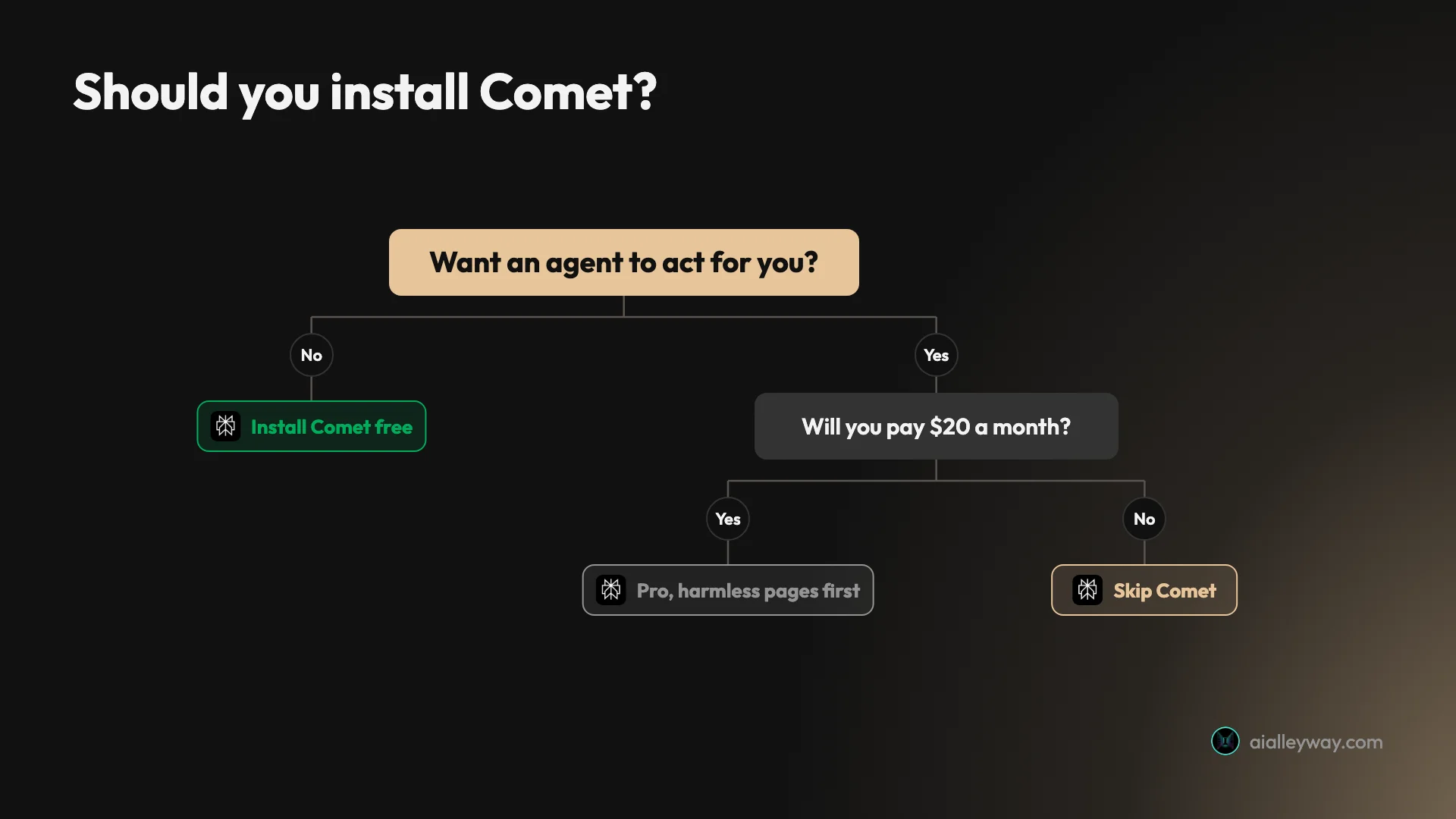
Comet on the free plan is a good Chromium browser with a careful reading assistant: in my tests it was accurate, quick, and honest about what it could not see. It is not the agent from the launch videos, because on the free plan the agent stops at an Upgrade to Pro screen, and the agent that lies behind it carries a risk Perplexity itself calls unsolved.
That makes it a 3.6, a Solid Choice for reading and research. The score covers the free browser and Assistant I tested, not the paid agent, which I did not run. Install it free for Perplexity in the sidebar, and if you pay for the agent, start it on pages where a mistake costs nothing.
Frequently asked questions
Is the Comet browser free?
Yes. Perplexity released Comet to everyone for free on 2 October 2025, and its FAQ says the free version of Perplexity will include Comet. You do not even need an account to browse; signing in adds more AI features and sync.
What Free does not include is the part that acts for you. On my free account the Assistant answered questions about the page I was on, but the mode that clicks and types opened a screen whose only button was Upgrade to Pro. Pro is $20 a month, or $17 a month billed annually, and Max is $200 a month.
Is Comet better than Chrome?
For reading, it can be. Comet is built on Chromium, the same engine as Chrome, so pages look the same and most Chrome Web Store extensions install; the extension I used for this test ran in it. It adds a built-in ad blocker that is on by default and an Assistant sidebar that summarises and compares pages.
The trade is where your questions go. Comet's default search engine is Perplexity, and its help page warns that switching to another engine removes most of the AI features in the address bar. If you live in Google's services, Chrome is the smaller change.
Is Comet safe to use?
For browsing and reading, it is a Chromium browser with the usual protections, and Perplexity says passwords and card details stay on your device and that the Assistant never has access to them. Personal queries are deleted from its databases after 30 days, by its own account.
The open question is the agent. Perplexity's October 2025 post on prompt injection, where a web page hides instructions for the AI, says the problem remains unsolved across the industry, and security researchers at Brave and LayerX have published attacks on Comet. Perplexity's answer is layered defences and confirmations before emails, calendar changes and orders. Treat any agent run on a logged-in account with care.
Can Comet read all my open tabs?
Not by default, in my test. I asked the Assistant to compare two open Wikipedia tabs, and it answered that it could see only the one in front and could not honestly compare both. Once I added the second tab with @ in the Assistant box, it built an accurate comparison of the two.
So on the desktop, treat the Assistant as reading the active tab unless you add others by name. Perplexity's Android post advertises summarising content across all your open tabs, which is a different promise from what I saw on a Mac.
Does Comet send my browsing data to Perplexity?
Some of it, when you use the AI. Perplexity's privacy FAQ says Comet data is stored on your device by default, and its October 2025 privacy post says that when you ask the Assistant something, your open tab and relevant browsing history are sent to help complete the task.
Two details are easy to miss. Incognito does not change this: the help page says AI queries made in Incognito still reach Perplexity's servers. And the July 2026 Privacy Notice says that when you sync Comet with a Perplexity account, it records your browsing history, depending on your settings.
What do I need to run Comet?
On a computer, Perplexity's current requirements page lists Windows 10 and 11, including ARM, and macOS 13 Ventura or later on Intel or Apple Silicon, with 4 GB of RAM as a minimum and 8 GB recommended, and at least 2 GB of disk. Linux and ChromeOS are not supported.
There are phone apps too: Android 12 or later since November 2025, and iOS 18 or later since March 2026. An older install page still lists macOS 11 and 500 MB, so go by the requirements page.
Keep reading
Perplexity alternatives: 7 ranked, 6 tested on one question
The best Perplexity alternatives, tested on one question with a checkable answer. ChatGPT used the newest figure; three free answers began below 2025's rate.
Perplexity vs Google: same right answers, different sources
Perplexity vs Google, tested side by side on five everyday searches: both got every answer right, so the difference is whose sources you can check.
How to use Google AI Mode, and when an AI Overview is enough
How to use Google AI Mode on desktop, phone and Chrome, tested on a free account: every way in, what the + menu does, and where the sources thin out.
Perplexity vs Gemini: one cites better, one gives more away
Perplexity vs Gemini, tested on both free tiers with the same questions: who found October's news, who got the prices right, and which free plan does more.