
Gamma AI review: 8 accurate slides in a minute, then the fixes
A hands-on Gamma AI review: an 8-slide deck in a minute with every number right, a footer bug, a chart that exports as a picture, and what Plus costs.
Contents
Is Gamma AI worth it?

Yes, as the fastest way to get from notes to a designed first draft: Gamma AI turned my brief into an eight-slide deck in about a minute on a free account, with every one of the nine facts exactly as written. It also shipped a broken footer, a stray box and a list where a chart belonged, which one message to its agent fixed. Use the free plan for first drafts, and pay for Plus at $9 a month, billed yearly, once the Made with Gamma badge on exports starts to matter.
What does Gamma do?
Gamma, also known as Gamma AI or the Gamma app, is an AI presentation maker. You describe what you need, paste in notes or import a file, and it produces a designed presentation, document, website or social post, with layouts, a colour theme and images already in place. Gamma says more than 100 million people have used it.
The way you make that request changed in October 2026. Gamma 5, launched on 6 October 2026, is the release Gamma calls “the biggest product overhaul in our company’s history”, and it puts an agent in charge. You now start with a conversation: by default the agent proposes a plan, waits for you to approve it, then builds the deck. Express mode skips the plan, and Research mode pulls web sources first. The older one-shot generator is still there under “Use classic generator”.
Effort levels, models and formats
Next to the prompt box sits an effort setting with three levels, Lite, Standard and Max. Gamma’s help centre says Max uses “our strongest models”, so it spends more credits and takes longer, and that deeper research is for Pro plans and above. I left it on Lite, the default, to see what a free user gets without touching anything.
| Setting | Options | What changes |
|---|---|---|
| Agent mode | Plan (default), Express, Research | Plan shows an outline for approval; Express goes straight to a draft; Research pulls web sources first |
| Effort | Lite (default), Standard, Max | Higher effort uses stronger models, more credits and more time |
| Generator | Agent, or “Use classic generator” | The classic route offers Generate, Paste and Import in one step |
Gamma does not build its own language model. Its pricing page names Claude, ChatGPT with DALL-E and Gemini for text and images, plus image models from Flux, Recraft, Playground, Ideogram, Luma and Leonardo. Image models come in tiers, basic, advanced, premium and ultra, and the plan you pay for decides which tiers you can use.
Presentations are the headline, but the same prompt box makes documents, websites and social posts. Websites can be published on custom domains on Pro, with analytics. Social posts come out at each platform’s size. Imagine, a design canvas for infographics, posters, logos and diagrams, is on every plan except Business and Enterprise. Studio mode, on Pro and above, renders each slide as one AI image with the text baked in, which looks striking but is hard to edit. Developers can use Gamma’s API, generally available since 5 November 2025.
My test: one brief, nine facts
To see whether a Gamma AI presentation keeps facts straight, I gave it a brief I could check line by line: an eight-slide quarterly review for a small bike-repair shop, to be shown to two staff and a bank manager. It contained nine facts, from revenue of $48,200 to an average repair ticket of $152 and a reopening date of Monday, November 9, and ended with an instruction: “Do not invent any other numbers.”
I ran it on a free account on 25 October 2026, with the effort setting left at its default of Lite. I did not test any paid plan, so everything below is what a free user gets. The agent replied with a one-line approach, then an outline of eight slide cards, each with its headline and points, a suggested theme called Quay Circuit, and AI images as the picture source.
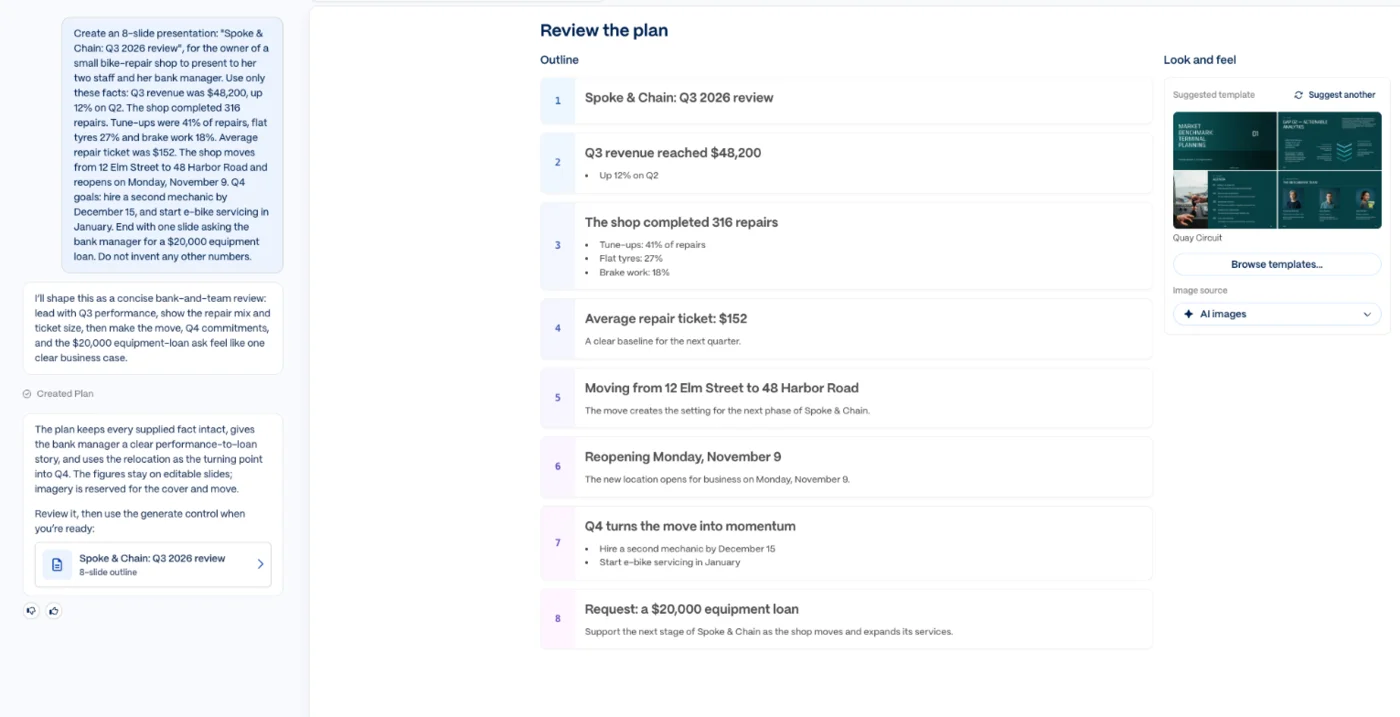
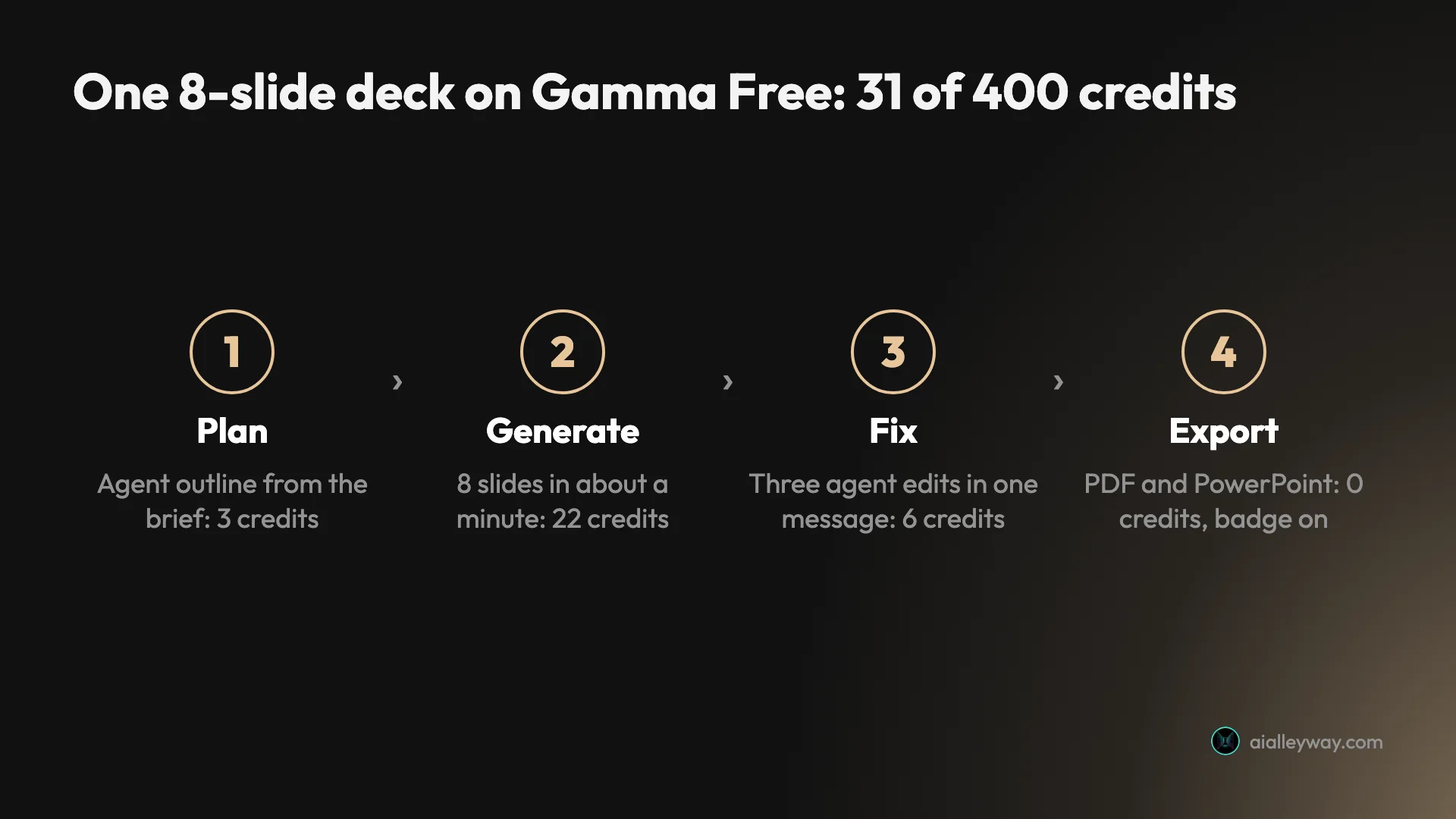
Every number in the outline was right. The plan cost 3 credits, and the deck itself 22 more. I pressed Generate at 12:01, and about a minute later the agent reported: “Your Q3 review is ready.” While it works, a prompt offers to notify you when the task finishes, so you can leave a longer deck running in the background.
What came out
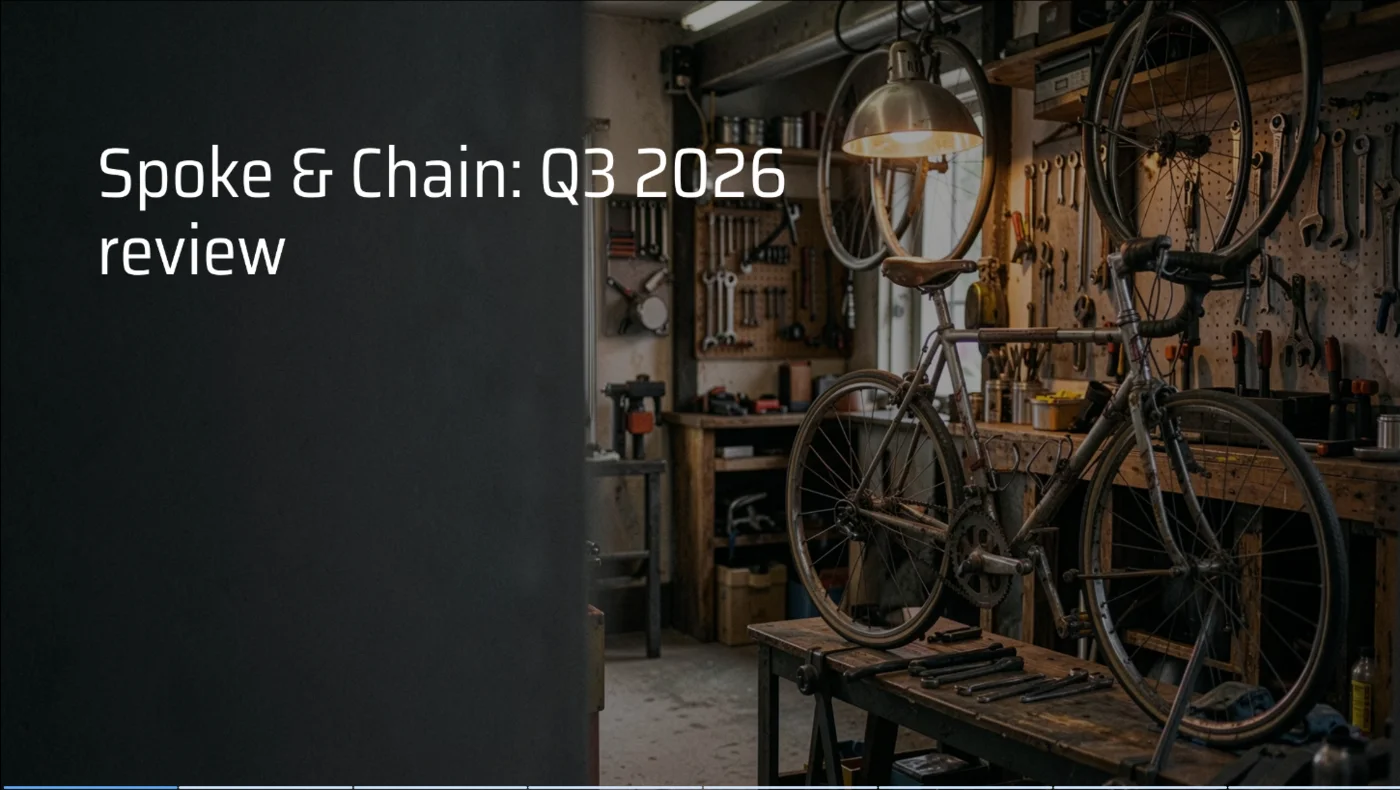
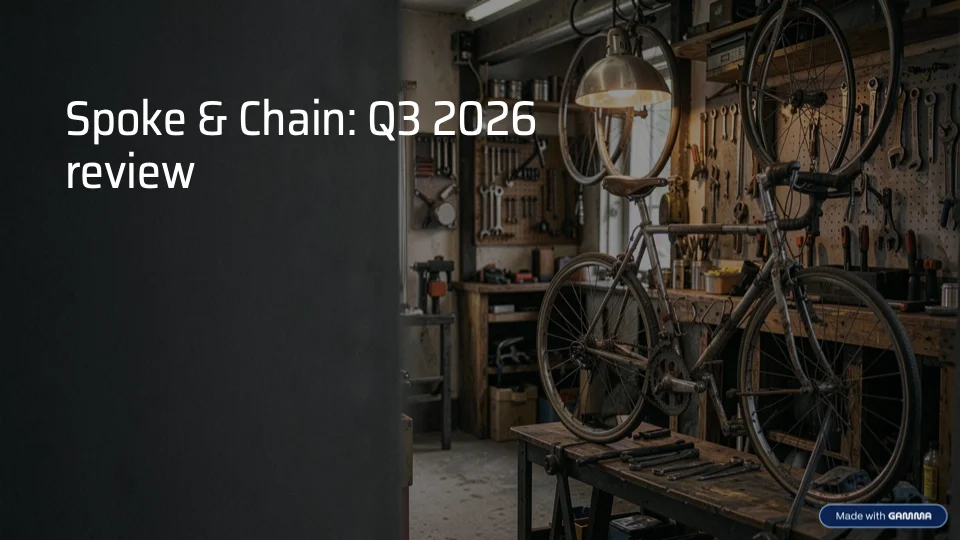
The deck looked like a deck. A dark teal theme ran through all eight slides, the cover had a moody AI photo of a bike workshop, and the slide about the move had a sunny AI picture of a brick shopfront by a harbour. The big numbers, $48,200, $152 and $20,000, each got their own large type.
The accuracy held. All nine facts appeared exactly as written, and no new figures crept in. That matters more than the design, because a wrong number on a slide shown to a bank manager is worse than a plain slide.
What also crept in was filler. “A clear baseline for the next quarter”, “The move creates the setting for the next phase of Spoke & Chain” and “Support the next stage of Spoke & Chain as the shop moves and expands its services” are sentences that say nothing, written to fill space under a headline.
What needed fixing
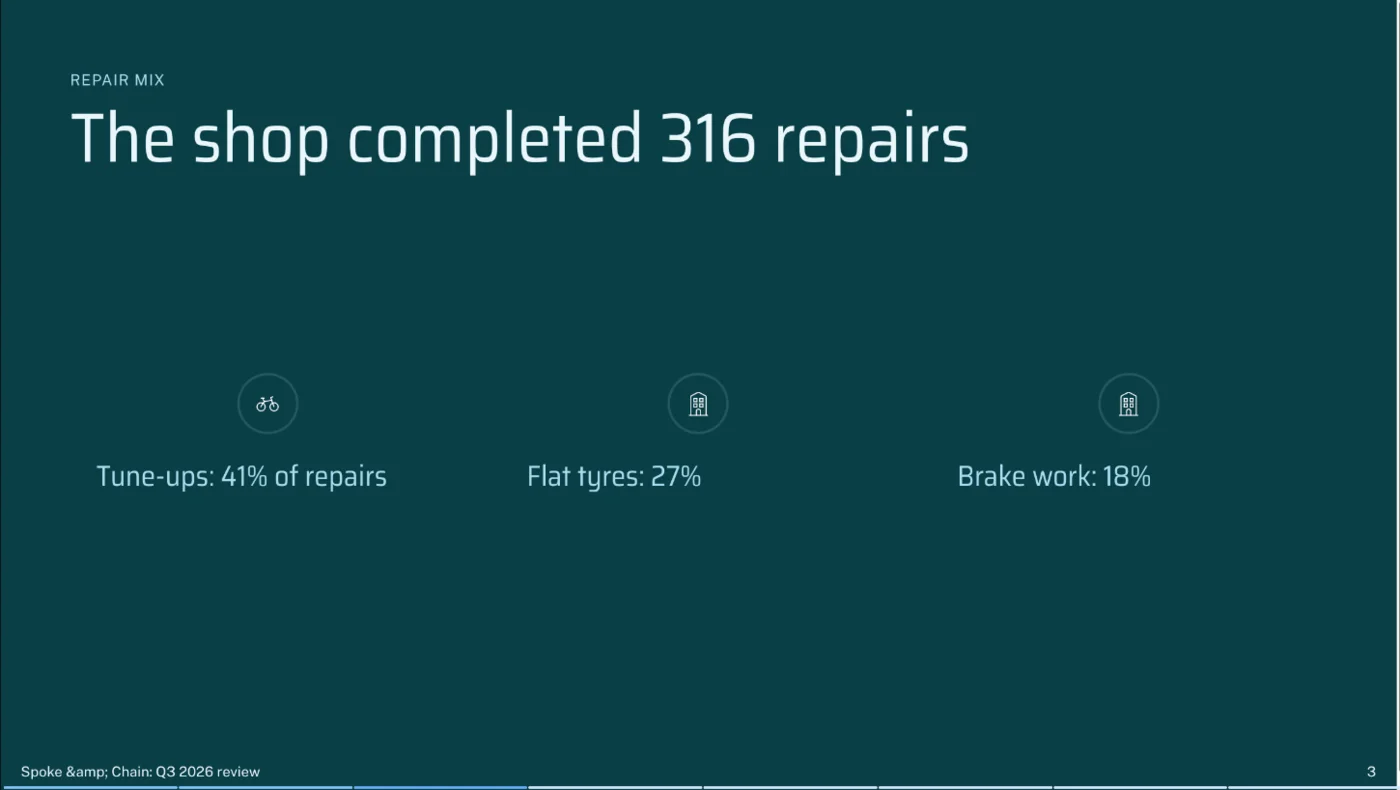
Then the details. The footer on every slide after the cover read “Spoke & Chain: Q3 2026 review”, a web-code version of the ampersand printed as text. Slide 2 had a rounded box containing only the number 1, sitting beside “Up 12% on Q2”. The repair mix, which is three percentages and an obvious chart, came out as three lines of text under small icons: a bicycle for tune-ups and an office building for both flat tyres and brake work.
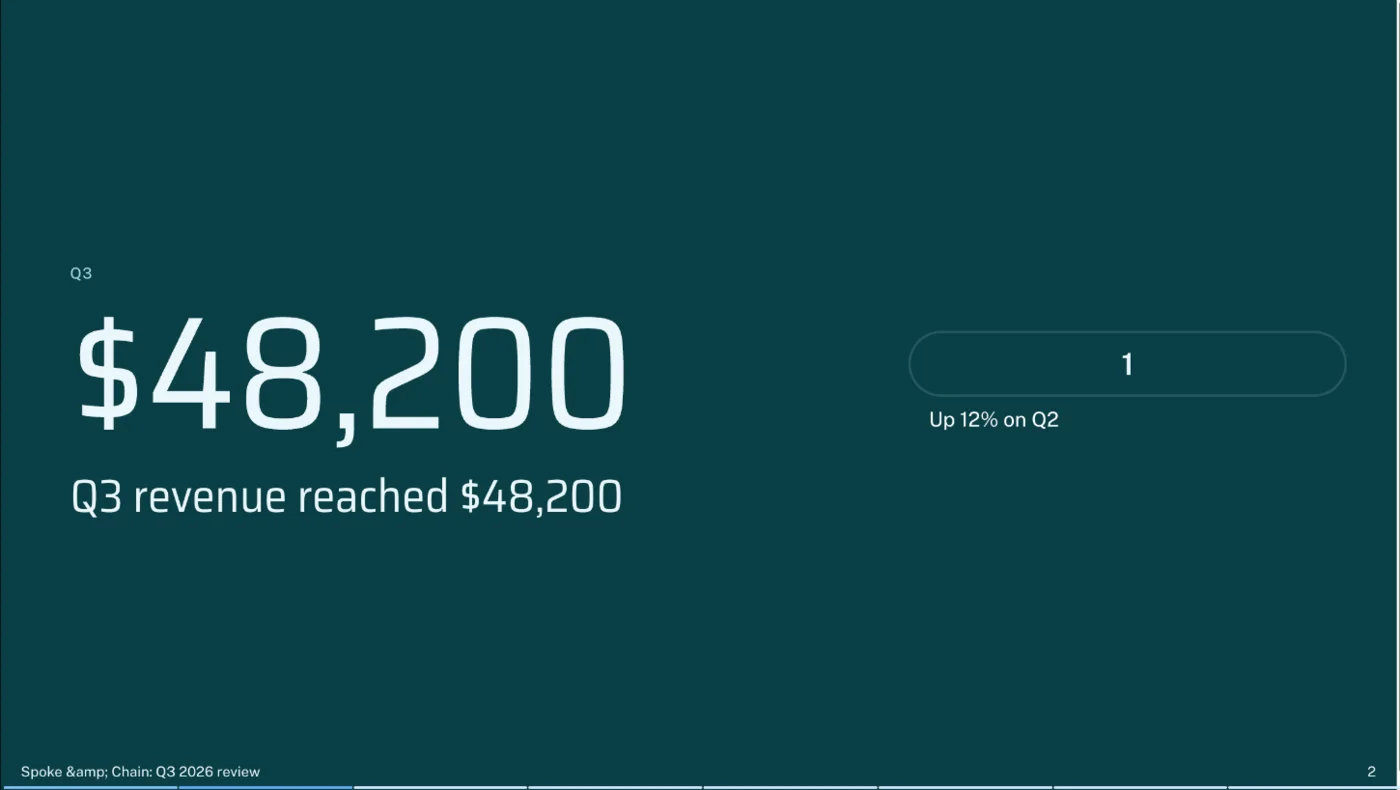
Two smaller things: slide 5 set dark body text over a bright sky, which is hard to read on a projector, and the big numbers were repeated word for word in the headline next to them, so “$152” sat above “Average repair ticket: $152”.

Fixing it with the agent
I sent the agent one message with three numbered fixes and the instruction to change nothing else. It answered “I’m making exactly those three changes”, and a little later listed what it had done, in its words: “Footer corrected to ‘Spoke & Chain’ on every slide”, the stray 1 removed, and the repair mix turned into a bar chart. It also warned me that the chart’s labels were “slightly tight at the current size and worth a quick visual glance”, which was true.
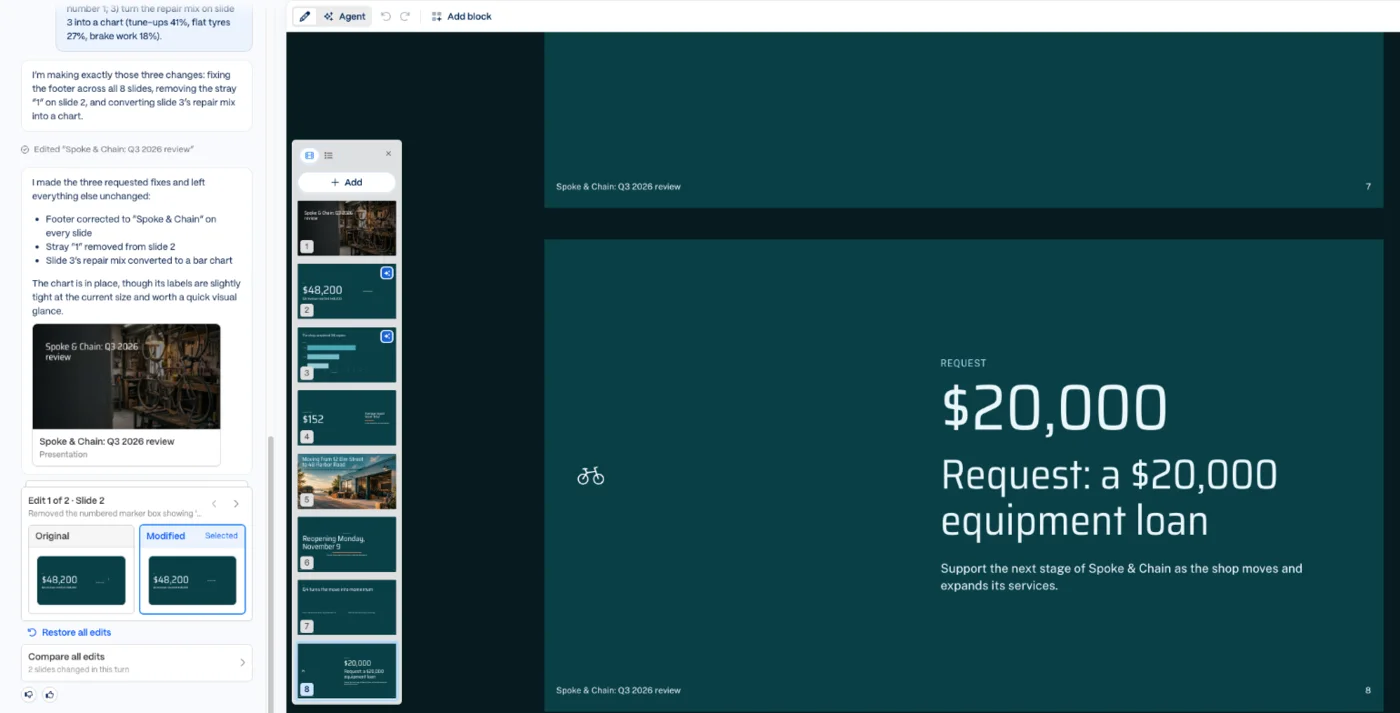
This is the best part of Gamma 5. The panel showed each edit as an original and modified thumbnail, with buttons to compare or restore all edits, so I could check that nothing else had moved. Nothing had. The edit cost 6 credits.
One quirk: the panel reported “2 slides changed in this turn”, although the footer fix appeared on all seven slides that have a footer. The footer is a deck-wide setting rather than slide content, so the compare view does not count it. If you ask for a deck-wide change, check a few slides yourself rather than trusting the count.
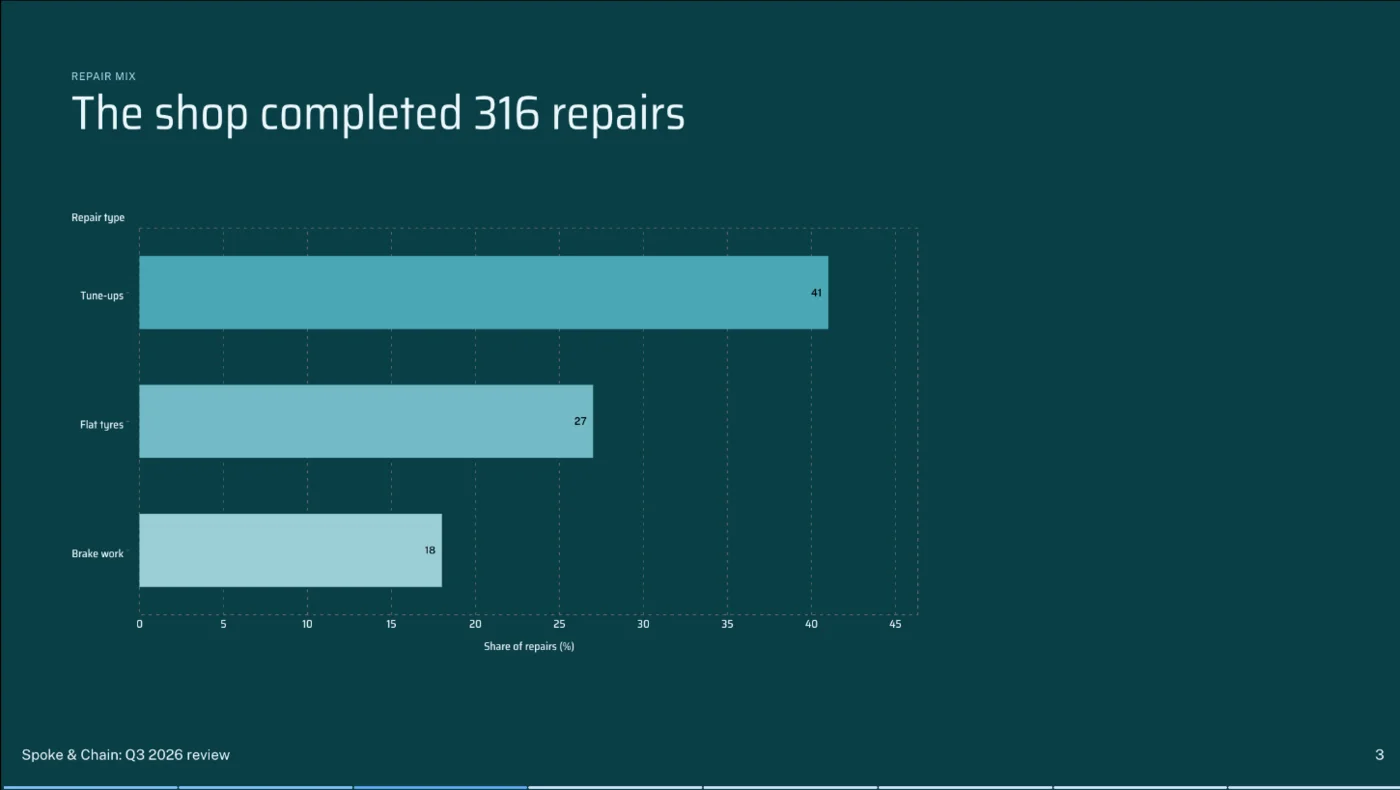
The chart itself is basic: small labels, and it fills only two thirds of the slide. In the editor view its axis overlapped the slide footer, although the presentation view drew it cleanly.
Exporting to PDF and PowerPoint
Gamma exports to PDF, PowerPoint, Google Slides and PNG images on every plan, at three quality levels, and can post a deck straight to LinkedIn. The export panel also lists the theme fonts to install for PowerPoint, Public Sans and Saira Semi Condensed in my case, and warns that gradient text and frosted backgrounds may fall back to simpler styles.
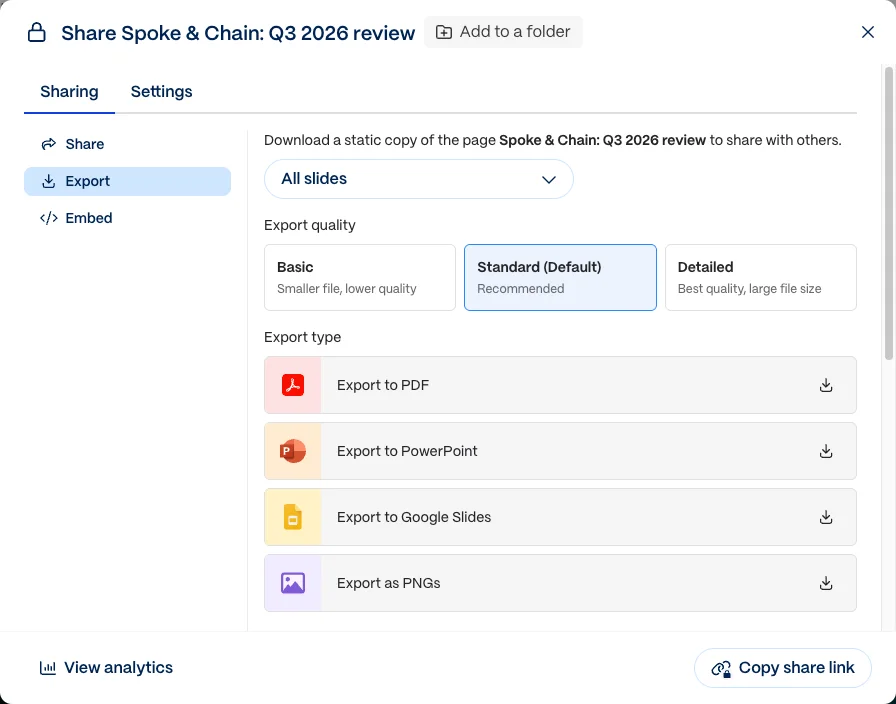
I exported both, which cost no credits, and opened the PowerPoint file’s contents. The text was all in ordinary, editable text boxes, and both theme fonts were embedded in the file. The bar chart was a picture: a 2,946-pixel-wide image, not a PowerPoint chart, so changing a number means remaking it.
The free plan’s badge is in both files. All eight PDF pages carry it, and on the cover it sits in the bottom-right corner. In the PowerPoint file it is placed on the slide layouts rather than the slides, linked back to Gamma’s homepage, and every one of my eight slides used one of those layouts. Someone who clicks a slide to delete the badge will not find it there.
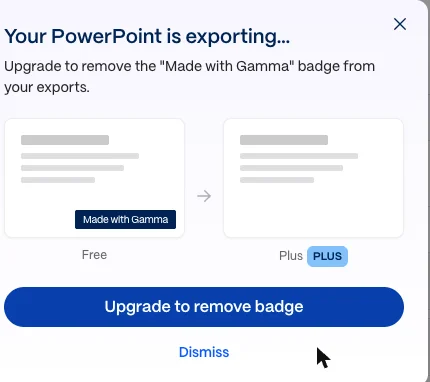
While the PowerPoint file downloaded, Gamma opened a window headed “Your PowerPoint is exporting…” with a button to upgrade and remove the badge. I closed it.
Or share a link instead
You do not have to export at all. My workspace settings let members share a deck with the whole workspace, invite guests to a single deck, or make it viewable by anyone with the link, including people who are not logged in. Link sharing also covers password-protected links, embeds and social sharing, and each of these can be switched off in the workspace settings.
For a deck you will present yourself, a link avoids the font question and the chart-as-picture problem; on the free plan the shared page still carries the Gamma badge, which Gamma says only paid plans remove. Gamma’s help centre also says printing a deck from your own editor, while signed in, with the browser’s Print command never adds the badge, on any plan.
How much does Gamma cost?
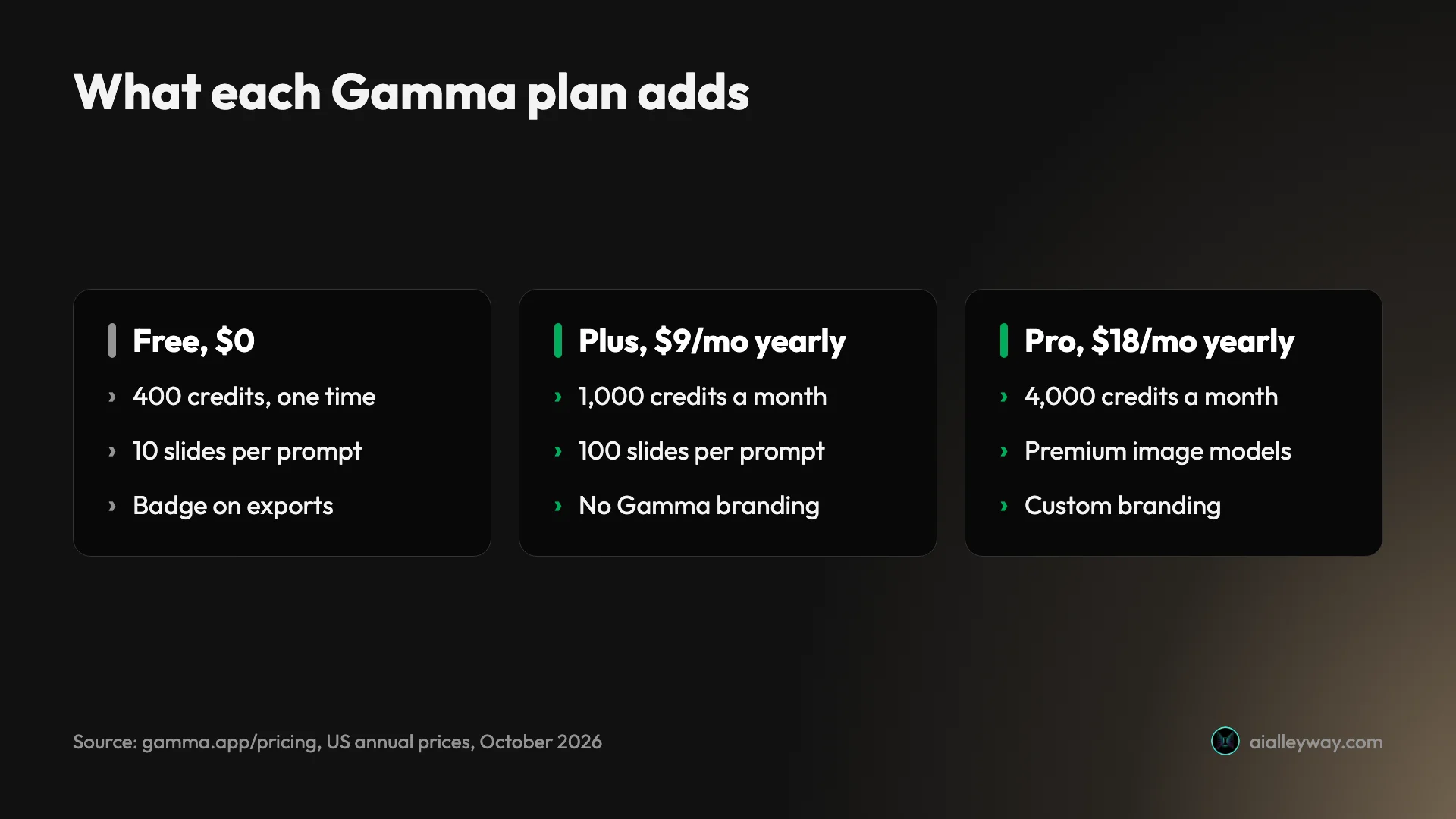
Gamma has a free plan and five paid tiers, priced per seat or per member. Its US pricing page loads on yearly billing, and these are the yearly prices; paying month to month costs more, and Gamma says yearly billing saves up to 28%.
| Plan | Price (US, billed yearly) | Credits | What it adds |
|---|---|---|---|
| Free | $0 | 400 once, at signup | Up to 10 slides per prompt; PDF, PPTX, PNG and Google Slides export with a badge |
| Plus | $9 per seat a month ($108 a year) | 1,000 a month | Up to 100 slides per prompt, no Gamma branding, advanced image models |
| Pro | $18 per seat a month ($216 a year) | 4,000 a month | Premium image models, custom branding, analytics, up to 10 custom domains |
| Ultra | $90 per seat a month ($1,080 a year) | 20,000 a month | The most advanced text, image and video models, up to 100 custom domains |
| Business | $40 per member a month, yearly only | 10,000 per seat plus a shared pool | SSO, shared workspace credits, training always off |
| Enterprise | Custom | Custom | Sold through sales |
How credits work
Credits are the part to understand before you rely on the free plan. Gamma does not publish a fixed price per deck: its help centre says creation is metered per slide and per image, and that you see an image model’s credit cost before you generate. Failed actions are free. My deck, its plan and one round of edits came to 31 credits, so 400 covers a dozen or so similar decks and then stops, because free credits never refill. Our Gamma pricing guide measures what each action costs, from a Lite deck to a set of AI images.
Which plan to pick
Stay on Free while you are deciding whether Gamma’s style suits you, and count your credits as you go. Move to Plus when decks start going to clients or managers, because that is where the badge comes off and the 10-slide cap rises to 100. Pro makes sense if you publish Gamma pages as websites or need your own branding and analytics. Business is the plan for teams that handle confidential material, because it is the cheapest one where training on your content is switched off for good.
Credit top-ups and rollover
Paid plans add monthly credits that roll over up to double the plan’s allowance, and top-ups cost $6 for 1,500 credits. Free users cannot buy top-ups. Gamma’s help centre, updated on 20 October, says creating decks is metered per slide and per image and that editing with the agent also uses credits, so heavy users on Plus should watch the 1,000-credit monthly allowance.
Refunds and renewals
Gamma’s refund window is short. Its help centre says refunds are only possible within three days of subscribing, monthly or yearly, by contacting support, and only if you have used fewer than a set number of credits: 200 on Plus, 600 on Pro, 1,000 on Business and 2,000 on Ultra. After three days there are no refunds except where the law requires them. If you cancel, you keep access until the end of the period, then drop to Free.
Who is Gamma for?
Gamma suits anyone who needs a decent-looking deck from a brief or a set of notes, and does not want to start from a blank PowerPoint file.
- Founders, consultants and small-business owners pitching to a bank, a client or a team. My test was exactly that kind of deck, and the content was right first time.
- Teachers and trainers who turn the same material into slides, documents and web pages. Gamma makes all three formats from the same kind of prompt.
- Marketers who need a quick web page or social post in a house style. Pro adds custom domains and analytics for published pages.
- Teams with sensitive material, but only on Business or Enterprise, where training on your content is always off.
It suits less well people who need pixel-level control, a company PowerPoint template with a slide master, or charts they will keep editing in PowerPoint. Those are the places where my export needed work.
Skip it, too, if your audience sees a lot of AI decks. Gamma’s themes are distinctive, which is part of the appeal, and a July 2026 thread on r/powerpoint complained that its decks are “recognised by everyone from a mile away”. Choosing a less common theme and replacing the generated photos with your own goes a long way.
How to get a better first draft
My test suggests a few habits that make Gamma’s first pass closer to finished.
- Put every fact in the brief. Numbers, dates, names and the ask. Gamma kept all nine of mine; it can only keep what you give it.
- Tell it not to invent. “Do not invent any other numbers” is one sentence, and the agent repeated the promise back in its plan.
- Read the outline before you generate. The plan costs a few credits and shows the structure of every slide. Fixing a slide there is cheaper than fixing it afterwards.
- Batch your fixes. One numbered message fixed three problems for 6 credits, and the compare view made checking them quick.
- Check the footer and the filler. That is where my deck’s mistakes were, and neither shows up at a glance.
- Export early. Open the PowerPoint file before the meeting, not during it, so a chart that turned into a picture is not a surprise.
The good
It kept every fact
The most important result in my test is the least visible one. Nine facts went in, and nine facts came out exactly as written, through the plan and the finished deck, with no invented figures. For a deck going to a bank manager, that matters more than any layout.
Plan first, then build
Gamma 5’s default flow shows you an outline before spending most of the credits. My plan cost 3 credits and the deck 22, so a wrong structure is cheap to catch. You can merge outline cards before pressing Generate, or skip the step with Express mode.
The agent fixes precisely, and shows its work
One message fixed three different problems and touched nothing else. The panel then showed each change as an original and a modified version, with buttons to compare and restore. I have not seen a clearer way for an AI tool to hand you an edit, and it made checking the change faster than making it by hand.
Fast, and designed by default
About a minute from Generate to a finished eight-slide deck, with a consistent theme, two generated photos and big-number layouts for the key figures. Even with its flaws, it was a better starting point than a blank presentation.
It points out its own weak spots
Gamma was candid about its own output. The agent told me unprompted that the new chart’s labels were tight and “worth a quick visual glance”. The export panel listed the fonts to install and warned which visual effects would not survive. Neither replaces checking, but both point you to the right place.
Editable PowerPoint export, even on Free
Every plan exports to PowerPoint, the text stays editable, and Gamma embeds its theme fonts in the file. Gamma’s export notes say Google Slides ignores embedded fonts, so install them if you finish there.
| In my PowerPoint export | Result |
|---|---|
| Headlines, numbers and body text | Editable text boxes |
| Theme fonts | Embedded in the file |
| AI photos | 3,840 by 2,160 pixel images on the slide backgrounds |
| The agent’s bar chart | A flat picture, not an editable chart |
| Made with Gamma badge | On every slide’s layout, linked to Gamma |
| Slide master | None, per Gamma’s export notes |
It connects to where your notes live
Gamma 5 can import PowerPoint and Word files up to 200 MB and PDFs up to 100 MB, and Gamma says PowerPoint and PDF imports keep their original design. My workspace settings listed 29 built-in connectors, from Slack, Notion and HubSpot to the meeting note takers Granola and Fireflies, plus custom connectors for your own MCP servers.
The bad
Polish bugs on a fresh deck
A literal “&” in the footer of seven of eight slides, a box containing only the number 1, office-building icons for brake work, dark text over a bright photo. None of it was hard to fix, but all of it would have been embarrassing in front of a bank manager, and none of it should need a second prompt.
Filler sentences
Gamma pads headlines with lines that state nothing, such as “A clear baseline for the next quarter”. They are easy to miss and easy to read as claims. Delete them or replace them with something true.
Free credits never refill
400 credits sounds generous until you notice they are one-off. My test used 31, so the free plan is a trial measured in decks rather than days. A Reddit user in an October 2026 thread said they “burned the free 400 credits in about three weeks”.
Charts and branding in exports
The chart Gamma made exported to PowerPoint as a picture, so its numbers cannot be edited there. The Made with Gamma badge is on every exported slide until you pay, placed on the layouts where it is hard to find. Gamma’s own notes add that there is no slide master in the PowerPoint file, which matters if your company has a template.
Your content trains its AI by default
Gamma’s help centre says content from Free, Plus, Pro and Ultra accounts can be used to train AI models unless you opt out under Data Controls. Training is only always off on Business, Enterprise and Teams plans. Turn it off before you put client figures into a personal account.
A short refund window and unhappy customers
Three days, with a credit limit, is a tight refund policy for a yearly plan. Gamma’s Trustpilot page scored 1.6 from 127 reviews when I checked, with complaints focused on billing, renewals and support; the profile is unclaimed and includes at least one review about a different company with the same name. Its iPhone app, by contrast, rates 4.8 from about 1,100 ratings on Apple’s US App Store.
Not everyone wants the agent
Gamma 5’s agent-first flow has its critics. One user in a GammaApp thread complained that “Gamma 5 forces me to chat with an AI agent instead.” The classic generator is still available, but it is one click further away.
Alternatives worth considering
If Gamma is not the right fit, these are the three I would look at first.
- Beautiful.ai is the closer rival for business decks. It sells itself as presentation software for teams, built around Smart Slides that, in its words, adapt “layouts, spacing, fonts, and colors automatically”. It suits teams that care more about consistent layouts than about generating from a prompt. Our Gamma vs Beautiful.ai comparison runs both on the same brief.
- Canva suits people who already design in it. Its presentation tools sit inside the same editor as everything else, with a huge template library. Our Canva review covers the editor and its AI tools.
- ChatGPT can now build the deck itself: given the same brief, its free plan returned an eight-slide PowerPoint file with every fact intact, then hit a limit before I could revise it. Our ChatGPT PowerPoint guide has that test, and our ChatGPT review covers what its free and paid plans include.
For more options, including Pitch, Plus AI and Copilot in PowerPoint, see our Gamma alternatives roundup.
Final word
Gamma is the quickest way I know to turn a brief into a deck you can work with: it was accurate where it counted, fast, and its agent fixed its own mistakes cleanly when asked. It stays our best pick for presentations; the 4.2 is for the polish bugs, the chart that exports as a picture and the one-time free credits, not for a rival doing the job better. Treat what it makes as a strong first draft, not a finished file. Check the footer, cut the filler, keep the charts you need to edit outside it, and pay for Plus only when the badge starts to matter.
Frequently asked questions
Is Gamma AI free?
Yes, with a one-time allowance. A free account gets 400 credits at signup, and they do not refill each month. In my test a full eight-slide deck, including the agent's plan and one round of fixes, used 31 of those credits, so the free plan covers a dozen or so decks before it runs dry.
The free plan also caps generation at 10 slides per prompt and puts a Made with Gamma badge on PDF and PowerPoint exports. Free users cannot buy extra credits; Gamma's help centre says top-ups of 1,500 credits for $6 are for paid plans only. You can earn 200 credits for each person you refer, up to a cap of 2,000 credits held at once.
How much does Gamma cost?
On Gamma's US pricing page, which loads on yearly billing, Plus costs $9 per seat a month ($108 a year), Pro $18 ($216 a year) and Ultra $90 ($1,080 a year). Business costs $40 per member a month and is sold yearly only, and Enterprise is priced on request. Paying month to month costs more; Gamma says yearly billing saves up to 28%.
The plans differ mainly in credits and features. Plus gives 1,000 credits a month, removes the Gamma branding and allows up to 100 slides per prompt. Pro gives 4,000 credits plus premium image models, custom branding, analytics and custom domains. Ultra gives 20,000 credits and the most advanced models. Refunds are only available within three days of subscribing, and only if you have used few credits.
Does Gamma export to PowerPoint?
Yes, on every plan including Free. I exported my test deck and opened the file's contents: all the text arrived in normal, editable text boxes, and Gamma embedded its two theme fonts, Public Sans and Saira Semi Condensed, in the file. Its export panel still suggests installing those fonts on your computer, which is worth doing.
Two things did not survive as well. A bar chart the agent had added came through as a flat picture, so you cannot edit its numbers in PowerPoint, and the Made with Gamma badge sat on the slide layouts used by every slide, which only paid plans remove. Gamma's own export notes add that there is no slide master, that gradient and frosted effects fall back to simpler styles, and that Google Slides ignores the embedded fonts. If your company has a PowerPoint template, plan to rebuild the deck in it rather than drop Gamma's slides in.
Does Gamma make up numbers?
It did not in my test. I gave it a brief with nine specific facts, including revenue of $48,200, 316 repairs and an average ticket of $152, and told it not to invent any other numbers. The agent's plan and the finished deck both kept every figure and date exactly as written.
What it did add was filler. Slides came with lines such as 'A clear baseline for the next quarter' and 'The move creates the setting for the next phase', which state no fact but read as padding. Check those lines as carefully as the numbers, because a vague sentence on a slide for a bank manager can sound like a claim you did not mean to make.
Does Gamma use my content to train its AI?
By default, yes, on individual plans. Gamma's help centre says data from Free, Plus, Pro and Ultra accounts is allowed to be used to train AI models, and that you can opt out at any time in Settings under Data Controls.
On Business, Enterprise and Teams plans, training is always off and the setting is locked. Gamma also says it does not sell personal information and holds a SOC 2 Type II report. If you put client or financial details into decks on a personal plan, turn the setting off before you start.
The same control has reached Gamma's iPhone app: its July 2026 release notes, for version 1.0.4, add a privacy setting to control whether your content is used to improve Gamma's AI. If you make decks on your phone as well as the web, check the setting in the app too.
Is Gamma better than PowerPoint?
For a first draft, yes. Gamma turned a short brief into a designed eight-slide deck in about a minute, with layouts, a colour theme and two generated photos, which would take far longer by hand in PowerPoint.
For control, PowerPoint still wins. Gamma's layouts are its own, its export has no slide master, and fine adjustments are easier in PowerPoint once the structure exists. A common way to use both is to draft the story and slides in Gamma, export to PowerPoint, and finish the details there.
Keep reading
Gamma vs Beautiful.ai: one kept my facts, one looked better
Gamma vs Beautiful.ai, tested with the same nine-fact brief: which kept the numbers, which made the better-looking deck, which costs less, which trains on you.
Beautiful.ai review: polished slides, invented numbers
A hands-on Beautiful.ai review: eight Smart Slides in 30 seconds, then a made-up revenue bar, a Steve Jobs quote and a misplaced address. Prices and verdict.

Best AI Design Tools: 8 Picks, 5 Tested, Sorted by the Job
The best AI design tools by job: Canva for layouts, ChatGPT for images with exact text, Lovable for working apps. Five tested, three read, each one labelled.
Canva Review: Great Editor, but the AI Runs on a Meter
A Canva review from a Pro trial: nine hands-on tests, exact US prices, and six AI requests that used 56% of the trial's allowance. Plus what the trial hides.
Gamma pricing: $9 a month, and what the credits really buy
Gamma pricing in October 2026: Free, Plus $9, Pro $18, Ultra $90 and Business $40 a month billed yearly, plus what a deck costs in credits on my account.
Gamma alternatives: 7 worth trying, and the one that's dead
The best Gamma alternatives, two run against Gamma on one nine-fact deck: Beautiful.ai invented numbers, ChatGPT kept them. Prices, free plans and when to stay.

ChatGPT PowerPoint: it made my deck free, then locked me out
Can ChatGPT make a PowerPoint? My free account got an 8-slide .pptx in a minute, then hit a limit. The add-in, ChatGPT Slides and Copilot, compared.