
Gamma alternatives: 7 worth trying, and the one that's dead
The best Gamma alternatives, two run against Gamma on one nine-fact deck: Beautiful.ai invented numbers, ChatGPT kept them. Prices, free plans and when to stay.
Contents
What is the best Gamma alternative?
Most people leave Gamma for one of three reasons: the free credits run out and never refill, the designs all start to look like Gamma, or the deck has to live in PowerPoint or Google Slides. The right alternative depends on which of those pushed you.
- Best for polished slides: Beautiful.ai, with unlimited AI on paid plans, but it invented numbers in my test.
- Best free option: Canva, with up to 20 AI uses a month on the free plan.
- Best for a quick PowerPoint file: ChatGPT, which built an accurate eight-slide .pptx on its free plan.
- Best if you already pay for Microsoft 365: Copilot in PowerPoint.
- Best inside Google Slides: Plus AI. Best for teams: Pitch. Closest to Gamma, with a free plan: Presentations.AI.
I ran two of these tools, Beautiful.ai and ChatGPT, plus Gamma itself, on the same brief, so the accuracy claims below are measured, not assumed. The rest come from each vendor’s own pricing and help pages, and I say so in each section.
How I picked these Gamma alternatives
Every tool here had to do the thing Gamma does: take a prompt or some notes and return a whole deck, not just a slide or a picture. That rules out tools that make diagrams or visuals rather than presentations, and it rules out one tool that most other lists still recommend, because it no longer exists.
The same brief, three tools
For our presentation reviews I wrote one brief and ran it through each tool: an eight-slide Q3 review for a small bike-repair shop called Spoke & Chain, with nine facts and the line “Do not invent any other numbers.” It is a deliberately ordinary job, the kind of deck a small business owner actually needs, and it has one hard test built in: whether the tool keeps the facts.
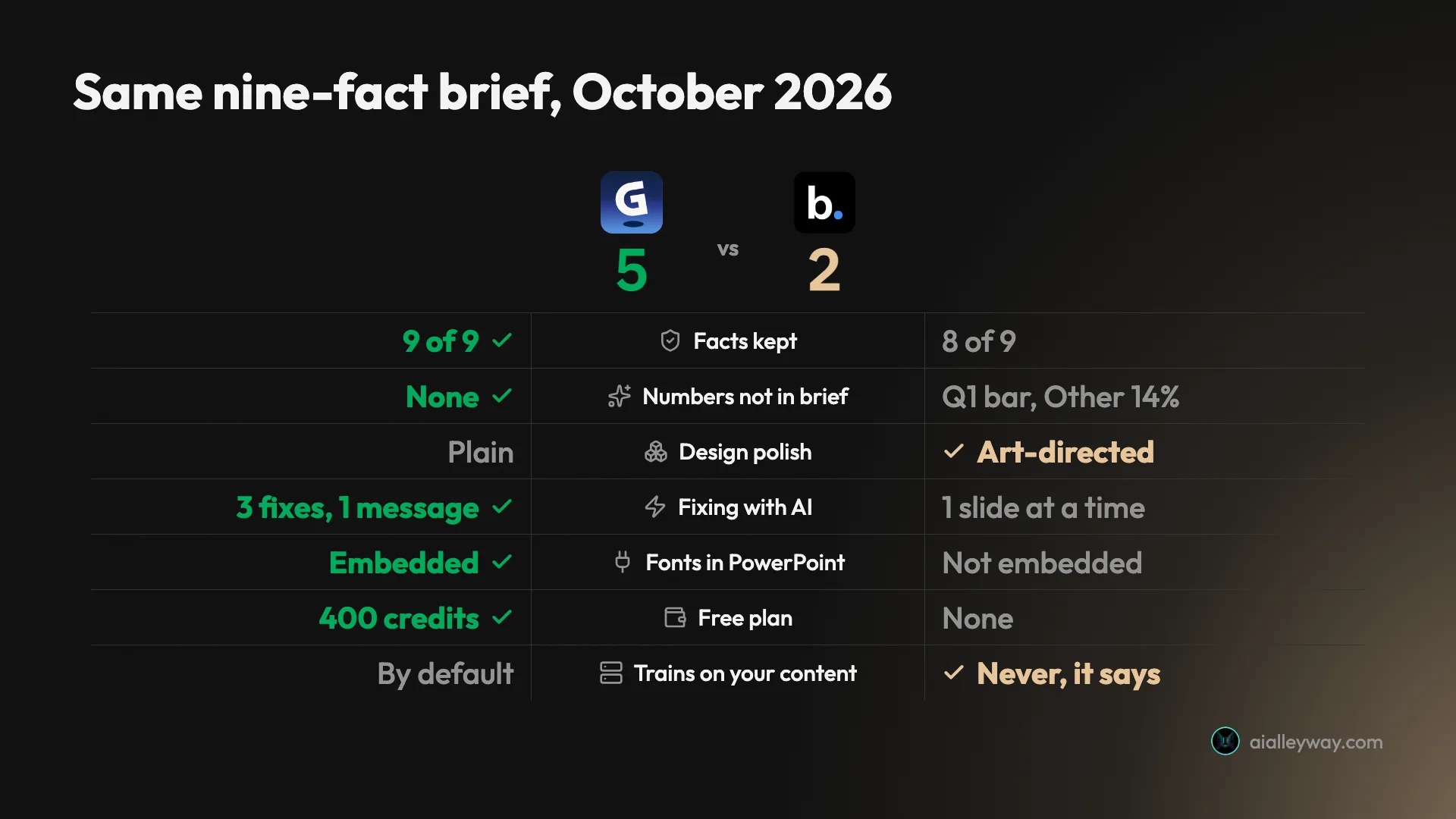
Gamma kept all nine facts and invented nothing. ChatGPT’s free plan kept all nine too. Beautiful.ai kept eight, then added a revenue bar for a quarter I never mentioned, an “Other 14%” bar, a Steve Jobs quote and a purpose for the loan. Canva was next in line, but its AI allowance on my trial had already run out, so its section draws on our earlier Canva tests rather than this brief.
What a Gamma alternative has to beat
Gamma sets a fair bar. On its free plan it turned the brief into a designed eight-slide deck in about a minute, and its PowerPoint export kept the text editable and embedded the fonts. The deck, its plan and one round of fixes used 31 of the 400 free credits.
Its weak spots are the reasons to look elsewhere. Those 400 credits never refill, free exports carry a Made with Gamma badge, a chart in my deck exported to PowerPoint as a flat picture, and Gamma’s help centre says data from individual plans can be used to train its models unless you opt out. Paid Plus costs $9 a month billed yearly, so most alternatives have to beat that price as well as the product. For the full picture, see our Gamma review.
The one that’s gone
Tome still turns up in lists of Gamma alternatives, and you should skip it. Tome’s own help article announced that “Tome Slides is Sunsetting on April 30th, 2025”, that users would not be able to sign in after that date, and that all files would be deleted. When I checked its domain in October 2026, it returned an error rather than a product. Any guide that still recommends Tome hasn’t been checked in at least 18 months.
Gamma alternatives compared
| Tool | Free plan | Cheapest paid, yearly | Exports | Tested on our brief |
|---|---|---|---|---|
| Beautiful.ai | No, card-required trial | $14.50 a month ($174) | PowerPoint, PDF | Yes: polished, but added a revenue bar, a quote and a loan purpose |
| Canva | Yes, up to 20 AI uses a month | $12 a month billed yearly ($144) | PowerPoint, PDF and more | No; earlier Canva AI tests only |
| ChatGPT | Yes | No yearly plan; Plus $20 a month | PowerPoint file | Yes: accurate, one deck a day on free |
| Copilot in PowerPoint | No | Microsoft 365 Personal $99.99 | It is PowerPoint | No |
| Plus AI | No, card-required trial | $10 a month ($120) | Works inside Google Slides and PowerPoint | No |
| Pitch | Yes, 100 credits once | $13 a month ($156) | PowerPoint, PDF | No |
| Presentations.AI | Yes, 200 credits | $20 a month ($240) | PowerPoint, PDF | No |
Prices are US list prices from each vendor’s pricing page in October 2026. Canva’s are from its US pricing page on 11 October, because canva.com blocked automated reads when I rechecked.
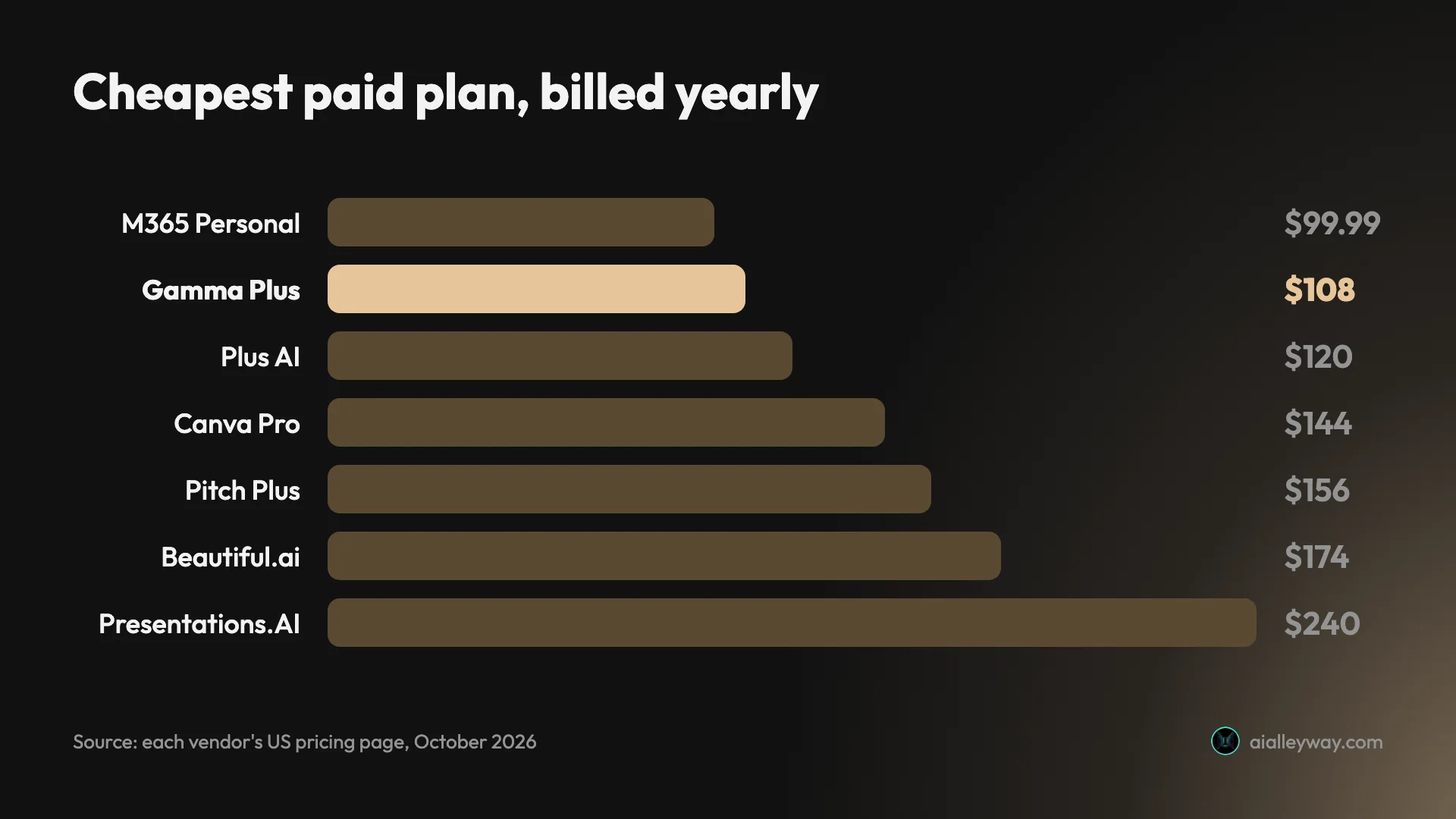
The chart makes one thing plain: of the plans in it, only Microsoft 365 Personal undercuts Gamma Plus, and that’s because you are buying Office, with Copilot thrown in. Two cheaper routes sit outside the chart: ChatGPT Go at $8 a month, monthly only ($96 over a year), and Prezi from $7 a month billed yearly.
What to check in any Gamma alternative
Every tool on this list claims to make a deck from a prompt. What separates them is everything around that moment, and these five questions sort them faster than a feature list.
Is the free plan a plan or a trial?
Gamma’s free plan is really a one-time allowance: 400 credits at signup that never come back. Pitch works the same way with 100 credits, and Beautiful.ai and Plus AI have no free plan at all, only trials that need a card. Canva gives you a monthly free allowance, Presentations.AI a free plan with 200 credits, and ChatGPT’s free plan resets daily, though on my account a day’s allowance was one deck.
How is the AI metered?
Credits make costs hard to predict, because each vendor prices a “task” differently. Plus AI says a task uses 40 to 170 credits, Gamma charged my free account 31 for a deck with a round of fixes, and Canva counts uses rather than credits. Beautiful.ai is the exception, with unlimited AI on paid plans.
Will it open cleanly in PowerPoint?
An export can be editable slides or pictures of slides. Gamma’s kept my text editable and embedded its fonts, but a chart arrived as a flat image. Canva warns its PowerPoint downloads “may look different” once opened. If the deck must be edited by someone else in PowerPoint, export one test slide before you commit.
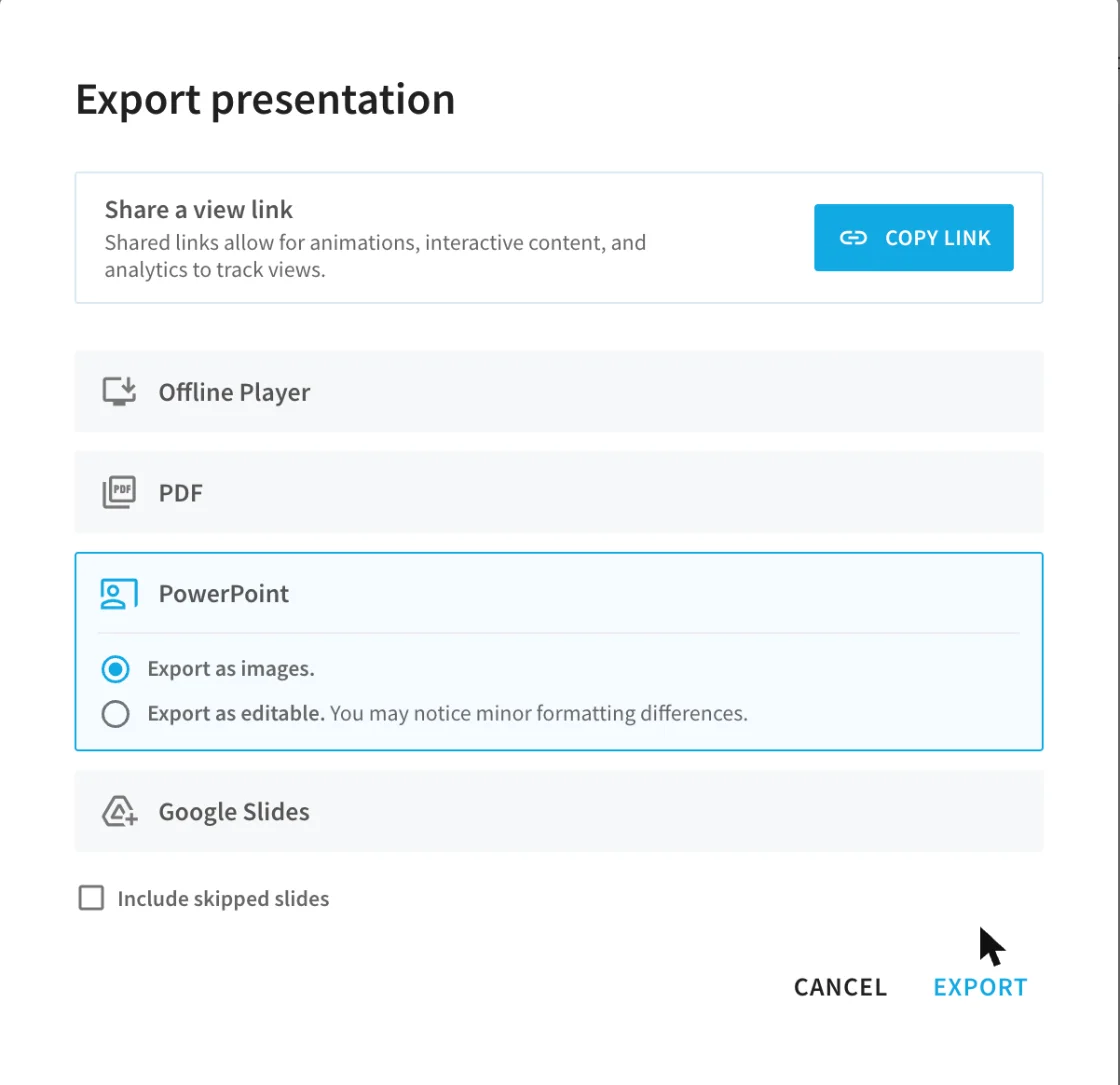
Beautiful.ai makes the choice explicit. Its PowerPoint export defaults to “Export as images”, with an editable option alongside it, so a colleague who opens the default file gets slides they can look at but not change.
Where does the deck live?
Gamma, Beautiful.ai, Pitch and Presentations.AI keep the deck in their own app, and PowerPoint is an export. Plus AI and Copilot build inside Google Slides or PowerPoint, so the file is already where your colleagues work. That difference matters more to a team than any template.
Does it train on your decks?
Gamma’s help centre says data from Free, Plus, Pro and Ultra accounts can be used to train its models unless you opt out in settings. Beautiful.ai says it never trains on your content. For board decks and loan applications, read this line before the feature list.
1. Beautiful.ai: best for polished layouts

| Price | Pro $14.50 a month billed yearly ($174), or $45 month to month |
| Free plan | No; 14-day trial needs a card |
| AI | Unlimited on paid plans |
| Our rating | 3.6 out of 5, Solid Choice |
Beautiful.ai is the alternative for people who think Gamma’s decks look samey. Its Smart Slides rearrange themselves as you add content, and on my brief they produced the most finished-looking slides of any tool I tried, including a repair-metrics dashboard and a roadmap slide for the Q4 goals.
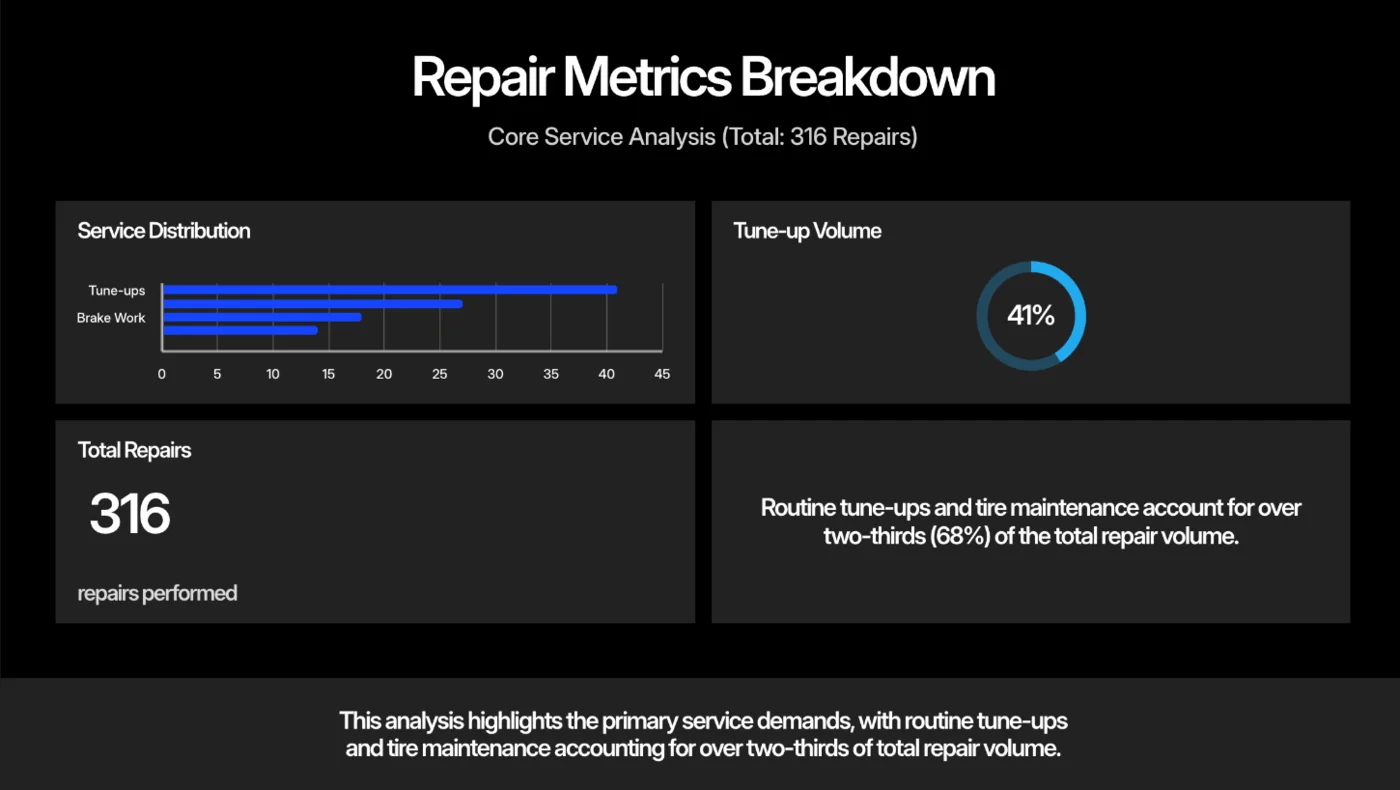
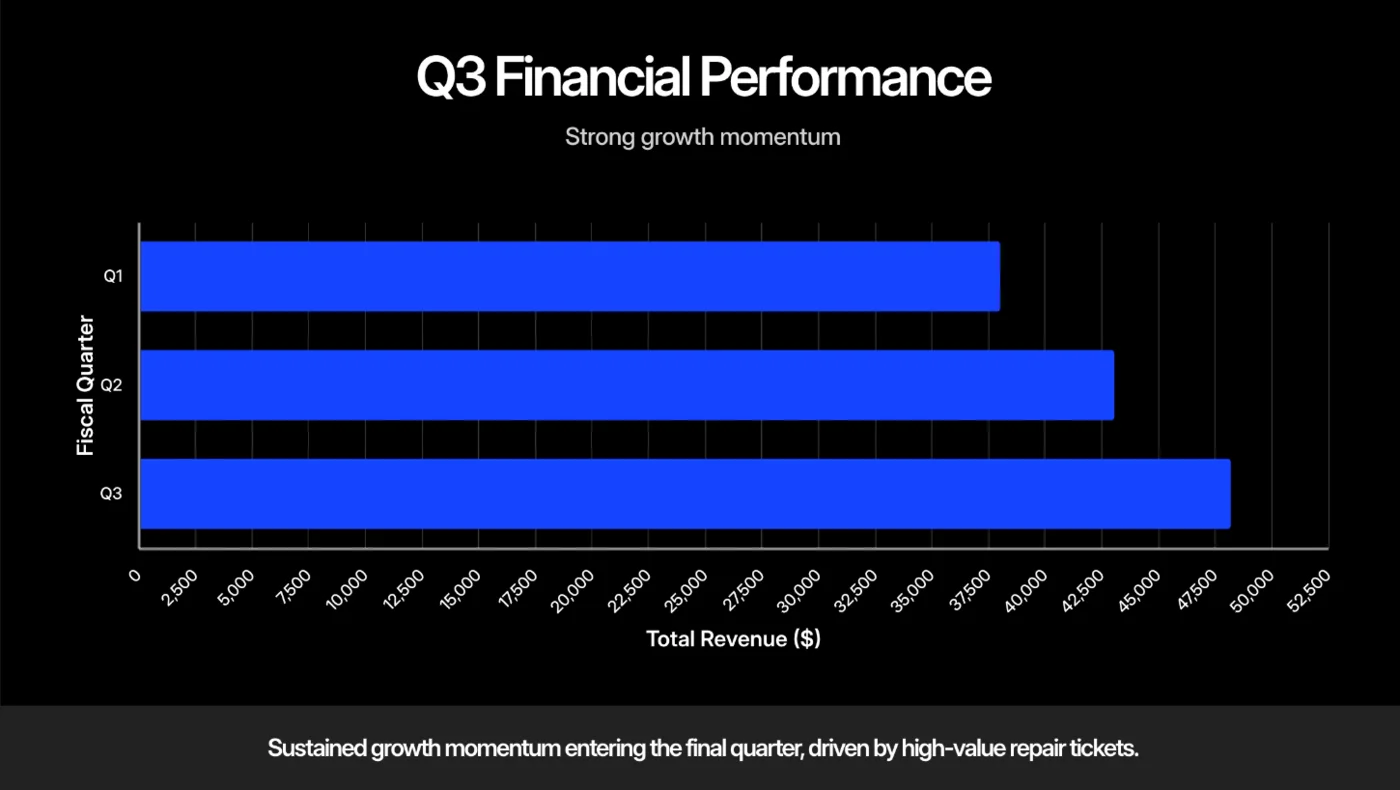
The trouble is what it did with the facts. It kept eight of the nine, then invented a revenue chart with bars for quarters I never gave it, added a Steve Jobs quote and gave the loan a purpose the brief never stated. For a deck going to a bank manager, that is the wrong way to fail.
Two things count in its favour against Gamma. Paid plans have no credit meter, and Beautiful.ai says it never trains on your content. If you landed here looking for Beautiful.ai alternatives instead, read this list in reverse: Gamma is the obvious one, and Canva and Pitch both have free plans. Our Beautiful.ai review and the Gamma vs Beautiful.ai comparison have the full test.
2. Canva: best for design control on a free plan
| Price | Pro $18 a month or $144 a year |
| Free plan | Yes, up to 20 AI uses a month |
| AI | Pro: up to 200 Premium uses a month |
| Our rating | 4.5 out of 5 for Canva overall, Power Tool |
Canva is the best Gamma alternative if you want to finish the deck yourself. Its AI builds a first draft, but the point is the editor afterwards: a large template library, a layered canvas and brand controls, so the deck stops looking like an AI made it.
Canva’s AI access page puts presentation generation in the Premium tier. The free plan gets up to 20 Standard or Premium uses a month and Pro up to 200 Premium uses, so a free account can make a handful of AI decks a month; past the cap, Canva says free users may see short pauses.
That meter is real. In our Canva review on a Pro trial, six AI requests used 56% of the trial’s monthly allowance, and one Canva Code build used a quarter of it alone. I haven’t run the bike-shop brief through Canva yet, because that allowance ran out before I got to it; it resets on 10 November.

Higher tiers raise the ceiling. Business gets up to 400 Premium uses a month, Canva’s newest conversational design tool sits in a paid Ultra tier, and an AI Pass add-on costs $100 per person a month. For most deck makers, Pro’s 200 uses are plenty.
Canva exports presentations as PowerPoint files, with no direct Google Slides export, and its help centre warns that a design downloaded as PPTX “may look different” when opened in PowerPoint.
3. ChatGPT: best free route to a .pptx file

| Price | Free; Go $8, Plus $20 a month |
| Free plan | Yes |
| Output | A downloadable PowerPoint file, with a preview panel |
| Tested on our brief | Yes, on the free plan |
ChatGPT is the surprise on this list. Asked for “a downloadable PowerPoint (.pptx) file”, its free plan returned an eight-slide deck in about a minute, in a tidy navy, teal and orange design, with all nine facts correct and no invented numbers. That’s a better accuracy result than Beautiful.ai and the same as Gamma, at no cost.
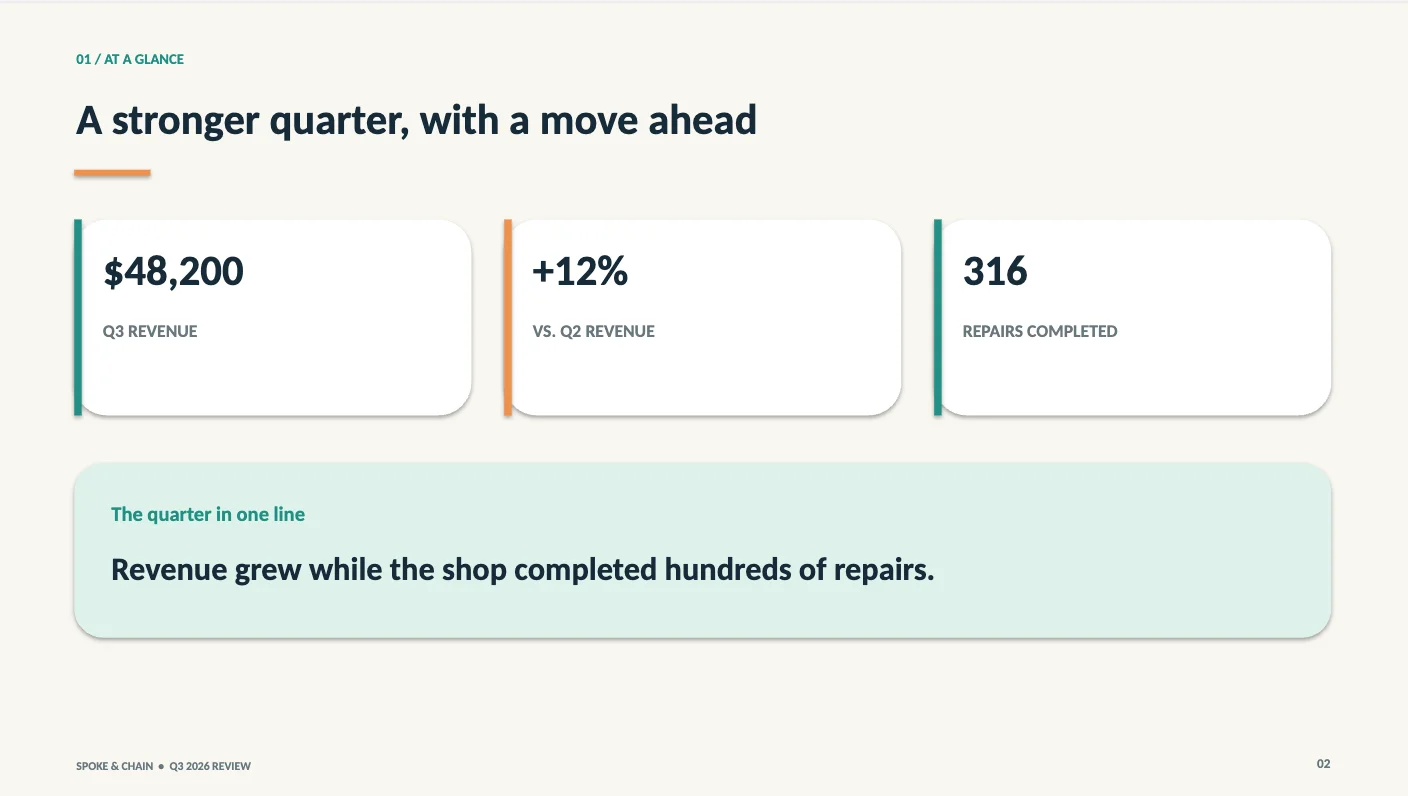
The limits are just as clear. One chart stretched tune-ups, flat tyres and brake work, 86% of repairs, across the whole bar, and when I asked for fixes the free plan refused: “You’ve reached your data analysis limit.” It reset 24 hours after my first message. There are no AI images and no Gamma-style themes either. Our ChatGPT PowerPoint guide covers the test, the add-in for PowerPoint and what each plan gets.
4. Copilot in PowerPoint: best if you already pay for Microsoft 365

| Price | Included with Microsoft 365 Personal ($9.99 a month or $99.99 a year), Family and Premium |
| Free plan | No; Microsoft 365 Basic has no AI features |
| Output | Slides inside PowerPoint itself |
| Tested on our brief | No |
If you already pay for Microsoft 365, you may own a Gamma alternative without knowing it. Microsoft’s support page says Copilot in PowerPoint can create a deck from a prompt or from a Word document, add and reorganize slides, generate images and summarize a presentation, on Windows, Mac and the web.
Building from Word is the feature I’d try first. Copilot reads Word’s heading styles to decide where slides break, which suits anyone whose deck starts life as a report. The model switcher that lets Copilot run on ChatGPT or Claude models needs a commercial Copilot subscription, so home users get Microsoft’s Auto setting.
On Family, only the subscription owner gets the AI features, and Copilot Pro, the old add-on that many guides still mention, is no longer sold. I couldn’t test Copilot, because the account I used has no Microsoft 365 plan, so treat this as what Microsoft says rather than what I saw.
5. Plus AI: best for decks built inside Google Slides

| Price | Basic $10 per user a month billed yearly, or $15 monthly |
| Free plan | No; 7-day trial with 1,000 credits needs a card |
| AI | 1,500 credits a month on Basic; a task uses 40 to 170 |
| Tested on our brief | No |
Plus AI is the answer to Gamma’s biggest structural problem: your deck lives in Gamma, not in the tool your company uses. Plus AI works the other way, generating presentations inside Google Slides and PowerPoint, so the result is a native file in your own template from the first click.
Its pricing page says Basic includes 1,500 AI credits a month and that a task “typically use[s] between 40–170 credits”, which works out to roughly 9 to 37 tasks a month. There is no free plan; the seven-day trial needs a card. Pro, at $20 a month billed yearly or $25 monthly, doubles the allowance to 3,000 credits.
It can also insert a single slide into a deck you already have, which Plus AI pitches as more control than generating a whole presentation. That’s the realistic way most people use AI in a company template: one new slide at a time, not a fresh deck.
6. Pitch: best for teams with a free start

| Price | Plus $13 a month billed yearly; Team $19; Business $25 |
| Free plan | Yes, with 100 AI credits that do not renew |
| AI | 500 credits a month on Plus and Team |
| Tested on our brief | No |
Pitch is built for teams that make decks together, with shared workspaces, comments and analytics, and it has a real free plan. Its pricing page gives free users 100 AI credits, with the note that “This amount does not renew once used”, which makes it a trial in practice, much like Gamma’s 400.
Paid Plus adds 500 credits a month and unbranded PowerPoint export. Extra credits cost $0.004 each, according to the same page. On Team and Business the credits are shared across the workspace, 500 and 750 a month respectively, and free-plan PDF exports carry Pitch branding. The US prices above are yearly billing, and Pitch showed my browser a non-US currency, so I couldn’t confirm the month-to-month price.
7. Presentations.AI: closest to Gamma, with a free plan

| Price | Pro $20 a month billed yearly ($240); Gold $100 a month |
| Free plan | Yes, Starter with 200 credits and decks up to 20 slides |
| AI | 5,000 credits a year on Pro |
| Tested on our brief | No |
Presentations.AI looks the most like Gamma on this list: you describe the deck, an agent builds it, and you export to PowerPoint or PDF. Its pricing page gives the free Starter plan 200 credits and decks of up to 20 slides, and says signing up with a work email doubles the free credits.
Pro adds brand customization and presentation tracking, and lifts the allowance to 5,000 credits a year; Gold, at $100 a month billed yearly, has 50,000 a year. It’s the most expensive paid entry here at $240 a year, more than twice Gamma Plus, and I couldn’t confirm a monthly price. For occasional decks, the free plan is the reason to try it.
Three more worth a look
These didn’t make the main list, either because they need a plan most people don’t have or because I could only confirm their prices secondhand, but each does the core job.
Google Slides with Gemini can build a full, editable deck from a prompt inside Slides, with an outline to approve first. Google’s help page says it needs an eligible Workspace or Google AI plan and works on desktop in English, and the consumer plan page names Docs rather than Slides, so check your plan before you count on it.
Prezi has a free Basic plan with 500 AI credits a month, according to Prezi’s own blog, and paid plans from $7 a month billed yearly. Its zooming canvas is a different kind of presentation from Gamma’s cards, and PDF export needs the Plus plan or higher.
Decktopus has no free plan beyond 15 credits at signup. Pro costs $9.99 a month billed yearly for 750 credits, which its pricing page says is about 150 slides, and it exports to PDF, PowerPoint and PNG.
Two decks a month for a year, priced
Take someone who makes two decks a month, 24 a year, and wants to pay as little as possible.
On Gamma’s free plan, at about 31 credits a deck with one round of fixes, the 400 credits cover roughly 12 decks, so the free plan runs out around mid-year. Gamma Plus at $108 a year then covers the rest with 1,000 credits a month.
On my account’s showing of one deck a day, ChatGPT’s free plan could in principle produce all 24 at no cost, as long as each first draft is close enough to fix by hand. Canva’s free plan, at up to 20 AI uses a month, covers two decks a month with room for a few edits.
For a team in Google Slides, Plus AI Basic at $120 per user a year gives 1,500 credits a month, enough for two decks and plenty of single-slide additions at 40 to 170 credits a task. Beautiful.ai at $174 a year removes the meter entirely, which suits someone making more than a few decks a month.
How to pick a Gamma alternative
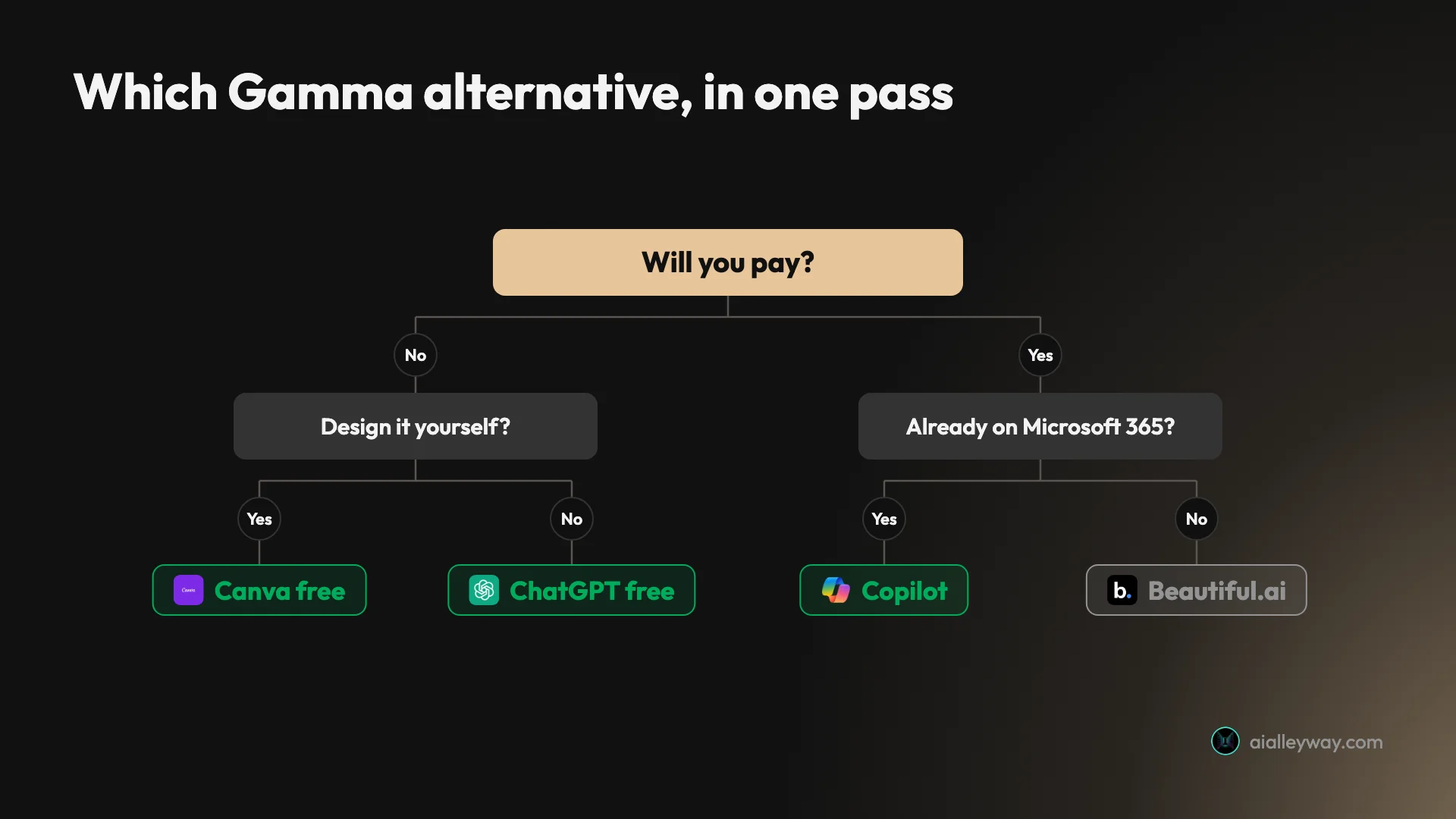
- You ran out of Gamma’s free credits: try ChatGPT’s free plan for the next deck, then Canva for the design pass.
- Your company works in Google Slides: Plus AI, because the deck never leaves Slides.
- You already pay for Microsoft 365 Personal, Family or Premium: Copilot in PowerPoint costs you nothing extra (on Family, only the subscription owner gets it).
- You want the best-looking slides and will check every number: Beautiful.ai.
- A team makes decks together: Pitch, starting on its free plan.
- Stay with Gamma if accuracy and price matter most. On our brief it kept every fact, and at $9 a month billed yearly almost nothing here is cheaper.
Final word
The best Gamma alternative depends on why you are leaving. For looks, Beautiful.ai; for free, ChatGPT or Canva; for Office, Copilot. But on the one test that matters for a real deck, keeping your numbers straight, Gamma itself still beats most of the field, and our Gamma review explains why it stays our best pick for presentations.
Frequently asked questions
What is the best alternative to Gamma?
Beautiful.ai, if what you want from leaving Gamma is more polished slides. It gave me the best-looking deck of the three tools I ran on the same nine-fact brief, with unlimited AI on paid plans and a promise never to train on your content.
The catch is accuracy and price. Beautiful.ai invented a revenue bar and a quote that were not in my brief, and it has no free plan: Pro costs $14.50 a month billed yearly or $45 month to month. If you want a free alternative, ChatGPT's free plan made an accurate eight-slide .pptx from the same brief.
Is there a free alternative to Gamma?
Several. ChatGPT's free plan built me an eight-slide PowerPoint file in about a minute with every fact intact, though the account then hit a data analysis limit that blocked edits until 24 hours after my first message. Canva's free plan includes up to 20 AI uses a month, and making a presentation with AI counts against them.
Pitch has a free plan with 100 AI credits that do not renew, and Presentations.AI has a free Starter plan with 200 credits and decks of up to 20 slides. Beautiful.ai and Plus AI have no free plans, only trials that need a card.
Is Tome still available?
No. Tome shut down its slides product on 30 April 2025. Its own help article said users would not be able to sign in or reach any Tome content after that date, and that all Tome Slides files would be deleted.
Several lists of Gamma alternatives still recommend Tome. In October 2026 its domain returned an error rather than a product, so treat any guide that lists it as out of date.
What is the best Beautiful.ai alternative?
Gamma, if accuracy matters more than polish. On the same nine-fact brief Gamma kept every fact and invented nothing, while Beautiful.ai added a revenue bar and a quote I never gave it. Gamma also has a free plan with 400 one-time credits, where Beautiful.ai has only a card-required trial.
If you want to keep Beautiful.ai's designed look without its price, Canva gives you template-led design on a free plan, and Pitch has a free plan aimed at teams.
Can ChatGPT replace Gamma?
For a first draft, yes. ChatGPT's free plan turned my brief into an eight-slide .pptx with a preview panel, and every number matched. Gamma's version looked more designed and came with AI images, but ChatGPT's file was accurate and came as a standard .pptx you can download.
Where ChatGPT falls short is revisions on the free plan and chart honesty. My follow-up edit was refused by the free data analysis limit, and one chart stretched 86% of repairs across the full bar.
Keep reading
Gamma AI review: 8 accurate slides in a minute, then the fixes
A hands-on Gamma AI review: an 8-slide deck in a minute with every number right, a footer bug, a chart that exports as a picture, and what Plus costs.
Beautiful.ai review: polished slides, invented numbers
A hands-on Beautiful.ai review: eight Smart Slides in 30 seconds, then a made-up revenue bar, a Steve Jobs quote and a misplaced address. Prices and verdict.
Gamma vs Beautiful.ai: one kept my facts, one looked better
Gamma vs Beautiful.ai, tested with the same nine-fact brief: which kept the numbers, which made the better-looking deck, which costs less, which trains on you.
ChatGPT PowerPoint: it made my deck free, then locked me out
Can ChatGPT make a PowerPoint? My free account got an 8-slide .pptx in a minute, then hit a limit. The add-in, ChatGPT Slides and Copilot, compared.
Gamma pricing: $9 a month, and what the credits really buy
Gamma pricing in October 2026: Free, Plus $9, Pro $18, Ultra $90 and Business $40 a month billed yearly, plus what a deck costs in credits on my account.