
Gamma vs Beautiful.ai: one kept my facts, one looked better
Gamma vs Beautiful.ai, tested with the same nine-fact brief: which kept the numbers, which made the better-looking deck, which costs less, which trains on you.
Contents
Gamma or Beautiful.ai: the verdict
Gamma is the better pick for most people, because it kept every fact in my brief; Beautiful.ai made the better-looking deck but invented a revenue bar, a quote and a loan purpose along the way. I gave both the same nine-fact brief, on Gamma’s free plan and a Beautiful.ai Pro trial, and the results split cleanly between accuracy and polish. Price points the same way as accuracy: Gamma is free to start and cheaper at the first paid tier.
| If you want | Pick | Why |
|---|---|---|
| Numbers you can stand behind | Gamma | Kept 9 of 9 facts and invented none |
| The most polished design | Beautiful.ai | Dashboard, timeline and card slides that look art-directed |
| A free plan, or the lowest price | Gamma | 400 free credits; Plus at $9 a month billed yearly |
| No training on your content by default | Beautiful.ai | Says it never trains on what you put in |
Gamma vs Beautiful.ai (or Beautiful.ai vs Gamma) at a glance
The brief asked for an eight-slide quarterly review for a small bike-repair shop, to be shown to two staff and a bank manager. It contained nine facts I could check, from revenue of $48,200 to a $20,000 loan request on the last slide, and ended: “Do not invent any other numbers.” Here is how the two compared on that test and on their published terms in October 2026.
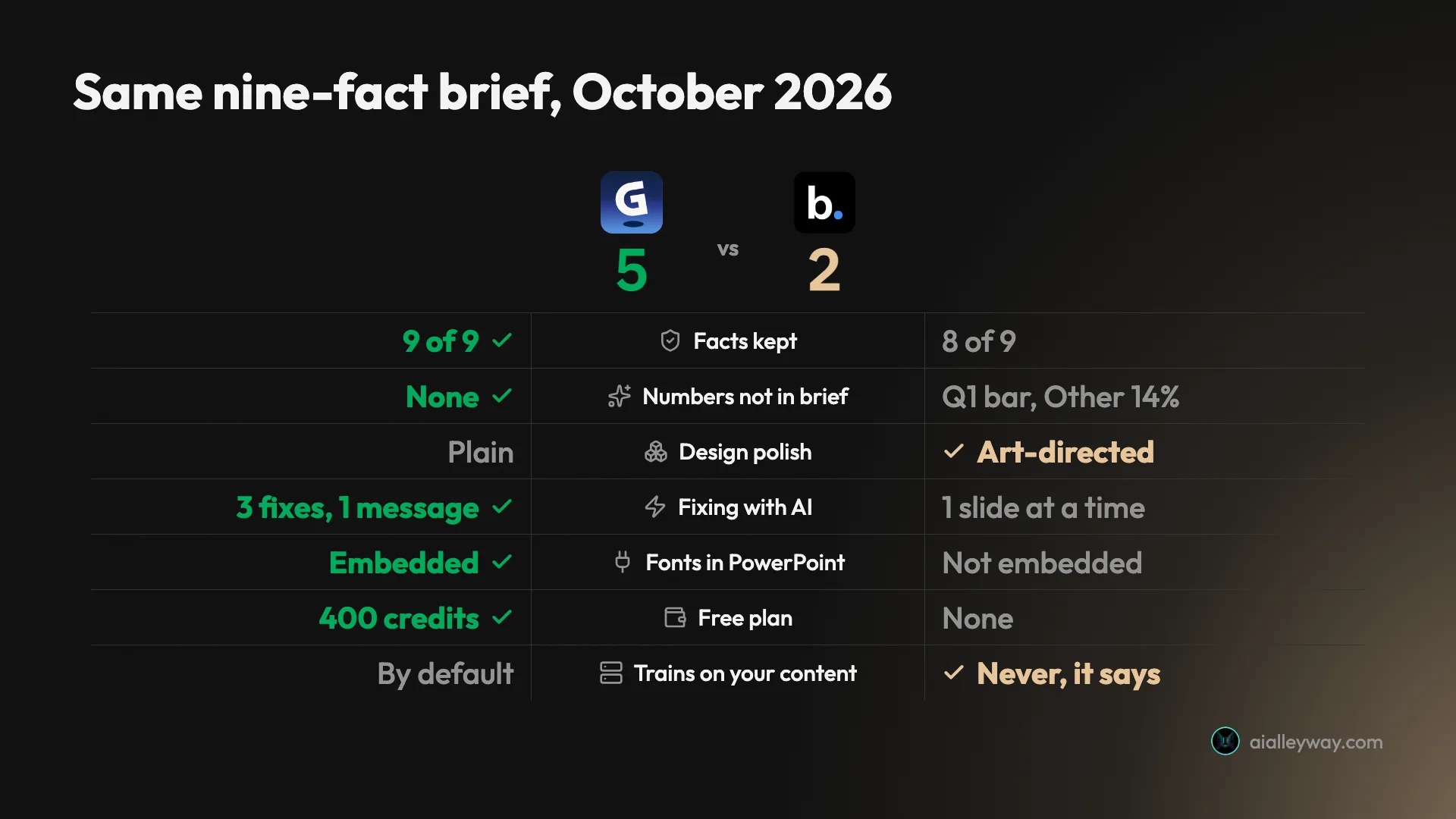
| Axis | Gamma | Beautiful.ai |
|---|---|---|
| Facts kept from the brief | 9 of 9 ✓ | 8 of 9 (dropped the $152 ticket) |
| Numbers not in the brief | None ✓ | An invented Q1 bar, an Other 14% bar |
| Other additions | Filler lines under headlines | A Steve Jobs quote slide, a loan purpose and ROI |
| Ended on the loan slide, as asked | Yes ✓ | No, added a summary slide |
| Layout errors | Broken footer, stray “1” box | New address under Current Location |
| Design polish | Plain, text-led | Art-directed ✓ |
| Fixing with AI | Agent fixed 3 issues in 1 message ✓ | Slide AI, one slide at a time |
| PowerPoint export | Editable text, fonts embedded, charts as pictures ✓ | Editable text, fonts not embedded, charts as pictures |
| Free plan | 400 one-time credits ✓ | None |
| Cheapest paid plan, billed yearly | $108 a year (Plus) ✓ | $174 a year (Pro) |
| AI limits on paid plans | Credits | Unlimited ✓ |
| Trains on your content | By default on individual plans | Never, it says ✓ |
Gamma: strengths and gaps

Gamma is an AI presentation maker that, since its Gamma 5 release in October 2026, works through an agent: it proposes a plan, waits for approval, then builds the deck. Our Gamma review rates it 4.2.
Strengths
- It kept every fact. All nine figures and dates came through the plan and the deck exactly as written, with no invented numbers.
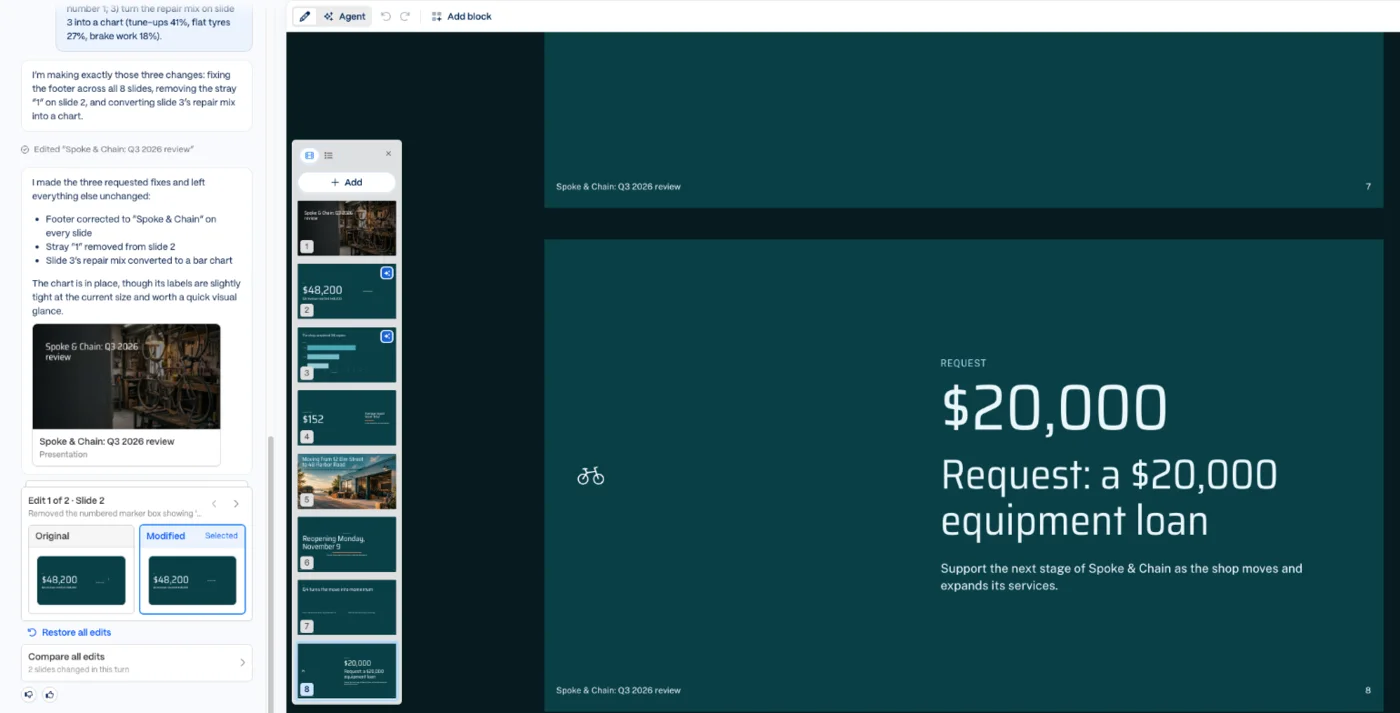
- Its agent fixes precisely. One message fixed a broken footer, removed a stray box and turned a list into a chart, with an original-and-modified view of each change.
- A real free plan. 400 one-time credits; my whole test, including fixes, used 31.
- Fonts embedded in PowerPoint, so exported slides keep their look on another computer.
Gaps
- Polish bugs on a fresh deck: a literal “
&” in the footer of seven slides and a box containing only “1”. - Plain design and filler lines, such as “A clear baseline for the next quarter”.
- Trains on your content by default on individual plans, with an opt-out.
- Free credits never refill, and the free plan stamps a badge on exports.
Beautiful.ai: strengths and gaps

Beautiful.ai is built around Smart Slides, more than 300 layouts that rearrange themselves as you add content, with Create with AI on top to build a deck from a prompt. Our Beautiful.ai review rates it 3.6.
Strengths
- The most polished first draft: a road-shaped timeline, a repair dashboard and tinted cards that looked designed.
- It asks before it writes: two clarifying questions and an editable outline before any design.
- Unlimited AI on paid plans, with no credit meter.
- Says it never trains on your content.
Gaps
- It invented numbers and claims: a Q1 revenue bar of roughly $38,000, an Other category, a Steve Jobs quote and a loan purpose.
- It dropped a fact and ignored an instruction: the $152 ticket vanished, and the deck did not end on the loan slide.
- No free plan, a card-required trial that bills automatically, and annual refunds only within 24 hours.
- Fonts not embedded in the PowerPoint export.
Is Gamma or Beautiful.ai cheaper?
Gamma is cheaper to start and cheaper at the entry paid tier; Beautiful.ai can be better value only if you lean on AI heavily enough to run out of Gamma’s credits. These are US prices from each company’s pricing page in October 2026. For what Gamma’s credits buy in practice, see our breakdown of Gamma’s credits and plans.
| Plan level | Gamma | Beautiful.ai |
|---|---|---|
| Free | 400 one-time credits, 10 slides per prompt, badge on exports | None |
| Entry paid, billed yearly | Plus: $9 a month ($108 a year), 1,000 credits a month | Pro: $14.50 a month ($174 a year), unlimited AI |
| Entry paid, monthly | Costs more; Gamma says yearly saves up to 28% | Pro: $45 a month |
| Next tier, billed yearly | Pro: $18 a month ($216 a year), 4,000 credits | No middle tier; Team is next |
| Team or business | Business: $40 per member a month, yearly only | Team: $40 per user a month yearly or $50 monthly |
| Top tier | Ultra: $90 a month ($1,080 a year); Enterprise custom | Enterprise: custom |
The starting points are not close. You can use Gamma free until its 400 credits run out, and the whole of my test cost 31 of them, so the free plan covers a dozen or so similar decks. Beautiful.ai has no free plan at all: you get a 14-day trial, but only with a card on file, and its pricing page says you will be charged in full if you do not cancel. On the Pro trial I used, the billing page showed the first bill as a yearly $174, due when the trial ends.
At the first paid tier, Gamma Plus costs $108 a year against Beautiful.ai Pro’s $174, and Plus is what removes Gamma’s badge. For someone building a deck or two a month, that is the cheaper way to get clean exports. Beautiful.ai’s monthly price, $45, is aimed at one-off projects; its own pricing page pitches the monthly option for exactly that, but monthly payments are never refunded.
Usage is where the comparison turns. Gamma meters AI in credits, and its help centre says creating decks is charged per slide and per image, with agent edits also using credits. Plus gives 1,000 credits a month, with unused credits rolling over up to double. Beautiful.ai’s paid plans list “Unlimited AI content generation”, and nothing in my test counted down. If you regenerate decks all day, Beautiful.ai’s flat price is easier to live with; most people will not come near Gamma’s limits.
Three scenarios make the difference concrete. For one deck, once, Gamma’s free plan costs nothing, while Beautiful.ai costs a $45 month you must remember to cancel. For someone presenting every week, Gamma Plus at $108 a year undercuts Beautiful.ai Pro at $174. For a team of three, the list prices meet: Gamma Business at $40 per member and Beautiful.ai Team at $40 per user both come to $1,440 a year, although Beautiful.ai’s Team price card also says the plan “includes 3 users”, so check the checkout total.
| Scenario | Gamma | Beautiful.ai |
|---|---|---|
| One deck, once | $0 on the free plan, with a badge | $45 for one month, then cancel |
| A deck most weeks, one person | $108 a year on Plus | $174 a year on Pro |
| Team of three, billed yearly | $1,440 a year on Business | $1,440 a year on Team, if priced per user |
Refund terms are tight on both. Gamma refunds only within three days of subscribing and only below a credit-use threshold, such as 200 credits on Plus. Beautiful.ai refunds annual plans only within 24 hours of the charge, partially and minus a processing fee, and never refunds monthly plans. Both let you keep access until the end of the paid period after cancelling.
Terms that matter beyond price
Two policies are worth weighing alongside the price. On training, Gamma’s help centre says content from Free, Plus, Pro and Ultra accounts can be used to train AI models unless you opt out under Data Controls, and that training is always off on Business, Enterprise and Teams. Beautiful.ai’s help centre says anything you input “is never used to train the AI models”, on every plan. For client or financial material on a personal plan, Beautiful.ai’s default is the safer one.
On security paperwork, Gamma says it holds a SOC 2 Type II report and does not sell personal information. Beautiful.ai’s pricing page lists CCPA, PCI, SOC 2 Type II and GDPR certification on its Enterprise plan. Smaller extras differ too: Gamma gives 200 credits per referral on the free plan and sells top-ups of 1,500 credits for $6 on paid plans, while Beautiful.ai offers students with a .edu email address a free year of Pro.
Which one is more accurate?
Gamma, and by a margin that matters for any deck with numbers in it. Accuracy was the whole point of the test, and it is where the two tools differ most.
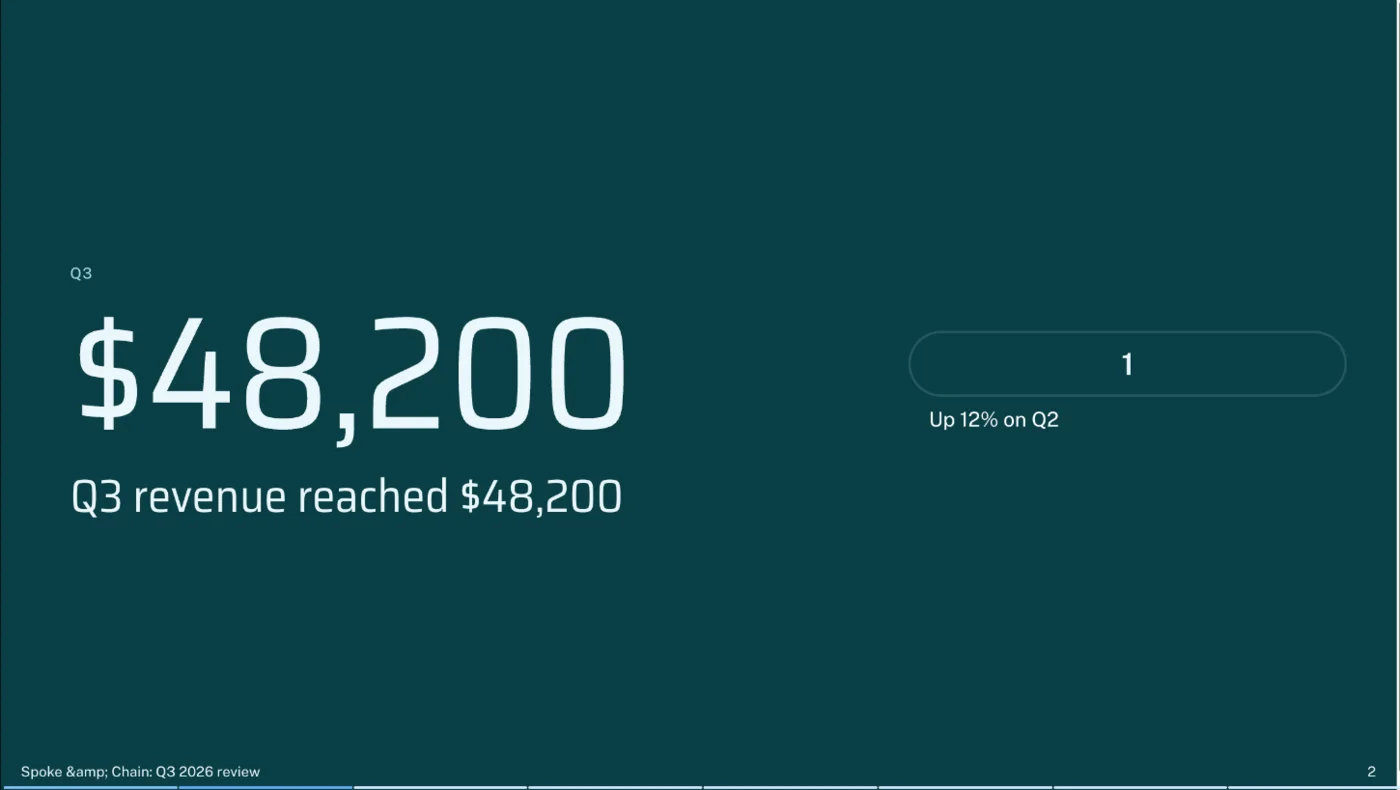
Gamma’s agent turned the brief into an outline that kept every fact, then built a deck that did the same. Revenue, growth, the repair mix, the average ticket, both addresses, the reopening date, both goals and the loan all appeared exactly as written, and no new figures appeared. Its mistakes were of a different kind: a footer that printed a web-code version of the ampersand, a stray box containing only the number 1, and filler sentences such as “The move creates the setting for the next phase of Spoke & Chain.”
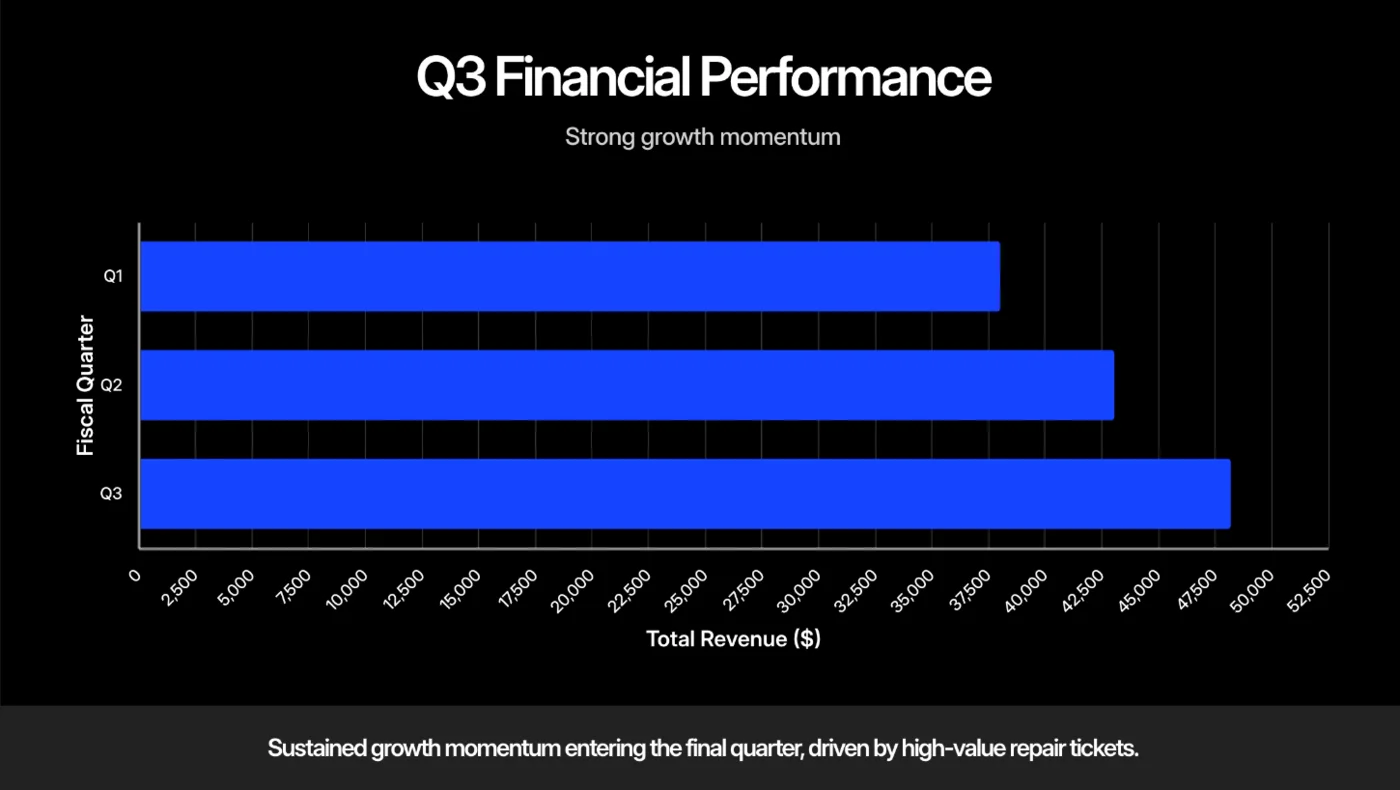
Beautiful.ai’s outline already contained extras: a Steve Jobs quote on slide 2, an “Other 14%” row in the repair table, a “Strategic Benefit” for the move and a purpose and return on investment for the loan. The finished deck added more. Its revenue slide drew bars for three quarters when the brief gave one revenue figure, with a Q1 bar of roughly $38,000 that came from nowhere, under a caption claiming the growth was “driven by high-value repair tickets”. The $152 average ticket appeared on no slide.
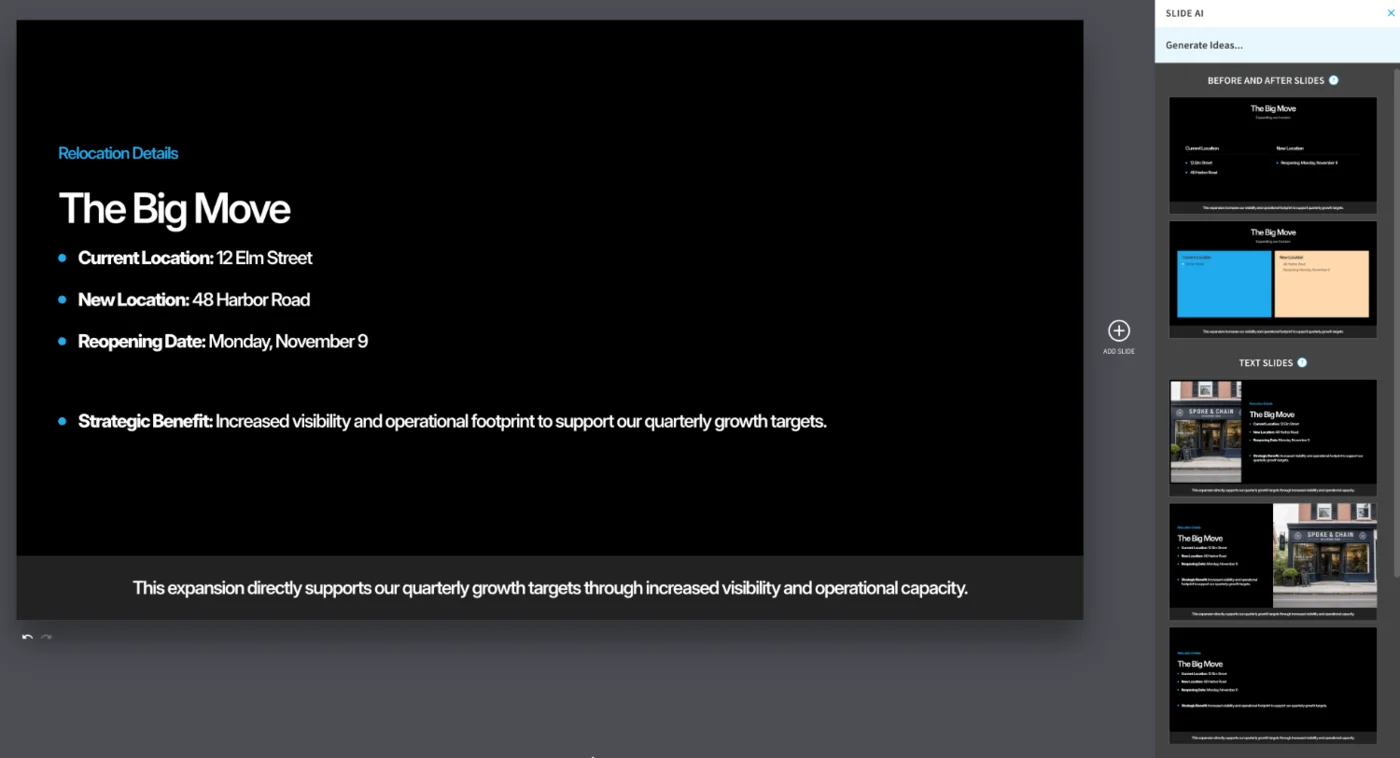
It also made a layout error that changed the meaning: the relocation slide listed both addresses under Current Location, so a quick reader would think the shop was staying put. The underlying text was right; the Smart Slide put it in the wrong column.
The difference in kind matters as much as the count. Gamma’s errors were visible at a glance, the sort anyone would catch while rehearsing. Beautiful.ai’s looked correct: a tidy chart with a plausible extra quarter, a confident sentence about what drove growth. For a deck going to a lender or a client, the plausible error is the dangerous one.
The two decks, slide by slide
Laying the decks side by side shows where each tool spent its effort.
- Cover. Gamma used a moody AI photo of a bike on a workbench. Beautiful.ai used a close-up of a crankset whose arm carried a real component maker’s branding, with four generic bicycle badges in the corner as a stand-in logo.
- Slide 2. Gamma put the revenue figure in large type, next to the stray box. Beautiful.ai gave the whole slide to the Steve Jobs quote on a bright blue background.
- Repair mix. Gamma listed the three percentages as text under mismatched icons until I asked for a chart. Beautiful.ai built a small dashboard with a bar chart, a 41% donut and the 316 total, but only two of its four bars were labelled.
- Average ticket. Gamma gave $152 its own slide in large type. Beautiful.ai left it out.
- The move. Gamma set dark text over a bright AI photo of a shopfront by a harbour, hard to read but correct. Beautiful.ai put the new address in the wrong column.
- Q4 goals. Gamma used two plain text columns. Beautiful.ai drew a winding road with three stops, one of them an “Ongoing: Operational Excellence” point I never asked for.
- The loan. Both put $20,000 in large type. Gamma added one filler sentence; Beautiful.ai added three cards of purpose, objective and return beside the request.
- The ending. Gamma ended on the loan, as asked. Beautiful.ai ended on “Summary & Next Steps / Looking ahead to 2027”.
Neither tool kept to the brief completely. Both added text I did not write: Gamma’s were empty filler lines, Beautiful.ai’s were claims. And both turned their charts into pictures on export, so any chart error has to be fixed inside the tool, before you export, or rebuilt in PowerPoint afterwards. Whichever you use, the last step is the same: read every slide against your notes.
On design, the verdict flips. Beautiful.ai’s dashboard, road timeline and loan cards looked like a designer had laid them out; Gamma’s slides were cleaner than a blank PowerPoint but text-led and repetitive, with big numbers repeated word for word in the headline beside them. If accuracy and design both matter, the practical answer is to draft in Gamma and restyle, or to draft in Beautiful.ai and fact-check every slide.
Which one is faster to work with?
Both build a deck in about a minute, so the real difference is how much work the draft leaves you. Gamma’s draft needed less checking and its fix-up tool handles several problems at once; Beautiful.ai’s draft looked closer to finished but needed a line-by-line check.
Gamma’s flow is chat-first. I typed the brief, the agent replied with a one-line approach and then an outline of eight cards, and I pressed Generate. The deck appeared about a minute later. The plan cost 3 credits and the deck 22. When I spotted problems, I sent one message with three numbered fixes; the agent made all three, left everything else alone and showed each change as an original and modified thumbnail, for 6 credits.
Beautiful.ai’s flow is form-first. After the brief it asked two questions, eight or fifteen slides and chart-heavy or narrative-first, and offered a brand kit and image style. About 20 seconds later it showed an editable outline with a chat panel, and about 30 seconds after I approved it the deck was ready. Its fix-up tool, Slide AI, regenerates one slide at a time from that slide’s prompt and offers several layouts to choose from; it fixed the misplaced address in one click, although one of its suggested layouts repeated the mistake.
The outline step deserves its own comparison, because it is where you catch problems cheaply. Gamma’s plan shows each slide as a card you can merge, plus a suggested theme and image source, and you can keep talking to the agent before generating. Beautiful.ai’s outline lets you edit any line in place, drag or collapse cards, regenerate the whole outline and chat with the AI, and it has a Preserve text switch that tells the design step to keep your wording exactly.
In my test, Beautiful.ai’s extras were visible in its outline except the invented chart bar, which only appeared at the design step; Gamma’s outline had no invented facts, only filler lines to trim.
Images differ too. Gamma chose two AI images on its own, the workshop cover and the harbour shopfront. Beautiful.ai let me pick from 13 image styles before generating, and its Slide AI suggestions included an AI storefront whose sign read “Spoke & Chain”, a nice touch for a deck about a specific shop.
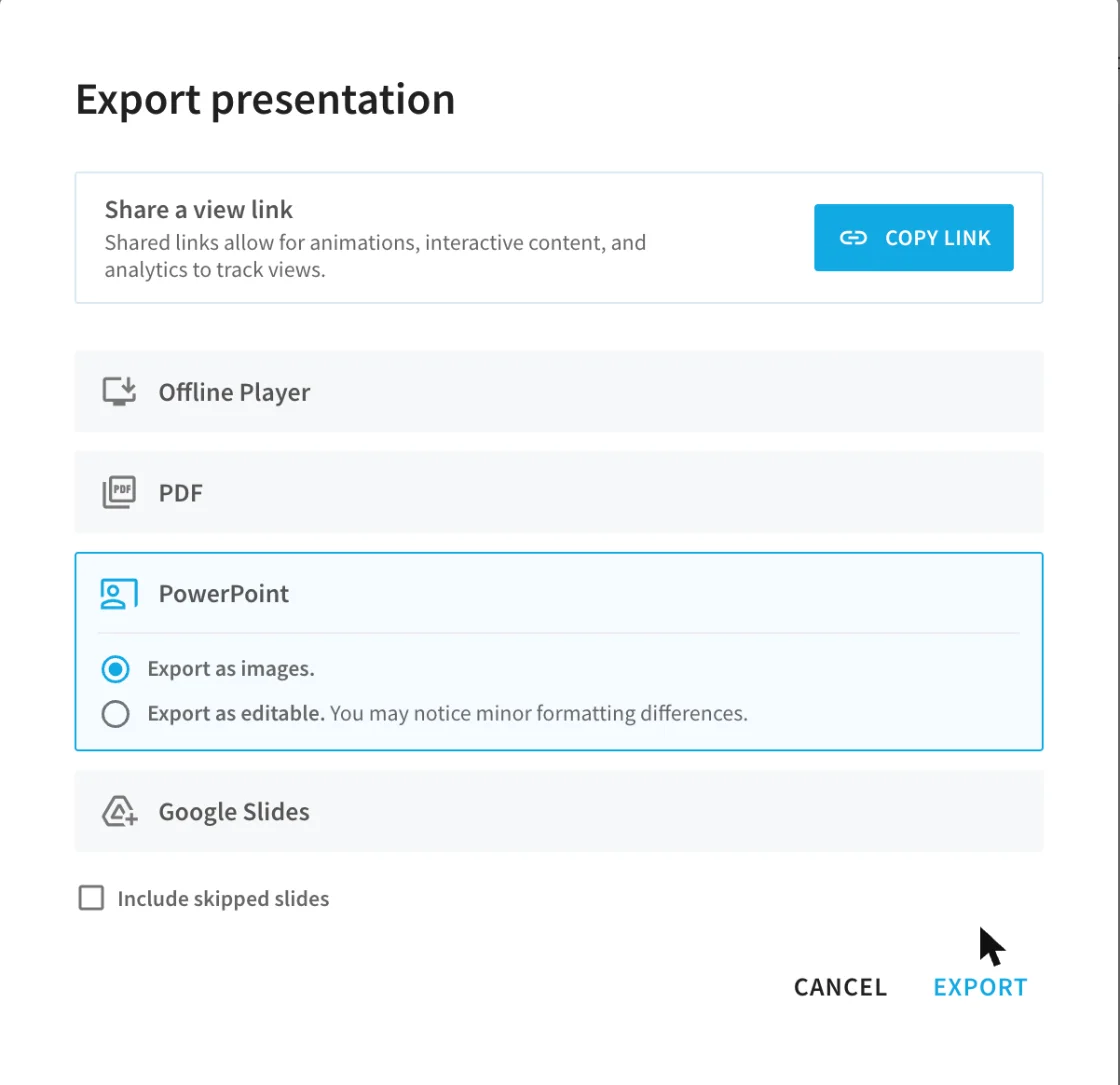
Exports took about the same effort. Both offer PDF, PowerPoint and Google Slides; Beautiful.ai adds an offline player, while Gamma adds PNG images and posting to LinkedIn. In both PowerPoint files the text was editable and the charts were pictures. Gamma embedded its theme fonts; Beautiful.ai did not, and its export page tells you to install fonts to keep the look.
The export dialogs show different priorities. Gamma offers three quality levels, a switch for editable tables, zoom to fit and, on Plus, a switch to hide the Made with Gamma badge, and it lists the fonts to install. Beautiful.ai offers PowerPoint as images or as editable slides, a compressed PDF, an option to include skipped slides and a share link that keeps animations, interactive content and viewer analytics. If you present from a link rather than a file, Beautiful.ai’s link is the richer option; if you hand over a file, Gamma’s travels better.
Whichever you pick, open the exported file on the computer you will present from, before the meeting rather than during it.
Presenting is simple in both. Gamma’s Present button goes full screen with a thin progress bar along the bottom, and arrow keys step through the slides. Beautiful.ai’s Present button opens a dropdown, and Present from beginning plays the deck in its own player page. I captured every slide of both decks this way, and neither stumbled.
Collaboration is where Beautiful.ai has more on paper, though I did not test either tool’s team features. Beautiful.ai’s Team plan lists real-time editing, shared slide libraries and live data links to tools such as Smartsheet and Airtable. Gamma’s workspace settings let members share decks with the workspace, invite guests and publish public links, and it lists 29 connectors, from Slack to HubSpot.
Gamma is the better buy if you need accuracy
Gamma suits anyone whose deck carries facts they will be held to, and anyone who wants to start free.
- Founders and small-business owners pitching to a lender or investor. It kept every number in my test, which is the part a bank manager will check.
- Students and occasional presenters who want a free plan and will not hit 400 credits quickly.
- People who want to fix drafts by describing the problem. The agent handled three different fixes in one message.
- Anyone exporting to PowerPoint on someone else’s computer, because the fonts travel with the file.
If you go with Gamma on a personal plan, switch off training under Data Controls before your first real deck, and budget a few minutes to cut its filler lines and check the footer.
Beautiful.ai is the better buy if design comes first
Beautiful.ai suits people for whom the look of the deck is the product, and who will check the content themselves.
- Sales and marketing teams reusing the same deck structure, with brand kits, shared slide libraries and live data on the Team plan.
- Designers and consultants who want an art-directed starting point and will rewrite the words anyway.
- Teams handling sensitive material who want a no-training default on any plan, rather than only on a business tier.
- Heavy AI users who would run through Gamma’s monthly credits and prefer one flat price with no meter.
Avoid it for finance or board decks unless you check every chart against your source, and set a reminder before the trial ends if you try it. Its trial is not cut down, so 14 days is enough to build a real deck and decide; just cancel on a desktop or laptop before the first annual charge.
Final word
For most people, Gamma is the one to start with: it is free to try, cheaper at the first paid tier, and it kept my facts straight where Beautiful.ai invented some, even though Beautiful.ai’s slides looked better. Choose Beautiful.ai when design matters more than speed of fact-checking, and treat its first draft as a layout to fill, not a deck to present. Our Gamma review and Beautiful.ai review have the full tests, and if neither fits, our Gamma alternatives roundup covers six more, including ChatGPT’s free PowerPoint route.
Frequently asked questions
Is Gamma or Beautiful.ai better?
Gamma, for most people, because it kept my facts. I gave both tools the same brief with nine facts and an instruction not to invent numbers. Gamma kept all nine and added no numbers. Beautiful.ai kept eight, dropped the $152 average ticket, and added a revenue bar for a quarter I never mentioned, a Steve Jobs quote and a purpose for the loan.
Beautiful.ai made the better-looking deck, with dashboard and timeline slides that looked designed rather than generated, and it says it never trains on your content. If your deck is mostly design and you will check every number yourself, it is a fair choice. If it carries figures someone will hold you to, start with Gamma.
Is Gamma cheaper than Beautiful.ai?
Yes, at every starting point. Gamma has a free plan with 400 one-time credits, and its Plus plan costs $9 a month billed yearly, $108 a year. Beautiful.ai has no free plan, and Pro costs $14.50 a month billed yearly, $174 a year, or $45 month to month.
The catch is usage. Gamma meters AI with credits, 1,000 a month on Plus, while Beautiful.ai's paid plans have no credit meter at all. A heavy user who generates and regenerates decks all day could hit Gamma's limits; most people will not. Both refund only briefly: Gamma within three days under a credit limit, Beautiful.ai annual plans within 24 hours minus a fee.
Which one exports better to PowerPoint?
Gamma, narrowly. I exported the same test deck from both. In both files the text was editable and every chart was a flat picture, so neither gives you charts you can edit in PowerPoint. The difference was fonts: Gamma embedded its theme fonts in the file, while Beautiful.ai did not, so the slides can change on a computer without Inter installed.
Gamma's free plan adds a Made with Gamma badge to the slide layouts every slide uses, which paid plans remove. Beautiful.ai's export carried no branding on its trial. Beautiful.ai also offers a PowerPoint export as images, which cannot be edited.
Does Gamma or Beautiful.ai use my content to train AI?
Gamma does by default, on individual plans. Its help centre says content from Free, Plus, Pro and Ultra accounts can be used to train AI models unless you opt out in Settings under Data Controls; training is always off on Business, Enterprise and Teams. Beautiful.ai says anything you input is never used to train its AI models, on every plan.
If you build decks with client or financial data on a personal plan, that is a real difference. With Gamma, turn the setting off before your first real deck, or use Business; with Beautiful.ai, the default already covers you.
Which is faster, Gamma or Beautiful.ai?
Both are fast enough that speed should not decide it. Beautiful.ai asked two clarifying questions, showed an outline about 20 seconds later and generated eight slides about 30 seconds after I approved it. Gamma showed its plan for approval first, then built the eight slides in about a minute.
The bigger time cost is fixing. Gamma's agent fixed three problems in one message and showed a before and after view of each change. Beautiful.ai's Slide AI works one slide at a time, and its first draft needed more checking, because the errors were plausible ones such as an invented chart bar rather than obvious glitches.
Keep reading
Gamma AI review: 8 accurate slides in a minute, then the fixes
A hands-on Gamma AI review: an 8-slide deck in a minute with every number right, a footer bug, a chart that exports as a picture, and what Plus costs.
Beautiful.ai review: polished slides, invented numbers
A hands-on Beautiful.ai review: eight Smart Slides in 30 seconds, then a made-up revenue bar, a Steve Jobs quote and a misplaced address. Prices and verdict.

Best AI Design Tools: 8 Picks, 5 Tested, Sorted by the Job
The best AI design tools by job: Canva for layouts, ChatGPT for images with exact text, Lovable for working apps. Five tested, three read, each one labelled.
Gamma pricing: $9 a month, and what the credits really buy
Gamma pricing in October 2026: Free, Plus $9, Pro $18, Ultra $90 and Business $40 a month billed yearly, plus what a deck costs in credits on my account.
Gamma alternatives: 7 worth trying, and the one that's dead
The best Gamma alternatives, two run against Gamma on one nine-fact deck: Beautiful.ai invented numbers, ChatGPT kept them. Prices, free plans and when to stay.

ChatGPT PowerPoint: it made my deck free, then locked me out
Can ChatGPT make a PowerPoint? My free account got an 8-slide .pptx in a minute, then hit a limit. The add-in, ChatGPT Slides and Copilot, compared.