
ChatGPT agent is gone: what replaced it, and what Plus gets now
ChatGPT agent mode no longer exists. Here is what ChatGPT Work and its cloud browser do instead, which plans get them, and what the old 40-a-month limit became.
Contents
The short answer: ChatGPT agent no longer exists
ChatGPT agent, the mode that drove its own browser and finished multi-step jobs, is gone. OpenAI’s help page for it now opens with one line, “ChatGPT agent is no longer available”, and points to two replacements. ChatGPT Work handles longer tasks and finished deliverables. Work’s cloud browser handles the clicking, typing and signing in that the agent used to do on websites.
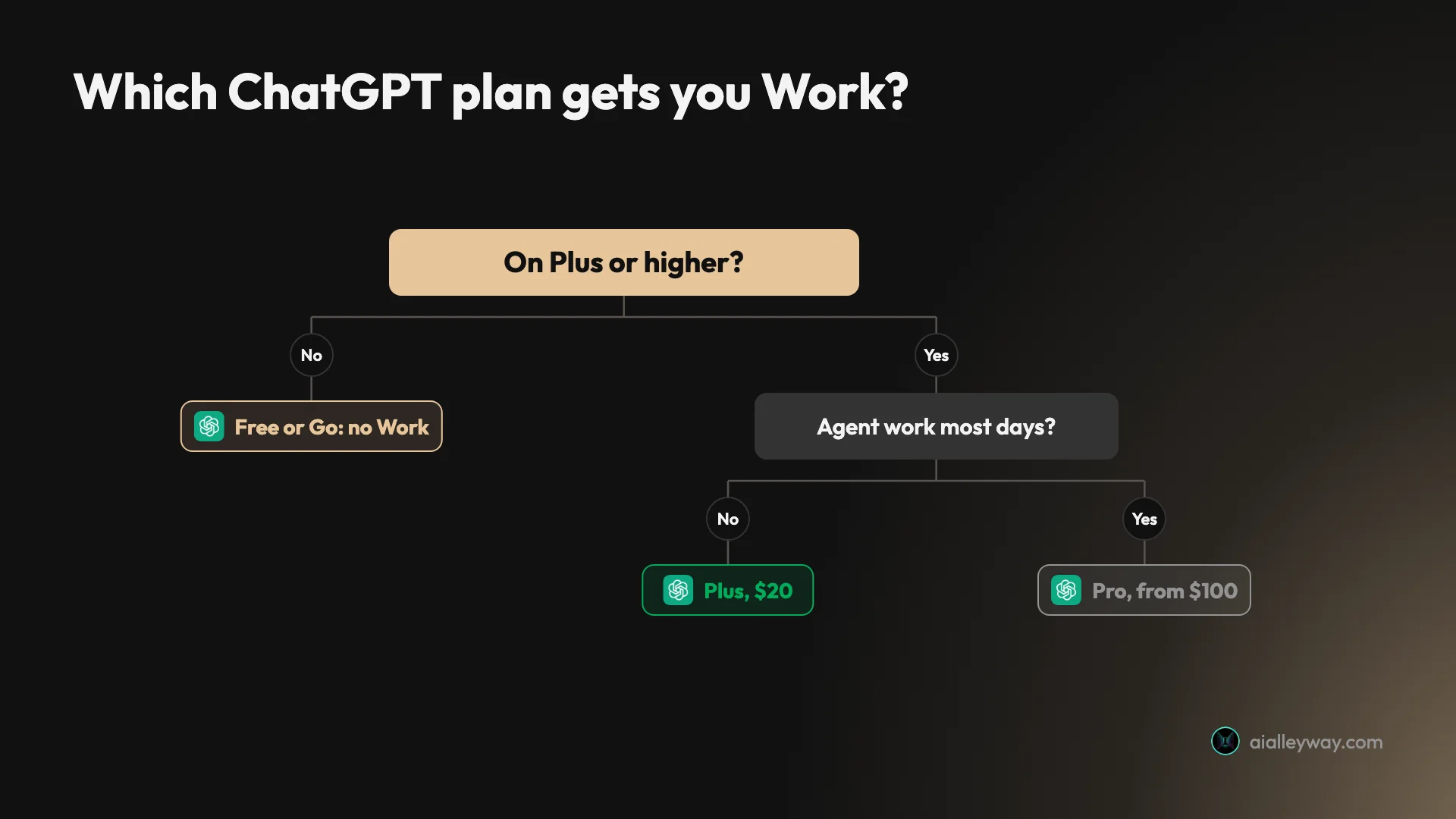
So the capability survived and the button did not. If you are on Plus, Pro or Business, Work should already be in your account, though OpenAI says availability still depends on region, workspace settings and rollout. If you are on Free or Go, you have neither the agent nor Work, and nothing in the tools menu stands in for them.

| If you used agent mode to… | Use this now | Plans |
|---|---|---|
| Research a topic and build a report | ChatGPT Work | Plus, Pro, Business, Enterprise, Edu |
| Make a deck, spreadsheet or document | ChatGPT Work | Plus, Pro, Business, Enterprise, Edu |
| Click through a website, fill forms, sign in | Work’s cloud browser | Paid plans except Free and Go; sign-in launched on Plus and Pro |
| Repeat a task every day or week | Scheduled tasks in Work | Plus, Pro, Business, Enterprise, Edu |
| Write and run code | Codex | Free and Go get limited access |
I could not run Work for this guide. The ChatGPT account I tested on is on the free plan, so everything below about Work comes from OpenAI’s help centre, its release notes and its pricing page, read on 4 November 2026. The one thing I checked by hand is what a free account sees now that the agent has gone.
How the switch from agent to Work happened
The change was abrupt. On 8 July 2026 a Plus subscriber opened a thread on OpenAI’s developer forum: agent mode had vanished from the tools menu in every chat, and clearing the cache did nothing. OpenAI’s support account replied the next day that agent mode availability was “currently being investigated”, with no timeline to share.
That same day, 9 July, OpenAI’s release notes introduced ChatGPT Work. By 18 July a Pro user reporting the same missing menu was pointed to the help page, which by then already said the agent was no longer available. OpenAI never published a retirement notice of its own in the release notes. The agent simply stopped appearing.
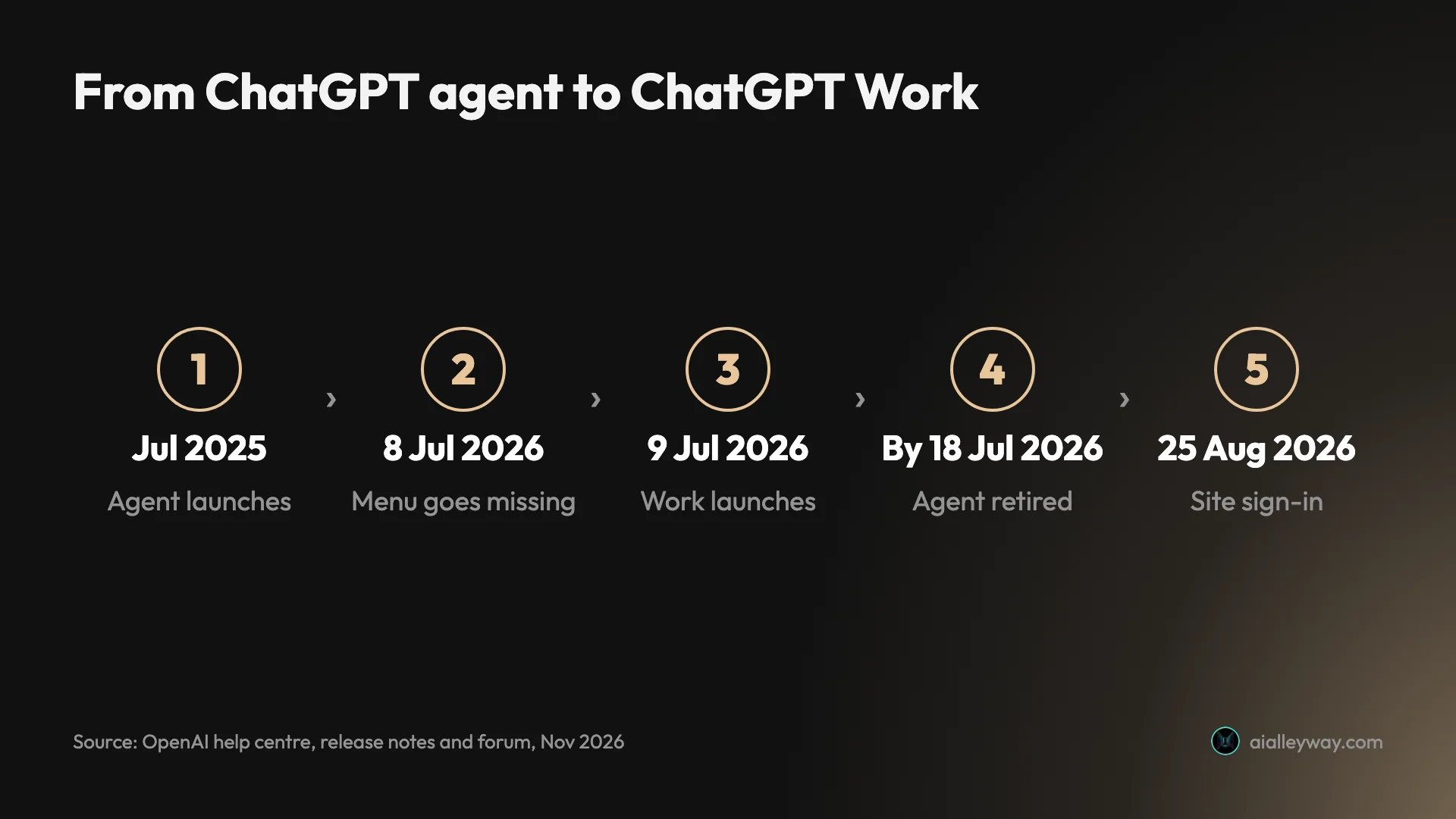
Work did not arrive with everything the agent had. The ability to complete tasks on websites that need a login came on 25 August 2026, six weeks later. Until then, anyone who relied on the agent’s “take over the browser, type your password, hand it back” routine had no way to do it inside ChatGPT. A forum thread posted on 8 August put the wider complaint in its title: “Agent Mode was removed with no real replacement.” Its author missed the agent clicking through interactive sites, not only signing in.
What ChatGPT agent did, for anyone reading an old guide
Most ChatGPT agent guides you will find were written in 2025, so it helps to know what they describe. The agent launched in July 2025 and merged two older products: Operator, which controlled a virtual computer, and deep research, which read and summarised large amounts of the web.
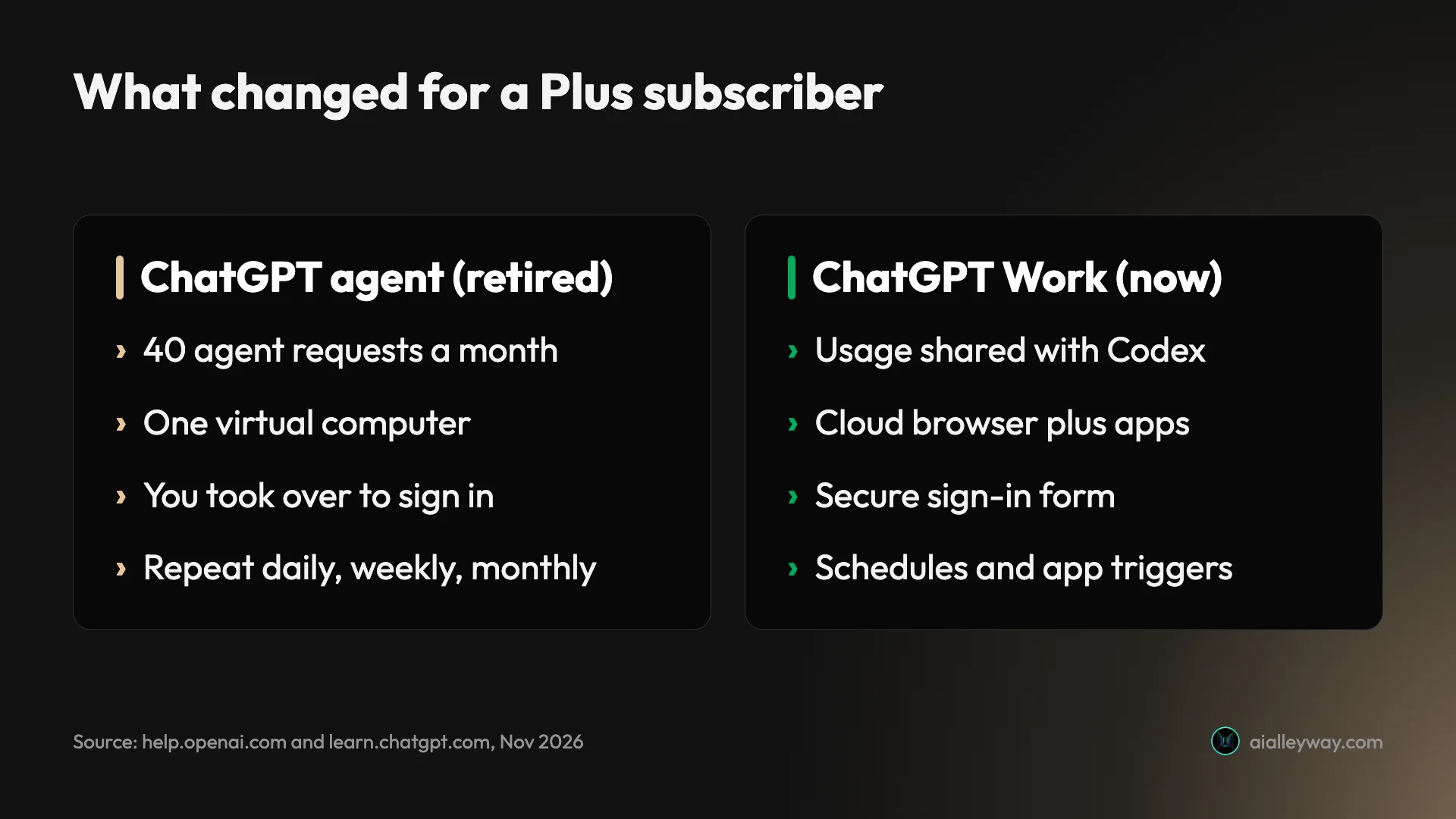
You turned it on from the tools menu or by typing /agent. It then worked on its own virtual computer, narrating as it went, and you could interrupt, redirect or take over the browser at any point. When a site needed a login, it paused and asked you to take control, and OpenAI said screenshots stopped while you typed.
The limits were counted per request. OpenAI’s help page still lists them:
| Plan | Agent allowance (retired) |
|---|---|
| Plus | 40 messages a month |
| Pro | 400 messages a month |
| Business and Enterprise | 40 messages a month |
| Business and Enterprise on flexible pricing | 30 credits a message |
Only the request you typed counted. Clarifying answers and sign-in steps were free, but a scheduled run counted every time it fired. Forty a month on Plus works out at about two a working day, so the agent was something to save for jobs that needed it.
None of that applies now. If a guide tells you to type /agent or count against 40 messages, it is describing a feature that no longer exists.
What ChatGPT Work does instead
Work is a mode, not a tool you pick from a list. OpenAI’s Work and Codex help article splits ChatGPT into Chat, for quick conversational help, and Work, which it calls “an agent designed for longer, multi-step work and finished deliverables.” Codex sits beside them for software development.
On the web you pick Chat or Work from a toggle at the top of the page, then describe the result you want. The help centre lists five kinds of output: a document, a spreadsheet, a presentation, a report or a Site. While it runs, you can follow its progress, answer its questions, change direction and approve important actions.
It runs in the cloud, so you can leave
On the web and on mobile, Work runs on OpenAI’s computers rather than yours. The practical upshot is that you can start a task, close the laptop and come back to the result. Cloud Work chats sync across web, mobile and the desktop app, so a task started on a phone can be picked up at a desk.
The desktop app adds a second mode, local Work, which can open folders and use apps on your own computer with your permission. Work on the web cannot touch files on your computer at all, so anything it needs has to be uploaded or reached through a connected app.
It uses your apps and projects
Work can pull from connected apps and files, and it can start from a project. Pick Work inside an existing project and it uses that project’s context. One exception is easy to trip over. A project set to project-only memory cannot use Work at all, according to OpenAI’s 14 August release note.
The release notes also list plugins for Work, which replaced the old App Directory on launch day, and voice. On the web you can talk to Work through the Voice control, and approvals still happen on screen because spoken approval is not supported.
It runs on a schedule, or when something happens
The agent let you repeat a finished task daily, weekly or monthly. Work keeps that and adds triggers. OpenAI’s 25 August 2026 release note gave Plus and Pro users tasks that fire when a new Gmail message arrives, when a Slack channel receives a message, or when a GitHub pull request changes. The help centre now lists Business, Enterprise, Edu and ChatGPT for Healthcare too, with Enterprise, Edu and Healthcare admins needing to switch the feature on first.
You can also share a scheduled task. The person you share it with gets the instructions and schedules their own copy, using their own connected apps. None of your chat history, files, memories or credentials goes with it.
The cloud browser is the old agent’s browser
If what you miss is the agent clicking through websites, this is the piece to look at. OpenAI’s cloud browser article describes it as Work’s own browser on a separate computer in the cloud. It reads pages, clicks buttons, fills in forms and carries out steps on public and signed-in websites.
You do not switch it on. ChatGPT decides when to use it, and if a connected app can do the job directly, it may use the app instead. OpenAI’s example jobs read like the agent’s old demo reel: checking restaurant availability, comparing flights, tracking a package from an email, finding a DMV appointment, comparing utility plans and reconciling invoices.
Signing in works differently now
This is the biggest change for people who relied on the agent’s takeover. The cloud browser stops at a supported sign-in page and shows a secure sign-in form. You enter your username, password and any security code there, and OpenAI says those credentials go straight to the remote browser, are not visible to the model and are not stored.
Before the form appears, a second model checks the request for signs of phishing, and you can see the website address and a preview of the form. Once you are signed in, the session persists for later tasks until it expires. You can still take over the browser if ChatGPT gets stuck, through a link it gives you.
It asks before it spends
Visiting a new website is a permission of its own. By default ChatGPT asks before opening any site it has not used before. Under Settings, Cloud browser, there are three settings:
| Website access setting | What it does |
|---|---|
| Always ask (default) | You approve every new website yourself |
| Auto approve | ChatGPT checks the address and only pauses if it looks unsafe |
| Always allow | Every website is allowed; OpenAI says this is not recommended |
You can also allow or block single sites, and those choices override the default.
Separately, it is meant to stop before consequential actions. OpenAI’s wording covers anything hard to reverse or that creates “a financial, legal, account, or other real-world commitment”, such as confirming a booking or paying. Those confirmations happen in the chat, whatever your website setting.
It is not your browser
The cloud browser keeps its own cookies and sessions. It does not see your tabs, history, saved passwords, extensions or existing sign-ins, which is safer and also means you sign in again the first time for every site. To clear what it has kept, go to Settings, Cloud browser, Browser data, Cookies.
What Work costs, and what happened to the 40-a-month limit
The flat monthly count is gone, and nothing as simple replaced it. OpenAI’s help centre says Work “follows the same usage structure as Codex”, and the pricing page confirms the two share usage, credits and limits. Your Work tasks and your Codex sessions draw from one allowance.
| Plan | Price (US) | Work |
|---|---|---|
| Free | $0 | Not on web or mobile |
| Go | $8 a month | Not on web or mobile |
| Plus | $20 a month | Yes, limited Astra usage, credits available |
| Pro | $100, $200 or $500 a month | Yes, currently no five-hour limit; Ultrafast on $500 only |
| Business | $20 per user a month billed annually, $25 monthly | Yes |
| Enterprise and Edu | Quoted by sales | Yes, if the workspace allows it |
For Plus, the pricing page publishes estimates in messages per five-hour window, by model. Those are the nearest thing to a Work allowance OpenAI states:
| Model on Plus | Messages per five hours (estimate) |
|---|---|
| GPT-6 Astra | 5 to 45 |
| GPT-6.1 Sol | 15 to 160 |
| GPT-6 Sol | 15 to 150 |
| GPT-6.1 Terra | 35 to 285 |
| GPT-6 Luna | 350 to 3,000 |
Read that table with three caveats. The help centre says the pricing page’s examples are based on coding tasks, so Work usage “will vary by task”. The pricing page adds that “weekly limits may also apply” on top of the five-hour window. And cloud tasks, which is how Work runs on the web, may use more of the allowance than local messages do.
The range is wide because a message is not a fixed amount of work, and OpenAI publishes no cost for a single Work task. The spread between models is the useful signal: on Plus, OpenAI’s estimate for GPT-6 Astra is 5 to 45 messages per five hours, against 350 to 3,000 for GPT-6 Luna, so the model you pick moves the allowance more than anything else.
When the allowance runs out
On Plus and Pro you can keep going with credits instead of waiting. A credit is worth four cents, a figure our Codex pricing guide worked out by dividing OpenAI’s API rates by its credit rates. The pricing page still gives its cost example on an older model, GPT-5.6 Sol, at promotional rates that run at least to 21 November 2026: “a typical GPT-5.6 Sol task may use 2-15 credits”, which is 8 to 60 cents.
Here is what that means for a routine job. Say a weekly report costs 15 credits a run, the top of OpenAI’s typical range, and every run lands after your allowance is spent. Fifty-two runs is 780 credits a year, or $31.20. Inside the allowance the same runs cost nothing beyond the $20 subscription, which is why the timing of a scheduled task matters as much as its size.
According to the credit terms our Codex pricing guide checked, the credits come from one pool shared by Codex, Work, ChatGPT for Excel and Workspace Agents, and they expire twelve months after you buy them. Auto top-up exists too, which is convenient until a scheduled Work task runs every hour on an expensive model.
On the web, OpenAI added a usage meter in the sidebar in early August 2026, so Plus and Business users can see how much Work allowance is left. Watch that number for the first week. It is the only way to find out what your own tasks cost.
Four jobs people used the agent for, done the new way
Old agent tutorials teach by example, so here are four common examples translated to the new setup. These are the routes OpenAI’s documentation describes, not runs I timed.
| Old agent job | Where it lives now | What it draws on |
|---|---|---|
| Research brief with a spreadsheet | Work | Shared Work and Codex allowance |
| Slide deck from your notes | Work, chat or the PowerPoint add-in | Allowance, or the chat’s own limits |
| Weekly check on a schedule | Work scheduled task or trigger | Allowance on every run |
| Booking a restaurant table | Chat reservations, every plan | Not a Work feature |
A research brief with a spreadsheet. The 2025 tutorials loved this one: find the data, put it in a sheet, write a summary. In Work you describe the deliverable directly, for example a spreadsheet of the twenty largest coffee chains with revenue and store counts, plus a one-page summary with sources. Work returns the file and the summary in the chat. If a source needs a login, the cloud browser stops at the secure form.
A slide deck from your own notes. Upload the notes, or start Work inside a project that already holds them, and ask for a ten-slide deck. Our ChatGPT PowerPoint guide covers the other routes: the ordinary chat can make a .pptx on any plan, and the PowerPoint add-in draws on the same agentic allowance as Work.
A weekly check that used to be a scheduled agent. Ask Work to check three competitor pricing pages every Monday and tell you what changed. Before, each run used one of your 40 monthly agent requests. Now each run draws on the shared Work and Codex allowance. If the check should run when something happens, such as a new email from a supplier, use a Gmail trigger instead of a timer.
Booking a table for a group. The agent’s most famous demo was booking a restaurant, and this one has moved out of the agent entirely. Since 10 August 2026, ordinary Chat finds reservations through OpenTable worldwide, Resy in the US and Yelp in the US and Canada, on every plan including Free, and you book by picking a time in the reply. OpenAI’s note adds that Work does not include restaurant reservation search. For a restaurant on none of those services, Work’s cloud browser can check the restaurant’s own site, and the booking itself waits for you to confirm in the chat.
Seven things to watch before you rely on Work
The help page still describes the old agent
OpenAI changed the first line of the agent article and left the rest, so anything that reads the whole page, a person skimming or an AI tool summarising it, can come away thinking agent mode still exists on Plus with a monthly cap. Trust the first line, not the body.
| The agent page still says | What is true in November 2026 |
|---|---|
| Select agent mode or type /agent | Neither exists; pick Work from the toggle |
| Plus gets 40 messages a month | Work shares a five-hour allowance with Codex |
| Take over the browser to sign in | The cloud browser shows a secure sign-in form |
| Manage schedules at chatgpt.com/schedules | Work tasks live under Scheduled |
“Work in a project” on Free is not Work
On the Free account I checked on 4 November 2026, the plus menu lists an item called Work in a project. It sounds like the new agent. It is not: its own description reads “Start a chat in a project”, and it opens an ordinary chat. The same menu had no agent entry and no Work entry, and typing /agent produced nothing.
Some sites will not let it in
OpenAI is frank that websites decide. Its cloud browser article says some sites “restrict access from automated browser agents” and may block a task even though the same site works in your own browser. The forum post from 8 August lists the kinds of sites the old agent handled well, such as store navigation, product configurators and shipping options. Test the specific site before you build a routine around it.
Your Codex habit and your Work habit compete
Because Work and Codex share usage and credits, a heavy coding day can leave less for Work and the reverse. A Plus subscriber who uses both should expect to hit the five-hour window sooner than either product alone would suggest. Our ChatGPT Plus vs Pro comparison covers when that tips you towards Pro.
Plus gets the best model only in small amounts
OpenAI’s help centre says Plus includes GPT-6 Astra in Work, but with “limited Astra usage”, and that Astra “may use your allowance faster” than other models. Its estimate for Plus is 5 to 45 Astra messages per five hours. For long Work tasks, pick a cheaper model in the model picker unless the job needs Astra.
Old schedules did not carry over cleanly
OpenAI kept agent schedules at chatgpt.com/schedules, and Work uses Scheduled Tasks. Neither the help pages nor the release notes say what became of scheduled agent runs once the agent went. If you had any, open the Scheduled page and check what is still running, rather than assuming your weekly report is still coming.
Prompt injection did not go away
The risk OpenAI spent most of the old agent page on still applies. A web page or email can hide instructions meant for the AI, and an agent that reads it on your behalf may follow them. OpenAI says it tests the cloud browser for prompt injection, phishing and unintended actions, and that those safeguards “do not eliminate every risk”. Its own advice: prefer a connected app when one can do the job, give narrow instructions, never paste passwords or payment details into the chat, and stop a task the moment it opens the wrong site.
Should you pay for ChatGPT Work?
- Pay for Plus if you used the agent a few times a week. At $20 a month it is the cheapest way back to an agent in ChatGPT. Whether the shared allowance beats the old 40 requests a month depends on your tasks and model, and the usage meter will tell you within a week. Our ChatGPT review covers what else Plus buys.
- Look at Pro if agent work fills your day. Pro currently has no five-hour limit, and OpenAI says the $100 and $200 plans can use their full allowance on Astra. The $500 plan adds Ultrafast.
- Use Business for a team that wants shared rules. OpenAI’s help centre describes workspace admins controlling who gets Work in its cloud and local forms, with browser use and network access managed separately.
- Stay on Free if you only want answers. Free still covers chat, web search, deep research and image creation. It has no agent at all.
- Skip Work if your job is one website that blocks bots. No plan fixes that. Do the task yourself, or use a browser agent that runs on your own machine.
Other agents to try instead of Work
Three other agents cover the same ground, each with a different catch.
- Claude Cowork. Anthropic’s Cowork page says Cowork is included in the Pro plan, which is $20 a month, the same price as ChatGPT Plus. Our Claude AI review covers what else each Claude plan includes.
- Perplexity Computer. Perplexity’s agent carries out multi-step work across connected apps and spends credits, as our Perplexity vs Gemini comparison describes. Perplexity’s pricing pages showed Pro at $17 a month billed annually on 20 October 2026; our Perplexity AI review covers the plans.
- Comet. Perplexity’s browser, which you install on your own computer, has its assistant built in. The browser is free; its agent mode stopped at an Upgrade to Pro wall in our Comet browser review.
Final word
The ChatGPT agent you read about in 2025 guides no longer exists, and the /agent shortcut goes nowhere. What replaced it is bigger and less predictable. Work makes finished files, runs on schedules and app triggers, and its cloud browser now signs in to websites more safely than the old takeover did. In exchange, the simple 40-a-month count is gone, and you get a shared Work and Codex allowance that OpenAI describes only in ranges.
If you used the agent a few times a week, Plus at $20 is still the right place to start. Watch the usage meter for the first week and you will know within days whether that is enough.
Frequently asked questions
Is ChatGPT agent still available?
No. OpenAI's help article for ChatGPT agent now opens with the line that ChatGPT agent is no longer available, and it sends readers to ChatGPT Work for longer, multi-step tasks and to the cloud browser article for browser jobs.
The rest of that page still describes the old feature, including the /agent command and the 40-a-month limit on Plus. Most guides that repeat those details were written in 2025, before the change. Neither works any more. On a Free account I checked on 4 November 2026, typing /agent did nothing and the tools menu had no agent entry.
What replaced ChatGPT agent?
ChatGPT Work, which OpenAI launched on 9 July 2026. It is described as an agent for longer, more involved tasks: it researches, works across connected apps and files, and returns finished documents, spreadsheets, presentations, reports and Sites.
The part of the old agent that clicked through websites now lives in Work's cloud browser, a separate browser on a computer in the cloud. It keeps working after you close your laptop, and since 25 August 2026 it can also sign in to supported websites on Plus and Pro, through a secure form.
How many ChatGPT Work tasks do you get on Plus?
OpenAI does not publish a task count for Work. Its help centre says Work follows the same usage structure as Codex, and the pricing page says the two share usage, credits and limits.
For Plus, that page estimates 15 to 160 messages every five hours on GPT-6.1 Sol and 350 to 3,000 on GPT-6 Luna, adds that weekly limits may also apply, and warns that cloud tasks can use more than local messages. Once the allowance runs out, Plus can buy credits instead of waiting.
Is ChatGPT Work free?
Not on the web or mobile. OpenAI's launch note says Work rolled out to paid plans except Free and Go, and the cloud browser article excludes the same two plans.
Free accounts do see an item called Work in a project in the tools menu, but that starts an ordinary chat inside a project. It is not ChatGPT Work. The cheapest way into Work is Plus at $20 a month.
Can ChatGPT Work buy things or book things for me?
It can get most of the way. OpenAI's cloud browser article lists jobs such as checking restaurant availability, comparing flights, finding a DMV appointment and preparing a booking for your approval.
It is designed to stop before anything hard to reverse. OpenAI says it asks for confirmation in the chat before actions that create a financial, legal or account commitment, such as confirming a booking or making a payment. Some websites also block automated browsers outright, so you may need to finish the last step yourself.
Keep reading
ChatGPT review: the free tier is the story, not the $20 one
A ChatGPT review from a year on the free tier plus one month of Plus. Six rungs from $0 to $500, and ads now run on both the Free and $8 Go tiers.
ChatGPT Plus vs Pro: three Pro prices and no published multiplier
ChatGPT Plus costs $20; Pro is now $100, $200 or $500 a month. OpenAI dropped the 5x and 20x figures, so here is what each tier still says it buys.
Codex pricing 2026: plans $0–$500, and a credit costs $0.04
Codex costs $0–$500/mo inside ChatGPT. A credit is $0.04, so 2,500 credits is $100. The rate card, the limits, and what a real task costs.
ChatGPT PowerPoint: it made my deck free, then locked me out
Can ChatGPT make a PowerPoint? My free account got an 8-slide .pptx in a minute, then hit a limit. The add-in, ChatGPT Slides and Copilot, compared.

Comet browser review: a careful reader, a paywalled agent
A hands-on Comet browser review on Perplexity's free plan: accurate page summaries, an honest one-tab limit, and an agent that stops at an Upgrade to Pro wall.