
Captions AI review: the pricing page hides half the plans
A Captions AI review from the published record: the pricing page shows three plans, the help doc lists six. Credits are 5 cents flat, and one clip costs $7.
Contents
Is Captions worth it?

Read the rating above with one caveat attached: I have not run Captions. No account, no generations, no exports. This is a review of what Captions publishes about itself, not of what it produces, and the score reflects exactly that — credit for a product its own users rate highly, marked down for telling buyers less than it knows. Every Captions figure below was read from its own pages and public ratings on 16 September 2026.
With that said: Captions is a well-liked product wrapped in a pricing page that misleads you about what it costs. It holds 4.7 out of 5 from 38,000 App Store ratings, a score most software never sees. It also publishes two different accounts of its own plans on two of its own pages, and the version most buyers will read is the one that costs them more.
If you make short video on an iPhone and want a dozen generative models behind one button, Captions is worth your time. If you need to know what a video will cost before you make it, you will be doing arithmetic the vendor could have done for you. Our CapCut review is the hands-on one in this category, and I lean on it wherever a comparison needs real numbers.
What does Captions actually do?
Captions is an AI video editor that started on iOS and grew into a generation suite. The original product did one job well: you talked into your phone, and it produced captioned vertical video with the subtitle styling that short-form audiences expect. That is still the core, and it is still what most of those 38,000 ratings are rating.
What has been layered on top is a model aggregator. Inside the app you can reach Google’s Veo 3 and Veo 3.1, Kling 1.6 and 2.1, Seedance 2.0, Pika 2.2, Hailuo, Luma’s Ray 2, Minimax and a shelf of image models including Flux, Imagen, Ideogram and Nano Banana. We have tested several of these directly — Kling, Google Veo, Seedance and Hailuo each have their own review here — and reaching all of them through one subscription instead of five is a genuine convenience.
Around the models sit the workflow features, using Captions’ own labels for them. Edit with AI takes a raw talking-head clip and cuts it with B-roll and effects. Create avatars builds a digital twin of you from footage, and Lipdub and Translate videos handle dubbing into other languages.
There is also a chat-based editor where you describe a change instead of making it, and Create clips, which turns a long recording into short ones. The last is the job our Submagic alternatives roundup covers in depth, and clipping is a side feature here rather than the product. I have not run Captions’ version of it, so I am not ranking it against the four tools in that roundup that I did run.
Each of those draws on the same balance, at costs Captions publishes per feature:
| Feature | Credit cost |
|---|---|
| Prompt to Video | 16 credits per 6 seconds |
| AI Edit | 10–40 credits |
| AI Edit clip style change | 1 credit |
| GenAI image | 1–3 credits |
| GenAI video | 1–20 credits |
| GenAI music | 1–2 credits |
| Chat-based editing | 2 credits per message, plus 1 per action |
The unifying mechanic is credits. Every generative action draws down a monthly balance, and the balance is the product’s real shape. Understanding what a credit is worth is understanding Captions, which makes it unfortunate that the page selling you credits is the least forthcoming page they publish.
How much does Captions cost?
Start with what the pricing page shows you, because it is where every buyer starts.
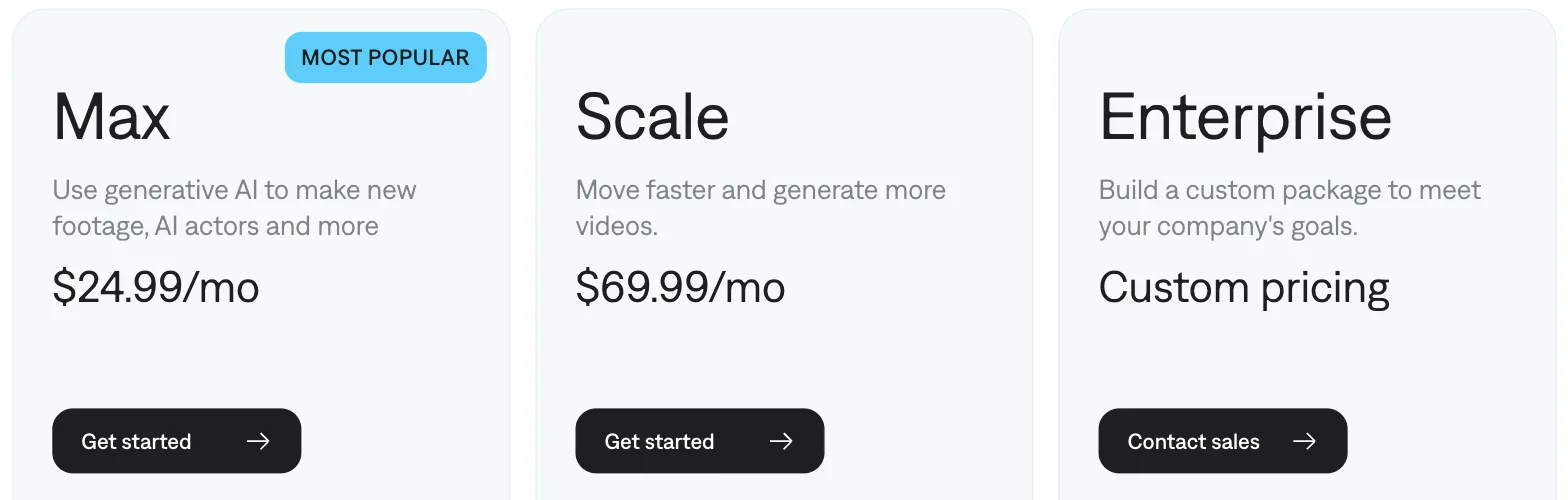
Three options. Max at $24.99, Scale at $69.99, Enterprise on request. A reasonable person concludes the entry price is $24.99 a month, and that conclusion is wrong: Captions sells a Basic plan at $9.99 that appears in its own help documentation and not on this page.
Scroll down and the comparison table adds a Free column, which is the only place on the page the free plan appears at all. Here is the row that matters most, and the one everybody writing about this tool disagrees on:

Two problems in one screenshot. The free plan is shown as having no AI credits whatsoever. And the paid plans quantify their credits as “Medium” and “High” — words, not numbers, on the page whose entire purpose is telling you how much you get for your money. The actual figures, 500 and 1,400, appear further down each plan card, in the “What’s included” list below the crop above — so the comparison table is less specific than the cards it is comparing.
A free tier its own two pages cannot agree on is unusual even in this category — free AI clip generator lays the category’s free tiers out against each other.
Now Captions’ own help documentation, which tells a different story:
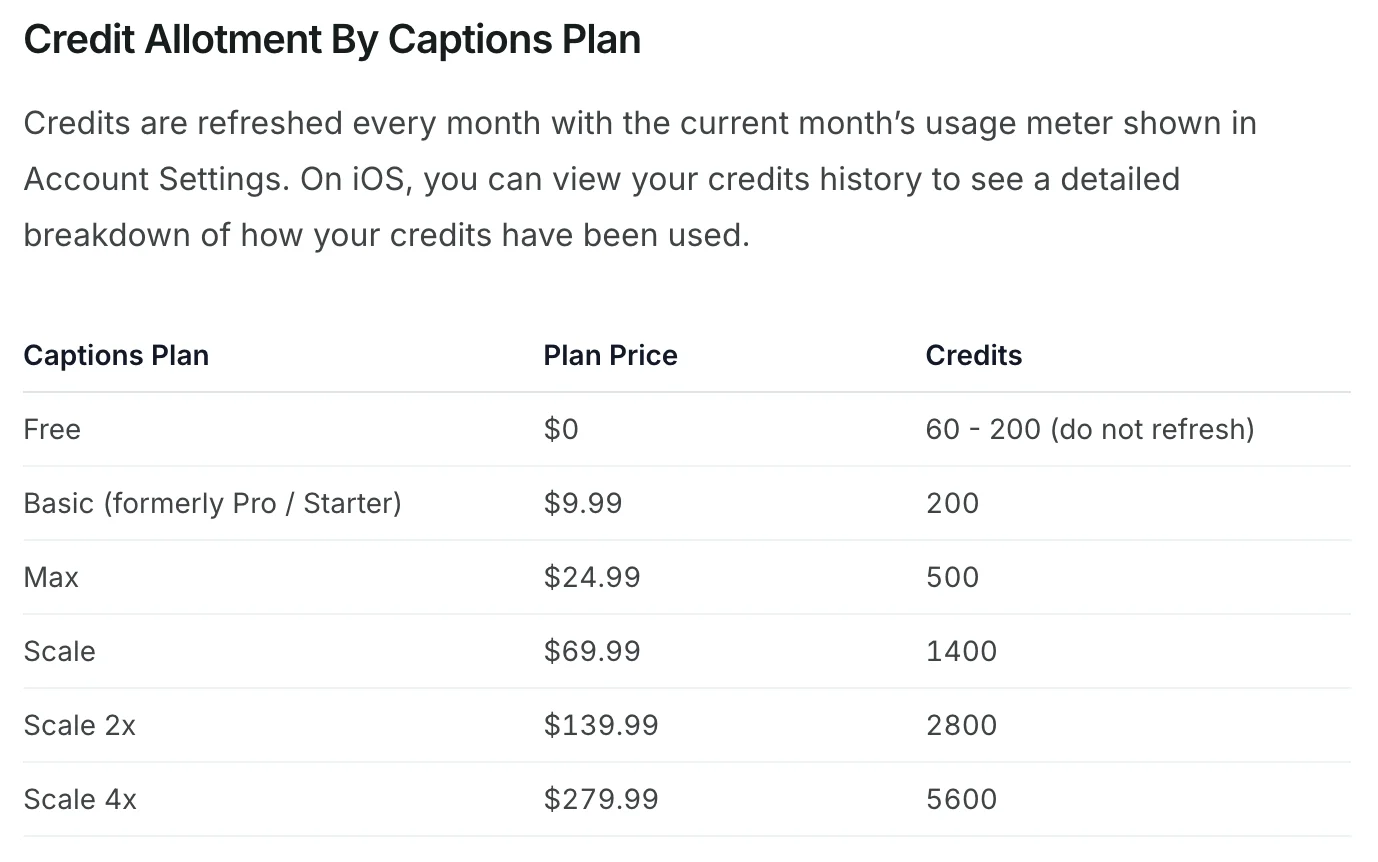
Six plans, not three. The free tier gets 60 to 200 credits, not none. And sitting below Max is Basic, at $9.99 a month for 200 credits — described in the table as “formerly Pro / Starter”, which is why older write-ups still list a “Pro” plan at that price.
I checked whether the pricing page mentions it anywhere. The strings “9.99” and “Basic” do not appear on that page, not in the rendered text and not in the underlying HTML. Someone shopping on the pricing page is looking at an entry price two and a half times higher than the real one.
| Plan | Price | Credits | Cost per credit |
|---|---|---|---|
| Free | $0 | 60–200, do not refresh | — |
| Basic (formerly Pro / Starter) | $9.99 | 200 | $0.0500 |
| Max | $24.99 | 500 | $0.0500 |
| Scale | $69.99 | 1,400 | $0.0500 |
| Scale 2x | $139.99 | 2,800 | $0.0500 |
| Scale 4x | $279.99 | 5,600 | $0.0500 |
Plans and credit counts are Captions’ published figures; the cost-per-credit column is mine, and it is the most useful thing on this page. Every tier charges almost exactly 5 cents a credit. There is no volume discount at any rung of this ladder. Scale costs 2.8 times what Max costs and hands you 2.8 times the credits. Scale 4x costs 11.2 times Max and gives 11.2 times the credits, or 28 times Basic for 28 times the credits. Worked to five decimal places the rate actually drifts very slightly against you as you climb, from $0.04995 on Basic to $0.04999 on Scale 4x.
That is worth saying out loud because it inverts the usual advice. On most metered tools, committing to a bigger plan buys a better rate. Here it buys headroom and nothing else, so the right move is the smallest plan that covers your month, and the cheapest of those is the one the pricing page does not show you.
Two more things the page will not tell you. Its footnote reads that “Features and prices reflect iOS plans only”, so every figure above is quoted for one platform. And the FAQ promises that “a yearly plan bills for 12 months upfront, at a discounted rate” — but no yearly price appears anywhere on the page, and there is no monthly-to-yearly toggle to reveal one.
Who is Captions for?
- iPhone creators who post talking-head video daily. This is the core audience and the one the 4.7 App Store rating comes from. Captioned vertical video is the thing Captions has been refining longest.
- People who want many generative models without many subscriptions. Veo, Kling, Seedance, Pika, Hailuo and Ray behind one meter is a real convenience if you would otherwise be paying four vendors.
- Anyone who needs dubbing and lip-sync more than they need editing. Translation and Lipdub are the features Captions markets hardest, and I have not run either.
- Light users who can live inside Basic. At $9.99 for 200 credits, the tier the pricing page hides is the best-value entry in the range.
- Not for you if you need predictable per-video costs. Credit costs swing from 8 to 140 per video depending on the model, and the “AI Edit” range is published as a shrug: 10 to 40 credits, varying by duration, model and algorithm. If you are quoting client work, this is a hard tool to quote on.
What Captions gets right
The user sentiment is real, and unusually well-evidenced
Software ratings are easy to dismiss until you look at the sample size. Captions holds 4.7 out of 5 across 38,000 App Store ratings, 4.4 across 435 Trustpilot reviews, that one read off a search listing rather than the site itself, and its Captions Lite listing on Google Play carries 4.2 across more than 18,000. Three independent populations, all landing between 4.2 and 4.7. Whatever the pricing page does to buyers, the product itself is clearly satisfying the people who use it.
One subscription reaches models that normally cost four
The model list is the strongest argument for the product. Reaching Veo 3.1, Kling 2.1, Seedance 2.0, Pika 2.2, Hailuo and Ray 2 through a single meter removes the thing that makes multi-model work annoying, which is maintaining accounts and balances at five vendors who all meter differently. Our best AI video generator comparison exists precisely because those tools are hard to evaluate side by side, and Captions makes side-by-side cheap to attempt.
Credits roll over, with a stated cap
Captions’ FAQ commits to unused credits carrying into the next month, up to two extra months’ worth, so a balance can reach three times the monthly grant. On Max that is 1,500 credits banked against a 500 allowance. That matters if you publish irregularly: a quiet month is not a forfeited month, which is not something every metered tool in this category offers.
The free tier is a real editor, not a demo
Strip out the generative features and what remains is still usable: trim, zoom, sound effects, transitions and resizing, each ticked in the free column of Captions’ own comparison table. The teleprompter is gated, and the AI tools are gated behind credits. But the free plan is not the empty shell the AI Overview describes, and for someone who only needs captioned vertical video it may be all they ever touch.
The credit costs are published, model by model
This is the thing I want to give Captions proper credit for, because most metered AI tools do not do it. The help documentation lists the credit cost of every individual model, which is what makes the arithmetic in this review possible at all.
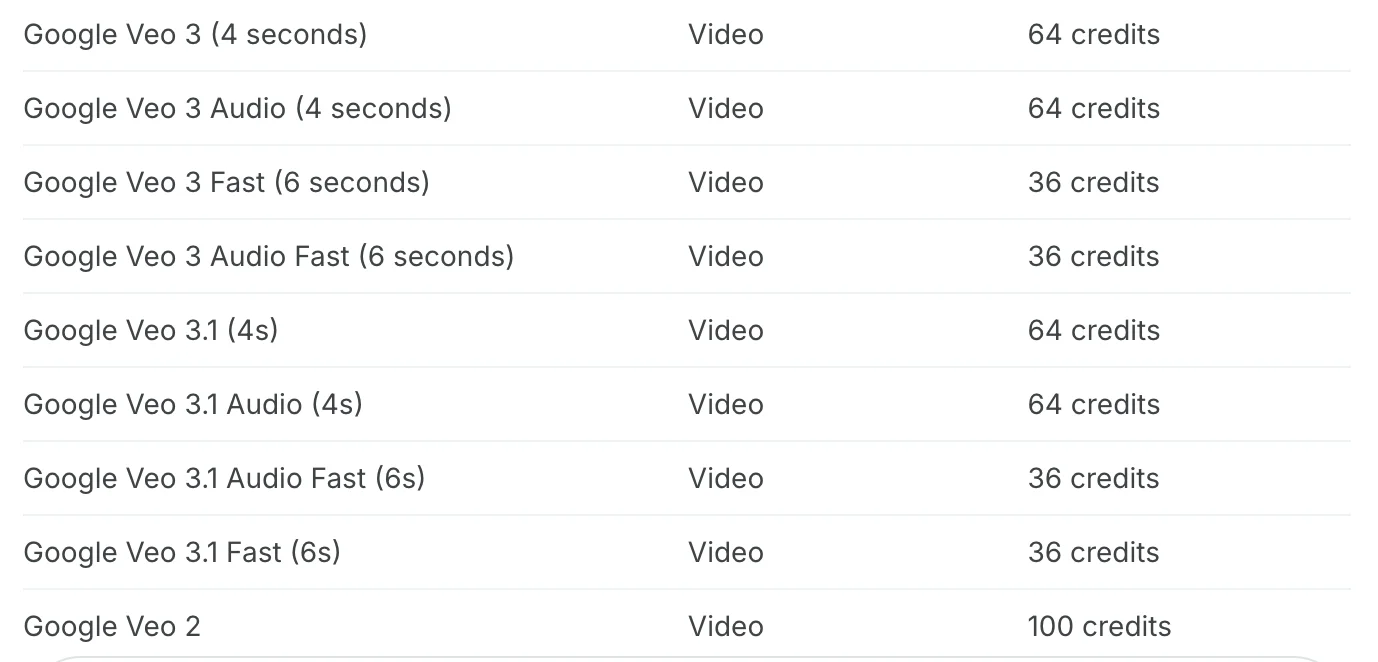
Buried in a help doc rather than shown at the point of sale, which is the complaint below. But published, and precise, and more than most of this category manages.
Where Captions falls down
Its two pages disagree about the free tier
The pricing page’s comparison table sets free AI usage credits to “None”. The help documentation’s allotment table gives the free plan 60 to 200 credits that do not refresh. Both pages are captions.ai, both were live on 16 September 2026, and they cannot both be right. The practical effect is that nobody — including Google, whose AI Overview states flatly that there is no free plan — can tell you what you get without paying.
The cheapest plan is invisible where it matters
Basic at $9.99 exists in the help documentation and nowhere on the pricing page. That is not a stale cache or a rounding difference; the string is absent from the markup. A buyer who does exactly what the site asks, and reads the pricing page, will conclude Captions starts at $24.99 and either pay 150% more than necessary or leave believing the tool is dearer than it is.
Premium models are expensive once you price them
At a flat 5 cents a credit, Kling 2.1 at 140 credits is $7.00 for one video. Google Veo 2 is $5.00. Veo 3 at four seconds is $3.20, which works out to 80 cents a second of finished footage. Prompt to Video bills 16 credits per 6 seconds, so a one-minute generated video is $8.00. Max’s 500 credits buy you three Kling 2.1 clips a month and change. None of that is hidden, exactly, but none of it is on the page where you choose a plan either.
| Model | Credits | Cost at 5¢ |
|---|---|---|
| Kling 2.1 | 140 | $7.00 |
| Google Veo 2 | 100 | $5.00 |
| Luma Ray 2 | 80 | $4.00 |
| Google Veo 3, 4 seconds | 64 | $3.20 |
| Seedance 2.0 | 61 | $3.05 |
| Kling 1.6 | 40 | $2.00 |
| Pika 2.2 | 20 | $1.00 |
| Hailuo 2.3 Fast | 8 | $0.40 |
Credit counts are Captions’ published figures; the dollar column is mine, at the flat 5-cent rate every plan charges.
Buying a bigger plan buys you nothing but headroom
Every tier prices at 5.0 cents a credit. There is no point at which volume earns a discount, and the effective rate creeps very slightly worse as the plans get larger. Most metered tools reward commitment; this one is indifferent to it, which makes the larger Scale tiers hard to justify over simply buying the smallest plan that fits.
The prices are quoted for one platform only
“Features and prices reflect iOS plans only” is a footnote doing a great deal of work. There is a web product and an Android presence, and the published price list does not describe what either costs. Combined with a FAQ that directs plan changes to App Store and Google Play settings, the impression is of a product whose commercial terms live in the stores while its marketing lives on the site.
AI Edit’s cost is published as a range you cannot plan around
The flagship automation bills at “10 - 40 credits”, footnoted as varying by video duration, model selection and algorithm choices. That is 50 cents to $2.00 for the same nominal action, resolved only after you have spent it. For a hobbyist that is noise. For anyone costing client work it means the headline feature has no quotable price.
If Captions isn’t for you
Three places to look, depending on which part of the above put you off. CapCut and Vizard were both measured on the same 35-minute file in the best AI clipping tool; Descript I have priced rather than run.
| If the problem is | Look at | Because |
|---|---|---|
| The cost | CapCut | The only genuinely clean free export in this category |
| No real editor underneath | Descript | A transcript-based editor with a real timeline, not an automation layer |
| Clipping long video | Vizard | Built for the job Captions treats as a side feature |
If the cost is the problem, use CapCut. It is the one tool in this category whose free export is genuinely clean. I ran it on a 35-minute panel and it returned eight clips at 1080x1920 with no watermark, for nothing, on an allowance that renews at 60 source minutes a month. It will not generate video for you and its clipping is really chaptering, but if you want captioned vertical video at zero cost it is the honest answer. The full CapCut review has the measured detail.
If you want a real editor underneath, use Descript. Captions is an app that automates editing; Descript is an editor that happens to have AI in it, with a transcript as the editing surface and a timeline you can work in directly. It is not the simpler meter, though — it runs Media Minutes and AI Credits as two separate budgets, and our review argues that is its biggest drawback. Our Descript review covers where that trade lands.
If clipping long video is the actual job, use Vizard. Captions’ Clips feature is a side dish. Vizard is built for it, and on the same 35-minute source it found 30 clips at 85 cents a job on its Creator annual rate against OpusClip’s $2.03 on Pro annual, an identical per-source-minute meter, though OpusClip’s annual price moved twice in a single day when I tested OpusClip, so check it on the day you buy. Its catch is that the free plan hands back ten of the thirty it finds. The Vizard review has the numbers.
The final word
| Captions, from the published record | Figure |
|---|---|
| App Store rating | 4.7 from 38,000 |
| Real entry price | $9.99 (Basic) |
| Price shown on the pricing page | $24.99 (Max) |
| Cost per credit, every tier | $0.0500 |
| One Kling 2.1 video | $7.00 |
| Free AI credits | “None” or 60–200, depending which vendor page you read |
The rating on this review is 3.7, a Solid Choice rather than something higher, and the gap is entirely about disclosure. On the evidence of 38,000 App Store ratings and two other independent populations, people who use Captions like it a great deal, and the model breadth is a real advantage over buying four subscriptions. I have no reason to doubt any of that and no standing to dispute it, because I did not test the output myself.
What I can assess is what Captions tells you before you pay, and there it does badly. A pricing page that shows three of six plans, omits the cheapest, quantifies its central resource as “Medium” and “High”, contradicts the company’s own documentation about the free tier, and footnotes that its prices only describe one platform, is not a page written to help you choose. Every number needed to fix it already exists on Captions’ own help pages. Someone decided not to move them.
Buy it if you are an iPhone creator who wants many models in one place and you are content to work out your own costs. Start on Basic at $9.99, not Max, whatever the pricing page implies. And if what you actually need is captioned vertical video at no cost, the answer in this category is still CapCut.
One note on the disclosure below: we earn nothing from Captions. There is no affiliate arrangement between us, and the Captions links on this page are plain, uncommissioned links. The banner is there because the Vizard link further up is commissioned.
Frequently asked questions
Is Captions AI free to use?
Yes, though Google's AI Overview currently says otherwise, and Captions' own two pages do not agree with each other. The pricing page's comparison table lists AI usage credits on the free plan as "None". The help documentation's credit allotment table gives the free plan 60 to 200 credits that, in its words, "do not refresh".
What is not in dispute is the shape of it. Free gives you the traditional editing tools: trim, zoom, sound effects, transitions and resizing. The teleprompter is crossed out. Every generative feature runs on credits, so if the pricing page is right you cannot touch them, and if the help doc is right you get one small non-renewing allowance and then you are done. Captions itself resolves the ambiguity in its FAQ by recommending you subscribe to use generative AI features at all.
Which is better, Captions AI or CapCut?
They are built for different jobs, and CapCut is the better free option by a wide margin. I ran CapCut's clipping tool on a 35-minute conference panel and exported eight clips at 1080x1920 with no watermark, on the free tier, at no cost. Its free allowance renews at 60 source minutes a month.
Captions is the better tool if you want generation rather than clipping. It bundles Veo, Kling, Seedance, Pika, Hailuo and a dozen image models behind one meter, which CapCut does not attempt. The trade is cost and clarity. Captions charges a flat 5 cents a credit and a single Kling 2.1 clip runs 140 credits, so about $7. CapCut's free wall is storage rather than money: 512MB of cloud space that four 1080p exports filled, after which further exports started failing and one was refused outright.
How much does Captions AI cost?
More cheaply than its pricing page suggests: the real floor is $9.99 a month, not the $24.99 that page implies. It shows three options, Max at $24.99, Scale at $69.99 and Enterprise, so a buyer concludes $24.99 is the cheapest way in.
The help documentation lists six plans. Below Max sits Basic, described as "formerly Pro / Starter", at $9.99 a month for 200 credits, and the strings "9.99" and "Basic" appear nowhere on the pricing page, in its text or its underlying markup. Above Scale sit Scale 2x at $139.99 for 2,800 credits and Scale 4x at $279.99 for 5,600. Every one of those tiers works out to almost exactly 5 cents a credit, so buying a larger plan gets you headroom and nothing else, and the smallest plan that covers your month is always the right one. The pricing page footnote also warns that its figures reflect iOS plans only, so none of these numbers is promised to web or Android buyers.
Do Captions credits expire?
They roll over, within a cap. Captions' pricing FAQ states that unused credits carry into the next month and that you can bank up to two extra months of them, so your balance tops out at three times your monthly allowance. On the Max plan that is 1,500 credits held at once against a 500-a-month grant.
The free plan is the exception and the important one. Its 60 to 200 credits are described in the help documentation as credits that do not refresh, which makes them a one-off trial allowance rather than a recurring budget. Rollover only matters if something arrives each month to roll over. Anyone evaluating Captions without paying should assume they get one pass at the generative features and plan what to spend it on before they start clicking. At 5 cents a credit, 200 free credits is about $10 of generation, and a single Kling 2.1 clip would consume 140 of them.
Is Captions AI safe to use?
Nothing in the public record suggests a security problem, and the app's standing with its own users is genuinely strong. It holds 4.7 out of 5 from 38,000 App Store ratings and 4.4 from 435 Trustpilot reviews, which are not the numbers of a product that mistreats people.
Two things are worth knowing before you install it. The App Store age rating is 18+, which is higher than most editing apps and reflects what generative models can be prompted to produce. And I have not audited how Captions handles what you upload. The app is published by Captions, LLC with the copyright held by Mirage US LLC, and it weighs 241.4MB, but none of that tells you what happens to your footage once it is on their servers. If you are feeding it client work, read the privacy policy yourself rather than taking my word or anyone else's for it.
Is Captions worth it if you are not on an iPhone?
Be careful here, because the pricing page will not price your situation. Its footnote reads that all prices displayed are in USD and that "Features and prices reflect iOS plans only". Everything above the free tier is quoted for one platform, and the page does not tell you what the web or Android equivalents cost.
The product does exist beyond iOS. There is a web version, and a separate Google Play listing for Captions Lite carries 4.2 from more than 18,000 ratings. But the published price list does not cover them, and Captions' own FAQ points you to your App Store or Google Play settings to manage a plan, which suggests billing runs through the stores rather than through the site. If you are not buying on an iPhone, treat every number on the pricing page as indicative and check what you are actually charged.
Keep reading
Free AI clip generator: only one export came back clean
Four AI clip generators, one 35-minute file, two of them on genuine free plans. Only CapCut returned a file with no watermark. Here is what the rest hand back.
CapCut review: free 1080p exports, until 512MB stops you
I put a 35-minute panel through CapCut's AI clipping and exported all 8 clips. Watermark-free 1080p on the free plan, but the cloud ceiling bites at clip four.
CapCut auto captions: Pro in the editor, still free on one page
I tested CapCut auto captions on a free account. The editor now locks export behind Pro, but CapCut's AI Captions page exported free, with 2.7% of words wrong.
Descript review: the editing is magic, the pricing isn't
I ran my own projects through Descript. The transcript editing is genuinely magic — the new AI-credit pricing isn't. Here's who should actually pay.
Vizard review: the cheapest clipper, with one catch
A Vizard AI review from a measured run: it found 30 clips in my 35-minute panel and handed me 10. The other 20 need a card, and the maths still favours it.