
Submagic alternatives: the cheapest depends on your meter
Seven Submagic alternatives ranked by the meter they charge on. Four tools measured on one 35-minute video, and the cheapest changes with source length.
Contents
The quick answer
Best overall swap: Vizard. Same meter as OpusClip at under half the rate, 85 cents a job against $2.03, and it found 30 clips in the same file. The catch is that its free plan shows you ten of them.
Best free output: CapCut. Not because it is unmetered, which I had wrong before testing it, but because it is the only one here whose free export is publishable: 1080p, no watermark.
Best for long podcasts: stay on Submagic. Its flat 8 credits a job — $1.53 at the Pro annual rate — beats OpusClip once your source runs past about twenty-six minutes, and beats even Vizard’s much cheaper meter past about sixty-three. Below those lines the per-minute tools win.
That last one is the uncomfortable finding in a piece about leaving. Before you switch, work out which meter you are actually on.
How I picked these
Four of the eight tools named here I have run the same file through, Submagic itself among them. One conference panel — “An Honest Conversation on AI and Humanity” from the World Economic Forum’s 2026 annual meeting, 35 minutes 27 seconds of multi-speaker talk published under a Creative Commons Attribution licence — went into Submagic, OpusClip, CapCut and Vizard on their default settings, and I counted what came back out of each. That is the spine of this piece, and it is the part no vendor comparison page can give you.
| Clips found | Shown without paying | Clip length | Cost per job | |
|---|---|---|---|---|
| Submagic | 31 | 31 | short-form | $1.53 |
| OpusClip | 32 | 32 | short-form | $2.03 |
| Vizard | 30 | 10 | 0:32–0:56 (the ten) | $0.85 |
| CapCut | 8 | 8 | 1:26–3:58 | $0 |
Costs are each tool’s cheapest paid annual rate for that one job — Submagic Pro, OpusClip Pro, Vizard Creator, since Vizard sells no Pro tier — except CapCut, which charges nothing. Submagic’s own Business tier works out cheaper still, at $1.09 a job. “Shown without paying” counts what the tool put in front of me, not files I could keep: Submagic’s 31 were visible in the app but not exportable, since its trial paywalls export entirely, and OpusClip’s 32 came back on a Free Trial of the Pro plan rather than its free tier. Vizard’s clip lengths are the ten it delivered.
One caveat on the money. OpusClip’s pricing page showed $174 a year on one afternoon read and $208.80 on the other three across 10 and 11 September, so the $2.03 above uses $208.80 as the rule and treats $174 as a promotional dip. Check the page on the day you buy rather than trusting that figure to the cent. Full workings live in the Submagic review, the OpusClip review, the CapCut review and the Vizard review.
The remaining four — Klap, Descript, Captions and Riverside — I have priced and specced from their live pages, not tested. Klap I have since signed into: its trial paywalls the generate step, which the Klap review covers. Where I say what those cost, I read it. Where I say what they produce, I am reporting what the vendor claims, and I flag which is which rather than blur them together.
If you would rather see the same field ranked by what each tool actually returned, the best AI clipping tool puts these four side by side on that one file. This piece organises them differently.
The criterion that organises the list is not features. It is the meter. These tools bill on incompatible units, and that single choice decides your bill more than any feature comparison will:
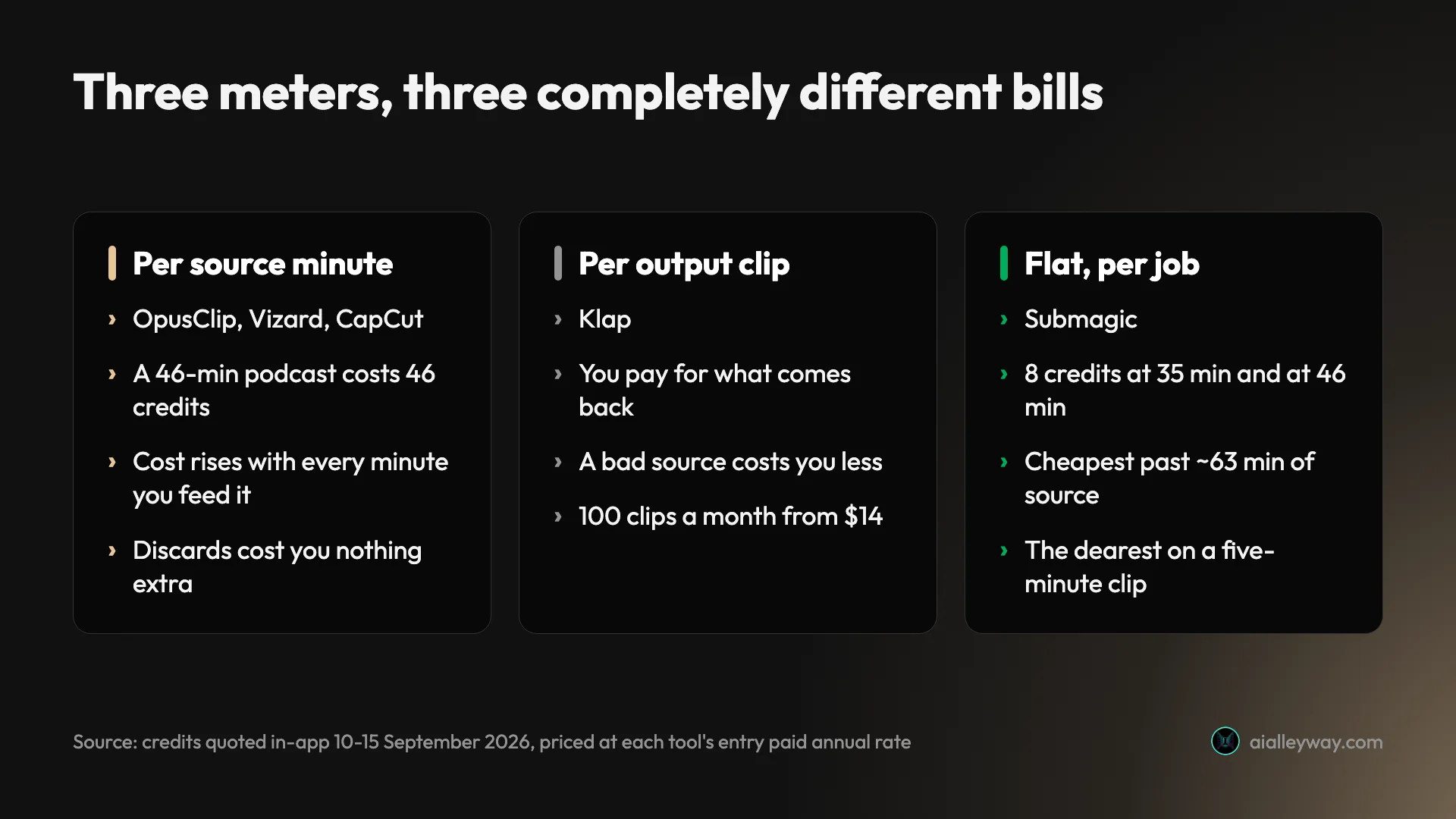
Work out which column you are in before you read the rest.
Quick comparison
| Tool | Meter | Free tier | Entry paid | Tested here |
|---|---|---|---|---|
| Submagic | flat per job | none, 15-credit trial | $12/mo yearly | Yes, measured |
| OpusClip | per source minute | 60 credits/mo | $15/mo | Yes, measured |
| Vizard | per source minute | 60 credits/mo | $14.50/mo yearly | Yes, measured |
| Klap | per output clip | trial only, cannot generate | $14/mo yearly | No output seen |
| Descript | media hours | 1 hr/mo | $16/mo annual | Priced only |
| Captions | credits | yes, no AI credits | $24.99/mo | Priced only |
| CapCut | per source minute | 60 min/mo | not published | Yes, measured |
| Riverside | recording hours | 2 hrs, no renewal stated | $24/mo annual | Priced only |
What Submagic does better than most of these
Worth putting on the table before the list, because two of its advantages are real and neither shows up in the comparison pages written by its rivals.
| Submagic, measured | |
|---|---|
| Clips found | 31 |
| Exported | none — trial paywalls export |
| Score range | 97–90 |
| Cost per job | flat 8 credits, any length |
| Failed run | 8 credits, 0 clips, no refund |
It explains every pick. Each of the 31 clips came back with a paragraph arguing why that moment works — what is in it, why it lands, sometimes who would share it. On 31 candidates that is a genuine time saving. Only Vizard comes close, and only for the ten clips of thirty it actually hands over; OpusClip gives a score and four letter grades, and CapCut gives a short qualitative tag on four of its eight clips and nothing on the other four.
It does not charge for the watermark. Watermark-free export is on every Submagic paid plan including the $12 Starter. Vizard sells removal from Creator, OpusClip from Starter, Riverside from Pro. If a clean file at the lowest possible subscription is the requirement, Submagic’s entry tier is among the cheapest ways to get one.
The catch on the first point is that the explanations never disagree with themselves. I read all 31, and not one says a clip is weak. The clips scoring 90 are called “perfectly calibrated for sharing” and “a powerful one-two punch”, in the same register as the ones scoring 97. The reasoning reads like analysis and functions like advertising copy for the tool’s own output, which makes it excellent for understanding what is in a clip and useless for deciding which to post.
And there is a harder catch that belongs here rather than buried in the FAQ. One of my two clipping runs, fed as a YouTube URL, came back with zero clips, no error message and no refund, having taken 8 of that trial’s 15 credits. A separate trial account, given the identical file as a local upload, returned the 31 without incident. On a flat per-job meter a failure costs exactly what a success costs, and at 8 credits a go a 15-credit trial has no room for a second attempt — on a product you cannot export from until you pay.
Which Submagic alternatives are free, and for how long?
Two of the most common things people want from this search are a free option and a file without a watermark. Those are different questions and the answers do not overlap neatly.
Submagic itself answers neither: it has no free plan, only a 15-credit trial that cannot export a file. Of the alternatives, three renew a monthly allowance — Vizard, OpusClip and CapCut all give you 60 source minutes a month — and only CapCut’s export comes back clean, at 1080p with no watermark. Descript renews media hours but grants its AI credits once; Riverside’s two hours are worded as a trial with no renewal stated; Captions’ free tier has no AI credits at all.
Free AI clip generator measures these same free tiers against one file and is the fuller answer if free is your main constraint.
CapCut is the one to note, because it is the only free export you could actually publish: 1080p with no watermark, where Vizard and OpusClip both mark theirs. Everything else labelled “free” here is a different shape. Riverside’s pricing page words its two hours as a trial to “try” rather than a monthly grant, and never says they renew. Captions’ free tier has no AI credits, so the intelligent half is untestable. Descript’s single media hour renews but its 100 AI credits do not. And Submagic’s trial, the thing you are presumably leaving, cannot produce a file at all.
1. Vizard — best overall Submagic alternative

Vizard is the closest like-for-like swap on this list, and it is now the one I have tested hardest.
It bills on one credit per minute of source video, the identical unit OpusClip uses. Its Creator plan is $29 a month for 600 credits, against OpusClip’s $29 for 300. Same money, same meter, twice the footage. On annual billing it drops to $14.50 a month, $174 a year.
The free tier is the other reason it leads. 60 credits every month, renewing, which is an hour of source video through the tool for nothing. Submagic has no free plan at all, and OpusClip’s free 60 credits withhold the virality score that is the whole point of OpusClip. Vizard’s free tier watermarks exports, caps them at 720p and deletes storage after three days. It recurs, which puts it alongside OpusClip and CapCut as one of three here you can keep using for nothing.
Read the free tier’s limits before you plan around it. Sixty credits buys sixty source minutes, but uploads are capped at 60 minutes per file, exports at 10 minutes and 720p, storage lasts three days, and you can connect one social account. The Creator plan lifts all of that: 4K export, no watermark, scheduling, 100GB of storage and six social accounts. Business at $39 a month, or $19.50 billed yearly, adds a shared workspace, twenty social accounts and team seats at $5 each.
The comparison table on its pricing page is worth a look for one number in particular: upload length runs 60 minutes on Free and 600 on both paid tiers, which is generous next to the 180-minute ceiling Submagic’s clipping accepts.
What the test showed. Fed the same 35-minute panel, Vizard found 30 clips against Submagic’s 31 and OpusClip’s 32, so on raw yield the three are level. The ten it handed over were the tightest clips here, 32 to 56 seconds — the other twenty stayed behind the paywall, so that range describes what I saw, not its full output. Each came with a virality score and a written reason for the pick. At its Creator annual rate that job cost 85 cents against OpusClip’s $2.03.
| Vizard, measured | |
|---|---|
| Clips found | 30 |
| Delivered on free | 10 |
| Clip length, the ten delivered | 0:32–0:56 |
| Cost, Creator yearly | $0.85 a job |
And the catch, which is serious. The processing screen reported finding 30 clips. The results page showed ten, with a banner offering the other twenty for an upgrade. The credits had already paid to analyse all thirty, so the paywall is on delivery rather than compute. None of the other three withheld clips this way: CapCut exported all eight, OpusClip returned all 32 on a Pro-trial account, and Submagic showed all 31 in the app — though its trial then paywalled export entirely, so nothing came off it as a file.
Two smaller things worth knowing before you spend an allowance: credits leave your balance when the upload finishes rather than when clips are generated, and the pricing page’s promise that one credit equals one minute only holds on the default model. A second model sits in a dropdown at 44 credits for the same file, a 25% surcharge nothing announces. The full Vizard review has the rest.
| Vizard at a glance | |
|---|---|
| Meter | 1 credit = 1 minute of source |
| Free | 60 credits/month, renewing |
| Creator | $29/mo, or $14.50 billed yearly, 600 credits |
| Business | $39/mo, or $19.50 yearly, +$5 a seat |
| Measured here | 30 clips found, 10 handed over |
2. OpusClip — best for finding the moments

Measured on the same video as the other three. It returned 32 clips from 35 minutes 27 seconds — on a Free Trial of the Pro plan, not its free tier — one every 66 seconds, against Submagic’s 31 at one every 69. On raw yield they are indistinguishable.
Where they part company is cost and explanation. OpusClip charges one credit per source minute, so that job cost 35 credits where Submagic’s cost 8. Credits are not comparable across tools, so price them: at each tool’s Pro annual rate that is $2.03 on OpusClip against $1.53 on Submagic, and by 46 minutes it is $2.67 against the same $1.53. The gap only opens as the source gets longer, and it closes and reverses on anything short. In exchange you get an editing timeline, Premiere Pro and DaVinci Resolve XML export, and a genuine editor — none of which Submagic offers.
Its scoring has the same disease as Submagic’s, only milder. Across 32 clips the virality scores ran 99 down to 80, never once dipping below 80 on a scale printed out of 100. Submagic’s ran 97 to 90. Both rank; neither gates. Of those 32, five were worth posting on my own viewing, which is a judgement rather than a measurement, and it is the number that actually decides what a clip costs you.
Its free plan matches Vizard’s 60 credits a month but withholds the virality score entirely, watermarks the export and stops the clips being exportable after three days. Starter at $15 a month is sold monthly only, with no annual option, which makes it the dearest plan per source minute on the whole price list. Pro is $29 a month, or $17.40 billed yearly at $208.80 for 3,600 credits granted upfront.
Two costs the plan cards do not mention. Credits leave your balance the moment a job is accepted rather than when it finishes. And upscaling a clip above preview resolution is priced per clip and varies: across six clips from one run I saw 35, 58, 58, 70, 128 and 128 credits, so the cheapest upscale cost exactly what the entire 35-minute job cost.
| OpusClip at a glance | |
|---|---|
| Meter | 1 credit = 1 minute of source |
| Free | 60 credits/month, no virality score |
| Starter | $15/mo, monthly only, 150 credits |
| Pro | $29/mo, or $17.40 billed yearly, 3,600/yr |
| Measured here | 32 clips, scores 99–80, 35 credits |
3. Klap — best when most clips get binned

Klap is the only tool here that charges for what it gives you rather than what you give it. Its plans are sold in clips per month: $14 for 100, $39 for 300, $94 for 1,000, all billed yearly.
That inverts the risk. On a per-source-minute meter, a three-hour recording costs you 180 credits before you know whether a single clip is usable. On Klap you pay per clip returned, so a bad source costs you less. Its own pricing page puts it plainly: “Only pay for clips you generate.”
Work the arithmetic and it lands close to the others rather than under them. Basic’s 100 clips for $14 is about 14 cents a clip; Pro’s 300 for $39 is 13 cents; Pro+ at 1,000 for $94 is 9.4 cents. My OpusClip run returned 32 clips for 35 credits, which at its annual rate is roughly 6 cents a clip produced. So Klap is not cheaper per clip — it is cheaper per wasted clip, because a source that yields nothing costs you nothing.
There is no free plan, which is the obvious cost of that model: if the tool only charges for output, it cannot afford to give output away. The trial account it does offer takes an upload and then paywalls the generate step, so it shows you nothing either.
One oddity worth knowing before you commit. When I read the page, the Monthly and Yearly toggles displayed the same three figures, each labelled “billed yearly”, with a “Save 50%” badge attached to the yearly option. Whether monthly genuinely costs double is not something the page would tell me that day, so treat $14, $39 and $94 as the annual rate. Re-checking on 18 September, the toggle worked and monthly reads $29, $79 and $189 — roughly double, as expected.
| Klap at a glance | |
|---|---|
| Meter | per output clip |
| Free | none; the trial cannot generate |
| Basic / Pro / Pro+ | $14 / $39 / $94 a month billed yearly |
| Clips included | 100 / 300 / 1,000 a month |
| Tested here | No — the trial paywalls generation |
4. Descript — best if you were editing anyway

Descript is the answer when clips are a by-product rather than the job. It meters media hours — 10, 30 and 40 a month on Hobbyist, Creator and Business — plus a separate pool of AI credits for the intelligent features.
Thirty media hours for $24 a month on annual billing is a lot of footage by the standards of this list, but the comparison is not clean. Clipping draws on AI credits as well as hours, so you cannot convert it into a per-clip figure the way you can with the others. What you get in return is a real editor, text-based editing, and a tool that does not stop being useful when you finish clipping. Our Descript review covers it properly.
The ladder runs Hobbyist at $24 a month, or $16 on annual billing, for 10 media hours and 400 AI credits; Creator at $35, or $24 annual, for 30 hours and 800 credits; Business at $65, or $50 annual, for 40 hours and 1,500 credits. Watermark-free 1080p export starts at Hobbyist and 4K at Creator. The free plan gives one media hour a month plus a one-off 100 AI credits, which is enough to see the editing model and not enough to run anything.
The clipping feature is called Create Clips and it sits alongside Studio Sound, filler-word removal and the rest of the AI toolkit, all drawing on the same credit pool. That is the trade in a sentence: Descript is the only text-based editor here, where clipping is a feature rather than the product, so it is the worst choice if clipping is all you want and the best if it is not.
| Descript at a glance | |
|---|---|
| Meter | media hours plus AI credits |
| Free | 1 media hour/month, 100 one-off credits |
| Hobbyist / Creator / Business | $16 / $24 / $50 a month annual |
| Media hours | 10 / 30 / 40 a month |
| Tested here | No — but we have a full Descript review |
5. CapCut — best free output, and a different job

An earlier version of this piece said CapCut had no meter and would not find the moments for you. Testing it disproved both, so here is what it actually does.
It meters, at 60 free source minutes a month, on the same per-source-minute unit OpusClip and Vizard use. Its Long video to shorts tool does find the moments. What stops you is neither of those things: it is 512MB of free cloud storage, which every export lands in before you can download it. Four 1080p exports filled it, two more failed silently, and the seventh was refused outright.
But the output is the best free file in this category. All eight clips came back at 1080×1920, 30fps, with no watermark at all — where Vizard and OpusClip both mark their free exports. If a publishable file at zero cost is the requirement, nothing else here matches it.
The real catch is the shape of what it returns. Eight clips from a 35-minute source, running 1:26 to 3:58, totalling 73.6% of the entire video in sequential non-overlapping ranges. On Auto, that is chaptering, not highlight-picking — the other three find thirty-odd overlapping candidates ranked against each other. Left on Auto, it picked none of the three short presets it offers — under 60s, 60 to 90s, and 90s to three minutes.
I did run the under-60s one later, in a two-run comparison with Auto over a 12-minute excerpt: it stopped the chaptering, taking coverage from 88.3% to 27.4%, but its three clips came back at 1:04, 1:05 and 1:08 rather than under the minute it names.
CapCut publishes no pricing page. The /pricing path does not resolve and there is no nav link. Prices live behind the login and are region-localised; on my account the modal rendered in my local currency. Check yours in your own country and read the renewal figure, not the promotional one.
| CapCut at a glance | |
|---|---|
| Meter | per source minute, 60/mo free |
| Free export | 1080p, no watermark — the only clean one here |
| Free ceiling | 512MB cloud storage, which blocks export |
| What it returns | 8 chapters of 1:26–3:58 on Auto, not short clips |
| Measured here | Yes — full CapCut review |
6. Captions — best mobile-first, with two caveats

Captions leans further into generation than the rest of this list: AI actors, digital twins, eye-contact correction, script-to-video. If your footage is talking-head material you intend to remake rather than cut, it is the most interesting tool here.
Two things to know before you try it, both from its own pricing page.
Its free tier carries no AI usage credits at all. The comparison table lists “AI usage credits: Free, None”, so nothing intelligent is testable without paying.
Its help documentation says otherwise, granting that plan 60 to 200 one-off credits. The full Captions review works through that contradiction and a second one.
And the page footnotes that “features and prices reflect iOS plans only”, so a proper evaluation needs an iPhone rather than a browser. Paid plans start at $24.99 a month for 500 credits on Max, then Scale at $69.99 for 1,400, with 2x and 4x usage tiers at $139.99 and $279.99 above that. The Max plan does list “turn a long video into a batch of post-ready clips” among its features, so the clipping job this article is about is in there — it is simply not what the product leads with.
The iOS-only pricing footnote is the detail that decides it for most people reading this. If your workflow is a desktop editor and a browser, Captions is asking you to change more than your clipping tool.
7. Riverside — best if you record remotely too

Riverside is a remote recording studio that grew clipping, rather than a clipper that grew features. Its Magic Clips are included on the free plan, alongside two hours of multi-track recording at 720p with a watermark, worded as a trial rather than a monthly grant. Paid plans start at $24 a month on annual billing for five hours of separate-track recording a month.
Above that, Grow is $39 a month, or $34 annual, for 15 hours, and Webinar runs $99, or $79 annual. The paid tiers add 4K recording, unlimited transcription and no watermark; the pricing page words the free tier as “Try 2 hours of multi-track recordings” and states no monthly renewal, so plan on it being a trial rather than a standing allowance until Riverside says otherwise.
It only makes sense if you are already recording interviews remotely. If your source video arrives as a finished file, you are paying for a studio you will not use, and every other tool here will clip that file more cheaply.
If you want captions, not clipping
Worth separating, because Submagic does two jobs and people leave it for different ones.
It began as a caption tool and the clipping came later. Half the people looking for an alternative want the thing this article has been measuring — feed it a long video, get short ones out. The other half already have a short clip and want captions burned onto it, which is a completely different purchase.
If captions are the job, the meter stops mattering and the duration caps start to. Submagic’s editor tops out at 2 minutes on Starter, 5 on Pro and 30 on Business. Those caps do not touch the clipping feature, which takes up to 180 minutes on any plan, but they absolutely bind the captions workflow. A 12-minute talking-head video cannot be captioned on the $12 plan or the $23 one.
That single constraint reshuffles the list:
- CapCut becomes the obvious answer. Auto-captions are free, the timeline is real, and the export is 1080p with no watermark — the only clean free file in this piece. Captioning a clip you already cut does not touch the clipping meter at all.
- Descript is the pick if the captions are part of a real edit, since its transcript is the editing surface rather than an output.
- Captions fits if you are shooting on a phone and finishing on a phone, subject to the iOS-only caveat above.
- The clippers are the wrong shape. Vizard, Klap, OpusClip and Riverside all price around finding moments in long footage. Buying one to caption a 40-second clip means paying for a search you are not running.
Our Submagic pricing guide works through what each of those caps costs and where the duration wall actually sits.
What Submagic keeps, on this job, is the caption styling itself — roughly three dozen presets and a word-level transcript editor that is genuinely quick to work in. That is what the $12 buys, and it is why the answer to “should I leave” depends so heavily on which of its two jobs you were using.
Which Submagic alternative should you pick?
The decision is mostly arithmetic, and it turns on one number: how long your source videos are.
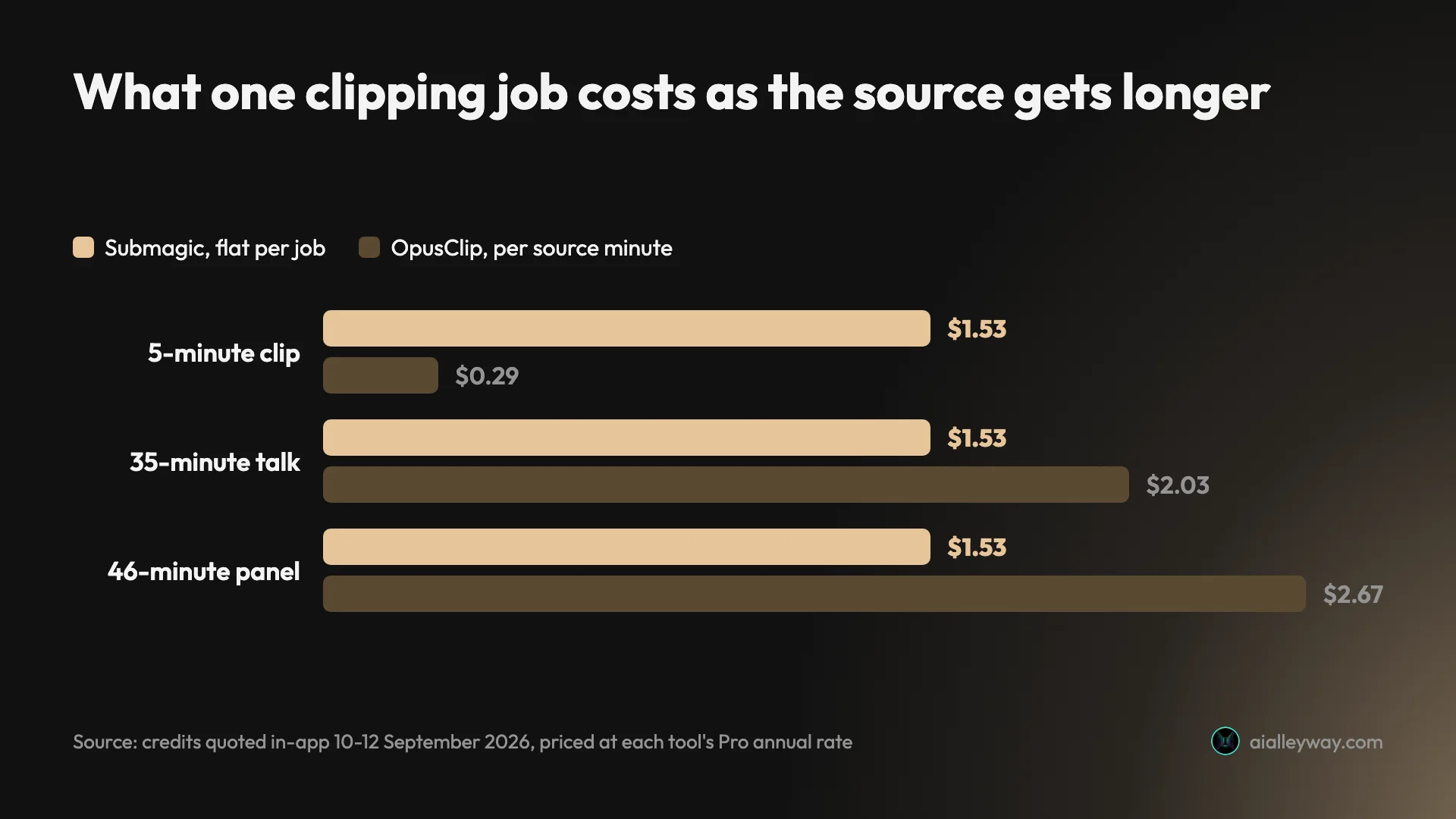
- Your sources run past about sixty-three minutes → the flat fee wins outright. Submagic charges 8 credits whether the video is 35 minutes or 46; I checked both. Between about twenty-six and sixty-three minutes it beats OpusClip but not Vizard, which did the 35-minute job for 85 cents against Submagic’s $1.53.
- Your sources are short → a per-minute meter wins, and Vizard is the cheapest of them at 600 credits for $29.
- You want to evaluate without paying → Vizard or CapCut, both 60 renewing source minutes a month. Submagic’s trial cannot export a file at all. Note Vizard shows you a third of what it finds until you pay.
- You bin most of what comes back → Klap, the only one that charges per clip delivered. Its trial paywalls the generate step, so you buy its output unseen.
- You need a timeline afterwards → OpusClip for the XML export, or Descript if the editing is the real job.
- You will not pay anything and need a clean file → CapCut. It is the only free export here without a watermark, and 60 source minutes a month is the same allowance Vizard and OpusClip give you.
- Skip this whole category if your videos are already short. Every tool here exists to find moments inside long footage. On a two-minute clip you are paying for a search problem you do not have.
The final word
| What four tools did with one 35-minute file | |
|---|---|
| Most clips found | OpusClip, 32 |
| Fewest, and a different job | CapCut, 8 chapters |
| Cheapest paid job | Vizard, $0.85 |
| Only clean free export | CapCut, 1080p unmarked |
| Only one that withholds what it found | Vizard, 10 of 30 |
Nearly every comparison page on this subject is published by one of these companies about its competitors, which is worth remembering when every list puts a different tool at number one. I have measured four of the eight tools here on one identical file, and said plainly which four I have not.
What the measuring showed is that the tools are closer than the marketing suggests — 31, 32 and 30 clips on the same video — and that the meaningful differences are the bill and what you are allowed to keep. Submagic’s flat fee is genuinely good on long sources and genuinely bad on short ones. Vizard undercuts OpusClip by half on an identical meter. Klap is the only one that shares your downside when the output is poor. And CapCut, which I had filed as the unmetered outlier, turned out to be a fourth per-minute tool doing a different job.
The tools also split on a question the marketing never frames for you: whether you are buying a search or a finish. Half of them exist to find moments inside long footage and half to make a short clip look good, and Submagic is one of the few that tries both. Work out which half you are paying for and most of this list eliminates itself.
The one thing none of them does is tell you which clips are weak. Submagic rated all 31 of its own between 90 and 97; OpusClip rated all 32 of its between 80 and 99. Whichever you pick, the watching is still your job.
Frequently asked questions
What is the best free alternative to Submagic?
It depends which kind of free you need, and the two answers differ. For the most work per month, Vizard: its free tier renews at 60 credits, one credit to one minute of source, so an hour of footage goes through it monthly for nothing. Vizard's catches are a watermark, 720p export, a three-day storage window, and delivery: it showed me ten of the thirty clips it found and sold the other twenty.
For a file you can publish without paying, CapCut, which meters clipping at the same 60 free source minutes a month and is the only one here whose free export comes back clean at 1080p with no watermark. OpusClip matches Vizard at 60 credits and the same watermark, but withholds the virality score that is its main feature. Submagic itself has no free plan, only a 15-credit trial that cannot export a file, so anyone arriving here from Submagic is comparing against something they could not fully evaluate.
Is there a Submagic alternative without a watermark?
Almost all of them, and Submagic is unusually good on this point, which is worth saying plainly since the question gets asked a lot. Watermark-free export is included on every Submagic paid plan including the $12 Starter, where most rivals gate it behind an upgrade.
Where the watermark bites is the free tiers. Vizard watermarks its free exports and sells removal from the Creator plan. OpusClip watermarks free and trial exports, including on an account badged as a Pro trial. Submagic's own trial sidesteps the question by refusing to export at all. Riverside watermarks its free two hours and lifts it from Pro. CapCut is the exception: its free export carries no watermark at all, the only clean free file in this group. So if a no-watermark file is the requirement, the honest answer is that you are paying somebody, and at $12 a month Submagic's entry tier is among the cheaper ways to do it.
What is the cheapest Submagic alternative?
It depends entirely on how long your source video is, because these tools charge on three different meters and the cheapest one flips as your footage gets longer.
Submagic charges a flat 8 credits per clipping job whatever the length. OpusClip and Vizard charge per minute of source you import. Klap charges per clip it hands back. On a five-minute video the per-minute tools win easily. On a 46-minute podcast the same job is $1.53 on Submagic against $2.67 on OpusClip, both at their Pro annual rate; on a five-minute clip it is $1.53 against 29 cents, because the flat fee does not shrink. Vizard is the outlier that undercuts on both: its Creator plan gives 600 credits a month for the same $29 OpusClip charges for 300, on an identical one-credit-per-source-minute basis. Klap works out at roughly 14, 13 and 9.4 cents a clip returned. CapCut charges no money at all, only 60 source minutes a month.
Why do people look for Submagic alternatives?
Three reasons show up repeatedly, and one of them I ran into directly. The first is that Submagic has no free plan, only a trial that cannot export a file, so there is no way to evaluate the finished output without paying.
The second is that it charges for failures. A clipping job of mine returned zero clips with no error message and still took 8 of the trial's 15 credits, which left too little to retry. The third is the plan caps: the editor tops out at 2, 5 and 30 minutes of video on Starter, Pro and Business respectively. That last one trips people up because the caps do not apply to the clipping feature, which accepts up to 180 minutes on any plan, but nothing in the pricing page explains the distinction.
Is OpusClip better than Submagic?
For finding the moments, marginally, and I ran the same 35-minute conference panel through both to check. OpusClip returned 32 clips, on a Free Trial of the Pro plan rather than its free tier, and Submagic 31, one every 66 and 69 seconds of source respectively, so they find roughly the same amount of material.
The differences are in what they tell you about it and what they charge. Submagic writes a paragraph explaining why it picked each clip for all 31, which speeds up triage considerably; only Vizard does anything similar, and only for the ten of thirty it delivers. OpusClip gives a score and four letter grades. Neither will tell you a clip is weak: OpusClip's scores ran 99 down to 80, Submagic's 97 down to 90, both on a scale printed out of 100. On price, OpusClip charges per source minute and Submagic a flat fee per job, so OpusClip is cheaper on short videos and materially dearer on long ones.
Which Submagic alternative is best for podcasts?
Submagic itself is hard to beat on price for long recordings, which is an awkward answer in a piece about its alternatives, but the flat 8-credit fee per job genuinely suits two-hour episodes better than any per-minute meter.
If you want to leave, the choice is between Vizard and Descript. Vizard is the closer swap: same clipping job, a free tier that covers an hour of source a month, and 600 credits for $29 against OpusClip's 300. Descript is the better answer if the clips are a by-product of editing you were doing anyway, since it meters media hours rather than clips and gives you a real timeline. Riverside is worth a look only if you are also recording the podcast remotely, where its Magic Clips are included even on the free plan and come bundled with the studio. Klap is the wrong shape for podcasts specifically, because paying per clip returned punishes exactly the long sources that yield the most of them.
Keep reading
The best AI video clipping tool, measured on one file
Four AI video clipping tools, one identical 35-minute file. OpusClip found 32 clips, Submagic 31, Vizard 30 but delivered 10, CapCut 8. What that means.
Submagic review: 31 clips, and it charged me for a failure
Submagic review: 31 clips from one 35-minute video, a score that never drops below 90, and 8 trial credits spent on a job that returned nothing.
Vizard review: the cheapest clipper, with one catch
A Vizard AI review from a measured run: it found 30 clips in my 35-minute panel and handed me 10. The other 20 need a card, and the maths still favours it.
Klap AI review: the free trial that will not make a clip
A Klap AI review from two runs on its free trial. It took a 354MB upload, then asked for money at the generate step. What Klap pricing costs and what it claims.